

More on Science

Laura Sanders
3 years ago
Xenobots, tiny living machines, can duplicate themselves.
Strange and complex behavior of frog cell blobs
A xenobot “parent,” shaped like a hungry Pac-Man (shown in red false color), created an “offspring” xenobot (green sphere) by gathering loose frog cells in its opening.
Tiny “living machines” made of frog cells can make copies of themselves. This newly discovered renewal mechanism may help create self-renewing biological machines.
According to Kirstin Petersen, an electrical and computer engineer at Cornell University who studies groups of robots, “this is an extremely exciting breakthrough.” She says self-replicating robots are a big step toward human-free systems.
Researchers described the behavior of xenobots earlier this year (SN: 3/31/21). Small clumps of skin stem cells from frog embryos knitted themselves into small spheres and started moving. Cilia, or cellular extensions, powered the xenobots around their lab dishes.
The findings are published in the Proceedings of the National Academy of Sciences on Dec. 7. The xenobots can gather loose frog cells into spheres, which then form xenobots.
The researchers call this type of movement-induced reproduction kinematic self-replication. The study's coauthor, Douglas Blackiston of Tufts University in Medford, Massachusetts, and Harvard University, says this is typical. For example, sexual reproduction requires parental sperm and egg cells. Sometimes cells split or budded off from a parent.
“This is unique,” Blackiston says. These xenobots “find loose parts in the environment and cobble them together.” This second generation of xenobots can move like their parents, Blackiston says.
The researchers discovered that spheroid xenobots could only produce one more generation before dying out. The original xenobots' shape was predicted by an artificial intelligence program, allowing for four generations of replication.
A C shape, like an openmouthed Pac-Man, was predicted to be a more efficient progenitor. When improved xenobots were let loose in a dish, they began scooping up loose cells into their gaping “mouths,” forming more sphere-shaped bots (see image below). As many as 50 cells clumped together in the opening of a parent to form a mobile offspring. A xenobot is made up of 4,000–6,000 frog cells.
Petersen likes the Xenobots' small size. “The fact that they were able to do this at such a small scale just makes it even better,” she says. Miniature xenobots could sculpt tissues for implantation or deliver therapeutics inside the body.
Beyond the xenobots' potential jobs, the research advances an important science, says study coauthor and Tufts developmental biologist Michael Levin. The science of anticipating and controlling the outcomes of complex systems, he says.
“No one could have predicted this,” Levin says. “They regularly surprise us.” Researchers can use xenobots to test the unexpected. “This is about advancing the science of being less surprised,” Levin says.

Sara_Mednick
3 years ago
Since I'm a scientist, I oppose biohacking
Understanding your own energy depletion and restoration is how to truly optimize
Hack has meant many bad things for centuries. In the 1800s, a hack was a meager horse used to transport goods.
Modern usage describes a butcher or ax murderer's cleaver chop. The 1980s programming boom distinguished elegant code from "hacks". Both got you to your goal, but the latter made any programmer cringe and mutter about changing the code. From this emerged the hacker trope, the friendless anti-villain living in a murky hovel lit by the computer monitor, eating junk food and breaking into databases to highlight security system failures or steal hotdog money.
Now, start-a-billion-dollar-business-from-your-garage types have shifted their sights from app development to DIY biology, coining the term "bio-hack". This is a required keyword and meta tag for every fitness-related podcast, book, conference, app, or device.
Bio-hacking involves bypassing your body and mind's security systems to achieve a goal. Many biohackers' initial goals were reasonable, like lowering blood pressure and weight. Encouraged by their own progress, self-determination, and seemingly exquisite control of their biology, they aimed to outsmart aging and death to live 180 to 1000 years (summarized well in this vox.com article).
With this grandiose north star, the hunt for novel supplements and genetic engineering began.
Companies selling do-it-yourself biological manipulations cite lab studies in mice as proof of their safety and success in reversing age-related diseases or promoting longevity in humans (the goal changes depending on whether a company is talking to the federal government or private donors).
The FDA is slower than science, they say. Why not alter your biochemistry by buying pills online, editing your DNA with a CRISPR kit, or using a sauna delivered to your home? How about a microchip or electrical stimulator?
What could go wrong?
I'm not the neo-police, making citizen's arrests every time someone introduces a new plumbing gadget or extrapolates from animal research on resveratrol or catechins that we should drink more red wine or eat more chocolate. As a scientist who's spent her career asking, "Can we get better?" I've come to view bio-hacking as misguided, profit-driven, and counterproductive to its followers' goals.
We're creatures of nature. Despite all the new gadgets and bio-hacks, we still use Roman plumbing technology, and the best way to stay fit, sharp, and happy is to follow a recipe passed down since the beginning of time. Bacteria, plants, and all natural beings are rhythmic, with alternating periods of high activity and dormancy, whether measured in seconds, hours, days, or seasons. Nature repeats successful patterns.
During the Upstate, every cell in your body is naturally primed and pumped full of glycogen and ATP (your cells' energy currencies), as well as cortisol, which supports your muscles, heart, metabolism, cognitive prowess, emotional regulation, and general "get 'er done" attitude. This big energy release depletes your batteries and requires the Downstate, when your subsystems recharge at the cellular level.
Downstates are when you give your heart a break from pumping nutrient-rich blood through your body; when you give your metabolism a break from inflammation, oxidative stress, and sympathetic arousal caused by eating fast food — or just eating too fast; or when you give your mind a chance to wander, think bigger thoughts, and come up with new creative solutions. When you're responding to notifications, emails, and fires, you can't relax.
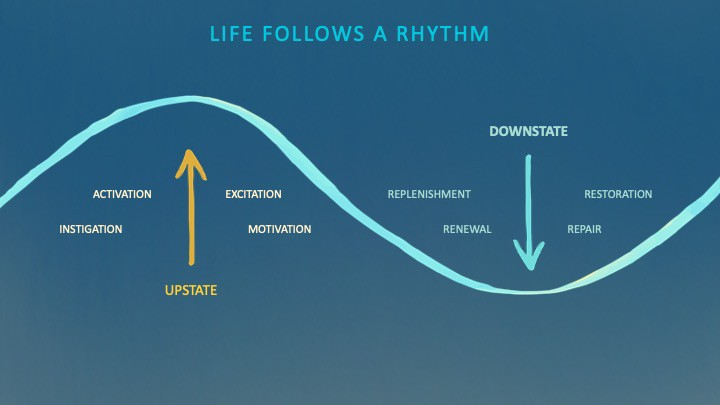
Downstates aren't just for consistently recharging your battery. By spending time in the Downstate, your body and brain get extra energy and nutrients, allowing you to grow smarter, faster, stronger, and more self-regulated. This state supports half-marathon training, exam prep, and mediation. As we age, spending more time in the Downstate is key to mental and physical health, well-being, and longevity.
When you prioritize energy-demanding activities during Upstate periods and energy-replenishing activities during Downstate periods, all your subsystems, including cardiovascular, metabolic, muscular, cognitive, and emotional, hum along at their optimal settings. When you synchronize the Upstates and Downstates of these individual rhythms, their functioning improves. A hard workout causes autonomic stress, which triggers Downstate recovery.
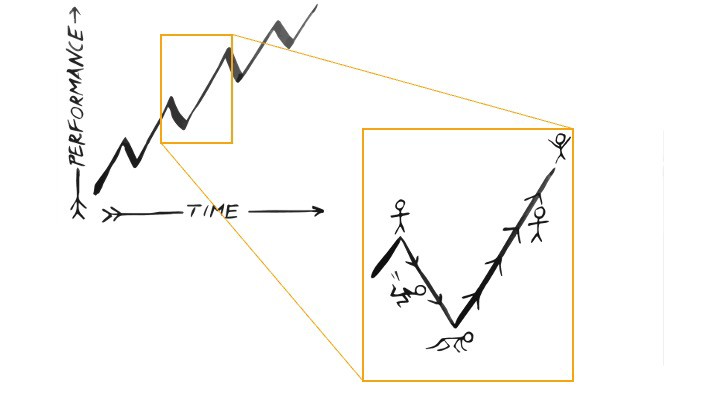
By choosing the right timing and type of exercise during the day, you can ensure a deeper recovery and greater readiness for the next workout by working with your natural rhythms and strengthening your autonomic and sleep Downstates.
Morning cardio workouts increase deep sleep compared to afternoon workouts. Timing and type of meals determine when your sleep hormone melatonin is released, ushering in sleep.
Rhythm isn't a hack. It's not a way to cheat the system or the boss. Nature has honed its optimization wisdom over trillions of days and nights. Stop looking for quick fixes. You're a whole system made of smaller subsystems that must work together to function well. No one pill or subsystem will make it all work. Understanding and coordinating your rhythms is free, easy, and only benefits you.
Dr. Sara C. Mednick is a cognitive neuroscientist at UC Irvine and author of The Power of the Downstate (HachetteGO)

Will Lockett
3 years ago
Thanks to a recent development, solar energy may prove to be the best energy source.
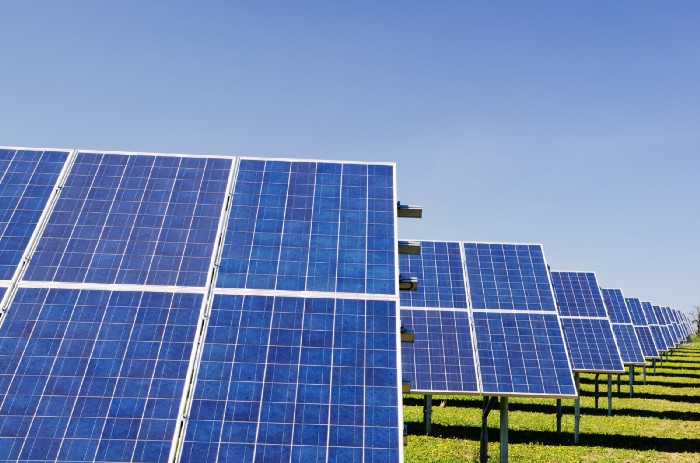
Perovskite solar cells will revolutionize everything.
Humanity is in a climatic Armageddon. Our widespread ecological crimes of the previous century are catching up with us, and planet-scale karma threatens everyone. We must adjust to new technologies and lifestyles to avoid this fate. Even solar power, a renewable energy source, has climate problems. A recent discovery could boost solar power's eco-friendliness and affordability. Perovskite solar cells are amazing.
Perovskite is a silicon-like semiconductor. Semiconductors are used to make computer chips, LEDs, camera sensors, and solar cells. Silicon makes sturdy and long-lasting solar cells, thus it's used in most modern solar panels.
Perovskite solar cells are far better. First, they're easy to make at room temperature, unlike silicon cells, which require long, intricate baking processes. This makes perovskite cells cheaper to make and reduces their carbon footprint. Perovskite cells are efficient. Most silicon panel solar farms are 18% efficient, meaning 18% of solar radiation energy is transformed into electricity. Perovskite cells are 25% efficient, making them 38% more efficient than silicon.
However, perovskite cells are nowhere near as durable. A normal silicon panel will lose efficiency after 20 years. The first perovskite cells were ineffective since they lasted barely minutes.
Recent research from Princeton shows that perovskite cells can endure 30 years. The cells kept their efficiency, therefore no sacrifices were made.
No electrical or chemical engineer here, thus I can't explain how they did it. But strangely, the team said longevity isn't the big deal. In the next years, perovskite panels will become longer-lasting. How do you test a panel if you only have a month or two? This breakthrough technique needs a uniform method to estimate perovskite life expectancy fast. The study's key milestone was establishing a standard procedure.
Lab-based advanced aging tests are their solution. Perovskite cells decay faster at higher temperatures, so scientists can extrapolate from that. The test heated the panel to 110 degrees and waited for its output to reduce by 20%. Their panel lasted 2,100 hours (87.5 days) before a 20% decline.
They did some math to extrapolate this data and figure out how long the panel would have lasted in different climates, and were shocked to find it would last 30 years in Princeton. This made perovskite panels as durable as silicon panels. This panel could theoretically be sold today.
This technology will soon allow these brilliant panels to be released into the wild. This technology could be commercially viable in ten, maybe five years.
Solar power will be the best once it does. Solar power is cheap and low-carbon. Perovskite is the cheapest renewable energy source if we switch to it. Solar panel manufacturing's carbon footprint will also drop.
Perovskites' impact goes beyond cost and carbon. Silicon panels require harmful mining and contain toxic elements (cadmium). Perovskite panels don't require intense mining or horrible materials, making their production and expiration more eco-friendly.
Solar power destroys habitat. Massive solar farms could reduce biodiversity and disrupt local ecology by destroying vital habitats. Perovskite cells are more efficient, so they can shrink a solar farm while maintaining energy output. This reduces land requirements, making perovskite solar power cheaper, and could reduce solar's environmental impact.
Perovskite solar power is scalable and environmentally friendly. Princeton scientists will speed up the development and rollout of this energy.
Why bother with fusion, fast reactors, SMRs, or traditional nuclear power? We're close to developing a nearly perfect environmentally friendly power source, and we have the tools and systems to do so quickly. It's also affordable, so we can adopt it quickly and let the developing world use it to grow. Even I struggle to justify spending billions on fusion when a great, cheap technology outperforms it. Perovskite's eco-credentials and cost advantages could save the world and power humanity's future.
You might also like

Simone Basso
3 years ago
How I set up my teams to be successful
After 10 years of working in scale-ups, I've embraced a few concepts for scaling Tech and Product teams.
First, cross-functionalize teams. Product Managers represent the business, Product Designers the consumer, and Engineers build.
I organize teams of 5-10 individuals, following AWS's two pizza teams guidelines, with a Product Trio guiding each.
If more individuals are needed to reach a goal, I group teams under a Product Trio.
With Engineering being the biggest group, Staff/Principal Engineers often support the Trio on cross-team technical decisions.
Product Managers, Engineering Managers, or Engineers in the team may manage projects (depending on the project or aim), but the trio is collectively responsible for the team's output and outcome.
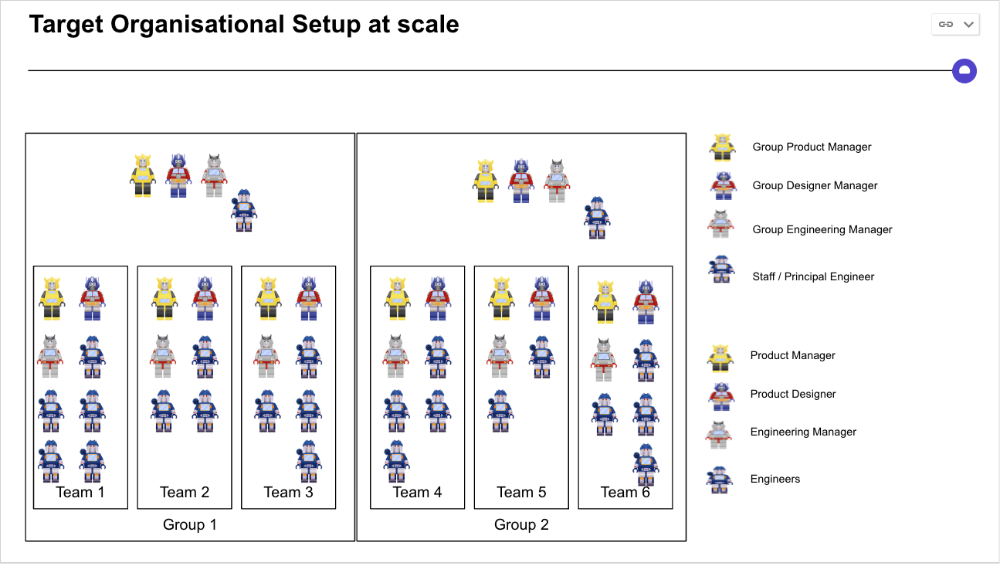
Once the Product Trio model is created, roles, duties, team ceremonies, and cooperation models must be clarified.
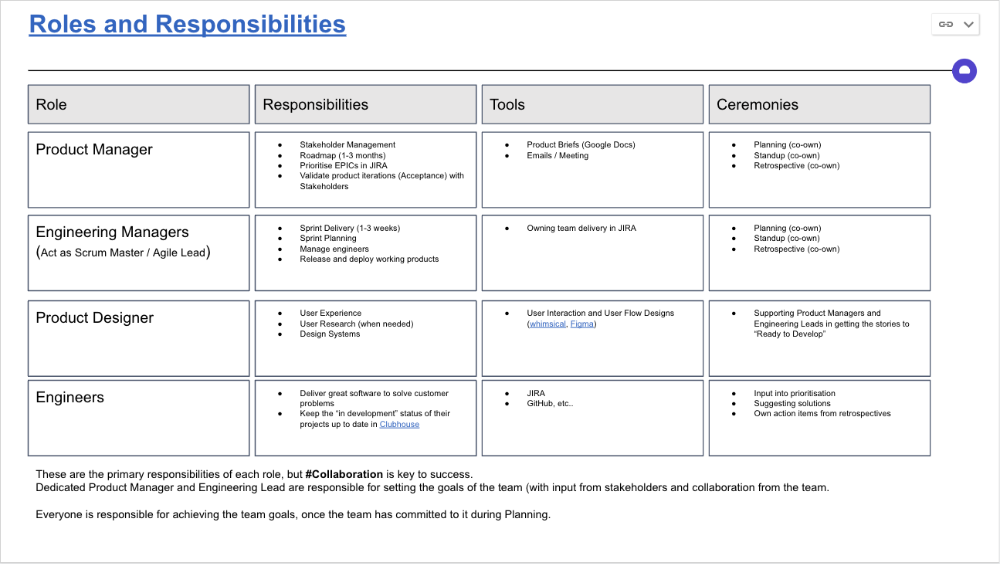
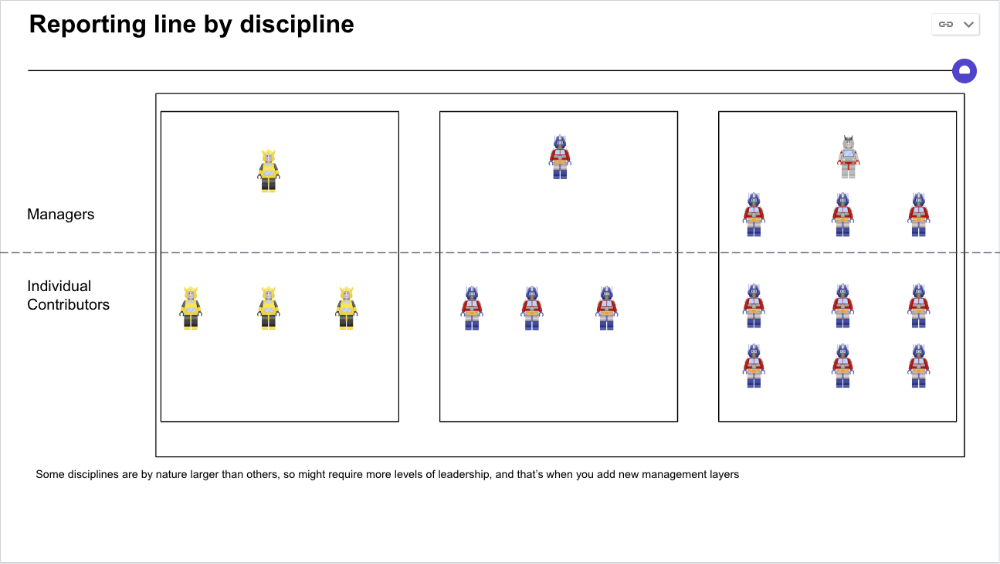
Keep reporting lines by discipline. Line managers are accountable for each individual's advancement, thus it's crucial that they know the work in detail.
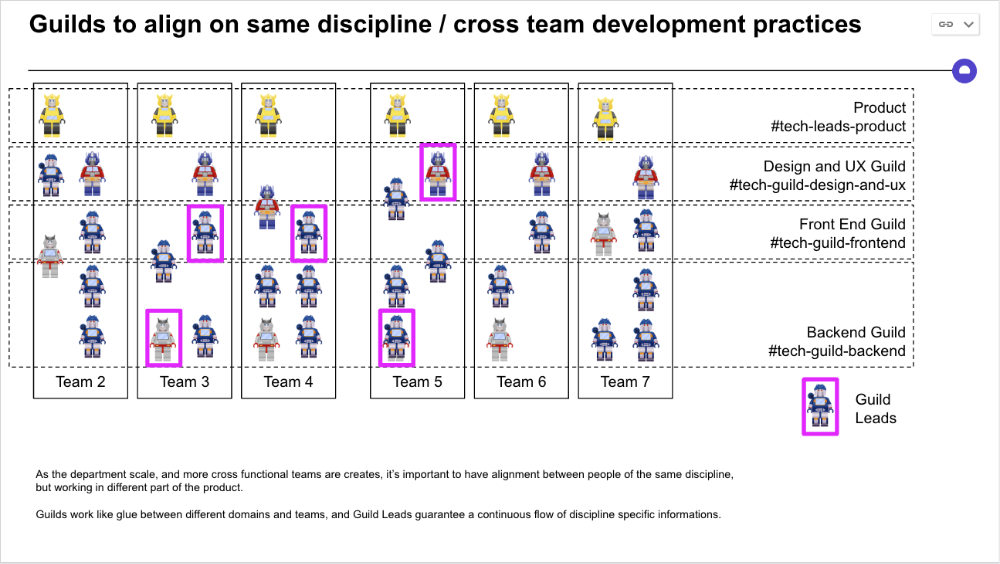
Cross-team collaboration becomes more important after 3 teams (15-30 people). Teams can easily diverge in how they write code, run ceremonies, and build products.
Establishing groups of people that are cross-team, but grouped by discipline and skills, sharing and agreeing on working practices becomes critical.
The “Spotify Guild” model has been where I’ve taken a lot of my inspiration from.
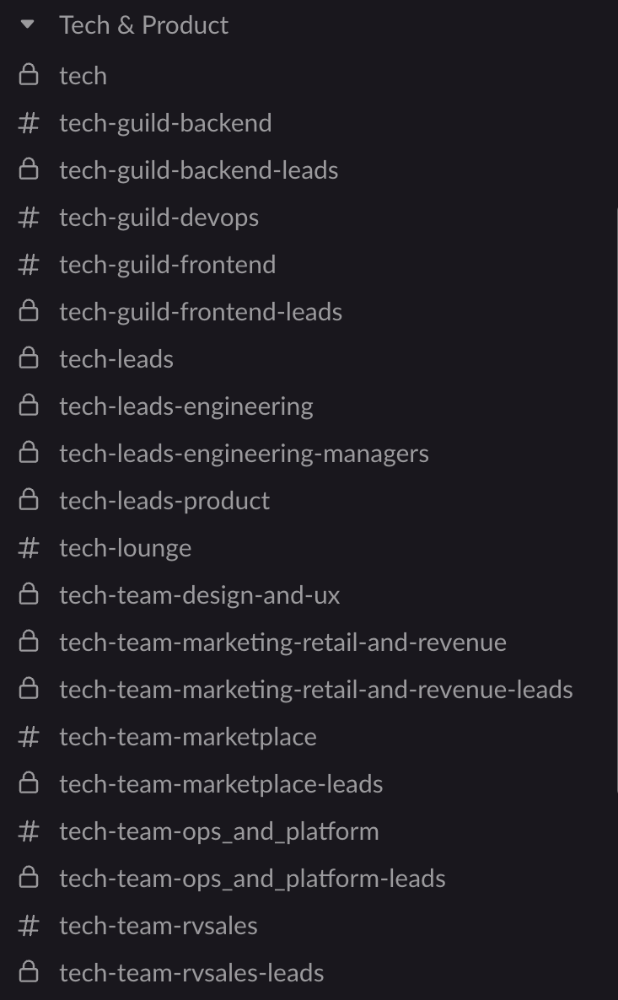
Last, establish a taxonomy for communication channels.
In Slack, I create one channel per team and one per guild (and one for me to have discussions with the team leads).
These are just some of the basic principles I follow to organize teams.
A book I particularly like about team types and how they interact with each other is https://teamtopologies.com/.
Will Lockett
3 years ago
The world will be changed by this molten salt battery.
Four times the energy density and a fraction of lithium-cost ion's
As the globe abandons fossil fuels, batteries become more important. EVs, solar, wind, tidal, wave, and even local energy grids will use them. We need a battery revolution since our present batteries are big, expensive, and detrimental to the environment. A recent publication describes a battery that solves these problems. But will it be enough?
Sodium-sulfur molten salt battery. It has existed for a long time and uses molten salt as an electrolyte (read more about molten salt batteries here). These batteries are cheaper, safer, and more environmentally friendly because they use less eco-damaging materials, are non-toxic, and are non-flammable.
Previous molten salt batteries used aluminium-sulphur chemistries, which had a low energy density and required high temperatures to keep the salt liquid. This one uses a revolutionary sodium-sulphur chemistry and a room-temperature-melting salt, making it more useful, affordable, and eco-friendly. To investigate this, researchers constructed a button-cell prototype and tested it.
First, the battery was 1,017 mAh/g. This battery is four times as energy dense as high-density lithium-ion batteries (250 mAh/g).
No one knows how much this battery would cost. A more expensive molten-salt battery costs $15 per kWh. Current lithium-ion batteries cost $132/kWh. If this new molten salt battery costs the same as present cells, it will be 90% cheaper.
This room-temperature molten salt battery could be utilized in an EV. Cold-weather heaters just need a modest backup battery.
The ultimate EV battery? If used in a Tesla Model S, you could install four times the capacity with no weight gain, offering a 1,620-mile range. This huge battery pack would cost less than Tesla's. This battery would nearly perfect EVs.
Or would it?
The battery's capacity declined by 50% after 1,000 charge cycles. This means that our hypothetical Model S would suffer this decline after 1.6 million miles, but for more cheap vehicles that use smaller packs, this would be too short. This test cell wasn't supposed to last long, so this is shocking. Future versions of this cell could be modified to live longer.
This affordable and eco-friendly cell is best employed as a grid-storage battery for renewable energy. Its safety and affordable price outweigh its short lifespan. Because this battery is made of easily accessible materials, it may be utilized to boost grid-storage capacity without causing supply chain concerns or EV battery prices to skyrocket.
Researchers are designing a bigger pouch cell (like those in phones and laptops) for this purpose. The battery revolution we need could be near. Let’s just hope it isn’t too late.

CyberPunkMetalHead
2 years ago
Why Bitcoin NFTs Are Incomprehensible yet Likely Here to Stay

I'm trying to understand why Bitcoin NFTs aren't ready.
Ordinals, a new Bitcoin protocol, has been controversial. NFTs can be added to Bitcoin transactions using the protocol. They are not tokens or fungible. Bitcoin NFTs are transaction metadata. Yes. They're not owned.
In January, the Ordinals protocol allowed data like photos to be directly encoded onto sats, the smallest units of Bitcoin worth 0.00000001 BTC, on the Bitcoin blockchain. Ordinals does not need a sidechain or token like other techniques. The Ordinals protocol has encoded JPEG photos, digital art, new profile picture (PFP) projects, and even 1993 DOOM onto the Bitcoin network.
Ordinals inscriptions are permanent digital artifacts preserved on the Bitcoin blockchain. It differs from Ethereum, Solana, and Stacks NFT technologies that allow smart contract creators to change information. Ordinals store the whole image or content on the blockchain, not just a link to an external server, unlike centralized databases, which can change the linked image, description, category, or contract identifier.
So far, more than 50,000 ordinals have been produced on the Bitcoin blockchain, and some of them have already been sold for astronomical amounts. The Ethereum-based CryptoPunks NFT collection spawned Ordinal Punk. Inscription 620 sold for 9.5 BTC, or $218,000, the most.

Segwit and Taproot, two important Bitcoin blockchain updates, enabled this. These protocols store transaction metadata, unlike Ethereum, where the NFT is the token. Bitcoin's NFT is a sat's transaction details.
What effects do ordinary values and NFTs have on the Bitcoin blockchain?
Ordinals will likely have long-term effects on the Bitcoin Ecosystem since they store, transact, and compute more data.
Charges Ordinals introduce scalability challenges. The Bitcoin network has limited transaction throughput and increased fees during peak demand. NFTs could make network transactions harder and more expensive. Ordinals currently occupy over 50% of block space, according to Glassnode.
One of the protocols that supported Ordinals Taproot has also seen a huge uptick:
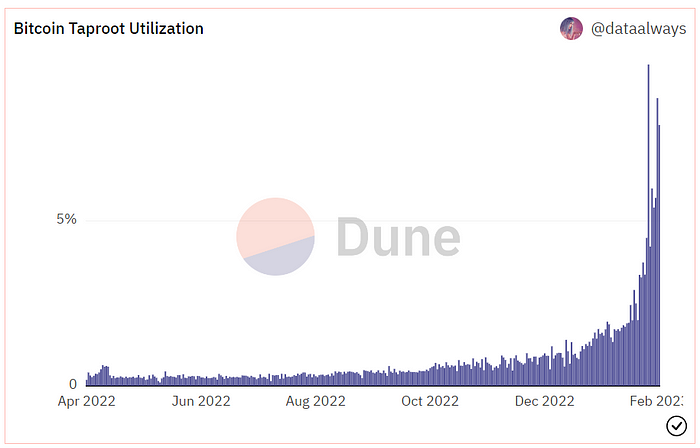
Taproot use increases block size and transaction costs.

This could cause network congestion but also support more L2s with Ordinals-specific use cases. Dune info here.
Storage Needs The Bitcoin blockchain would need to store more data to store NFT data directly. Since ordinals were introduced, blocksize has tripled from 0.7mb to over 2.2mb, which could increase storage costs and make it harder for nodes to join the network.
Use Case Diversity On the other hand, NFTs on the Bitcoin blockchain could broaden Bitcoin's use cases beyond storage and payment. This could expand Bitcoin's user base. This is two-sided. Bitcoin was designed to be trustless, decentralized, peer-to-peer money.
Chain to permanently store NFTs as ordinals will change everything.
Popularity rise This new use case will boost Bitcoin appeal, according to some. This argument fails since Bitcoin is the most popular cryptocurrency. Popularity doesn't require a new use case. Cryptocurrency adoption boosts Bitcoin. It need not compete with Ethereum or provide extra benefits to crypto investors. If there was a need for another chain that supports NFTs (there isn't), why would anyone choose the slowest and most expensive network? It appears contradictory and unproductive.
Nonetheless, holding an NFT on the Bitcoin blockchain is more secure than any other blockchain, but this has little utility.
Bitcoin NFTs are undoubtedly controversial. NFTs are strange and perhaps harmful to Bitcoin's mission. If Bitcoin NFTs are here to stay, I hope a sidechain or rollup solution will take over and leave the base chain alone.