



More on Current Events

Will Lockett
3 years ago
Russia's nukes may be useless
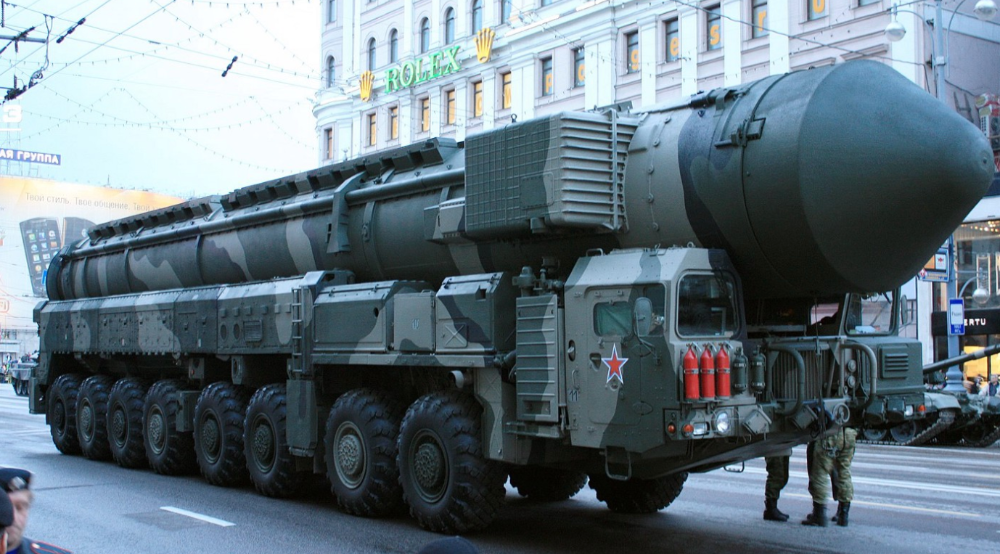
Russia's nuclear threat may be nullified by physics.
Putin seems nostalgic and wants to relive the Cold War. He's started a deadly war to reclaim the old Soviet state of Ukraine and is threatening the West with nuclear war. NATO can't risk starting a global nuclear war that could wipe out humanity to support Ukraine's independence as much as they want to. Fortunately, nuclear physics may have rendered Putin's nuclear weapons useless. However? How will Ukraine and NATO react?
To understand why Russia's nuclear weapons may be ineffective, we must first know what kind they are.
Russia has the world's largest nuclear arsenal, with 4,447 strategic and 1,912 tactical weapons (all of which are ready to be rolled out quickly). The difference between these two weapons is small, but it affects their use and logistics. Strategic nuclear weapons are ICBMs designed to destroy a city across the globe. Russia's ICBMs have many designs and a yield of 300–800 kilotonnes. 300 kilotonnes can destroy Washington. Tactical nuclear weapons are smaller and can be fired from artillery guns or small truck-mounted missile launchers, giving them a 1,500 km range. Instead of destroying a distant city, they are designed to eliminate specific positions, bases, or military infrastructure. They produce 1–50 kilotonnes.
These two nuclear weapons use different nuclear reactions. Pure fission bombs are compact enough to fit in a shell or small missile. All early nuclear weapons used this design for their fission bombs. This technology is inefficient for bombs over 50 kilotonnes. Larger bombs are thermonuclear. Thermonuclear weapons use a small fission bomb to compress and heat a hydrogen capsule, which undergoes fusion and releases far more energy than ignition fission reactions, allowing for effective giant bombs.
Here's Russia's issue.
A thermonuclear bomb needs deuterium (hydrogen with one neutron) and tritium (hydrogen with two neutrons). Because these two isotopes fuse at lower energies than others, the bomb works. One problem. Tritium is highly radioactive, with a half-life of only 12.5 years, and must be artificially made.
Tritium is made by irradiating lithium in nuclear reactors and extracting the gas. Tritium is one of the most expensive materials ever made, at $30,000 per gram.
Why does this affect Putin's nukes?
Thermonuclear weapons need tritium. Tritium decays quickly, so they must be regularly refilled at great cost, which Russia may struggle to do.
Russia has a smaller economy than New York, yet they are running an invasion, fending off international sanctions, and refining tritium for 4,447 thermonuclear weapons.
The Russian military is underfunded. Because the state can't afford it, Russian troops must buy their own body armor. Arguably, Putin cares more about the Ukraine conflict than maintaining his nuclear deterrent. Putin will likely lose power if he loses the Ukraine war.
It's possible that Putin halted tritium production and refueling to save money for Ukraine. His threats of nuclear attacks and escalating nuclear war may be a bluff.
This doesn't help Ukraine, sadly. Russia's tactical nuclear weapons don't need expensive refueling and will help with the invasion. So Ukraine still risks a nuclear attack. The bomb that destroyed Hiroshima was 15 kilotonnes, and Russia's tactical Iskander-K nuclear missile has a 50-kiloton yield. Even "little" bombs are deadly.
We can't guarantee it's happening in Russia. Putin may prioritize tritium. He knows the power of nuclear deterrence. Russia may have enough tritium for this conflict. Stockpiling a material with a short shelf life is unlikely, though.
This means that Russia's most powerful weapons may be nearly useless, but they may still be deadly. If true, this could allow NATO to offer full support to Ukraine and push the Russian tyrant back where he belongs. If Putin withholds funds from his crumbling military to maintain his nuclear deterrent, he may be willing to sink the ship with him. Let's hope the former.

B Kean
3 years ago
Russia's greatest fear is that no one will ever fear it again.
When everyone laughs at him, he's powerless.

1-2-3: Fold your hands and chuckle heartily. Repeat until you're really laughing.
We're laughing at Russia's modern-day shortcomings, if you hadn't guessed.
Watch Good Fellas' laughing scene on YouTube. Ray Liotta, Joe Pesci, and others laugh hysterically in a movie. Laugh at that scene, then think of Putin's macho guy statement on February 24 when he invaded Ukraine. It's cathartic to laugh at his expense.
Right? It makes me feel great that he was convinced the military action will be over in a week. I love reading about Putin's morning speech. Many stupid people on Earth supported him. Many loons hailed his speech historic.
Russia preys on the weak. Strong Ukraine overcame Russia. Ukraine's right. As usual, Russia is in the wrong.
A so-called thought leader recently complained on Russian TV that the West no longer fears Russia, which is why Ukraine is kicking Russia's ass.
Let's simplify for this Russian intellectual. Except for nuclear missiles, the West has nothing to fear from Russia. Russia is a weak, morally-empty country whose DNA has degraded to the point that evolution is already working to flush it out.
The West doesn't fear Russia since he heads a prominent Russian institution. Russian universities are intellectually barren. I taught at St. Petersburg University till June (since February I was virtually teaching) and was astounded by the lack of expertise.
Russians excel in science, math, engineering, IT, and anything that doesn't demand critical thinking or personal ideas.
Reflecting on many of the high-ranking individuals from around the West, Satanovsky said: “They are not interested in us. We only think we’re ‘big politics’ for them but for those guys we’re small politics. “We’re small politics, even though we think of ourselves as the descendants of the Russian Empire, of the USSR. We are not the Soviet Union, we don’t have enough weirdos and lunatics, we practically don’t have any (U.S. Has Stopped Fearing Us).”
Professor Dmitry Evstafiev, president of the Institute of the Middle East, praised Nikita Khrushchev's fiery nature because he made the world fear him, which made the Soviet Union great. If the world believes Putin is crazy, then Russia will be great, says this man. This is crazy.
Evstafiev covered his cowardice by saluting Putin. He praised his culture and Ukraine patience. This weakling professor ingratiates himself to Putin instead of calling him a cowardly, demonic shithead.
This is why we don't fear Russia, professor. Because you're all sycophantic weaklings who sold your souls to a Leningrad narcissist. Putin's nothing. He lacks intelligence. You've tied your country's fate and youth's future to this terrible monster. Disgraceful!
How can you loathe your country's youth so much to doom them to decades or centuries of ignominy? My son is half Russian and must now live with this portion of him.
We don't fear Russia because you don't realize that it should be appreciated, not frightened. That would need lobotomizing tens of millions of people like you.
Sadman. You let a Leningrad weakling castrate you and display your testicles. He shakes the container, saying, "Your balls are mine."
Why is Russia not feared?
Your self-inflicted national catastrophe is hilarious. Sadly, it's laugh-through-tears.

Erik Engheim
3 years ago
You Misunderstand the Russian Nuclear Threat
Many believe Putin is simply sabre rattling and intimidating us. They see no threat of nuclear war. We can send NATO troops into Ukraine without risking a nuclear war.
I keep reading that Putin is just using nuclear blackmail and that a strong leader will call the bluff. That, in my opinion, misunderstands the danger of sending NATO into Ukraine.
It assumes that once NATO moves in, Putin can either push the red nuclear button or not.
Sure, Putin won't go nuclear if NATO invades Ukraine. So we're safe? Can't we just move NATO?
No, because history has taught us that wars often escalate far beyond our initial expectations. One domino falls, knocking down another. That's why having clear boundaries is vital. Crossing a seemingly harmless line can set off a chain of events that are unstoppable once started.
One example is WWI. The assassin of Archduke Franz Ferdinand could not have known that his actions would kill millions. They couldn't have known that invading Serbia to punish them for not handing over the accomplices would start a world war. Every action triggered a counter-action, plunging Europe into a brutal and bloody war. Each leader saw their actions as limited, not realizing how they kept the dominos falling.
Nobody can predict the future, but it's easy to imagine how NATO intervention could trigger a chain of events leading to a total war. Let me suggest some outcomes.
NATO creates a no-fly-zone. In retaliation, Russia bombs NATO airfields. Russia may see this as a limited counter-move that shouldn't cause further NATO escalation. They think it's a reasonable response to force NATO out of Ukraine. Nobody has yet thought to use the nuke.
Will NATO act? Polish airfields bombed, will they be stuck? Is this an article 5 event? If so, what should be done?
It could happen. Maybe NATO sends troops into Ukraine to punish Russia. Maybe NATO will bomb Russian airfields.
Putin's response Is bombing Russian airfields an invasion or an attack? Remember that Russia has always used nuclear weapons for defense, not offense. But let's not panic, let's assume Russia doesn't go nuclear.
Maybe Russia retaliates by attacking NATO military bases with planes. Maybe they use ships to attack military targets. How does NATO respond? Will they fight Russia in Ukraine or escalate? Will they invade Russia or attack more military installations there?
Seen the pattern? As each nation responds, smaller limited military operations can grow in scope.
So far, the Russian military has shown that they begin with less brutal methods. As losses and failures increase, brutal means are used. Syria had the same. Assad used chemical weapons and attacked hospitals, schools, residential areas, etc.
A NATO invasion of Ukraine would cost Russia dearly. “Oh, this isn't looking so good, better pull out and finish this war,” do you think? No way. Desperate, they will resort to more brutal tactics. If desperate, Russia has a huge arsenal of ugly weapons. They have nerve agents, chemical weapons, and other nasty stuff.
What happens if Russia uses chemical weapons? What if Russian nerve agents kill NATO soldiers horribly? West calls for retaliation will grow. Will we invade Russia? Will we bomb them?
We are angry and determined to punish war criminal Putin, so NATO tanks may be heading to Moscow. We want vengeance for his chemical attacks and bombing of our cities.
Do you think the distance between that red nuclear button and Putin's finger will be that far once NATO tanks are on their way to Moscow?
We might avoid a nuclear apocalypse. A NATO invasion force or even Western cities may be used by Putin. Not as destructive as ICBMs. Putin may think we won't respond to tactical nukes with a full nuclear counterattack. Why would we risk a nuclear Holocaust by launching ICBMs on Russia?
Maybe. My point is that at every stage of the escalation, one party may underestimate the other's response. This war is spiraling out of control and the chances of a nuclear exchange are increasing. Nobody really wants it.
Fear, anger, and resentment cause it. If Putin and his inner circle decide their time is up, they may no longer care about the rest of the world. We saw it with Hitler. Hitler, seeing the end of his empire, ordered the destruction of Germany. Nobody should win if he couldn't. He wanted to destroy everything, including Paris.
In other words, the danger isn't what happens after NATO intervenes The danger is the potential chain reaction. Gambling has a psychological equivalent. It's best to exit when you've lost less. We humans are willing to take small risks for big rewards. To avoid losses, we are willing to take high risks. Daniel Kahneman describes this behavior in his book Thinking, Fast and Slow.
And so bettors who have lost a lot begin taking bigger risks to make up for it. We get a snowball effect. NATO involvement in the Ukraine conflict is akin to entering a casino and placing a bet. We'll start taking bigger risks as we start losing to Russian retaliation. That's the game's psychology.
It's impossible to stop. So will politicians and citizens from both Russia and the West, until we risk the end of human civilization.
You can avoid spiraling into ever larger bets in the Casino by drawing a hard line and declaring “I will not enter that Casino.” We're doing it now. We supply Ukraine. We send money and intelligence but don't cross that crucial line.
It's difficult to watch what happened in Bucha without demanding NATO involvement. What should we do? Of course, I'm not in charge. I'm a writer. My hope is that people will think about the consequences of the actions we demand. My hope is that you think ahead not just one step but multiple dominos.
More and more, we are driven by our emotions. We cannot act solely on emotion in matters of life and death. If we make the wrong choice, more people will die.
Read the original post here.
You might also like

Ashraful Islam
4 years ago
Clean API Call With React Hooks
| Photo by Juanjo Jaramillo on Unsplash |
Calling APIs is the most common thing to do in any modern web application. When it comes to talking with an API then most of the time we need to do a lot of repetitive things like getting data from an API call, handling the success or error case, and so on.
When calling tens of hundreds of API calls we always have to do those tedious tasks. We can handle those things efficiently by putting a higher level of abstraction over those barebone API calls, whereas in some small applications, sometimes we don’t even care.
The problem comes when we start adding new features on top of the existing features without handling the API calls in an efficient and reusable manner. In that case for all of those API calls related repetitions, we end up with a lot of repetitive code across the whole application.
In React, we have different approaches for calling an API. Nowadays mostly we use React hooks. With React hooks, it’s possible to handle API calls in a very clean and consistent way throughout the application in spite of whatever the application size is. So let’s see how we can make a clean and reusable API calling layer using React hooks for a simple web application.
I’m using a code sandbox for this blog which you can get here.
import "./styles.css";
import React, { useEffect, useState } from "react";
import axios from "axios";
export default function App() {
const [posts, setPosts] = useState(null);
const [error, setError] = useState("");
const [loading, setLoading] = useState(false);
useEffect(() => {
handlePosts();
}, []);
const handlePosts = async () => {
setLoading(true);
try {
const result = await axios.get(
"https://jsonplaceholder.typicode.com/posts"
);
setPosts(result.data);
} catch (err) {
setError(err.message || "Unexpected Error!");
} finally {
setLoading(false);
}
};
return (
<div className="App">
<div>
<h1>Posts</h1>
{loading && <p>Posts are loading!</p>}
{error && <p>{error}</p>}
<ul>
{posts?.map((post) => (
<li key={post.id}>{post.title}</li>
))}
</ul>
</div>
</div>
);
}
I know the example above isn’t the best code but at least it’s working and it’s valid code. I will try to improve that later. For now, we can just focus on the bare minimum things for calling an API.
Here, you can try to get posts data from JsonPlaceholer. Those are the most common steps we follow for calling an API like requesting data, handling loading, success, and error cases.
If we try to call another API from the same component then how that would gonna look? Let’s see.
500: Internal Server Error
Now it’s going insane! For calling two simple APIs we’ve done a lot of duplication. On a top-level view, the component is doing nothing but just making two GET requests and handling the success and error cases. For each request, it’s maintaining three states which will periodically increase later if we’ve more calls.
Let’s refactor to make the code more reusable with fewer repetitions.
Step 1: Create a Hook for the Redundant API Request Codes
Most of the repetitions we have done so far are about requesting data, handing the async things, handling errors, success, and loading states. How about encapsulating those things inside a hook?
The only unique things we are doing inside handleComments and handlePosts are calling different endpoints. The rest of the things are pretty much the same. So we can create a hook that will handle the redundant works for us and from outside we’ll let it know which API to call.
500: Internal Server Error
Here, this request function is identical to what we were doing on the handlePosts and handleComments. The only difference is, it’s calling an async function apiFunc which we will provide as a parameter with this hook. This apiFunc is the only independent thing among any of the API calls we need.
With hooks in action, let’s change our old codes in App component, like this:
500: Internal Server Error
How about the current code? Isn’t it beautiful without any repetitions and duplicate API call handling things?
Let’s continue our journey from the current code. We can make App component more elegant. Now it knows a lot of details about the underlying library for the API call. It shouldn’t know that. So, here’s the next step…
Step 2: One Component Should Take Just One Responsibility
Our App component knows too much about the API calling mechanism. Its responsibility should just request the data. How the data will be requested under the hood, it shouldn’t care about that.
We will extract the API client-related codes from the App component. Also, we will group all the API request-related codes based on the API resource. Now, this is our API client:
import axios from "axios";

const apiClient = axios.create({
  // Later read this URL from an environment variable
  baseURL: "https://jsonplaceholder.typicode.com"
});

export default apiClient;
All API calls for comments resource will be in the following file:
import client from "./client";

const getComments = () => client.get("/comments");

export default {
  getComments
};
All API calls for posts resource are placed in the following file:
import client from "./client";

const getPosts = () => client.get("/posts");

export default {
  getPosts
};
Finally, the App component looks like the following:
import "./styles.css";
import React, { useEffect } from "react";
import commentsApi from "./api/comments";
import postsApi from "./api/posts";
import useApi from "./hooks/useApi";

export default function App() {
  const getPostsApi = useApi(postsApi.getPosts);
  const getCommentsApi = useApi(commentsApi.getComments);

  useEffect(() => {
    getPostsApi.request();
    getCommentsApi.request();
  }, []);

  return (
    <div className="App">
      {/* Post List */}
      <div>
        <h1>Posts</h1>
        {getPostsApi.loading && <p>Posts are loading!</p>}
        {getPostsApi.error && <p>{getPostsApi.error}</p>}
        <ul>
          {getPostsApi.data?.map((post) => (
            <li key={post.id}>{post.title}</li>
          ))}
        </ul>
      </div>
      {/* Comment List */}
      <div>
        <h1>Comments</h1>
        {getCommentsApi.loading && <p>Comments are loading!</p>}
        {getCommentsApi.error && <p>{getCommentsApi.error}</p>}
        <ul>
          {getCommentsApi.data?.map((comment) => (
            <li key={comment.id}>{comment.name}</li>
          ))}
        </ul>
      </div>
    </div>
  );
}
Now it doesn’t know anything about how the APIs get called. Tomorrow if we want to change the API calling library from axios to fetch or anything else, our App component code will not get affected. We can just change the codes form client.js This is the beauty of abstraction.
Apart from the abstraction of API calls, Appcomponent isn’t right the place to show the list of the posts and comments. It’s a high-level component. It shouldn’t handle such low-level data interpolation things.
So we should move this data display-related things to another low-level component. Here I placed those directly in the App component just for the demonstration purpose and not to distract with component composition-related things.
Final Thoughts
The React library gives the flexibility for using any kind of third-party library based on the application’s needs. As it doesn’t have any predefined architecture so different teams/developers adopted different approaches to developing applications with React. There’s nothing good or bad. We choose the development practice based on our needs/choices. One thing that is there beyond any choices is writing clean and maintainable codes.

M.G. Siegler
3 years ago
G3nerative
Generative AI hype: some thoughts

The sudden surge in "generative AI" startups and projects feels like the inverse of the recent "web3" boom. Both came from hyped-up pots. But while web3 hyped idealistic tech and an easy way to make money, generative AI hypes unsettling tech and questions whether it can be used to make money.
Web3 is technology looking for problems to solve, while generative AI is technology creating almost too many solutions. Web3 has been evangelists trying to solve old problems with new technology. As Generative AI evolves, users are resolving old problems in stunning new ways.
It's a jab at web3, but it's true. Web3's hype, including crypto, was unhealthy. Always expected a tech crash and shakeout. Tech that won't look like "web3" but will enhance "web2"
But that doesn't mean AI hype is healthy. There'll be plenty of bullshit here, too. As moths to a flame, hype attracts charlatans. Again, the difference is the different starting point. People want to use it. Try it.
With the beta launch of Dall-E 2 earlier this year, a new class of consumer product took off. Midjourney followed suit (despite having to jump through the Discord server hoops). Twelve more generative art projects. Lensa, Prisma Labs' generative AI self-portrait project, may have topped the hype (a startup which has actually been going after this general space for quite a while). This week, ChatGPT went off-topic.
This has a "fake-it-till-you-make-it" vibe. We give these projects too much credit because they create easy illusions. This also unlocks new forms of creativity. And faith in new possibilities.
As a user, it's thrilling. We're just getting started. These projects are not only fun to play with, but each week brings a new breakthrough. As an investor, it's all happening so fast, with so much hype (and ethical and societal questions), that no one knows how it will turn out. Web3's demand won't be the issue. Too much demand may cause servers to melt down, sending costs soaring. Companies will try to mix rapidly evolving tech to meet user demand and create businesses. Frustratingly difficult.
Anyway, I wanted an excuse to post some Lensa selfies.

These are really weird. I recognize them as me or a version of me, but I have no memory of them being taken. It's surreal, out-of-body. Uncanny Valley.

Jari Roomer
3 years ago
Three Simple Daily Practices That Will Immediately Double Your Output
Most productive people are habitual.

Early in the day, do important tasks.
In his best-selling book Eat That Frog, Brian Tracy advised starting the day with your hardest, most important activity.
Most individuals work best in the morning. Energy and willpower peak then.
Mornings are also ideal for memory, focus, and problem-solving.
Thus, the morning is ideal for your hardest chores.
It makes sense to do these things during your peak performance hours.
Additionally, your morning sets the tone for the day. According to Brian Tracy, the first hour of the workday steers the remainder.
After doing your most critical chores, you may feel accomplished, confident, and motivated for the remainder of the day, which boosts productivity.
Develop Your Essentialism
In Essentialism, Greg McKeown claims that trying to be everything to everyone leads to mediocrity and tiredness.
You'll either burn out, be spread too thin, or compromise your ideals.
Greg McKeown advises Essentialism:
Clarify what’s truly important in your life and eliminate the rest.
Eliminating non-essential duties, activities, and commitments frees up time and energy for what matters most.
According to Greg McKeown, Essentialists live by design, not default.
You'll be happier and more productive if you follow your essentials.
Follow these three steps to live more essentialist.
Prioritize Your Tasks First
What matters most clarifies what matters less. List your most significant aims and values.
The clearer your priorities, the more you can focus on them.
On Essentialism, McKeown wrote, The ultimate form of effectiveness is the ability to deliberately invest our time and energy in the few things that matter most.
#2: Set Your Priorities in Order
Prioritize your priorities, not simply know them.
“If you don’t prioritize your life, someone else will.” — Greg McKeown
Planning each day and allocating enough time for your priorities is the best method to become more purposeful.
#3: Practice saying "no"
If a request or demand conflicts with your aims or principles, you must learn to say no.
Saying no frees up space for our priorities.
Place Sleep Above All Else
Many believe they must forego sleep to be more productive. This is false.
A productive day starts with a good night's sleep.
Matthew Walker (Why We Sleep) says:
“Getting a good night’s sleep can improve cognitive performance, creativity, and overall productivity.”
Sleep helps us learn, remember, and repair.
Unfortunately, 35% of people don't receive the recommended 79 hours of sleep per night.
Sleep deprivation can cause:
increased risk of diabetes, heart disease, stroke, and obesity
Depression, stress, and anxiety risk are all on the rise.
decrease in general contentment
decline in cognitive function
To live an ideal, productive, and healthy life, you must prioritize sleep.
Follow these six sleep optimization strategies to obtain enough sleep:
Establish a nightly ritual to relax and prepare for sleep.
Avoid using screens an hour before bed because the blue light they emit disrupts the generation of melatonin, a necessary hormone for sleep.
Maintain a regular sleep schedule to control your body's biological clock (and optimizes melatonin production)
Create a peaceful, dark, and cool sleeping environment.
Limit your intake of sweets and caffeine (especially in the hours leading up to bedtime)
Regular exercise (but not right before you go to bed, because your body temperature will be too high)
Sleep is one of the best ways to boost productivity.
Sleep is crucial, says Matthew Walker. It's the key to good health and longevity.