



More on Productivity

Todd Lewandowski
3 years ago
DWTS: How to Organize Your To-Do List Quickly
Don't overcomplicate to-do lists. DWTS (Done, Waiting, Top 3, Soon) organizes your to-dos.
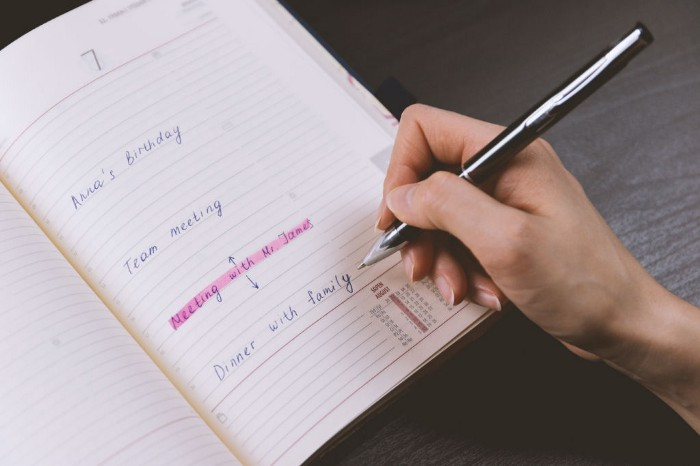
How Are You Going to Manage Everything?
Modern America is busy. Work involves meetings. Anytime, Slack communications arrive. Many software solutions offer a @-mention notification capability. Emails.
Work obligations continue. At home, there are friends, family, bills, chores, and fun things.
How are you going to keep track of it all? Enter the todo list. It’s been around forever. It’s likely to stay forever in some way, shape, or form.
Everybody has their own system. You probably modified something from middle school. Post-its? Maybe it’s an app? Maybe both, another system, or none.
I suggest a format that has worked for me in 15 years of professional and personal life.
Try it out and see if it works for you. If not, no worries. You do you! Hopefully though you can learn a thing or two, and I from you too.
It is merely a Google Doc, yes.
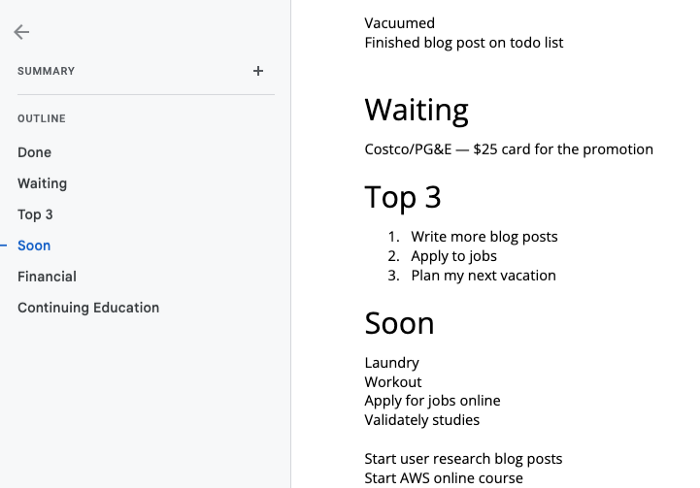
It's a giant list. One task per line. Indent subtasks on a new line. Add or move new tasks as needed.
I recommend using Google Docs. It's easy to use and flexible for structuring.
Prioritizing these tasks is key. I organize them using DWTS (Done, Waiting, Top 3, Soon). Chronologically is good because it implicitly provides both a priority (high, medium, low) and an ETA (now, soon, later).
Yes, I recognize the similarities to DWTS (Dancing With The Stars) TV Show. Although I'm not a fan, it's entertaining. The acronym is easy to remember and adds fun to something dull.

What each section contains
Done
All tasks' endpoint. Finish here. Don't worry about it again.
Waiting
You're blocked and can't continue. Blocked tasks usually need someone. Write Person Task so you know who's waiting.
Blocking tasks shouldn't last long. After a while, remind them kindly. If people don't help you out of kindness, they will if you're persistent.
Top 3
Mental focus areas. These can be short- to mid-term goals or recent accomplishments. 2 to 5 is a good number to stay focused.
Top 3 reminds us to prioritize. If they don't fit your Top 3 goals, delay them.
Every 1:1 at work is a project update. Another chance to list your top 3. You should know your Top 3 well and be able to discuss them confidently.
Soon
Here's your short-term to-do list. Rank them from highest to lowest.
I usually subdivide it with empty lines. First is what I have to do today, then week, then month. Subsections can be arranged however you like.
Inventories by Concept
Tasks that aren’t in your short or medium future go into the backlog.
Eventually you’ll complete these tasks, assign them to someone else, or mark them as “wont’ do” (like done but in another sense).
Backlog tasks don't need to be organized chronologically because their timing and priority may change. Theme-organize them. When planning/strategic, you can choose themes to focus on, so future top 3 topics.
More Tips on Todos
Decide Upon a Morning Goal
Morning routines are universal. Coffee and Wordle. My to-do list is next. Two things:
As needed, update the to-do list: based on the events of yesterday and any fresh priorities.
Pick a few jobs to complete today: Pick a few goals that you know you can complete today. Push the remainder below and move them to the top of the Soon section. I typically select a few tasks I am confident I can complete along with one stretch task that might extend into tomorrow.
Finally. By setting and achieving small goals every day, you feel accomplished and make steady progress on medium and long-term goals.
Tech companies call this a daily standup. Everyone shares what they did yesterday, what they're doing today, and any blockers. The name comes from a tradition of holding meetings while standing up to keep them short. Even though it's virtual, everyone still wants a quick meeting.
Your team may or may not need daily standups. Make a daily review a habit with your coffee.
Review Backwards & Forwards on a regular basis
While you're updating your to-do list daily, take time to review it.
Review your Done list. Remember things you're proud of and things that could have gone better. Your Done list can be long. Archive it so your main to-do list isn't overwhelming.
Future-gaze. What you considered important may no longer be. Reorder tasks. Backlog grooming is a workplace term.
Backwards-and-forwards reviews aren't required often. Every 3-6 months is fine. They help you see the forest as often as the trees.
Final Remarks
Keep your list simple. Done, Waiting, Top 3, Soon. These are the necessary sections. If you like, add more subsections; otherwise, keep it simple.
I recommend a morning review. By having clear goals and an action-oriented attitude, you'll be successful.

Pen Magnet
3 years ago
Why Google Staff Doesn't Work
Sundar Pichai unveiled Simplicity Sprint at Google's latest all-hands conference.
To boost employee efficiency.
Not surprising. Few envisioned Google declaring a productivity drive.
Sunder Pichai's speech:
“There are real concerns that our productivity as a whole is not where it needs to be for the head count we have. Help me create a culture that is more mission-focused, more focused on our products, more customer focused. We should think about how we can minimize distractions and really raise the bar on both product excellence and productivity.”
The primary driver driving Google's efficiency push is:
Google's efficiency push follows 13% quarterly revenue increase. Last year in the same quarter, it was 62%.
Market newcomers may argue that the previous year's figure was fuelled by post-Covid reopening and growing consumer spending. Investors aren't convinced. A promising company like Google can't afford to drop so quickly.
Google’s quarterly revenue growth stood at 13%, against 62% in last year same quarter.
Google isn't alone. In my recent essay regarding 2025 programmers, I warned about the economic downturn's effects on FAAMG's workforce. Facebook had suspended hiring, and Microsoft had promised hefty bonuses for loyal staff.
In the same article, I predicted Google's troubles. Online advertising, especially the way Google and Facebook sell it using user data, is over.
FAAMG and 2nd rung IT companies could be the first to fall without Post-COVID revival and uncertain global geopolitics.
Google has hardly ever discussed effectiveness:
Apparently openly.
Amazon treats its employees like robots, even in software positions. It has significant turnover and a terrible reputation as a result. Because of this, it rarely loses money due to staff productivity.
Amazon trumps Google. In reality, it treats its employees poorly.
Google was the founding father of the modern-day open culture.
Larry and Sergey Google founded the IT industry's Open Culture. Silicon Valley called Google's internal democracy and transparency near anarchy. Management rarely slammed decisions on employees. Surveys and internal polls ensured everyone knew the company's direction and had a vote.
20% project allotment (weekly free time to build own project) was Google's open-secret innovation component.
After Larry and Sergey's exit in 2019, this is Google's first profitability hurdle. Only Google insiders can answer these questions.
Would Google's investors compel the company's management to adopt an Amazon-style culture where the developers are treated like circus performers?
If so, would Google follow suit?
If so, how does Google go about doing it?
Before discussing Google's likely plan, let's examine programming productivity.
What determines a programmer's productivity is simple:
How would we answer Google's questions?
As a programmer, I'm more concerned about Simplicity Sprint's aftermath than its economic catalysts.
Large organizations don't care much about quarterly and annual productivity metrics. They have 10-year product-launch plans. If something seems horrible today, it's likely due to someone's lousy judgment 5 years ago who is no longer in the blame game.
Deconstruct our main question.
How exactly do you change the culture of the firm so that productivity increases?
How can you accomplish that without affecting your capacity to profit? There are countless ways to increase output without decreasing profit.
How can you accomplish this with little to no effect on employee motivation? (While not all employers care about it, in this case we are discussing the father of the open company culture.)
How do you do it for a 10-developer IT firm that is losing money versus a 1,70,000-developer organization with a trillion-dollar valuation?
When implementing a large-scale organizational change, success must be carefully measured.
The fastest way to do something is to do it right, no matter how long it takes.
You require clearly-defined group/team/role segregation and solid pass/fail matrices to:
You can give performers rewards.
Ones that are average can be inspired to improve
Underachievers may receive assistance or, in the worst-case scenario, rehabilitation
As a 20-year programmer, I associate productivity with greatness.
Doing something well, no matter how long it takes, is the fastest way to do it.
Let's discuss a programmer's productivity.
Why productivity is a strange term in programming:
Productivity is work per unit of time.
Money=time This is an economic proverb. More hours worked, more pay. Longer projects cost more.
As a buyer, you desire a quick supply. As a business owner, you want employees who perform at full capacity, creating more products to transport and boosting your profits.
All economic matrices encourage production because of our obsession with it. Productivity is the only organic way a nation may increase its GDP.
Time is money — is not just a proverb, but an economical fact.
Applying the same productivity theory to programming gets problematic. An automating computer. Its capacity depends on the software its master writes.
Today, a sophisticated program can process a billion records in a few hours. Creating one takes a competent coder and the necessary infrastructure. Learning, designing, coding, testing, and iterations take time.
Programming productivity isn't linear, unlike manufacturing and maintenance.
Average programmers produce code every day yet miss deadlines. Expert programmers go days without coding. End of sprint, they often surprise themselves by delivering fully working solutions.
Reversing the programming duties has no effect. Experts aren't needed for productivity.
These patterns remind me of an XKCD comic.
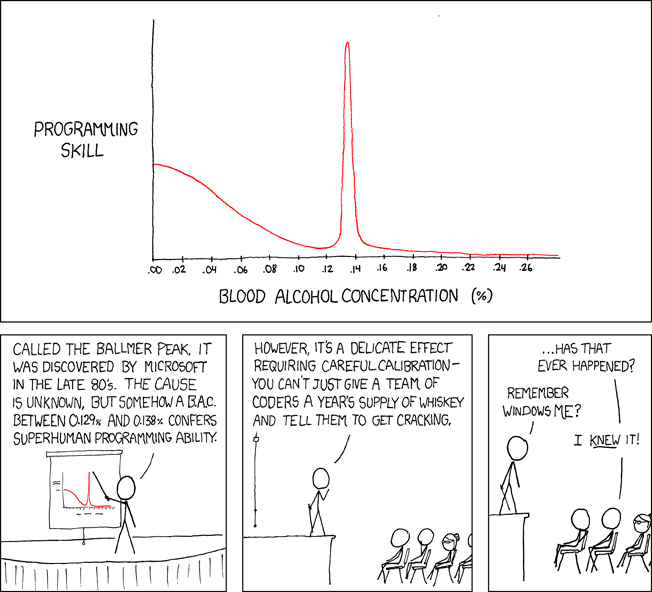
Programming productivity depends on two factors:
The capacity of the programmer and his or her command of the principles of computer science
His or her productive bursts, how often they occur, and how long they last as they engineer the answer
At some point, productivity measurement becomes Schrödinger’s cat.
Product companies measure productivity using use cases, classes, functions, or LOCs (lines of code). In days of data-rich source control systems, programmers' merge requests and/or commits are the most preferred yardstick. Companies assess productivity by tickets closed.
Every organization eventually has trouble measuring productivity. Finer measurements create more chaos. Every measure compares apples to oranges (or worse, apples with aircraft.) On top of the measuring overhead, the endeavor causes tremendous and unnecessary stress on teams, lowering their productivity and defeating its purpose.
Macro productivity measurements make sense. Amazon's factory-era management has done it, but at great cost.
Google can pull it off if it wants to.
What Google meant in reality when it said that employee productivity has decreased:
When Google considers its employees unproductive, it doesn't mean they don't complete enough work in the allotted period.
They can't multiply their work's influence over time.
Programmers who produce excellent modules or products are unsure on how to use them.
The best data scientists are unable to add the proper parameters in their models.
Despite having a great product backlog, managers struggle to recruit resources with the necessary skills.
Product designers who frequently develop and A/B test newer designs are unaware of why measures are inaccurate or whether they have already reached the saturation point.
Most ignorant: All of the aforementioned positions are aware of what to do with their deliverables, but neither their supervisors nor Google itself have given them sufficient authority.
So, Google employees aren't productive.
How to fix it?
Business analysis: White suits introducing novel items can interact with customers from all regions. Track analytics events proactively, especially the infrequent ones.
SOLID, DRY, TEST, and AUTOMATION: Do less + reuse. Use boilerplate code creation. If something already exists, don't implement it yourself.
Build features-building capabilities: N features are created by average programmers in N hours. An endless number of features can be built by average programmers thanks to the fact that expert programmers can produce 1 capability in N hours.
Work on projects that will have a positive impact: Use the same algorithm to search for images on YouTube rather than the Mars surface.
Avoid tasks that can only be measured in terms of time linearity at all costs (if a task can be completed in N minutes, then M copies of the same task would cost M*N minutes).
In conclusion:
Software development isn't linear. Why should the makers be measured?
Notation for The Big O
I'm discussing a new way to quantify programmer productivity. (It applies to other professions, but that's another subject)
The Big O notation expresses the paradigm (the algorithmic performance concept programmers rot to ace their Google interview)
Google (or any large corporation) can do this.
Sort organizational roles into categories and specify their impact vs. time objectives. A CXO role's time vs. effect function, for instance, has a complexity of O(log N), meaning that if a CEO raises his or her work time by 8x, the result only increases by 3x.
Plot the influence of each employee over time using the X and Y axes, respectively.
Add a multiplier for Y-axis values to the productivity equation to make business objectives matter. (Example values: Support = 5, Utility = 7, and Innovation = 10).
Compare employee scores in comparable categories (developers vs. devs, CXOs vs. CXOs, etc.) and reward or help employees based on whether they are ahead of or behind the pack.
After measuring every employee's inventiveness, it's straightforward to help underachievers and praise achievers.
Example of a Big(O) Category:
If I ran Google (God forbid, its worst days are far off), here's how I'd classify it. You can categorize Google employees whichever you choose.
The Google interview truth:
O(1) < O(log n) < O(n) < O(n log n) < O(n^x) where all logarithmic bases are < n.
O(1): Customer service workers' hours have no impact on firm profitability or customer pleasure.
CXOs Most of their time is spent on travel, strategic meetings, parties, and/or meetings with minimal floor-level influence. They're good at launching new products but bad at pivoting without disaster. Their directions are being followed.
Devops, UX designers, testers Agile projects revolve around deployment. DevOps controls the levers. Their automation secures results in subsequent cycles.
UX/UI Designers must still prototype UI elements despite improved design tools.
All test cases are proportional to use cases/functional units, hence testers' work is O(N).
Architects Their effort improves code quality. Their right/wrong interference affects product quality and rollout decisions even after the design is set.
Core Developers Only core developers can write code and own requirements. When people understand and own their labor, the output improves dramatically. A single character error can spread undetected throughout the SDLC and cost millions.
Core devs introduce/eliminate 1000x bugs, refactoring attempts, and regression. Following our earlier hypothesis.
The fastest way to do something is to do it right, no matter how long it takes.
Conclusion:
Google is at the liberal extreme of the employee-handling spectrum
Microsoft faced an existential crisis after 2000. It didn't choose Amazon's data-driven people management to revitalize itself.
Instead, it entrusted developers. It welcomed emerging technologies and opened up to open source, something it previously opposed.
Google is too lax in its employee-handling practices. With that foundation, it can only follow Amazon, no matter how carefully.
Any attempt to redefine people's measurements will affect the organization emotionally.
The more Google compares apples to apples, the higher its chances for future rebirth.

Jano le Roux
3 years ago
My Top 11 Tools For Building A Modern Startup, With A Free Plan
The best free tools are probably unknown to you.
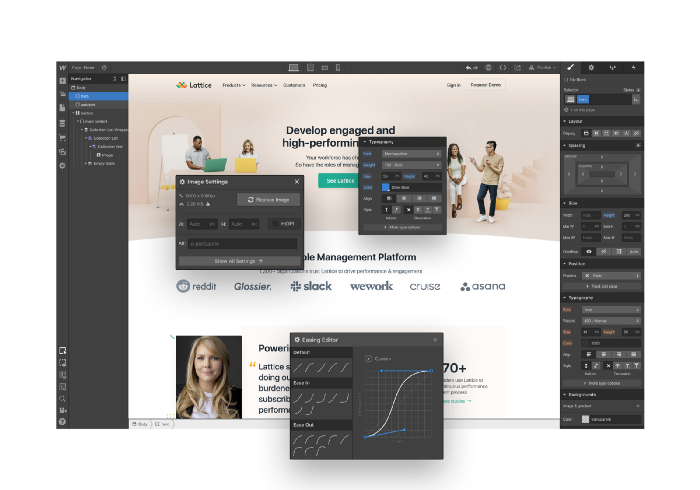
Modern startups are easy to build.
Start with free tools.
Let’s go.
Web development — Webflow
Code-free HTML, CSS, and JS.
Webflow isn't like Squarespace, Wix, or Shopify.
It's a super-fast no-code tool for professionals to construct complex, highly-responsive websites and landing pages.
Webflow can help you add animations like those on Apple's website to your own site.
I made the jump from WordPress a few years ago and it changed my life.
No damn plugins. No damn errors. No damn updates.
The best, you can get started on Webflow for free.
Data tracking — Airtable
Spreadsheet wings.
Airtable combines spreadsheet flexibility with database power without code.
Airtable is modern.
Airtable has modularity.
Scaling Airtable is simple.
Airtable, one of the most adaptable solutions on this list, is perfect for client data management.
Clients choose customized service packages. Airtable consolidates data so you can automate procedures like invoice management and focus on your strengths.
Airtable connects with so many tools that rarely creates headaches. Airtable scales when you do.
Airtable's flexibility makes it a potential backend database.
Design — Figma
Better, faster, easier user interface design.
Figma rocks!
It’s fast.
It's free.
It's adaptable
First, design in Figma.
Iterate.
Export development assets.
Figma lets you add more team members as your company grows to work on each iteration simultaneously.
Figma is web-based, so you don't need a powerful PC or Mac to start.
Task management — Trello
Unclock jobs.
Tacky and terrifying task management products abound. Trello isn’t.
Those that follow Marie Kondo will appreciate Trello.
Everything is clean.
Nothing is complicated.
Everything has a place.
Compared to other task management solutions, Trello is limited. And that’s good. Too many buttons lead to too many decisions lead to too many hours wasted.
Trello is a must for teamwork.
Domain email — Zoho
Free domain email hosting.
Professional email is essential for startups. People relied on monthly payments for too long. Nope.
Zoho offers 5 free professional emails.
It doesn't have Google's UI, but it works.
VPN — Proton VPN
Fast Swiss VPN protects your data and privacy.
Proton VPN is secure.
Proton doesn't record any data.
Proton is based in Switzerland.
Swiss privacy regulation is among the most strict in the world, therefore user data are protected. Switzerland isn't a 14 eye country.
Journalists and activists trust Proton to secure their identities while accessing and sharing information authoritarian governments don't want them to access.
Web host — Netlify
Free fast web hosting.
Netlify is a scalable platform that combines your favorite tools and APIs to develop high-performance sites, stores, and apps through GitHub.
Serverless functions and environment variables preserve API keys.
Netlify's free tier is unmissable.
100GB of free monthly bandwidth.
Free 125k serverless operations per website each month.
Database — MongoDB
Create a fast, scalable database.
MongoDB is for small and large databases. It's a fast and inexpensive database.
Free for the first million reads.
Then, for each million reads, you must pay $0.10.
MongoDB's free plan has:
Encryption from end to end
Continual authentication
field-level client-side encryption
If you have a large database, you can easily connect MongoDB to Webflow to bypass CMS limits.
Automation — Zapier
Time-saving tip: automate repetitive chores.
Zapier simplifies life.
Zapier syncs and connects your favorite apps to do impossibly awesome things.
If your online store is connected to Zapier, a customer's purchase can trigger a number of automated actions, such as:
The customer is being added to an email chain.
Put the information in your Airtable.
Send a pre-programmed postcard to the customer.
Alexa, set the color of your smart lights to purple.
Zapier scales when you do.
Email & SMS marketing — Omnisend
Email and SMS marketing campaigns.
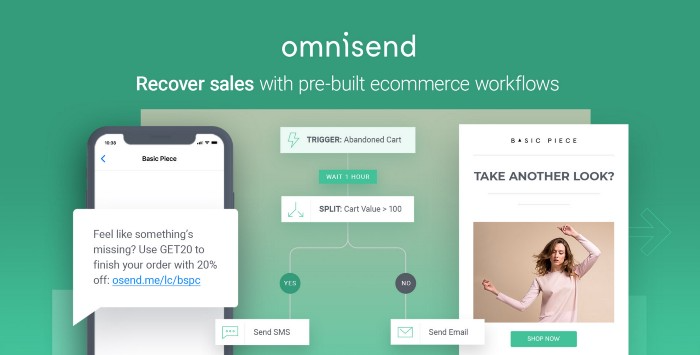
This is an excellent Mailchimp option for magical emails. Omnisend's processes simplify email automation.
I love the interface's cleanliness.
Omnisend's free tier includes web push notifications.
Send up to:
500 emails per month
60 maximum SMSs
500 Web Push Maximum
Forms and surveys — Tally
Create flexible forms that people enjoy.
Typeform is clean but restricting. Sometimes you need to add many questions. Tally's needed sometimes.
Tally is flexible and cheaper than Typeform.
99% of Tally's features are free and unrestricted, including:
Unlimited forms
Countless submissions
Collect payments
File upload
Tally lets you examine what individuals contributed to forms before submitting them to see where they get stuck.
Airtable and Zapier connectors automate things further. If you pay, you can apply custom CSS to fit your brand.
See.
Free tools are the greatest.
Let's use them to launch a startup.
You might also like

Karthik Rajan
3 years ago
11 Cooking Hacks I Wish I Knew Earlier
Quick, easy and tasty (and dollops of parenting around food).

My wife and mom are both great mothers. They're super-efficient planners. They soak and ferment food. My 104-year-old grandfather loved fermented foods.
When I'm hungry and need something fast, I waffle to the pantry. Like most people, I like to improvise. I wish I knew these 11 hacks sooner.
1. The world's best pasta sauce only has 3 ingredients.
You watch recipe videos with prepped ingredients. In reality, prepping and washing take time. The food's taste isn't guaranteed. The raw truth at a sublime level is not talked about often.
Sometimes a radical recipe comes along that's so easy and tasty, you're dumbfounded. The Classic Italian Cook Book has a pasta recipe.
One 28-ounce can of whole, peeled tomatoes, one medium peeled onion, and 5 tablespoons of butter. And salt to taste.
Combine everything in a single pot and simmer for 45 minutes, uncovered. Stir occasionally. Toss the onion halves after 45 minutes and pour the sauce over pasta. Finish!
This simple recipe fights our deepest fears.
Salt to taste! Customized to perfection, no frills.
2. Reheating rice with ice. Magical.
Most of the world eats rice. I was raised in south India. My grandfather farmed rice in the Cauvery river delta.
The problem with rice With growing kids, you can't cook just enough. Leftovers are a norm. Microwaves help most people. Ice cubes are the frosting.
Before reheating rice in the microwave, add an ice cube. The ice will steam the rice, making it fluffy and delicious again.
3. Pineapple leaf
if it comes off easy, it is ripe enough to cut. No rethinking.
My daughter loves pineapples like her dad. One daddy task is cutting them. Sharing immediate results is therapeutic.
Timing the cut has been the most annoying part over the years. The pineapple leaf tip reveals the fruitiness inside. Always loved it.
4. Magic knife words (rolling and curling)
Cutting hand: Roll the blade's back, not its tip, to cut.
Other hand: If you can’t see your finger tips, you can’t cut them. So curl your fingers.
I dislike that schools don't teach financial literacy or cutting skills.
My wife and I used scissors differently for 25 years. We both used the thumb. My index finger, her middle. We googled the difference when I noticed it and laughed. She's right.
This video teaches knifing skills:
5. Best advice about heat
If it's done in the pan, it's overdone on the plate.
This simple advice stands out when we worry about ingredients and proportions.
6. The truth about pasta water
Pasta water should be sea-salty.
Properly seasoning food separates good from great. Salt depends is a good line.
Want delicious pasta? Well, then kind of a lot, to be perfectly honest.
7. Clean as you go
Clean blender as you go by blending water and dish soap.
I find clean as you go easier than clean afterwords. This easy tip is gold.
8. Clean as you go (bis)
Microwave a bowl of water, vinegar, and a toothpick for 5 minutes.
2 cups water, 2 tablespoons vinegar, and a toothpick to prevent overflow.
5-minute microwave. Let the steam work for another 2 minutes. Sponge-off dirt and food. Simple.
9 and 10. Tools,tools, tools
Immersion blender and pressure cooker save time and money.
Narrative: I experienced fatherly pride. My middle-schooler loves science. We discussed boiling. I spoke. Water doesn't need 100°C to boil. She looked confused. 100 degrees assume something. The world around the water is a normal room. Changing water pressure affects its boiling point. This saves energy. Pressure cooker magic.
I captivated her. She's into science and sustainable living.
Whistling is a subliminal form of self-expression when done right. Pressure cookers remind me of simple pleasures.
Your handiness depends on your home tools. Immersion blenders are great for pre- and post-cooking. It eliminates chopping and washing. Second to the dishwasher, in my opinion.
11. One pepper is plenty
A story I share with my daughters.
Once, everyone thought about spice (not spicy). More valuable than silk. One of the three mighty oceans was named after a source country. Columbus sailed the wrong way and found America. The explorer called the natives after reaching his spice destination.
It was pre-internet days. His Google wasn't working.
My younger daughter listens in awe. Strong roots. Image cast. She can contextualize one of the ocean names.
I struggle with spices in daily life. Combinations are mind-boggling. I have more spices than Columbus. Flavor explosion has repercussions. You must closely follow the recipe without guarantees. Best aha. Double down on one spice and move on. If you like it, it's great.
I naturally gravitate towards cumin soups, fennel dishes, mint rice, oregano pasta, basil thai curry and cardamom pudding.
Variety enhances life. Each of my dishes is unique.
To each their own comfort food and nostalgic memories.
Happy living!

Akshad Singi
3 years ago
Four obnoxious one-minute habits that help me save more than 30 hours each week
These four, when combined, destroy procrastination.
You're not rushed. You waste it on busywork.
You'll accept this eventually.
In 2022, the daily average usage of a user on social media is 2.5 hours.
By 2020, 6 billion hours of video were watched each month by Netflix's customers, who used the service an average of 3.2 hours per day.
When we see these numbers, we think "Wow!" People squander so much time as though they don't contribute. True. These are yours. Likewise.
We don't lack time; we just waste it. Once you realize this, you can change your habits to save time. This article explains. If you adopt ALL 4 of these simple behaviors, you'll see amazing benefits.
Time-blocking
Cal Newport's time-blocking trick takes a minute but improves your day's clarity.
Divide the next day into 30-minute (or 5-minute, if you're Elon Musk) segments and assign responsibilities. As seen.
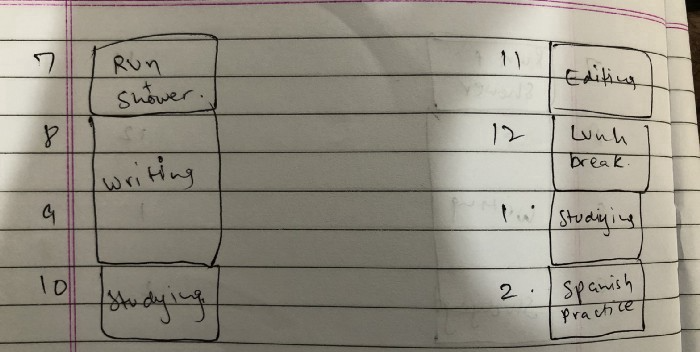
Here's why:
The procrastination that results from attempting to determine when to begin working is eliminated. Procrastination is a given if you choose when to begin working in real-time. Even if you may assume you'll start working in five minutes, it won't take you long to realize that five minutes have turned into an hour. But if you've already determined to start working at 2:00 the next day, your odds of procrastinating are greatly decreased, if not eliminated altogether.
You'll also see that you have a lot of time in a day when you plan your day out on paper and assign chores to each hour. Doing this daily will permanently eliminate the lack of time mindset.
5-4-3-2-1: Have breakfast with the frog!
“If it’s your job to eat a frog, it’s best to do it first thing in the morning. And If it’s your job to eat two frogs, it’s best to eat the biggest one first.”
Eating the frog means accomplishing the day's most difficult chore. It's better to schedule it first thing in the morning when time-blocking the night before. Why?
The day's most difficult task is also the one that causes the most postponement. Because of the stress it causes, the later you schedule it, the more time you risk wasting by procrastinating.
However, if you do it right away in the morning, you'll feel good all day. This is the reason it was set for the morning.
Mel Robbins' 5-second rule can help. Start counting backward 54321 and force yourself to start at 1. If you acquire the urge to work on a goal, you must act within 5 seconds or your brain will destroy it. If you're scheduled to eat your frog at 9, eat it at 8:59. Start working.
Micro-visualisation
You've heard of visualizing to enhance the future. Visualizing a bright future won't do much if you're not prepared to focus on the now and develop the necessary habits. Alexander said:
People don’t decide their futures. They decide their habits and their habits decide their future.
I visualize the next day's schedule every morning. My day looks like this
“I’ll start writing an article at 7:30 AM. Then, I’ll get dressed up and reach the medicine outpatient department by 9:30 AM. After my duty is over, I’ll have lunch at 2 PM, followed by a nap at 3 PM. Then, I’ll go to the gym at 4…”
etc.
This reinforces the day you planned the night before. This makes following your plan easy.
Set the timer.
It's the best iPhone productivity app. A timer is incredible for increasing productivity.
Set a timer for an hour or 40 minutes before starting work. Your call. I don't believe in techniques like the Pomodoro because I can focus for varied amounts of time depending on the time of day, how fatigued I am, and how cognitively demanding the activity is.
I work with a timer. A timer keeps you focused and prevents distractions. Your mind stays concentrated because of the timer. Timers generate accountability.
To pee, I'll pause my timer. When I sit down, I'll continue. Same goes for bottle refills. To use Twitter, I must pause the timer. This creates accountability and focuses work.
Connecting everything
If you do all 4, you won't be disappointed. Here's how:
Plan out your day's schedule the night before.
Next, envision in your mind's eye the same timetable in the morning.
Speak aloud 54321 when it's time to work: Eat the frog! In the morning, devour the largest frog.
Then set a timer to ensure that you remain focused on the task at hand.

Scott Stockdale
3 years ago
A Day in the Life of Lex Fridman Can Help You Hit 6-Month Goals

The Lex Fridman podcast host has interviewed Elon Musk.
Lex is a minimalist YouTuber. His videos are sloppy. Suits are his trademark.
In a video, he shares a typical day. I've smashed my 6-month goals using its ideas.
Here's his schedule.
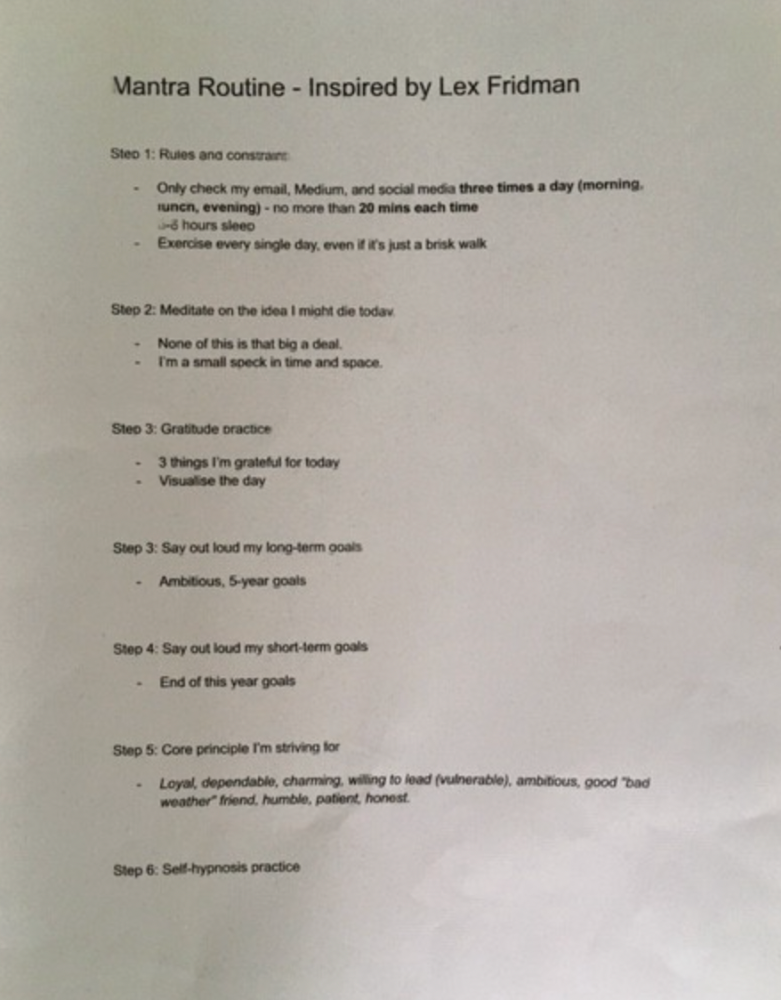
Morning Mantra
Not woo-woo. Lex's mantra reflects his practicality.
Four parts.
Rulebook
"I remember the game's rules," he says.
Among them:
Sleeping 6–8 hours nightly
1–3 times a day, he checks social media.
Every day, despite pain, he exercises. "I exercise uninjured body parts."
Visualize
He imagines his day. "Like Sims..."
He says three things he's grateful for and contemplates death.
"Today may be my last"
Objectives
Then he visualizes his goals. He starts big. Five-year goals.
Short-term goals follow. Lex says they're year-end goals.
Near but out of reach.
Principles
He lists his principles. Assertions. His goals.
He acknowledges his cliche beliefs. Compassion, empathy, and strength are key.
Here's my mantra routine:
Four-Hour Deep Work
Lex begins a four-hour deep work session after his mantra routine. Today's toughest.
AI is Lex's specialty. His video doesn't explain what he does.
Clearly, he works hard.
Before starting, he has water, coffee, and a bathroom break.
"During deep work sessions, I minimize breaks."
He's distraction-free. Phoneless. Silence. Nothing. Any loose ideas are typed into a Google doc for later. He wants to work.
"Just get the job done. Don’t think about it too much and feel good once it’s complete." — Lex Fridman
30-Minute Social Media & Music
After his first deep work session, Lex rewards himself.
10 minutes on social media, 20 on music. Upload content and respond to comments in 10 minutes. 20 minutes for guitar or piano.
"In the real world, I’m currently single, but in the music world, I’m in an open relationship with this beautiful guitar. Open relationship because sometimes I cheat on her with the acoustic." — Lex Fridman
Two-hour exercise
Then exercise for two hours.
Daily runs six miles. Then he chooses how far to go. Run time is an hour.
He does bodyweight exercises. Every minute for 15 minutes, do five pull-ups and ten push-ups. It's David Goggins-inspired. He aims for an hour a day.
He's hungry. Before running, he takes a salt pill for electrolytes.
He'll then take a one-minute cold shower while listening to cheesy songs. Afterward, he might eat.
Four-Hour Deep Work
Lex's second work session.
He works 8 hours a day.
Again, zero distractions.
Eating
The video's meal doesn't look appetizing, but it's healthy.
It's ground beef with vegetables. Cauliflower is his "ground-floor" veggie. "Carrots are my go-to party food."
Lex's keto diet includes 1800–2000 calories.
He drinks a "nutrient-packed" Atheltic Greens shake and takes tablets. It's:
One daily tablet of sodium.
Magnesium glycinate tablets stopped his keto headaches.
Potassium — "For electrolytes"
Fish oil: healthy joints
“So much of nutrition science is barely a science… I like to listen to my own body and do a one-person, one-subject scientific experiment to feel good.” — Lex Fridman
Four-hour shallow session
This work isn't as mentally taxing.
Lex planned to:
Finish last session's deep work (about an hour)
Adobe Premiere podcasting (about two hours).
Email-check (about an hour). Three times a day max. First, check for emergencies.
If he's sick, he may watch Netflix or YouTube documentaries or visit friends.
“The possibilities of chaos are wide open, so I can do whatever the hell I want.” — Lex Fridman
Two-hour evening reading
Nonstop work.
Lex ends the day reading academic papers for an hour. "Today I'm skimming two machine learning and neuroscience papers"
This helps him "think beyond the paper."
He reads for an hour.
“When I have a lot of energy, I just chill on the bed and read… When I’m feeling tired, I jump to the desk…” — Lex Fridman
Takeaways
Lex's day-in-the-life video is inspiring.
He has positive energy and works hard every day.
Schedule:
Mantra Routine includes rules, visualizing, goals, and principles.
Deep Work Session #1: Four hours of focus.
10 minutes social media, 20 minutes guitar or piano. "Music brings me joy"
Six-mile run, then bodyweight workout. Two hours total.
Deep Work #2: Four hours with no distractions. Google Docs stores random thoughts.
Lex supplements his keto diet.
This four-hour session is "open to chaos."
Evening reading: academic papers followed by fiction.
"I value some things in life. Work is one. The other is loving others. With those two things, life is great." — Lex Fridman