


More on Entrepreneurship/Creators

Antonio Neto
4 years ago
Should you skip the minimum viable product?
Are MVPs outdated and have no place in modern product culture?
Frank Robinson coined "MVP" in 2001. In the same year as the Agile Manifesto, the first Scrum experiment began. MVPs are old.
The concept was created to solve the waterfall problem at the time.
The market was still sour from the .com bubble. The tech industry needed a new approach. Product and Agile gained popularity because they weren't waterfall.
More than 20 years later, waterfall is dead as dead can be, but we are still talking about MVPs. Does that make sense?
What is an MVP?
Minimum viable product. You probably know that, so I'll be brief:
[…] The MVP fits your company and customer. It's big enough to cause adoption, satisfaction, and sales, but not bloated and risky. It's the product with the highest ROI/risk. […] — Frank Robinson, SyncDev
MVP is a complete product. It's not a prototype. It's your product's first iteration, which you'll improve. It must drive sales and be user-friendly.
At the MVP stage, you should know your product's core value, audience, and price. We are way deep into early adoption territory.
What about all the things that come before?
Modern product discovery
Eric Ries popularized the term with The Lean Startup in 2011. (Ries would work with the concept since 2008, but wide adoption came after the book was released).
Ries' definition of MVP was similar to Robinson's: "Test the market" before releasing anything. Ries never mentioned money, unlike Jobs. His MVP's goal was learning.
“Remove any feature, process, or effort that doesn't directly contribute to learning” — Eric Ries, The Lean Startup
Product has since become more about "what" to build than building it. What started as a learning tool is now a discovery discipline: fake doors, prototyping, lean inception, value proposition canvas, continuous interview, opportunity tree... These are cheap, effective learning tools.
Over time, companies realized that "maximum ROI divided by risk" started with discovery, not the MVP. MVPs are still considered discovery tools. What is the problem with that?
Time to Market vs Product Market Fit
Waterfall's Time to Market is its biggest flaw. Since projects are sliced horizontally rather than vertically, when there is nothing else to be done, it’s not because the product is ready, it’s because no one cares to buy it anymore.
MVPs were originally conceived as a way to cut corners and speed Time to Market by delivering more customer requests after they paid.
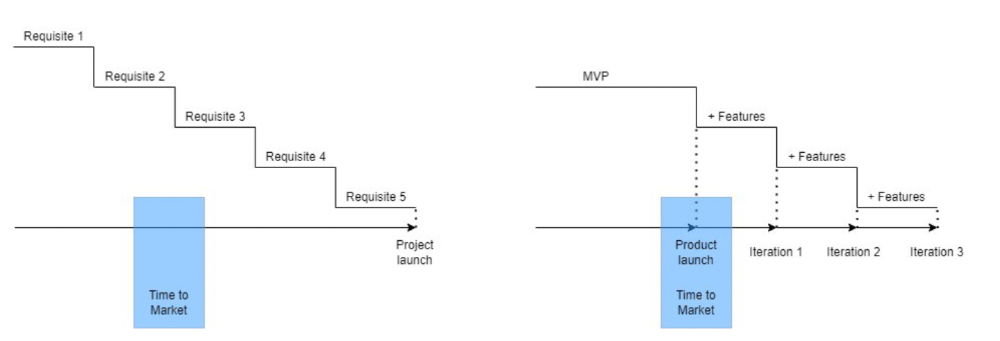
Original product development was waterfall-like.
Time to Market defines an optimal, specific window in which value should be delivered. It's impossible to predict how long or how often this window will be open.
Product Market Fit makes this window a "state." You don’t achieve Product Market Fit, you have it… and you may lose it.
Take, for example, Snapchat. They had a great time to market, but lost product-market fit later. They regained product-market fit in 2018 and have grown since.
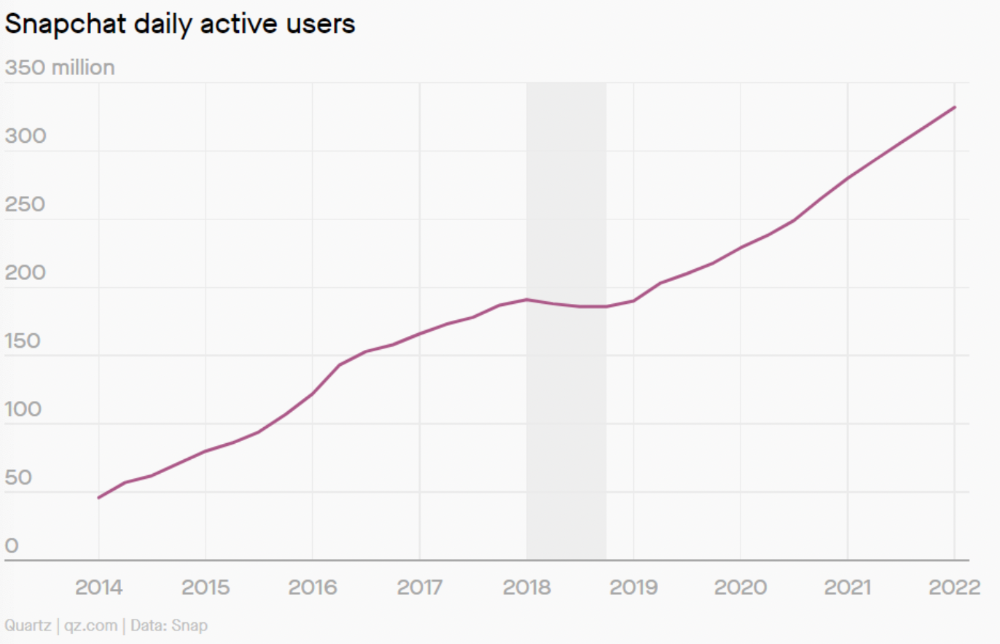
An MVP couldn't handle this. What should Snapchat do? Launch Snapchat 2 and see what the market was expecting differently from the last time? MVPs are a snapshot in time that may be wrong in two weeks.
MVPs are mini-projects. Instead of spending a lot of time and money on waterfall, you spend less but are still unsure of the results.
MVPs aren't always wrong. When releasing your first product version, consider an MVP.
Minimum viable product became less of a thing on its own and more interchangeable with Alpha Release or V.1 release over time.
Modern discovery technics are more assertive and predictable than the MVP, but clarity comes only when you reach the market.
MVPs aren't the starting point, but they're the best way to validate your product concept.

Dani Herrera
3 years ago
What prevents companies from disclosing salary information?

Yes, salary details ought to be mentioned in job postings. Recruiters and candidates both agree, so why doesn't it happen?
The short answer is “Unfortunately, it’s not the Recruiter’s decision”. The longer answer is well… A LOT.
Starting in November 2022, NYC employers must include salary ranges in job postings. It should have started in May, but companies balked.
I'm thrilled about salary transparency. This decision will promote fair, inclusive, and equitable hiring practices, and I'm sure other states will follow suit. Good news!
Candidates, recruiters, and ED&I practitioners have advocated for pay transparency for years. Why the opposition?
Let's quickly review why companies have trouble sharing salary bands.
💰 Pay Parity
Many companies and leaders still oppose pay parity. Yes, even in 2022.
💰 Pay Equity
Many companies believe in pay parity and have reviewed their internal processes and systems to ensure equality.
However, Pay Equity affects who gets roles/promotions/salary raises/bonuses and when. Enter the pay gap!
💰Pay Transparency and its impact on Talent Retention
Sharing salary bands with external candidates (and the world) means current employees will have access to that information, which is one of the main reasons companies don't share salary data.
If a company has Pay Parity and Pay Equity issues, they probably have a Pay Transparency policy as well.
Sharing salary information with external candidates without ensuring current employees understand their own salary bands and how promotions/raises are decided could impact talent retention strategies.
This information should help clarify recent conversations.
Vanessa Karel
4 years ago
10 hard lessons from founding a startup.
Here is the ugly stuff, read this if you have a founder in your life or are trying to become one. Your call.

#1 You'll try to talk yourself to sleep, but it won't always work.
As founders, we're all driven. Good and bad, you're restless. Success requires resistance and discipline. Your startup will be on your mind 24/7, and not everyone will have the patience to listen to your worries, ideas, and coffee runs. You become more self-sufficient than ever before.
#2 No one will understand what you're going through unless they've been a founder.
Some of my closest friends don't understand the work that goes into starting a business, and we can't blame them.
#3 You'll feel alienated.
Your problems aren't common; calling your bestie won't help. You must search hard for the right resources. It alienates you from conversations you no longer relate to. (No 4th of July, no long weekends!)
#4 Since you're your "own boss," people assume you have lots of free time.
Do you agree? I was on a webinar with lots of new entrepreneurs, and one woman said, "I started my own business so I could have more time for myself." This may be true for some lucky people, and you can be flexible with your schedule. If you want your business to succeed, you'll probably be its slave for a while.
#5 No time for illness or family emergencies.
Both last month. Oh, no! Physically and emotionally withdrawing at the worst times will give you perspective. I learned this the hard way because I was too stubborn to postpone an important interview. I thought if I rested all day and only took one call, I'd be fine. Nope. I had a fever and my mind wasn't as sharp, so my performance and audience interaction suffered. Nope. Better to delay than miss out.
Oh, and setting a "OoO" makes you cringe.
#6 Good luck with your mental health, perfectionists.
When building a startup, it's difficult to accept that there won't be enough time to do everything. You can't make them all, not perfectly. You must learn to accept things that are done but not perfect.
#7 As a founder, you'll make mistakes, but you'll want to make them quickly so you can learn.
Hard lessons are learned quicker. You'll need to pivot and try new things often; some won't work, and it's best to discover them sooner rather than later.
#8 Pyramid schemes abound.
I didn't realize how bad it was until I started a company. You must spy and constantly research. As a founder, you'll receive many emails from people claiming to "support" you. Be wary and keep your eyes open. When it's too good to be true. Some "companies" will try to get you to pay for "competitions" to "pitch at events." Don't do it.
#9 Keep your competitor research to a minimum.
Actually, competition is good. It means there's a market for those solutions. However, this can be mentally exhausting too. Learn about their geography and updates, but that's it.
#10 You'll feel guilty taking vacation.
I don't know what to say, but I no longer enjoy watching TV, and that's okay. Pay attention to things that enrich you, bring you joy, and have fun. It boosts creativity.
Being a startup founder may be one of the hardest professional challenges you face, but it's also a great learning experience. Your passion will take you places you never imagined and open doors to opportunities you wouldn't have otherwise. You'll meet amazing people. No regrets, no complaints. It's a roller coaster, but the good days are great.
Miss anything? Comment below
You might also like

Jayden Levitt
3 years ago
How to Explain NFTs to Your Grandmother, in Simple Terms

In simple terms, you probably don’t.
But try. Grandma didn't grow up with Facebook, but she eventually joined.
Perhaps the fear of being isolated outweighed the discomfort of learning the technology.
Grandmas are Facebook likers, sharers, and commenters.
There’s no stopping her.
Not even NFTs. Web3 is currently very complex.
It's difficult to explain what NFTs are, how they work, and why we might use them.
Three explanations.
1. Everything will be ours to own, both physically and digitally.
Why own something you can't touch? What's the point?
Blockchain technology proves digital ownership.
Untouchables need ownership proof. What?
Digital assets reduce friction, save time, and are better for the environment than physical goods.
Many valuable things are intangible. Feeling like your favorite brands. You'll pay obscene prices for clothing that costs pennies.
Secondly, NFTs Are Contracts. Agreements Have Value.
Blockchain technology will replace all contracts and intermediaries.
Every insurance contract, deed, marriage certificate, work contract, plane ticket, concert ticket, or sports event is likely an NFT.
We all have public wallets, like Grandma's Facebook page.
3. Your NFT Purchases Will Be Visible To Everyone.
Everyone can see your public wallet. What you buy says more about you than what you post online.
NFTs issued double as marketing collateral when seen on social media.
While I doubt Grandma knows who Snoop Dog is, imagine him or another famous person holding your NFT in his public wallet and the attention that could bring to you, your company, or brand.
This Technical Section Is For You
The NFT is a contract; its founders can add value through access, events, tuition, and possibly royalties.
Imagine Elon Musk releasing an NFT to his network. Or yearly business consultations for three years.
Christ-alive.
It's worth millions.
These determine their value.
No unsuspecting schmuck willing to buy your hot potato at zero. That's the trend, though.
Overpriced NFTs for low-effort projects created a bubble that has burst.
During a market bubble, you can make money by buying overvalued assets and selling them later for a profit, according to the Greater Fool Theory.
People are struggling. Some are ruined by collateralized loans and the gold rush.
Finances are ruined.
It's uncomfortable.
The same happened in 2018, during the ICO crash or in 1999/2000 when the dot com bubble burst. But the underlying technology hasn’t gone away.

Leon Ho
4 years ago
Digital Brainbuilding (Your Second Brain)
The human brain is amazing. As more scientists examine the brain, we learn how much it can store.
The human brain has 1 billion neurons, according to Scientific American. Each neuron creates 1,000 connections, totaling over a trillion. If each neuron could store one memory, we'd run out of room. [1]
What if you could store and access more info, freeing up brain space for problem-solving and creativity?
Build a second brain to keep up with rising knowledge (what I refer to as a Digital Brain). Effectively managing information entails realizing you can't recall everything.
Every action requires information. You need the correct information to learn a new skill, complete a project at work, or establish a business. You must manage information properly to advance your profession and improve your life.
How to construct a second brain to organize information and achieve goals.
What Is a Second Brain?
How often do you forget an article or book's key point? Have you ever wasted hours looking for a saved file?
If so, you're not alone. Information overload affects millions of individuals worldwide. Information overload drains mental resources and causes anxiety.
This is when the second brain comes in.
Building a second brain doesn't involve duplicating the human brain. Building a system that captures, organizes, retrieves, and archives ideas and thoughts. The second brain improves memory, organization, and recall.
Digital tools are preferable to analog for building a second brain.
Digital tools are portable and accessible. Due to these benefits, we'll focus on digital second-brain building.
Brainware
Digital Brains are external hard drives. It stores, organizes, and retrieves. This means improving your memory won't be difficult.
Memory has three components in computing:
Recording — storing the information
Organization — archiving it in a logical manner
Recall — retrieving it again when you need it
For example:
Due to rigorous security settings, many websites need you to create complicated passwords with special characters.
You must now memorize (Record), organize (Organize), and input this new password the next time you check in (Recall).
Even in this simple example, there are many pieces to remember. We can't recognize this new password with our usual patterns. If we don't use the password every day, we'll forget it. You'll type the wrong password when you try to remember it.
It's common. Is it because the information is complicated? Nope. Passwords are basically letters, numbers, and symbols.
It happens because our brains aren't meant to memorize these. Digital Brains can do heavy lifting.
Why You Need a Digital Brain
Dual minds are best. Birth brain is limited.
The cerebral cortex has 125 trillion synapses, according to a Stanford Study. The human brain can hold 2.5 million terabytes of digital data. [2]
Building a second brain improves learning and memory.
Learn and store information effectively
Faster information recall
Organize information to see connections and patterns
Build a Digital Brain to learn more and reach your goals faster. Building a second brain requires time and work, but you'll have more time for vital undertakings.
Why you need a Digital Brain:
1. Use Brainpower Effectively
Your brain has boundaries, like any organ. This is true while solving a complex question or activity. If you can't focus on a work project, you won't finish it on time.
Second brain reduces distractions. A robust structure helps you handle complicated challenges quickly and stay on track. Without distractions, it's easy to focus on vital activities.
2. Staying Organized
Professional and personal duties must be balanced. With so much to do, it's easy to neglect crucial duties. This is especially true for skill-building. Digital Brain will keep you organized and stress-free.
Life success requires action. Organized people get things done. Organizing your information will give you time for crucial tasks.
You'll finish projects faster with good materials and methods. As you succeed, you'll gain creative confidence. You can then tackle greater jobs.
3. Creativity Process
Creativity drives today's world. Creativity is mysterious and surprising for millions worldwide. Immersing yourself in others' associations, triggers, thoughts, and ideas can generate inspiration and creativity.
Building a second brain is crucial to establishing your creative process and building habits that will help you reach your goals. Creativity doesn't require perfection or overthinking.
4. Transforming Your Knowledge Into Opportunities
This is the age of entrepreneurship. Today, you can publish online, build an audience, and make money.
Whether it's a business or hobby, you'll have several job alternatives. Knowledge can boost your economy with ideas and insights.
5. Improving Thinking and Uncovering Connections
Modern career success depends on how you think. Instead of overthinking or perfecting, collect the best images, stories, metaphors, anecdotes, and observations.
This will increase your creativity and reveal connections. Increasing your imagination can help you achieve your goals, according to research. [3]
Your ability to recognize trends will help you stay ahead of the pack.
6. Credibility for a New Job or Business
Your main asset is experience-based expertise. Others won't be able to learn without your help. Technology makes knowledge tangible.
This lets you use your time as you choose while helping others. Changing professions or establishing a new business become learning opportunities when you have a Digital Brain.
7. Using Learning Resources
Millions of people use internet learning materials to improve their lives. Online resources abound. These include books, forums, podcasts, articles, and webinars.
These resources are mostly free or inexpensive. Organizing your knowledge can save you time and money. Building a Digital Brain helps you learn faster. You'll make rapid progress by enjoying learning.
How does a second brain feel?
Digital Brain has helped me arrange my job and family life for years.
No need to remember 1001 passwords. I never forget anything on my wife's grocery lists. Never miss a meeting. I can access essential information and papers anytime, anywhere.
Delegating memory to a second brain reduces tension and anxiety because you'll know what to do with every piece of information.
No information will be forgotten, boosting your confidence. Better manage your fears and concerns by writing them down and establishing a strategy. You'll understand the plethora of daily information and have a clear head.
How to Develop Your Digital Brain (Your Second Brain)
It's cheap but requires work.
Digital Brain development requires:
Recording — storing the information
Organization — archiving it in a logical manner
Recall — retrieving it again when you need it
1. Decide what information matters before recording.
To succeed in today's environment, you must manage massive amounts of data. Articles, books, webinars, podcasts, emails, and texts provide value. Remembering everything is impossible and overwhelming.
What information do you need to achieve your goals?
You must consolidate ideas and create a strategy to reach your aims. Your biological brain can imagine and create with a Digital Brain.
2. Use the Right Tool
We usually record information without any preparation - we brainstorm in a word processor, email ourselves a message, or take notes while reading.
This information isn't used. You must store information in a central location.
Different information needs different instruments.
Evernote is a top note-taking program. Audio clips, Slack chats, PDFs, text notes, photos, scanned handwritten pages, emails, and webpages can be added.
Pocket is a great software for saving and organizing content. Images, videos, and text can be sorted. Web-optimized design
Calendar apps help you manage your time and enhance your productivity by reminding you of your most important tasks. Calendar apps flourish. The best calendar apps are easy to use, have many features, and work across devices. These calendars include Google, Apple, and Outlook.
To-do list/checklist apps are useful for managing tasks. Easy-to-use, versatility, budget, and cross-platform compatibility are important when picking to-do list apps. Google Keep, Google Tasks, and Apple Notes are good to-do apps.
3. Organize data for easy retrieval
How should you organize collected data?
When you collect and organize data, you'll see connections. An article about networking can assist you comprehend web marketing. Saved business cards can help you find new clients.
Choosing the correct tools helps organize data. Here are some tools selection criteria:
Can the tool sync across devices?
Personal or team?
Has a search function for easy information retrieval?
Does it provide easy data categorization?
Can users create lists or collections?
Does it offer easy idea-information connections?
Does it mind map and visually organize thoughts?
Conclusion
Building a Digital Brain (second brain) helps us save information, think creatively, and implement ideas. Your second brain is a biological extension. It prevents amnesia, allowing you to tackle bigger creative difficulties.
People who love learning often consume information without using it. Every day, they postpone life-improving experiences until they're forgotten. Useful information becomes strength.
Reference
[1] ^ Scientific American: What Is the Memory Capacity of the Human Brain?
[2] ^ Clinical Neurology Specialists: What is the Memory Capacity of a Human Brain?
[3] ^ National Library of Medicine: Imagining Success: Multiple Achievement Goals and the Effectiveness of Imagery

Dmitrii Eliuseev
3 years ago
Creating Images on Your Local PC Using Stable Diffusion AI
Deep learning-based generative art is being researched. As usual, self-learning is better. Some models, like OpenAI's DALL-E 2, require registration and can only be used online, but others can be used locally, which is usually more enjoyable for curious users. I'll demonstrate the Stable Diffusion model's operation on a standard PC.
Let’s get started.
What It Does
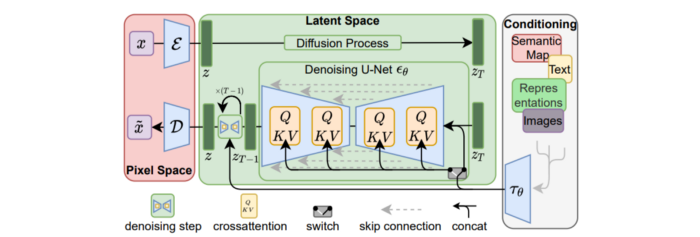
Stable Diffusion uses numerous components:
A generative model trained to produce images is called a diffusion model. The model is incrementally improving the starting data, which is only random noise. The model has an image, and while it is being trained, the reversed process is being used to add noise to the image. Being able to reverse this procedure and create images from noise is where the true magic is (more details and samples can be found in the paper).
An internal compressed representation of a latent diffusion model, which may be altered to produce the desired images, is used (more details can be found in the paper). The capacity to fine-tune the generation process is essential because producing pictures at random is not very attractive (as we can see, for instance, in Generative Adversarial Networks).
A neural network model called CLIP (Contrastive Language-Image Pre-training) is used to translate natural language prompts into vector representations. This model, which was trained on 400,000,000 image-text pairs, enables the transformation of a text prompt into a latent space for the diffusion model in the scenario of stable diffusion (more details in that paper).
This figure shows all data flow:
The weights file size for Stable Diffusion model v1 is 4 GB and v2 is 5 GB, making the model quite huge. The v1 model was trained on 256x256 and 512x512 LAION-5B pictures on a 4,000 GPU cluster using over 150.000 NVIDIA A100 GPU hours. The open-source pre-trained model is helpful for us. And we will.
Install
Before utilizing the Python sources for Stable Diffusion v1 on GitHub, we must install Miniconda (assuming Git and Python are already installed):
wget https://repo.anaconda.com/miniconda/Miniconda3-py39_4.12.0-Linux-x86_64.sh
chmod +x Miniconda3-py39_4.12.0-Linux-x86_64.sh
./Miniconda3-py39_4.12.0-Linux-x86_64.sh
conda update -n base -c defaults conda
Install the source and prepare the environment:
git clone https://github.com/CompVis/stable-diffusion
cd stable-diffusion
conda env create -f environment.yaml
conda activate ldm
pip3 install transformers --upgrade
Download the pre-trained model weights next. HiggingFace has the newest checkpoint sd-v14.ckpt (a download is free but registration is required). Put the file in the project folder and have fun:
python3 scripts/txt2img.py --prompt "hello world" --plms --ckpt sd-v1-4.ckpt --skip_grid --n_samples 1Almost. The installation is complete for happy users of current GPUs with 12 GB or more VRAM. RuntimeError: CUDA out of memory will occur otherwise. Two solutions exist.
Running the optimized version
Try optimizing first. After cloning the repository and enabling the environment (as previously), we can run the command:
python3 optimizedSD/optimized_txt2img.py --prompt "hello world" --ckpt sd-v1-4.ckpt --skip_grid --n_samples 1Stable Diffusion worked on my visual card with 8 GB RAM (alas, I did not behave well enough to get NVIDIA A100 for Christmas, so 8 GB GPU is the maximum I have;).
Running Stable Diffusion without GPU
If the GPU does not have enough RAM or is not CUDA-compatible, running the code on a CPU will be 20x slower but better than nothing. This unauthorized CPU-only branch from GitHub is easiest to obtain. We may easily edit the source code to use the latest version. It's strange that a pull request for that was made six months ago and still hasn't been approved, as the changes are simple. Readers can finish in 5 minutes:
Replace if attr.device!= torch.device(cuda) with if attr.device!= torch.device(cuda) and torch.cuda.is available at line 20 of ldm/models/diffusion/ddim.py ().
Replace if attr.device!= torch.device(cuda) with if attr.device!= torch.device(cuda) and torch.cuda.is available in line 20 of ldm/models/diffusion/plms.py ().
Replace device=cuda in lines 38, 55, 83, and 142 of ldm/modules/encoders/modules.py with device=cuda if torch.cuda.is available(), otherwise cpu.
Replace model.cuda() in scripts/txt2img.py line 28 and scripts/img2img.py line 43 with if torch.cuda.is available(): model.cuda ().
Run the script again.
Testing
Test the model. Text-to-image is the first choice. Test the command line example again:
python3 scripts/txt2img.py --prompt "hello world" --plms --ckpt sd-v1-4.ckpt --skip_grid --n_samples 1The slow generation takes 10 seconds on a GPU and 10 minutes on a CPU. Final image:
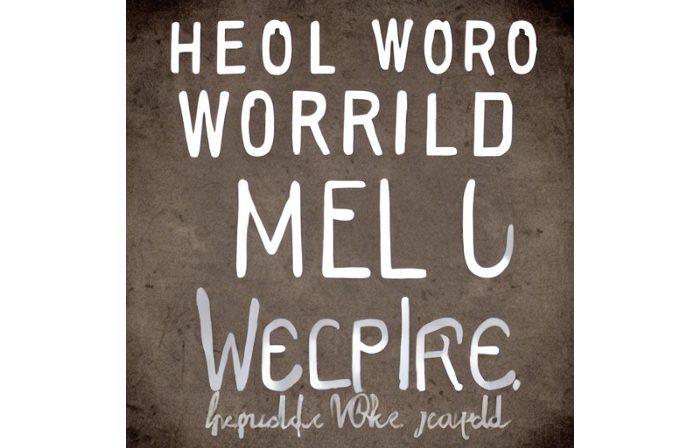
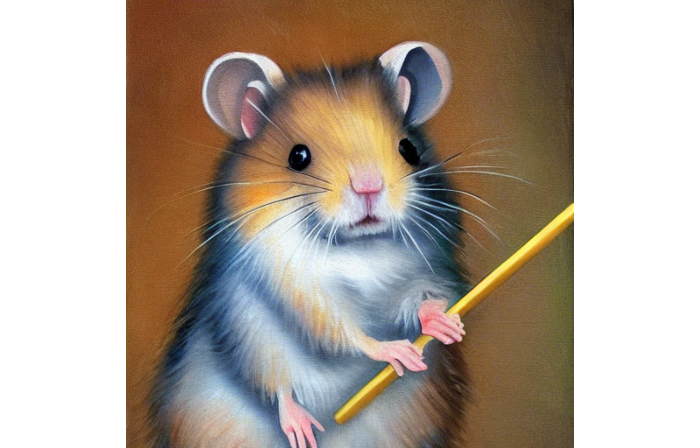
Hello world is dull and abstract. Try a brush-wielding hamster. Why? Because we can, and it's not as insane as Napoleon's cat. Another image:
Generating an image from a text prompt and another image is interesting. I made this picture in two minutes using the image editor (sorry, drawing wasn't my strong suit):
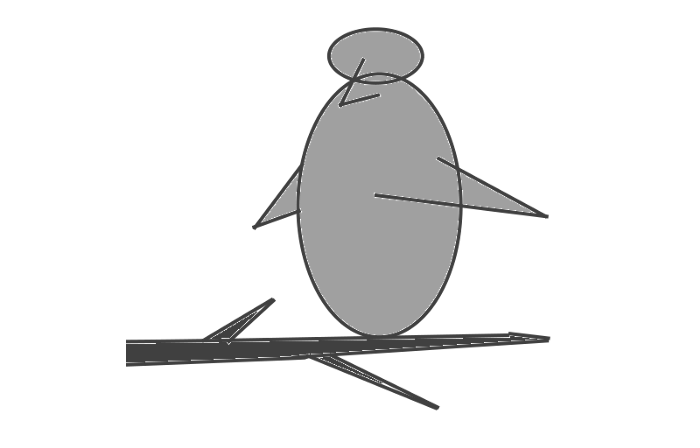
I can create an image from this drawing:
python3 scripts/img2img.py --prompt "A bird is sitting on a tree branch" --ckpt sd-v1-4.ckpt --init-img bird.png --strength 0.8It was far better than my initial drawing:

I hope readers understand and experiment.
Stable Diffusion UI
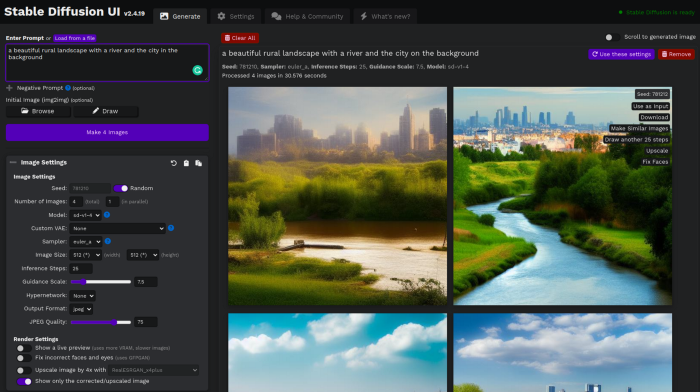
Developers love the command line, but regular users may struggle. Stable Diffusion UI projects simplify image generation and installation. Simple usage:
Unpack the ZIP after downloading it from https://github.com/cmdr2/stable-diffusion-ui/releases. Linux and Windows are compatible with Stable Diffusion UI (sorry for Mac users, but those machines are not well-suitable for heavy machine learning tasks anyway;).
Start the script.
Done. The web browser UI makes configuring various Stable Diffusion features (upscaling, filtering, etc.) easy:
V2.1 of Stable Diffusion
I noticed the notification about releasing version 2.1 while writing this essay, and it was intriguing to test it. First, compare version 2 to version 1:
alternative text encoding. The Contrastive LanguageImage Pre-training (CLIP) deep learning model, which was trained on a significant number of text-image pairs, is used in Stable Diffusion 1. The open-source CLIP implementation used in Stable Diffusion 2 is called OpenCLIP. It is difficult to determine whether there have been any technical advancements or if legal concerns were the main focus. However, because the training datasets for the two text encoders were different, the output results from V1 and V2 will differ for the identical text prompts.
a new depth model that may be used to the output of image-to-image generation.
a revolutionary upscaling technique that can quadruple the resolution of an image.
Generally higher resolution Stable Diffusion 2 has the ability to produce both 512x512 and 768x768 pictures.
The Hugging Face website offers a free online demo of Stable Diffusion 2.1 for code testing. The process is the same as for version 1.4. Download a fresh version and activate the environment:
conda deactivate
conda env remove -n ldm  # Use this if version 1 was previously installed
git clone https://github.com/Stability-AI/stablediffusion
cd stablediffusion
conda env create -f environment.yaml
conda activate ldm
Hugging Face offers a new weights ckpt file.
The Out of memory error prevented me from running this version on my 8 GB GPU. Version 2.1 fails on CPUs with the slow conv2d cpu not implemented for Half error (according to this GitHub issue, the CPU support for this algorithm and data type will not be added). The model can be modified from half to full precision (float16 instead of float32), however it doesn't make sense since v1 runs up to 10 minutes on the CPU and v2.1 should be much slower. The online demo results are visible. The same hamster painting with a brush prompt yielded this result:
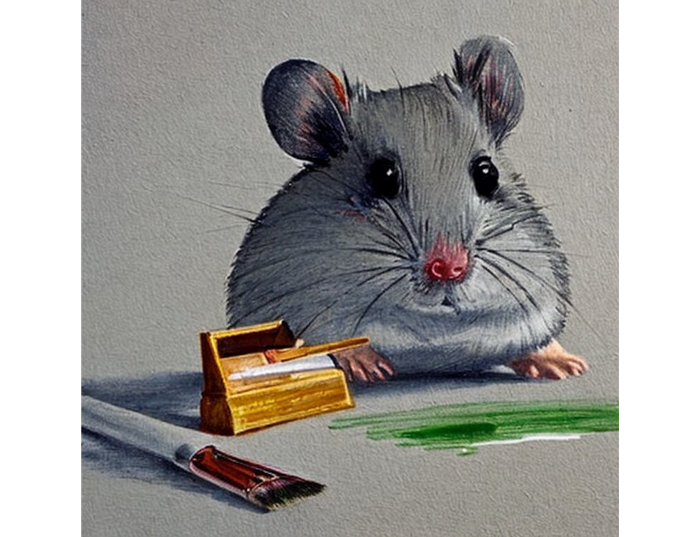
It looks different from v1, but it functions and has a higher resolution.
The superresolution.py script can run the 4x Stable Diffusion upscaler locally (the x4-upscaler-ema.ckpt weights file should be in the same folder):
python3 scripts/gradio/superresolution.py configs/stable-diffusion/x4-upscaling.yaml x4-upscaler-ema.ckptThis code allows the web browser UI to select the image to upscale:
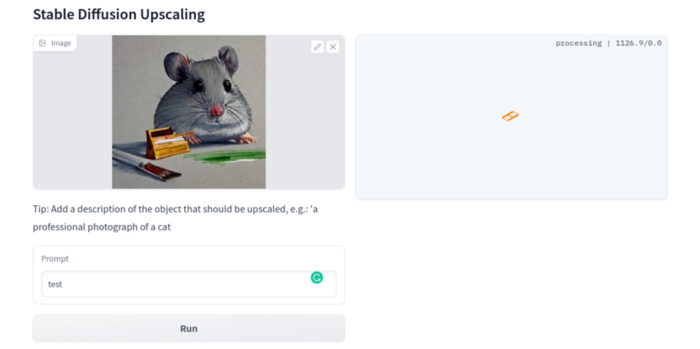
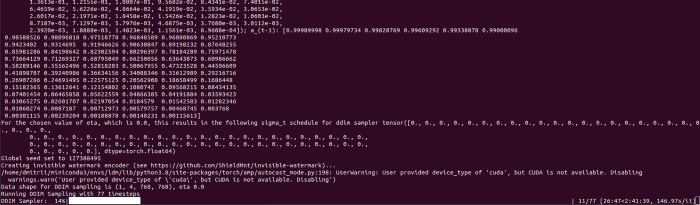
The copy-paste strategy may explain why the upscaler needs a text prompt (and the Hugging Face code snippet does not have any text input as well). I got a GPU out of memory error again, although CUDA can be disabled like v1. However, processing an image for more than two hours is unlikely:
Stable Diffusion Limitations
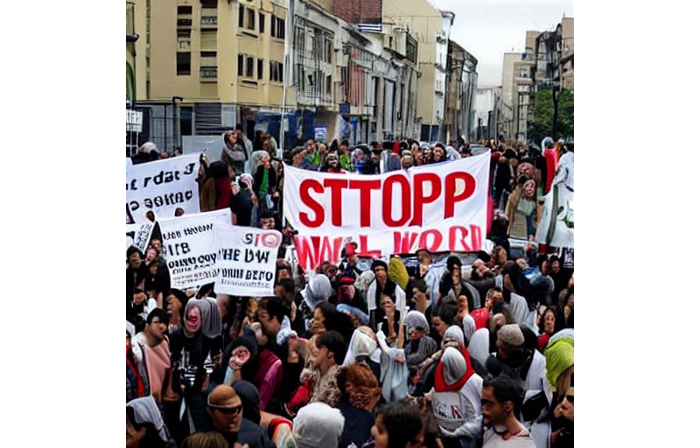
When we use the model, it's fun to see what it can and can't do. Generative models produce abstract visuals but not photorealistic ones. This fundamentally limits The generative neural network was trained on text and image pairs, but humans have a lot of background knowledge about the world. The neural network model knows nothing. If someone asks me to draw a Chinese text, I can draw something that looks like Chinese but is actually gibberish because I never learnt it. Generative AI does too! Humans can learn new languages, but the Stable Diffusion AI model includes only language and image decoder brain components. For instance, the Stable Diffusion model will pull NO WAR banner-bearers like this:
V1:
V2.1:
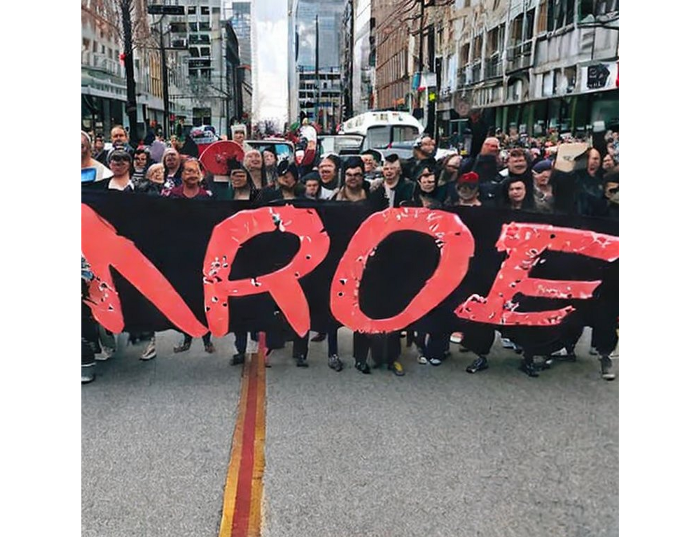
The shot shows text, although the model never learned to read or write. The model's string tokenizer automatically converts letters to lowercase before generating the image, so typing NO WAR banner or no war banner is the same.
I can also ask the model to draw a gorgeous woman:
V1:

V2.1:

The first image is gorgeous but physically incorrect. A second one is better, although it has an Uncanny valley feel. BTW, v2 has a lifehack to add a negative prompt and define what we don't want on the image. Readers might try adding horrible anatomy to the gorgeous woman request.
If we ask for a cartoon attractive woman, the results are nice, but accuracy doesn't matter:
V1:
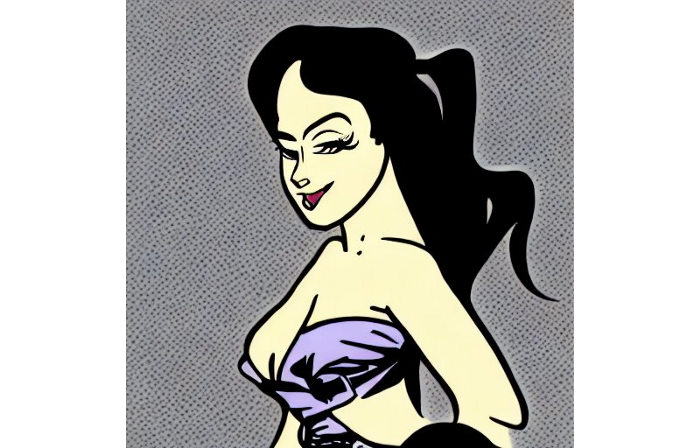
V2.1:
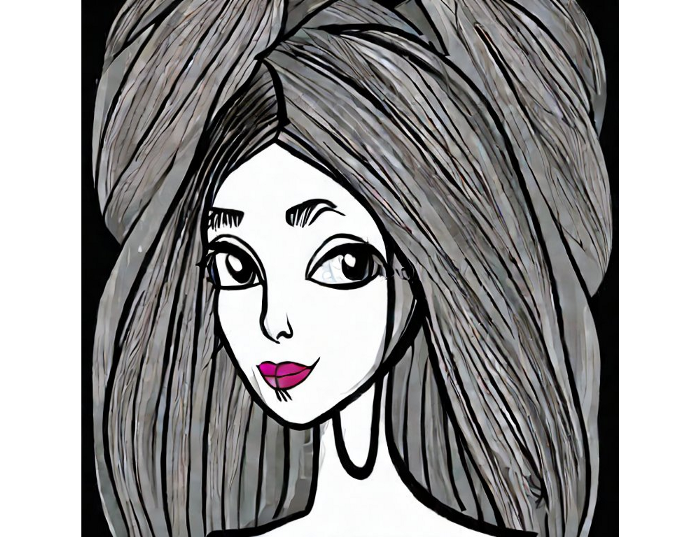
Another example: I ordered a model to sketch a mouse, which looks beautiful but has too many legs, ears, and fingers:
V1:
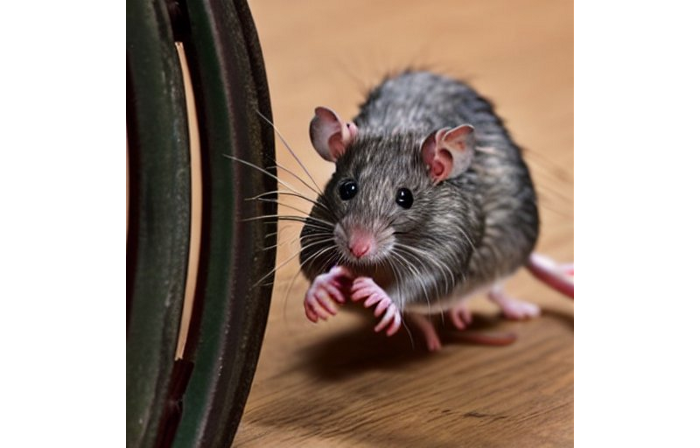
V2.1: improved but not perfect.
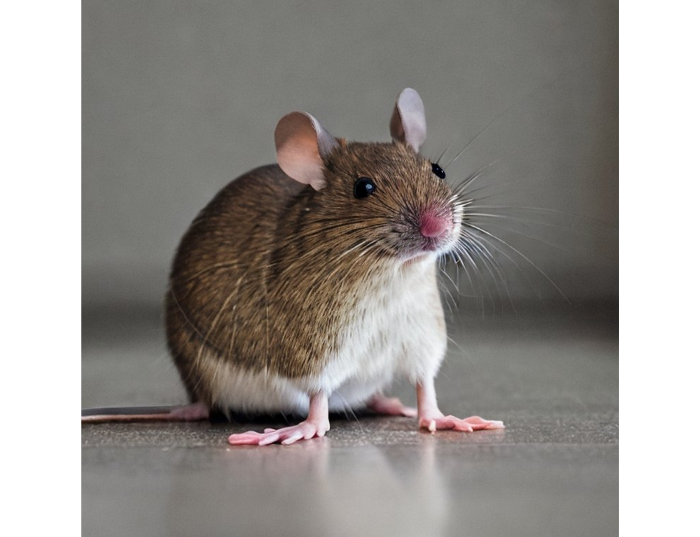
V1 produces a fun cartoon flying mouse if I want something more abstract:
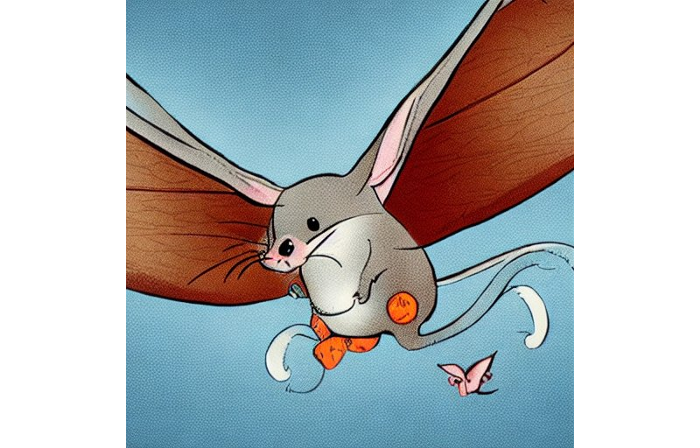
I tried multiple times with V2.1 but only received this:
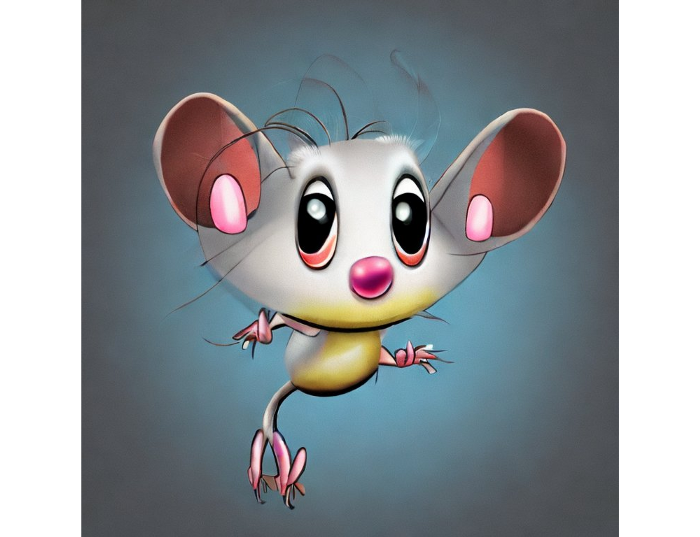
The image is OK, but the first version is closer to the request.
Stable Diffusion struggles to draw letters, fingers, etc. However, abstract images yield interesting outcomes. A rural landscape with a modern metropolis in the background turned out well:
V1:

V2.1:

Generative models help make paintings too (at least, abstract ones). I searched Google Image Search for modern art painting to see works by real artists, and this was the first image:

I typed "abstract oil painting of people dancing" and got this:
V1:

V2.1:

It's a different style, but I don't think the AI-generated graphics are worse than the human-drawn ones.
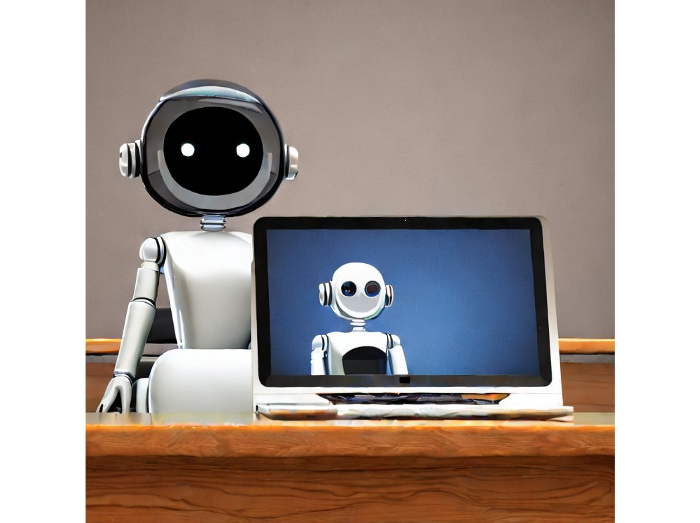
The AI model cannot think like humans. It thinks nothing. A stable diffusion model is a billion-parameter matrix trained on millions of text-image pairs. I input "robot is creating a picture with a pen" to create an image for this post. Humans understand requests immediately. I tried Stable Diffusion multiple times and got this:
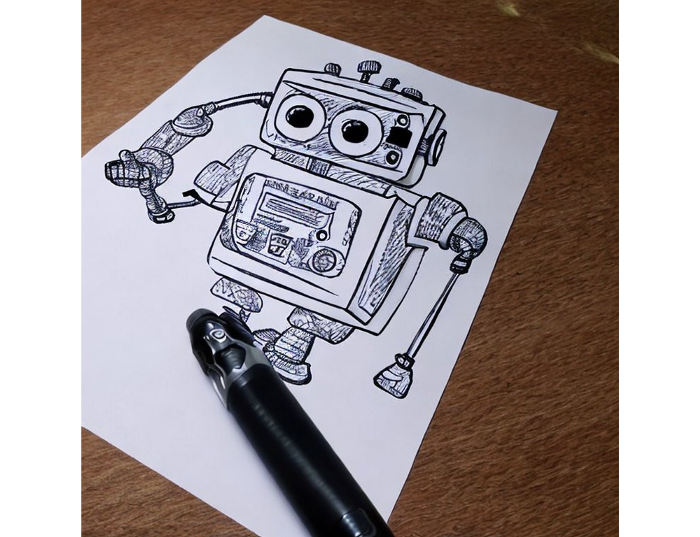
This great artwork has a pen, robot, and sketch, however it was not asked. Maybe it was because the tokenizer deleted is and a words from a statement, but I tried other requests such robot painting picture with pen without success. It's harder to prompt a model than a person.
I hope Stable Diffusion's general effects are evident. Despite its limitations, it can produce beautiful photographs in some settings. Readers who want to use Stable Diffusion results should be warned. Source code examination demonstrates that Stable Diffusion images feature a concealed watermark (text StableDiffusionV1 and SDV2) encoded using the invisible-watermark Python package. It's not a secret, because the official Stable Diffusion repository's test watermark.py file contains a decoding snippet. The put watermark line in the txt2img.py source code can be removed if desired. I didn't discover this watermark on photographs made by the online Hugging Face demo. Maybe I did something incorrectly (but maybe they are just not using the txt2img script on their backend at all).
Conclusion
The Stable Diffusion model was fascinating. As I mentioned before, trying something yourself is always better than taking someone else's word, so I encourage readers to do the same (including this article as well;).
Is Generative AI a game-changer? My humble experience tells me:
I think that place has a lot of potential. For designers and artists, generative AI can be a truly useful and innovative tool. Unfortunately, it can also pose a threat to some of them since if users can enter a text field to obtain a picture or a website logo in a matter of clicks, why would they pay more to a different party? Is it possible right now? unquestionably not yet. Images still have a very poor quality and are erroneous in minute details. And after viewing the image of the stunning woman above, models and fashion photographers may also unwind because it is highly unlikely that AI will replace them in the upcoming years.
Today, generative AI is still in its infancy. Even 768x768 images are considered to be of a high resolution when using neural networks, which are computationally highly expensive. There isn't an AI model that can generate high-resolution photographs natively without upscaling or other methods, at least not as of the time this article was written, but it will happen eventually.
It is still a challenge to accurately represent knowledge in neural networks (information like how many legs a cat has or the year Napoleon was born). Consequently, AI models struggle to create photorealistic photos, at least where little details are important (on the other side, when I searched Google for modern art paintings, the results are often even worse;).
When compared to the carefully chosen images from official web pages or YouTube reviews, the average output quality of a Stable Diffusion generation process is actually less attractive because to its high degree of randomness. When using the same technique on their own, consumers will theoretically only view those images as 1% of the results.
Anyway, it's exciting to witness this area's advancement, especially because the project is open source. Google's Imagen and DALL-E 2 can also produce remarkable findings. It will be interesting to see how they progress.