







More on Entrepreneurship/Creators

Rachel Greenberg
4 years ago
The Unsettling Fact VC-Backed Entrepreneurs Don't Want You to Know
What they'll do is scarier.

My acquaintance recently joined a VC-funded startup. Money, equity, and upside possibilities were nice, but he had a nagging dread.
They just secured a $40M round and are hiring like crazy to prepare for their IPO in two years. All signals pointed to this startup's (a B2B IT business in a stable industry) success, and its equity-holding workers wouldn't pass that up.
Five months after starting the work, my friend struggled with leaving. We might overlook the awful culture and long hours at the proper price. This price plus the company's fate and survival abilities sent my friend departing in an unpleasant unplanned resignation before jumping on yet another sinking ship.
This affects founders. This affects VC-backed companies (and all businesses). This affects anyone starting, buying, or running a business.
Here's the under-the-table approach that's draining VC capital, leaving staff terrified (or jobless), founders rattled, and investors upset. How to recognize, solve, and avoid it
The unsettling reality behind door #1
You can't raise money off just your looks, right? If "looks" means your founding team's expertise, then maybe. In my friend's case, the founding team's strong qualifications and track records won over investors before talking figures.
They're hardly the only startup to raise money without a profitable customer acquisition strategy. Another firm raised money for an expensive sleep product because it's eco-friendly. They were off to the races with a few keywords and key players.
Both companies, along with numerous others, elected to invest on product development first. Company A employed all the tech, then courted half their market (they’re a tech marketplace that connects two parties). Company B spent millions on R&D to create a palatable product, then flooded the world with marketing.
My friend is on Company B's financial team, and he's seen where they've gone wrong. It's terrible.
Company A (tech market): Growing? Not quite. To achieve the ambitious expansion they (and their investors) demand, they've poured much of their little capital into salespeople: Cold-calling commission and salary salesmen. Is it working? Considering attrition and companies' dwindling capital, I don't think so.
Company B (green sleep) has been hiring, digital marketing, and opening new stores like crazy. Growing expenses should result in growing revenues and a favorable return on investment; if you grow too rapidly, you may neglect to check that ROI.
Once Company A cut headcount and Company B declared “going concerned”, my friend realized both startups had the same ailment and didn't recognize it.
I shouldn't have to ask a friend to verify a company's cash reserves and profitability to spot a financial problem. It happened anyhow.
The frightening part isn't that investors were willing to invest millions without product-market fit, CAC, or LTV estimates. That's alarming, but not as scary as the fact that startups aren't understanding the problem until VC rounds have dried up.
When they question consultants if their company will be around in 6 months. It’s a red flag. How will they stretch $20M through a 2-year recession with a $3M/month burn rate and no profitability? Alarms go off.
Who's in danger?
In a word, everyone who raised money without a profitable client acquisition strategy or enough resources to ride out dry spells.
Money mismanagement and poor priorities affect every industry (like sinking all your capital into your product, team, or tech, at the expense of probing what customer acquisition really takes and looks like).
This isn't about tech, real estate, or recession-proof luxury products. Fast, cheap, easy money flows into flashy-looking teams with buzzwords, trending industries, and attractive credentials.
If these companies can't show progress or get a profitable CAC, they can't raise more money. They die if they can't raise more money (or slash headcount and find shoestring budget solutions until they solve the real problem).
The kiss of death (and how to avoid it)
If you're running a startup and think raising VC is the answer, pause and evaluate. Do you need the money now?
I'm not saying VC is terrible or has no role. Founders have used it as a Band-Aid for larger, pervasive problems. Venture cash isn't a crutch for recruiting consumers profitably; it's rocket fuel to get you what and who you need.
Pay-to-play isn't a way to throw money at the wall and hope for a return. Pay-to-play works until you run out of money, and if you haven't mastered client acquisition, your cash will diminish quickly.
How can you avoid this bottomless pit? Tips:
Understand your burn rate
Keep an eye on your growth or profitability.
Analyze each and every marketing channel and initiative.
Make lucrative customer acquisition strategies and satisfied customers your top two priorities. not brand-new products. not stellar hires. avoid the fundraising rollercoaster to save time. If you succeed in these two tasks, investors will approach you with their thirsty offers rather than the other way around, and your cash reserves won't diminish as a result.
Not as much as your grandfather
My family friend always justified expensive, impractical expenditures by saying it was only monopoly money. In business, startups, and especially with money from investors expecting a return, that's not true.
More founders could understand that there isn't always another round if they viewed VC money as their own limited pool. When the well runs dry, you must refill it or save the day.
Venture financing isn't your grandpa's money. A discerning investor has entrusted you with dry powder in the hope that you'll use it wisely, strategically, and thoughtfully. Use it well.

DC Palter
3 years ago
How Will You Generate $100 Million in Revenue? The Startup Business Plan
A top-down company plan facilitates decision-making and impresses investors.

A startup business plan starts with the product, the target customers, how to reach them, and how to grow the business.
Bottom-up is terrific unless venture investors fund it.
If it can prove how it can exceed $100M in sales, investors will invest. If not, the business may be wonderful, but it's not venture capital-investable.
As a rule, venture investors only fund firms that expect to reach $100M within 5 years.
Investors get nothing until an acquisition or IPO. To make up for 90% of failed investments and still generate 20% annual returns, portfolio successes must exit with a 25x return. A $20M-valued company must be acquired for $500M or more.
This requires $100M in sales (or being on a nearly vertical trajectory to get there). The company has 5 years to attain that milestone and create the requisite ROI.
This motivates venture investors (venture funds and angel investors) to hunt for $100M firms within 5 years. When you pitch investors, you outline how you'll achieve that aim.
I'm wary of pitches after seeing a million hockey sticks predicting $5M to $100M in year 5 that never materialized. Doubtful.
Startups fail because they don't have enough clients, not because they don't produce a great product. That jump from $5M to $100M never happens. The company reaches $5M or $10M, growing at 10% or 20% per year. That's great, but not enough for a $500 million deal.
Once it becomes clear the company won’t reach orbit, investors write it off as a loss. When a corporation runs out of money, it's shut down or sold in a fire sale. The company can survive if expenses are trimmed to match revenues, but investors lose everything.
When I hear a pitch, I'm not looking for bright income projections but a viable plan to achieve them. Answer these questions in your pitch.
Is the market size sufficient to generate $100 million in revenue?
Will the initial beachhead market serve as a springboard to the larger market or as quicksand that hinders progress?
What marketing plan will bring in $100 million in revenue? Is the market diffuse and will cost millions of dollars in advertising, or is it one, focused market that can be tackled with a team of salespeople?
Will the business be able to bridge the gap from a small but fervent set of early adopters to a larger user base and avoid lock-in with their current solution?
Will the team be able to manage a $100 million company with hundreds of people, or will hypergrowth force the organization to collapse into chaos?
Once the company starts stealing market share from the industry giants, how will it deter copycats?
The requirement to reach $100M may be onerous, but it provides a context for difficult decisions: What should the product be? Where should we concentrate? who should we hire? Every strategic choice must consider how to reach $100M in 5 years.
Focusing on $100M streamlines investor pitches. Instead of explaining everything, focus on how you'll attain $100M.
As an investor, I know I'll lose my money if the startup doesn't reach this milestone, so the revenue prediction is the first thing I look at in a pitch deck.
Reaching the $100M goal needs to be the first thing the entrepreneur thinks about when putting together the business plan, the central story of the pitch, and the criteria for every important decision the company makes.

Tim Denning
4 years ago
Bills are paid by your 9 to 5. 6 through 12 help you build money.
40 years pass. After 14 years of retirement, you die. Am I the only one who sees the problem?

I’m the Jedi master of escaping the rat race.
Not to impress. I know this works since I've tried it. Quitting a job to make money online is worse than Kim Kardashian's internet-burning advice.
Let me help you rethink the move from a career to online income to f*ck you money.
To understand why a job is a joke, do some life math.
Without a solid why, nothing makes sense.
The retirement age is 65. Our processed food consumption could shorten our 79-year average lifespan.
You spend 40 years working.
After 14 years of retirement, you die.
Am I alone in seeing the problem?
Life is too short to work a job forever, especially since most people hate theirs. After-hours skills are vital.
Money equals unrestricted power, f*ck you.
F*ck you money is the answer.
Jack Raines said it first. He says we can do anything with the money. Jack, a young rebel straight out of college, can travel and try new foods.
F*ck you money signifies not checking your bank account before buying.
F*ck you” money is pure, unadulterated freedom with no strings attached.
Jack claims you're rich when you rarely think about money.
Avoid confusion.
This doesn't imply you can buy a Lamborghini. It indicates your costs, income, lifestyle, and bank account are balanced.
Jack established an online portfolio while working for UPS in Atlanta, Georgia. So he gained boundless power.
The portion that many erroneously believe
Yes, you need internet abilities to make money, but they're not different from 9-5 talents.
Sahil Lavingia, Gumroad's creator, explains.
A job is a way to get paid to learn.
Mistreat your boss 9-5. Drain his skills. Defuse him. Love and leave him (eventually).
Find another employment if yours is hazardous. Pick an easy job. Make sure nothing sneaks into your 6-12 time slot.
The dumb game that makes you a sheep
A 9-5 job requires many job interviews throughout life.
You email your résumé to employers and apply for jobs through advertisements. This game makes you a sheep.
You're competing globally. Work-from-home makes the competition tougher. If you're not the cheapest, employers won't hire you.
After-hours online talents (say, 6 pm-12 pm) change the game. This graphic explains it better:
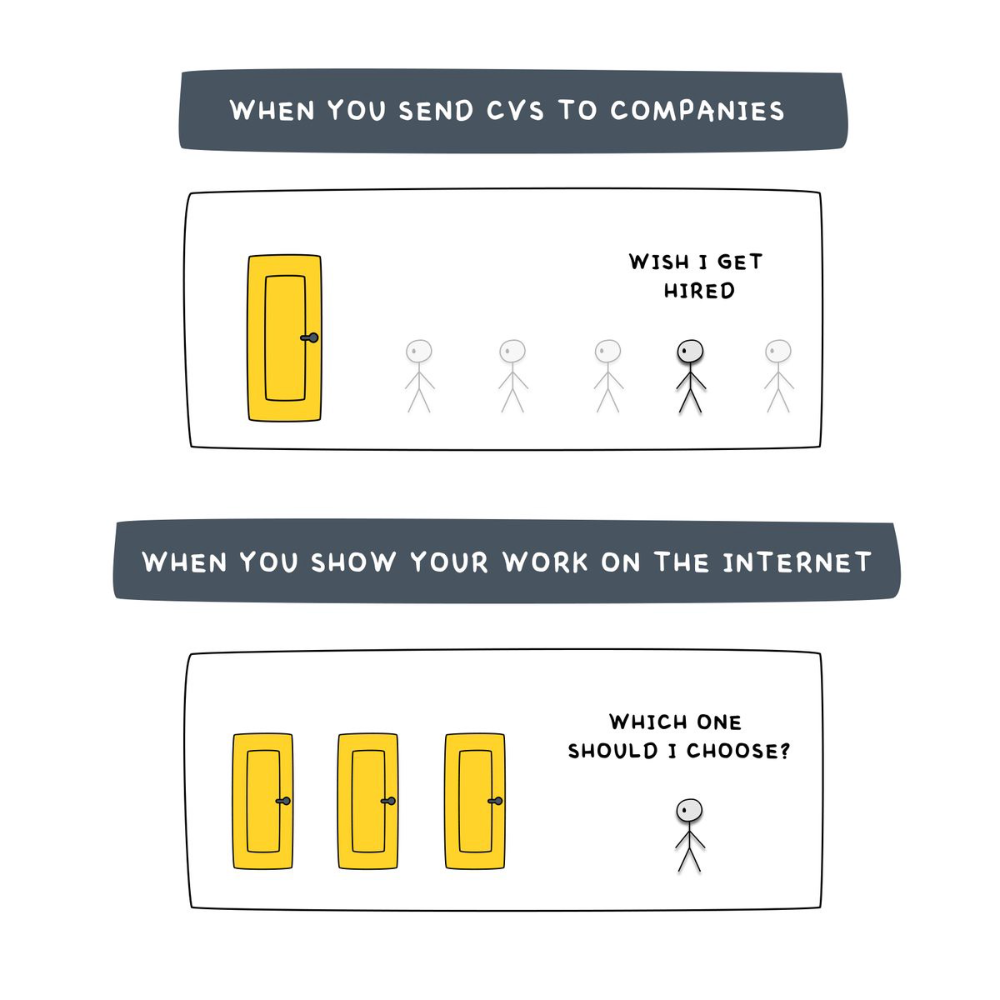
Online talents boost after-hours opportunities.
You go from wanting to be picked to picking yourself. More chances equal more money. Your f*ck you fund gets the extra cash.
A novel method of learning is essential.
College costs six figures and takes a lifetime to repay.
Informal learning is distinct. 6-12pm:
Observe the carefully controlled Twitter newsfeed.
Make use of Teachable and Gumroad's online courses.
Watch instructional YouTube videos
Look through the top Substack newsletters.
Informal learning is more effective because it's not obvious. It's fun to follow your curiosity and hobbies.
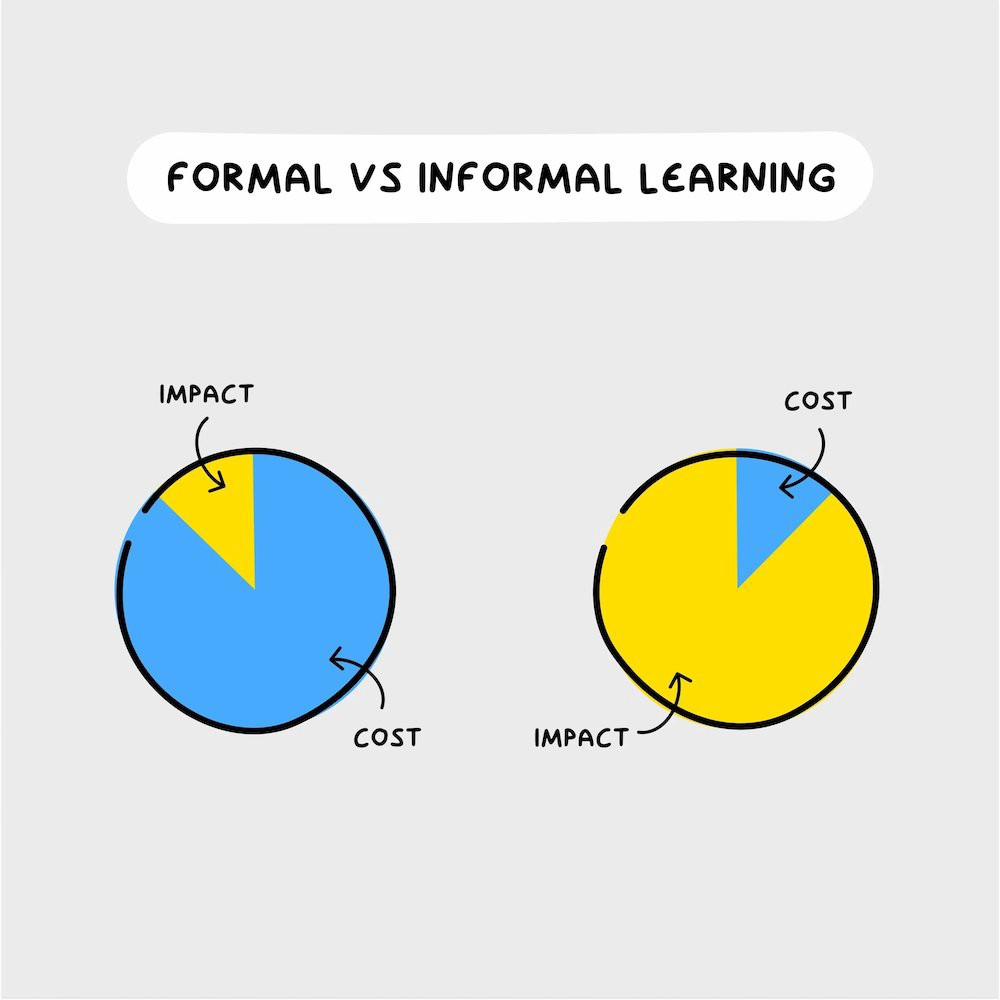
The majority of people lack one attitude. It's simple to learn.
One big impediment stands in the way of f*ck you money and time independence. So often.
Too many people plan after 6-12 hours. Dreaming. Big-thinkers. Strategically. They fill their calendar with meetings.
This is after-hours masturb*tion.
Sahil Bloom reminded me that a bias towards action will determine if this approach works for you.
The key isn't knowing what to do from 6-12 a.m. Trust yourself and develop abilities as you go. It's for building the parachute after you jump.
Sounds risky. We've eliminated the risk by finishing this process after hours while you work 9-5.
With no risk, you can have an I-don't-care attitude and still be successful.
When you choose to move forward, this occurs.
Once you try 9-5/6-12, you'll tell someone.
It's bad.
Few of us hang out with problem-solvers.
It's how much of society operates. So they make reasons so they can feel better about not giving you money.
Matthew Kobach told me chasing f*ck you money is easier with like-minded folks.
Without f*ck you money friends, loneliness will take over and you'll think you've messed up when you just need to keep going.
Steal this easy guideline
Let's act. No more fluffing and caressing.
1. Learn
If you detest your 9-5 talents or don't think they'll work online, get new ones. If you're skilled enough, continue.
Easlo recommends these skills:
Designer for Figma
Designer Canva
bubble creators
editor in Photoshop
Automation consultant for Zapier
Designer of Webflow
video editor Adobe
Ghostwriter for Twitter
Idea consultant
Artist in Blender Studio
2. Develop the ability
Every night from 6-12, apply the skill.
Practicing ghostwriting? Write someone's tweets for free. Do someone's website copy to learn copywriting. Get a website to the top of Google for a keyword to understand SEO.
Free practice is crucial. Your 9-5 pays the money, so work for free.
3. Take off stealthily like a badass
Another mistake. Sell to few. Don't be the best. Don't claim expertise.
Sell your new expertise to others behind you.
Two ways:
Using a digital good
By providing a service,
Point 1 also includes digital service examples. Digital products include eBooks, communities, courses, ad-supported podcasts, and templates. It's easy. Your 9-5 job involves one of these.
Take ideas from work.
Why? They'll steal your time for profit.
4. Iterate while feeling awful
First-time launches always fail. You'll feel terrible. Okay. Remember your 9-5?
Find improvements. Ask free and paying consumers what worked.
Multiple relaunches, each 1% better.
5. Discover more
Never stop learning. Improve your skill. Add a relevant skill. Learn copywriting if you write online.
After-hours students earn the most.
6. Continue
Repetition is key.
7. Make this one small change.
Consistently. The 6-12 momentum won't make you rich in 30 days; that's success p*rn.
Consistency helps wage slaves become f*ck you money. Most people can't switch between the two.
Putting everything together
It's easy. You're probably already doing some.
This formula explains why, how, and what to do. It's a 5th-grade-friendly blueprint. Good.
Reduce financial risk with your 9-to-5. Replace Netflix with 6-12 money-making talents.
Life is short; do whatever you want. Today.
You might also like

Sneaker News
4 years ago
This Month Will See The Release Of Travis Scott x Nike Footwear
Following the catastrophes at Astroworld, Travis Scott was swiftly vilified by both media outlets and fans alike, and the names who had previously supported him were quickly abandoned. Nike, on the other hand, remained silent, only delaying the release of La Flame's planned collaborations, such as the Air Max 1 and Air Trainer 1, indefinitely. While some may believe it is too soon for the artist to return to the spotlight, the Swoosh has other ideas, as Nice Kicks reveals that these exact sneakers will be released in May.
Both the Travis Scott x Nike Air Max 1 and the Travis Scott x Nike Air Trainer 1 are set to come in two colorways this month. Tinker Hatfield's renowned runner will meet La Flame's "Baroque Brown" and "Saturn Gold" make-ups, which have been altered with backwards Swooshes and outdoors-themed webbing. The high-top trainer is being customized with Hatfield's "Wheat" and "Grey Haze" palettes, both of which include zippers across the heel, co-branded patches, and other details.
See below for a closer look at the four footwear. TravisScott.com is expected to release the shoes on May 20th, according to Nice Kicks. Following that, on May 27th, Nike SNKRS will release the shoe.
Travis Scott x Nike Air Max 1 "Baroque Brown"
Release Date: 2022
Color: Baroque Brown/Lemon Drop/Wheat/Chile Red
Mens: $160
Style Code: DO9392-200
Pre-School: $85
Style Code: DN4169-200
Infant & Toddler: $70
Style Code: DN4170-200
Travis Scott x Nike Air Max 1 "Saturn Gold"
Release Date: 2022
Color: N/A
Mens: $160
Style Code: DO9392-700
Travis Scott x Nike Air Trainer 1 "Wheat"
Restock Date: May 27th, 2022 (Friday)
Original Release Date: May 20th, 2022 (Friday)
Color: N/A
Mens: $140
Style Code: DR7515-200
Travis Scott x Nike Air Trainer 1 "Grey Haze"
Restock Date: May 27th, 2022 (Friday)
Original Release Date: May 20th, 2022 (Friday)
Color: N/A
Mens: $140
Style Code: DR7515-001

Cory Doctorow
3 years ago
The current inflation is unique.
New Stiglitz just dropped.
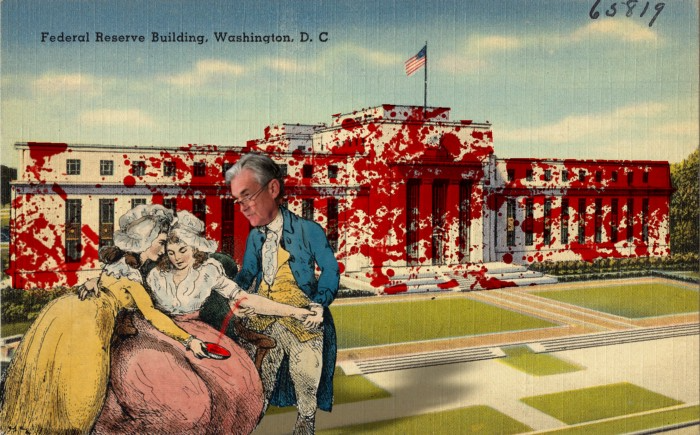
Here's the inflation story everyone believes (warning: it's false): America gave the poor too much money during the recession, and now the economy is awash with free money, which made them so rich they're refusing to work, meaning the economy isn't making anything. Prices are soaring due to increased cash and missing labor.
Lawrence Summers says there's only one answer. We must impoverish the poor: raise interest rates, cause a recession, and eliminate millions of jobs, until the poor are stripped of their underserved fortunes and return to work.
https://pluralistic.net/2021/11/20/quiet-part-out-loud/#profiteering
This is nonsense. Countries around the world suffered inflation during and after lockdowns, whether they gave out humanitarian money to keep people from starvation. America has slightly greater inflation than other OECD countries, but it's not due to big relief packages.
The Causes of and Responses to Today's Inflation, a Roosevelt Institute report by Nobel-winning economist Joseph Stiglitz and macroeconomist Regmi Ira, debunks this bogus inflation story and offers a more credible explanation for inflation.
https://rooseveltinstitute.org/wp-content/uploads/2022/12/RI CausesofandResponsestoTodaysInflation Report 202212.pdf
Sharp interest rate hikes exacerbate the slump and increase inflation, the authors argue. They compare monetary policy inflation cures to medieval bloodletting, where doctors repeated the same treatment until the patient recovered (for which they received credit) or died (which was more likely).
Let's discuss bloodletting. Inflation hawks warn of the wage price spiral, when inflation rises and powerful workers bargain for higher pay, driving up expenses, prices, and wages. This is the fairy-tale narrative of the 1970s, and it's true except that OPEC's embargo drove up oil prices, which produced inflation. Oh well.
Let's be generous to seventies-haunted inflation hawks and say we're worried about a wage-price spiral. Fantastic! No. Real wages are 2.3% lower than they were in Oct 2021 after peaking in June at 4.8%.
Why did America's powerful workers take a paycut rather than demand inflation-based pay? Weak unions, globalization, economic developments.
Workers don't expect inflation to rise, so they're not requesting inflationary hikes. Inflationary expectations have remained moderate, consistent with our data interpretation.
https://www.newyorkfed.org/microeconomics/sce#/
Neither are workers. Working people see surplus savings as wealth and spend it gradually over their lives, despite rising demand. People may have saved money by staying in during the lockdown, but they don't eat out every night to make up for it. Instead, they keep those savings as precautionary balances. This is why the economy is lagging.
People don't buy non-traded goods with pandemic savings (basically, imports). Imports don't multiply like domestic purchases. If you buy a loaf of bread from the corner baker for $1 and they spend it at the tavern across the street, that dollar generates $3 in economic activity. Spending a dollar on foreign goods leaves the country and any multiplier effect happens there, not in the US.
Only marginally higher wages. The ECI is up 1.6% from 2019. Almost all gains went to the 25% lowest-paid Americans. Contrary to the inflation worry about too much savings, these workers don't make enough to save, even post-pandemic.
Recreation and transit spending are at or below pre-pandemic levels. Higher food and hotel prices (which doesn’t mean we’re buying more food than we were in 2019, just that it costs more).
What causes inflation if not greedy workers, free money, and high demand? The most expensive domestic goods produce the biggest revenues for their manufacturers. They charge you more without paying their workers or suppliers more.
The largest price-gougers are funneling their earnings to rich people who store it offshore through stock buybacks and dividends. A $1 billion stock buyback doesn't buy $1 billion in bread.
Five factors influence US inflation today:
I. Price rises for energy and food
II. shifts in consumer tastes
III. supply interruptions (mainly autos);
IV. increased rents (due to telecommuting);
V. monopoly (AKA price-gouging).
None can be remedied by raising interest rates or laying off workers.
Russia's invasion of Ukraine, omicron, and China's Zero Covid policy all disrupted the flow of food, energy, and production inputs. The price went higher because we made less.
After Russia invaded Ukraine, oil prices spiked, and sanctions made it worse. But that was February. By October, oil prices had returned to pre-pandemic, 2015 levels attributable to global economic adjustments, including a shift to renewables. Every new renewable installation reduces oil consumption and affects oil prices.
High food prices have a simple solution. The US and EU have bribed farmers not to produce for 50 years. If the war continues, this program may end, and food prices may decline.
Demand changes. We want different things than in 2019, not more. During the lockdown, people substituted goods. Half of the US toilet-paper supply in 2019 was on commercial-sized rolls. This is created from different mills and stock than our toilet paper.
Lockdown pushed toilet paper demand to residential rolls, causing shortages (the TP hoarding story was just another pandemic urban legend). Because supermarket stores don't have accounts with commercial paper distributors, ordering from languishing stores was difficult. Kleenex and paper towel substitutions caused greater shortages.
All that drove increased costs in numerous product categories, and there were more cases. These increases are transient, caused by supply chain inefficiencies that are resolving.
Demand for frontline staff saw a one-time repricing of pay, which is being recouped as we speak.
Illnesses. Brittle, hollowed-out global supply chains aggravated this. The constant pursuit of cheap labor and minimal regulation by monopolies that dominate most sectors means things are manufactured in far-flung locations. Financialization means any surplus capital assets were sold off years ago, leaving firms with little production slack. After the epidemic, several of these systems took years to restart.
Automobiles are to blame. Financialization and monopolization consolidated microchip and auto production in Taiwan and China. When the lockdowns came, these worldwide corporations cancelled their chip orders, and when they placed fresh orders, they were at the back of the line.
That drove up car prices, which is why the US has slightly higher inflation than other wealthy countries: the economy is car-centric. Automobile prices account for 9% of the CPI. France: 3.6%
Rent shocks and telecommuting. After the epidemic, many professionals moved to exurbs, small towns, and the countryside to work from home. As commercial properties were vacated, it was impractical to adapt them for residential use due to planning restrictions. Addressing these restrictions will cut rent prices more than raising inflation rates, which halts housing construction.
Statistical mirages cause some rent inflation. The CPI estimates what homeowners would pay to rent their properties. When rents rise in your neighborhood, the CPI believes you're spending more on rent even if you have a 30-year fixed-rate mortgage.
Market dominance. Almost every area of the US economy is dominated by monopolies, whose CEOs disclose on investor calls that they use inflation scares to jack up prices and make record profits.
https://pluralistic.net/2022/02/02/its-the-economy-stupid/#overinflated
Long-term profit margins are rising. Markups averaged 26% from 1960-1980. 2021: 72%. Market concentration explains 81% of markup increases (e.g. monopolization). Profit margins reach a 70-year high in 2022. These elements interact. Monopolies thin out their sectors, making them brittle and sensitive to shocks.
If we're worried about a shrinking workforce, there are more humanitarian and sensible solutions than causing a recession and mass unemployment. Instead, we may boost US production capacity by easing workers' entry into the workforce.
https://pluralistic.net/2022/06/01/factories-to-condos-pipeline/#stuff-not-money
US female workforce participation ranks towards the bottom of developed countries. Many women can't afford to work due to America's lack of daycare, low earnings, and bad working conditions in female-dominated fields. If America doesn't have enough workers, childcare subsidies and minimum wages can help.
By contrast, driving the country into recession with interest-rate hikes will reduce employment, and the last recruited (women, minorities) are the first fired and the last to be rehired. Forcing America into recession won't enhance its capacity to create what its people want; it will degrade it permanently.
Nothing the Fed does can stop price hikes from international markets, lack of supply chain investment, COVID-19 disruptions, climate change, the Ukraine war, or market power. They can worsen it. When supply problems generate inflation, raising interest rates decreases investments that can remedy shortages.
Increasing interest rates won't cut rents since landlords pass on the expenses and high rates restrict investment in new dwellings where tenants could escape the costs.
Fixing the supply fixes supply-side inflation. Increase renewables investment (as the Inflation Reduction Act does). Monopolies can be busted (as the IRA does). Reshore key goods (as the CHIPS Act does). Better pay and child care attract employees.
Windfall taxes can claw back price-gouging corporations' monopoly earnings.
https://pluralistic.net/2022/03/15/sanctions-financing/#soak-the-rich
In 2008, we ruled out fiscal solutions (bailouts for debtors) and turned to monetary policy (bank bailouts). This preserved the economy but increased inequality and eroded public trust.
Monetary policy won't help. Even monetary policy enthusiasts recognize an 18-month lag between action and result. That suggests monetary tightening is unnecessary. Like the medieval bloodletter, central bankers whose interest rate hikes don't work swiftly may do more of the same, bringing the economy to its knees.
Interest rates must rise. Zero-percent interest fueled foolish speculation and financialization. Increasing rates will stop this. Increasing interest rates will destroy the economy and dampen inflation.
Then what? All recent evidence indicate to inflation decreasing on its own, as the authors argue. Supply side difficulties are finally being overcome, evidence shows. Energy and food prices are showing considerable mean reversion, which is disinflationary.
The authors don't recommend doing nothing. Best case scenario, they argue, is that the Fed won't keep raising interest rates until morale improves.

Tom Smykowski
3 years ago
CSS Scroll-linked Animations Will Transform The Web's User Experience
We may never tap again in ten years.
I discussed styling websites and web apps on smartwatches in my earlier article on W3C standardization.
The Parallax Chronicles
Section containing examples and flying objects
Another intriguing Working Draft I found applies to all devices, including smartphones.
These pages may have something intriguing. Take your time. Return after scrolling:
What connects these three pages?

JustinWick at English Wikipedia • CC-BY-SA-3.0
Scroll-linked animation, commonly called parallax, is the effect.
WordPress theme developers' quick setup and low-code tools made the effect popular around 2014.
Parallax: Why Designers Love It
The chapter that your designer shouldn't read
Online video playback required searching, scrolling, and clicking ten years ago. Scroll and click four years ago.
Some video sites let you swipe to autoplay the next video from an endless list.
UI designers create scrollable pages and apps to accommodate the behavioral change.
Web interactivity used to be mouse-based. Clicking a button opened a help drawer, and hovering animated it.
However, a large page with more material requires fewer buttons and less interactiveness.
Designers choose scroll-based effects. Design and frontend developers must fight the trend but prepare for the worst.
How to Create Parallax
The component that you might want to show the designer
JavaScript-based effects track page scrolling and apply animations.
Javascript libraries like lax.js simplify it.
Using it needs a lot of human mathematical and physical computations.
Your asset library must also be prepared to display your website on a laptop, television, smartphone, tablet, foldable smartphone, and possibly even a microwave.
Overall, scroll-based animations can be solved better.
CSS Scroll-linked Animations
CSS makes sense since it's presentational. A Working Draft has been laying the groundwork for the next generation of interactiveness.
The new CSS property scroll-timeline powers the feature, which MDN describes well.
Before testing it, you should realize it is poorly supported:
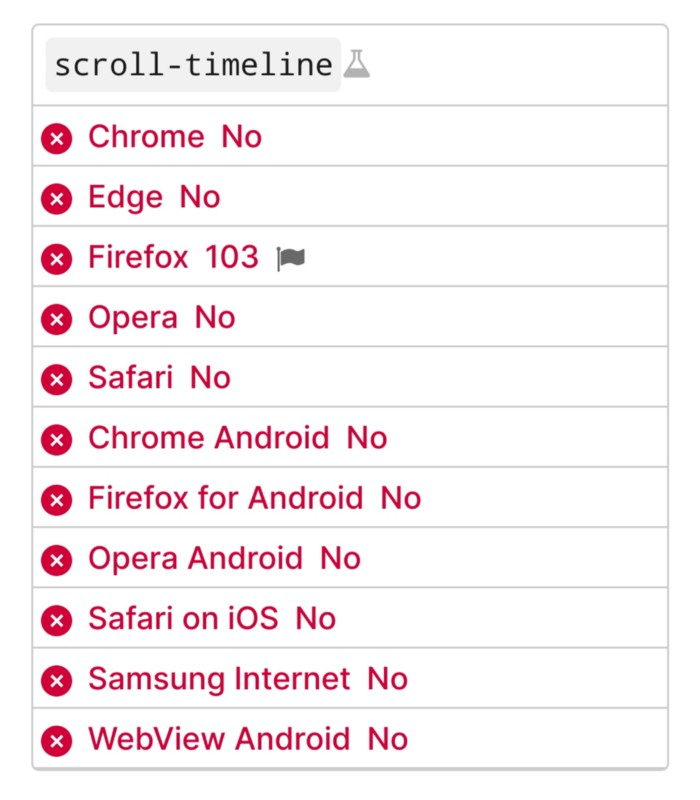
Firefox 103 currently supports it.
There is also a polyfill, with some demo examples to explore.
Summary
Web design was a protracted process. Started with pages with static backdrop images and scrollable text. Artists and designers may use the scroll-based animation CSS API to completely revamp our web experience.
It's a promising frontier. This post may attract a future scrollable web designer.
Ps. I have created flashcards for HTML, Javascript etc. Check them out!