





Integrity
Write
Loading...
Modern Eremite

Modern Eremite

3 years ago

The complete, easy-to-understand guide to bitcoin

More on Web3 & Crypto

OnChain Wizard

OnChain Wizard

3 years ago

How to make a >800 million dollars in crypto attacking the once 3rd largest stablecoin, Soros style

Everyone is talking about the $UST attack right now, including Janet Yellen. But no one is talking about how much money the attacker made (or how brilliant it was). Lets dig in.

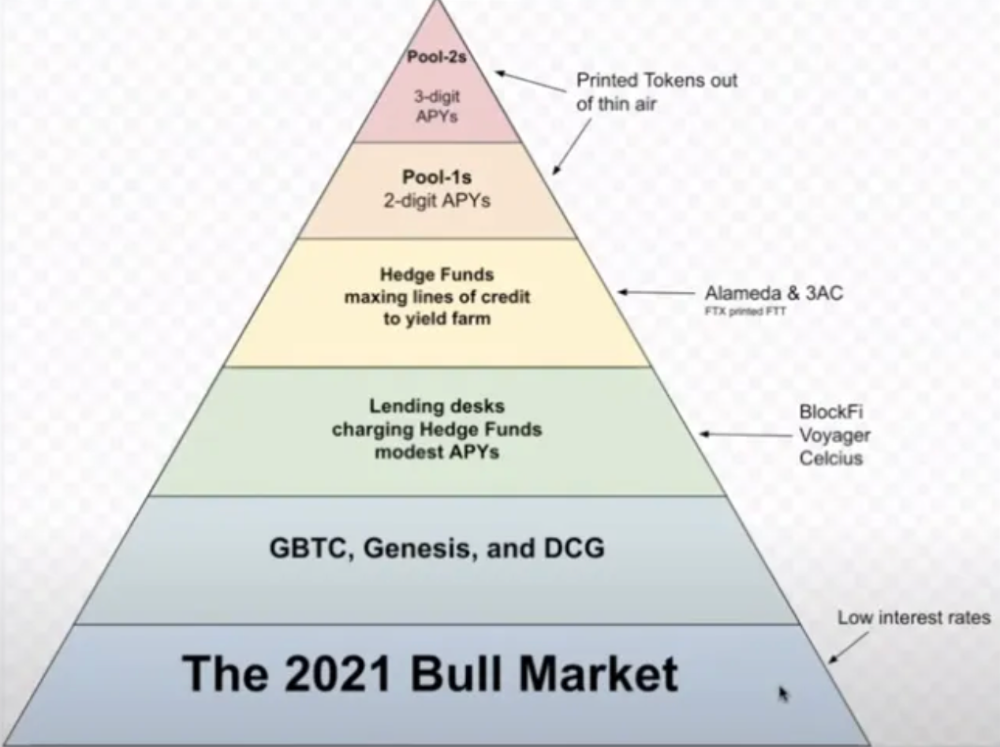
Our story starts in late March, when the Luna Foundation Guard (or LFG) starts buying BTC to help back $UST. LFG started accumulating BTC on 3/22, and by March 26th had a $1bn+ BTC position. This is leg #1 that made this trade (or attack) brilliant.

The second leg comes in the form of the 4pool Frax announcement for $UST on April 1st. This added the second leg needed to help execute the strategy in a capital efficient way (liquidity will be lower and then the attack is on).

We don't know when the attacker borrowed 100k BTC to start the position, other than that it was sold into Kwon's buying (still speculation). LFG bought 15k BTC between March 27th and April 11th, so lets just take the average price between these dates ($42k).


So you have a ~$4.2bn short position built. Over the same time, the attacker builds a $1bn OTC position in $UST. The stage is now set to create a run on the bank and get paid on your BTC short. In anticipation of the 4pool, LFG initially removes $150mm from 3pool liquidity.

The liquidity was pulled on 5/8 and then the attacker uses $350mm of UST to drain curve liquidity (and LFG pulls another $100mm of liquidity).

But this only starts the de-pegging (down to 0.972 at the lows). LFG begins selling $BTC to defend the peg, causing downward pressure on BTC while the run on $UST was just getting started.

With the Curve liquidity drained, the attacker used the remainder of their $1b OTC $UST position ($650mm or so) to start offloading on Binance. As withdrawals from Anchor turned from concern into panic, this caused a real de-peg as people fled for the exits

So LFG is selling $BTC to restore the peg while the attacker is selling $UST on Binance. Eventually the chain gets congested and the CEXs suspend withdrawals of $UST, fueling the bank run panic. $UST de-pegs to 60c at the bottom, while $BTC bleeds out.


The crypto community panics as they wonder how much $BTC will be sold to keep the peg. There are liquidations across the board and LUNA pukes because of its redemption mechanism (the attacker very well could have shorted LUNA as well). BTC fell 25% from $42k on 4/11 to $31.3k

So how much did our attacker make? There aren't details on where they covered obviously, but if they are able to cover (or buy back) the entire position at ~$32k, that means they made $952mm on the short.

On the $350mm of $UST curve dumps I don't think they took much of a loss, lets assume 3% or just $11m. And lets assume that all the Binance dumps were done at 80c, thats another $125mm cost of doing business. For a grand total profit of $815mm (bf borrow cost).

BTC was the perfect playground for the trade, as the liquidity was there to pull it off. While having LFG involved in BTC, and foreseeing they would sell to keep the peg (and prevent LUNA from dying) was the kicker.

Lastly, the liquidity being low on 3pool in advance of 4pool allowed the attacker to drain it with only $350mm, causing the broader panic in both BTC and $UST. Any shorts on LUNA would've added a lot of P&L here as well, with it falling -65% since 5/7.

And for the reply guys, yes I know a lot of this involves some speculation & assumptions. But a lot of money was made here either way, and I thought it would be cool to dive into how they did it.

Ashraful Islam

Ashraful Islam

4 years ago

Clean API Call With React Hooks

Photo by Juanjo Jaramillo on Unsplash

Calling APIs is the most common thing to do in any modern web application. When it comes to talking with an API then most of the time we need to do a lot of repetitive things like getting data from an API call, handling the success or error case, and so on.

When calling tens of hundreds of API calls we always have to do those tedious tasks. We can handle those things efficiently by putting a higher level of abstraction over those barebone API calls, whereas in some small applications, sometimes we don’t even care.

The problem comes when we start adding new features on top of the existing features without handling the API calls in an efficient and reusable manner. In that case for all of those API calls related repetitions, we end up with a lot of repetitive code across the whole application.

In React, we have different approaches for calling an API. Nowadays mostly we use React hooks. With React hooks, it’s possible to handle API calls in a very clean and consistent way throughout the application in spite of whatever the application size is. So let’s see how we can make a clean and reusable API calling layer using React hooks for a simple web application.

I’m using a code sandbox for this blog which you can get here.

import "./styles.css";
import React, { useEffect, useState } from "react";
import axios from "axios";

export default function App() {
  const [posts, setPosts] = useState(null);
  const [error, setError] = useState("");
  const [loading, setLoading] = useState(false);

  useEffect(() => {
    handlePosts();
  }, []);

  const handlePosts = async () => {
    setLoading(true);
    try {
      const result = await axios.get(
        "https://jsonplaceholder.typicode.com/posts"
      );
      setPosts(result.data);
    } catch (err) {
      setError(err.message || "Unexpected Error!");
    } finally {
      setLoading(false);
    }
  };

  return (
    <div className="App">
      <div>
        <h1>Posts</h1>
        {loading && <p>Posts are loading!</p>}
        {error && <p>{error}</p>}
        <ul>
          {posts?.map((post) => (
            <li key={post.id}>{post.title}</li>
          ))}
        </ul>
      </div>
    </div>
  );
}

I know the example above isn’t the best code but at least it’s working and it’s valid code. I will try to improve that later. For now, we can just focus on the bare minimum things for calling an API.

Here, you can try to get posts data from JsonPlaceholer. Those are the most common steps we follow for calling an API like requesting data, handling loading, success, and error cases.

If we try to call another API from the same component then how that would gonna look? Let’s see.

500: Internal Server Error

Now it’s going insane! For calling two simple APIs we’ve done a lot of duplication. On a top-level view, the component is doing nothing but just making two GET requests and handling the success and error cases. For each request, it’s maintaining three states which will periodically increase later if we’ve more calls.

Let’s refactor to make the code more reusable with fewer repetitions.

Step 1: Create a Hook for the Redundant API Request Codes

Most of the repetitions we have done so far are about requesting data, handing the async things, handling errors, success, and loading states. How about encapsulating those things inside a hook?

The only unique things we are doing inside handleComments and handlePosts are calling different endpoints. The rest of the things are pretty much the same. So we can create a hook that will handle the redundant works for us and from outside we’ll let it know which API to call.

500: Internal Server Error

Here, this request function is identical to what we were doing on the handlePosts and handleComments. The only difference is, it’s calling an async function apiFunc which we will provide as a parameter with this hook. This apiFunc is the only independent thing among any of the API calls we need.

With hooks in action, let’s change our old codes in App component, like this:

500: Internal Server Error

How about the current code? Isn’t it beautiful without any repetitions and duplicate API call handling things?

Let’s continue our journey from the current code. We can make App component more elegant. Now it knows a lot of details about the underlying library for the API call. It shouldn’t know that. So, here’s the next step…

Step 2: One Component Should Take Just One Responsibility

Our App component knows too much about the API calling mechanism. Its responsibility should just request the data. How the data will be requested under the hood, it shouldn’t care about that.

We will extract the API client-related codes from the App component. Also, we will group all the API request-related codes based on the API resource. Now, this is our API client:

import axios from "axios";

const apiClient = axios.create({
  // Later read this URL from an environment variable
  baseURL: "https://jsonplaceholder.typicode.com"
});

export default apiClient;

All API calls for comments resource will be in the following file:

import client from "./client";

const getComments = () => client.get("/comments");

export default {
  getComments
};

All API calls for posts resource are placed in the following file:

import client from "./client";

const getPosts = () => client.get("/posts");

export default {
  getPosts
};

Finally, the App component looks like the following:

import "./styles.css";
import React, { useEffect } from "react";
import commentsApi from "./api/comments";
import postsApi from "./api/posts";
import useApi from "./hooks/useApi";

export default function App() {
  const getPostsApi = useApi(postsApi.getPosts);
  const getCommentsApi = useApi(commentsApi.getComments);

  useEffect(() => {
    getPostsApi.request();
    getCommentsApi.request();
  }, []);

  return (
    <div className="App">
      {/* Post List */}
      <div>
        <h1>Posts</h1>
        {getPostsApi.loading && <p>Posts are loading!</p>}
        {getPostsApi.error && <p>{getPostsApi.error}</p>}
        <ul>
          {getPostsApi.data?.map((post) => (
            <li key={post.id}>{post.title}</li>
          ))}
        </ul>
      </div>
      {/* Comment List */}
      <div>
        <h1>Comments</h1>
        {getCommentsApi.loading && <p>Comments are loading!</p>}
        {getCommentsApi.error && <p>{getCommentsApi.error}</p>}
        <ul>
          {getCommentsApi.data?.map((comment) => (
            <li key={comment.id}>{comment.name}</li>
          ))}
        </ul>
      </div>
    </div>
  );
}

Now it doesn’t know anything about how the APIs get called. Tomorrow if we want to change the API calling library from axios to fetch or anything else, our App component code will not get affected. We can just change the codes form client.js This is the beauty of abstraction.

Apart from the abstraction of API calls, Appcomponent isn’t right the place to show the list of the posts and comments. It’s a high-level component. It shouldn’t handle such low-level data interpolation things.

So we should move this data display-related things to another low-level component. Here I placed those directly in the App component just for the demonstration purpose and not to distract with component composition-related things.

Final Thoughts

The React library gives the flexibility for using any kind of third-party library based on the application’s needs. As it doesn’t have any predefined architecture so different teams/developers adopted different approaches to developing applications with React. There’s nothing good or bad. We choose the development practice based on our needs/choices. One thing that is there beyond any choices is writing clean and maintainable codes.

Ajay Shrestha

Ajay Shrestha

2 years ago

Bitcoin's technical innovation: addressing the issue of the Byzantine generals

The 2008 Bitcoin white paper solves the classic computer science consensus problem.

Figure 1: Illustration of the Byzantine Generals problem by Lord Belbury, CC BY-SA 4.0 / Source

Issue Statement

The Byzantine Generals Problem (BGP) is called after an allegory in which several generals must collaborate and attack a city at the same time to win (figure 1-left). Any general who retreats at the last minute loses the fight (figure 1-right). Thus, precise messengers and no rogue generals are essential. This is difficult without a trusted central authority.

In their 1982 publication, Leslie Lamport, Robert Shostak, and Marshall Please termed this topic the Byzantine Generals Problem to simplify distributed computer systems.

Consensus in a distributed computer network is the issue. Reaching a consensus on which systems work (and stay in the network) and which don't makes maintaining a network tough (i.e., needs to be removed from network). Challenges include unreliable communication routes between systems and mis-reporting systems.

Solving BGP can let us construct machine learning solutions without single points of failure or trusted central entities. One server hosts model parameters while numerous workers train the model. This study describes fault-tolerant Distributed Byzantine Machine Learning.

Bitcoin invented a mechanism for a distributed network of nodes to agree on which transactions should go into the distributed ledger (blockchain) without a trusted central body. It solved BGP implementation. Satoshi Nakamoto, the pseudonymous bitcoin creator, solved the challenge by cleverly combining cryptography and consensus mechanisms.

Disclaimer

This is not financial advice. It discusses a unique computer science solution.

Bitcoin

Bitcoin's white paper begins:

“A purely peer-to-peer version of electronic cash would allow online payments to be sent directly from one party to another without going through a financial institution.” Source: https://www.ussc.gov/sites/default/files/pdf/training/annual-national-training-seminar/2018/Emerging_Tech_Bitcoin_Crypto.pdf

Bitcoin's main parts:

  1. The open-source and versioned bitcoin software that governs how nodes, miners, and the bitcoin token operate.

  2. The native kind of token, known as a bitcoin token, may be created by mining (up to 21 million can be created), and it can be transferred between wallet addresses in the bitcoin network.

  3. Distributed Ledger, which contains exact copies of the database (or "blockchain") containing each transaction since the first one in January 2009.

  4. distributed network of nodes (computers) running the distributed ledger replica together with the bitcoin software. They broadcast the transactions to other peer nodes after validating and accepting them.

  5. Proof of work (PoW) is a cryptographic requirement that must be met in order for a miner to be granted permission to add a new block of transactions to the blockchain of the cryptocurrency bitcoin. It takes the form of a valid hash digest. In order to produce new blocks on average every 10 minutes, Bitcoin features a built-in difficulty adjustment function that modifies the valid hash requirement (length of nonce). PoW requires a lot of energy since it must continually generate new hashes at random until it satisfies the criteria.

  6. The competing parties known as miners carry out continuous computing processing to address recurrent cryptography issues. Transaction fees and some freshly minted (mined) bitcoin are the rewards they receive. The amount of hashes produced each second—or hash rate—is a measure of mining capacity.

Cryptography, decentralization, and the proof-of-work consensus method are Bitcoin's most unique features.

Bitcoin uses encryption

Bitcoin employs this established cryptography.

  1. Hashing

  2. digital signatures based on asymmetric encryption

Hashing (SHA-256) (SHA-256)

Figure 2: SHA-256 Hash operation on Block Header’s Hash + nonce

Hashing converts unique plaintext data into a digest. Creating the plaintext from the digest is impossible. Bitcoin miners generate new hashes using SHA-256 to win block rewards.

A new hash is created from the current block header and a variable value called nonce. To achieve the required hash, mining involves altering the nonce and re-hashing.

The block header contains the previous block hash and a Merkle root, which contains hashes of all transactions in the block. Thus, a chain of blocks with increasing hashes links back to the first block. Hashing protects new transactions and makes the bitcoin blockchain immutable. After a transaction block is mined, it becomes hard to fabricate even a little entry.

Asymmetric Cryptography Digital Signatures

Figure 3: Transaction signing and verifying process with asymmetric encryption and hashing operations

Asymmetric cryptography (public-key encryption) requires each side to have a secret and public key. Public keys (wallet addresses) can be shared with the transaction party, but private keys should not. A message (e.g., bitcoin payment record) can only be signed by the owner (sender) with the private key, but any node or anybody with access to the public key (visible in the blockchain) can verify it. Alex will submit a digitally signed transaction with a desired amount of bitcoin addressed to Bob's wallet to a node to send bitcoin to Bob. Alex alone has the secret keys to authorize that amount. Alex's blockchain public key allows anyone to verify the transaction.

Solution

Now, apply bitcoin to BGP. BGP generals resemble bitcoin nodes. The generals' consensus is like bitcoin nodes' blockchain block selection. Bitcoin software on all nodes can:

Check transactions (i.e., validate digital signatures)

2. Accept and propagate just the first miner to receive the valid hash and verify it accomplished the task. The only way to guess the proper hash is to brute force it by repeatedly producing one with the fixed/current block header and a fresh nonce value.

Thus, PoW and a dispersed network of nodes that accept blocks from miners that solve the unfalsifiable cryptographic challenge solve consensus.

Suppose:

  1. Unreliable nodes

  2. Unreliable miners

Bitcoin accepts the longest chain if rogue nodes cause divergence in accepted blocks. Thus, rogue nodes must outnumber honest nodes in accepting/forming the longer chain for invalid transactions to reach the blockchain. As of November 2022, 7000 coordinated rogue nodes are needed to takeover the bitcoin network.

Dishonest miners could also try to insert blocks with falsified transactions (double spend, reverse, censor, etc.) into the chain. This requires over 50% (51% attack) of miners (total computational power) to outguess the hash and attack the network. Mining hash rate exceeds 200 million (source). Rewards and transaction fees encourage miners to cooperate rather than attack. Quantum computers may become a threat.

Visit my Quantum Computing post.

Quantum computers—what are they? Quantum computers will have a big influence. towardsdatascience.com

Nodes have more power than miners since they can validate transactions and reject fake blocks. Thus, the network is secure if honest nodes are the majority.

Summary

Table 1 compares three Byzantine Generals Problem implementations.

Table 1: Comparison of Byzantine Generals Problem implementations

Bitcoin white paper and implementation solved the consensus challenge of distributed systems without central governance. It solved the illusive Byzantine Generals Problem.

Resources

Resources

  1. https://en.wikipedia.org/wiki/Byzantine_fault

  2. Source-code for Bitcoin Core Software — https://github.com/bitcoin/bitcoin

  3. Bitcoin white paper — https://bitcoin.org/bitcoin.pdf

  4. https://en.wikipedia.org/wiki/Bitcoin

  5. https://www.microsoft.com/en-us/research/publication/byzantine-generals-problem/

  6. https://www.microsoft.com/en-us/research/uploads/prod/2016/12/The-Byzantine-Generals-Problem.pdf

  7. https://en.wikipedia.org/wiki/Hash_function

  8. https://en.wikipedia.org/wiki/Merkle_tree

  9. https://en.wikipedia.org/wiki/SHA-2

  10. https://en.wikipedia.org/wiki/Public-key_cryptography

  11. https://en.wikipedia.org/wiki/Digital_signature

  12. https://en.wikipedia.org/wiki/Proof_of_work

  13. https://en.wikipedia.org/wiki/Quantum_cryptography

  14. https://dci.mit.edu/bitcoin-security-initiative

  15. https://dci.mit.edu/51-attacks

  16. Genuinely Distributed Byzantine Machine LearningEl-Mahdi El-Mhamdi et al., 2020. ACM, New York, NY, https://doi.org/10.1145/3382734.3405695

You might also like

Glorin Santhosh

Glorin Santhosh

3 years ago

Start organizing your ideas by using The Second Brain.

Image by author

Building A Second Brain helps us remember connections, ideas, inspirations, and insights. Using contemporary technologies and networks increases our intelligence.

This approach makes and preserves concepts. It's a straightforward, practical way to construct a second brain—a remote, centralized digital store for your knowledge and its sources.

How to build ‘The Second Brain’

Have you forgotten any brilliant ideas? What insights have you ignored?

We're pressured to read, listen, and watch informative content. Where did the data go? What happened?

Our brains can store few thoughts at once. Our brains aren't idea banks.

Building a Second Brain helps us remember thoughts, connections, and insights. Using digital technologies and networks expands our minds.

Ten Rules for Creating a Second Brain

1. Creative Stealing

Instead of starting from scratch, integrate other people's ideas with your own.

This way, you won't waste hours starting from scratch and can focus on achieving your goals.

Users of Notion can utilize and customize each other's templates.

2. The Habit of Capture

We must record every idea, concept, or piece of information that catches our attention since our minds are fragile.

When reading a book, listening to a podcast, or engaging in any other topic-related activity, save and use anything that resonates with you.

3. Recycle Your Ideas

Reusing our own ideas across projects might be advantageous since it helps us tie new information to what we already know and avoids us from starting a project with no ideas.

4. Projects Outside of Category

Instead of saving an idea in a folder, group it with documents for a project or activity.

If you want to be more productive, gather suggestions.

5. Burns Slowly

Even if you could finish a job, work, or activity if you focused on it, you shouldn't.

You'll get tired and can't advance many projects. It's easier to divide your routine into daily tasks.

Few hours of daily study is more productive and healthier than entire nights.

6. Begin with a surplus

Instead of starting with a blank sheet when tackling a new subject, utilise previous articles and research.

You may have read or saved related material.

7. Intermediate Packets

A bunch of essay facts.

You can utilize it as a document's section or paragraph for different tasks.

Memorize useful information so you can use it later.

8. You only know what you make

We can see, hear, and read about anything.

What matters is what we do with the information, whether that's summarizing it or writing about it.

9. Make it simpler for yourself in the future.

Create documents or files that your future self can easily understand. Use your own words, mind maps, or explanations.

10. Keep your thoughts flowing.

If you don't employ the knowledge in your second brain, it's useless.

Few people exercise despite knowing its benefits.

Conclusion:

  • You may continually move your activities and goals closer to completion by organizing and applying your information in a way that is results-focused.

  • Profit from the information economy's explosive growth by turning your specialized knowledge into cash.

  • Make up original patterns and linkages between topics.

  • You may reduce stress and information overload by appropriately curating and managing your personal information stream.

  • Learn how to apply your significant experience and specific knowledge to a new job, business, or profession.

  • Without having to adhere to tight, time-consuming constraints, accumulate a body of relevant knowledge and concepts over time.

  • Take advantage of all the learning materials that are at your disposal, including podcasts, online courses, webinars, books, and articles.

Dmitrii Eliuseev

Dmitrii Eliuseev

2 years ago

Creating Images on Your Local PC Using Stable Diffusion AI

Deep learning-based generative art is being researched. As usual, self-learning is better. Some models, like OpenAI's DALL-E 2, require registration and can only be used online, but others can be used locally, which is usually more enjoyable for curious users. I'll demonstrate the Stable Diffusion model's operation on a standard PC.

Image generated by Stable Diffusion 2.1

Let’s get started.

What It Does

Stable Diffusion uses numerous components:

  • A generative model trained to produce images is called a diffusion model. The model is incrementally improving the starting data, which is only random noise. The model has an image, and while it is being trained, the reversed process is being used to add noise to the image. Being able to reverse this procedure and create images from noise is where the true magic is (more details and samples can be found in the paper).

  • An internal compressed representation of a latent diffusion model, which may be altered to produce the desired images, is used (more details can be found in the paper). The capacity to fine-tune the generation process is essential because producing pictures at random is not very attractive (as we can see, for instance, in Generative Adversarial Networks).

  • A neural network model called CLIP (Contrastive Language-Image Pre-training) is used to translate natural language prompts into vector representations. This model, which was trained on 400,000,000 image-text pairs, enables the transformation of a text prompt into a latent space for the diffusion model in the scenario of stable diffusion (more details in that paper).

This figure shows all data flow:

Model architecture, Source © https://arxiv.org/pdf/2112.10752.pdf

The weights file size for Stable Diffusion model v1 is 4 GB and v2 is 5 GB, making the model quite huge. The v1 model was trained on 256x256 and 512x512 LAION-5B pictures on a 4,000 GPU cluster using over 150.000 NVIDIA A100 GPU hours. The open-source pre-trained model is helpful for us. And we will.

Install

Before utilizing the Python sources for Stable Diffusion v1 on GitHub, we must install Miniconda (assuming Git and Python are already installed):

wget https://repo.anaconda.com/miniconda/Miniconda3-py39_4.12.0-Linux-x86_64.sh
chmod +x Miniconda3-py39_4.12.0-Linux-x86_64.sh
./Miniconda3-py39_4.12.0-Linux-x86_64.sh
conda update -n base -c defaults conda

Install the source and prepare the environment:

git clone https://github.com/CompVis/stable-diffusion
cd stable-diffusion
conda env create -f environment.yaml
conda activate ldm
pip3 install transformers --upgrade

Download the pre-trained model weights next. HiggingFace has the newest checkpoint sd-v14.ckpt (a download is free but registration is required). Put the file in the project folder and have fun:

python3 scripts/txt2img.py --prompt "hello world" --plms --ckpt sd-v1-4.ckpt --skip_grid --n_samples 1

Almost. The installation is complete for happy users of current GPUs with 12 GB or more VRAM. RuntimeError: CUDA out of memory will occur otherwise. Two solutions exist.

Running the optimized version

Try optimizing first. After cloning the repository and enabling the environment (as previously), we can run the command:

python3 optimizedSD/optimized_txt2img.py --prompt "hello world" --ckpt sd-v1-4.ckpt --skip_grid --n_samples 1

Stable Diffusion worked on my visual card with 8 GB RAM (alas, I did not behave well enough to get NVIDIA A100 for Christmas, so 8 GB GPU is the maximum I have;).

Running Stable Diffusion without GPU

If the GPU does not have enough RAM or is not CUDA-compatible, running the code on a CPU will be 20x slower but better than nothing. This unauthorized CPU-only branch from GitHub is easiest to obtain. We may easily edit the source code to use the latest version. It's strange that a pull request for that was made six months ago and still hasn't been approved, as the changes are simple. Readers can finish in 5 minutes:

  • Replace if attr.device!= torch.device(cuda) with if attr.device!= torch.device(cuda) and torch.cuda.is available at line 20 of ldm/models/diffusion/ddim.py ().

  • Replace if attr.device!= torch.device(cuda) with if attr.device!= torch.device(cuda) and torch.cuda.is available in line 20 of ldm/models/diffusion/plms.py ().

  • Replace device=cuda in lines 38, 55, 83, and 142 of ldm/modules/encoders/modules.py with device=cuda if torch.cuda.is available(), otherwise cpu.

  • Replace model.cuda() in scripts/txt2img.py line 28 and scripts/img2img.py line 43 with if torch.cuda.is available(): model.cuda ().

Run the script again.

Testing

Test the model. Text-to-image is the first choice. Test the command line example again:

python3 scripts/txt2img.py --prompt "hello world" --plms --ckpt sd-v1-4.ckpt --skip_grid --n_samples 1

The slow generation takes 10 seconds on a GPU and 10 minutes on a CPU. Final image:

The SD V1.4 first example, Image by the author

Hello world is dull and abstract. Try a brush-wielding hamster. Why? Because we can, and it's not as insane as Napoleon's cat. Another image:

The SD V1.4 second example, Image by the author

Generating an image from a text prompt and another image is interesting. I made this picture in two minutes using the image editor (sorry, drawing wasn't my strong suit):

An image sketch, Image by the author

I can create an image from this drawing:

python3 scripts/img2img.py --prompt "A bird is sitting on a tree branch" --ckpt sd-v1-4.ckpt --init-img bird.png --strength 0.8

It was far better than my initial drawing:

The SD V1.4 third example, Image by the author

I hope readers understand and experiment.

Stable Diffusion UI

Developers love the command line, but regular users may struggle. Stable Diffusion UI projects simplify image generation and installation. Simple usage:

  • Unpack the ZIP after downloading it from https://github.com/cmdr2/stable-diffusion-ui/releases. Linux and Windows are compatible with Stable Diffusion UI (sorry for Mac users, but those machines are not well-suitable for heavy machine learning tasks anyway;).

  • Start the script.

Done. The web browser UI makes configuring various Stable Diffusion features (upscaling, filtering, etc.) easy:

Stable Diffusion UI © Image by author

V2.1 of Stable Diffusion

I noticed the notification about releasing version 2.1 while writing this essay, and it was intriguing to test it. First, compare version 2 to version 1:

  • alternative text encoding. The Contrastive LanguageImage Pre-training (CLIP) deep learning model, which was trained on a significant number of text-image pairs, is used in Stable Diffusion 1. The open-source CLIP implementation used in Stable Diffusion 2 is called OpenCLIP. It is difficult to determine whether there have been any technical advancements or if legal concerns were the main focus. However, because the training datasets for the two text encoders were different, the output results from V1 and V2 will differ for the identical text prompts.

  • a new depth model that may be used to the output of image-to-image generation.

  • a revolutionary upscaling technique that can quadruple the resolution of an image.

  • Generally higher resolution Stable Diffusion 2 has the ability to produce both 512x512 and 768x768 pictures.

The Hugging Face website offers a free online demo of Stable Diffusion 2.1 for code testing. The process is the same as for version 1.4. Download a fresh version and activate the environment:

conda deactivate  
conda env remove -n ldm  # Use this if version 1 was previously installed
git clone https://github.com/Stability-AI/stablediffusion
cd stablediffusion
conda env create -f environment.yaml
conda activate ldm

Hugging Face offers a new weights ckpt file.

The Out of memory error prevented me from running this version on my 8 GB GPU. Version 2.1 fails on CPUs with the slow conv2d cpu not implemented for Half error (according to this GitHub issue, the CPU support for this algorithm and data type will not be added). The model can be modified from half to full precision (float16 instead of float32), however it doesn't make sense since v1 runs up to 10 minutes on the CPU and v2.1 should be much slower. The online demo results are visible. The same hamster painting with a brush prompt yielded this result:

A Stable Diffusion 2.1 example

It looks different from v1, but it functions and has a higher resolution.

The superresolution.py script can run the 4x Stable Diffusion upscaler locally (the x4-upscaler-ema.ckpt weights file should be in the same folder):

python3 scripts/gradio/superresolution.py configs/stable-diffusion/x4-upscaling.yaml x4-upscaler-ema.ckpt

This code allows the web browser UI to select the image to upscale:

The copy-paste strategy may explain why the upscaler needs a text prompt (and the Hugging Face code snippet does not have any text input as well). I got a GPU out of memory error again, although CUDA can be disabled like v1. However, processing an image for more than two hours is unlikely:

Stable Diffusion 4X upscaler running on CPU © Image by author

Stable Diffusion Limitations

When we use the model, it's fun to see what it can and can't do. Generative models produce abstract visuals but not photorealistic ones. This fundamentally limits The generative neural network was trained on text and image pairs, but humans have a lot of background knowledge about the world. The neural network model knows nothing. If someone asks me to draw a Chinese text, I can draw something that looks like Chinese but is actually gibberish because I never learnt it. Generative AI does too! Humans can learn new languages, but the Stable Diffusion AI model includes only language and image decoder brain components. For instance, the Stable Diffusion model will pull NO WAR banner-bearers like this:

V1:

V2.1:

The shot shows text, although the model never learned to read or write. The model's string tokenizer automatically converts letters to lowercase before generating the image, so typing NO WAR banner or no war banner is the same.

I can also ask the model to draw a gorgeous woman:

V1:

V2.1:

The first image is gorgeous but physically incorrect. A second one is better, although it has an Uncanny valley feel. BTW, v2 has a lifehack to add a negative prompt and define what we don't want on the image. Readers might try adding horrible anatomy to the gorgeous woman request.

If we ask for a cartoon attractive woman, the results are nice, but accuracy doesn't matter:

V1:

V2.1:

Another example: I ordered a model to sketch a mouse, which looks beautiful but has too many legs, ears, and fingers:

V1:

V2.1: improved but not perfect.

V1 produces a fun cartoon flying mouse if I want something more abstract:

I tried multiple times with V2.1 but only received this:

The image is OK, but the first version is closer to the request.

Stable Diffusion struggles to draw letters, fingers, etc. However, abstract images yield interesting outcomes. A rural landscape with a modern metropolis in the background turned out well:

V1:

V2.1:

Generative models help make paintings too (at least, abstract ones). I searched Google Image Search for modern art painting to see works by real artists, and this was the first image:

“Modern art painting” © Google’s Image search result

I typed "abstract oil painting of people dancing" and got this:

V1:

V2.1:

It's a different style, but I don't think the AI-generated graphics are worse than the human-drawn ones.

The AI model cannot think like humans. It thinks nothing. A stable diffusion model is a billion-parameter matrix trained on millions of text-image pairs. I input "robot is creating a picture with a pen" to create an image for this post. Humans understand requests immediately. I tried Stable Diffusion multiple times and got this:

This great artwork has a pen, robot, and sketch, however it was not asked. Maybe it was because the tokenizer deleted is and a words from a statement, but I tried other requests such robot painting picture with pen without success. It's harder to prompt a model than a person.

I hope Stable Diffusion's general effects are evident. Despite its limitations, it can produce beautiful photographs in some settings. Readers who want to use Stable Diffusion results should be warned. Source code examination demonstrates that Stable Diffusion images feature a concealed watermark (text StableDiffusionV1 and SDV2) encoded using the invisible-watermark Python package. It's not a secret, because the official Stable Diffusion repository's test watermark.py file contains a decoding snippet. The put watermark line in the txt2img.py source code can be removed if desired. I didn't discover this watermark on photographs made by the online Hugging Face demo. Maybe I did something incorrectly (but maybe they are just not using the txt2img script on their backend at all).

Conclusion

The Stable Diffusion model was fascinating. As I mentioned before, trying something yourself is always better than taking someone else's word, so I encourage readers to do the same (including this article as well;).

Is Generative AI a game-changer? My humble experience tells me:

  • I think that place has a lot of potential. For designers and artists, generative AI can be a truly useful and innovative tool. Unfortunately, it can also pose a threat to some of them since if users can enter a text field to obtain a picture or a website logo in a matter of clicks, why would they pay more to a different party? Is it possible right now? unquestionably not yet. Images still have a very poor quality and are erroneous in minute details. And after viewing the image of the stunning woman above, models and fashion photographers may also unwind because it is highly unlikely that AI will replace them in the upcoming years.

  • Today, generative AI is still in its infancy. Even 768x768 images are considered to be of a high resolution when using neural networks, which are computationally highly expensive. There isn't an AI model that can generate high-resolution photographs natively without upscaling or other methods, at least not as of the time this article was written, but it will happen eventually.

  • It is still a challenge to accurately represent knowledge in neural networks (information like how many legs a cat has or the year Napoleon was born). Consequently, AI models struggle to create photorealistic photos, at least where little details are important (on the other side, when I searched Google for modern art paintings, the results are often even worse;).

  • When compared to the carefully chosen images from official web pages or YouTube reviews, the average output quality of a Stable Diffusion generation process is actually less attractive because to its high degree of randomness. When using the same technique on their own, consumers will theoretically only view those images as 1% of the results.

Anyway, it's exciting to witness this area's advancement, especially because the project is open source. Google's Imagen and DALL-E 2 can also produce remarkable findings. It will be interesting to see how they progress.

Gajus Kuizinas

Gajus Kuizinas

3 years ago

How a few lines of code were able to eliminate a few million queries from the database

I was entering tens of millions of records per hour when I first published Slonik PostgreSQL client for Node.js. The data being entered was usually flat, making it straightforward to use INSERT INTO ... SELECT * FROM unnset() pattern. I advocated the unnest approach for inserting rows in groups (that was part I).

Bulk inserting nested data into the database

However, today I’ve found a better way: jsonb_to_recordset.

jsonb_to_recordset expands the top-level JSON array of objects to a set of rows having the composite type defined by an AS clause.

jsonb_to_recordset allows us to query and insert records from arbitrary JSON, like unnest. Since we're giving JSON to PostgreSQL instead of unnest, the final format is more expressive and powerful.

SELECT *
FROM json_to_recordset('[{"name":"John","tags":["foo","bar"]},{"name":"Jane","tags":["baz"]}]')
AS t1(name text, tags text[]);
 name |   tags
------+-----------
 John | {foo,bar}
 Jane | {baz}
(2 rows)

Let’s demonstrate how you would use it to insert data.

Inserting data using json_to_recordset

Say you need to insert a list of people with attributes into the database.

const persons = [
  {
    name: 'John',
    tags: ['foo', 'bar']
  },
  {
    name: 'Jane',
    tags: ['baz']
  }
];

You may be tempted to traverse through the array and insert each record separately, e.g.

for (const person of persons) {
  await pool.query(sql`
    INSERT INTO person (name, tags)
    VALUES (
      ${person.name},
      ${sql.array(person.tags, 'text[]')}
    )
  `);
}

It's easier to read and grasp when working with a few records. If you're like me and troubleshoot a 2M+ insert query per day, batching inserts may be beneficial.

What prompted the search for better alternatives.

Inserting using unnest pattern might look like this:

await pool.query(sql`
  INSERT INTO public.person (name, tags)
  SELECT t1.name, t1.tags::text[]
  FROM unnest(
    ${sql.array(['John', 'Jane'], 'text')},
    ${sql.array(['{foo,bar}', '{baz}'], 'text')}
  ) AS t1.(name, tags);
`);

You must convert arrays into PostgreSQL array strings and provide them as text arguments, which is unsightly. Iterating the array to create slices for each column is likewise unattractive.

However, with jsonb_to_recordset, we can:

await pool.query(sql`
  INSERT INTO person (name, tags)
  SELECT *
  FROM jsonb_to_recordset(${sql.jsonb(persons)}) AS t(name text, tags text[])
`);

In contrast to the unnest approach, using jsonb_to_recordset we can easily insert complex nested data structures, and we can pass the original JSON document to the query without needing to manipulate it.

In terms of performance they are also exactly the same. As such, my current recommendation is to prefer jsonb_to_recordset whenever inserting lots of rows or nested data structures.