



More on Entrepreneurship/Creators

Pat Vieljeux
3 years ago
The three-year business plan is obsolete for startups.
If asked, run.

An entrepreneur asked me about her pitch deck. A Platform as a Service (PaaS).
She told me she hadn't done her 5-year forecasts but would soon.
I said, Don't bother. I added "time-wasting."
“I've been asked”, she said.
“Who asked?”
“a VC”
“5-year forecast?”
“Yes”
“Get another VC. If he asks, it's because he doesn't understand your solution or to waste your time.”
Some VCs are lagging. They're still using steam engines.
10-years ago, 5-year forecasts were requested.
Since then, we've adopted a 3-year plan.
But It's outdated.
Max one year.
What has happened?
Revolutionary technology. NO-CODE.
Revolution's consequences?
Product viability tests are shorter. Hugely. SaaS and PaaS.
Let me explain:
Building a minimum viable product (MVP) that works only takes a few months.
1 to 2 months for practical testing.
Your company plan can be validated or rejected in 4 months as a consequence.
After validation, you can ask for VC money. Even while a prototype can generate revenue, you may not require any.
Good VCs won't ask for a 3-year business plan in that instance.
One-year, though.
If you want, establish a three-year plan, but realize that the second year will be different.
You may have changed your business model by then.
A VC isn't interested in a three-year business plan because your solution may change.
Your ability to create revenue will be key.
But also, to pivot.
They will be interested in your value proposition.
They will want to know what differentiates you from other competitors and why people will buy your product over another.
What will interest them is your resilience, your ability to bounce back.
Not to mention your mindset. The fact that you won’t get discouraged at the slightest setback.
The grit you have when facing adversity, as challenges will surely mark your journey.
The authenticity of your approach. They’ll want to know that you’re not just in it for the money, let alone to show off.
The fact that you put your guts into it and that you are passionate about it. Because entrepreneurship is a leap of faith, a leap into the void.
They’ll want to make sure you are prepared for it because it’s not going to be a walk in the park.
They’ll want to know your background and why you got into it.
They’ll also want to know your family history.
And what you’re like in real life.
So a 5-year plan…. You can bet they won’t give a damn. Like their first pair of shoes.

Aaron Dinin, PhD
2 years ago
The Advantages and Disadvantages of Having Investors Sign Your NDA
Startup entrepreneurs assume what risks when pitching?

Last week I signed four NDAs.
Four!
NDA stands for non-disclosure agreement. A legal document given to someone receiving confidential information. By signing, the person pledges not to share the information for a certain time. If they do, they may be in breach of contract and face legal action.
Companies use NDAs to protect trade secrets and confidential internal information from employees and contractors. Appropriate. If you manage a huge, successful firm, you don't want your employees selling their information to your competitors. To be true, business NDAs don't always prevent corporate espionage, but they usually make employees and contractors think twice before sharing.
I understand employee and contractor NDAs, but I wasn't asked to sign one. I counsel entrepreneurs, thus the NDAs I signed last week were from startups that wanted my feedback on their concepts.
I’m not a startup investor. I give startup guidance online. Despite that, four entrepreneurs thought their company ideas were so important they wanted me to sign a generically written legal form they probably acquired from a shady, spam-filled legal templates website before we could chat.
False. One company tried to get me to sign their NDA a few days after our conversation. I gently rejected, but their tenacity encouraged me. I considered sending retroactive NDAs to everyone I've ever talked to about one of my startups in case they establish a successful company based on something I said.
Two of the other three NDAs were from nearly identical companies. Good thing I didn't sign an NDA for the first one, else they may have sued me for talking to the second one as though I control the firms people pitch me.
I wasn't talking to the fourth NDA company. Instead, I received an unsolicited email from someone who wanted comments on their fundraising pitch deck but required me to sign an NDA before sending it.
That's right, before I could read a random Internet stranger's unsolicited pitch deck, I had to sign his NDA, potentially limiting my ability to discuss what was in it.
You should understand. Advisors, mentors, investors, etc. talk to hundreds of businesses each year. They cannot manage all the companies they deal with, thus they cannot risk legal trouble by talking to someone. Well, if I signed NDAs for all the startups I spoke with, half of the 300+ articles I've written on Medium over the past several years could get me sued into the next century because I've undoubtedly addressed topics in my articles that I discussed with them.
The four NDAs I received last week are part of a recent trend of entrepreneurs sending out NDAs before meetings, despite the practical and legal issues. They act like asking someone to sign away their right to talk about all they see and hear in a day is as straightforward as asking for a glass of water.
Given this inflow of NDAs, I wanted to briefly remind entrepreneurs reading this blog about the merits and cons of requesting investors (or others in the startup ecosystem) to sign your NDA.
Benefits of having investors sign your NDA include:
None. Zero. Nothing.
Disadvantages of requesting investor NDAs:
You'll come off as an amateur who has no idea what it takes to launch a successful firm.
Investors won't trust you with their money since you appear to be a complete amateur.
Printing NDAs will be a waste of paper because no genuine entrepreneur will ever sign one.
I apologize for missing any cons. Please leave your remarks.

Sarah Bird
3 years ago
Memes Help This YouTube Channel Earn Over $12k Per Month
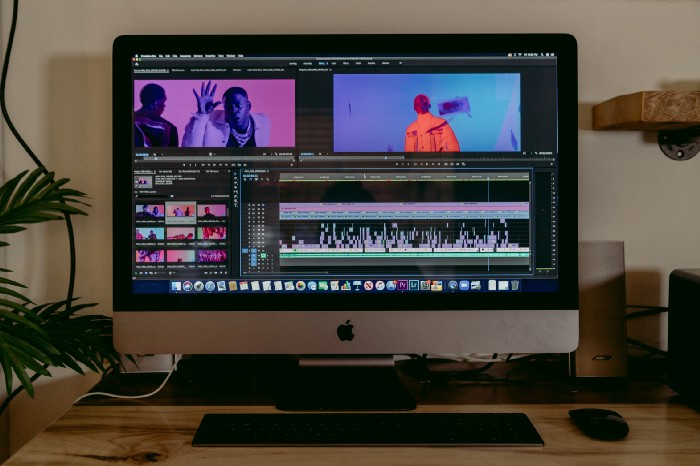
Take a look at a YouTube channel making anything up to over $12k a month from making very simple videos.
And the best part? Its replicable by anyone. Basic videos can be generated for free without design abilities.
Join me as I deconstruct the channel to estimate how much they make, how they do it, and how you can too.
What Do They Do Exactly?
Happy Land posts memes with a simple caption they wrote. So, it's new. The videos are a slideshow of meme photos with stock music.
The site posts 12 times a day.
8-10-minute videos show 10 second images. Thus, each video needs 48-60 memes.
Memes are video titles (e.g. times a boyfriend was hilarious, back to school fails, funny restaurant signs).
Some stats about the channel:
Founded on October 30, 2020
873 videos were added.
81.8k subscribers
67,244,196 views of the video
What Value Are They Adding?
Everyone can find free memes online. This channel collects similar memes into a single video so you don't have to scroll or click for more. It’s right there, you just keep watching and more will come.
By theming it, the audience is prepared for the video's content.
If you want hilarious animal memes or restaurant signs, choose the video and you'll get up to 60 memes without having to look for them. Genius!
How much money do they make?
According to www.socialblade.com, the channel earns $800-12.8k (image shown in my home currency of GBP).
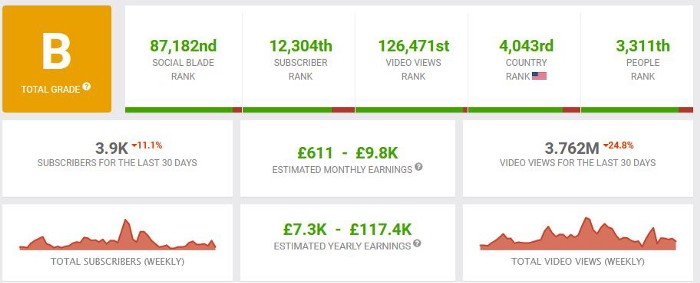
That's a crazy estimate, but it highlights the unbelievable potential of a channel that presents memes.
This channel thrives on quantity, thus putting out videos is necessary to keep the flow continuing and capture its audience's attention.
How Are the Videos Made?
Straightforward. Memes are added to a presentation without editing (so you could make this in PowerPoint or Keynote).
Each slide should include a unique image and caption. Set 10 seconds per slide.
Add music and post the video.
Finding enough memes for the material and theming is difficult, but if you enjoy memes, this is a fun job.
This case study should have shown you that you don't need expensive software or design expertise to make entertaining videos. Why not try fresh, easy-to-do ideas and see where they lead?
You might also like
Eric Esposito
3 years ago
$100M in NFT TV shows from Fox

Fox executives will invest $100 million in NFT-based TV shows. Fox brought in "Rick and Morty" co-creator Dan Harmon to create "Krapopolis"
Fox's Blockchain Creative Labs (BCL) will develop these NFT TV shows with Bento Box Entertainment. BCL markets Fox's WWE "Moonsault" NFT.
Fox said it would use the $100 million to build a "creative community" and "brand ecosystem." The media giant mentioned using these funds for NFT "benefits."
"Krapopolis" will be a Greek-themed animated comedy, per Rarity Sniper. Initial reports said NFT buyers could collaborate on "character development" and get exclusive perks.
Fox Entertainment may drop "Krapopolis" NFTs on Ethereum, according to new reports. Fox says it will soon release more details on its NFT plans for "Krapopolis."
Media Giants Favor "NFT Storytelling"
"Krapopolis" is one of the largest "NFT storytelling" experiments due to Dan Harmon's popularity and Fox Entertainment's reach. Many celebrities have begun exploring Web3 for TV shows.
Mila Kunis' animated sitcom "The Gimmicks" lets fans direct the show. Any "Gimmick" NFT holder could contribute to episode plots.
"The Gimmicks" lets NFT holders write fan fiction about their avatars. If show producers like what they read, their NFT may appear in an episode.
Rob McElhenney recently launched "Adimverse," a Web3 writers' community. Anyone with a "Adimverse" NFT can collaborate on creative projects and share royalties.
Many blue-chip NFTs are appearing in movies and TV shows. Coinbase will release Bored Ape Yacht Club shorts at NFT. NYC. Reese Witherspoon is working on a World of Women NFT series.
PFP NFT collections have Hollywood media partners. Guy Oseary manages Madonna's World of Women and Bored Ape Yacht Club collections. The Doodles signed with Billboard's Julian Holguin and the Cool Cats with CAA.
Web3 and NFTs are changing how many filmmakers tell stories.

Dung Claire Tran
3 years ago
Is the future of brand marketing with virtual influencers?
Digital influences that mimic humans are rising.
Lil Miquela has 3M Instagram followers, 3.6M TikTok followers, and 30K Twitter followers. She's been on the covers of Prada, Dior, and Calvin Klein magazines. Miquela released Not Mine in 2017 and launched Hard Feelings at Lollapazoolas this year. This isn't surprising, given the rise of influencer marketing.
This may be unexpected. Miquela's fake. Brud, a Los Angeles startup, produced her in 2016.
Lil Miquela is one of many rising virtual influencers in the new era of social media marketing. She acts like a real person and performs the same tasks as sports stars and models.
The emergence of online influencers
Before 2018, computer-generated characters were rare. Since the virtual human industry boomed, they've appeared in marketing efforts worldwide.
In 2020, the WHO partnered up with Atlanta-based virtual influencer Knox Frost (@knoxfrost) to gather contributions for the COVID-19 Solidarity Response Fund.
Lu do Magalu (@magazineluiza) has been the virtual spokeswoman for Magalu since 2009, using social media to promote reviews, product recommendations, unboxing videos, and brand updates. Magalu's 10-year profit was $552M.
In 2020, PUMA partnered with Southeast Asia's first virtual model, Maya (@mayaaa.gram). She joined Singaporean actor Tosh Zhang in the PUMA campaign. Local virtual influencer Ava Lee-Graham (@avagram.ai) partnered with retail firm BHG to promote their in-house labels.

In Japan, Imma (@imma.gram) is the face of Nike, PUMA, Dior, Salvatore Ferragamo SpA, and Valentino. Imma's bubblegum pink bob and ultra-fine fashion landed her on the cover of Grazia magazine.

Lotte Home Shopping created Lucy (@here.me.lucy) in September 2020. She made her TV debut as a Christmas show host in 2021. Since then, she has 100K Instagram followers and 13K TikTok followers.
Liu Yiexi gained 3 million fans in five days on Douyin, China's TikTok, in 2021. Her two-minute video went viral overnight. She's posted 6 videos and has 830 million Douyin followers.

China's virtual human industry was worth $487 million in 2020, up 70% year over year, and is expected to reach $875.9 million in 2021.
Investors worldwide are interested. Immas creator Aww Inc. raised $1 million from Coral Capital in September 2020, according to Bloomberg. Superplastic Inc., the Vermont-based startup behind influencers Janky and Guggimon, raised $16 million by 2020. Craft Ventures, SV Angels, and Scooter Braun invested. Crunchbase shows the company has raised $47 million.
The industries they represent, including Augmented and Virtual reality, were worth $14.84 billion in 2020 and are projected to reach $454.73 billion by 2030, a CAGR of 40.7%, according to PR Newswire.
Advantages for brands
Forbes suggests brands embrace computer-generated influencers. Examples:
Unlimited creative opportunities: Because brands can personalize everything—from a person's look and activities to the style of their content—virtual influencers may be suited to a brand's needs and personalities.
100% brand control: Brand managers now have more influence over virtual influencers, so they no longer have to give up and rely on content creators to include brands into their storytelling and style. Virtual influencers can constantly produce social media content to promote a brand's identity and ideals because they are completely scandal-free.
Long-term cost savings: Because virtual influencers are made of pixels, they may be reused endlessly and never lose their beauty. Additionally, they can move anywhere around the world and even into space to fit a brand notion. They are also always available. Additionally, the expense of creating their content will not rise in step with their expanding fan base.
Introduction to the metaverse: Statista reports that 75% of American consumers between the ages of 18 and 25 follow at least one virtual influencer. As a result, marketers that support virtual celebrities may now interact with younger audiences that are more tech-savvy and accustomed to the digital world. Virtual influencers can be included into any digital space, including the metaverse, as they are entirely computer-generated 3D personas. Virtual influencers can provide brands with a smooth transition into this new digital universe to increase brand trust and develop emotional ties, in addition to the young generations' rapid adoption of the metaverse.
Better engagement than in-person influencers: A Hype Auditor study found that online influencers have roughly three times the engagement of their conventional counterparts. Virtual influencers should be used to boost brand engagement even though the data might not accurately reflect the entire sector.
Concerns about influencers created by computers
Virtual influencers could encourage excessive beauty standards in South Korea, which has a $10.7 billion plastic surgery industry.
A classic Korean beauty has a small face, huge eyes, and pale, immaculate skin. Virtual influencers like Lucy have these traits. According to Lee Eun-hee, a professor at Inha University's Department of Consumer Science, this could make national beauty standards more unrealistic, increasing demand for plastic surgery or cosmetic items.

Other parts of the world raise issues regarding selling items to consumers who don't recognize the models aren't human and the potential of cultural appropriation when generating influencers of other ethnicities, called digital blackface by some.
Meta, Facebook and Instagram's parent corporation, acknowledges this risk.
“Like any disruptive technology, synthetic media has the potential for both good and harm. Issues of representation, cultural appropriation and expressive liberty are already a growing concern,” the company stated in a blog post. “To help brands navigate the ethical quandaries of this emerging medium and avoid potential hazards, (Meta) is working with partners to develop an ethical framework to guide the use of (virtual influencers).”
Despite theoretical controversies, the industry will likely survive. Companies think virtual influencers are the next frontier in the digital world, which includes the metaverse, virtual reality, and digital currency.
In conclusion
Virtual influencers may garner millions of followers online and help marketers reach youthful audiences. According to a YouGov survey, the real impact of computer-generated influencers is yet unknown because people prefer genuine connections. Virtual characters can supplement brand marketing methods. When brands are metaverse-ready, the author predicts virtual influencer endorsement will continue to expand.

Ann
3 years ago
These new DeFi protocols are just amazing.
I've never seen this before.
Focus on native crypto development, not price activity or turmoil.
CT is boring now. Either folks are still angry about FTX or they're distracted by AI. Plus, it's year-end, and people rest for the holidays. 2022 was rough.
So DeFi fans can get inspired by something fresh. Who's building? As I read the Defillama daily roundup, many updates are still on FTX and its contagion.
I've used the same method on their Raises page. Not much happened :(. Maybe my high standards are to fault, but the business may be resting. OK.
The handful I locate might last us till the end of the year. (If another big blowup occurs.)
Hashflow
An on-chain monitor account I follow reported a huge transfer of $HFT from Binance to Jump Tradings.
I was intrigued. Stacking? So I checked and discovered out the project was launched through Binance Launchpad, which has introduced many 100x tokens (although momentarily) in the past, such as GALA and STEPN.
Hashflow appears to be pumpable. Binance launchpad, VC backers, CEX listing immediately. What's the protocol?
Hasflow is intriguing and timely, I discovered. After the FTX collapse, people looked more at DEXs.
Hashflow is a decentralized exchange that connects traders with professional market makers, according to its Binance launchpad description. Post-FTX, market makers lost their MM-ing chance with the collapse of the world's third-largest exchange. Jump and Wintermute back them?
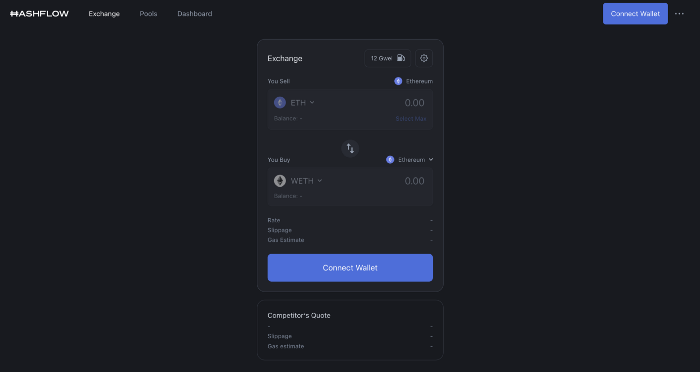
Why is that the case? Hashflow doesn't use bonding curves like standard AMM. On AMMs, you pay more for the following trade because the prior trade reduces liquidity (supply and demand). With market maker quotations, you get a CEX-like experience (fewer coins in the pool, higher price). Stable prices, no MEV frontrunning.
Hashflow is innovative because...
DEXs gained from the FTX crash, but let's be honest: DEXs aren't as good as CEXs. Hashflow will change this.
Hashflow offers MEV protection, which major dealers seek in DEXs. You can trade large amounts without front running and sandwich assaults.
Hasflow offers a user-friendly swapping platform besides MEV. Any chain can be traded smoothly. This is a benefit because DEXs lag CEXs in UX.
Status, timeline:
Wintermute wrote in August that prominent market makers will work on Hashflow. Binance launched a month-long farming session in December. Jump probably participated in this initial sell, therefore we witnessed a significant transfer after the introduction.
Binance began trading HFT token on November 11 (the day FTX imploded). coincidence?)
Tokens are used for community rewards. Perhaps they'd copy dYdX. (Airdrop?). Read their documents about their future plans. Tokenomics doesn't impress me. Governance, rewards, and NFT.
Their stat page details their activity. First came Ethereum, then Arbitrum. For a new protocol in a bear market, they handled a lot of unique users daily.
It’s interesting to see their future. Will they be thriving? Not only against DEXs, but also among the CEXs too.
STFX
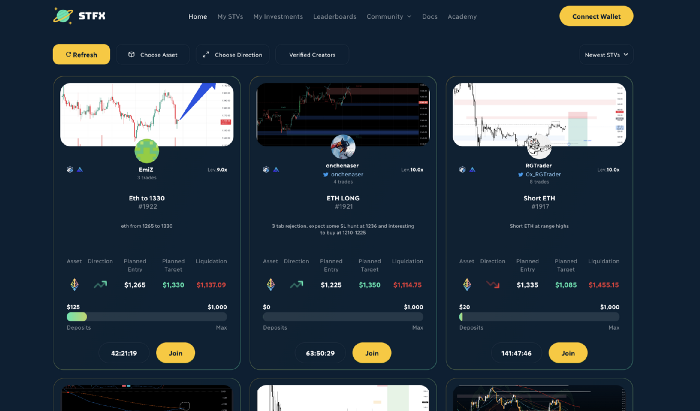
I forget how I found STFX. Possibly a Twitter thread concerning Arbitrum applications. STFX was the only new protocol I found interesting.
STFX is a new concept and trader problem-solver. I've never seen this protocol.
STFX allows you copy trades. You give someone your money to trade for you.
It's a marketplace. Traders are everywhere. You put your entry, exit, liquidation point, and trading theory. Twitter has a verification system for socials. Leaderboards display your trading skill.
This service could be popular. Staying disciplined is the hardest part of trading. Sometimes you take-profit too early or too late, or sell at a loss when an asset dumps, then it soon recovers (often happens in crypto.) It's hard to stick to entry-exit and liquidation plans.
What if you could hire someone to run your trade for a little commission? Set-and-forget.
Trading money isn't easy. Trust how? How do you know they won't steal your money?
Smart contracts.
STFX's trader is a vault maker/manager. One trade=one vault. User sets long/short, entrance, exit, and liquidation point. Anyone who agrees can exchange instantly. The smart contract will keep the fund during the trade and limit the manager's actions.
Here's STFX's transaction flow.
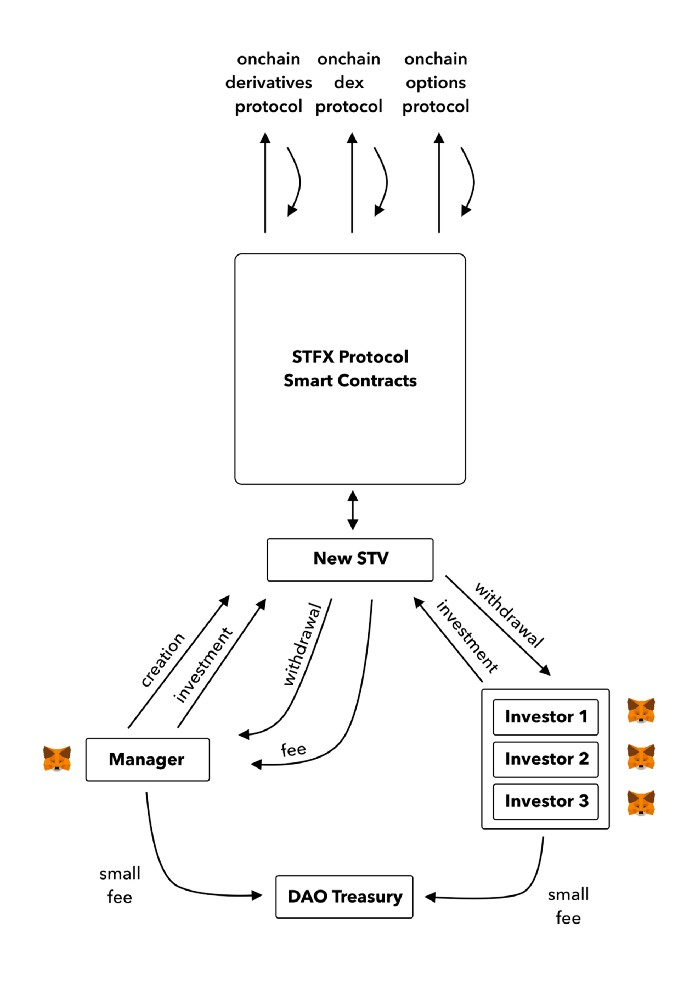
Managers and the treasury receive fees. It's a sustainable business strategy that benefits everyone.
I'm impressed by $STFX's planned use. Brilliant priority access. A crypto dealer opens a vault here. Many would join. STFX tokens offer VIP access over those without tokens.
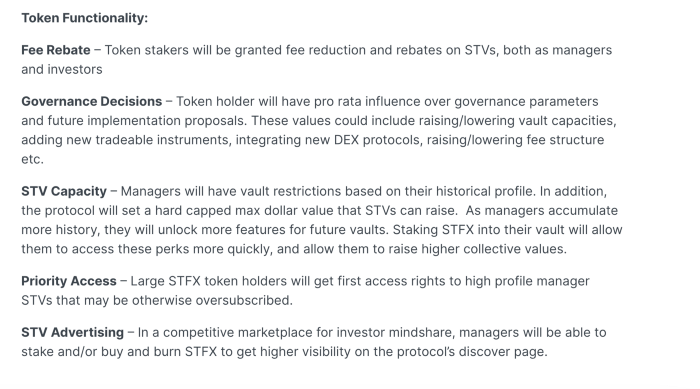
STFX provides short-term trading, which is mind-blowing to me. I agree with their platform's purpose. Crypto market pricing actions foster short-termism. When you trade, the turnover could be larger than long-term holding or trading. 2017 BTC buyers waited 5 years to complete their holdings.
STFX teams simply adapted. Volatility aids trading.
All things about STFX scream Degen. The protocol fully embraces the degen nature of some, if not most, crypto natives.
An enjoyable dApp. Leaderboards are fun for reputation-building. FLEXING COMPETITIONS. You can join for as low as $10. STFX uses Arbitrum, therefore gas costs are low. Alpha procedure completes the degen feeling.
Despite looking like they don't take themselves seriously, I sense a strong business plan below. There is a real demand for the solution STFX offers.