


Because of regulations, the $3 million Mercedes-AMG ONE will not (officially) be available in the United States or Canada.
We asked Mercedes to clarify whether "customers" refers to people who have expressed interest in buying the AMG ONE but haven't made a down payment or paid in full for a production slot, and a company spokesperson told that it's the latter – "Actual customers for AMG ONE in the United States and Canada."
The Mercedes-AMG ONE has finally arrived in manufacturing form after numerous delays. This may be the most complicated and magnificent hypercar ever created, but according to Mercedes, those roads will not be found in the United States or Canada.
Despite all of the well-deserved excitement around the gorgeous AMG ONE, there was no word on when US customers could expect their cars. Our Editor-in-Chief became aware of this and contacted Mercedes to clarify the matter. Mercedes-hypercar AMG's with the F1-derived 1,049 HP 1.6-liter V6 engine will not be homologated for the US market, they've confirmed.
Mercedes has informed its customers in the United States and Canada that the ONE will not be arriving to North America after all, as of today, June 1, 2022. The whole text of the letter is included below, so sit back and wait for Mercedes to explain why we (or they) won't be getting (or seeing) the hypercar. Mercedes claims that all 275 cars it wants to produce have already been reserved, with net pricing in Europe starting at €2.75 million (about US$2.93 million at today's exchange rates), before country-specific taxes.
"The AMG-ONE was created with one purpose in mind: to provide a straight technology transfer of the World Championship-winning Mercedes-AMG Petronas Formula 1 E PERFORMANCE drive unit to the road." It's the first time a complete Formula 1 drive unit has been integrated into a road car.
Every component of the AMG ONE has been engineered to redefine high performance, with 1,000+ horsepower, four electric motors, and a blazing top speed of more than 217 mph. While the engine's beginnings are in competition, continuous research and refinement has left us with a difficult choice for the US market.
We determined that following US road requirements would considerably damage its performance and overall driving character in order to preserve the distinctive nature of its F1 powerplant. We've made the strategic choice to make the automobile available for road use in Europe, where it complies with all necessary rules."
If this is the first time US customers have heard about it, which it shouldn't be, we understand if it's a bit off-putting. The AMG ONE could very probably be Mercedes' final internal combustion hypercar of this type.
Nonetheless, we wouldn't be surprised if a few make their way to the United States via the federal government's "Show and Display" exemption provision. This legislation permits the importation of automobiles such as the AMG ONE, but only for a total of 2,500 miles per year.
The McLaren Speedtail, the Koenigsegg One:1, and the Bugatti EB110 are among the automobiles that have been imported under this special rule. We just hope we don't have to wait too long to see the ONE in the United States.
More on Lifestyle

Will Lockett
3 years ago
There Is A New EV King in Town

McMurtry Spéirling outperforms Tesla in speed and efficiency.
EVs were ridiculously slow for decades. However, the 2008 Tesla Roadster revealed that EVs might go extraordinarily fast. The Tesla Model S Plaid and Rimac Nevera are the fastest-accelerating road vehicles, despite combustion-engined road cars dominating the course. A little-known firm beat Tesla and Rimac in the 0-60 race, beat F1 vehicles on a circuit, and boasts a 350-mile driving range. The McMurtry Spéirling is completely insane.
Mat Watson of CarWow, a YouTube megastar, was recently handed a Spéirling and access to Silverstone Circuit (view video above). Mat ran a quarter-mile on Silverstone straight with former F1 driver Max Chilton. The little pocket-rocket automobile touched 100 mph in 2.7 seconds, completed the quarter mile in 7.97 seconds, and hit 0-60 in 1.4 seconds. When looking at autos quickly, 0-60 times can seem near. The Tesla Model S Plaid does 0-60 in 1.99 seconds, which is comparable to the Spéirling. Despite the meager statistics, the Spéirling is nearly 30% faster than Plaid!
My vintage VW Golf 1.4s has an 8.8-second 0-60 time, whereas a BMW Z4 3.0i is 30% faster (with a 0-60 time of 6 seconds). I tried to beat a Z4 off the lights in my Golf, but the Beamer flew away. If they challenge the Spéirling in a Model S Plaid, they'll feel as I did. Fast!
Insane quarter-mile drag time. Its road car record is 7.97 seconds. A Dodge Demon, meant to run extremely fast quarter miles, finishes so in 9.65 seconds, approximately 20% slower. The Rimac Nevera's 8.582-second quarter-mile record was miles behind drag racing. This run hampered the Spéirling. Because it was employing gearing that limited its top speed to 150 mph, it reached there in a little over 5 seconds without accelerating for most of the quarter mile! McMurtry can easily change the gearing, making the Spéirling run quicker.
McMurtry did this how? First, the Spéirling is a tiny single-seater EV with a 60 kWh battery pack, making it one of the lightest EVs ever. The 1,000-hp Spéirling has more than one horsepower per kg. The Nevera has 0.84 horsepower per kg and the Plaid 0.44.
However, you cannot simply construct a car light and power it. Instead of accelerating, it would spin. This makes the Spéirling a fan car. Its huge fans create massive downforce. These fans provide the Spéirling 2 tonnes of downforce while stationary, so you could park it on the ceiling. Its fast 0-60 time comes from its downforce, which lets it deliver all that power without wheel spin.
It also possesses complete downforce at all speeds, allowing it to tackle turns faster than even race vehicles. Spéirlings overcame VW IDRs and F1 cars to set the Goodwood Hill Climb record (read more here). The Spéirling is a dragstrip winner and track dominator, unlike the Plaid and Nevera.
The Spéirling is astonishing for a single-seater. Fan-generated downforce is more efficient than wings and splitters. It also means the vehicle has very minimal drag without the fan. The Spéirling can go 350 miles per charge (WLTP) or 20-30 minutes at full speed on a track despite its 60 kWh battery pack. The G-forces would hurt your neck before the battery died if you drove around a track for longer. The Spéirling can charge at over 200 kW in about 30 minutes. Thus, driving to track days, having fun, and returning is possible. Unlike other high-performance EVs.
Tesla, Rimac, or Lucid will struggle to defeat the Spéirling. They would need to build a fan automobile because adding power to their current vehicle would make it uncontrollable. The EV and automobile industries now have a new, untouchable performance king.
Sneaker News
4 years ago
This Month Will See The Release Of Travis Scott x Nike Footwear
Following the catastrophes at Astroworld, Travis Scott was swiftly vilified by both media outlets and fans alike, and the names who had previously supported him were quickly abandoned. Nike, on the other hand, remained silent, only delaying the release of La Flame's planned collaborations, such as the Air Max 1 and Air Trainer 1, indefinitely. While some may believe it is too soon for the artist to return to the spotlight, the Swoosh has other ideas, as Nice Kicks reveals that these exact sneakers will be released in May.
Both the Travis Scott x Nike Air Max 1 and the Travis Scott x Nike Air Trainer 1 are set to come in two colorways this month. Tinker Hatfield's renowned runner will meet La Flame's "Baroque Brown" and "Saturn Gold" make-ups, which have been altered with backwards Swooshes and outdoors-themed webbing. The high-top trainer is being customized with Hatfield's "Wheat" and "Grey Haze" palettes, both of which include zippers across the heel, co-branded patches, and other details.
See below for a closer look at the four footwear. TravisScott.com is expected to release the shoes on May 20th, according to Nice Kicks. Following that, on May 27th, Nike SNKRS will release the shoe.
Travis Scott x Nike Air Max 1 "Baroque Brown"
Release Date: 2022
Color: Baroque Brown/Lemon Drop/Wheat/Chile Red
Mens: $160
Style Code: DO9392-200
Pre-School: $85
Style Code: DN4169-200
Infant & Toddler: $70
Style Code: DN4170-200
Travis Scott x Nike Air Max 1 "Saturn Gold"
Release Date: 2022
Color: N/A
Mens: $160
Style Code: DO9392-700
Travis Scott x Nike Air Trainer 1 "Wheat"
Restock Date: May 27th, 2022 (Friday)
Original Release Date: May 20th, 2022 (Friday)
Color: N/A
Mens: $140
Style Code: DR7515-200
Travis Scott x Nike Air Trainer 1 "Grey Haze"
Restock Date: May 27th, 2022 (Friday)
Original Release Date: May 20th, 2022 (Friday)
Color: N/A
Mens: $140
Style Code: DR7515-001

Peter Steven Ho
4 years ago
Thank You for 21 Fantastic Years, iPod
Apple's latest revelation may shock iPod fans and former owners.

Apple discontinued the iPod touch on May 11, 2022. After 21 years, Apple killed the last surviving iPod, a device Steve Jobs believed would revolutionize the music industry.
Jobs was used to making bold predictions, but few expected Apple's digital music player to change the music industry. It did.
This chaos created new business opportunities. Spotify, YouTube, and Amazon are products of that chaotic era.
As the digital landscape changes, so do consumers, and the iPod has lost favor. I'm sure Apple realizes the importance of removing an icon. The iPod was Apple like the Mac and iPhone. I think it's bold to retire such a key Apple cornerstone. What would Jobs do?
iPod evolution across the ages
Here's an iPod family tree for all you enthusiasts.
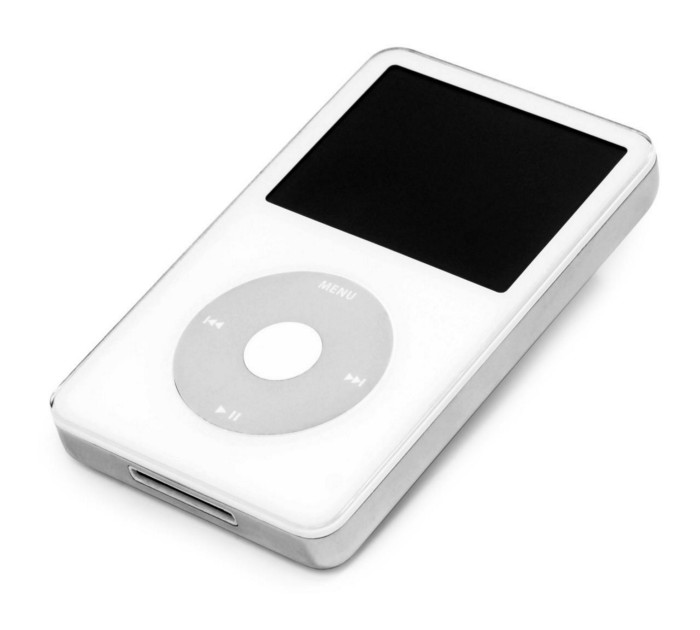
iPod vintage (Oct 2001 to Sep 2014, 6 generations)
The original iPod had six significant upgrades since 2001. Apple announced an 80 GB ($249) and 160 GB ($349) iPod classic in 2007.
Apple updated the 80 GB model with a 120 GB device in September 2008. Apple upgraded the 120 GB model with a 160 GB variant a year later (2009). This was the last iteration, and Apple discontinued the classic in September 2014.
iPod nano (Jan 2004 to Sep 2005, 2 generations)
Apple debuted a smaller, brightly-colored iPod in 2004. The first model featured 4 GB, enough for 1,000 songs.
Apple produced a new 4 GB or 6 GB iPod mini in February 2005 and discontinued it in September when they released a better-looking iPod nano.
iTouch nano (Sep 2005 to July 2017, 7 generations)
I loved the iPod nano. It was tiny and elegant with enough tech to please most music aficionados, unless you carry around your complete music collection.

Apple owed much of the iPod nano's small form and success to solid-state flash memory. Flash memory doesn't need power because it has no moving parts. This makes the iPod nano more durable than the iPod classic and mini, which employ hard drives.
Apple manufactured seven generations of the iPod nano, improving its design, display screen, memory, battery, and software, but abandoned it in July 2017 due to dwindling demand.
Shuffle iPod (Jan 2005 to Jul 2017, 4 generations)
The iPod shuffle was entry-level. It was a simple, lightweight, tiny music player. The iPod shuffle was perfect for lengthy bike trips, runs, and hikes.

Apple sold 10 million iPod shuffles in the first year and kept making them for 12 years, through four significant modifications.
iOS device (Sep 2007 to May 2022, 7 generations)
The iPod touch's bigger touchscreen interface made it a curious addition to the iPod family. The iPod touch resembled an iPhone more than the other iPods, making them hard to tell apart.
Many were dissatisfied that Apple removed functionality from the iPod touch to avoid making it too similar to the iPhone. Seven design improvements over 15 years brought the iPod touch closer to the iPhone, but not completely.
The iPod touch uses the same iOS operating system as the iPhone, giving it access to many apps, including handheld games.
The iPod touch's long production run is due to the next generation of music-loving gamers.
What made the iPod cool
iPod revolutionized music listening. It was the first device to store and play MP3 music, allowing you to carry over 1,000 songs anywhere.
The iPod changed consumer electronics with its scroll wheel and touchscreen. Jobs valued form and function equally. He showed people that a product must look good to inspire an emotional response and ignite passion.
The elegant, tiny iPod was a tremendous sensation when it arrived for $399 in October 2001. Even at this price, it became a must-have for teens to CEOs.
It's hard to identify any technology that changed how music was downloaded and played like the iPod. Apple iPod and iTunes had 63% of the paid music download market in the fourth quarter of 2012.
The demise of the iPod was inevitable
Apple discontinuing the iPod touch after 21 years is sad. This ends a 00s music icon.
Jobs was a genius at anticipating market needs and opportunities, and Apple launched the iPod at the correct time.
Few consumer electronics items have had such a lasting impact on music lovers and the music industry as the iPod.
Smartphones and social media have contributed to the iPod's decline. Instead of moving to the music, the new generation of consumers is focused on social media. They're no longer passive content consumers; they're active content creators seeking likes and followers. Here, the smartphone has replaced the iPod.
It's hard not to feel a feeling of loss, another part of my adolescence now forgotten by the following generation.
So, if you’re lucky enough to have a working iPod, hang on to that relic and enjoy the music and the nostalgia.
You might also like

Abhimanyu Bhargava
4 years ago
VeeFriends Series 2: The Biggest NFT Opportunity Ever
VeeFriends is one NFT project I'm sure will last.
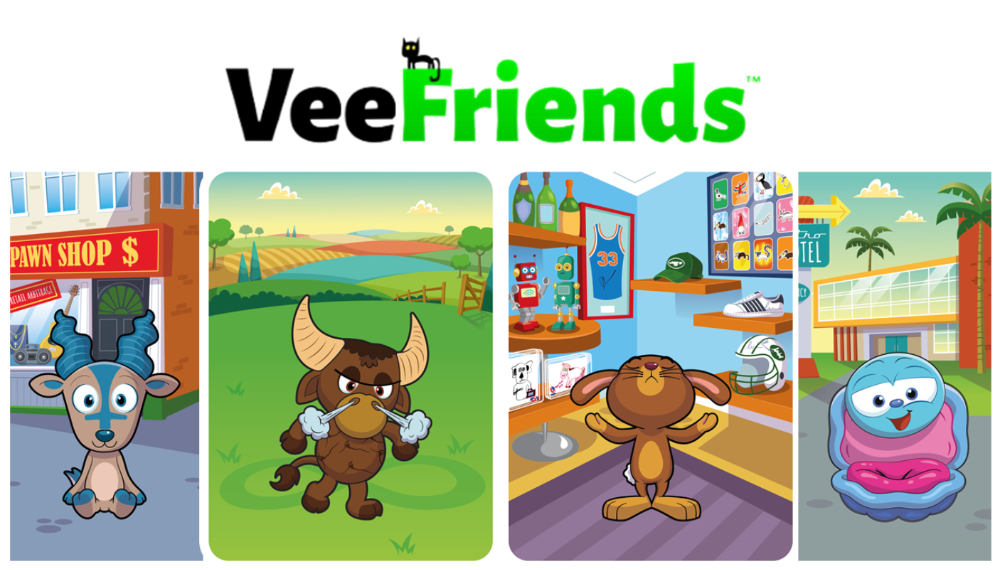
I believe in blockchain technology and JPEGs, aka NFTs. NFTs aren't JPEGs. It's not as it seems.
Gary Vaynerchuk is leading the pack with his new NFT project VeeFriends, I wrote a year ago. I was spot-on. It's the most innovative project I've seen.
Since its minting in May 2021, it has given its holders enormous value, most notably the first edition of VeeCon, a multi-day superconference featuring iconic and emerging leaders in NFTs and Popular Culture. First-of-its-kind NFT-ticketed Web3 conference to build friendships, share ideas, and learn together.
VeeFriends holders got free VeeCon NFT tickets. Attendees heard iconic keynote speeches, innovative talks, panels, and Q&A sessions.
It was a unique conference that most of us, including me, are looking forward to in 2023. The lineup was epic, and it allowed many to network in new ways. Really memorable learning. Here are a couple of gratitude posts from the attendees.
VeeFriends Series 2
This article explains VeeFriends if you're still confused.
GaryVee's hand-drawn doodles have evolved into wonderful characters. The characters' poses and backgrounds bring the VeeFriends IP to life.
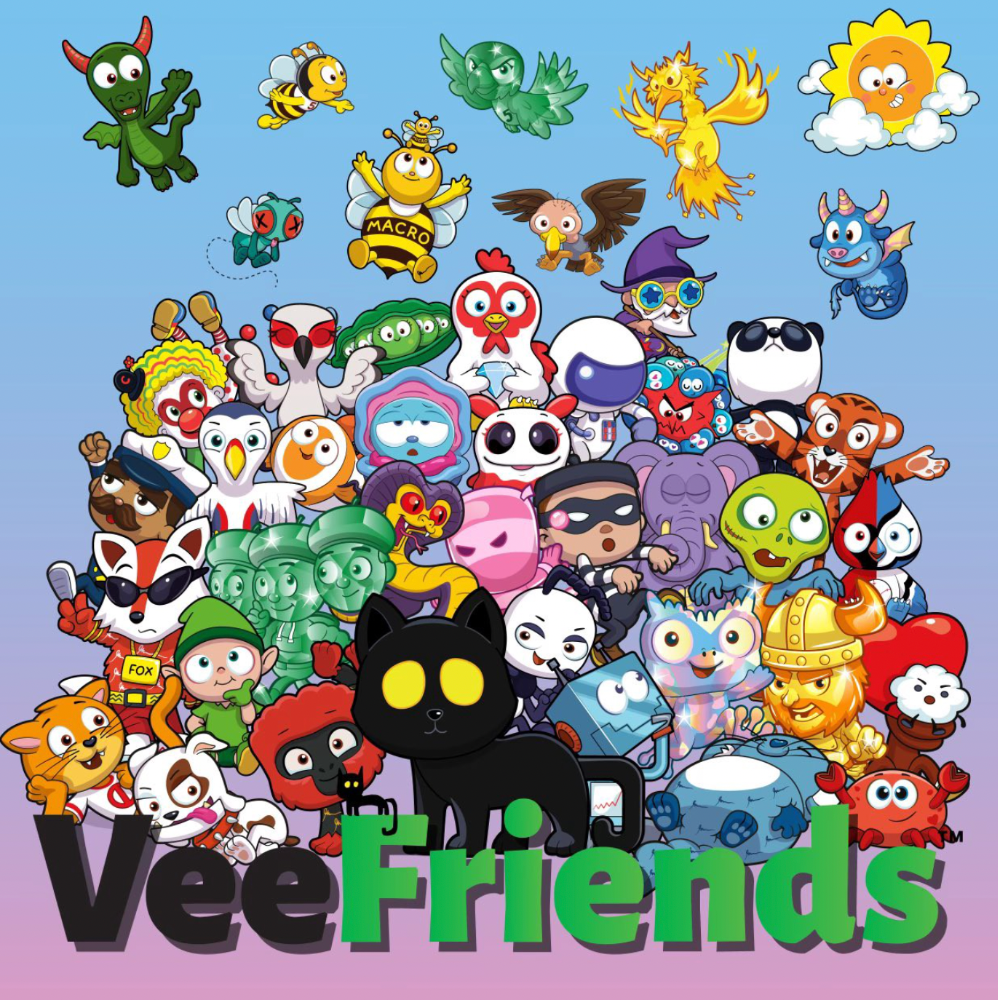
Yes, this is the second edition of VeeFriends, and at current prices, it's one of the best NFT opportunities in years. If you have the funds and risk appetite to invest in NFTs, VeeFriends Series 2 is worth every penny. Even if you can't invest, learn from their journey.
1. Art Is the Start
Many critics say VeeFriends artwork is below average and not by GaryVee. Art is often the key to future success.
Let's look at one of the first Mickey Mouse drawings. No one would have guessed that this would become one of the most beloved animated short film characters. In Walt Before Mickey, Walt Disney's original mouse Mortimer was less refined.
First came a mouse...
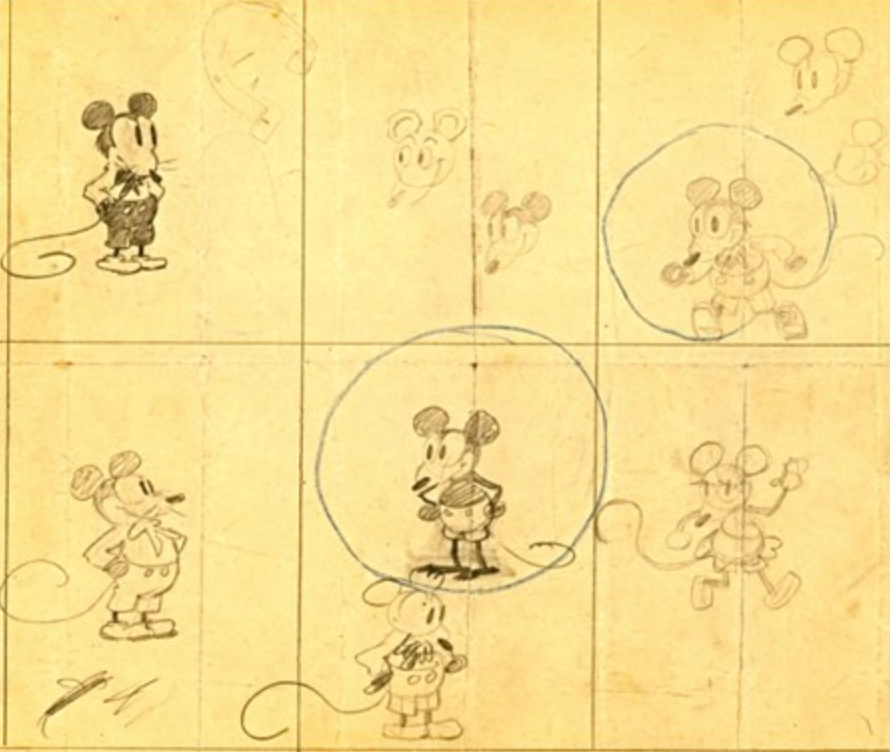
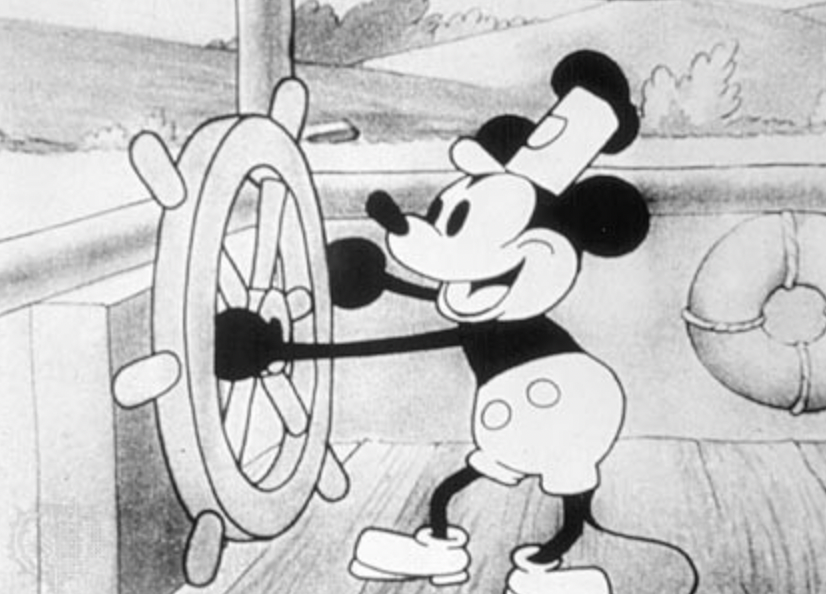
These sketches evolved into Steamboat Willie, Disney's first animated short film.
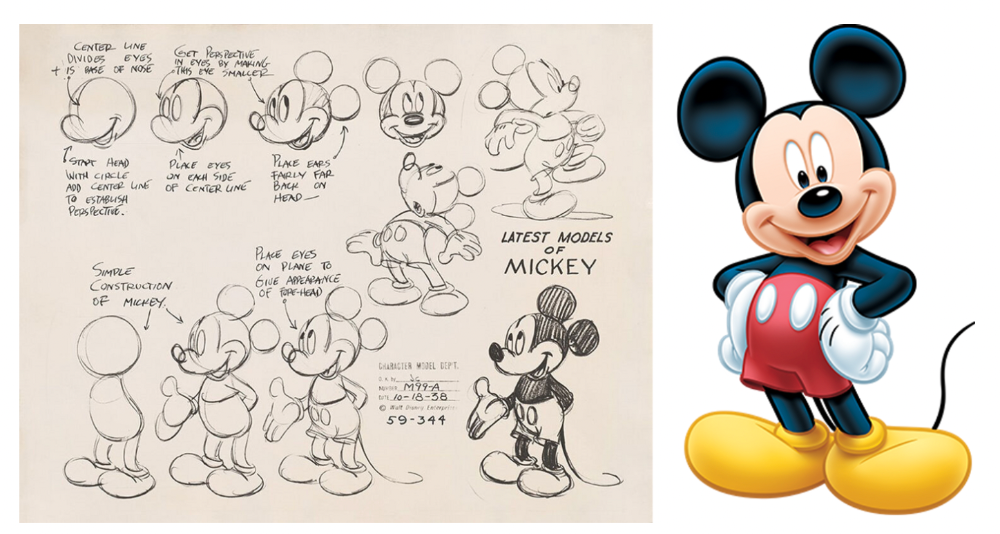
Fred Moore redesigned the character artwork into what we saw in cartoons as kids. Mickey Mouse's history is here.
Looking at how different cartoon characters have evolved and gained popularity over decades, I believe Series 2 characters like Self-Aware Hare, Kind Kudu, and Patient Pig can do the same.
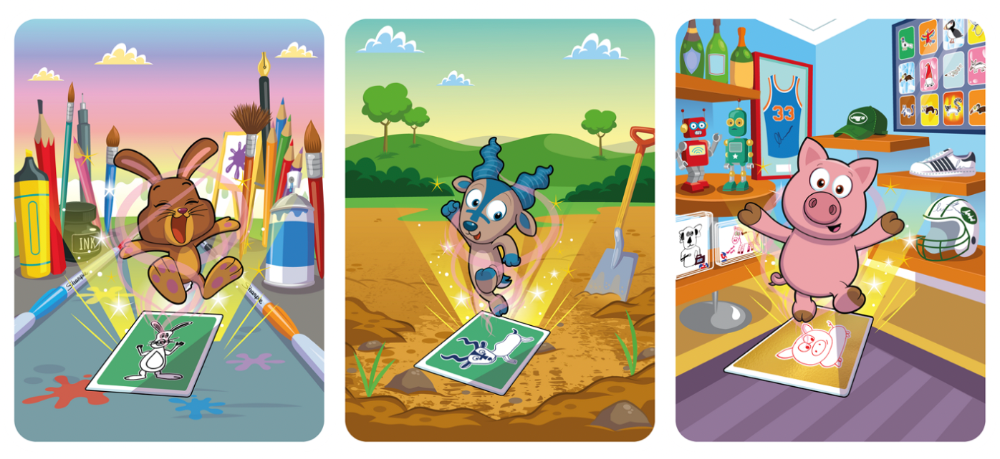
GaryVee captures this journey on the blockchain and lets early supporters become part of history. Time will tell if it rivals Disney, Pokemon, or Star Wars. Gary has been vocal about this vision.
2. VeeFriends is Intellectual Property for the Coming Generations
Most of us grew up watching cartoons, playing with toys, cards, and video games. Our interactions with fictional characters and the stories we hear shape us.
GaryVee is slowly curating an experience for the next generation with animated videos, card games, merchandise, toys, and more.
VeeFriends UNO, a collaboration with Mattel Creations, features 17 VeeFriends characters.
VeeFriends and Zerocool recently released Trading Cards featuring all 268 Series 1 characters and 15 new ones. Another way to build VeeFriends' collectibles brand.

At Veecon, all the characters were collectible toys. Something will soon emerge.
Kids and adults alike enjoy the YouTube channel's animated shorts and VeeFriends Tunes. Here's a song by the holder's Optimistic Otter-loving daughter.
This VeeFriends story is only the beginning. I'm looking forward to animated short film series, coloring books, streetwear, candy, toys, physical collectibles, and other forms of VeeFriends IP.
3. Veefriends will always provide utilities
Smart contracts can be updated at any time and authenticated on a ledger.
VeeFriends Series 2 gives no promise of any utility whatsoever. GaryVee released no project roadmap. In the first few months after launch, many owners of specific characters or scenes received utilities.
Every benefit or perk you receive helps promote the VeeFriends brand.
Recent partnerships are listed below.
MaryRuth's Multivitamin Gummies
Productive Puffin holders from VeeFriends x Primitive
Pickleball Scene & Clown Holders Only

Pickleball & Competitive Clown Exclusive experience, anteater multivitamin gummies, and Puffin x Primitive merch
Considering the price of NFTs, it may not seem like much. It's just the beginning; you never know what the future holds. No other NFT project offers such diverse, ongoing benefits.
4. Garyvee's team is ready
Gary Vaynerchuk's team and record are undisputed. He's a serial entrepreneur and the Chairman & CEO of VaynerX, which includes VaynerMedia, VaynerCommerce, One37pm, and The Sasha Group.
Gary founded VaynerSports, Resy, and Empathy Wines. He's a Candy Digital Board Member, VCR Group Co-Founder, ArtOfficial Co-Founder, and VeeFriends Creator & CEO. Gary was recently named one of Fortune's Top 50 NFT Influencers.

Gary Vayenerchuk aka GaryVee
Gary documents his daily life as a CEO on social media, which has 34 million followers and 272 million monthly views. GaryVee Audio Experience is a top podcast. He's a five-time New York Times best-seller and sought-after speaker.
Gary can observe consumer behavior to predict trends. He understood these trends early and pioneered them.
1997 — Realized e-potential commerce's and started winelibrary.com. In five years, he grew his father's wine business from $3M to $60M.
2006 — Realized content marketing's potential and started Wine Library on YouTube. TV
2009 — Estimated social media's potential (Web2) and invested in Facebook, Twitter, and Tumblr.
2014: Ethereum and Bitcoin investments
2021 — Believed in NFTs and Web3 enough to launch VeeFriends
GaryVee isn't all of VeeFriends. Andy Krainak, Dave DeRosa, Adam Ripps, Tyler Dowdle, and others work tirelessly to make VeeFriends a success.
GaryVee has said he'll let other businesses fail but not VeeFriends. We're just beginning his 40-year vision.
I have more confidence than ever in a company with a strong foundation and team.
5. Humans die, but characters live forever
What if GaryVee dies or can't work?
A writer's books can immortalize them. As long as their books exist, their words are immortal. Socrates, Hemingway, Aristotle, Twain, Fitzgerald, and others have become immortal.
Everyone knows Vincent Van Gogh's The Starry Night.
We all love reading and watching Peter Parker, Thor, or Jessica Jones. Their behavior inspires us. Stan Lee's message and stories live on despite his death.
GaryVee represents VeeFriends. Creating characters to communicate ensures that the message reaches even those who don't listen.
Gary wants his values and messages to be omnipresent in 268 characters. Messengers die, but their messages live on.
Gary envisions VeeFriends creating timeless stories and experiences. Ten years from now, maybe every kid will sing Patient Pig.
6. I love the intent.
Gary planned to create Workplace Warriors three years ago when he began designing Patient Panda, Accountable Ant, and Empathy elephant. The project stalled. When NFTs came along, he knew.
Gary wanted to create characters with traits he values, such as accountability, empathy, patience, kindness, and self-awareness. He wants future generations to find these traits cool. He hopes one or more of his characters will become pop culture icons.
These emotional skills aren't taught in schools or colleges, but they're crucial for business and life success. I love that someone is teaching this at scale.
In the end, intent matters.
Humans Are Collectors
Buy and collect things to communicate. Since the 1700s. Medieval people formed communities around hidden metals and stones. Many people still collect stamps and coins, and luxury and fashion are multi-trillion dollar industries. We're collectors.
The early 2020s NFTs will be remembered in the future. VeeFriends will define a cultural and technological shift in this era. VeeFriends Series 1 is the original hand-drawn art, but it's expensive. VeeFriends Series 2 is a once-in-a-lifetime opportunity at $1,000.
If you are new to NFTs, check out How to Buy a Non Fungible Token (NFT) For Beginners
This is a non-commercial article. Not financial or legal advice. Information isn't always accurate. Before making important financial decisions, consult a pro or do your own research.
This post is a summary. Read the full article here

Adrien Book
4 years ago
What is Vitalik Buterin's newest concept, the Soulbound NFT?
Decentralizing Web3's soul
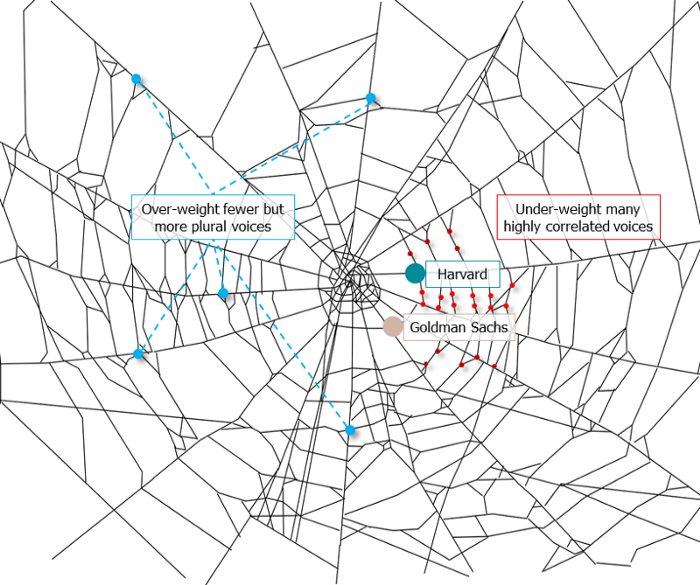
Our tech must reflect our non-transactional connections. Web3 arose from a lack of social links. It must strengthen these linkages to get widespread adoption. Soulbound NFTs help.
This NFT creates digital proofs of our social ties. It embodies G. Simmel's idea of identity, in which individuality emerges from social groups, just as social groups evolve from people.
It's multipurpose. First, gather online our distinctive social features. Second, highlight and categorize social relationships between entities and people to create a spiderweb of networks.
1. 🌐 Reducing online manipulation: Only socially rich or respectable crypto wallets can participate in projects, ensuring that no one can create several wallets to influence decentralized project governance.
2. 🤝 Improving social links: Some sectors of society lack social context. Racism, sexism, and homophobia do that. Public wallets can help identify and connect distinct social groupings.
3. 👩❤️💋👨 Increasing pluralism: Soulbound tokens can ensure that socially connected wallets have less voting power online to increase pluralism. We can also overweight a minority of numerous voices.
4. 💰Making more informed decisions: Taking out an insurance policy requires a life review. Why not loans? Character isn't limited by income, and many people need a chance.
5. 🎶 Finding a community: Soulbound tokens are accessible to everyone. This means we can find people who are like us but also different. This is probably rare among your friends and family.
NFTs are dangerous, and I don't like them. Social credit score, privacy, lost wallet. We must stay informed and keep talking to innovators.
E. Glen Weyl, Puja Ohlhaver and Vitalik Buterin get all the credit for these ideas, having written the very accessible white paper “Decentralized Society: Finding Web3’s Soul”.

Jayden Levitt
3 years ago
Billionaire who was disgraced lost his wealth more quickly than anyone in history
If you're not genuine, you'll be revealed.
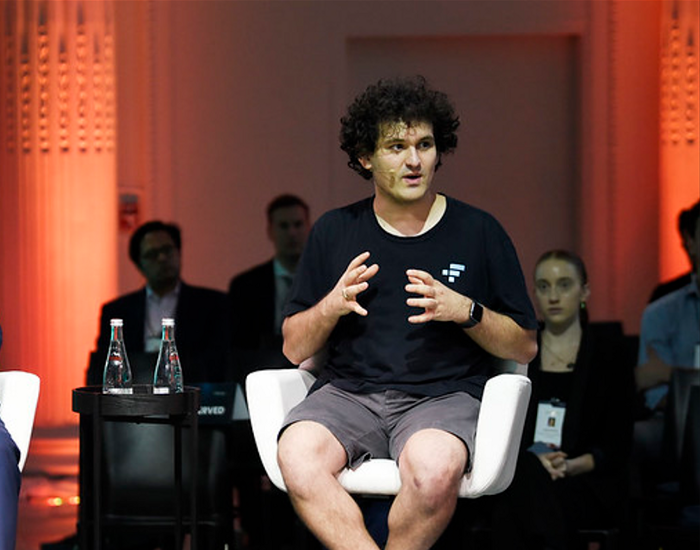
Sam Bankman-Fried (SBF) was called the Cryptocurrency Warren Buffet.
No wonder.
SBF's trading expertise, Blockchain knowledge, and ability to construct FTX attracted mainstream investors.
He had a fantastic worldview, donating much of his riches to charity.
As the onion layers peel back, it's clear he wasn't the altruistic media figure he portrayed.
SBF's mistakes were disastrous.
Customer deposits were traded and borrowed by him.
With ten other employees, he shared a $40 million mansion where they all had polyamorous relationships.
Tone-deaf and wasteful marketing expenditures, such as the $200 million spent to change the name of the Miami Heat stadium to the FTX Arena
Democrats received a $40 million campaign gift.
And now there seems to be no regret.
FTX was a 32-billion-dollar cryptocurrency exchange.
It went bankrupt practically overnight.
SBF, FTX's creator, exploited client funds to leverage trade.
FTX had $1 billion in customer withdrawal reserves against $9 billion in liabilities in sister business Alameda Research.
Bloomberg Billionaire Index says it's the largest and fastest net worth loss in history.
It gets worse.
SBF's net worth is $900 Million, however he must still finalize FTX's bankruptcy.
SBF's arrest in the Bahamas and SEC inquiry followed news that his cryptocurrency exchange had crashed, losing billions in customer deposits.
A journalist contacted him on Twitter D.M., and their exchange is telling.
His ideas are revealed.
Kelsey Piper says they didn't expect him to answer because people under investigation don't comment.
Bankman-Fried wanted to communicate, and the interaction shows he has little remorse.
SBF talks honestly about FTX gaming customers' money and insults his competition.
Reporter Kelsey Piper was outraged by what he said and felt the mistakes SBF says plague him didn't evident in the messages.
Before FTX's crash, SBF was a poster child for Cryptocurrency regulation and avoided criticizing U.S. regulators.
He tells Piper that his lobbying is just excellent PR.
It shows his genuine views and supports cynics' opinions that his attempts to win over U.S. authorities were good for his image rather than Crypto.
SBF’s responses are in Grey, and Pipers are in Blue.
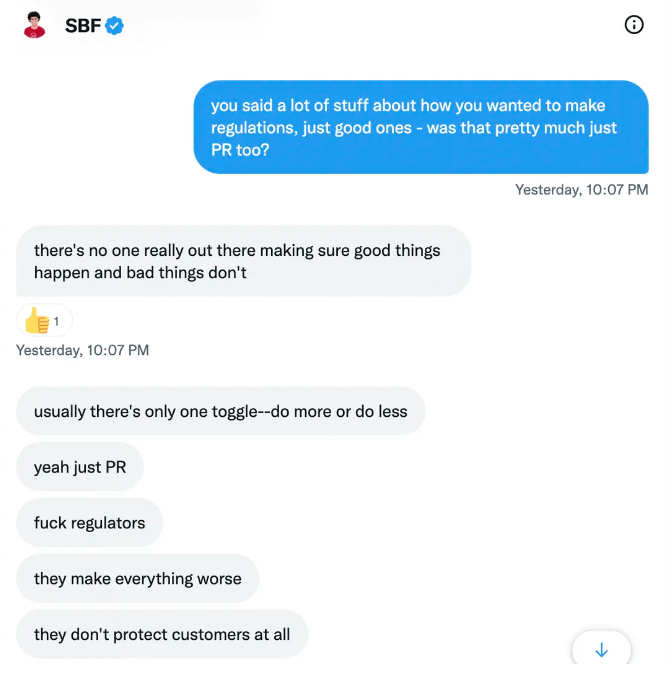
It's unclear if SBF cut corners for his gain. In their Twitter exchange, Piper revisits an interview question about ethics.
SBF says, "All the foolish sh*t I said"
SBF claims FTX has never invested customer monies.
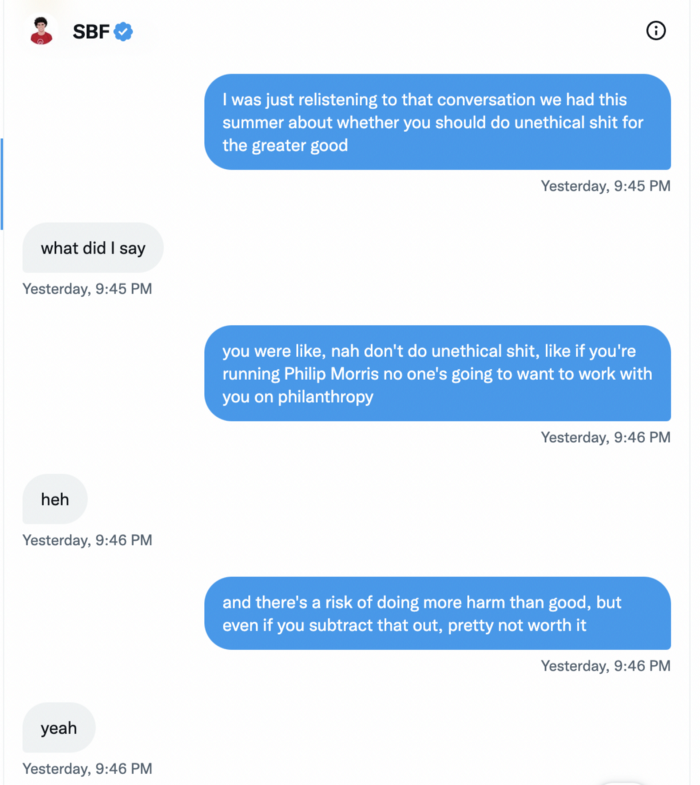
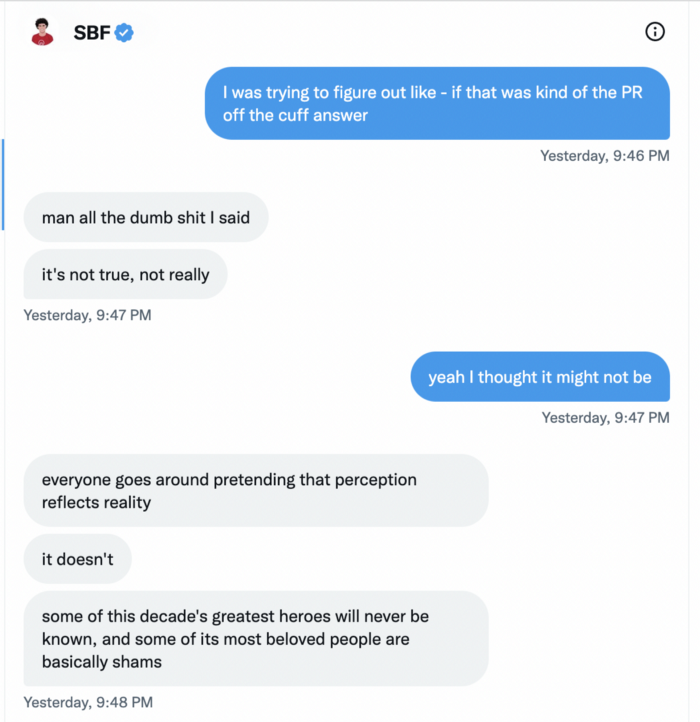
Piper challenged him on Twitter.
While he insisted FTX didn't use customer deposits, he said sibling business Alameda borrowed too much from FTX's balance sheet.
He did, basically.
When consumers tried to withdraw money, FTX was short.
SBF thought Alameda had enough money to cover FTX customers' withdrawals, but life sneaks up on you.
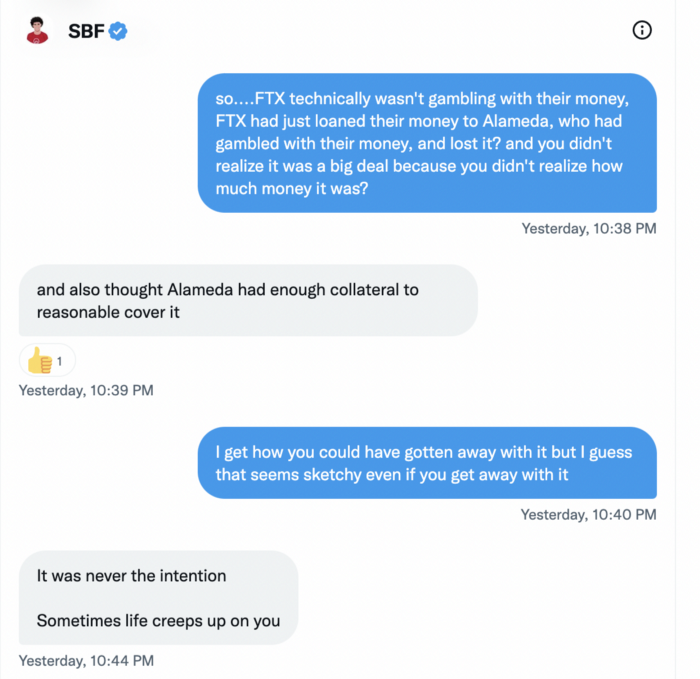
SBF believes most exchanges have done something similar to FTX, but they haven't had a bank run (a bunch of people all wanting to get their deposits out at the same time).
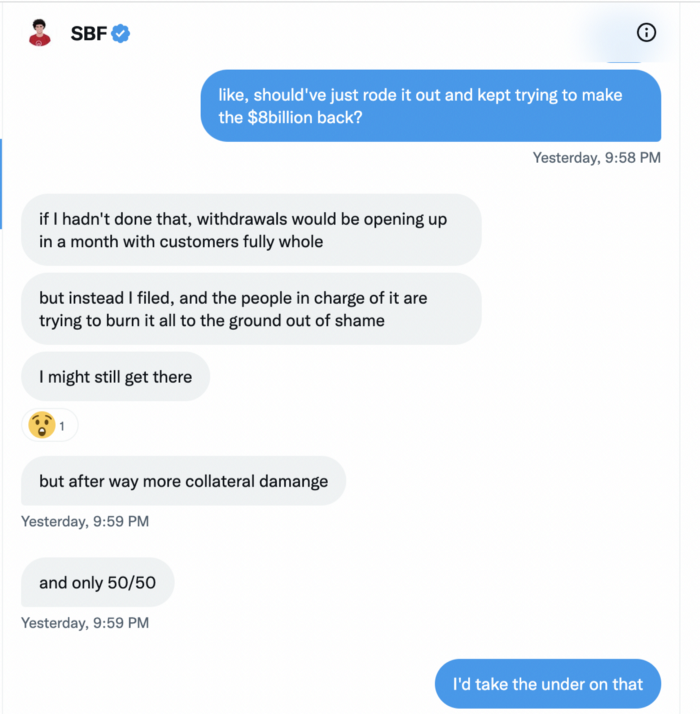
SBF believes he shouldn't have consented to the bankruptcy and kept attempting to raise more money because withdrawals would be open in a month with clients whole.
If additional money came in, he needed $8 billion to bridge the creditors' deficit, and there aren't many corporations with $8 billion to spare.
Once clients feel protected, they will continue to leave their assets on the exchange, according to one idea.
Kevin OLeary, a world-renowned hedge fund manager, says not all investors will walk through the open gate once the company is safe, therefore the $8 Billion wasn't needed immediately.
SBF claims the bankruptcy was his biggest error because he could have accumulated more capital.
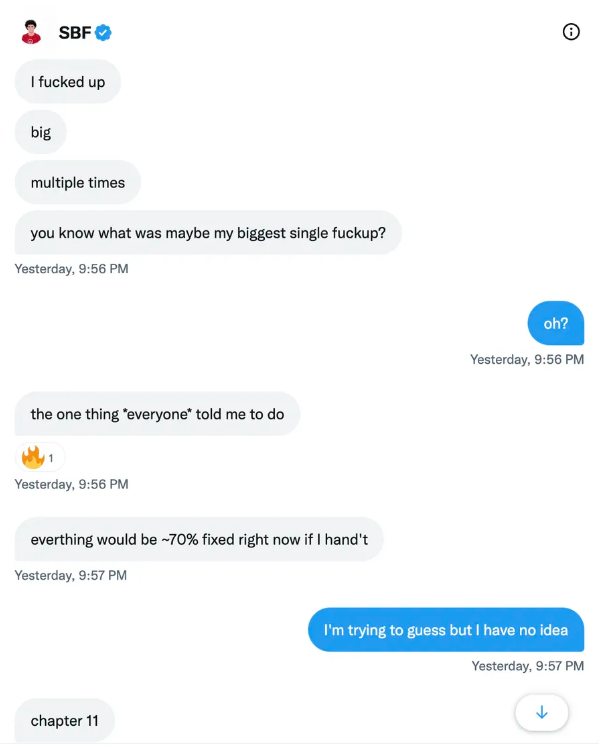
Final Reflections
Sam Bankman-Fried, 30, became the world's youngest billionaire in four years.
Never listen to what people say about investing; watch what they do.
SBF is a trader who gets wrecked occasionally.
Ten first-time entrepreneurs ran FTX, screwing each other with no risk management.
It prevents opposing or challenging perspectives and echo chamber highs.
Twitter D.M. conversation with a journalist is the final nail.
He lacks an experienced crew.
This event will surely speed up much-needed regulation.
It's also prompted cryptocurrency exchanges to offer proof of reserves to calm customers.