


More on Entrepreneurship/Creators

Keagan Stokoe
3 years ago
Generalists Create Startups; Specialists Scale Them
There’s a funny part of ‘Steve Jobs’ by Walter Isaacson where Jobs says that Bill Gates was more a copier than an innovator:
“Bill is basically unimaginative and has never invented anything, which is why I think he’s more comfortable now in philanthropy than technology. He just shamelessly ripped off other people’s ideas….He’d be a broader guy if he had dropped acid once or gone off to an ashram when he was younger.”
Gates lacked flavor. Nobody ever got excited about a Microsoft launch, despite their good products. Jobs had the world's best product taste. Apple vs. Microsoft.
A CEO's core job functions are all driven by taste: recruiting, vision, and company culture all require good taste. Depending on the type of company you want to build, know where you stand between Microsoft and Apple.
How can you improve your product judgment? How to acquire taste?

Test and refine
Product development follows two parallel paths: the ‘customer obsession’ path and the ‘taste and iterate’ path.
The customer obsession path involves solving customer problems. Lean Startup frameworks show you what to build at each step.
Taste-and-iterate doesn't involve the customer. You iterate internally and rely on product leaders' taste and judgment.
Creative Selection by Ken Kocienda explains this method. In Creative Selection, demos are iterated and presented to product leaders. Your boss presents to their boss, and so on up to Steve Jobs. If you have good product taste, you can be a panelist.
The iPhone follows this path. Before seeing an iPhone, consumers couldn't want one. Customer obsession wouldn't have gotten you far because iPhone buyers didn't know they wanted one.
In The Hard Thing About Hard Things, Ben Horowitz writes:
“It turns out that is exactly what product strategy is all about — figuring out the right product is the innovator’s job, not the customer’s job. The customer only knows what she thinks she wants based on her experience with the current product. The innovator can take into account everything that’s possible, but often must go against what she knows to be true. As a result, innovation requires a combination of knowledge, skill, and courage.“
One path solves a problem the customer knows they have, and the other doesn't. Instead of asking a person what they want, observe them and give them something they didn't know they needed.
It's much harder. Apple is the world's most valuable company because it's more valuable. It changes industries permanently.

If you want to build superior products, use the iPhone of your industry.
How to Improve Your Taste
I. Work for a company that has taste.
People with the best taste in products, markets, and people are rewarded for building great companies. Tasteful people know quality even when they can't describe it. Taste isn't writable. It's feel-based.
Moving into a community that's already doing what you want to do may be the best way to develop entrepreneurial taste. Most company-building knowledge is tacit.
Joining a company you want to emulate allows you to learn its inner workings. It reveals internal patterns intuitively. Many successful founders come from successful companies.
Consumption determines taste. Excellence will refine you. This is why restauranteurs visit the world's best restaurants and serious painters visit Paris or New York. Joining a company with good taste is beneficial.
2. Possess a wide range of interests
“Edwin Land of Polaroid talked about the intersection of the humanities and science. I like that intersection. There’s something magical about that place… The reason Apple resonates with people is that there’s a deep current of humanity in our innovation. I think great artists and great engineers are similar, in that they both have a desire to express themselves.” — Steve Jobs
I recently discovered Edwin Land. Jobs modeled much of his career after Land's. It makes sense that Apple was inspired by Land.
A Triumph of Genius: Edwin Land, Polaroid, and the Kodak Patent War notes:
“Land was introverted in person, but supremely confident when he came to his ideas… Alongside his scientific passions, lay knowledge of art, music, and literature. He was a cultured person growing even more so as he got older, and his interests filtered into the ethos of Polaroid.”
Founders' philosophies shape companies. Jobs and Land were invested. It showed in the products their companies made. Different. His obsession was spreading Microsoft software worldwide. Microsoft's success is why their products are bland and boring.
Experience is important. It's probably why startups are built by generalists and scaled by specialists.
Jobs combined design, typography, storytelling, and product taste at Apple. Some of the best original Mac developers were poets and musicians. Edwin Land liked broad-minded people, according to his biography. Physicist-musicians or physicist-photographers.
Da Vinci was a master of art, engineering, architecture, anatomy, and more. He wrote and drew at the same desk. His genius is remembered centuries after his death. Da Vinci's statue would stand at the intersection of humanities and science.
We find incredibly creative people here. Superhumans. Designers, creators, and world-improvers. These are the people we need to navigate technology and lead world-changing companies. Generalists lead.

DC Palter
3 years ago
How Will You Generate $100 Million in Revenue? The Startup Business Plan
A top-down company plan facilitates decision-making and impresses investors.

A startup business plan starts with the product, the target customers, how to reach them, and how to grow the business.
Bottom-up is terrific unless venture investors fund it.
If it can prove how it can exceed $100M in sales, investors will invest. If not, the business may be wonderful, but it's not venture capital-investable.
As a rule, venture investors only fund firms that expect to reach $100M within 5 years.
Investors get nothing until an acquisition or IPO. To make up for 90% of failed investments and still generate 20% annual returns, portfolio successes must exit with a 25x return. A $20M-valued company must be acquired for $500M or more.
This requires $100M in sales (or being on a nearly vertical trajectory to get there). The company has 5 years to attain that milestone and create the requisite ROI.
This motivates venture investors (venture funds and angel investors) to hunt for $100M firms within 5 years. When you pitch investors, you outline how you'll achieve that aim.
I'm wary of pitches after seeing a million hockey sticks predicting $5M to $100M in year 5 that never materialized. Doubtful.
Startups fail because they don't have enough clients, not because they don't produce a great product. That jump from $5M to $100M never happens. The company reaches $5M or $10M, growing at 10% or 20% per year. That's great, but not enough for a $500 million deal.
Once it becomes clear the company won’t reach orbit, investors write it off as a loss. When a corporation runs out of money, it's shut down or sold in a fire sale. The company can survive if expenses are trimmed to match revenues, but investors lose everything.
When I hear a pitch, I'm not looking for bright income projections but a viable plan to achieve them. Answer these questions in your pitch.
Is the market size sufficient to generate $100 million in revenue?
Will the initial beachhead market serve as a springboard to the larger market or as quicksand that hinders progress?
What marketing plan will bring in $100 million in revenue? Is the market diffuse and will cost millions of dollars in advertising, or is it one, focused market that can be tackled with a team of salespeople?
Will the business be able to bridge the gap from a small but fervent set of early adopters to a larger user base and avoid lock-in with their current solution?
Will the team be able to manage a $100 million company with hundreds of people, or will hypergrowth force the organization to collapse into chaos?
Once the company starts stealing market share from the industry giants, how will it deter copycats?
The requirement to reach $100M may be onerous, but it provides a context for difficult decisions: What should the product be? Where should we concentrate? who should we hire? Every strategic choice must consider how to reach $100M in 5 years.
Focusing on $100M streamlines investor pitches. Instead of explaining everything, focus on how you'll attain $100M.
As an investor, I know I'll lose my money if the startup doesn't reach this milestone, so the revenue prediction is the first thing I look at in a pitch deck.
Reaching the $100M goal needs to be the first thing the entrepreneur thinks about when putting together the business plan, the central story of the pitch, and the criteria for every important decision the company makes.

Owolabi Judah
3 years ago
How much did YouTube pay for 10 million views?
Ali's $1,054,053.74 YouTube Adsense haul.
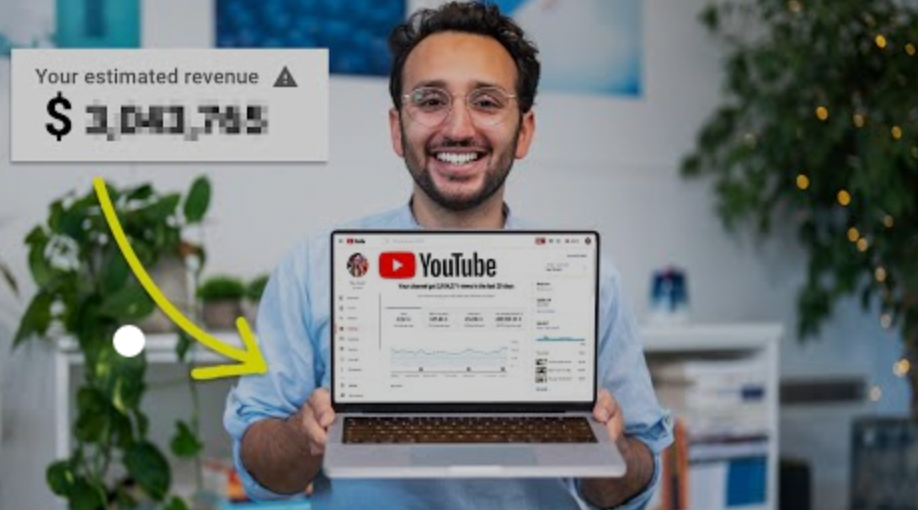
YouTuber, entrepreneur, and former doctor Ali Abdaal. He began filming productivity and financial videos in 2017. Ali Abdaal has 3 million YouTube subscribers and has crossed $1 million in AdSense revenue. Crazy, no?
Ali will share the revenue of his top 5 youtube videos, things he's learned that you can apply to your side hustle, and how many views it takes to make a livelihood off youtube.
First, "The Long Game."
All good things take time to bear fruit. Compounding improves everything. Long-term work yields better returns. Ali made his first dollar after nine months and 85 videos.
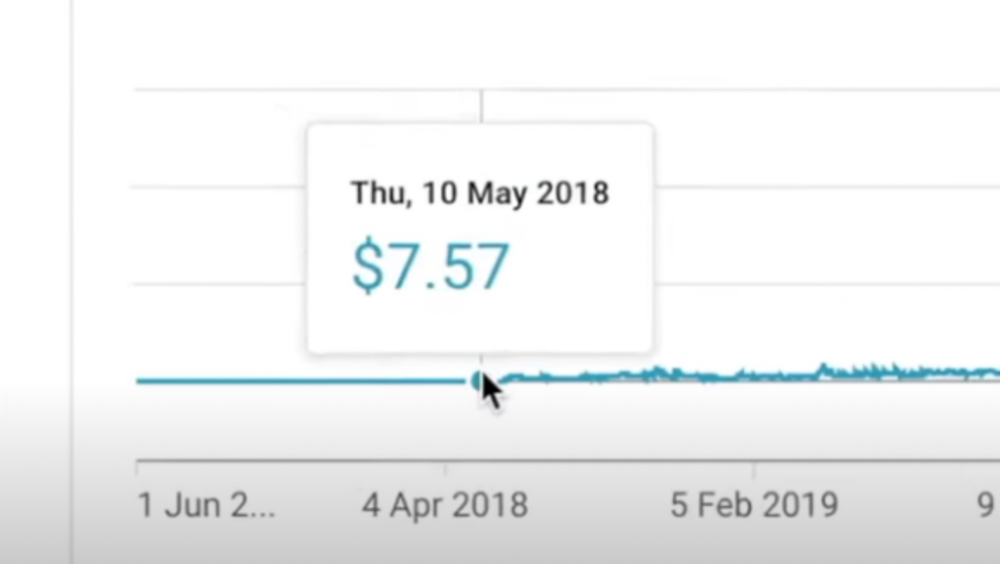
Second, "One piece of content can transform your life, but you never know which one."
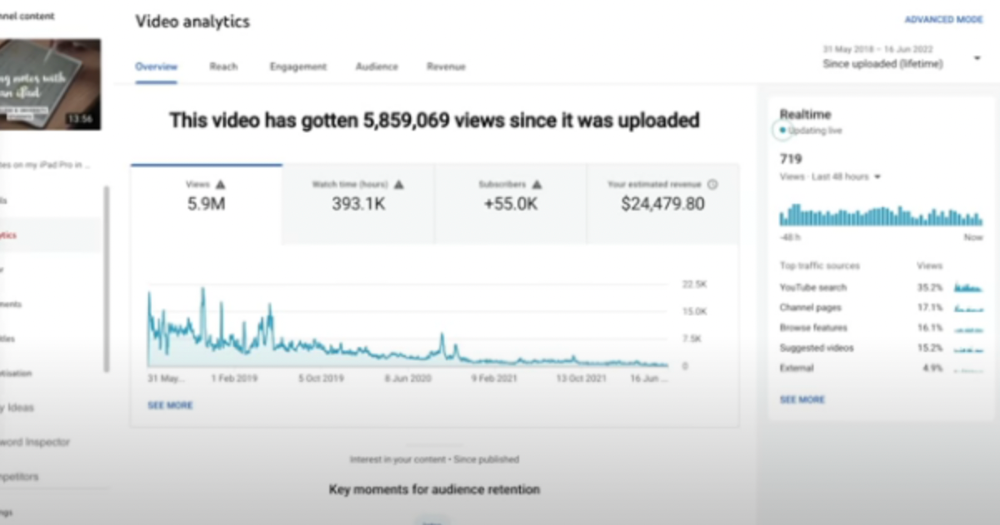
Had he abandoned YouTube at 84 videos without making any money, he wouldn't have filmed the 85th video that altered everything.
Third Lesson: Your Industry Choice Can Multiply.
The industry or niche you target as a business owner or side hustler can have a major impact on how much money you make.
Here are the top 5 videos.

1) 9.8m views: $191,258.16 for 9 passive income ideas
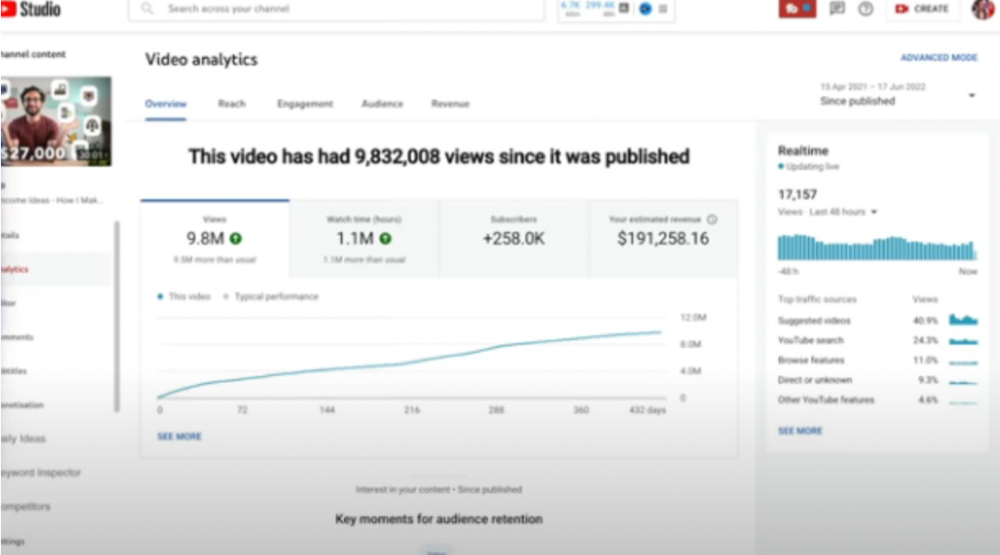
Ali made 2 points.
We should consider YouTube videos digital assets. They're investments, which make us money. His investments are yielding passive income.
Investing extra time and effort in your films can pay off.
2) How to Invest for Beginners — 5.2m Views: $87,200.08.
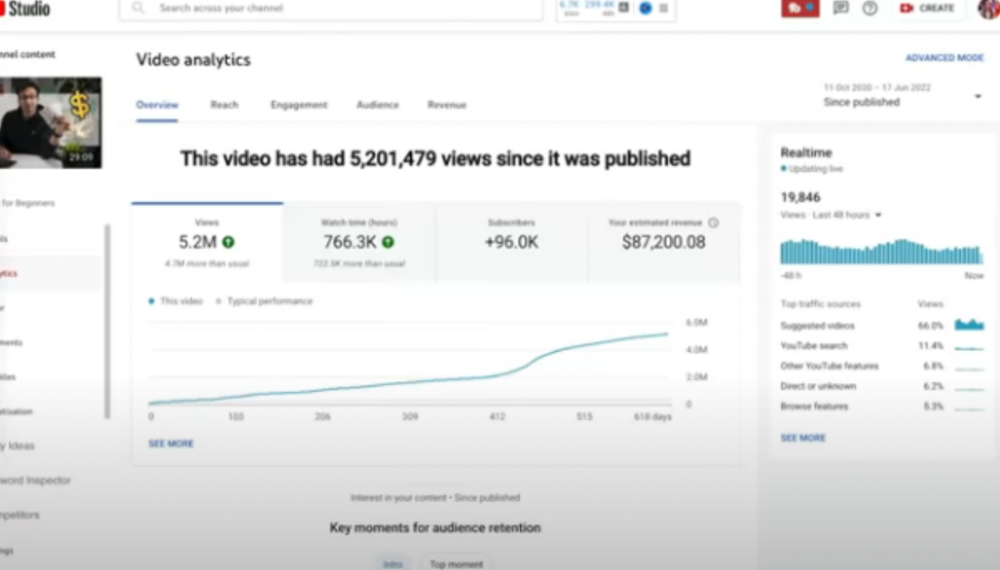
This video did poorly in the first several weeks after it was published; it was his tenth poorest performer. Don't worry about things you can't control. This applies to life, not just YouTube videos.
He stated we constantly have anxieties, fears, and concerns about things outside our control, but if we can find that line, life is easier and more pleasurable.
3) How to Build a Website in 2022— 866.3k views: $42,132.72.
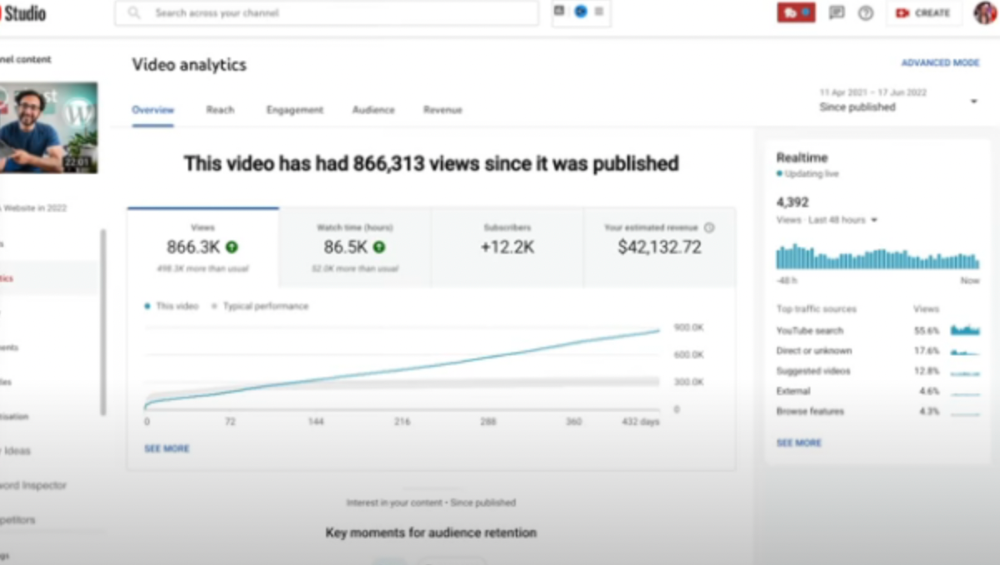
The RPM was $48.86 per thousand views, making it his highest-earning video. Squarespace, Wix, and other website builders are trying to put ads on it and competing against one other, so ad rates go up.
Because it was beyond his niche, Ali almost didn't make the video. He made the video because he wanted to help at least one person.
4) How I take notes on my iPad in medical school — 5.9m views: $24,479.80

85th video. It's the video that affected Ali's YouTube channel and his life the most. The video's success wasn't certain.
5) How I Type Fast 156 Words Per Minute — 8.2M views: $25,143.17
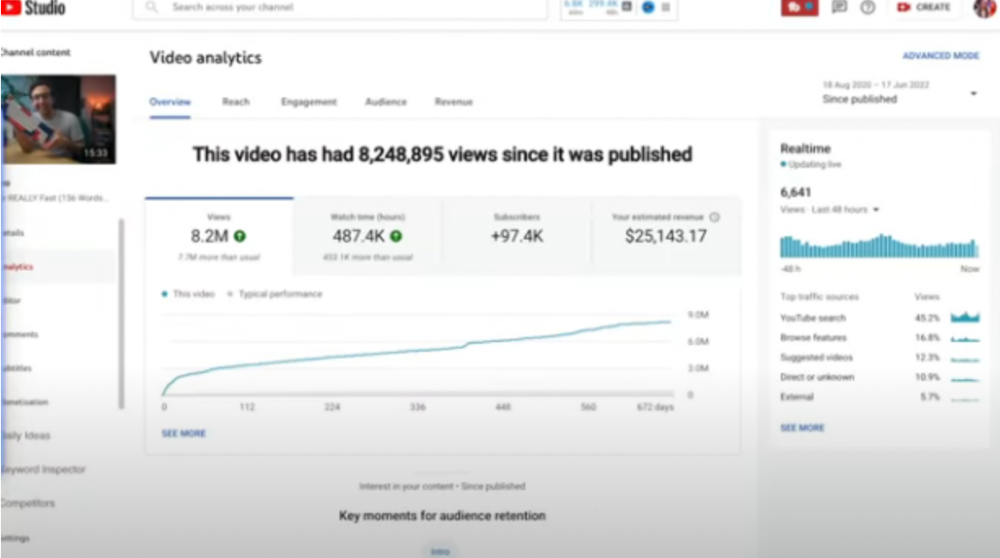
Ali didn't know this video would perform well; he made it because he can type fast and has been practicing for 10 years. So he made a video with his best advice.
How many views to different wealth levels?
It depends on geography, niche, and other monetization sources. To keep things simple, he would solely utilize AdSense.
How many views to generate money?
To generate money on Youtube, you need 1,000 subscribers and 4,000 hours of view time. How much work do you need to make pocket money?

Ali's first 1,000 subscribers took 52 videos and 6 months. The typical channel with 1,000 subscribers contains 152 videos, according to Tubebuddy. It's time-consuming.
After monetizing, you'll need 15,000 views/month to make $5-$10/day.
How many views to go part-time?
Say you make $35,000/year at your day job. If you work 5 days/week, you make $7,000/year each day. If you want to drop down from 5 days to 4 days/week, you need to make an extra $7,000/year from YouTube, or $600/month.
What's the quit-your-job budget?
Silicon Valley Girl is in a highly successful niche targeting tech-focused folks in the west. When her channel had 500k views/month, she made roughly $3,000/month or $47,000/year, enough to quit your work.
Marina has another 1.5m subscriber channel in Russia, which has a lower rpm because fewer corporations advertise there than in the west. 2.3 million views/month is $4,000/month or $50,000/year, enough to quit your employment.
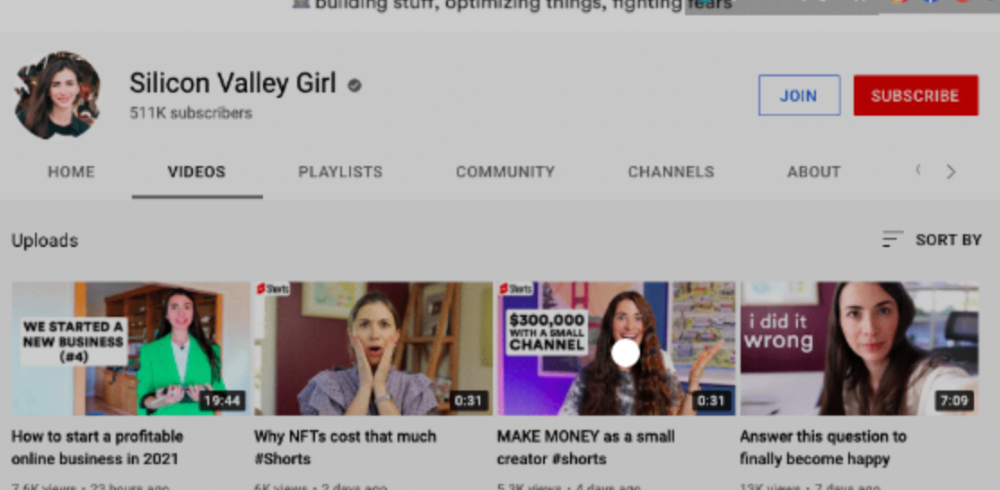
Marina is an intriguing example because she has three YouTube channels with the same skills, but one is 16x more profitable due to the niche she chose.
In Ali's case, he made 100+ videos when his channel was producing enough money to quit his job, roughly $4,000/month.
How many views make you rich?
Depending on how you define rich. Ali felt prosperous with over $100,000/year and 3–5m views/month.
Conclusion
YouTubers and artists don't treat their work like a company, which is a mistake. Businesses have been attempting to figure this out for decades, if not centuries.
We can learn from the business world how to monetize YouTube, Instagram, and Tiktok and make them into sustainable enterprises where we can hire people and delegate tasks.
Bonus
Watch Ali's video explaining all this:
This post is a summary. Read the full article here
You might also like
Langston Thomas
3 years ago
A Simple Guide to NFT Blockchains
Ethereum's blockchain rules NFTs. Many consider it the one-stop shop for NFTs, and it's become the most talked-about and trafficked blockchain in existence.
Other blockchains are becoming popular in NFTs. Crypto-artists and NFT enthusiasts have sought new places to mint and trade NFTs due to Ethereum's high transaction costs and environmental impact.
When choosing a blockchain to mint on, there are several factors to consider. Size, creator costs, consumer spending habits, security, and community input are important. We've created a high-level summary of blockchains for NFTs to help clarify the fast-paced world of web3 tech.
Ethereum
Ethereum currently has the most NFTs. It's decentralized and provides financial and legal services without intermediaries. It houses popular NFT marketplaces (OpenSea), projects (CryptoPunks and the Bored Ape Yacht Club), and artists (Pak and Beeple).
It's also expensive and energy-intensive. This is because Ethereum works using a Proof-of-Work (PoW) mechanism. PoW requires computers to solve puzzles to add blocks and transactions to the blockchain. Solving these puzzles requires a lot of computer power, resulting in astronomical energy loss.
You should consider this blockchain first due to its popularity, security, decentralization, and ease of use.
Solana
Solana is a fast programmable blockchain. Its proof-of-history and proof-of-stake (PoS) consensus mechanisms eliminate complex puzzles. Reduced validation times and fees result.
PoS users stake their cryptocurrency to become a block validator. Validators get SOL. This encourages and rewards users to become stakers. PoH works with PoS to cryptographically verify time between events. Solana blockchain ensures transactions are in order and found by the correct leader (validator).
Solana's PoS and PoH mechanisms keep transaction fees and times low. Solana isn't as popular as Ethereum, so there are fewer NFT marketplaces and blockchain traders.
Tezos
Tezos is a greener blockchain. Tezos rose in 2021. Hic et Nunc was hailed as an economic alternative to Ethereum-centric marketplaces until Nov. 14, 2021.
Similar to Solana, Tezos uses a PoS consensus mechanism and only a PoS mechanism to reduce computational work. This blockchain uses two million times less energy than Ethereum. It's cheaper than Ethereum (but does cost more than Solana).
Tezos is a good place to start minting NFTs in bulk. Objkt is the largest Tezos marketplace.
Flow
Flow is a high-performance blockchain for NFTs, games, and decentralized apps (dApps). Flow is built with scalability in mind, so billions of people could interact with NFTs on the blockchain.
Flow became the NBA's blockchain partner in 2019. Flow, a product of Dapper labs (the team behind CryptoKitties), launched and hosts NBA Top Shot, making the blockchain integral to the popularity of non-fungible tokens.
Flow uses PoS to verify transactions, like Tezos. Developers are working on a model to handle 10,000 transactions per second on the blockchain. Low transaction fees.
Flow NFTs are tradeable on Blocktobay, OpenSea, Rarible, Foundation, and other platforms. NBA, NFL, UFC, and others have launched NFT marketplaces on Flow. Flow isn't as popular as Ethereum, resulting in fewer NFT marketplaces and blockchain traders.
Asset Exchange (WAX)
WAX is king of virtual collectibles. WAX is popular for digitalized versions of legacy collectibles like trading cards, figurines, memorabilia, etc.
Wax uses a PoS mechanism, but also creates carbon offset NFTs and partners with Climate Care. Like Flow, WAX transaction fees are low, and network fees are redistributed to the WAX community as an incentive to collectors.
WAX marketplaces host Topps, NASCAR, Hot Wheels, and cult classic film franchises like Godzilla, The Princess Bride, and Spiderman.
Binance Smart Chain
BSC is another good option for balancing fees and performance. High-speed transactions and low fees hurt decentralization. BSC is most centralized.
Binance Smart Chain uses Proof of Staked Authority (PoSA) to support a short block time and low fees. The 21 validators needed to run the exchange switch every 24 hours. 11 of the 21 validators are directly connected to the Binance Crypto Exchange, according to reports.
While many in the crypto and NFT ecosystems dislike centralization, the BSC NFT market picked up speed in 2021. OpenBiSea, AirNFTs, JuggerWorld, and others are gaining popularity despite not having as robust an ecosystem as Ethereum.

Simon Ash
2 years ago
The Three Most Effective Questions for Ongoing Development
The Traffic Light Approach to Reviewing Personal, Team and Project Development

What needs improvement? If you want to improve, you need to practice your sport, musical instrument, habit, or work project. You need to assess your progress.
Continuous improvement is the foundation of focused practice and a growth mentality. Not just individually. High-performing teams pursue improvement. Right? Why is it hard?
As a leadership coach, senior manager, and high-level athlete, I've found three key questions that may unlock high performance in individuals and teams.
Problems with Reviews
Reviewing and improving performance is crucial, however I hate seeing review sessions in my diary. I rarely respond to questionnaire pop-ups or emails. Why?
Time constrains. Requests to fill out questionnaires often state they will take 10–15 minutes, but I can think of a million other things to do with that time. Next, review overload. Businesses can easily request comments online. No matter what you buy, someone will ask for your opinion. This bombardment might make feedback seem bad, which is bad.
The problem is that we might feel that way about important things like personal growth and work performance. Managers and team leaders face a greater challenge.
When to Conduct a Review
We must be wise about reviewing things that matter to us. Timing and duration matter. Reviewing the experience as quickly as possible preserves information and sentiments. Time must be brief. The review's importance and size will determine its length. We might only take a few seconds to review our morning coffee, but we might require more time for that six-month work project.
These post-event reviews should be supplemented by periodic reflection. Journaling can help with daily reflections, but I also like to undertake personal reviews every six months on vacation or at a retreat.
As an employee or line manager, you don't want to wait a year for a performance assessment. Little and frequently is best, with a more formal and in-depth assessment (typically with a written report) in 6 and 12 months.
The Easiest Method to Conduct a Review Session
I follow Einstein's review process:
“Make things as simple as possible but no simpler.”
Thus, it should be brief but deliver the necessary feedback. Quality critique is hard to receive if the process is overly complicated or long.
I have led or participated in many review processes, from strategic overhauls of big organizations to personal goal coaching. Three key questions guide the process at either end:
What ought to stop being done?
What should we do going forward?
What should we do first?
Following the Rule of 3, I compare it to traffic lights. Red, amber, and green lights:
Red What ought should we stop?
Amber What ought to we keep up?
Green Where should we begin?
This approach is easy to understand and self-explanatory, however below are some examples under each area.
Red What ought should we stop?
As a team or individually, we must stop doing things to improve.
Sometimes they're bad. If we want to lose weight, we should avoid sweets. If a team culture is bad, we may need to stop unpleasant behavior like gossiping instead of having difficult conversations.
Not all things we should stop are wrong. Time matters. Since it is finite, we sometimes have to stop nice things to focus on the most important. Good to Great author Jim Collins famously said:
“Don’t let the good be the enemy of the great.”
Prioritizing requires this idea. Thus, decide what to stop to prioritize.
Amber What ought to we keep up?
Should we continue with the amber light? It helps us decide what to keep doing during review. Many items fall into this category, so focus on those that make the most progress.
Which activities have the most impact? Which behaviors create the best culture? Success-building habits?
Use these questions to find positive momentum. These are the fly-wheel motions, according to Jim Collins. The Compound Effect author Darren Hardy says:
“Consistency is the key to achieving and maintaining momentum.”
What can you do consistently to reach your goal?
Green Where should we begin?
Finally, green lights indicate new beginnings. Red/amber difficulties may be involved. Stopping a red issue may give you more time to do something helpful (in the amber).
This green space inspires creativity. Kolbs learning cycle requires active exploration to progress. Thus, it's crucial to think of new approaches, try them out, and fail if required.
This notion underpins lean start-build, up's measure, learn approach and agile's trying, testing, and reviewing. Try new things until you find what works. Thomas Edison, the lighting legend, exclaimed:
“There is a way to do it better — find it!”
Failure is acceptable, but if you want to fail forward, look back on what you've done.
John Maxwell concurred with Edison:
“Fail early, fail often, but always fail forward”
A good review procedure lets us accomplish that. To avoid failure, we must act, experiment, and reflect.
Use the traffic light system to prioritize queries. Ask:
Red What needs to stop?
Amber What should continue to occur?
Green What might be initiated?
Take a moment to reflect on your day. Check your priorities with these three questions. Even if merely to confirm your direction, it's a terrific exercise!

xuanling11
3 years ago
Reddit NFT Achievement

Reddit's NFT market is alive and well.
NFT owners outnumber OpenSea on Reddit.
Reddit NFTs flip in OpenSea in days:
Fast-selling.
NFT sales will make Reddit's current communities more engaged.
I don't think NFTs will affect existing groups, but they will build hype for people to acquire them.
The first season of Collectibles is unique, but many missed the first season.
Second-season NFTs are less likely to be sold for a higher price than first-season ones.
If you use Reddit, it's fun to own NFTs.