


More on Web3 & Crypto

Robert Kim
3 years ago
Crypto Legislation Might Progress Beyond Talk in 2022
Financial regulators have for years attempted to apply existing laws to the multitude of issues created by digital assets. In 2021, leading federal regulators and members of Congress have begun to call for legislation to address these issues. As a result, 2022 may be the year when federal legislation finally addresses digital asset issues that have been growing since the mining of the first Bitcoin block in 2009.
Digital Asset Regulation in the Absence of Legislation
So far, Congress has left the task of addressing issues created by digital assets to regulatory agencies. Although a Congressional Blockchain Caucus formed in 2016, House and Senate members introduced few bills addressing digital assets until 2018. As of October 2021, Congress has not amended federal laws on financial regulation, which were last significantly revised by the Dodd-Frank Act in 2010, to address digital asset issues.
In the absence of legislation, issues that do not fit well into existing statutes have created problems. An example is the legal status of digital assets, which can be considered to be either securities or commodities, and can even shift from one to the other over time. Years after the SEC’s 2017 report applying the definition of a security to digital tokens, the SEC and the CFTC have yet to clarify the distinction between securities and commodities for the thousands of digital assets in existence.
SEC Chair Gary Gensler has called for Congress to act, stating in August, “We need additional Congressional authorities to prevent transactions, products, and platforms from falling between regulatory cracks.” Gensler has reached out to Sen. Elizabeth Warren (D-Ma.), who has expressed her own concerns about the need for legislation.
Legislation on Digital Assets in 2021
While regulators and members of Congress talked about the need for legislation, and the debate over cryptocurrency tax reporting in the 2021 infrastructure bill generated headlines, House and Senate bills proposing specific solutions to various issues quietly started to emerge.
Digital Token Sales
Several House bills attempt to address securities law barriers to digital token sales—some of them by building on ideas proposed by regulators in past years.
Exclusion from the definition of a security. Congressional Blockchain Caucus members have been introducing bills to exclude digital tokens from the definition of a security since 2018, and they have revived those bills in 2021. They include the Token Taxonomy Act of 2021 (H.R. 1628), successor to identically named bills in 2018 and 2019, and the Securities Clarity Act (H.R. 4451), successor to a 2020 namesake.
Safe harbor. SEC Commissioner Hester Peirce proposed a regulatory safe harbor for token sales in 2020, and two 2021 bills have proposed statutory safe harbors. Rep. Patrick McHenry (R-N.C.), Republican leader of the House Financial Services Committee, introduced a Clarity for Digital Tokens Act of 2021 (H.R. 5496) that would amend the Securities Act to create a safe harbor providing a grace period of exemption from Securities Act registration requirements. The Digital Asset Market Structure and Investor Protection Act (H.R. 4741) from Rep. Don Beyer (D-Va.) would amend the Securities Exchange Act to define a new type of security—a “digital asset security”—and add issuers of digital asset securities to an existing provision for delayed registration of securities.
Stablecoins
Stablecoins—digital currencies linked to the value of the U.S. dollar or other fiat currencies—have not yet been the subject of regulatory action, although Treasury Secretary Janet Yellen and Federal Reserve Chair Jerome Powell have each underscored the need to create a regulatory framework for them. The Beyer bill proposes to create a regulatory regime for stablecoins by amending Title 31 of the U.S. Code. Treasury Department approval would be required for any “digital asset fiat-based stablecoin” to be issued or used, under an application process to be established by Treasury in consultation with the Federal Reserve, the SEC, and the CFTC.
Serious consideration for any of these proposals in the current session of Congress may be unlikely. A spate of autumn bills on crypto ransom payments (S. 2666, S. 2923, S. 2926, H.R. 5501) shows that Congress is more inclined to pay attention first to issues that are more spectacular and less arcane. Moreover, the arcaneness of digital asset regulatory issues is likely only to increase further, now that major industry players such as Coinbase and Andreessen Horowitz are starting to roll out their own regulatory proposals.
Digital Dollar vs. Digital Yuan
Impetus to pass legislation on another type of digital asset, a central bank digital currency (CBDC), may come from a different source: rivalry with China.
China established itself as a world leader in developing a CBDC with a pilot project launched in 2020, and in 2021, the People’s Bank of China announced that its CBDC will be used at the Beijing Winter Olympics in February 2022. Republican Senators responded by calling for the U.S. Olympic Committee to forbid use of China’s CBDC by U.S. athletes in Beijing and introducing a bill (S. 2543) to require a study of its national security implications.
The Beijing Olympics could motivate a legislative mandate to accelerate implementation of a U.S. digital dollar, which the Federal Reserve has been in the process of considering in 2021. Antecedents to such legislation already exist. A House bill sponsored by 46 Republicans (H.R. 4792) has a provision that would require the Treasury Department to assess China’s CBDC project and report on the status of Federal Reserve work on a CBDC, and the Beyer bill includes a provision amending the Federal Reserve Act to authorize issuing a digital dollar.
Both parties are likely to support creating a digital dollar. The Covid-19 pandemic made a digital dollar for delivery of relief payments a popular idea in 2020, and House Democrats introduced bills with provisions for creating one in 2020 and 2021. Bipartisan support for a bill on a digital dollar, based on concerns both foreign and domestic in nature, could result.
International rivalry and bipartisan support may make the digital dollar a gateway issue for digital asset legislation in 2022. Legislative work on a digital dollar may open the door for considering further digital asset issues—including the regulatory issues that have been emerging for years—in 2022 and beyond.

Yusuf Ibrahim
3 years ago
How to sell 10,000 NFTs on OpenSea for FREE (Puppeteer/NodeJS)
So you've finished your NFT collection and are ready to sell it. Except you can't figure out how to mint them! Not sure about smart contracts or want to avoid rising gas prices. You've tried and failed with apps like Mini mouse macro, and you're not familiar with Selenium/Python. Worry no more, NodeJS and Puppeteer have arrived!
Learn how to automatically post and sell all 1000 of my AI-generated word NFTs (Nakahana) on OpenSea for FREE!
My NFT project — Nakahana |
NOTE: Only NFTs on the Polygon blockchain can be sold for free; Ethereum requires an initiation charge. NFTs can still be bought with (wrapped) ETH.
If you want to go right into the code, here's the GitHub link: https://github.com/Yusu-f/nftuploader
Let's start with the knowledge and tools you'll need.
What you should know
You must be able to write and run simple NodeJS programs. You must also know how to utilize a Metamask wallet.
Tools needed
- NodeJS. You'll need NodeJs to run the script and NPM to install the dependencies.
- Puppeteer – Use Puppeteer to automate your browser and go to sleep while your computer works.
- Metamask – Create a crypto wallet and sign transactions using Metamask (free). You may learn how to utilize Metamask here.
- Chrome – Puppeteer supports Chrome.
Let's get started now!
Starting Out
Clone Github Repo to your local machine. Make sure that NodeJS, Chrome, and Metamask are all installed and working. Navigate to the project folder and execute npm install. This installs all requirements.
Replace the “extension path” variable with the Metamask chrome extension path. Read this tutorial to find the path.
Substitute an array containing your NFT names and metadata for the “arr” variable and the “collection_name” variable with your collection’s name.
Run the script.
After that, run node nftuploader.js.
Open a new chrome instance (not chromium) and Metamask in it. Import your Opensea wallet using your Secret Recovery Phrase or create a new one and link it. The script will be unable to continue after this but don’t worry, it’s all part of the plan.
Next steps
Open your terminal again and copy the route that starts with “ws”, e.g. “ws:/localhost:53634/devtools/browser/c07cb303-c84d-430d-af06-dd599cf2a94f”. Replace the path in the connect function of the nftuploader.js script.
const browser = await puppeteer.connect({ browserWSEndpoint: "ws://localhost:58533/devtools/browser/d09307b4-7a75-40f6-8dff-07a71bfff9b3", defaultViewport: null });
Rerun node nftuploader.js. A second tab should open in THE SAME chrome instance, navigating to your Opensea collection. Your NFTs should now start uploading one after the other! If any errors occur, the NFTs and errors are logged in an errors.log file.
Error Handling
The errors.log file should show the name of the NFTs and the error type. The script has been changed to allow you to simply check if an NFT has already been posted. Simply set the “searchBeforeUpload” setting to true.
We're done!
If you liked it, you can buy one of my NFTs! If you have any concerns or would need a feature added, please let me know.
Thank you to everyone who has read and liked. I never expected it to be so popular.

CyberPunkMetalHead
3 years ago
It's all about the ego with Terra 2.0.
UST depegs and LUNA crashes 99.999% in a fraction of the time it takes the Moon to orbit the Earth.
Fat Man, a Terra whistle-blower, promises to expose Do Kwon's dirty secrets and shady deals.
The Terra community has voted to relaunch Terra LUNA on a new blockchain. The Terra 2.0 Pheonix-1 blockchain went live on May 28, 2022, and people were airdropped the new LUNA, now called LUNA, while the old LUNA became LUNA Classic.
Does LUNA deserve another chance? To answer this, or at least start a conversation about the Terra 2.0 chain's advantages and limitations, we must assess its fundamentals, ideology, and long-term vision.
Whatever the result, our analysis must be thorough and ruthless. A failure of this magnitude cannot happen again, so we must magnify every potential breaking point by 10.
Will UST and LUNA holders be compensated in full?
The obvious. First, and arguably most important, is to restore previous UST and LUNA holders' bags.
Terra 2.0 has 1,000,000,000,000 tokens to distribute.
25% of a community pool
Holders of pre-attack LUNA: 35%
10% of aUST holders prior to attack
Holders of LUNA after an attack: 10%
UST holders as of the attack: 20%
Every LUNA and UST holder has been compensated according to the above proposal.
According to self-reported data, the new chain has 210.000.000 tokens and a $1.3bn marketcap. LUNC and UST alone lost $40bn. The new token must fill this gap. Since launch:
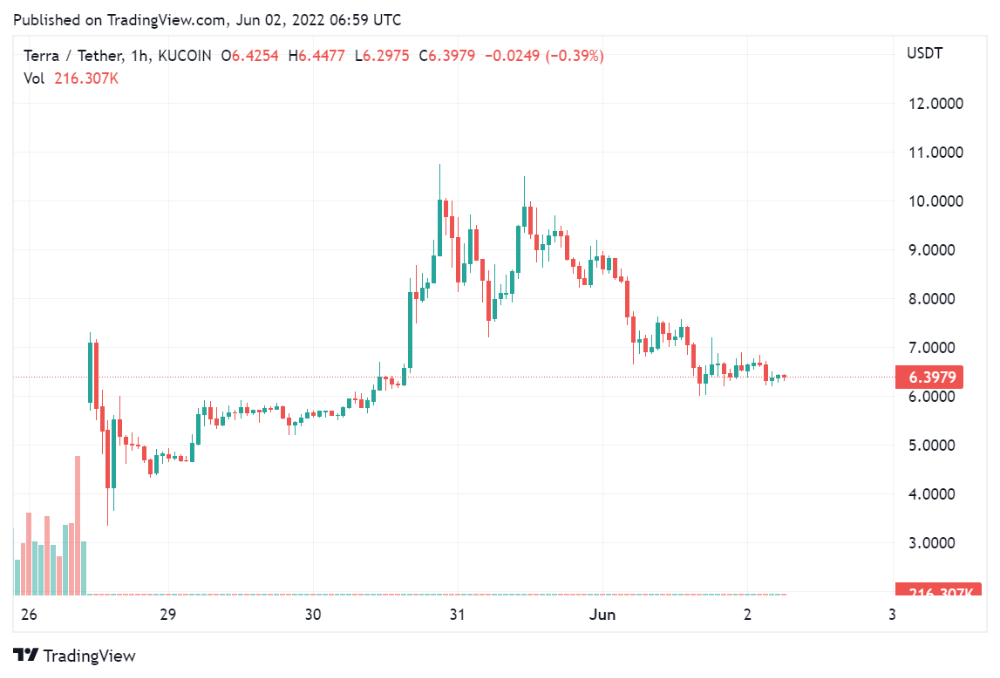
LUNA holders collectively own $1b worth of LUNA if we subtract the 25% community pool airdrop from the current market cap and assume airdropped LUNA was never sold.
At the current supply, the chain must grow 40 times to compensate holders. At the current supply, LUNA must reach $240.
LUNA needs a full-on Bull Market to make LUNC and UST holders whole.
Who knows if you'll be whole? From the time you bought to the amount and price, there are too many variables to determine if Terra can cover individual losses.
The above distribution doesn't consider individual cases. Terra didn't solve individual cases. It would have been huge.
What does LUNA offer in terms of value?
UST's marketcap peaked at $18bn, while LUNC's was $41bn. LUNC and UST drove the Terra chain's value.
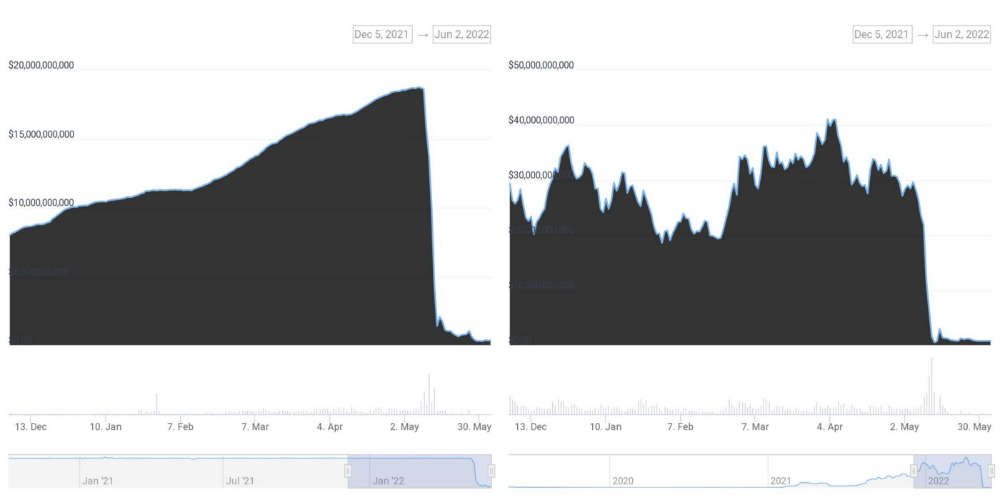
After it was confirmed (again) that algorithmic stablecoins are bad, Terra 2.0 will no longer support them.
Algorithmic stablecoins contributed greatly to Terra's growth and value proposition. Terra 2.0 has no product without algorithmic stablecoins.
Terra 2.0 has an identity crisis because it has no actual product. It's like Volkswagen faking carbon emission results and then stopping car production.
A project that has already lost the trust of its users and nearly all of its value cannot survive without a clear and in-demand use case.
Do Kwon, how about him?
Oh, the Twitter-caller-poor? Who challenges crypto billionaires to break his LUNA chain? Who dissolved Terra Labs South Korea before depeg? Arrogant guy?
That's not a good image for LUNA, especially when making amends. I think he should step down and let a nicer person be Terra 2.0's frontman.
The verdict
Terra has a terrific community with an arrogant, unlikeable leader. The new LUNA chain must grow 40 times before it can start making up its losses, and even then, not everyone's losses will be covered.
I won't invest in Terra 2.0 or other algorithmic stablecoins in the near future. I won't be near any Do Kwon-related project within 100 miles. My opinion.
Can Terra 2.0 be saved? Comment below.
You might also like

Jenn Leach
3 years ago
I created a faceless TikTok account. Six months later.
Follower count, earnings, and more

I created my 7th TikTok account six months ago. TikTok's great. I've developed accounts for Amazon products, content creators/brand deals education, website flipping, and more.
Introverted or shy people use faceless TikTok accounts.
Maybe they don't want millions of people to see their face online, or they want to remain anonymous so relatives and friends can't locate them.
Going faceless on TikTok can help you grow a following, communicate your message, and make money online.
Here are 6 steps I took to turn my Tik Tok account into a $60,000/year side gig.
From nothing to $60K in 6 months
It's clickbait, but it’s true. Here’s what I did to get here.
Quick context:
I've used social media before. I've spent years as a social creator and brand.
I've built Instagram, TikTok, and YouTube accounts to nearly 100K.
How I did it
First, select a niche.
If you can focus on one genre on TikTok, you'll have a better chance of success, however lifestyle creators do well too.
Niching down is easier, in my opinion.
Examples:
Travel
Food
Kids
Earning cash
Finance
You can narrow these niches if you like.
During the pandemic, a travel blogger focused on Texas-only tourism and gained 1 million subscribers.
Couponing might be a finance specialization.
One of my finance TikTok accounts gives credit tips and grants and has 23K followers.
Tons of ways you can get more specific.
Consider how you'll monetize your TikTok account. I saw many enormous TikTok accounts that lose money.
Why?
They can't monetize their niche. Not impossible to commercialize, but tough enough to inhibit action.
First, determine your goal.
In this first step, consider what your end goal is.
Are you trying to promote your digital products or social media management services?
You want brand deals or e-commerce sales.
This will affect your TikTok specialty.
This is the first step to a TikTok side gig.
Step 2: Pick a content style
Next, you want to decide on your content style.
Do you do voiceover and screenshots?
You'll demonstrate a product?
Will you faceless vlog?
Step 3: Look at the competition
Find anonymous accounts and analyze what content works, where they thrive, what their audience wants, etc.
This can help you make better content.
Like the skyscraper method for TikTok.
Step 4: Create a content strategy.
Your content plan is where you sit down and decide:
How many videos will you produce each day or each week?
Which links will you highlight in your biography?
What amount of time can you commit to this project?
You may schedule when to post videos on a calendar. Make videos.
5. Create videos.
No video gear needed.
Using a phone is OK, and I think it's preferable than posting drafts from a computer or phone.
TikTok prefers genuine material.
Use their app, tools, filters, and music to make videos.
And imperfection is preferable. Tik okers like to see videos made in a bedroom, not a film studio.
Make sense?
When making videos, remember this.
I personally use my phone and tablet.
Step 6: Monetize
Lastly, it’s time to monetize How will you make money? You decided this in step 1.
Time to act!
For brand agreements
Include your email in the bio.
Share several sites and use a beacons link in your bio.
Make cold calls to your favorite companies to get them to join you in a TikTok campaign.
For e-commerce
Include a link to your store's or a product's page in your bio.
For client work
Include your email in the bio.
Use a beacons link to showcase your personal website, portfolio, and other resources.
For affiliate marketing
Include affiliate product links in your bio.
Join the Amazon Influencer program and provide a link to your storefront in your bio.
$60,000 per year from Tik Tok?
Yes, and some creators make much more.
Tori Dunlap (herfirst100K) makes $100,000/month on TikTok.
My TikTok adventure took 6 months, but by month 2 I was making $1,000/month (or $12K/year).
By year's end, I want this account to earn $100K/year.
Imagine if my 7 TikTok accounts made $100K/year.
7 Tik Tok accounts X $100K/yr = $700,000/year

Amelia Winger-Bearskin
3 years ago
Reasons Why AI-Generated Images Remind Me of Nightmares
AI images are like funhouse mirrors.
Google's AI Blog introduced the puppy-slug in the summer of 2015.
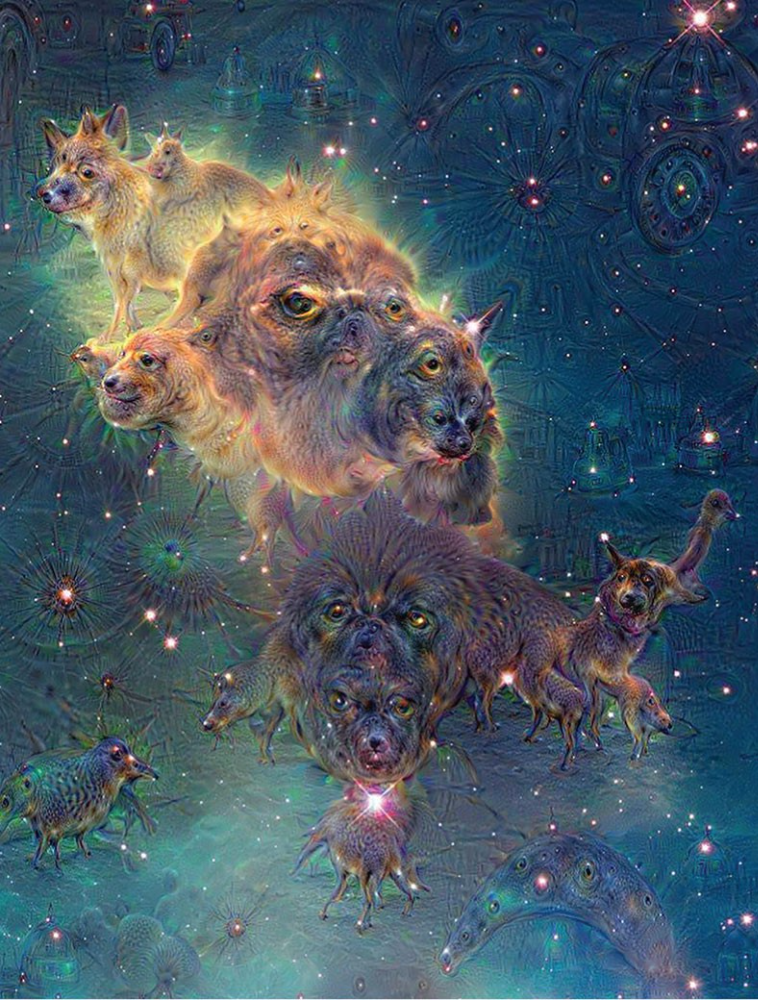
Puppy-slug isn't a single image or character. "Puppy-slug" refers to Google's DeepDream's unsettling psychedelia. This tool uses convolutional neural networks to train models to recognize dataset entities. If researchers feed the model millions of dog pictures, the network will learn to recognize a dog.
DeepDream used neural networks to analyze and classify image data as well as generate its own images. DeepDream's early examples were created by training a convolutional network on dog images and asking it to add "dog-ness" to other images. The models analyzed images to find dog-like pixels and modified surrounding pixels to highlight them.
Puppy-slugs and other DeepDream images are ugly. Even when they don't trigger my trypophobia, they give me vertigo when my mind tries to reconcile familiar features and forms in unnatural, physically impossible arrangements. I feel like I've been poisoned by a forbidden mushroom or a noxious toad. I'm a Lovecraft character going mad from extradimensional exposure. They're gross!
Is this really how AIs see the world? This is possibly an even more unsettling topic that DeepDream raises than the blatant abjection of the images.
When these photographs originally circulated online, many friends were startled and scandalized. People imagined a computer's imagination would be literal, accurate, and boring. We didn't expect vivid hallucinations and organic-looking formations.
DeepDream's images didn't really show the machines' imaginations, at least not in the way that scared some people. DeepDream displays data visualizations. DeepDream reveals the "black box" of convolutional network training.
Some of these images look scary because the models don't "know" anything, at least not in the way we do.
These images are the result of advanced algorithms and calculators that compare pixel values. They can spot and reproduce trends from training data, but can't interpret it. If so, they'd know dogs have two eyes and one face per head. If machines can think creatively, they're keeping it quiet.
You could be forgiven for thinking otherwise, given OpenAI's Dall-impressive E's results. From a technological perspective, it's incredible.
Arthur C. Clarke once said, "Any sufficiently advanced technology is indistinguishable from magic." Dall-magic E's requires a lot of math, computer science, processing power, and research. OpenAI did a great job, and we should applaud them.
Dall-E and similar tools match words and phrases to image data to train generative models. Matching text to images requires sorting and defining the images. Untold millions of low-wage data entry workers, content creators optimizing images for SEO, and anyone who has used a Captcha to access a website make these decisions. These people could live and die without receiving credit for their work, even though the project wouldn't exist without them.
This technique produces images that are less like paintings and more like mirrors that reflect our own beliefs and ideals back at us, albeit via a very complex prism. Due to the limitations and biases that these models portray, we must exercise caution when viewing these images.
The issue was succinctly articulated by artist Mimi Onuoha in her piece "On Algorithmic Violence":
As we continue to see the rise of algorithms being used for civic, social, and cultural decision-making, it becomes that much more important that we name the reality that we are seeing. Not because it is exceptional, but because it is ubiquitous. Not because it creates new inequities, but because it has the power to cloak and amplify existing ones. Not because it is on the horizon, but because it is already here.

Sylvain Saurel
3 years ago
A student trader from the United States made $110 million in one month and rose to prominence on Wall Street.
Genius or lucky?
From the title, you might think I'm selling advertising for a financial influencer, a dubious trading site, or a training organization to attract clients. I'm suspicious. Better safe than sorry.
But not here.
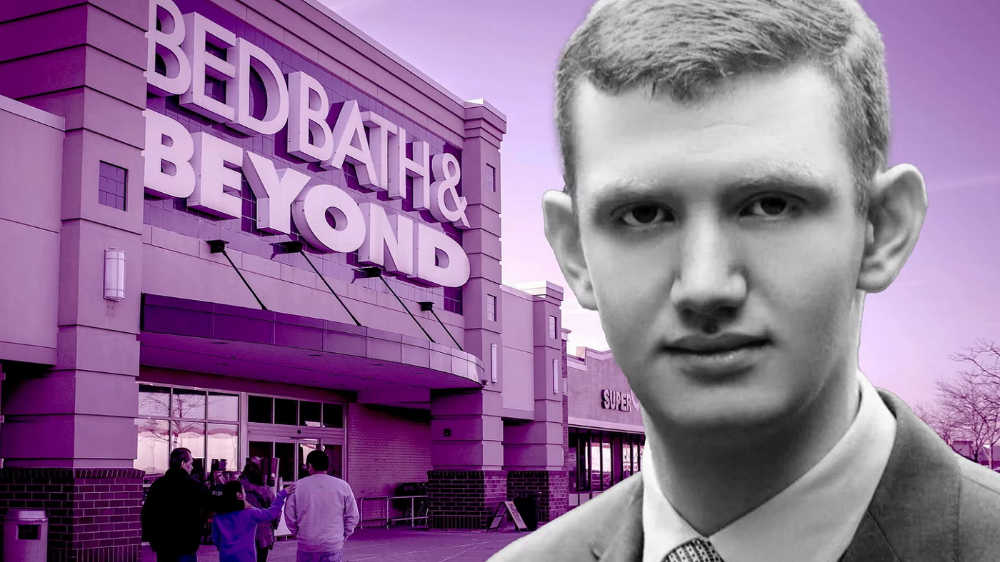
Jake Freeman, 20, made $110 million in a month, according to the Financial Times. At 18, he ran for president. He made his name in markets, not politics. Two years later, he's Wall Street's prince. Interview requests flood the prodigy.
Jake Freeman bought 5 million Bed Bath & Beyond Group shares for $5.5 in July 2022 and sold them for $27 a month later. He thought the stock might double. Since speculation died down, he sold well. The stock fell 40.5% to 11 dollars on Friday, 19 August 2022. On August 22, 2022, it fell 16% to $9.
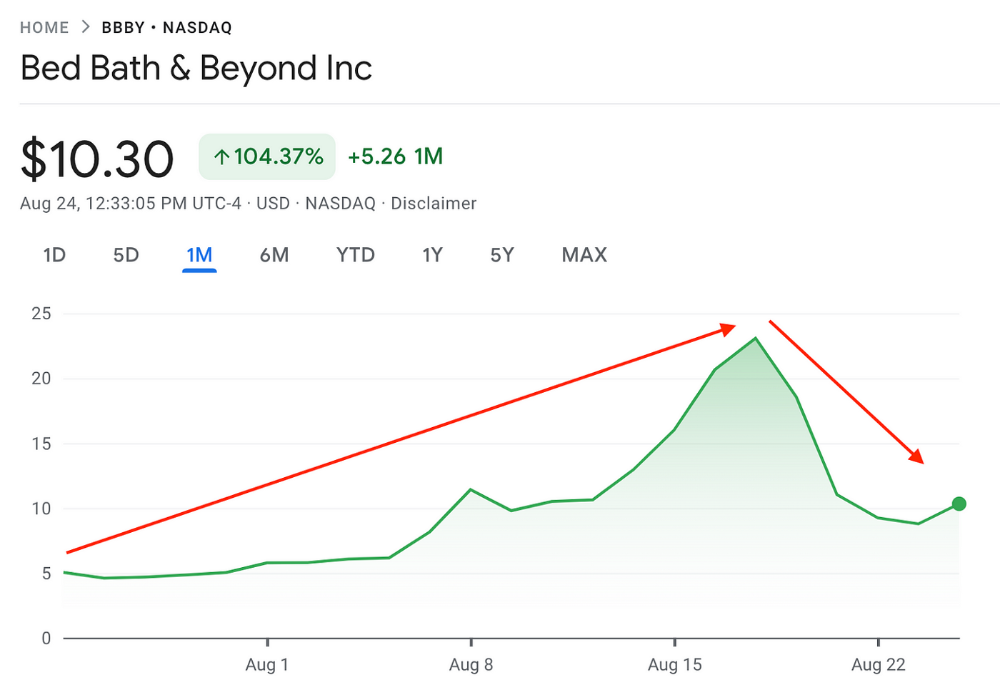
Smallholders have been buying the stock for weeks and will lose heavily if it falls further. Bed Bath & Beyond is the second most popular stock after Foot Locker, ahead of GameStop and Apple.
Jake Freeman earned $110 million thanks to a significant stock market flurry.
Online broker customers aren't the only ones with jitters. By June 2022, Ken Griffin's Citadel and Stephen Mandel's Lone Pine Capital held nearly a third of the company's capital. Did big managers sell before the stock plummeted?
Recent stock movements (derivatives) and rumors could prompt a SEC investigation.
Jake Freeman wrote to the board of directors after his investment to call for a turnaround, given the company's persistent problems and short sellers. The bathroom and kitchen products distribution group's stock soared in July 2022 due to renewed buying by private speculators, who made it one of their meme stocks with AMC and GameStop.
Second-quarter 2022 results and financial health worsened. He didn't celebrate his miraculous operation in a nightclub. He told a British newspaper, "I'm shocked." His parents dined in New York. He returned to Los Angeles to study math and economics.
Jake Freeman founded Freeman Capital Management with his savings and $25 million from family, friends, and acquaintances. They are the ones who are entitled to the $110 million he raised in one month. Will his investors pocket and withdraw all or part of their profits or will they trust the young prodigy for new stunts on Wall Street?
His operation should attract new clients. Well-known hedge funds may hire him.
Jake Freeman didn't listen to gurus or former traders. At 17, he interned at a quantitative finance and derivatives hedge fund, Volaris. At 13, he began investing with his pharmaceutical executive uncle. All countries have increased their Google searches for the young trader in the last week.
Naturally, his success has inspired resentment.
His success stirs jealousy, and he's attacked on social media. On Reddit, people who lost money on Bed Bath & Beyond, Jake Freeman's fortune, are mourning.
Several conspiracy theories circulate about him, including that he doesn't exist or is working for a Taiwanese amusement park.
If all 20 million American students had the same trading skills, they would have generated $1.46 trillion. Jake Freeman is unique. Apprentice traders' careers are often short, disillusioning, and tragic.
Two years ago, 20-year-old Robinhood client Alexander Kearns committed suicide after losing $750,000 trading options. Great traders start young. Michael Platt of BlueCrest invested in British stocks at age 12 under his grandmother's supervision and made a £30,000 fortune. Paul Tudor Jones started trading before he turned 18 with his uncle. Warren Buffett, at age 10, was discussing investments with Goldman Sachs' head. Oracle of Omaha tells all.