




More on Entrepreneurship/Creators

Muthinja
4 years ago
Why don't you relaunch my startup projects?
Open to ideas or acquisitions
Failure is an unavoidable aspect of life, yet many recoil at the word.

I've worked on unrelated startup projects. This is a list of products I developed (often as the tech lead or co-founder) and why they failed to launch.
Chess Bet (Betting)
As a chess player who plays 5 games a day and has an ELO rating of 2100, I tried to design a chess engine to rival stockfish and Houdini.
While constructing my chess engine, my cofounder asked me about building a p2p chess betting app. Chess Bet. There couldn't be a better time.
Two people in different locations could play a staked game. The winner got 90% of the bet and we got 10%. The business strategy was clear, but our mini-launch was unusual.
People started employing the same cheat engines I mentioned, causing user churn and defaming our product.
It was the first programming problem I couldn't solve after building a cheat detection system based on player move strengths and prior games. Chess.com, the most famous online chess software, still suffers from this.
We decided to pivot because we needed an expensive betting license.
We relaunched as Chess MVP after deciding to focus on chess learning. A platform for teachers to create chess puzzles and teach content. Several chess students used our product, but the target market was too tiny.
We chose to quit rather than persevere or pivot.
BodaCare (Insure Tech)
‘BodaBoda’ in Swahili means Motorcycle. My Dad approached me in 2019 (when I was working for a health tech business) about establishing an Insurtech/fintech solution for motorbike riders to pay for insurance using SNPL.
We teamed up with an underwriter to market motorcycle insurance. Once they had enough premiums, they'd get an insurance sticker in the mail. We made it better by splitting the cover in two, making it more reasonable for motorcyclists struggling with lump-sum premiums.
Lack of capital and changing customer behavior forced us to close, with 100 motorcyclists paying 0.5 USD every day. Our unit econ didn't make sense, and CAC and retention capital only dug us deeper.
Circle (Social Networking)
Having learned from both product failures, I began to understand what worked and what didn't. While reading through Instagram, an idea struck me.
Suppose social media weren't virtual.
Imagine meeting someone on your way home. Like-minded person
People were excited about social occasions after covid restrictions were eased. Anything to escape. I just built a university student-popular experiences startup. Again, there couldn't be a better time.
I started the Android app. I launched it on Google Beta and oh my! 200 people joined in two days.
It works by signaling if people are in a given place and allowing users to IM in hopes of meeting up in near real-time. Playstore couldn't deploy the app despite its success in beta for unknown reasons. I appealed unsuccessfully.
My infrastructure quickly lost users because I lacked funding.
In conclusion
This essay contains many failures, some of which might have been avoided and others not, but they were crucial learning points in my startup path.
If you liked any idea, I have the source code on Github.
Happy reading until then!

Eitan Levy
4 years ago
The Top 8 Growth Hacking Techniques for Startups
The Top 8 Growth Hacking Techniques for Startups

These startups, and how they used growth-hack marketing to flourish, are some of the more ethical ones, while others are less so.
Before the 1970 World Cup began, Puma paid footballer Pele $120,000 to tie his shoes. The cameras naturally focused on Pele and his Pumas, causing people to realize that Puma was the top football brand in the world.
Early workers of Uber canceled over 5,000 taxi orders made on competing applications in an effort to financially hurt any of their rivals.
PayPal developed a bot that advertised cheap goods on eBay, purchased them, and paid for them with PayPal, fooling eBay into believing that customers preferred this payment option. Naturally, Paypal became eBay's primary method of payment.
Anyone renting a space on Craigslist had their emails collected by AirBnB, who then urged them to use their service instead. A one-click interface was also created to list immediately on AirBnB from Craigslist.
To entice potential single people looking for love, Tinder developed hundreds of bogus accounts of attractive people. Additionally, for at least a year, users were "accidentally" linked.
Reddit initially created a huge number of phony accounts and forced them all to communicate with one another. It eventually attracted actual users—the real meaning of "fake it 'til you make it"! Additionally, this gave Reddit control over the tone of voice they wanted for their site, which is still present today.
To disrupt the conferences of their main rival, Salesforce recruited fictitious protestors. The founder then took over all of the event's taxis and gave a 45-minute pitch for his startup. No place to hide!
When a wholesaler required a minimum purchase of 10, Amazon CEO Jeff Bezos wanted a way to purchase only one book from them. A wholesaler would deliver the one book he ordered along with an apology for the other eight books after he discovered a loophole and bought the one book before ordering nine books about lichens. On Amazon, he increased this across all of the users.
Original post available here

Ben Chino
4 years ago
100-day SaaS buildout.
We're opening up Maki through a series of Medium posts. We'll describe what Maki is building and how. We'll explain how we built a SaaS in 100 days. This isn't a step-by-step guide to starting a business, but a product philosophy to help you build quickly.
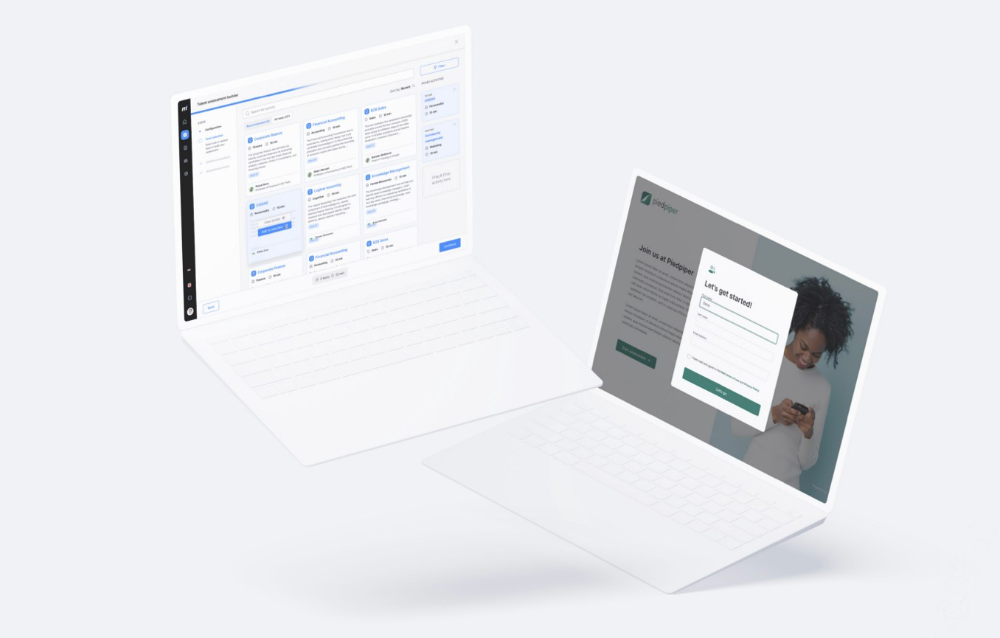
Focus on end-users.
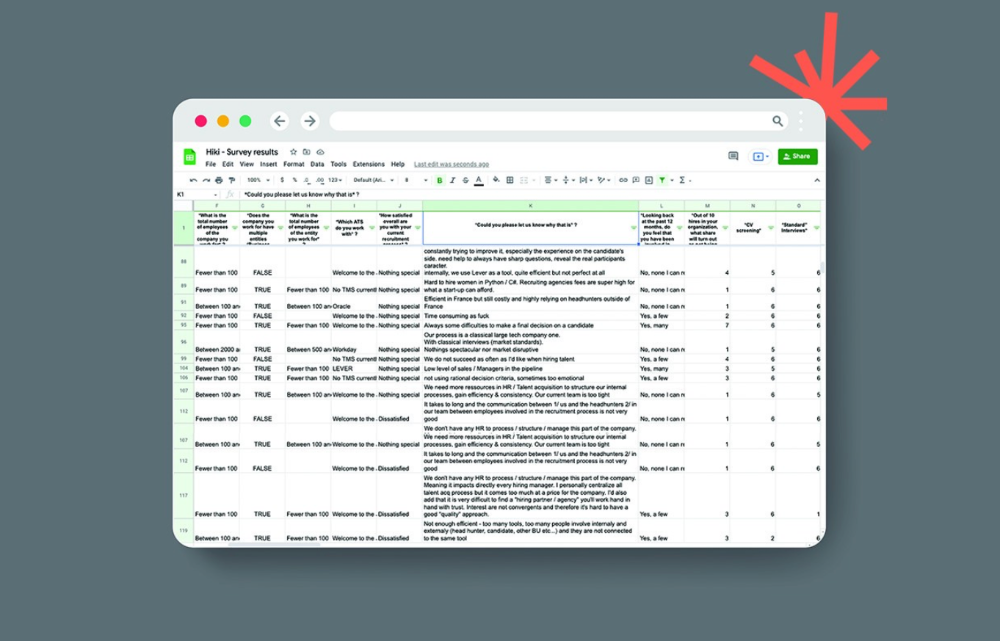
This may seem obvious, but it's important to talk to users first. When we started thinking about Maki, we interviewed 100 HR directors from SMBs, Next40 scale-ups, and major Enterprises to understand their concerns. We initially thought about the future of employment, but most of their worries centered on Recruitment. We don't have a clear recruiting process, it's time-consuming, we recruit clones, we don't support diversity, etc. And as hiring managers, we couldn't help but agree.
Co-create your product with your end-users.
We went to the drawing board, read as many books as possible (here, here, and here), and when we started getting a sense for a solution, we questioned 100 more operational HR specialists to corroborate the idea and get a feel for our potential answer. This confirmed our direction to help hire more objectively and efficiently.
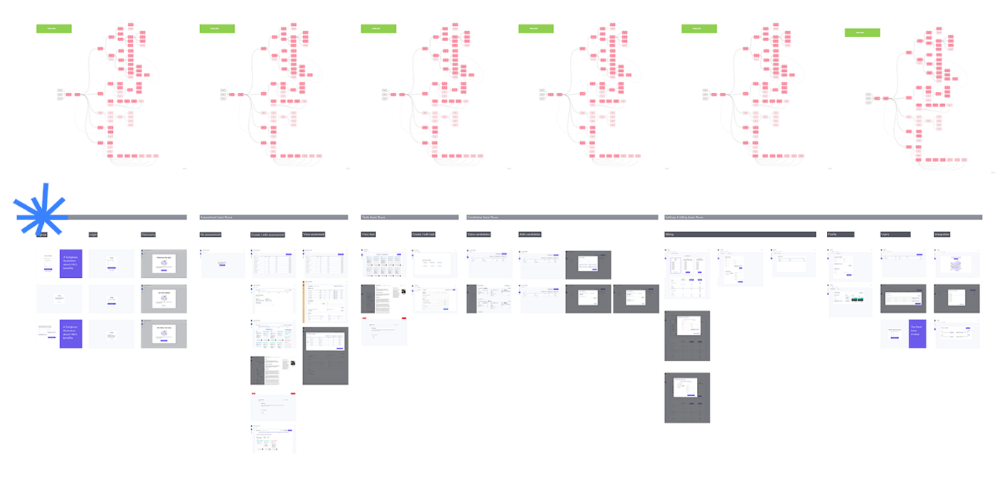
Back to the drawing board, we designed our first flows and screens. We organized sessions with certain survey respondents to show them our early work and get comments. We got great input that helped us build Maki, and we met some consumers. Obsess about users and execute alongside them.
Don’t shoot for the moon, yet. Make pragmatic choices first.
Once we were convinced, we began building. To launch a SaaS in 100 days, we needed an operating principle that allowed us to accelerate while still providing a reliable, secure, scalable experience. We focused on adding value and outsourced everything else. Example:
Concentrate on adding value. Reuse existing bricks.
When determining which technology to use, we looked at our strengths and the future to see what would last. Node.js for backend, React for frontend, both with typescript. We thought this technique would scale well since it would attract more talent and the surrounding mature ecosystem would help us go quicker.

We explored for ways to bootstrap services while setting down strong foundations that might support millions of users. We built our backend services on NestJS so we could extend into microservices later. Hasura, a GraphQL APIs engine, automates Postgres data exposing through a graphQL layer. MUI's ready-to-use components powered our design-system. We used well-maintained open-source projects to speed up certain tasks.
We outsourced important components of our platform (Auth0 for authentication, Stripe for billing, SendGrid for notifications) because, let's face it, we couldn't do better. We choose to host our complete infrastructure (SQL, Cloud run, Logs, Monitoring) on GCP to simplify our work between numerous providers.
Focus on your business, use existing bricks for the rest. For the curious, we'll shortly publish articles detailing each stage.
Most importantly, empower people and step back.
We couldn't have done this without the incredible people who have supported us from the start. Since Powership is one of our key values, we provided our staff the power to make autonomous decisions from day one. Because we believe our firm is its people, we hired smart builders and let them build.
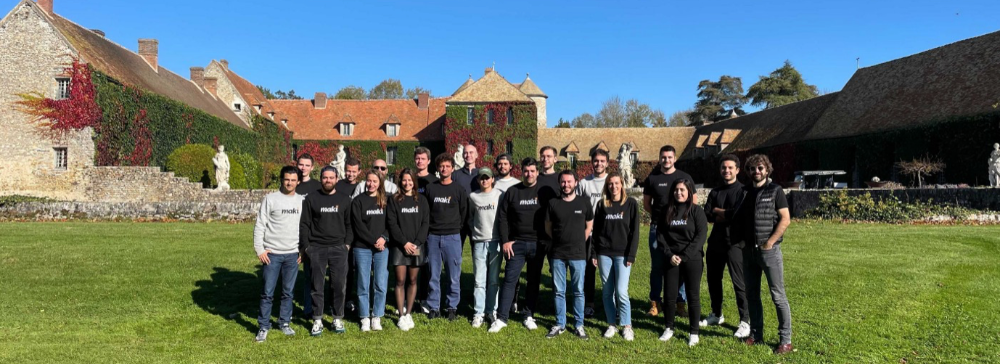
Nicolas left Spendesk to create scalable interfaces using react-router, react-queries, and MUI. JD joined Swile and chose Hasura as our GraphQL engine. Jérôme chose NestJS to build our backend services. Since then, Justin, Ben, Anas, Yann, Benoit, and others have followed suit.
If you consider your team a collective brain, you should let them make decisions instead of directing them what to do. You'll make mistakes, but you'll go faster and learn faster overall.
Invest in great talent and develop a strong culture from the start. Here's how to establish a SaaS in 100 days.
You might also like

Liam Vaughan
4 years ago
Investors can bet big on almost anything on a new prediction market.
Kalshi allows five-figure bets on the Grammys, the next Covid wave, and future SEC commissioners. Worst-case scenario
On Election Day 2020, two young entrepreneurs received a call from the CFTC chairman. Luana Lopes Lara and Tarek Mansour spent 18 months trying to start a new type of financial exchange. Instead of betting on stock prices or commodity futures, people could trade instruments tied to real-world events, such as legislation, the weather, or the Oscar winner.
Heath Tarbert, a Trump appointee, shouted "Congratulations." "You're competing with 1840s-era markets. I'm sure you'll become a powerhouse too."
Companies had tried to introduce similar event markets in the US for years, but Tarbert's agency, the CFTC, said no, arguing they were gambling and prone to cheating. Now the agency has reversed course, approving two 24-year-olds who will have first-mover advantage in what could become a huge new asset class. Kalshi Inc. raised $30 million from venture capitalists within weeks of Tarbert's call, his representative says. Mansour, 26, believes this will be bigger than crypto.
Anyone who's read The Wisdom of Crowds knows prediction markets' potential. Well-designed markets can help draw out knowledge from disparate groups, and research shows that when money is at stake, people make better predictions. Lopes Lara calls it a "bullshit tax." That's why Google, Microsoft, and even the US Department of Defense use prediction markets internally to guide decisions, and why university-linked political betting sites like PredictIt sometimes outperform polls.
Regulators feared Wall Street-scale trading would encourage investors to manipulate reality. If the stakes are high enough, traders could pressure congressional staffers to stall a bill or bet on whether Kanye West's new album will drop this week. When Lopes Lara and Mansour pitched the CFTC, senior regulators raised these issues. Politically appointed commissioners overruled their concerns, and one later joined Kalshi's board.
Will Kanye’s new album come out next week? Yes or no?
Kalshi's victory was due more to lobbying and legal wrangling than to Silicon Valley-style innovation. Lopes Lara and Mansour didn't invent anything; they changed a well-established concept's governance. The result could usher in a new era of market-based enlightenment or push Wall Street's destructive tendencies into the real world.
If Kalshi's founders lacked experience to bolster their CFTC application, they had comical youth success. Lopes Lara studied ballet at the Brazilian Bolshoi before coming to the US. Mansour won France's math Olympiad. They bonded over their work ethic in an MIT computer science class.
Lopes Lara had the idea for Kalshi while interning at a New York hedge fund. When the traders around her weren't working, she noticed they were betting on the news: Would Apple hit a trillion dollars? Kylie Jenner? "It was anything," she says.
Are mortgage rates going up? Yes or no?
Mansour saw the business potential when Lopes Lara suggested it. He interned at Goldman Sachs Group Inc., helping investors prepare for the UK leaving the EU. Goldman sold clients complex stock-and-derivative combinations. As he discussed it with Lopes Lara, they agreed that investors should hedge their risk by betting on Brexit itself rather than an imperfect proxy.
Lopes Lara and Mansour hypothesized how a marketplace might work. They settled on a "event contract," a binary-outcome instrument like "Will inflation hit 5% by the end of the month?" The contract would settle at $1 (if the event happened) or zero (if it didn't), but its price would fluctuate based on market sentiment. After a good debate, a politician's election odds may rise from 50 to 55. Kalshi would charge a commission on every trade and sell data to traders, political campaigns, businesses, and others.
In October 2018, five months after graduation, the pair flew to California to compete in a hackathon for wannabe tech founders organized by the Silicon Valley incubator Y Combinator. They built a website in a day and a night and presented it to entrepreneurs the next day. Their prototype barely worked, but they won a three-month mentorship program and $150,000. Michael Seibel, managing director of Y Combinator, said of their idea, "I had to take a chance!"
Will there be another moon landing by 2025?
Seibel's skepticism was rooted in America's historical wariness of gambling. Roulette, poker, and other online casino games are largely illegal, and sports betting was only legal in a few states until May 2018. Kalshi as a risk-hedging platform rather than a bookmaker seemed like a good idea, but convincing the CFTC wouldn't be easy. In 2012, the CFTC said trading on politics had no "economic purpose" and was "contrary to the public interest."
Lopes Lara and Mansour cold-called 60 Googled lawyers during their time at Y Combinator. Everyone advised quitting. Mansour recalls the pain. Jeff Bandman, a former CFTC official, helped them navigate the agency and its characters.
When they weren’t busy trying to recruit lawyers, Lopes Lara and Mansour were meeting early-stage investors. Alfred Lin of Sequoia Capital Operations LLC backed Airbnb, DoorDash, and Uber Technologies. Lin told the founders their idea could capitalize on retail trading and challenge how the financial world manages risk. "Come back with regulatory approval," he said.
In the US, even small bets on most events were once illegal. Under the Commodity Exchange Act, the CFTC can stop exchanges from listing contracts relating to "terrorism, assassination, war" and "gaming" if they are "contrary to the public interest," which was often the case.
Will subway ridership return to normal? Yes or no?
In 1988, as academic interest in the field grew, the agency allowed the University of Iowa to set up a prediction market for research purposes, as long as it didn't make a profit or advertise and limited bets to $500. PredictIt, the biggest and best-known political betting platform in the US, also got an exemption thanks to an association with Victoria University of Wellington in New Zealand. Today, it's a sprawling marketplace with its own subculture and lingo. PredictIt users call it "Rules Cuck Panther" when they lose on a technicality. Major news outlets cite PredictIt's odds on Discord and the Star Spangled Gamblers podcast.
CFTC limits PredictIt bets to $850. To keep traders happy, PredictIt will often run multiple variations of the same question, listing separate contracts for two dozen Democratic primary candidates, for example. A trader could have more than $10,000 riding on a single outcome. Some of the site's traders are current or former campaign staffers who can answer questions like "How many tweets will Donald Trump post from Nov. 20 to 27?" and "When will Anthony Scaramucci's role as White House communications director end?"
According to PredictIt co-founder John Phillips, politicians help explain the site's accuracy. "Prediction markets work well and are accurate because they attract people with superior information," he said in a 2016 podcast. “In the financial stock market, it’s called inside information.”
Will Build Back Better pass? Yes or no?
Trading on nonpublic information is illegal outside of academia, which presented a dilemma for Lopes Lara and Mansour. Kalshi's forecasts needed to be accurate. Kalshi must eliminate insider trading as a regulated entity. Lopes Lara and Mansour wanted to build a high-stakes PredictIt without the anarchy or blurred legal lines—a "New York Stock Exchange for Events." First, they had to convince regulators event trading was safe.
When Lopes Lara and Mansour approached the CFTC in the spring of 2019, some officials in the Division of Market Oversight were skeptical, according to interviews with people involved in the process. For all Kalshi's talk of revolutionizing finance, this was just a turbocharged version of something that had been rejected before.
The DMO couldn't see the big picture. The staff review was supposed to ensure Kalshi could complete a checklist, "23 Core Principles of a Designated Contract Market," which included keeping good records and having enough money. The five commissioners decide. With Trump as president, three of them were ideologically pro-market.
Lopes Lara, Mansour, and their lawyer Bandman, an ex-CFTC official, answered the DMO's questions while lobbying the commissioners on Zoom about the potential of event markets to mitigate risks and make better decisions. Before each meeting, they would write a script and memorize it word for word.
Will student debt be forgiven? Yes or no?
Several prediction markets that hadn't sought regulatory approval bolstered Kalshi's case. Polymarket let customers bet hundreds of thousands of dollars anonymously using cryptocurrencies, making it hard to track. Augur, which facilitates private wagers between parties using blockchain, couldn't regulate bets and hadn't stopped users from betting on assassinations. Kalshi, by comparison, argued it was doing everything right. (The CFTC fined Polymarket $1.4 million for operating an unlicensed exchange in January 2022. Polymarket says it's now compliant and excited to pioneer smart contract-based financial solutions with regulators.
Kalshi was approved unanimously despite some DMO members' concerns about event contracts' riskiness. "Once they check all the boxes, they're in," says a CFTC insider.
Three months after CFTC approval, Kalshi announced funding from Sequoia, Charles Schwab, and Henry Kravis. Sequoia's Lin, who joined the board, said Tarek, Luana, and team created a new way to invest and engage with the world.
The CFTC hadn't asked what markets the exchange planned to run since. After approval, Lopes Lara and Mansour had the momentum. Kalshi's March list of 30 proposed contracts caused chaos at the DMO. The division handles exchanges that create two or three new markets a year. Kalshi’s business model called for new ones practically every day.
Uncontroversial proposals included weather and GDP questions. Others, on the initial list and later, were concerning. DMO officials feared Covid-19 contracts amounted to gambling on human suffering, which is why war and terrorism markets are banned. (Similar logic doomed ex-admiral John Poindexter's Policy Analysis Market, a Bush-era plan to uncover intelligence by having security analysts bet on Middle East events.) Regulators didn't see how predicting the Grammy winners was different from betting on the Patriots to win the Super Bowl. Who, other than John Legend, would need to hedge the best R&B album winner?
Event contracts raised new questions for the DMO's product review team. Regulators could block gaming contracts that weren't in the public interest under the Commodity Exchange Act, but no one had defined gaming. It was unclear whether the CFTC had a right or an obligation to consider whether a contract was in the public interest. How was it to determine public interest? Another person familiar with the CFTC review says, "It was a mess." The agency didn't comment.
CFTC staff feared some event contracts could be cheated. Kalshi wanted to run a bee-endangerment market. The DMO pushed back, saying it saw two problems symptomatic of the asset class: traders could press government officials for information, and officials could delay adding the insects to the list to cash in.
The idea that traders might manipulate prediction markets wasn't paranoid. In 2013, academics David Rothschild and Rajiv Sethi found that an unidentified party lost $7 million buying Mitt Romney contracts on Intrade, a now-defunct, unlicensed Irish platform, in the runup to the 2012 election. The authors speculated that the trader, whom they dubbed the “Romney Whale,” may have been looking to boost morale and keep donations coming in.
Kalshi said manipulation and insider trading are risks for any market. It built a surveillance system and said it would hire a team to monitor it. "People trade on events all the time—they just use options and other instruments. This brings everything into the open, Mansour says. Kalshi didn't include election contracts, a red line for CFTC Democrats.
Lopes Lara and Mansour were ready to launch kalshi.com that summer, but the DMO blocked them. Product reviewers were frustrated by spending half their time on an exchange that represented a tiny portion of the derivatives market. Lopes Lara and Mansour pressed politically appointed commissioners during the impasse.
Tarbert, the chairman, had moved on, but Kalshi found a new supporter in Republican Brian Quintenz, a crypto-loving former hedge fund manager. He was unmoved by the DMO's concerns, arguing that speculation on Kalshi's proposed events was desirable and the agency had no legal standing to prevent it. He supported a failed bid to allow NFL futures earlier this year. Others on the commission were cautious but supportive. Given the law's ambiguity, they worried they'd be on shaky ground if Kalshi sued if they blocked a contract. Without a permanent chairman, the agency lacked leadership.
To block a contract, DMO staff needed a majority of commissioners' support, which they didn't have in all but a few cases. "We didn't have the votes," a reviewer says, paraphrasing Hamilton. By the second half of 2021, new contract requests were arriving almost daily at the DMO, and the demoralized and overrun division eventually accepted defeat and stopped fighting back. By the end of the year, three senior DMO officials had left the agency, making it easier for Kalshi to list its contracts unimpeded.
Today, Kalshi is growing. 32 employees work in a SoHo office with big windows and exposed brick. Quintenz, who left the CFTC 10 months after Kalshi was approved, is on its board. He joined because he was interested in the market's hedging and risk management opportunities.
Mid-May, the company's website had 75 markets, such as "Will Q4 GDP be negative?" Will NASA land on the moon by 2025? The exchange recently reached 2 million weekly contracts, a jump from where it started but still a small number compared to other futures exchanges. Early adopters are PredictIt and Polymarket fans. Bets on the site are currently capped at $25,000, but Kalshi hopes to increase that to $100,000 and beyond.
With the regulatory drawbridge down, Lopes Lara and Mansour must move quickly. Chicago's CME Group Inc. plans to offer index-linked event contracts. Kalshi will release a smartphone app to attract customers. After that, it hopes to partner with a big brokerage. Sequoia is a major investor in Robinhood Markets Inc. Robinhood users could have access to Kalshi so that after buying GameStop Corp. shares, they'd be prompted to bet on the Oscars or the next Fed commissioner.
Some, like Illinois Democrat Sean Casten, accuse Robinhood and its competitors of gamifying trading to encourage addiction, but Kalshi doesn't seem worried. Mansour says Kalshi's customers can't bet more than they've deposited, making debt difficult. Eventually, he may introduce leveraged bets.
Tension over event contracts recalls another CFTC episode. Brooksley Born proposed regulating the financial derivatives market in 1994. Alan Greenspan and others in the government opposed her, saying it would stifle innovation and push capital overseas. Unrestrained, derivatives grew into a trillion-dollar industry until 2008, when they sparked the financial crisis.
Today, with a midterm election looming, it seems reasonable to ask whether Kalshi plans to get involved. Elections have historically been the biggest draw in prediction markets, with 125 million shares traded on PredictIt for 2020. “We can’t discuss specifics,” Mansour says. “All I can say is, you know, we’re always working on expanding the universe of things that people can trade on.”
Any election contracts would need CFTC approval, which may be difficult with three Democratic commissioners. A Republican president would change the equation.

Samer Buna
3 years ago
The Errors I Committed As a Novice Programmer
Learn to identify them, make habits to avoid them
First, a clarification. This article is aimed to make new programmers aware of their mistakes, train them to detect them, and remind them to prevent them.
I learned from all these blunders. I'm glad I have coding habits to avoid them. Do too.
These mistakes are not ordered.
1) Writing code haphazardly
Writing good content is hard. It takes planning and investigation. Quality programs don't differ.
Think. Research. Plan. Write. Validate. Modify. Unfortunately, no good acronym exists. Create a habit of doing the proper quantity of these activities.
As a newbie programmer, my biggest error was writing code without thinking or researching. This works for small stand-alone apps but hurts larger ones.
Like saying anything you might regret, you should think before coding something you could regret. Coding expresses your thoughts.
When angry, count to 10 before you speak. If very angry, a hundred. — Thomas Jefferson.
My quote:
When reviewing code, count to 10 before you refactor a line. If the code does not have tests, a hundred. — Samer Buna
Programming is primarily about reviewing prior code, investigating what is needed and how it fits into the current system, and developing small, testable features. Only 10% of the process involves writing code.
Programming is not writing code. Programming need nurturing.
2) Making excessive plans prior to writing code
Yes. Planning before writing code is good, but too much of it is bad. Water poisons.
Avoid perfect plans. Programming does not have that. Find a good starting plan. Your plan will change, but it helped you structure your code for clarity. Overplanning wastes time.
Only planning small features. All-feature planning should be illegal! The Waterfall Approach is a step-by-step system. That strategy requires extensive planning. This is not planning. Most software projects fail with waterfall. Implementing anything sophisticated requires agile changes to reality.
Programming requires responsiveness. You'll add waterfall plan-unthinkable features. You will eliminate functionality for reasons you never considered in a waterfall plan. Fix bugs and adjust. Be agile.
Plan your future features, though. Do it cautiously since too little or too much planning can affect code quality, which you must risk.
3) Underestimating the Value of Good Code
Readability should be your code's exclusive goal. Unintelligible code stinks. Non-recyclable.
Never undervalue code quality. Coding communicates implementations. Coders must explicitly communicate solution implementations.
Programming quote I like:
Always code as if the guy who ends up maintaining your code will be a violent psychopath who knows where you live. — John Woods
John, great advice!
Small things matter. If your indentation and capitalization are inconsistent, you should lose your coding license.
Long queues are also simple. Readability decreases after 80 characters. To highlight an if-statement block, you might put a long condition on the same line. No. Just never exceed 80 characters.
Linting and formatting tools fix many basic issues like this. ESLint and Prettier work great together in JavaScript. Use them.
Code quality errors:
Multiple lines in a function or file. Break long code into manageable bits. My rule of thumb is that any function with more than 10 lines is excessively long.
Double-negatives. Don't.
Using double negatives is just very not not wrong
Short, generic, or type-based variable names. Name variables clearly.
There are only two hard things in Computer Science: cache invalidation and naming things. — Phil Karlton
Hard-coding primitive strings and numbers without descriptions. If your logic relies on a constant primitive string or numeric value, identify it.
Avoiding simple difficulties with sloppy shortcuts and workarounds. Avoid evasion. Take stock.
Considering lengthier code better. Shorter code is usually preferable. Only write lengthier versions if they improve code readability. For instance, don't utilize clever one-liners and nested ternary statements just to make the code shorter. In any application, removing unneeded code is better.
Measuring programming progress by lines of code is like measuring aircraft building progress by weight. — Bill Gates
Excessive conditional logic. Conditional logic is unnecessary for most tasks. Choose based on readability. Measure performance before optimizing. Avoid Yoda conditions and conditional assignments.
4) Selecting the First Approach
When I started programming, I would solve an issue and move on. I would apply my initial solution without considering its intricacies and probable shortcomings.
After questioning all the solutions, the best ones usually emerge. If you can't think of several answers, you don't grasp the problem.
Programmers do not solve problems. Find the easiest solution. The solution must work well and be easy to read, comprehend, and maintain.
There are two ways of constructing a software design. One way is to make it so simple that there are obviously no deficiencies, and the other way is to make it so complicated that there are no obvious deficiencies. — C.A.R. Hoare
5) Not Giving Up
I generally stick with the original solution even though it may not be the best. The not-quitting mentality may explain this. This mindset is helpful for most things, but not programming. Program writers should fail early and often.
If you doubt a solution, toss it and rethink the situation. No matter how much you put in that solution. GIT lets you branch off and try various solutions. Use it.
Do not be attached to code because of how much effort you put into it. Bad code needs to be discarded.
6) Avoiding Google
I've wasted time solving problems when I should have researched them first.
Unless you're employing cutting-edge technology, someone else has probably solved your problem. Google It First.
Googling may discover that what you think is an issue isn't and that you should embrace it. Do not presume you know everything needed to choose a solution. Google surprises.
But Google carefully. Newbies also copy code without knowing it. Use only code you understand, even if it solves your problem.
Never assume you know how to code creatively.
The most dangerous thought that you can have as a creative person is to think that you know what you’re doing. — Bret Victor
7) Failing to Use Encapsulation
Not about object-oriented paradigm. Encapsulation is always useful. Unencapsulated systems are difficult to maintain.
An application should only handle a feature once. One object handles that. The application's other objects should only see what's essential. Reducing application dependencies is not about secrecy. Following these guidelines lets you safely update class, object, and function internals without breaking things.
Classify logic and state concepts. Class means blueprint template. Class or Function objects are possible. It could be a Module or Package.
Self-contained tasks need methods in a logic class. Methods should accomplish one thing well. Similar classes should share method names.
As a rookie programmer, I didn't always establish a new class for a conceptual unit or recognize self-contained units. Newbie code has a Util class full of unrelated code. Another symptom of novice code is when a small change cascades and requires numerous other adjustments.
Think before adding a method or new responsibilities to a method. Time's needed. Avoid skipping or refactoring. Start right.
High Cohesion and Low Coupling involves grouping relevant code in a class and reducing class dependencies.
8) Arranging for Uncertainty
Thinking beyond your solution is appealing. Every line of code will bring up what-ifs. This is excellent for edge cases but not for foreseeable needs.
Your what-ifs must fall into one of these two categories. Write only code you need today. Avoid future planning.
Writing a feature for future use is improper. No.
Write only the code you need today for your solution. Handle edge-cases, but don't introduce edge-features.
Growth for the sake of growth is the ideology of the cancer cell. — Edward Abbey
9) Making the incorrect data structure choices
Beginner programmers often overemphasize algorithms when preparing for interviews. Good algorithms should be identified and used when needed, but memorizing them won't make you a programming genius.
However, learning your language's data structures' strengths and shortcomings will make you a better developer.
The improper data structure shouts "newbie coding" here.
Let me give you a few instances of data structures without teaching you:
Managing records with arrays instead of maps (objects).
Most data structure mistakes include using lists instead of maps to manage records. Use a map to organize a list of records.
This list of records has an identifier to look up each entry. Lists for scalar values are OK and frequently superior, especially if the focus is pushing values to the list.
Arrays and objects are the most common JavaScript list and map structures, respectively (there is also a map structure in modern JavaScript).
Lists over maps for record management often fail. I recommend always using this point, even though it only applies to huge collections. This is crucial because maps are faster than lists in looking up records by identifier.
Stackless
Simple recursive functions are often tempting when writing recursive programming. In single-threaded settings, optimizing recursive code is difficult.
Recursive function returns determine code optimization. Optimizing a recursive function that returns two or more calls to itself is harder than optimizing a single call.
Beginners overlook the alternative to recursive functions. Use Stack. Push function calls to a stack and start popping them out to traverse them back.
10) Worsening the current code
Imagine this:

Add an item to that room. You might want to store that object anywhere as it's a mess. You can finish in seconds.
Not with messy code. Do not worsen! Keep the code cleaner than when you started.
Clean the room above to place the new object. If the item is clothing, clear a route to the closet. That's proper execution.
The following bad habits frequently make code worse:
code duplication You are merely duplicating code and creating more chaos if you copy/paste a code block and then alter just the line after that. This would be equivalent to adding another chair with a lower base rather than purchasing a new chair with a height-adjustable seat in the context of the aforementioned dirty room example. Always keep abstraction in mind, and use it when appropriate.
utilizing configuration files not at all. A configuration file should contain the value you need to utilize if it may differ in certain circumstances or at different times. A configuration file should contain a value if you need to use it across numerous lines of code. Every time you add a new value to the code, simply ask yourself: "Does this value belong in a configuration file?" The most likely response is "yes."
using temporary variables and pointless conditional statements. Every if-statement represents a logic branch that should at the very least be tested twice. When avoiding conditionals doesn't compromise readability, it should be done. The main issue with this is that branch logic is being used to extend an existing function rather than creating a new function. Are you altering the code at the appropriate level, or should you go think about the issue at a higher level every time you feel you need an if-statement or a new function variable?
This code illustrates superfluous if-statements:
function isOdd(number) {
  if (number % 2 === 1) {
    return true;
  } else {
    return false;
  }
}
Can you spot the biggest issue with the isOdd function above?
Unnecessary if-statement. Similar code:
function isOdd(number) {
  return (number % 2 === 1);
};
11) Making remarks on things that are obvious
I've learnt to avoid comments. Most code comments can be renamed.
instead of:
// This function sums only odd numbers in an array
const sum = (val) => {
  return val.reduce((a, b) => {
    if (b % 2 === 1) { // If the current number is odd
      a+=b;            // Add current number to accumulator
    }
    return a;          // The accumulator
  }, 0);
};
Commentless code looks like this:
const sumOddValues = (array) => {
  return array.reduce((accumulator, currentNumber) => {
    if (isOdd(currentNumber)) {
      return accumulator + currentNumber;
    }
    return accumulator;
  }, 0);
};
Better function and argument names eliminate most comments. Remember that before commenting.
Sometimes you have to use comments to clarify the code. This is when your comments should answer WHY this code rather than WHAT it does.
Do not write a WHAT remark to clarify the code. Here are some unnecessary comments that clutter code:
// create a variable and initialize it to 0
let sum = 0;
// Loop over array
array.forEach(
  // For each number in the array
  (number) => {
    // Add the current number to the sum variable
    sum += number;
  }
);
Avoid that programmer. Reject that code. Remove such comments if necessary. Most importantly, teach programmers how awful these remarks are. Tell programmers who publish remarks like this that they may lose their jobs. That terrible.
12) Skipping tests
I'll simplify. If you develop code without tests because you think you're an excellent programmer, you're a rookie.
If you're not writing tests in code, you're probably testing manually. Every few lines of code in a web application will be refreshed and interacted with. Also. Manual code testing is fine. To learn how to automatically test your code, manually test it. After testing your application, return to your code editor and write code to automatically perform the same interaction the next time you add code.
Human. After each code update, you will forget to test all successful validations. Automate it!
Before writing code to fulfill validations, guess or design them. TDD is real. It improves your feature design thinking.
If you can use TDD, even partially, do so.
13) Making the assumption that if something is working, it must be right.
See this sumOddValues function. Is it flawed?
const sumOddValues = (array) => {
  return array.reduce((accumulator, currentNumber) => {
    if (currentNumber % 2 === 1) {
      return accumulator + currentNumber;
    }
    return accumulator;
  });
};


console.assert(
  sumOddValues([1, 2, 3, 4, 5]) === 9
);
Verified. Good life. Correct?
Code above is incomplete. It handles some scenarios correctly, including the assumption used, but it has many other issues. I'll list some:
#1: No empty input handling. What happens when the function is called without arguments? That results in an error revealing the function's implementation:
TypeError: Cannot read property 'reduce' of undefined.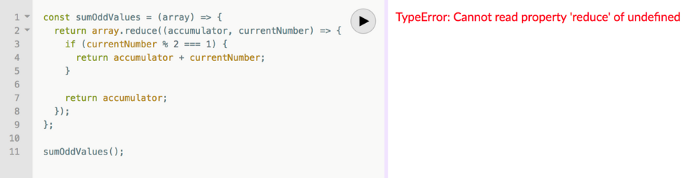
Two main factors indicate faulty code.
Your function's users shouldn't come across implementation-related information.
The user cannot benefit from the error. Simply said, they were unable to use your function. They would be aware that they misused the function if the error was more obvious about the usage issue. You might decide to make the function throw a custom exception, for instance:
TypeError: Cannot execute function for empty list.Instead of returning an error, your method should disregard empty input and return a sum of 0. This case requires action.
Problem #2: No input validation. What happens if the function is invoked with a text, integer, or object instead of an array?
The function now throws:
sumOddValues(42);
TypeError: array.reduce is not a function
Unfortunately, array. cut's a function!
The function labels anything you call it with (42 in the example above) as array because we named the argument array. The error says 42.reduce is not a function.
See how that error confuses? An mistake like:
TypeError: 42 is not an array, dude.Edge-cases are #1 and #2. These edge-cases are typical, but you should also consider less obvious ones. Negative numbers—what happens?
sumOddValues([1, 2, 3, 4, 5, -13]) // => still 9-13's unusual. Is this the desired function behavior? Error? Should it sum negative numbers? Should it keep ignoring negative numbers? You may notice the function should have been titled sumPositiveOddNumbers.
This decision is simple. The more essential point is that if you don't write a test case to document your decision, future function maintainers won't know if you ignored negative values intentionally or accidentally.
It’s not a bug. It’s a feature. — Someone who forgot a test case
#3: Valid cases are not tested. Forget edge-cases, this function mishandles a straightforward case:
sumOddValues([2, 1, 3, 4, 5]) // => 11The 2 above was wrongly included in sum.
The solution is simple: reduce accepts a second input to initialize the accumulator. Reduce will use the first value in the collection as the accumulator if that argument is not provided, like in the code above. The sum included the test case's first even value.
This test case should have been included in the tests along with many others, such as all-even numbers, a list with 0 in it, and an empty list.
Newbie code also has rudimentary tests that disregard edge-cases.
14) Adhering to Current Law
Unless you're a lone supercoder, you'll encounter stupid code. Beginners don't identify it and assume it's decent code because it works and has been in the codebase for a while.
Worse, if the terrible code uses bad practices, the newbie may be enticed to use them elsewhere in the codebase since they learnt them from good code.
A unique condition may have pushed the developer to write faulty code. This is a nice spot for a thorough note that informs newbies about that condition and why the code is written that way.
Beginners should presume that undocumented code they don't understand is bad. Ask. Enquire. Blame it!
If the code's author is dead or can't remember it, research and understand it. Only after understanding the code can you judge its quality. Before that, presume nothing.
15) Being fixated on best practices
Best practices damage. It suggests no further research. Best practice ever. No doubts!
No best practices. Today's programming language may have good practices.
Programming best practices are now considered bad practices.
Time will reveal better methods. Focus on your strengths, not best practices.
Do not do anything because you read a quote, saw someone else do it, or heard it is a recommended practice. This contains all my article advice! Ask questions, challenge theories, know your options, and make informed decisions.
16) Being preoccupied with performance
Premature optimization is the root of all evil (or at least most of it) in programming — Donald Knuth (1974)
I think Donald Knuth's advice is still relevant today, even though programming has changed.
Do not optimize code if you cannot measure the suspected performance problem.
Optimizing before code execution is likely premature. You may possibly be wasting time optimizing.
There are obvious optimizations to consider when writing new code. You must not flood the event loop or block the call stack in Node.js. Remember this early optimization. Will this code block the call stack?
Avoid non-obvious code optimization without measurements. If done, your performance boost may cause new issues.
Stop optimizing unmeasured performance issues.
17) Missing the End-User Experience as a Goal
How can an app add a feature easily? Look at it from your perspective or in the existing User Interface. Right? Add it to the form if the feature captures user input. Add it to your nested menu of links if it adds a link to a page.
Avoid that developer. Be a professional who empathizes with customers. They imagine this feature's consumers' needs and behavior. They focus on making the feature easy to find and use, not just adding it to the software.
18) Choosing the incorrect tool for the task
Every programmer has their preferred tools. Most tools are good for one thing and bad for others.
The worst tool for screwing in a screw is a hammer. Do not use your favorite hammer on a screw. Don't use Amazon's most popular hammer on a screw.
A true beginner relies on tool popularity rather than problem fit.
You may not know the best tools for a project. You may know the best tool. However, it wouldn't rank high. You must learn your tools and be open to new ones.
Some coders shun new tools. They like their tools and don't want to learn new ones. I can relate, but it's wrong.
You can build a house slowly with basic tools or rapidly with superior tools. You must learn and use new tools.
19) Failing to recognize that data issues are caused by code issues
Programs commonly manage data. The software will add, delete, and change records.
Even the simplest programming errors can make data unpredictable. Especially if the same defective application validates all data.
Code-data relationships may be confusing for beginners. They may employ broken code in production since feature X is not critical. Buggy coding may cause hidden data integrity issues.
Worse, deploying code that corrected flaws without fixing minor data problems caused by these defects will only collect more data problems that take the situation into the unrecoverable-level category.
How do you avoid these issues? Simply employ numerous data integrity validation levels. Use several interfaces. Front-end, back-end, network, and database validations. If not, apply database constraints.
Use all database constraints when adding columns and tables:
If a column has a NOT NULL constraint, null values will be rejected for that column. If your application expects that field has a value, your database should designate its source as not null.
If a column has a UNIQUE constraint, the entire table cannot include duplicate values for that column. This is ideal for a username or email field on a Users table, for instance.
For the data to be accepted, a CHECK constraint, or custom expression, must evaluate to true. For instance, you can apply a check constraint to ensure that the values of a normal % column must fall within the range of 0 and 100.
With a PRIMARY KEY constraint, the values of the columns must be both distinct and not null. This one is presumably what you're utilizing. To distinguish the records in each table, the database needs have a primary key.
A FOREIGN KEY constraint requires that the values in one database column, typically a primary key, match those in another table column.
Transaction apathy is another data integrity issue for newbies. If numerous actions affect the same data source and depend on each other, they must be wrapped in a transaction that can be rolled back if one fails.
20) Reinventing the Wheel
Tricky. Some programming wheels need reinvention. Programming is undefined. New requirements and changes happen faster than any team can handle.
Instead of modifying the wheel we all adore, maybe we should rethink it if you need a wheel that spins at varied speeds depending on the time of day. If you don't require a non-standard wheel, don't reinvent it. Use the darn wheel.
Wheel brands can be hard to choose from. Research and test before buying! Most software wheels are free and transparent. Internal design quality lets you evaluate coding wheels. Try open-source wheels. Debug and fix open-source software simply. They're easily replaceable. In-house support is also easy.
If you need a wheel, don't buy a new automobile and put your maintained car on top. Do not include a library to use a few functions. Lodash in JavaScript is the finest example. Import shuffle to shuffle an array. Don't import lodash.
21) Adopting the incorrect perspective on code reviews
Beginners often see code reviews as criticism. Dislike them. Not appreciated. Even fear them.
Incorrect. If so, modify your mindset immediately. Learn from every code review. Salute them. Observe. Most crucial, thank reviewers who teach you.
Always learning code. Accept it. Most code reviews teach something new. Use these for learning.
You may need to correct the reviewer. If your code didn't make that evident, it may need to be changed. If you must teach your reviewer, remember that teaching is one of the most enjoyable things a programmer can do.
22) Not Using Source Control
Newbies often underestimate Git's capabilities.
Source control is more than sharing your modifications. It's much bigger. Clear history is source control. The history of coding will assist address complex problems. Commit messages matter. They are another way to communicate your implementations, and utilizing them with modest commits helps future maintainers understand how the code got where it is.
Commit early and often with present-tense verbs. Summarize your messages but be detailed. If you need more than a few lines, your commit is too long. Rebase!
Avoid needless commit messages. Commit summaries should not list new, changed, or deleted files. Git commands can display that list from the commit object. The summary message would be noise. I think a big commit has many summaries per file altered.
Source control involves discoverability. You can discover the commit that introduced a function and see its context if you doubt its need or design. Commits can even pinpoint which code caused a bug. Git has a binary search within commits (bisect) to find the bug-causing commit.
Source control can be used before commits to great effect. Staging changes, patching selectively, resetting, stashing, editing, applying, diffing, reversing, and others enrich your coding flow. Know, use, and enjoy them.
I consider a Git rookie someone who knows less functionalities.
23) Excessive Use of Shared State
Again, this is not about functional programming vs. other paradigms. That's another article.
Shared state is problematic and should be avoided if feasible. If not, use shared state as little as possible.
As a new programmer, I didn't know that all variables represent shared states. All variables in the same scope can change its data. Global scope reduces shared state span. Keep new states in limited scopes and avoid upward leakage.
When numerous resources modify common state in the same event loop tick, the situation becomes severe (in event-loop-based environments). Races happen.
This shared state race condition problem may encourage a rookie to utilize a timer, especially if they have a data lock issue. Red flag. No. Never accept it.
24) Adopting the Wrong Mentality Toward Errors
Errors are good. Progress. They indicate a simple way to improve.
Expert programmers enjoy errors. Newbies detest them.
If these lovely red error warnings irritate you, modify your mindset. Consider them helpers. Handle them. Use them to advance.
Some errors need exceptions. Plan for user-defined exceptions. Ignore some mistakes. Crash and exit the app.
25) Ignoring rest periods
Humans require mental breaks. Take breaks. In the zone, you'll forget breaks. Another symptom of beginners. No compromises. Make breaks mandatory in your process. Take frequent pauses. Take a little walk to plan your next move. Reread the code.
This has been a long post. You deserve a break.


David G Chen
4 years ago
If you want to earn money, stop writing for entertainment.
When you stop blogging for a few weeks, your views and profits plummet.
Because you're writing fascinating posts for others. Everyone's done ithat…
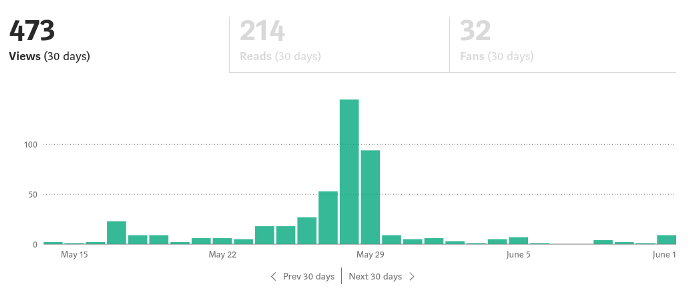
If I keep writing, the graph should maintain velocity, you could say. If I wrote more, it could rise.
However, entertaining pieces still tend to roller coaster and jump.
this type of writing is like a candle. They burn out and must be replaced. You must continuously light new ones to maintain the illumination.
When you quit writing, your income stops.
A substitute
Instead of producing amusing articles, try solving people's issues. You should answer their search questions.
Here's what happens when you answer their searches.
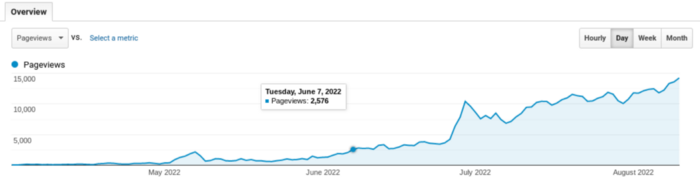
My website's Google analytics. As a dentist, I answer oral health questions.
This chart vs. Medium is pretty glaring, right?
As of yesterday, it was averaging 15k page views each day.
How much would you make on Medium with 15k daily views?
Evergreen materials
In SEO, this is called evergreen content.
Your content is like a lush, evergreen forest, and by green I mean Benjamins.

Do you have knowledge that you can leverage? Why not help your neighbors and the world?
Answer search inquiries and help others. You'll be well rewarded.
This is better than crafting candle-like content that fizzles out quickly.
Is beauty really ephemeral like how flowers bloom? Nah, I prefer watching forests grow instead (: