Integrity
Write
Loading...
Stephen Moore

Stephen Moore

3 years ago

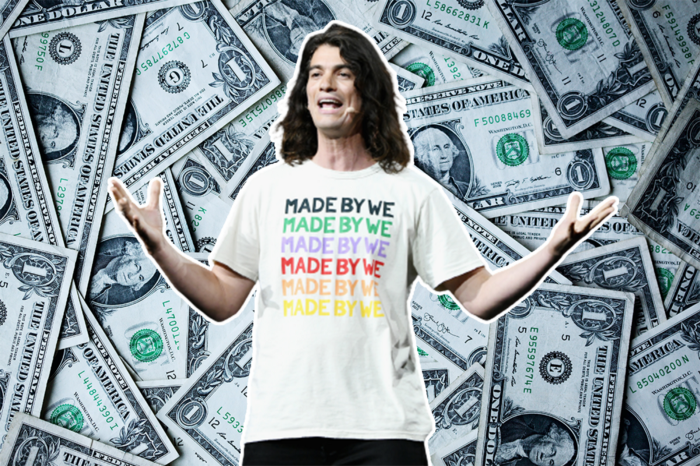
Adam Neumanns is working to create the future of living in a classic example of a guy failing upward.

More on Entrepreneurship/Creators

Jenn Leach

Jenn Leach

3 years ago

What TikTok Paid Me in 2021 with 100,000 Followers

Photo by Catherina Schürmann on Unsplash

I thought it would be interesting to share how much TikTok paid me in 2021.

Onward!

Oh, you get paid by TikTok?

Yes.

They compensate thousands of creators. My Tik Tok account

Tik Tok

I launched my account in March 2020 and generally post about money, finance, and side hustles.

TikTok creators are paid in several ways.

  • Fund for TikTok creators

  • Sponsorships (aka brand deals)

  • Affiliate promotion

  • My own creations

Only one, the TikTok Creator Fund, pays me.

The TikTok Creator Fund: What Is It?

TikTok's initiative pays creators.

YouTube's Shorts Fund, Snapchat Spotlight, and other platforms have similar programs.

Creator Fund doesn't pay everyone. Some prerequisites are:

  • age requirement of at least 18 years

  • In the past 30 days, there must have been 100,000 views.

  • a minimum of 10,000 followers

If you qualify, you can apply using your TikTok account, and once accepted, your videos can earn money.

My earnings from the TikTok Creator Fund

Since 2020, I've made $273.65. My 2021 payment is $77.36.

Yikes!

I made between $4.91 to around $13 payout each time I got paid.

TikTok reportedly pays 3 to 5 cents per thousand views.

To live off the Creator Fund, you'd need billions of monthly views.

Top personal finance creator Sara Finance has millions (if not billions) of views and over 700,000 followers yet only received $3,000 from the TikTok Creator Fund.

Goals for 2022

TikTok pays me in different ways, as listed above.

My largest TikTok account isn't my only one.

In 2022, I'll revamp my channel.

It's been a tumultuous year on TikTok for my account, from getting shadow-banned to being banned from the Creator Fund to being accepted back (not at my wish).

What I've experienced isn't rare. I've read about other creators' experiences.

So, some quick goals for this account…

  • 200,000 fans by the year 2023

  • Consistent monthly income of $5,000

  • two brand deals each month

For now, that's all.

Victoria Kurichenko

Victoria Kurichenko

3 years ago

Updates From Google For Content Producers What You Should Know Is This

People-first update.

Image credit: Shutterstock. Image edited in Canva

Every Google upgrade causes website owners to panic.

Some have just recovered from previous algorithm tweaks and resumed content development.

If you follow Google's Webmaster rules, you shouldn't fear its adjustments.

Everyone has a view of them. Miscommunication and confusion result.

Now, for some (hopefully) exciting news.

Google tweeted on August 18, 2022 about a fresh content update.

This change is another Google effort to remove low-quality, repetitive, and AI-generated content.

The algorithm generates and analyzes search results, not humans.

Google spends a lot to teach its algorithm what searchers want. Intent isn't always clear.

Google's content update aims to:

“… ensure people see more original, helpful content written by people, for people, in search results.”

Isn't it a noble goal?

However, what does it mean for content creators and website owners?

How can you ensure you’re creating content that will be successful after the updates roll out?

Let's first define people-first content.

What does "people-first-content" mean?

If asked, I'd say information written to answer queries and solve problems.

Like others, I read it from the term.

Content creators and marketers disagree. They need more information to follow recommendations.

Google gives explicit instructions for creating people-first content.

According to Google, if you answer yes to the following questions, you have a people-first attitude.

  1. Do you have customers who might find your content useful if they contacted you directly?

  2. Does your content show the breadth of your knowledge?

  3. Do you have a niche or a focus for your website?

  4. After reading your content, will readers learn something new to aid them in achieving their goals?

  5. Are readers happy after reading your content?

  6. Have you been adhering to Google's fundamental updates and product reviews?

As an SEO writer, I'm not scared.

I’ve been following these rules consciously while creating content for my website. That’s why it’s been steadily growing despite me publishing just one or two stories a month.

If you avoid AI-generated text and redundant, shallow material, your website won't suffer.

If you use unscrupulous methods to boost your website's traffic, including link buying or keyword stuffing, stop. Google is getting smarter and will find and punish your site eventually.

For those who say, “SEO is no longer working,” I dedicated the whole paragraph below.

This does not imply that SEO is obsolete.

Google:

“People-first content creators focus on creating satisfying content, while also utilizing SEO best practices to bring searchers additional value.”

The official helpful content update page lists two people-first content components:

  • meeting user needs

  • best practices for SEO

Always read official guidelines, not unsolicited suggestions.

SEO will work till search engines die.

How to use the update

Google said the changes will arrive in August 2022.

They pledged to post updates on Google's search ranking updates page.

Google also tweets this info. If you haven't followed it already, I recommend it.

Ranking adjustments could take two weeks and will affect English searches internationally initially.

Google affirmed plans to extend to other languages.

If you own a website, monitor your rankings and traffic to see if it's affected.

Nick Nolan

Nick Nolan

3 years ago

How to Make $1,037,100 in 4 Months with This Weird Website

One great idea might make you rich.

Author Screenshot | Source

Imagine having a million-dollar concept in college that made a million.

2005 precisely.

Alex Tew, 21, from Wiltshire, England, created The Million Dollar Homepage in August 2005. The idea is basic but beyond the ordinary, which is why it worked.

Alex built a 1,000,000-pixel webpage.

Each website pixel would cost $1. Since pixels are hard to discern, he sold 10x10 squares for $100.

He'd make a million if all the spots sold.

He may have thought about NFTs and the Metaverse decades ago.

MillionDollarHomepage.com launched in 2005.

Businesses and individuals could buy a website spot and add their logo, website link, and tagline. You bought an ad, but nobody visited the website.

If a few thousand people visited the website, it could drive traffic to your business's site.

Alex promised buyers the website would be up for 5 years, so it was a safe bet.

Alex's friend with a music website was the first to buy real estate on the site. Within two weeks, 4,700 pixels sold, and a tracker showed how many were sold and available.

Screenshot from: Source

Word-of-mouth marketing got the press's attention quickly. Everyone loves reading about new ways to make money, so it was a good news story.

By September, over 250,000 pixels had been sold, according to a BBC press release.

Alex and the website gained more media and public attention, so traffic skyrocketed. Two months after the site launched, 1,400 customers bought more than 500,000 pixels.

Businesses bought online real estate. They heard thousands visited the site, so they could get attention cheaply.

Unless you bought a few squares, I'm not sure how many people would notice your ad or click your link.

A sponge website owner emailed Alex:

“We tried Million Dollar Homepage because we were impressed at the level of ingenuity and the sheer simplicity of it. If we’re honest, we didn’t expect too much from it. Now, as a direct result, we are pitching for £18,000 GBP worth of new clients and have seen our site traffic increase over a hundred-fold. We’re even going to have to upgrade our hosting facility! It’s been exceptional.”

Web.archive.org screenshots show how the website changed.

GIF from web.archive.org

“The idea is to create something of an internet time capsule: a homepage that is unique and permanent. Everything on the internet keeps changing so fast, it will be nice to have something that stays solid and permanent for many years. You can be a part of that!” Alex Tew, 2005

The last 1,000 pixels were sold on January 1, 2006.

By then, the homepage had hundreds of thousands of monthly visitors. Alex put the last space on eBay due to high demand.

MillionDollarWeightLoss.com won the last pixels for $38,100, bringing revenue to $1,037,100 in 4 months.

Made in Canva

Many have tried to replicate this website's success. They've all failed.

This idea only worked because no one had seen this website before.

This winner won't be repeated, but it should inspire you to try something new and creative.

Still popular, you could buy one of the linked domains. You can't buy pixels, but you can buy an expired domain.

One link I clicked costs $59,888.

Screenshot from DomainMarket.com

You'd own a piece of internet history if you spent that much on a domain.

Someone bought stablesgallery.co.uk after the domain expired and restored it.

Many of the linked websites have expired or been redirected, but some still link to the original. I couldn't find sponge's website. Can you?

This is a great example of how a simple creative idea can go viral.

Comment on this amazing success story.

You might also like

James White

James White

3 years ago

Three Books That Can Change Your Life in a Day

I've summarized each.

IStockPhoto

Anne Lamott said books are important. Books help us understand ourselves and our behavior. They teach us about community, friendship, and death.

I read. One of my few life-changing habits. 100+ books a year improve my life. I'll list life-changing books you can read in a day. I hope you like them too.

Let's get started!

1) Seneca's Letters from a Stoic

One of my favorite philosophy books. Ryan Holiday, Naval Ravikant, and other prolific readers recommend it.

Seneca wrote 124 letters at the end of his life after working for Nero. Death, friendship, and virtue are discussed.

It's worth rereading. When I'm in trouble, I consult Seneca.

It's brief. The book could be read in one day. However, use it for guidance during difficult times.

Goodreads

My favorite book quotes:

  • Many men find that becoming wealthy only alters their problems rather than solving them.

  • You will never be poor if you live in harmony with nature; you will never be wealthy if you live according to what other people think.

  • We suffer more frequently in our imagination than in reality; there are more things that are likely to frighten us than to crush us.

2) Steven Pressfield's book The War of Art

I’ve read this book twice. I'll likely reread it before 2022 is over.

The War Of Art is the best productivity book. Steven offers procrastination-fighting tips.

Writers, musicians, and creative types will love The War of Art. Workplace procrastinators should also read this book.

Goodreads

My favorite book quotes:

  • The act of creation is what matters most in art. Other than sitting down and making an effort every day, nothing else matters.

  • Working creatively is not a selfish endeavor or an attempt by the actor to gain attention. It serves as a gift for all living things in the world. Don't steal your contribution from us. Give us everything you have.

  • Fear is healthy. Fear is a signal, just like self-doubt. Fear instructs us on what to do. The more terrified we are of a task or calling, the more certain we can be that we must complete it.

3) Darren Hardy's The Compound Effect

The Compound Effect offers practical tips to boost productivity by 10x.

The author believes each choice shapes your future. Pizza may seem harmless. However, daily use increases heart disease risk.

Positive outcomes too. Daily gym visits improve fitness. Reading an hour each night can help you learn. Writing 1,000 words per day would allow you to write a novel in under a year.

Your daily choices affect compound interest and your future. Thus, better habits can improve your life.

Goodreads

My favorite book quotes:

  • Until you alter a daily habit, you cannot change your life. The key to your success can be found in the actions you take each day.

  • The hundreds, thousands, or millions of little things are what distinguish the ordinary from the extraordinary; it is not the big things that add up in the end.

  • Don't worry about willpower. Time to use why-power. Only when you relate your decisions to your aspirations and dreams will they have any real meaning. The decisions that are in line with what you define as your purpose, your core self, and your highest values are the wisest and most inspiring ones. To avoid giving up too easily, you must want something and understand why you want it.

Mark Schaefer

Mark Schaefer

2 years ago

20 Fun Uses for ChatGPT

Our RISE community is stoked on ChatGPT. ChatGPT has countless uses.

Early on. Companies are figuring out the legal and ethical implications of AI's content revolution. Using AI for everyday tasks is cool.

So I challenged RISE friends... Let's have fun and share non-obvious uses.

Onward!

1. Tweet

Jim MacLeod requested a design-themed Twitter thread from ChatGPT.

2. Novelize

Giuseppe Fratoni writes novels.

"This is amazing!" Impotent. I asked about writing, mystery novels, and jazz.

"Develop a mystery novel plot in which a disillusioned homicide detective hunts a serial killer who targets jazz musicians who play Autumn Leaves."

"I have:

Detective James Thompson is a seasoned veteran of the Homicide department, but lately he’s been feeling burnt out and disillusioned. His latest case, the murder of a young jazz pianist who was found brutally killed in his home, only serves to deepen his sense of despair … (much more provided)

3. Question-and-answer sessions

Bliss recommends:

You have a guest speaker and want to ask audience questions.

Pre-generate questions with ChatGPT. "And here's a question from our AI?"

The conference is about Western water scarcity. Water management expert. My AI question was...

Which desalination-related questions should I ask an expert?

ChatGPT said...

  • How is desalination currently being used around the world, and in what types of locations is it most effective?

  • What are the potential advantages and disadvantages of using desalination to provide fresh water?

  • What are some of the key challenges and limitations of desalination technology, and how are they being addressed?

4. Game-making

Richard's a board game expert. He suggests using ChatGPT to plan games. Note: Some people have started getting help solving crossword puzzle clues.

5. Matchmaking

Tanya Thompson thinks it helps dating. ChatGPT:

Here are some flirty first-message ideas for dating apps:

I noticed you from afar. I had to say hi and see if we clicked.

Your profile picture is gorgeous. I'm obsessed with your [Feature] and want to know you better.

I don't usually message first, but I had to. You're [Attractive Quality] and I can't wait to talk.”

Hello. Your profile intimidates me. I'm starstruck by your [Attractiveness]. (Many instances)

5. Solitude/anxiety

ChatGPT excels at one-on-one conversations.

PepperBrooks: "I'm sad and lonely."

ChatGPT: I’m sorry to hear that you’re feeling sad and lonely. It’s natural to feel down sometimes, but it’s important to remember that you’re not alone. There are many people who care about you and want to help you. It can be helpful to talk to someone about your feelings, whether it’s a close friend, family member, or mental health professional.

Sometimes, just expressing your thoughts and emotions to someone else can help to alleviate your sadness and loneliness. It’s also important to take care of yourself and do things that make you happy, such as spending time with loved ones, pursuing a hobby, or exercising. These things can help to improve your mood and make you feel more connected to others. Remember that you are strong and capable, and that you can get through this difficult time.

Daniel Nestle asked ChatGPT to generate journal prompts to help him deal with anxiety.

  1. Write down the things that are causing you anxiety at the moment.

  2. Describe a situation in which you felt anxious and how you coped with it.

  3. Reflect on how your thoughts and beliefs contribute to your anxiety.

  4. Write a letter to your anxiety, expressing your feelings and concerns

  5. Imagine yourself in a calm and peaceful place, and describe it in detail.

  6. (many more items followed)

6. Names

Continued Daniel:

Also, naming ideas.

Me: Name this drink. Japanese gin, unsweetened tonic, lime, Szechuan pepper, grapefruit.

ChatGPT: How about “Sakura Sunrise?” The name incorporates the Japanese gin and the citrus flavors of grapefruit and lime, and the word “sunrise” suggests a fresh and invigorating start to the day. Alternatively, you could go with something like “Peppered Grapefruit Gin Fizz” to emphasize the unique flavor combination of Szechuan pepper and grapefruit.

7. Translation on the go

Monks recommends: ChatGPT is a perfect mobile translation tool. Say you need help in Italy.

ME: Translate to Italian

Where is the nearest gas station?

ChatGPT: “La mia auto sta per esaurire il carburante, mi puoi dire dove si trova la stazione di servizio più vicina?”

8. Fitness

Monks added:

ME: In 3 months, I want to run 5km. Plan out how I can do this.

ChatGPT: Here's a 3-month plan to run 5km.

  • Start by walking for 15–20 minutes each day to build up your endurance and get your body used to regular exercise.

  • After a week of walking, begin incorporating short jogs into your routine. Start by jogging for 1–2 minutes at a time, with walking breaks in between. Gradually increase the length of your jogs and reduce the amount of time you spend walking.

  • Once you can jog for 10 minutes without stopping, start increasing the distance of your runs. Aim to run 1km without stopping and then gradually increase the distance over time.

  • In addition to your regular runs, incorporate strength training and stretching into your routine to improve your overall fitness and reduce the risk of injury.

  • (more details continued on)

9. Integrations and coding

10. Teacher lesson plans

Spencer Crandall saved time.

This morning, I wondered who has the hardest job. Teachers.

Many students, little time. ChatGPT could handle lesson planning. I tried it and got this.

Lesson Title: The History and Impact of Artificial Intelligence

Students will understand the history and development of AI and the potential positive and negative impacts on society.

AI timeline AI technologies and applications

Overview:

  1. Introduce the topic of artificial intelligence, and explain that it refers to the development of computer systems and algorithms that can simulate human intelligence and behavior.

  2. Show the timeline of significant events in the history of AI, and discuss the key milestones and developments in the field.

  3. Show examples of AI technologies and applications, and explain how they are used in various industries and fields.

  4. Discuss the potential positive and negative impacts of AI on society, including its potential to improve productivity, efficiency, and safety, as well as its potential to create new challenges and concerns, such as job displacement and ethical issues.

(many more details followed)

11. Find podcast guests.

Joeri Billast suggested:

Who should be on my Web3 podcast?

ChatGPT: Web3 marketing experts, influencers, and thought leaders make great podcast guests. These include Web3 marketers, content creators, business owners, entrepreneurs, and technologists. You could invite Web3 startups and organizations to your podcast.

Please give examples.

ChatGPT: Ideal Web3 marketing podcast guests include:

  • Tim Berner-Lee, inventor of the World Wide Web

  • Chris Dixon, general partner at Andreessen Horowitz

  • Vitalik Buterin, founder of Ethereum

  • Joe Lubin, founder of ConsenSys

  • Susan Fowler, author of Whistleblower

  • (many other suggestions)

12. Comments and reviews on social media

Lisa Monk thinks ChatGPT can help retail staff with social media.

She asked ChatGPT to "review this restaurant"

POSITIVE CUSTOMER REVIEW: I absolutely love this place. We eat out a lot however this place has topped it all. Perfect meals, amazing staff and the timing for it all was great! Special thanks to Sophie B (you rock) From your guests all the way from the Gold Coast, THANK YOU

ChatGPT REPLY: Thank you so much for your kind words and for taking the time to write a review. We are delighted to hear that you had such a great experience at our restaurant. We are thrilled that you enjoyed your meal and the service provided by Sophie. It’s always a pleasure to serve guests visiting from the Gold Coast and we are grateful for your support. We look forward to welcoming you back again soon. Thank you again for your positive review.

CUSTOMER REVIEW: Most average food, there is a nice view, But that’s about it

ChatGPT: Thank you for your review. We apologize if your dining experience was not up to your expectations. We strive to provide top-quality food and service to all of our customers, and we will take your feedback into consideration as we continue to improve. Thank you for letting us know about your experience.

13. Crime-fighting

Zack Seipert said, "I researched some famous unsolved murders, and ChatGPT laid out the crime, suspects, clues, and more." I bet experienced detectives could solve some of these cold cases.

14. Reduce bias

Joanne Taylor struggles to remove biases from her writing. She asked ChatGPT for ideas.

I asked ChatGPT to check a text for racial bias, and it did well.

15. Furnishings

I designed a small, unique table using ChatGPT and MidJourney. I edited ChatGPT's idea for clarity and brevity before entering it in MidJourney.

Results:

16. Serialize a novel

Scott Scowcoft led ChatCPT through iterations of a story text to create serialized novel frames. You can view this here.

17. Interview preparation

I was on a sales podcast. Although this is marketing-related, it's not my forte. I asked ChatGPT for help with a sales interview. Response:

Here are some interview questions about the future of sales and how to answer them.

How will technology affect sales in the future?

Technology will impact sales in the coming years. Automation and AI could be used to handle routine tasks, and data analysis and CRM could become more important. E-commerce and online sales channels are also reshaping the sales landscape.

How will the salesperson's role change?

Future sales roles may change in response to changing customer needs and expectations. Salespeople must be knowledgeable and consultative to help customers navigate complex products and services. Increasing importance of data analysis and CRM tools will require salespeople to understand and use technology effectively.

Future sales professionals will need what skills?

Future salespeople will need many skills. Sales professionals must have strong communication and interpersonal skills, as well as product and service knowledge and the ability to use data analysis and CRM tools effectively. Adapting to changing customer needs and staying current on industry trends will also be important for sales success.

18. Gift ideas

I need Christmas gift ideas for my wife. I asked:

Suggest a gift idea under $200 for a middle-aged woman who loves The Eagles.

A middle-aged woman who loves The Eagles might like a vinyl record of "Hotel California" or "The Long Run." Many music fans enjoy the unique sound and experience of vinyl records.

Pair the record with a high-quality record player for a complete gift. The vinyl record and record player should fit within your $200 budget for an Eagles fan.

19. Explaining complex concepts

I entered: Explain quantum physics to me as if I were 10 years old.

Quantum physics is a branch of science that studies how tiny particles, like atoms and subatomic particles, behave. These particles are so small that they don’t always follow the same rules as the things we can see and touch every day.

For example, sometimes they can be in two places at the same time, or they can be friends with each other even if they are far apart. This might sound strange, but it’s what scientists have learned from studying these tiny particles. Quantum physics helps us understand how the world works at a very small scale, and it can also help us make new technologies, like computers that are much faster than the ones we have today.

20. AP-style editing

Blogs, journals, and books follow AP Style. I asked ChatGPT to "edit using AP Style" and it did a great job.

And then... "Write a catchy headline for a blog post about 16 ChatGPT uses"

Here are some possible blog post titles for 20 creative ChatGPT uses:

  • “20 Fun and Creative Ways to Use ChatGPT: From Games to Quizzes and More”

  • “The Ultimate Guide to Using ChatGPT for Entertainment and Creativity”

  • “20 Reasons to Use ChatGPT: How it Can Enhance Your Gaming, Storytelling, and More”

  • 20 Entertaining Uses for ChatGPT You Never Knew Were Possible”

  • “Unleash Your Imagination with ChatGPT: 16 Creative and Fun Ways to Use it”

In a previous post, I said ChatGPT will change marketing careers forever. I have never made a statement like that in my life. Even in the early days of the internet, people were cautious.

This technology was just released two weeks ago, and over a million people are already using it. This is the fastest technology adoption in history.

Today's post offers inventive and entertaining ideas, but it's just the beginning. ChatGPT writes code, music, and papers.

Dmitrii Eliuseev

Dmitrii Eliuseev

2 years ago

Creating Images on Your Local PC Using Stable Diffusion AI

Deep learning-based generative art is being researched. As usual, self-learning is better. Some models, like OpenAI's DALL-E 2, require registration and can only be used online, but others can be used locally, which is usually more enjoyable for curious users. I'll demonstrate the Stable Diffusion model's operation on a standard PC.

Image generated by Stable Diffusion 2.1

Let’s get started.

What It Does

Stable Diffusion uses numerous components:

  • A generative model trained to produce images is called a diffusion model. The model is incrementally improving the starting data, which is only random noise. The model has an image, and while it is being trained, the reversed process is being used to add noise to the image. Being able to reverse this procedure and create images from noise is where the true magic is (more details and samples can be found in the paper).

  • An internal compressed representation of a latent diffusion model, which may be altered to produce the desired images, is used (more details can be found in the paper). The capacity to fine-tune the generation process is essential because producing pictures at random is not very attractive (as we can see, for instance, in Generative Adversarial Networks).

  • A neural network model called CLIP (Contrastive Language-Image Pre-training) is used to translate natural language prompts into vector representations. This model, which was trained on 400,000,000 image-text pairs, enables the transformation of a text prompt into a latent space for the diffusion model in the scenario of stable diffusion (more details in that paper).

This figure shows all data flow:

Model architecture, Source © https://arxiv.org/pdf/2112.10752.pdf

The weights file size for Stable Diffusion model v1 is 4 GB and v2 is 5 GB, making the model quite huge. The v1 model was trained on 256x256 and 512x512 LAION-5B pictures on a 4,000 GPU cluster using over 150.000 NVIDIA A100 GPU hours. The open-source pre-trained model is helpful for us. And we will.

Install

Before utilizing the Python sources for Stable Diffusion v1 on GitHub, we must install Miniconda (assuming Git and Python are already installed):

wget https://repo.anaconda.com/miniconda/Miniconda3-py39_4.12.0-Linux-x86_64.sh
chmod +x Miniconda3-py39_4.12.0-Linux-x86_64.sh
./Miniconda3-py39_4.12.0-Linux-x86_64.sh
conda update -n base -c defaults conda

Install the source and prepare the environment:

git clone https://github.com/CompVis/stable-diffusion
cd stable-diffusion
conda env create -f environment.yaml
conda activate ldm
pip3 install transformers --upgrade

Download the pre-trained model weights next. HiggingFace has the newest checkpoint sd-v14.ckpt (a download is free but registration is required). Put the file in the project folder and have fun:

python3 scripts/txt2img.py --prompt "hello world" --plms --ckpt sd-v1-4.ckpt --skip_grid --n_samples 1

Almost. The installation is complete for happy users of current GPUs with 12 GB or more VRAM. RuntimeError: CUDA out of memory will occur otherwise. Two solutions exist.

Running the optimized version

Try optimizing first. After cloning the repository and enabling the environment (as previously), we can run the command:

python3 optimizedSD/optimized_txt2img.py --prompt "hello world" --ckpt sd-v1-4.ckpt --skip_grid --n_samples 1

Stable Diffusion worked on my visual card with 8 GB RAM (alas, I did not behave well enough to get NVIDIA A100 for Christmas, so 8 GB GPU is the maximum I have;).

Running Stable Diffusion without GPU

If the GPU does not have enough RAM or is not CUDA-compatible, running the code on a CPU will be 20x slower but better than nothing. This unauthorized CPU-only branch from GitHub is easiest to obtain. We may easily edit the source code to use the latest version. It's strange that a pull request for that was made six months ago and still hasn't been approved, as the changes are simple. Readers can finish in 5 minutes:

  • Replace if attr.device!= torch.device(cuda) with if attr.device!= torch.device(cuda) and torch.cuda.is available at line 20 of ldm/models/diffusion/ddim.py ().

  • Replace if attr.device!= torch.device(cuda) with if attr.device!= torch.device(cuda) and torch.cuda.is available in line 20 of ldm/models/diffusion/plms.py ().

  • Replace device=cuda in lines 38, 55, 83, and 142 of ldm/modules/encoders/modules.py with device=cuda if torch.cuda.is available(), otherwise cpu.

  • Replace model.cuda() in scripts/txt2img.py line 28 and scripts/img2img.py line 43 with if torch.cuda.is available(): model.cuda ().

Run the script again.

Testing

Test the model. Text-to-image is the first choice. Test the command line example again:

python3 scripts/txt2img.py --prompt "hello world" --plms --ckpt sd-v1-4.ckpt --skip_grid --n_samples 1

The slow generation takes 10 seconds on a GPU and 10 minutes on a CPU. Final image:

The SD V1.4 first example, Image by the author

Hello world is dull and abstract. Try a brush-wielding hamster. Why? Because we can, and it's not as insane as Napoleon's cat. Another image:

The SD V1.4 second example, Image by the author

Generating an image from a text prompt and another image is interesting. I made this picture in two minutes using the image editor (sorry, drawing wasn't my strong suit):

An image sketch, Image by the author

I can create an image from this drawing:

python3 scripts/img2img.py --prompt "A bird is sitting on a tree branch" --ckpt sd-v1-4.ckpt --init-img bird.png --strength 0.8

It was far better than my initial drawing:

The SD V1.4 third example, Image by the author

I hope readers understand and experiment.

Stable Diffusion UI

Developers love the command line, but regular users may struggle. Stable Diffusion UI projects simplify image generation and installation. Simple usage:

  • Unpack the ZIP after downloading it from https://github.com/cmdr2/stable-diffusion-ui/releases. Linux and Windows are compatible with Stable Diffusion UI (sorry for Mac users, but those machines are not well-suitable for heavy machine learning tasks anyway;).

  • Start the script.

Done. The web browser UI makes configuring various Stable Diffusion features (upscaling, filtering, etc.) easy:

Stable Diffusion UI © Image by author

V2.1 of Stable Diffusion

I noticed the notification about releasing version 2.1 while writing this essay, and it was intriguing to test it. First, compare version 2 to version 1:

  • alternative text encoding. The Contrastive LanguageImage Pre-training (CLIP) deep learning model, which was trained on a significant number of text-image pairs, is used in Stable Diffusion 1. The open-source CLIP implementation used in Stable Diffusion 2 is called OpenCLIP. It is difficult to determine whether there have been any technical advancements or if legal concerns were the main focus. However, because the training datasets for the two text encoders were different, the output results from V1 and V2 will differ for the identical text prompts.

  • a new depth model that may be used to the output of image-to-image generation.

  • a revolutionary upscaling technique that can quadruple the resolution of an image.

  • Generally higher resolution Stable Diffusion 2 has the ability to produce both 512x512 and 768x768 pictures.

The Hugging Face website offers a free online demo of Stable Diffusion 2.1 for code testing. The process is the same as for version 1.4. Download a fresh version and activate the environment:

conda deactivate  
conda env remove -n ldm  # Use this if version 1 was previously installed
git clone https://github.com/Stability-AI/stablediffusion
cd stablediffusion
conda env create -f environment.yaml
conda activate ldm

Hugging Face offers a new weights ckpt file.

The Out of memory error prevented me from running this version on my 8 GB GPU. Version 2.1 fails on CPUs with the slow conv2d cpu not implemented for Half error (according to this GitHub issue, the CPU support for this algorithm and data type will not be added). The model can be modified from half to full precision (float16 instead of float32), however it doesn't make sense since v1 runs up to 10 minutes on the CPU and v2.1 should be much slower. The online demo results are visible. The same hamster painting with a brush prompt yielded this result:

A Stable Diffusion 2.1 example

It looks different from v1, but it functions and has a higher resolution.

The superresolution.py script can run the 4x Stable Diffusion upscaler locally (the x4-upscaler-ema.ckpt weights file should be in the same folder):

python3 scripts/gradio/superresolution.py configs/stable-diffusion/x4-upscaling.yaml x4-upscaler-ema.ckpt

This code allows the web browser UI to select the image to upscale:

The copy-paste strategy may explain why the upscaler needs a text prompt (and the Hugging Face code snippet does not have any text input as well). I got a GPU out of memory error again, although CUDA can be disabled like v1. However, processing an image for more than two hours is unlikely:

Stable Diffusion 4X upscaler running on CPU © Image by author

Stable Diffusion Limitations

When we use the model, it's fun to see what it can and can't do. Generative models produce abstract visuals but not photorealistic ones. This fundamentally limits The generative neural network was trained on text and image pairs, but humans have a lot of background knowledge about the world. The neural network model knows nothing. If someone asks me to draw a Chinese text, I can draw something that looks like Chinese but is actually gibberish because I never learnt it. Generative AI does too! Humans can learn new languages, but the Stable Diffusion AI model includes only language and image decoder brain components. For instance, the Stable Diffusion model will pull NO WAR banner-bearers like this:

V1:

V2.1:

The shot shows text, although the model never learned to read or write. The model's string tokenizer automatically converts letters to lowercase before generating the image, so typing NO WAR banner or no war banner is the same.

I can also ask the model to draw a gorgeous woman:

V1:

V2.1:

The first image is gorgeous but physically incorrect. A second one is better, although it has an Uncanny valley feel. BTW, v2 has a lifehack to add a negative prompt and define what we don't want on the image. Readers might try adding horrible anatomy to the gorgeous woman request.

If we ask for a cartoon attractive woman, the results are nice, but accuracy doesn't matter:

V1:

V2.1:

Another example: I ordered a model to sketch a mouse, which looks beautiful but has too many legs, ears, and fingers:

V1:

V2.1: improved but not perfect.

V1 produces a fun cartoon flying mouse if I want something more abstract:

I tried multiple times with V2.1 but only received this:

The image is OK, but the first version is closer to the request.

Stable Diffusion struggles to draw letters, fingers, etc. However, abstract images yield interesting outcomes. A rural landscape with a modern metropolis in the background turned out well:

V1:

V2.1:

Generative models help make paintings too (at least, abstract ones). I searched Google Image Search for modern art painting to see works by real artists, and this was the first image:

“Modern art painting” © Google’s Image search result

I typed "abstract oil painting of people dancing" and got this:

V1:

V2.1:

It's a different style, but I don't think the AI-generated graphics are worse than the human-drawn ones.

The AI model cannot think like humans. It thinks nothing. A stable diffusion model is a billion-parameter matrix trained on millions of text-image pairs. I input "robot is creating a picture with a pen" to create an image for this post. Humans understand requests immediately. I tried Stable Diffusion multiple times and got this:

This great artwork has a pen, robot, and sketch, however it was not asked. Maybe it was because the tokenizer deleted is and a words from a statement, but I tried other requests such robot painting picture with pen without success. It's harder to prompt a model than a person.

I hope Stable Diffusion's general effects are evident. Despite its limitations, it can produce beautiful photographs in some settings. Readers who want to use Stable Diffusion results should be warned. Source code examination demonstrates that Stable Diffusion images feature a concealed watermark (text StableDiffusionV1 and SDV2) encoded using the invisible-watermark Python package. It's not a secret, because the official Stable Diffusion repository's test watermark.py file contains a decoding snippet. The put watermark line in the txt2img.py source code can be removed if desired. I didn't discover this watermark on photographs made by the online Hugging Face demo. Maybe I did something incorrectly (but maybe they are just not using the txt2img script on their backend at all).

Conclusion

The Stable Diffusion model was fascinating. As I mentioned before, trying something yourself is always better than taking someone else's word, so I encourage readers to do the same (including this article as well;).

Is Generative AI a game-changer? My humble experience tells me:

  • I think that place has a lot of potential. For designers and artists, generative AI can be a truly useful and innovative tool. Unfortunately, it can also pose a threat to some of them since if users can enter a text field to obtain a picture or a website logo in a matter of clicks, why would they pay more to a different party? Is it possible right now? unquestionably not yet. Images still have a very poor quality and are erroneous in minute details. And after viewing the image of the stunning woman above, models and fashion photographers may also unwind because it is highly unlikely that AI will replace them in the upcoming years.

  • Today, generative AI is still in its infancy. Even 768x768 images are considered to be of a high resolution when using neural networks, which are computationally highly expensive. There isn't an AI model that can generate high-resolution photographs natively without upscaling or other methods, at least not as of the time this article was written, but it will happen eventually.

  • It is still a challenge to accurately represent knowledge in neural networks (information like how many legs a cat has or the year Napoleon was born). Consequently, AI models struggle to create photorealistic photos, at least where little details are important (on the other side, when I searched Google for modern art paintings, the results are often even worse;).

  • When compared to the carefully chosen images from official web pages or YouTube reviews, the average output quality of a Stable Diffusion generation process is actually less attractive because to its high degree of randomness. When using the same technique on their own, consumers will theoretically only view those images as 1% of the results.

Anyway, it's exciting to witness this area's advancement, especially because the project is open source. Google's Imagen and DALL-E 2 can also produce remarkable findings. It will be interesting to see how they progress.