


Elon Musk Bets $44 Billion on Free Speech's Future
Musk’s purchase of Twitter has sealed his bond with the American right—whether the platform’s left-leaning employees and users like it or not.
Elon Musk's pursuit of Twitter Inc. began earlier this month as a joke. It started slowly, then spiraled out of control, culminating on April 25 with the world's richest man agreeing to spend $44 billion on one of the most politically significant technology companies ever. There have been bigger financial acquisitions, but Twitter's significance has always outpaced its balance sheet. This is a unique Silicon Valley deal.
To recap: Musk announced in early April that he had bought a stake in Twitter, citing the company's alleged suppression of free speech. His complaints were vague, relying heavily on the dog whistles of the ultra-right. A week later, he announced he'd buy the company for $54.20 per share, four days after initially pledging to join Twitter's board. Twitter's directors noticed the 420 reference as well, and responded with a “shareholder rights” plan (i.e., a poison pill) that included a 420 joke.
Musk - Patrick Pleul/Getty Images
No one knew if the bid was genuine. Musk's Twitter plans seemed implausible or insincere. In a tweet, he referred to automated accounts that use his name to promote cryptocurrency. He enraged his prospective employees by suggesting that Twitter's San Francisco headquarters be turned into a homeless shelter, renaming the company Titter, and expressing solidarity with his growing conservative fan base. “The woke mind virus is making Netflix unwatchable,” he tweeted on April 19.
But Musk got funding, and after a frantic weekend of negotiations, Twitter said yes. Unlike most buyouts, Musk will personally fund the deal, putting up up to $21 billion in cash and borrowing another $12.5 billion against his Tesla stock.
Free Speech and Partisanship
Percentage of respondents who agree with the following
The deal is expected to replatform accounts that were banned by Twitter for harassing others, spreading misinformation, or inciting violence, such as former President Donald Trump's account. As a result, Musk is at odds with his own left-leaning employees, users, and advertisers, who would prefer more content moderation rather than less.
Dorsey - Photographer: Joe Raedle/Getty Images
Previously, the company's leadership had similar issues. Founder Jack Dorsey stepped down last year amid concerns about slowing growth and product development, as well as his dual role as CEO of payments processor Block Inc. Compared to Musk, a father of seven who already runs four companies (besides Tesla and SpaceX), Dorsey is laser-focused.
Musk's motivation to buy Twitter may be political. Affirming the American far right with $44 billion spent on “free speech” Right-wing activists have promoted a series of competing upstart Twitter competitors—Parler, Gettr, and Trump's own effort, Truth Social—since Trump was banned from major social media platforms for encouraging rioters at the US Capitol on Jan. 6, 2021. But Musk can give them a social network with lax content moderation and a real user base. Trump said he wouldn't return to Twitter after the deal was announced, but he wouldn't be the first to do so.
Trump - Eli Hiller/Bloomberg
Conservative activists and lawmakers are already ecstatic. “A great day for free speech in America,” said Missouri Republican Josh Hawley. The day the deal was announced, Tucker Carlson opened his nightly Fox show with a 10-minute laudatory monologue. “The single biggest political development since Donald Trump's election in 2016,” he gushed over Musk.
But Musk's supporters and detractors misunderstand how much his business interests influence his political ideology. He marketed Tesla's cars as carbon-saving machines that were faster and cooler than gas-powered luxury cars during George W. Bush's presidency. Musk gained a huge following among wealthy environmentalists who reserved hundreds of thousands of Tesla sedans years before they were made during Barack Obama's presidency. Musk in the Trump era advocated for a carbon tax, but he also fought local officials (and his own workers) over Covid rules that slowed the reopening of his Bay Area factory.
Teslas at the Las Vegas Convention Center Loop Central Station in April 2021. The Las Vegas Convention Center Loop was Musk's first commercial project. Ethan Miller/Getty Images
Musk's rightward shift matched the rise of the nationalist-populist right and the desire to serve a growing EV market. In 2019, he unveiled the Cybertruck, a Tesla pickup, and in 2018, he announced plans to manufacture it at a new plant outside Austin. In 2021, he decided to move Tesla's headquarters there, citing California's "land of over-regulation." After Ford and General Motors beat him to the electric truck market, Musk reframed Tesla as a company for pickup-driving dudes.
Similarly, his purchase of Twitter will be entwined with his other business interests. Tesla has a factory in China and is friendly with Beijing. This could be seen as a conflict of interest when Musk's Twitter decides how to treat Chinese-backed disinformation, as Amazon.com Inc. founder Jeff Bezos noted.
Musk has focused on Twitter's product and social impact, but the company's biggest challenges are financial: Either increase cash flow or cut costs to comfortably service his new debt. Even if Musk can't do that, he can still benefit from the deal. He has recently used the increased attention to promote other business interests: Boring has hyperloops and Neuralink brain implants on the way, Musk tweeted. Remember Tesla's long-promised robotaxis!
Musk may be comfortable saying he has no expectation of profit because it benefits his other businesses. At the TED conference on April 14, Musk insisted that his interest in Twitter was solely charitable. “I don't care about money.”
The rockets and weed jokes make it easy to see Musk as unique—and his crazy buyout will undoubtedly add to that narrative. However, he is a megabillionaire who is risking a small amount of money (approximately 13% of his net worth) to gain potentially enormous influence. Musk makes everything seem new, but this is a rehash of an old media story.
More on Society & Culture

The woman
3 years ago
The renowned and highest-paid Google software engineer
His story will inspire you.
“Google search went down for a few hours in 2002; Jeff Dean handled all the queries by hand and checked quality doubled.”- Jeff Dean Facts.
One of many Jeff Dean jokes, but you get the idea.
Google's top six engineers met in a war room in mid-2000. Google's crawling system, which indexed the Web, stopped working. Users could still enter queries, but results were five months old.
Google just signed a deal with Yahoo to power a ten-times-larger search engine. Tension rose. It was crucial. If they failed, the Yahoo agreement would likely fall through, risking bankruptcy for the firm. Their efforts could be lost.
A rangy, tall, energetic thirty-one-year-old man named Jeff dean was among those six brilliant engineers in the makeshift room. He had just left D. E. C. a couple of months ago and started his career in a relatively new firm Google, which was about to change the world. He rolled his chair over his colleague Sanjay and sat right next to him, cajoling his code like a movie director. The history started from there.
When you think of people who shaped the World Wide Web, you probably picture founders and CEOs like Larry Page and Sergey Brin, Marc Andreesen, Tim Berners-Lee, Bill Gates, and Mark Zuckerberg. They’re undoubtedly the brightest people on earth.
Under these giants, legions of anonymous coders work at keyboards to create the systems and products we use. These computer workers are irreplaceable.
Let's get to know him better.
It's possible you've never heard of Jeff Dean. He's American. Dean created many behind-the-scenes Google products. Jeff, co-founder and head of Google's deep learning research engineering team, is a popular technology, innovation, and AI keynote speaker.
While earning an MS and Ph.D. in computer science at the University of Washington, he was a teaching assistant, instructor, and research assistant. Dean joined the Compaq Computer Corporation Western Research Laboratory research team after graduating.
Jeff co-created ProfileMe and the Continuous Profiling Infrastructure for Digital at Compaq. He co-designed and implemented Swift, one of the fastest Java implementations. He was a senior technical staff member at mySimon Inc., retrieving and caching electronic commerce content.
Dean, a top young computer scientist, joined Google in mid-1999. He was always trying to maximize a computer's potential as a child.
An expert
His high school program for processing massive epidemiological data was 26 times faster than professionals'. Epi Info, in 13 languages, is used by the CDC. He worked on compilers as a computer science Ph.D. These apps make source code computer-readable.
Dean never wanted to work on compilers forever. He left Academia for Google, which had less than 20 employees. Dean helped found Google News and AdSense, which transformed the internet economy. He then addressed Google's biggest issue, scaling.
Growing Google faced a huge computing challenge. They developed PageRank in the late 1990s to return the most relevant search results. Google's popularity slowed machine deployment.
Dean solved problems, his specialty. He and fellow great programmer Sanjay Ghemawat created the Google File System, which distributed large data over thousands of cheap machines.
These two also created MapReduce, which let programmers handle massive data quantities on parallel machines. They could also add calculations to the search algorithm. A 2004 research article explained MapReduce, which became an industry sensation.
Several revolutionary inventions
Dean's other initiatives were also game-changers. BigTable, a petabyte-capable distributed data storage system, was based on Google File. The first global database, Spanner, stores data on millions of servers in dozens of data centers worldwide.
It underpins Gmail and AdWords. Google Translate co-founder Jeff Dean is surprising. He contributes heavily to Google News. Dean is Senior Fellow of Google Research and Health and leads Google AI.
Recognitions
The National Academy of Engineering elected Dean in 2009. He received the 2009 Association for Computing Machinery fellowship and the 2016 American Academy of Arts and Science fellowship. He received the 2007 ACM-SIGOPS Mark Weiser Award and the 2012 ACM-Infosys Foundation Award. Lists could continue.
A sneaky question may arrive in your mind: How much does this big brain earn? Well, most believe he is one of the highest-paid employees at Google. According to a survey, he is paid $3 million a year.
He makes espresso and chats with a small group of Googlers most mornings. Dean steams milk, another grinds, and another brews espresso. They discuss families and technology while making coffee. He thinks this little collaboration and idea-sharing keeps Google going.
“Some of us have been working together for more than 15 years,” Dean said. “We estimate that we’ve collectively made more than 20,000 cappuccinos together.”
We all know great developers and software engineers. It may inspire many.

DC Palter
3 years ago
Why Are There So Few Startups in Japan?
Japan's startup challenge: 7 reasons

Every day, another Silicon Valley business is bought for a billion dollars, making its founders rich while growing the economy and improving consumers' lives.
Google, Amazon, Twitter, and Medium dominate our daily lives. Tesla automobiles and Moderna Covid vaccinations.
The startup movement started in Silicon Valley, California, but the rest of the world is catching up. Global startup buzz is rising. Except Japan.
644 of CB Insights' 1170 unicorns—successful firms valued at over $1 billion—are US-based. China follows with 302 and India third with 108.
Japan? 6!
1% of US startups succeed. The third-largest economy is tied with small Switzerland for startup success.
Mexico (8), Indonesia (12), and Brazil (12) have more successful startups than Japan (16). South Korea has 16. Yikes! Problem?
Why Don't Startups Exist in Japan More?
Not about money. Japanese firms invest in startups. To invest in startups, big Japanese firms create Silicon Valley offices instead of Tokyo.
Startups aren't the issue either. Local governments are competing to be Japan's Shirikon Tani, providing entrepreneurs financing, office space, and founder visas.
Startup accelerators like Plug and Play in Tokyo, Osaka, and Kyoto, the Startup Hub in Kobe, and Google for Startups are many.
Most of the companies I've encountered in Japan are either local offices of foreign firms aiming to expand into the Japanese market or small businesses offering local services rather than disrupting a staid industry with new ideas.
There must be a reason Japan can develop world-beating giant corporations like Toyota, Nintendo, Shiseido, and Suntory but not inventive startups.
Culture, obviously. Japanese culture excels in teamwork, craftsmanship, and quality, but it hates moving fast, making mistakes, and breaking things.
If you have a brilliant idea in Silicon Valley, quit your job, get money from friends and family, and build a prototype. To fund the business, you approach angel investors and VCs.
Most non-startup folks don't aware that venture capitalists don't want good, profitable enterprises. That's wonderful if you're developing a solid small business to consult, open shops, or make a specialty product. However, you must pay for it or borrow money. Venture capitalists want moon rockets. Silicon Valley is big or bust. Almost 90% will explode and crash. The few successes are remarkable enough to make up for the failures.
Silicon Valley's high-risk, high-reward attitude contrasts with Japan's incrementalism. Japan makes the best automobiles and cleanrooms, but it fails to produce new items that grow the economy.
Changeable? Absolutely. But, what makes huge manufacturing enterprises successful and what makes Japan a safe and comfortable place to live are inextricably connected with the lack of startups.
Barriers to Startup Development in Japan
These are the 7 biggest obstacles to Japanese startup success.
Unresponsive Employment Market
While the lifelong employment system in Japan is evolving, the average employee stays at their firm for 12 years (15 years for men at large organizations) compared to 4.3 years in the US. Seniority, not experience or aptitude, determines career routes, making it tough to quit a job to join a startup and then return to corporate work if it fails.
Conservative Buyers
Even if your product is buggy and undocumented, US customers will migrate to a cheaper, superior one. Japanese corporations demand perfection from their trusted suppliers and keep with them forever. Startups need income fast, yet product evaluation takes forever.
Failure intolerance
Japanese business failures harm lives. Failed forever. It hinders risk-taking. Silicon Valley embraces failure. Build another startup if your first fails. Build a third if that fails. Every setback is viewed as a learning opportunity for success.
4. No Corporate Purchases
Silicon Valley industrial giants will buy fast-growing startups for a lot of money. Many huge firms have stopped developing new goods and instead buy startups after the product is validated.
Japanese companies prefer in-house product development over startup acquisitions. No acquisitions mean no startup investment and no investor reward.
Startup investments can also be monetized through stock market listings. Public stock listings in Japan are risky because the Nikkei was stagnant for 35 years while the S&P rose 14x.
5. Social Unity Above Wealth
In Silicon Valley, everyone wants to be rich. That creates a competitive environment where everyone wants to succeed, but it also promotes fraud and societal problems.
Japan values communal harmony above individual success. Wealthy folks and overachievers are avoided. In Japan, renegades are nearly impossible.
6. Rote Learning Education System
Japanese high school graduates outperform most Americans. Nonetheless, Japanese education is known for its rote memorization. The American system, which fails too many kids, emphasizes creativity to create new products.
Immigration.
Immigrants start 55% of successful Silicon Valley firms. Some come for university, some to escape poverty and war, and some are recruited by Silicon Valley startups and stay to start their own.
Japan is difficult for immigrants to start a business due to language barriers, visa restrictions, and social isolation.
How Japan Can Promote Innovation
Patchwork solutions to deep-rooted cultural issues will not work. If customers don't buy things, immigration visas won't aid startups. Startups must have a chance of being acquired for a huge sum to attract investors. If risky startups fail, employees won't join.
Will Japan never have a startup culture?
Once a consensus is reached, Japan changes rapidly. A dwindling population and standard of living may lead to such consensus.
Toyota and Sony were firms with renowned founders who used technology to transform the world. Repeatable.
Silicon Valley is flawed too. Many people struggle due to wealth disparities, job churn and layoffs, and the tremendous ups and downs of the economy caused by stock market fluctuations.
The founders of the 10% successful startups are heroes. The 90% that fail and return to good-paying jobs with benefits are never mentioned.
Silicon Valley startup culture and Japanese corporate culture are opposites. Each have pros and cons. Big Japanese corporations make the most reliable, dependable, high-quality products yet move too slowly. That's good for creating cars, not social networking apps.
Can innovation and success be encouraged without eroding social cohesion? That can motivate software firms to move fast and break things while recognizing the beauty and precision of expert craftsmen? A hybrid culture where Japan can make the world's best and most original items. Hopefully.

Tim Smedley
3 years ago
When Investment in New Energy Surpassed That in Fossil Fuels (Forever)
A worldwide energy crisis might have hampered renewable energy and clean tech investment. Nope.
BNEF's 2023 Energy Transition Investment Trends study surprised and encouraged. Global energy transition investment reached $1 trillion for the first time ($1.11t), up 31% from 2021. From 2013, the clean energy transition has come and cannot be reversed.
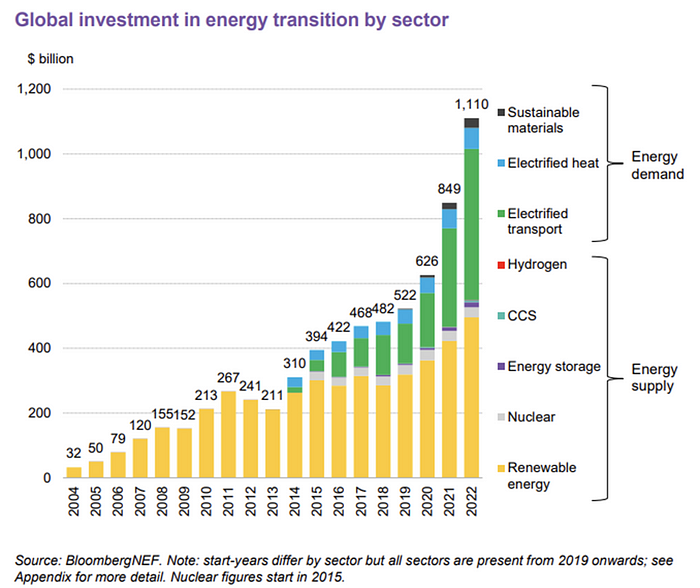
BNEF Head of Global Analysis Albert Cheung said our findings ended the energy crisis's influence on renewable energy deployment. Energy transition investment has reached a record as countries and corporations implement transition strategies. Clean energy investments will soon surpass fossil fuel investments.
The table below indicates the tripping point, which means the energy shift is occuring today.
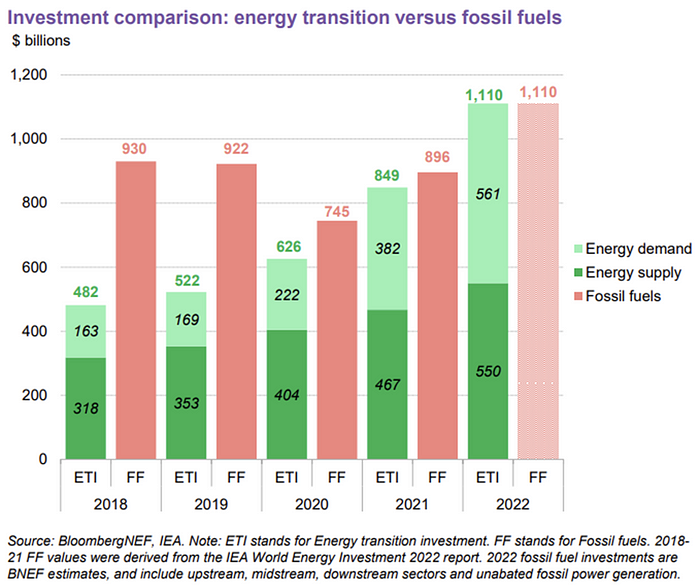
BNEF calls money invested on clean technology including electric vehicles, heat pumps, hydrogen, and carbon capture energy transition investment. In 2022, electrified heat received $64b and energy storage $15.7b.
Nonetheless, $495b in renewables (up 17%) and $466b in electrified transport (up 54%) account for most of the investment. Hydrogen and carbon capture are tiny despite the fanfare. Hydrogen received the least funding in 2022 at $1.1 billion (0.1%).
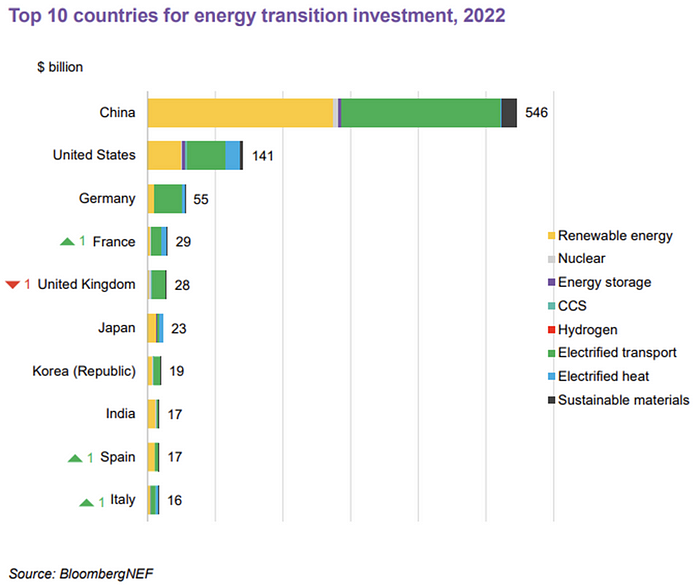
China dominates investment. China spends $546 billion on energy transition, half the global amount. Second, the US total of $141 billion in 2022 was up 11% from 2021. With $180 billion, the EU is unofficially second. China invested 91% in battery technologies.
The 2022 transition tipping point is encouraging, but the BNEF research shows how far we must go to get Net Zero. Energy transition investment must average $4.55 trillion between 2023 and 2030—three times the amount spent in 2022—to reach global Net Zero. Investment must be seven times today's record to reach Net Zero by 2050.
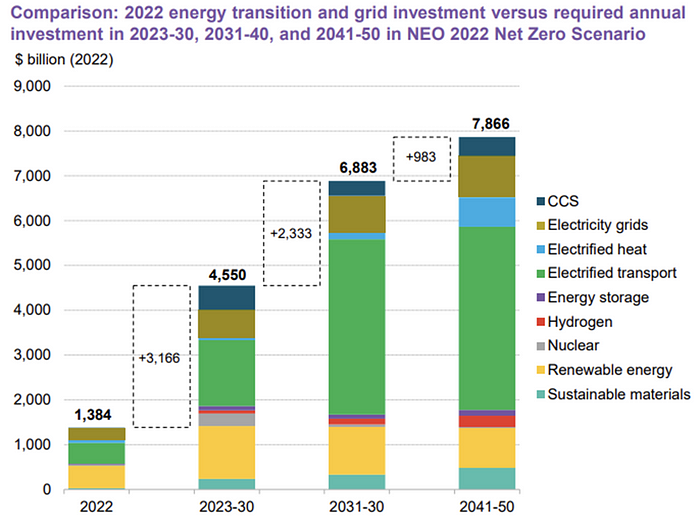
BNEF 2023 Energy Transition Investment Trends.
As shown in the graph above, BNEF experts have been using their crystal balls to determine where that investment should go. CCS and hydrogen are still modest components of the picture. Interestingly, they see nuclear almost fading. Active transport advocates like me may have something to say about the massive $4b in electrified transport. If we focus on walkable 15-minute cities, we may need fewer electric automobiles. Though we need more electric trains and buses.
Albert Cheung of BNEF emphasizes the challenge. This week's figures promise short-term job creation and medium-term energy security, but more investment is needed to reach net zero in the long run.
I expect the BNEF Energy Transition Investment Trends report to show clean tech investment outpacing fossil fuels investment every year. Finally saying that is amazing. It's insufficient. The planet must maintain its electric (not gas) pedal. In response to the research, Christina Karapataki, VC at Breakthrough Energy Ventures, a clean tech investment firm, tweeted: Clean energy investment needs to average more than 3x this level, for the remainder of this decade, to get on track for BNEFs Net Zero Scenario. Go!
You might also like

Katrina Paulson
4 years ago
Dehumanization Against Anthropomorphization
We've fought for humanity's sake. We need equilibrium.

We live in a world of opposites (black/white, up/down, love/hate), thus life is a game of achieving equilibrium. We have a universe of paradoxes within ourselves, not just in physics.
Individually, you balance your intellect and heart, but as a species, we're full of polarities. They might be gentle and compassionate, then ruthless and unsympathetic.
We desire for connection so much that we personify non-human beings and objects while turning to violence and hatred toward others. These contrasts baffle me. Will we find balance?
Anthropomorphization
Assigning human-like features or bonding with objects is common throughout childhood. Cartoons often give non-humans human traits. Adults still anthropomorphize this trait. Researchers agree we start doing it as infants and continue throughout life.
Humans of all ages are good at humanizing stuff. We build emotional attachments to weather events, inanimate objects, animals, plants, and locales. Gods, goddesses, and fictitious figures are anthropomorphized.
Cast Away, starring Tom Hanks, features anthropization. Hanks is left on an island, where he builds an emotional bond with a volleyball he calls Wilson.
We became emotionally invested in Wilson, including myself.
Why do we do it, though?
Our instincts and traits helped us survive and thrive. Our brain is alert to other people's thoughts, feelings, and intentions to assist us to determine who is safe or hazardous. We can think about others and our own mental states, or about thinking. This is the Theory of Mind.
Neurologically, specialists believe the Theory of Mind has to do with our mirror neurons, which exhibit the same activity while executing or witnessing an action.
Mirror neurons may contribute to anthropization, but they're not the only ones. In 2021, Harvard Medical School researchers at MGH and MIT colleagues published a study on the brain's notion of mind.
“Our study provides evidence to support theory of mind by individual neurons. Until now, it wasn’t clear whether or how neurons were able to perform these social cognitive computations.”
Neurons have particular functions, researchers found. Others encode information that differentiates one person's beliefs from another's. Some neurons reflect tale pieces, whereas others aren't directly involved in social reasoning but may multitask contributing factors.
Combining neuronal data gives a precise portrait of another's beliefs and comprehension. The theory of mind describes how we judge and understand each other in our species, and it likely led to anthropomorphism. Neuroscience indicates identical brain regions react to human or non-human behavior, like mirror neurons.
Some academics believe we're wired for connection, which explains why we anthropomorphize. When we're alone, we may anthropomorphize non-humans.
Humanizing non-human entities may make them deserving of moral care, according to another theory. Animamorphizing something makes it responsible for its actions and deserves punishments or rewards. This mental shift is typically apparent in our connections with pets and leads to deanthropomorphization.
Dehumanization
Dehumanizing involves denying someone or anything ethical regard, the opposite of anthropomorphizing.
Dehumanization occurs throughout history. We do it to everything in nature, including ourselves. We experiment on and torture animals. We enslave, hate, and harm other groups of people.
Race, immigrant status, dress choices, sexual orientation, social class, religion, gender, politics, need I go on? Our degrading behavior is promoting fascism and division everywhere.
Dehumanizing someone or anything reduces their agency and value. Many assume they're immune to this feature, but tests disagree.
It's inevitable. Humans are wired to have knee-jerk reactions to differences. We are programmed to dehumanize others, and it's easier than we'd like to admit.
Why do we do it, though?
Dehumanizing others is simpler than humanizing things for several reasons. First, we consider everything unusual as harmful, which has helped our species survive for hundreds of millions of years. Our propensity to be distrustful of others, like our fear of the unknown, promotes an us-vs.-them mentality.
Since WWII, various studies have been done to explain how or why the holocaust happened. How did so many individuals become radicalized to commit such awful actions and feel morally justified? Researchers quickly showed how easily the mind can turn gloomy.
Stanley Milgram's 1960s electroshock experiment highlighted how quickly people bow to authority to injure others. Philip Zimbardo's 1971 Stanford Prison Experiment revealed how power may be abused.
The us-versus-them attitude is natural and even young toddlers act on it. Without a relationship, empathy is more difficult.
It's terrifying how quickly dehumanizing behavior becomes commonplace. The current pandemic is an example. Most countries no longer count deaths. Long Covid is a major issue, with predictions of a handicapped tsunami in the future years. Mostly, we shrug.
In 2020, we panicked. Remember everyone's caution? Now Long Covid is ruining more lives, threatening to disable an insane amount of our population for months or their entire lives.
There's little research. Experts can't even classify or cure it. The people should be outraged, but most have ceased caring. They're over covid.
We're encouraged to find a method to live with a terrible pandemic that will cause years of damage. People aren't worried about infection anymore. They shrug and say, "We'll all get it eventually," then hope they're not one of the 30% who develops Long Covid.
We can correct course before further damage. Because we can recognize our urges and biases, we're not captives to them. We can think critically about our thoughts and behaviors, then attempt to improve. We can recognize our deficiencies and work to attain balance.
Changing perspectives
We're currently attempting to find equilibrium between opposites. It's superficial to defend extremes by stating we're only human or wired this way because both imply we have no control.
Being human involves having self-awareness, and by being careful of our thoughts and acts, we can find balance and recognize opposites' purpose.
Extreme anthropomorphizing and dehumanizing isolate and imperil us. We anthropomorphize because we desire connection and dehumanize because we're terrified, frequently of the connection we crave. Will we find balance?
Katrina Paulson ponders humanity, unanswered questions, and discoveries. Please check out her newsletters, Curious Adventure and Curious Life.

Pat Vieljeux
4 years ago
In 5 minutes, you can tell if a startup will succeed.
Or the “lie to me” method.

I can predict a startup's success in minutes.
Just interview its founder.
Ask "why?"
I question "why" till I sense him.
I need to feel the person I have in front of me. I need to know if he or she can deliver. Startups aren't easy. Without abilities, a brilliant idea will fail.
Good entrepreneurs have these qualities: He's a leader, determined, and resilient.
For me, they can be split in two categories.
The first entrepreneur aspires to live meaningfully. The second wants to get rich. The second is communicative. He wants to wow the crowd. He's motivated by the thought of one day sailing a boat past palm trees and sunny beaches.
What drives the first entrepreneur is evident in his speech, face, and voice. He will not speak about his product. He's (nearly) uninterested. He's not selling anything. He's not a salesman. He wants to succeed. The product is his fuel.
He'll explain his decision. He'll share his motivations. His desire. And he'll use meaningful words.
Paul Ekman has shown that face expressions aren't cultural. His study influenced the American TV series "lie to me" about body language and speech.
Passionate entrepreneurs are obvious. It's palpable. Faking passion is tough. Someone who wants your favor and money will expose his actual motives through his expressions and language.
The good liar will be able to fool you for a while, but not for long if you pay attention to his body language and how he expresses himself.
And also, if you look at his business plan.
His business plan reveals his goals. Read between the lines.
Entrepreneur 1 will focus on his "why", whereas Entrepreneur 2 will focus on the "how".
Entrepreneur 1 will develop a vision-driven culture.
The second, on the other hand, will focus on his EBITDA.
Why is the culture so critical? Because it will allow entrepreneur 1 to develop a solid team that can tackle his problems and trials. His team's "why" will keep them together in tough times.
"Give me a terrific start-up team with a mediocre idea over a weak one any day." Because a great team knows when to pivot and trusts each other. Weak teams fail.” — Bernhard Schroeder
Closings thoughts
Every VC must ask Why. Entrepreneur's motivations. This "why" will create the team's culture. This culture will help the team adjust to any setback.
Nate Kostar
4 years ago
# DeaMau5’s PIXELYNX and Beatport Launch Festival NFTs
Pixelynx, a music metaverse gaming platform, has teamed up with Beatport, an online music retailer focusing in electronic music, to establish a Synth Heads non-fungible token (NFT) Collection.
Richie Hawtin, aka Deadmau5, and Joel Zimmerman, nicknamed Pixelynx, have invented a new music metaverse game platform called Pixelynx. In January 2022, they released their first Beatport NFT drop, which saw 3,030 generative NFTs sell out in seconds.
The limited edition Synth Heads NFTs will be released in collaboration with Junction 2, the largest UK techno festival, and having one will grant fans special access tickets and experiences at the London-based festival.
Membership in the Synth Head community, day passes to the Junction 2 Festival 2022, Junction 2 and Beatport apparel, special vinyl releases, and continued access to future ticket drops are just a few of the experiences available.
Five lucky NFT holders will also receive a Golden Ticket, which includes access to a backstage artist bar and tickets to Junction 2's next large-scale London event this summer, in addition to full festival entrance for both days.
The Junction 2 festival will take place at Trent Park in London on June 18th and 19th, and will feature performances from Four Tet, Dixon, Amelie Lens, Robert Hood, and a slew of other artists. Holders of the original Synth Head NFT will be granted admission to the festival's guestlist as well as line-jumping privileges.
The new Synth Heads NFTs collection contain 300 NFTs.
NFTs that provide IRL utility are in high demand.
The benefits of NFT drops related to In Real Life (IRL) utility aren't limited to Beatport and Pixelynx.
Coachella, a well-known music event, recently partnered with cryptocurrency exchange FTX to offer free NFTs to 2022 pass holders. Access to a dedicated entry lane, a meal and beverage pass, and limited-edition merchandise were all included with the NFTs.
Coachella also has its own NFT store on the Solana blockchain, where fans can buy Coachella NFTs and digital treasures that unlock exclusive on-site experiences, physical objects, lifetime festival passes, and "future adventures."
Individual artists and performers have begun taking advantage of NFT technology outside of large music festivals like Coachella.
DJ Tisto has revealed that he would release a VIP NFT for his upcoming "Eagle" collection during the EDC festival in Las Vegas in 2022. This NFT, dubbed "All Access Eagle," gives collectors the best chance to get NFTs from his first drop, as well as unique access to the music "Repeat It."
NFTs are one-of-a-kind digital assets that can be verified, purchased, sold, and traded on blockchains, opening up new possibilities for artists and businesses alike. Time will tell whether Beatport and Pixelynx's Synth Head NFT collection will be successful, but if it's anything like the first release, it's a safe bet.