



More on Entrepreneurship/Creators

Raad Ahmed
4 years ago
How We Just Raised $6M At An $80M Valuation From 100+ Investors Using A Link (Without Pitching)
Lawtrades nearly failed three years ago.
We couldn't raise Series A or enthusiasm from VCs.
We raised $6M (at a $80M valuation) from 100 customers and investors using a link and no pitching.
Step-by-step:
We refocused our business first.
Lawtrades raised $3.7M while Atrium raised $75M. By comparison, we seemed unimportant.
We had to close the company or try something new.
As I've written previously, a pivot saved us. Our initial focus on SMBs attracted many unprofitable customers. SMBs needed one-off legal services, meaning low fees and high turnover.
Tech startups were different. Their General Councels (GCs) needed near-daily support, resulting in higher fees and lower churn than SMBs.
We stopped unprofitable customers and focused on power users. To avoid dilution, we borrowed against receivables. We scaled our revenue 10x, from $70k/mo to $700k/mo.
Then, we reconsidered fundraising (and do it differently)
This time was different. Lawtrades was cash flow positive for most of last year, so we could dictate our own terms. VCs were still wary of legaltech after Atrium's shutdown (though they were thinking about the space).
We neither wanted to rely on VCs nor dilute more than 10% equity. So we didn't compete for in-person pitch meetings.
AngelList Roll-Up Vehicle (RUV). Up to 250 accredited investors can invest in a single RUV. First, we emailed customers the RUV. Why? Because I wanted to help the platform's users.
Imagine if Uber or Airbnb let all drivers or Superhosts invest in an RUV. Humans make the platform, theirs and ours. Giving people a chance to invest increases their loyalty.
We expanded after initial interest.
We created a Journey link, containing everything that would normally go in an investor pitch:
- Slides
- Trailer (from me)
- Testimonials
- Product demo
- Financials
We could also link to our AngelList RUV and send the pitch to an unlimited number of people. Instead of 1:1, we had 1:10,000 pitches-to-investors.
We posted Journey's link in RUV Alliance Discord. 600 accredited investors noticed it immediately. Within days, we raised $250,000 from customers-turned-investors.
Stonks, which live-streamed our pitch to thousands of viewers, was interested in our grassroots enthusiasm. We got $1.4M from people I've never met.
These updates on Pump generated more interest. Facebook, Uber, Netflix, and Robinhood executives all wanted to invest. Sahil Lavingia, who had rejected us, gave us $100k.
We closed the round with public support.
Without a single pitch meeting, we'd raised $2.3M. It was a result of natural enthusiasm: taking care of the people who made us who we are, letting them move first, and leveraging their enthusiasm with VCs, who were interested.
We used network effects to raise $3.7M from a founder-turned-VC, bringing the total to $6M at a $80M valuation (which, by the way, I set myself).
What flipping the fundraising script allowed us to do:
We started with private investors instead of 2–3 VCs to show VCs what we were worth. This gave Lawtrades the ability to:
- Without meetings, share our vision. Many people saw our Journey link. I ended up taking meetings with people who planned to contribute $50k+, but still, the ratio of views-to-meetings was outrageously good for us.
- Leverage ourselves. Instead of us selling ourselves to VCs, they did. Some people with large checks or late arrivals were turned away.
- Maintain voting power. No board seats were lost.
- Utilize viral network effects. People-powered.
- Preemptively halt churn by turning our users into owners. People are more loyal and respectful to things they own. Our users make us who we are — no matter how good our tech is, we need human beings to use it. They deserve to be owners.
I don't blame founders for being hesitant about this approach. Pump and RUVs are new and scary. But it won’t be that way for long. Our approach redistributed some of the power that normally lies entirely with VCs, putting it into our hands and our network’s hands.
This is the future — another way power is shifting from centralized to decentralized.

Jenn Leach
4 years ago
What TikTok Paid Me in 2021 with 100,000 Followers

I thought it would be interesting to share how much TikTok paid me in 2021.
Onward!
Oh, you get paid by TikTok?
Yes.
They compensate thousands of creators. My Tik Tok account
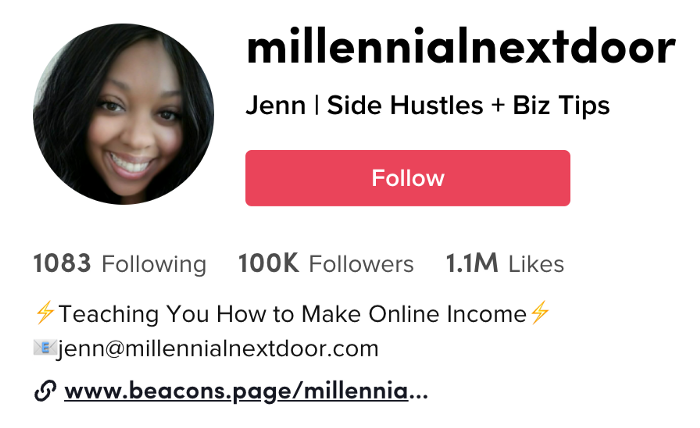
I launched my account in March 2020 and generally post about money, finance, and side hustles.
TikTok creators are paid in several ways.
Fund for TikTok creators
Sponsorships (aka brand deals)
Affiliate promotion
My own creations
Only one, the TikTok Creator Fund, pays me.
The TikTok Creator Fund: What Is It?
TikTok's initiative pays creators.
YouTube's Shorts Fund, Snapchat Spotlight, and other platforms have similar programs.
Creator Fund doesn't pay everyone. Some prerequisites are:
age requirement of at least 18 years
In the past 30 days, there must have been 100,000 views.
a minimum of 10,000 followers
If you qualify, you can apply using your TikTok account, and once accepted, your videos can earn money.
My earnings from the TikTok Creator Fund
Since 2020, I've made $273.65. My 2021 payment is $77.36.
Yikes!
I made between $4.91 to around $13 payout each time I got paid.
TikTok reportedly pays 3 to 5 cents per thousand views.
To live off the Creator Fund, you'd need billions of monthly views.
Top personal finance creator Sara Finance has millions (if not billions) of views and over 700,000 followers yet only received $3,000 from the TikTok Creator Fund.
Goals for 2022
TikTok pays me in different ways, as listed above.
My largest TikTok account isn't my only one.
In 2022, I'll revamp my channel.
It's been a tumultuous year on TikTok for my account, from getting shadow-banned to being banned from the Creator Fund to being accepted back (not at my wish).
What I've experienced isn't rare. I've read about other creators' experiences.
So, some quick goals for this account…
200,000 fans by the year 2023
Consistent monthly income of $5,000
two brand deals each month
For now, that's all.

Bradley Vangelder
3 years ago
How we started and then quickly sold our startup
From a simple landing where we tested our MVP to a platform that distributes 20,000 codes per month, we learned a lot.

Starting point
Kwotet was my first startup. Everyone might post book quotes online.
I wanted a change.
Kwotet lacked attention, thus I felt stuck. After experiencing the trials of starting Kwotet, I thought of developing a waitlist service, but I required a strong co-founder.
I knew Dries from school, but we weren't close. He was an entrepreneurial programmer who worked a lot outside school. I needed this.
We brainstormed throughout school hours. We developed features to put us first. We worked until 3 am to launch this product.
Putting in the hours is KEY when building a startup

The instant that we lost our spark
In Belgium, college seniors do their internship in their last semester.
As we both made the decision to pick a quite challenging company, little time was left for Lancero.
Eventually, we lost interest. We lost the spark…
The only logical choice was to find someone with the same spark we started with to acquire Lancero.
And we did @ MicroAcquire.
Sell before your product dies. Make sure to profit from all the gains.
What did we do following the sale?
Not far from selling Lancero I lost my dad. I was about to start a new company. It was focused on positivity. I got none left at the time.
We still didn’t let go of the dream of becoming full-time entrepreneurs. As Dries launched the amazing company Plunk, and I’m still in the discovering stages of my next journey!

Dream!
You’re an entrepreneur if:
You're imaginative.
You enjoy disassembling and reassembling things.
You're adept at making new friends.
YOU HAVE DREAMS.
You don’t need to believe me if I tell you “everything is possible”… I wouldn't believe it myself if anyone told me this 2 years ago.
Until I started doing, living my dreams.
You might also like

Simon Egersand
4 years ago
Working from home for more than two years has taught me a lot.
Since the pandemic, I've worked from home. It’s been +2 years (wow, time flies!) now, and during this time I’ve learned a lot. My 4 remote work lessons.
I work in a remote distributed team. This team setting shaped my experience and teachings.
Isolation ("I miss my coworkers")
The most obvious point. I miss going out with my coworkers for coffee, weekend chats, or just company while I work. I miss being able to go to someone's desk and ask for help. On a remote world, I must organize a meeting, share my screen, and avoid talking over each other in Zoom - sigh!
Social interaction is more vital for my health than I believed.
Online socializing stinks
My company used to come together every Friday to play Exploding Kittens, have food and beer, and bond over non-work things.
Different today. Every Friday afternoon is for fun, but it's not the same. People with screen weariness miss meetings, which makes sense. Sometimes you're too busy on Slack to enjoy yourself.
We laugh in meetings, but it's not the same as face-to-face.
Digital social activities can't replace real-world ones
Improved Work-Life Balance, if You Let It
At the outset of the pandemic, I recognized I needed to take better care of myself to survive. After not leaving my apartment for a few days and feeling miserable, I decided to walk before work every day. This turned into a passion for exercise, and today I run or go to the gym before work. I use my commute time for healthful activities.
Working from home makes it easier to keep working after hours. I sometimes forget the time and find myself writing coding at dinnertime. I said, "One more test." This is a disadvantage, therefore I keep my office schedule.
Spend your commute time properly and keep to your office schedule.
Remote Pair Programming Is Hard
As a software developer, I regularly write code. My team sometimes uses pair programming to write code collaboratively. One person writes code while another watches, comments, and asks questions. I won't list them all here.
Internet pairing is difficult. My team struggles with this. Even with Tuple, it's challenging. I lose attention when I get a notification or check my computer.
I miss a pen and paper to rapidly sketch down my thoughts for a colleague or a whiteboard for spirited talks with others. Best answers are found through experience.
Real-life pair programming beats the best remote pair programming tools.
Lessons Learned
Here are 4 lessons I've learned working remotely for 2 years.
-
Socializing is more vital to my health than I anticipated.
-
Digital social activities can't replace in-person ones.
-
Spend your commute time properly and keep your office schedule.
-
Real-life pair programming beats the best remote tools.
Conclusion
Our era is fascinating. Remote labor has existed for years, but software companies have just recently had to adapt. Companies who don't offer remote work will lose talent, in my opinion.
We're still figuring out the finest software development approaches, programming language features, and communication methods since the 1960s. I can't wait to see what advancements assist us go into remote work.
I'll certainly work remotely in the next years, so I'm interested to see what I've learnt from this post then.
This post is a summary of this one.

Nir Zicherman
3 years ago
The Great Organizational Conundrum
Only two of the following three options can be achieved: consistency, availability, and partition tolerance

Someone told me that growing from 30 to 60 is the biggest adjustment for a team or business.
I remember thinking, That's random. Each company is unique. I've seen teams of all types confront the same issues during development periods. With new enterprises starting every year, we should be better at navigating growing difficulties.
As a team grows, its processes and systems break down, requiring reorganization or declining results. Why always? Why isn't there a perfect scaling model? Why hasn't that been found?
The Three Things Productive Organizations Must Have
Any company should be efficient and productive. Three items are needed:
First, it must verify that no two team members have conflicting information about the roadmap, strategy, or any input that could affect execution. Teamwork is required.
Second, it must ensure that everyone can receive the information they need from everyone else quickly, especially as teams become more specialized (an inevitability in a developing organization). It requires everyone's accessibility.
Third, it must ensure that the organization can operate efficiently even if a piece is unavailable. It's partition-tolerant.
From my experience with the many teams I've been on, invested in, or advised, achieving all three is nearly impossible. Why a perfect organization model cannot exist is clear after analysis.
The CAP Theorem: What is it?
Eric Brewer of Berkeley discovered the CAP Theorem, which argues that a distributed data storage should have three benefits. One can only have two at once.
The three benefits are consistency, availability, and partition tolerance, which implies that even if part of the system is offline, the remainder continues to work.
This notion is usually applied to computer science, but I've realized it's also true for human organizations. In a post-COVID world, many organizations are hiring non-co-located staff as they grow. CAP Theorem is more important than ever. Growing teams sometimes think they can develop ways to bypass this law, dooming themselves to a less-than-optimal team dynamic. They should adopt CAP to maximize productivity.
Path 1: Consistency and availability equal no tolerance for partitions
Let's imagine you want your team to always be in sync (i.e., for someone to be the source of truth for the latest information) and to be able to share information with each other. Only division into domains will do.
Numerous developing organizations do this, especially after the early stage (say, 30 people) when everyone may wear many hats and be aware of all the moving elements. After a certain point, it's tougher to keep generalists aligned than to divide them into specialized tasks.
In a specialized, segmented team, leaders optimize consistency and availability (i.e. every function is up-to-speed on the latest strategy, no one is out of sync, and everyone is able to unblock and inform everyone else).
Partition tolerance suffers. If any component of the organization breaks down (someone goes on vacation, quits, underperforms, or Gmail or Slack goes down), productivity stops. There's no way to give the team stability, availability, and smooth operation during a hiccup.
Path 2: Partition Tolerance and Availability = No Consistency
Some businesses avoid relying too heavily on any one person or sub-team by maximizing availability and partition tolerance (the organization continues to function as a whole even if particular components fail). Only redundancy can do that. Instead of specializing each member, the team spreads expertise so people can work in parallel. I switched from Path 1 to Path 2 because I realized too much reliance on one person is risky.
What happens after redundancy? Unreliable. The more people may run independently and in parallel, the less anyone can be the truth. Lack of alignment or updated information can lead to people executing slightly different strategies. So, resources are squandered on the wrong work.
Path 3: Partition and Consistency "Tolerance" equates to "absence"
The third, least-used path stresses partition tolerance and consistency (meaning answers are always correct and up-to-date). In this organizational style, it's most critical to maintain the system operating and keep everyone aligned. No one is allowed to read anything without an assurance that it's up-to-date (i.e. there’s no availability).
Always short-lived. In my experience, a business that prioritizes quality and scalability over speedy information transmission can get bogged down in heavy processes that hinder production. Large-scale, this is unsustainable.
Accepting CAP
When two puzzle pieces fit, the third won't. I've watched developing teams try to tackle these difficulties, only to find, as their ancestors did, that they can never be entirely solved. Idealized solutions fail in reality, causing lost effort, confusion, and lower production.
As teams develop and change, they should embrace CAP, acknowledge there is a limit to productivity in a scaling business, and choose the best two-out-of-three path.

Simon Ash
3 years ago
The Three Most Effective Questions for Ongoing Development
The Traffic Light Approach to Reviewing Personal, Team and Project Development

What needs improvement? If you want to improve, you need to practice your sport, musical instrument, habit, or work project. You need to assess your progress.
Continuous improvement is the foundation of focused practice and a growth mentality. Not just individually. High-performing teams pursue improvement. Right? Why is it hard?
As a leadership coach, senior manager, and high-level athlete, I've found three key questions that may unlock high performance in individuals and teams.
Problems with Reviews
Reviewing and improving performance is crucial, however I hate seeing review sessions in my diary. I rarely respond to questionnaire pop-ups or emails. Why?
Time constrains. Requests to fill out questionnaires often state they will take 10–15 minutes, but I can think of a million other things to do with that time. Next, review overload. Businesses can easily request comments online. No matter what you buy, someone will ask for your opinion. This bombardment might make feedback seem bad, which is bad.
The problem is that we might feel that way about important things like personal growth and work performance. Managers and team leaders face a greater challenge.
When to Conduct a Review
We must be wise about reviewing things that matter to us. Timing and duration matter. Reviewing the experience as quickly as possible preserves information and sentiments. Time must be brief. The review's importance and size will determine its length. We might only take a few seconds to review our morning coffee, but we might require more time for that six-month work project.
These post-event reviews should be supplemented by periodic reflection. Journaling can help with daily reflections, but I also like to undertake personal reviews every six months on vacation or at a retreat.
As an employee or line manager, you don't want to wait a year for a performance assessment. Little and frequently is best, with a more formal and in-depth assessment (typically with a written report) in 6 and 12 months.
The Easiest Method to Conduct a Review Session
I follow Einstein's review process:
“Make things as simple as possible but no simpler.”
Thus, it should be brief but deliver the necessary feedback. Quality critique is hard to receive if the process is overly complicated or long.
I have led or participated in many review processes, from strategic overhauls of big organizations to personal goal coaching. Three key questions guide the process at either end:
What ought to stop being done?
What should we do going forward?
What should we do first?
Following the Rule of 3, I compare it to traffic lights. Red, amber, and green lights:
Red What ought should we stop?
Amber What ought to we keep up?
Green Where should we begin?
This approach is easy to understand and self-explanatory, however below are some examples under each area.
Red What ought should we stop?
As a team or individually, we must stop doing things to improve.
Sometimes they're bad. If we want to lose weight, we should avoid sweets. If a team culture is bad, we may need to stop unpleasant behavior like gossiping instead of having difficult conversations.
Not all things we should stop are wrong. Time matters. Since it is finite, we sometimes have to stop nice things to focus on the most important. Good to Great author Jim Collins famously said:
“Don’t let the good be the enemy of the great.”
Prioritizing requires this idea. Thus, decide what to stop to prioritize.
Amber What ought to we keep up?
Should we continue with the amber light? It helps us decide what to keep doing during review. Many items fall into this category, so focus on those that make the most progress.
Which activities have the most impact? Which behaviors create the best culture? Success-building habits?
Use these questions to find positive momentum. These are the fly-wheel motions, according to Jim Collins. The Compound Effect author Darren Hardy says:
“Consistency is the key to achieving and maintaining momentum.”
What can you do consistently to reach your goal?
Green Where should we begin?
Finally, green lights indicate new beginnings. Red/amber difficulties may be involved. Stopping a red issue may give you more time to do something helpful (in the amber).
This green space inspires creativity. Kolbs learning cycle requires active exploration to progress. Thus, it's crucial to think of new approaches, try them out, and fail if required.
This notion underpins lean start-build, up's measure, learn approach and agile's trying, testing, and reviewing. Try new things until you find what works. Thomas Edison, the lighting legend, exclaimed:
“There is a way to do it better — find it!”
Failure is acceptable, but if you want to fail forward, look back on what you've done.
John Maxwell concurred with Edison:
“Fail early, fail often, but always fail forward”
A good review procedure lets us accomplish that. To avoid failure, we must act, experiment, and reflect.
Use the traffic light system to prioritize queries. Ask:
Red What needs to stop?
Amber What should continue to occur?
Green What might be initiated?
Take a moment to reflect on your day. Check your priorities with these three questions. Even if merely to confirm your direction, it's a terrific exercise!