


More on Leadership

Aniket
4 years ago
Yahoo could have purchased Google for $1 billion
Let's see this once-dominant IT corporation crumble.

What's the capital of Kazakhstan? If you don't know the answer, you can probably find it by Googling. Google Search returned results for Nur-Sultan in 0.66 seconds.
Google is the best search engine I've ever used. Did you know another search engine ruled the Internet? I'm sure you guessed Yahoo!
Google's friendly UI and wide selection of services make it my top choice. Let's explore Yahoo's decline.
Yahoo!
YAHOO stands for Yet Another Hierarchically Organized Oracle. Jerry Yang and David Filo established Yahoo.
Yahoo is primarily a search engine and email provider. It offers News and an advertising platform. It was a popular website in 1995 that let people search the Internet directly. Yahoo began offering free email in 1997 by acquiring RocketMail.
According to a study, Yahoo used Google Search Engine technology until 2000 and then developed its own in 2004.
Yahoo! rejected buying Google for $1 billion
Larry Page and Sergey Brin, Google's founders, approached Yahoo in 1998 to sell Google for $1 billion so they could focus on their studies. Yahoo denied the offer, thinking it was overvalued at the time.
Yahoo realized its error and offered Google $3 billion in 2002, but Google demanded $5 billion since it was more valuable. Yahoo thought $5 billion was overpriced for the existing market.
In 2022, Google is worth $1.56 Trillion.
What happened to Yahoo!
Yahoo refused to buy Google, and Google's valuation rose, making a purchase unfeasible.
Yahoo started losing users when Google launched Gmail. Google's UI was far cleaner than Yahoo's.
Yahoo offered $1 billion to buy Facebook in July 2006, but Zuckerberg and the board sought $1.1 billion. Yahoo rejected, and Facebook's valuation rose, making it difficult to buy.
Yahoo was losing users daily while Google and Facebook gained many. Google and Facebook's popularity soared. Yahoo lost value daily.
Microsoft offered $45 billion to buy Yahoo in February 2008, but Yahoo declined. Microsoft increased its bid to $47 billion after Yahoo said it was too low, but Yahoo rejected it. Then Microsoft rejected Yahoo’s 10% bid increase in May 2008.
In 2015, Verizon bought Yahoo for $4.5 billion, and Apollo Global Management bought 90% of Yahoo's shares for $5 billion in May 2021. Verizon kept 10%.
Yahoo's opportunity to acquire Google and Facebook could have been a turning moment. It declined Microsoft's $45 billion deal in 2008 and was sold to Verizon for $4.5 billion in 2015. Poor decisions and lack of vision caused its downfall. Yahoo's aim wasn't obvious and it didn't stick to a single domain.
Hence, a corporation needs a clear vision and a leader who can see its future.
Liked this article? Join my tech and programming newsletter here.

Sammy Abdullah
4 years ago
Payouts to founders at IPO
How much do startup founders make after an IPO? We looked at 2018's major tech IPOs. Paydays aren't what founders took home at the IPO (shares are normally locked up for 6 months), but what they were worth at the IPO price on the day the firm went public. It's not cash, but it's nice. Here's the data.
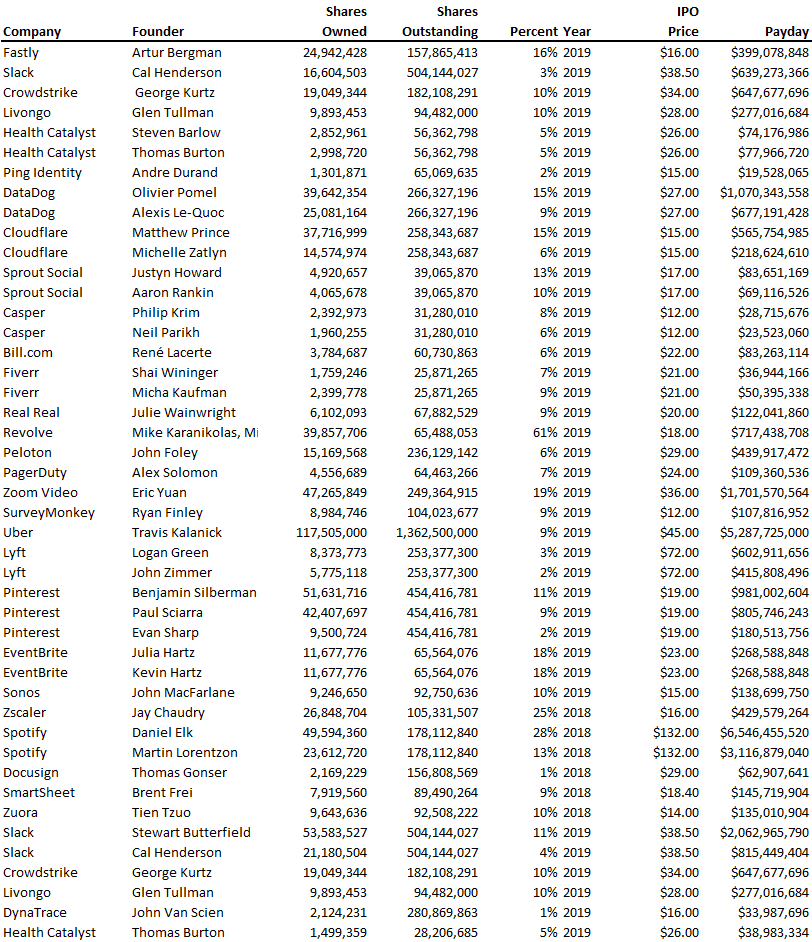
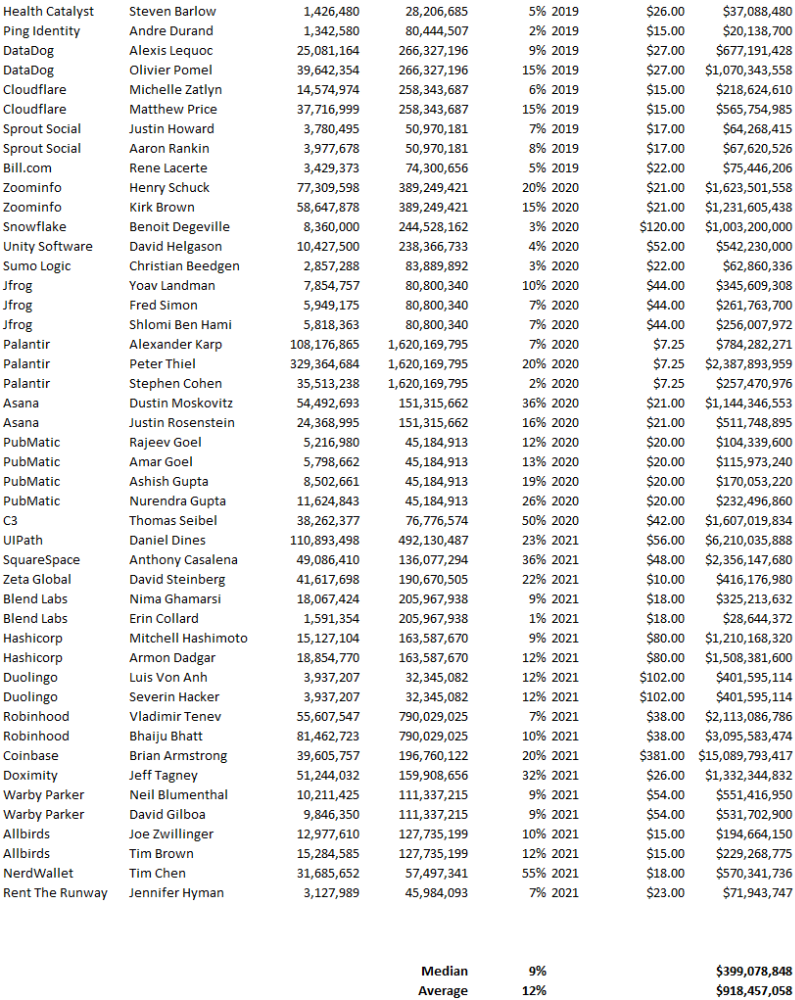
Several points are noteworthy.
Huge payoffs. Median and average pay were $399m and $918m. Average and median homeownership were 9% and 12%.
Coinbase, Uber, UI Path. Uber, Zoom, Spotify, UI Path, and Coinbase founders raised billions. Zoom's founder owned 19% and Spotify's 28% and 13%. Brian Armstrong controlled 20% of Coinbase at IPO and was worth $15bn. Preserving as much equity as possible by staying cash-efficient or raising at high valuations also helps.
The smallest was Ping. Ping's compensation was the smallest. Andre Duand owned 2% but was worth $20m at IPO. That's less than some billion-dollar paydays, but still good.
IPOs can be lucrative, as you can see. Preserving equity could be the difference between a $20mm and $15bln payday (Coinbase).

Joseph Mavericks
4 years ago
5 books my CEO read to make $30M
Offices without books are like bodies without souls.
After 10 years, my CEO sold his company for $30 million. I've shared many of his lessons on medium. You could ask him anything at his always-open office. He also said we could use his office for meetings while he was away. When I used his office for work, I was always struck by how many books he had.
Books are useful in almost every aspect of learning. Building a business, improving family relationships, learning a new language, a new skill... Books teach, guide, and structure. Whether fiction or nonfiction, books inspire, give ideas, and develop critical thinking skills.
My CEO prefers non-fiction and attends a Friday book club. This article discusses 5 books I found in his office that impacted my life/business. My CEO sold his company for $30 million, but I've built a steady business through blogging and video making.
I recall events and lessons I learned from my CEO and how they relate to each book, and I explain how I applied the book's lessons to my business and life.
Note: This post has no affiliate links.
1. The One Thing — Gary Keller

Gary Keller, a real estate agent, wanted more customers. So he and his team brainstormed ways to get more customers. They decided to write a bestseller about work and productivity. The more people who saw the book, the more customers they'd get.
Gary Keller focused on writing the best book on productivity, work, and efficiency for months. His business experience. Keller's business grew after the book's release.
The author summarizes the book in one question.
"What's the one thing that will make everything else easier or unnecessary?"
When I started my blog and business alongside my 9–5, I quickly identified my one thing: writing. My business relied on it, so it had to be great. Without writing, there was no content, traffic, or business.
My CEO focused on funding when he started his business. Even in his final years, he spent a lot of time on the phone with investors, either to get more money or to explain what he was doing with it. My CEO's top concern was money, and the other super important factors were handled by separate teams.
Product tech and design
Incredible customer support team
Excellent promotion team
Profitable sales team
My CEO didn't always focus on one thing and ignore the rest. He was on all of those teams when I started my job. He'd start his day in tech, have lunch with marketing, and then work in sales. He was in his office on the phone at night.
He eventually realized his errors. Investors told him he couldn't do everything for the company. If needed, he had to change internally. He learned to let go, mind his own business, and focus for the next four years. Then he sold for $30 million.
The bigger your project/company/idea, the more you'll need to delegate to stay laser-focused. I started something new every few months for 10 years before realizing this. So much to do makes it easy to avoid progress. Once you identify the most important aspect of your project and enlist others' help, you'll be successful.
2. Eat That Frog — Brian Tracy
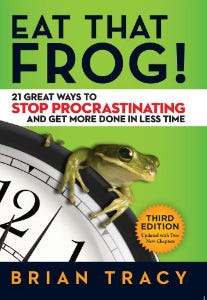
The author quote sums up book's essence:
Mark Twain said that if you eat a live frog in the morning, it's probably the worst thing that will happen to you all day. Your "frog" is the biggest, most important task you're most likely to procrastinate on.
"Frog" and "One Thing" are both about focusing on what's most important. Eat That Frog recommends doing the most important task first thing in the morning.
I shared my CEO's calendar in an article 10 months ago. Like this:

CEO's average week (some information crossed out for confidentiality)
Notice anything about 8am-8:45am? Almost every day is the same (except Friday). My CEO started his day with a management check-in for 2 reasons:
Checking in with all managers is cognitively demanding, and my CEO is a morning person.
In a young startup where everyone is busy, the morning management check-in was crucial. After 10 am, you couldn't gather all managers.
When I started my blog, writing was my passion. I'm a morning person, so I woke up at 6 am and started writing by 6:30 am every day for a year. This allowed me to publish 3 articles a week for 52 weeks to build my blog and audience. After 2 years, I'm not stopping.
3. Deep Work — Cal Newport
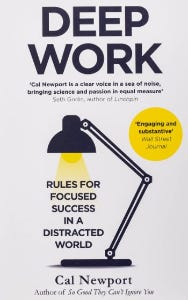
Deep work is focusing on a cognitively demanding task without distractions (like a morning management meeting). It helps you master complex information quickly and produce better results faster. In a competitive world 10 or 20 years ago, focus wasn't a huge advantage. Smartphones, emails, and social media made focus a rare, valuable skill.
Most people can't focus anymore. Screens light up, notifications buzz, emails arrive, Instagram feeds... Many people don't realize they're interrupted because it's become part of their normal workflow.
Cal Newport mentions Bill Gates' "Think Weeks" in Deep Work.
Microsoft CEO Bill Gates would isolate himself (often in a lakeside cottage) twice a year to read and think big thoughts.
Inside Bill's Brain on Netflix shows Newport's lakeside cottage. I've always wanted a lakeside cabin to work in. My CEO bought a lakehouse after selling his company, but now he's retired.
As a company grows, you can focus less on it. In a previous section, I said investors told my CEO to get back to basics and stop micromanaging. My CEO's commitment and ability to get work done helped save the company. His deep work and new frameworks helped us survive the corona crisis (more on this later).
The ability to deep work will be a huge competitive advantage in the next century. Those who learn to work deeply will likely be successful while everyone else is glued to their screens, Bluetooth-synced to their watches, and playing Candy Crush on their tablets.
4. The 7 Habits of Highly Effective People — Stephen R. Covey
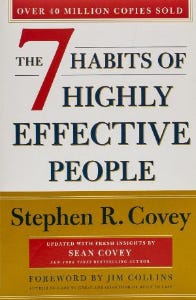
It took me a while to start reading this book because it seemed like another shallow self-help bible. I kept finding this book when researching self-improvement. I tried it because it was everywhere.
Stephen Covey taught me 2 years ago to have a personal mission statement.
A 7 Habits mission statement describes the life you want to lead, the character traits you want to embody, and the impact you want to have on others. shortform.com
I've had many lunches with my CEO and talked about Vipassana meditation and Sunday forest runs, but I've never seen his mission statement. I'm sure his family is important, though. In the above calendar screenshot, you can see he always included family events (in green) so we could all see those time slots. We couldn't book him then. Although he never spent as much time with his family as he wanted, he always made sure to be on time for his kid's birthday rather than a conference call.
My CEO emphasized his company's mission. Your mission statement should answer 3 questions.
What does your company do?
How does it do it?
Why does your company do it?
As a graphic designer, I had to create mission-statement posters. My CEO hung posters in each office.
5. Measure What Matters — John Doerr

This book is about Andrew Grove's OKR strategy, developed in 1968. When he joined Google's early investors board, he introduced it to Larry Page and Sergey Brin. Google still uses OKR.
Objective Key Results
Objective: It explains your goals and desired outcome. When one goal is reached, another replaces it. OKR objectives aren't technical, measured, or numerical. They must be clear.
Key Result should be precise, technical, and measurable, unlike the Objective. It shows if the Goal is being worked on. Time-bound results are quarterly or yearly.
Our company almost sank several times. Sales goals were missed, management failed, and bad decisions were made. On a Monday, our CEO announced we'd implement OKR to revamp our processes.
This was a year before the pandemic, and I'm certain we wouldn't have sold millions or survived without this change. This book impacted the company the most, not just management but all levels. Organization and transparency improved. We reached realistic goals. Happy investors. We used the online tool Gtmhub to implement OKR across the organization.

My CEO's company went from near bankruptcy to being acquired for $30 million in 2 years after implementing OKR.
I hope you enjoyed this booklist. Here's a recap of the 5 books and the lessons I learned from each.
The 7 Habits of Highly Effective People — Stephen R. Covey
Have a mission statement that outlines your goals, character traits, and impact on others.
Deep Work — Cal Newport
Focus is a rare skill; master it. Deep workers will succeed in our hyper-connected, distracted world.
The One Thing — Gary Keller
What can you do that will make everything else easier or unnecessary? Once you've identified it, focus on it.
Eat That Frog — Brian Tracy
Identify your most important task the night before and do it first thing in the morning. You'll have a lighter day.
Measure What Matters — John Doerr
On a timeline, divide each long-term goal into chunks. Divide those slices into daily tasks (your goals). Time-bound results are quarterly or yearly. Objectives aren't measured or numbered.
Thanks for reading. Enjoy the ride!
You might also like

Guillaume Dumortier
3 years ago
Mastering the Art of Rhetoric: A Guide to Rhetorical Devices in Successful Headlines and Titles
Unleash the power of persuasion and captivate your audience with compelling headlines.
As the old adage goes, "You never get a second chance to make a first impression."
In the world of content creation and social ads, headlines and titles play a critical role in making that first impression.
A well-crafted headline can make the difference between an article being read or ignored, a video being clicked on or bypassed, or a product being purchased or passed over.
To make an impact with your headlines, mastering the art of rhetoric is essential. In this post, we'll explore various rhetorical devices and techniques that can help you create headlines that captivate your audience and drive engagement.
tl;dr : Headline Magician will help you craft the ultimate headline titles powered by rhetoric devices
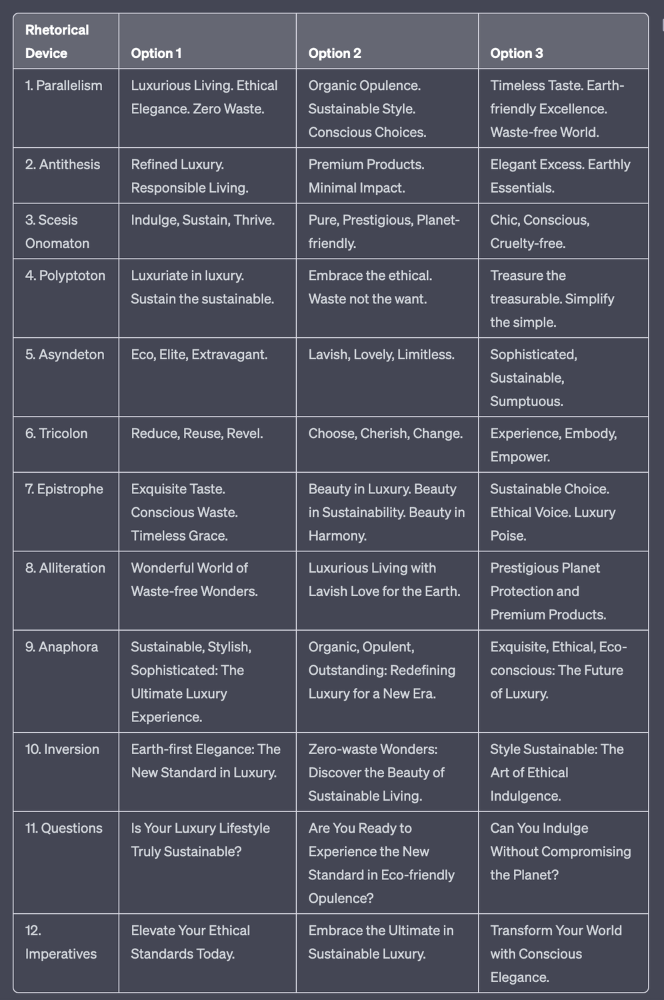
Example with a high-end luxury organic zero-waste skincare brand
✍️ The Power of Alliteration
Alliteration is the repetition of the same consonant sound at the beginning of words in close proximity. This rhetorical device lends itself well to headlines, as it creates a memorable, rhythmic quality that can catch a reader's attention.
By using alliteration, you can make your headlines more engaging and easier to remember.
Examples:
"Crafting Compelling Content: A Comprehensive Course"
"Mastering the Art of Memorable Marketing"
🔁 The Appeal of Anaphora
Anaphora is the repetition of a word or phrase at the beginning of successive clauses. This rhetorical device emphasizes a particular idea or theme, making it more memorable and persuasive.
In headlines, anaphora can be used to create a sense of unity and coherence, which can draw readers in and pique their interest.
Examples:
"Create, Curate, Captivate: Your Guide to Social Media Success"
"Innovation, Inspiration, and Insight: The Future of AI"
🔄 The Intrigue of Inversion
Inversion is a rhetorical device where the normal order of words is reversed, often to create an emphasis or achieve a specific effect.
In headlines, inversion can generate curiosity and surprise, compelling readers to explore further.
Examples:
"Beneath the Surface: A Deep Dive into Ocean Conservation"
"Beyond the Stars: The Quest for Extraterrestrial Life"
⚖️ The Persuasive Power of Parallelism
Parallelism is a rhetorical device that involves using similar grammatical structures or patterns to create a sense of balance and symmetry.
In headlines, parallelism can make your message more memorable and impactful, as it creates a pleasing rhythm and flow that can resonate with readers.
Examples:
"Eat Well, Live Well, Be Well: The Ultimate Guide to Wellness"
"Learn, Lead, and Launch: A Blueprint for Entrepreneurial Success"
⏭️ The Emphasis of Ellipsis
Ellipsis is the omission of words, typically indicated by three periods (...), which suggests that there is more to the story.
In headlines, ellipses can create a sense of mystery and intrigue, enticing readers to click and discover what lies behind the headline.
Examples:
"The Secret to Success... Revealed"
"Unlocking the Power of Your Mind... A Step-by-Step Guide"
🎭 The Drama of Hyperbole
Hyperbole is a rhetorical device that involves exaggeration for emphasis or effect.
In headlines, hyperbole can grab the reader's attention by making bold, provocative claims that stand out from the competition. Be cautious with hyperbole, however, as overuse or excessive exaggeration can damage your credibility.
Examples:
"The Ultimate Guide to Mastering Any Skill in Record Time"
"Discover the Revolutionary Technique That Will Transform Your Life"
❓The Curiosity of Questions
Posing questions in your headlines can be an effective way to pique the reader's curiosity and encourage engagement.
Questions compel the reader to seek answers, making them more likely to click on your content. Additionally, questions can create a sense of connection between the content creator and the audience, fostering a sense of dialogue and discussion.
Examples:
"Are You Making These Common Mistakes in Your Marketing Strategy?"
"What's the Secret to Unlocking Your Creative Potential?"
💥 The Impact of Imperatives
Imperatives are commands or instructions that urge the reader to take action. By using imperatives in your headlines, you can create a sense of urgency and importance, making your content more compelling and actionable.
Examples:
"Master Your Time Management Skills Today"
"Transform Your Business with These Innovative Strategies"
💢 The Emotion of Exclamations
Exclamations are powerful rhetorical devices that can evoke strong emotions and convey a sense of excitement or urgency.
Including exclamations in your headlines can make them more attention-grabbing and shareable, increasing the chances of your content being read and circulated.
Examples:
"Unlock Your True Potential: Find Your Passion and Thrive!"
"Experience the Adventure of a Lifetime: Travel the World on a Budget!"
🎀 The Effectiveness of Euphemisms
Euphemisms are polite or indirect expressions used in place of harsher, more direct language.
In headlines, euphemisms can make your message more appealing and relatable, helping to soften potentially controversial or sensitive topics.
Examples:
"Navigating the Challenges of Modern Parenting"
"Redefining Success in a Fast-Paced World"
⚡Antithesis: The Power of Opposites
Antithesis involves placing two opposite words side-by-side, emphasizing their contrasts. This device can create a sense of tension and intrigue in headlines.
Examples:
"Once a day. Every day"
"Soft on skin. Kill germs"
"Mega power. Mini size."
To utilize antithesis, identify two opposing concepts related to your content and present them in a balanced manner.
🎨 Scesis Onomaton: The Art of Verbless Copy
Scesis onomaton is a rhetorical device that involves writing verbless copy, which quickens the pace and adds emphasis.
Example:
"7 days. 7 dollars. Full access."
To use scesis onomaton, remove verbs and focus on the essential elements of your headline.
🌟 Polyptoton: The Charm of Shared Roots
Polyptoton is the repeated use of words that share the same root, bewitching words into memorable phrases.
Examples:
"Real bread isn't made in factories. It's baked in bakeries"
"Lose your knack for losing things."
To employ polyptoton, identify words with shared roots that are relevant to your content.
✨ Asyndeton: The Elegance of Omission
Asyndeton involves the intentional omission of conjunctions, adding crispness, conviction, and elegance to your headlines.
Examples:
"You, Me, Sushi?"
"All the latte art, none of the environmental impact."
To use asyndeton, eliminate conjunctions and focus on the core message of your headline.
🔮 Tricolon: The Magic of Threes
Tricolon is a rhetorical device that uses the power of three, creating memorable and impactful headlines.
Examples:
"Show it, say it, send it"
"Eat Well, Live Well, Be Well."
To use tricolon, craft a headline with three key elements that emphasize your content's main message.
🔔 Epistrophe: The Chime of Repetition
Epistrophe involves the repetition of words or phrases at the end of successive clauses, adding a chime to your headlines.
Examples:
"Catch it. Bin it. Kill it."
"Joint friendly. Climate friendly. Family friendly."
To employ epistrophe, repeat a key phrase or word at the end of each clause.
Rishi Dean
4 years ago
Coinbase's web3 app
Use popular Ethereum dapps with Coinbase’s new dapp wallet and browser
Tl;dr: This post highlights the ability to access web3 directly from your Coinbase app using our new dapp wallet and browser.
Decentralized autonomous organizations (DAOs) and decentralized finance (DeFi) have gained popularity in the last year (DAOs). The total value locked (TVL) of DeFi investments on the Ethereum blockchain has grown to over $110B USD, while NFTs sales have grown to over $30B USD in the last 12 months (LTM). New innovative real-world applications are emerging every day.
Today, a small group of Coinbase app users can access Ethereum-based dapps. Buying NFTs on Coinbase NFT and OpenSea, trading on Uniswap and Sushiswap, and borrowing and lending on Curve and Compound are examples.
Our new dapp wallet and dapp browser enable you to access and explore web3 directly from your Coinbase app.
Web3 in the Coinbase app
Users can now access dapps without a recovery phrase. This innovative dapp wallet experience uses Multi-Party Computation (MPC) technology to secure your on-chain wallet. This wallet's design allows you and Coinbase to share the 'key.' If you lose access to your device, the key to your dapp wallet is still safe and Coinbase can help recover it.
Set up your new dapp wallet by clicking the "Browser" tab in the Android app's navigation bar. Once set up, the Coinbase app's new dapp browser lets you search, discover, and use Ethereum-based dapps.
Looking forward
We want to enable everyone to seamlessly and safely participate in web3, and today’s launch is another step on that journey. We're rolling out the new dapp wallet and browser in the US on Android first to a small subset of users and plan to expand soon. Stay tuned!

Sam Hickmann
4 years ago
What is this Fed interest rate everybody is talking about that makes or breaks the stock market?
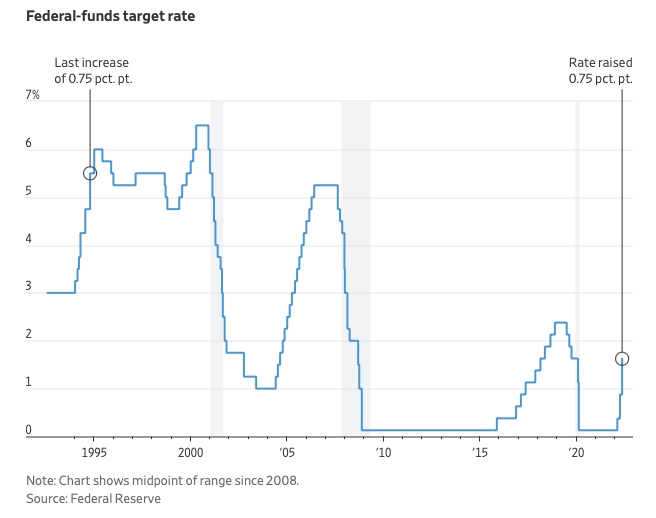
The Federal Funds Rate (FFR) is the target interest rate set by the Federal Reserve System (Fed)'s policy-making body (FOMC). This target is the rate at which the Fed suggests commercial banks borrow and lend their excess reserves overnight to each other.
The FOMC meets 8 times a year to set the target FFR. This is supposed to promote economic growth. The overnight lending market sets the actual rate based on commercial banks' short-term reserves. If the market strays too far, the Fed intervenes.
Banks must keep a certain percentage of their deposits in a Federal Reserve account. A bank's reserve requirement is a percentage of its total deposits. End-of-day bank account balances averaged over two-week reserve maintenance periods are used to determine reserve requirements.
If a bank expects to have end-of-day balances above what's needed, it can lend the excess to another institution.
The FOMC adjusts interest rates based on economic indicators that show inflation, recession, or other issues that affect economic growth. Core inflation and durable goods orders are indicators.
In response to economic conditions, the FFR target has changed over time. In the early 1980s, inflation pushed it to 20%. During the Great Recession of 2007-2009, the rate was slashed to 0.15 percent to encourage growth.
Inflation picked up in May 2022 despite earlier rate hikes, prompting today's 0.75 percent point increase. The largest increase since 1994. It might rise to around 3.375% this year and 3.1% by the end of 2024.