


More on Marketing

Victoria Kurichenko
4 years ago
What Happened After I Posted an AI-Generated Post on My Website
This could cost you.
Content creators may have heard about Google's "Helpful content upgrade."
This change is another Google effort to remove low-quality, repetitive, and AI-generated content.
Why should content creators care?
Because too much content manipulates search results.
My experience includes the following.
Website admins seek high-quality guest posts from me. They send me AI-generated text after I say "yes." My readers are irrelevant. Backlinks are needed.
Companies copy high-ranking content to boost their Google rankings. Unfortunately, it's common.
What does this content offer?
Nothing.
Despite Google's updates and efforts to clean search results, webmasters create manipulative content.
As a marketer, I knew about AI-powered content generation tools. However, I've never tried them.
I use old-fashioned content creation methods to grow my website from 0 to 3,000 monthly views in one year.
Last year, I launched a niche website.
I do keyword research, analyze search intent and competitors' content, write an article, proofread it, and then optimize it.
This strategy is time-consuming.
But it yields results!
Here's proof from Google Analytics:
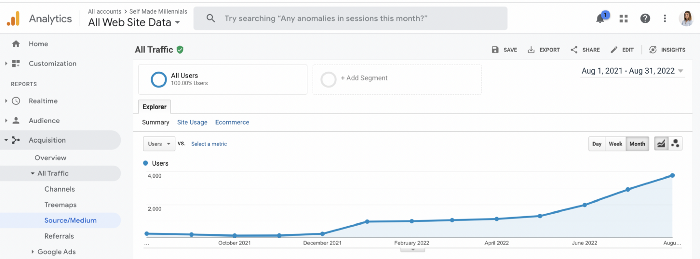
Proven strategies yield promising results.
To validate my assumptions and find new strategies, I run many experiments.
I tested an AI-powered content generator.
I used a tool to write this Google-optimized article about SEO for startups.
I wanted to analyze AI-generated content's Google performance.
Here are the outcomes of my test.
First, quality.
I dislike "meh" content. I expect articles to answer my questions. If not, I've wasted my time.
My essays usually include research, personal anecdotes, and what I accomplished and achieved.
AI-generated articles aren't as good because they lack individuality.
Read my AI-generated article about startup SEO to see what I mean.
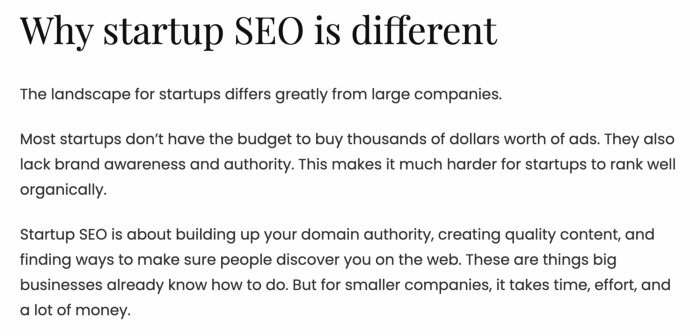
It's dry and shallow, IMO.
It seems robotic.
I'd use quotes and personal experience to show how SEO for startups is different.
My article paraphrases top-ranked articles on a certain topic.
It's readable but useless. Similar articles abound online. Why read it?
AI-generated content is low-quality.
Let me show you how this content ranks on Google.
The Google Search Console report shows impressions, clicks, and average position.
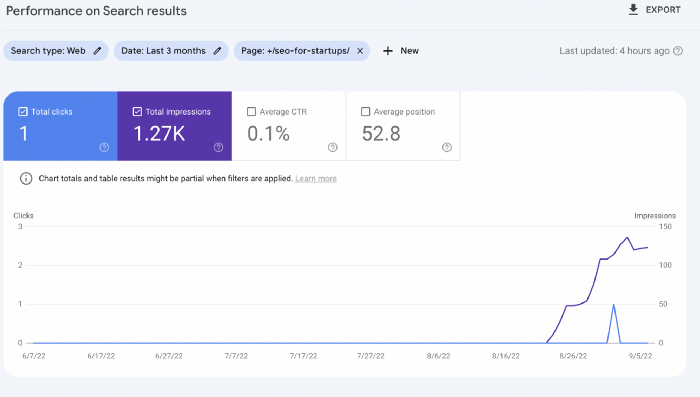
Low numbers.
No one opens the 5th Google search result page to read the article. Too far!
You may say the new article will improve.
Marketing-wise, I doubt it.
This article is shorter and less comprehensive than top-ranking pages. It's unlikely to win because of this.
AI-generated content's terrible reality.
I'll compare how this content I wrote for readers and SEO performs.
Both the AI and my article are fresh, but trends are emerging.
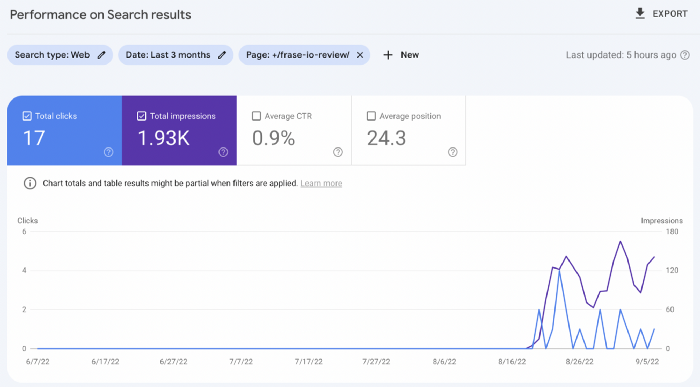
My article's CTR and average position are higher.
I spent a week researching and producing that piece, unlike AI-generated content. My expert perspective and unique consequences make it interesting to read.
Human-made.
In summary
No content generator can duplicate a human's tone, writing style, or creativity. Artificial content is always inferior.
Not "bad," but inferior.
Demand for content production tools will rise despite Google's efforts to eradicate thin content.
Most won't spend hours producing link-building articles. Costly.
As guest and sponsored posts, artificial content will thrive.
Before accepting a new arrangement, content creators and website owners should consider this.

Dung Claire Tran
4 years ago
Is the future of brand marketing with virtual influencers?
Digital influences that mimic humans are rising.
Lil Miquela has 3M Instagram followers, 3.6M TikTok followers, and 30K Twitter followers. She's been on the covers of Prada, Dior, and Calvin Klein magazines. Miquela released Not Mine in 2017 and launched Hard Feelings at Lollapazoolas this year. This isn't surprising, given the rise of influencer marketing.
This may be unexpected. Miquela's fake. Brud, a Los Angeles startup, produced her in 2016.
Lil Miquela is one of many rising virtual influencers in the new era of social media marketing. She acts like a real person and performs the same tasks as sports stars and models.
The emergence of online influencers
Before 2018, computer-generated characters were rare. Since the virtual human industry boomed, they've appeared in marketing efforts worldwide.
In 2020, the WHO partnered up with Atlanta-based virtual influencer Knox Frost (@knoxfrost) to gather contributions for the COVID-19 Solidarity Response Fund.
Lu do Magalu (@magazineluiza) has been the virtual spokeswoman for Magalu since 2009, using social media to promote reviews, product recommendations, unboxing videos, and brand updates. Magalu's 10-year profit was $552M.
In 2020, PUMA partnered with Southeast Asia's first virtual model, Maya (@mayaaa.gram). She joined Singaporean actor Tosh Zhang in the PUMA campaign. Local virtual influencer Ava Lee-Graham (@avagram.ai) partnered with retail firm BHG to promote their in-house labels.

In Japan, Imma (@imma.gram) is the face of Nike, PUMA, Dior, Salvatore Ferragamo SpA, and Valentino. Imma's bubblegum pink bob and ultra-fine fashion landed her on the cover of Grazia magazine.

Lotte Home Shopping created Lucy (@here.me.lucy) in September 2020. She made her TV debut as a Christmas show host in 2021. Since then, she has 100K Instagram followers and 13K TikTok followers.
Liu Yiexi gained 3 million fans in five days on Douyin, China's TikTok, in 2021. Her two-minute video went viral overnight. She's posted 6 videos and has 830 million Douyin followers.

China's virtual human industry was worth $487 million in 2020, up 70% year over year, and is expected to reach $875.9 million in 2021.
Investors worldwide are interested. Immas creator Aww Inc. raised $1 million from Coral Capital in September 2020, according to Bloomberg. Superplastic Inc., the Vermont-based startup behind influencers Janky and Guggimon, raised $16 million by 2020. Craft Ventures, SV Angels, and Scooter Braun invested. Crunchbase shows the company has raised $47 million.
The industries they represent, including Augmented and Virtual reality, were worth $14.84 billion in 2020 and are projected to reach $454.73 billion by 2030, a CAGR of 40.7%, according to PR Newswire.
Advantages for brands
Forbes suggests brands embrace computer-generated influencers. Examples:
Unlimited creative opportunities: Because brands can personalize everything—from a person's look and activities to the style of their content—virtual influencers may be suited to a brand's needs and personalities.
100% brand control: Brand managers now have more influence over virtual influencers, so they no longer have to give up and rely on content creators to include brands into their storytelling and style. Virtual influencers can constantly produce social media content to promote a brand's identity and ideals because they are completely scandal-free.
Long-term cost savings: Because virtual influencers are made of pixels, they may be reused endlessly and never lose their beauty. Additionally, they can move anywhere around the world and even into space to fit a brand notion. They are also always available. Additionally, the expense of creating their content will not rise in step with their expanding fan base.
Introduction to the metaverse: Statista reports that 75% of American consumers between the ages of 18 and 25 follow at least one virtual influencer. As a result, marketers that support virtual celebrities may now interact with younger audiences that are more tech-savvy and accustomed to the digital world. Virtual influencers can be included into any digital space, including the metaverse, as they are entirely computer-generated 3D personas. Virtual influencers can provide brands with a smooth transition into this new digital universe to increase brand trust and develop emotional ties, in addition to the young generations' rapid adoption of the metaverse.
Better engagement than in-person influencers: A Hype Auditor study found that online influencers have roughly three times the engagement of their conventional counterparts. Virtual influencers should be used to boost brand engagement even though the data might not accurately reflect the entire sector.
Concerns about influencers created by computers
Virtual influencers could encourage excessive beauty standards in South Korea, which has a $10.7 billion plastic surgery industry.
A classic Korean beauty has a small face, huge eyes, and pale, immaculate skin. Virtual influencers like Lucy have these traits. According to Lee Eun-hee, a professor at Inha University's Department of Consumer Science, this could make national beauty standards more unrealistic, increasing demand for plastic surgery or cosmetic items.

Other parts of the world raise issues regarding selling items to consumers who don't recognize the models aren't human and the potential of cultural appropriation when generating influencers of other ethnicities, called digital blackface by some.
Meta, Facebook and Instagram's parent corporation, acknowledges this risk.
“Like any disruptive technology, synthetic media has the potential for both good and harm. Issues of representation, cultural appropriation and expressive liberty are already a growing concern,” the company stated in a blog post. “To help brands navigate the ethical quandaries of this emerging medium and avoid potential hazards, (Meta) is working with partners to develop an ethical framework to guide the use of (virtual influencers).”
Despite theoretical controversies, the industry will likely survive. Companies think virtual influencers are the next frontier in the digital world, which includes the metaverse, virtual reality, and digital currency.
In conclusion
Virtual influencers may garner millions of followers online and help marketers reach youthful audiences. According to a YouGov survey, the real impact of computer-generated influencers is yet unknown because people prefer genuine connections. Virtual characters can supplement brand marketing methods. When brands are metaverse-ready, the author predicts virtual influencer endorsement will continue to expand.

Rachel Greenberg
4 years ago
6 Causes Your Sales Pitch Is Unintentionally Repulsing Customers
Skip this if you don't want to discover why your lively, no-brainer pitch isn't making $10k a month.

You don't want to be repulsive as an entrepreneur or anyone else. Making friends, influencing people, and converting strangers into customers will be difficult if your words evoke disgust, distrust, or disrespect. You may be one of many entrepreneurs who do this obliviously and involuntarily.
I've had to master selling my skills to recruiters (to land 6-figure jobs on Wall Street), selling companies to buyers in M&A transactions, and selling my own companies' products to strangers-turned-customers. I probably committed every cardinal sin of sales repulsion before realizing it was me or my poor salesmanship strategy.
If you're launching a new business, frustrated by low conversion rates, or just curious if you're repelling customers, read on to identify (and avoid) the 6 fatal errors that can kill any sales pitch.
1. The first indication
So many people fumble before they even speak because they assume their role is to convince the buyer. In other words, they expect to pressure, arm-twist, and combat objections until they convert the buyer. Actuality, the approach stinks of disgust, and emotionally-aware buyers would feel "gross" immediately.
Instead of trying to persuade a customer to buy, ask questions that will lead them to do so on their own. When a customer discovers your product or service on their own, they need less outside persuasion. Why not position your offer in a way that leads customers to sell themselves on it?
2. A flawless performance
Are you memorizing a sales script, tweaking video testimonials, and expunging historical blemishes before hitting "publish" on your new campaign? If so, you may be hurting your conversion rate.
Perfection may be a step too far and cause prospects to mistrust your sincerity. Become a great conversationalist to boost your sales. Seriously. Being charismatic is hard without being genuine and showing a little vulnerability.
People like vulnerability, even if it dents your perfect facade. Show the customer's stuttering testimonial. Open up about your or your company's past mistakes (and how you've since improved). Make your sales pitch a two-way conversation. Let the customer talk about themselves to build rapport. Real people sell, not canned scripts and movie-trailer testimonials.
If marketing or sales calls feel like a performance, you may be doing something wrong or leaving money on the table.
3. Your greatest phobia
Three minutes into prospect talks, I'd start sweating. I was talking 100 miles per hour, covering as many bases as possible to avoid the ones I feared. I knew my then-offering was inadequate and my firm had fears I hadn't addressed. So I word-vomited facts, features, and everything else to avoid the customer's concerns.
Do my prospects know I'm insecure? Maybe not, but it added an unnecessary and unhelpful layer of paranoia that kept me stressed, rushed, and on edge instead of connecting with the prospect. Skirting around a company, product, or service's flaws or objections is a poor, temporary, lazy (and cowardly) decision.
How can you project confidence and trust if you're afraid? Before you make another sales call, face your shortcomings, weak points, and objections. Your company won't be everyone's cup of tea, but you should have answers to every question or objection. You should be your business's top spokesperson and defender.
4. The unintentional apologies
Have you ever begged for a sale? I'm going to say no, however you may be unknowingly emitting sorry, inferior, insecure energy.
Young founders, first-time entrepreneurs, and those with severe imposter syndrome may elevate their target customer. This is common when trying to get first customers for obvious reasons.
Since you're truly new at this, you naturally lack experience.
You don't have the self-confidence boost of thousands or hundreds of closed deals or satisfied client results to remind you that your good or service is worthwhile.
Getting those initial few clients seems like the most difficult task, as if doing so will decide the fate of your company as a whole (it probably won't, and you shouldn't actually place that much emphasis on any one transaction).
Customers can smell fear, insecurity, and anxiety just like they can smell B.S. If you believe your product or service improves clients' lives, selling it should feel like a benevolent act of service, not a sleazy money-grab. If you're a sincere entrepreneur, prospects will believe your proposition; if you're apprehensive, they'll notice.
Approach every sale as if you're fine with or without it. This has improved my salesmanship, marketing skills, and mental health. When you put pressure on yourself to close a sale or convince a difficult prospect "or else" (your company will fail, your rent will be late, your electricity will be cut), you emit desperation and lower the quality of your pitch. There's no point.
5. The endless promises
We've all read a million times how to answer or disprove prospects' arguments and add extra incentives to speed or secure the close. Some objections shouldn't be refuted. What if I told you not to offer certain incentives, bonuses, and promises? What if I told you to walk away from some prospects, even if it means losing your sales goal?
If you market to enough people, make enough sales calls, or grow enough companies, you'll encounter prospects who can't be satisfied. These prospects have endless questions, concerns, and requests for more, more, more that you'll never satisfy. These people are a distraction, a resource drain, and a test of your ability to cut losses before they erode your sanity and profit margin.
To appease or convert these insatiably needy, greedy Nellies into customers, you may agree with or acquiesce to every request and demand — even if you can't follow through. Once you overpromise and answer every hole they poke, their trust in you may wane quickly.
Telling a prospect what you can't do takes courage and integrity. If you're honest, upfront, and willing to admit when a product or service isn't right for the customer, you'll gain respect and positive customer experiences. Sometimes honesty is the most refreshing pitch and the deal-closer.
6. No matter what
Have you ever said, "I'll do anything to close this sale"? If so, you've probably already been disqualified. If a prospective customer haggles over a price, requests a discount, or continues to wear you down after you've made three concessions too many, you have a metal hook in your mouth, not them, and it may not end well. Why?
If you're so willing to cut a deal that you cut prices, comp services, extend payment plans, waive fees, etc., you betray your own confidence that your product or service was worth the stated price. They wonder if anyone is paying those prices, if you've ever had a customer (who wasn't a blood relative), and if you're legitimate or worth your rates.
Once a prospect senses that you'll do whatever it takes to get them to buy, their suspicions rise and they wonder why.
Why are you cutting pricing if something is wrong with you or your service?
Why are you so desperate for their sale?
Why aren't more customers waiting in line to pay your pricing, and if they aren't, what on earth are they doing there?
That's what a prospect thinks when you reveal your lack of conviction, desperation, and willingness to give up control. Some prospects will exploit it to drain you dry, while others will be too frightened to buy from you even if you paid them.
Walking down a two-way street. Be casual.
If we track each act of repulsion to an uneasiness, fear, misperception, or impulse, it's evident that these sales and marketing disasters were forced communications. Stiff, imbalanced, divisive, combative, bravado-filled, and desperate. They were unnatural and accepted a power struggle between two sparring, suspicious, unequal warriors, rather than a harmonious oneness of two natural, but opposite parties shaking hands.
Sales should be natural, harmonious. Sales should feel good for both parties, not like one party is having their arm twisted.
You may be doing sales wrong if it feels repulsive, icky, or degrading. If you're thinking cringe-worthy thoughts about yourself, your product, service, or sales pitch, imagine what you're projecting to prospects. Don't make it unpleasant, repulsive, or cringeworthy.
You might also like

Athirah Syamimi
4 years ago
Here's How I Built A Business Offering Unlimited Design Services in Just One Weekend.
Weekend project: limitless design service. It was fun to see whether I could start a business quickly.
I use no-code apps to save time and resources.
TL;DR I started a business utilizing EditorX for my website, Notion for client project management, and a few favors to finish my portfolio.
First step: research (Day 1)
I got this concept from a Kimp Instagram ad. The Minimalist Hustler Daily newsletter mentioned a similar and cheaper service (Graphically).
I Googled other unlimited design companies. Many provide different costs and services. Some supplied solely graphic design, web development, or copywriting.
Step 2: Brainstorming (Day 1)
I did something simple.
What benefits and services to provide
Price to charge
Since it's a one-person performance (for now), I'm focusing on graphic design. I can charge less.
So I don't overwhelm myself and can accommodate budget-conscious clientele.
Step 3: Construction (Day 1 & 2)
This project includes a management tool, a website, and a team procedure.
I built a project management tool and flow first. Once I had the flow and a Notion board, I tested it with design volunteers. They fake-designed while I built the website.
Tool for Project Management
I modified a Notion template. My goal is to keep clients and designers happy.
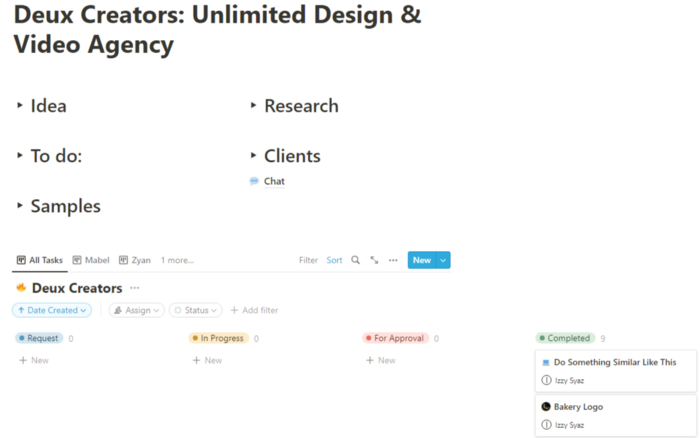
Team Approach
My sister, my partner, and I kept this business lean. I tweaked the Notion board to make the process smooth. By the end of Sunday, I’d say it’s perfect!
Website
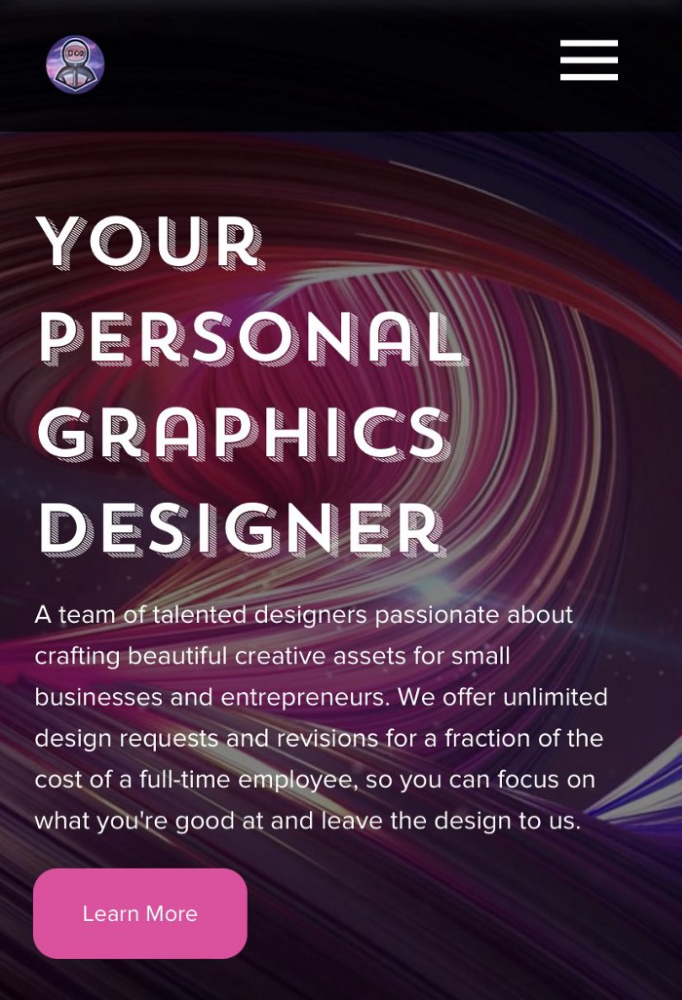
I created the website after they finished the fake design demands. EditorX's drag-and-drop builder attracted me. I didn't need to learn code, and there are templates.
I used a template wireframe.
This project's hardest aspect is developing the site. It's my first time using EditorX and I'm no developer.
People answer all your inquiries in a large community forum.
As a first-time user developing a site in two days, I think I performed OK. Here's the site for feedback.
4th step: testing (Day 2)
Testing is frustrating because it works or doesn't. My testing day was split in two.
testing the workflow from payment to onboarding to the website
the demand being tested
It's working so far. If someone gets the trial, they can request design work.
I've gotten a couple of inquiries about demand. I’ll be working with them as a start.
Completion
Finally! I built my side project in one weekend. It's too early to tell if this is successful. I liked that I didn't squander months of resources testing out an idea.

The woman
4 years ago
I received a $2k bribe to replace another developer in an interview
I can't believe they’d even think it works!
Developers are usually interviewed before being hired, right? Every organization wants candidates who meet their needs. But they also want to avoid fraud.
There are cheaters in every field. Only two come to mind for the hiring process:
Lying on a resume.
Cheating on an online test.
Recently, I observed another one. One of my coworkers invited me to replace another developer during an online interview! I was astonished, but it’s not new.
The specifics
My ex-colleague recently texted me. No one from your former office will ever approach you after a year unless they need something.
Which was the case. My coworker said his wife needed help as a programmer. I was glad someone asked for my help, but I'm still a junior programmer.
Then he informed me his wife was selected for a fantastic job interview. He said he could help her with the online test, but he needed someone to help with the online interview.
Okay, I guess. Preparing for an online interview is beneficial. But then he said she didn't need to be ready. She needed someone to take her place.
I told him it wouldn't work. Every remote online interview I've ever seen required an open camera.
What followed surprised me. She'd ask to turn off the camera, he said.
I asked why.
He told me if an applicant is unwell, the interviewer may consider an off-camera interview. His wife will say she's sick and prefers no camera.
The plan left me speechless. I declined politely. He insisted and promised $2k if she got the job.
I felt insulted and told him if he persisted, I'd inform his office. I was furious. Later, I apologized and told him to stop.
I'm not sure what they did after that
I'm not sure if they found someone or listened to me. They probably didn't. How would she do the job if she even got it?
It's an internship, he said. With great pay, though. What should an intern do?
I suggested she do the interview alone. Even if she failed, she'd gain confidence and valuable experience.
Conclusion
Many interviewees cheat. My profession is vital to me, thus I'd rather improve my abilities and apply honestly. It's part of my identity.
Am I truthful? Most professionals are not. They fabricate their CVs. Often.
When you support interview cheating, you encourage more cheating! When someone cheats, another qualified candidate may not obtain the job.
One day, that could be you or me.

Sammy Abdullah
4 years ago
Payouts to founders at IPO
How much do startup founders make after an IPO? We looked at 2018's major tech IPOs. Paydays aren't what founders took home at the IPO (shares are normally locked up for 6 months), but what they were worth at the IPO price on the day the firm went public. It's not cash, but it's nice. Here's the data.
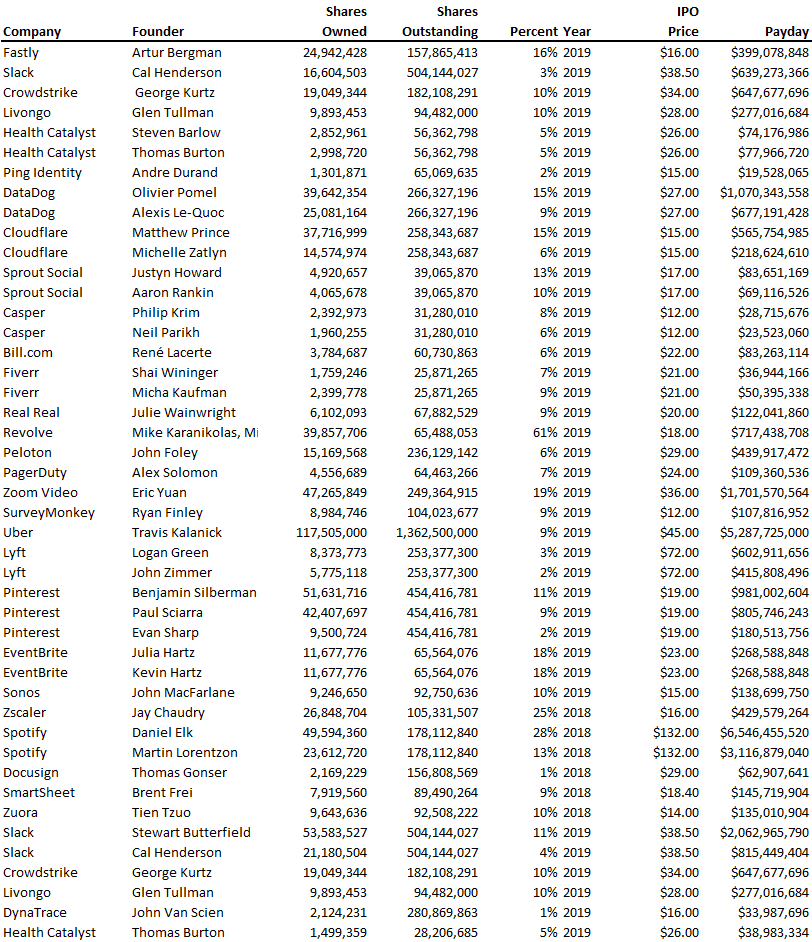
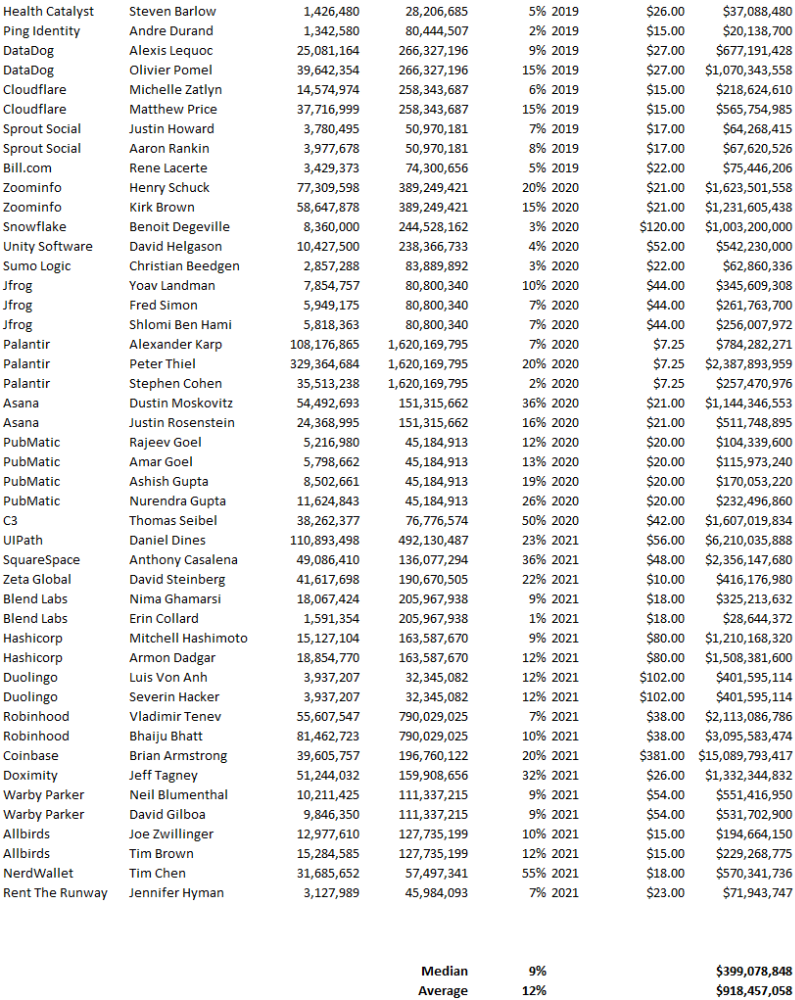
Several points are noteworthy.
Huge payoffs. Median and average pay were $399m and $918m. Average and median homeownership were 9% and 12%.
Coinbase, Uber, UI Path. Uber, Zoom, Spotify, UI Path, and Coinbase founders raised billions. Zoom's founder owned 19% and Spotify's 28% and 13%. Brian Armstrong controlled 20% of Coinbase at IPO and was worth $15bn. Preserving as much equity as possible by staying cash-efficient or raising at high valuations also helps.
The smallest was Ping. Ping's compensation was the smallest. Andre Duand owned 2% but was worth $20m at IPO. That's less than some billion-dollar paydays, but still good.
IPOs can be lucrative, as you can see. Preserving equity could be the difference between a $20mm and $15bln payday (Coinbase).