




More on Personal Growth

Patryk Nawrocki
4 years ago
7 things a new UX/UI designer should know

If I could tell my younger self a few rules, they would boost my career.
1. Treat design like medicine; don't get attached.

If it doesn't help, you won't be angry, but you'll try to improve it. Designers blame others if they don't like the design, but the rule is the same: we solve users' problems. You're not your design, and neither are they. Be humble with your work because your assumptions will often be wrong and users will behave differently.
2. Consider your design flawed.

Disagree with yourself, then defend your ideas. Most designers forget to dig deeper into a pattern, screen, button, or copywriting. If someone asked, "Have you considered alternatives? How does this design stack up? Here's a functional UX checklist to help you make design decisions.
3. Codeable solutions.

If your design requires more developer time, consider whether it's worth spending more money to code something with a small UX impact. Overthinking problems and designing abstract patterns is easy. Sometimes you see something on dribbble or bechance and try to recreate it, but it's not worth it. Here's my article on it.
4. Communication changes careers

Designers often talk with users, clients, companies, developers, and other designers. How you talk and present yourself can land you a job. Like driving or swimming, practice it. Success requires being outgoing and friendly. If I hadn't said "hello" to a few people, I wouldn't be where I am now.
5. Ignorance of the law is not an excuse.

Copyright, taxation How often have you used an icon without checking its license? If you use someone else's work in your project, the owner can cause you a lot of problems — paying a lot of money isn't worth it. Spend a few hours reading about copyrights, client agreements, and taxes.
6. Always test your design

If nobody has seen or used my design, it's not finished. Ask friends about prototypes. Testing reveals how wrong your assumptions were. Steve Krug, one of the authorities on this topic will tell you more about how to do testing.
7. Run workshops
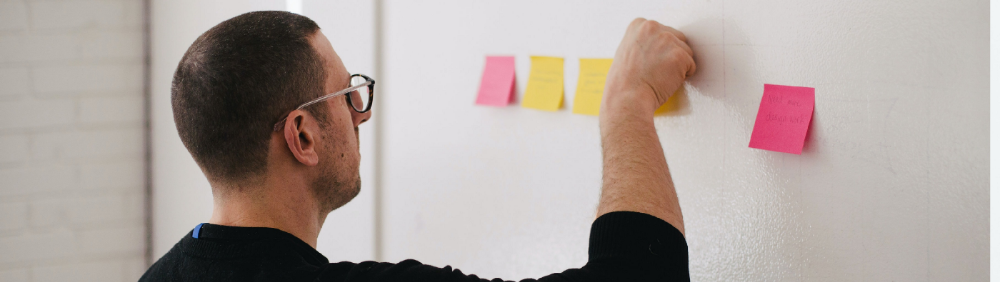
A UX designer's job involves talking to people and figuring out what they need, which is difficult because they usually don't know. Organizing teamwork sessions is a powerful skill, but you must also be a good listener. Your job is to help a quiet, introverted developer express his solution and control the group. AJ Smart has more on workshops here.

Alex Mathers
3 years ago Draft
12 practices of the zenith individuals I know

Calmness is a vital life skill.
It aids communication. It boosts creativity and performance.
I've studied calm people's habits for years. Commonalities:
Have learned to laugh at themselves.
Those who have something to protect can’t help but make it a very serious business, which drains the energy out of the room.
They are fixated on positive pursuits like making cool things, building a strong physique, and having fun with others rather than on depressing influences like the news and gossip.
Every day, spend at least 20 minutes moving, whether it's walking, yoga, or lifting weights.
Discover ways to take pleasure in life's challenges.
Since perspective is malleable, they change their view.
Set your own needs first.
Stressed people neglect themselves and wonder why they struggle.
Prioritize self-care.
Don't ruin your life to please others.
Make something.
Calm people create more than react.
They love creating beautiful things—paintings, children, relationships, and projects.
Hold your breath, please.
If you're stressed or angry, you may be surprised how much time you spend holding your breath and tightening your belly.
Release, breathe, and relax to find calm.
Stopped rushing.
Rushing is disadvantageous.
Calm people handle life better.
Are attuned to their personal dietary needs.
They avoid junk food and eat foods that keep them healthy, happy, and calm.
Don’t take anything personally.
Stressed people control everything.
Self-conscious.
Calm people put others and their work first.
Keep their surroundings neat.
Maintaining an uplifting and clutter-free environment daily calms the mind.
Minimise negative people.
Calm people are ruthless with their boundaries and avoid negative and drama-prone people.

Suzie Glassman
4 years ago
How I Stay Fit Despite Eating Fast Food and Drinking Alcohol
Here's me. Perfectionism is unnecessary.

This post isn't for people who gag at the prospect of eating french fries. I've been ridiculed for stating you can lose weight eating carbs and six-pack abs aren't good.
My family eats frozen processed meals and quick food most weeks (sometimes more). Clean eaters may think I'm unqualified to give fitness advice. I get it.
Hear me out, though. I’m a 44-year-old raising two busy kids with a weekly-traveling husband. Tutoring, dance, and guitar classes fill weeknights. I'm also juggling my job and freelancing.
I'm as worried and tired as my clients. I wish I ate only kale smoothies and salads. I can’t. Despite my mistakes, I'm fit. I won't promise you something just because it worked for me. But here’s a look at how I manage.
What I largely get right about eating
I have a flexible diet and track my daily intake. I count protein, fat, and carbs. Only on vacation or exceptional occasions do I not track.
My protein goal is 1 g per lb. I consume a lot of chicken breasts, eggs, turkey, and lean ground beef. I also occasionally drink protein shakes.
I eat 220–240 grams of carbs daily. My carb count depends on training volume and goals. I'm trying to lose weight slowly. If I want to lose weight faster, I cut carbs to 150-180.
My carbs include white rice, Daves Killer Bread, fruit, pasta, and veggies. I don't eat enough vegetables, so I take Athletic Greens. Also, V8.
Fat grams over 50 help me control my hormones. Recently, I've reached 70-80 grams. Cooking with olive oil. I eat daily dark chocolate. Eggs, butter, milk, and cheese contribute to the rest.
Those frozen meals? What can I say? Stouffer’s lasagna is sometimes needed. I order the healthiest fast food I can find (although I can never bring myself to order the salad). That's a chicken sandwich or a kid's hamburger. I rarely order fries. I eat slowly and savor each bite to feel full.
Potato chips and sugary cereals are in the pantry, but I'm not tempted. My kids eat them because I'd rather teach them moderation than total avoidance. If I eat them, I only eat one portion.
If you're not hungry and eating enough protein and fat, you won't want to eat everything in sight.
I drink once or twice a week. As a result, I rarely overdo it.
Food tracking is tedious and frustrating for many. Taking breaks and using estimates when eating out help. Not perfect, but realistic.
I practice a prolonged fast to enhance metabolic adaptability
Metabolic flexibility is the ability to switch between fuel sources (fat and carbs) based on activity intensity and time since eating. At rest or during low to moderate exertion, your body burns fat. Your body burns carbs after eating and during intense exercise.
Our metabolic flexibility can be hampered by lack of exercise, overeating, and stress. Our bodies become lousy fat burners, making weight loss difficult.
Once a week, I skip dinner (usually around 24 hours). Long-term fasting teaches my body to burn fat. It provides me one low-calorie day a week (I break the fast with a normal-sized dinner).
Fasting day helps me maintain my weight on weekends, when I typically overeat and drink.
Try an extended fast slowly. Delay breakfast by two hours. Next week, add two hours, etc. It takes practice to go that long without biting off your arm. I also suggest consulting your doctor.
I stay active.
I've always been active. As a child, I danced many nights a week, was on the high school dance team, and ran marathons in my 20s.
Often, I feel driven by an internal engine. Working from home makes it easy to exercise. If that’s not you, I get it. Everyone can benefit from raising their baseline.
After taking the kids to school, I walk two miles around the neighborhood. When I need to think, I switch off podcasts. First thing in the morning, I go for a walk.
I lift weights Monday, Wednesday, and Friday. 45 minutes is typical. I run 45-90 minutes on Tuesday and Thursday. I'm slow but reliable. On Saturdays and Sundays, I walk and add a short spin class if I'm not too tired.
I almost never forgo sleep.
I rarely stay up past 10 p.m., much to my night-owl husband's dismay. My 7-8-hour nights help me recover from workouts and handle stress. Without it, I'm grumpy.
I suppose sleep duration matters more than bedtime. Some people just can't fall asleep early. Internal clock and genetics determine sleep and wake hours.
Prioritize sleep.
Last thoughts
Fitness and diet advice is often useless. Some of the advice is inaccurate, dangerous, or difficult to follow if you have a life. I want to throw a shoe at my screen when I see headlines promising to speed up my metabolism or help me lose fat.
I studied exercise physiology for years. No shortcuts exist. No medications or cleanses reset metabolism. I play the hand I'm dealt. I realize that just because something works for me, it won't for you.
If I wanted 15% body fat and ripped abs, I'd have to be stricter. I occasionally think I’d like to get there. But then I remember I’m happy with my life. I like fast food and beer. Pizza and margaritas are favorites (not every day).
You can get it mostly right and live a healthy life.
You might also like

Tim Denning
4 years ago
Elon Musk’s Rich Life Is a Nightmare
I'm sure you haven't read about Elon's other side.
Elon divorced badly.
Nobody's surprised.
Imagine you're a parent. Someone isn't home year-round. What's next?
That’s what happened to YOLO Elon.
He can do anything. He can intervene in wars, shoot his mouth off, bang anyone he wants, avoid tax, make cool tech, buy anything his ego desires, and live anywhere exotic.
Few know his billionaire backstory. I'll tell you so you don't worship his lifestyle. It’s a cult.
Only his career succeeds. His life is a nightmare otherwise.
Psychopaths' schedule
Elon has said he works 120-hour weeks.
As he told the reporter about his job, he choked up, which was unusual for him.
His crazy workload and lack of sleep forced him to scold innocent Wall Street analysts. Later, he apologized.
In the same interview, he admits he hadn't taken more than a week off since 2001, when he was bedridden with malaria. Elon stays home after a near-death experience.
He's rarely outside.
Elon says he sometimes works 3 or 4 days straight.
He admits his crazy work schedule has cost him time with his kids and friends.
Elon's a slave
Elon's birthday description made him emotional.
Elon worked his entire birthday.
"No friends, nothing," he said, stuttering.
His brother's wedding in Catalonia was 48 hours after his birthday. That meant flying there from Tesla's factory prison.
He arrived two hours before the big moment, barely enough time to eat and change, let alone see his brother.
Elon had to leave after the bouquet was tossed to a crowd of billionaire lovers. He missed his brother's first dance with his wife.
Shocking.
He went straight to Tesla's prison.
The looming health crisis
Elon was asked if overworking affected his health.
Not great. Friends are worried.
Now you know why Elon tweets dumb things. Working so hard has probably caused him mental health issues.
Mental illness removed my reality filter. You do stupid things because you're tired.
Astronauts pelted Elon
Elon's overwork isn't the first time his life has made him emotional.
When asked about Neil Armstrong and Gene Cernan criticizing his SpaceX missions, he got emotional. Elon's heroes.
They're why he started the company, and they mocked his work. In another interview, we see how Elon’s business obsession has knifed him in the heart.
Once you have a company, you must feed, nurse, and care for it, even if it destroys you.
"Yep," Elon says, tearing up.
In the same interview, he's asked how Tesla survived the 2008 recession. Elon stopped the interview because he was crying. When Tesla and SpaceX filed for bankruptcy in 2008, he nearly had a nervous breakdown. He called them his "children."
All the time, he's risking everything.
Jack Raines explains best:
Too much money makes you a slave to your net worth.
Elon's emotions are admirable. It's one of the few times he seems human, not like an alien Cyborg.
Stop idealizing Elon's lifestyle
Building a side business that becomes a billion-dollar unicorn startup is a nightmare.
"Billionaire" means financially wealthy but otherwise broke. A rich life includes more than business and money.
This post is a summary. Read full article here

Thomas Huault
4 years ago
A Mean Reversion Trading Indicator Inspired by Classical Mechanics Is The Kinetic Detrender
DATA MINING WITH SUPERALGORES
Old pots produce the best soup.
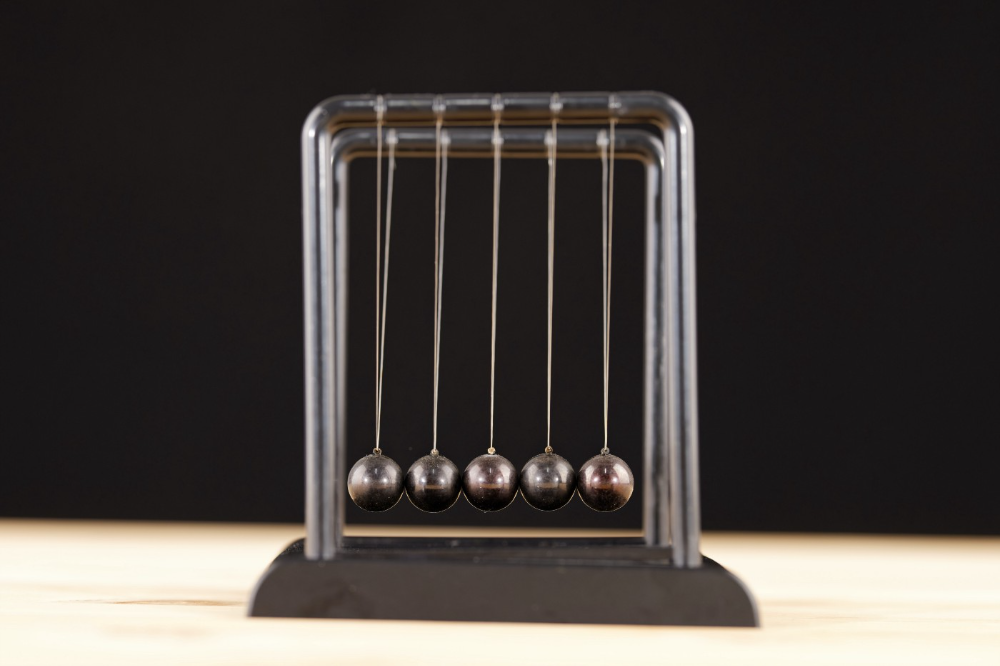
Science has always inspired indicator design. From physics to signal processing, many indicators use concepts from mechanical engineering, electronics, and probability. In Superalgos' Data Mining section, we've explored using thermodynamics and information theory to construct indicators and using statistical and probabilistic techniques like reduced normal law to take advantage of low probability events.
An asset's price is like a mechanical object revolving around its moving average. Using this approach, we could design an indicator using the oscillator's Total Energy. An oscillator's energy is finite and constant. Since we don't expect the price to follow the harmonic oscillator, this energy should deviate from the perfect situation, and the maximum of divergence may provide us valuable information on the price's moving average.
Definition of the Harmonic Oscillator in Few Words
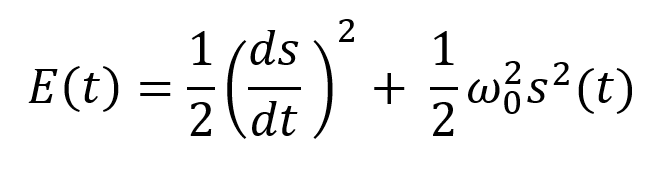
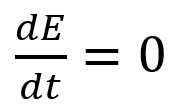
Sinusoidal function describes a harmonic oscillator. The time-constant energy equation for a harmonic oscillator is:
With
Time saves energy.
In a mechanical harmonic oscillator, total energy equals kinetic energy plus potential energy. The formula for energy is the same for every kind of harmonic oscillator; only the terms of total energy must be adapted to fit the relevant units. Each oscillator has a velocity component (kinetic energy) and a position to equilibrium component (potential energy).
The Price Oscillator and the Energy Formula
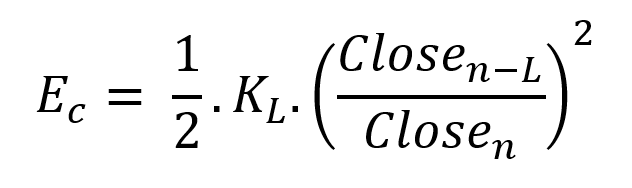
Considering the harmonic oscillator definition, we must specify kinetic and potential components for our price oscillator. We define oscillator velocity as the rate of change and equilibrium position as the price's distance from its moving average.
Price kinetic energy:
It's like:
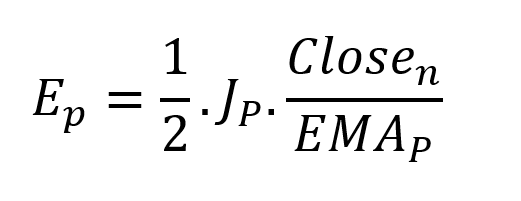
With
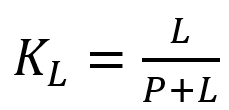
and
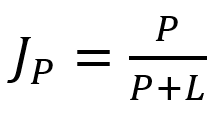
L is the number of periods for the rate of change calculation and P for the close price EMA calculation.
Total price oscillator energy =

Given that an asset's price can theoretically vary at a limitless speed and be endlessly far from its moving average, we don't expect this formula's outcome to be constrained. We'll normalize it using Z-Score for convenience of usage and readability, which also allows probabilistic interpretation.
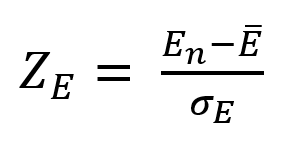
Over 20 periods, we'll calculate E's moving average and standard deviation.
We calculated Z on BTC/USDT with L = 10 and P = 21 using Knime Analytics.
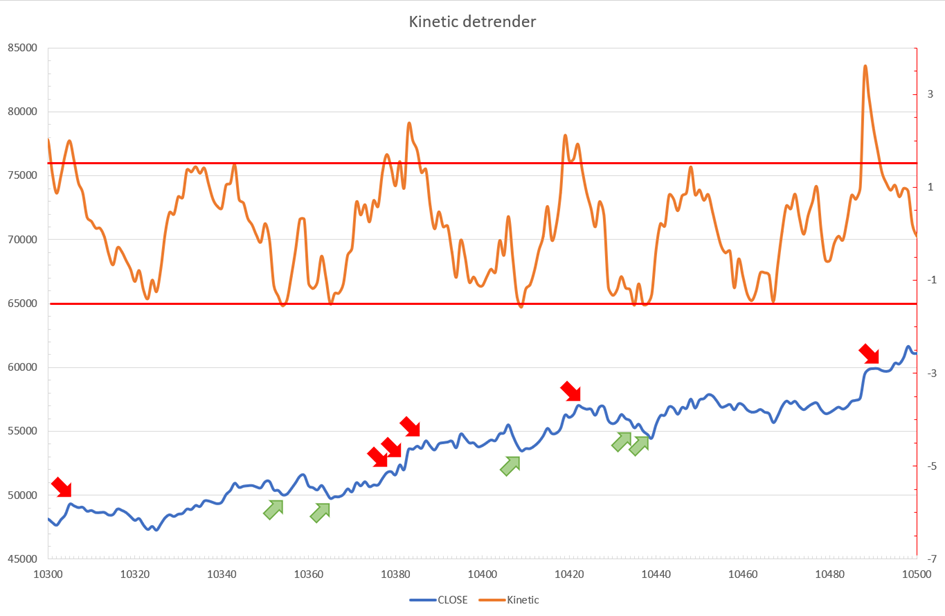
The graph is detrended. We added two horizontal lines at +/- 1.6 to construct a 94.5% probability zone based on reduced normal law tables. Price cycles to its moving average oscillate clearly. Red and green arrows illustrate where the oscillator crosses the top and lower limits, corresponding to the maximum/minimum price oscillation. Since the results seem noisy, we may apply a non-lagging low-pass or multipole filter like Butterworth or Laguerre filters and employ dynamic bands at a multiple of Z's standard deviation instead of fixed levels.
Kinetic Detrender Implementation in Superalgos
The Superalgos Kinetic detrender features fixed upper and lower levels and dynamic volatility bands.
The code is pretty basic and does not require a huge amount of code lines.
It starts with the standard definitions of the candle pointer and the constant declaration :
let candle = record.current
let len = 10
let P = 21
let T = 20
let up = 1.6
let low = 1.6
Upper and lower dynamic volatility band constants are up and low.
We proceed to the initialization of the previous value for EMA :
if (variable.prevEMA === undefined) {
    variable.prevEMA = candle.close
}
And the calculation of EMA with a function (it is worth noticing the function is declared at the end of the code snippet in Superalgos) :
variable.ema = calculateEMA(P, candle.close, variable.prevEMA)
//EMA calculation
function calculateEMA(periods, price, previousEMA) {
    let k = 2 / (periods + 1)
    return price * k + previousEMA * (1 - k)
}
The rate of change is calculated by first storing the right amount of close price values and proceeding to the calculation by dividing the current close price by the first member of the close price array:
variable.allClose.push(candle.close)
if (variable.allClose.length > len) {
    variable.allClose.splice(0, 1)
}
if (variable.allClose.length === len) {
    variable.roc = candle.close / variable.allClose[0]
} else {
    variable.roc = 1
}
Finally, we get energy with a single line:
variable.E = 1 / 2 * len * variable.roc + 1 / 2 * P * candle.close / variable.emaThe Z calculation reuses code from Z-Normalization-based indicators:
variable.allE.push(variable.E)
if (variable.allE.length > T) {
    variable.allE.splice(0, 1)
}
variable.sum = 0
variable.SQ = 0
if (variable.allE.length === T) {
    for (var i = 0; i < T; i++) {
        variable.sum += variable.allE[i]
    }
    variable.MA = variable.sum / T
for (var i = 0; i < T; i++) {
        variable.SQ += Math.pow(variable.allE[i] - variable.MA, 2)
    }
    variable.sigma = Math.sqrt(variable.SQ / T)
variable.Z = (variable.E - variable.MA) / variable.sigma
} else {
    variable.Z = 0
}
variable.allZ.push(variable.Z)
if (variable.allZ.length > T) {
    variable.allZ.splice(0, 1)
}
variable.sum = 0
variable.SQ = 0
if (variable.allZ.length === T) {
    for (var i = 0; i < T; i++) {
        variable.sum += variable.allZ[i]
    }
    variable.MAZ = variable.sum / T
for (var i = 0; i < T; i++) {
        variable.SQ += Math.pow(variable.allZ[i] - variable.MAZ, 2)
    }
    variable.sigZ = Math.sqrt(variable.SQ / T)
} else {
    variable.MAZ = variable.Z
    variable.sigZ = variable.MAZ * 0.02
}
variable.upper = variable.MAZ + up * variable.sigZ
variable.lower = variable.MAZ - low * variable.sigZ
We also update the EMA value.
variable.prevEMA = variable.EMA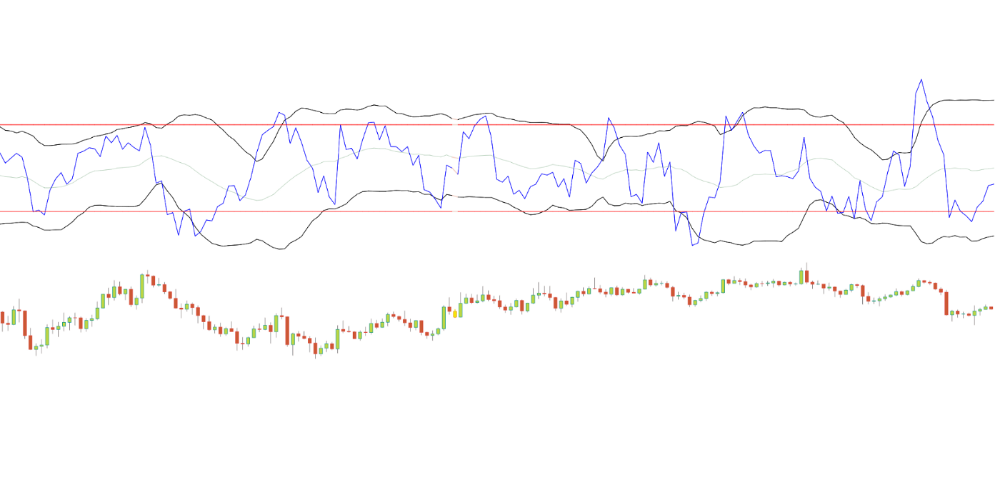
Conclusion
We showed how to build a detrended oscillator using simple harmonic oscillator theory. Kinetic detrender's main line oscillates between 2 fixed levels framing 95% of the values and 2 dynamic levels, leading to auto-adaptive mean reversion zones.
Superalgos' Normalized Momentum data mine has the Kinetic detrender indication.
All the material here can be reused and integrated freely by linking to this article and Superalgos.
This post is informative and not financial advice. Seek expert counsel before trading. Risk using this material.

Sammy Abdullah
4 years ago
SaaS payback period data
It's ok and even desired to be unprofitable if you're gaining revenue at a reasonable cost and have 100%+ net dollar retention, meaning you never lose customers and expand them. To estimate the acceptable cost of new SaaS revenue, we compare new revenue to operating loss and payback period. If you pay back the customer acquisition cost in 1.5 years and never lose them (100%+ NDR), you're doing well.
To evaluate payback period, we compared new revenue to net operating loss for the last 73 SaaS companies to IPO since October 2017. (55 out of 73). Here's the data. 1/(new revenue/operating loss) equals payback period. New revenue/operating loss equals cost of new revenue.
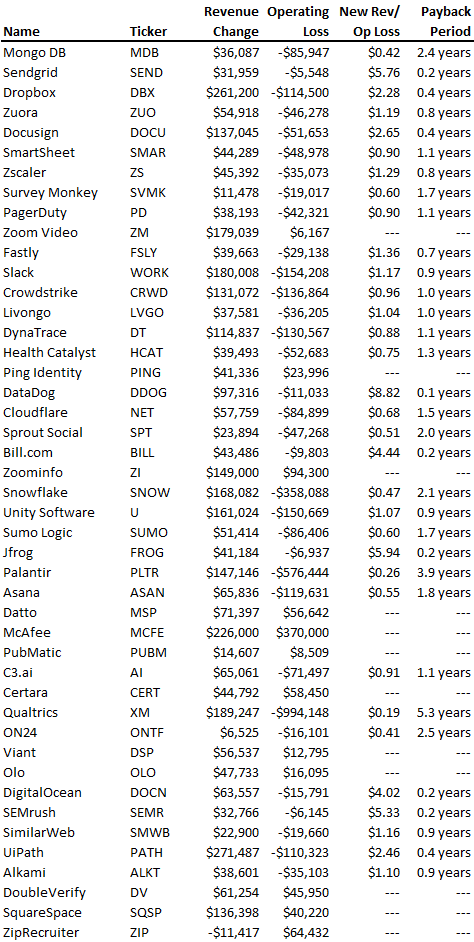
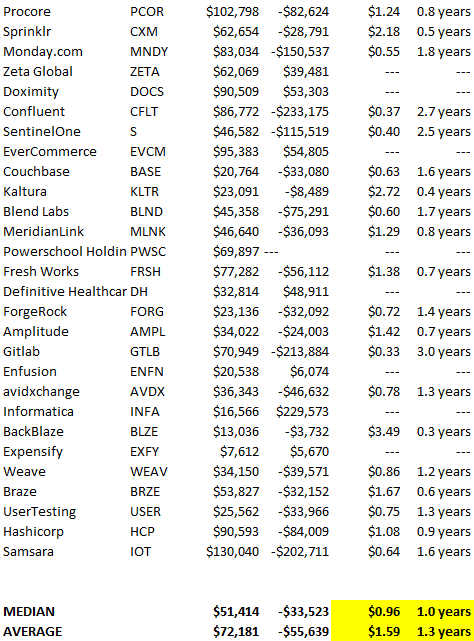
Payback averages a year. 55 SaaS companies that weren't profitable at IPO got a 1-year payback. Outstanding. If you pay for a customer in a year and never lose them (100%+ NDR), you're establishing a valuable business. The average was 1.3 years, which is within the 1.5-year range.
New revenue costs $0.96 on average. These SaaS companies lost $0.96 every $1 of new revenue last year. Again, impressive. Average new revenue per operating loss was $1.59.
Loss-in-operations definition. Operating loss revenue COGS S&M R&D G&A (technical point: be sure to use the absolute value of operating loss). It's wrong to only consider S&M costs and ignore other business costs. Operating loss and new revenue are measured over one year to eliminate seasonality.
Operating losses are desirable if you never lose a customer and have a quick payback period, especially when SaaS enterprises are valued on ARR. The payback period should be under 1.5 years, the cost of new income < $1, and net dollar retention 100%.