



More on Entrepreneurship/Creators

Jared Heyman
3 years ago
The survival and demise of Y Combinator startups
I've written a lot about Y Combinator's success, but as any startup founder or investor knows, many startups fail.
Rebel Fund invests in the top 5-10% of new Y Combinator startups each year, so we focus on identifying and supporting the most promising technology startups in our ecosystem. Given the power law dynamic and asymmetric risk/return profile of venture capital, we worry more about our successes than our failures. Since the latter still counts, this essay will focus on the proportion of YC startups that fail.
Since YC's launch in 2005, the figure below shows the percentage of active, inactive, and public/acquired YC startups by batch.
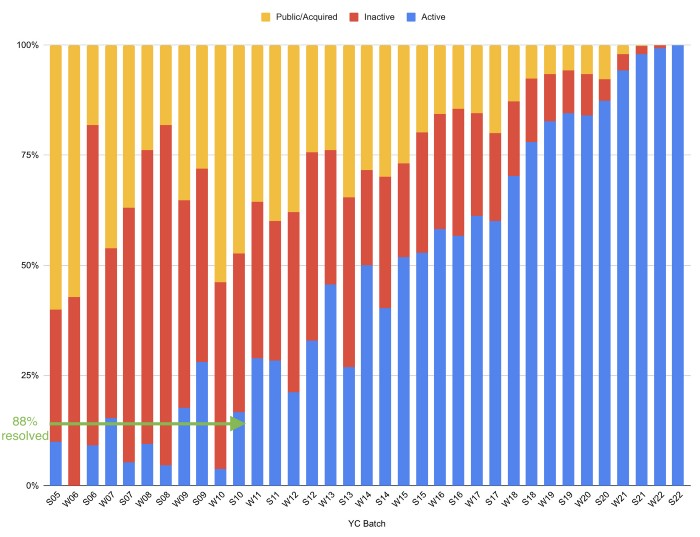
As more startups finish, the blue bars (active) decrease significantly. By 12 years, 88% of startups have closed or exited. Only 7% of startups reach resolution each year.
YC startups by status after 12 years:
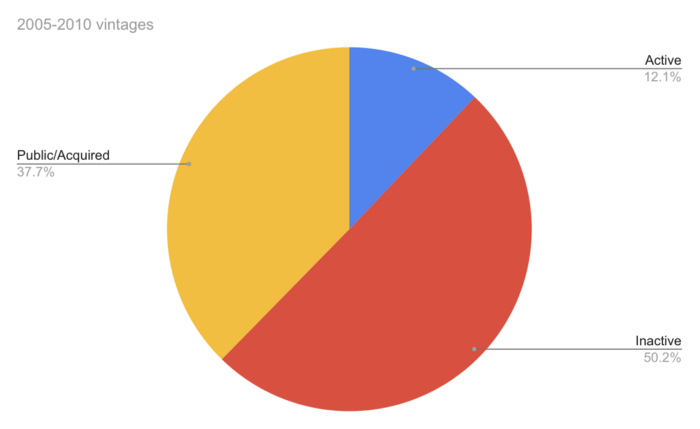
Half the startups have failed, over one-third have exited, and the rest are still operating.
In venture investing, it's said that failed investments show up before successful ones. This is true for YC startups, but only in their early years.
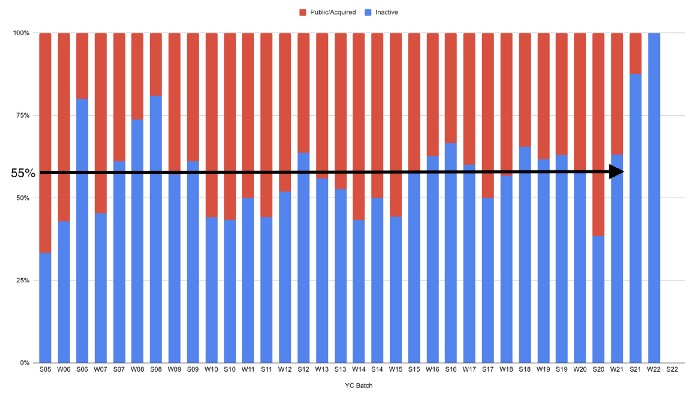
Below, we only present resolved companies from the first chart. Some companies fail soon after establishment, but after a few years, the inactive vs. public/acquired ratio stabilizes around 55:45. After a few years, a YC firm is roughly as likely to quit as fail, which is better than I imagined.
I prepared this post because Rebel investors regularly question me about YC startup failure rates and how long it takes for them to exit or shut down.
Early-stage venture investors can overlook it because 100x investments matter more than 0x investments.
YC founders can ignore it because it shouldn't matter if many of their peers succeed or fail ;)
Benjamin Lin
3 years ago
I sold my side project for $20,000: 6 lessons I learned
How I monetized and sold an abandoned side project for $20,000

The Origin Story
I've always wanted to be an entrepreneur but never succeeded. I often had business ideas, made a landing page, and told my buddies. Never got customers.
In April 2021, I decided to try again with a new strategy. I noticed that I had trouble acquiring an initial set of customers, so I wanted to start by acquiring a product that had a small user base that I could grow.
I found a SaaS marketplace called MicroAcquire.com where you could buy and sell SaaS products. I liked Shareit.video, an online Loom-like screen recorder.
Shareit.video didn't generate revenue, but 50 people visited daily to record screencasts.
Purchasing a Failed Side Project
I eventually bought Shareit.video for $12,000 from its owner.
$12,000 was probably too much for a website without revenue or registered users.
I thought time was most important. I could have recreated the website, but it would take months. $12,000 would give me an organized code base and a working product with a few users to monetize.
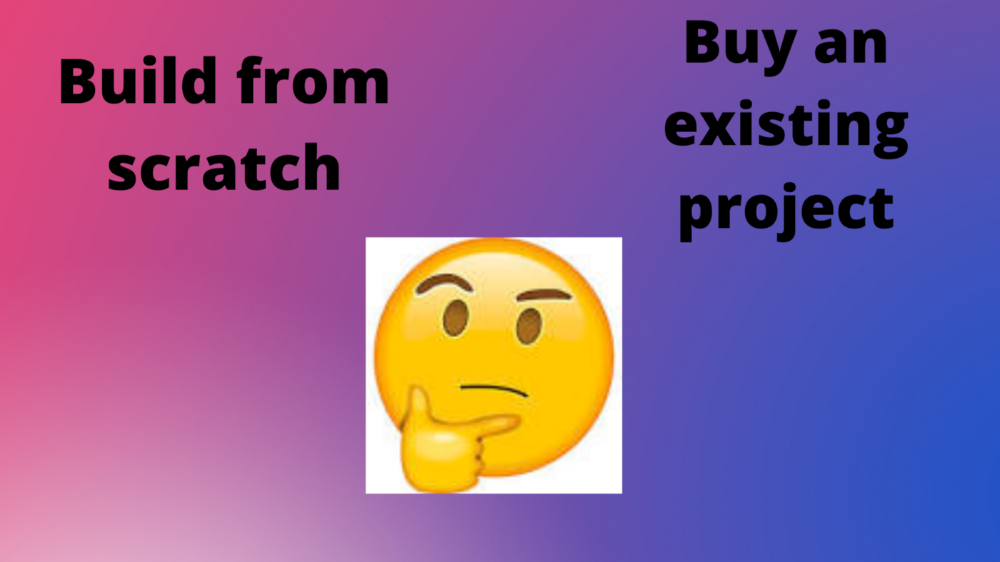
I considered buying a screen recording website and trying to grow it versus buying a new car or investing in crypto with the $12K.
Buying the website would make me a real entrepreneur, which I wanted more than anything.
Putting down so much money would force me to commit to the project and prevent me from quitting too soon.
A Year of Development
I rebranded the website to be called RecordJoy and worked on it with my cousin for about a year. Within a year, we made $5000 and had 3000 users.
We spent $3500 on ads, hosting, and software to run the business.
AppSumo promoted our $120 Life Time Deal in exchange for 30% of the revenue.
We put RecordJoy on maintenance mode after 6 months because we couldn't find a scalable user acquisition channel.
We improved SEO and redesigned our landing page, but nothing worked.

Despite not being able to grow RecordJoy any further, I had already learned so much from working on the project so I was fine with putting it on maintenance mode. RecordJoy still made $500 a month, which was great lunch money.
Getting Taken Over
One of our customers emailed me asking for some feature requests and I replied that we weren’t going to add any more features in the near future. They asked if we'd sell.
We got on a call with the customer and I asked if he would be interested in buying RecordJoy for 15k. The customer wanted around $8k but would consider it.
Since we were negotiating with one buyer, we put RecordJoy on MicroAcquire to see if there were other offers.

We quickly received 10+ offers. We got 18.5k. There was also about $1000 in AppSumo that we could not withdraw, so we agreed to transfer that over for $600 since about 40% of our sales on AppSumo usually end up being refunded.
Lessons Learned
First, create an acquisition channel
We couldn't discover a scalable acquisition route for RecordJoy. If I had to start another project, I'd develop a robust acquisition channel first. It might be LinkedIn, Medium, or YouTube.
Purchase Power of the Buyer Affects Acquisition Price
Some of the buyers we spoke to were individuals looking to buy side projects, as well as companies looking to launch a new product category. Individual buyers had less budgets than organizations.
Customers of AppSumo vary.
AppSumo customers value lifetime deals and low prices, which may not be a good way to build a business with recurring revenue. Designed for AppSumo users, your product may not connect with other users.
Try to increase acquisition trust
Acquisition often fails. The buyer can go cold feet, cease communicating, or run away with your stuff. Trusting the buyer ensures a smooth asset exchange. First acquisition meeting was unpleasant and price negotiation was tight. In later meetings, we spent the first few minutes trying to get to know the buyer’s motivations and background before jumping into the negotiation, which helped build trust.
Operating expenses can reduce your earnings.
Monitor operating costs. We were really happy when we withdrew the $5000 we made from AppSumo and Stripe until we realized that we had spent $3500 in operating fees. Spend money on software and consultants to help you understand what to build.
Don't overspend on advertising
We invested $1500 on Google Ads but made little money. For a side project, it’s better to focus on organic traffic from SEO rather than paid ads unless you know your ads are going to have a positive ROI.

Aaron Dinin, PhD
3 years ago
There Are Two Types of Entrepreneurs in the World Make sure you are aware of your type!
Know why it's important.
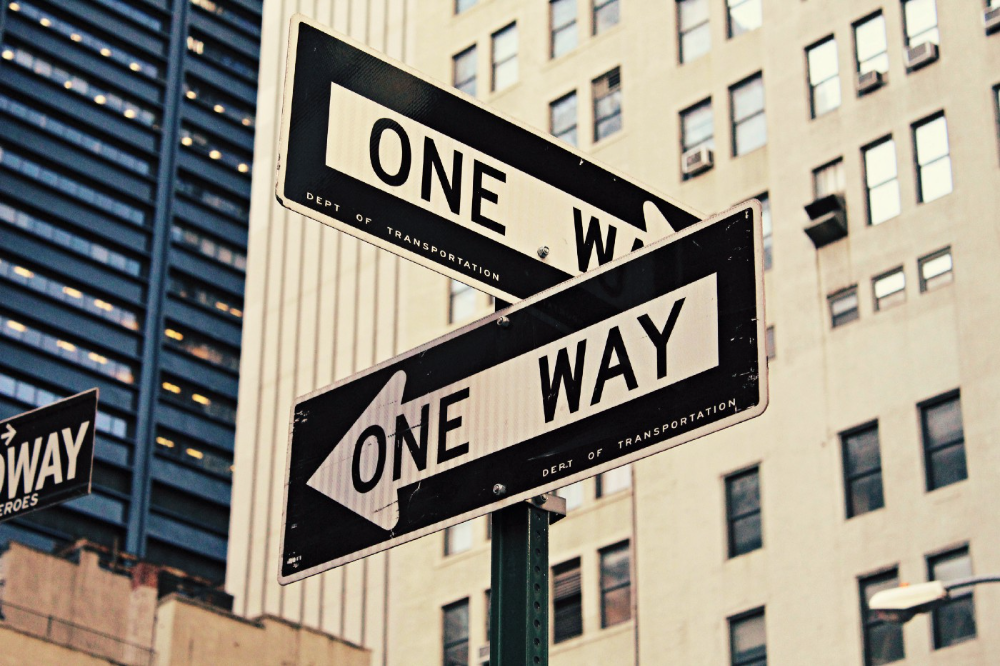
The entrepreneur I was meeting with said, "I should be doing crypto, or maybe AI? Aren't those the hot spots? I should look there for a startup idea.”
I shook my head. Yes, they're exciting, but that doesn't mean they're best for you and your business.
“There are different types of entrepreneurs?” he asked.
I said "obviously." Two types, actually. Knowing what type of entrepreneur you are helps you build the right startup.
The two types of businesspeople
The best way for me to describe the two types of entrepreneurs is to start by telling you exactly the kinds of entrepreneurial opportunities I never get excited about: future opportunities.
In the early 1990s, my older brother showed me the World Wide Web and urged me to use it. Unimpressed, I returned to my Super Nintendo.
My roommate tried to get me to join Facebook as a senior in college. I remember thinking, This is dumb. Who'll use it?
In 2011, my best friend tried to convince me to buy bitcoin and I laughed.
Heck, a couple of years ago I had to buy a new car, and I never even considered buying something that didn’t require fossilized dinosaur bones.
I'm no visionary. I don't anticipate the future. I focus on the present.
This tendency makes me a problem-solving entrepreneur. I identify entrepreneurial opportunities by spotting flaws and/or inefficiencies in the world and devising solutions.
There are other ways to find business opportunities. Visionary entrepreneurs also exist. I don't mean visionary in the hyperbolic sense that implies world-changing impact. I mean visionary as an entrepreneur who identifies future technological shifts that will change how people work and live and create new markets.
Problem-solving and visionary entrepreneurs are equally good. But the two approaches to building companies are very different. Knowing the type of entrepreneur you are will help you build a startup that fits your worldview.
What is the distinction?
Let's use some simple hypotheticals to compare problem-solving and visionary entrepreneurship.
Imagine a city office building without nearby restaurants. Those office workers love to eat. Sometimes they'd rather eat out than pack a lunch. As an entrepreneur, you can solve the lack of nearby restaurants. You'd open a restaurant near that office, say a pizza parlor, and get customers because you solved the lack of nearby restaurants. Problem-solving entrepreneurship.
Imagine a new office building in a developing area with no residents or workers. In this scenario, a large office building is coming. The workers will need to eat then. As a visionary entrepreneur, you're excited about the new market and decide to open a pizzeria near the construction to meet demand.
Both possibilities involve the same product. You opened a pizzeria. How you launched that pizza restaurant and what will affect its success are different.
Why is the distinction important?
Let's say you opened a pizzeria near an office. You'll probably get customers. Because people are nearby and demand isn't being met, someone from a nearby building will stop in within the first few days of your pizzeria's grand opening. This makes solving the problem relatively risk-free. You'll get customers unless you're a fool.
The market you're targeting existed before you entered it, so you're not guaranteed success. This means people in that market solved the lack of nearby restaurants. Those office workers are used to bringing their own lunches. Why should your restaurant change their habits? Even when they eat out, they're used to traveling far. They've likely developed pizza preferences.
To be successful with your problem-solving startup, you must convince consumers to change their behavior, which is difficult.
Unlike opening a pizza restaurant near a construction site. Once the building opens, workers won't have many preferences or standardized food-getting practices. Your pizza restaurant can become the incumbent quickly. You'll be the first restaurant in the area, so you'll gain a devoted following that makes your food a routine.
Great, right? It's easier than changing people's behavior. The benefit comes with a risk. Opening a pizza restaurant near a construction site increases future risk. What if builders run out of money? No one moves in? What if the building's occupants are the National Association of Pizza Haters? Then you've opened a pizza restaurant next to pizza haters.
Which kind of businessperson are you?
This isn't to say one type of entrepreneur is better than another. Each type of entrepreneurship requires different skills.
As my simple examples show, a problem-solving entrepreneur must operate in markets with established behaviors and habits. To be successful, you must be able to teach a market a new way of doing things.
Conversely, the challenge of being a visionary entrepreneur is that you have to be good at predicting the future and getting in front of that future before other people.
Both are difficult in different ways. So, smart entrepreneurs don't just chase opportunities. Smart entrepreneurs pursue opportunities that match their skill sets.
You might also like

Jon Brosio
3 years ago
Every time I use this 6-part email sequence, I almost always make four figures.
(And you can have it for free)

Master email to sell anything.
Most novice creators don't know how to begin.
Many use online templates. These are usually fluff-filled and niche-specific.
They're robotic and "salesy."
I've attended 3 courses, read 10 books, and sent 600,000 emails in the past five years.
Outcome?
This *proven* email sequence assures me a month's salary every time I send it.
What you will discover in this article is that:
A full 6-part email sales cycle
The essential elements you must incorporate
placeholders and text-filled images
(Applies to any niche)
This can be a product introduction, holiday, or welcome sequence. This works for email-saleable products.
Let's start
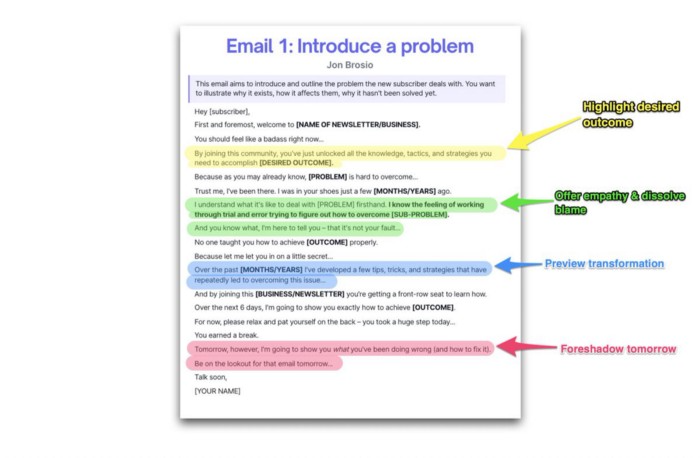
Email 1: Describe your issue
This email is crucial.
How to? We introduce a subscriber or prospect's problem. Later, we'll frame our offer as the solution.
Label the:
Problem
Why it still hasn't been fixed
Resulting implications for the customer
This puts our new subscriber in solve mode and queues our offer:
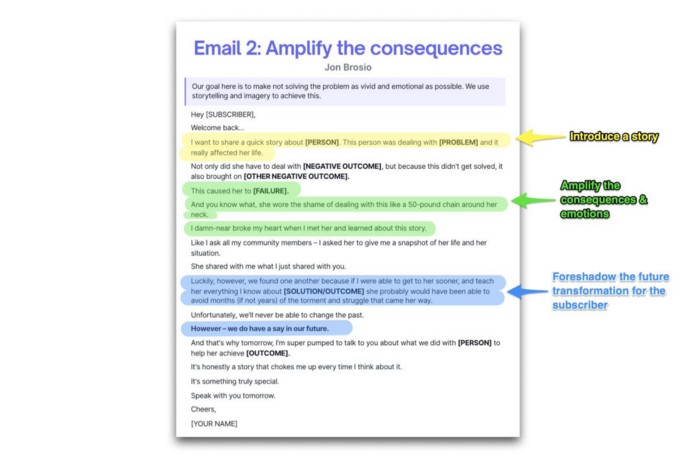
Email 2: Amplify the consequences
We're still causing problems.
We've created the problem, but now we must employ emotion and storytelling to make it real. We also want to forecast life if nothing changes.
Let's feel:
What occurs if it is not resolved?
Why is it crucial to fix it immediately?
Tell a tale of a person who was in their position. To emphasize the effects, use a true account of another person (or of yourself):
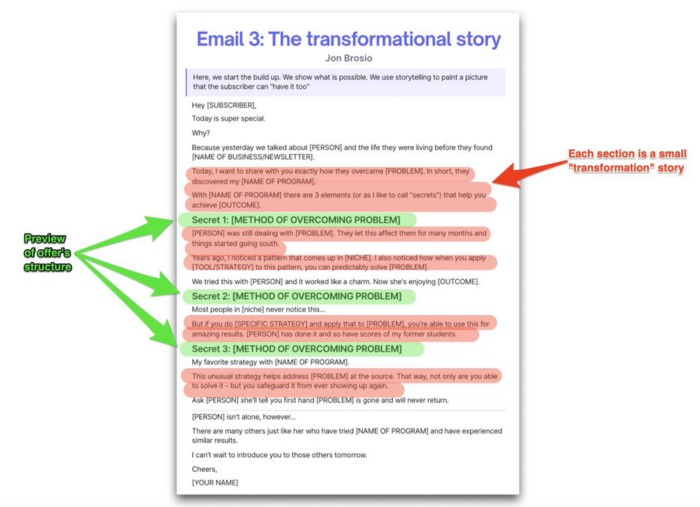
Email 3: Share a transformation story
Selling stories.
Whether in an email, landing page, article, or video. Humanize stories. They give information meaning.
This is where "issue" becomes "solution."
Let's reveal:
A tale of success
A new existence and result
tools and tactics employed
Start by transforming yourself.
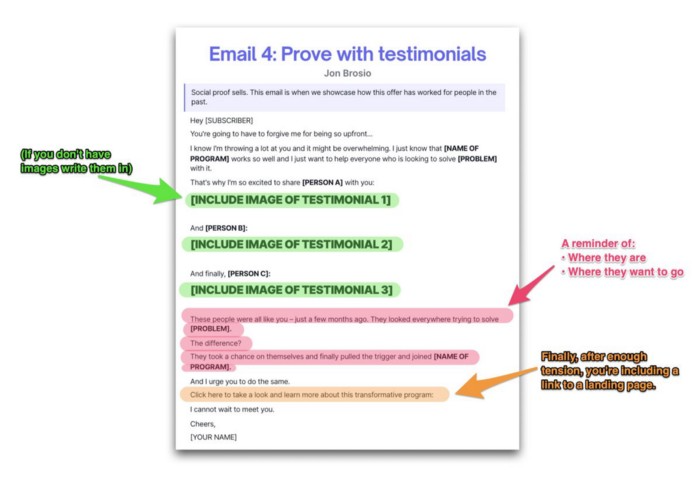
Email 4: Prove with testimonials
No one buys what you say.
Emotionally stirred people buy and act. They believe in the product. They feel that if they buy, it will work.
Social proof shows prospects that your solution will help them.
Add:
Earlier and Later
Testimonials
Reviews
Proof this deal works:
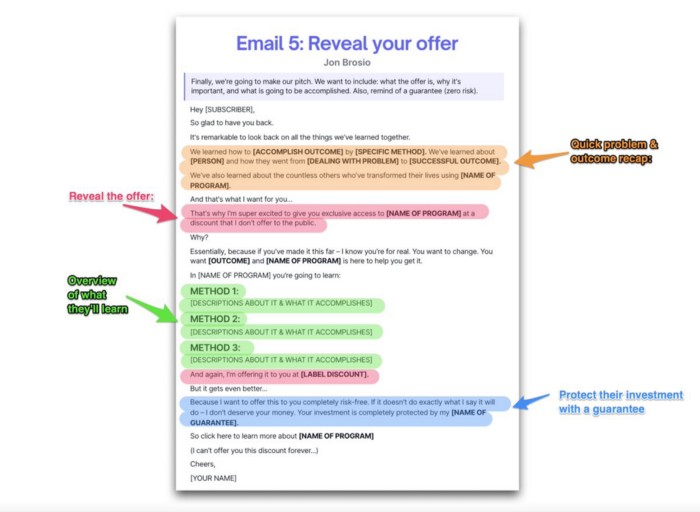
Email 5: Reveal your offer
It's showtime.
This is it. Until now, describing the offer and offering links to a landing page have been sparse in the email pictures.
We've been tense. Gaining steam. Building suspense. Email 5 reveals all.
In this email:
a description of the deal
A word about a promise
recapitulation of the transformation
and make a reference to the urgency Everything should be spelled out clearly:
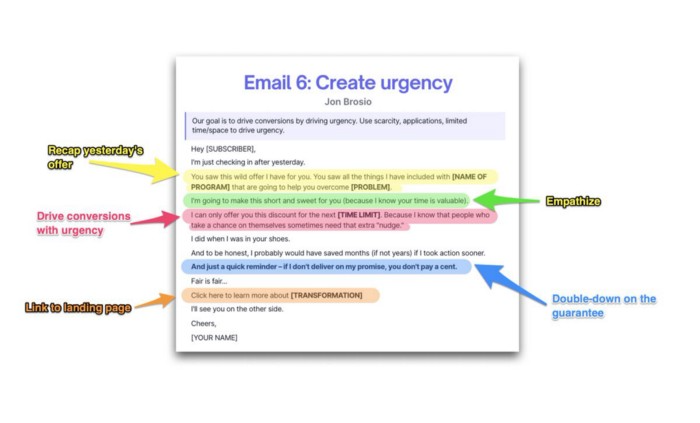
Email no. 6: Instill urgency
When there are stakes, humans act.
Creating and marketing with haste raises the stakes. Urgency makes a prospect act because they'll miss out or gain immensely.
Urgency converts. Use:
short time
Screening
Scarcity
Urgency and conversions. Limited-time offers are easy.
TL;DR
Use this proven 6-part email sequence (that turns subscribers into profit):
Introduce a problem
Amplify it with emotions
Share transformation story
Prove it works with testimonials
Value-stack and present your offer
Drive urgency and entice the purchase

Shawn Mordecai
3 years ago
The Apple iPhone 14 Pill is Easier to Swallow
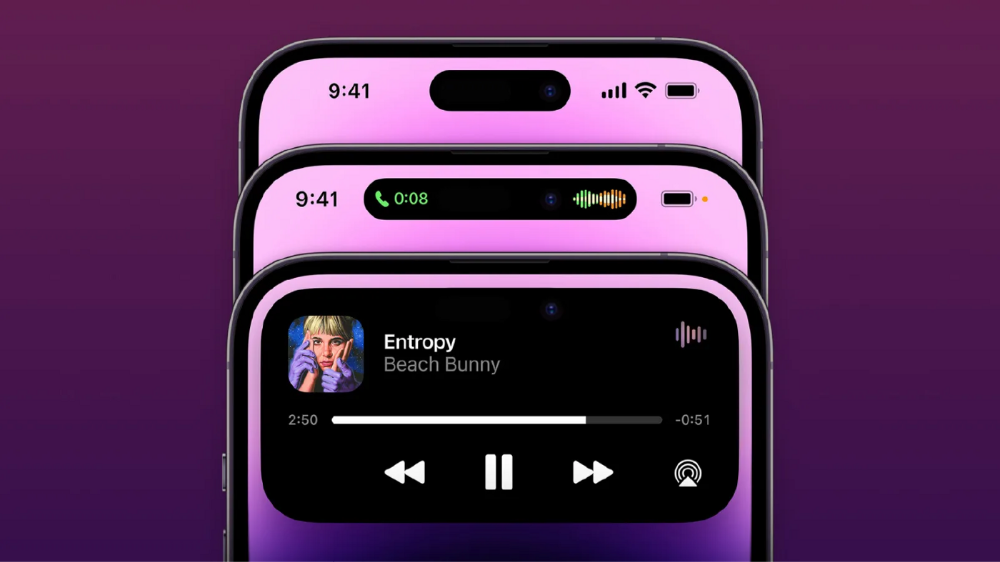
Is iPhone's Dynamic Island invention or a marketing ploy?
First of all, why the notch?
When Apple debuted the iPhone X with the notch, some were surprised, confused, and amused by the goof. Let the Brits keep the new meaning of top-notch.
Apple removed the bottom home button to enhance screen space. The tides couldn't overtake part of the top. This section contained sensors, a speaker, a microphone, and cameras for facial recognition. A town resisted Apple's new iPhone design.
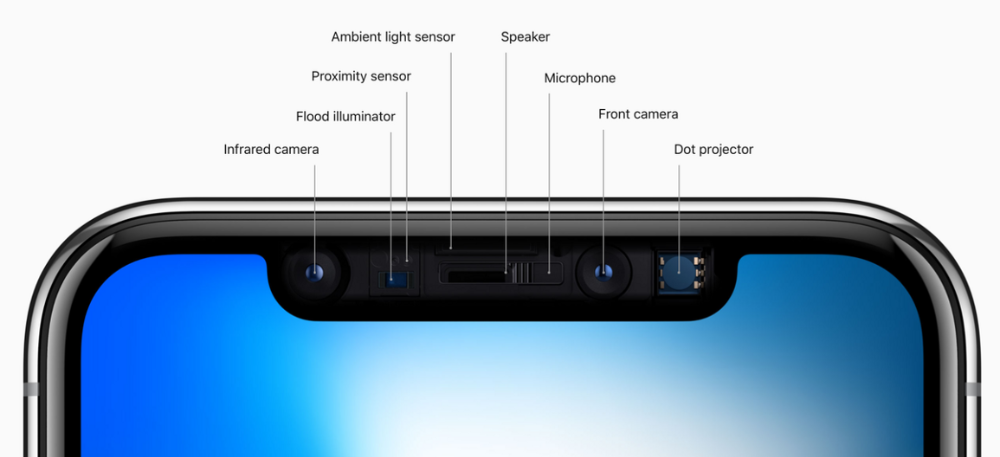
From iPhone X to 13, the notch has gotten smaller. We expected this as technology and engineering progressed, but we hated the notch. Apple approved. They attached it to their other gadgets.
Apple accepted, owned, and ran with the iPhone notch, it has become iconic (or infamous); and that’s intentional.
The Island Where Apple Is
Apple needs to separate itself, but they know how to do it well. The iPhone 14 Pro finally has us oohing and aahing. Life-changing, not just higher pixel density or longer battery.
Dynamic Island turned a visual differentiation into great usefulness, which may not be life-changing. Apple always welcomes the controversy, whether it's $700 for iMac wheels, no charging block with a new phone, or removing the headphone jack.
Apple knows its customers will be loyal, even if they're irritated. Their odd design choices often cause controversy. It's calculated that people blog, review, and criticize Apple's products. We accept what works for them.
While the competition zigs, Apple zags. Sometimes they zag too hard and smash into a wall, but we talk about it anyways, and that’s great publicity for them.
Getting Dependent on the drug
The notch became a crop. Dynamic Island's design is helpful, intuitive, elegant, and useful. It increases iPhone usability, productivity (slightly), and joy. No longer unsightly.
The medication helps with multitasking. It's a compact version of the iPhone's Live Activities lock screen function. Dynamic Island enhances apps and activities with visual effects and animations whether you engage with it or not. As you use the pill, its usefulness lessens. It lowers user notifications and consolidates them with live and permanent feeds, delivering quick app statuses. It uses the black pixels on the iPhone 14's display, which looked like a poor haircut.

The pill may be a gimmick to entice customers to use more Apple products and services. Apps may promote to their users like a live billboard.
Be prepared to get a huge dose of Dynamic Island’s “pill” like you never had before with the notch. It might become so satisfying and addicting to use, that every interaction with it will become habit-forming, and you’re going to forget that it ever existed.
WARNING: A Few Potential Side Effects
Vision blurred Dynamic Island's proximity to the front-facing camera may leave behind grease that blurs photos. Before taking a selfie, wipe the camera clean.
Strained thumb To fully use Dynamic Island, extend your thumb's reach 6.7 inches beyond your typical, comfortable range.
Happiness, contentment The Dynamic Island may enhance Endorphins and Dopamine. Multitasking, interactions, animations, and haptic feedback make you want to use this function again and again.
Motion-sickness Dynamic Island's motions and effects may make some people dizzy. If you can disable animations, you can avoid motion sickness.
I'm not a doctor, therefore they aren't established adverse effects.
Does Dynamic Island Include Multiple Tasks?
Dynamic Islands is a placebo for multitasking. Apple might have compromised on iPhone multitasking. It won't make you super productive, but it's a step up.
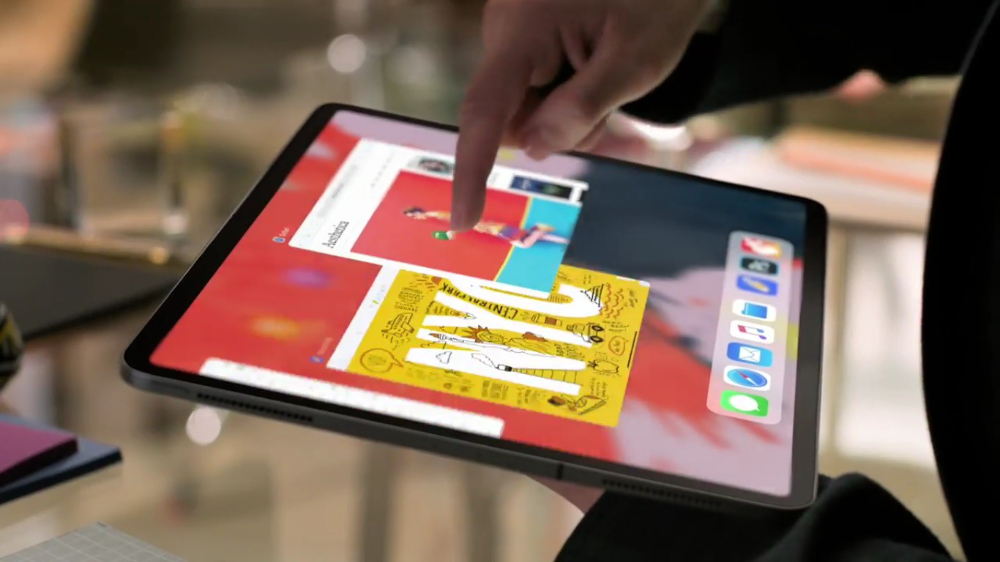
iPhone is primarily for personal use, like watching videos, messaging friends, sending money to friends, calling friends about the money you were supposed to send them, taking 50 photos of the same leaf, investing in crypto, driving for Uber because you lost all your money investing in crypto, listening to music and hailing an Uber from a deserted crop field because while you were driving for Uber your passenger stole your car and left you stranded, so you used Apple’s new SOS satellite feature to message your friend, who still didn’t receive their money, to hail you an Uber; now you owe them more money… karma?
We won't be watching videos on iPhones while perusing 10,000-row spreadsheets anytime soon. True multitasking and productivity aren't priorities for Apple's iPhone. Apple doesn't to preserve the iPhone's experience. Like why there's no iPad calculator. Apple doesn't want iPad users to do math, but isn't essential for productivity?
Digressing.
Apple will block certain functions so you must buy and use their gadgets and services, immersing yourself in their ecosystem and dictating how to use their goods.
Dynamic Island is a poor man’s multi-task for iPhone, and that’s fine it works for most iPhone users. For substantial productivity Apple prefers you to get an iPad or a MacBook. That’s part of the reason for restrictive features on certain Apple devices, but sometimes it’s based on principles to preserve the integrity of the product, according to Apple’s definition.
Is Apple using deception?
Dynamic Island may be distracting you from a design decision. The answer is kind of. Elegant distraction
When you pull down a smartphone webpage to refresh it or minimize an app, you get seamless animations. It's not simply because it appears better; it's due to iPhone and smartphone processing speeds. Such limits reduce the system's response to your activity, slowing the experience. Designers and developers use animations and effects to distract us from the time lag (most of the time) and sometimes because it looks cooler and smoother.
Dynamic Island makes apps more useable and interactive. It shows system states visually. Turn signal audio and visual cues, voice assistance, physical and digital haptic feedbacks, heads-up displays, fuel and battery level gauges, and gear shift indicators helped us overcome vehicle design problems.
Dynamic Island is a wonderfully delightful (and temporary) solution to a design “problem” until Apple or other companies can figure out a way to sink the cameras under the smartphone screen.

Apple Has Returned to Being an Innovative & Exciting Company
Now Apple's products are exciting. Next, bring back real Apple events, not pre-recorded demos.
Dynamic Island integrates hardware and software. What will this new tech do? How would this affect device use? Or is it just hype?
Dynamic Island may be an insignificant improvement to the iPhone, but it sure is promising for the future of bridging the human and computer interaction gap.

Darius Foroux
2 years ago
My financial life was changed by a single, straightforward mental model.
Prioritize big-ticket purchases
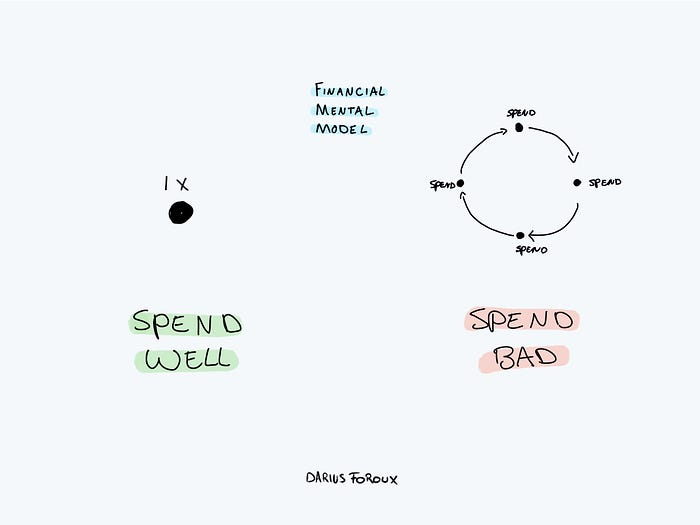
I've made several spending blunders. I get sick thinking about how much money I spent.
My financial mental model was poor back then.
Stoicism and mindfulness keep me from attaching to those feelings. It still hurts.
Until four or five years ago, I bought a new winter jacket every year.
Ten years ago, I spent twice as much. Now that I have a fantastic, warm winter parka, I don't even consider acquiring another one. No more spending. I'm not looking for jackets either.
Saving time and money by spending well is my thinking paradigm.
The philosophy is expressed in most languages. Cheap is expensive in the Netherlands. This applies beyond shopping.
In this essay, I will offer three examples of how this mental paradigm transformed my financial life.
Publishing books
In 2015, I presented and positioned my first book poorly.
I called the book Huge Life Success and made a funny Canva cover in 30 minutes. This:
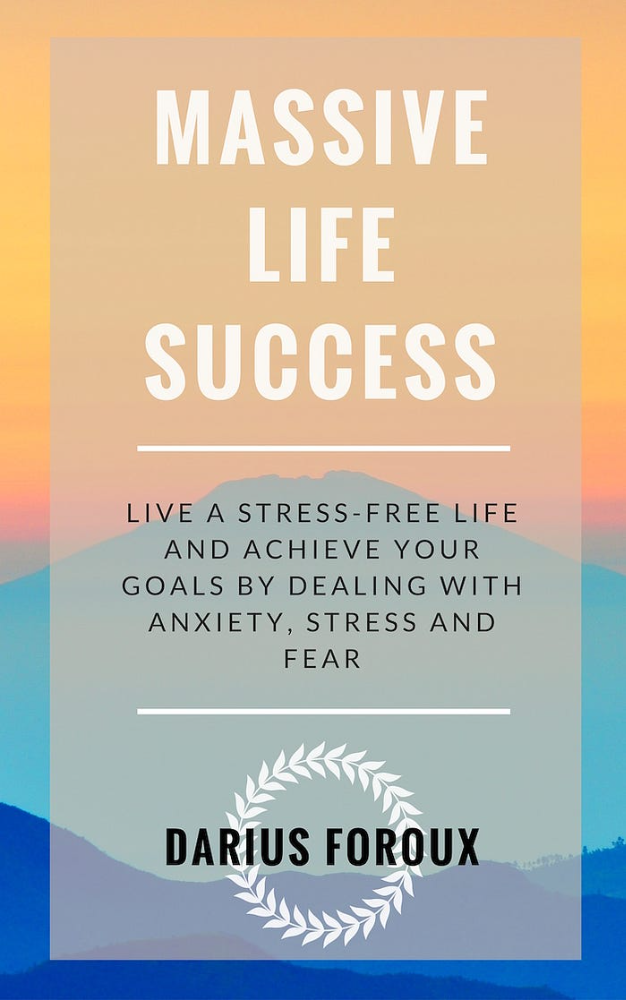
That looks nothing like my present books. No logo or style. The book felt amateurish.
The book started bothering me a few weeks after publication. The advice was good, but it didn't appear professional. I studied the book business extensively.
I created a style for all my designs. Branding. Win Your Inner Wars was reissued a year later.
Title, cover, and description changed. Rearranging the chapters improved readability.
Seven years later, the book sells hundreds of copies a month. That taught me a lot.
Rushing to finish a project is enticing. Send it and move forward.
Avoid rushing everything. Relax. Develop your projects. Perform well. Perform the job well.
My first novel was underfunded and underworked. A bad book arrived. I then invested time and money in writing the greatest book I could.
That book still sells.
Traveling
I hate travel. Airports, flights, trains, and lines irritate me.
But, I enjoy traveling to beautiful areas.
I do it strangely. I make up travel rules. I never go to airports in summer. I hate being near airports on holidays. Unworthy.
No vacation packages for me. Those airline packages with a flight, shuttle, and hotel. I've had enough.
I try to avoid crowds and popular spots. July Paris? Nuts and bolts, please. Christmas in NYC? No, please keep me sane.
I fly business class behind. I accept upgrades upon check-in. I prefer driving. I drove from the Netherlands to southern Spain.
Thankfully, no lines. What if travel costs more? Thus? I enjoy it from the start. I start traveling then.
I rarely travel since I'm so difficult. One great excursion beats several average ones.
Personal effectiveness
New apps, tools, and strategies intrigue most productivity professionals.
No.
I researched years ago. I spent years investigating productivity in university.
I bought books, courses, applications, and tools. It was expensive and time-consuming.
Im finished. Productivity no longer costs me time or money. OK. I worked on it once and now follow my strategy.
I avoid new programs and systems. My stuff works. Why change winners?
Spending wisely saves time and money.
Spending wisely means spending once. Many people ignore productivity. It's understudied. No classes.
Some assume reading a few articles or a book is enough. Productivity is personal. You need a personal system.
Time invested is one-time. You can trust your system for life once you find it.
Concentrate on the expensive choices.
Life's short. Saving money quickly is enticing.
Spend less on groceries today. True. That won't fix your finances.
Adopt a lifestyle that makes you affluent over time. Consider major choices.
Are they causing long-term poverty? Are you richer?
Leasing cars comes to mind. The automobile costs a fortune today. The premium could accomplish a million nice things.
Focusing on important decisions makes life easier. Consider your future. You want to improve next year.