

More on NFTs & Art

Jennifer Tieu
3 years ago
Why I Love Azuki
Azuki Banner (www.azuki.com)
Disclaimer: This is my personal viewpoint. I'm not on the Azuki team. Please keep in mind that I am merely a fan, community member, and holder. Please do your own research and pardon my grammar. Thanks!
Azuki has changed my view of NFTs.
When I first entered the NFT world, I had no idea what to expect. I liked the idea. So I invested in some projects, fought for whitelists, and discovered some cool NFTs projects (shout-out to CATC). I lost more money than I earned at one point, but I hadn't invested excessively (only put in what you can afford to lose). Despite my losses, I kept looking. I almost waited for the “ah-ha” moment. A NFT project that changed my perspective on NFTs. What makes an NFT project more than a work of art?
Answer: Azuki.
The Art
The Azuki art drew me in as an anime fan. It looked like something out of an anime, and I'd never seen it before in NFT.
The project was still new. The first two animated teasers were released with little fanfare, but I was impressed with their quality. You can find them on Instagram or in their earlier Tweets.
The teasers hinted that this project could be big and that the team could deliver. It was amazing to see Shao cut the Azuki posters with her katana. Especially at the end when she sheaths her sword and the music cues. Then the live action video of the young boy arranging the Azuki posters seemed movie-like. I felt like I was entering the Azuki story, brand, and dope theme.
The team did not disappoint with the Azuki NFTs. The level of detail in the art is stunning. There were Azukis of all genders, skin and hair types, and more. These 10,000 Azukis have so much representation that almost anyone can find something that resonates. Rather than me rambling on, I suggest you visit the Azuki gallery
The Team
If the art is meant to draw you in and be the project's face, the team makes it more. The NFT would be a JPEG without a good team leader. Not that community isn't important, but no community would rally around a bad team.
Because I've been rugged before, I'm very focused on the team when considering a project. While many project teams are anonymous, I try to find ones that are doxxed (public) or at least appear to be established. Unlike Azuki, where most of the Azuki team is anonymous, Steamboy is public. He is (or was) Overwatch's character art director and co-creator of Azuki. I felt reassured and could trust the project after seeing someone from a major game series on the team.
Then I tried to learn as much as I could about the team. Following everyone on Twitter, reading their tweets, and listening to recorded AMAs. I was impressed by the team's professionalism and dedication to their vision for Azuki, led by ZZZAGABOND.
I believe the phrase “actions speak louder than words” applies to Azuki. I can think of a few examples of what the Azuki team has done, but my favorite is ERC721A.
With ERC721A, Azuki has created a new algorithm that allows minting multiple NFTs for essentially the same cost as minting one NFT.
I was ecstatic when the dev team announced it. This fascinates me as a self-taught developer. Azuki released a product that saves people money, improves the NFT space, and is open source. It showed their love for Azuki and the NFT community.
The Community
Community, community, community. It's almost a chant in the NFT space now. A community, like a team, can make or break a project. We are the project's consumers, shareholders, core, and lifeblood. The team builds the house, and we fill it. We stay for the community.
When I first entered the Azuki Discord, I was surprised by the calm atmosphere. There was no news about the project. No release date, no whitelisting requirements. No grinding or spamming either. People just wanted to hangout, get to know each other, and talk. It was nice. So the team could pick genuine people for their mintlist (aka whitelist).
But nothing fundamental has changed since the release. It has remained an authentic, fun, and helpful community. I'm constantly logging into Discord to chat with others or follow conversations. I see the community's openness to newcomers. Everyone respects each other (barring a few bad apples) and the variety of people passing through is fascinating. This human connection and interaction is what I enjoy about this place. Being a part of a group that supports a cause.
Finally, I want to thank the amazing Azuki mod team and the kissaten channel for their contributions.
The Brand
So, what sets Azuki apart from other projects? They are shaping a brand or identity. The Azuki website, I believe, best captures their vision. (This is me gushing over the site.)
If you go to the website, turn on the dope playlist in the bottom left. The playlist features a mix of Asian and non-Asian hip-hop and rap artists, with some lo-fi thrown in. The songs on the playlist change, but I think you get the vibe Azuki embodies just by turning on the music.
The Garden is our next stop where we are introduced to Azuki.
A brand.
We're creating a new brand together.
A metaverse brand. By the people.
A collection of 10,000 avatars that grant Garden membership. It starts with exclusive streetwear collabs, NFT drops, live events, and more. Azuki allows for a new media genre that the world has yet to discover. Let's build together an Azuki, your metaverse identity.
The Garden is a magical internet corner where art, community, and culture collide. The boundaries between the physical and digital worlds are blurring.
Try a Red Bean.
The text begins with Azuki's intention in the space. It's a community-made metaverse brand. Then it goes into more detail about Azuki's plans. Initiation of a story or journey. "Would you like to take the red bean and jump down the rabbit hole with us?" I love the Matrix red pill or blue pill play they used. (Azuki in Japanese means red bean.)
Morpheus, the rebel leader, offers Neo the choice of a red or blue pill in The Matrix. “You take the blue pill... After the story, you go back to bed and believe whatever you want. Your red pill... Let me show you how deep the rabbit hole goes.” Aware that the red pill will free him from the enslaving control of the machine-generated dream world and allow him to escape into the real world, he takes it. However, living the “truth of reality” is harsher and more difficult.
It's intriguing and draws you in. Taking the red bean causes what? Where am I going? I think they did well in piqueing a newcomer's interest.
Not convinced by the Garden? Read the Manifesto. It reinforces Azuki's role.
Here comes a new wave…
And surfing here is different.
Breaking down barriers.
Building open communities.
Creating magic internet money with our friends.
To those who don’t get it, we tell them: gm.
They’ll come around eventually.
Here’s to the ones with the courage to jump down a peculiar rabbit hole.
One that pulls you away from a world that’s created by many and owned by few…
To a world that’s created by more and owned by all.
From The Garden come the human beans that sprout into your family.
We rise together.
We build together.
We grow together.
Ready to take the red bean?
Not to mention the Mindmap, it sets Azuki apart from other projects and overused Roadmaps. I like how the team recognizes that the NFT space is not linear. So many of us are still trying to figure it out. It is Azuki's vision to adapt to changing environments while maintaining their values. I admire their commitment to long-term growth.
Conclusion
To be honest, I have no idea what the future holds. Azuki is still new and could fail. But I'm a long-term Azuki fan. I don't care about quick gains. The future looks bright for Azuki. I believe in the team's output. I love being an Azuki.
Thank you! IKUZO!
Full post here

1eth1da
3 years ago
6 Rules to build a successful NFT Community in 2022

Too much NFT, Discord, and shitposting.
How do you choose?
How do you recruit more members to join your NFT project?
In 2021, a successful NFT project required:
Monkey/ape artwork
Twitter and Discord bot-filled
Roadmap overpromise
Goal was quick cash.
2022 and the years after will change that.
These are 6 Rules for a Strong NFT Community in 2022:
THINK LONG TERM
This relates to roadmap planning. Hype and dumb luck may drive NFT projects (ahem, goblins) but rarely will your project soar.
Instead, consider sustainability.
Plan your roadmap based on your team's abilities.
Do what you're already doing, but with NFTs, make it bigger and better.
You shouldn't copy a project's roadmap just because it was profitable.
This will lead to over-promising, team burnout, and an RUG NFT project.
OFFER VALUE
Building a great community starts with giving.
Why are musicians popular?
Because they offer entertainment for everyone, a random person becomes a fan, and more fans become a cult.
That's how you should approach your community.
TEAM UP
A great team helps.
An NFT project could have 3 or 2 people.
Credibility trumps team size.
Make sure your team can answer community questions, resolve issues, and constantly attend to them.
Don't overwork and burn out.
Your community will be able to recognize that you are trying too hard and give up on the project.
BUILD A GREAT PRODUCT
Bored Ape Yacht Club altered the NFT space.
Cryptopunks transformed NFTs.
Many others did, including Okay Bears.
What made them that way?
Because they answered a key question.
What is my NFT supposed to be?
Before planning art, this question must be answered.
NFTs can't be just jpegs.
What does it represent?
Is it a Metaverse-ready project?
What blockchain are you going to be using and why?
Set some ground rules for yourself. This helps your project's direction.
These questions will help you and your team set a direction for blockchain, NFT, and Web3 technology.
EDUCATE ON WEB3
The more the team learns about Web3 technology, the more they can offer their community.
Think tokens, metaverse, cross-chain interoperability and more.
BUILD A GREAT COMMUNITY
Several projects mistreat their communities.
They treat their community like "customers" and try to sell them NFT.
Providing Whitelists and giveaways aren't your only community-building options.
Think bigger.
Consider them family and friends, not wallets.
Consider them fans.
These are some tips to start your NFT project.

Yogita Khatri
3 years ago
Moonbirds NFT sells for $1 million in first week
On Saturday, Moonbird #2642, one of the collection's rarest NFTs, sold for a record 350 ETH (over $1 million) on OpenSea.
The Sandbox, a blockchain-based gaming company based in Hong Kong, bought the piece. The seller, "oscuranft" on OpenSea, made around $600,000 after buying the NFT for 100 ETH a week ago.
Owl avatars
Moonbirds is a 10,000 owl NFT collection. It is one of the quickest collections to achieve bluechip status. Proof, a media startup founded by renowned VC Kevin Rose, launched Moonbirds on April 16.
Rose is currently a partner at True Ventures, a technology-focused VC firm. He was a Google Ventures general partner and has 1.5 million Twitter followers.
Rose has an NFT podcast on Proof. It follows Proof Collective, a group of 1,000 NFT collectors and artists, including Beeple, who hold a Proof Collective NFT and receive special benefits.
These include early access to the Proof podcast and in-person events.
According to the Moonbirds website, they are "the official Proof PFP" (picture for proof).
Moonbirds NFTs sold nearly $360 million in just over a week, according to The Block Research and Dune Analytics. Its top ten sales range from $397,000 to $1 million.
In the current market, Moonbirds are worth 33.3 ETH. Each NFT is 2.5 ETH. Holders have gained over 12 times in just over a week.
Why was it so popular?
The Block Research's NFT analyst, Thomas Bialek, attributes Moonbirds' rapid rise to Rose's backing, the success of his previous Proof Collective project, and collectors' preference for proven NFT projects.
Proof Collective NFT holders have made huge gains. These NFTs were sold in a Dutch auction last December for 5 ETH each. According to OpenSea, the current floor price is 109 ETH.
According to The Block Research, citing Dune Analytics, Proof Collective NFTs have sold over $39 million to date.
Rose has bigger plans for Moonbirds. Moonbirds is introducing "nesting," a non-custodial way for holders to stake NFTs and earn rewards.
Holders of NFTs can earn different levels of status based on how long they keep their NFTs locked up.
"As you achieve different nest status levels, we can offer you different benefits," he said. "We'll have in-person meetups and events, as well as some crazy airdrops planned."
Rose went on to say that Proof is just the start of "a multi-decade journey to build a new media company."
You might also like

Ian Writes
3 years ago
Rich Dad, Poor Dad is a Giant Steaming Pile of Sh*t by Robert Kiyosaki.
Don't promote it.
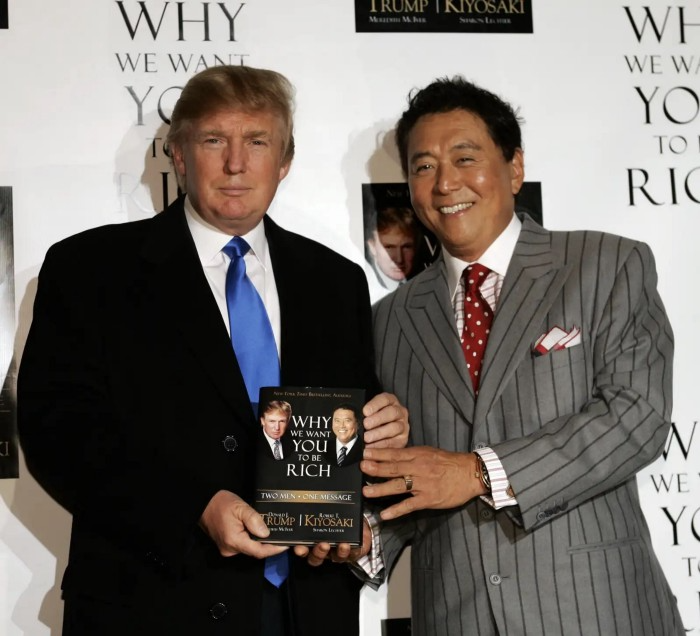
I rarely read a post on how Rich Dad, Poor Dad motivated someone to grow rich or change their investing/finance attitude. Rich Dad, Poor Dad is a sham, though. This book isn't worth anyone's attention.
Robert Kiyosaki, the author of this garbage, doesn't deserve recognition or attention. This first finance guru wanted to build his own wealth at your expense. These charlatans only care about themselves.
The reason why Rich Dad, Poor Dad is a huge steaming piece of trash
The book's ideas are superficial, apparent, and unsurprising to entrepreneurs and investors. The book's themes may seem profound to first-time readers.
Apparently, starting a business will make you rich.
The book supports founding or buying a business, making it self-sufficient, and being rich through it. Starting a business is time-consuming, tough, and expensive. Entrepreneurship isn't for everyone. Rarely do enterprises succeed.
Robert says we should think like his mentor, a rich parent. Robert never said who or if this guy existed. He was apparently his own father. Robert proposes investing someone else's money in several enterprises and properties. The book proposes investing in:
“have returns of 100 percent to infinity. Investments that for $5,000 are soon turned into $1 million or more.”
In rare cases, a business may provide 200x returns, but 65% of US businesses fail within 10 years. Australia's first-year business failure rate is 60%. A business that lasts 10 years doesn't mean its owner is rich. These statistics only include businesses that survive and pay their owners.
Employees are depressed and broke.
The novel portrays employees as broke and sad. The author degrades workers.
I've owned and worked for a business. I was broke and miserable as a business owner, working 80 hours a week for absolutely little salary. I work 50 hours a week and make over $200,000 a year. My work is hard, intriguing, and I'm surrounded by educated individuals. Self-employed or employee?
Don't listen to a charlatan's tax advice.
From a bad advise perspective, Robert's tax methods were funny. Robert suggests forming a corporation to write off holidays as board meetings or health club costs as business expenses. These actions can land you in serious tax trouble.
Robert dismisses college and traditional schooling. Rich individuals learn by doing or living, while educated people are agitated and destitute, says Robert.
Rich dad says:
“All too often business schools train employees to become sophisticated bean-counters. Heaven forbid a bean counter takes over a business. All they do is look at the numbers, fire people, and kill the business.”
And then says:
“Accounting is possibly the most confusing, boring subject in the world, but if you want to be rich long-term, it could be the most important subject.”
Get rich by avoiding paying your debts to others.
While this book has plenty of bad advice, I'll end with this: Robert advocates paying yourself first. This man's work with Trump isn't surprising.
Rich Dad's book says:
“So you see, after paying myself, the pressure to pay my taxes and the other creditors is so great that it forces me to seek other forms of income. The pressure to pay becomes my motivation. I’ve worked extra jobs, started other companies, traded in the stock market, anything just to make sure those guys don’t start yelling at me […] If I had paid myself last, I would have felt no pressure, but I’d be broke.“
Paying yourself first shouldn't mean ignoring debt, damaging your credit score and reputation, or paying unneeded fees and interest. Good business owners pay employees, creditors, and other costs first. You can pay yourself after everyone else.
If you follow Robert Kiyosaki's financial and business advice, you might as well follow Donald Trump's, the most notoriously ineffective businessman and swindle artist.
This book's popularity is unfortunate. Robert utilized the book's fame to promote paid seminars. At these seminars, he sold more expensive seminars to the gullible. This strategy was utilized by several conmen and Trump University.
It's reasonable that many believed him. It sounded appealing because he was pushing to get rich by thinking like a rich person. Anyway. At a time when most persons addressing wealth development advised early sacrifices (such as eschewing luxury or buying expensive properties), Robert told people to act affluent now and utilize other people's money to construct their fantasy lifestyle. It's exciting and fast.
I often voice my skepticism and scorn for internet gurus now that social media and platforms like Medium make it easier to promote them. Robert Kiyosaki was a guru. Many people still preach his stuff because he was so good at pushing it.

Andy Walker
3 years ago
Why personal ambition and poor leadership caused Google layoffs
Google announced 6% layoffs recently (or 12,000 people). This aligns it with most tech companies. A publicly contrite CEO explained that they had overhired during the COVID-19 pandemic boom and had to address it, but they were sorry and took full responsibility. I thought this was "bullshit" too. Meta, Amazon, Microsoft, and others must feel similarly. I spent 10 years at Google, and these things don't reflect well on the company's leaders.
All publicly listed companies have a fiduciary duty to act in the best interests of their shareholders. Dodge vs. Ford Motor Company established this (1919). Henry Ford wanted to reduce shareholder payments to offer cheaper cars and better wages. Ford stated.
My ambition is to employ still more men, to spread the benefits of this industrial system to the greatest possible number, to help them build up their lives and their homes. To do this we are putting the greatest share of our profits back in the business.
The Dodge brothers, who owned 10% of Ford, opposed this and sued Ford for the payments to start their own company. They won, preventing Ford from raising prices or salaries. If you have a vocal group of shareholders with the resources to sue you, you must prove you are acting in their best interests. Companies prioritize shareholders. Giving activist investors a stick to threaten you almost enshrines short-term profit over long-term thinking.
This underpins Google's current issues. Institutional investors who can sue Google see it as a wasteful company they can exploit. That doesn't mean you have to maximize profits (thanks to those who pointed out my ignorance of US corporate law in the comments and on HN), but it allows pressure. I feel for those navigating this. This is about unrestrained capitalism.
When Google went public, Larry Page and Sergey Brin knew the risks and worked hard to keep control. In their Founders' Letter to investors, they tried to set expectations for the company's operations.
Our long-term focus as a private company has paid off. Public companies do the same. We believe outside pressures lead companies to sacrifice long-term opportunities to meet quarterly market expectations.
The company has transformed since that letter. The company has nearly 200,000 full-time employees and a trillion-dollar market cap. Large investors have bought company stock because it has been a good long-term bet. Why are they restless now?
Other big tech companies emerged and fought for top talent. This has caused rising compensation packages. Google has also grown rapidly (roughly 22,000 people hired to the end of 2022). At $300,000 median compensation, those 22,000 people added $6.6 billion in salary overheads in 2022. Exorbitant. If the company still makes $16 billion every quarter, maybe not. Investors wonder if this value has returned.
Investors are right. Google uses people wastefully. However, by bluntly reducing headcount, they're not addressing the root causes and hurting themselves. No studies show that downsizing this way boosts productivity. There is plenty of evidence that they'll lose out because people will be risk-averse and distrust their leadership.
The company's approach also stinks. Finding out that you no longer have a job because you can’t log in anymore (sometimes in cases where someone is on call for protecting your production systems) is no way to fire anyone. Being with a narcissistic sociopath is like being abused. First, you receive praise and fancy perks for making the cut. You're fired by text and ghosted. You're told to appreciate the generous severance package. This firing will devastate managers and teams. This type of firing will take years to recover self-esteem. Senior management contributed to this. They chose the expedient answer, possibly by convincing themselves they were managing risk and taking the Macbeth approach of “If it were done when ’tis done, then ’twere well It were done quickly”.
Recap. Google's leadership did a stupid thing—mass firing—in a stupid way. How do we get rid of enough people to make investors happier? and "have 6% less people." Empathetic leaders should not emulate Elon Musk. There is no humane way to fire 12,000 people, but there are better ways. Why is Google so wasteful?
Ambition answers this. There aren't enough VP positions for a group of highly motivated, ambitious, and (increasingly) ruthless people. I’ve loitered around the edges of this world and a large part of my value was to insulate my teams from ever having to experience it. It’s like Game of Thrones played out through email and calendar and over video call.
Your company must look a certain way to be promoted to director or higher. You need the right people at the right levels under you. Long-term, growing your people will naturally happen if you're working on important things. This takes time, and you're never more than 6–18 months from a reorg that could start you over. Ambitious people also tend to be impatient. So, what do you do?
Hiring and vanity projects. To shape your company, you hire at the right levels. You value vanity metrics like active users over product utility. Your promo candidates get through by subverting the promotion process. In your quest for growth, you avoid performance managing people out. You avoid confronting toxic peers because you need their support for promotion. Your cargo cult gets you there.
Its ease makes Google wasteful. Since they don't face market forces, the employees don't see it as a business. Why would you do when the ads business is so profitable? Complacency causes senior leaders to prioritize their own interests. Empires collapse. Personal ambition often trumped doing the right thing for users, the business, or employees. Leadership's ambition over business is the root cause. Vanity metrics, mass hiring, and vague promises have promoted people to VP. Google goes above and beyond to protect senior leaders.
The decision-makers and beneficiaries are not the layoffees. Stock price increase beneficiaries. The people who will post on LinkedIn how it is about misjudging the market and how they’re so sorry and take full responsibility. While accumulating wealth, the dark room dwellers decide who stays and who goes. The billionaire investors. Google should start by addressing its bloated senior management, but — as they say — turkeys don't vote for Christmas. It should examine its wastefulness and make tough choices to fix it. A 6% cut is a blunt tool that admits you're not running your business properly. why aren’t the people running the business the ones shortly to be entering the job market?
This won't fix Google's wastefulness. The executives may never regain trust after their approach. Suppressed creativity. Business won't improve. Google will have lost its founding vision and us all. Large investors know they can force Google's CEO to yield. The rich will get richer and rationalize leaving 12,000 people behind. Cycles repeat.
It doesn’t have to be this way. In 2013, Nintendo's CEO said he wouldn't fire anyone for shareholders. Switch debuted in 2017. Nintendo's stock has increased by nearly five times, or 19% a year (including the drop most of the stock market experienced last year). Google wasted 12,000 talented people. To please rich people.

Ash Parrish
3 years ago
Sonic Prime and indie games on Netflix
Netflix will stream Spiritfarer, Raji: An Ancient Epic, and Lucky Luna.
Netflix's Geeked Week brought a slew of announcements. The flurry of reveals for The Sandman, The Umbrella Academy season 3, One Piece, and more also included game and game-adjacent announcements.
Netflix released a teaser for Cuphead season 2 ahead of its August premiere, featuring more of Grey DeLisle's Ms. Chalice. DOTA: Dragon's Blood season 3 hits Netflix in August. Tekken, the fighting game that throws kids off cliffs, gets an anime, Tekken: Bloodline.
Netflix debuted a clip of Sonic Prime before Sonic Origins in June and Sonic Frontiers in 2022.
Castlevania: Nocturne will follow Richter Belmont.
Netflix is reviving licensed games with titles based on its shows. There's a Queen's Gambit chess game, a Shadow and Bone RPG, a La Casa de Papel heist adventure, and a Too Hot to Handle game where a pregnant woman must choose between stabbing her cheating ex or forgiving him.
Riot's rhythm platformer Hextech Mayhem debuted on Netflix last year, and now Netflix is adding games from Devolver Digital. Reigns: Three Kingdoms is a card game that lets players choose the fate of Three Kingdoms-era China by swiping left or right on cards. Spiritfarer, the "cozy game about death" from 2020, and Raji: An Ancient Epic are coming to Netflix. Poinpy, a vertical climber from the creator of Downwell, is now on Netflix.
Desta: The Memories Between is a turn-based strategy game set in dreams and memories.
Snowman's Lucky Luna will also be added soon.
With these games, Netflix is expanding beyond dinky mobile games — it plans to have 50 by the end of the year — and could be a serious platform for indies that want to expand into mobile. It takes gaming seriously.