




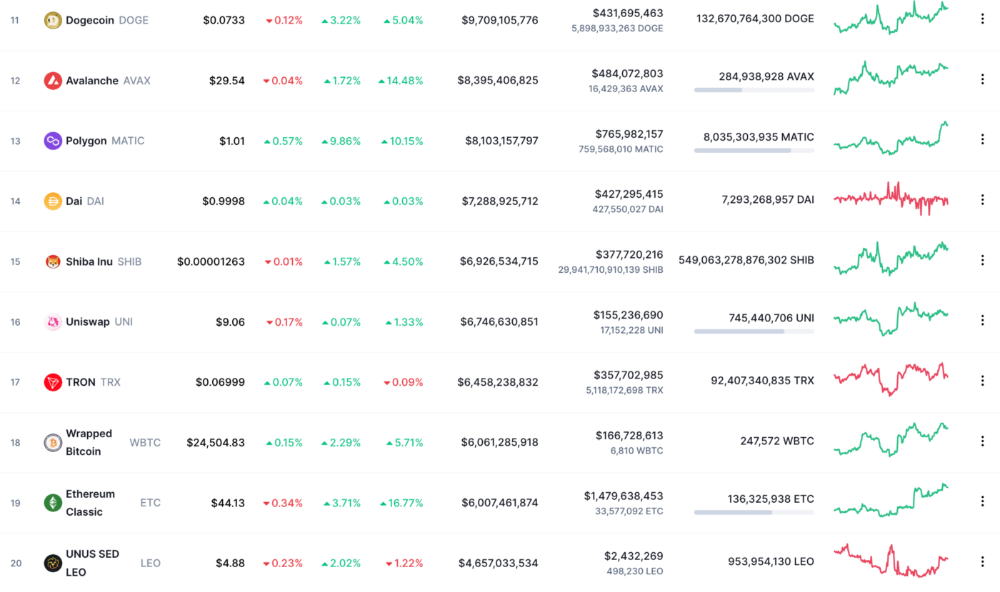

More on Web3 & Crypto

Tim Denning
3 years ago
The Dogecoin millionaire mysteriously disappeared.
The American who bought a meme cryptocurrency.
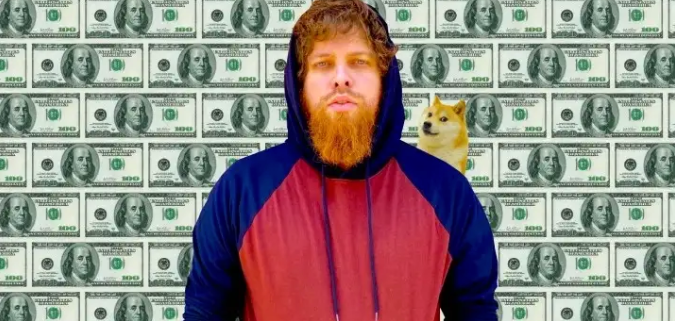
Cryptocurrency is the financial underground.
I love it. But there’s one thing I hate: scams. Over the last few years the Dogecoin cryptocurrency saw massive gains.
Glauber Contessoto overreacted. He shared his rags-to-riches cryptocurrency with the media.
He's only wealthy on paper. No longer Dogecoin millionaire.
Here's what he's doing now. It'll make you rethink cryptocurrency investing.
Strange beginnings
Glauber once had a $36,000-a-year job.
He grew up poor and wanted to make his mother proud. Tesla was his first investment. He bought GameStop stock after Reddit boosted it.
He bought whatever was hot.
He was a young investor. Memes, not research, influenced his decisions.
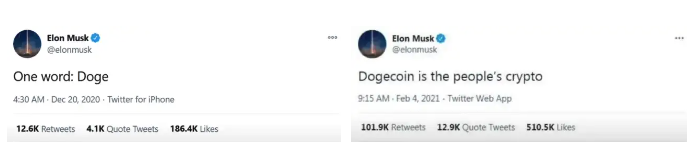
Elon Musk (aka Papa Elon) began tweeting about Dogecoin.
Doge is a 2013 cryptocurrency. One founder is Australian. He insists it's funny.
He was shocked anyone bought it LOL.
Doge is a Shiba Inu-themed meme. Now whenever I see a Shiba Inu, I think of Doge.
Elon helped drive up the price of Doge by talking about it in 2020 and 2021 (don't take investment advice from Elon; he's joking and gaslighting you).
Glauber caved. He invested everything in Doge. He borrowed from family and friends. He maxed out his credit card to buy more Doge. Yuck.
Internet dubbed him a genius. Slumdog millionaire and The Dogefather were nicknames. Elon pumped Doge on social media.
Good times.
From $180,000 to $1,000,000+
TikTok skyrocketed Doge's price.
Reddit fueled up. Influencers recommended buying Doge because of its popularity. Glauber's motto:
Scared money doesn't earn.
Glauber was no broke ass anymore.
His $180,000 Dogecoin investment became $1M. He championed investing. He quit his dumb job like a rebellious millennial.
A puppy dog meme captivated the internet.
Rise and fall
Whenever I invest in anything I ask myself “what utility does this have?”
Dogecoin is useless.
You buy it for the cute puppy face and hope others will too, driving up the price. All cryptocurrencies fell in 2021's second half.
Central banks raised interest rates, and inflation became a pain.
Dogecoin fell more than others. 90% decline.
Glauber’s Dogecoin is now worth $323K. Still no sales. His dog god is unshakeable. Confidence rocks. Dogecoin millionaire recently said...
“I should have sold some.”
Yes, sir.
He now avoids speculative cryptocurrencies like Dogecoin and focuses on Bitcoin and Ethereum.
I've long said this. Starbucks is building on Ethereum.
It's useful. Useful. Developers use Ethereum daily. Investing makes you wiser over time, like the Dogecoin millionaire.
When risk b*tch slaps you, humility follows, as it did for me when I lost money.
You have to lose money to make money. Few understand.
Dogecoin's omissions
You might be thinking Dogecoin is crap.
I'll take a contrarian stance. Dogecoin does nothing, but it has a strong community. Dogecoin dominates internet memes.
It's silly.
Not quite. The message of crypto that many people forget is that it’s a change in business model.
Businesses create products and services, then advertise to find customers. Crypto Web3 works backwards. A company builds a fanbase but sells them nothing.
Once the community reaches MVC (minimum viable community), a business can be formed.
Community members are relational versus transactional. They're invested in a cause and care about it (typically ownership in the business via crypto).
In this new world, Dogecoin has the most important feature.
Summary
While Dogecoin does have a community I still dislike it.
It's all shady. Anything Elon Musk recommends is a bad investment (except SpaceX & Tesla are great companies).
Dogecoin Millionaire has wised up and isn't YOLOing into more dog memes.
Don't follow the crowd or the hype. Investing is a long-term sport based on fundamentals and research.
Since Ethereum's inception, I've spent 10,000 hours researching.
Dogecoin will be the foundation of something new, like Pets.com at the start of the dot-com revolution. But I doubt Doge will boom.
Be safe!

William Brucee
3 years ago
This person is probably Satoshi Nakamoto.
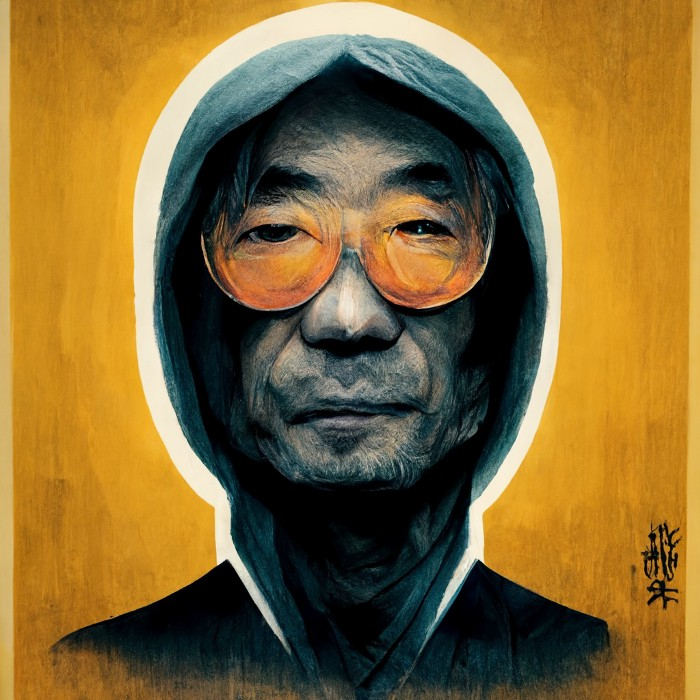
Who founded bitcoin is the biggest mystery in technology today, not how it works.
On October 31, 2008, Satoshi Nakamoto posted a whitepaper to a cryptography email list. Still confused by the mastermind who changed monetary history.
Journalists and bloggers have tried in vain to uncover bitcoin's creator. Some candidates self-nominated. We're still looking for the mystery's perpetrator because none of them have provided proof.
One person. I'm confident he invented bitcoin. Let's assess Satoshi Nakamoto before I reveal my pick. Or what he wants us to know.
Satoshi's P2P Foundation biography says he was born in 1975. He doesn't sound or look Japanese. First, he wrote the whitepaper and subsequent articles in flawless English. His sleeping habits are unusual for a Japanese person.
Stefan Thomas, a Bitcoin Forum member, displayed Satoshi's posting timestamps. Satoshi Nakamoto didn't publish between 2 and 8 p.m., Japanese time. Satoshi's identity may not be real.
Why would he disguise himself?
There is a legitimate explanation for this
Phil Zimmermann created PGP to give dissidents an open channel of communication, like Pretty Good Privacy. US government seized this technology after realizing its potential. Police investigate PGP and Zimmermann.
This technology let only two people speak privately. Bitcoin technology makes it possible to send money for free without a bank or other intermediary, removing it from government control.
How much do we know about the person who invented bitcoin?
Here's what we know about Satoshi Nakamoto now that I've covered my doubts about his personality.
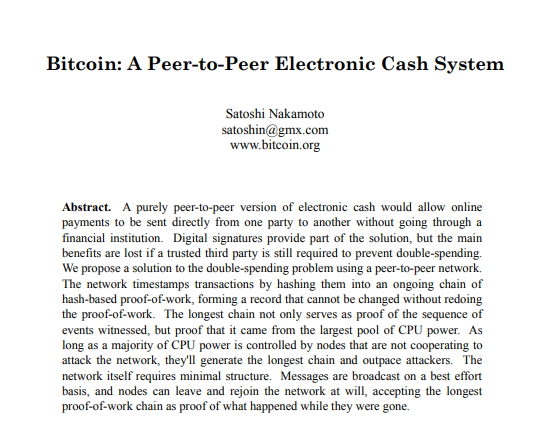
Satoshi Nakamoto first appeared with a whitepaper on metzdowd.com. On Halloween 2008, he presented a nine-page paper on a new peer-to-peer electronic monetary system.
Using the nickname satoshi, he created the bitcointalk forum. He kept developing bitcoin and created bitcoin.org. Satoshi mined the genesis block on January 3, 2009.
Satoshi Nakamoto worked with programmers in 2010 to change bitcoin's protocol. He engaged with the bitcoin community. Then he gave Gavin Andresen the keys and codes and transferred community domains. By 2010, he'd abandoned the project.
The bitcoin creator posted his goodbye on April 23, 2011. Mike Hearn asked Satoshi if he planned to rejoin the group.
“I’ve moved on to other things. It’s in good hands with Gavin and everyone.”
Nakamoto Satoshi
The man who broke the banking system vanished. Why?
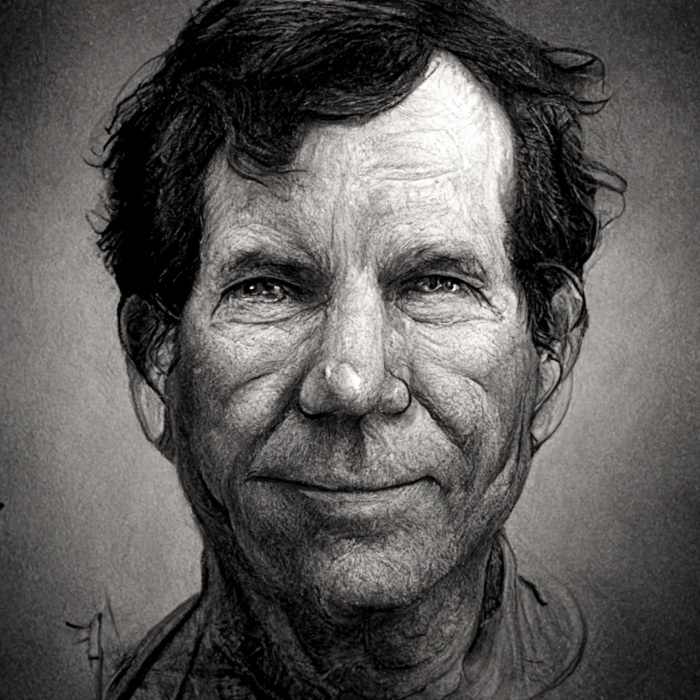
Satoshi's wallets held 1,000,000 BTC. In December 2017, when the price peaked, he had over US$19 billion. Nakamoto had the 44th-highest net worth then. He's never cashed a bitcoin.
This data suggests something happened to bitcoin's creator. I think Hal Finney is Satoshi Nakamoto .
Hal Finney had ALS and died in 2014. I suppose he created the future of money, then he died, leaving us with only rumors about his identity.
Hal Finney, who was he?
Hal Finney graduated from Caltech in 1979. Student peers voted him the smartest. He took a doctoral-level gravitational field theory course as a freshman. Finney's intelligence meets the first requirement for becoming Satoshi Nakamoto.
Students remember Finney holding an Ayn Rand book. If he'd read this, he may have developed libertarian views.
His beliefs led him to a small group of freethinking programmers. In the 1990s, he joined Cypherpunks. This action promoted the use of strong cryptography and privacy-enhancing technologies for social and political change. Finney helped them achieve a crypto-anarchist perspective as self-proclaimed privacy defenders.
Zimmermann knew Finney well.
Hal replied to a Cypherpunk message about Phil Zimmermann and PGP. He contacted Phil and became PGP Corporation's first member, retiring in 2011. Satoshi Nakamoto quit bitcoin in 2011.
Finney improved the new PGP protocol, but he had to do so secretly. He knew about Phil's PGP issues. I understand why he wanted to hide his identity while creating bitcoin.
Why did he pretend to be from Japan?
His envisioned persona was spot-on. He resided near scientist Dorian Prentice Satoshi Nakamoto. Finney could've assumed Nakamoto's identity to hide his. Temple City has 36,000 people, so what are the chances they both lived there? A cryptographic genius with the same name as Bitcoin's creator: coincidence?
Things went differently, I think.
I think Hal Finney sent himself Satoshis messages. I know it's odd. If you want to conceal your involvement, do as follows. He faked messages and transferred the first bitcoins to himself to test the transaction mechanism, so he never returned their money.
Hal Finney created the first reusable proof-of-work system. The bitcoin protocol. In the 1990s, Finney was intrigued by digital money. He invented CRypto cASH in 1993.
Legacy
Hal Finney's contributions should not be forgotten. Even if I'm wrong and he's not Satoshi Nakamoto, we shouldn't forget his bitcoin contribution. He helped us achieve a better future.

Onchain Wizard
4 years ago
Three Arrows Capital & Celsius Updates
I read 1k+ page 3AC liquidation documentation so you don't have to. Also sharing revised Celsius recovery plans.
3AC's liquidation documents:
Someone disclosed 3AC liquidation records in the BVI courts recently. I'll discuss the leak's timeline and other highlights.
Three Arrows Capital began trading traditional currencies in emerging markets in 2012. They switched to equities and crypto, then purely crypto in 2018.
By 2020, the firm had $703mm in net assets and $1.8bn in loans (these guys really like debt).
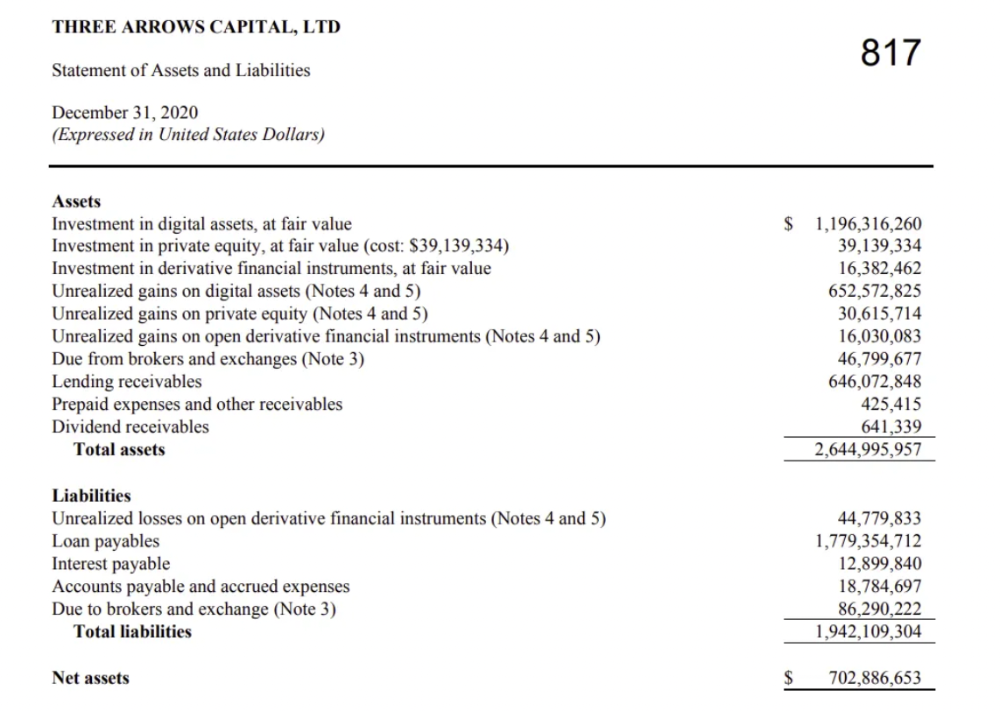
The firm's net assets under control reached $3bn in April 2022, according to the filings. 3AC had $600mm of LUNA/UST exposure before May 9th 2022, which put them over.
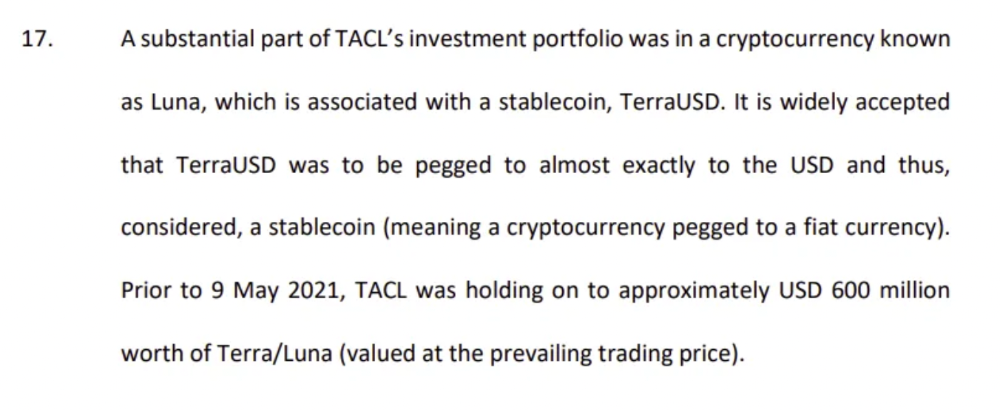
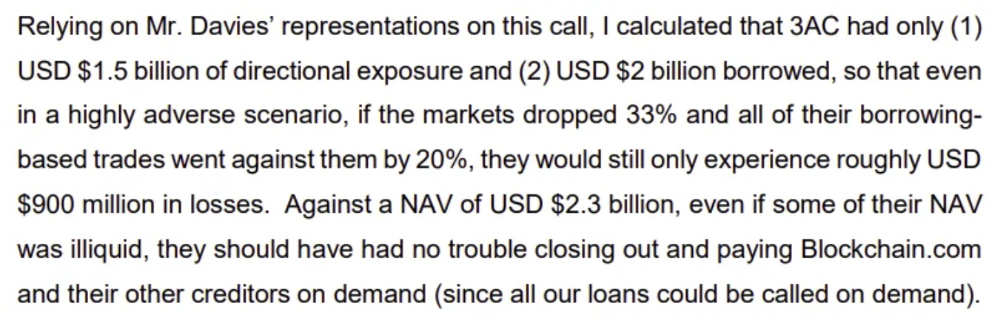
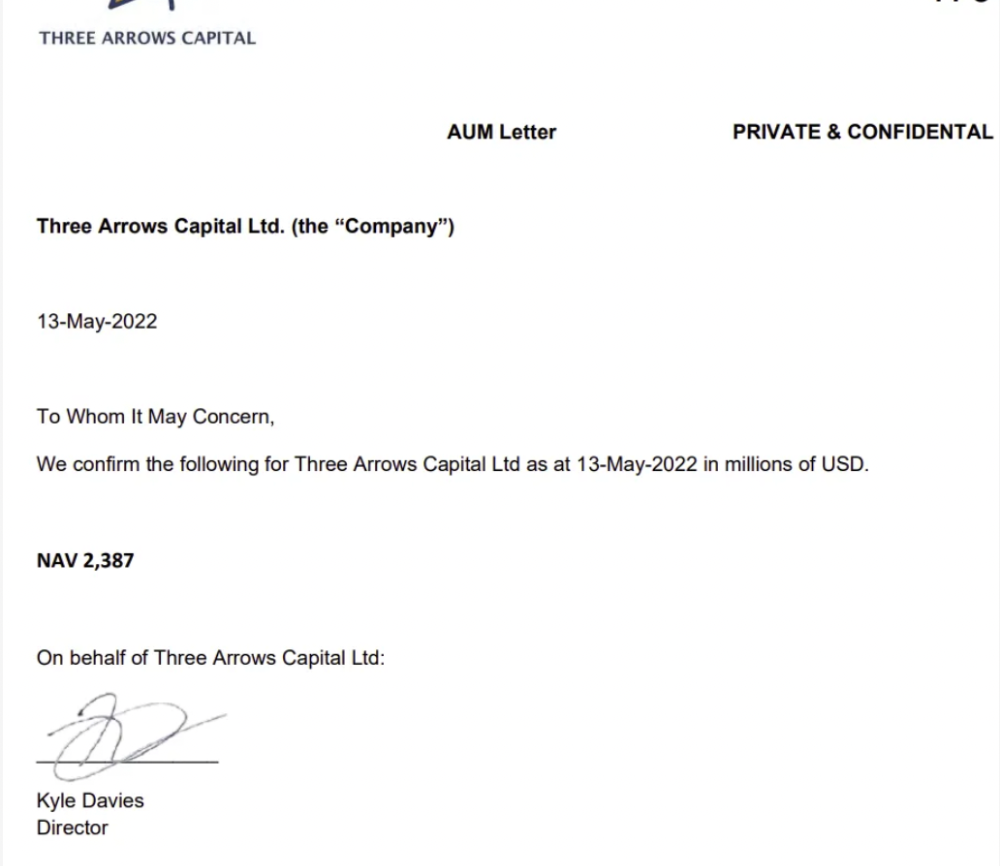
LUNA and UST go to zero quickly (I wrote about the mechanics of the blowup here). Kyle Davies, 3AC co-founder, told Blockchain.com on May 13 that they have $2.4bn in assets and $2.3bn NAV vs. $2bn in borrowings. As BTC and ETH plunged 33% and 50%, the company became insolvent by mid-2022.
3AC sent $32mm to Tai Ping Shen, a Cayman Islands business owned by Su Zhu and Davies' partner, Kelly Kaili Chen (who knows what is going on here).
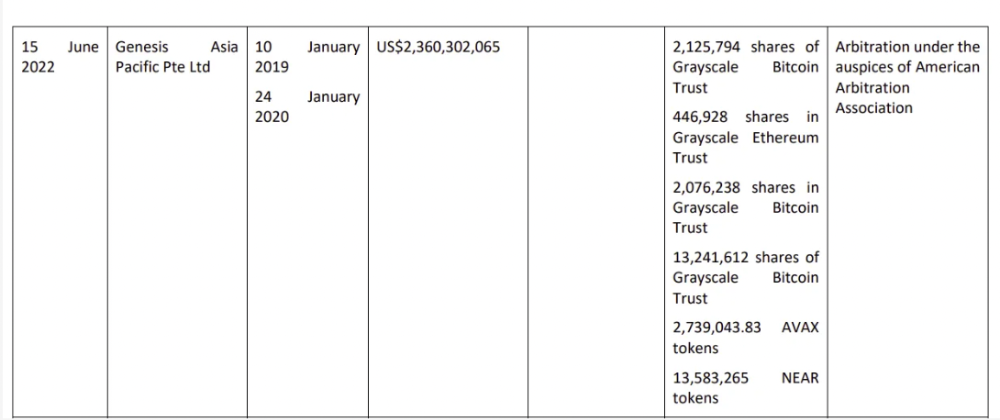
3AC had borrowed over $3.5bn in notional principle, with Genesis ($2.4bn) and Voyager ($650mm) having the most exposure.
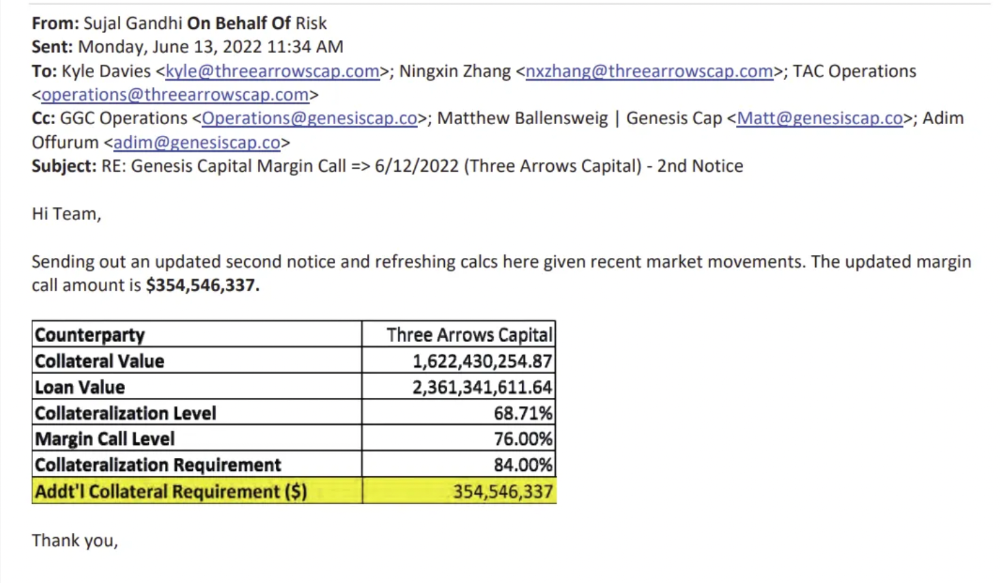
Genesis demanded $355mm in further collateral in June.
Deribit (another 3AC investment) called for $80 million in mid-June.
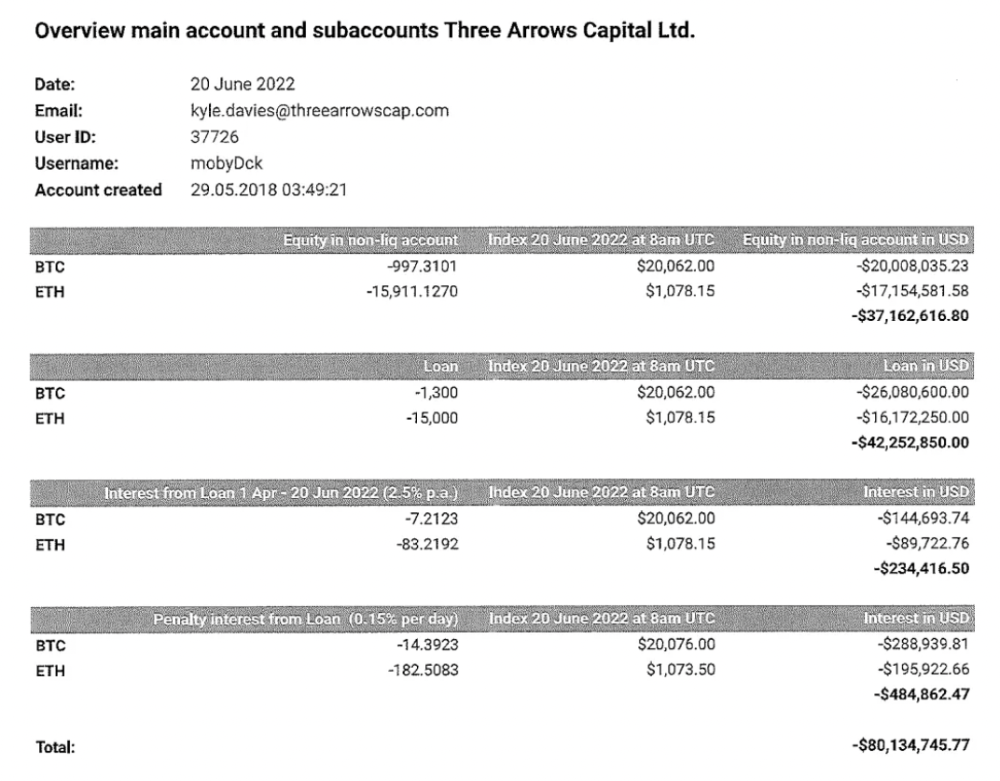
Even in mid-June, the corporation was trying to borrow more money to stay afloat. They approached Genesis for another $125mm loan (to pay another lender) and HODLnauts for BTC & ETH loans.
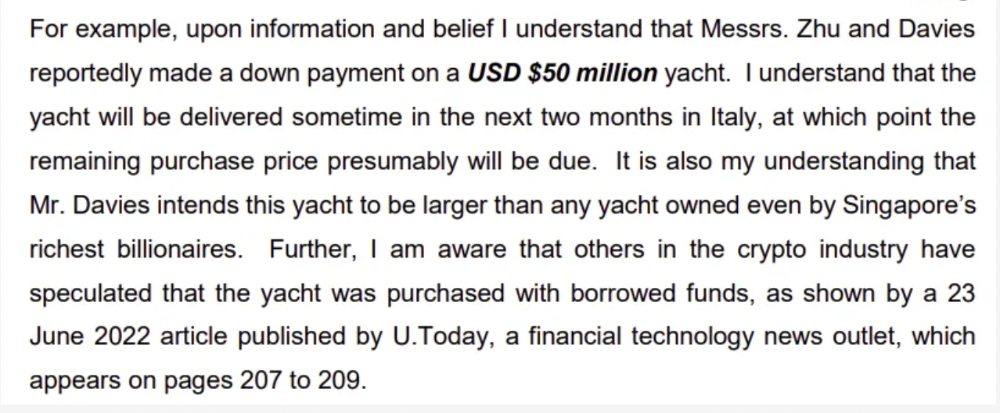
Pretty crazy. 3AC founders used borrowed money to buy a $50 million boat, according to the leak.
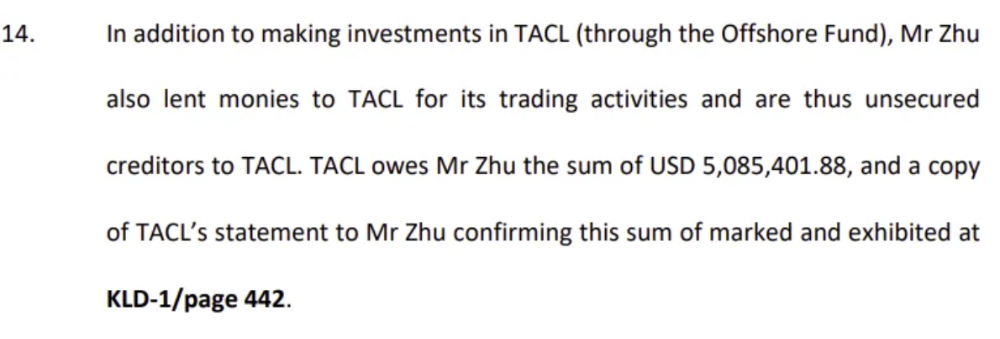
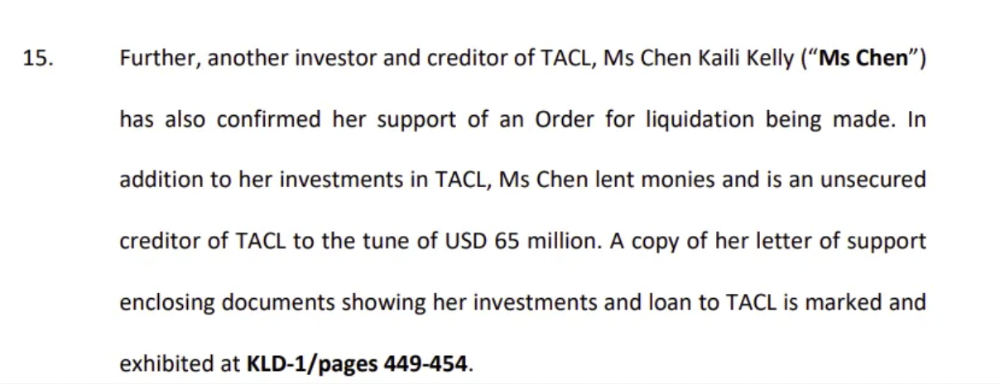
Su requesting for $5m + Chen Kaili Kelly asserting they loaned $65m unsecured to 3AC are identified as creditors.
Celsius:
This bankruptcy presentation shows the Celsius breakdown from March to July 14, 2022. From $22bn to $4bn, crypto assets plummeted from $14.6bn to $1.8bn (ouch). $16.5bn in user liabilities dropped to $4.72bn.
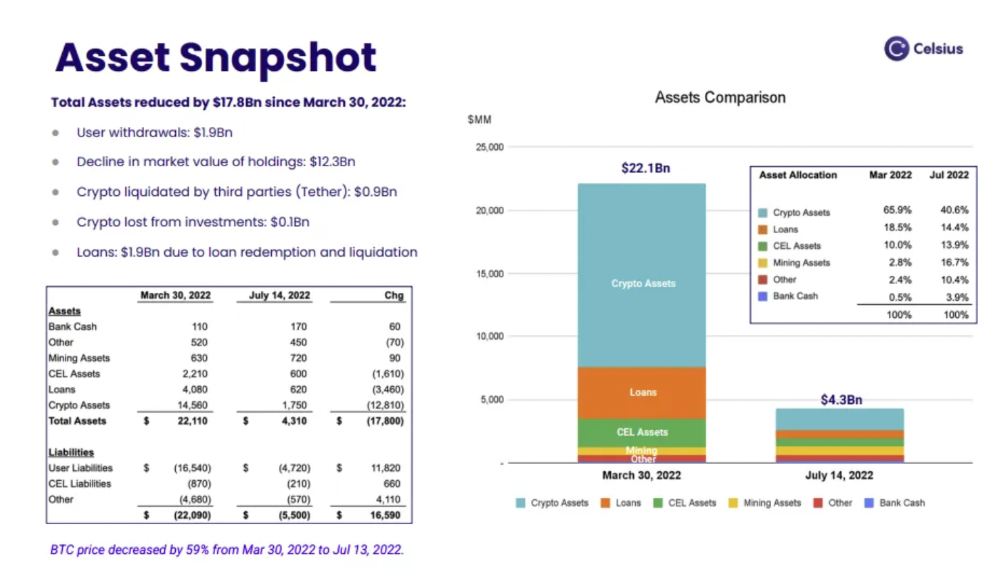
In my recent post, I examined if "forced selling" is over, with Celsius' crypto assets being a major overhang. In this presentation, it looks that Chapter 11 will provide clients the opportunity to accept cash at a discount or remain long crypto. Provided that a fresh source of money is unlikely to enter the Celsius situation, cash at a discount or crypto given to customers will likely remain a near-term market risk - cash at a discount will likely come from selling crypto assets, while customers who receive crypto could sell at any time. I'll share any Celsius updates I find.
Conclusion
Only Celsius and the Mt Gox BTC unlock remain as forced selling catalysts. While everything went through a "relief" pump, with ETH up 75% from the bottom and numerous alts multiples higher, there are still macro dangers to equities + risk assets. There's a lot of wealth waiting to be deployed in crypto ($153bn in stables), but fund managers are risk apprehensive (lower than 2008 levels).
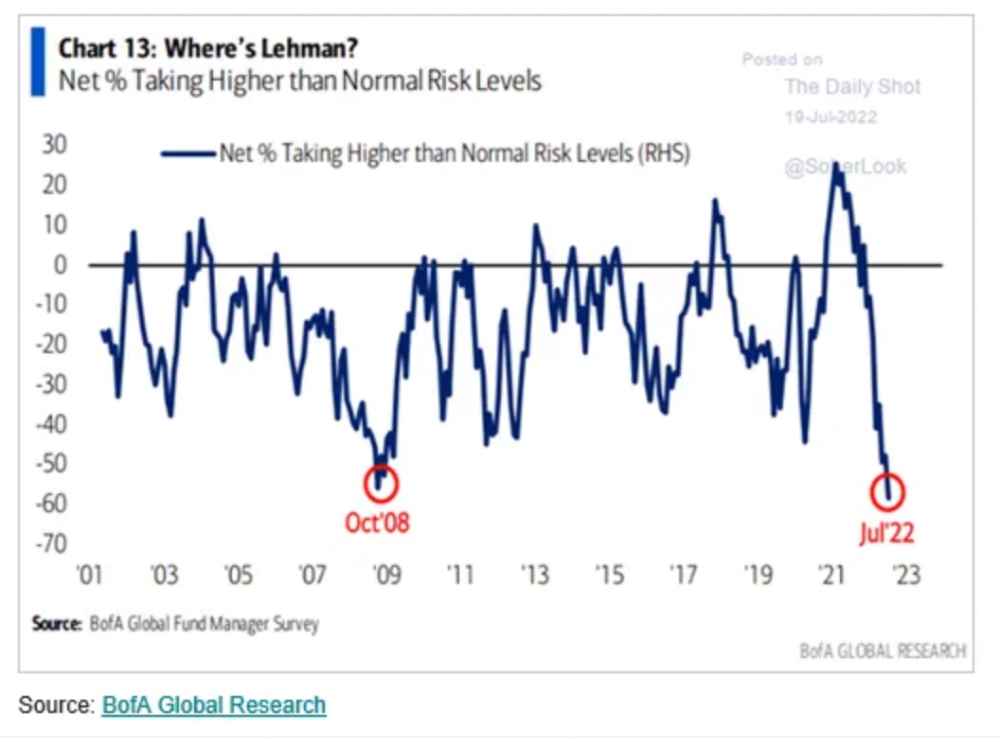
We're hopefully over crypto's "bottom," with peak anxiety and forced selling behind us, but we may chop around.
To see the full article, click here.
You might also like

Jerry Keszka
4 years ago
10 Crazy Useful Free Websites No One Told You About But You Needed
The internet is a massive information resource. With so much stuff, it's easy to forget about useful websites. Here are five essential websites you may not have known about.

1. Companies.tools
Companies.tools are what successful startups employ. This website offers a curated selection of design, research, coding, support, and feedback resources. Ct has the latest app development platform and greatest client feedback method.
2. Excel Formula Bot
Excel Formula Bot can help if you forget a formula. Formula Bot uses AI to convert text instructions into Excel formulas, so you don't have to remember them.
Just tell the Bot what to do, and it will do it. Excel Formula Bot can calculate sales tax and vacation days. When you're stuck, let the Bot help.
3.TypeLit
TypeLit helps you improve your typing abilities while reading great literature.
TypeLit.io lets you type any book or dozens of preset classics. TypeLit provides real-time feedback on accuracy and speed.
Goals and progress can be tracked. Why not improve your typing and learn great literature with TypeLit?
4. Calm Schedule
Finding a meeting time that works for everyone is difficult. Personal and business calendars might be difficult to coordinate.
Synchronize your two calendars to save time and avoid problems. You may avoid searching through many calendars for conflicts and keep your personal information secret. Having one source of truth for personal and work occasions will help you never miss another appointment.
https://calmcalendar.com/
5. myNoise
myNoise makes the outside world quieter. myNoise is the right noise for a noisy office or busy street.
If you can't locate the right noise, make it. MyNoise unlocks the world. Shut out distractions. Thank your ears.
6. Synthesia
Professional videos require directors, filmmakers, editors, and animators. Now, thanks to AI, you can generate high-quality videos without video editing experience.
AI avatars are crucial. You can design a personalized avatar using a web-based software like synthesia.io. Our avatars can lip-sync in over 60 languages, so you can make worldwide videos. There's an AI avatar for every video goal.
Not free. Amazing service, though.
7. Cleaning-up-images
Have you shot a wonderful photo just to notice something in the background? You may have a beautiful headshot but wish to erase an imperfection.
Cleanup.pictures removes undesirable objects from photos. Our algorithms will eliminate the selected object.
Cleanup.pictures can help you obtain the ideal shot every time. Next time you take images, let Cleanup.pictures fix any flaws.
8. PDF24 Tools
Editing a PDF can be a pain. Most of us don't know Adobe Acrobat's functionalities. Why buy something you'll rarely use? Better options exist.
PDF24 is an online PDF editor that's free and subscription-free. Rotate, merge, split, compress, and convert PDFs in your browser. PDF24 makes document signing easy.
Upload your document, sign it (or generate a digital signature), and download it. It's easy and free. PDF24 is a free alternative to pricey PDF editing software.
9. Class Central
Finding online classes is much easier. Class Central has classes from Harvard, Stanford, Coursera, Udemy, and Google, Amazon, etc. in one spot.
Whether you want to acquire a new skill or increase your knowledge, you'll find something. New courses bring variety.
10. Rome2rio
Foreign travel offers countless transport alternatives. How do you get from A to B? It’s easy!
Rome2rio will show you the best method to get there, including which mode of transport is ideal.
Plane
Car
Train
Bus
Ferry
Driving
Shared bikes
Walking
Do you know any free, useful websites?

Yuga Labs
4 years ago
Yuga Labs (BAYC and MAYC) buys CryptoPunks and Meebits and gives them commercial rights
Yuga has acquired the CryptoPunks and Meebits NFT IP from Larva Labs. These include 423 CryptoPunks and 1711 Meebits.
We set out to create in the NFT space because we admired CryptoPunks and the founders' visionary work. A lot of their work influenced how we built BAYC and NFTs. We're proud to lead CryptoPunks and Meebits into the future as part of our broader ecosystem.
"Yuga Labs invented the modern profile picture project and are the best in the world at operating these projects. They are ideal CrytoPunk and Meebit stewards. We are confident that in their hands, these projects will thrive in the emerging decentralized web.”
–The founders of Larva Labs, CryptoPunks, and Meebits
This deal grew out of discussions between our partner Guy Oseary and the Larva Labs founders. One call led to another, and now we're here. This does not mean Matt and John will join Yuga. They'll keep running Larva Labs and creating awesome projects that help shape the future of web3.
Next steps
Here's what we plan to do with CryptoPunks and Meebits now that we own the IP. Owners of CryptoPunks and Meebits will soon receive commercial rights equal to those of BAYC and MAYC holders. Our legal teams are working on new terms and conditions for both collections, which we hope to share with the community soon. We expect a wide range of third-party developers and community creators to incorporate CryptoPunks and Meebits into their web3 projects. We'll build the brand alongside them.
We don't intend to cram these NFT collections into the BAYC club model. We see BAYC as the hub of the Yuga universe, and CryptoPunks as a historical collection. We will work to improve the CryptoPunks and Meebits collections as good stewards. We're not in a hurry. We'll consult the community before deciding what to do next.
For us, NFTs are about culture. We're deeply invested in the BAYC community, and it's inspiring to see them grow, collaborate, and innovate. We're excited to see what CryptoPunks and Meebits do with IP rights. Our goal has always been to create a community-owned brand that goes beyond NFTs, and now we can include CryptoPunks and Meebits.

Sam Hickmann
4 years ago
The Jordan 6 Rings Reintroduce Classic Bulls
The Jordan 6 Rings return in Bulls colors, a deviation from previous releases. The signature red color is used on the midsole and heel, as well as the chenille patch and pull tab. The rest of the latter fixture is black, matching the outsole and adjacent Jumpman logos. Finally, white completes the look, from the leather mudguard to the lace unit. Here's a closer look at the Jordan 6 Rings. Sizes should be available soon on Nike.com and select retailers. Also, official photos of the Air Jordan 1 Denim have surfaced.
Jordan 6 Rings
Release Date: 2022
Color: N/A
Mens: $130
Style Code: 322992-126