


More on Leadership

William Anderson
4 years ago
When My Remote Leadership Skills Took Off
4 Ways To Manage Remote Teams & Employees
The wheels hit the ground as I landed in Rochester.
Our six-person satellite office was now part of my team.
Their manager only reported to me the day before, but I had my ticket booked ahead of time.
I had managed remote employees before but this was different. Engineers dialed into headquarters for every meeting.
So when I learned about the org chart change, I knew a strong first impression would set the tone for everything else.
I was either their boss, or their boss's boss, and I needed them to know I was committed.
Managing a fleet of satellite freelancers or multiple offices requires treating others as more than just a face behind a screen.
You must comprehend each remote team member's perspective and daily interactions.
The good news is that you can start using these techniques right now to better understand and elevate virtual team members.
1. Make Visits To Other Offices
If budgeted, visit and work from offices where teams and employees report to you. Only by living alongside them can one truly comprehend their problems with communication and other aspects of modern life.
2. Have Others Come to You
• Having remote, distributed, or satellite employees and teams visit headquarters every quarter or semi-quarterly allows the main office culture to rub off on them.
When remote team members visit, more people get to meet them, which builds empathy.
If you can't afford to fly everyone, at least bring remote managers or leaders. Hopefully they can resurrect some culture.
3. Weekly Work From Home
No home office policy?
Make one.
WFH is a team-building, problem-solving, and office-viewing opportunity.
For dial-in meetings, I started working from home on occasion.
It also taught me which teams “forget” or “skip” calls.
As a remote team member, you experience all the issues first hand.
This isn't as accurate for understanding teams in other offices, but it can be done at any time.
4. Increase Contact Even If It’s Just To Chat
Don't underestimate office banter.
Sometimes it's about bonding and trust, other times it's about business.
If you get all this information in real-time, please forward it.
Even if nothing critical is happening, call remote team members to check in and chat.
I guarantee that building relationships and rapport will increase both their job satisfaction and yours.

The woman
4 years ago
Why Google's Hiring Process is Brilliant for Top Tech Talent
Without a degree and experience, you can get a high-paying tech job.

Most organizations follow this hiring rule: you chat with HR, interview with your future boss and other senior managers, and they make the final hiring choice.
If you've ever applied for a job, you know how arduous it can be. A newly snapped photo and a glossy resume template can wear you out. Applying to Google can change this experience.
According to an Universum report, Google is one of the world's most coveted employers. It's not simply the search giant's name and reputation that attract candidates, but its role requirements or lack thereof.
Candidates no longer need a beautiful resume, cover letter, Ivy League laurels, or years of direct experience. The company requires no degree or experience.
Elon Musk started it. He employed the two-hands test to uncover talented non-graduates. The billionaire eliminated the requirement for experience.
Google is deconstructing traditional employment with programs like the Google Project Management Degree, a free online and self-paced professional credential course.
Google's hiring is interesting. After its certification course, applicants can work in project management. Instead of academic degrees and experience, the company analyzes coursework.
Google finds the best project managers and technical staff in exchange. Google uses three strategies to find top talent.
Chase down the innovators
Google eliminates restrictions like education, experience, and others to find the polar bear amid the snowfall. Google's free project management education makes project manager responsibilities accessible to everyone.
Many jobs don't require a degree. Overlooking individuals without a degree can make it difficult to locate a candidate who can provide value to a firm.
Firsthand knowledge follows the same rule. A lack of past information might be an employer's benefit. This is true for creative teams or businesses that prefer to innovate.
Or when corporations conduct differently from the competition. No-experience candidates can offer fresh perspectives. Fast Company reports that people with no sales experience beat those with 10 to 15 years of experience.
Give the aptitude test first priority.
Google wants the best candidates. Google wouldn't be able to receive more applications if it couldn't screen them for fit. Its well-organized online training program can be utilized as a portfolio.
Google learns a lot about an applicant through completed assignments. It reveals their ability, leadership style, communication capability, etc. The course mimics the job to assess candidates' suitability.
Basic screening questions might provide information to compare candidates. Any size small business can use screening questions and test projects to evaluate prospective employees.
Effective training for employees
Businesses must train employees regardless of their hiring purpose. Formal education and prior experience don't guarantee success. Maintaining your employees' professional knowledge gaps is key to their productivity and happiness. Top-notch training can do that. Learning and development are key to employee engagement, says Bob Nelson, author of 1,001 Ways to Engage Employees.
Google's online certification program isn't available everywhere. Improving the recruiting process means emphasizing aptitude over experience and a degree. Instead of employing new personnel and having them work the way their former firm trained them, train them how you want them to function.
If you want to know more about Google’s recruiting process, we recommend you watch the movie “Internship.”

Aniket
4 years ago
Yahoo could have purchased Google for $1 billion
Let's see this once-dominant IT corporation crumble.

What's the capital of Kazakhstan? If you don't know the answer, you can probably find it by Googling. Google Search returned results for Nur-Sultan in 0.66 seconds.
Google is the best search engine I've ever used. Did you know another search engine ruled the Internet? I'm sure you guessed Yahoo!
Google's friendly UI and wide selection of services make it my top choice. Let's explore Yahoo's decline.
Yahoo!
YAHOO stands for Yet Another Hierarchically Organized Oracle. Jerry Yang and David Filo established Yahoo.
Yahoo is primarily a search engine and email provider. It offers News and an advertising platform. It was a popular website in 1995 that let people search the Internet directly. Yahoo began offering free email in 1997 by acquiring RocketMail.
According to a study, Yahoo used Google Search Engine technology until 2000 and then developed its own in 2004.
Yahoo! rejected buying Google for $1 billion
Larry Page and Sergey Brin, Google's founders, approached Yahoo in 1998 to sell Google for $1 billion so they could focus on their studies. Yahoo denied the offer, thinking it was overvalued at the time.
Yahoo realized its error and offered Google $3 billion in 2002, but Google demanded $5 billion since it was more valuable. Yahoo thought $5 billion was overpriced for the existing market.
In 2022, Google is worth $1.56 Trillion.
What happened to Yahoo!
Yahoo refused to buy Google, and Google's valuation rose, making a purchase unfeasible.
Yahoo started losing users when Google launched Gmail. Google's UI was far cleaner than Yahoo's.
Yahoo offered $1 billion to buy Facebook in July 2006, but Zuckerberg and the board sought $1.1 billion. Yahoo rejected, and Facebook's valuation rose, making it difficult to buy.
Yahoo was losing users daily while Google and Facebook gained many. Google and Facebook's popularity soared. Yahoo lost value daily.
Microsoft offered $45 billion to buy Yahoo in February 2008, but Yahoo declined. Microsoft increased its bid to $47 billion after Yahoo said it was too low, but Yahoo rejected it. Then Microsoft rejected Yahoo’s 10% bid increase in May 2008.
In 2015, Verizon bought Yahoo for $4.5 billion, and Apollo Global Management bought 90% of Yahoo's shares for $5 billion in May 2021. Verizon kept 10%.
Yahoo's opportunity to acquire Google and Facebook could have been a turning moment. It declined Microsoft's $45 billion deal in 2008 and was sold to Verizon for $4.5 billion in 2015. Poor decisions and lack of vision caused its downfall. Yahoo's aim wasn't obvious and it didn't stick to a single domain.
Hence, a corporation needs a clear vision and a leader who can see its future.
Liked this article? Join my tech and programming newsletter here.
You might also like

Nick Nolan
4 years ago
How to Make $1,037,100 in 4 Months with This Weird Website
One great idea might make you rich.
Imagine having a million-dollar concept in college that made a million.
2005 precisely.
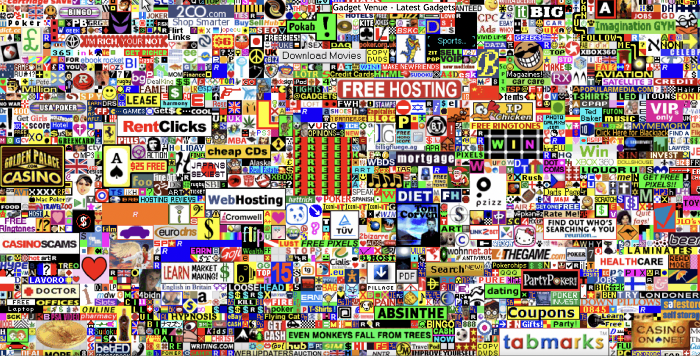
Alex Tew, 21, from Wiltshire, England, created The Million Dollar Homepage in August 2005. The idea is basic but beyond the ordinary, which is why it worked.
Alex built a 1,000,000-pixel webpage.
Each website pixel would cost $1. Since pixels are hard to discern, he sold 10x10 squares for $100.
He'd make a million if all the spots sold.
He may have thought about NFTs and the Metaverse decades ago.
MillionDollarHomepage.com launched in 2005.
Businesses and individuals could buy a website spot and add their logo, website link, and tagline. You bought an ad, but nobody visited the website.
If a few thousand people visited the website, it could drive traffic to your business's site.
Alex promised buyers the website would be up for 5 years, so it was a safe bet.
Alex's friend with a music website was the first to buy real estate on the site. Within two weeks, 4,700 pixels sold, and a tracker showed how many were sold and available.

Word-of-mouth marketing got the press's attention quickly. Everyone loves reading about new ways to make money, so it was a good news story.
By September, over 250,000 pixels had been sold, according to a BBC press release.
Alex and the website gained more media and public attention, so traffic skyrocketed. Two months after the site launched, 1,400 customers bought more than 500,000 pixels.
Businesses bought online real estate. They heard thousands visited the site, so they could get attention cheaply.
Unless you bought a few squares, I'm not sure how many people would notice your ad or click your link.
A sponge website owner emailed Alex:
“We tried Million Dollar Homepage because we were impressed at the level of ingenuity and the sheer simplicity of it. If we’re honest, we didn’t expect too much from it. Now, as a direct result, we are pitching for £18,000 GBP worth of new clients and have seen our site traffic increase over a hundred-fold. We’re even going to have to upgrade our hosting facility! It’s been exceptional.”
Web.archive.org screenshots show how the website changed.
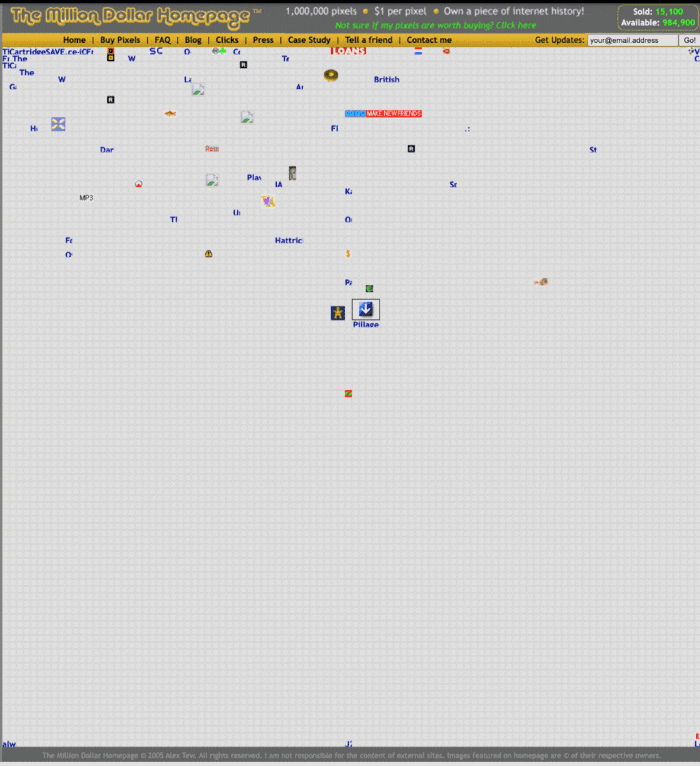
“The idea is to create something of an internet time capsule: a homepage that is unique and permanent. Everything on the internet keeps changing so fast, it will be nice to have something that stays solid and permanent for many years. You can be a part of that!” Alex Tew, 2005
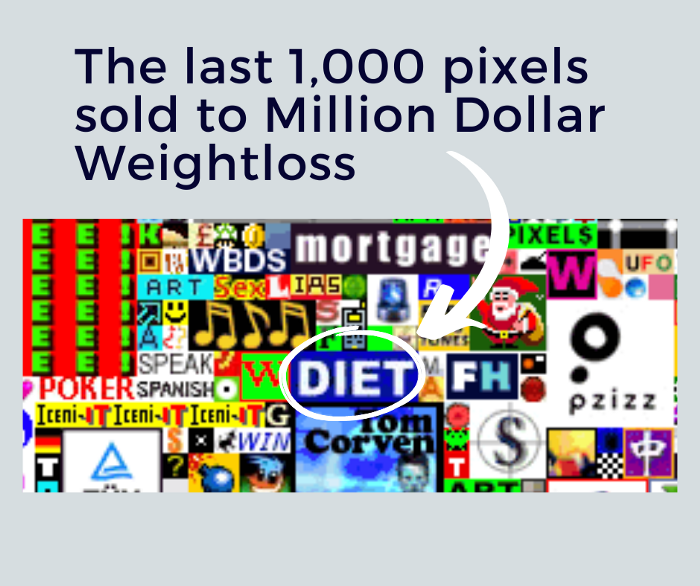
The last 1,000 pixels were sold on January 1, 2006.
By then, the homepage had hundreds of thousands of monthly visitors. Alex put the last space on eBay due to high demand.
MillionDollarWeightLoss.com won the last pixels for $38,100, bringing revenue to $1,037,100 in 4 months.
Many have tried to replicate this website's success. They've all failed.
This idea only worked because no one had seen this website before.
This winner won't be repeated, but it should inspire you to try something new and creative.
Still popular, you could buy one of the linked domains. You can't buy pixels, but you can buy an expired domain.
One link I clicked costs $59,888.

You'd own a piece of internet history if you spent that much on a domain.
Someone bought stablesgallery.co.uk after the domain expired and restored it.
Many of the linked websites have expired or been redirected, but some still link to the original. I couldn't find sponge's website. Can you?
This is a great example of how a simple creative idea can go viral.
Comment on this amazing success story.

Modern Eremite
4 years ago
The complete, easy-to-understand guide to bitcoin
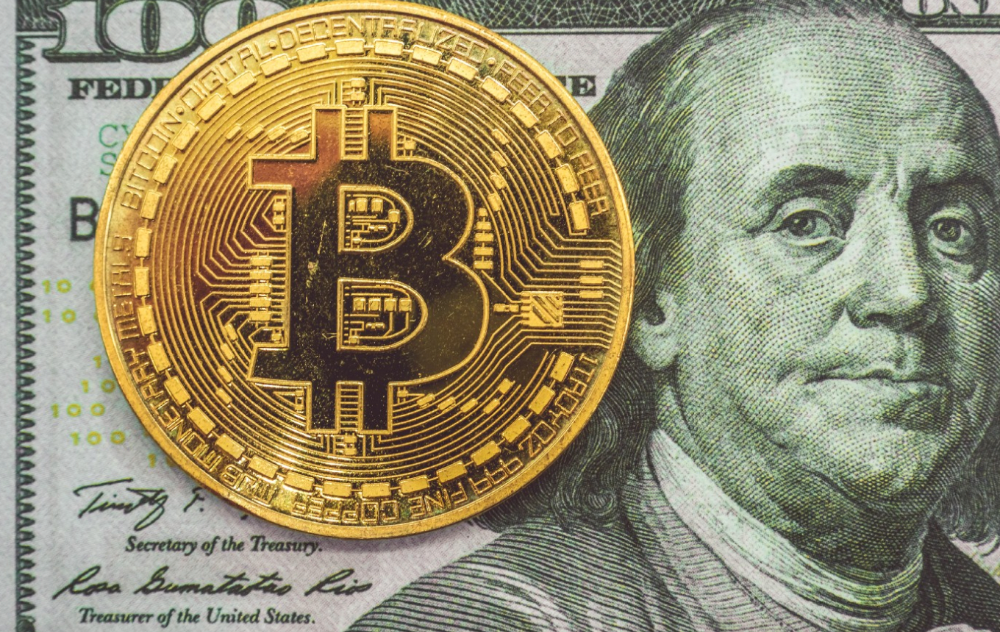
Introduction
Markets rely on knowledge.
The internet provided practically endless knowledge and wisdom. Humanity has never seen such leverage. Technology's progress drives us to adapt to a changing world, changing our routines and behaviors.
In a digital age, people may struggle to live in the analogue world of their upbringing. Can those who can't adapt change their lives? I won't answer. We should teach those who are willing to learn, nevertheless. Unravel the modern world's riddles and give them wisdom.
Adapt or die . Accept the future or remain behind.
This essay will help you comprehend Bitcoin better than most market participants and the general public. Let's dig into Bitcoin.
Join me.

Ascension
Bitcoin.org was registered in August 2008. Bitcoin whitepaper was published on 31 October 2008. The document intrigued and motivated people around the world, including technical engineers and sovereignty seekers. Since then, Bitcoin's whitepaper has been read and researched to comprehend its essential concept.
I recommend reading the whitepaper yourself. You'll be able to say you read the Bitcoin whitepaper instead of simply Googling "what is Bitcoin" and reading the fundamental definition without knowing the revolution's scope. The article links to Bitcoin's whitepaper. To avoid being overwhelmed by the whitepaper, read the following article first.
Bitcoin isn't the first peer-to-peer digital currency. Hashcash or Bit Gold were once popular cryptocurrencies. These two Bitcoin precursors failed to gain traction and produce the network effect needed for general adoption. After many struggles, Bitcoin emerged as the most successful cryptocurrency, leading the way for others.
Satoshi Nakamoto, an active bitcointalk.org user, created Bitcoin. Satoshi's identity remains unknown. Satoshi's last bitcointalk.org login was 12 December 2010. Since then, he's officially disappeared. Thus, conspiracies and riddles surround Bitcoin's creators. I've heard many various theories, some insane and others well-thought-out.
It's not about who created it; it's about knowing its potential. Since its start, Satoshi's legacy has changed the world and will continue to.
Block-by-block blockchain
Bitcoin is a distributed ledger. What's the meaning?
Everyone can view all blockchain transactions, but no one can undo or delete them.
Imagine you and your friends routinely eat out, but only one pays. You're careful with money and what others owe you. How can everyone access the info without it being changed?

You'll keep a notebook of your evening's transactions. Everyone will take a page home. If one of you changed the page's data, the group would notice and reject it. The majority will establish consensus and offer official facts.
Miners add a new Bitcoin block to the main blockchain every 10 minutes. The appended block contains miner-verified transactions. Now that the next block has been added, the network will receive the next set of user transactions.
Bitcoin Proof of Work—prove you earned it
Any firm needs hardworking personnel to expand and serve clients. Bitcoin isn't that different.
Bitcoin's Proof of Work consensus system needs individuals to validate and create new blocks and check for malicious actors. I'll discuss Bitcoin's blockchain consensus method.
Proof of Work helps Bitcoin reach network consensus. The network is checked and safeguarded by CPU, GPU, or ASIC Bitcoin-mining machines (Application-Specific Integrated Circuit).
Every 10 minutes, miners are rewarded in Bitcoin for securing and verifying the network. It's unlikely you'll finish the block. Miners build pools to increase their chances of winning by combining their processing power.
In the early days of Bitcoin, individual mining systems were more popular due to high maintenance costs and larger earnings prospects. Over time, people created larger and larger Bitcoin mining facilities that required a lot of space and sophisticated cooling systems to keep machines from overheating.
Proof of Work is a vital part of the Bitcoin network, as network security requires the processing power of devices purchased with fiat currency. Miners must invest in mining facilities, which creates a new business branch, mining facilities ownership. Bitcoin mining is a topic for a future article.
More mining, less reward
Bitcoin is usually scarce.
Why is it rare? It all comes down to 21,000,000 Bitcoins.
Were all Bitcoins mined? Nope. Bitcoin's supply grows until it hits 21 million coins. Initially, 50BTC each block was mined, and each block took 10 minutes. Around 2140, the last Bitcoin will be mined.
But 50BTC every 10 minutes does not give me the year 2140. Indeed careful reader. So important is Bitcoin's halving process.
What is halving?
The block reward is halved every 210,000 blocks, which takes around 4 years. The initial payout was 50BTC per block and has been decreased to 25BTC after 210,000 blocks. First halving occurred on November 28, 2012, when 10,500,000 BTC (50%) had been mined. As of April 2022, the block reward is 6.25BTC and will be lowered to 3.125BTC by 19 March 2024.
The halving method is tied to Bitcoin's hashrate. Here's what "hashrate" means.
What if we increased the number of miners and hashrate they provide to produce a block every 10 minutes? Wouldn't we manufacture blocks faster?

Every 10 minutes, blocks are generated with little asymmetry. Due to the built-in adaptive difficulty algorithm, the overall hashrate does not affect block production time. With increased hashrate, it's harder to construct a block. We can estimate when the next halving will occur because 10 minutes per block is fixed.
Building with nodes and blocks
For someone new to crypto, the unusual terms and words may be overwhelming. You'll also find everyday words that are easy to guess or have a vague idea of what they mean, how they work, and what they do. Consider blockchain technology.
Nodes and blocks: Think about that for a moment. What is your first idea?
The blockchain is a chain of validated blocks added to the main chain. What's a "block"? What's inside?
The block is another page in the blockchain book that has been filled with transaction information and accepted by the majority.
We won't go into detail about what each block includes and how it's built, as long as you understand its purpose.
What about nodes?
Nodes, along with miners, verify the blockchain's state independently. But why?
To create a full blockchain node, you must download the whole Bitcoin blockchain and check every transaction against Bitcoin's consensus criteria.
What's Bitcoin's size?
In April 2022, the Bitcoin blockchain was 389.72GB.
Bitcoin's blockchain has miners and node runners.
Let's revisit the US gold rush. Miners mine gold with their own power (physical and monetary resources) and are rewarded with gold (Bitcoin). All become richer with more gold, and so does the country.
Nodes are like sheriffs, ensuring everything is done according to consensus rules and that there are no rogue miners or network users.
Lost and held bitcoin
Does the Bitcoin exchange price match each coin's price? How many coins remain after 21,000,000? 21 million or less?
Common reason suggests a 21 million-coin supply.
What if I lost 1BTC from a cold wallet?
What if I saved 1000BTC on paper in 2010 and it was damaged?
What if I mined Bitcoin in 2010 and lost the keys?
Satoshi Nakamoto's coins? Since then, those coins haven't moved.
How many BTC are truly in circulation?
Many people are trying to answer this question, and you may discover a variety of studies and individual research on the topic. Be cautious of the findings because they can't be evaluated and the statistics are hazy guesses.
On the other hand, we have long-term investors who won't sell their Bitcoin or will sell little amounts to cover mining or living needs.
The price of Bitcoin is determined by supply and demand on exchanges using liquid BTC. How many BTC are left after subtracting lost and non-custodial BTC?
We have significantly less Bitcoin in circulation than you think, thus the price may not reflect demand if we knew the exact quantity of coins available.
True HODLers and diamond-hand investors won't sell you their coins, no matter the market.
What's UTXO?
Unspent (U) Transaction (TX) Output (O)

Imagine taking a $100 bill to a store. After choosing a drink and munchies, you walk to the checkout to pay. The cashier takes your $100 bill and gives you $25.50 in change. It's in your wallet.
Is it simply 100$? No way.
The $25.50 in your wallet is unrelated to the $100 bill you used. Your wallet's $25.50 is just bills and coins. Your wallet may contain these coins and bills:
2x 10$ 1x 10$
1x 5$ or 3x 5$
1x 0.50$ 2x 0.25$
Any combination of coins and bills can equal $25.50. You don't care, and I'd wager you've never ever considered it.
That is UTXO. Now, I'll detail the Bitcoin blockchain and how UTXO works, as it's crucial to know what coins you have in your (hopefully) cold wallet.
You purchased 1BTC. Is it all? No. UTXOs equal 1BTC. Then send BTC to a cold wallet. Say you pay 0.001BTC and send 0.999BTC to your cold wallet. Is it the 1BTC you got before? Well, yes and no. The UTXOs are the same or comparable as before, but the blockchain address has changed. It's like if you handed someone a wallet, they removed the coins needed for a network charge, then returned the rest of the coins and notes.
UTXO is a simple concept, but it's crucial to grasp how it works to comprehend dangers like dust attacks and how coins may be tracked.
Lightning Network: fast cash
You've probably heard of "Layer 2 blockchain" projects.
What does it mean?
Layer 2 on a blockchain is an additional layer that increases the speed and quantity of transactions per minute and reduces transaction fees.
Imagine going to an obsolete bank to transfer money to another account and having to pay a charge and wait. You can transfer funds via your bank account or a mobile app without paying a fee, or the fee is low, and the cash appear nearly quickly. Layer 1 and 2 payment systems are different.
Layer 1 is not obsolete; it merely has more essential things to focus on, including providing the blockchain with new, validated blocks, whereas Layer 2 solutions strive to offer Layer 1 with previously processed and verified transactions. The primary blockchain, Bitcoin, will only receive the wallets' final state. All channel transactions until shutting and balancing are irrelevant to the main chain.
Layer 2 and the Lightning Network's goal are now clear. Most Layer 2 solutions on multiple blockchains are created as blockchains, however Lightning Network is not. Remember the following remark, as it best describes Lightning.

Lightning Network connects public and private Bitcoin wallets.
Opening a private channel with another wallet notifies just two parties. The creation and opening of a public channel tells the network that anyone can use it.
Why create a public Lightning Network channel?
Every transaction through your channel generates fees.
Money, if you don't know.
See who benefits when in doubt.
Anonymity, huh?
Bitcoin anonymity? Bitcoin's anonymity was utilized to launder money.
Well… You've heard similar stories. When you ask why or how it permits people to remain anonymous, the conversation ends as if it were just a story someone heard.
Bitcoin isn't private. Pseudonymous.
What if someone tracks your transactions and discovers your wallet address? Where is your anonymity then?

Bitcoin is like bulletproof glass storage; you can't take or change the money. If you dig and analyze the data, you can see what's inside.
Every online action leaves a trace, and traces may be tracked. People often forget this guideline.
A tool like that can help you observe what the major players, or whales, are doing with their coins when the market is uncertain. Many people spend time analyzing on-chain data. Worth it?
Ask yourself a question. What are the big players' options? Do you think they're letting you see their wallets for a small on-chain data fee?
Instead of short-term behaviors, focus on long-term trends.
More wallet transactions leave traces. Having nothing to conceal isn't a defect. Can it lead to regulating Bitcoin so every transaction is tracked like in banks today?
But wait. How can criminals pay out Bitcoin? They're doing it, aren't they?
Mixers can anonymize your coins, letting you to utilize them freely. This is not a guide on how to make your coins anonymous; it could do more harm than good if you don't know what you're doing.
Remember, being anonymous attracts greater attention.
Bitcoin isn't the only cryptocurrency we can use to buy things. Using cryptocurrency appropriately can provide usability and anonymity. Monero (XMR), Zcash (ZEC), and Litecoin (LTC) following the Mimblewimble upgrade are examples.
Summary
Congratulations! You've reached the conclusion of the article and learned about Bitcoin and cryptocurrency. You've entered the future.
You know what Bitcoin is, how its blockchain works, and why it's not anonymous. I bet you can explain Lightning Network and UTXO to your buddies.
Markets rely on knowledge. Prepare yourself for success before taking the first step. Let your expertise be your edge.
This article is a summary of this one.

Sara_Mednick
4 years ago
Since I'm a scientist, I oppose biohacking
Understanding your own energy depletion and restoration is how to truly optimize

Hack has meant many bad things for centuries. In the 1800s, a hack was a meager horse used to transport goods.
Modern usage describes a butcher or ax murderer's cleaver chop. The 1980s programming boom distinguished elegant code from "hacks". Both got you to your goal, but the latter made any programmer cringe and mutter about changing the code. From this emerged the hacker trope, the friendless anti-villain living in a murky hovel lit by the computer monitor, eating junk food and breaking into databases to highlight security system failures or steal hotdog money.
Now, start-a-billion-dollar-business-from-your-garage types have shifted their sights from app development to DIY biology, coining the term "bio-hack". This is a required keyword and meta tag for every fitness-related podcast, book, conference, app, or device.
Bio-hacking involves bypassing your body and mind's security systems to achieve a goal. Many biohackers' initial goals were reasonable, like lowering blood pressure and weight. Encouraged by their own progress, self-determination, and seemingly exquisite control of their biology, they aimed to outsmart aging and death to live 180 to 1000 years (summarized well in this vox.com article).
With this grandiose north star, the hunt for novel supplements and genetic engineering began.
Companies selling do-it-yourself biological manipulations cite lab studies in mice as proof of their safety and success in reversing age-related diseases or promoting longevity in humans (the goal changes depending on whether a company is talking to the federal government or private donors).
The FDA is slower than science, they say. Why not alter your biochemistry by buying pills online, editing your DNA with a CRISPR kit, or using a sauna delivered to your home? How about a microchip or electrical stimulator?
What could go wrong?
I'm not the neo-police, making citizen's arrests every time someone introduces a new plumbing gadget or extrapolates from animal research on resveratrol or catechins that we should drink more red wine or eat more chocolate. As a scientist who's spent her career asking, "Can we get better?" I've come to view bio-hacking as misguided, profit-driven, and counterproductive to its followers' goals.
We're creatures of nature. Despite all the new gadgets and bio-hacks, we still use Roman plumbing technology, and the best way to stay fit, sharp, and happy is to follow a recipe passed down since the beginning of time. Bacteria, plants, and all natural beings are rhythmic, with alternating periods of high activity and dormancy, whether measured in seconds, hours, days, or seasons. Nature repeats successful patterns.
During the Upstate, every cell in your body is naturally primed and pumped full of glycogen and ATP (your cells' energy currencies), as well as cortisol, which supports your muscles, heart, metabolism, cognitive prowess, emotional regulation, and general "get 'er done" attitude. This big energy release depletes your batteries and requires the Downstate, when your subsystems recharge at the cellular level.
Downstates are when you give your heart a break from pumping nutrient-rich blood through your body; when you give your metabolism a break from inflammation, oxidative stress, and sympathetic arousal caused by eating fast food — or just eating too fast; or when you give your mind a chance to wander, think bigger thoughts, and come up with new creative solutions. When you're responding to notifications, emails, and fires, you can't relax.
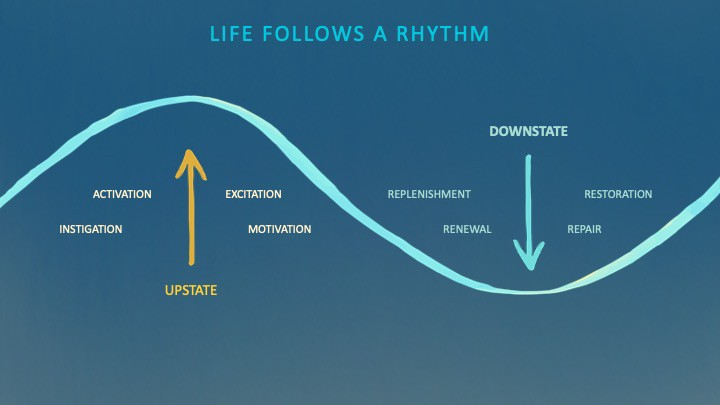
Downstates aren't just for consistently recharging your battery. By spending time in the Downstate, your body and brain get extra energy and nutrients, allowing you to grow smarter, faster, stronger, and more self-regulated. This state supports half-marathon training, exam prep, and mediation. As we age, spending more time in the Downstate is key to mental and physical health, well-being, and longevity.
When you prioritize energy-demanding activities during Upstate periods and energy-replenishing activities during Downstate periods, all your subsystems, including cardiovascular, metabolic, muscular, cognitive, and emotional, hum along at their optimal settings. When you synchronize the Upstates and Downstates of these individual rhythms, their functioning improves. A hard workout causes autonomic stress, which triggers Downstate recovery.
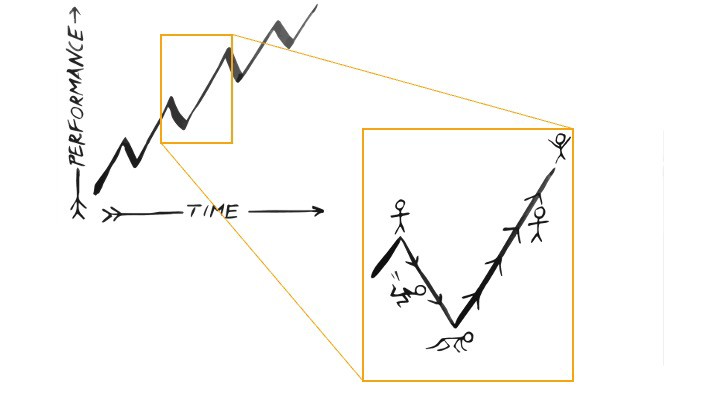
By choosing the right timing and type of exercise during the day, you can ensure a deeper recovery and greater readiness for the next workout by working with your natural rhythms and strengthening your autonomic and sleep Downstates.
Morning cardio workouts increase deep sleep compared to afternoon workouts. Timing and type of meals determine when your sleep hormone melatonin is released, ushering in sleep.
Rhythm isn't a hack. It's not a way to cheat the system or the boss. Nature has honed its optimization wisdom over trillions of days and nights. Stop looking for quick fixes. You're a whole system made of smaller subsystems that must work together to function well. No one pill or subsystem will make it all work. Understanding and coordinating your rhythms is free, easy, and only benefits you.
Dr. Sara C. Mednick is a cognitive neuroscientist at UC Irvine and author of The Power of the Downstate (HachetteGO)