



More on Web3 & Crypto

Shan Vernekar
3 years ago
How the Ethereum blockchain's transactions are carried out
Overview
Ethereum blockchain is a network of nodes that validate transactions. Any network node can be queried for blockchain data for free. To write data as a transition requires processing and writing to each network node's storage. Fee is paid in ether and is also called as gas.
We'll examine how user-initiated transactions flow across the network and into the blockchain.
Flow of transactions
A user wishes to move some ether from one external account to another. He utilizes a cryptocurrency wallet for this (like Metamask), which is a browser extension.
The user enters the desired transfer amount and the external account's address. He has the option to choose the transaction cost he is ready to pay.
Wallet makes use of this data, signs it with the user's private key, and writes it to an Ethereum node. Services such as Infura offer APIs that enable writing data to nodes. One of these services is used by Metamask. An example transaction is shown below. Notice the “to” address and value fields.
var rawTxn = {
    nonce: web3.toHex(txnCount),
    gasPrice: web3.toHex(100000000000),
    gasLimit: web3.toHex(140000),
    to: '0x633296baebc20f33ac2e1c1b105d7cd1f6a0718b',
    value: web3.toHex(0),
    data: '0xcc9ab24952616d6100000000000000000000000000000000000000000000000000000000'
};
The transaction is written to the target Ethereum node's local TRANSACTION POOL. It informed surrounding nodes of the new transaction, and those nodes reciprocated. Eventually, this transaction is received by and written to each node's local TRANSACTION pool.
The miner who finds the following block first adds pending transactions (with a higher gas cost) from the nearby TRANSACTION POOL to the block.
The transactions written to the new block are verified by other network nodes.
A block is added to the main blockchain after there is consensus and it is determined to be genuine. The local blockchain is updated with the new node by additional nodes as well.
Block mining begins again next.
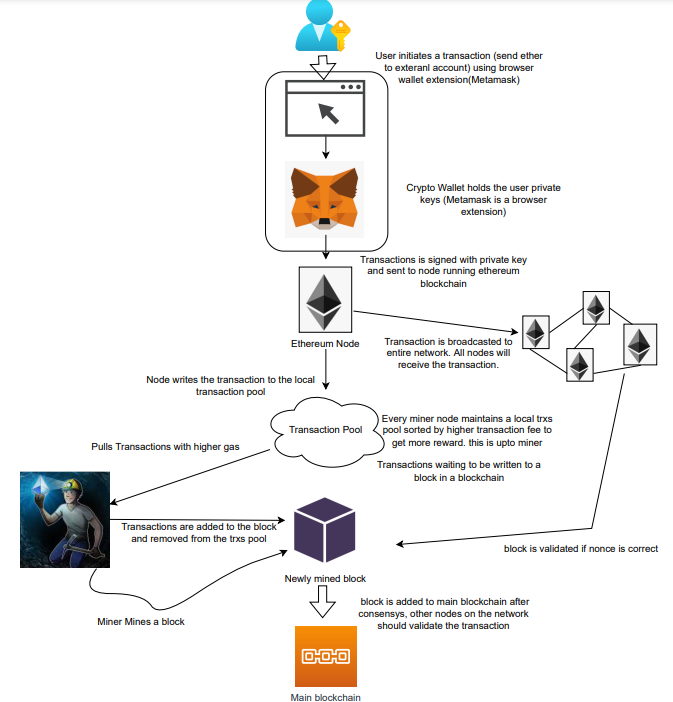
The image above shows how transactions go via the network and what's needed to submit them to the main block chain.
References
ethereum.org/transactions How Ethereum transactions function, their data structure, and how to send them via app. ethereum.org

Marco Manoppo
3 years ago
Failures of DCG and Genesis
Don't sleep with your own sister.
70% of lottery winners go broke within five years. You've heard the last one. People who got rich quickly without setbacks and hard work often lose it all. My father said, "Easy money is easily lost," and a wealthy friend who owns a family office said, "The first generation makes it, the second generation spends it, and the third generation blows it."
This is evident. Corrupt politicians in developing countries live lavishly, buying their third wives' fifth Hermès bag and celebrating New Year's at The Brando Resort. A successful businessperson from humble beginnings is more conservative with money. More so if they're atom-based, not bit-based. They value money.
Crypto can "feel" easy. I have nothing against capital market investing. The global financial system is shady, but that's another topic. The problem started when those who took advantage of easy money started affecting other businesses. VCs did minimal due diligence on FTX because they needed deal flow and returns for their LPs. Lenders did minimum diligence and underwrote ludicrous loans to 3AC because they needed revenue.
Alameda (hence FTX) and 3AC made "easy money" Genesis and DCG aren't. Their businesses are more conventional, but they underestimated how "easy money" can hurt them.
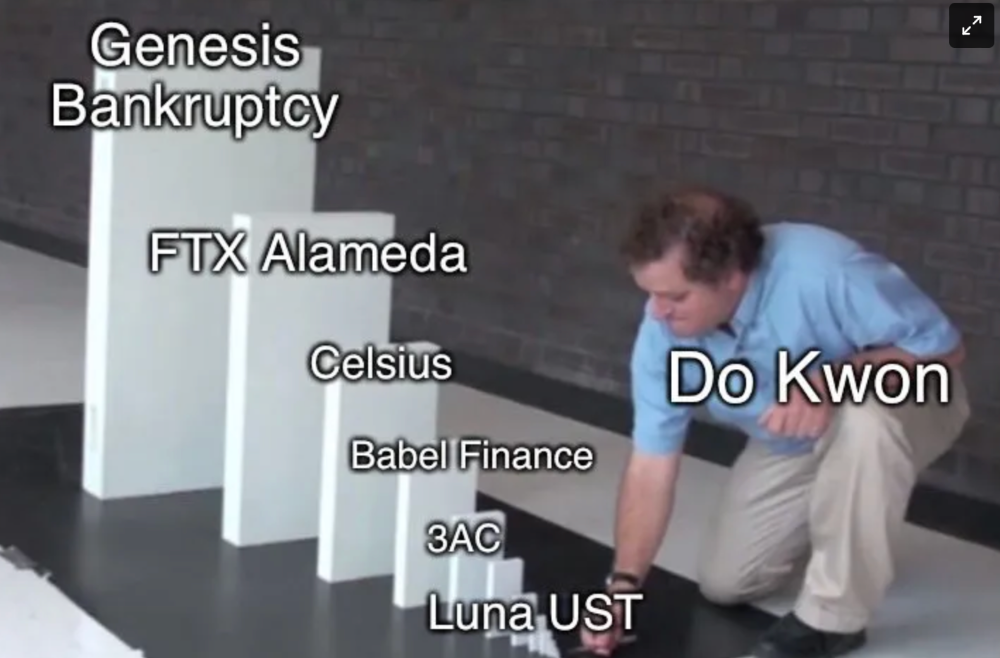
Genesis has been the victim of easy money hubris and insolvency, losing $1 billion+ to 3AC and $200M to FTX. We discuss the implications for the broader crypto market.
Here are the quick takeaways:
Genesis is one of the largest and most notable crypto lenders and prime brokerage firms.
DCG and Genesis have done related party transactions, which can be done right but is a bad practice.
Genesis owes DCG $1.5 billion+.
If DCG unwinds Grayscale's GBTC, $9-10 billion in BTC will hit the market.
DCG will survive Genesis.
What happened?
Let's recap the FTX shenanigan from two weeks ago. Shenanigans! Delphi's tweet sums up the craziness. Genesis has $175M in FTX.
Cred's timeline: I hate bad crisis management. Yes, admitting their balance sheet hole right away might've sparked more panic, and there's no easy way to convey your trouble, but no one ever learns.
By November 23, rumors circulated online that the problem could affect Genesis' parent company, DCG. To address this, Barry Silbert, Founder, and CEO of DCG released a statement to shareholders.
A few things are confirmed thanks to this statement.
DCG owes $1.5 billion+ to Genesis.
$500M is due in 6 months, and the rest is due in 2032 (yes, that’s not a typo).
Unless Barry raises new cash, his last-ditch efforts to repay the money will likely push the crypto market lower.
Half a year of GBTC fees is approximately $100M.
They can pay $500M with GBTC.
With profits, sell another port.
Genesis has hired a restructuring adviser, indicating it is in trouble.
Rehypothecation
Every crypto problem in the past year seems to be rehypothecation between related parties, excessive leverage, hubris, and the removal of the money printer. The Bankless guys provided a chart showing 2021 crypto yield.
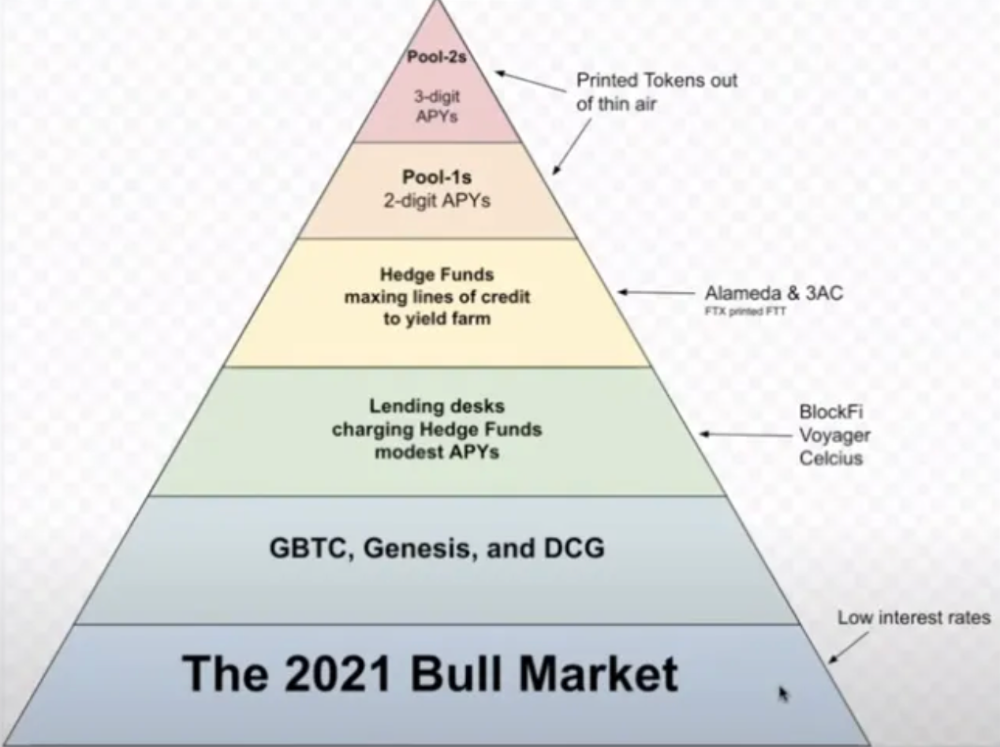
In June 2022, @DataFinnovation published a great investigation about 3AC and DCG. Here's a summary.
3AC borrowed BTC from Genesis and pledged it to create Grayscale's GBTC shares.
3AC uses GBTC to borrow more money from Genesis.
This lets 3AC leverage their capital.
3AC's strategy made sense because GBTC had a premium, creating "free money."
GBTC's discount and LUNA's implosion caused problems.
3AC lost its loan money in LUNA.
Margin called on 3ACs' GBTC collateral.
DCG bought GBTC to avoid a systemic collapse and a larger discount.
Genesis lost too much money because 3AC can't pay back its loan. DCG "saved" Genesis, but the FTX collapse hurt Genesis further, forcing DCG and Genesis to seek external funding.
bruh…
Learning Experience
Co-borrowing. Unnecessary rehypothecation. Extra space. Governance disaster. Greed, hubris. Crypto has repeatedly shown it can recreate traditional financial system disasters quickly. Working in crypto is one of the best ways to learn crazy financial tricks people will do for a quick buck much faster than if you dabble in traditional finance.
Moving Forward
I think the crypto industry needs to consider its future. This is especially true for professionals. I'm not trying to scare you. In 2018 and 2020, I had doubts. No doubts now. Detailing the crypto industry's potential outcomes helped me gain certainty and confidence in its future. This includes VCs' benefits and talking points during the bull market, as well as what would happen if government regulations became hostile, etc. Even if that happens, I'm certain. This is permanent. I may write a post about that soon.
Sincerely,
M.

Chris
2 years ago
What the World's Most Intelligent Investor Recently Said About Crypto
Cryptoshit. This thing is crazy to buy.
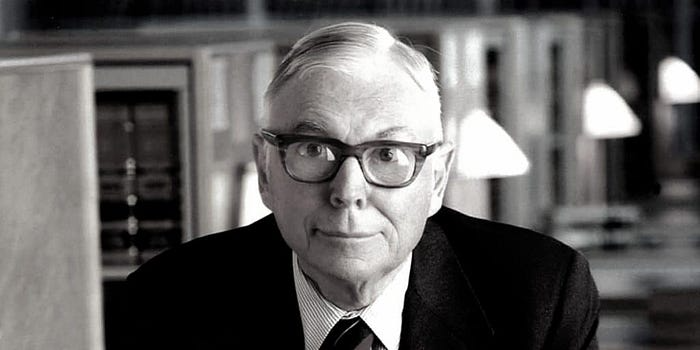
Charlie Munger is revered and powerful in finance.
Munger, vice chairman of Berkshire Hathaway, is noted for his wit, no-nonsense attitude to investment, and ability to spot promising firms and markets.
Munger's crypto views have upset some despite his reputation as a straight shooter.
“There’s only one correct answer for intelligent people, just totally avoid all the people that are promoting it.” — Charlie Munger
The Munger Interview on CNBC (4:48 secs)
This Monday, CNBC co-anchor Rebecca Quick interviewed Munger and brought up his 2007 statement, "I'm not allowed to have an opinion on this subject until I can present the arguments against my viewpoint better than the folks who are supporting it."
Great investing and life advice!
If you can't explain the opposing reasons, you're not informed enough to have an opinion.
In today's world, it's important to grasp both sides of a debate before supporting one.
Rebecca inquired:
Does your Wall Street Journal article on banning cryptocurrency apply? If so, would you like to present the counterarguments?
Mungers reply:
I don't see any viable counterarguments. I think my opponents are idiots, hence there is no sensible argument against my position.
Consider his words.
Do you believe Munger has studied both sides?
He said, "I assume my opponents are idiots, thus there is no sensible argument against my position."
This is worrisome, especially from a guy who once encouraged studying both sides before forming an opinion.
Munger said:
National currencies have benefitted humanity more than almost anything else.
Hang on, I think we located the perpetrator.
Munger thinks crypto will replace currencies.
False.
I doubt he studied cryptocurrencies because the name is deceptive.
He misread a headline as a Dollar destroyer.
Cryptocurrencies are speculations.
Like Tesla, Amazon, Apple, Google, Microsoft, etc.
Crypto won't replace dollars.
In the interview with CNBC, Munger continued:
“I’m not proud of my country for allowing this crap, what I call the cryptoshit. It’s worthless, it’s no good, it’s crazy, it’ll do nothing but harm, it’s anti-social to allow it.” — Charlie Munger
Not entirely inaccurate.
Daily cryptos are established solely to pump and dump regular investors.
Let's get into Munger's crypto aversion.
Rat poison is bitcoin.
Munger famously dubbed Bitcoin rat poison and a speculative bubble that would implode.
Partially.
But the bubble broke. Since 2021, the market has fallen.
Scam currencies and NFTs are being eliminated, which I like.
Whoa.
Why does Munger doubt crypto?
Mungers thinks cryptocurrencies has no intrinsic value.
He worries about crypto fraud and money laundering.
Both are valid issues.
Yet grouping crypto is intellectually dishonest.
Ethereum, Bitcoin, Solana, Chainlink, Flow, and Dogecoin have different purposes and values (not saying they’re all good investments).
Fraudsters who hurt innocents will be punished.
Therefore, complaining is useless.
Why not stop it? Repair rather than complain.
Regrettably, individuals today don't offer solutions.
Blind Areas for Mungers
As with everyone, Mungers' bitcoin views may be impacted by his biases and experiences.
OK.
But Munger has always advocated classic value investing and may be wary of investing in an asset outside his expertise.
Mungers' banking and insurance investments may influence his bitcoin views.
Could a coworker or acquaintance have told him crypto is bad and goes against traditional finance?
Right?
Takeaways
Do you respect Charlie Mungers?
Yes and no, like any investor or individual.
To understand Mungers' bitcoin beliefs, you must be critical.
Mungers is a successful investor, but his views about bitcoin should be considered alongside other viewpoints.
Munger’s success as an investor has made him an influencer in the space.
Influence gives power.
He controls people's thoughts.
Munger's ok. He will always be heard.
I'll do so cautiously.
You might also like

Anton Franzen
3 years ago
This is the driving force for my use of NFTs, which will completely transform the world.
Its not a fuc*ing fad.

It's not about boring monkeys or photos as nfts; that's just what's been pushed up and made a lot of money. The technology underlying those ridiculous nft photos will one day prove your house and automobile ownership and tell you where your banana came from. Are you ready for web3? Soar!
People don't realize that absolutely anything can and will be part of the blockchain and smart contracts, making them even better. I'll tell you a secret: it will and is happening.
Why?
Why is something blockchain-based a good idea? So let’s speak about cars!
So a new Tesla car is manufactured, and when you buy it, it is bound to an NFT on the blockchain that proves current ownership. The NFT in the smart contract can contain some data about the current owner of the car and some data about the car's status, such as the number of miles driven, the car's overall quality, and so on, as well as a reference to a digital document bound to the NFT that has more information.
Now, 40 years from now, if you want to buy a used automobile, you can scan the car's serial number to view its NFT and see all of its history, each owner, how long they owned it, if it had damages, and more. Since it's on the blockchain, it can't be tampered with.
When you're ready to buy it, the owner posts it for sale, you buy it, and it's sent to your wallet. 5 seconds to change owner, 100% safe and verifiable.
Incorporate insurance logic into the car contract. If you crashed, your car's smart contract would take money from your insurance contract and deposit it in an insurance company wallet.
It's limitless. Your funds may be used by investors to provide insurance as they profit from everyone's investments.
Or suppose all car owners in a country deposit a fixed amount of money into an insurance smart contract that promises if something happens, we'll take care of it. It could be as little as $100-$500 per year, and in a country with 10 million people, maybe 3 million would do that, which would be $500 000 000 in that smart contract and it would be used by the insurance company to invest in assets or take a cut, literally endless possibilities.
Instead of $300 per month, you may pay $300 per year to be covered if something goes wrong, and that may include multiple insurances.
What about your grocery store banana, though?
Yes that too.
You can scan a banana to learn its complete history. You'll be able to see where it was cultivated, every middleman in the supply chain, and hopefully the banana's quality, farm, and ingredients used.
If you want locally decent bananas, you can only buy them, offering you transparency and options. I believe it will be an online marketplace where farmers publish their farms and products for trust and transparency. You might also buy bananas from the farmer.
And? Food security to finish the article. If an order of bananas included a toxin, you could easily track down every banana from the same origin and supply chain and uncover the root cause. This is a tremendous thing that will save lives and have a big impact; did you realize that 1 in 6 Americans gets poisoned by food every year? This could lower the number.
To summarize:
Smart contracts can issue nfts as proof of ownership and include functionality.

Jayden Levitt
3 years ago
Starbucks' NFT Project recently defeated its rivals.
The same way Amazon killed bookstores. You just can’t see it yet.

Shultz globalized coffee. Before Starbucks, coffee sucked.
All accounts say 1970s coffee was awful.
Starbucks had three stores selling ground Indonesian coffee in the 1980s.
What a show!
A year after joining the company at 29, Shultz traveled to Italy for R&D.
He noticed the coffee shops' sense of theater and community and realized Starbucks was in the wrong business.
Integrating coffee and destination created a sense of community in the store.
Brilliant!
He told Starbucks' founders about his experience.
They disapproved.
For two years.
Shultz left and opened an Italian coffee shop chain like any good entrepreneur.
Starbucks ran into financial trouble, so the founders offered to sell to Shultz.
Shultz bought Starbucks in 1987 for $3.8 million, including six stores and a payment plan.
Starbucks is worth $100.79Billion, per Google Finance.
26,500 times Shultz's initial investment
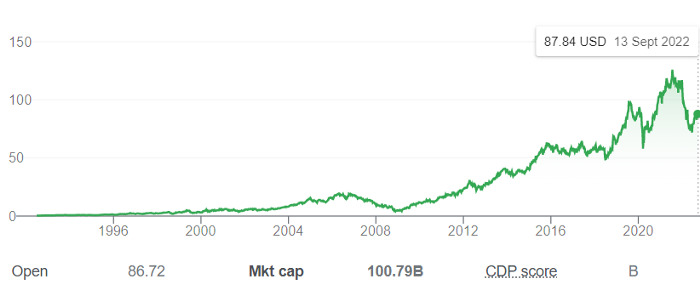
Starbucks is releasing its own NFT Platform under Shultz and his early Vision.
This year, Starbucks Odyssey launches. The new digital experience combines a Loyalty Rewards program with NFT.
The side chain Polygon-based platform doesn't require a Crypto Wallet. Customers can earn and buy digital assets to unlock incentives and experiences.
They've removed all friction, making it more immersive and convenient than a coffee shop.
Brilliant!
NFTs are the access coupon to their digital community, but they don't highlight the technology.
They prioritize consumer experience by adding non-technical users to Web3. Their collectables are called journey stamps, not NFTs.
No mention of bundled gas fees.
Brady Brewer, Starbucks' CMO, said;
“It happens to be built on blockchain and web3 technologies, but the customer — to be honest — may very well not even know that what they’re doing is interacting with blockchain technology. It’s just the enabler,”
Rewards members will log into a web app using their loyalty program credentials to access Starbucks Odyssey. They won't know about blockchain transactions.
Starbucks has just dealt its rivals a devastating blow.
It generates more than ten times the revenue of its closest competitor Costa Coffee.
The coffee giant is booming.
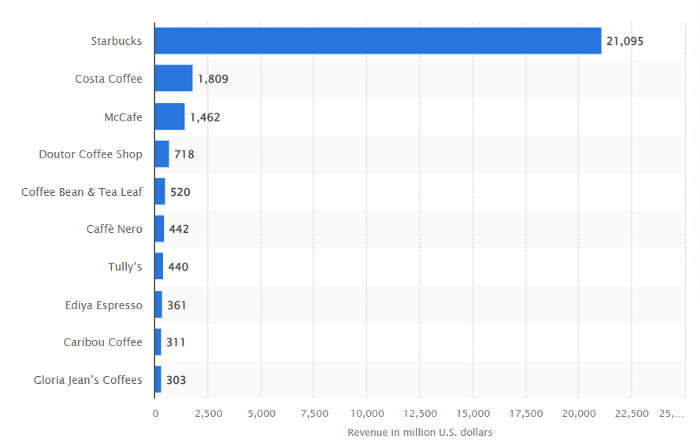
Starbucks is ahead of its competitors. No wonder.
They have an innovative, adaptable leadership team.
Starbucks' DNA challenges the narrative, especially when others reject their ideas.
I’m off for a cappuccino.

Jano le Roux
3 years ago
Never Heard Of: The Apple Of Email Marketing Tools
Unlimited everything for $19 monthly!?

Even with pretty words, no one wants to read an ugly email.
Not Gen Z
Not Millennials
Not Gen X
Not Boomers
I am a minimalist.
I like Mozart. I like avos. I love Apple.
When I hear seamlessly, effortlessly, or Apple's new adverb fluidly, my toes curl.
No email marketing tool gave me that feeling.
As a marketing consultant helping high-growth brands create marketing that doesn't feel like marketing, I've worked with every email marketing platform imaginable, including that naughty monkey and the expensive platform whose sales teams don't stop calling.
Most email marketing platforms are flawed.
They are overpriced.
They use dreadful templates.
They employ a poor visual designer.
The user experience there is awful.
Too many useless buttons are present. (Similar to the TV remote!)
I may have finally found the perfect email marketing tool. It creates strong flows. It helps me focus on storytelling.
It’s called Flodesk.
It’s effortless. It’s seamless. It’s fluid.
Here’s why it excites me.
Unlimited everything for $19 per month
Sends unlimited. Emails unlimited. Signups unlimited.
Most email platforms penalize success.
Pay for performance?
$87 for 10k contacts
$605 for 100K contacts
$1,300+ for 200K contacts
In the 1990s, this made sense, but not now. It reminds me of when ISPs capped internet usage at 5 GB per month.
Flodesk made unlimited email for a low price a reality. Affordable, attractive email marketing isn't just for big companies.
Flodesk doesn't penalize you for growing your list. Price stays the same as lists grow.
Flodesk plans cost $38 per month, but I'll give you a 30-day trial for $19.
Amazingly strong flows
Foster different people's flows.
Email marketing isn't one-size-fits-all.
Different times require different emails.
People don't open emails because they're irrelevant, in my experience. A colder audience needs a nurturing sequence.
Flodesk automates your email funnels so top-funnel prospects fall in love with your brand and values before mid- and bottom-funnel email flows nudge them to take action.
I wish I could save more custom audience fields to further customize the experience.
Dynamic editor
Easy. Effortless.
Flodesk's editor is Apple-like.
You understand how it works almost instantly.
Like many Apple products, it's intentionally limited. No distractions. You can focus on emotional email writing.

Flodesk's inability to add inline HTML to emails is my biggest issue with larger projects. I wish I could upload HTML emails.
Simple sign-up procedures
Dream up joining.
I like how easy it is to create conversion-focused landing pages. Linkly lets you easily create 5 landing pages and A/B test messaging.

I like that you can use signup forms to ask people what they're interested in so they get relevant emails instead of mindless mass emails nobody opens.

I love how easy it is to embed in-line on a website.
Wonderful designer templates
Beautiful, connecting emails.
Flodesk has calm email templates. My designer's eye felt at rest when I received plain text emails with big impacts.

As a typography nerd, I love Flodesk's handpicked designer fonts. It gives emails a designer feel that is hard to replicate on other platforms without coding and custom font licenses.
Small adjustments can have a big impact
Details matter.
Flodesk remembers your brand colors. Flodesk automatically adds your logo and social handles to emails after signup.
Flodesk uses Zapier. This lets you send emails based on a user's action.
A bad live chat can trigger a series of emails to win back a customer.
Flodesk isn't for everyone.
Flodesk is great for Apple users like me.