


Sonic Prime and indie games on Netflix
Netflix will stream Spiritfarer, Raji: An Ancient Epic, and Lucky Luna.
Netflix's Geeked Week brought a slew of announcements. The flurry of reveals for The Sandman, The Umbrella Academy season 3, One Piece, and more also included game and game-adjacent announcements.
Netflix released a teaser for Cuphead season 2 ahead of its August premiere, featuring more of Grey DeLisle's Ms. Chalice. DOTA: Dragon's Blood season 3 hits Netflix in August. Tekken, the fighting game that throws kids off cliffs, gets an anime, Tekken: Bloodline.
Netflix debuted a clip of Sonic Prime before Sonic Origins in June and Sonic Frontiers in 2022.
Castlevania: Nocturne will follow Richter Belmont.
Netflix is reviving licensed games with titles based on its shows. There's a Queen's Gambit chess game, a Shadow and Bone RPG, a La Casa de Papel heist adventure, and a Too Hot to Handle game where a pregnant woman must choose between stabbing her cheating ex or forgiving him.
Riot's rhythm platformer Hextech Mayhem debuted on Netflix last year, and now Netflix is adding games from Devolver Digital. Reigns: Three Kingdoms is a card game that lets players choose the fate of Three Kingdoms-era China by swiping left or right on cards. Spiritfarer, the "cozy game about death" from 2020, and Raji: An Ancient Epic are coming to Netflix. Poinpy, a vertical climber from the creator of Downwell, is now on Netflix.
Desta: The Memories Between is a turn-based strategy game set in dreams and memories.
Snowman's Lucky Luna will also be added soon.
With these games, Netflix is expanding beyond dinky mobile games — it plans to have 50 by the end of the year — and could be a serious platform for indies that want to expand into mobile. It takes gaming seriously.
More on Gaming

Matthew Cluff
3 years ago
GTO Poker 101
"GTO" (Game Theory Optimal) has been used a lot in poker recently. To clarify its meaning and application, the aim of this article is to define what it is, when to use it when playing, what strategies to apply for how to play GTO poker, for beginner and more advanced players!
Poker GTO
In poker, you can choose between two main winning strategies:
Exploitative play maximizes expected value (EV) by countering opponents' sub-optimal plays and weaker tendencies. Yes, playing this way opens you up to being exploited, but the weaker opponents you're targeting won't change their game to counteract this, allowing you to reap maximum profits over the long run.
GTO (Game-Theory Optimal): You try to play perfect poker, which forces your opponents to make mistakes (which is where almost all of your profit will be derived from). It mixes bluffs or semi-bluffs with value bets, clarifies bet sizes, and more.
GTO vs. Exploitative: Which is Better in Poker?
Before diving into GTO poker strategy, it's important to know which of these two play styles is more profitable for beginners and advanced players. The simple answer is probably both, but usually more exploitable.
Most players don't play GTO poker and can be exploited in their gameplay and strategy, allowing for more profits to be made using an exploitative approach. In fact, it’s only in some of the largest games at the highest stakes that GTO concepts are fully utilized and seen in practice, and even then, exploitative plays are still sometimes used.
Knowing, understanding, and applying GTO poker basics will create a solid foundation for your poker game. It's also important to understand GTO so you can deviate from it to maximize profits.
GTO Poker Strategy
According to Ed Miller's book "Poker's 1%," the most fundamental concept that only elite poker players understand is frequency, which could be in relation to cbets, bluffs, folds, calls, raises, etc.
GTO poker solvers (downloadable online software) give solutions for how to play optimally in any given spot and often recommend using mixed strategies based on select frequencies.
In a river situation, a solver may tell you to call 70% of the time and fold 30%. It may also suggest calling 50% of the time, folding 35% of the time, and raising 15% of the time (with a certain range of hands).
Frequencies are a fundamental and often unrecognized part of poker, but they run through these 5 GTO concepts.
1. Preflop ranges
To compensate for positional disadvantage, out-of-position players must open tighter hand ranges.
Premium starting hands aren't enough, though. Considering GTO poker ranges and principles, you want a good, balanced starting hand range from each position with at least some hands that can make a strong poker hand regardless of the flop texture (low, mid, high, disconnected, etc).
Below is a GTO preflop beginner poker chart for online 6-max play, showing which hand ranges one should open-raise with. Table positions are color-coded (see key below).
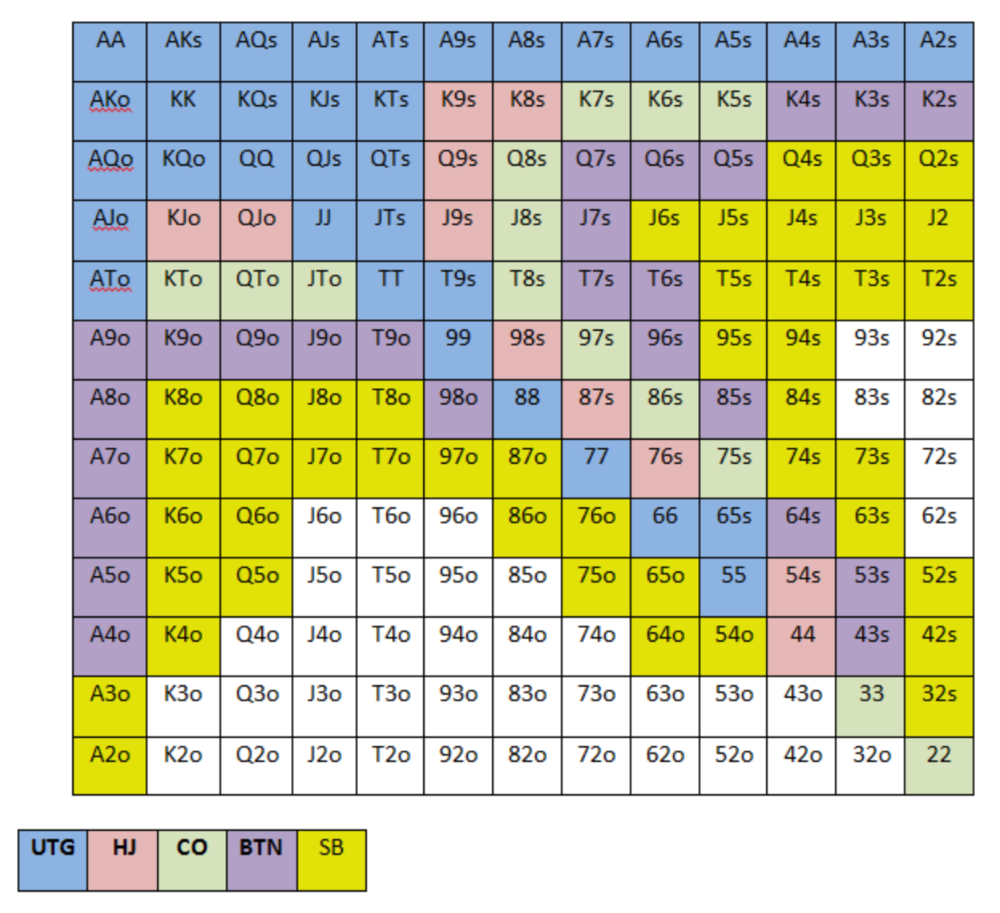
NOTE: For GTO play, it's advisable to use a mixed strategy for opening in the small blind, combining open-limps and open-raises for various hands. This cannot be illustrated with the color system used for the chart.
Choosing which hands to play is often a math problem, as discussed below.
Other preflop GTO poker charts include which hands to play after a raise, which to 3bet, etc. Solvers can help you decide which preflop hands to play (call, raise, re-raise, etc.).
2. Pot Odds
Always make +EV decisions that profit you as a poker player. Understanding pot odds (and equity) can help.
Postflop Pot Odds
Let’s say that we have JhTh on a board of 9h8h2s4c (open-ended straight-flush draw). We have $40 left and $50 in the pot. He has you covered and goes all-in. As calling or folding are our only options, playing GTO involves calculating whether a call is +EV or –EV. (The hand was empty.)
Any remaining heart, Queen, or 7 wins the hand. This means we can improve 15 of 46 unknown cards, or 32.6% of the time.
What if our opponent has a set? The 4h or 2h could give us a flush, but it could also give the villain a boat. If we reduce outs from 15 to 14.5, our equity would be 31.5%.
We must now calculate pot odds.
(bet/(our bet+pot)) = pot odds
= $50 / ($40 + $90)
= $40 / $130
= 30.7%
To make a profitable call, we need at least 30.7% equity. This is a profitable call as we have 31.5% equity (even if villain has a set). Yes, we will lose most of the time, but we will make a small profit in the long run, making a call correct.
Pot odds aren't just for draws, either. If an opponent bets 50% pot, you get 3 to 1 odds on a call, so you must win 25% of the time to be profitable. If your current hand has more than 25% equity against your opponent's perceived range, call.
Preflop Pot Odds
Preflop, you raise to 3bb and the button 3bets to 9bb. You must decide how to act. In situations like these, we can actually use pot odds to assist our decision-making.
This pot is:
(our open+3bet size+small blind+big blind)
(3bb+9bb+0.5bb+1bb)
= 13.5
This means we must call 6bb to win a pot of 13.5bb, which requires 30.7% equity against the 3bettor's range.
Three additional factors must be considered:
Being out of position on our opponent makes it harder to realize our hand's equity, as he can use his position to put us in tough spots. To profitably continue against villain's hand range, we should add 7% to our equity.
Implied Odds / Reverse Implied Odds: The ability to win or lose significantly more post-flop (than pre-flop) based on our remaining stack.
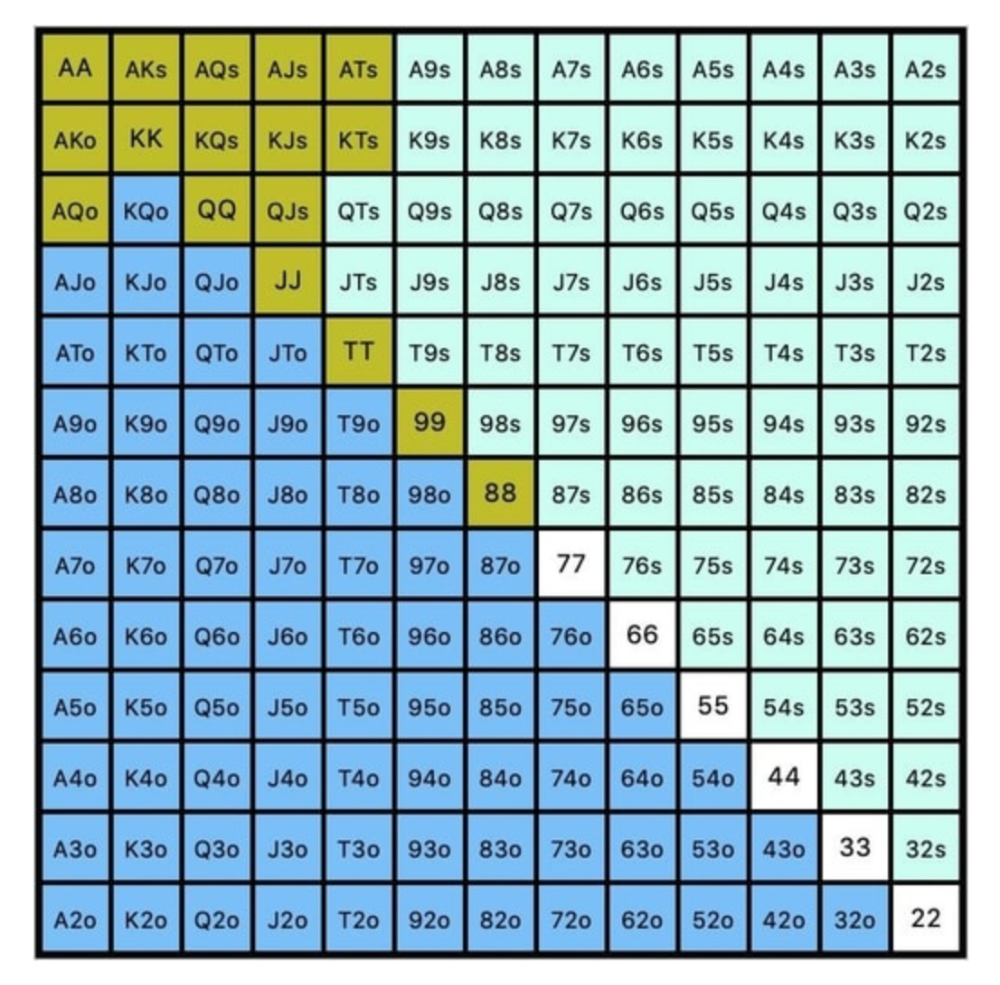
While statistics on 3bet stats can be gained with a large enough sample size (i.e. 8% 3bet stat from button), the numbers don't tell us which 8% of hands villain could be 3betting with. Both polarized and depolarized charts below show 8% of possible hands.
7.4% of hands are depolarized.
Polarized Hand range (7.54%):
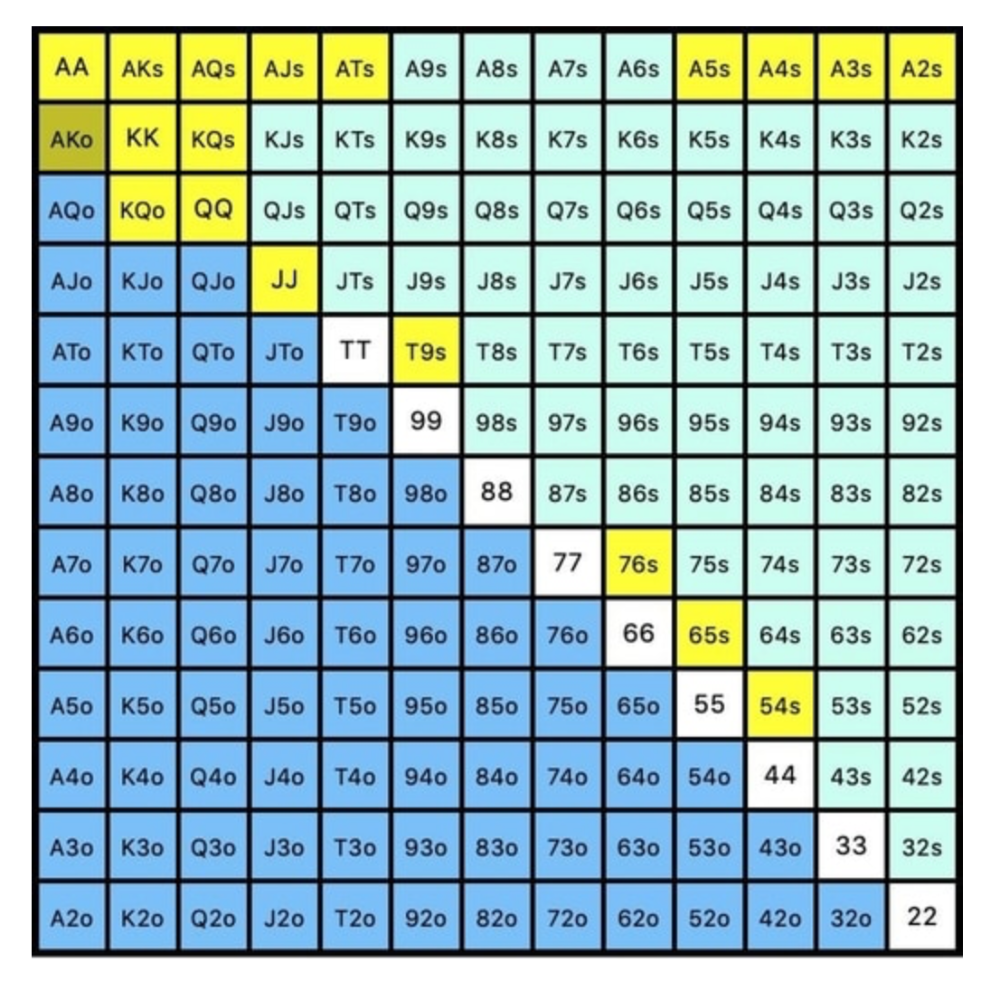
Each hand range has different contents. We don't know if he 3bets some hands and calls or folds others.
Using an exploitable strategy can help you play a hand range correctly. The next GTO concept will make things easier.
3. Minimum Defense Frequency:
This concept refers to the % of our range we must continue with (by calling or raising) to avoid being exploited by our opponents. This concept is most often used off-table and is difficult to apply in-game.
These beginner GTO concepts will help your decision-making during a hand, especially against aggressive opponents.
MDF formula:
MDF = POT SIZE/(POT SIZE+BET SIZE)
Here's a poker GTO chart of common bet sizes and minimum defense frequency.
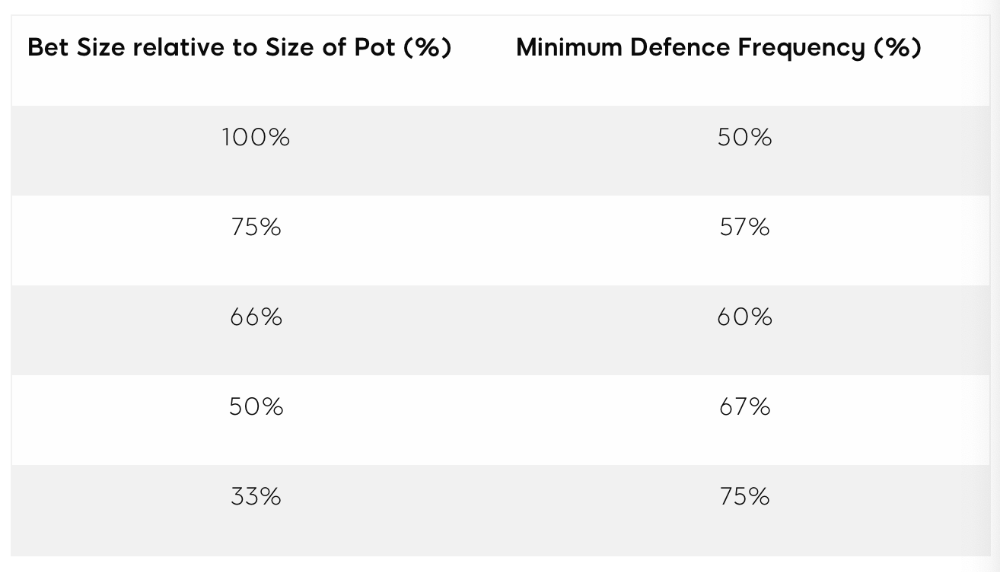
Take the number of hand combos in your starting hand range and use the MDF to determine which hands to continue with. Choose hands with the most playability and equity against your opponent's betting range.
Say you open-raise HJ and BB calls. Qh9h6c flop. Your opponent leads you for a half-pot bet. MDF suggests keeping 67% of our range.
Using the above starting hand chart, we can determine that the HJ opens 254 combos:
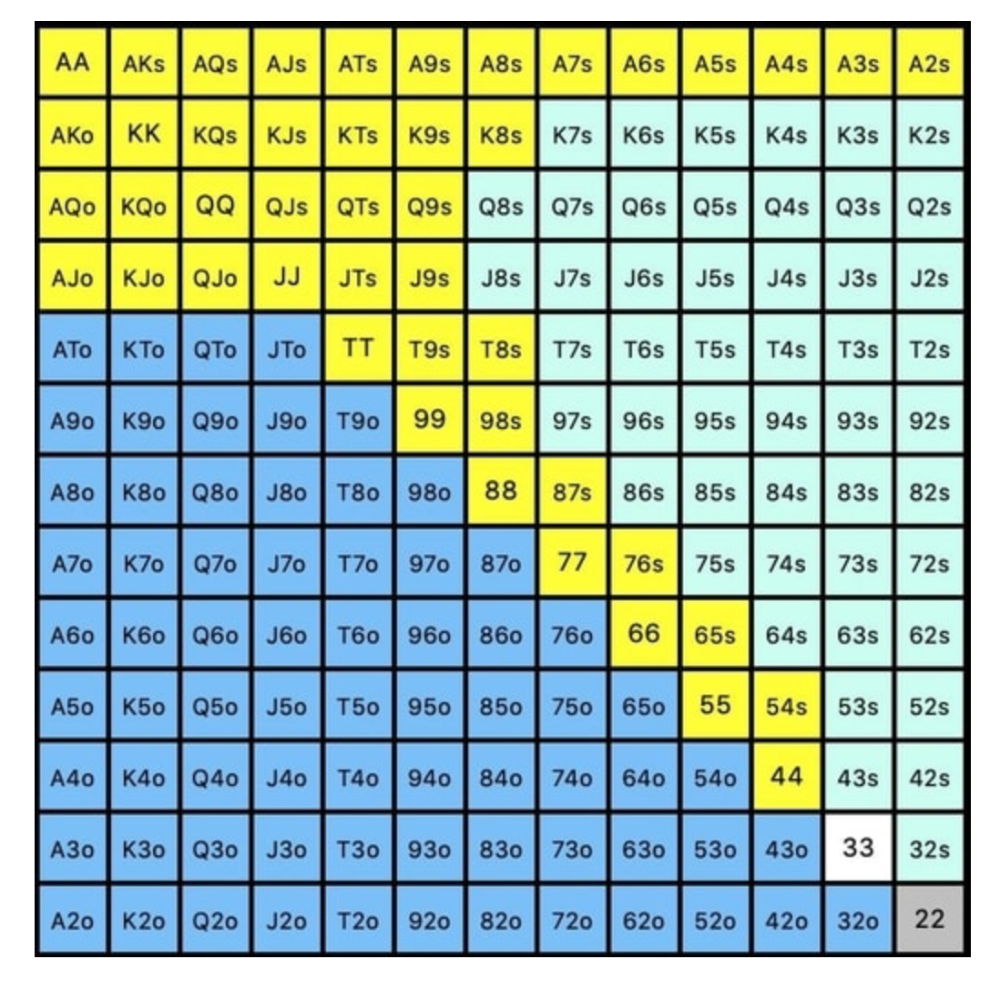
We must defend 67% of these hands, or 170 combos, according to MDF. Hands we should keep include:
Flush draws
Open-Ended Straight Draws
Gut-Shot Straight Draws
Overcards
Any Pair or better
So, our flop continuing range could be:
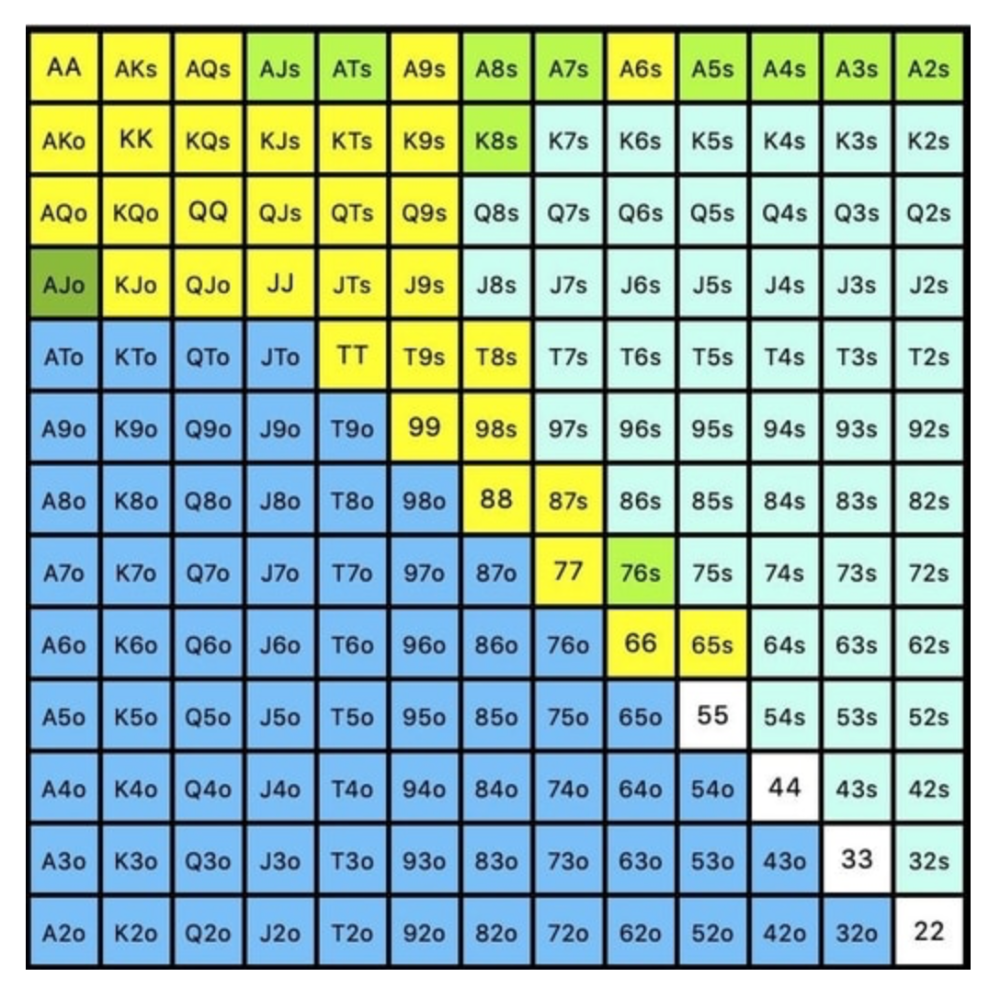
Some highlights:
Fours and fives have little chance of improving on the turn or river.
We only continue with AX hearts (with a flush draw) without a pair or better.
We'll also include 4 AJo combos, all of which have the Ace of hearts, and AcJh, which can block a backdoor nut flush combo.
Let's assume all these hands are called and the turn is blank (2 of spades). Opponent bets full-pot. MDF says we must defend 50% of our flop continuing range, or 85 of 170 combos, to be unexploitable. This strategy includes our best flush draws, straight draws, and made hands.
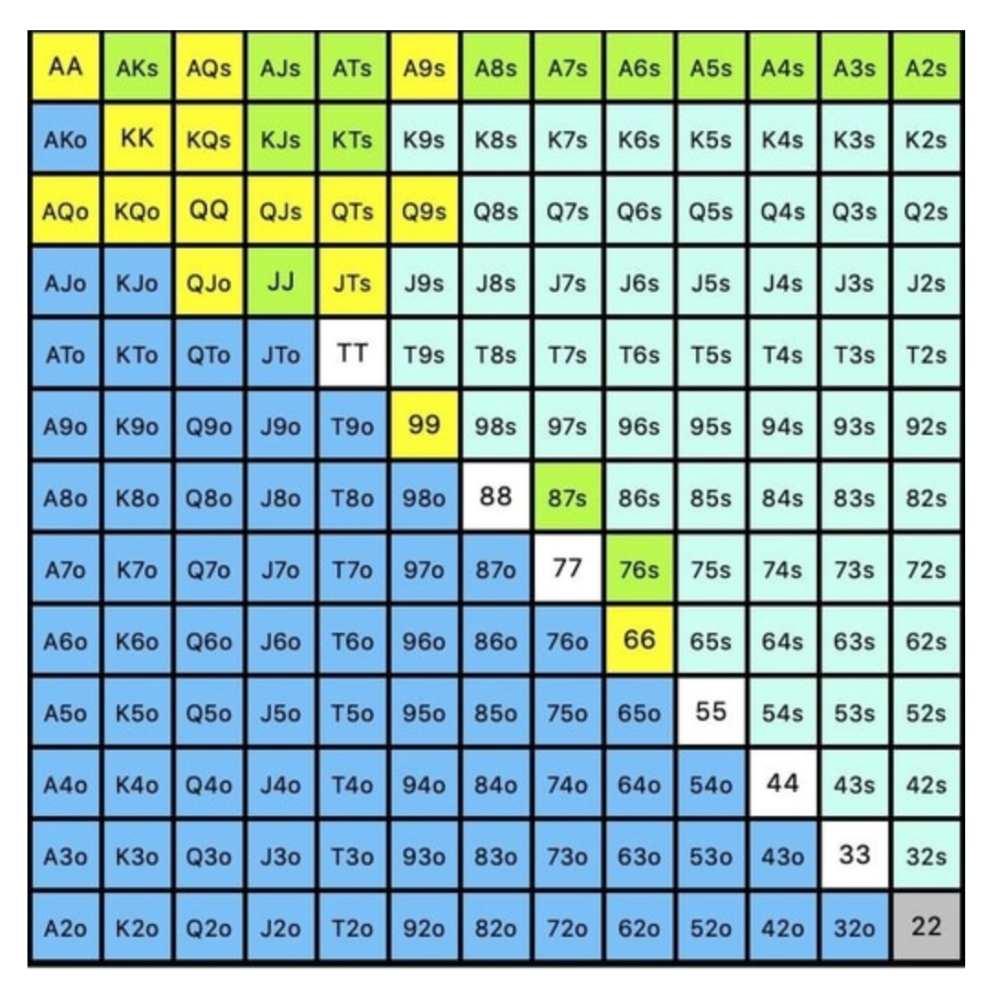
Here, we keep combining:
Nut flush draws
Pair + flush draws
GS + flush draws
Second Pair, Top Kicker+
One combo of JJ that doesn’t block the flush draw or backdoor flush draw.
On the river, we can fold our missed draws and keep our best made hands. When calling with weaker hands, consider blocker effects and card removal to avoid overcalling and decide which combos to continue.
4. Poker GTO Bet Sizing
To avoid being exploited, balance your bluffs and value bets. Your betting range depends on how much you bet (in relation to the pot). This concept only applies on the river, as draws (bluffs) on the flop and turn still have equity (and are therefore total bluffs).
On the flop, you want a 2:1 bluff-to-value-bet ratio. On the flop, there won't be as many made hands as on the river, and your bluffs will usually contain equity. The turn should have a "bluffing" ratio of 1:1. Use the chart below to determine GTO river bluff frequencies (relative to your bet size):
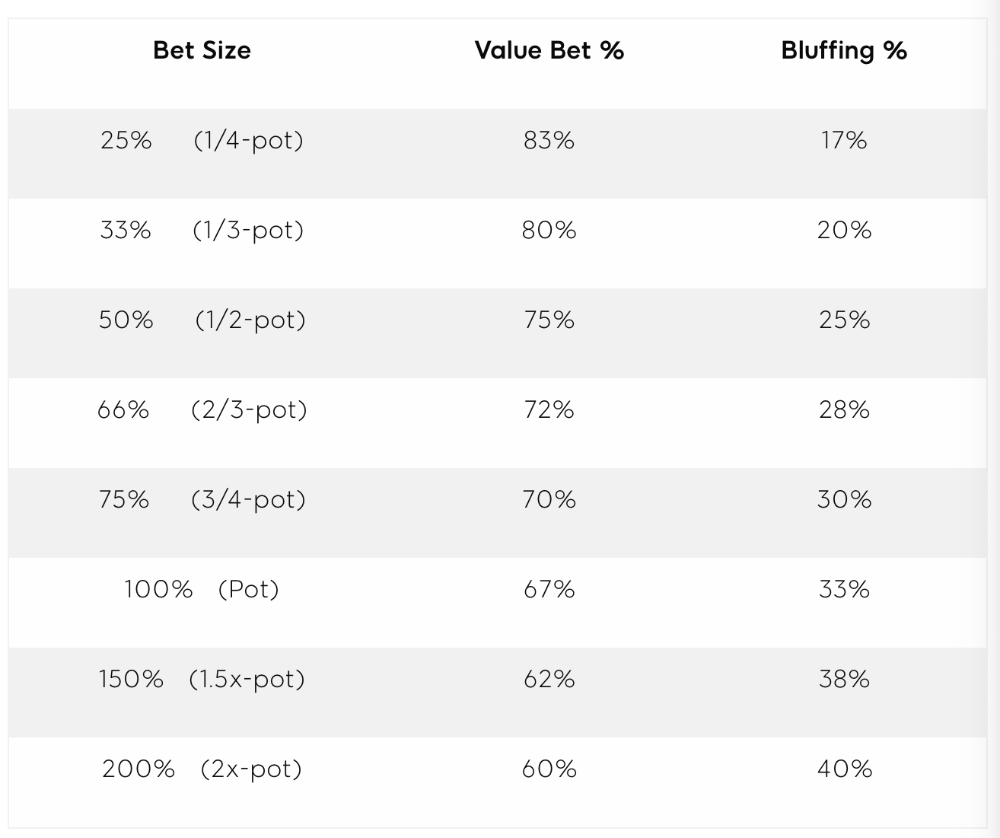
This chart relates to your opponent's pot odds. If you bet 50% pot, your opponent gets 3:1 odds and must win 25% of the time to call. Poker GTO theory suggests including 25% bluff combinations in your betting range so you're indifferent to your opponent calling or folding.
Best river bluffs don't block hands you want your opponent to have (or not have). For example, betting with missed Ace-high flush draws is often a mistake because you block a missed flush draw you want your opponent to have when bluffing on the river (meaning that it would subsequently be less likely he would have it, if you held two of the flush draw cards). Ace-high usually has some river showdown value.
If you had a 3-flush on the river and wanted to raise, you could bluff raise with AX combos holding the bluff suit Ace. Blocking the nut flush prevents your opponent from using that combo.
5. Bet Sizes and Frequency
GTO beginner strategies aren't just bluffs and value bets. They show how often and how much to bet in certain spots. Top players have benefited greatly from poker solvers, which we'll discuss next.
GTO Poker Software
In recent years, various poker GTO solvers have been released to help beginner, intermediate, and advanced players play balanced/GTO poker in various situations.
PokerSnowie and PioSolver are popular GTO and poker study programs.
While you can't compute players' hand ranges and what hands to bet or check with in real time, studying GTO play strategies with these programs will pay off. It will improve your poker thinking and understanding.
Solvers can help you balance ranges, choose optimal bet sizes, and master cbet frequencies.
GTO Poker Tournament
Late-stage tournaments have shorter stacks than cash games. In order to follow GTO poker guidelines, Nash charts have been created, tweaked, and used for many years (and also when to call, depending on what number of big blinds you have when you find yourself shortstacked).
The charts are for heads-up push/fold. In a multi-player game, the "pusher" chart can only be used if play is folded to you in the small blind. The "caller" chart can only be used if you're in the big blind and assumes a small blind "pusher" (with a much wider range than if a player in another position was open-shoving).
Divide the pusher chart's numbers by 2 to see which hand to use from the Button. Divide the original chart numbers by 4 to find the CO's pushing range. Some of the figures will be impossible to calculate accurately for the CO or positions to the right of the blinds because the chart's highest figure is "20+" big blinds, which is also used for a wide range of hands in the push chart.
Both of the GTO charts below are ideal for heads-up play, but exploitable HU shortstack strategies can lead to more +EV decisions against certain opponents. Following the charts will make your play GTO and unexploitable.
Poker pro Max Silver created the GTO push/fold software SnapShove. (It's accessible online at www.snapshove.com or as iOS or Android apps.)
Players can access GTO shove range examples in the full version. (You can customize the number of big blinds you have, your position, the size of the ante, and many other options.)
In Conclusion
Due to the constantly changing poker landscape, players are always improving their skills. Exploitable strategies often yield higher profit margins than GTO-based approaches, but knowing GTO beginner and advanced concepts can give you an edge for a few reasons.
It creates a solid gameplay base.
Having a baseline makes it easier to exploit certain villains.
You can avoid leveling wars with your opponents by making sound poker decisions based on GTO strategy.
It doesn't require assuming opponents' play styles.
Not results-oriented.
This is just the beginning of GTO and poker theory. Consider investing in the GTO poker solver software listed above to improve your game.

Chris Moyse
4 years ago
Sony and LEGO raise $2 billion for Epic Games' metaverse
‘Kid-friendly’ project holds $32 billion valuation
Epic Games announced today that it has raised $2 billion USD from Sony Group Corporation and KIRKBI (holding company of The LEGO Group). Both companies contributed $1 billion to Epic Games' upcoming ‘metaverse' project.
“We need partners who share our vision as we reimagine entertainment and play. Our partnership with Sony and KIRKBI has found this,” said Epic Games CEO Tim Sweeney. A new metaverse will be built where players can have fun with friends and brands create creative and immersive experiences, as well as creators thrive.
Last week, LEGO and Epic Games announced their plans to create a family-friendly metaverse where kids can play, interact, and create in digital environments. The service's users' safety and security will be prioritized.
With this new round of funding, Epic Games' project is now valued at $32 billion.
“Epic Games is known for empowering creators large and small,” said KIRKBI CEO Sren Thorup Srensen. “We invest in trends that we believe will impact the world we and our children will live in. We are pleased to invest in Epic Games to support their continued growth journey, with a long-term focus on the future metaverse.”
Epic Games is expected to unveil its metaverse plans later this year, including its name, details, services, and release date.

Luke Plunkett
4 years ago
Gran Turismo 7 Update Eases Up On The Grind After Fan Outrage
Polyphony Digital has changed the game after apologizing in March.
To make amends for some disastrous downtime, Gran Turismo 7 director Kazunori Yamauchi announced a credits handout and promised to “dramatically change GT7's car economy to help make amends” last month. The first of these has arrived.
The game's 1.11 update includes the following concessions to players frustrated by the economy and its subsequent grind:
-
The last half of the World Circuits events have increased in-game credit rewards.
-
Modified Arcade and Custom Race rewards
-
Clearing all circuit layouts with Gold or Bronze now rewards In-game Credits. Exiting the Sector selection screen with the Exit button will award Credits if an event has already been cleared.
-
Increased Credits Rewards in Lobby and Daily Races
-
Increased the free in-game Credits cap from 20,000,000 to 100,000,000.
Additionally, “The Human Comedy” missions are one-hour endurance races that award “up to 1,200,000” credits per event.
This isn't everything Yamauchi promised last month; he said it would take several patches and updates to fully implement the changes. Here's a list of everything he said would happen, some of which have already happened (like the World Cup rewards and credit cap):
- Increase rewards in the latter half of the World Circuits by roughly 100%.
- Added high rewards for all Gold/Bronze results clearing the Circuit Experience.
- Online Races rewards increase.
- Add 8 new 1-hour Endurance Race events to Missions. So expect higher rewards.
- Increase the non-paid credit limit in player wallets from 20M to 100M.
- Expand the number of Used and Legend cars available at any time.
- With time, we will increase the payout value of limited time rewards.
- New World Circuit events.
- Missions now include 24-hour endurance races.
- Online Time Trials added, with rewards based on the player's time difference from the leader.
- Make cars sellable.
The full list of updates and changes can be found here.
Read the original post.
You might also like

Ben
4 years ago
The Real Value of Carbon Credit (Climate Coin Investment)
Disclaimer : This is not financial advice for any investment.
TL;DR
You might not have realized it, but as we move toward net zero carbon emissions, the globe is already at war.
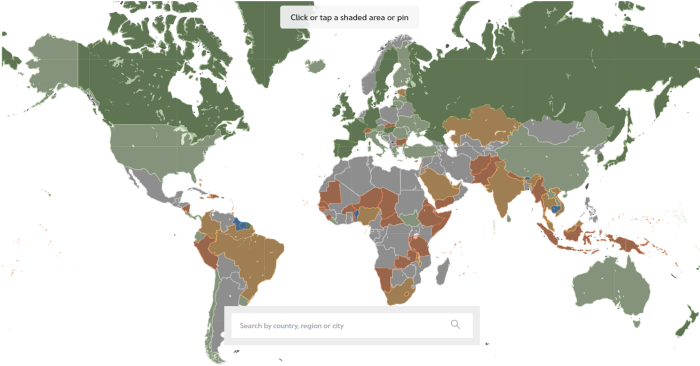
According to the Paris Agreement of COP26, 64% of nations have already declared net zero, and the issue of carbon reduction has already become so important for businesses that it affects their ability to survive. Furthermore, the time when carbon emission standards will be defined and controlled on an individual basis is becoming closer.
Since 2017, the market for carbon credits has experienced extraordinary expansion as a result of widespread talks about carbon credits. The carbon credit market is predicted to expand much more once net zero is implemented and carbon emission rules inevitably tighten.
Hello! Ben here from Nonce Classic. Nonce Classic has recently confirmed the tremendous growth potential of the carbon credit market in the midst of a major trend towards the global goal of net zero (carbon emissions caused by humans — carbon reduction by humans = 0 ). Moreover, we too believed that the questions and issues the carbon credit market suffered from the last 30–40yrs could be perfectly answered through crypto technology and that is why we have added a carbon credit crypto project to the Nonce Classic portfolio. There have been many teams out there that have tried to solve environmental problems through crypto but very few that have measurable experience working in the carbon credit scene. Thus we have put in our efforts to find projects that are not crypto projects created for the sake of issuing tokens but projects that pragmatically use crypto technology to combat climate change by solving problems of the current carbon credit market. In that process, we came to hear of Climate Coin, a veritable carbon credit crypto project, and us Nonce Classic as an accelerator, have begun contributing to its growth and invested in its tokens. Starting with this article, we plan to publish a series of articles explaining why the carbon credit market is bullish, why we invested in Climate Coin, and what kind of project Climate Coin is specifically. In this first article let us understand the carbon credit market and look into its growth potential! Let’s begin :)
The Unavoidable Entry of the Net Zero Era
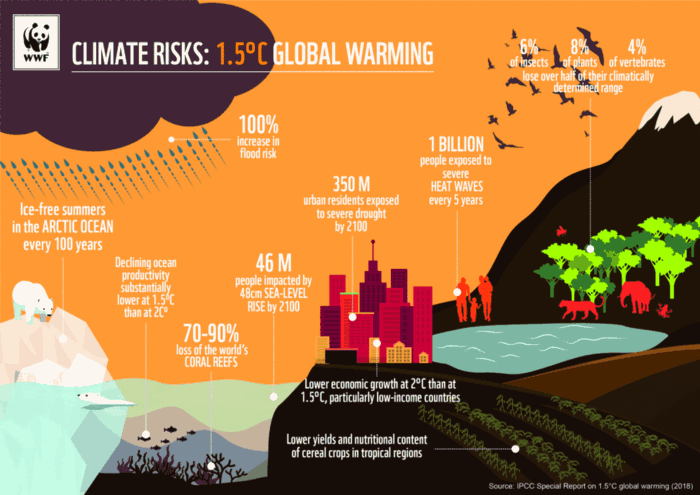
Net zero means... Human carbon emissions are balanced by carbon reduction efforts. A non-environmentalist may find it hard to accept that net zero is attainable by 2050. Global cooperation to save the earth is happening faster than we imagine.
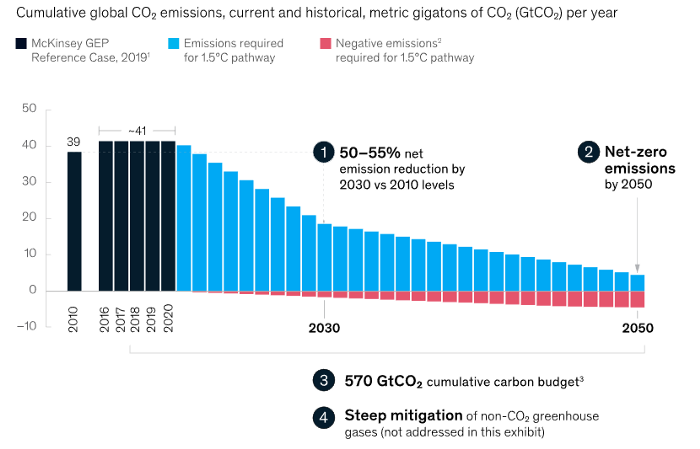
In the Paris Agreement of COP26, concluded in Glasgow, UK on Oct. 31, 2021, nations pledged to reduce worldwide yearly greenhouse gas emissions by more than 50% by 2030 and attain net zero by 2050. Governments throughout the world have pledged net zero at the national level and are holding each other accountable by submitting Nationally Determined Contributions (NDC) every five years to assess implementation. 127 of 198 nations have declared net zero.
Each country's 1.5-degree reduction plans have led to carbon reduction obligations for companies. In places with the strictest environmental regulations, like the EU, companies often face bankruptcy because the cost of buying carbon credits to meet their carbon allowances exceeds their operating profits. In this day and age, minimizing carbon emissions and securing carbon credits are crucial.
Recent SEC actions on climate change may increase companies' concerns about reducing emissions. The SEC required all U.S. stock market companies to disclose their annual greenhouse gas emissions and climate change impact on March 21, 2022. The SEC prepared the proposed regulation through in-depth analysis and stakeholder input since last year. Three out of four SEC members agreed that it should pass without major changes. If the regulation passes, it will affect not only US companies, but also countless companies around the world, directly or indirectly.
Even companies not listed on the U.S. stock market will be affected and, in most cases, required to disclose emissions. Companies listed on the U.S. stock market with significant greenhouse gas emissions or specific targets are subject to stricter emission standards (Scope 3) and disclosure obligations, which will magnify investigations into all related companies. Greenhouse gas emissions can be calculated three ways. Scope 1 measures carbon emissions from a company's facilities and transportation. Scope 2 measures carbon emissions from energy purchases. Scope 3 covers all indirect emissions from a company's value chains.
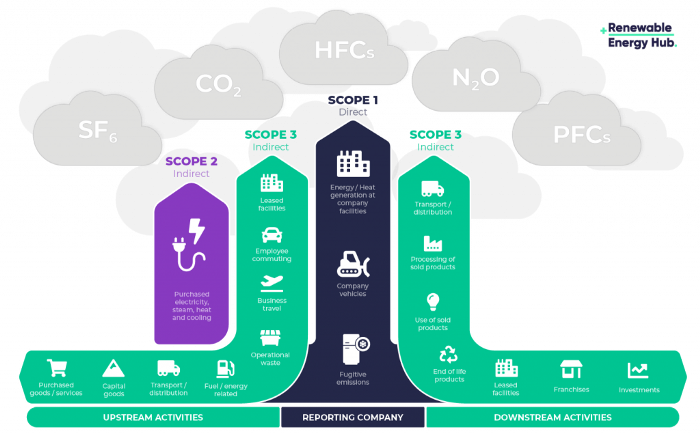
The SEC's proposed carbon emission disclosure mandate and regulations are one example of how carbon credit policies can cross borders and affect all parties. As such incidents will continue throughout the implementation of net zero, even companies that are not immediately obligated to disclose their carbon emissions must be prepared to respond to changes in carbon emission laws and policies.
Carbon reduction obligations will soon become individual. Individual consumption has increased dramatically with improved quality of life and convenience, despite national and corporate efforts to reduce carbon emissions. Since consumption is directly related to carbon emissions, increasing consumption increases carbon emissions. Countries around the world have agreed that to achieve net zero, carbon emissions must be reduced on an individual level. Solutions to individual carbon reduction are being actively discussed and studied under the term Personal Carbon Trading (PCT).
PCT is a system that allows individuals to trade carbon emission quotas in the form of carbon credits. Individuals who emit more carbon than their allotment can buy carbon credits from those who emit less. European cities with well-established carbon credit markets are preparing for net zero by conducting early carbon reduction prototype projects. The era of checking product labels for carbon footprints, choosing low-emissions transportation, and worrying about hot shower emissions is closer than we think.
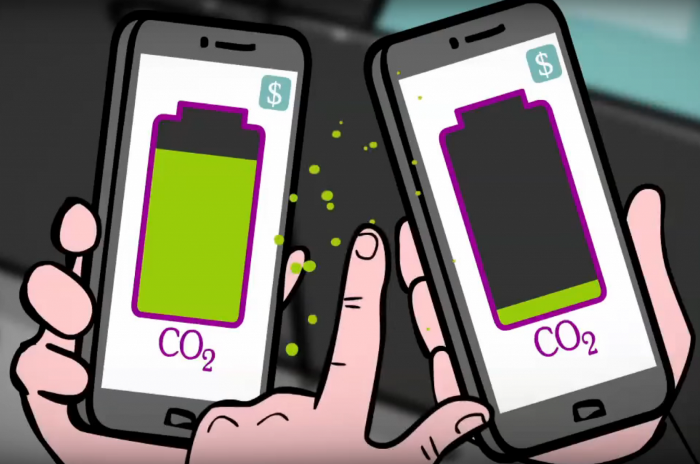
The Market for Carbon Credits Is Expanding Fearfully
Compliance and voluntary carbon markets make up the carbon credit market.
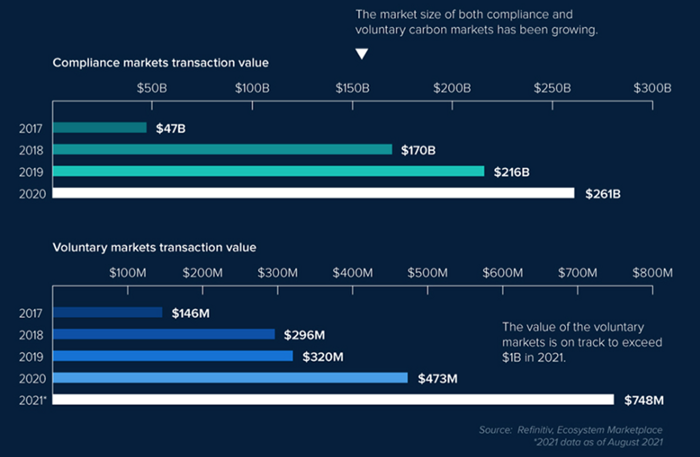
A Compliance Market enforces carbon emission allowances for actors. Companies in industries that previously emitted a lot of carbon are included in the mandatory carbon market, and each government receives carbon credits each year. If a company's emissions are less than the assigned cap and it has extra carbon credits, it can sell them to other companies that have larger emissions and require them (Cap and Trade). The annual number of free emission permits provided to companies is designed to decline, therefore companies' desire for carbon credits will increase. The compliance market's yearly trading volume will exceed $261B in 2020, five times its 2017 level.
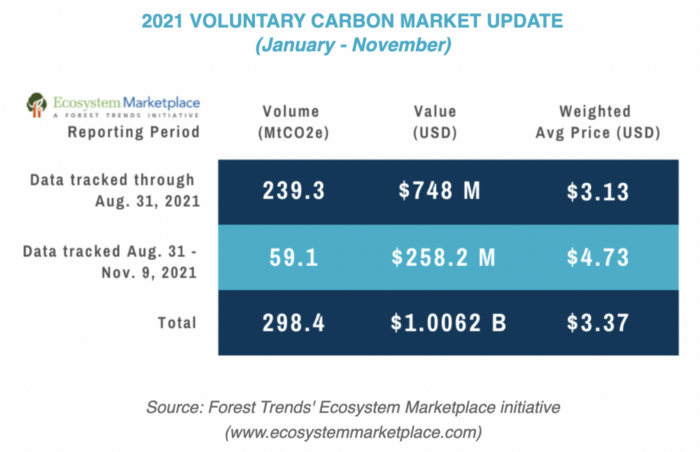
In the Voluntary Market, carbon reduction is voluntary and carbon credits are sold for personal reasons or to build market participants' eco-friendly reputations. Even if not in the compliance market, it is typical for a corporation to be obliged to offset its carbon emissions by acquiring voluntary carbon credits. When a company seeks government or company investment, it may be denied because it is not net zero. If a significant shareholder declares net zero, the companies below it must execute it. As the world moves toward ESG management, becoming an eco-friendly company is no longer a strategic choice to gain a competitive edge, but an important precaution to not fall behind. Due to this eco-friendly trend, the annual market volume of voluntary emission credits will approach $1B by November 2021. The voluntary credit market is anticipated to reach $5B to $50B by 2030. (TSCVM 2021 Report)
In conclusion
This article analyzed how net zero, a target promised by countries around the world to combat climate change, has brought governmental, corporate, and human changes. We discussed how these shifts will become more obvious as we approach net zero, and how the carbon credit market would increase exponentially in response. In the following piece, let's analyze the hurdles impeding the carbon credit market's growth, how the project we invested in tries to tackle these issues, and why we chose Climate Coin. Wait! Jim Skea, co-chair of the IPCC working group, said,
“It’s now or never, if we want to limit global warming to 1.5°C” — Jim Skea
Join nonceClassic’s community:
Telegram: https://t.me/non_stock
Youtube: https://www.youtube.com/channel/UCqeaLwkZbEfsX35xhnLU2VA
Twitter: @nonceclassic
Mail us : general@nonceclassic.org

Katrine Tjoelsen
3 years ago
8 Communication Hacks I Use as a Young Employee
Learn these subtle cues to gain influence.
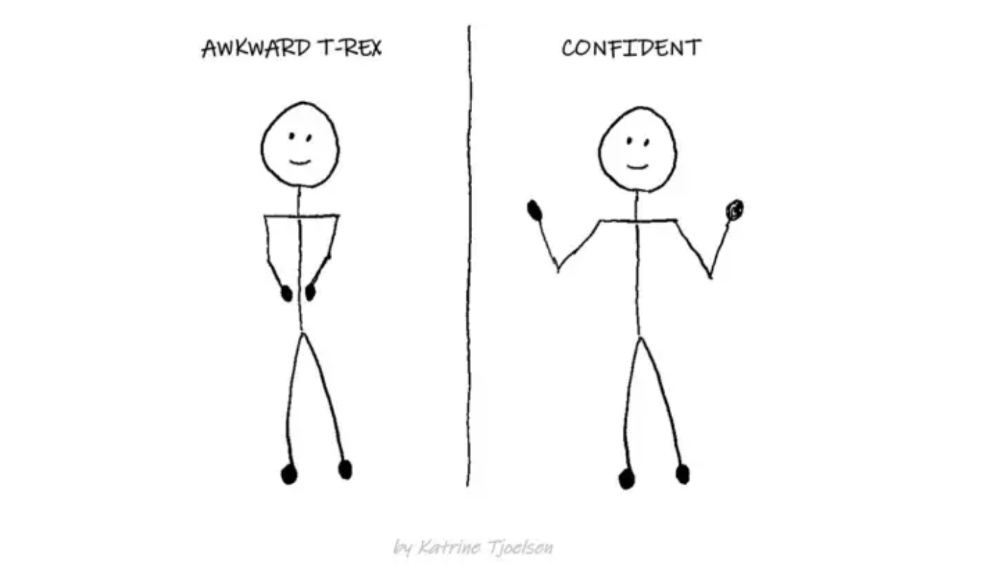
Hate being ignored?
As a 24-year-old, I struggled at work. Attention-getting tips How to avoid being judged by my size, gender, and lack of wrinkles or gray hair?
I've learned seniority hacks. Influence. Within two years as a product manager, I led a team. I'm a Stanford MBA student.
These communication hacks can make you look senior and influential.
1. Slowly speak
We speak quickly because we're afraid of being interrupted.
When I doubt my ideas, I speak quickly. How can we slow down? Jamie Chapman says speaking slowly saps our energy.
Chapman suggests emphasizing certain words and pausing.
2. Interrupted? Stop the stopper
Someone interrupt your speech?
Don't wait. "May I finish?" No pause needed. Stop interrupting. I first tried this in Leadership Laboratory at Stanford. How quickly I gained influence amazed me.
Next time, try “May I finish?” If that’s not enough, try these other tips from Wendy R.S. O’Connor.
3. Context
Others don't always see what's obvious to you.
Through explanation, you help others see the big picture. If a senior knows it, you help them see where your work fits.
4. Don't ask questions in statements
“Your statement lost its effect when you ended it on a high pitch,” a group member told me. Upspeak, it’s called. I do it when I feel uncertain.
Upspeak loses influence and credibility. Unneeded. When unsure, we can say "I think." We can even ask a proper question.
Someone else's boasting is no reason to be dismissive. As leaders and colleagues, we should listen to our colleagues even if they use this speech pattern.
Give your words impact.
5. Signpost structure
Signposts improve clarity by providing structure and transitions.
Communication coach Alexander Lyon explains how to use "first," "second," and "third" He explains classic and summary transitions to help the listener switch topics.
Signs clarify. Clarity matters.
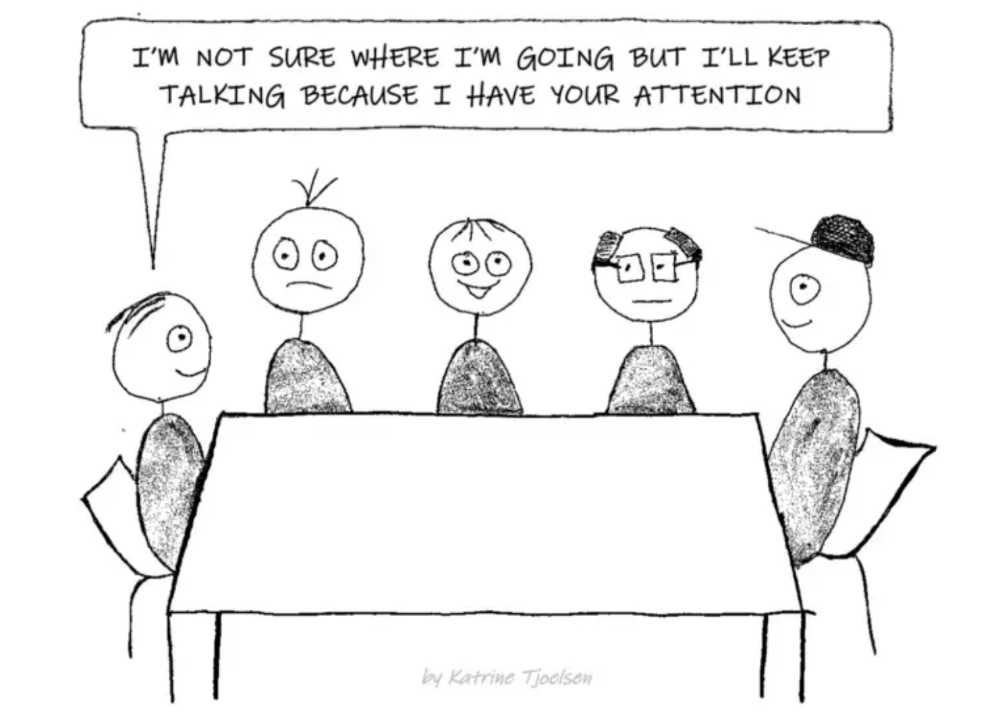
6. Eliminate email fluff
“Fine. When will the report be ready? — Jeff.”
Notice how senior leaders write short, direct emails? I often use formalities like "dear," "hope you're well," and "kind regards"
Formality is (usually) unnecessary.
7. Replace exclamation marks with periods
See how junior an exclamation-filled email looks:
Hi, all!
Hope you’re as excited as I am for tomorrow! We’re celebrating our accomplishments with cake! Join us tomorrow at 2 pm!
See you soon!
Why the exclamation points? Why not just one?
Hi, all.
Hope you’re as excited as I am for tomorrow. We’re celebrating our accomplishments with cake. Join us tomorrow at 2 pm!
See you soon.
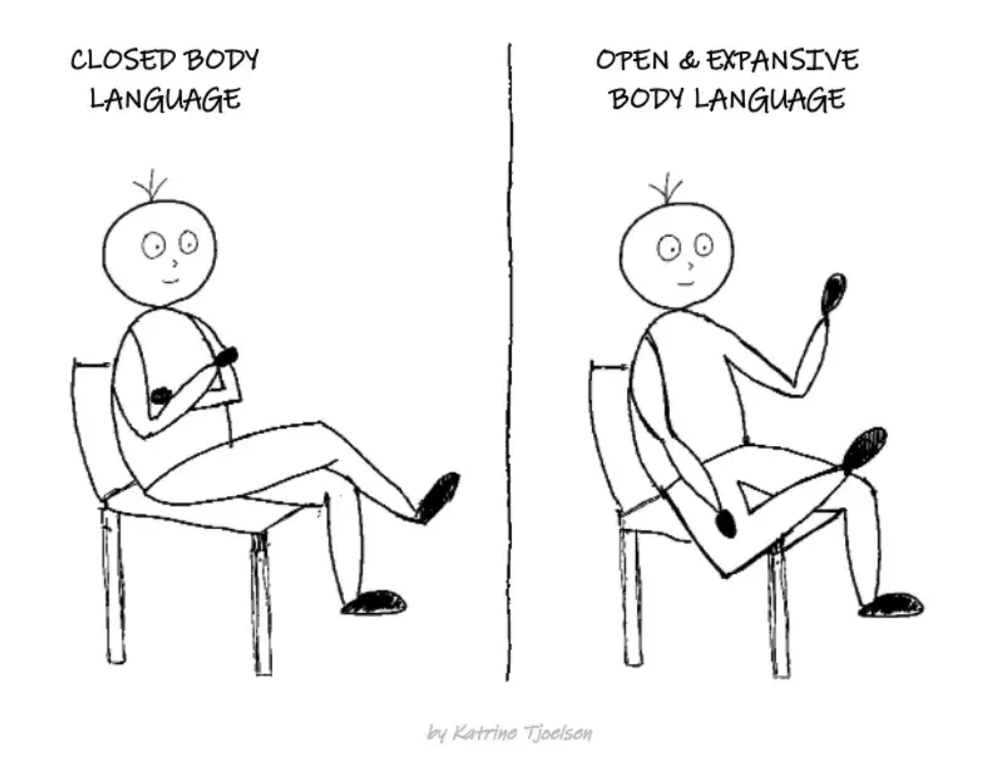
8. Take space
"Playing high" means having an open, relaxed body, says Stanford professor and author Deborah Gruenfield.
Crossed legs or looking small? Relax. Get bigger.

Yogesh Rawal
4 years ago
Blockchain to solve growing privacy challenges
Most online activity is now public. Businesses collect, store, and use our personal data to improve sales and services.
In 2014, Uber executives and employees were accused of spying on customers using tools like maps. Another incident raised concerns about the use of ‘FaceApp'. The app was created by a small Russian company, and the photos can be used in unexpected ways. The Cambridge Analytica scandal exposed serious privacy issues. The whole incident raised questions about how governments and businesses should handle data. Modern technologies and practices also make it easier to link data to people.
As a result, governments and regulators have taken steps to protect user data. The General Data Protection Regulation (GDPR) was introduced by the EU to address data privacy issues. The law governs how businesses collect and process user data. The Data Protection Bill in India and the General Data Protection Law in Brazil are similar.
Despite the impact these regulations have made on data practices, a lot of distance is yet to cover.
Blockchain's solution
Blockchain may be able to address growing data privacy concerns. The technology protects our personal data by providing security and anonymity. The blockchain uses random strings of numbers called public and private keys to maintain privacy. These keys allow a person to be identified without revealing their identity. Blockchain may be able to ensure data privacy and security in this way. Let's dig deeper.
Financial transactions
Online payments require third-party services like PayPal or Google Pay. Using blockchain can eliminate the need to trust third parties. Users can send payments between peers using their public and private keys without providing personal information to a third-party application. Blockchain will also secure financial data.
Healthcare data
Blockchain technology can give patients more control over their data. There are benefits to doing so. Once the data is recorded on the ledger, patients can keep it secure and only allow authorized access. They can also only give the healthcare provider part of the information needed.
The major challenge
We tried to figure out how blockchain could help solve the growing data privacy issues. However, using blockchain to address privacy concerns has significant drawbacks. Blockchain is not designed for data privacy. A ‘distributed' ledger will be used to store the data. Another issue is the immutability of blockchain. Data entered into the ledger cannot be changed or deleted. It will be impossible to remove personal data from the ledger even if desired.
MIT's Enigma Project aims to solve this. Enigma's ‘Secret Network' allows nodes to process data without seeing it. Decentralized applications can use Secret Network to use encrypted data without revealing it.
Another startup, Oasis Labs, uses blockchain to address data privacy issues. They are working on a system that will allow businesses to protect their customers' data.
Conclusion
Blockchain technology is already being used. Several governments use blockchain to eliminate centralized servers and improve data security. In this information age, it is vital to safeguard our data. How blockchain can help us in this matter is still unknown as the world explores the technology.