



More on Entrepreneurship/Creators

Esteban
3 years ago
The Berkus Startup Valuation Method: What Is It?
What Is That?
Berkus is a pre-revenue valuation method based exclusively on qualitative criteria, like Scorecard.
Few firms match their financial estimates, especially in the early stages, so valuation methodologies like the Berkus method are a good way to establish a valuation when the economic measures are not reliable.
How does it work?
This technique evaluates five key success factors.
Fundamental principle
Technology
Execution
Strategic alliances in its primary market
Production, followed by sales
The Berkus technique values the business idea and four success factors. As seen in the matrix below, each of these dimensions poses a danger to the startup's success.
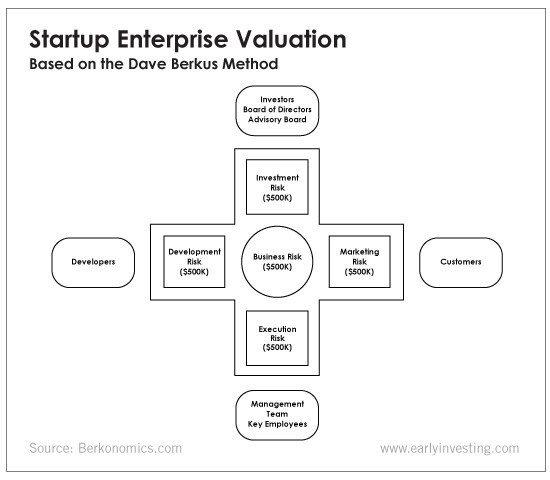
It assigns $0-$500,000 to each of these beginning regions. This approach enables a maximum $2.5M pre-money valuation.
This approach relies significantly on geography and uses the US as a baseline, as it differs in every country in Europe.
A set of standards for analyzing each dimension individually
Fundamental principle (or strength of the idea)
Ideas are worthless; execution matters. Most of us can relate to seeing a new business open in our area or a startup get funded and thinking, "I had this concept years ago!" Someone did it.
The concept remains. To assess the idea's viability, we must consider several criteria.
The concept's exclusivity It is necessary to protect a product or service's concept using patents and copyrights. Additionally, it must be capable of generating large profits.
Planned growth and growth that goes in a specific direction have a lot of potential, therefore incorporating them into a business is really advantageous.
The ability of a concept to grow A venture's ability to generate scalable revenue is a key factor in its emergence and continuation. A startup needs a scalable idea in order to compete successfully in the market.
The attraction of a business idea to a broad spectrum of people is significantly influenced by the current socio-political climate. Thus, the requirement for the assumption of conformity.
Concept Validation Ideas must go through rigorous testing with a variety of audiences in order to lower risk during the implementation phase.
Technology (Prototype)
This aspect reduces startup's technological risk. How good is the startup prototype when facing cyber threats, GDPR compliance (in Europe), tech stack replication difficulty, etc.?
Execution
Check the management team's efficacy. A potential angel investor must verify the founders' experience and track record with previous ventures. Good leadership is needed to chart a ship's course.
Strategic alliances in its primary market
Existing and new relationships will play a vital role in the development of both B2B and B2C startups. What are the startup's synergies? potential ones?
Production, followed by sales (product rollout)
Startup success depends on its manufacturing and product rollout. It depends on the overall addressable market, the startup's ability to market and sell their product, and their capacity to provide consistent, high-quality support.
Example
We're now founders of EyeCaramba, a machine vision-assisted streaming platform. My imagination always goes to poor puns when naming a startup.
Since we're first-time founders and the Berkus technique depends exclusively on qualitative methods and the evaluator's skill, we ask our angel-investor acquaintance for a pre-money appraisal of EyeCaramba.
Our friend offers us the following table:
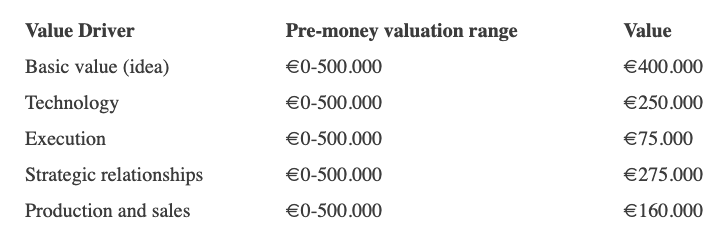
Because we're first-time founders, our pal lowered our Execution score. He knows the idea's value and that the gaming industry is red-hot, with worse startup ideas getting funded, therefore he gave the Basic value the highest value (idea).
EyeCaramba's pre-money valuation is $400,000 + $250,000 + $75,000 + $275,000 + $164,000 (1.16M). Good.
References
https://medium.com/humble-ventures/how-angel-investors-value-pre-revenue-startups-part-iii-8271405f0774#:~:text=pre%2Drevenue%20startups.-,Berkus%20Method,potential%20of%20the%20idea%20itself.%E2%80%9D
https://eqvista.com/berkus-valuation-method-for-startups/
https://www.venionaire.com/early-stage-startup-valuation-part-2-the-berkus-method/

Keagan Stokoe
3 years ago
Generalists Create Startups; Specialists Scale Them
There’s a funny part of ‘Steve Jobs’ by Walter Isaacson where Jobs says that Bill Gates was more a copier than an innovator:
“Bill is basically unimaginative and has never invented anything, which is why I think he’s more comfortable now in philanthropy than technology. He just shamelessly ripped off other people’s ideas….He’d be a broader guy if he had dropped acid once or gone off to an ashram when he was younger.”
Gates lacked flavor. Nobody ever got excited about a Microsoft launch, despite their good products. Jobs had the world's best product taste. Apple vs. Microsoft.
A CEO's core job functions are all driven by taste: recruiting, vision, and company culture all require good taste. Depending on the type of company you want to build, know where you stand between Microsoft and Apple.
How can you improve your product judgment? How to acquire taste?
Test and refine
Product development follows two parallel paths: the ‘customer obsession’ path and the ‘taste and iterate’ path.
The customer obsession path involves solving customer problems. Lean Startup frameworks show you what to build at each step.
Taste-and-iterate doesn't involve the customer. You iterate internally and rely on product leaders' taste and judgment.
Creative Selection by Ken Kocienda explains this method. In Creative Selection, demos are iterated and presented to product leaders. Your boss presents to their boss, and so on up to Steve Jobs. If you have good product taste, you can be a panelist.
The iPhone follows this path. Before seeing an iPhone, consumers couldn't want one. Customer obsession wouldn't have gotten you far because iPhone buyers didn't know they wanted one.
In The Hard Thing About Hard Things, Ben Horowitz writes:
“It turns out that is exactly what product strategy is all about — figuring out the right product is the innovator’s job, not the customer’s job. The customer only knows what she thinks she wants based on her experience with the current product. The innovator can take into account everything that’s possible, but often must go against what she knows to be true. As a result, innovation requires a combination of knowledge, skill, and courage.“
One path solves a problem the customer knows they have, and the other doesn't. Instead of asking a person what they want, observe them and give them something they didn't know they needed.
It's much harder. Apple is the world's most valuable company because it's more valuable. It changes industries permanently.
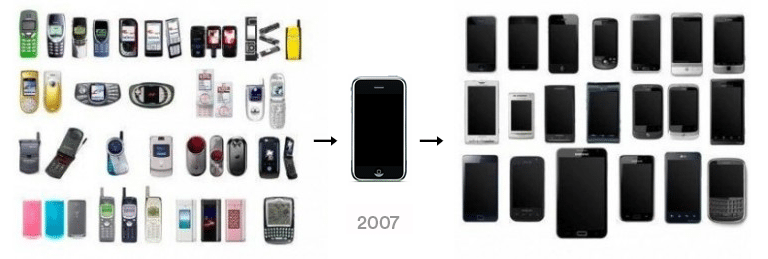
If you want to build superior products, use the iPhone of your industry.
How to Improve Your Taste
I. Work for a company that has taste.
People with the best taste in products, markets, and people are rewarded for building great companies. Tasteful people know quality even when they can't describe it. Taste isn't writable. It's feel-based.
Moving into a community that's already doing what you want to do may be the best way to develop entrepreneurial taste. Most company-building knowledge is tacit.
Joining a company you want to emulate allows you to learn its inner workings. It reveals internal patterns intuitively. Many successful founders come from successful companies.
Consumption determines taste. Excellence will refine you. This is why restauranteurs visit the world's best restaurants and serious painters visit Paris or New York. Joining a company with good taste is beneficial.
2. Possess a wide range of interests
“Edwin Land of Polaroid talked about the intersection of the humanities and science. I like that intersection. There’s something magical about that place… The reason Apple resonates with people is that there’s a deep current of humanity in our innovation. I think great artists and great engineers are similar, in that they both have a desire to express themselves.” — Steve Jobs
I recently discovered Edwin Land. Jobs modeled much of his career after Land's. It makes sense that Apple was inspired by Land.
A Triumph of Genius: Edwin Land, Polaroid, and the Kodak Patent War notes:
“Land was introverted in person, but supremely confident when he came to his ideas… Alongside his scientific passions, lay knowledge of art, music, and literature. He was a cultured person growing even more so as he got older, and his interests filtered into the ethos of Polaroid.”
Founders' philosophies shape companies. Jobs and Land were invested. It showed in the products their companies made. Different. His obsession was spreading Microsoft software worldwide. Microsoft's success is why their products are bland and boring.
Experience is important. It's probably why startups are built by generalists and scaled by specialists.
Jobs combined design, typography, storytelling, and product taste at Apple. Some of the best original Mac developers were poets and musicians. Edwin Land liked broad-minded people, according to his biography. Physicist-musicians or physicist-photographers.
Da Vinci was a master of art, engineering, architecture, anatomy, and more. He wrote and drew at the same desk. His genius is remembered centuries after his death. Da Vinci's statue would stand at the intersection of humanities and science.
We find incredibly creative people here. Superhumans. Designers, creators, and world-improvers. These are the people we need to navigate technology and lead world-changing companies. Generalists lead.
Benjamin Lin
4 years ago
I sold my side project for $20,000: 6 lessons I learned
How I monetized and sold an abandoned side project for $20,000
The Origin Story
I've always wanted to be an entrepreneur but never succeeded. I often had business ideas, made a landing page, and told my buddies. Never got customers.
In April 2021, I decided to try again with a new strategy. I noticed that I had trouble acquiring an initial set of customers, so I wanted to start by acquiring a product that had a small user base that I could grow.
I found a SaaS marketplace called MicroAcquire.com where you could buy and sell SaaS products. I liked Shareit.video, an online Loom-like screen recorder.
Shareit.video didn't generate revenue, but 50 people visited daily to record screencasts.
Purchasing a Failed Side Project
I eventually bought Shareit.video for $12,000 from its owner.
$12,000 was probably too much for a website without revenue or registered users.
I thought time was most important. I could have recreated the website, but it would take months. $12,000 would give me an organized code base and a working product with a few users to monetize.
I considered buying a screen recording website and trying to grow it versus buying a new car or investing in crypto with the $12K.
Buying the website would make me a real entrepreneur, which I wanted more than anything.
Putting down so much money would force me to commit to the project and prevent me from quitting too soon.
A Year of Development
I rebranded the website to be called RecordJoy and worked on it with my cousin for about a year. Within a year, we made $5000 and had 3000 users.
We spent $3500 on ads, hosting, and software to run the business.
AppSumo promoted our $120 Life Time Deal in exchange for 30% of the revenue.
We put RecordJoy on maintenance mode after 6 months because we couldn't find a scalable user acquisition channel.
We improved SEO and redesigned our landing page, but nothing worked.

Despite not being able to grow RecordJoy any further, I had already learned so much from working on the project so I was fine with putting it on maintenance mode. RecordJoy still made $500 a month, which was great lunch money.
Getting Taken Over
One of our customers emailed me asking for some feature requests and I replied that we weren’t going to add any more features in the near future. They asked if we'd sell.
We got on a call with the customer and I asked if he would be interested in buying RecordJoy for 15k. The customer wanted around $8k but would consider it.
Since we were negotiating with one buyer, we put RecordJoy on MicroAcquire to see if there were other offers.

We quickly received 10+ offers. We got 18.5k. There was also about $1000 in AppSumo that we could not withdraw, so we agreed to transfer that over for $600 since about 40% of our sales on AppSumo usually end up being refunded.
Lessons Learned
First, create an acquisition channel
We couldn't discover a scalable acquisition route for RecordJoy. If I had to start another project, I'd develop a robust acquisition channel first. It might be LinkedIn, Medium, or YouTube.
Purchase Power of the Buyer Affects Acquisition Price
Some of the buyers we spoke to were individuals looking to buy side projects, as well as companies looking to launch a new product category. Individual buyers had less budgets than organizations.
Customers of AppSumo vary.
AppSumo customers value lifetime deals and low prices, which may not be a good way to build a business with recurring revenue. Designed for AppSumo users, your product may not connect with other users.
Try to increase acquisition trust
Acquisition often fails. The buyer can go cold feet, cease communicating, or run away with your stuff. Trusting the buyer ensures a smooth asset exchange. First acquisition meeting was unpleasant and price negotiation was tight. In later meetings, we spent the first few minutes trying to get to know the buyer’s motivations and background before jumping into the negotiation, which helped build trust.
Operating expenses can reduce your earnings.
Monitor operating costs. We were really happy when we withdrew the $5000 we made from AppSumo and Stripe until we realized that we had spent $3500 in operating fees. Spend money on software and consultants to help you understand what to build.
Don't overspend on advertising
We invested $1500 on Google Ads but made little money. For a side project, it’s better to focus on organic traffic from SEO rather than paid ads unless you know your ads are going to have a positive ROI.
You might also like

The Velocipede
3 years ago
Stolen wallet
How a misplaced item may change your outlook

Losing your wallet means life stops. Money vanishes. No credit. Your identity is unverifiable. As you check your pockets for the missing object, you can't drive. You can't borrow a library book.
Last seen? intuitively. Every kid asks this, including yours. However, you know where you lost it: On the Providence River cycling trail. While pedaling vigorously, the wallet dropped out of your back pocket and onto the pavement.
A woman you know—your son's art teacher—says it will be returned. Faith.
You want that faith. Losing a wallet is all-consuming. You must presume it has been stolen and is being used to buy every diamond and non-fungible token on the market. Your identity may have been used to open bank accounts and fake passports. Because he used your license address, a ski mask-wearing man may be driving slowly past your house.
As you delete yourself by canceling cards, these images run through your head. You wait in limbo for replacements. Digital text on the DMV website promises your new license will come within 60 days and be approved by local and state law enforcement. In the following two months, your only defense is a screenshot.
Your wallet was ordinary. A worn, overstuffed leather rectangle. You understand how tenuous your existence has always been since you've never lost a wallet. You barely breathe without your documents.
Ironically, you wore a wallet-belt chain. You adored being a 1993 slacker for 15 years. Your wife just convinced you last year that your office job wasn't professional. You nodded and hid the chain.
Never lost your wallet. Until now.
Angry. Feeling stupid. How could you drop something vital? Why? Is the world cruel? No more dumb luck. You're always one pedal-stroke from death.
Then you get a call: We have your wallet.
Local post office, not cops.
The clerk said someone returned it. Due to trying to identify you, it's a chaos. It has your cards but no cash.
Your automobile screeches down the highway. You yell at the windshield, amazed. Submitted. Art teacher was right. Have some trust.
You thank the postmaster. You ramble through the story. The clerk doesn't know the customer, simply a neighborhood Good Samaritan. You wish you could thank that person for lifting your spirits.
You get home, beaming with gratitude. You thumb through your wallet, amazed that it’s all intact. Then you dig out your chain and reattach it.
Because even faith could use a little help.

mbvissers.eth
4 years ago
Why does every smart contract seem to implement ERC165?

ERC165 (or EIP-165) is a standard utilized by various open-source smart contracts like Open Zeppelin or Aavegotchi.
What's it? You must implement? Why do we need it? I'll describe the standard and answer any queries.
What is ERC165
ERC165 detects and publishes smart contract interfaces. Meaning? It standardizes how interfaces are recognized, how to detect if they implement ERC165, and how a contract publishes the interfaces it implements. How does it work?
Why use ERC165? Sometimes it's useful to know which interfaces a contract implements, and which version.
Identifying interfaces
An interface function's selector. This verifies an ABI function. XORing all function selectors defines an interface in this standard. The following code demonstrates.
// SPDX-License-Identifier: UNLICENCED
pragma solidity >=0.8.0 <0.9.0;

interface Solidity101 {
    function hello() external pure;
    function world(int) external pure;
}

contract Selector {
    function calculateSelector() public pure returns (bytes4) {
        Solidity101 i;
        return i.hello.selector ^ i.world.selector;
        // Returns 0xc6be8b58
    }

    function getHelloSelector() public pure returns (bytes4) {
        Solidity101 i;
        return i.hello.selector;
        // Returns 0x19ff1d21
    }

    function getWorldSelector() public pure returns (bytes4) {
        Solidity101 i;
        return i.world.selector;
        // Returns 0xdf419679
    }
}
This code isn't necessary to understand function selectors and how an interface's selector can be determined from the functions it implements.
Run that sample in Remix to see how interface function modifications affect contract function output.
Contracts publish their implemented interfaces.
We can identify interfaces. Now we must disclose the interfaces we're implementing. First, import IERC165 like so.
pragma solidity ^0.4.20;

interface ERC165 {
    /// @notice Query if a contract implements an interface
    /// @param interfaceID The interface identifier, as specified in ERC-165
    /// @dev Interface identification is specified in ERC-165.
    /// @return `true` if the contract implements `interfaceID` and
    ///  `interfaceID` is not 0xffffffff, `false` otherwise
    function supportsInterface(bytes4 interfaceID) external view returns (bool);
}
We still need to build this interface in our smart contract. ERC721 from OpenZeppelin is a good example.
// SPDX-License-Identifier: MIT
// OpenZeppelin Contracts (last updated v4.5.0) (token/ERC721/ERC721.sol)

pragma solidity ^0.8.0;

import "./IERC721.sol";
import "./extensions/IERC721Metadata.sol";
import "../../utils/introspection/ERC165.sol";
// ...

contract ERC721 is Context, ERC165, IERC721, IERC721Metadata {
  // ...

  function supportsInterface(bytes4 interfaceId) public view virtual override(ERC165, IERC165) returns (bool) {
    return
      interfaceId == type(IERC721).interfaceId ||
      interfaceId == type(IERC721Metadata).interfaceId ||
      super.supportsInterface(interfaceId);
  }

  // ...
}
I deleted unnecessary code. The smart contract imports ERC165, IERC721 and IERC721Metadata. The is keyword at smart contract declaration implements all three.
Kind (interface).
Note that type(interface).interfaceId returns the same as the interface selector.
We override supportsInterface in the smart contract to return a boolean that checks if interfaceId is the same as one of the implemented contracts.
Super.supportsInterface() calls ERC165 code. Checks if interfaceId is IERC165.
function supportsInterface(bytes4 interfaceId) public view virtual override returns (bool) {
    return interfaceId == type(IERC165).interfaceId;
}
So, if we run supportsInterface with an interfaceId, our contract function returns true if it's implemented and false otherwise. True for IERC721, IERC721Metadata, andIERC165.
Conclusion
I hope this post has helped you understand and use ERC165 and why it's employed.
Have a great day, thanks for reading!

Will Lockett
3 years ago
Tesla recently disclosed its greatest secret.

The VP has revealed a secret that should frighten the rest of the EV world.
Tesla led the EV revolution. Elon Musk's invention offers a viable alternative to gas-guzzlers. Tesla has lost ground in recent years. VW, BMW, Mercedes, and Ford offer EVs with similar ranges, charging speeds, performance, and cost. Tesla's next-generation 4680 battery pack, Roadster, Cybertruck, and Semi were all delayed. CATL offers superior batteries than the 4680. Martin Viecha, Tesla's Vice President, recently told Business Insider something that startled the EV world and will establish Tesla as the EV king.
Viecha mentioned that Tesla's production costs have dropped 57% since 2017. This isn't due to cheaper batteries or devices like Model 3. No, this is due to amazing factory efficiency gains.
Musk wasn't crazy to want a nearly 100% automated production line, and Tesla's strategy of sticking with one model and improving it has paid off. Others change models every several years. This implies they must spend on new R&D, set up factories, and modernize service and parts systems. All of this costs a ton of money and prevents them from refining production to cut expenses.
Meanwhile, Tesla updates its vehicles progressively. Everything from the backseats to the screen has been enhanced in a 2022 Model 3. Tesla can refine, standardize, and cheaply produce every part without changing the production line.
In 2017, Tesla's automobile production averaged $84,000. In 2022, it'll be $36,000.
Mr. Viecha also claimed that new factories in Shanghai and Berlin will be significantly cheaper to operate once fully operating.
Tesla's hand is visible. Tesla selling $36,000 cars for $60,000 This barely beats the competition. Model Y long-range costs just over $60,000. Tesla makes $24,000+ every sale, giving it a 40% profit margin, one of the best in the auto business.
VW I.D4 costs about the same but makes no profit. Tesla's rivals face similar challenges. Their EVs make little or no profit.
Tesla costs the same as other EVs, but they're in a different league.
But don't forget that the battery pack accounts for 40% of an EV's cost. Tesla may soon fully utilize its 4680 battery pack.
The 4680 battery pack has larger cells and a unique internal design. This means fewer cells are needed for a car, making it cheaper to assemble and produce (per kWh). Energy density and charge speeds increase slightly.
Tesla underestimated the difficulty of making this revolutionary new cell. Each time they try to scale up production, quality drops and rejected cells rise.
Tesla recently installed this battery pack in Model Ys and is scaling production. If they succeed, Tesla battery prices will plummet.
Tesla's Model Ys 2170 battery costs $11,000. The same size pack with 4680 cells costs $3,400 less. Once scaled, it could be $5,500 (50%) less. The 4680 battery pack could reduce Tesla production costs by 20%.
With these cost savings, Tesla could sell Model Ys for $40,000 while still making a profit. They could offer a $25,000 car.
Even with new battery technology, it seems like other manufacturers will struggle to make EVs profitable.
Teslas cost about the same as competitors, so don't be fooled. Behind the scenes, they're still years ahead, and the 4680 battery pack and new factories will only increase that lead. Musk faces a first. He could sell Teslas at current prices and make billions while other manufacturers struggle. Or, he could massively undercut everyone and crush the competition once and for all. Tesla and Elon win.