



More on Personal Growth

Leon Ho
3 years ago
Digital Brainbuilding (Your Second Brain)
The human brain is amazing. As more scientists examine the brain, we learn how much it can store.
The human brain has 1 billion neurons, according to Scientific American. Each neuron creates 1,000 connections, totaling over a trillion. If each neuron could store one memory, we'd run out of room. [1]
What if you could store and access more info, freeing up brain space for problem-solving and creativity?
Build a second brain to keep up with rising knowledge (what I refer to as a Digital Brain). Effectively managing information entails realizing you can't recall everything.
Every action requires information. You need the correct information to learn a new skill, complete a project at work, or establish a business. You must manage information properly to advance your profession and improve your life.
How to construct a second brain to organize information and achieve goals.
What Is a Second Brain?
How often do you forget an article or book's key point? Have you ever wasted hours looking for a saved file?
If so, you're not alone. Information overload affects millions of individuals worldwide. Information overload drains mental resources and causes anxiety.
This is when the second brain comes in.
Building a second brain doesn't involve duplicating the human brain. Building a system that captures, organizes, retrieves, and archives ideas and thoughts. The second brain improves memory, organization, and recall.
Digital tools are preferable to analog for building a second brain.
Digital tools are portable and accessible. Due to these benefits, we'll focus on digital second-brain building.
Brainware
Digital Brains are external hard drives. It stores, organizes, and retrieves. This means improving your memory won't be difficult.
Memory has three components in computing:
Recording — storing the information
Organization — archiving it in a logical manner
Recall — retrieving it again when you need it
For example:
Due to rigorous security settings, many websites need you to create complicated passwords with special characters.
You must now memorize (Record), organize (Organize), and input this new password the next time you check in (Recall).
Even in this simple example, there are many pieces to remember. We can't recognize this new password with our usual patterns. If we don't use the password every day, we'll forget it. You'll type the wrong password when you try to remember it.
It's common. Is it because the information is complicated? Nope. Passwords are basically letters, numbers, and symbols.
It happens because our brains aren't meant to memorize these. Digital Brains can do heavy lifting.
Why You Need a Digital Brain
Dual minds are best. Birth brain is limited.
The cerebral cortex has 125 trillion synapses, according to a Stanford Study. The human brain can hold 2.5 million terabytes of digital data. [2]
Building a second brain improves learning and memory.
Learn and store information effectively
Faster information recall
Organize information to see connections and patterns
Build a Digital Brain to learn more and reach your goals faster. Building a second brain requires time and work, but you'll have more time for vital undertakings.
Why you need a Digital Brain:
1. Use Brainpower Effectively
Your brain has boundaries, like any organ. This is true while solving a complex question or activity. If you can't focus on a work project, you won't finish it on time.
Second brain reduces distractions. A robust structure helps you handle complicated challenges quickly and stay on track. Without distractions, it's easy to focus on vital activities.
2. Staying Organized
Professional and personal duties must be balanced. With so much to do, it's easy to neglect crucial duties. This is especially true for skill-building. Digital Brain will keep you organized and stress-free.
Life success requires action. Organized people get things done. Organizing your information will give you time for crucial tasks.
You'll finish projects faster with good materials and methods. As you succeed, you'll gain creative confidence. You can then tackle greater jobs.
3. Creativity Process
Creativity drives today's world. Creativity is mysterious and surprising for millions worldwide. Immersing yourself in others' associations, triggers, thoughts, and ideas can generate inspiration and creativity.
Building a second brain is crucial to establishing your creative process and building habits that will help you reach your goals. Creativity doesn't require perfection or overthinking.
4. Transforming Your Knowledge Into Opportunities
This is the age of entrepreneurship. Today, you can publish online, build an audience, and make money.
Whether it's a business or hobby, you'll have several job alternatives. Knowledge can boost your economy with ideas and insights.
5. Improving Thinking and Uncovering Connections
Modern career success depends on how you think. Instead of overthinking or perfecting, collect the best images, stories, metaphors, anecdotes, and observations.
This will increase your creativity and reveal connections. Increasing your imagination can help you achieve your goals, according to research. [3]
Your ability to recognize trends will help you stay ahead of the pack.
6. Credibility for a New Job or Business
Your main asset is experience-based expertise. Others won't be able to learn without your help. Technology makes knowledge tangible.
This lets you use your time as you choose while helping others. Changing professions or establishing a new business become learning opportunities when you have a Digital Brain.
7. Using Learning Resources
Millions of people use internet learning materials to improve their lives. Online resources abound. These include books, forums, podcasts, articles, and webinars.
These resources are mostly free or inexpensive. Organizing your knowledge can save you time and money. Building a Digital Brain helps you learn faster. You'll make rapid progress by enjoying learning.
How does a second brain feel?
Digital Brain has helped me arrange my job and family life for years.
No need to remember 1001 passwords. I never forget anything on my wife's grocery lists. Never miss a meeting. I can access essential information and papers anytime, anywhere.
Delegating memory to a second brain reduces tension and anxiety because you'll know what to do with every piece of information.
No information will be forgotten, boosting your confidence. Better manage your fears and concerns by writing them down and establishing a strategy. You'll understand the plethora of daily information and have a clear head.
How to Develop Your Digital Brain (Your Second Brain)
It's cheap but requires work.
Digital Brain development requires:
Recording — storing the information
Organization — archiving it in a logical manner
Recall — retrieving it again when you need it
1. Decide what information matters before recording.
To succeed in today's environment, you must manage massive amounts of data. Articles, books, webinars, podcasts, emails, and texts provide value. Remembering everything is impossible and overwhelming.
What information do you need to achieve your goals?
You must consolidate ideas and create a strategy to reach your aims. Your biological brain can imagine and create with a Digital Brain.
2. Use the Right Tool
We usually record information without any preparation - we brainstorm in a word processor, email ourselves a message, or take notes while reading.
This information isn't used. You must store information in a central location.
Different information needs different instruments.
Evernote is a top note-taking program. Audio clips, Slack chats, PDFs, text notes, photos, scanned handwritten pages, emails, and webpages can be added.
Pocket is a great software for saving and organizing content. Images, videos, and text can be sorted. Web-optimized design
Calendar apps help you manage your time and enhance your productivity by reminding you of your most important tasks. Calendar apps flourish. The best calendar apps are easy to use, have many features, and work across devices. These calendars include Google, Apple, and Outlook.
To-do list/checklist apps are useful for managing tasks. Easy-to-use, versatility, budget, and cross-platform compatibility are important when picking to-do list apps. Google Keep, Google Tasks, and Apple Notes are good to-do apps.
3. Organize data for easy retrieval
How should you organize collected data?
When you collect and organize data, you'll see connections. An article about networking can assist you comprehend web marketing. Saved business cards can help you find new clients.
Choosing the correct tools helps organize data. Here are some tools selection criteria:
Can the tool sync across devices?
Personal or team?
Has a search function for easy information retrieval?
Does it provide easy data categorization?
Can users create lists or collections?
Does it offer easy idea-information connections?
Does it mind map and visually organize thoughts?
Conclusion
Building a Digital Brain (second brain) helps us save information, think creatively, and implement ideas. Your second brain is a biological extension. It prevents amnesia, allowing you to tackle bigger creative difficulties.
People who love learning often consume information without using it. Every day, they postpone life-improving experiences until they're forgotten. Useful information becomes strength.
Reference
[1] ^ Scientific American: What Is the Memory Capacity of the Human Brain?
[2] ^ Clinical Neurology Specialists: What is the Memory Capacity of a Human Brain?
[3] ^ National Library of Medicine: Imagining Success: Multiple Achievement Goals and the Effectiveness of Imagery

Jari Roomer
4 years ago
After 240 articles and 2.5M views on Medium, 9 Raw Writing Tips
Late in 2018, I published my first Medium article, but I didn't start writing seriously until 2019. Since then, I've written more than 240 articles, earned over $50,000 through Medium's Partner Program, and had over 2.5 million page views.
Write A Lot
Most people don't have the patience and persistence for this simple writing secret:
Write + Write + Write = possible success
Writing more improves your skills.
The more articles you publish, the more likely one will go viral.
If you only publish once a month, you have no views. If you publish 10 or 20 articles a month, your success odds increase 10- or 20-fold.
Tim Denning, Ayodeji Awosika, Megan Holstein, and Zulie Rane. Medium is their jam. How are these authors alike? They're productive and consistent. They're prolific.
80% is publishable
Many writers battle perfectionism.
To succeed as a writer, you must publish often. You'll never publish if you aim for perfection.
Adopt the 80 percent-is-good-enough mindset to publish more. It sounds terrible, but it'll boost your writing success.
Your work won't be perfect. Always improve. Waiting for perfection before publishing will take a long time.
Second, readers are your true critics, not you. What you consider "not perfect" may be life-changing for the reader. Don't let perfectionism hinder the reader.
Don't let perfectionism hinder the reader. ou don't want to publish mediocre articles. When the article is 80% done, publish it. Don't spend hours editing. Realize it. Get feedback. Only this will work.
Make Your Headline Irresistible
We all judge books by their covers, despite the saying. And headlines. Readers, including yourself, judge articles by their titles. We use it to decide if an article is worth reading.
Make your headlines irresistible. Want more article views? Then, whether you like it or not, write an attractive article title.
Many high-quality articles are collecting dust because of dull, vague headlines. It didn't make the reader click.
As a writer, you must do more than produce quality content. You must also make people click on your article. This is a writer's job. How to create irresistible headlines:
Curiosity makes readers click. Here's a tempting example...
Example: What Women Actually Look For in a Guy, According to a Huge Study by Luba Sigaud
Use Numbers: Click-bait lists. I mean, which article would you click first? ‘Some ways to improve your productivity’ or ’17 ways to improve your productivity.’ Which would I click?
Example: 9 Uncomfortable Truths You Should Accept Early in Life by Sinem Günel
Most headlines are dull. If you want clicks, get 'sexy'. Buzzword-ify. Invoke emotion. Trendy words.
Example: 20 Realistic Micro-Habits To Live Better Every Day by Amardeep Parmar
Concise paragraphs
Our culture lacks focus. If your headline gets a click, keep paragraphs short to keep readers' attention.
Some writers use 6–8 lines per paragraph, but I prefer 3–4. Longer paragraphs lose readers' interest.
A writer should help the reader finish an article, in my opinion. I consider it a job requirement. You can't force readers to finish an article, but you can make it 'snackable'
Help readers finish an article with concise paragraphs, interesting subheadings, exciting images, clever formatting, or bold attention grabbers.
Work And Move On
I've learned over the years not to get too attached to my articles. Many writers report a strange phenomenon:
The articles you're most excited about usually bomb, while the ones you're not tend to do well.
This isn't always true, but I've noticed it in my own writing. My hopes for an article usually make it worse. The more objective I am, the better an article does.
Let go of a finished article. 40 or 40,000 views, whatever. Now let the article do its job. Onward. Next story. Start another project.
Disregard Haters
Online content creators will encounter haters, whether on YouTube, Instagram, or Medium. More views equal more haters. Fun, right?
As a web content creator, I learned:
Don't debate haters. Never.
It's a mistake I've made several times. It's tempting to prove haters wrong, but they'll always find a way to be 'right'. Your response is their fuel.
I smile and ignore hateful comments. I'm indifferent. I won't enter a negative environment. I have goals, money, and a life to build. "I'm not paid to argue," Drake once said.
Use Grammarly
Grammarly saves me as a non-native English speaker. You know Grammarly. It shows writing errors and makes article suggestions.
As a writer, you need Grammarly. I have a paid plan, but their free version works. It improved my writing greatly.
Put The Reader First, Not Yourself
Many writers write for themselves. They focus on themselves rather than the reader.
Ask yourself:
This article teaches what? How can they be entertained or educated?
Personal examples and experiences improve writing quality. Don't focus on yourself.
It's not about you, the content creator. Reader-focused. Putting the reader first will change things.
Extreme ownership: Stop blaming others
I remember writing a lot on Medium but not getting many views. I blamed Medium first. Poor algorithm. Poor publishing. All sucked.
Instead of looking at what I could do better, I blamed others.
When you blame others, you lose power. Owning your results gives you power.
As a content creator, you must take full responsibility. Extreme ownership means 100% responsibility for work and results.
You don’t blame others. You don't blame the economy, president, platform, founders, or audience. Instead, you look for ways to improve. Few people can do this.
Blaming is useless. Zero. Taking ownership of your work and results will help you progress. It makes you smarter, better, and stronger.
Instead of blaming others, you'll learn writing, marketing, copywriting, content creation, productivity, and other skills. Game-changer.

Samer Buna
3 years ago
The Errors I Committed As a Novice Programmer
Learn to identify them, make habits to avoid them
First, a clarification. This article is aimed to make new programmers aware of their mistakes, train them to detect them, and remind them to prevent them.
I learned from all these blunders. I'm glad I have coding habits to avoid them. Do too.
These mistakes are not ordered.
1) Writing code haphazardly
Writing good content is hard. It takes planning and investigation. Quality programs don't differ.
Think. Research. Plan. Write. Validate. Modify. Unfortunately, no good acronym exists. Create a habit of doing the proper quantity of these activities.
As a newbie programmer, my biggest error was writing code without thinking or researching. This works for small stand-alone apps but hurts larger ones.
Like saying anything you might regret, you should think before coding something you could regret. Coding expresses your thoughts.
When angry, count to 10 before you speak. If very angry, a hundred. — Thomas Jefferson.
My quote:
When reviewing code, count to 10 before you refactor a line. If the code does not have tests, a hundred. — Samer Buna
Programming is primarily about reviewing prior code, investigating what is needed and how it fits into the current system, and developing small, testable features. Only 10% of the process involves writing code.
Programming is not writing code. Programming need nurturing.
2) Making excessive plans prior to writing code
Yes. Planning before writing code is good, but too much of it is bad. Water poisons.
Avoid perfect plans. Programming does not have that. Find a good starting plan. Your plan will change, but it helped you structure your code for clarity. Overplanning wastes time.
Only planning small features. All-feature planning should be illegal! The Waterfall Approach is a step-by-step system. That strategy requires extensive planning. This is not planning. Most software projects fail with waterfall. Implementing anything sophisticated requires agile changes to reality.
Programming requires responsiveness. You'll add waterfall plan-unthinkable features. You will eliminate functionality for reasons you never considered in a waterfall plan. Fix bugs and adjust. Be agile.
Plan your future features, though. Do it cautiously since too little or too much planning can affect code quality, which you must risk.
3) Underestimating the Value of Good Code
Readability should be your code's exclusive goal. Unintelligible code stinks. Non-recyclable.
Never undervalue code quality. Coding communicates implementations. Coders must explicitly communicate solution implementations.
Programming quote I like:
Always code as if the guy who ends up maintaining your code will be a violent psychopath who knows where you live. — John Woods
John, great advice!
Small things matter. If your indentation and capitalization are inconsistent, you should lose your coding license.
Long queues are also simple. Readability decreases after 80 characters. To highlight an if-statement block, you might put a long condition on the same line. No. Just never exceed 80 characters.
Linting and formatting tools fix many basic issues like this. ESLint and Prettier work great together in JavaScript. Use them.
Code quality errors:
Multiple lines in a function or file. Break long code into manageable bits. My rule of thumb is that any function with more than 10 lines is excessively long.
Double-negatives. Don't.
Using double negatives is just very not not wrong
Short, generic, or type-based variable names. Name variables clearly.
There are only two hard things in Computer Science: cache invalidation and naming things. — Phil Karlton
Hard-coding primitive strings and numbers without descriptions. If your logic relies on a constant primitive string or numeric value, identify it.
Avoiding simple difficulties with sloppy shortcuts and workarounds. Avoid evasion. Take stock.
Considering lengthier code better. Shorter code is usually preferable. Only write lengthier versions if they improve code readability. For instance, don't utilize clever one-liners and nested ternary statements just to make the code shorter. In any application, removing unneeded code is better.
Measuring programming progress by lines of code is like measuring aircraft building progress by weight. — Bill Gates
Excessive conditional logic. Conditional logic is unnecessary for most tasks. Choose based on readability. Measure performance before optimizing. Avoid Yoda conditions and conditional assignments.
4) Selecting the First Approach
When I started programming, I would solve an issue and move on. I would apply my initial solution without considering its intricacies and probable shortcomings.
After questioning all the solutions, the best ones usually emerge. If you can't think of several answers, you don't grasp the problem.
Programmers do not solve problems. Find the easiest solution. The solution must work well and be easy to read, comprehend, and maintain.
There are two ways of constructing a software design. One way is to make it so simple that there are obviously no deficiencies, and the other way is to make it so complicated that there are no obvious deficiencies. — C.A.R. Hoare
5) Not Giving Up
I generally stick with the original solution even though it may not be the best. The not-quitting mentality may explain this. This mindset is helpful for most things, but not programming. Program writers should fail early and often.
If you doubt a solution, toss it and rethink the situation. No matter how much you put in that solution. GIT lets you branch off and try various solutions. Use it.
Do not be attached to code because of how much effort you put into it. Bad code needs to be discarded.
6) Avoiding Google
I've wasted time solving problems when I should have researched them first.
Unless you're employing cutting-edge technology, someone else has probably solved your problem. Google It First.
Googling may discover that what you think is an issue isn't and that you should embrace it. Do not presume you know everything needed to choose a solution. Google surprises.
But Google carefully. Newbies also copy code without knowing it. Use only code you understand, even if it solves your problem.
Never assume you know how to code creatively.
The most dangerous thought that you can have as a creative person is to think that you know what you’re doing. — Bret Victor
7) Failing to Use Encapsulation
Not about object-oriented paradigm. Encapsulation is always useful. Unencapsulated systems are difficult to maintain.
An application should only handle a feature once. One object handles that. The application's other objects should only see what's essential. Reducing application dependencies is not about secrecy. Following these guidelines lets you safely update class, object, and function internals without breaking things.
Classify logic and state concepts. Class means blueprint template. Class or Function objects are possible. It could be a Module or Package.
Self-contained tasks need methods in a logic class. Methods should accomplish one thing well. Similar classes should share method names.
As a rookie programmer, I didn't always establish a new class for a conceptual unit or recognize self-contained units. Newbie code has a Util class full of unrelated code. Another symptom of novice code is when a small change cascades and requires numerous other adjustments.
Think before adding a method or new responsibilities to a method. Time's needed. Avoid skipping or refactoring. Start right.
High Cohesion and Low Coupling involves grouping relevant code in a class and reducing class dependencies.
8) Arranging for Uncertainty
Thinking beyond your solution is appealing. Every line of code will bring up what-ifs. This is excellent for edge cases but not for foreseeable needs.
Your what-ifs must fall into one of these two categories. Write only code you need today. Avoid future planning.
Writing a feature for future use is improper. No.
Write only the code you need today for your solution. Handle edge-cases, but don't introduce edge-features.
Growth for the sake of growth is the ideology of the cancer cell. — Edward Abbey
9) Making the incorrect data structure choices
Beginner programmers often overemphasize algorithms when preparing for interviews. Good algorithms should be identified and used when needed, but memorizing them won't make you a programming genius.
However, learning your language's data structures' strengths and shortcomings will make you a better developer.
The improper data structure shouts "newbie coding" here.
Let me give you a few instances of data structures without teaching you:
Managing records with arrays instead of maps (objects).
Most data structure mistakes include using lists instead of maps to manage records. Use a map to organize a list of records.
This list of records has an identifier to look up each entry. Lists for scalar values are OK and frequently superior, especially if the focus is pushing values to the list.
Arrays and objects are the most common JavaScript list and map structures, respectively (there is also a map structure in modern JavaScript).
Lists over maps for record management often fail. I recommend always using this point, even though it only applies to huge collections. This is crucial because maps are faster than lists in looking up records by identifier.
Stackless
Simple recursive functions are often tempting when writing recursive programming. In single-threaded settings, optimizing recursive code is difficult.
Recursive function returns determine code optimization. Optimizing a recursive function that returns two or more calls to itself is harder than optimizing a single call.
Beginners overlook the alternative to recursive functions. Use Stack. Push function calls to a stack and start popping them out to traverse them back.
10) Worsening the current code
Imagine this:

Add an item to that room. You might want to store that object anywhere as it's a mess. You can finish in seconds.
Not with messy code. Do not worsen! Keep the code cleaner than when you started.
Clean the room above to place the new object. If the item is clothing, clear a route to the closet. That's proper execution.
The following bad habits frequently make code worse:
code duplication You are merely duplicating code and creating more chaos if you copy/paste a code block and then alter just the line after that. This would be equivalent to adding another chair with a lower base rather than purchasing a new chair with a height-adjustable seat in the context of the aforementioned dirty room example. Always keep abstraction in mind, and use it when appropriate.
utilizing configuration files not at all. A configuration file should contain the value you need to utilize if it may differ in certain circumstances or at different times. A configuration file should contain a value if you need to use it across numerous lines of code. Every time you add a new value to the code, simply ask yourself: "Does this value belong in a configuration file?" The most likely response is "yes."
using temporary variables and pointless conditional statements. Every if-statement represents a logic branch that should at the very least be tested twice. When avoiding conditionals doesn't compromise readability, it should be done. The main issue with this is that branch logic is being used to extend an existing function rather than creating a new function. Are you altering the code at the appropriate level, or should you go think about the issue at a higher level every time you feel you need an if-statement or a new function variable?
This code illustrates superfluous if-statements:
function isOdd(number) {
  if (number % 2 === 1) {
    return true;
  } else {
    return false;
  }
}
Can you spot the biggest issue with the isOdd function above?
Unnecessary if-statement. Similar code:
function isOdd(number) {
  return (number % 2 === 1);
};
11) Making remarks on things that are obvious
I've learnt to avoid comments. Most code comments can be renamed.
instead of:
// This function sums only odd numbers in an array
const sum = (val) => {
  return val.reduce((a, b) => {
    if (b % 2 === 1) { // If the current number is odd
      a+=b;            // Add current number to accumulator
    }
    return a;          // The accumulator
  }, 0);
};
Commentless code looks like this:
const sumOddValues = (array) => {
  return array.reduce((accumulator, currentNumber) => {
    if (isOdd(currentNumber)) {
      return accumulator + currentNumber;
    }
    return accumulator;
  }, 0);
};
Better function and argument names eliminate most comments. Remember that before commenting.
Sometimes you have to use comments to clarify the code. This is when your comments should answer WHY this code rather than WHAT it does.
Do not write a WHAT remark to clarify the code. Here are some unnecessary comments that clutter code:
// create a variable and initialize it to 0
let sum = 0;
// Loop over array
array.forEach(
  // For each number in the array
  (number) => {
    // Add the current number to the sum variable
    sum += number;
  }
);
Avoid that programmer. Reject that code. Remove such comments if necessary. Most importantly, teach programmers how awful these remarks are. Tell programmers who publish remarks like this that they may lose their jobs. That terrible.
12) Skipping tests
I'll simplify. If you develop code without tests because you think you're an excellent programmer, you're a rookie.
If you're not writing tests in code, you're probably testing manually. Every few lines of code in a web application will be refreshed and interacted with. Also. Manual code testing is fine. To learn how to automatically test your code, manually test it. After testing your application, return to your code editor and write code to automatically perform the same interaction the next time you add code.
Human. After each code update, you will forget to test all successful validations. Automate it!
Before writing code to fulfill validations, guess or design them. TDD is real. It improves your feature design thinking.
If you can use TDD, even partially, do so.
13) Making the assumption that if something is working, it must be right.
See this sumOddValues function. Is it flawed?
const sumOddValues = (array) => {
  return array.reduce((accumulator, currentNumber) => {
    if (currentNumber % 2 === 1) {
      return accumulator + currentNumber;
    }
    return accumulator;
  });
};


console.assert(
  sumOddValues([1, 2, 3, 4, 5]) === 9
);
Verified. Good life. Correct?
Code above is incomplete. It handles some scenarios correctly, including the assumption used, but it has many other issues. I'll list some:
#1: No empty input handling. What happens when the function is called without arguments? That results in an error revealing the function's implementation:
TypeError: Cannot read property 'reduce' of undefined.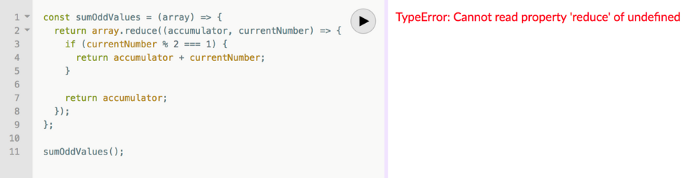
Two main factors indicate faulty code.
Your function's users shouldn't come across implementation-related information.
The user cannot benefit from the error. Simply said, they were unable to use your function. They would be aware that they misused the function if the error was more obvious about the usage issue. You might decide to make the function throw a custom exception, for instance:
TypeError: Cannot execute function for empty list.Instead of returning an error, your method should disregard empty input and return a sum of 0. This case requires action.
Problem #2: No input validation. What happens if the function is invoked with a text, integer, or object instead of an array?
The function now throws:
sumOddValues(42);
TypeError: array.reduce is not a function
Unfortunately, array. cut's a function!
The function labels anything you call it with (42 in the example above) as array because we named the argument array. The error says 42.reduce is not a function.
See how that error confuses? An mistake like:
TypeError: 42 is not an array, dude.Edge-cases are #1 and #2. These edge-cases are typical, but you should also consider less obvious ones. Negative numbers—what happens?
sumOddValues([1, 2, 3, 4, 5, -13]) // => still 9-13's unusual. Is this the desired function behavior? Error? Should it sum negative numbers? Should it keep ignoring negative numbers? You may notice the function should have been titled sumPositiveOddNumbers.
This decision is simple. The more essential point is that if you don't write a test case to document your decision, future function maintainers won't know if you ignored negative values intentionally or accidentally.
It’s not a bug. It’s a feature. — Someone who forgot a test case
#3: Valid cases are not tested. Forget edge-cases, this function mishandles a straightforward case:
sumOddValues([2, 1, 3, 4, 5]) // => 11The 2 above was wrongly included in sum.
The solution is simple: reduce accepts a second input to initialize the accumulator. Reduce will use the first value in the collection as the accumulator if that argument is not provided, like in the code above. The sum included the test case's first even value.
This test case should have been included in the tests along with many others, such as all-even numbers, a list with 0 in it, and an empty list.
Newbie code also has rudimentary tests that disregard edge-cases.
14) Adhering to Current Law
Unless you're a lone supercoder, you'll encounter stupid code. Beginners don't identify it and assume it's decent code because it works and has been in the codebase for a while.
Worse, if the terrible code uses bad practices, the newbie may be enticed to use them elsewhere in the codebase since they learnt them from good code.
A unique condition may have pushed the developer to write faulty code. This is a nice spot for a thorough note that informs newbies about that condition and why the code is written that way.
Beginners should presume that undocumented code they don't understand is bad. Ask. Enquire. Blame it!
If the code's author is dead or can't remember it, research and understand it. Only after understanding the code can you judge its quality. Before that, presume nothing.
15) Being fixated on best practices
Best practices damage. It suggests no further research. Best practice ever. No doubts!
No best practices. Today's programming language may have good practices.
Programming best practices are now considered bad practices.
Time will reveal better methods. Focus on your strengths, not best practices.
Do not do anything because you read a quote, saw someone else do it, or heard it is a recommended practice. This contains all my article advice! Ask questions, challenge theories, know your options, and make informed decisions.
16) Being preoccupied with performance
Premature optimization is the root of all evil (or at least most of it) in programming — Donald Knuth (1974)
I think Donald Knuth's advice is still relevant today, even though programming has changed.
Do not optimize code if you cannot measure the suspected performance problem.
Optimizing before code execution is likely premature. You may possibly be wasting time optimizing.
There are obvious optimizations to consider when writing new code. You must not flood the event loop or block the call stack in Node.js. Remember this early optimization. Will this code block the call stack?
Avoid non-obvious code optimization without measurements. If done, your performance boost may cause new issues.
Stop optimizing unmeasured performance issues.
17) Missing the End-User Experience as a Goal
How can an app add a feature easily? Look at it from your perspective or in the existing User Interface. Right? Add it to the form if the feature captures user input. Add it to your nested menu of links if it adds a link to a page.
Avoid that developer. Be a professional who empathizes with customers. They imagine this feature's consumers' needs and behavior. They focus on making the feature easy to find and use, not just adding it to the software.
18) Choosing the incorrect tool for the task
Every programmer has their preferred tools. Most tools are good for one thing and bad for others.
The worst tool for screwing in a screw is a hammer. Do not use your favorite hammer on a screw. Don't use Amazon's most popular hammer on a screw.
A true beginner relies on tool popularity rather than problem fit.
You may not know the best tools for a project. You may know the best tool. However, it wouldn't rank high. You must learn your tools and be open to new ones.
Some coders shun new tools. They like their tools and don't want to learn new ones. I can relate, but it's wrong.
You can build a house slowly with basic tools or rapidly with superior tools. You must learn and use new tools.
19) Failing to recognize that data issues are caused by code issues
Programs commonly manage data. The software will add, delete, and change records.
Even the simplest programming errors can make data unpredictable. Especially if the same defective application validates all data.
Code-data relationships may be confusing for beginners. They may employ broken code in production since feature X is not critical. Buggy coding may cause hidden data integrity issues.
Worse, deploying code that corrected flaws without fixing minor data problems caused by these defects will only collect more data problems that take the situation into the unrecoverable-level category.
How do you avoid these issues? Simply employ numerous data integrity validation levels. Use several interfaces. Front-end, back-end, network, and database validations. If not, apply database constraints.
Use all database constraints when adding columns and tables:
If a column has a NOT NULL constraint, null values will be rejected for that column. If your application expects that field has a value, your database should designate its source as not null.
If a column has a UNIQUE constraint, the entire table cannot include duplicate values for that column. This is ideal for a username or email field on a Users table, for instance.
For the data to be accepted, a CHECK constraint, or custom expression, must evaluate to true. For instance, you can apply a check constraint to ensure that the values of a normal % column must fall within the range of 0 and 100.
With a PRIMARY KEY constraint, the values of the columns must be both distinct and not null. This one is presumably what you're utilizing. To distinguish the records in each table, the database needs have a primary key.
A FOREIGN KEY constraint requires that the values in one database column, typically a primary key, match those in another table column.
Transaction apathy is another data integrity issue for newbies. If numerous actions affect the same data source and depend on each other, they must be wrapped in a transaction that can be rolled back if one fails.
20) Reinventing the Wheel
Tricky. Some programming wheels need reinvention. Programming is undefined. New requirements and changes happen faster than any team can handle.
Instead of modifying the wheel we all adore, maybe we should rethink it if you need a wheel that spins at varied speeds depending on the time of day. If you don't require a non-standard wheel, don't reinvent it. Use the darn wheel.
Wheel brands can be hard to choose from. Research and test before buying! Most software wheels are free and transparent. Internal design quality lets you evaluate coding wheels. Try open-source wheels. Debug and fix open-source software simply. They're easily replaceable. In-house support is also easy.
If you need a wheel, don't buy a new automobile and put your maintained car on top. Do not include a library to use a few functions. Lodash in JavaScript is the finest example. Import shuffle to shuffle an array. Don't import lodash.
21) Adopting the incorrect perspective on code reviews
Beginners often see code reviews as criticism. Dislike them. Not appreciated. Even fear them.
Incorrect. If so, modify your mindset immediately. Learn from every code review. Salute them. Observe. Most crucial, thank reviewers who teach you.
Always learning code. Accept it. Most code reviews teach something new. Use these for learning.
You may need to correct the reviewer. If your code didn't make that evident, it may need to be changed. If you must teach your reviewer, remember that teaching is one of the most enjoyable things a programmer can do.
22) Not Using Source Control
Newbies often underestimate Git's capabilities.
Source control is more than sharing your modifications. It's much bigger. Clear history is source control. The history of coding will assist address complex problems. Commit messages matter. They are another way to communicate your implementations, and utilizing them with modest commits helps future maintainers understand how the code got where it is.
Commit early and often with present-tense verbs. Summarize your messages but be detailed. If you need more than a few lines, your commit is too long. Rebase!
Avoid needless commit messages. Commit summaries should not list new, changed, or deleted files. Git commands can display that list from the commit object. The summary message would be noise. I think a big commit has many summaries per file altered.
Source control involves discoverability. You can discover the commit that introduced a function and see its context if you doubt its need or design. Commits can even pinpoint which code caused a bug. Git has a binary search within commits (bisect) to find the bug-causing commit.
Source control can be used before commits to great effect. Staging changes, patching selectively, resetting, stashing, editing, applying, diffing, reversing, and others enrich your coding flow. Know, use, and enjoy them.
I consider a Git rookie someone who knows less functionalities.
23) Excessive Use of Shared State
Again, this is not about functional programming vs. other paradigms. That's another article.
Shared state is problematic and should be avoided if feasible. If not, use shared state as little as possible.
As a new programmer, I didn't know that all variables represent shared states. All variables in the same scope can change its data. Global scope reduces shared state span. Keep new states in limited scopes and avoid upward leakage.
When numerous resources modify common state in the same event loop tick, the situation becomes severe (in event-loop-based environments). Races happen.
This shared state race condition problem may encourage a rookie to utilize a timer, especially if they have a data lock issue. Red flag. No. Never accept it.
24) Adopting the Wrong Mentality Toward Errors
Errors are good. Progress. They indicate a simple way to improve.
Expert programmers enjoy errors. Newbies detest them.
If these lovely red error warnings irritate you, modify your mindset. Consider them helpers. Handle them. Use them to advance.
Some errors need exceptions. Plan for user-defined exceptions. Ignore some mistakes. Crash and exit the app.
25) Ignoring rest periods
Humans require mental breaks. Take breaks. In the zone, you'll forget breaks. Another symptom of beginners. No compromises. Make breaks mandatory in your process. Take frequent pauses. Take a little walk to plan your next move. Reread the code.
This has been a long post. You deserve a break.

You might also like

Mircea Iosif
3 years ago
How To Start An Online Business That Will Be Profitable Without Investing A Lot Of Time

Don't know how to start an online business? Here's a guide. By following these recommendations, you can build a lucrative and profitable online business.
What Are Online Businesses Used For?
Most online businesses are websites. A self-created, self-managed website. You may sell things and services online.
To establish an internet business, you must locate a host and set up accounts with numerous companies. Once your accounts are set up, you may start publishing content and selling products or services.
How to Make Money from Your Online Business
Advertising and marketing are the best ways to make money online. You must develop strategies to contact new customers and generate leads. Make sure your website is search engine optimized so people can find you online.
Top 5 Online Business Tips for Startups:
1. Know your target audience's needs.
2. Make your website as appealing as possible.
3. Generate leads and sales with marketing.
4. Track your progress and learn from your mistakes to improve.
5. Be prepared to expand into new markets or regions.
How to Launch a Successful Online Business Without Putting in a Lot of Work
Build with a solid business model to start a profitable online business. By using these tips, you can start your online business without paying much.
First, develop a user-friendly website. You can use an internet marketing platform or create your own website. Once your website is live, optimize it for search engines and add relevant content.
Second, sell online. This can be done through ads or direct sales to website visitors. Finally, use social media to advertise your internet business. By accomplishing these things, you'll draw visitors to your website and make money.
When launching a business, invest long-term. This involves knowing your goals and how you'll pay for them. Volatility can have several effects on your business. If you offer things online, you may need to examine if the market is ready for them.
Invest wisely
Investing all your money in one endeavor can lead to too much risk and little ROI. Diversify your investments to take advantage of all available chances. So, your investments won't encounter unexpected price swings and you'll be immune to economic upheavals.
Financial news updates
When launching or running a thriving online business, financial news is crucial. By knowing current trends and upcoming developments, you can keep your business lucrative.
Keeping up with financial news can also help you avoid potential traps that could harm your bottom line. If you don't know about new legislation that could affect your industry, potential customers may choose another store when they learn about your business's problems.
Volatility ahead
You should expect volatility in the financial sector. Without a plan for coping with volatility, you could run into difficulty. If your organization relies on client input, you may not be able to exploit customer behavior shifts.
Your company could go bankrupt if you don't understand how fickle the stock market can be. By preparing for volatility, you can ensure your organization survives difficult times and market crashes.
Conclusion
Many internet businesses can be profitable. Start quickly with a few straightforward steps. Diversify your investments, follow financial news, and be prepared for volatility to develop a successful business.
Thanks for reading!

Nik Nicholas
4 years ago
A simple go-to-market formula
“Poor distribution, not poor goods, is the main reason for failure” — Peter Thiel.
Here's an easy way to conceptualize "go-to-market" for your distribution plan.
One equation captures the concept:
Distribution = Ecosystem Participants + Incentives
Draw your customers' ecosystem. Set aside your goods and consider your consumer's environment. Who do they deal with daily?
First, list each participant. You want an exhaustive list, but here are some broad categories.
In-person media services
Websites
Events\Networks
Financial education and banking
Shops
Staff
Advertisers
Twitter influencers
Draw influence arrows. Who's affected? I'm not just talking about Instagram selfie-posters. Who has access to your consumer and could promote your product if motivated?
The thicker the arrow, the stronger the relationship. Include more "influencers" if needed. Customer ecosystems are complex.
3. Incentivize ecosystem players. “Show me the incentive and I will show you the result.“, says Warren Buffet's business partner Charlie Munger.
Strong distribution strategies encourage others to promote your product to your target market by incentivizing the most prominent players. Incentives can be financial or non-financial.
Financial rewards
Usually, there's money. If you pay Facebook, they'll run your ad. Salespeople close deals for commission. Giving customers bonus credits will encourage referrals.
Most businesses underuse non-financial incentives.
Non-cash incentives
Motivate key influencers without spending money to expand quickly and cheaply. What can you give a client-connector for free?
Here are some ideas:
Are there any other features or services available?
Titles or status? Tinder paid college "ambassadors" for parties to promote its dating service.
Can I get early/free access? Facebook gave a select group of developers "exclusive" early access to their AR platform.
Are you a good host? Pharell performed at YPlan's New York launch party.
Distribution? Apple's iPod earphones are white so others can see them.
Have an interesting story? PR rewards journalists by giving them a compelling story to boost page views.
Prioritize distribution.
More time spent on distribution means more room in your product design and business plan. Once you've identified the key players in your customer's ecosystem, talk to them.
Money isn't your only resource. Creative non-monetary incentives may be more effective and scalable. Give people something useful and easy to deliver.

Nikhil Vemu
3 years ago
7 Mac Apps That Are Exorbitantly Priced But Totally Worth It

Wish you more bang for your buck
By ‘Cost a Bomb’ I didn’t mean to exaggerate. It’s an idiom that means ‘To be very expensive’. In fact, no app on the planet costs a bomb lol.
So, to the point.
Chronicle
(Freemium. For Pro, $24.99 | Available on Setapp)
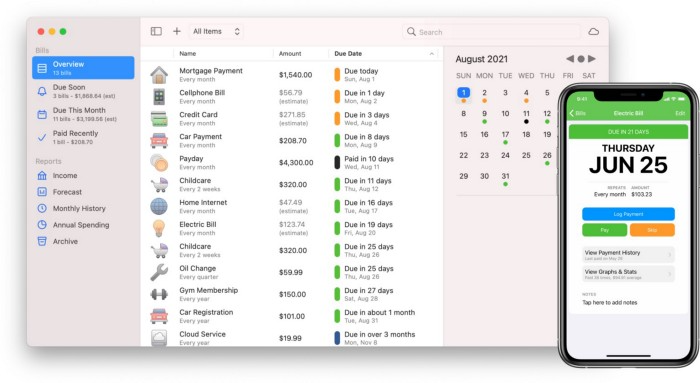
You probably have trouble keeping track of dozens of bills and subscriptions each month.
Try Chronicle.
Easy-to-use app
Add payment due dates and receive reminders,
Save payment documentation,
Analyze your spending by season, year, and month.
Observe expenditure trends and create new budgets.
Best of all, Chronicle features an integrated browser for fast payment and logging.
iOS and macOS sync.
SoundSource
($39 for lifetime)
Background Music, a free macOS program, was featured in #6 of this post last month.
It controls per-app volume, stereo balance, and audio over its max level.
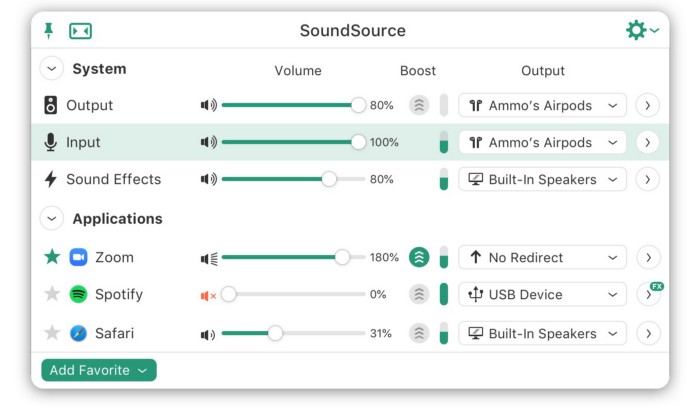
Background Music is fully supported. Additionally,
Connect various speakers to various apps (Wow! ),
change the audio sample rate for each app,
To facilitate access, add a floating SoundSource window.
Use its blocks in Shortcuts app,
On the menu bar, include meters for output/input devices and running programs.
PixelSnap
($39 for lifetime | Available on Setapp)
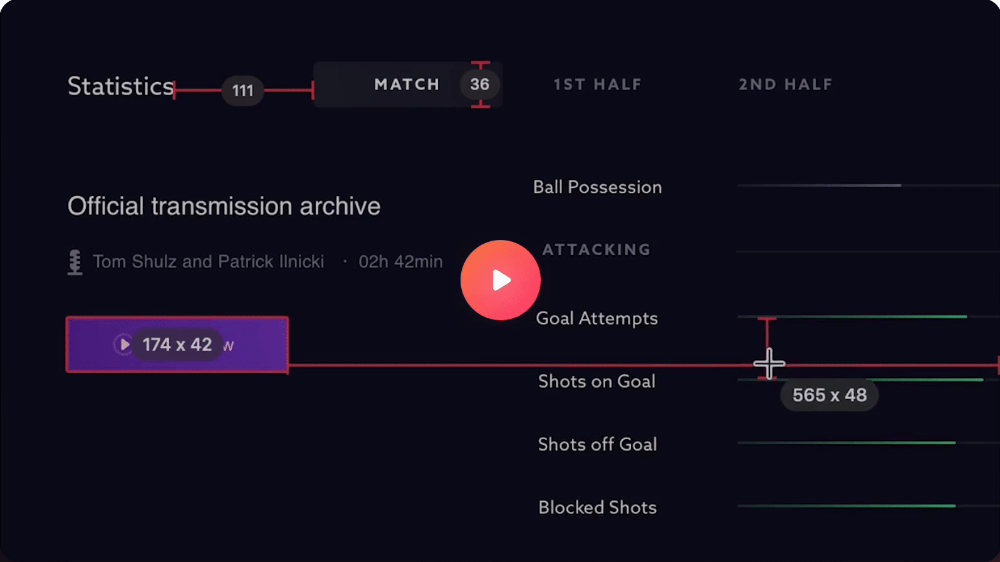
This software is heaven for UI designers.
It aids you.
quickly calculate screen distances (in pixels) ,
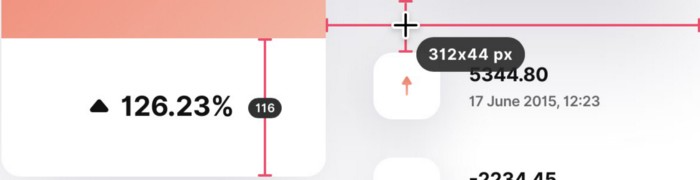
Drag an area around an object to determine its borders,
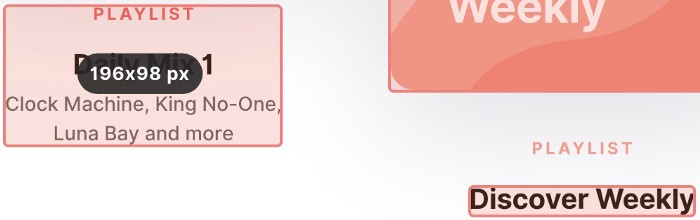
Measure the distances between the additional guides,
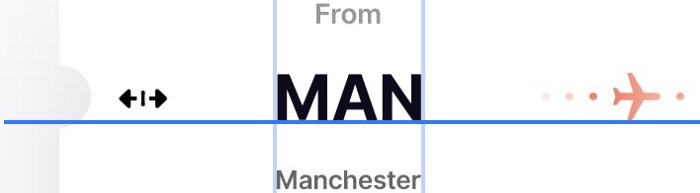
screenshots should be pixel-perfect.
What’s more.
You can
Adapt your tolerance for items with poor contrast and shadows.
Use your Touch Bar to perform important tasks, if you have one.
Mate Translation
($3.99 a month / $29.99 a year | Available on Setapp)
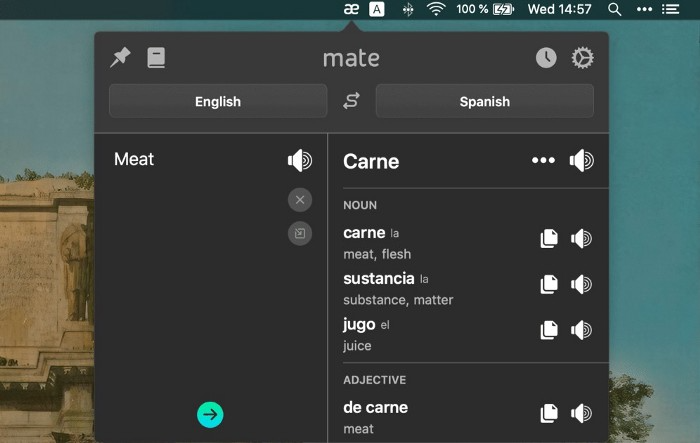
Mate Translate resembles a roided-up version of BarTranslate, which I wrote about in #1 of this piece last month.
If you translate often, utilize Mate Translate on macOS and Safari.
I'm really vocal about it.
It stays on the menu bar, and is accessible with a click or ⌥+shift+T hotkey.
It lets you
Translate in 103 different languages,
To translate text, double-click or right-click on it.
Totally translate websites. Additionally, Netflix subtitles,
Listen to their pronunciation to see how close it is to human.
iPhone and Mac sync Mate-ing history.
Swish
($16 for lifetime | Available on Setapp)
Swish is awesome!
Swipe, squeeze, tap, and hold movements organize chaotic desktop windows. Swish operates with mouse and trackpad.
Some gestures:
• Pinch Once: Close an app
• Pinch Twice: Quit an app
• Swipe down once: Minimise an app
• Pinch Out: Enter fullscreen mode
• Tap, Hold, & Swipe: Arrange apps in grids
 and many more...

After getting acquainted to the movements, your multitasking will improve.
Unite
($24.99 for lifetime | Available on Setapp)
It turns webapps into macOS apps. The end.
Unite's functionality is a million times better.
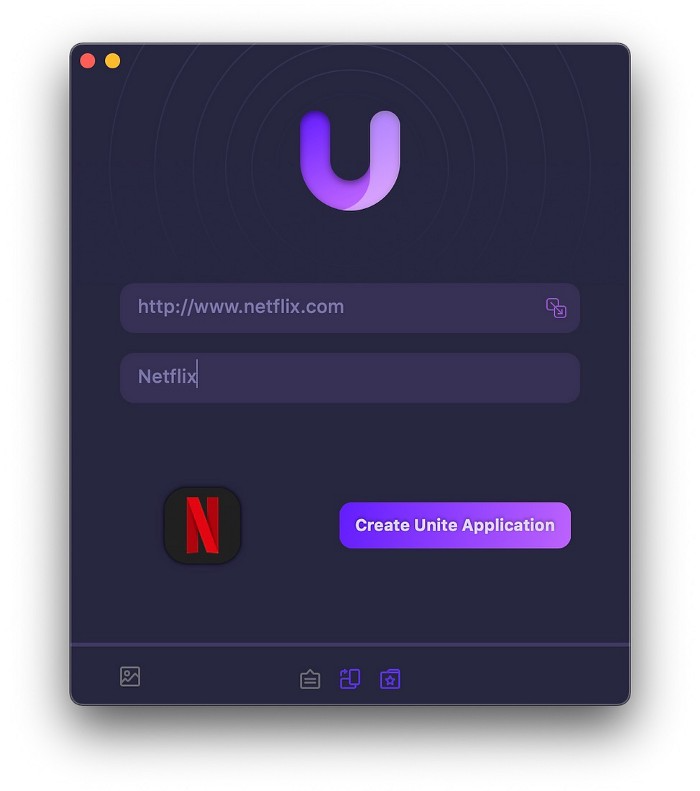
Provide extensive customization (incl. its icon, light and dark modes)
make menu bar applications,
Get badges for web notifications and automatically refresh websites,
Replace any dock icon in the window with it (Wow!) by selecting that portion of the window.

Use PiP (Picture-in-Picture) on video sites that support it.
Delete advertising,
Throughout macOS, use floating windows
and many more…
I feel $24.99 one-off for this tool is a great deal, considering all these features. What do you think?
CleanShot X
(Basic: $29 one-off. Pro: $8/month | Available on Setapp)
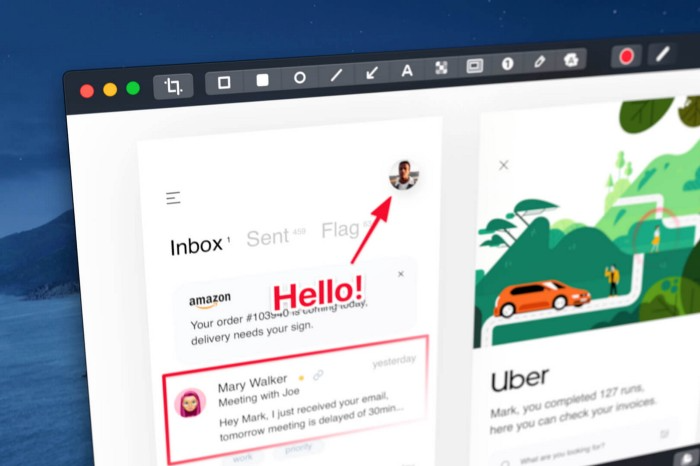
CleanShot X can achieve things the macOS screenshot tool cannot. Complete screenshot toolkit.
CleanShot X, like Pixel Snap 2 (#3), is fantastic.
Allows
Scroll to capture a long page,
screen recording,
With webcam on,
• With mic and system audio,
• Highlighting mouse clicks and hotkeys.
Maintain floating screenshots for reference
While capturing, conceal desktop icons and notifications.
Recognize text in screenshots (OCR),
You may upload and share screenshots using the built-in cloud.
These are just 6 in 50+ features, and you’re already saying Wow!