


Apple AR/VR heaset
Apple is said to have opted for a standalone AR/VR headset over a more powerful tethered model.
It has had a tumultuous history.
Apple's alleged mixed reality headset appears to be the worst-kept secret in tech, and a fresh story from The Information is jam-packed with details regarding the device's rocky development.
Apple's decision to use a separate headgear is one of the most notable aspects of the story. Apple had yet to determine whether to pursue a more powerful VR headset that would be linked with a base station or a standalone headset. According to The Information, Apple officials chose the standalone product over the version with the base station, which had a processor that later arrived as the M1 Ultra. In 2020, Bloomberg published similar information.
That decision appears to have had a long-term impact on the headset's development. "The device's many processors had already been in development for several years by the time the choice was taken, making it impossible to go back to the drawing board and construct, say, a single chip to handle all the headset's responsibilities," The Information stated. "Other difficulties, such as putting 14 cameras on the headset, have given hardware and algorithm engineers stress."
Jony Ive remained to consult on the project's design even after his official departure from Apple, according to the story. Ive "prefers" a wearable battery, such as that offered by Magic Leap. Other prototypes, according to The Information, placed the battery in the headset's headband, and it's unknown which will be used in the final design.
The headset was purportedly shown to Apple's board of directors last week, indicating that a public unveiling is imminent. However, it is possible that it will not be introduced until later this year, and it may not hit shop shelves until 2023, so we may have to wait a bit to try it.
For further down the line, Apple is working on a pair of AR spectacles that appear like Ray-Ban wayfarer sunglasses, but according to The Information, they're "still several years away from release." (I'm interested to see how they compare to Meta and Ray-Bans' true wayfarer-style glasses.)
More on Technology

Enrique Dans
3 years ago
You may not know about The Merge, yet it could change society
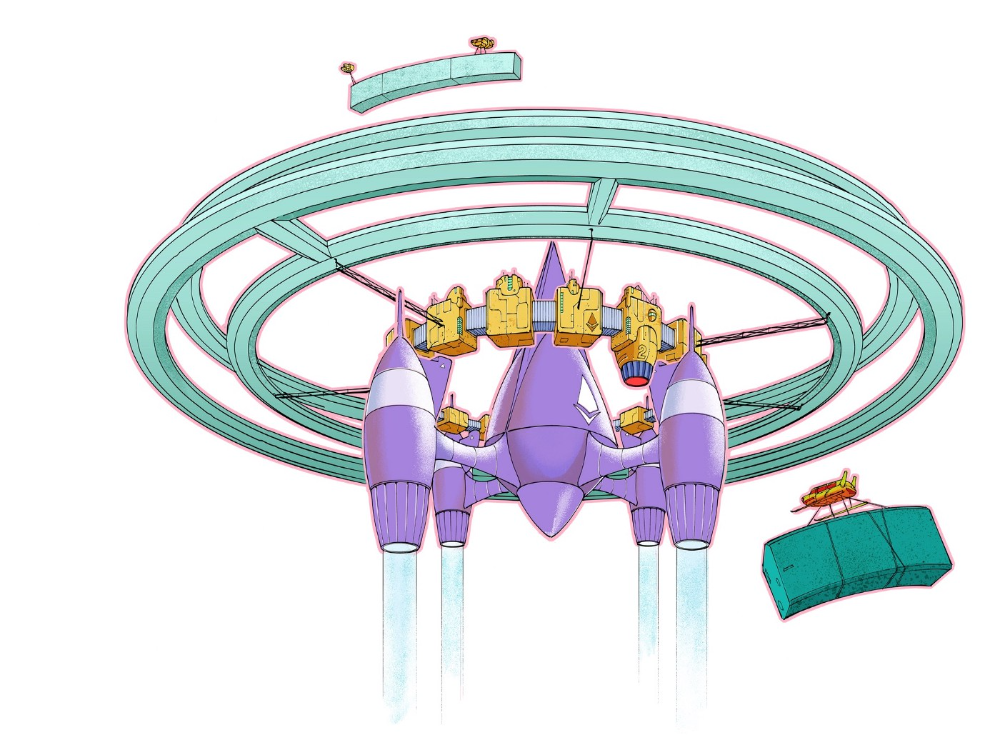
Ethereum is the second-largest cryptocurrency. The Merge, a mid-September event that will convert Ethereum's consensus process from proof-of-work to proof-of-stake if all goes according to plan, will be a game changer.
Why is Ethereum ditching proof-of-work? Because it can. We're talking about a fully functioning, open-source ecosystem with a capacity for evolution that other cryptocurrencies lack, a change that would allow it to scale up its performance from 15 transactions per second to 100,000 as its blockchain is used for more and more things. It would reduce its energy consumption by 99.95%. Vitalik Buterin, the system's founder, would play a less active role due to decentralization, and miners, who validated transactions through proof of work, would be far less important.
Why has this conversion taken so long and been so cautious? Because it involves modifying a core process while it's running to boost its performance. It requires running the new mechanism in test chains on an ever-increasing scale, assessing participant reactions, and checking for issues or restrictions. The last big test was in early June and was successful. All that's left is to converge the mechanism with the Ethereum blockchain to conclude the switch.
What's stopping Bitcoin, the leader in market capitalization and the cryptocurrency that began blockchain's appeal, from doing the same? Satoshi Nakamoto, whoever he or she is, departed from public life long ago, therefore there's no community leadership. Changing it takes a level of consensus that is impossible to achieve without strong leadership, which is why Bitcoin's evolution has been sluggish and conservative, with few modifications.
Secondly, The Merge will balance the consensus mechanism (proof-of-work or proof-of-stake) and the system decentralization or centralization. Proof-of-work prevents double-spending, thus validators must buy hardware. The system works, but it requires a lot of electricity and, as it scales up, tends to re-centralize as validators acquire more hardware and the entire network activity gets focused in a few nodes. Larger operations save more money, which increases profitability and market share. This evolution runs opposed to the concept of decentralization, and some anticipate that any system that uses proof of work as a consensus mechanism will evolve towards centralization, with fewer large firms able to invest in efficient network nodes.
Yet radical bitcoin enthusiasts share an opposite argument. In proof-of-stake, transaction validators put their funds at stake to attest that transactions are valid. The algorithm chooses who validates each transaction, giving more possibilities to nodes that put more coins at stake, which could open the door to centralization and government control.
In both cases, we're talking about long-term changes, but Bitcoin's proof-of-work has been evolving longer and seems to confirm those fears, while proof-of-stake is only employed in coins with a minuscule volume compared to Ethereum and has no predictive value.
As of mid-September, we will have two significant cryptocurrencies, each with a different consensus mechanisms and equally different characteristics: one is intrinsically conservative and used only for economic transactions, while the other has been evolving in open source mode, and can be used for other types of assets, smart contracts, or decentralized finance systems. Some even see it as the foundation of Web3.
Many things could change before September 15, but The Merge is likely to be a turning point. We'll have to follow this closely.

Nikhil Vemu
3 years ago
7 Mac Tips You Never Knew You Needed
Unleash the power of the Option key ⌥

#1 Open a link in the Private tab first.
Previously, if I needed to open a Safari link in a private window, I would:
copied the URL with the right click command,
choose File > New Private Window to open a private window, and
clicked return after pasting the URL.
I've found a more straightforward way.
Right-clicking a link shows this, right?
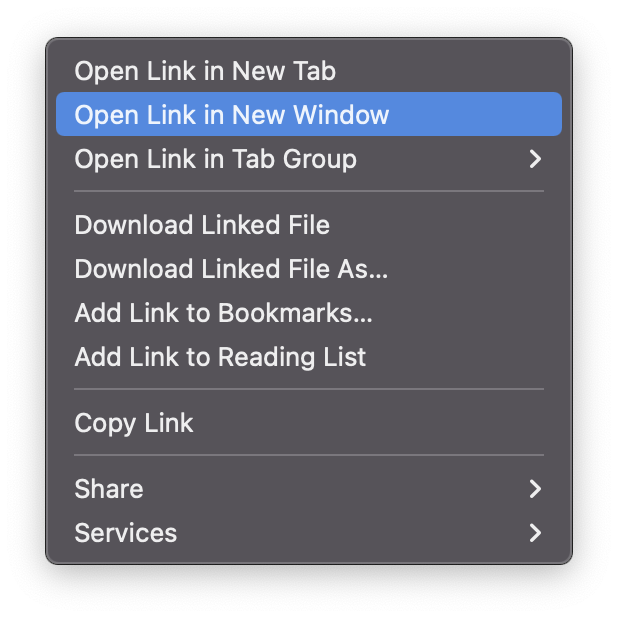
Hold option (⌥) for:
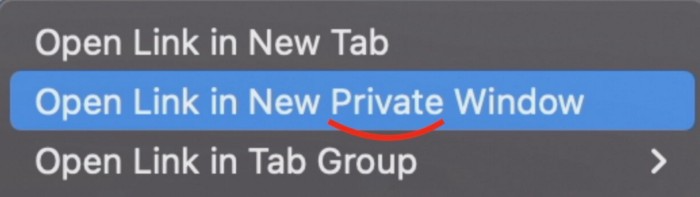
Click Open Link in New Private Window while holding.
Finished!
#2. Instead of searching for specific characters, try this
You may use unicode for business or school. Most people Google them when they need them.
That is lengthy!
You can type some special characters just by pressing ⌥ and a key.
For instance
• ⌥+2 -> ™ (Trademark)
• ⌥+0 -> ° (Degree)
• ⌥+G -> © (Copyright)
• ⌥+= -> ≠ (Not equal to)
• ⌥+< -> ≤ (Less than or equal to)
• ⌥+> -> ≥ (Greater then or equal to)
• ⌥+/ -> ÷ (Different symbol for division)
#3 Activate Do Not Disturb silently.
Do Not Disturb when sharing my screen is awkward for me (because people may think Im trying to hide some secret notifications).
Here's another method.
Hold ⌥ and click on Time (at the extreme right on the menu-bar).
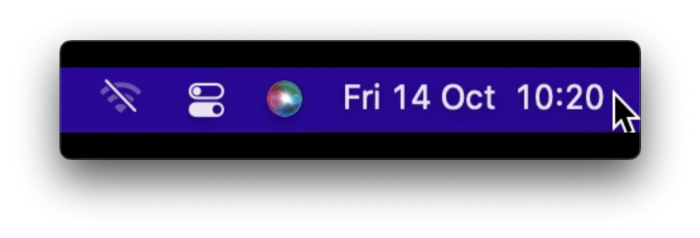
Now, DND is activated (secretly!). To turn it off, do it again.
Note: This works only for DND focus.#4. Resize a window starting from its center
Although this is rarely useful, it is still a hidden trick.
When you resize a window, the opposite edge or corner is used as the pivot, right?
However, if you want to resize it with its center as the pivot, hold while doing so.
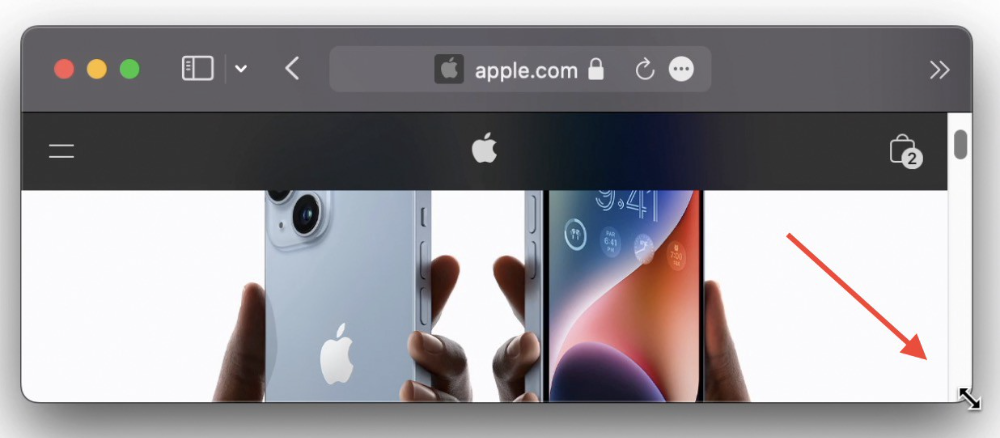
#5. Yes, Cut-Paste is available on Macs as well (though it is slightly different).
I call it copy-move rather than cut-paste. This is how it works.
Carry it out.
Choose a file (by clicking on it), then copy it (⌘+C).
Go to a new location on your Mac. Do you use ⌘+V to paste it? However, to move it, press ⌘+⌥+V.
This removes the file from its original location and copies it here. And it works exactly like cut-and-paste on Windows.
#6. Instantly expand all folders
Set your Mac's folders to List view.
Assume you have one folder with multiple subfolders, each of which contains multiple files. And you wanted to look at every single file that was over there.
How would you do?
You're used to clicking the ⌄ glyph near the folder and each subfolder to expand them all, right? Instead, hold down ⌥ while clicking ⌄ on the parent folder.
This is what happens next.
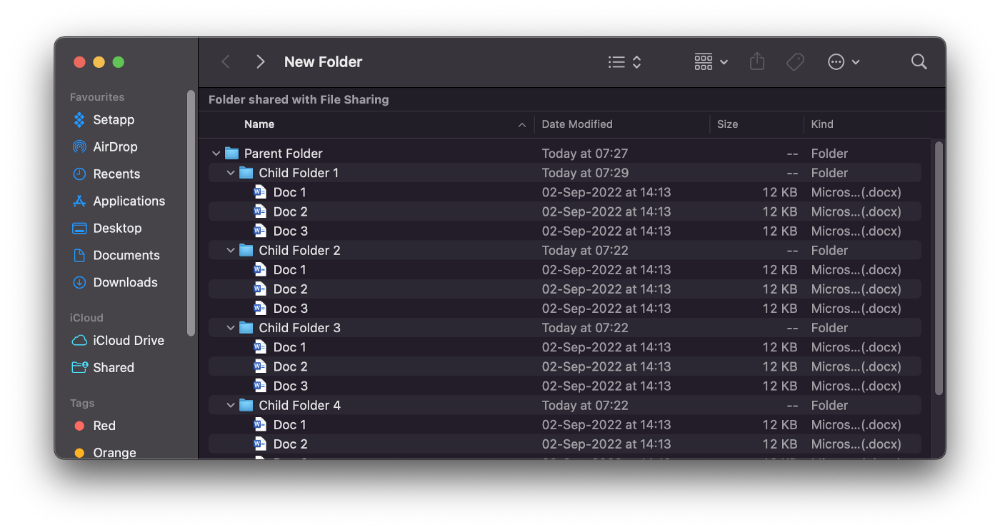
Everything expands.
View/Copy a file's path as an added bonus
If you want to see the path of a file in Finder, select it and hold ⌥, and you'll see it at the bottom for a moment.
To copy its path, right-click on the folder and hold down ⌥ to see this
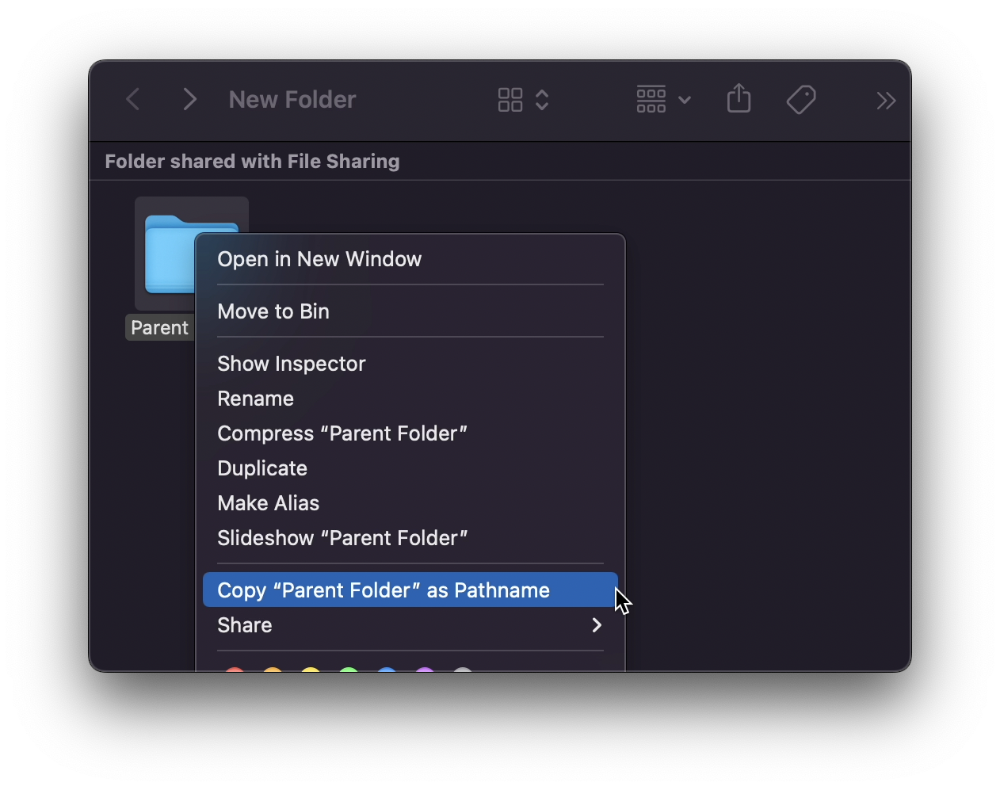
Click on Copy <"folder name"> as Pathname to do it.
#7 "Save As"
I was irritated by the lack of "Save As" in Pages when I first got a Mac (after 15 years of being a Windows guy).
It was necessary for me to save the file as a new file, in a different location, with a different name, or both.
Unfortunately, I couldn't do it on a Mac.
However, I recently discovered that it appears when you hold ⌥ when in the File menu.
Yay!

Paul DelSignore
3 years ago
The stunning new free AI image tool is called Leonardo AI.
Leonardo—The New Midjourney?
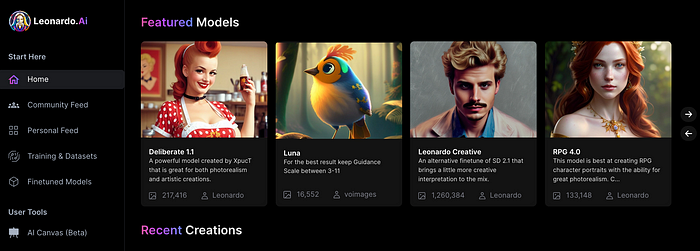
Users are comparing the new cowboy to Midjourney.
Leonardo.AI creates great photographs and has several unique capabilities I haven't seen in other AI image systems.
Midjourney's quality photographs are evident in the community feed.
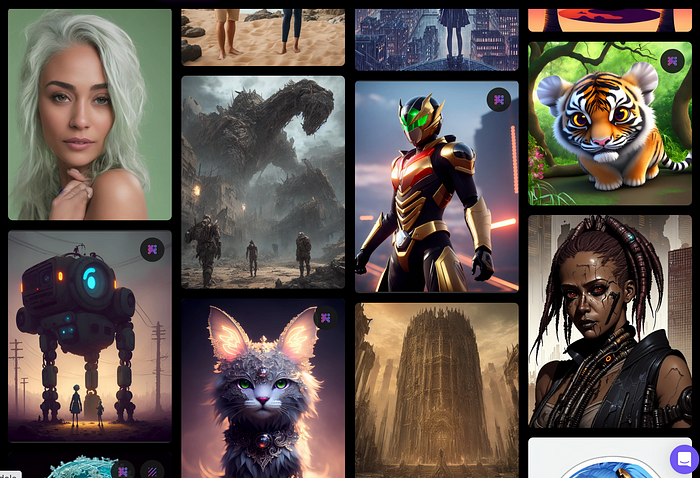
Create Pictures Using Models
You can make graphics using platform models when you first enter the app (website):
Luma, Leonardo creative, Deliberate 1.1.
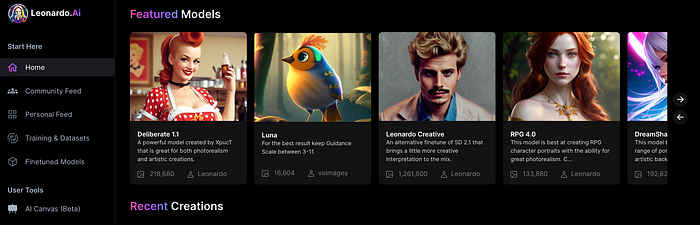
Clicking a model displays its description and samples:
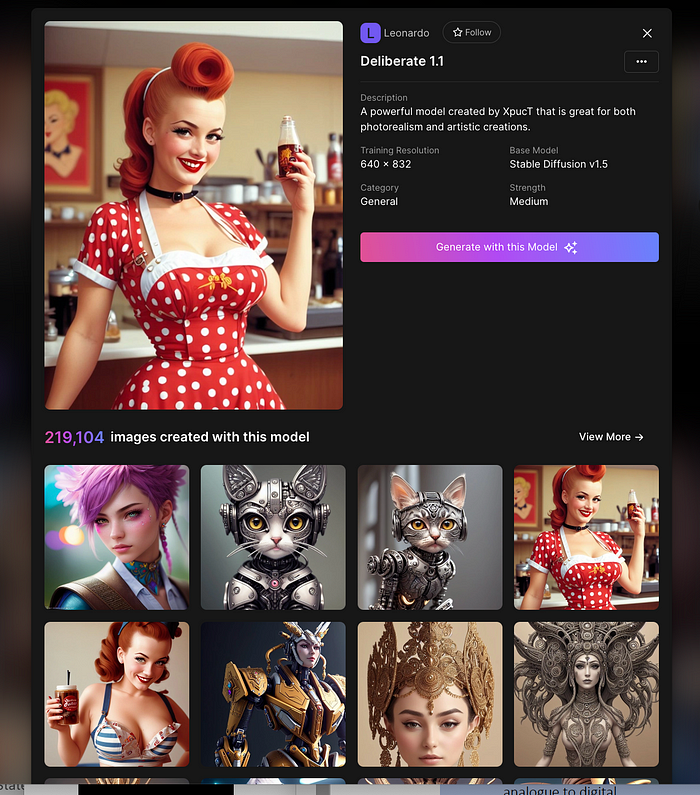
Click Generate With This Model.
Then you can add your prompt, alter models, photos, sizes, and guide scale in a sleek UI.
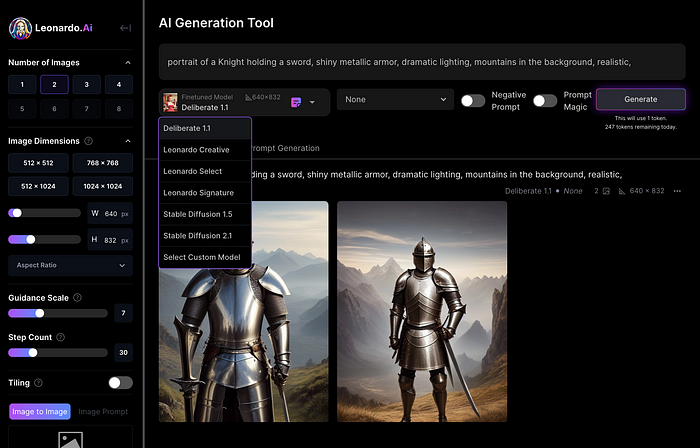
Changing Pictures
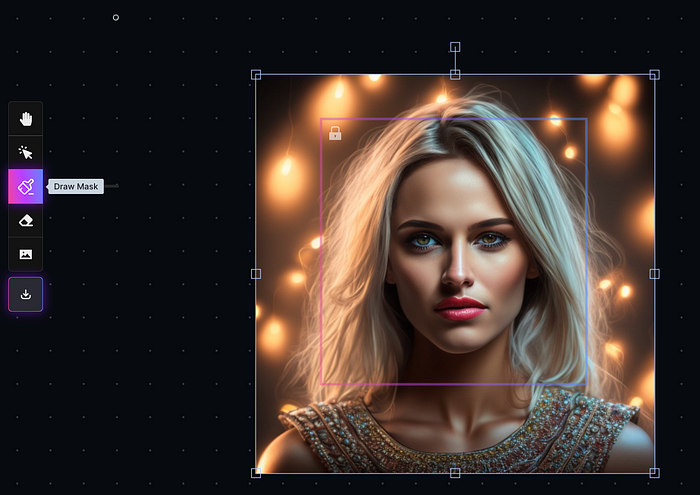
Leonardo's Canvas editor lets you change created images by hovering over them:
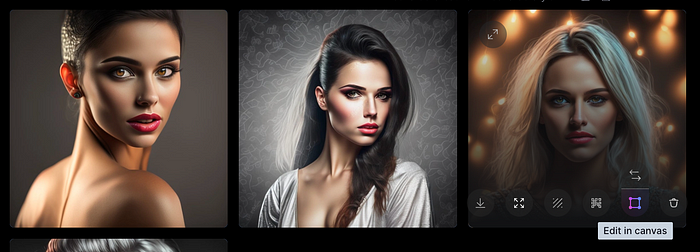
The editor opens with masking, erasing, and picture download.
Develop Your Own Models
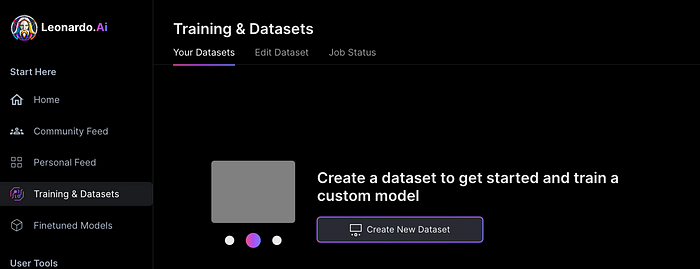
I've never seen anything like Leonardo's model training feature.
Upload a handful of similar photographs and save them as a model for future images. Share your model with the community.
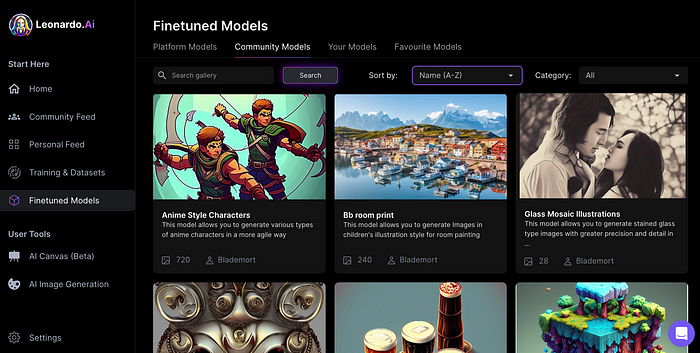
You can make photos using your own model and a community-shared set of fine-tuned models:
Obtain Leonardo access
Leonardo is currently free.
Visit Leonardo.ai and click "Get Early Access" to receive access.
Add your email to receive a link to join the discord channel. Simply describe yourself and fill out a form to join the discord channel.
Please go to 👑│introductions to make an introduction and ✨│priority-early-access will be unlocked, you must fill out a form and in 24 hours or a little more (due to demand), the invitation will be sent to you by email.
I got access in two hours, so hopefully you can too.
Last Words
I know there are many AI generative platforms, some free and some expensive, but Midjourney produces the most artistically stunning images and art.
Leonardo is the closest I've seen to Midjourney, but Midjourney is still the leader.
It's free now.
Leonardo's fine-tuned model selections, model creation, image manipulation, and output speed and quality make it a great AI image toolbox addition.
You might also like

Bernard Bado
3 years ago
Build This Before Someone Else Does!

Do you want to build and launch your own software company? To do this, all you need is a product that solves a problem.
Coming up with profitable ideas is not that easy. But you’re in luck because you got me!
I’ll give you the idea for free. All you need to do is execute it properly.
If you’re ready, let’s jump right into it! Starting with the problem.
Problem
Youtube has many creators. Every day, they think of new ways to entertain or inform us.
They work hard to make videos. Many of their efforts go to waste. They limit their revenue and reach.
Solution
Content repurposing solves this problem.
One video can become several TikToks. Creating YouTube videos from a podcast episode.
Or, one video might become a blog entry.
By turning videos into blog entries, Youtubers may develop evergreen SEO content, attract a new audience, and reach a non-YouTube audience.
Many YouTube creators want this easy feature.
Let's build it!
Implementation
We identified the problem, and we have a solution. All that’s left to do is see how it can be done.
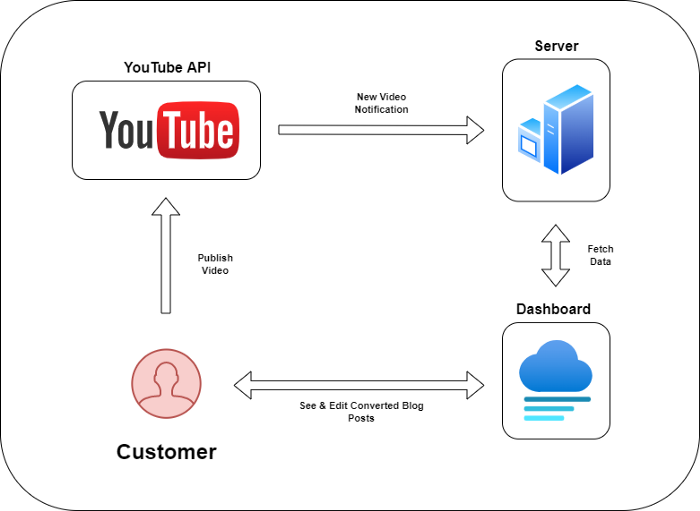
Monitoring new video uploads
First, watch when a friend uploads a new video. Everything should happen automatically without user input.
YouTube Webhooks make this easy. Our server listens for YouTube Webhook notifications.
After publishing a new video, we create a conversion job.
Creating a Blog Post from a Video
Next, turn a video into a blog article.
To convert, we must extract the video's audio (which can be achieved by using FFmpeg on the server).
Once we have the audio channel, we can use speech-to-text.
Services can accomplish this easily.
Speech-to-text on Google
Google Translate
Deepgram
Deepgram's affordability and integration make it my pick.
After conversion, the blog post needs formatting, error checking, and proofreading.
After this, a new blog post will appear in our web app's dashboard.
Completing a blog post
After conversion, users must examine and amend their blog posts.
Our application dashboard would handle all of this. It's a dashboard-style software where users can:
Link their Youtube account
Check out the converted videos in the future.
View the conversions that are ongoing.
Edit and format converted blog articles.
It's a web-based app.
It doesn't matter how it's made but I'd choose Next.js.
Next.js is a React front-end standard. Vercel serverless functions could conduct the conversions.
This would let me host the software for free and reduce server expenditures.
Taking It One Step Further
SaaS in a nutshell. Future improvements include integrating with WordPress or Ghost.
Our app users could then publish blog posts. Streamlining the procedure.
MVPs don't need this functionality.
Final Thoughts
Repurposing content helps you post more often, reach more people, and develop faster.
Many agencies charge a fortune for this service. Handmade means pricey.
Content creators will go crazy if you automate and cheaply solve this problem.
Just execute this idea!

Rick Blyth
3 years ago
Looking for a Reliable Micro SaaS Niche
Niches are rich, as the adage goes.
Micro SaaS requires a great micro-niche; otherwise, it's merely plain old SaaS with a large audience.
Instead of targeting broad markets with few identifying qualities, specialise down to a micro-niche. How would you target these users?
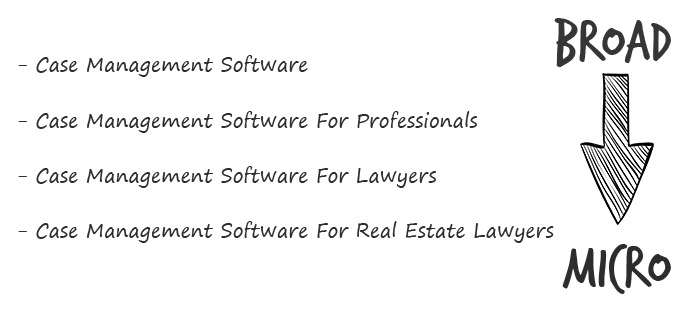
Better go tiny. You'll locate and engage new consumers more readily and serve them better with a customized solution.
Imagine you're a real estate lawyer looking for a case management solution. Because it's so specific to you, you'd be lured to this link:

instead of below:

Next, locate mini SaaS niches that could work for you. You're not yet looking at the problems/solutions in these areas, merely shortlisting them.
The market should be growing, not shrinking
We shouldn't design apps for a declining niche. We intend to target stable or growing niches for the next 5 to 10 years.
If it's a developing market, you may be able to claim a stake early. You must balance this strategy with safer, longer-established niches (accountancy, law, health, etc).
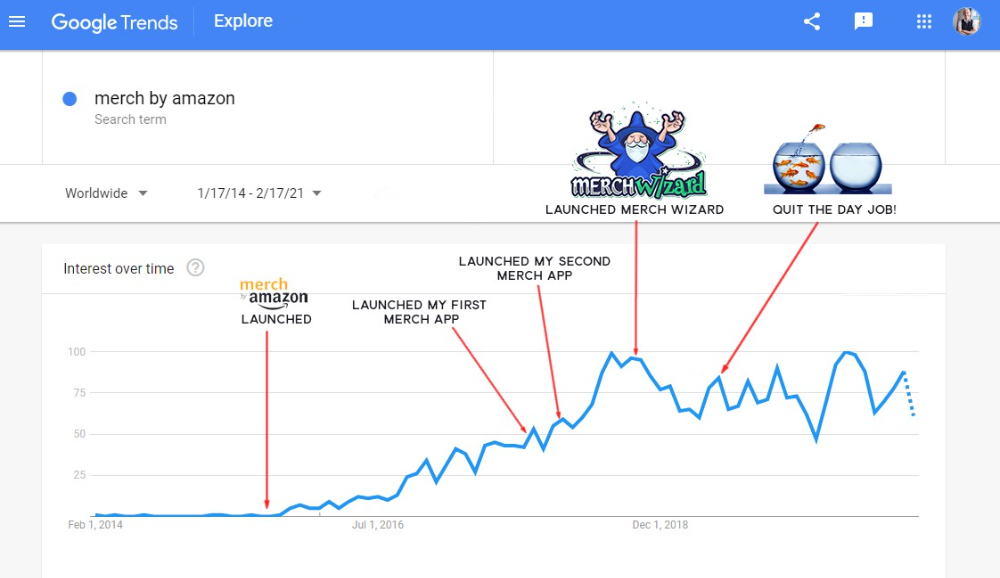
First Micro SaaS apps I designed were for Merch By Amazon creators, a burgeoning niche. I found this niche when searching for passive income.
Graphic designers and entrepreneurs post their art to Amazon to sell on clothes. When Amazon sells their design, they get a royalty. Since 2015, this platform and specialty have grown dramatically.
Amazon doesn't publicize the amount of creators on the platform, but it's possible to approximate by looking at Facebook groups, Reddit channels, etc.
I could see the community growing week by week, with new members joining. Merch was an up-and-coming niche, and designers made money when their designs sold. All I had to do was create tools that let designers focus on making bestselling designs.
Look at the Google Trends graph below to see how this niche has evolved and when I released my apps and resigned my job.
Are the users able to afford the tools?
Who's your average user? Consumer or business? Is your solution budgeted?
If they're students, you'll struggle to convince them to subscribe to your study-system app (ahead of video games and beer).
Let's imagine you designed a Shopify plugin that emails customers when a product is restocked. If your plugin just needs 5 product sales a month to justify its cost, everyone wins (just be mindful that one day Shopify could potentially re-create your plugins functionality within its core offering making your app redundant ).
Do specialized users buy tools? If so, that's comforting. If not, you'd better have a compelling value proposition for your end customer if you're the first.
This should include how much time or money your program can save or make the user.

Are you able to understand the Micro SaaS market?
Ideally, you're already familiar about the industry/niche. Maybe you're fixing a challenge from your day job or freelance work.
If not, evaluate how long it would take to learn the niche's users. Health & Fitness is easier to relate to and understand than hedge fund derivatives trading.
Competing in these complex (and profitable) fields might offer you an edge.

B2C, B2M, or B2B?
Consider your user base's demographics. Will you target businesses, consumers, or both? Let's examine the different consumer types:
B2B refers to business-to-business transactions where customers are other businesses. UpVoty, Plutio, Slingshot, Salesforce, Atlassian, and Hubspot are a few examples of SaaS, ranging from Micro SaaS to SaaS.
Business to Consumer (B2C), in which your clients are people who buy things. For instance, Duolingo, Canva, and Nomad List.
For instance, my tool KDP Wizard has a mixed user base of publishing enterprises and also entrepreneurial consumers selling low-content books on Amazon. This is a case of business to many (B2M), where your users are a mixture of businesses and consumers. There is a large SaaS called Dropbox that offers both personal and business plans.
Targeting a B2B vs. B2C niche is very different. The sales cycle differs.
A B2B sales staff must make cold calls to potential clients' companies. Long sales, legal, and contractual conversations are typically required for each business to get the go-ahead. The cost of obtaining a new customer is substantially more than it is for B2C, despite the fact that the recurring fees are significantly higher.
Since there is typically only one individual making the purchasing decision, B2C signups are virtually always self-service with reduced recurring fees. Since there is typically no outbound sales staff in B2C, acquisition costs are significantly lower than in B2B.
User Characteristics for B2B vs. B2C
Consider where your niche's users congregate if you don't already have a presence there.
B2B users frequent LinkedIn and Twitter. B2C users are on Facebook/Instagram/Reddit/Twitter, etc.
Churn is higher in B2C because consumers haven't gone through all the hoops of a B2B sale. Consumers are more unpredictable than businesses since they let their bank cards exceed limitations or don't update them when they expire.
With a B2B solution, there's a contractual arrangement and the firm will pay the subscription as long as they need it.
Depending on how you feel about the above (sales team vs. income vs. churn vs. targeting), you'll know which niches to pursue.
You ought to respect potential customers.
Would you hang out with customers?
You'll connect with users at conferences (in-person or virtual), webinars, seminars, screenshares, Facebook groups, emails, support calls, support tickets, etc.
If talking to a niche's user base makes you shudder, you're in for a tough road. Whether they're demanding or dull, avoid them if possible.
Merch users are mostly graphic designers, side hustlers, and entrepreneurs. These laid-back users embrace technologies that assist develop their Merch business.
I discovered there was only one annual conference for this specialty, held in Seattle, USA. I decided to organize a conference for UK/European Merch designers, despite never having done so before.
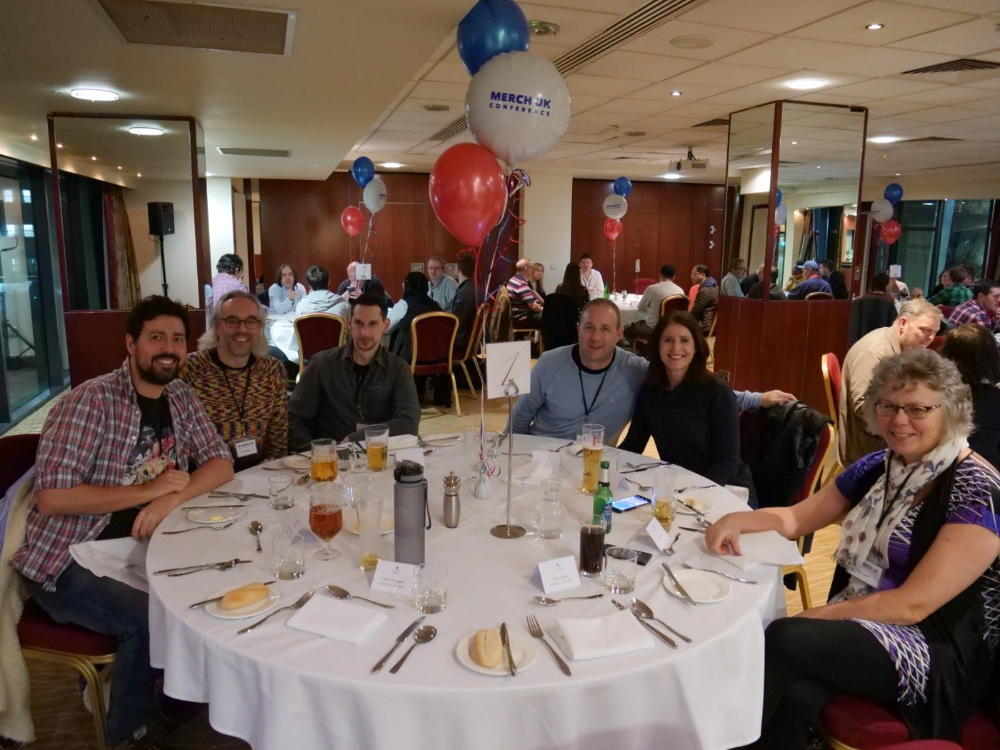
Hosting a conference for over 80 people was stressful, and it turned out to be much bigger than expected, with attendees from the US, Europe, and the UK.
I met many specialized users, built relationships, gained trust, and picked their brains in person. Many of the attendees were already Merch Wizard users, so hearing their feedback and ideas for future features was invaluable.
focused and specific
Instead of building for a generic, hard-to-reach market, target a specific group.
I liken it to fishing in a little, hidden pond. This small pond has only one species of fish, so you learn what bait it likes. Contrast that with trawling for hours to catch as many fish as possible, even if some aren't what you want.
In the case management scenario, it's difficult to target leads because several niches could use the app. Where do your potential customers hang out? Your generic solution: No.
It's easier to join a community of Real Estate Lawyers and see if your software can answer their pain points.
My Success with Micro SaaS
In my case, my Micro SaaS apps have been my chrome extensions. Since I launched them, they've earned me an average $10k MRR, allowing me to quit my lousy full-time job years ago.
I sold my apps after scaling them for a life-changing lump amount. Since then, I've helped unfulfilled software developers escape the 9-5 through Micro SaaS.
Whether it's a profitable side hustle or a liferaft to quit their job and become their own Micro SaaS boss.
Having built my apps to the point where I could quit my job, then scaled and sold them, I feel I can share my skills with software developers worldwide.
Read my free guide on self-funded SaaS to discover more about Micro SaaS, or download your own copy. 12 chapters cover everything from Idea to Exit.
Watch my YouTube video to learn how to construct a Micro SaaS app in 10 steps.

Alison Randel
3 years ago
Raising the Bar on Your 1:1s

Managers spend much time in 1:1s. Most team members meet with supervisors regularly. 1:1s can help create relationships and tackle tough topics. Few appreciate the 1:1 format's potential. Most of the time, that potential is spent on small talk, surface-level updates, and ranting (Ugh, the marketing team isn’t stepping up the way I want them to).
What if you used that time to have deeper conversations and important insights? What if change was easy?
This post introduces a new 1:1 format to help you dive deeper, faster, and develop genuine relationships without losing impact.
A 1:1 is a chat, you would assume. Why use structure to talk to a coworker? Go! I know how to talk to people. I can write. I've always written. Also, This article was edited by Zoe.
Before you discard something, ask yourself if there's a good reason not to try anything new. Is the 1:1 only a talk, or do you want extra benefits? Try the steps below to discover more.
I. Reflection (5 minutes)
Context-free, broad comments waste time and are useless. Instead, give team members 5 minutes to write these 3 prompts.
What's effective?
What is decent but could be improved?
What is broken or missing?
Why these? They encourage people to be honest about all their experiences. Answering these questions helps people realize something isn't working. These prompts let people consider what's working.
Why take notes? Because you get more in less time. Will you feel awkward sitting quietly while your coworker writes? Probably. Persevere. Multi-task. Take a break from your afternoon meeting marathon. Any awkwardness will pay off.
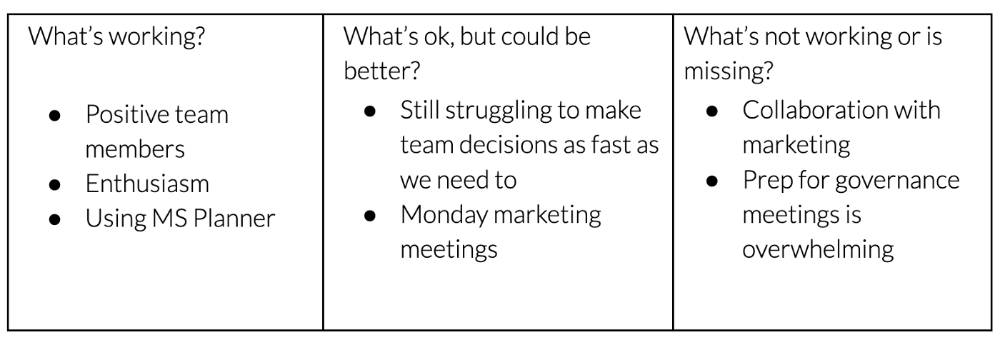
What happens? After a few minutes of light conversation, create a template like the one given here and have team members fill in their replies. You can pre-share the template (with the caveat that this isn’t meant to take much prep time). Do this with your coworker: Answer the prompts. Everyone can benefit from pondering and obtaining guidance.
This step's output.
Part II: Talk (10-20 minutes)
Most individuals can explain what they see but not what's behind an answer. You don't like a meeting. Why not? Marketing partnership is difficult. What makes working with them difficult? I don't recommend slandering coworkers. Consider how your meetings, decisions, and priorities make work harder. The excellent stuff too. You want to know what's humming so you can reproduce the magic.
First, recognize some facts.
Real power dynamics exist. To encourage individuals to be honest, you must provide a safe environment and extend clear invites. Even then, it may take a few 1:1s for someone to feel secure enough to go there in person. It is part of your responsibility to admit that it is normal.
Curiosity and self-disclosure are crucial. Most leaders have received training to present themselves as the authorities. However, you will both benefit more from the dialogue if you can be open and honest about your personal experience, ask questions out of real curiosity, and acknowledge the pertinent sacrifices you're making as a leader.
Honesty without bias is difficult and important. Due to concern for the feelings of others, people frequently hold back. Or if they do point anything out, they do so in a critical manner. The key is to be open and unapologetic about what you observe while not presuming that your viewpoint is correct and that of the other person is incorrect.
Let's go into some prompts (based on genuine conversations):
“What do you notice across your answers?”
“What about the way you/we/they do X, Y, or Z is working well?”
“ Will you say more about item X in ‘What’s not working?’”
“I’m surprised there isn’t anything about Z. Why is that?”
“All of us tend to play some role in maintaining certain patterns. How might you/we be playing a role in this pattern persisting?”
“How might the way we meet, make decisions, or collaborate play a role in what’s currently happening?”
Consider the preceding example. What about the Monday meeting isn't working? Why? or What about the way we work with marketing makes collaboration harder? Remember to share your honest observations!
Third section: observe patterns (10-15 minutes)
Leaders desire to empower their people but don't know how. We also have many preconceptions about what empowerment means to us and how it works. The next phase in this 1:1 format will assist you and your team member comprehend team power and empowerment. This understanding can help you support and shift your team member's behavior, especially where you disagree.
How to? After discussing the stated responses, ask each team member what they can control, influence, and not control. Mark their replies. You can do the same, adding colors where you disagree.
This step's output.
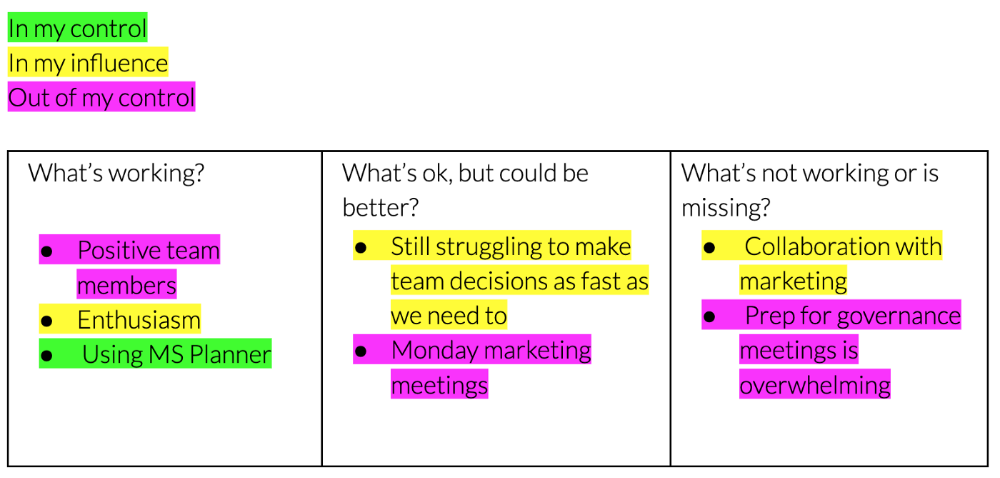
Next, consider the color constellation. Discuss these questions:
Is one color much more prevalent than the other? Why, if so?
Are the colors for the "what's working," "what's fine," and "what's not working" categories clearly distinct? Why, if so?
Do you have any disagreements? If yes, specifically where does your viewpoint differ? What activities do you object to? (Remember, there is no right or wrong in this. Give explicit details and ask questions with curiosity.)
Example: Based on the colors, you can ask, Is the marketing meeting's quality beyond your control? Were our marketing partners consulted? Are there any parts of team decisions we can control? We can't control people, but have we explored another decision-making method? How can we collaborate and generate governance-related information to reduce work, even if the requirement for prep can't be eliminated?
Consider the top one or two topics for this conversation. No 1:1 can cover everything, and that's OK. Focus on the present.
Part IV: Determine the next step (5 minutes)
Last, examine what this conversation means for you and your team member. It's easy to think we know the next moves when we don't.
Like what? You and your teammate answer these questions.
What does this signify moving ahead for me? What can I do to change this? Make requests, for instance, and see how people respond before thinking they won't be responsive.
What demands do I have on other people or my partners? What should I do first? E.g. Make a suggestion to marketing that we hold a monthly retrospective so we can address problems and exchange input more frequently. Include it on the meeting's agenda for next Monday.
Close the 1:1 by sharing what you noticed about the chat. Observations? Learn anything?
Yourself, you, and the 1:1
As a leader, you either reinforce or disrupt habits. Try this template if you desire greater ownership, empowerment, or creativity. Consider how you affect surrounding dynamics. How can you expect others to try something new in high-stakes scenarios, like meetings with cross-functional partners or senior stakeholders, if you won't? How can you expect deep thought and relationship if you don't encourage it in 1:1s? What pattern could this new format disrupt or reinforce?
Fight reluctance. First attempts won't be ideal, and that's OK. You'll only learn by trying.