

More on Entrepreneurship/Creators

SAHIL SAPRU
4 years ago
Growth tactics that grew businesses from 1 to 100
Everyone wants a scalable startup.
Innovation helps launch a startup. The secret to a scalable business is growth trials (from 1 to 100).
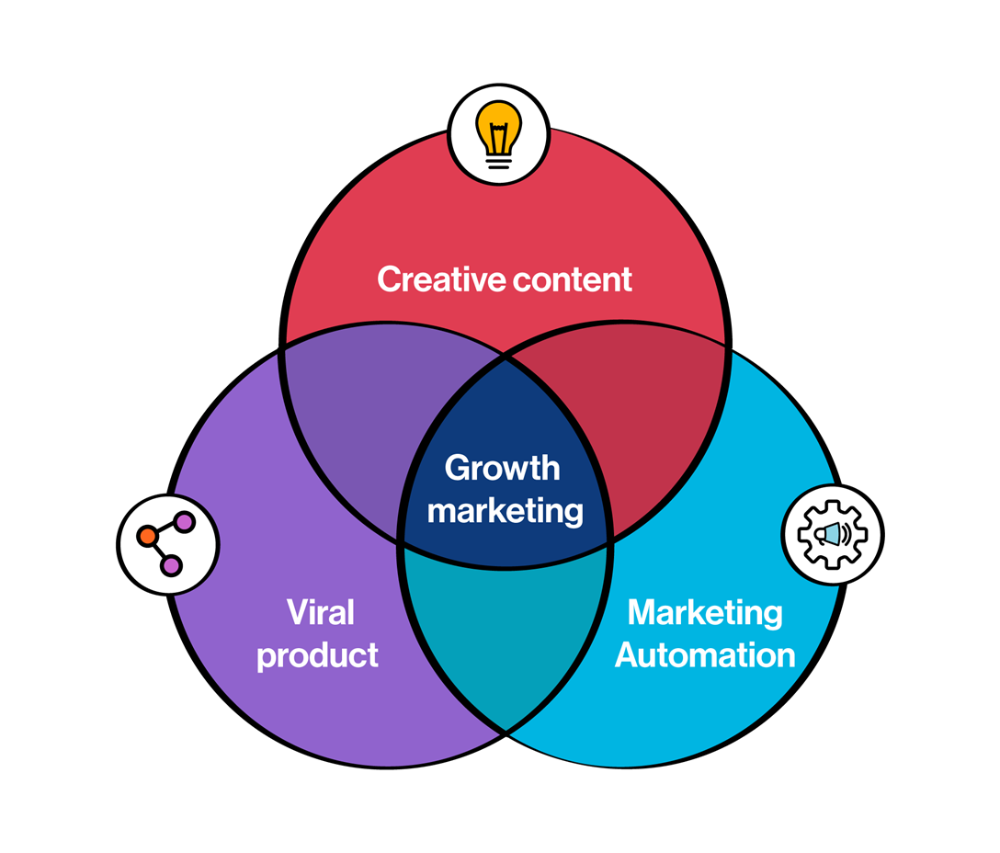
Growth marketing combines marketing and product development for long-term growth.
Today, I'll explain growth hacking strategies popular startups used to scale.
1/ A Facebook user's social value is proportional to their friends.
Facebook built its user base using content marketing and paid ads. Mark and his investors feared in 2007 when Facebook's growth stalled at 90 million users.
Chamath Palihapitiya was brought in by Mark.
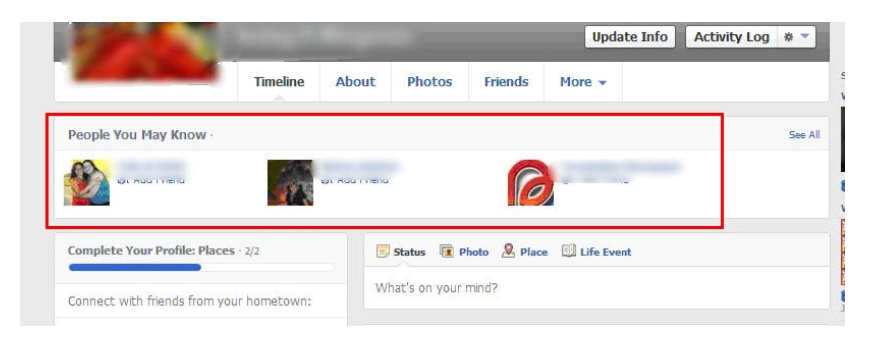
The team tested SEO keywords and MAU chasing. The growth team introduced “people you may know”
This feature reunited long-lost friends and family. Casual users became power users as the retention curve flattened.
Growth Hack Insights: With social network effect the value of your product or platform increases exponentially if you have users you know or can relate with.
2/ Airbnb - Focus on your value propositions
Airbnb nearly failed in 2009. The company's weekly revenue was $200 and they had less than 2 months of runway.
Enter Paul Graham. The team noticed a pattern in 40 listings. Their website's property photos sucked.
Why?
Because these photos were taken with regular smartphones. Users didn't like the first impression.
Graham suggested traveling to New York to rent a camera, meet with property owners, and replace amateur photos with high-resolution ones.
A week later, the team's weekly revenue doubled to $400, indicating they were on track.
Growth Hack Insights: When selling an “online experience” ensure that your value proposition is aesthetic enough for users to enjoy being associated with them.

3/ Zomato - A company's smartphone push ensured growth.
Zomato delivers food. User retention was a challenge for the founders. Indian food customers are notorious for switching brands at the drop of a hat.
Zomato wanted users to order food online and repeat orders throughout the week.
Zomato created an attractive website with “near me” keywords for SEO indexing.
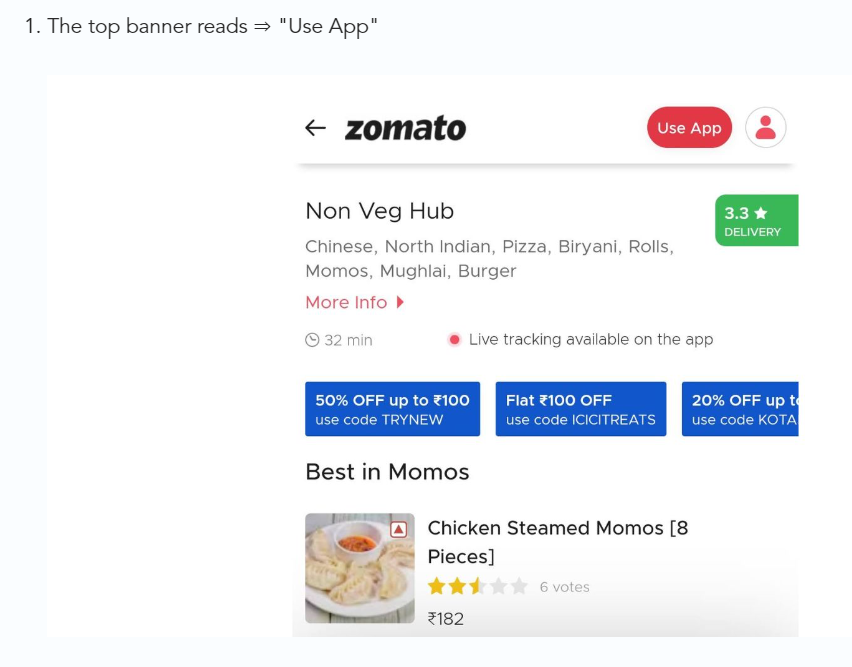
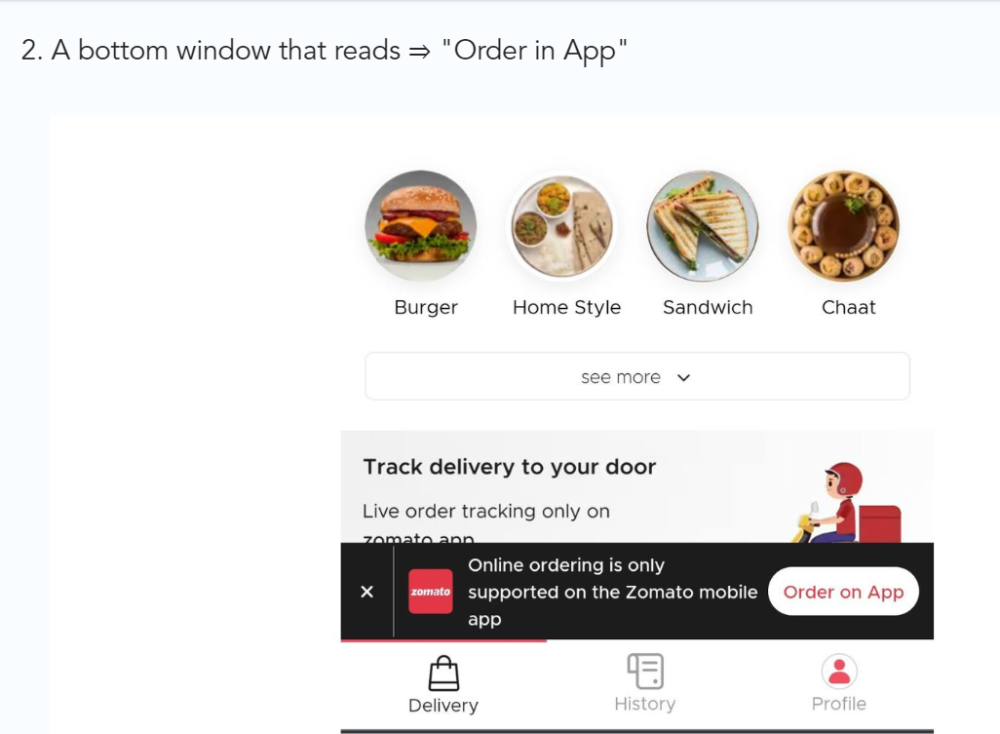
Zomato gambled to increase repeat orders. They only allowed mobile app food orders.
Zomato thought mobile apps were stickier. Product innovations in search/discovery/ordering or marketing campaigns like discounts/in-app notifications/nudges can improve user experience.
Zomato went public in 2021 after users kept ordering food online.
Growth Hack Insights: To improve user retention try to build platforms that build user stickiness. Your product and marketing team will do the rest for them.
4/ Hotmail - Signaling helps build premium users.
Ever sent or received an email or tweet with a sign — sent from iPhone?
Hotmail did it first! One investor suggested Hotmail add a signature to every email.
Overnight, thousands joined the company. Six months later, the company had 1 million users.
When serving an existing customer, improve their social standing. Signaling keeps the top 1%.
5/ Dropbox - Respect loyal customers
Dropbox is a company that puts people over profits. The company prioritized existing users.
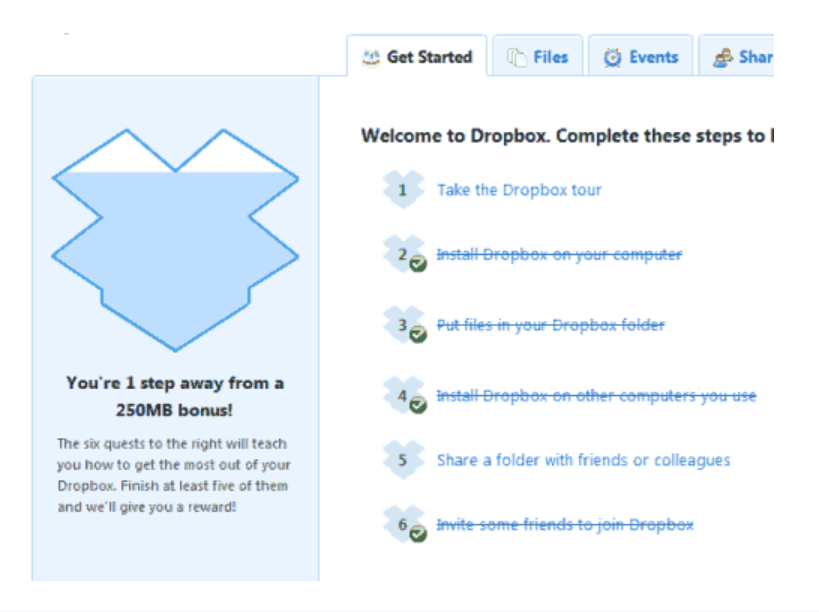
Dropbox rewarded loyal users by offering 250 MB of free storage to anyone who referred a friend. The referral hack helped Dropbox get millions of downloads in its first few months.
Growth Hack Insights: Think of ways to improve the social positioning of your end-user when you are serving an existing customer. Signaling goes a long way in attracting the top 1% to stay.
These experiments weren’t hacks. Hundreds of failed experiments and user research drove these experiments. Scaling up experiments is difficult.
Contact me if you want to grow your startup's user base.

Victoria Kurichenko
4 years ago
Here's what happened after I launched my second product on Gumroad.
One-hour ebook sales, affiliate relationships, and more.

If you follow me, you may know I started a new ebook in August 2022.
Despite publishing on this platform, my website, and Quora, I'm not a writer.
My writing speed is slow, 2,000 words a day, and I struggle to communicate cohesively.
In April 2022, I wrote a successful guide on How to Write Google-Friendly Blog Posts.
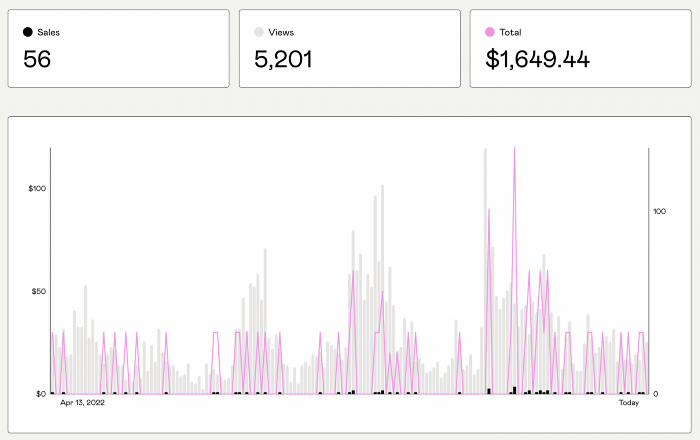
I had no email list or social media presence. I've made $1,600+ selling ebooks.
Evidence:
My first digital offering isn't a book.
It's an actionable guide with my tried-and-true process for writing Google-friendly content.
I'm not bragging.
Established authors like Tim Denning make more from my ebook sales with one newsletter.
This experience taught me writing isn't a privilege.
Writing a book and making money online doesn't require expertise.
Many don't consult experts. They want someone approachable.
Two years passed before I realized my own limits.
I have a brain, two hands, and Internet to spread my message.
I wrote and published a second ebook after the first's success.
On Gumroad, I released my second digital product.
Here's my complete Gumroad evaluation.
Gumroad is a marketplace for content providers to develop and sell sales pages.
Gumroad handles payments and client requests. It's helpful when someone sends a bogus payment receipt requesting an ebook (actual story!).
You'll forget administrative concerns after your first ebook sale.
After my first ebook sale, I did this: I made additional cash!
After every sale, I tell myself, "I built a new semi-passive revenue source."
This thinking shift helps me become less busy while increasing my income and quality of life.
Besides helping others, folks sell evergreen digital things to earn passive money.
It's in my second ebook.
I explain how I built and sold 50+ copies of my SEO writing ebook without being an influencer.
I show how anyone can sell ebooks on Gumroad and automate their sales process.
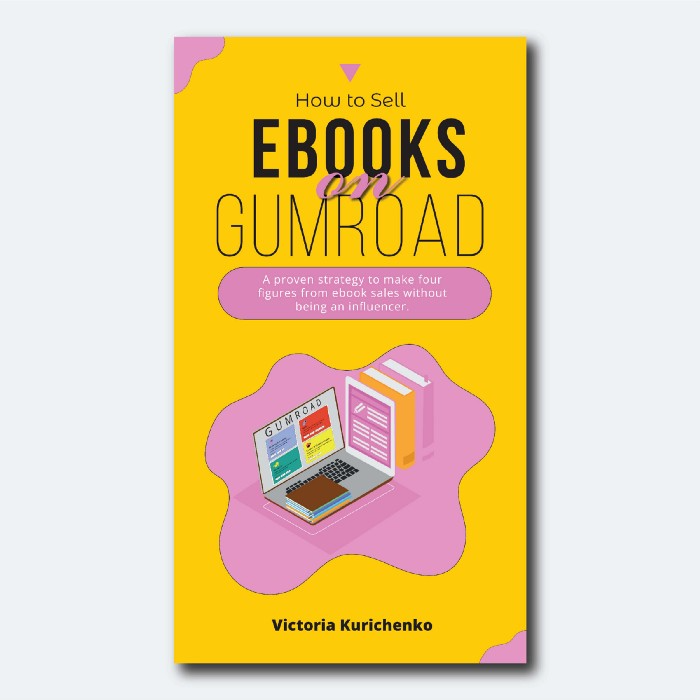
This is my ebook.
After publicizing the ebook release, I sold three copies within an hour.
Wow, or meh?
I don’t know.
The answer is different for everyone.
These three sales came from a small email list of 40 motivated fans waiting for my ebook release.
I had bigger plans.
I'll market my ebook on Medium, my website, Quora, and email.
I'm testing affiliate partnerships this time.
One of my ebook buyers is now promoting it for 40% commission.
Become my affiliate if you think your readers would like my ebook.
My ebook is a few days old, but I'm interested to see where it goes.
My SEO writing book started without an email list, affiliates, or 4,000 website visitors. I've made four figures.
I'm slowly expanding my communication avenues to have more impact.
Even a small project can open doors you never knew existed.
So began my writing career.
In summary
If you dare, every concept can become a profitable trip.
Before, I couldn't conceive of creating an ebook.
How to Sell eBooks on Gumroad is my second digital product.
Marketing and writing taught me that anything can be sold online.

Pat Vieljeux
4 years ago
In 5 minutes, you can tell if a startup will succeed.
Or the “lie to me” method.

I can predict a startup's success in minutes.
Just interview its founder.
Ask "why?"
I question "why" till I sense him.
I need to feel the person I have in front of me. I need to know if he or she can deliver. Startups aren't easy. Without abilities, a brilliant idea will fail.
Good entrepreneurs have these qualities: He's a leader, determined, and resilient.
For me, they can be split in two categories.
The first entrepreneur aspires to live meaningfully. The second wants to get rich. The second is communicative. He wants to wow the crowd. He's motivated by the thought of one day sailing a boat past palm trees and sunny beaches.
What drives the first entrepreneur is evident in his speech, face, and voice. He will not speak about his product. He's (nearly) uninterested. He's not selling anything. He's not a salesman. He wants to succeed. The product is his fuel.
He'll explain his decision. He'll share his motivations. His desire. And he'll use meaningful words.
Paul Ekman has shown that face expressions aren't cultural. His study influenced the American TV series "lie to me" about body language and speech.
Passionate entrepreneurs are obvious. It's palpable. Faking passion is tough. Someone who wants your favor and money will expose his actual motives through his expressions and language.
The good liar will be able to fool you for a while, but not for long if you pay attention to his body language and how he expresses himself.
And also, if you look at his business plan.
His business plan reveals his goals. Read between the lines.
Entrepreneur 1 will focus on his "why", whereas Entrepreneur 2 will focus on the "how".
Entrepreneur 1 will develop a vision-driven culture.
The second, on the other hand, will focus on his EBITDA.
Why is the culture so critical? Because it will allow entrepreneur 1 to develop a solid team that can tackle his problems and trials. His team's "why" will keep them together in tough times.
"Give me a terrific start-up team with a mediocre idea over a weak one any day." Because a great team knows when to pivot and trusts each other. Weak teams fail.” — Bernhard Schroeder
Closings thoughts
Every VC must ask Why. Entrepreneur's motivations. This "why" will create the team's culture. This culture will help the team adjust to any setback.
You might also like

Vivek Singh
4 years ago
A Warm Welcome to Web3 and the Future of the Internet
Let's take a look back at the internet's history and see where we're going — and why.
Tim Berners Lee had a problem. He was at CERN, the world's largest particle physics factory, at the time. The institute's stated goal was to study the simplest particles with the most sophisticated scientific instruments. The institute completed the LEP Tunnel in 1988, a 27 kilometer ring. This was Europe's largest civil engineering project (to study smaller particles — electrons).
The problem Tim Berners Lee found was information loss, not particle physics. CERN employed a thousand people in 1989. Due to team size and complexity, people often struggled to recall past project information. While these obstacles could be overcome, high turnover was nearly impossible. Berners Lee addressed the issue in a proposal titled ‘Information Management'.
When a typical stay is two years, data is constantly lost. The introduction of new people takes a lot of time from them and others before they understand what is going on. An emergency situation may require a detective investigation to recover technical details of past projects. Often, the data is recorded but cannot be found. — Information Management: A Proposal
He had an idea. Create an information management system that allowed users to access data in a decentralized manner using a new technology called ‘hypertext'.
To quote Berners Lee, his proposal was “vague but exciting...”. The paper eventually evolved into the internet we know today. Here are three popular W3C standards used by billions of people today:
(credit: CERN)
HTML (Hypertext Markup)
A web formatting language.
URI (Unique Resource Identifier)
Each web resource has its own “address”. Known as ‘a URL'.
HTTP (Hypertext Transfer Protocol)
Retrieves linked resources from across the web.
These technologies underpin all computer work. They were the seeds of our quest to reorganize information, a task as fruitful as particle physics.
Tim Berners-Lee would probably think the three decades from 1989 to 2018 were eventful. He'd be amazed by the billions, the inspiring, the novel. Unlocking innovation at CERN through ‘Information Management'.
The fictional character would probably need a drink, walk, and a few deep breaths to fully grasp the internet's impact. He'd be surprised to see a few big names in the mix.
Then he'd say, "Something's wrong here."
We should review the web's history before going there. Was it a success after Berners Lee made it public? Web1 and Web2: What is it about what we are doing now that so many believe we need a new one, web3?
Per Outlier Ventures' Jamie Burke:
Web 1.0 was read-only.
Web 2.0 was the writable
Web 3.0 is a direct-write web.
Let's explore.
Web1: The Read-Only Web
Web1 was the digital age. We put our books, research, and lives ‘online'. The web made information retrieval easier than any filing cabinet ever. Massive amounts of data were stored online. Encyclopedias, medical records, and entire libraries were put away into floppy disks and hard drives.
In 2015, the web had around 305,500,000,000 pages of content (280 million copies of Atlas Shrugged).
Initially, one didn't expect to contribute much to this database. Web1 was an online version of the real world, but not yet a new way of using the invention.
One gets the impression that the web has been underutilized by historians if all we can say about it is that it has become a giant global fax machine. — Daniel Cohen, The Web's Second Decade (2004)
That doesn't mean developers weren't building. The web was being advanced by great minds. Web2 was born as technology advanced.
Web2: Read-Write Web
Remember when you clicked something on a website and the whole page refreshed? Is it too early to call the mid-2000s ‘the good old days'?
Browsers improved gradually, then suddenly. AJAX calls augmented CGI scripts, and applications began sending data back and forth without disrupting the entire web page. One button to ‘digg' a post (see below). Web experiences blossomed.
In 2006, Digg was the most active ‘Web 2.0' site. (Photo: Ethereum Foundation Taylor Gerring)
Interaction was the focus of new applications. Posting, upvoting, hearting, pinning, tweeting, liking, commenting, and clapping became a lexicon of their own. It exploded in 2004. Easy ways to ‘write' on the internet grew, and continue to grow.
Facebook became a Web2 icon, where users created trillions of rows of data. Google and Amazon moved from Web1 to Web2 by better understanding users and building products and services that met their needs.
Business models based on Software-as-a-Service and then managing consumer data within them for a fee have exploded.
Web2 Emerging Issues
Unbelievably, an intriguing dilemma arose. When creating this read-write web, a non-trivial question skirted underneath the covers. Who owns it all?
You have no control over [Web 2] online SaaS. People didn't realize this because SaaS was so new. People have realized this is the real issue in recent years.
Even if these organizations have good intentions, their incentive is not on the users' side.
“You are not their customer, therefore you are their product,” they say. With Laura Shin, Vitalik Buterin, Unchained
A good plot line emerges. Many amazing, world-changing software products quietly lost users' data control.
For example: Facebook owns much of your social graph data. Even if you hate Facebook, you can't leave without giving up that data. There is no ‘export' or ‘exit'. The platform owns ownership.
While many companies can pull data on you, you cannot do so.
On the surface, this isn't an issue. These companies use my data better than I do! A complex group of stakeholders, each with their own goals. One is maximizing shareholder value for public companies. Tim Berners-Lee (and others) dislike the incentives created.
“Show me the incentive and I will show you the outcome.” — Berkshire Hathaway's CEO
It's easy to see what the read-write web has allowed in retrospect. We've been given the keys to create content instead of just consume it. On Facebook and Twitter, anyone with a laptop and internet can participate. But the engagement isn't ours. Platforms own themselves.
Web3: The ‘Unmediated’ Read-Write Web
Tim Berners Lee proposed a decade ago that ‘linked data' could solve the internet's data problem.
However, until recently, the same principles that allowed the Web of documents to thrive were not applied to data...
The Web of Data also allows for new domain-specific applications. Unlike Web 2.0 mashups, Linked Data applications work with an unbound global data space. As new data sources appear on the Web, they can provide more complete answers.
At around the same time as linked data research began, Satoshi Nakamoto created Bitcoin. After ten years, it appears that Berners Lee's ideas ‘link' spiritually with cryptocurrencies.
What should Web 3 do?
Here are some quick predictions for the web's future.
Users' data:
Users own information and provide it to corporations, businesses, or services that will benefit them.
Defying censorship:
No government, company, or institution should control your access to information (1, 2, 3)
Connect users and platforms:
Create symbiotic rather than competitive relationships between users and platform creators.
Open networks:
“First, the cryptonetwork-participant contract is enforced in open source code. Their voices and exits are used to keep them in check.” Dixon, Chris (4)
Global interactivity:
Transacting value, information, or assets with anyone with internet access, anywhere, at low cost
Self-determination:
Giving you the ability to own, see, and understand your entire digital identity.
Not pull, push:
‘Push' your data to trusted sources instead of ‘pulling' it from others.
Where Does This Leave Us?
Change incentives, change the world. Nick Babalola
People believe web3 can help build a better, fairer system. This is not the same as equal pay or outcomes, but more equal opportunity.
It should be noted that some of these advantages have been discussed previously. Will the changes work? Will they make a difference? These unanswered questions are technical, economic, political, and philosophical. Unintended consequences are likely.
We hope Web3 is a more democratic web. And we think incentives help the user. If there’s one thing that’s on our side, it’s that open has always beaten closed, given a long enough timescale.
We are at the start.

Asher Umerie
4 years ago
What is Bionic Reading?
Senses help us navigate a complicated world. They shape our worldview - how we hear, smell, feel, and taste. People claim a sixth sense, an intuitive capacity that extends perception.
Our brain is a half-pool of grey and white matter that stores data from our senses. Brains provide us context, so zombies' obsession makes sense.
Bionic reading uses the brain's visual information and context to simplify text comprehension.
Stay with me.
What is Bionic Reading?
Bionic reading is a software application established by Swiss typographic designer Renato Casutt. The term honors the brain (bio) and technology's collaboration to better text comprehension.
The image above shows two similar paragraphs with bionic reading.
Notice anything yet?
This Twitter user did.
I did too...
Image text describes bionic reading-
New method to aid reading by using artificial fixation points. The reader focuses on the highlighted starting letters, and the brain completes the word.
How is Bionic Reading possible?
Do you remember seeing social media posts asking you to stare at a black dot for 30 seconds (or more)? You blink and see an after-image on your wall.
Our brains are skilled at identifying patterns and'seeing' familiar objects, therefore optical illusions are conceivable.
Brain and sight collaborate well. Text comprehension proves it.
Considering evolutionary patterns, humans' understanding skills may be cosmic luck.
Scientists don't know why people can read and write, but they do know what reading does to the brain.
One portion of your brain recognizes words, while another analyzes their meaning. Fixation, saccade, and linguistic transparency/opacity aid.
Let's explain some terms.
-
Fixation is how the eyes move when reading. It's where you look. If the eyes fixate less, a reader can read quicker. [Eye fixation is a physiological process](Eye fixation is a naturally occurring physiological process) impacted by the reader's vocabulary, vision span, and text familiarity.
-
Saccade - Pause and look around. That's a saccade. Rapid eye movements that alter the place of fixation, as reading text or looking around a room. They can happen willingly (when you choose) or instinctively, even when your eyes are fixed.
-
Linguistic transparency and opacity analyze how well a composite word or phrase may be deduced from its constituents.
The Bionic reading website compares these tools.
Text highlights lead the eye. Fixation, saccade, and opacity can transfer visual stimuli to text, changing typeface.
## Final Thoughts on Bionic Reading
I'm excited about how this could influence my long-term assimilation and productivity.
This technology is still in development, with prototypes working on only a few apps. Like any new tech, it will be criticized.
I'll be watching Bionic Reading closely. Comment on it!

Ben
4 years ago
The Real Value of Carbon Credit (Climate Coin Investment)
Disclaimer : This is not financial advice for any investment.
TL;DR
You might not have realized it, but as we move toward net zero carbon emissions, the globe is already at war.
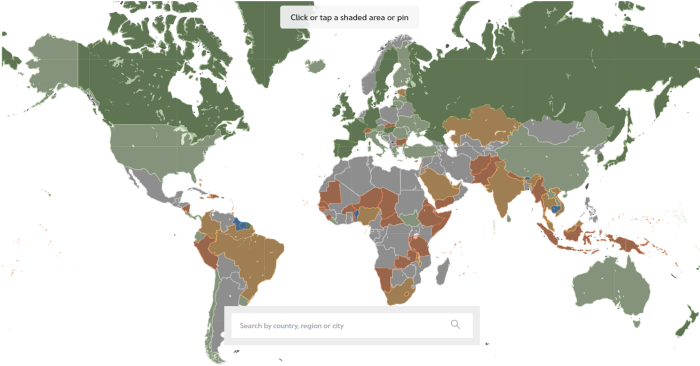
According to the Paris Agreement of COP26, 64% of nations have already declared net zero, and the issue of carbon reduction has already become so important for businesses that it affects their ability to survive. Furthermore, the time when carbon emission standards will be defined and controlled on an individual basis is becoming closer.
Since 2017, the market for carbon credits has experienced extraordinary expansion as a result of widespread talks about carbon credits. The carbon credit market is predicted to expand much more once net zero is implemented and carbon emission rules inevitably tighten.
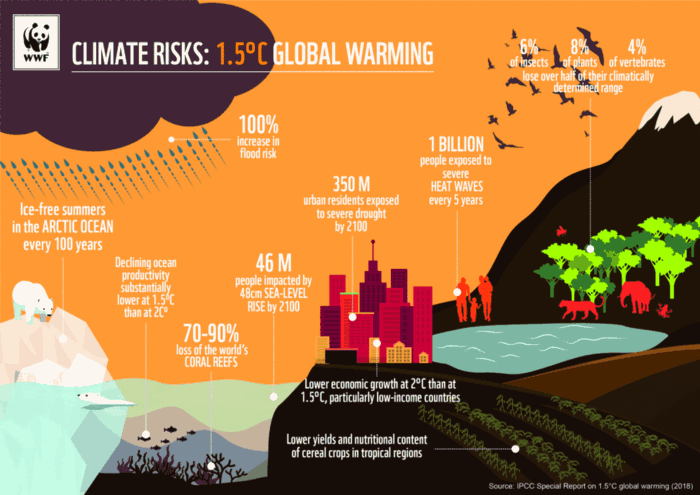
Hello! Ben here from Nonce Classic. Nonce Classic has recently confirmed the tremendous growth potential of the carbon credit market in the midst of a major trend towards the global goal of net zero (carbon emissions caused by humans — carbon reduction by humans = 0 ). Moreover, we too believed that the questions and issues the carbon credit market suffered from the last 30–40yrs could be perfectly answered through crypto technology and that is why we have added a carbon credit crypto project to the Nonce Classic portfolio. There have been many teams out there that have tried to solve environmental problems through crypto but very few that have measurable experience working in the carbon credit scene. Thus we have put in our efforts to find projects that are not crypto projects created for the sake of issuing tokens but projects that pragmatically use crypto technology to combat climate change by solving problems of the current carbon credit market. In that process, we came to hear of Climate Coin, a veritable carbon credit crypto project, and us Nonce Classic as an accelerator, have begun contributing to its growth and invested in its tokens. Starting with this article, we plan to publish a series of articles explaining why the carbon credit market is bullish, why we invested in Climate Coin, and what kind of project Climate Coin is specifically. In this first article let us understand the carbon credit market and look into its growth potential! Let’s begin :)
The Unavoidable Entry of the Net Zero Era
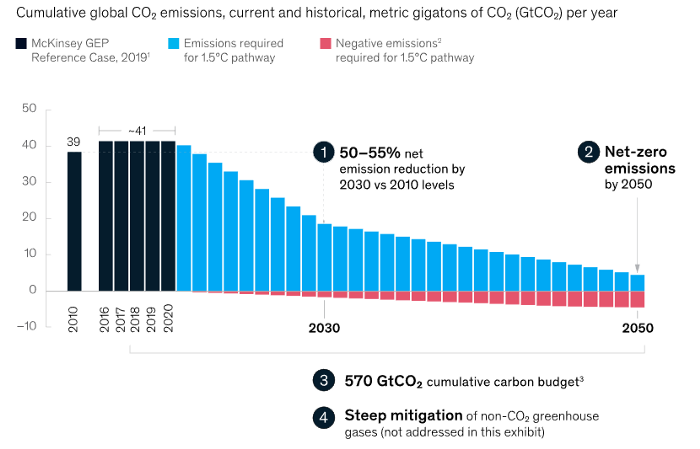
Net zero means... Human carbon emissions are balanced by carbon reduction efforts. A non-environmentalist may find it hard to accept that net zero is attainable by 2050. Global cooperation to save the earth is happening faster than we imagine.
In the Paris Agreement of COP26, concluded in Glasgow, UK on Oct. 31, 2021, nations pledged to reduce worldwide yearly greenhouse gas emissions by more than 50% by 2030 and attain net zero by 2050. Governments throughout the world have pledged net zero at the national level and are holding each other accountable by submitting Nationally Determined Contributions (NDC) every five years to assess implementation. 127 of 198 nations have declared net zero.
Each country's 1.5-degree reduction plans have led to carbon reduction obligations for companies. In places with the strictest environmental regulations, like the EU, companies often face bankruptcy because the cost of buying carbon credits to meet their carbon allowances exceeds their operating profits. In this day and age, minimizing carbon emissions and securing carbon credits are crucial.
Recent SEC actions on climate change may increase companies' concerns about reducing emissions. The SEC required all U.S. stock market companies to disclose their annual greenhouse gas emissions and climate change impact on March 21, 2022. The SEC prepared the proposed regulation through in-depth analysis and stakeholder input since last year. Three out of four SEC members agreed that it should pass without major changes. If the regulation passes, it will affect not only US companies, but also countless companies around the world, directly or indirectly.
Even companies not listed on the U.S. stock market will be affected and, in most cases, required to disclose emissions. Companies listed on the U.S. stock market with significant greenhouse gas emissions or specific targets are subject to stricter emission standards (Scope 3) and disclosure obligations, which will magnify investigations into all related companies. Greenhouse gas emissions can be calculated three ways. Scope 1 measures carbon emissions from a company's facilities and transportation. Scope 2 measures carbon emissions from energy purchases. Scope 3 covers all indirect emissions from a company's value chains.
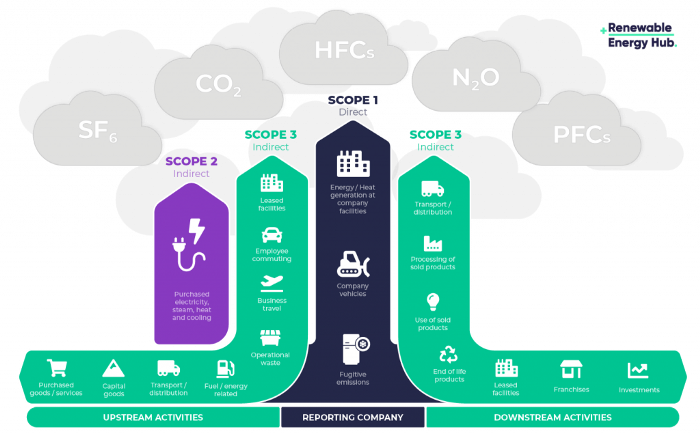
The SEC's proposed carbon emission disclosure mandate and regulations are one example of how carbon credit policies can cross borders and affect all parties. As such incidents will continue throughout the implementation of net zero, even companies that are not immediately obligated to disclose their carbon emissions must be prepared to respond to changes in carbon emission laws and policies.
Carbon reduction obligations will soon become individual. Individual consumption has increased dramatically with improved quality of life and convenience, despite national and corporate efforts to reduce carbon emissions. Since consumption is directly related to carbon emissions, increasing consumption increases carbon emissions. Countries around the world have agreed that to achieve net zero, carbon emissions must be reduced on an individual level. Solutions to individual carbon reduction are being actively discussed and studied under the term Personal Carbon Trading (PCT).
PCT is a system that allows individuals to trade carbon emission quotas in the form of carbon credits. Individuals who emit more carbon than their allotment can buy carbon credits from those who emit less. European cities with well-established carbon credit markets are preparing for net zero by conducting early carbon reduction prototype projects. The era of checking product labels for carbon footprints, choosing low-emissions transportation, and worrying about hot shower emissions is closer than we think.
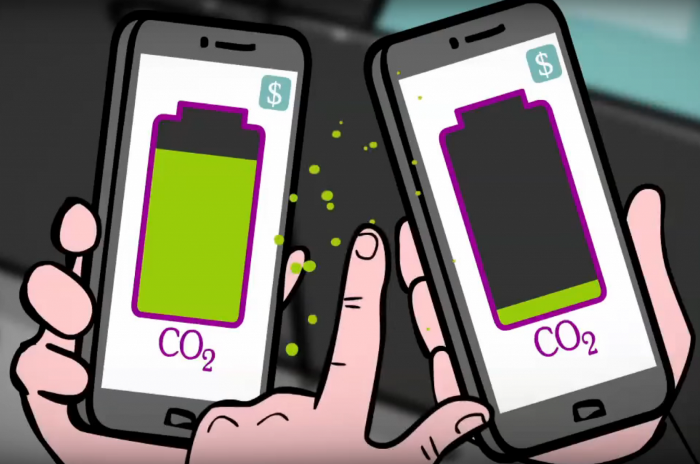
The Market for Carbon Credits Is Expanding Fearfully
Compliance and voluntary carbon markets make up the carbon credit market.
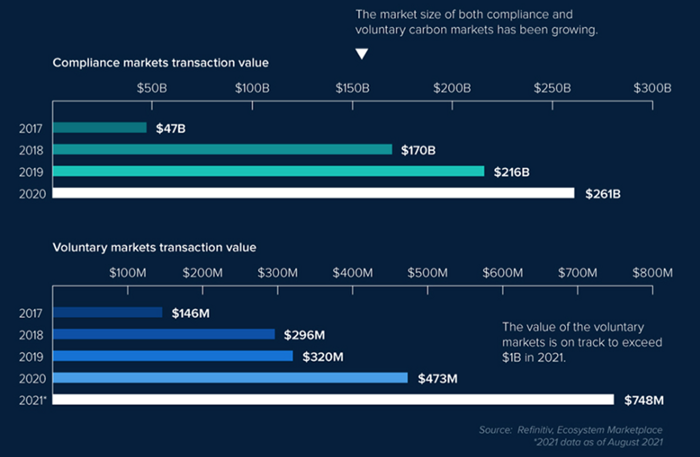
A Compliance Market enforces carbon emission allowances for actors. Companies in industries that previously emitted a lot of carbon are included in the mandatory carbon market, and each government receives carbon credits each year. If a company's emissions are less than the assigned cap and it has extra carbon credits, it can sell them to other companies that have larger emissions and require them (Cap and Trade). The annual number of free emission permits provided to companies is designed to decline, therefore companies' desire for carbon credits will increase. The compliance market's yearly trading volume will exceed $261B in 2020, five times its 2017 level.
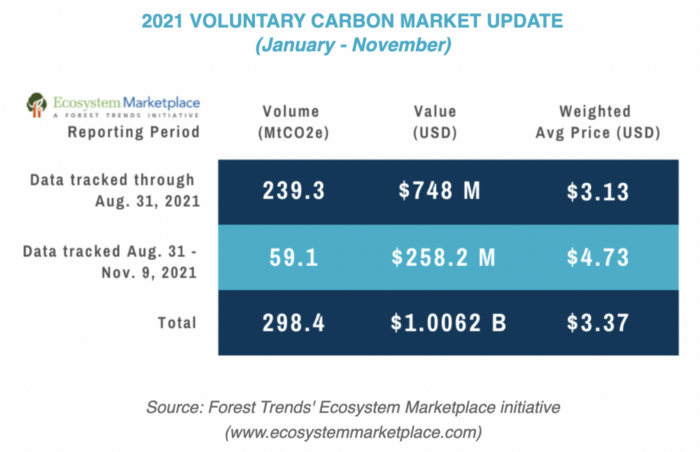
In the Voluntary Market, carbon reduction is voluntary and carbon credits are sold for personal reasons or to build market participants' eco-friendly reputations. Even if not in the compliance market, it is typical for a corporation to be obliged to offset its carbon emissions by acquiring voluntary carbon credits. When a company seeks government or company investment, it may be denied because it is not net zero. If a significant shareholder declares net zero, the companies below it must execute it. As the world moves toward ESG management, becoming an eco-friendly company is no longer a strategic choice to gain a competitive edge, but an important precaution to not fall behind. Due to this eco-friendly trend, the annual market volume of voluntary emission credits will approach $1B by November 2021. The voluntary credit market is anticipated to reach $5B to $50B by 2030. (TSCVM 2021 Report)
In conclusion
This article analyzed how net zero, a target promised by countries around the world to combat climate change, has brought governmental, corporate, and human changes. We discussed how these shifts will become more obvious as we approach net zero, and how the carbon credit market would increase exponentially in response. In the following piece, let's analyze the hurdles impeding the carbon credit market's growth, how the project we invested in tries to tackle these issues, and why we chose Climate Coin. Wait! Jim Skea, co-chair of the IPCC working group, said,
“It’s now or never, if we want to limit global warming to 1.5°C” — Jim Skea
Join nonceClassic’s community:
Telegram: https://t.me/non_stock
Youtube: https://www.youtube.com/channel/UCqeaLwkZbEfsX35xhnLU2VA
Twitter: @nonceclassic
Mail us : general@nonceclassic.org