


Sony and LEGO raise $2 billion for Epic Games' metaverse
‘Kid-friendly’ project holds $32 billion valuation
Epic Games announced today that it has raised $2 billion USD from Sony Group Corporation and KIRKBI (holding company of The LEGO Group). Both companies contributed $1 billion to Epic Games' upcoming ‘metaverse' project.
“We need partners who share our vision as we reimagine entertainment and play. Our partnership with Sony and KIRKBI has found this,” said Epic Games CEO Tim Sweeney. A new metaverse will be built where players can have fun with friends and brands create creative and immersive experiences, as well as creators thrive.
Last week, LEGO and Epic Games announced their plans to create a family-friendly metaverse where kids can play, interact, and create in digital environments. The service's users' safety and security will be prioritized.
With this new round of funding, Epic Games' project is now valued at $32 billion.
“Epic Games is known for empowering creators large and small,” said KIRKBI CEO Sren Thorup Srensen. “We invest in trends that we believe will impact the world we and our children will live in. We are pleased to invest in Epic Games to support their continued growth journey, with a long-term focus on the future metaverse.”
Epic Games is expected to unveil its metaverse plans later this year, including its name, details, services, and release date.
More on Gaming

Matthew Cluff
3 years ago
GTO Poker 101
"GTO" (Game Theory Optimal) has been used a lot in poker recently. To clarify its meaning and application, the aim of this article is to define what it is, when to use it when playing, what strategies to apply for how to play GTO poker, for beginner and more advanced players!
Poker GTO
In poker, you can choose between two main winning strategies:
Exploitative play maximizes expected value (EV) by countering opponents' sub-optimal plays and weaker tendencies. Yes, playing this way opens you up to being exploited, but the weaker opponents you're targeting won't change their game to counteract this, allowing you to reap maximum profits over the long run.
GTO (Game-Theory Optimal): You try to play perfect poker, which forces your opponents to make mistakes (which is where almost all of your profit will be derived from). It mixes bluffs or semi-bluffs with value bets, clarifies bet sizes, and more.
GTO vs. Exploitative: Which is Better in Poker?
Before diving into GTO poker strategy, it's important to know which of these two play styles is more profitable for beginners and advanced players. The simple answer is probably both, but usually more exploitable.
Most players don't play GTO poker and can be exploited in their gameplay and strategy, allowing for more profits to be made using an exploitative approach. In fact, it’s only in some of the largest games at the highest stakes that GTO concepts are fully utilized and seen in practice, and even then, exploitative plays are still sometimes used.
Knowing, understanding, and applying GTO poker basics will create a solid foundation for your poker game. It's also important to understand GTO so you can deviate from it to maximize profits.
GTO Poker Strategy
According to Ed Miller's book "Poker's 1%," the most fundamental concept that only elite poker players understand is frequency, which could be in relation to cbets, bluffs, folds, calls, raises, etc.
GTO poker solvers (downloadable online software) give solutions for how to play optimally in any given spot and often recommend using mixed strategies based on select frequencies.
In a river situation, a solver may tell you to call 70% of the time and fold 30%. It may also suggest calling 50% of the time, folding 35% of the time, and raising 15% of the time (with a certain range of hands).
Frequencies are a fundamental and often unrecognized part of poker, but they run through these 5 GTO concepts.
1. Preflop ranges
To compensate for positional disadvantage, out-of-position players must open tighter hand ranges.
Premium starting hands aren't enough, though. Considering GTO poker ranges and principles, you want a good, balanced starting hand range from each position with at least some hands that can make a strong poker hand regardless of the flop texture (low, mid, high, disconnected, etc).
Below is a GTO preflop beginner poker chart for online 6-max play, showing which hand ranges one should open-raise with. Table positions are color-coded (see key below).
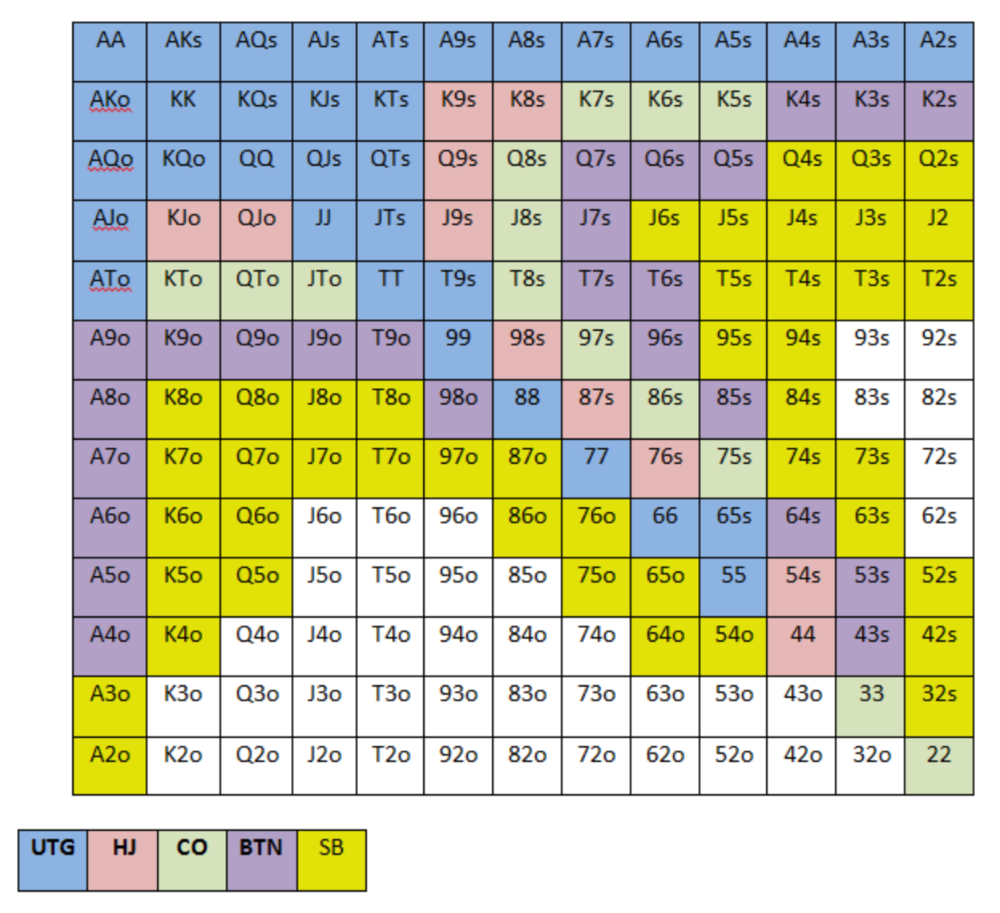
NOTE: For GTO play, it's advisable to use a mixed strategy for opening in the small blind, combining open-limps and open-raises for various hands. This cannot be illustrated with the color system used for the chart.
Choosing which hands to play is often a math problem, as discussed below.
Other preflop GTO poker charts include which hands to play after a raise, which to 3bet, etc. Solvers can help you decide which preflop hands to play (call, raise, re-raise, etc.).
2. Pot Odds
Always make +EV decisions that profit you as a poker player. Understanding pot odds (and equity) can help.
Postflop Pot Odds
Let’s say that we have JhTh on a board of 9h8h2s4c (open-ended straight-flush draw). We have $40 left and $50 in the pot. He has you covered and goes all-in. As calling or folding are our only options, playing GTO involves calculating whether a call is +EV or –EV. (The hand was empty.)
Any remaining heart, Queen, or 7 wins the hand. This means we can improve 15 of 46 unknown cards, or 32.6% of the time.
What if our opponent has a set? The 4h or 2h could give us a flush, but it could also give the villain a boat. If we reduce outs from 15 to 14.5, our equity would be 31.5%.
We must now calculate pot odds.
(bet/(our bet+pot)) = pot odds
= $50 / ($40 + $90)
= $40 / $130
= 30.7%
To make a profitable call, we need at least 30.7% equity. This is a profitable call as we have 31.5% equity (even if villain has a set). Yes, we will lose most of the time, but we will make a small profit in the long run, making a call correct.
Pot odds aren't just for draws, either. If an opponent bets 50% pot, you get 3 to 1 odds on a call, so you must win 25% of the time to be profitable. If your current hand has more than 25% equity against your opponent's perceived range, call.
Preflop Pot Odds
Preflop, you raise to 3bb and the button 3bets to 9bb. You must decide how to act. In situations like these, we can actually use pot odds to assist our decision-making.
This pot is:
(our open+3bet size+small blind+big blind)
(3bb+9bb+0.5bb+1bb)
= 13.5
This means we must call 6bb to win a pot of 13.5bb, which requires 30.7% equity against the 3bettor's range.
Three additional factors must be considered:
Being out of position on our opponent makes it harder to realize our hand's equity, as he can use his position to put us in tough spots. To profitably continue against villain's hand range, we should add 7% to our equity.
Implied Odds / Reverse Implied Odds: The ability to win or lose significantly more post-flop (than pre-flop) based on our remaining stack.
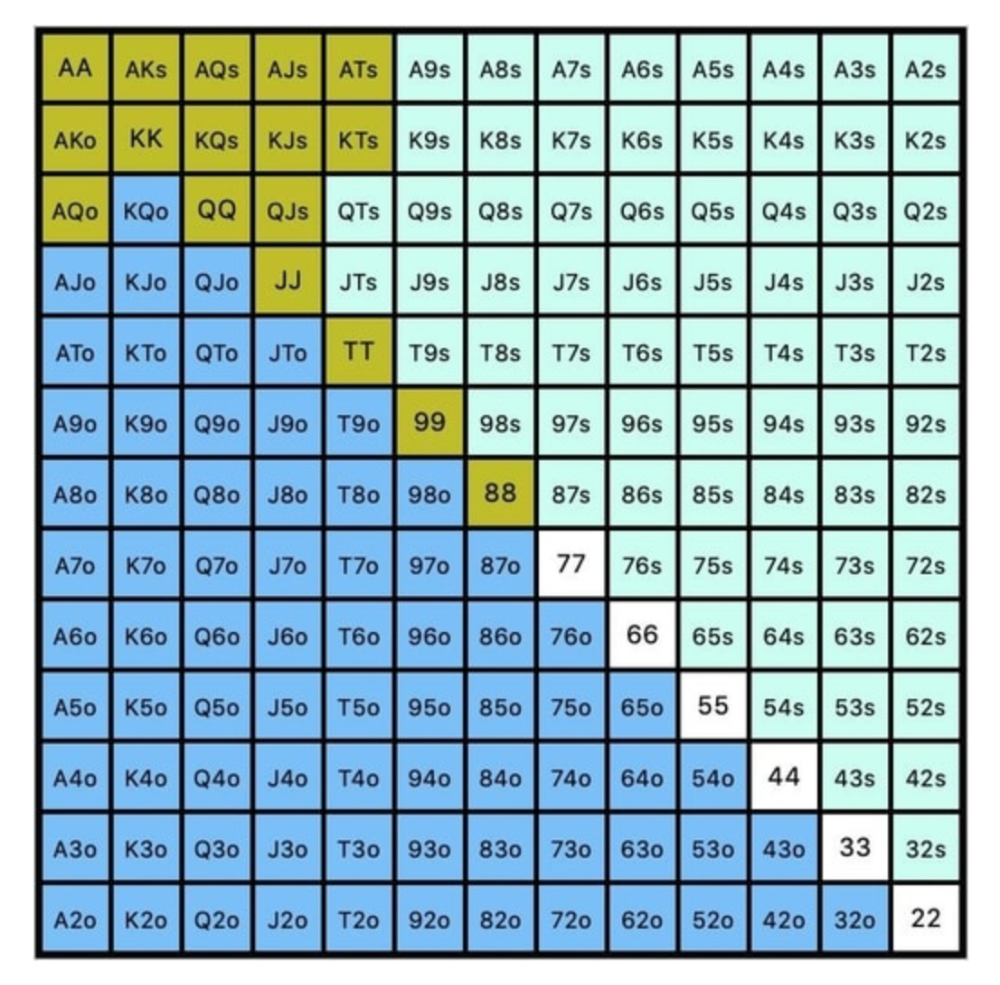
While statistics on 3bet stats can be gained with a large enough sample size (i.e. 8% 3bet stat from button), the numbers don't tell us which 8% of hands villain could be 3betting with. Both polarized and depolarized charts below show 8% of possible hands.
7.4% of hands are depolarized.
Polarized Hand range (7.54%):
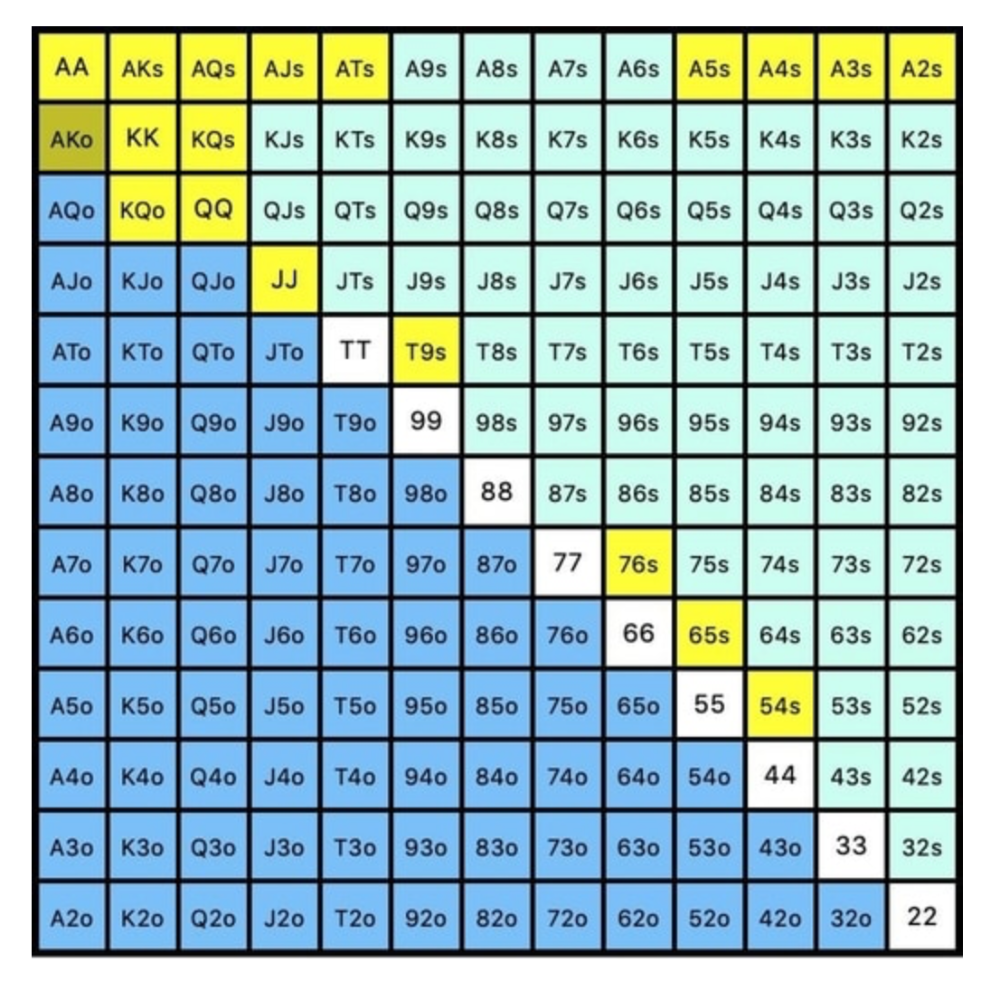
Each hand range has different contents. We don't know if he 3bets some hands and calls or folds others.
Using an exploitable strategy can help you play a hand range correctly. The next GTO concept will make things easier.
3. Minimum Defense Frequency:
This concept refers to the % of our range we must continue with (by calling or raising) to avoid being exploited by our opponents. This concept is most often used off-table and is difficult to apply in-game.
These beginner GTO concepts will help your decision-making during a hand, especially against aggressive opponents.
MDF formula:
MDF = POT SIZE/(POT SIZE+BET SIZE)
Here's a poker GTO chart of common bet sizes and minimum defense frequency.
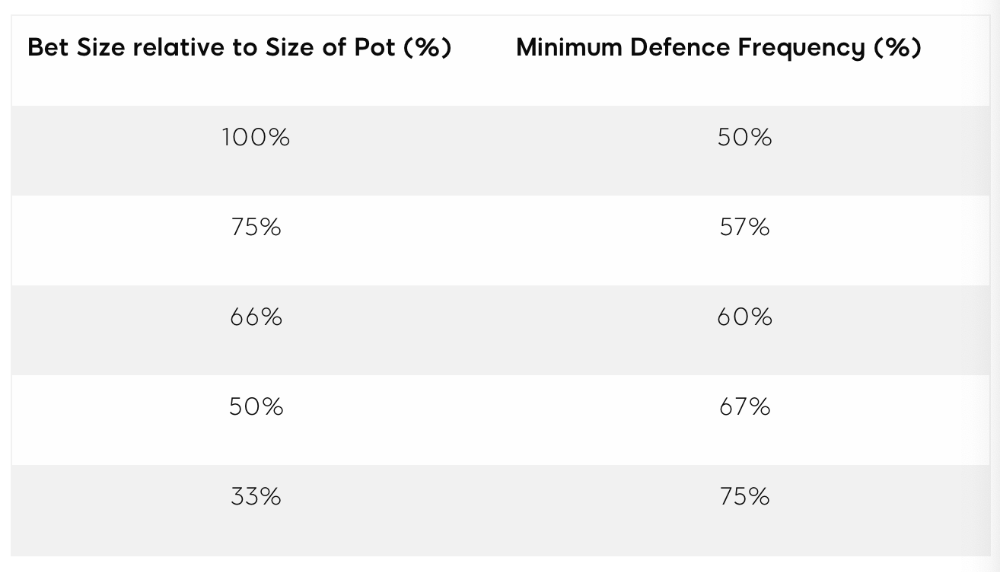
Take the number of hand combos in your starting hand range and use the MDF to determine which hands to continue with. Choose hands with the most playability and equity against your opponent's betting range.
Say you open-raise HJ and BB calls. Qh9h6c flop. Your opponent leads you for a half-pot bet. MDF suggests keeping 67% of our range.
Using the above starting hand chart, we can determine that the HJ opens 254 combos:
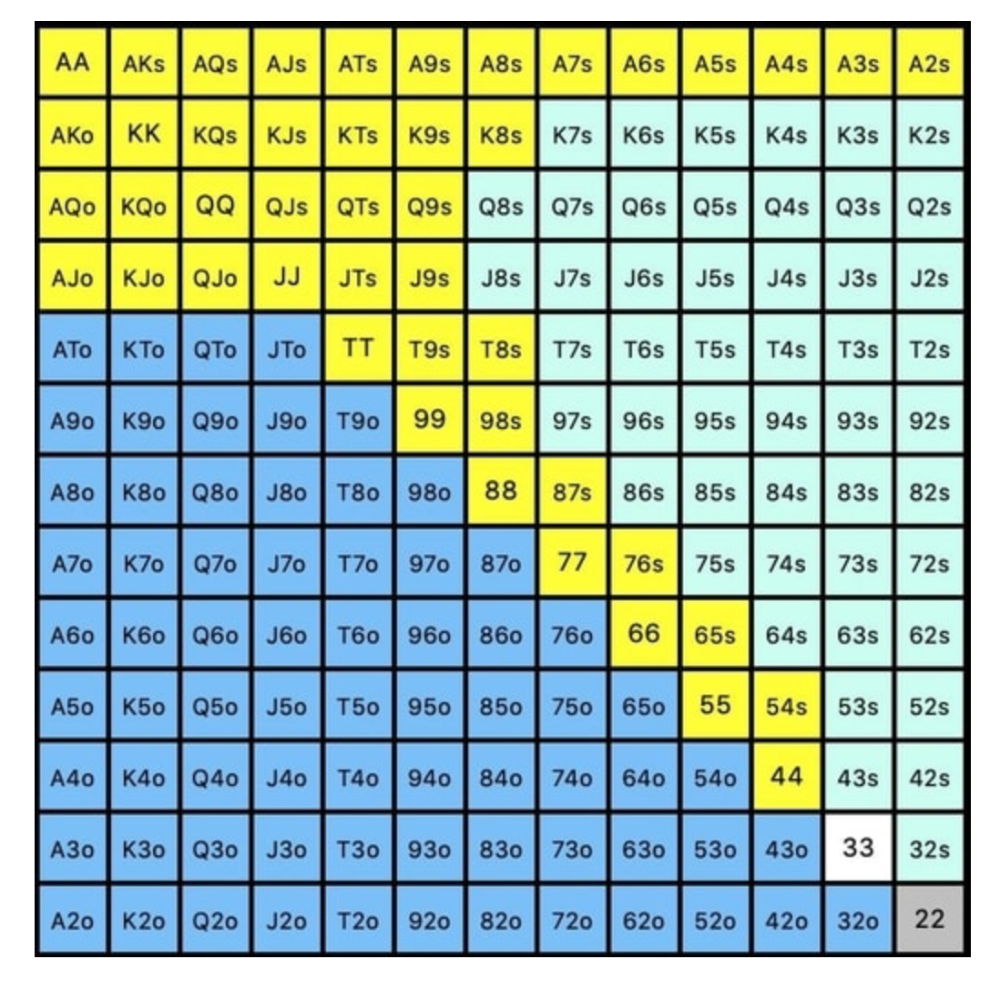
We must defend 67% of these hands, or 170 combos, according to MDF. Hands we should keep include:
Flush draws
Open-Ended Straight Draws
Gut-Shot Straight Draws
Overcards
Any Pair or better
So, our flop continuing range could be:
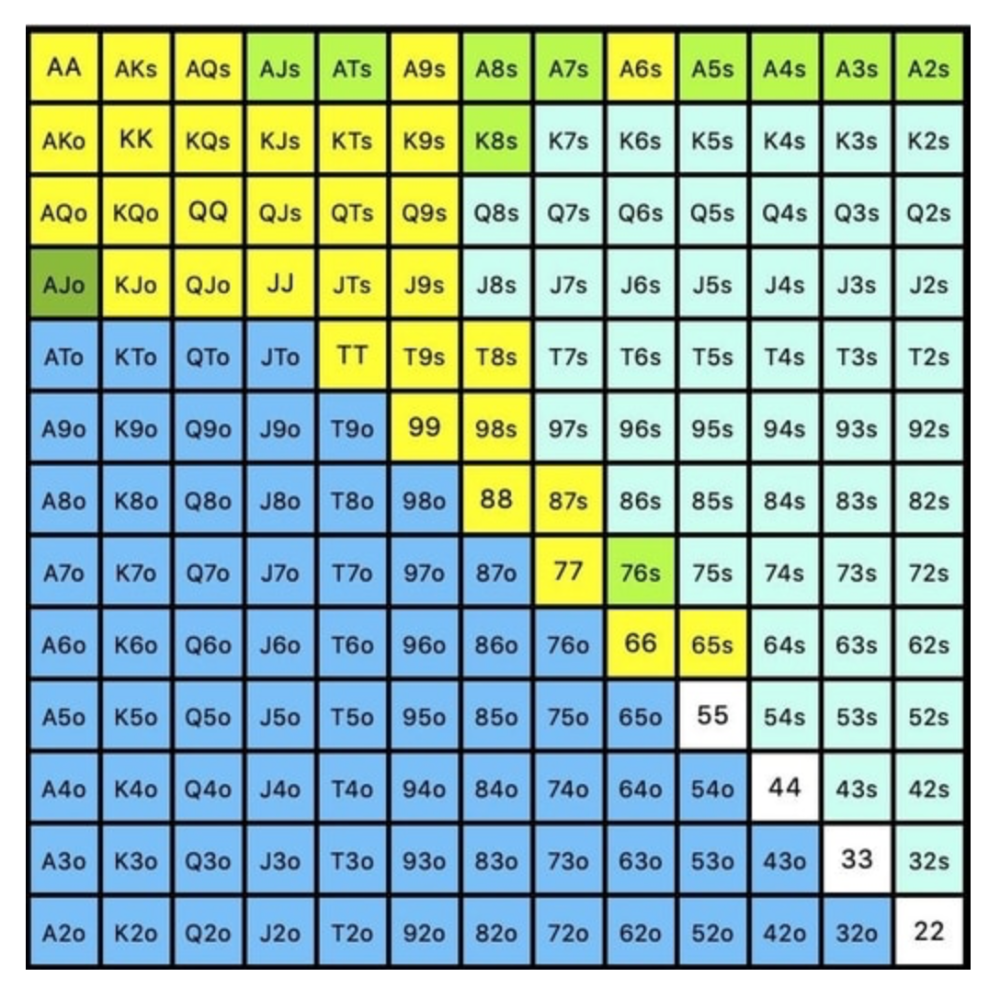
Some highlights:
Fours and fives have little chance of improving on the turn or river.
We only continue with AX hearts (with a flush draw) without a pair or better.
We'll also include 4 AJo combos, all of which have the Ace of hearts, and AcJh, which can block a backdoor nut flush combo.
Let's assume all these hands are called and the turn is blank (2 of spades). Opponent bets full-pot. MDF says we must defend 50% of our flop continuing range, or 85 of 170 combos, to be unexploitable. This strategy includes our best flush draws, straight draws, and made hands.
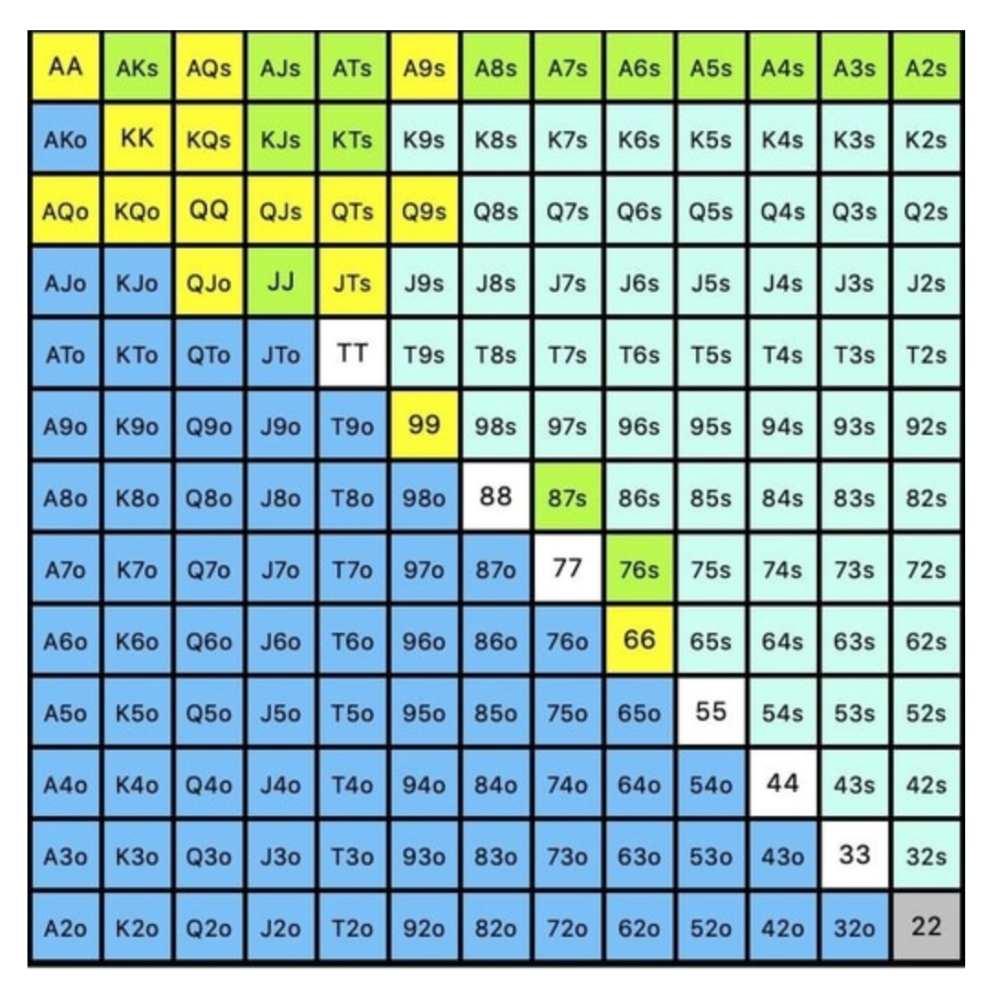
Here, we keep combining:
Nut flush draws
Pair + flush draws
GS + flush draws
Second Pair, Top Kicker+
One combo of JJ that doesn’t block the flush draw or backdoor flush draw.
On the river, we can fold our missed draws and keep our best made hands. When calling with weaker hands, consider blocker effects and card removal to avoid overcalling and decide which combos to continue.
4. Poker GTO Bet Sizing
To avoid being exploited, balance your bluffs and value bets. Your betting range depends on how much you bet (in relation to the pot). This concept only applies on the river, as draws (bluffs) on the flop and turn still have equity (and are therefore total bluffs).
On the flop, you want a 2:1 bluff-to-value-bet ratio. On the flop, there won't be as many made hands as on the river, and your bluffs will usually contain equity. The turn should have a "bluffing" ratio of 1:1. Use the chart below to determine GTO river bluff frequencies (relative to your bet size):
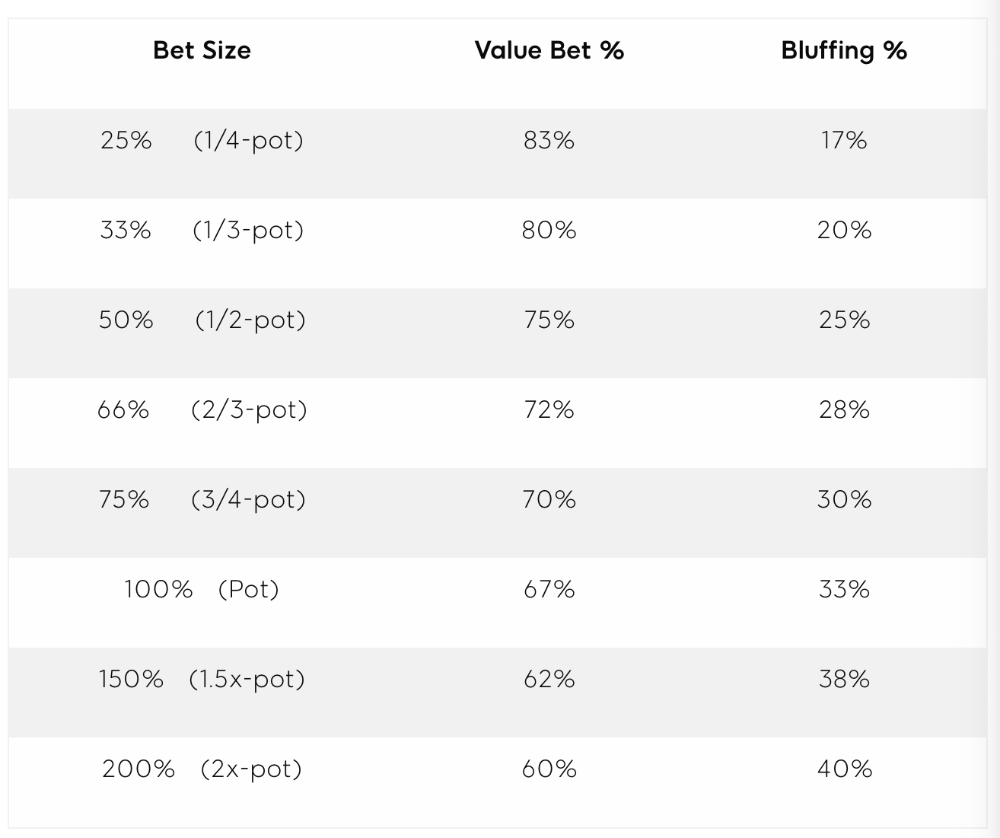
This chart relates to your opponent's pot odds. If you bet 50% pot, your opponent gets 3:1 odds and must win 25% of the time to call. Poker GTO theory suggests including 25% bluff combinations in your betting range so you're indifferent to your opponent calling or folding.
Best river bluffs don't block hands you want your opponent to have (or not have). For example, betting with missed Ace-high flush draws is often a mistake because you block a missed flush draw you want your opponent to have when bluffing on the river (meaning that it would subsequently be less likely he would have it, if you held two of the flush draw cards). Ace-high usually has some river showdown value.
If you had a 3-flush on the river and wanted to raise, you could bluff raise with AX combos holding the bluff suit Ace. Blocking the nut flush prevents your opponent from using that combo.
5. Bet Sizes and Frequency
GTO beginner strategies aren't just bluffs and value bets. They show how often and how much to bet in certain spots. Top players have benefited greatly from poker solvers, which we'll discuss next.
GTO Poker Software
In recent years, various poker GTO solvers have been released to help beginner, intermediate, and advanced players play balanced/GTO poker in various situations.
PokerSnowie and PioSolver are popular GTO and poker study programs.
While you can't compute players' hand ranges and what hands to bet or check with in real time, studying GTO play strategies with these programs will pay off. It will improve your poker thinking and understanding.
Solvers can help you balance ranges, choose optimal bet sizes, and master cbet frequencies.
GTO Poker Tournament
Late-stage tournaments have shorter stacks than cash games. In order to follow GTO poker guidelines, Nash charts have been created, tweaked, and used for many years (and also when to call, depending on what number of big blinds you have when you find yourself shortstacked).
The charts are for heads-up push/fold. In a multi-player game, the "pusher" chart can only be used if play is folded to you in the small blind. The "caller" chart can only be used if you're in the big blind and assumes a small blind "pusher" (with a much wider range than if a player in another position was open-shoving).
Divide the pusher chart's numbers by 2 to see which hand to use from the Button. Divide the original chart numbers by 4 to find the CO's pushing range. Some of the figures will be impossible to calculate accurately for the CO or positions to the right of the blinds because the chart's highest figure is "20+" big blinds, which is also used for a wide range of hands in the push chart.
Both of the GTO charts below are ideal for heads-up play, but exploitable HU shortstack strategies can lead to more +EV decisions against certain opponents. Following the charts will make your play GTO and unexploitable.
Poker pro Max Silver created the GTO push/fold software SnapShove. (It's accessible online at www.snapshove.com or as iOS or Android apps.)
Players can access GTO shove range examples in the full version. (You can customize the number of big blinds you have, your position, the size of the ante, and many other options.)
In Conclusion
Due to the constantly changing poker landscape, players are always improving their skills. Exploitable strategies often yield higher profit margins than GTO-based approaches, but knowing GTO beginner and advanced concepts can give you an edge for a few reasons.
It creates a solid gameplay base.
Having a baseline makes it easier to exploit certain villains.
You can avoid leveling wars with your opponents by making sound poker decisions based on GTO strategy.
It doesn't require assuming opponents' play styles.
Not results-oriented.
This is just the beginning of GTO and poker theory. Consider investing in the GTO poker solver software listed above to improve your game.

Ash Parrish
4 years ago
Sonic Prime and indie games on Netflix
Netflix will stream Spiritfarer, Raji: An Ancient Epic, and Lucky Luna.
Netflix's Geeked Week brought a slew of announcements. The flurry of reveals for The Sandman, The Umbrella Academy season 3, One Piece, and more also included game and game-adjacent announcements.
Netflix released a teaser for Cuphead season 2 ahead of its August premiere, featuring more of Grey DeLisle's Ms. Chalice. DOTA: Dragon's Blood season 3 hits Netflix in August. Tekken, the fighting game that throws kids off cliffs, gets an anime, Tekken: Bloodline.
Netflix debuted a clip of Sonic Prime before Sonic Origins in June and Sonic Frontiers in 2022.
Castlevania: Nocturne will follow Richter Belmont.
Netflix is reviving licensed games with titles based on its shows. There's a Queen's Gambit chess game, a Shadow and Bone RPG, a La Casa de Papel heist adventure, and a Too Hot to Handle game where a pregnant woman must choose between stabbing her cheating ex or forgiving him.
Riot's rhythm platformer Hextech Mayhem debuted on Netflix last year, and now Netflix is adding games from Devolver Digital. Reigns: Three Kingdoms is a card game that lets players choose the fate of Three Kingdoms-era China by swiping left or right on cards. Spiritfarer, the "cozy game about death" from 2020, and Raji: An Ancient Epic are coming to Netflix. Poinpy, a vertical climber from the creator of Downwell, is now on Netflix.
Desta: The Memories Between is a turn-based strategy game set in dreams and memories.
Snowman's Lucky Luna will also be added soon.
With these games, Netflix is expanding beyond dinky mobile games — it plans to have 50 by the end of the year — and could be a serious platform for indies that want to expand into mobile. It takes gaming seriously.
Luke Plunkett
4 years ago
Gran Turismo 7 Update Eases Up On The Grind After Fan Outrage
Polyphony Digital has changed the game after apologizing in March.
To make amends for some disastrous downtime, Gran Turismo 7 director Kazunori Yamauchi announced a credits handout and promised to “dramatically change GT7's car economy to help make amends” last month. The first of these has arrived.
The game's 1.11 update includes the following concessions to players frustrated by the economy and its subsequent grind:
-
The last half of the World Circuits events have increased in-game credit rewards.
-
Modified Arcade and Custom Race rewards
-
Clearing all circuit layouts with Gold or Bronze now rewards In-game Credits. Exiting the Sector selection screen with the Exit button will award Credits if an event has already been cleared.
-
Increased Credits Rewards in Lobby and Daily Races
-
Increased the free in-game Credits cap from 20,000,000 to 100,000,000.
Additionally, “The Human Comedy” missions are one-hour endurance races that award “up to 1,200,000” credits per event.
This isn't everything Yamauchi promised last month; he said it would take several patches and updates to fully implement the changes. Here's a list of everything he said would happen, some of which have already happened (like the World Cup rewards and credit cap):
- Increase rewards in the latter half of the World Circuits by roughly 100%.
- Added high rewards for all Gold/Bronze results clearing the Circuit Experience.
- Online Races rewards increase.
- Add 8 new 1-hour Endurance Race events to Missions. So expect higher rewards.
- Increase the non-paid credit limit in player wallets from 20M to 100M.
- Expand the number of Used and Legend cars available at any time.
- With time, we will increase the payout value of limited time rewards.
- New World Circuit events.
- Missions now include 24-hour endurance races.
- Online Time Trials added, with rewards based on the player's time difference from the leader.
- Make cars sellable.
The full list of updates and changes can be found here.
Read the original post.
You might also like

Davlin Knight
3 years ago
2 pitfalls to stay away from when launching a YouTube channel
You do not want to miss these
Stop! Stop it! Two things to avoid when starting a YouTube channel. Critical. Possible channel-killers Its future revenue.
I'll tell you now, so don't say "I wish I knew."
The Notorious Copyright Allegation
My YouTube channel received a copyright claim before I sold it. This claim was on a one-minute video I thought I'd changed enough to make mine, but the original owner disagreed.
It cost me thousands in ad revenue. Original owner got the profits.
Well, it wasn't your video, you say.
Touché.
I've learned. Sorta
I couldn't stop looking at the video's views. The video got 1,000,000 views without any revenue. I made 4 more similar videos.
If they didn't get copyrighted, I'd be rolling in dough.
You've spent a week editing and are uploading to YouTube. You're thrilled as you stand and stretch your back. You see the video just before publishing.
No way!
The red exclamation point on checks.
Copyright claim!
YouTube lets you publish, but you won't make money.
Sounds fair? Well, it is.
Copyright claims mean you stole someone's work. Song, image, or video clip.
We wouldn't want our content used for money.
The only problem with this is that almost everything belongs to someone else. I doubt some of the biggest creators are sitting down and making their music for their videos. That just seems really excessive when you could make a quick search on YouTube and download a song (I definitely don’t do this because that would be stealing).
So how do you defeat a copyright defense?
Even copyright-free songs on YouTube aren't guaranteed. Some copyrighted songs claim to be free.
Use YouTube's free music library or pay for a subscription to adobe stock, epidemic sound, or artlist.io.
Most of my videos have Nintendo music. Almost all game soundtracks are copyright-free and offer a variety of songs.
Restriction on age
Age restrictions are a must-avoid. A channel dies.
YouTube never suggests age-restricted videos.
Shadow banning means YouTube hides your content from subscribers and non-subscribers.
Keeping your channel family-friendly can help.
I hear you complaining that your channel isn't for kids. I agree. Not everyone has a clean mouth or creates content for minors.
YouTube has changed rapidly in recent years. Focusing on kids. Fewer big creators are using profanity or explicit content in videos. Not YouTube-worthy.
Youtube wants to be family-friendly. A family-friendly movie. It won't promote illegal content. Yes, it allows profanity.
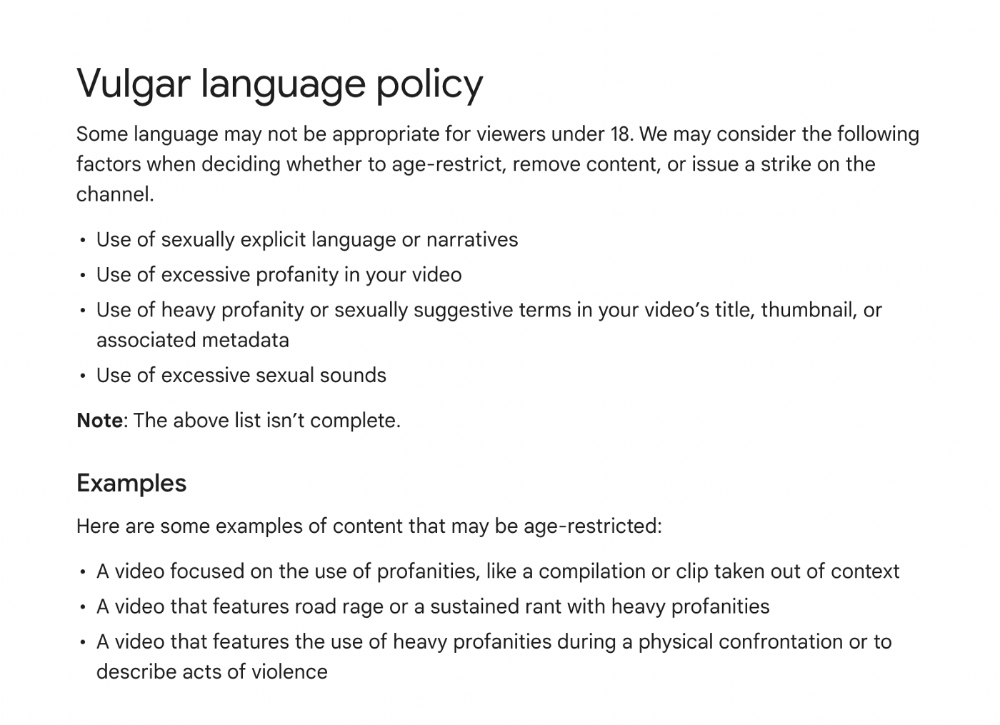
Do I recommend avoiding no-no words in videos? Never. Okay. YouTube's policies are shaky. YouTube uses video content to determine ad suitability.
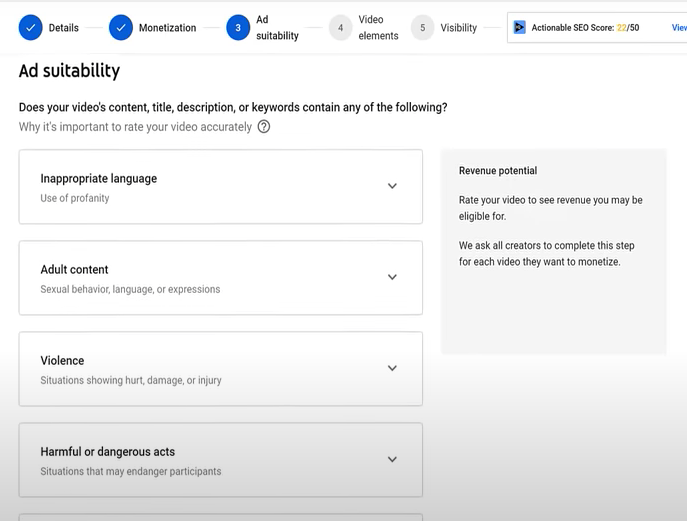
No joke. If you're serious about becoming a content creator, avoid profanity and inappropriate topics.
If your channel covers 18+ topics, like crime or commentary, censor as much as possible.
YouTube can be like walking on eggshells. You never know what is gonna upset the boss. So play it safe and try to avoid getting on their bad side.
Mr. Beast, Dream, Markplier, Faze Rug, and PewDewPie are popular creators. They maintain it family-friendly while entertaining fans.
You got this.
Matthew Royse
4 years ago
5 Tips for Concise Writing
Here's how to be clear.
“I have only made this letter longer because I have not had the time to make it shorter.” — French mathematician, physicist, inventor, philosopher, and writer Blaise Pascal
Concise.
People want this. We tend to repeat ourselves and use unnecessary words.
Being vague frustrates readers. It focuses their limited attention span on figuring out what you're saying rather than your message.
Edit carefully.
“Examine every word you put on paper. You’ll find a surprising number that don’t serve any purpose.” — American writer, editor, literary critic, and teacher William Zinsser
How do you write succinctly?
Here are three ways to polish your writing.
1. Delete
Your readers will appreciate it if you delete unnecessary words. If a word or phrase is essential, keep it. Don't force it.
Many readers dislike bloated sentences. Ask yourself if cutting a word or phrase will change the meaning or dilute your message.
For example, you could say, “It’s absolutely essential that I attend this meeting today, so I know the final outcome.” It’s better to say, “It’s critical I attend the meeting today, so I know the results.”
Key takeaway
Delete actually, completely, just, full, kind of, really, and totally. Keep the necessary words, cut the rest.
2. Just Do It
Don't tell readers your plans. Your readers don't need to know your plans. Who are you?
Don't say, "I want to highlight our marketing's problems." Our marketing issues are A, B, and C. This cuts 5–7 words per sentence.
Keep your reader's attention on the essentials, not the fluff. What are you doing? You won't lose readers because you get to the point quickly and don't build up.
Key takeaway
Delete words that don't add to your message. Do something, don't tell readers you will.
3. Cut Overlap
You probably repeat yourself unintentionally. You may add redundant sentences when brainstorming. Read aloud to detect overlap.
Remove repetition from your writing. It's important to edit our writing and thinking to avoid repetition.
Key Takeaway
If you're repeating yourself, combine sentences to avoid overlap.
4. Simplify
Write as you would to family or friends. Communicate clearly. Don't use jargon. These words confuse readers.
Readers want specifics, not jargon. Write simply. Done.
Most adults read at 8th-grade level. Jargon and buzzwords make speech fluffy. This confuses readers who want simple language.
Key takeaway
Ensure all audiences can understand you. USA Today's 5th-grade reading level is intentional. They want everyone to understand.
5. Active voice
Subjects perform actions in active voice. When you write in passive voice, the subject receives the action.
For example, “the board of directors decided to vote on the topic” is an active voice, while “a decision to vote on the topic was made by the board of directors” is a passive voice.
Key takeaway
Active voice clarifies sentences. Active voice is simple and concise.
Bringing It All Together
Five tips help you write clearly. Delete, just do it, cut overlap, use simple language, and write in an active voice.
Clear writing is effective. It's okay to occasionally use unnecessary words or phrases. Realizing it is key. Check your writing.
Adding words costs.
Write more concisely. People will appreciate it and read your future articles, emails, and messages. Spending extra time will increase trust and influence.
“Not that the story need be long, but it will take a long while to make it short.” — Naturalist, essayist, poet, and philosopher Henry David Thoreau

Maria Urkedal York
4 years ago
When at work, don't give up; instead, think like a designer.
How to reframe irritation and go forward

“… before you can figure out where you are going, you need to know where you are, and once you know and accept where you are, you can design your way to where you want to be.” — Bill Burnett and Dave Evans
“You’ve been here before. But there are some new ingredients this time. What can tell yourself that will make you understand that now isn’t just like last year? That there’s something new in this August.”
My coach paused. I sighed, inhaled deeply, and considered her question.
What could I say? I simply needed a plan from her so everything would fall into place and I could be the happy, successful person I want to be.
Time passed. My mind was exhausted from running all morning, all summer, or the last five years, searching for what to do next and how to get there.
Calmer, I remembered that my coach's inquiry had benefited me throughout the summer. The month before our call, I read Designing Your Work Life — How to Thrive and Change and Find Happiness at Work from Standford University’s Bill Burnett and Dave Evans.
A passage in their book felt like a lifeline: “We have something important to say to you: Wherever you are in your work life, whatever job you are doing, it’s good enough. For now. Not forever. For now.”
As I remembered this book on the coaching call, I wondered if I could embrace where I am in August and say my job life is good enough for now. Only temporarily.
I've done that since. I'm getting unstuck.
Here's how you can take the first step in any area where you feel stuck.
How to acquire the perspective of "Good enough for now" for yourself
We’ve all heard the advice to just make the best of a bad situation. That´s not bad advice, but if you only make the best of a bad situation, you are still in a bad situation. It doesn’t get to the root of the problem or offer an opportunity to change the situation. You’re more cheerfully navigating lousiness, which is an improvement, but not much of one and rather hard to sustain over time.” — Bill Burnett and Dave Evans
Reframing Burnett at Evans says good enough for now is the key to being happier at work. Because, as they write, a designer always has options.
Choosing to believe things are good enough for now is liberating. It helps us feel less victimized and less judged. Accepting our situation helps us become unstuck.
Let's break down the process, which designers call constructing your way ahead, into steps you can take today.
Writing helps get started. First, write down your challenge and why it's essential to you. If pen and paper help, try this strategy:
Make the decision to accept the circumstance as it is. Designers always begin by acknowledging the truth of the situation. You now refrain from passing judgment. Instead, you simply describe the situation as accurately as you can. This frees us from negative thought patterns that prevent us from seeing the big picture and instead keep us in a tunnel of negativity.
Look for a reframing right now. Begin with good enough for the moment. Take note of how your body feels as a result. Tell yourself repeatedly that whatever is occurring is sufficient for the time being. Not always, but just now. If you want to, you can even put it in writing and repeatedly breathe it in, almost like a mantra.
You can select a reframe that is more relevant to your situation once you've decided that you're good enough for now and have allowed yourself to believe it. Try to find another perspective that is possible, for instance, if you feel unappreciated at work and your perspective of I need to use and be recognized for all my new skills in my job is making you sad and making you want to resign. For instance, I can learn from others at work and occasionally put my new abilities to use.
After that, leave your mind and act in accordance with your new perspective. Utilize the designer's bias for action to test something out and create a prototype that you can learn from. Your beginning point for creating experiences that will support the new viewpoint derived from the aforementioned point is the new perspective itself. By doing this, you recognize a circumstance at work where you can provide value to yourself or your workplace and then take appropriate action. Send two or three coworkers from whom you wish to learn anything an email, for instance, asking them to get together for coffee or a talk.
Choose tiny, doable actions. You prioritize them at work.
Let's assume you're feeling disconnected at work, so you make a list of folks you may visit each morning or invite to lunch. If you're feeling unmotivated and tired, take a daily walk and treat yourself to a decent coffee.
This may be plenty for now. If you want to take this procedure further, use Burnett and Evans' internet tools and frameworks.
Developing the daily practice of reframing
“We’re not discontented kids in the backseat of the family minivan, but how many of us live our lives, especially our work lives, as if we are?” — Bill Burnett and Dave Evans
I choose the good enough for me perspective every day, often. No quick fix. Am a failing? Maybe a little bit, but I like to think of it more as building muscle.
This way, every time I tell myself it's ok, I hear you. For now, that muscle gets stronger.
Hopefully, reframing will become so natural for us that it will become a habit, and not a technique anymore.
If you feel like you’re stuck in your career or at work, the reframe of Good enough, for now, might be valuable, so just go ahead and try it out right now.
And while you’re playing with this, why not think of other areas of your life too, like your relationships, where you live — even your writing, and see if you can feel a shift?