


More on NFTs & Art

Web3Lunch
3 years ago
An employee of OpenSea might get a 40-year prison sentence for insider trading using NFTs.

The space had better days. Those greenish spikes...oh wow, haven't felt that in ages. Cryptocurrencies and NFTs have lost popularity. Google agrees. Both are declining.
As seen below, crypto interest spiked in May because of the Luna fall. NFT interest is similar to early October last year.
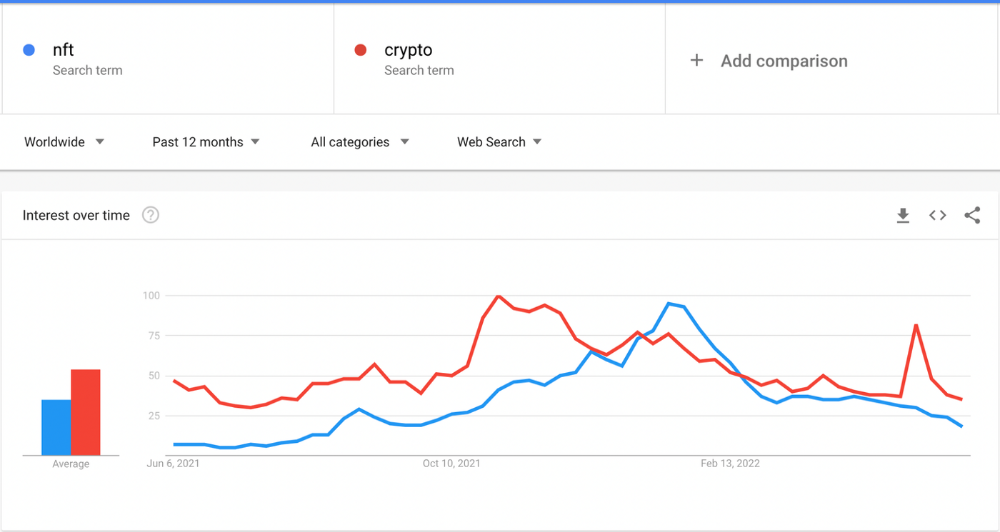
This makes me think NFTs are mostly hype and FOMO. No art or community. I've seen enough initiatives to know that communities stick around if they're profitable. Once it starts falling, they move on to the next project. The space has no long-term investments. Flip everything.
OpenSea trading volume has stayed steady for months. May's volume is 1.8 million ETH ($3.3 billion).
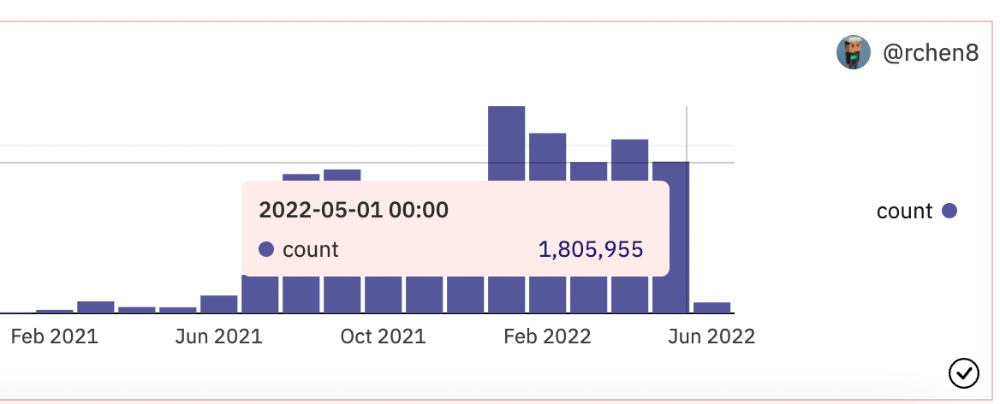
Despite this, I think NFTs and crypto will stick around. In bad markets, builders gain most.
Only 4k developers are active on Ethereum blockchain. It's low. A great chance for the space enthusiasts.
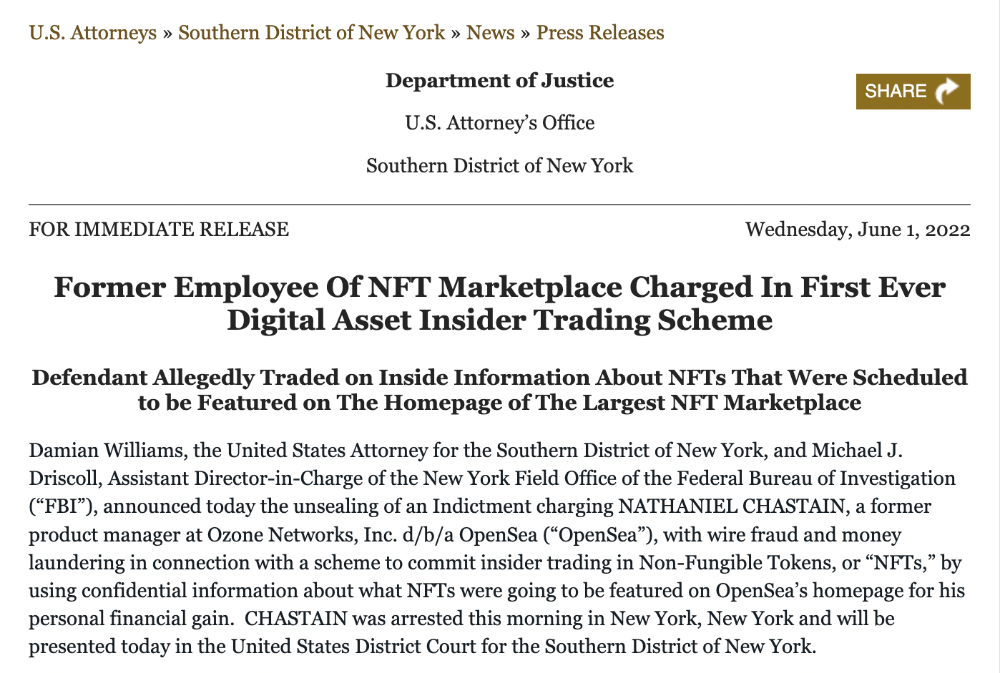
An employee of OpenSea might get a 40-year prison sentence for insider trading using NFTs.
Nathaniel Chastian, an OpenSea employee, traded on insider knowledge. He'll serve 40 years for that.
Here's what happened if you're unfamiliar.
OpenSea is a secondary NFT marketplace. Their homepage featured remarkable drops. Whatever gets featured there, NFT prices will rise 5x.
Chastian was at OpenSea. He chose forthcoming NFTs for OpenSeas' webpage.
Using anonymous digital currency wallets and OpenSea accounts, he would buy NFTs before promoting them on the homepage, showcase them, and then sell them for at least 25 times the price he paid.
From June through September 2021, this happened. Later caught, fired. He's charged with wire fraud and money laundering, each carrying a 20-year maximum penalty.
Although web3 space is all about decentralization, a step like this is welcomed since it restores faith in the area. We hope to see more similar examples soon.
Here's the press release.
Understanding smart contracts
@cantino.eth has a Twitter thread on smart contracts. Must-read. Also, he appears educated about the space, so follow him.

Matt Nutsch
3 years ago
Most people are unaware of how artificial intelligence (A.I.) is changing the world.

Recently, I saw an interesting social media post. In an entrepreneurship forum. A blogger asked for help because he/she couldn't find customers. I now suspect that the writer’s occupation is being disrupted by A.I.
Introduction
Artificial Intelligence (A.I.) has been a hot topic since the 1950s. With recent advances in machine learning, A.I. will touch almost every aspect of our lives. This article will discuss A.I. technology and its social and economic implications.
What's AI?
A computer program or machine with A.I. can think and learn. In general, it's a way to make a computer smart. Able to understand and execute complex tasks. Machine learning, NLP, and robotics are common types of A.I.
AI's global impact

AI will change the world, but probably faster than you think. A.I. already affects our daily lives. It improves our decision-making, efficiency, and productivity.
A.I. is transforming our lives and the global economy. It will create new business and job opportunities but eliminate others. Affected workers may face financial hardship.
AI examples:
OpenAI's GPT-3 text-generation
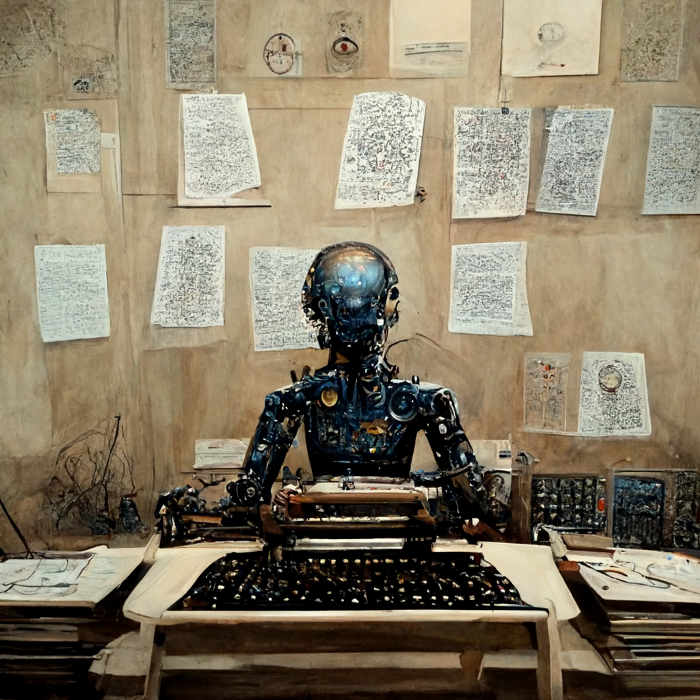
Developers can train, deploy, and manage models on GPT-3. It handles data preparation, model training, deployment, and inference for machine learning workloads. GPT-3 is easy to use for both experienced and new data scientists.
My team conducted an experiment. We needed to generate some blog posts for a website. We hired a blogger on Upwork. OpenAI created a blog post. The A.I.-generated blog post was of higher quality and lower cost.
MidjourneyAI's Art Contests
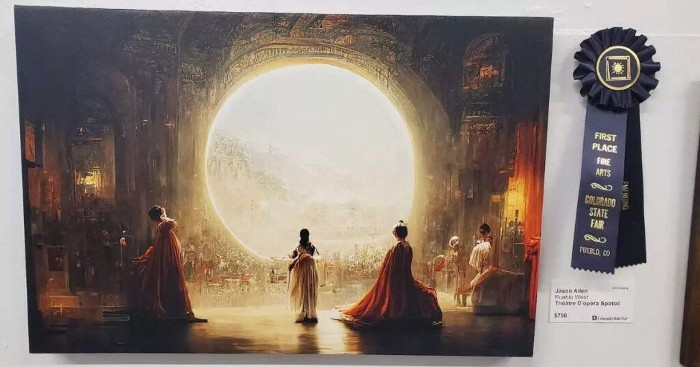
AI already affects artists. Artists use A.I. to create realistic 3D images and videos for digital art. A.I. is also used to generate new art ideas and methods.
MidjourneyAI and GigapixelAI won a contest last month. It's AI. created a beautiful piece of art that captured the contest's spirit. AI triumphs. It could open future doors.
After the art contest win, I registered to try out these new image generating A.I.s. In the MidjourneyAI chat forum, I noticed an artist's plea. The artist begged others to stop flooding RedBubble with AI-generated art.
Shutterstock and Getty Images have halted user uploads. AI-generated images flooded online marketplaces.
Imagining Videos with Meta
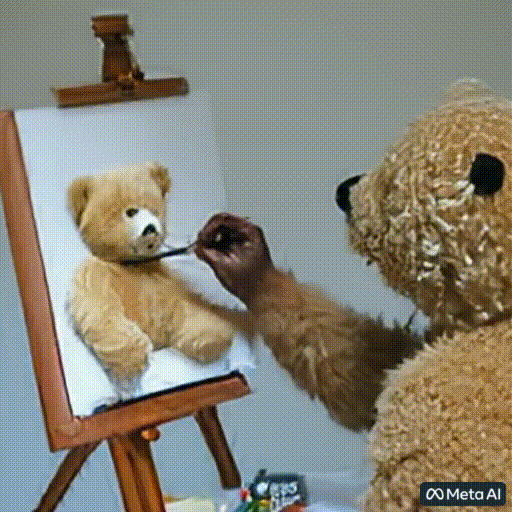
Meta released Make-a-Video this week. It's an A.I. app that creates videos from text. What you type creates a video.
This technology will impact TV, movies, and video games greatly. Imagine a movie or game that's personalized to your tastes. It's closer than you think.
Uses and Abuses of Deepfakes
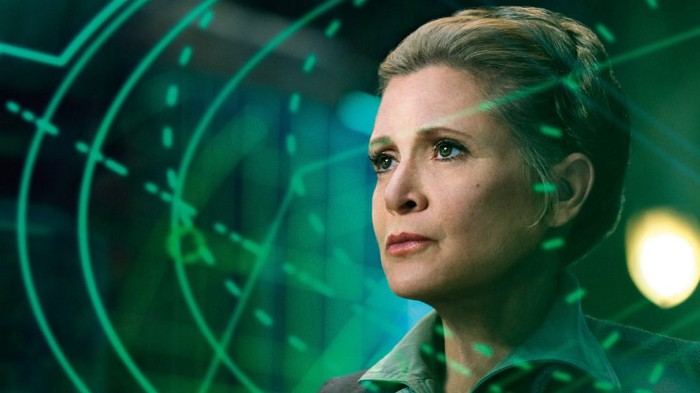
Deepfake videos are computer-generated images of people. AI creates realistic images and videos of people.
Deepfakes are entertaining but have social implications. Porn introduced deepfakes in 2017. People put famous faces on porn actors and actresses without permission.
Soon, deepfakes were used to show dead actors/actresses or make them look younger. Carrie Fischer was included in films after her death using deepfake technology.
Deepfakes can be used to create fake news or manipulate public opinion, according to an AI.
Voices for Darth Vader and Iceman
James Earl Jones, who voiced Darth Vader, sold his voice rights this week. Aged actor won't be in those movies. Respeecher will use AI to mimic Jones's voice. This technology could change the entertainment industry. One actor can now voice many characters.

AI can generate realistic voice audio from text. Top Gun 2 actor Val Kilmer can't speak for medical reasons. Sonantic created Kilmer's voice from the movie script. This entertaining technology has social implications. It blurs authentic recordings and fake media.
Medical A.I. fights viruses

A team of Chinese scientists used machine learning to predict effective antiviral drugs last year. They started with a large dataset of virus-drug interactions. Researchers combined that with medication and virus information. Finally, they used machine learning to predict effective anti-virus medicines. This technology could solve medical problems.
AI ideas AI-generated Itself

OpenAI's GPT-3 predicted future A.I. uses. Here's what it told me:
AI will affect the economy. Businesses can operate more efficiently and reinvest resources with A.I.-enabled automation. AI can automate customer service tasks, reducing costs and improving satisfaction.
A.I. makes better pricing, inventory, and marketing decisions. AI automates tasks and makes decisions. A.I.-powered robots could help the elderly or disabled. Self-driving cars could reduce accidents.
A.I. predictive analytics can predict stock market or consumer behavior trends and patterns. A.I. also personalizes recommendations. sways. A.I. recommends products and movies. AI can generate new ideas based on data analysis.
Conclusion

A.I. will change business as it becomes more common. It will change how we live and work by creating growth and prosperity.
Exciting times, but also one which should give us all pause. Technology can be good or evil. We must use new technologies ethically, fairly, and honestly.
“The author generated some sentences in this text in part with GPT-3, OpenAI’s large-scale language-generation model. Upon generating draft language, the author reviewed, edited, and revised the language to their own liking and takes ultimate responsibility for the content of this publication. The text of this post was further edited using HemingWayApp. Many of the images used were generated using A.I. as described in the captions.”

Protos
3 years ago
Plagiarism on OpenSea: humans and computers
OpenSea, a non-fungible token (NFT) marketplace, is fighting plagiarism. A new “two-pronged” approach will aim to root out and remove copies of authentic NFTs and changes to its blue tick verified badge system will seek to enhance customer confidence.
According to a blog post, the anti-plagiarism system will use algorithmic detection of “copymints” with human reviewers to keep it in check.
Last year, NFT collectors were duped into buying flipped images of the popular BAYC collection, according to The Verge. The largest NFT marketplace had to remove its delay pay minting service due to an influx of copymints.
80% of NFTs removed by the platform were minted using its lazy minting service, which kept the digital asset off-chain until the first purchase.
NFTs copied from popular collections are opportunistic money-grabs. Right-click, save, and mint the jacked JPEGs that are then flogged as an authentic NFT.
The anti-plagiarism system will scour OpenSea's collections for flipped and rotated images, as well as other undescribed permutations. The lack of detail here may be a deterrent to scammers, or it may reflect the new system's current rudimentary nature.
Thus, human detectors will be needed to verify images flagged by the detection system and help train it to work independently.
“Our long-term goal with this system is two-fold: first, to eliminate all existing copymints on OpenSea, and second, to help prevent new copymints from appearing,” it said.
“We've already started delisting identified copymint collections, and we'll continue to do so over the coming weeks.”
It works for Twitter, why not OpenSea
OpenSea is also changing account verification. Early adopters will be invited to apply for verification if their NFT stack is worth $100 or more. OpenSea plans to give the blue checkmark to people who are active on Twitter and Discord.
This is just the beginning. We are committed to a future where authentic creators can be verified, keeping scammers out.
Also, collections with a lot of hype and sales will get a blue checkmark. For example, a new NFT collection sold by the verified BAYC account will have a blue badge to verify its legitimacy.
New requests will be responded to within seven days, according to OpenSea.
These programs and products help protect creators and collectors while ensuring our community can confidently navigate the world of NFTs.
By elevating authentic content and removing plagiarism, these changes improve trust in the NFT ecosystem, according to OpenSea.
OpenSea is indeed catching up with the digital art economy. Last August, DevianArt upgraded its AI image recognition system to find stolen tokenized art on marketplaces like OpenSea.
It scans all uploaded art and compares it to “public blockchain events” like Ethereum NFTs to detect stolen art.
You might also like

Sam Hickmann
3 years ago
Improving collaboration with the Six Thinking Hats
Six Thinking Hats was written by Dr. Edward de Bono. "Six Thinking Hats" and parallel thinking allow groups to plan thinking processes in a detailed and cohesive way, improving collaboration.
Fundamental ideas
In order to develop strategies for thinking about specific issues, the method assumes that the human brain thinks in a variety of ways that can be intentionally challenged. De Bono identifies six brain-challenging directions. In each direction, the brain brings certain issues into conscious thought (e.g. gut instinct, pessimistic judgement, neutral facts). Some may find wearing hats unnatural, uncomfortable, or counterproductive.
The example of "mismatch" sensitivity is compelling. In the natural world, something out of the ordinary may be dangerous. This mode causes negative judgment and critical thinking.
Colored hats represent each direction. Putting on a colored hat symbolizes changing direction, either literally or metaphorically. De Bono first used this metaphor in his 1971 book "Lateral Thinking for Management" to describe a brainstorming framework. These metaphors allow more complete and elaborate thought separation. Six thinking hats indicate ideas' problems and solutions.
Similarly, his CoRT Thinking Programme introduced "The Five Stages of Thinking" method in 1973.
| HAT | OVERVIEW | TECHNIQUE |
|---|---|---|
| BLUE | "The Big Picture" & Managing | CAF (Consider All Factors); FIP (First Important Priorities) |
| WHITE | "Facts & Information" | Information |
| RED | "Feelings & Emotions" | Emotions and Ego |
| BLACK | "Negative" | PMI (Plus, Minus, Interesting); Evaluation |
| YELLOW | "Positive" | PMI |
| GREEN | "New Ideas" | Concept Challenge; Yes, No, Po |
Strategies and programs
After identifying the six thinking modes, programs can be created. These are groups of hats that encompass and structure the thinking process. Several of these are included in the materials for franchised six hats training, but they must often be adapted. Programs are often "emergent," meaning the group plans the first few hats and the facilitator decides what to do next.
The group agrees on how to think, then thinks, then evaluates the results and decides what to do next. Individuals or groups can use sequences (and indeed hats). Each hat is typically used for 2 minutes at a time, although an extended white hat session is common at the start of a process to get everyone on the same page. The red hat is recommended to be used for a very short period to get a visceral gut reaction – about 30 seconds, and in practice often takes the form of dot-voting.
| ACTIVITY | HAT SEQUENCE |
|---|---|
| Initial Ideas | Blue, White, Green, Blue |
| Choosing between alternatives | Blue, White, (Green), Yellow, Black, Red, Blue |
| Identifying Solutions | Blue, White, Black, Green, Blue |
| Quick Feedback | Blue, Black, Green, Blue |
| Strategic Planning | Blue, Yellow, Black, White, Blue, Green, Blue |
| Process Improvement | Blue, White, White (Other People's Views), Yellow, Black, Green, Red, Blue |
| Solving Problems | Blue, White, Green, Red, Yellow, Black, Green, Blue |
| Performance Review | Blue, Red, White, Yellow, Black, Green, Blue |
Use
Speedo's swimsuit designers reportedly used the six thinking hats. "They used the "Six Thinking Hats" method to brainstorm, with a green hat for creative ideas and a black one for feasibility.
Typically, a project begins with extensive white hat research. Each hat is used for a few minutes at a time, except the red hat, which is limited to 30 seconds to ensure an instinctive gut reaction, not judgement. According to Malcolm Gladwell's "blink" theory, this pace improves thinking.
De Bono believed that the key to a successful Six Thinking Hats session was focusing the discussion on a particular approach. A meeting may be called to review and solve a problem. The Six Thinking Hats method can be used in sequence to explore the problem, develop a set of solutions, and choose a solution through critical examination.
Everyone may don the Blue hat to discuss the meeting's goals and objectives. The discussion may then shift to Red hat thinking to gather opinions and reactions. This phase may also be used to determine who will be affected by the problem and/or solutions. The discussion may then shift to the (Yellow then) Green hat to generate solutions and ideas. The discussion may move from White hat thinking to Black hat thinking to develop solution set criticisms.
Because everyone is focused on one approach at a time, the group is more collaborative than if one person is reacting emotionally (Red hat), another is trying to be objective (White hat), and another is critical of the points which emerge from the discussion (Black hat). The hats help people approach problems from different angles and highlight problem-solving flaws.

Nitin Sharma
3 years ago
Quietly Create a side business that will revolutionize everything in a year.
Quitting your job for a side gig isn't smart.

A few years ago, I would have laughed at the idea of starting a side business.
I never thought a side gig could earn more than my 9-to-5. My side gig pays more than my main job now.
You may then tell me to leave your job. But I don't want to gamble, and my side gig is important. Programming and web development help me write better because of my job.
Yes, I share work-related knowledge. Web development, web3, programming, money, investment, and side hustles are key.
Let me now show you how to make one.
Create a side business based on your profession or your interests.
I'd be direct.
Most people don't know where to start or which side business to pursue.
You can make money by taking online surveys, starting a YouTube channel, or playing web3 games, according to several blogs.
You won't make enough money and will waste time.
Nitin directs our efforts. My friend, you've worked and have talent. Profit from your talent.
Example:
College taught me web development. I soon created websites, freelanced, and made money. First year was hardest for me financially and personally.
As I worked, I became more skilled. Soon after, I got more work, wrote about web development on Medium, and started selling products.
I've built multiple income streams from web development. It wasn't easy. Web development skills got me a 9-to-5 job.
Focus on a specific skill and earn money in many ways. Most people start with something they hate or are bad at; the rest is predictable.
Result? They give up, frustrated.
Quietly focus for a year.
I started my side business in college and never told anyone. My parents didn't know what I did for fun.
The only motivation is time constraints. So I focused.
As I've said, I focused on my strengths (learned skills) and made money. Yes, I was among Medium's top 500 authors in a year and got a bonus.
How did I succeed? Since I know success takes time, I never imagined making enough money in a month. I spent a year concentrating.
I became wealthy. Now that I have multiple income sources, some businesses pay me based on my skill.
I recommend learning skills and working quietly for a year. You can do anything with this.
The hardest part will always be the beginning.
When someone says you can make more money working four hours a week. Leave that, it's bad advice.
If someone recommends a paid course to help you succeed, think twice.
The beginning is always the hardest.
I made many mistakes learning web development. When I started my technical content side gig, it was tough. I made mistakes and changed how I create content, which helped.
And it’s applicable everywhere.
Don't worry if you face problems at first. Time and effort heal all wounds.
Quitting your job to work a side job is not a good idea.
Some honest opinions.
Most online gurus encourage side businesses. It takes time to start and grow a side business.
Suppose you quit and started a side business.
After six months, what happens? Your side business won't provide enough money to survive.
Indeed. Later, you'll become demotivated and tense and look for work.
Instead, work 9-5, and start a side business. You decide. Stop watching Netflix and focus on your side business.
I know you're busy, but do it.
Next? It'll succeed or fail in six months. You can continue your side gig for another six months because you have a job and have tried it.
You'll probably make money, but you may need to change your side gig.
That’s it.
You've created a new revenue stream.
Remember.
Starting a side business, a company, or finding work is difficult. There's no free money in a competitive world. You'll only succeed with skill.
Read it again.
Focusing silently for a year can help you succeed.
I studied web development and wrote about it. First year was tough. I went viral, hit the top 500, and other firms asked me to write for them. So, my life changed.
Yours can too. One year of silence is required.
Enjoy!

Jeff John Roberts
3 years ago
Jack Dorsey and Jay-Z Launch 'Bitcoin Academy' in Brooklyn rapper's home
The new Bitcoin Academy will teach Jay-Marcy Z's Houses neighbors "What is Cryptocurrency."
Jay-Z grew up in Brooklyn's Marcy Houses. The rapper and Block CEO Jack Dorsey are giving back to his hometown by creating the Bitcoin Academy.
The Bitcoin Academy will offer online and in-person classes, including "What is Money?" and "What is Blockchain?"
The program will provide participants with a mobile hotspot and a small amount of Bitcoin for hands-on learning.
Students will receive dinner and two evenings of instruction until early September. The Shawn Carter Foundation will help with on-the-ground instruction.
Jay-Z and Dorsey announced the program Thursday morning. It will begin at Marcy Houses but may be expanded.
Crypto Blockchain Plug and Black Bitcoin Billionaire, which has received a grant from Block, will teach the classes.
Jay-Z, Dorsey reunite
Jay-Z and Dorsey have previously worked together to promote a Bitcoin and crypto-based future.
In 2021, Dorsey's Block (then Square) acquired the rapper's streaming music service Tidal, which they propose using for NFT distribution.
Dorsey and Jay-Z launched an endowment in 2021 to fund Bitcoin development in Africa and India.
Dorsey is funding the new Bitcoin Academy out of his own pocket (as is Jay-Z), but he's also pushed crypto-related charitable endeavors at Block, including a $5 million fund backed by corporate Bitcoin interest.
This post is a summary. Read full article here