







More on Entrepreneurship

Sanjay Priyadarshi
5 days ago
Meet a Programmer Who Turned Down Microsoft's $10,000,000,000 Acquisition Offer
Failures inspire young developers
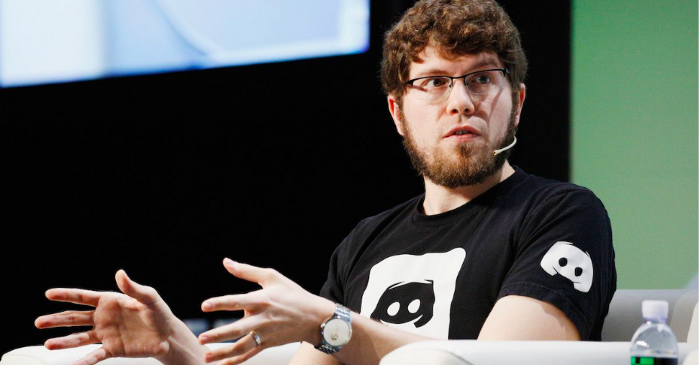
Jason citron created many products.
These products flopped.
Microsoft offered $10 billion for one of these products.
He rejected the offer since he was so confident in his success.
Let’s find out how he built a product that is currently valued at $15 billion.
Early in his youth, Jason began learning to code.
Jason's father taught him programming and IT.
His father wanted to help him earn money when he needed it.
Jason created video games and websites in high school.
Jason realized early on that his IT and programming skills could make him money.
Jason's parents misjudged his aptitude for programming.
Jason frequented online programming communities.
He looked for web developers. He created websites for those people.
His parents suspected Jason sold drugs online. When he said he used programming to make money, they were shocked.
They helped him set up a PayPal account.
Florida higher education to study video game creation
Jason never attended an expensive university.
He studied game design in Florida.
“Higher Education is an interesting part of society… When I work with people, the school they went to never comes up… only thing that matters is what can you do…At the end of the day, the beauty of silicon valley is that if you have a great idea and you can bring it to the life, you can convince a total stranger to give you money and join your project… This notion that you have to go to a great school didn’t end up being a thing for me.”
Jason's life was altered by Steve Jobs' keynote address.
After graduating, Jason joined an incubator.
Jason created a video-dating site first.
Bad idea.
Nobody wanted to use it when it was released, so they shut it down.
He made a multiplayer game.
It was released on Bebo. 10,000 people played it.
When Steve Jobs unveiled the Apple app store, he stopped playing.
The introduction of the app store resembled that of a new gaming console.
Jason's life altered after Steve Jobs' 2008 address.
“Whenever a new video game console is launched, that’s the opportunity for a new video game studio to get started, it’s because there aren’t too many games available…When a new PlayStation comes out, since it’s a new system, there’s only a handful of titles available… If you can be a launch title you can get a lot of distribution.”
Apple's app store provided a chance to start a video game company.
They released an app after 5 months of work.
Aurora Feint is the game.
Jason believed 1000 players in a week would be wonderful. A thousand players joined in the first hour.
Over time, Aurora Feints' game didn't gain traction. They don't make enough money to keep playing.
They could only make enough for one month.
Instead of buying video games, buy technology
Jason saw that they established a leaderboard, chat rooms, and multiplayer capabilities and believed other developers would want to use these.
They opted to sell the prior game's technology.
OpenFeint.
Assisting other game developers
They had no money in the bank to create everything needed to make the technology user-friendly.
Jason and Daniel designed a website saying:
“If you’re making a video game and want to have a drop in multiplayer support, you can use our system”
TechCrunch covered their website launch, and they gained a few hundred mailing list subscribers.
They raised seed funding with the mailing list.
Nearly all iPhone game developers started adopting the Open Feint logo.
“It was pretty wild… It was really like a whole social platform for people to play with their friends.”
What kind of a business model was it?
OpenFeint originally planned to make the software free for all games. As the game gained popularity, they demanded payment.
They later concluded it wasn't a good business concept.
It became free eventually.
Acquired for $104 million
Open Feint's users and employees grew tremendously.
GREE bought OpenFeint for $104 million in April 2011.
GREE initially committed to helping Jason and his team build a fantastic company.
Three or four months after the acquisition, Jason recognized they had a different vision.
He quit.
Jason's Original Vision for the iPad
Jason focused on distribution in 2012 to help businesses stand out.
The iPad market and user base were growing tremendously.
Jason said the iPad may replace mobile gadgets.
iPad gamers behaved differently than mobile gamers.
People sat longer and experienced more using an iPad.
“The idea I had was what if we built a gaming business that was more like traditional video games but played on tablets as opposed to some kind of mobile game that I’ve been doing before.”
Unexpected insight after researching the video game industry
Jason learned from studying the gaming industry that long-standing companies had advantages beyond a single release.
Previously, long-standing video game firms had their own distribution system. This distribution strategy could buffer time between successful titles.
Sony, Microsoft, and Valve all have gaming consoles and online stores.
So he built a distribution system.
He created a group chat app for gamers.
He envisioned a team-based multiplayer game with text and voice interaction.
His objective was to develop a communication network, release more games, and start a game distribution business.
Remaking the video game League of Legends
Jason and his crew reimagined a League of Legends game mode for 12-inch glass.
They adapted the game for tablets.
League of Legends was PC-only.
So they rebuilt it.
They overhauled the game and included native mobile experiences to stand out.
Hammer and Chisel was the company's name.
18 people worked on the game.
The game was funded. The game took 2.5 years to make.
Was the game a success?
July 2014 marked the game's release. The team's hopes were dashed.
Critics initially praised the game.
Initial installation was widespread.
The game failed.
As time passed, the team realized iPad gaming wouldn't increase much and mobile would win.
Jason was given a fresh idea by Stan Vishnevskiy.
Stan Vishnevskiy was a corporate engineer.
He told Jason about his plan to design a communication app without a game.
This concept seeded modern strife.
“The insight that he really had was to put a couple of dots together… we’re seeing our customers communicating around our own game with all these different apps and also ourselves when we’re playing on PC… We should solve that problem directly rather than needing to build a new game…we should start making it on PC.”
So began Discord.
Online socializing with pals was the newest trend.
Jason grew up playing video games with his friends.
He never played outside.
Jason had many great moments playing video games with his closest buddy, wife, and brother.
Discord was about providing a location for you and your group to speak and hang out.
Like a private cafe, bedroom, or living room.
Discord was developed for you and your friends on computers and phones.
You can quickly call your buddies during a game to conduct a conference call. Put the call on speaker and talk while playing.
Discord wanted to give every player a unique experience. Because coordinating across apps was a headache.
The entire team started concentrating on Discord.
Jason decided Hammer and Chisel would focus on their chat app.
Jason didn't want to make a video game.
How Discord attracted the appropriate attention
During the first five months, the entire team worked on the game and got feedback from friends.
This ensures product improvement. As a result, some teammates' buddies started utilizing Discord.
The team knew it would become something, but the result was buggy. App occasionally crashed.
Jason persuaded a gamer friend to write on Reddit about the software.
New people would find Discord. Why not?
Reddit users discovered Discord and 50 started using it frequently.
Discord was launched.
Rejecting the $10 billion acquisition proposal
Discord has increased in recent years.
It sends billions of messages.
Discord's users aren't tracked. They're privacy-focused.
Purchase offer
Covid boosted Discord's user base.
Weekly, billions of messages were transmitted.
Microsoft offered $10 billion for Discord in 2021.
Jason sold Open Feint for $104m in 2011.
This time, he believed in the product so much that he rejected Microsoft's offer.
“I was talking to some people in the team about which way we could go… The good thing was that most of the team wanted to continue building.”
Last time, Discord was valued at $15 billion.
Discord raised money on March 12, 2022.
The $15 billion corporation raised $500 million in 2021.

SAHIL SAPRU
1 month ago
Growth tactics that grew businesses from 1 to 100
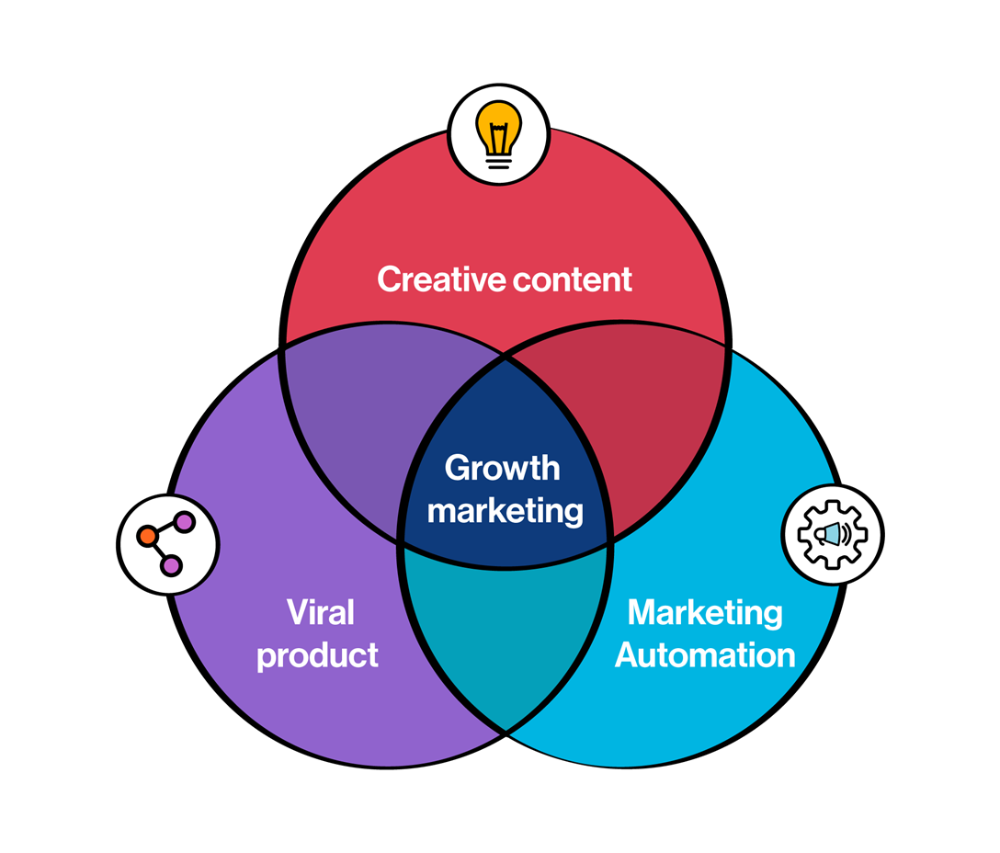
Everyone wants a scalable startup.
Innovation helps launch a startup. The secret to a scalable business is growth trials (from 1 to 100).
Growth marketing combines marketing and product development for long-term growth.
Today, I'll explain growth hacking strategies popular startups used to scale.
1/ A Facebook user's social value is proportional to their friends.
Facebook built its user base using content marketing and paid ads. Mark and his investors feared in 2007 when Facebook's growth stalled at 90 million users.
Chamath Palihapitiya was brought in by Mark.
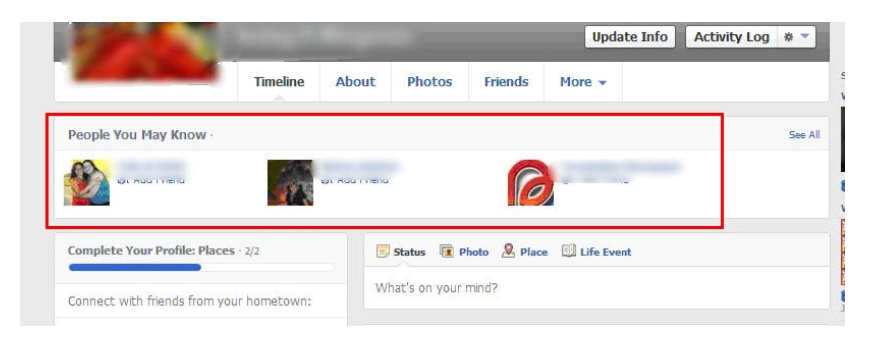
The team tested SEO keywords and MAU chasing. The growth team introduced “people you may know”
This feature reunited long-lost friends and family. Casual users became power users as the retention curve flattened.
Growth Hack Insights: With social network effect the value of your product or platform increases exponentially if you have users you know or can relate with.
2/ Airbnb - Focus on your value propositions
Airbnb nearly failed in 2009. The company's weekly revenue was $200 and they had less than 2 months of runway.
Enter Paul Graham. The team noticed a pattern in 40 listings. Their website's property photos sucked.
Why?
Because these photos were taken with regular smartphones. Users didn't like the first impression.
Graham suggested traveling to New York to rent a camera, meet with property owners, and replace amateur photos with high-resolution ones.
A week later, the team's weekly revenue doubled to $400, indicating they were on track.
Growth Hack Insights: When selling an “online experience” ensure that your value proposition is aesthetic enough for users to enjoy being associated with them.

3/ Zomato - A company's smartphone push ensured growth.
Zomato delivers food. User retention was a challenge for the founders. Indian food customers are notorious for switching brands at the drop of a hat.
Zomato wanted users to order food online and repeat orders throughout the week.
Zomato created an attractive website with “near me” keywords for SEO indexing.
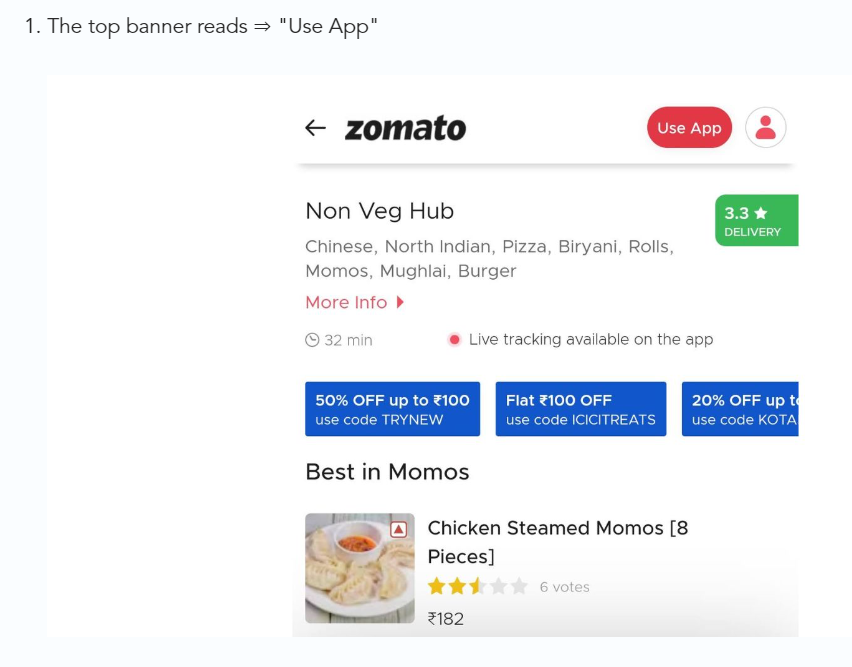
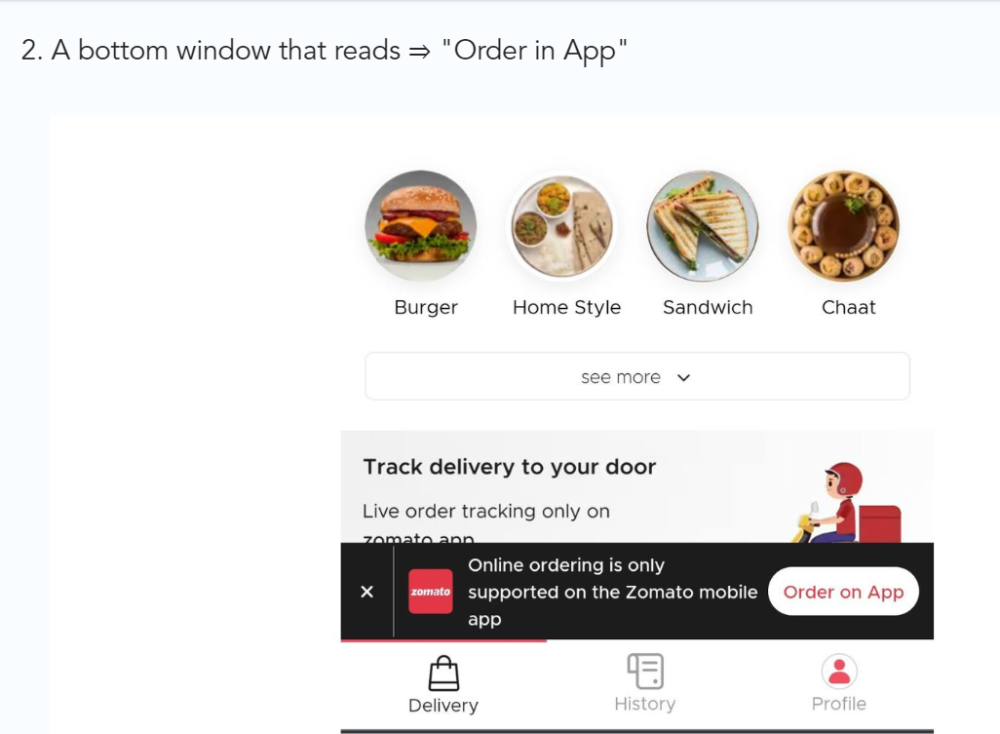
Zomato gambled to increase repeat orders. They only allowed mobile app food orders.
Zomato thought mobile apps were stickier. Product innovations in search/discovery/ordering or marketing campaigns like discounts/in-app notifications/nudges can improve user experience.
Zomato went public in 2021 after users kept ordering food online.
Growth Hack Insights: To improve user retention try to build platforms that build user stickiness. Your product and marketing team will do the rest for them.
4/ Hotmail - Signaling helps build premium users.
Ever sent or received an email or tweet with a sign — sent from iPhone?
Hotmail did it first! One investor suggested Hotmail add a signature to every email.
Overnight, thousands joined the company. Six months later, the company had 1 million users.
When serving an existing customer, improve their social standing. Signaling keeps the top 1%.
5/ Dropbox - Respect loyal customers
Dropbox is a company that puts people over profits. The company prioritized existing users.
Dropbox rewarded loyal users by offering 250 MB of free storage to anyone who referred a friend. The referral hack helped Dropbox get millions of downloads in its first few months.
Growth Hack Insights: Think of ways to improve the social positioning of your end-user when you are serving an existing customer. Signaling goes a long way in attracting the top 1% to stay.
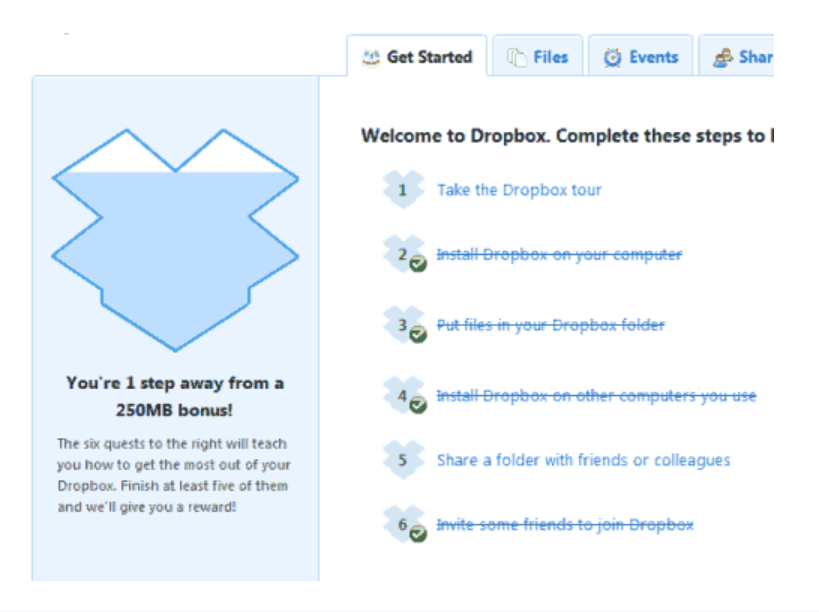
These experiments weren’t hacks. Hundreds of failed experiments and user research drove these experiments. Scaling up experiments is difficult.
Contact me if you want to grow your startup's user base.

Matthew O'Riordan
2 months ago
Trends in SaaS Funding from 2016 to 2022
Christopher Janz of Point Nine Capital created the SaaS napkin in 2016. This post shows how founders have raised cash in the last 6 years. View raw data.
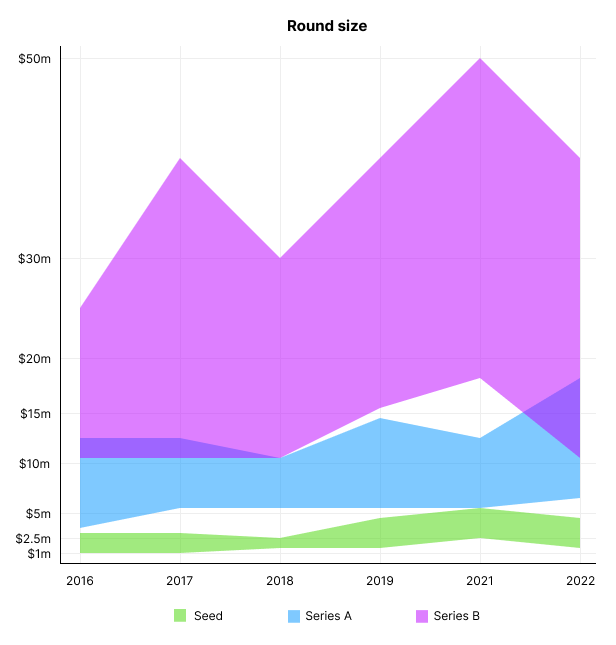
Round size
Unsurprisingly, round sizes have expanded and will taper down in 2022. In 2016, pre-seed rounds were $200k to $500k; currently, they're $1-$2m. Despite the macroeconomic scenario, Series A have expanded from $3m to $12m in 2016 to $6m and $18m in 2022.
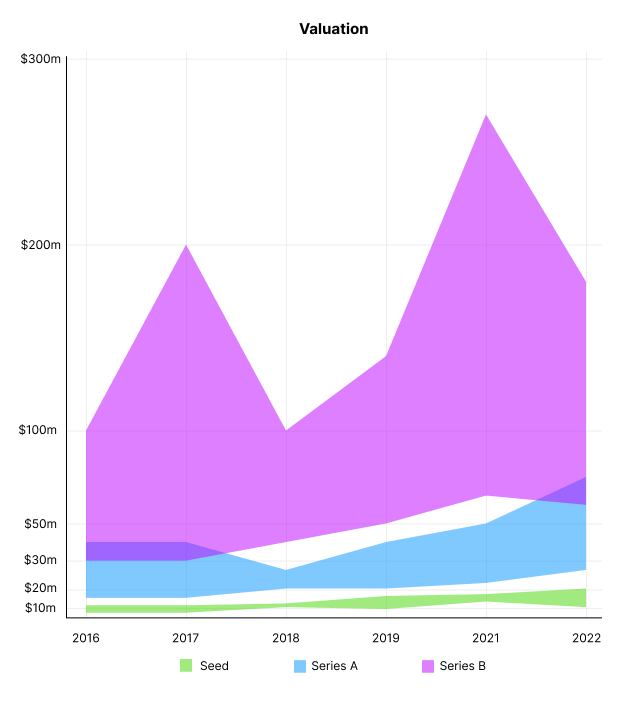
Valuation
There are hints that valuations are rebounding this year. Pre-seed valuations in 2022 are $12m from $3m in 2016, and Series B prices are $270m from $100m in 2016.
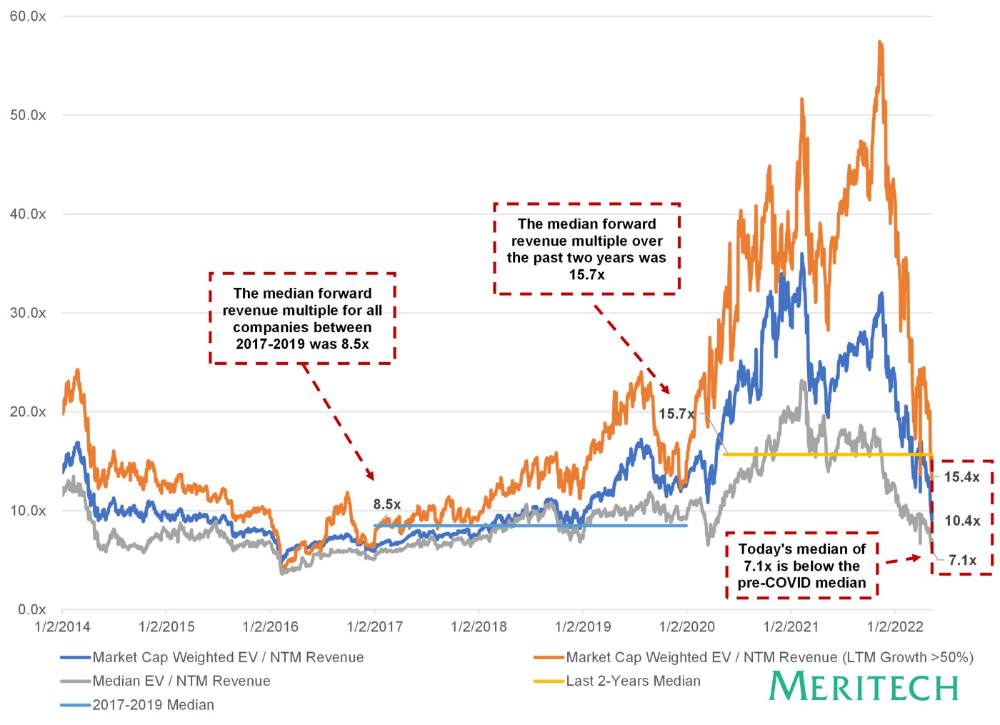
Compared to public SaaS multiples, Series B valuations more closely reflect the market, but Seed and Series A prices seem to be inflated regardless of the market.
I'd like to know how each annual cohort performed for investors, based on the year they invested and the valuations. I can't access this information.
ARR
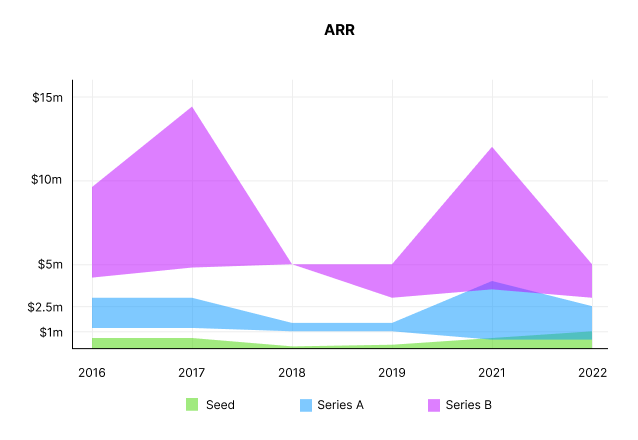
Seed firms' ARR forecasts have risen from $0 to $0.6m to $0 to $1m. 2016 expected $1.2m to $3m, 2021 $0.5m to $4m, and this year $0.5m to $2.5m, suggesting that Series A firms may raise with less ARR today. Series B minutes fell from $4.2m to $3m.
Capitalization Rate
2022 is the year that VCs start discussing capital efficiency in portfolio meetings. Given the economic shift in the markets and the stealthy VC meltdown, it's not surprising. Christopher Janz added capital efficiency to the SaaS Napkin as a new statistic for Series A (3.5x) and Series B. (2.5x). Your investors must live under a rock if they haven't asked about capital efficiency. If you're unsure:
The Capital Efficiency Ratio is the ratio of how much a company has spent growing revenue and how much they’re receiving in return. It is the broadest measure of company effectiveness in generating ARR
What next?
No one knows what's next, including me. All startup and growing enterprises around me are tightening their belts and extending their runways in anticipation of a difficult fundraising ride. If you're wanting to raise money but can wait, wait till the market is more stable and access to money is easier.
You might also like

Ben
26 days ago
The Real Value of Carbon Credit (Climate Coin Investment)
Disclaimer : This is not financial advice for any investment.
TL;DR
You might not have realized it, but as we move toward net zero carbon emissions, the globe is already at war.
According to the Paris Agreement of COP26, 64% of nations have already declared net zero, and the issue of carbon reduction has already become so important for businesses that it affects their ability to survive. Furthermore, the time when carbon emission standards will be defined and controlled on an individual basis is becoming closer.
Since 2017, the market for carbon credits has experienced extraordinary expansion as a result of widespread talks about carbon credits. The carbon credit market is predicted to expand much more once net zero is implemented and carbon emission rules inevitably tighten.
Hello! Ben here from Nonce Classic. Nonce Classic has recently confirmed the tremendous growth potential of the carbon credit market in the midst of a major trend towards the global goal of net zero (carbon emissions caused by humans — carbon reduction by humans = 0 ). Moreover, we too believed that the questions and issues the carbon credit market suffered from the last 30–40yrs could be perfectly answered through crypto technology and that is why we have added a carbon credit crypto project to the Nonce Classic portfolio. There have been many teams out there that have tried to solve environmental problems through crypto but very few that have measurable experience working in the carbon credit scene. Thus we have put in our efforts to find projects that are not crypto projects created for the sake of issuing tokens but projects that pragmatically use crypto technology to combat climate change by solving problems of the current carbon credit market. In that process, we came to hear of Climate Coin, a veritable carbon credit crypto project, and us Nonce Classic as an accelerator, have begun contributing to its growth and invested in its tokens. Starting with this article, we plan to publish a series of articles explaining why the carbon credit market is bullish, why we invested in Climate Coin, and what kind of project Climate Coin is specifically. In this first article let us understand the carbon credit market and look into its growth potential! Let’s begin :)
The Unavoidable Entry of the Net Zero Era
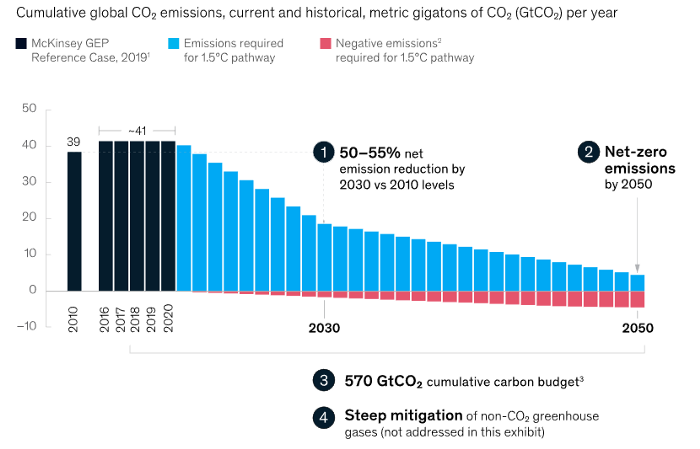
Net zero means... Human carbon emissions are balanced by carbon reduction efforts. A non-environmentalist may find it hard to accept that net zero is attainable by 2050. Global cooperation to save the earth is happening faster than we imagine.
In the Paris Agreement of COP26, concluded in Glasgow, UK on Oct. 31, 2021, nations pledged to reduce worldwide yearly greenhouse gas emissions by more than 50% by 2030 and attain net zero by 2050. Governments throughout the world have pledged net zero at the national level and are holding each other accountable by submitting Nationally Determined Contributions (NDC) every five years to assess implementation. 127 of 198 nations have declared net zero.
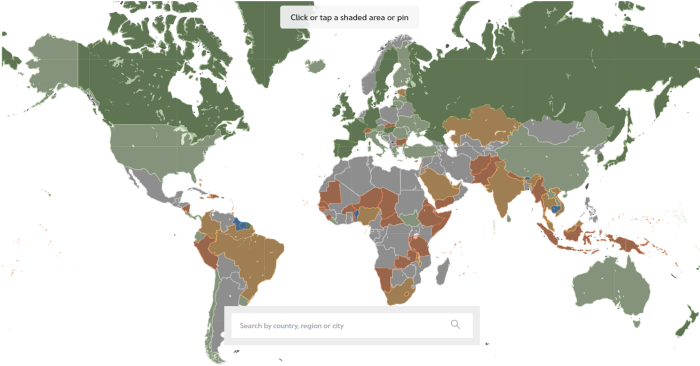
Each country's 1.5-degree reduction plans have led to carbon reduction obligations for companies. In places with the strictest environmental regulations, like the EU, companies often face bankruptcy because the cost of buying carbon credits to meet their carbon allowances exceeds their operating profits. In this day and age, minimizing carbon emissions and securing carbon credits are crucial.
Recent SEC actions on climate change may increase companies' concerns about reducing emissions. The SEC required all U.S. stock market companies to disclose their annual greenhouse gas emissions and climate change impact on March 21, 2022. The SEC prepared the proposed regulation through in-depth analysis and stakeholder input since last year. Three out of four SEC members agreed that it should pass without major changes. If the regulation passes, it will affect not only US companies, but also countless companies around the world, directly or indirectly.
Even companies not listed on the U.S. stock market will be affected and, in most cases, required to disclose emissions. Companies listed on the U.S. stock market with significant greenhouse gas emissions or specific targets are subject to stricter emission standards (Scope 3) and disclosure obligations, which will magnify investigations into all related companies. Greenhouse gas emissions can be calculated three ways. Scope 1 measures carbon emissions from a company's facilities and transportation. Scope 2 measures carbon emissions from energy purchases. Scope 3 covers all indirect emissions from a company's value chains.
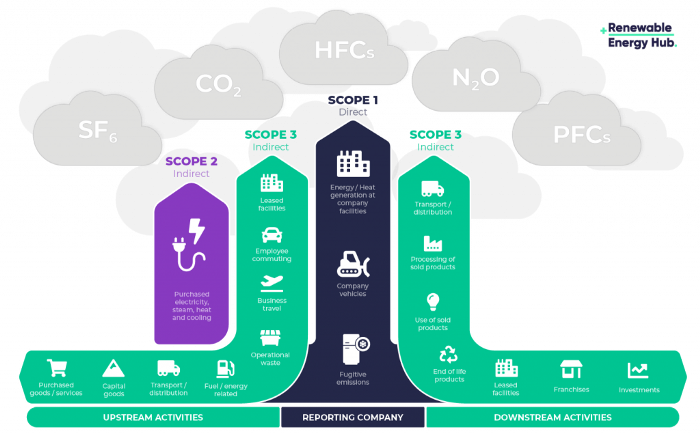
The SEC's proposed carbon emission disclosure mandate and regulations are one example of how carbon credit policies can cross borders and affect all parties. As such incidents will continue throughout the implementation of net zero, even companies that are not immediately obligated to disclose their carbon emissions must be prepared to respond to changes in carbon emission laws and policies.
Carbon reduction obligations will soon become individual. Individual consumption has increased dramatically with improved quality of life and convenience, despite national and corporate efforts to reduce carbon emissions. Since consumption is directly related to carbon emissions, increasing consumption increases carbon emissions. Countries around the world have agreed that to achieve net zero, carbon emissions must be reduced on an individual level. Solutions to individual carbon reduction are being actively discussed and studied under the term Personal Carbon Trading (PCT).
PCT is a system that allows individuals to trade carbon emission quotas in the form of carbon credits. Individuals who emit more carbon than their allotment can buy carbon credits from those who emit less. European cities with well-established carbon credit markets are preparing for net zero by conducting early carbon reduction prototype projects. The era of checking product labels for carbon footprints, choosing low-emissions transportation, and worrying about hot shower emissions is closer than we think.
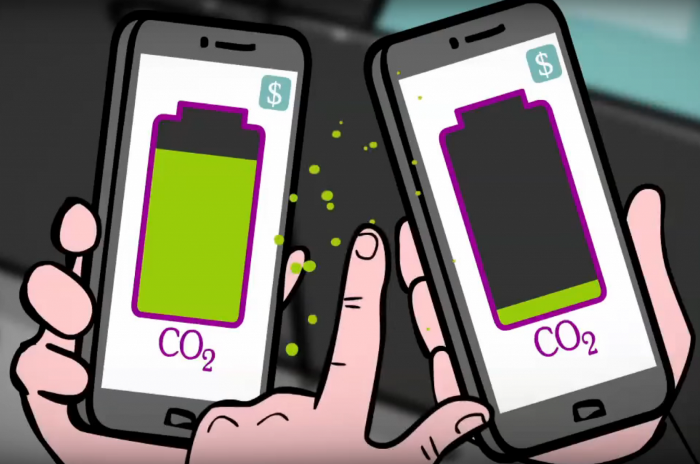
The Market for Carbon Credits Is Expanding Fearfully
Compliance and voluntary carbon markets make up the carbon credit market.
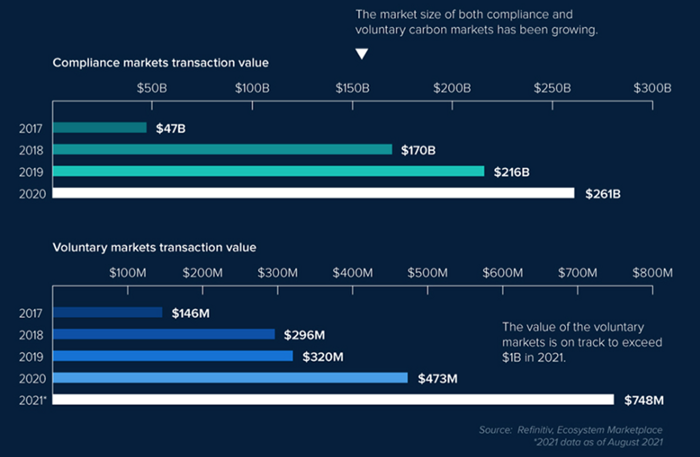
A Compliance Market enforces carbon emission allowances for actors. Companies in industries that previously emitted a lot of carbon are included in the mandatory carbon market, and each government receives carbon credits each year. If a company's emissions are less than the assigned cap and it has extra carbon credits, it can sell them to other companies that have larger emissions and require them (Cap and Trade). The annual number of free emission permits provided to companies is designed to decline, therefore companies' desire for carbon credits will increase. The compliance market's yearly trading volume will exceed $261B in 2020, five times its 2017 level.
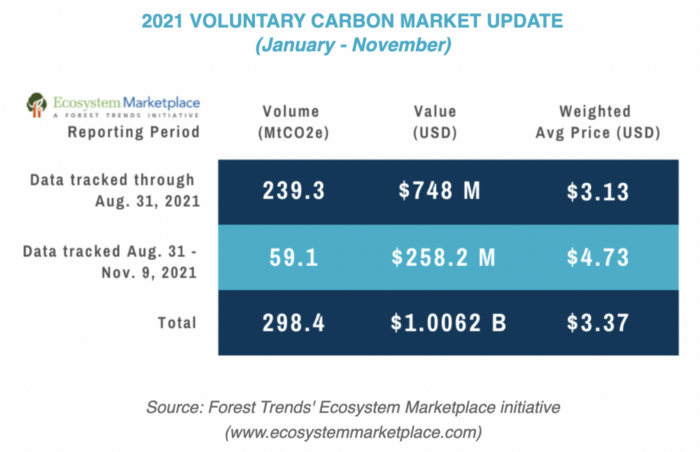
In the Voluntary Market, carbon reduction is voluntary and carbon credits are sold for personal reasons or to build market participants' eco-friendly reputations. Even if not in the compliance market, it is typical for a corporation to be obliged to offset its carbon emissions by acquiring voluntary carbon credits. When a company seeks government or company investment, it may be denied because it is not net zero. If a significant shareholder declares net zero, the companies below it must execute it. As the world moves toward ESG management, becoming an eco-friendly company is no longer a strategic choice to gain a competitive edge, but an important precaution to not fall behind. Due to this eco-friendly trend, the annual market volume of voluntary emission credits will approach $1B by November 2021. The voluntary credit market is anticipated to reach $5B to $50B by 2030. (TSCVM 2021 Report)
In conclusion
This article analyzed how net zero, a target promised by countries around the world to combat climate change, has brought governmental, corporate, and human changes. We discussed how these shifts will become more obvious as we approach net zero, and how the carbon credit market would increase exponentially in response. In the following piece, let's analyze the hurdles impeding the carbon credit market's growth, how the project we invested in tries to tackle these issues, and why we chose Climate Coin. Wait! Jim Skea, co-chair of the IPCC working group, said,
“It’s now or never, if we want to limit global warming to 1.5°C” — Jim Skea
Join nonceClassic’s community:
Telegram: https://t.me/non_stock
Youtube: https://www.youtube.com/channel/UCqeaLwkZbEfsX35xhnLU2VA
Twitter: @nonceclassic
Mail us : general@nonceclassic.org

Maria Stepanova
1 month ago
How Elon Musk Picks Things Up Quicker Than Anyone Else
Adopt Elon Musk's learning strategy to succeed.

Medium writers rank first and second when you Google “Elon Musk's learning approach”.
My article idea seems unoriginal. Lol
Musk is brilliant.
No doubt here.
His name connotes success and intelligence.
He knows rocket science, engineering, AI, and solar power.
Musk is a Unicorn, but his skills aren't special.
How does he manage it?
Elon Musk has two learning rules that anyone may use.
You can apply these rules and become anyone you want.
You can become a rocket scientist or a surgeon. If you want, of course.
The learning process is key.
Make sure you are creating a Tree of Knowledge according to Rule #1.
Musk told Reddit how he learns:
“It is important to view knowledge as sort of a semantic tree — make sure you understand the fundamental principles, i.e. the trunk and big branches, before you get into the leaves/details or there is nothing for them to hang onto.”
Musk understands the essential ideas and mental models of each of his business sectors.
He starts with the tree's trunk, making sure he learns the basics before going on to branches and leaves.
We often act otherwise. We memorize small details without understanding how they relate to the whole. Our minds are stuffed with useless data.
Cramming isn't learning.
Start with the basics to learn faster. Before diving into minutiae, grasp the big picture.

Rule #2: You can't connect what you can't remember.
Elon Musk transformed industries this way. As his expertise grew, he connected branches and leaves from different trees.
Musk read two books a day as a child. He didn't specialize like most people. He gained from his multidisciplinary education. It helped him stand out and develop billion-dollar firms.
He gained skills in several domains and began connecting them. World-class performances resulted.
Most of us never learn the basics and only collect knowledge. We never really comprehend information, thus it's hard to apply it.
Learn the basics initially to maximize your chances of success. Then start learning.
Learn across fields and connect them.
This method enabled Elon Musk to enter and revolutionize a century-old industry.

Yogesh Rawal
8 months ago
Blockchain to solve growing privacy challenges
Most online activity is now public. Businesses collect, store, and use our personal data to improve sales and services.
In 2014, Uber executives and employees were accused of spying on customers using tools like maps. Another incident raised concerns about the use of ‘FaceApp'. The app was created by a small Russian company, and the photos can be used in unexpected ways. The Cambridge Analytica scandal exposed serious privacy issues. The whole incident raised questions about how governments and businesses should handle data. Modern technologies and practices also make it easier to link data to people.
As a result, governments and regulators have taken steps to protect user data. The General Data Protection Regulation (GDPR) was introduced by the EU to address data privacy issues. The law governs how businesses collect and process user data. The Data Protection Bill in India and the General Data Protection Law in Brazil are similar.
Despite the impact these regulations have made on data practices, a lot of distance is yet to cover.
Blockchain's solution
Blockchain may be able to address growing data privacy concerns. The technology protects our personal data by providing security and anonymity. The blockchain uses random strings of numbers called public and private keys to maintain privacy. These keys allow a person to be identified without revealing their identity. Blockchain may be able to ensure data privacy and security in this way. Let's dig deeper.
Financial transactions
Online payments require third-party services like PayPal or Google Pay. Using blockchain can eliminate the need to trust third parties. Users can send payments between peers using their public and private keys without providing personal information to a third-party application. Blockchain will also secure financial data.
Healthcare data
Blockchain technology can give patients more control over their data. There are benefits to doing so. Once the data is recorded on the ledger, patients can keep it secure and only allow authorized access. They can also only give the healthcare provider part of the information needed.
The major challenge
We tried to figure out how blockchain could help solve the growing data privacy issues. However, using blockchain to address privacy concerns has significant drawbacks. Blockchain is not designed for data privacy. A ‘distributed' ledger will be used to store the data. Another issue is the immutability of blockchain. Data entered into the ledger cannot be changed or deleted. It will be impossible to remove personal data from the ledger even if desired.
MIT's Enigma Project aims to solve this. Enigma's ‘Secret Network' allows nodes to process data without seeing it. Decentralized applications can use Secret Network to use encrypted data without revealing it.
Another startup, Oasis Labs, uses blockchain to address data privacy issues. They are working on a system that will allow businesses to protect their customers' data.
Conclusion
Blockchain technology is already being used. Several governments use blockchain to eliminate centralized servers and improve data security. In this information age, it is vital to safeguard our data. How blockchain can help us in this matter is still unknown as the world explores the technology.