



More on Entrepreneurship/Creators

Ben Chino
3 years ago
100-day SaaS buildout.
We're opening up Maki through a series of Medium posts. We'll describe what Maki is building and how. We'll explain how we built a SaaS in 100 days. This isn't a step-by-step guide to starting a business, but a product philosophy to help you build quickly.

Focus on end-users.
This may seem obvious, but it's important to talk to users first. When we started thinking about Maki, we interviewed 100 HR directors from SMBs, Next40 scale-ups, and major Enterprises to understand their concerns. We initially thought about the future of employment, but most of their worries centered on Recruitment. We don't have a clear recruiting process, it's time-consuming, we recruit clones, we don't support diversity, etc. And as hiring managers, we couldn't help but agree.
Co-create your product with your end-users.
We went to the drawing board, read as many books as possible (here, here, and here), and when we started getting a sense for a solution, we questioned 100 more operational HR specialists to corroborate the idea and get a feel for our potential answer. This confirmed our direction to help hire more objectively and efficiently.
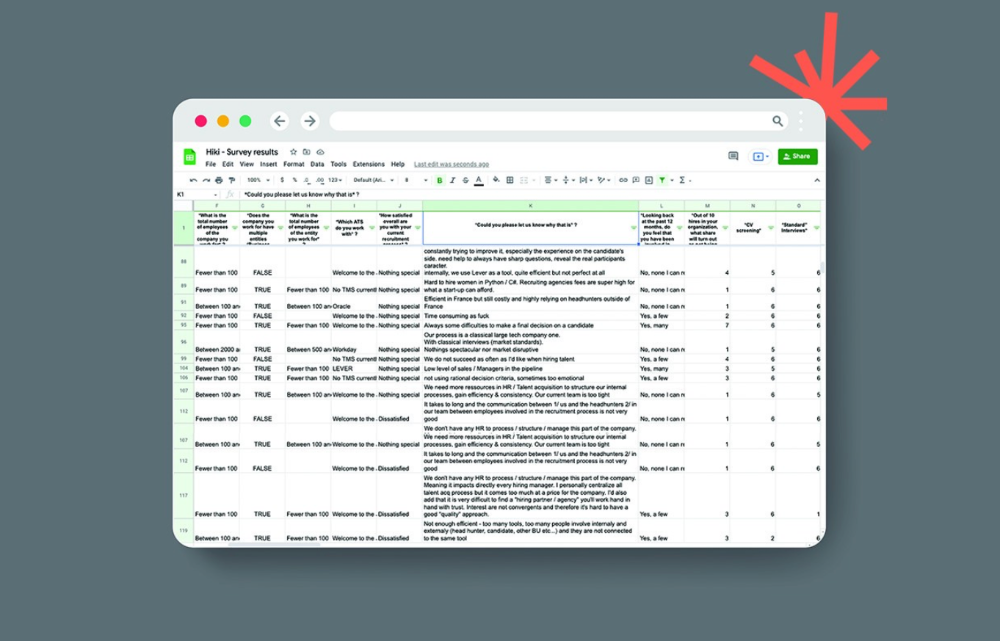
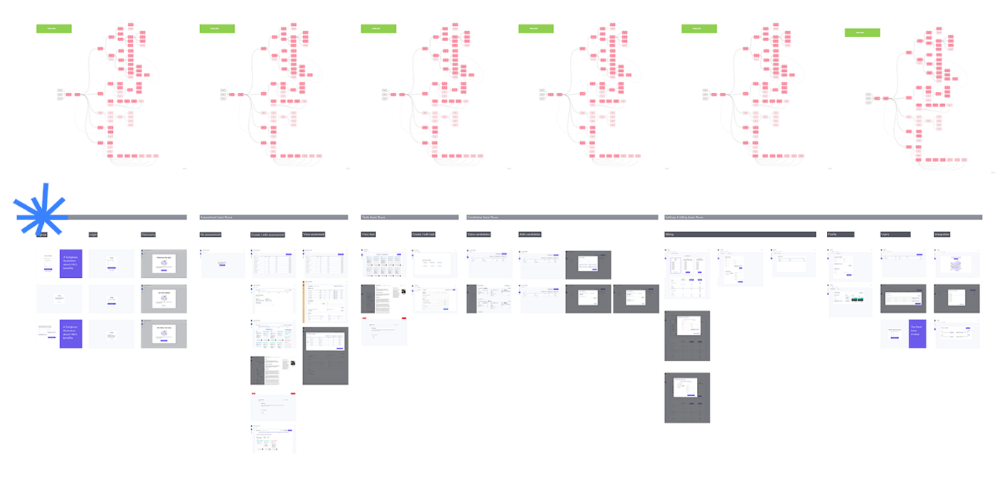
Back to the drawing board, we designed our first flows and screens. We organized sessions with certain survey respondents to show them our early work and get comments. We got great input that helped us build Maki, and we met some consumers. Obsess about users and execute alongside them.
Don’t shoot for the moon, yet. Make pragmatic choices first.
Once we were convinced, we began building. To launch a SaaS in 100 days, we needed an operating principle that allowed us to accelerate while still providing a reliable, secure, scalable experience. We focused on adding value and outsourced everything else. Example:
Concentrate on adding value. Reuse existing bricks.
When determining which technology to use, we looked at our strengths and the future to see what would last. Node.js for backend, React for frontend, both with typescript. We thought this technique would scale well since it would attract more talent and the surrounding mature ecosystem would help us go quicker.

We explored for ways to bootstrap services while setting down strong foundations that might support millions of users. We built our backend services on NestJS so we could extend into microservices later. Hasura, a GraphQL APIs engine, automates Postgres data exposing through a graphQL layer. MUI's ready-to-use components powered our design-system. We used well-maintained open-source projects to speed up certain tasks.
We outsourced important components of our platform (Auth0 for authentication, Stripe for billing, SendGrid for notifications) because, let's face it, we couldn't do better. We choose to host our complete infrastructure (SQL, Cloud run, Logs, Monitoring) on GCP to simplify our work between numerous providers.
Focus on your business, use existing bricks for the rest. For the curious, we'll shortly publish articles detailing each stage.
Most importantly, empower people and step back.
We couldn't have done this without the incredible people who have supported us from the start. Since Powership is one of our key values, we provided our staff the power to make autonomous decisions from day one. Because we believe our firm is its people, we hired smart builders and let them build.

Nicolas left Spendesk to create scalable interfaces using react-router, react-queries, and MUI. JD joined Swile and chose Hasura as our GraphQL engine. Jérôme chose NestJS to build our backend services. Since then, Justin, Ben, Anas, Yann, Benoit, and others have followed suit.
If you consider your team a collective brain, you should let them make decisions instead of directing them what to do. You'll make mistakes, but you'll go faster and learn faster overall.
Invest in great talent and develop a strong culture from the start. Here's how to establish a SaaS in 100 days.

Jared Heyman
3 years ago
The survival and demise of Y Combinator startups
I've written a lot about Y Combinator's success, but as any startup founder or investor knows, many startups fail.
Rebel Fund invests in the top 5-10% of new Y Combinator startups each year, so we focus on identifying and supporting the most promising technology startups in our ecosystem. Given the power law dynamic and asymmetric risk/return profile of venture capital, we worry more about our successes than our failures. Since the latter still counts, this essay will focus on the proportion of YC startups that fail.
Since YC's launch in 2005, the figure below shows the percentage of active, inactive, and public/acquired YC startups by batch.
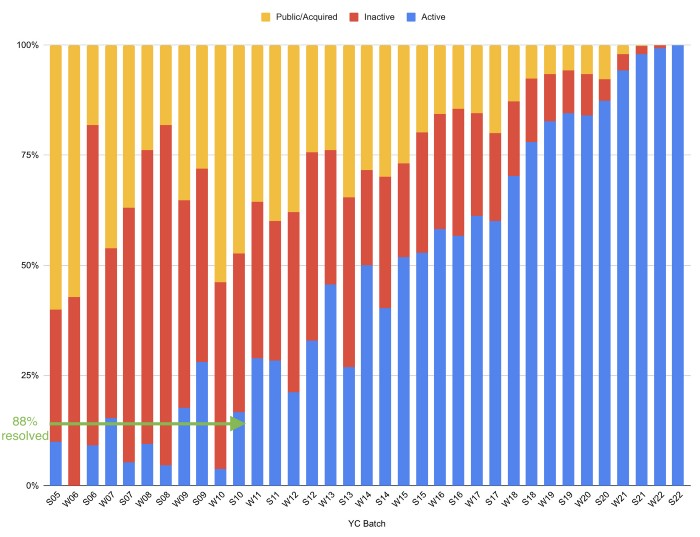
As more startups finish, the blue bars (active) decrease significantly. By 12 years, 88% of startups have closed or exited. Only 7% of startups reach resolution each year.
YC startups by status after 12 years:
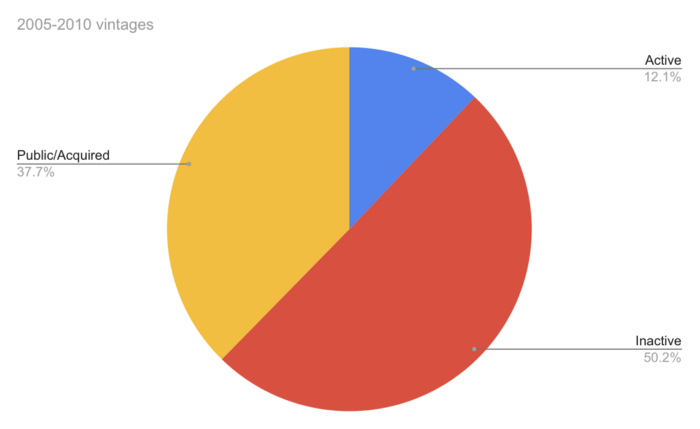
Half the startups have failed, over one-third have exited, and the rest are still operating.
In venture investing, it's said that failed investments show up before successful ones. This is true for YC startups, but only in their early years.
Below, we only present resolved companies from the first chart. Some companies fail soon after establishment, but after a few years, the inactive vs. public/acquired ratio stabilizes around 55:45. After a few years, a YC firm is roughly as likely to quit as fail, which is better than I imagined.
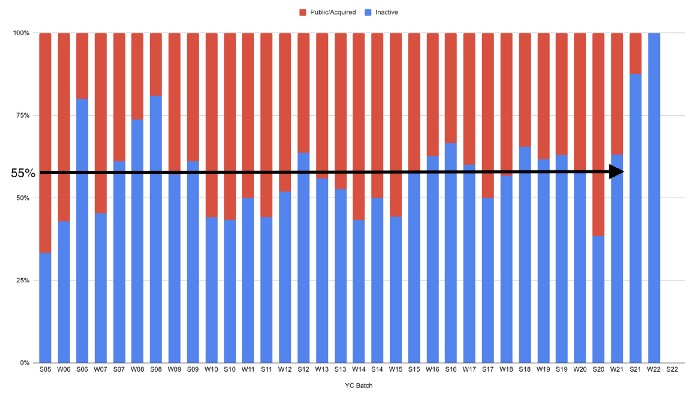
I prepared this post because Rebel investors regularly question me about YC startup failure rates and how long it takes for them to exit or shut down.
Early-stage venture investors can overlook it because 100x investments matter more than 0x investments.
YC founders can ignore it because it shouldn't matter if many of their peers succeed or fail ;)

Caleb Naysmith
4 years ago
Ads Coming to Medium?
Could this happen?
Medium isn't like other social media giants. It wasn't a dot-com startup that became a multi-trillion-dollar social media firm. It launched in 2012 but didn't gain popularity until later. Now, it's one of the largest sites by web traffic, but it's still little compared to most. Most of Medium's traffic is external, but they don't run advertisements, so it's all about memberships.
Medium isn't profitable, but they don't disclose how terrible the problem is. Most of the $163 million they raised has been spent or used for acquisitions. If the money turns off, Medium can't stop paying its writers since the site dies. Writers must be paid, but they can't substantially slash payment without hurting the platform. The existing model needs scale to be viable and has a low ceiling. Facebook and other free social media platforms are struggling to retain users. Here, you must pay to appreciate it, and it's bad for writers AND readers. If I had the same Medium stats on YouTube, I'd make thousands of dollars a month.
Then what? Medium has tried to monetize by offering writers a cut of new members, but that's unsustainable. People-based growth is limited. Imagine recruiting non-Facebook users and getting them to pay to join. Some may, but I'd rather write.
Alternatives:
Donation buttons
Tiered subscriptions ($5, $10, $25, etc.)
Expanding content
and these may be short-term fixes, but they're not as profitable as allowing ads. Advertisements can pay several dollars per click and cents every view. If you get 40,000 views a month like me, that's several thousand instead of a few hundred. Also, Medium would have enough money to split ad revenue with writers, who would make more. I'm among the top 6% of Medium writers. Only 6% of Medium writers make more than $100, and I made $500 with 35,000 views last month. Compared to YouTube, the top 1% of Medium authors make a lot. Mr. Beast and PewDiePie make MILLIONS a month, yet top Medium writers make tens of thousands. Sure, paying 3 or 4 people a few grand, or perhaps tens of thousands, will keep them around. What if great authors leveraged their following to go huge on YouTube and abandoned Medium? If people use Medium to get successful on other platforms, Medium will be continuously cycling through authors and paying them to stay.
Ads might make writing on Medium more profitable than making videos on YouTube because they could preserve the present freemium model and pay users based on internal views. The $5 might be ad-free.
Consider: Would you accept Medium ads? A $5 ad-free version + pay-as-you-go, etc. What are your thoughts on this?
Original post available here
You might also like

Mark Shpuntov
3 years ago
How to Produce a Month's Worth of Content for Social Media in a Day
New social media producers' biggest error

The Treadmill of Social Media Content
New creators focus on the wrong platforms.
They post to Instagram, Twitter, TikTok, etc.
They create daily material, but it's never enough for social media algorithms.
Creators recognize they're on a content creation treadmill.
They have to keep publishing content daily just to stay on the algorithm’s good side and avoid losing the audience they’ve built on the platform.
This is exhausting and unsustainable, causing creator burnout.
They focus on short-lived platforms, which is an issue.
Comparing low- and high-return social media platforms
Social media networks are great for reaching new audiences.
Their algorithm is meant to viralize material.
Social media can use you for their aims if you're not careful.
To master social media, focus on the right platforms.
To do this, we must differentiate low-ROI and high-ROI platforms:
Low ROI platforms are ones where content has a short lifespan. High ROI platforms are ones where content has a longer lifespan.
A tweet may be shown for 12 days. If you write an article or blog post, it could get visitors for 23 years.
ROI is drastically different.
New creators have limited time and high learning curves.
Nothing is possible.
First create content for high-return platforms.
ROI for social media platforms
Here are high-return platforms:
Your Blog - A single blog article can rank and attract a ton of targeted traffic for a very long time thanks to the power of SEO.
YouTube - YouTube has a reputation for showing search results or sidebar recommendations for videos uploaded 23 years ago. A superb video you make may receive views for a number of years.
Medium - A platform dedicated to excellent writing is called Medium. When you write an article about a subject that never goes out of style, you're building a digital asset that can drive visitors indefinitely.
These high ROI platforms let you generate content once and get visitors for years.
This contrasts with low ROI platforms:
Twitter
Instagram
TikTok
LinkedIn
Facebook
The posts you publish on these networks have a 23-day lifetime. Instagram Reels and TikToks are exceptions since viral content can last months.
If you want to make content creation sustainable and enjoyable, you must focus the majority of your efforts on creating high ROI content first. You can then use the magic of repurposing content to publish content to the lower ROI platforms to increase your reach and exposure.
How To Use Your Content Again
So, you’ve decided to focus on the high ROI platforms.
Great!
You've published an article or a YouTube video.
You worked hard on it.
Now you have fresh stuff.
What now?
If you are not repurposing each piece of content for multiple platforms, you are throwing away your time and efforts.
You've created fantastic material, so why not distribute it across platforms?
Repurposing Content Step-by-Step
For me, it's writing a blog article, but you might start with a video or podcast.
The premise is the same regardless of the medium.
Start by creating content for a high ROI platform (YouTube, Blog Post, Medium). Then, repurpose, edit, and repost it to the lower ROI platforms.
Here's how to repurpose pillar material for other platforms:
Post the article on your blog.
Put your piece on Medium (use the canonical link to point to your blog as the source for SEO)
Create a video and upload it to YouTube using the talking points from the article.
Rewrite the piece a little, then post it to LinkedIn.
Change the article's format to a Thread and share it on Twitter.
Find a few quick quotes throughout the article, then use them in tweets or Instagram quote posts.
Create a carousel for Instagram and LinkedIn using screenshots from the Twitter Thread.
Go through your film and select a few valuable 30-second segments. Share them on LinkedIn, Facebook, Twitter, TikTok, YouTube Shorts, and Instagram Reels.
Your video's audio can be taken out and uploaded as a podcast episode.
If you (or your team) achieve all this, you'll have 20-30 pieces of social media content.
If you're just starting, I wouldn't advocate doing all of this at once.
Instead, focus on a few platforms with this method.
You can outsource this as your company expands. (If you'd want to learn more about content repurposing, contact me.)
You may focus on relevant work while someone else grows your social media on autopilot.
You develop high-ROI pillar content, and it's automatically chopped up and posted on social media.
This lets you use social media algorithms without getting sucked in.
Thanks for reading!

Peter Steven Ho
4 years ago
Thank You for 21 Fantastic Years, iPod
Apple's latest revelation may shock iPod fans and former owners.

Apple discontinued the iPod touch on May 11, 2022. After 21 years, Apple killed the last surviving iPod, a device Steve Jobs believed would revolutionize the music industry.
Jobs was used to making bold predictions, but few expected Apple's digital music player to change the music industry. It did.
This chaos created new business opportunities. Spotify, YouTube, and Amazon are products of that chaotic era.
As the digital landscape changes, so do consumers, and the iPod has lost favor. I'm sure Apple realizes the importance of removing an icon. The iPod was Apple like the Mac and iPhone. I think it's bold to retire such a key Apple cornerstone. What would Jobs do?
iPod evolution across the ages
Here's an iPod family tree for all you enthusiasts.
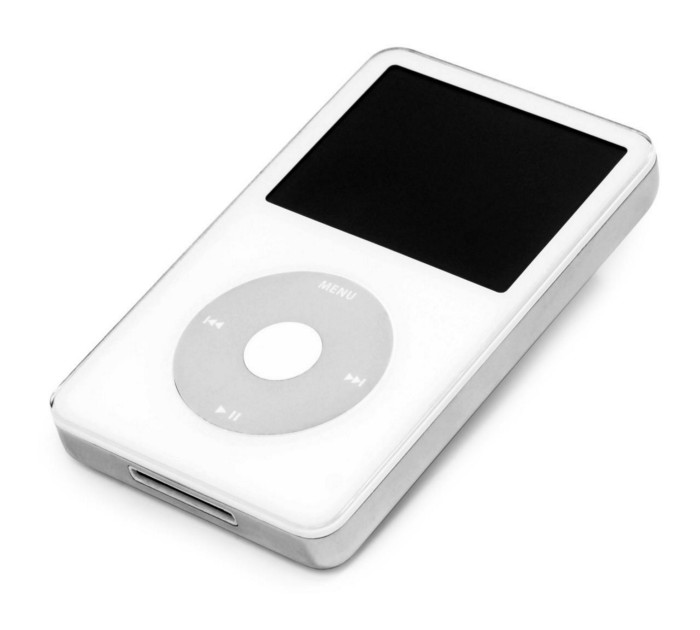
iPod vintage (Oct 2001 to Sep 2014, 6 generations)
The original iPod had six significant upgrades since 2001. Apple announced an 80 GB ($249) and 160 GB ($349) iPod classic in 2007.
Apple updated the 80 GB model with a 120 GB device in September 2008. Apple upgraded the 120 GB model with a 160 GB variant a year later (2009). This was the last iteration, and Apple discontinued the classic in September 2014.
iPod nano (Jan 2004 to Sep 2005, 2 generations)
Apple debuted a smaller, brightly-colored iPod in 2004. The first model featured 4 GB, enough for 1,000 songs.
Apple produced a new 4 GB or 6 GB iPod mini in February 2005 and discontinued it in September when they released a better-looking iPod nano.
iTouch nano (Sep 2005 to July 2017, 7 generations)
I loved the iPod nano. It was tiny and elegant with enough tech to please most music aficionados, unless you carry around your complete music collection.

Apple owed much of the iPod nano's small form and success to solid-state flash memory. Flash memory doesn't need power because it has no moving parts. This makes the iPod nano more durable than the iPod classic and mini, which employ hard drives.
Apple manufactured seven generations of the iPod nano, improving its design, display screen, memory, battery, and software, but abandoned it in July 2017 due to dwindling demand.
Shuffle iPod (Jan 2005 to Jul 2017, 4 generations)
The iPod shuffle was entry-level. It was a simple, lightweight, tiny music player. The iPod shuffle was perfect for lengthy bike trips, runs, and hikes.

Apple sold 10 million iPod shuffles in the first year and kept making them for 12 years, through four significant modifications.
iOS device (Sep 2007 to May 2022, 7 generations)
The iPod touch's bigger touchscreen interface made it a curious addition to the iPod family. The iPod touch resembled an iPhone more than the other iPods, making them hard to tell apart.
Many were dissatisfied that Apple removed functionality from the iPod touch to avoid making it too similar to the iPhone. Seven design improvements over 15 years brought the iPod touch closer to the iPhone, but not completely.
The iPod touch uses the same iOS operating system as the iPhone, giving it access to many apps, including handheld games.
The iPod touch's long production run is due to the next generation of music-loving gamers.
What made the iPod cool
iPod revolutionized music listening. It was the first device to store and play MP3 music, allowing you to carry over 1,000 songs anywhere.
The iPod changed consumer electronics with its scroll wheel and touchscreen. Jobs valued form and function equally. He showed people that a product must look good to inspire an emotional response and ignite passion.
The elegant, tiny iPod was a tremendous sensation when it arrived for $399 in October 2001. Even at this price, it became a must-have for teens to CEOs.
It's hard to identify any technology that changed how music was downloaded and played like the iPod. Apple iPod and iTunes had 63% of the paid music download market in the fourth quarter of 2012.
The demise of the iPod was inevitable
Apple discontinuing the iPod touch after 21 years is sad. This ends a 00s music icon.
Jobs was a genius at anticipating market needs and opportunities, and Apple launched the iPod at the correct time.
Few consumer electronics items have had such a lasting impact on music lovers and the music industry as the iPod.
Smartphones and social media have contributed to the iPod's decline. Instead of moving to the music, the new generation of consumers is focused on social media. They're no longer passive content consumers; they're active content creators seeking likes and followers. Here, the smartphone has replaced the iPod.
It's hard not to feel a feeling of loss, another part of my adolescence now forgotten by the following generation.
So, if you’re lucky enough to have a working iPod, hang on to that relic and enjoy the music and the nostalgia.

Farhad Malik
3 years ago
How This Python Script Makes Me Money Every Day
Starting a passive income stream with data science and programming
My website is fresh. But how do I monetize it?
Creating a passive-income website is difficult. Advertise first. But what useful are ads without traffic?
Let’s Generate Traffic And Put Our Programming Skills To Use
SEO boosts traffic (Search Engine Optimisation). Traffic generation is complex. Keywords matter more than text, URL, photos, etc.
My Python skills helped here. I wanted to find relevant, Google-trending keywords (tags) for my topic.
First The Code
I wrote the script below here.
import re
from string import punctuation

import nltk
from nltk import TreebankWordTokenizer, sent_tokenize
from nltk.corpus import stopwords


class KeywordsGenerator:
    def __init__(self, pytrends):
        self._pytrends = pytrends

    def generate_tags(self, file_path, top_words=30):
        file_text = self._get_file_contents(file_path)
        clean_text = self._remove_noise(file_text)
        top_words = self._get_top_words(clean_text, top_words)
        suggestions = []
        for top_word in top_words:
            suggestions.extend(self.get_suggestions(top_word))
        suggestions.extend(top_words)
        tags = self._clean_tokens(suggestions)
        return ",".join(list(set(tags)))

    def _remove_noise(self, text):
        #1. Convert Text To Lowercase and remove numbers
        lower_case_text = str.lower(text)
        just_text = re.sub(r'\d+', '', lower_case_text)
        #2. Tokenise Paragraphs To words
        list = sent_tokenize(just_text)
        tokenizer = TreebankWordTokenizer()
        tokens = tokenizer.tokenize(just_text)
        #3. Clean text
        clean = self._clean_tokens(tokens)
        return clean

    def _clean_tokens(self, tokens):
        clean_words = [w for w in tokens if w not in punctuation]
        stopwords_to_remove = stopwords.words('english')
        clean = [w for w in clean_words if w not in stopwords_to_remove and not w.isnumeric()]
        return clean

    def get_suggestions(self, keyword):
        print(f'Searching pytrends for {keyword}')
        result = []
        self._pytrends.build_payload([keyword], cat=0, timeframe='today 12-m')
        data = self._pytrends.related_queries()[keyword]['top']
        if data is None or data.values is None:
            return result
        result.extend([x[0] for x in data.values.tolist()][:2])
        return result

    def _get_file_contents(self, file_path):
        return open(file_path, "r", encoding='utf-8',errors='ignore').read()

    def _get_top_words(self, words, top):
        counts = dict()

        for word in words:
            if word in counts:
                counts[word] += 1
            else:
                counts[word] = 1

        return list({k: v for k, v in sorted(counts.items(), key=lambda item: item[1])}.keys())[:top]


if __name__ == "1__main__":
    from pytrends.request import TrendReq

    nltk.download('punkt')
    nltk.download('stopwords')
    pytrends = TrendReq(hl='en-GB', tz=360)
    tags = KeywordsGenerator(pytrends)\
              .generate_tags('text_file.txt')
    print(tags)
Then The Dependencies
This script requires:
nltk==3.7
pytrends==4.8.0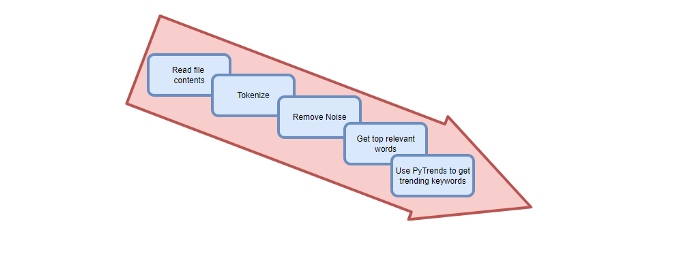
Analysis of the Script
I copy and paste my article into text file.txt, and the code returns the keywords as a comma-separated string.
To achieve this:
A class I made is called KeywordsGenerator.
This class has a function:
generate_tagsThe function
generate_tagsperforms the following tasks:
retrieves text file contents
uses NLP to clean the text by tokenizing sentences into words, removing punctuation, and other elements.
identifies the most frequent words that are relevant.
The
pytrendsAPI is then used to retrieve related phrases that are trending for each word from Google.finally adds a comma to the end of the word list.
4. I then use the keywords and paste them into the SEO area of my website.
These terms are trending on Google and relevant to my topic. My site's rankings and traffic have improved since I added new keywords. This little script puts our knowledge to work. I shared the script in case anyone faces similar issues.
I hope it helps readers sell their work.