





More on Cooking

Karthik Rajan
3 years ago
11 Cooking Hacks I Wish I Knew Earlier
Quick, easy and tasty (and dollops of parenting around food).

My wife and mom are both great mothers. They're super-efficient planners. They soak and ferment food. My 104-year-old grandfather loved fermented foods.
When I'm hungry and need something fast, I waffle to the pantry. Like most people, I like to improvise. I wish I knew these 11 hacks sooner.
1. The world's best pasta sauce only has 3 ingredients.
You watch recipe videos with prepped ingredients. In reality, prepping and washing take time. The food's taste isn't guaranteed. The raw truth at a sublime level is not talked about often.
Sometimes a radical recipe comes along that's so easy and tasty, you're dumbfounded. The Classic Italian Cook Book has a pasta recipe.
One 28-ounce can of whole, peeled tomatoes, one medium peeled onion, and 5 tablespoons of butter. And salt to taste.
Combine everything in a single pot and simmer for 45 minutes, uncovered. Stir occasionally. Toss the onion halves after 45 minutes and pour the sauce over pasta. Finish!
This simple recipe fights our deepest fears.
Salt to taste! Customized to perfection, no frills.
2. Reheating rice with ice. Magical.
Most of the world eats rice. I was raised in south India. My grandfather farmed rice in the Cauvery river delta.
The problem with rice With growing kids, you can't cook just enough. Leftovers are a norm. Microwaves help most people. Ice cubes are the frosting.
Before reheating rice in the microwave, add an ice cube. The ice will steam the rice, making it fluffy and delicious again.
3. Pineapple leaf
if it comes off easy, it is ripe enough to cut. No rethinking.
My daughter loves pineapples like her dad. One daddy task is cutting them. Sharing immediate results is therapeutic.
Timing the cut has been the most annoying part over the years. The pineapple leaf tip reveals the fruitiness inside. Always loved it.
4. Magic knife words (rolling and curling)
Cutting hand: Roll the blade's back, not its tip, to cut.
Other hand: If you can’t see your finger tips, you can’t cut them. So curl your fingers.
I dislike that schools don't teach financial literacy or cutting skills.
My wife and I used scissors differently for 25 years. We both used the thumb. My index finger, her middle. We googled the difference when I noticed it and laughed. She's right.
This video teaches knifing skills:
5. Best advice about heat
If it's done in the pan, it's overdone on the plate.
This simple advice stands out when we worry about ingredients and proportions.
6. The truth about pasta water
Pasta water should be sea-salty.
Properly seasoning food separates good from great. Salt depends is a good line.
Want delicious pasta? Well, then kind of a lot, to be perfectly honest.
7. Clean as you go
Clean blender as you go by blending water and dish soap.
I find clean as you go easier than clean afterwords. This easy tip is gold.
8. Clean as you go (bis)
Microwave a bowl of water, vinegar, and a toothpick for 5 minutes.
2 cups water, 2 tablespoons vinegar, and a toothpick to prevent overflow.
5-minute microwave. Let the steam work for another 2 minutes. Sponge-off dirt and food. Simple.
9 and 10. Tools,tools, tools
Immersion blender and pressure cooker save time and money.
Narrative: I experienced fatherly pride. My middle-schooler loves science. We discussed boiling. I spoke. Water doesn't need 100°C to boil. She looked confused. 100 degrees assume something. The world around the water is a normal room. Changing water pressure affects its boiling point. This saves energy. Pressure cooker magic.
I captivated her. She's into science and sustainable living.
Whistling is a subliminal form of self-expression when done right. Pressure cookers remind me of simple pleasures.
Your handiness depends on your home tools. Immersion blenders are great for pre- and post-cooking. It eliminates chopping and washing. Second to the dishwasher, in my opinion.
11. One pepper is plenty
A story I share with my daughters.
Once, everyone thought about spice (not spicy). More valuable than silk. One of the three mighty oceans was named after a source country. Columbus sailed the wrong way and found America. The explorer called the natives after reaching his spice destination.
It was pre-internet days. His Google wasn't working.
My younger daughter listens in awe. Strong roots. Image cast. She can contextualize one of the ocean names.
I struggle with spices in daily life. Combinations are mind-boggling. I have more spices than Columbus. Flavor explosion has repercussions. You must closely follow the recipe without guarantees. Best aha. Double down on one spice and move on. If you like it, it's great.
I naturally gravitate towards cumin soups, fennel dishes, mint rice, oregano pasta, basil thai curry and cardamom pudding.
Variety enhances life. Each of my dishes is unique.
To each their own comfort food and nostalgic memories.
Happy living!

Joseph Mavericks
3 years ago
Apples Top 100 Meeting: Steve Jobs's Secret Agenda's Lessons
Jobs' secret emails became public due to a litigation with Samsung.

Steve Jobs sent Phil Schiller an email at the end of 2010. Top 100 A was the codename for Apple's annual Top 100 executive meetings. The 2011 one was scheduled.
Everything about this gathering is secret, even attendance. The location is hidden, and attendees can't even drive themselves. Instead, buses transport them to a 2-3 day retreat.
Due to a litigation with Samsung, this Top 100 meeting's agenda was made public in 2014. This was a critical milestone in Apple's history, not a Top 100 meeting. Apple had many obstacles in the 2010s to remain a technological leader. Apple made more money with non-PC goods than with its best-selling Macintosh series. This was the last Top 100 gathering Steve Jobs would attend before passing, and he wanted to make sure his messages carried on before handing over his firm to Tim Cook.
In this post, we'll discuss lessons from Jobs' meeting agenda. Two sorts of entrepreneurs can use these tips:
Those who manage a team in a business and must ensure that everyone is working toward the same goals, upholding the same principles, and being inspired by the same future.
Those who are sole proprietors or independent contractors and who must maintain strict self-discipline in order to stay innovative in their industry and adhere to their own growth strategy.
Here's Steve Jobs's email outlining the annual meeting agenda. It's an 11-part summary of the company's shape and strategy.
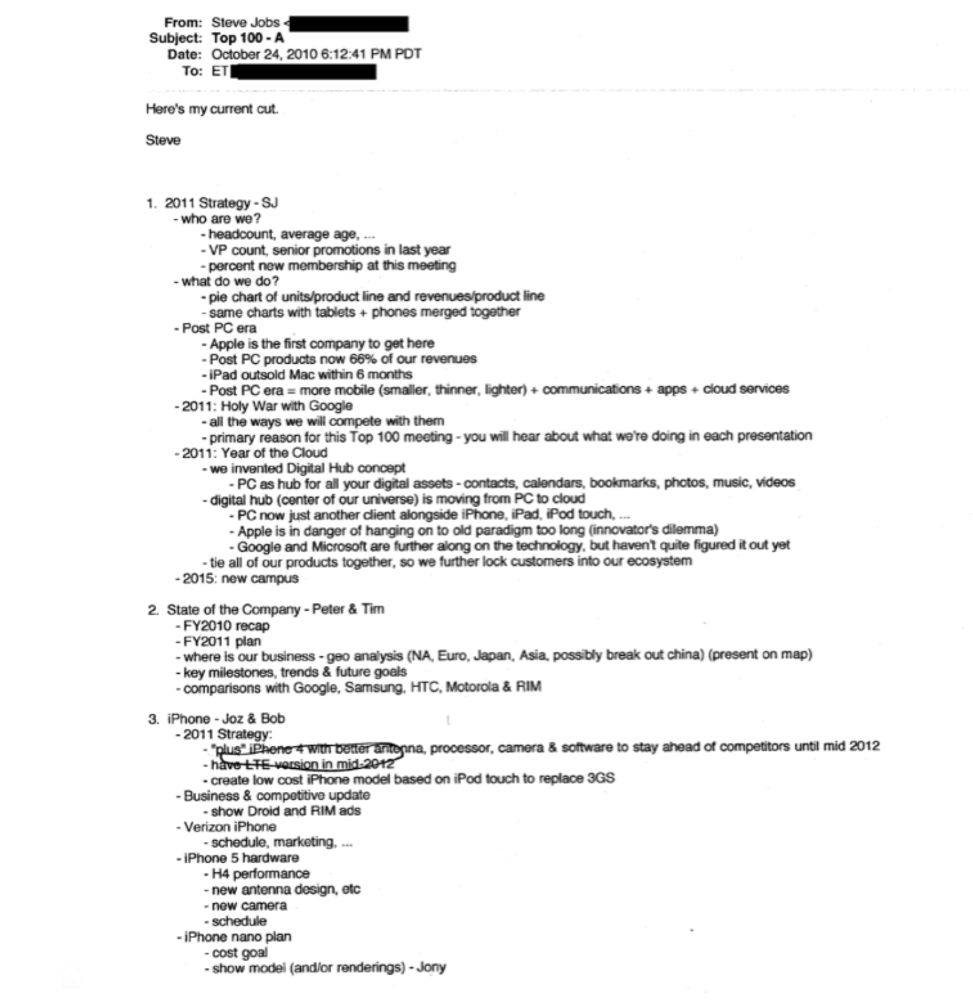
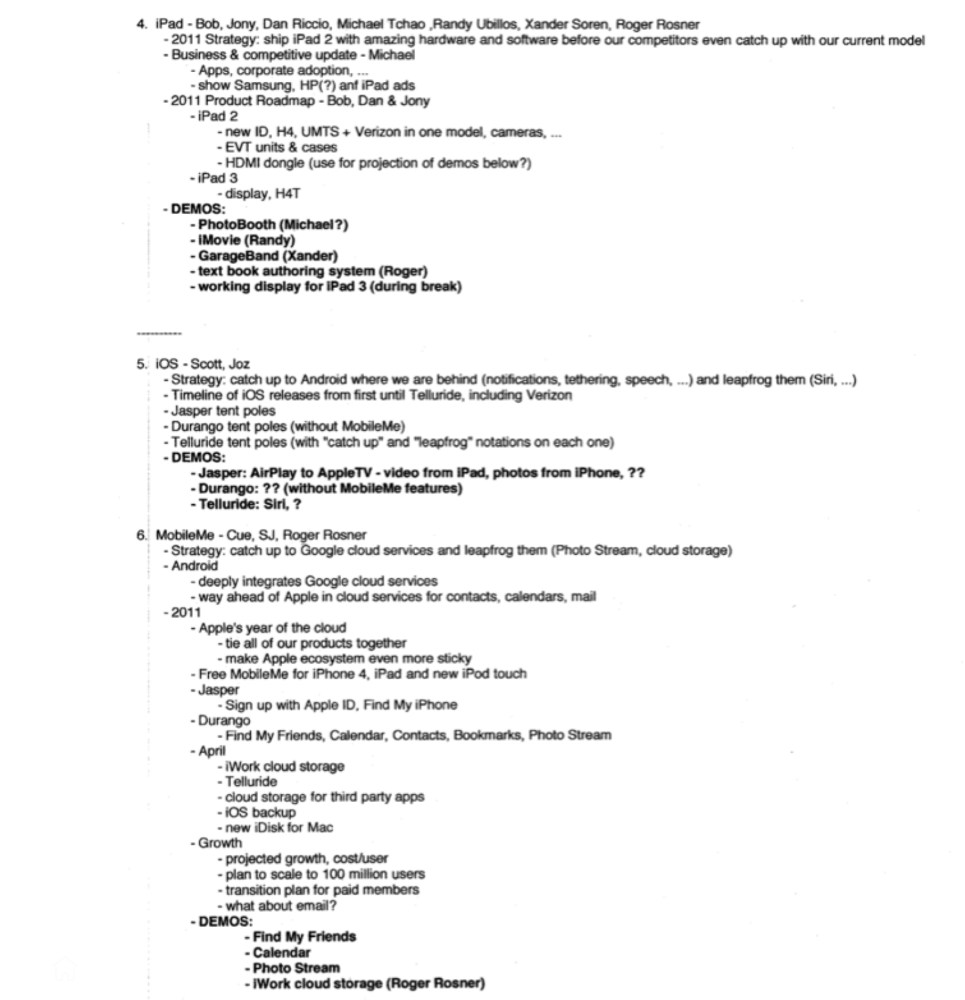
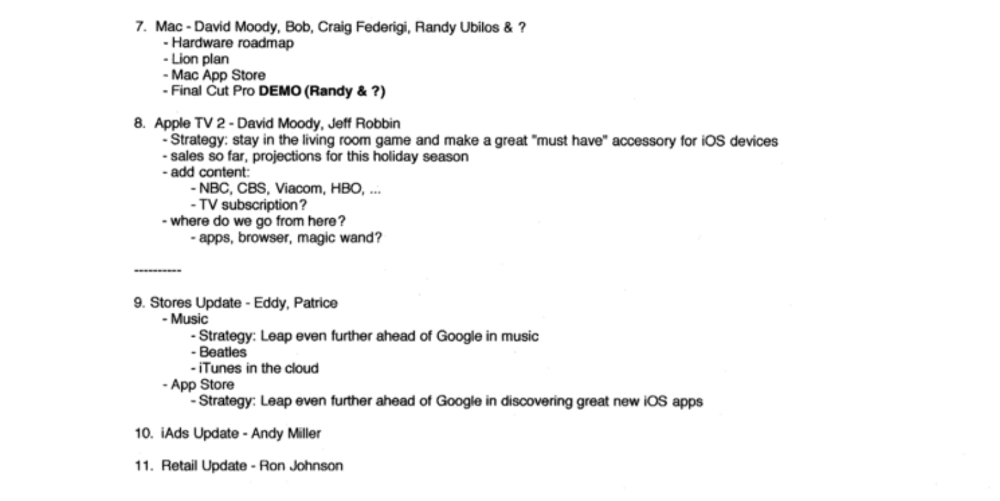
Steve Jobs outlines Apple's 2011 strategy, 10/24/10
1. Correct your data
Business leaders must comprehend their company's metrics. Jobs either mentions critical information he already knows or demands slides showing the numbers he wants. These numbers fall under 2 categories:
Metrics for growth and strategy
As we will see, this was a crucial statistic for Apple since it signaled the beginning of the Post PC era and required them to make significant strategic changes in order to stay ahead of the curve. Post PC products now account for 66% of our revenues.
Within six months, iPad outsold Mac, another sign of the Post-PC age. As we will see, Jobs thought the iPad would be the next big thing, and item number four on the agenda is one of the most thorough references to the iPad.
Geographical analysis: Here, Jobs emphasizes China, where the corporation has a slower start than anticipated. China was dominating Apple's sales growth with 16% of revenue one year after this meeting.
Metrics for people & culture
The individuals that make up a firm are more significant to its success than its headcount or average age. That holds true regardless of size, from a 5-person startup to a Fortune 500 firm. Jobs was aware of this, which is why his suggested agenda begins by emphasizing demographic data.
Along with the senior advancements in the previous year's requested statistic, it's crucial to demonstrate that if the business is growing, the employees who make it successful must also grow.
2. Recognize the vulnerabilities and strengths of your rivals
Steve Jobs was known for attacking his competition in interviews and in his strategies and roadmaps. This agenda mentions 18 competitors, including:
Google 7 times
Android 3 times
Samsung 2 times
Jobs' agenda email was issued 6 days after Apple's Q4 results call (2010). On the call, Jobs trashed Google and Android. His 5-minute intervention included:
Google has acknowledged that the present iteration of Android is not tablet-optimized.
Future Android tablets will not work (Dead On Arrival)
While Google Play only has 90,000 apps, the Apple App Store has 300,000.
Android is extremely fragmented and is continuing to do so.
The App Store for iPad contains over 35,000 applications. The market share of the latest generation of tablets (which debuted in 2011) will be close to nil.
Jobs' aim in blasting the competition on that call was to reassure investors about the upcoming flood of new tablets. Jobs often criticized Google, Samsung, and Microsoft, but he also acknowledged when they did a better job. He was great at detecting his competitors' advantages and devising ways to catch up.
Jobs doesn't hold back when he says in bullet 1 of his agenda: "We further lock customers into our ecosystem while Google and Microsoft are further along on the technology, but haven't quite figured it out yet tie all of our goods together."
The plan outlined in bullet point 5 is immediately clear: catch up to Android where we are falling behind (notifications, tethering, and speech), and surpass them (Siri,). It's important to note that Siri frequently let users down and never quite lived up to expectations.
Regarding MobileMe, see Bullet 6 Jobs admits that when it comes to cloud services like contacts, calendars, and mail, Google is far ahead of Apple.
3. Adapt or perish
Steve Jobs was a visionary businessman. He knew personal computers were the future when he worked on the first Macintosh in the 1980s.
Jobs acknowledged the Post-PC age in his 2010 D8 interview.
Will the tablet replace the laptop, Walt Mossberg questioned Jobs? Jobs' response:
“You know, when we were an agrarian nation, all cars were trucks, because that’s what you needed on the farm. As vehicles started to be used in the urban centers and America started to move into those urban and suburban centers, cars got more popular and innovations like automatic transmission and things that you didn’t care about in a truck as much started to become paramount in cars. And now, maybe 1 out of every 25 vehicles is a truck, where it used to be 100%. PCs are going to be like trucks. They’re still going to be around, still going to have a lot of value, but they’re going to be used by one out of X people.”
Imagine how forward-thinking that was in 2010, especially for the Macintosh creator. You have to be willing to recognize that things were changing and that it was time to start over and focus on the next big thing.
Post-PC is priority number 8 in his 2010 agenda's 2011 Strategy section. Jobs says Apple is the first firm to get here and that Post PC items account about 66% of our income. The iPad outsold the Mac in 6 months, and the Post-PC age means increased mobility (smaller, thinner, lighter). Samsung had just introduced its first tablet, while Apple was working on the iPad 3. (as mentioned in bullet 4).
4. Plan ahead (and different)
Jobs' agenda warns that Apple risks clinging to outmoded paradigms. Clayton Christensen explains in The Innovators Dilemma that huge firms neglect disruptive technologies until they become profitable. Samsung's Galaxy tab, released too late, never caught up to Apple.
Apple faces a similar dilemma with the iPhone, its cash cow for over a decade. It doesn't sell as much because consumers aren't as excited about new iPhone launches and because technology is developing and cell phones may need to be upgraded.
Large companies' established consumer base typically hinders innovation. Clayton Christensen emphasizes that loyal customers from established brands anticipate better versions of current products rather than something altogether fresh and new technologies.
Apple's marketing is smart. Apple's ecosystem is trusted by customers, and its products integrate smoothly. So much so that Apple can afford to be a disruptor by doing something no one has ever done before, something the world's largest corporation shouldn't be the first to try. Apple can test the waters and produce a tremendous innovation tsunami, something few corporations can do.
In March 2011, Jobs appeared at an Apple event. During his address, Steve reminded us about Apple's brand:
“It’s in Apple’s DNA, that technology alone is not enough. That it’s technology married with liberal arts, married with the humanities that yields us the results that make our hearts sink. And nowhere is that more true that in these Post-PC devices.“
More than a decade later, Apple remains one of the most innovative and trailblazing companies in the Post-PC world (industry-disrupting products like Airpods or the Apple Watch came out after that 2011 strategy meeting), and it has reinvented how we use laptops with its M1-powered line of laptops offering unprecedented performance.
A decade after Jobs' death, Apple remains the world's largest firm, and its former CEO had a crucial part in its expansion. If you can do 1% of what Jobs did, you may be 1% as successful.
Not bad.

Scott Hickmann
3 years ago Draft
This is a draft
My wallpape

You might also like

Tech With Dom
3 years ago
6 Awesome Desk Accessories You Must Have!
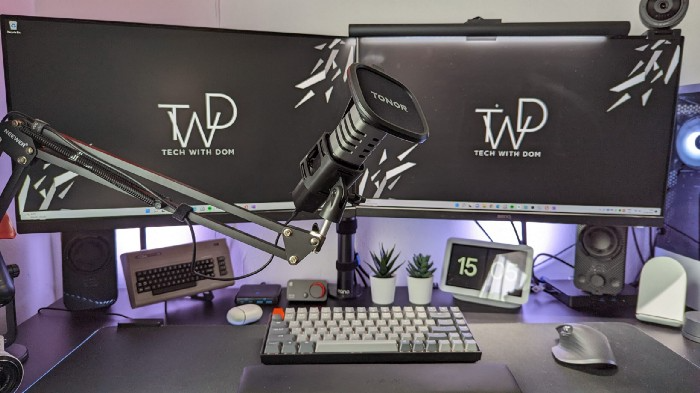
I'm gadget-obsessed. So I shared my top 6 desk gadgets.
These gadgets improve my workflow and are handy for working from home.
Without further ado...
Computer light bar Xiaomi Mi
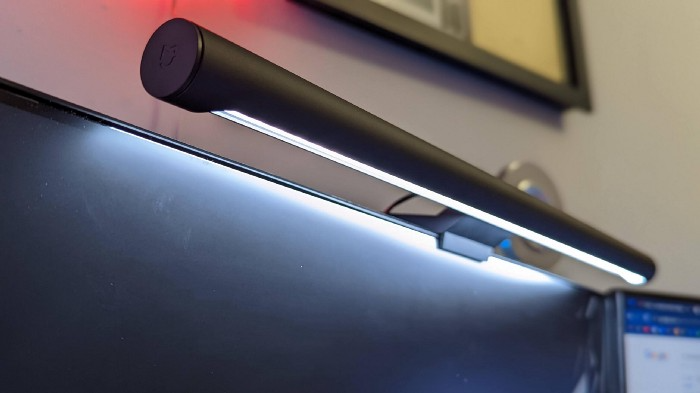
I've previously recommended the Xiaomi Mi Light Bar, and I still do. It's stylish and convenient.
The Mi bar is a monitor-mounted desk lamp. The lamp's hue and brightness can be changed with a stylish wireless remote.
Changeable hue and brightness make it ideal for late-night work.
Desk Mat 2.
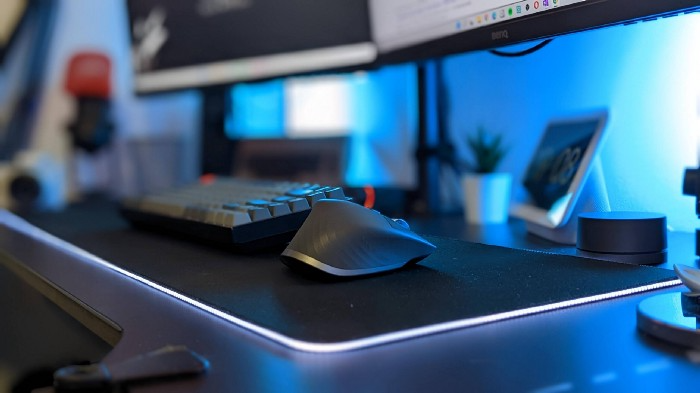
I wasn't planning to include a desk surface in this article, but I find it improves computer use.
The mouse feels smoother and is a better palm rest than wood or glass.
I'm currently using the overkill Razer Goliathus Extended Chroma RGB Gaming Surface, but I like RGB.
Using a desk surface or mat makes computer use more comfortable, and it's not expensive.
Third, the Logitech MX Master 3 Mouse
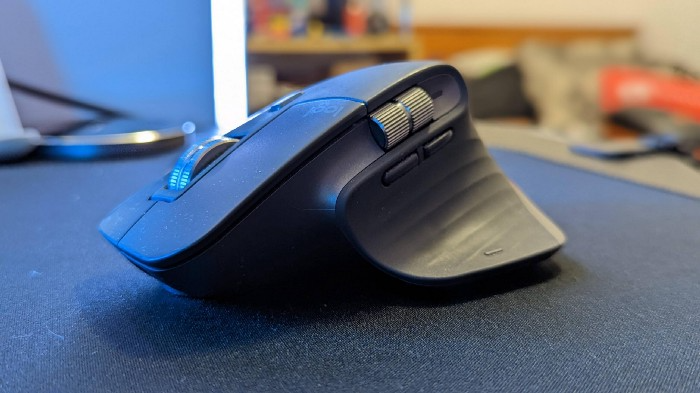
The Logitech MX Master 3 or any from the MX Master series is my favorite mouse.
The side scroll wheel on these mice is a feature I've never seen on another mouse.
Side scroll wheels are great for spreadsheets and video editing. It would be hard for me to switch from my Logitech MX Master 3 to another mouse. Only gaming is off-limits.
Google Nest 4.
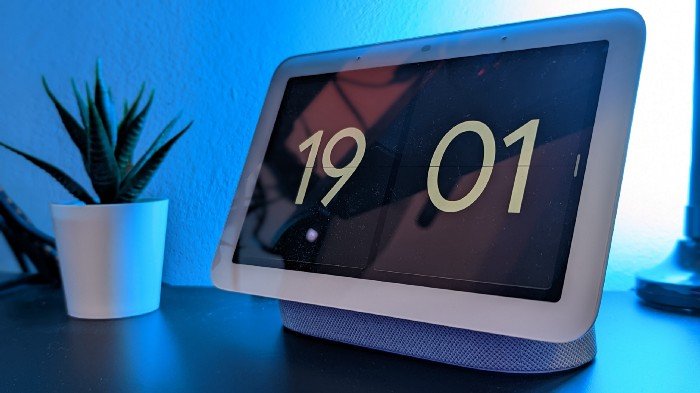
Without a smart assistant, my desk is useless. I'm currently using the second-generation Google Nest Hub, but I've also used the Amazon Echo Dot, Echo Spot, and Apple HomePod Mini.
As a Pixel 6 Pro user, the Nest Hub works best with my phone.
My Nest Hub plays news, music, and calendar events. It also lets me control lights and switches with my smartphone. It plays YouTube videos.
Google Pixel Stand, No. 5
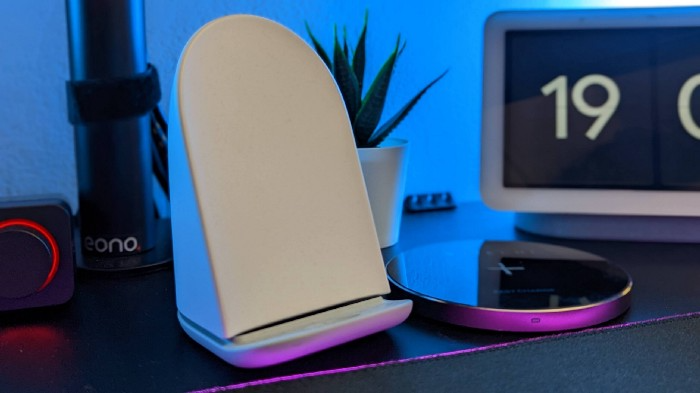
A wireless charger on my desk is convenient for charging my phone and other devices while I work. My desk has two wireless chargers. I have a Satechi aluminum fast charger and a second-generation Google Pixel Stand.
If I need to charge my phone and earbuds simultaneously, I use two wireless chargers. Satechi chargers are well-made and fast. Micro-USB is my only complaint.
The Pixel Stand converts compatible devices into a smart display for adjusting charging speeds and controlling other smart devices. My Pixel 6 Pro charges quickly. Here's my video review.
6. Anker Power Bank
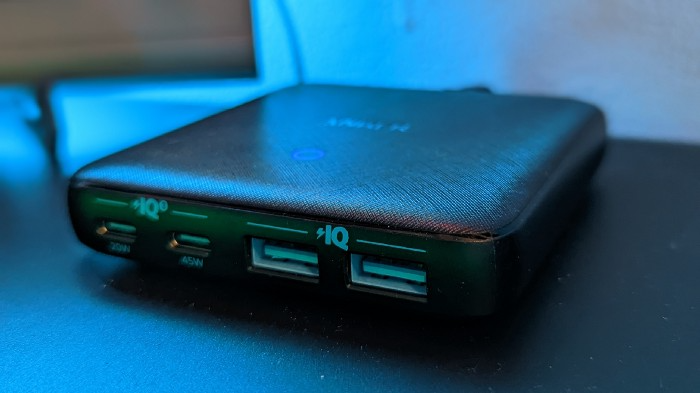
Anker's 65W charger is my final recommendation. This online find was a must-have. This can charge my laptop and several non-wireless devices, perfect for any techie!
The charger has two USB-A ports and two USB-C ports, one with 45W and the other with 20W, so it can charge my iPad Pro and Pixel 6 Pro simultaneously.
Summary
These are some of my favorite office gadgets. My kit page has an updated list.
Links to the products mentioned in this article are in the appropriate sections. These are affiliate links.
You're up! Share the one desk gadget you can't live without and why.

Emma Jade
3 years ago
6 hacks to create content faster
Content gurus' top time-saving hacks.

I'm a content strategist, writer, and graphic designer. Time is more valuable than money.
Money is always available. Even if you're poor. Ways exist.
Time is passing, and one day we'll run out.
Sorry to be morbid.
In today's digital age, you need to optimize how you create content for your organization. Here are six content creation hacks.
1. Use templates
Use templates to streamline your work whether generating video, images, or documents.
Setup can take hours. Using a free resource like Canva, you can create templates for any type of material.
This will save you hours each month.
2. Make a content calendar
You post without a plan? A content calendar solves 50% of these problems.
You can prepare, organize, and plan your material ahead of time so you're not scrambling when you remember, "Shit, it's Mother's Day!"
3. Content Batching
Batching content means creating a lot in one session. This is helpful for video content that requires a lot of setup time.
Batching monthly content saves hours. Time is a valuable resource.
When working on one type of task, it's easy to get into a flow state. This saves time.
4. Write Caption
On social media, we generally choose the image first and then the caption. Writing captions first sometimes work better, though.
Writing the captions first can allow you more creative flexibility and be easier if you're not excellent with language.
Say you want to tell your followers something interesting.
Writing a caption first is easier than choosing an image and then writing a caption to match.
Not everything works. You may have already-created content that needs captioning. When you don't know what to share, think of a concept, write the description, and then produce a video or graphic.
Cats can be skinned in several ways..
5. Repurpose
Reuse content when possible. You don't always require new stuff. In fact, you’re pretty stupid if you do #SorryNotSorry.
Repurpose old content. All those blog entries, videos, and unfinished content on your desk or hard drive.
This blog post can be turned into a social media infographic. Canva's motion graphic function can animate it. I can record a YouTube video regarding this issue for a podcast. I can make a post on each point in this blog post and turn it into an eBook or paid course.
And it doesn’t stop there.
My point is, to think outside the box and really dig deep into ways you can leverage the content you’ve already created.
6. Schedule Them
If you're still manually posting content, get help. When you batch your content, schedule it ahead of time.
Some scheduling apps are free or cheap. No excuses.
Don't publish and ghost.
Scheduling saves time by preventing you from doing it manually. But if you never engage with your audience, the algorithm won't reward your material.
Be online and engage your audience.
Content Machine
Use these six content creation hacks. They help you succeed and save time.

Nick Babich
2 years ago
Is ChatGPT Capable of Generating a Complete Mobile App?

TL;DR: It'll be harder than you think.
Mobile app development is a complicated product design sector. You require broad expertise to create a mobile app. You must write Swift or Java code and consider mobile interactions.
When ChatGPT was released, many were amazed by its capabilities and wondered if it could replace designers and developers. This article will use ChatGPT to answer a specific query.
Can ChatGPT build an entire iOS app?
This post will use ChatGPT to construct an iOS meditation app. Video of the article is available.
App concepts for meditation
After deciding on an app, think about the user experience. What should the app offer?
Let's ask ChatGPT for the answer.
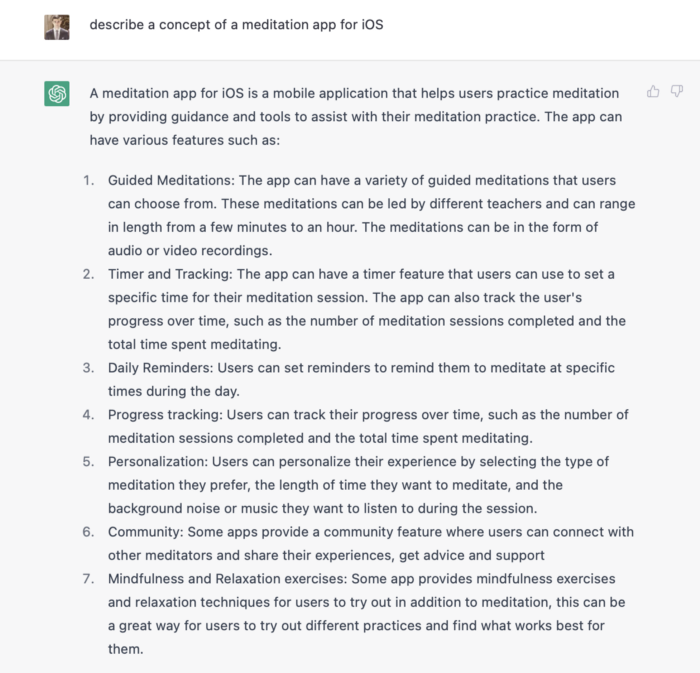
ChatGPT described a solid meditation app with various exercises. Use this list to plan product design. Our first product iteration will have few features. A simple, one-screen software will let users set the timeframe and play music during meditation.
Structure of information
Information architecture underpins product design. Our app's navigation mechanism should be founded on strong information architecture, so we need to identify our mobile's screens first.
ChatGPT can define our future app's information architecture since we already know it.

ChatGPT uses the more complicated product's structure. When adding features to future versions of our product, keep this information picture in mind.
Color palette
Meditation apps need colors. We want to employ relaxing colors in a meditation app because colors affect how we perceive items. ChatGPT can suggest product colors.
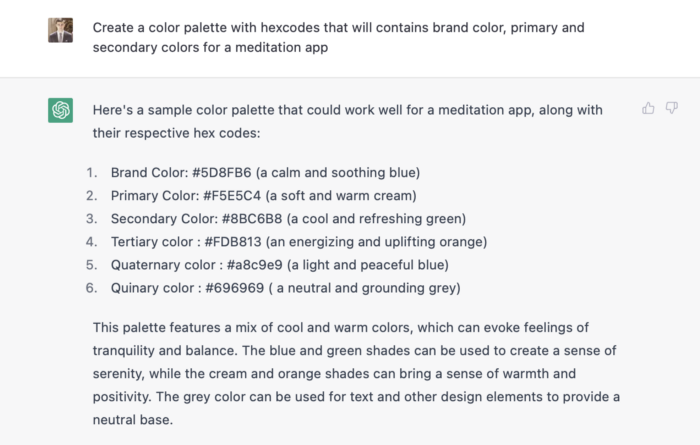
See the hues in person:
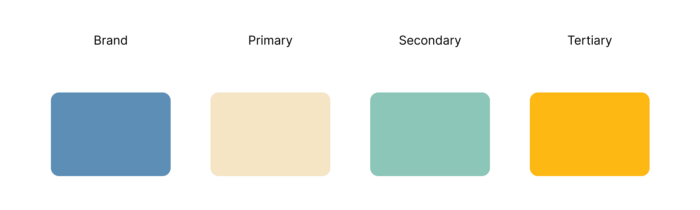
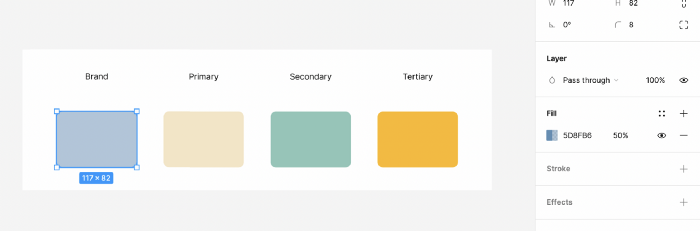
Neutral colors dominate the color scheme. Playing with color opacity makes this scheme useful.
Ambiance music
Meditation involves music. Well-chosen music calms the user.
Let ChatGPT make music for us.
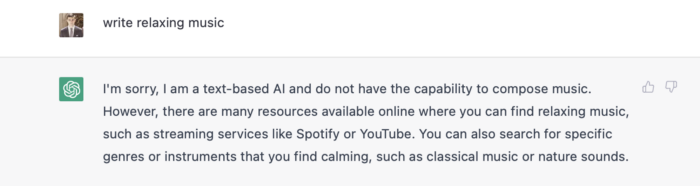
ChatGPT can only generate text. It directs us to Spotify or YouTube to look for such stuff and makes precise recommendations.
Fonts
Fonts can impress app users. Round fonts are easier on the eyes and make a meditation app look friendlier.
ChatGPT can suggest app typefaces. I compare two font pairs when making a product. I'll ask ChatGPT for two font pairs.
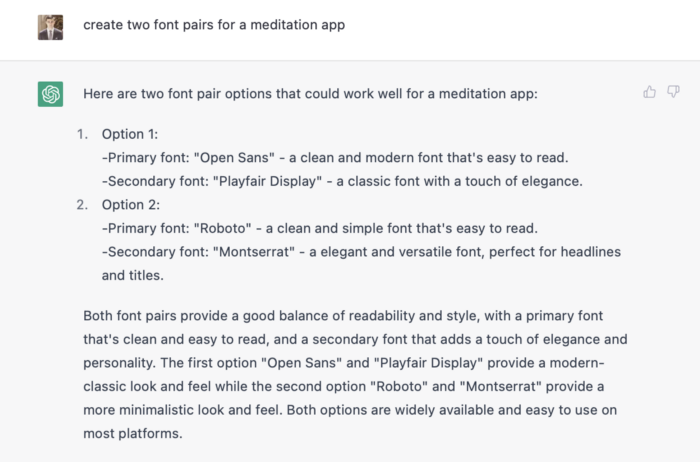
See the hues in person:
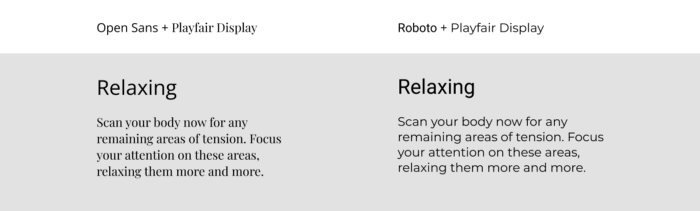
Despite ChatGPT's convincing font pairing arguments, the output is unattractive. The initial combo (Open Sans + Playfair Display) doesn't seem to work well for a mediation app.
Content
Meditation requires the script. Find the correct words and read them calmly and soothingly to help listeners relax and focus on each region of their body to enhance the exercise's effect.
ChatGPT's offerings:
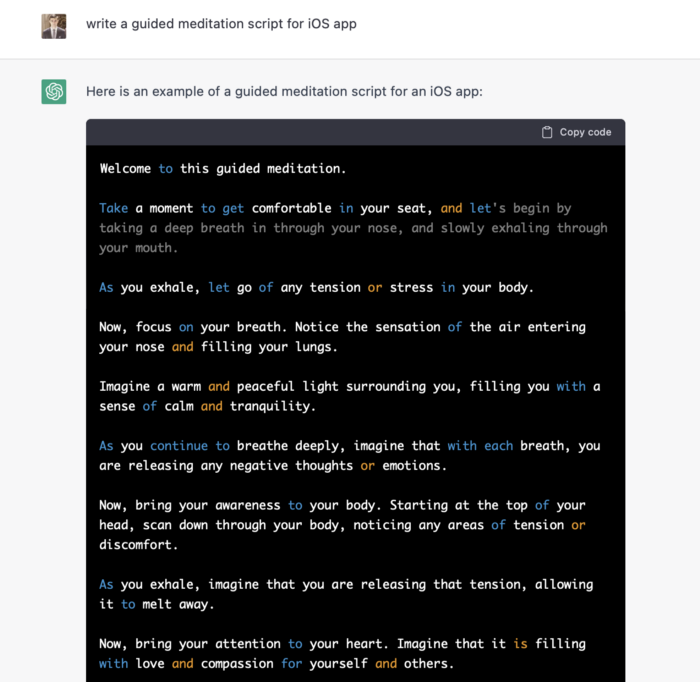
ChatGPT outputs code. My prompt's word script may cause it.
Timer
After fonts, colors, and content, construct functional pieces. Timer is our first functional piece. The meditation will be timed.
Let ChatGPT write Swift timer code (since were building an iOS app, we need to do it using Swift language).
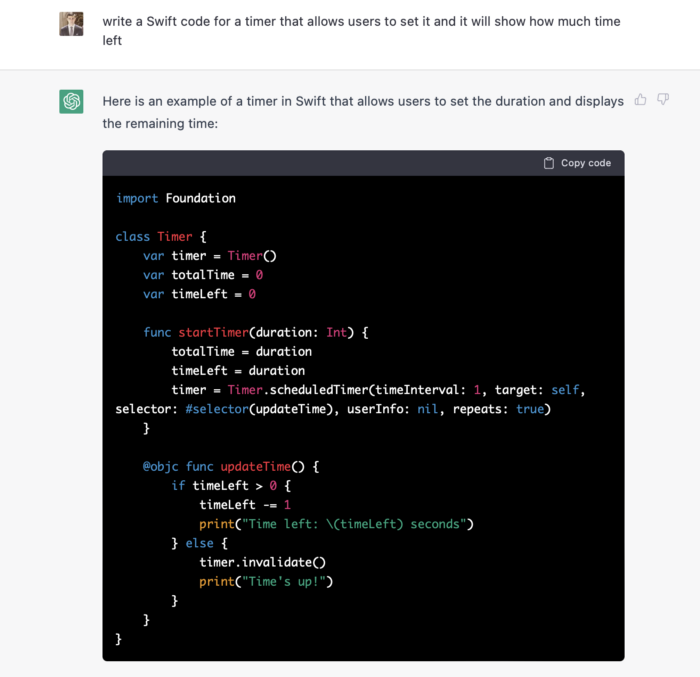
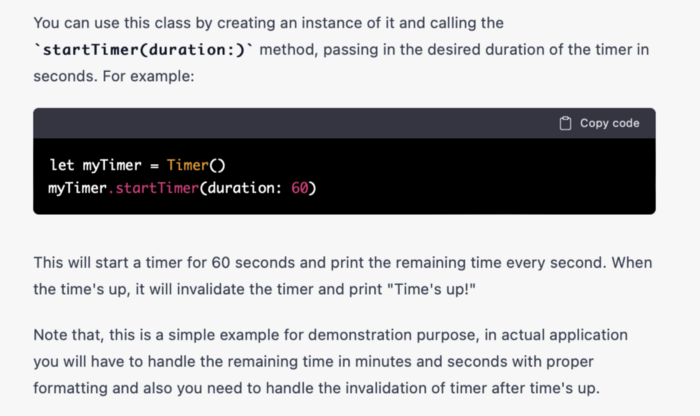
ChatGPT supplied a timer class, initializer, and usage guidelines.
Apple Xcode requires a playground to test this code. Xcode will report issues after we paste the code to the playground.
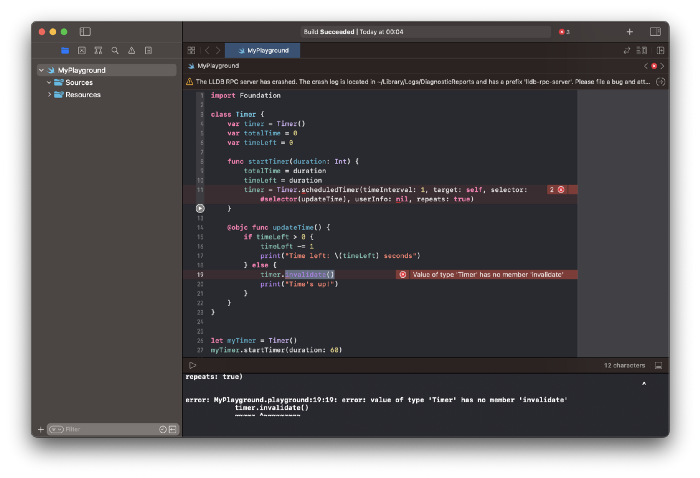
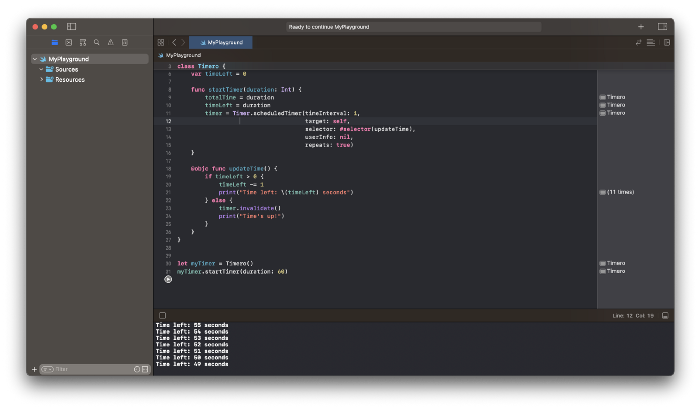
Fixing them is simple. Just change Timer to another class name (Xcode shows errors because it thinks that we access the properties of the class we’ve created rather than the system class Timer; it happens because both classes have the same name Timer). I titled our class Timero and implemented the project. After this quick patch, ChatGPT's code works.
Can ChatGPT produce a complete app?
Since ChatGPT can help us construct app components, we may question if it can write a full app in one go.
Question ChatGPT:
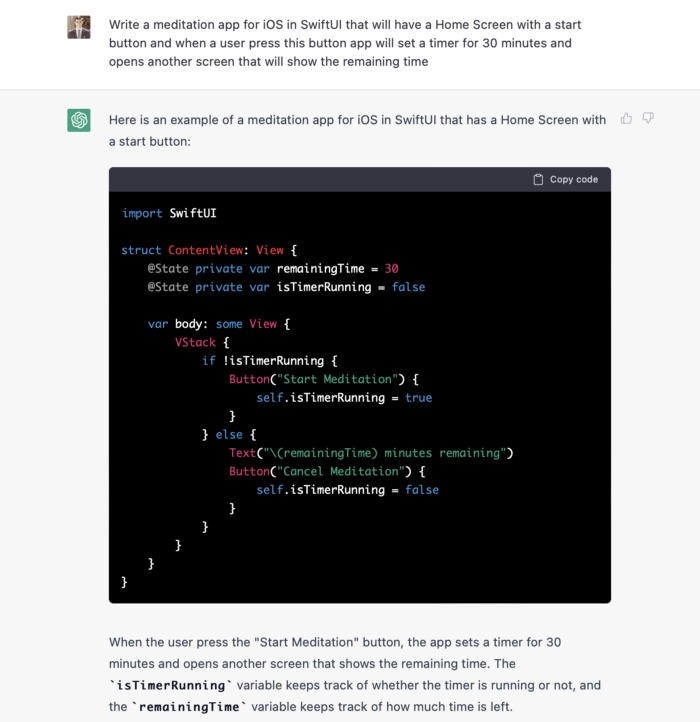
ChatGPT supplied basic code and instructions. It's unclear if ChatGPT purposely limits output or if my prompt wasn't good enough, but the tool cannot produce an entire app from a single prompt.
However, we can contact ChatGPT for thorough Swift app construction instructions.
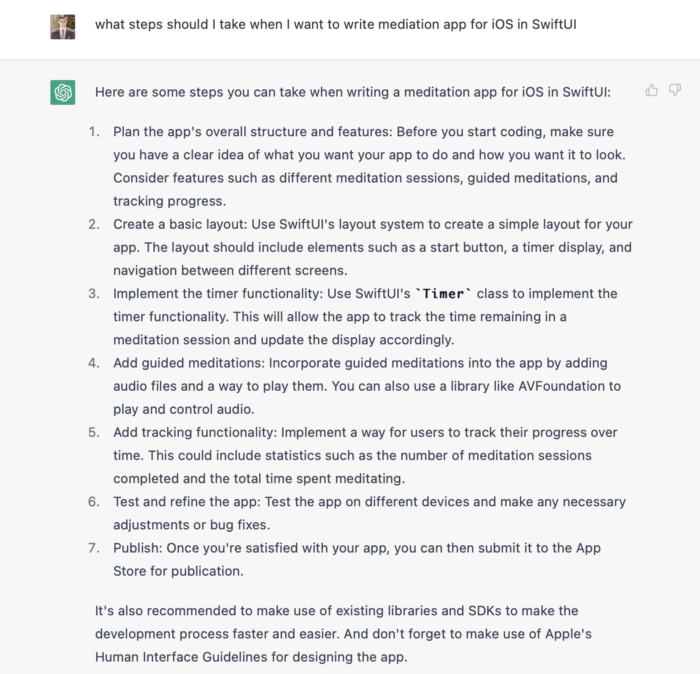
We can ask ChatGPT for step-by-step instructions now that we know what to do. Request a basic app layout from ChatGPT.
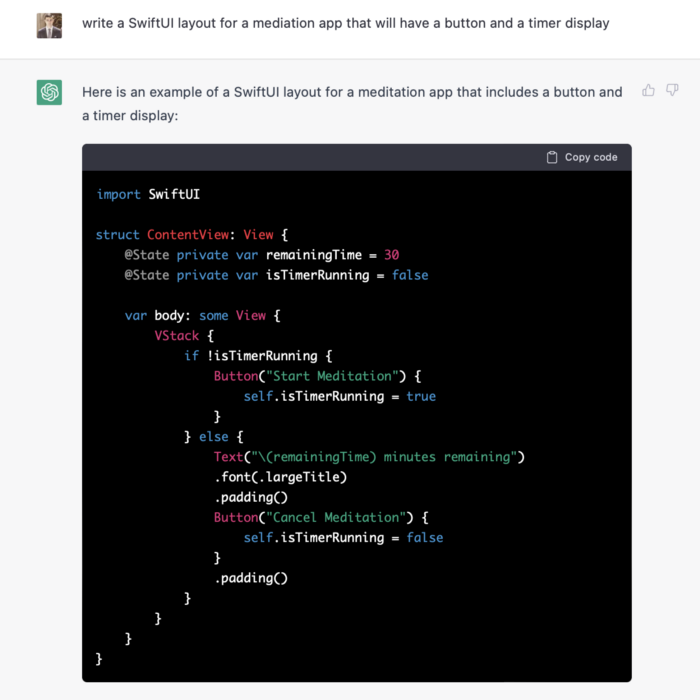
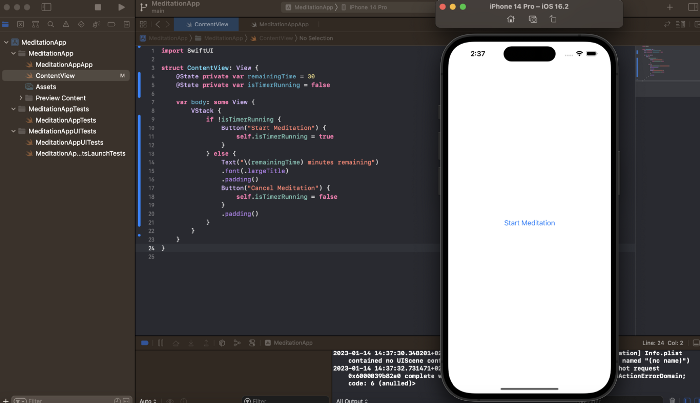
Copying this code to an Xcode project generates a functioning layout.
Takeaways
ChatGPT may provide step-by-step instructions on how to develop an app for a specific system, and individual steps can be utilized as prompts to ChatGPT. ChatGPT cannot generate the source code for the full program in one go.
The output that ChatGPT produces needs to be examined by a human. The majority of the time, you will need to polish or adjust ChatGPT's output, whether you develop a color scheme or a layout for the iOS app.
ChatGPT is unable to produce media material. Although ChatGPT cannot be used to produce images or sounds, it can assist you build prompts for programs like midjourney or Dalle-2 so that they can provide the appropriate images for you.