




More on Personal Growth

Nitin Sharma
3 years ago
Quietly Create a side business that will revolutionize everything in a year.
Quitting your job for a side gig isn't smart.

A few years ago, I would have laughed at the idea of starting a side business.
I never thought a side gig could earn more than my 9-to-5. My side gig pays more than my main job now.
You may then tell me to leave your job. But I don't want to gamble, and my side gig is important. Programming and web development help me write better because of my job.
Yes, I share work-related knowledge. Web development, web3, programming, money, investment, and side hustles are key.
Let me now show you how to make one.
Create a side business based on your profession or your interests.
I'd be direct.
Most people don't know where to start or which side business to pursue.
You can make money by taking online surveys, starting a YouTube channel, or playing web3 games, according to several blogs.
You won't make enough money and will waste time.
Nitin directs our efforts. My friend, you've worked and have talent. Profit from your talent.
Example:
College taught me web development. I soon created websites, freelanced, and made money. First year was hardest for me financially and personally.
As I worked, I became more skilled. Soon after, I got more work, wrote about web development on Medium, and started selling products.
I've built multiple income streams from web development. It wasn't easy. Web development skills got me a 9-to-5 job.
Focus on a specific skill and earn money in many ways. Most people start with something they hate or are bad at; the rest is predictable.
Result? They give up, frustrated.
Quietly focus for a year.
I started my side business in college and never told anyone. My parents didn't know what I did for fun.
The only motivation is time constraints. So I focused.
As I've said, I focused on my strengths (learned skills) and made money. Yes, I was among Medium's top 500 authors in a year and got a bonus.
How did I succeed? Since I know success takes time, I never imagined making enough money in a month. I spent a year concentrating.
I became wealthy. Now that I have multiple income sources, some businesses pay me based on my skill.
I recommend learning skills and working quietly for a year. You can do anything with this.
The hardest part will always be the beginning.
When someone says you can make more money working four hours a week. Leave that, it's bad advice.
If someone recommends a paid course to help you succeed, think twice.
The beginning is always the hardest.
I made many mistakes learning web development. When I started my technical content side gig, it was tough. I made mistakes and changed how I create content, which helped.
And it’s applicable everywhere.
Don't worry if you face problems at first. Time and effort heal all wounds.
Quitting your job to work a side job is not a good idea.
Some honest opinions.
Most online gurus encourage side businesses. It takes time to start and grow a side business.
Suppose you quit and started a side business.
After six months, what happens? Your side business won't provide enough money to survive.
Indeed. Later, you'll become demotivated and tense and look for work.
Instead, work 9-5, and start a side business. You decide. Stop watching Netflix and focus on your side business.
I know you're busy, but do it.
Next? It'll succeed or fail in six months. You can continue your side gig for another six months because you have a job and have tried it.
You'll probably make money, but you may need to change your side gig.
That’s it.
You've created a new revenue stream.
Remember.
Starting a side business, a company, or finding work is difficult. There's no free money in a competitive world. You'll only succeed with skill.
Read it again.
Focusing silently for a year can help you succeed.
I studied web development and wrote about it. First year was tough. I went viral, hit the top 500, and other firms asked me to write for them. So, my life changed.
Yours can too. One year of silence is required.
Enjoy!

Simon Ash
3 years ago
The Three Most Effective Questions for Ongoing Development
The Traffic Light Approach to Reviewing Personal, Team and Project Development

What needs improvement? If you want to improve, you need to practice your sport, musical instrument, habit, or work project. You need to assess your progress.
Continuous improvement is the foundation of focused practice and a growth mentality. Not just individually. High-performing teams pursue improvement. Right? Why is it hard?
As a leadership coach, senior manager, and high-level athlete, I've found three key questions that may unlock high performance in individuals and teams.
Problems with Reviews
Reviewing and improving performance is crucial, however I hate seeing review sessions in my diary. I rarely respond to questionnaire pop-ups or emails. Why?
Time constrains. Requests to fill out questionnaires often state they will take 10–15 minutes, but I can think of a million other things to do with that time. Next, review overload. Businesses can easily request comments online. No matter what you buy, someone will ask for your opinion. This bombardment might make feedback seem bad, which is bad.
The problem is that we might feel that way about important things like personal growth and work performance. Managers and team leaders face a greater challenge.
When to Conduct a Review
We must be wise about reviewing things that matter to us. Timing and duration matter. Reviewing the experience as quickly as possible preserves information and sentiments. Time must be brief. The review's importance and size will determine its length. We might only take a few seconds to review our morning coffee, but we might require more time for that six-month work project.
These post-event reviews should be supplemented by periodic reflection. Journaling can help with daily reflections, but I also like to undertake personal reviews every six months on vacation or at a retreat.
As an employee or line manager, you don't want to wait a year for a performance assessment. Little and frequently is best, with a more formal and in-depth assessment (typically with a written report) in 6 and 12 months.
The Easiest Method to Conduct a Review Session
I follow Einstein's review process:
“Make things as simple as possible but no simpler.”
Thus, it should be brief but deliver the necessary feedback. Quality critique is hard to receive if the process is overly complicated or long.
I have led or participated in many review processes, from strategic overhauls of big organizations to personal goal coaching. Three key questions guide the process at either end:
What ought to stop being done?
What should we do going forward?
What should we do first?
Following the Rule of 3, I compare it to traffic lights. Red, amber, and green lights:
Red What ought should we stop?
Amber What ought to we keep up?
Green Where should we begin?
This approach is easy to understand and self-explanatory, however below are some examples under each area.
Red What ought should we stop?
As a team or individually, we must stop doing things to improve.
Sometimes they're bad. If we want to lose weight, we should avoid sweets. If a team culture is bad, we may need to stop unpleasant behavior like gossiping instead of having difficult conversations.
Not all things we should stop are wrong. Time matters. Since it is finite, we sometimes have to stop nice things to focus on the most important. Good to Great author Jim Collins famously said:
“Don’t let the good be the enemy of the great.”
Prioritizing requires this idea. Thus, decide what to stop to prioritize.
Amber What ought to we keep up?
Should we continue with the amber light? It helps us decide what to keep doing during review. Many items fall into this category, so focus on those that make the most progress.
Which activities have the most impact? Which behaviors create the best culture? Success-building habits?
Use these questions to find positive momentum. These are the fly-wheel motions, according to Jim Collins. The Compound Effect author Darren Hardy says:
“Consistency is the key to achieving and maintaining momentum.”
What can you do consistently to reach your goal?
Green Where should we begin?
Finally, green lights indicate new beginnings. Red/amber difficulties may be involved. Stopping a red issue may give you more time to do something helpful (in the amber).
This green space inspires creativity. Kolbs learning cycle requires active exploration to progress. Thus, it's crucial to think of new approaches, try them out, and fail if required.
This notion underpins lean start-build, up's measure, learn approach and agile's trying, testing, and reviewing. Try new things until you find what works. Thomas Edison, the lighting legend, exclaimed:
“There is a way to do it better — find it!”
Failure is acceptable, but if you want to fail forward, look back on what you've done.
John Maxwell concurred with Edison:
“Fail early, fail often, but always fail forward”
A good review procedure lets us accomplish that. To avoid failure, we must act, experiment, and reflect.
Use the traffic light system to prioritize queries. Ask:
Red What needs to stop?
Amber What should continue to occur?
Green What might be initiated?
Take a moment to reflect on your day. Check your priorities with these three questions. Even if merely to confirm your direction, it's a terrific exercise!
Tom Connor
4 years ago
12 mental models that I use frequently
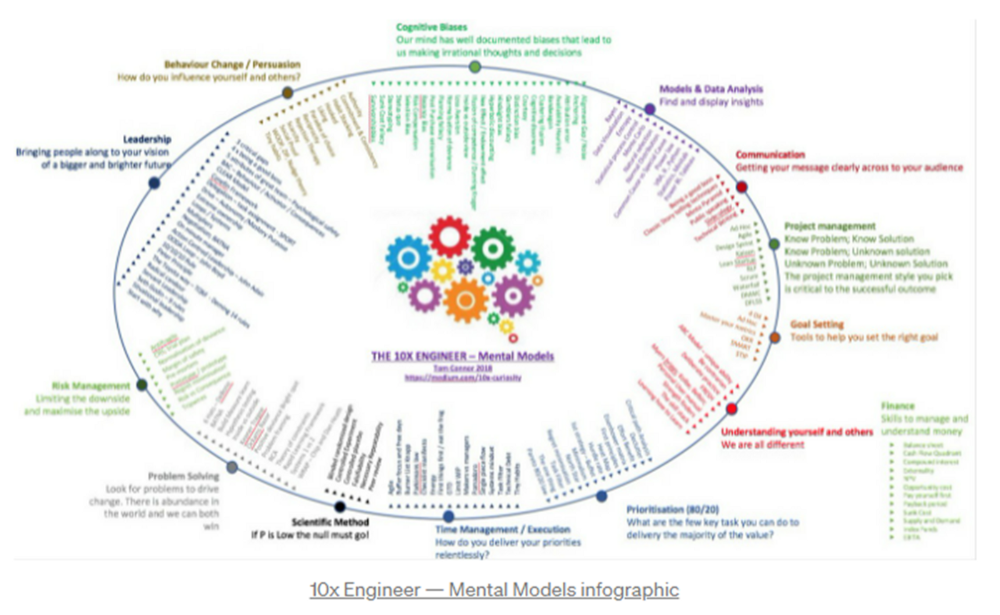
https://tomconnor.me/wp-content/uploads/2021/08/10x-Engineer-Mental-Models.pdf
I keep returning to the same mental models and tricks after writing and reading about a wide range of topics.
Top 12 mental models
12.
Survival bias - We perceive the surviving population as remarkable, yet they may have gotten there through sheer grit.
Survivorship bias affects us in many situations. Our retirement fund; the unicorn business; the winning team. We often study and imitate the last one standing. This can lead to genuine insights and performance improvements, but it can also lead us astray because the leader may just be lucky.

11.
The Helsinki Bus Theory - How to persevere Buss up!
Always display new work, and always be compared to others. Why? Easy. Keep riding. Stay on the fucking bus.
10.
Until it sticks… Turning up every day… — Artists teach engineers plenty. Quality work over a career comes from showing up every day and starting.
9.
WRAP decision making process (Heath Brothers)
Decision-making WRAP Model:
W — Widen your Options
R — Reality test your assumptions
A — Attain Distance
P — Prepare to be wrong or Right
8.
Systems for knowledge worker excellence - Todd Henry and Cal Newport write about techniques knowledge workers can employ to build a creative rhythm and do better work.
Todd Henry's FRESH framework:
Focus: Keep the start in mind as you wrap up.
Relationships: close a loop that's open.
Pruning is an energy.
Set aside time to be inspired by stimuli.
Hours: Spend time thinking.
7.
BBT is learning from mistakes. Science has transformed the world because it constantly updates its theories in light of failures. Complexity guarantees failure. Do we learn or self-justify?
6.
The OODA Loop - Competitive advantage
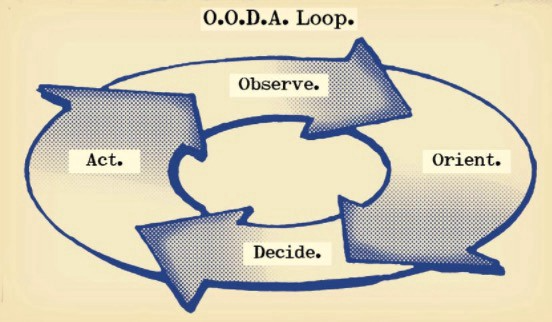
O: Observe: collect the data. Figure out exactly where you are, what’s happening.
O: Orient: analyze/synthesize the data to form an accurate picture.
D: Decide: select an action from possible options
A: Action: execute the action, and return to step (1)
Boyd's approach indicates that speed and agility are about information processing, not physical reactions. They form feedback loops. More OODA loops improve speed.
5.
Leaders who try to impose order in a complex situation fail; those who set the stage, step back, and allow patterns to develop win.
https://vimeo.com/640941172?embedded=true&source=vimeo_logo&owner=11999906
4.
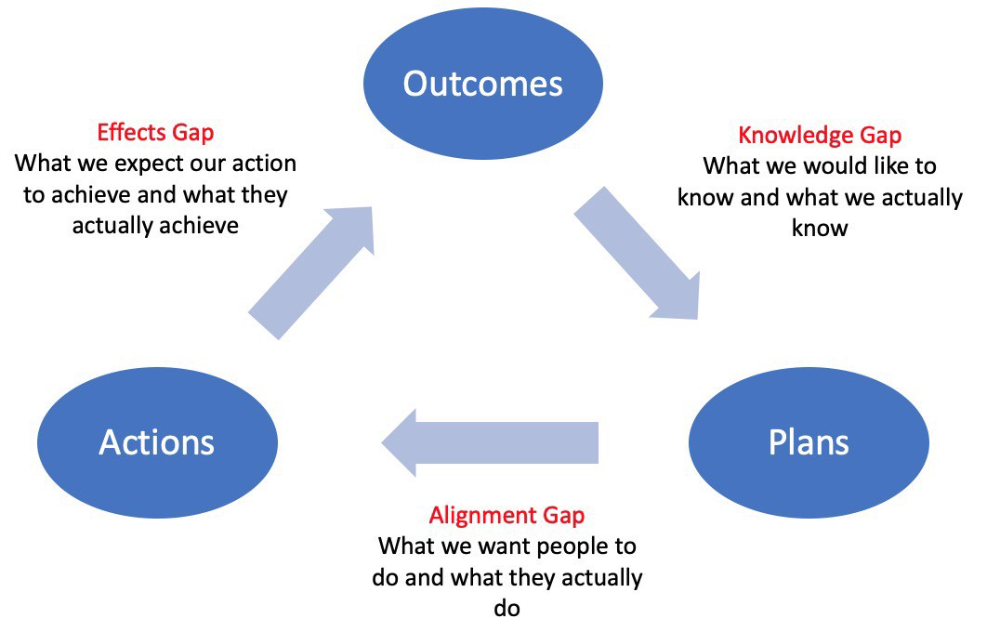
Information Gap - The discrepancy between what we know and what we would like to know
Gap in Alignment - What individuals actually do as opposed to what we wish them to do
Effects Gap - the discrepancy between our expectations and the results of our actions
3.
Theory of Constraints — The Goal - To maximize system production, maximize bottleneck throughput.
Goldratt creates a five-step procedure:
Determine the restriction
Improve the restriction.
Everything else should be based on the limitation.
Increase the restriction
Go back to step 1 Avoid letting inertia become a limitation.
Any non-constraint improvement is an illusion.
2.
Serendipity and the Adjacent Possible - Why do several amazing ideas emerge at once? How can you foster serendipity in your work?
You need specialized abilities to reach to the edge of possibilities, where you can pursue exciting tasks that will change the world. Few people do it since it takes a lot of hard work. You'll stand out if you do.
Most people simply lack the comfort with discomfort required to tackle really hard things. At some point, in other words, there’s no way getting around the necessity to clear your calendar, shut down your phone, and spend several hard days trying to make sense of the damn proof.
1.
Boundaries of failure - Rasmussen's accident model.
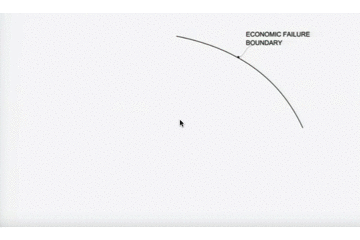
Rasmussen modeled this. It has economic, workload, and performance boundaries.
The economic boundary is a company's profit zone. If the lights are on, you're within the economic boundaries, but there's pressure to cut costs and do more.
Performance limit reflects system capacity. Taking shortcuts is a human desire to minimize work. This is often necessary to survive because there's always more labor.
Both push operating points toward acceptable performance. Personal or process safety, or equipment performance.
If you exceed acceptable performance, you'll push back, typically forcefully.
You might also like
Thomas Smith
3 years ago
ChatGPT Is Experiencing a Lightbulb Moment
Why breakthrough technologies must be accessible

ChatGPT has exploded. Over 1 million people have used the app, and coding sites like Stack Overflow have banned its answers. It's huge.
I wouldn't have called that as an AI researcher. ChatGPT uses the same GPT-3 technology that's been around for over two years.
More than impressive technology, ChatGPT 3 shows how access makes breakthroughs usable. OpenAI has finally made people realize the power of AI by packaging GPT-3 for normal users.
We think of Thomas Edison as the inventor of the lightbulb, not because he invented it, but because he popularized it.
Going forward, AI companies that make using AI easy will thrive.
Use-case importance
Most modern AI systems use massive language models. These language models are trained on 6,000+ years of human text.
GPT-3 ate 8 billion pages, almost every book, and Wikipedia. It created an AI that can write sea shanties and solve coding problems.
Nothing new. I began beta testing GPT-3 in 2020, but the system's basics date back further.
Tools like GPT-3 are hidden in many apps. Many of the AI writing assistants on this platform are just wrappers around GPT-3.
Lots of online utilitarian text, like restaurant menu summaries or city guides, is written by AI systems like GPT-3. You've probably read GPT-3 without knowing it.
Accessibility
Why is ChatGPT so popular if the technology is old?
ChatGPT makes the technology accessible. Free to use, people can sign up and text with the chatbot daily. ChatGPT isn't revolutionary. It does it in a way normal people can access and be amazed by.
Accessibility isn't easy. OpenAI's Sam Altman tweeted that opening ChatGPT to the public increased computing costs.
Each chat costs "low-digit cents" to process. OpenAI probably spends several hundred thousand dollars a day to keep ChatGPT running, with no immediate business case.
Academic researchers and others who developed GPT-3 couldn't afford it. Without resources to make technology accessible, it can't be used.
Retrospective
This dynamic is old. In the history of science, a researcher with a breakthrough idea was often overshadowed by an entrepreneur or visionary who made it accessible to the public.
We think of Thomas Edison as the inventor of the lightbulb. But really, Vasilij Petrov, Thomas Wright, and Joseph Swan invented the lightbulb. Edison made technology visible and accessible by electrifying public buildings, building power plants, and wiring.
Edison probably lost a ton of money on stunts like building a power plant to light JP Morgan's home, the NYSE, and several newspaper headquarters.
People wanted electric lights once they saw their benefits. By making the technology accessible and visible, Edison unlocked a hugely profitable market.
Similar things are happening in AI. ChatGPT shows that developing breakthrough technology in the lab or on B2B servers won't change the culture.
AI must engage people's imaginations to become mainstream. Before the tech impacts the world, people must play with it and see its revolutionary power.
As the field evolves, companies that make the technology widely available, even at great cost, will succeed.
OpenAI's compute fees are eye-watering. Revolutions are costly.

Nojus Tumenas
4 years ago
NASA: Strange Betelgeuse Explosion Just Took Place

Orion's red supergiant Betelgeuse erupted. This is astronomers' most magnificent occurrence.
Betelgeuse, a supergiant star in Orion, garnered attention in 2019 for its peculiar appearance. It continued to dim in 2020.
The star was previously thought to explode as a supernova. Studying the event has revealed what happened to Betelgeuse since it happened.
Astronomers saw that the star released a large amount of material, causing it to lose a section of its surface.
They have never seen anything like this and are unsure what caused the star to release so much material.
According to Harvard-Smithsonian Center for Astrophysics astrophysicist Andrea Dupre, astronomers' data reveals an unexplained mystery.
They say it's a new technique to examine star evolution. The James Webb telescope revealed the star's surface features.
Corona flares are stellar mass ejections. These eruptions change the Sun's outer atmosphere.
This could affect power grids and satellite communications if it hits Earth.
Betelgeuse's flare ejected four times more material than the Sun's corona flare.
Astronomers have monitored star rhythms for 50 years. They've seen its dimming and brightening cycle start, stop, and repeat.
Monitoring Betelgeuse's pulse revealed the eruption's power.
Dupre believes the star's convection cells are still amplifying the blast's effects, comparing it to an imbalanced washing machine tub.
The star's outer layer has returned to normal, Hubble data shows. The photosphere slowly rebuilds its springy surface.
Dupre noted the star's unusual behavior. For instance, it’s causing its interior to bounce.
This suggests that the mass ejections that caused the star's surface to lose mass were two separate processes.
Researchers hope to better understand star mass ejection with the James Webb Space Telescope.

Woo
3 years ago
How To Launch A Business Without Any Risk
> Say Hello To The Lean-Hedge Model
People think starting a business requires significant debt and investment. Like Shark Tank, you need a world-changing idea. I'm not saying to avoid investors or brilliant ideas.
Investing is essential to build a genuinely profitable company. Think Apple or Starbucks.
Entrepreneurship is risky because many people go bankrupt from debt. As starters, we shouldn't do it. Instead, use lean-hedge.
Simply defined, you construct a cash-flow business to hedge against long-term investment-heavy business expenses.
What the “fx!$rench-toast” is the lean-hedge model?
When you start a business, your money should move down, down, down, then up when it becomes profitable.
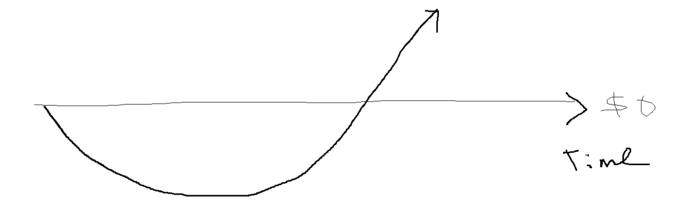
Many people don't survive the business's initial losses and debt. What if, we created a cash-flow business BEFORE we started our Starbucks to hedge against its initial expenses?
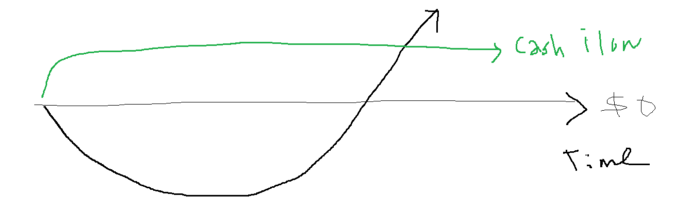
Lean-hedge has two sections. Start a cash-flow business. A cash-flow business takes minimal investment and usually involves sweat and time.
Let’s take a look at some examples:
A Translation company
Personal portfolio website (you make a site then you do cold e-mail marketing)
FREELANCE (UpWork, Fiverr).
Educational business.
Infomarketing. (You design a knowledge-based product. You sell the info).
Online fitness/diet/health coaching ($50-$300/month, calls, training plan)
Amazon e-book publishing. (Medium writers do this)
YouTube, cash-flow channel
A web development agency (I'm a dev, but if you're not, a graphic design agency, etc.) (Sell your time.)
Digital Marketing
Online paralegal (A million lawyers work in the U.S).
Some dropshipping (Organic Tik Tok dropshipping, where you create content to drive traffic to your shopify store instead of spend money on ads).
(Disclaimer: My first two cash-flow enterprises, which were language teaching, failed terribly. My translation firm is now booming because B2B e-mail marketing is easy.)
Crossover occurs. Your long-term business starts earning more money than your cash flow business.
My cash-flow business (freelancing, translation) makes $7k+/month.
I’ve decided to start a slightly more investment-heavy digital marketing agency
Here are the anticipated business's time- and money-intensive investments:
($$$) Top Front-End designer's Figma/UI-UX design (in negotiation)
(Time): A little copywriting (I will do this myself)
($$) Creating an animated webpage with HTML (in negotiation)
Backend Development (Duration) (I'll carry out this myself using Laravel.)
Logo Design ($$)
Logo Intro Video for $
Video Intro (I’ll edit this myself with Premiere Pro)
etc.
Then evaluate product, place, price, and promotion. Consider promotion and pricing.
The lean-hedge model's point is:
Don't gamble. Avoid debt. First create a cash-flow project, then grow it steadily.
Check read my previous posts on “Nightmare Mode” (which teaches you how to make work as interesting as video games) and Why most people can't escape a 9-5 to learn how to develop a cash-flow business.