




More on Entrepreneurship/Creators

Carter Kilmann
4 years ago
I finally achieved a $100K freelance income. Here's what I wish I knew.

We love round numbers, don't we? $100,000 is a frequent freelancing milestone. You feel like six figures means you're doing something properly.
You've most likely already conquered initial freelancing challenges like finding clients, setting fair pricing, coping with criticism, getting through dry spells, managing funds, etc.
You think I must be doing well. Last month, my freelance income topped $100,000.
That may not sound impressive considering I've been freelancing for 2.75 years, but I made 30% of that in the previous four months, which is crazy.
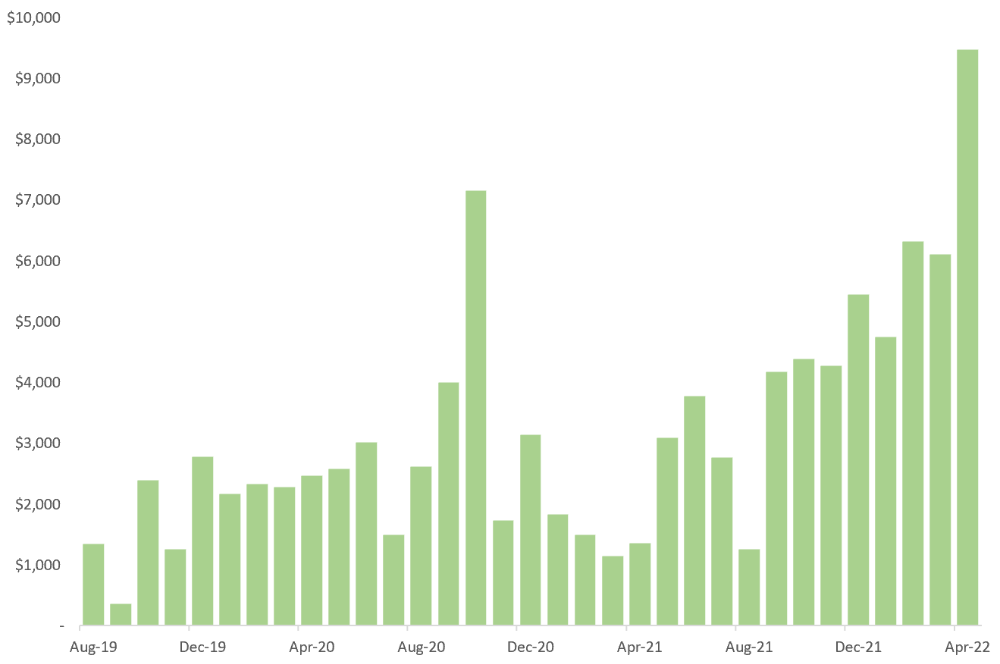
Here are the things I wish I'd known during the early days of self-employment that would have helped me hit $100,000 faster.
1. The Volatility of Freelancing Will Stabilize.
Freelancing is risky. No surprise.
Here's an example.
October 2020 was my best month, earning $7,150. Between $4,004 in September and $1,730 in November. Unsteady.
Freelancing is regrettably like that. Moving clients. Content requirements change. Allocating so much time to personal pursuits wasn't smart, but yet.
Stabilizing income takes time. Consider my rolling three-month average income since I started freelancing. My three-month average monthly income. In February, this metric topped $5,000. Now, it's in the mid-$7,000s, but it took a while to get there.
Finding freelance gigs that provide high pay, high volume, and recurring revenue is difficult. But it's not impossible.
TLDR: Don't expect a steady income increase at first. Be patient.
2. You Have More Value Than You Realize.
Writing is difficult. Assembling words, communicating a message, and provoking action are a puzzle.
People are willing to pay you for it because they can't do what you do or don't have enough time.
Keeping that in mind can have huge commercial repercussions.
When talking to clients, don't tiptoe. You can ignore ridiculous deadlines. You don't have to take unmanageable work.
You solve an issue, so make sure you get rightly paid.
TLDR: Frame services as problem-solutions. This will let you charge more and set boundaries.
3. Increase Your Prices.
I studied hard before freelancing. I read articles and watched videos about writing businesses.
I didn't want to work for pennies. Despite this clarity, I had no real strategy to raise my rates.
I then luckily stumbled into higher-paying work. We discussed fees and hours with a friend who launched a consulting business. It's subjective and speculative because value isn't standardized. One company may laugh at your charges. If your solution helps them create a solid ROI, another client may pay $200 per hour.
When he told me he charged his first client $125 per hour, I thought, Why not?
A new-ish client wanted to discuss a huge forthcoming project, so I raised my rates. They knew my worth, so they didn't blink when I handed them my new number.
TLDR: Increase rates periodically (e.g., every 6 or 12 months). Writing skill develops with practice. You'll gain value over time.
4. Remember Your Limits.
If you can squeeze additional time into a day, let me know. I can't manipulate time yet.
We all have time and economic limits. You could theoretically keep boosting rates, but your prospect pool diminishes. Outsourcing and establishing extra revenue sources might boost monthly revenues.
I've devoted a lot of time to side projects (hopefully extra cash sources), but I've only just started outsourcing. I wish I'd tried this earlier.
If you can discover good freelancers, you can grow your firm without sacrificing time.
TLDR: Expand your writing network immediately. You'll meet freelancers who understand your daily grind and locate reference sources.
5. Every Action You Take Involves an Investment. Be Certain to Select Correctly.
Investing in stocks or crypto requires paying money, right?
In business, time is your currency (and maybe money too). Your daily habits define your future. If you spend time collecting software customers and compiling content in the space, you'll end up with both. So be sure.
I only spend around 50% of my time on client work, therefore it's taken me nearly three years to earn $100,000. I spend the remainder of my time on personal projects including a freelance book, an investment newsletter, and this blog.
Why? I don't want to rely on client work forever. So, I'm working on projects that could pay off later and help me live a more fulfilling life.
TLDR: Consider the long-term impact of your time commitments, and don't overextend. You can only make so many "investments" in a given time.
6. LinkedIn Is an Endless Mine of Gold. Use It.
Why didn't I use LinkedIn earlier?
I designed a LinkedIn inbound lead strategy that generates 12 leads a month and a few high-quality offers. As a result, I've turned down good gigs. Wish I'd begun earlier.
If you want to create a freelance business, prioritize LinkedIn. Too many freelancers ignore this site, missing out on high-paying clients. Build your profile, post often, and interact.
TLDR: Study LinkedIn's top creators. Once you understand their audiences, start posting and participating daily.
For 99% of People, Freelancing is Not a Get-Rich-Quick Scheme.
Here's a list of things I wish I'd known when I started freelancing.
Although it is erratic, freelancing eventually becomes stable.
You deserve respect and discretion over how you conduct business because you have solved an issue.
Increase your charges rather than undervaluing yourself. If necessary, add a reminder to your calendar. Your worth grows with time.
In order to grow your firm, outsource jobs. After that, you can work on the things that are most important to you.
Take into account how your present time commitments may affect the future. It will assist in putting things into perspective and determining whether what you are doing is indeed worthwhile.
Participate on LinkedIn. You'll get better jobs as a result.
If I could give my old self (and other freelancers) one bit of advice, it's this:
Despite appearances, you're making progress.
Each job. Tweets. Newsletters. Progress. It's simpler to see retroactively than in the moment.
Consistent, intentional work pays off. No good comes from doing nothing. You must set goals, divide them into time-based targets, and then optimize your calendar.
Then you'll understand you're doing well.
Want to learn more? I’ll teach you.

Jenn Leach
4 years ago
In November, I made an effort to pitch 10 brands per day. Here's what I discovered.

I pitched 10 brands per workday for a total of 200.
How did I do?
It was difficult.
I've never pitched so much.
What did this challenge teach me?
the superiority of quality over quantity
When you need help, outsource
Don't disregard burnout in order to complete a challenge because it exists.
First, pitching brands for brand deals requires quality. Find firms that align with your brand to expose to your audience.
If you associate with any company, you'll lose audience loyalty. I didn't lose sight of that, but I couldn't resist finishing the task.
Outsourcing.
Delegating work to teammates is effective.
I wish I'd done it.
Three people can pitch 200 companies a month significantly faster than one.
One person does research, one to two do outreach, and one to two do follow-up and negotiating.
Simple.
In 2022, I'll outsource everything.
Burnout.
I felt this, so I slowed down at the end of the month.
Thanksgiving week in November was slow.
I was buying and decorating for Christmas. First time putting up outdoor holiday lights was fun.
Much was happening.
I'm not perfect.
I'm being honest.
The Outcomes
Less than 50 brands pitched.
Result: A deal with 3 brands.
I hoped for 4 brands with reaching out to 200 companies, so three with under 50 is wonderful.
That’s a 6% conversion rate!
Whoo-hoo!
I needed 2%.
Here's a screenshot from one of the deals I booked.
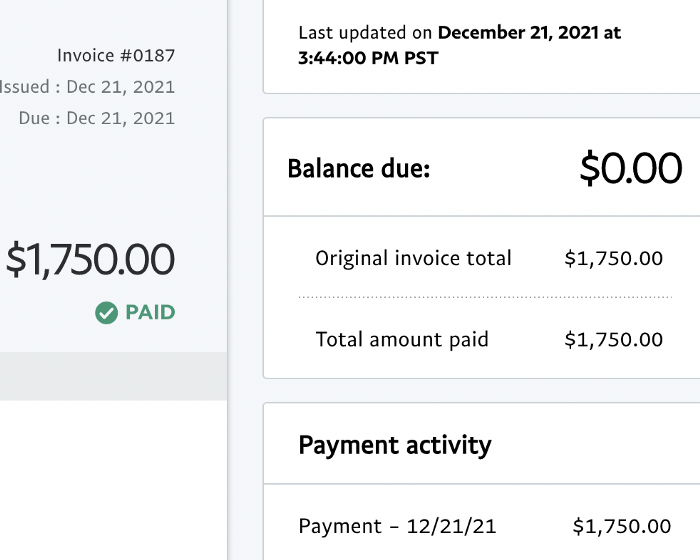
These companies fit my company well. Each campaign is different, but I've booked $2,450 in brand work with a couple of pending transactions for December and January.
$2,450 in brand work booked!
How did I do? You tell me.
Is this something you’d try yourself?

Aaron Dinin, PhD
4 years ago
I put my faith in a billionaire, and he destroyed my business.
How did his money blind me?

Like most fledgling entrepreneurs, I wanted a mentor. I met as many nearby folks with "entrepreneur" in their LinkedIn biographies for coffee.
These meetings taught me a lot, and I'd suggest them to any new creator. Attention! Meeting with many experienced entrepreneurs means getting contradictory advice. One entrepreneur will tell you to do X, then the next one you talk to may tell you to do Y, which are sometimes opposites. You'll have to chose which suggestion to take after the chats.
I experienced this. Same afternoon, I had two coffee meetings with experienced entrepreneurs. The first meeting was with a billionaire entrepreneur who took his company public.
I met him in a swanky hotel lobby and ordered a drink I didn't pay for. As a fledgling entrepreneur, money was scarce.
During the meeting, I demoed the software I'd built, he liked it, and we spent the hour discussing what features would make it a success. By the end of the meeting, he requested I include a killer feature we both agreed would attract buyers. The feature was complex and would require some time. The billionaire I was sipping coffee with in a beautiful hotel lobby insisted people would love it, and that got me enthusiastic.
The second meeting was with a young entrepreneur who had recently raised a small amount of investment and looked as eager to pitch me as I was to pitch him. I forgot his name. I mostly recall meeting him in a filthy coffee shop in a bad section of town and buying his pricey cappuccino. Water for me.
After his pitch, I demoed my app. When I was done, he barely noticed. He questioned my customer acquisition plan. Who was my client? What did they offer? What was my plan? Etc. No decent answers.
After our meeting, he insisted I spend more time learning my market and selling. He ignored my questions about features. Don't worry about features, he said. Customers will request features. First, find them.
Putting your faith in results over relevance
Problems plagued my afternoon. I met with two entrepreneurs who gave me differing advice about how to proceed, and I had to decide which to pursue. I couldn't decide.
Ultimately, I followed the advice of the billionaire.
Obviously.
Who wouldn’t? That was the guy who clearly knew more.
A few months later, I constructed the feature the billionaire said people would line up for.
The new feature was unpopular. I couldn't even get the billionaire to answer an email showing him what I'd done. He disappeared.
Within a few months, I shut down the company, wasting all the time and effort I'd invested into constructing the killer feature the billionaire said I required.
Would follow the struggling entrepreneur's advice have saved my company? It would have saved me time in retrospect. Potential consumers would have told me they didn't want what I was producing, and I could have shut down the company sooner or built something they did want. Both outcomes would have been better.
Now I know, but not then. I favored achievement above relevance.
Success vs. relevance
The millionaire gave me advice on building a large, successful public firm. A successful public firm is different from a startup. Priorities change in the last phase of business building, which few entrepreneurs reach. He gave wonderful advice to founders trying to double their stock values in two years, but it wasn't beneficial for me.
The other failing entrepreneur had relevant, recent experience. He'd recently been in my shoes. We still had lots of problems. He may not have achieved huge success, but he had valuable advice on how to pass the closest hurdle.
The money blinded me at the moment. Not alone So much of company success is defined by money valuations, fundraising, exits, etc., so entrepreneurs easily fall into this trap. Money chatter obscures the value of knowledge.
Don't base startup advice on a person's income. Focus on what and when the person has learned. Relevance to you and your goals is more important than a person's accomplishments when considering advice.
You might also like

Charlie Brown
3 years ago
What Happens When You Sell Your House, Never Buying It Again, Reverse the American Dream
Homeownership isn't the only life pattern.

Want to irritate people?
My party trick is to say I used to own a house but no longer do.
I no longer wish to own a home, not because I lost it or because I'm moving.
It was a long-term plan. It was more deliberate than buying a home. Many people are committed for this reason.
Poppycock.
Anyone who told me that owning a house (or striving to do so) is a must is wrong.
Because, URGH.
One pattern for life is to own a home, but there are millions of others.
You can afford to buy a home? Go, buddy.
You think you need 1,000 square feet (or more)? You think it's non-negotiable in life?
Nope.
It's insane that society forces everyone to own real estate, regardless of income, wants, requirements, or situation. As if this trade brings happiness, stability, and contentment.
Take it from someone who thought this for years: drywall isn't happy. Living your way brings contentment.
That's in real estate. It may also be renting a small apartment in a city that makes your soul sing, but you can't afford the downpayment or mortgage payments.
Living or traveling abroad is difficult when your life savings are connected to something that eats your money the moment you sign.
#vanlife, which seems like torment to me, makes some people feel alive.
I've seen co-living, vacation rental after holiday rental, living with family, and more work.
Insisting that home ownership is the only path in life is foolish and reduces alternative options.
How little we question homeownership is a disgrace.
No one challenges a homebuyer's motives. We congratulate them, then that's it.
When you offload one, you must answer every question, even if you have a loose screw.
Why do you want to sell?
Do you have any concerns about leaving the market?
Why would you want to renounce what everyone strives for?
Why would you want to abandon a beautiful place like that?
Why would you mismanage your cash in such a way?
But surely it's only temporary? RIGHT??
Incorrect questions. Buying a property requires several inquiries.
The typical American has $4500 saved up. When something goes wrong with the house (not if, it’s never if), can you actually afford the repairs?
Are you certain that you can examine a home in less than 15 minutes before committing to buying it outright and promising to pay more than twice the asking price on a 30-year 7% mortgage?
Are you certain you're ready to leave behind friends, family, and the services you depend on in order to acquire something?
Have you thought about the connotation that moving to a suburb, which more than half of Americans do, means you will be dependent on a car for the rest of your life?
Plus:
Are you sure you want to prioritize home ownership over debt, employment, travel, raising kids, and daily routines?
Homeownership entails that. This ex-homeowner says it will rule your life from the time you put the key in the door.
This isn't questioned. We don't question enough. The holy home-ownership grail was set long ago, and we don't challenge it.
Many people question after signing the deeds. 70% of homeowners had at least one regret about buying a property, including the expense.
Exactly. Tragic.
Homes are different from houses
We've been fooled into thinking home ownership will make us happy.
Some may agree. No one.
Bricks and brick hindered me from living the version of my life that made me most comfortable, happy, and steady.
I'm spending the next month in a modest apartment in southern Spain. Even though it's late November, today will be 68 degrees. My spouse and I will soon meet his visiting parents. We'll visit a Sherry store. We'll eat, nap, walk, and drink Sherry. Writing. Jerez means flamenco.
That's my home. This is such a privilege. Living a fulfilling life brings me the contentment that buying a home never did.
I'm happy and comfortable knowing I can make almost all of my days good. Rejecting home ownership is partly to blame.
I'm broke like most folks. I had to choose between home ownership and comfort. I said, I didn't find them together.
Feeling at home trumps owning brick-and-mortar every day.
The following is the reality of what it's like to turn the American Dream around.
Leaving the housing market.
Sometimes I wish I owned a home.
I miss having my own yard and bed. My kitchen, cookbooks, and pizza oven are missed.
But I rarely do.
Someone else's life plan pushed home ownership on me. I'm grateful I figured it out at 35. Many take much longer, and some never understand homeownership stinks (for them).
It's confusing. People will think you're dumb or suicidal.
If you read what I write, you'll know. You'll realize that all you've done is choose to live intentionally. Find a home beyond four walls and a picket fence.
Miss? As I said, they're not home. If it were, a pizza oven, a good mattress, and a well-stocked kitchen would bring happiness.
No.
If you can afford a house and desire one, more power to you.
There are other ways to discover home. Find calm and happiness. For fun.
For it, look deeper than your home's foundation.

Alison Randel
4 years ago
Raising the Bar on Your 1:1s

Managers spend much time in 1:1s. Most team members meet with supervisors regularly. 1:1s can help create relationships and tackle tough topics. Few appreciate the 1:1 format's potential. Most of the time, that potential is spent on small talk, surface-level updates, and ranting (Ugh, the marketing team isn’t stepping up the way I want them to).
What if you used that time to have deeper conversations and important insights? What if change was easy?
This post introduces a new 1:1 format to help you dive deeper, faster, and develop genuine relationships without losing impact.
A 1:1 is a chat, you would assume. Why use structure to talk to a coworker? Go! I know how to talk to people. I can write. I've always written. Also, This article was edited by Zoe.
Before you discard something, ask yourself if there's a good reason not to try anything new. Is the 1:1 only a talk, or do you want extra benefits? Try the steps below to discover more.
I. Reflection (5 minutes)
Context-free, broad comments waste time and are useless. Instead, give team members 5 minutes to write these 3 prompts.
What's effective?
What is decent but could be improved?
What is broken or missing?
Why these? They encourage people to be honest about all their experiences. Answering these questions helps people realize something isn't working. These prompts let people consider what's working.
Why take notes? Because you get more in less time. Will you feel awkward sitting quietly while your coworker writes? Probably. Persevere. Multi-task. Take a break from your afternoon meeting marathon. Any awkwardness will pay off.
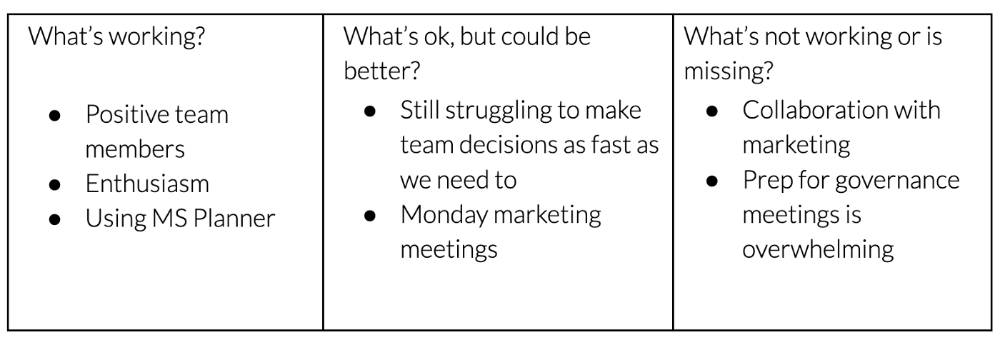
What happens? After a few minutes of light conversation, create a template like the one given here and have team members fill in their replies. You can pre-share the template (with the caveat that this isn’t meant to take much prep time). Do this with your coworker: Answer the prompts. Everyone can benefit from pondering and obtaining guidance.
This step's output.
Part II: Talk (10-20 minutes)
Most individuals can explain what they see but not what's behind an answer. You don't like a meeting. Why not? Marketing partnership is difficult. What makes working with them difficult? I don't recommend slandering coworkers. Consider how your meetings, decisions, and priorities make work harder. The excellent stuff too. You want to know what's humming so you can reproduce the magic.
First, recognize some facts.
Real power dynamics exist. To encourage individuals to be honest, you must provide a safe environment and extend clear invites. Even then, it may take a few 1:1s for someone to feel secure enough to go there in person. It is part of your responsibility to admit that it is normal.
Curiosity and self-disclosure are crucial. Most leaders have received training to present themselves as the authorities. However, you will both benefit more from the dialogue if you can be open and honest about your personal experience, ask questions out of real curiosity, and acknowledge the pertinent sacrifices you're making as a leader.
Honesty without bias is difficult and important. Due to concern for the feelings of others, people frequently hold back. Or if they do point anything out, they do so in a critical manner. The key is to be open and unapologetic about what you observe while not presuming that your viewpoint is correct and that of the other person is incorrect.
Let's go into some prompts (based on genuine conversations):
“What do you notice across your answers?”
“What about the way you/we/they do X, Y, or Z is working well?”
“ Will you say more about item X in ‘What’s not working?’”
“I’m surprised there isn’t anything about Z. Why is that?”
“All of us tend to play some role in maintaining certain patterns. How might you/we be playing a role in this pattern persisting?”
“How might the way we meet, make decisions, or collaborate play a role in what’s currently happening?”
Consider the preceding example. What about the Monday meeting isn't working? Why? or What about the way we work with marketing makes collaboration harder? Remember to share your honest observations!
Third section: observe patterns (10-15 minutes)
Leaders desire to empower their people but don't know how. We also have many preconceptions about what empowerment means to us and how it works. The next phase in this 1:1 format will assist you and your team member comprehend team power and empowerment. This understanding can help you support and shift your team member's behavior, especially where you disagree.
How to? After discussing the stated responses, ask each team member what they can control, influence, and not control. Mark their replies. You can do the same, adding colors where you disagree.
This step's output.
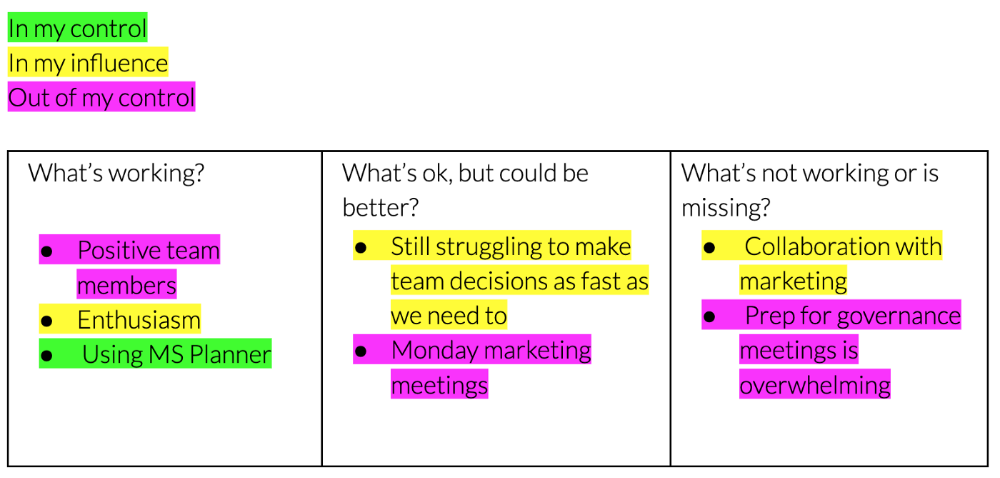
Next, consider the color constellation. Discuss these questions:
Is one color much more prevalent than the other? Why, if so?
Are the colors for the "what's working," "what's fine," and "what's not working" categories clearly distinct? Why, if so?
Do you have any disagreements? If yes, specifically where does your viewpoint differ? What activities do you object to? (Remember, there is no right or wrong in this. Give explicit details and ask questions with curiosity.)
Example: Based on the colors, you can ask, Is the marketing meeting's quality beyond your control? Were our marketing partners consulted? Are there any parts of team decisions we can control? We can't control people, but have we explored another decision-making method? How can we collaborate and generate governance-related information to reduce work, even if the requirement for prep can't be eliminated?
Consider the top one or two topics for this conversation. No 1:1 can cover everything, and that's OK. Focus on the present.
Part IV: Determine the next step (5 minutes)
Last, examine what this conversation means for you and your team member. It's easy to think we know the next moves when we don't.
Like what? You and your teammate answer these questions.
What does this signify moving ahead for me? What can I do to change this? Make requests, for instance, and see how people respond before thinking they won't be responsive.
What demands do I have on other people or my partners? What should I do first? E.g. Make a suggestion to marketing that we hold a monthly retrospective so we can address problems and exchange input more frequently. Include it on the meeting's agenda for next Monday.
Close the 1:1 by sharing what you noticed about the chat. Observations? Learn anything?
Yourself, you, and the 1:1
As a leader, you either reinforce or disrupt habits. Try this template if you desire greater ownership, empowerment, or creativity. Consider how you affect surrounding dynamics. How can you expect others to try something new in high-stakes scenarios, like meetings with cross-functional partners or senior stakeholders, if you won't? How can you expect deep thought and relationship if you don't encourage it in 1:1s? What pattern could this new format disrupt or reinforce?
Fight reluctance. First attempts won't be ideal, and that's OK. You'll only learn by trying.

Onchain Wizard
4 years ago
Three Arrows Capital & Celsius Updates
I read 1k+ page 3AC liquidation documentation so you don't have to. Also sharing revised Celsius recovery plans.
3AC's liquidation documents:
Someone disclosed 3AC liquidation records in the BVI courts recently. I'll discuss the leak's timeline and other highlights.
Three Arrows Capital began trading traditional currencies in emerging markets in 2012. They switched to equities and crypto, then purely crypto in 2018.
By 2020, the firm had $703mm in net assets and $1.8bn in loans (these guys really like debt).
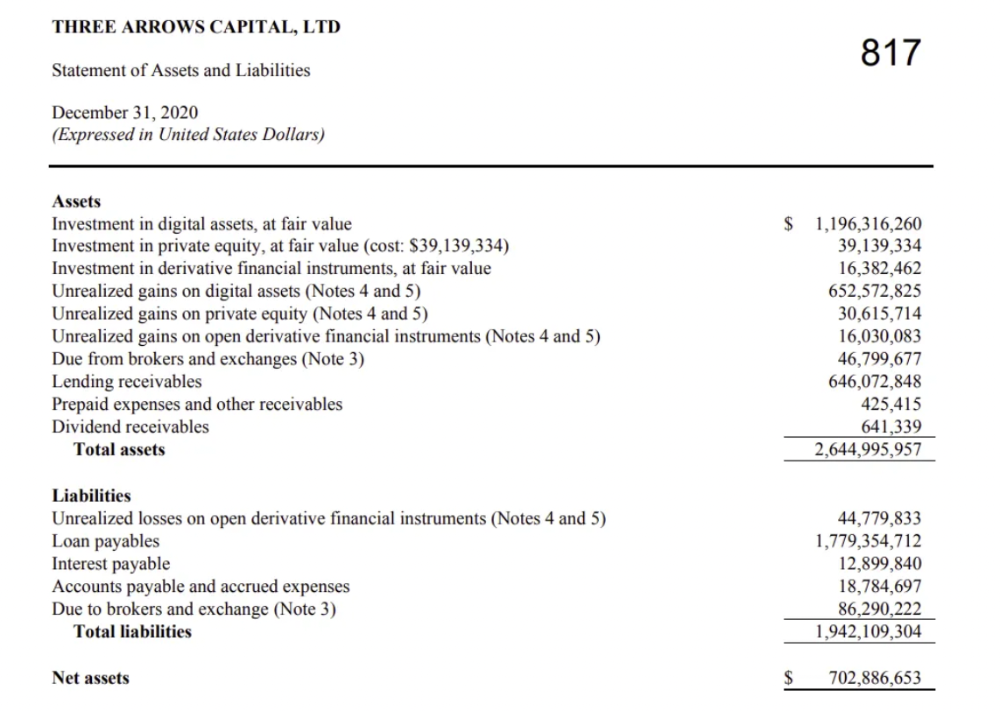
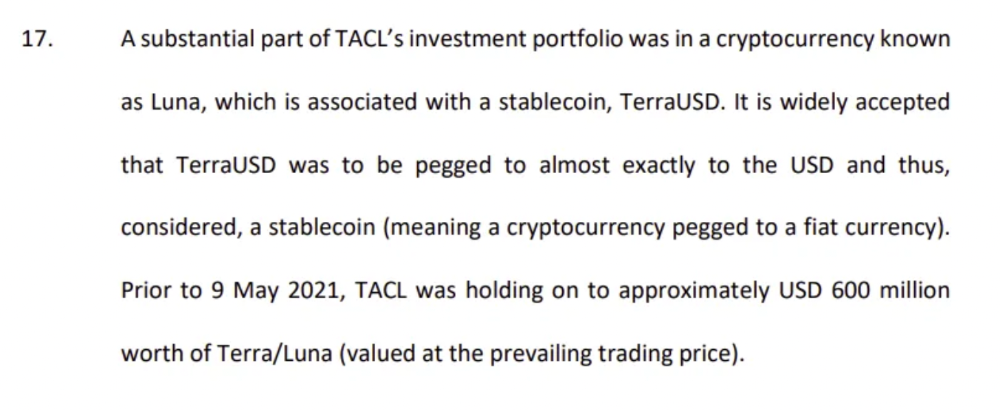
The firm's net assets under control reached $3bn in April 2022, according to the filings. 3AC had $600mm of LUNA/UST exposure before May 9th 2022, which put them over.
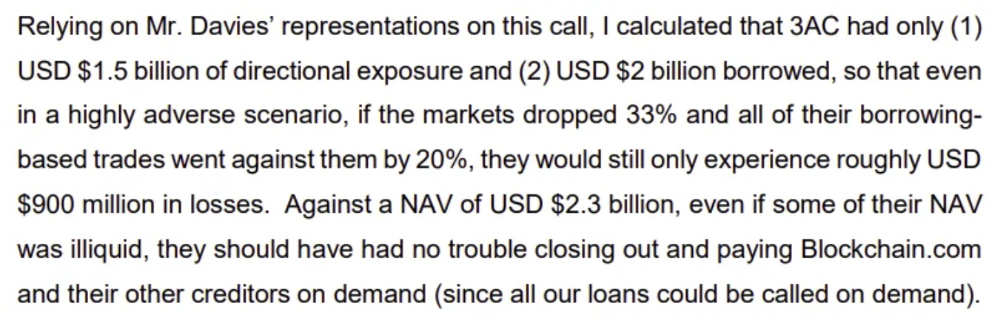
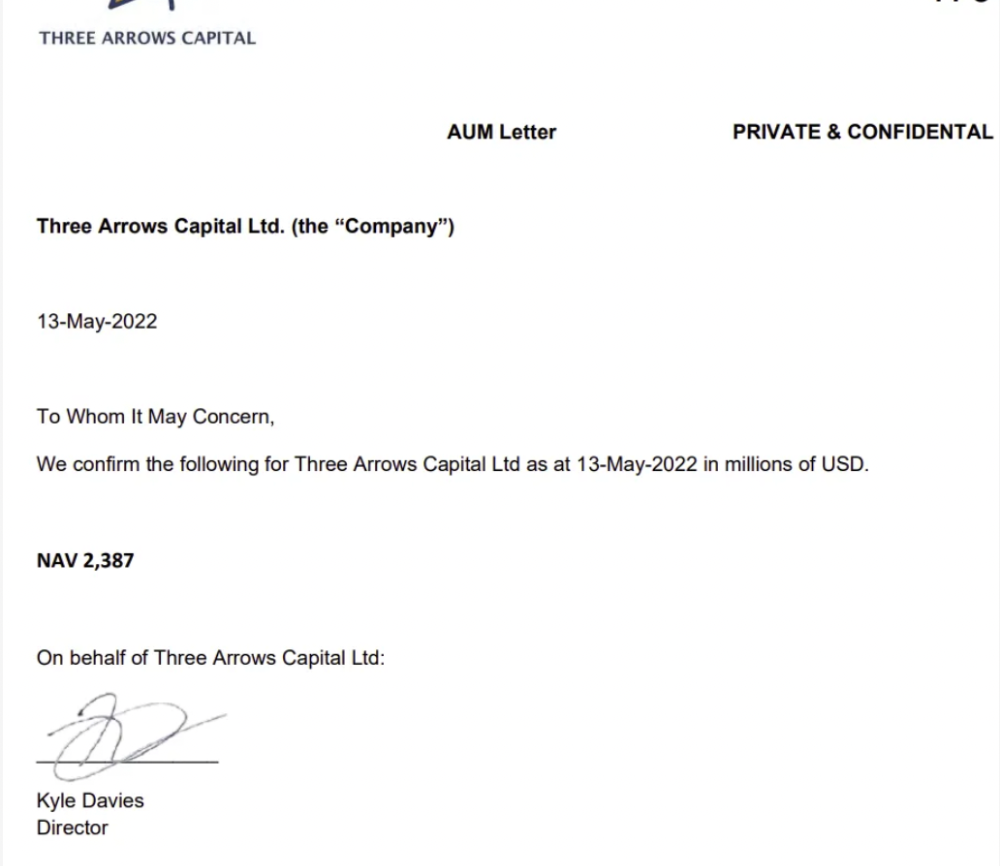
LUNA and UST go to zero quickly (I wrote about the mechanics of the blowup here). Kyle Davies, 3AC co-founder, told Blockchain.com on May 13 that they have $2.4bn in assets and $2.3bn NAV vs. $2bn in borrowings. As BTC and ETH plunged 33% and 50%, the company became insolvent by mid-2022.
3AC sent $32mm to Tai Ping Shen, a Cayman Islands business owned by Su Zhu and Davies' partner, Kelly Kaili Chen (who knows what is going on here).
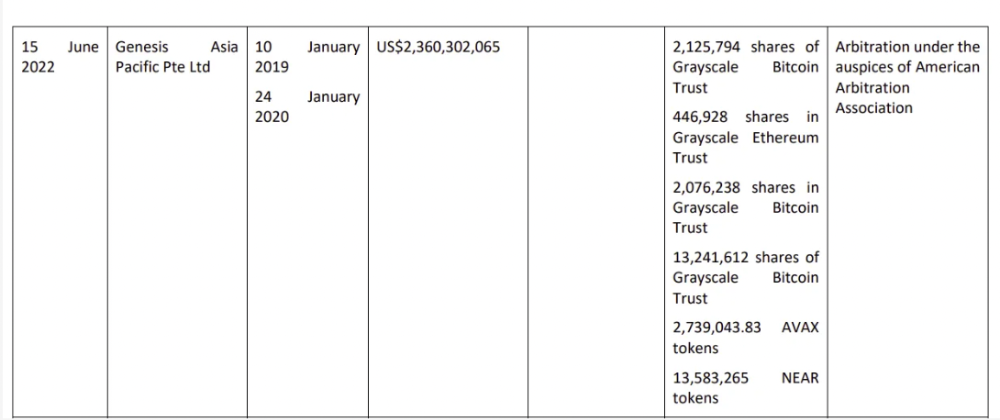
3AC had borrowed over $3.5bn in notional principle, with Genesis ($2.4bn) and Voyager ($650mm) having the most exposure.
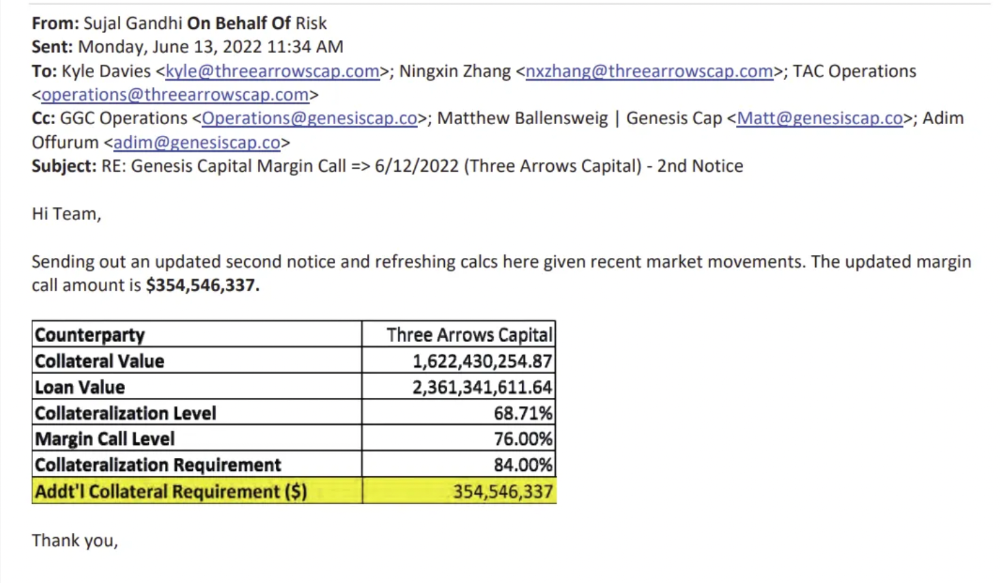
Genesis demanded $355mm in further collateral in June.
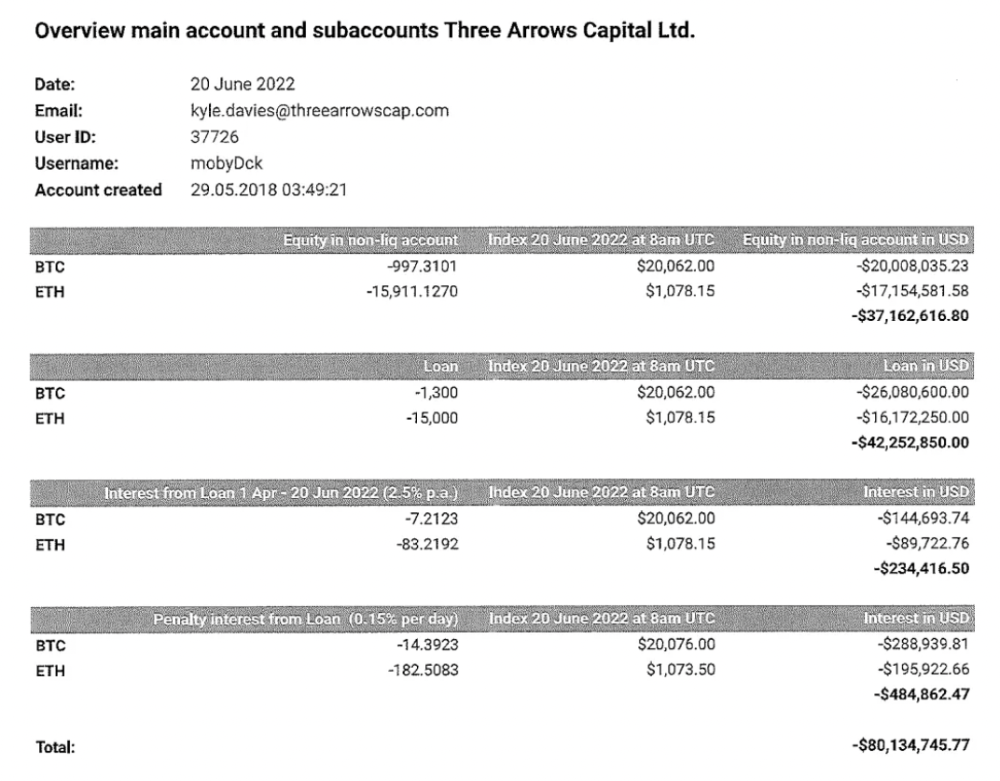
Deribit (another 3AC investment) called for $80 million in mid-June.
Even in mid-June, the corporation was trying to borrow more money to stay afloat. They approached Genesis for another $125mm loan (to pay another lender) and HODLnauts for BTC & ETH loans.
Pretty crazy. 3AC founders used borrowed money to buy a $50 million boat, according to the leak.
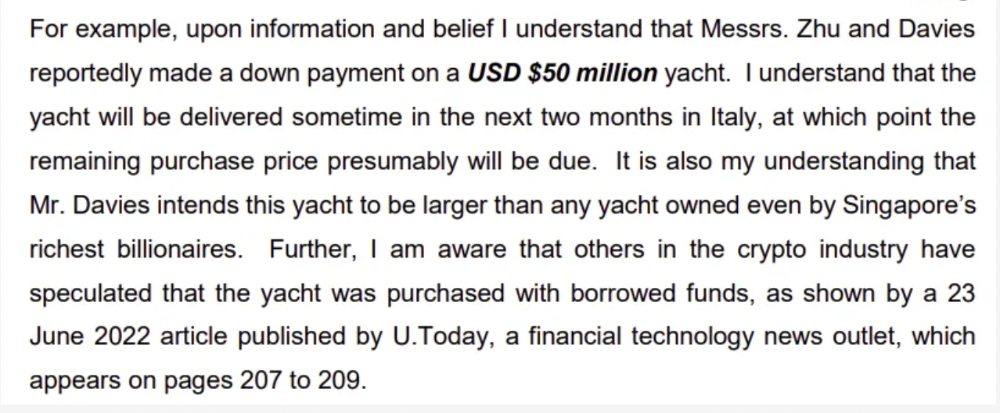
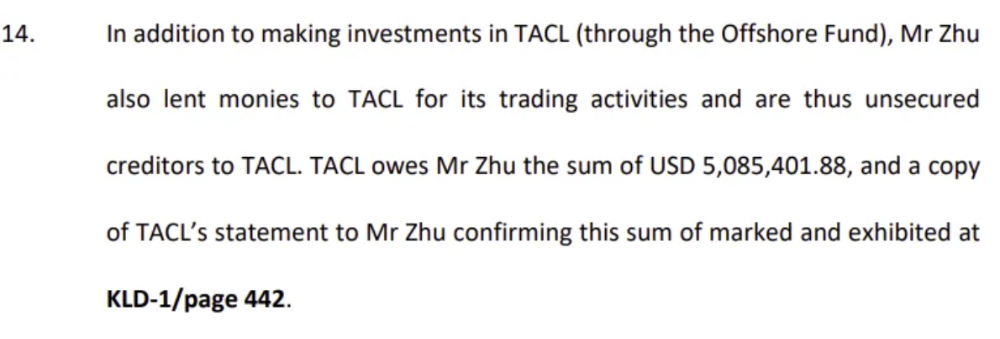
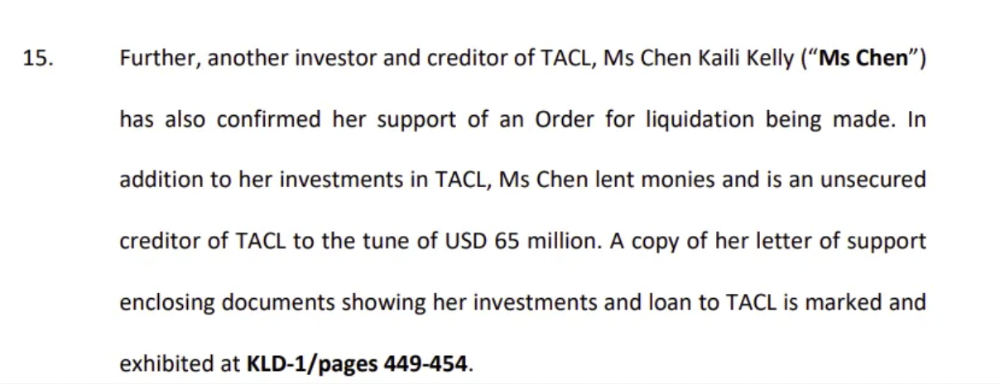
Su requesting for $5m + Chen Kaili Kelly asserting they loaned $65m unsecured to 3AC are identified as creditors.
Celsius:
This bankruptcy presentation shows the Celsius breakdown from March to July 14, 2022. From $22bn to $4bn, crypto assets plummeted from $14.6bn to $1.8bn (ouch). $16.5bn in user liabilities dropped to $4.72bn.
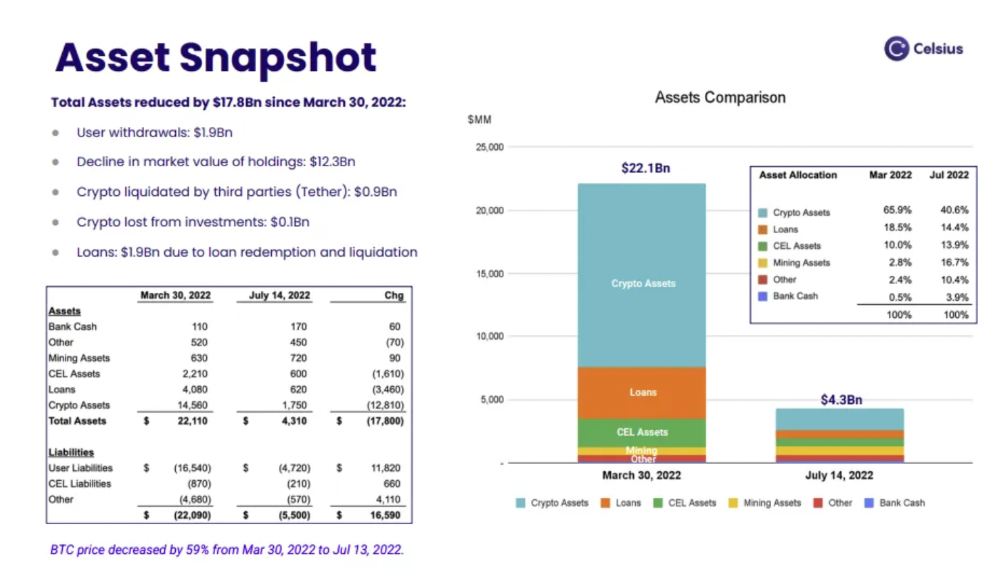
In my recent post, I examined if "forced selling" is over, with Celsius' crypto assets being a major overhang. In this presentation, it looks that Chapter 11 will provide clients the opportunity to accept cash at a discount or remain long crypto. Provided that a fresh source of money is unlikely to enter the Celsius situation, cash at a discount or crypto given to customers will likely remain a near-term market risk - cash at a discount will likely come from selling crypto assets, while customers who receive crypto could sell at any time. I'll share any Celsius updates I find.
Conclusion
Only Celsius and the Mt Gox BTC unlock remain as forced selling catalysts. While everything went through a "relief" pump, with ETH up 75% from the bottom and numerous alts multiples higher, there are still macro dangers to equities + risk assets. There's a lot of wealth waiting to be deployed in crypto ($153bn in stables), but fund managers are risk apprehensive (lower than 2008 levels).
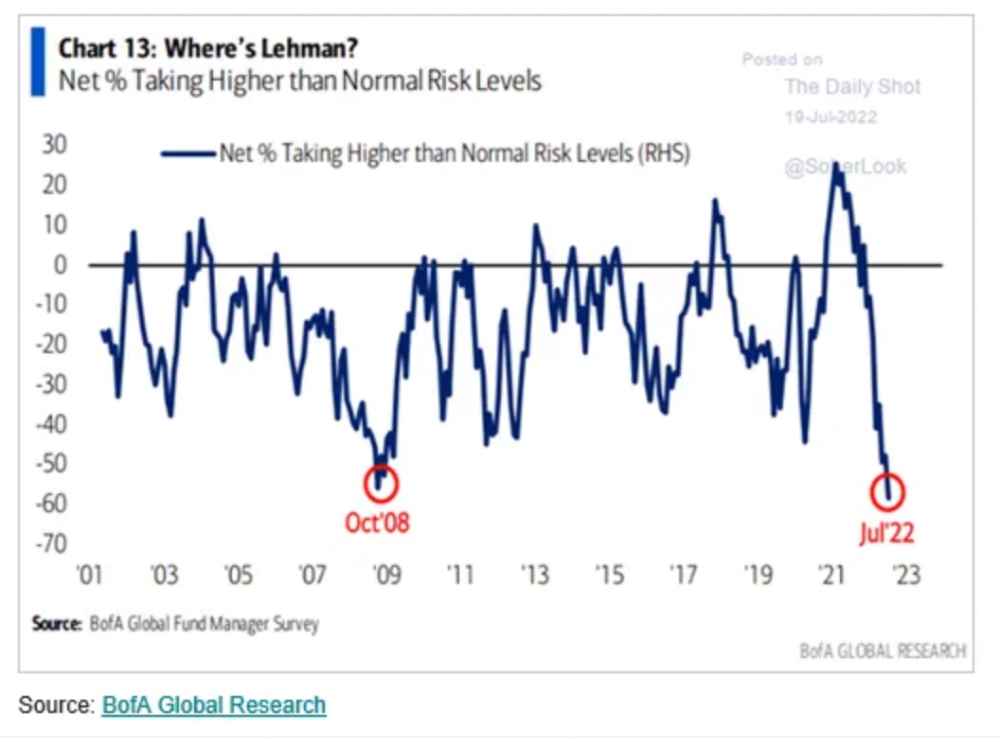
We're hopefully over crypto's "bottom," with peak anxiety and forced selling behind us, but we may chop around.
To see the full article, click here.