




More on Entrepreneurship/Creators

Jenn Leach
3 years ago
In November, I made an effort to pitch 10 brands per day. Here's what I discovered.

I pitched 10 brands per workday for a total of 200.
How did I do?
It was difficult.
I've never pitched so much.
What did this challenge teach me?
the superiority of quality over quantity
When you need help, outsource
Don't disregard burnout in order to complete a challenge because it exists.
First, pitching brands for brand deals requires quality. Find firms that align with your brand to expose to your audience.
If you associate with any company, you'll lose audience loyalty. I didn't lose sight of that, but I couldn't resist finishing the task.
Outsourcing.
Delegating work to teammates is effective.
I wish I'd done it.
Three people can pitch 200 companies a month significantly faster than one.
One person does research, one to two do outreach, and one to two do follow-up and negotiating.
Simple.
In 2022, I'll outsource everything.
Burnout.
I felt this, so I slowed down at the end of the month.
Thanksgiving week in November was slow.
I was buying and decorating for Christmas. First time putting up outdoor holiday lights was fun.
Much was happening.
I'm not perfect.
I'm being honest.
The Outcomes
Less than 50 brands pitched.
Result: A deal with 3 brands.
I hoped for 4 brands with reaching out to 200 companies, so three with under 50 is wonderful.
That’s a 6% conversion rate!
Whoo-hoo!
I needed 2%.
Here's a screenshot from one of the deals I booked.
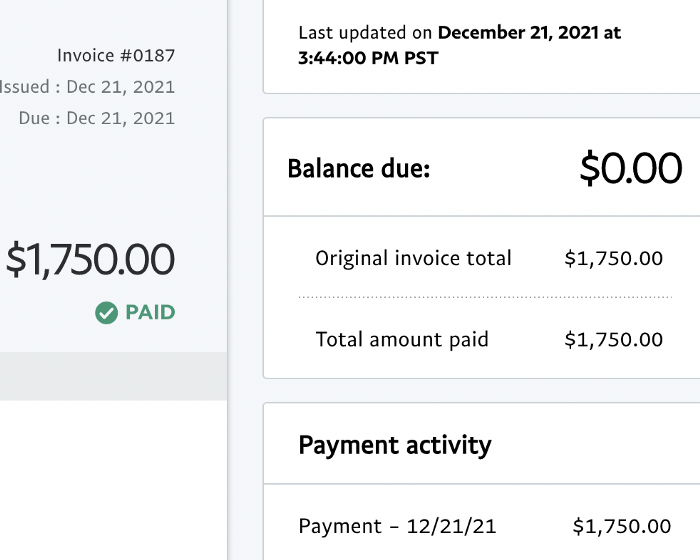
These companies fit my company well. Each campaign is different, but I've booked $2,450 in brand work with a couple of pending transactions for December and January.
$2,450 in brand work booked!
How did I do? You tell me.
Is this something you’d try yourself?

Emils Uztics
3 years ago
This billionaire created a side business that brings around $90,000 per month.
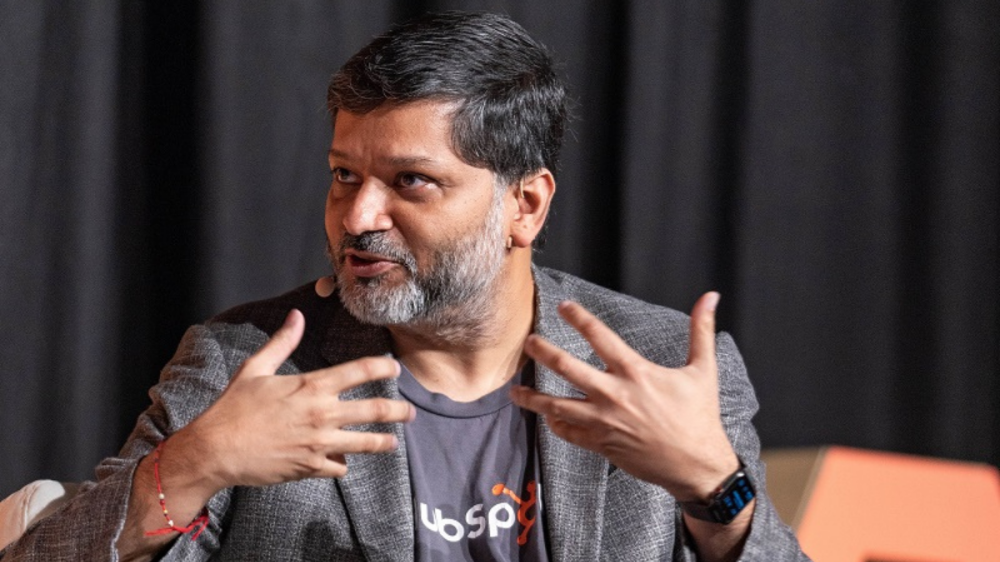
Dharmesh Shah co-founded HubSpot. WordPlay reached $90,000 per month in revenue without utilizing any of his wealth.
His method:
Take Advantage Of An Established Trend
Remember Wordle? Dharmesh was instantly hooked. As was the tech world.
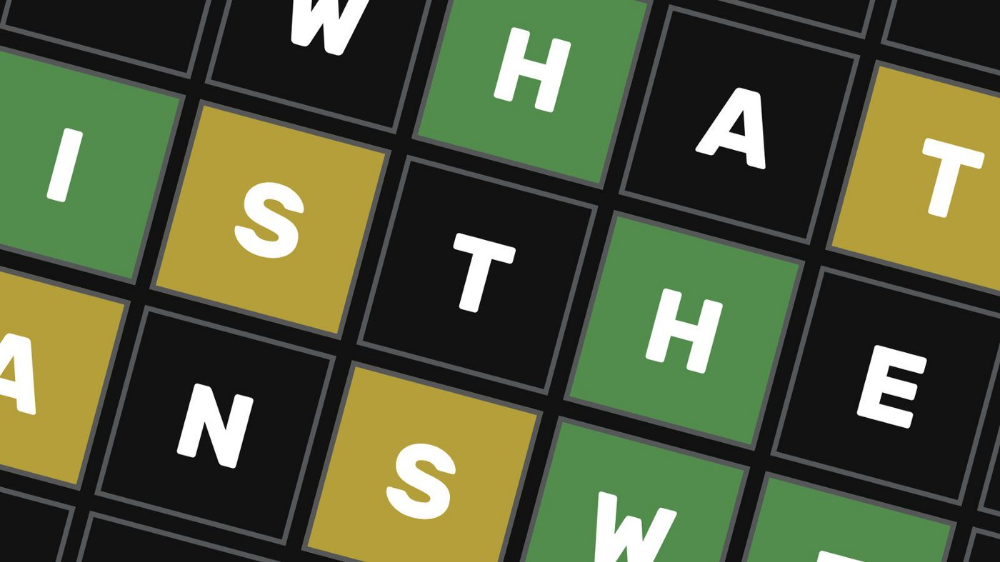
HubSpot's co-founder noted inefficiencies in a recent My First Million episode. He wanted to play daily. Dharmesh, a tinkerer and software engineer, decided to design a word game.
He's a billionaire. How could he?
Wordle had limitations in his opinion;
Dharmesh is fundamentally a developer. He desired to start something new and increase his programming knowledge;
This project may serve as an excellent illustration for his son, who had begun learning about software development.
Better It Up
Building a new Wordle wasn't successful.
WordPlay lets you play with friends and family. You could challenge them and compare the results. It is a built-in growth tool.
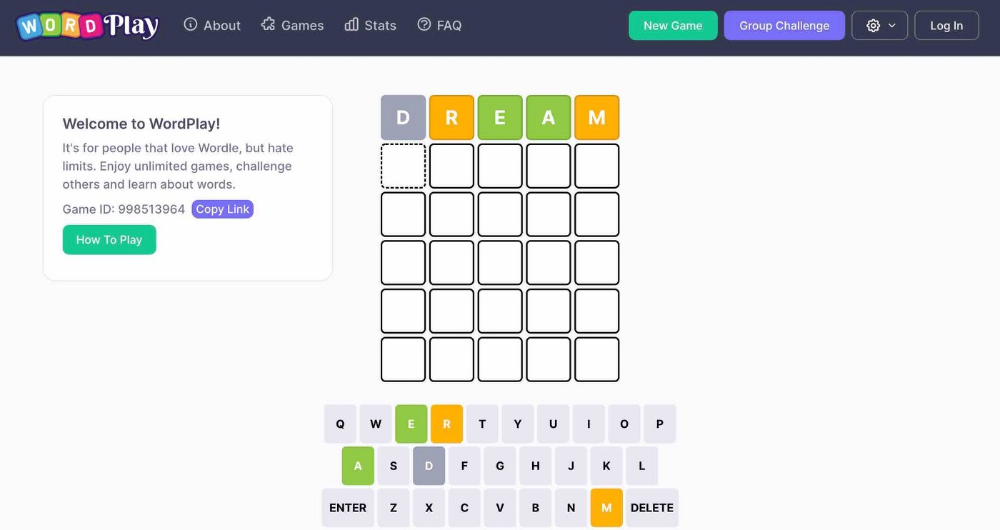
WordPlay features:
the capacity to follow sophisticated statistics after creating an account;
continuous feedback on your performance;
Outstanding domain name (wordplay.com).
Project Development
WordPlay has 9.5 million visitors and 45 million games played since February.
HubSpot co-founder credits tremendous growth to flywheel marketing, pushing the game through his own following.
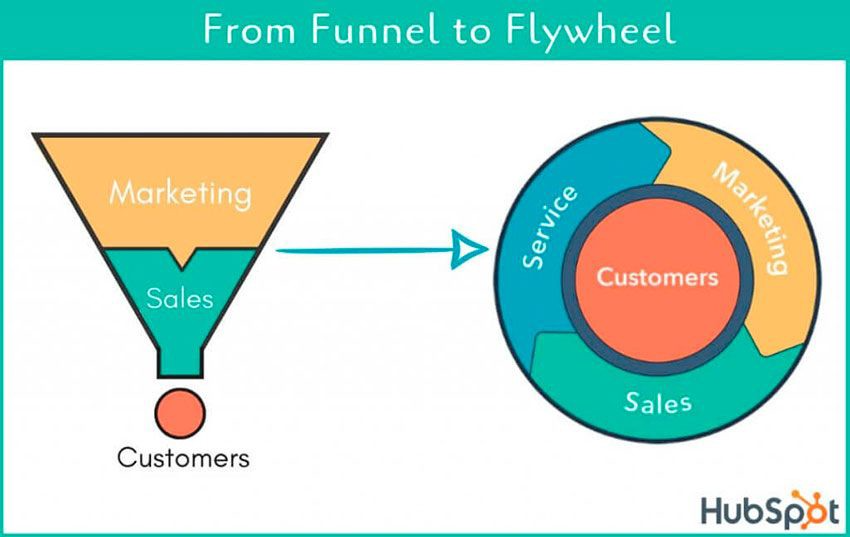
Choosing an exploding specialty and making sharing easy also helped.
Shah enabled Google Ads on the website to test earning potential. Monthly revenue was $90,000.
That's just Google Ads. If monetization was the goal, a specialized ad network like Ezoic could double or triple the amount.
Wordle was a great buy for The New York Times at $1 million.

Sammy Abdullah
3 years ago
R&D, S&M, and G&A expense ratios for SaaS
SaaS spending is 40/40/20. 40% of operating expenses should be R&D, 40% sales and marketing, and 20% G&A. We wanted to see the statistics behind the rules of thumb. Since October 2017, 73 SaaS startups have gone public. Perhaps the rule of thumb should be 30/50/20. The data is below.
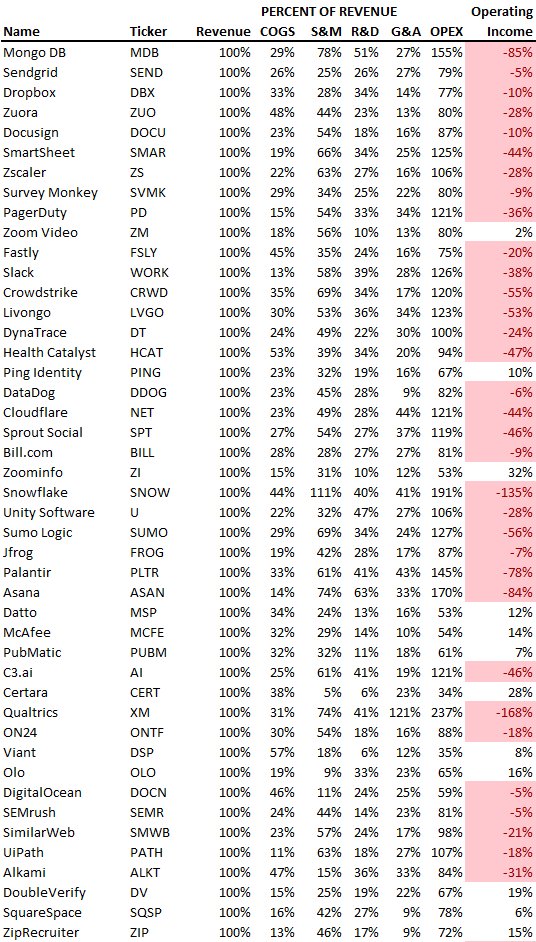
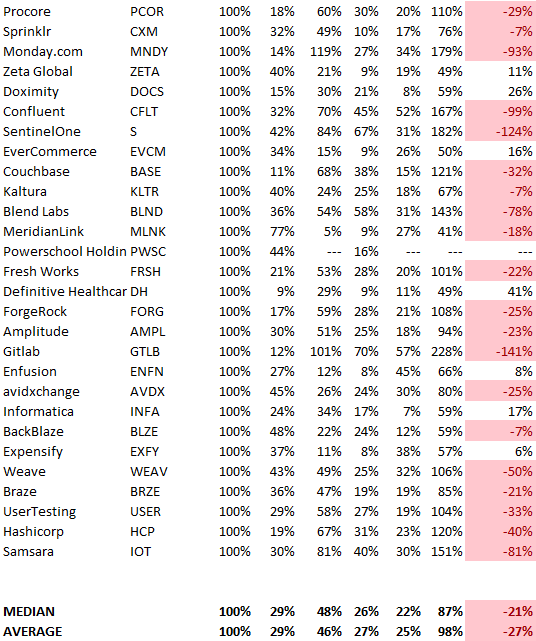
30/50/20. R&D accounts for 26% of opex, sales and marketing 48%, and G&A 22%. We think R&D/S&M/G&A should be 30/50/20.
There are outliers. There are exceptions to rules of thumb. Dropbox spent 45% on R&D whereas Zoom spent 13%. Zoom spent 73% on S&M, Dropbox 37%, and Bill.com 28%. Snowflake spent 130% of revenue on S&M, while their EBITDA margin is -192%.
G&A shouldn't stand out. Minimize G&A spending. Priorities should be product development and sales. Cloudflare, Sendgrid, Snowflake, and Palantir spend 36%, 34%, 37%, and 43% on G&A.
Another myth is that COGS is 20% of revenue. Median and averages are 29%.
Where is the profitability? Data-driven operating income calculations were simplified (Revenue COGS R&D S&M G&A). 20 of 73 IPO businesses reported operational income. Median and average operating income margins are -21% and -27%.
As long as you're growing fast, have outstanding retention, and marquee clients, you can burn cash since recurring income that doesn't churn is a valuable annuity.
The data was compelling overall. 30/50/20 is the new 40/40/20 for more established SaaS enterprises, unprofitability is alright as long as your business is expanding, and COGS can be somewhat more than 20% of revenue.
You might also like

Alex Mathers
3 years ago Draft
12 practices of the zenith individuals I know
Calmness is a vital life skill.
It aids communication. It boosts creativity and performance.
I've studied calm people's habits for years. Commonalities:
Have learned to laugh at themselves.
Those who have something to protect can’t help but make it a very serious business, which drains the energy out of the room.
They are fixated on positive pursuits like making cool things, building a strong physique, and having fun with others rather than on depressing influences like the news and gossip.
Every day, spend at least 20 minutes moving, whether it's walking, yoga, or lifting weights.
Discover ways to take pleasure in life's challenges.
Since perspective is malleable, they change their view.
Set your own needs first.
Stressed people neglect themselves and wonder why they struggle.
Prioritize self-care.
Don't ruin your life to please others.
Make something.
Calm people create more than react.
They love creating beautiful things—paintings, children, relationships, and projects.
Hold your breath, please.
If you're stressed or angry, you may be surprised how much time you spend holding your breath and tightening your belly.
Release, breathe, and relax to find calm.
Stopped rushing.
Rushing is disadvantageous.
Calm people handle life better.
Are attuned to their personal dietary needs.
They avoid junk food and eat foods that keep them healthy, happy, and calm.
Don’t take anything personally.
Stressed people control everything.
Self-conscious.
Calm people put others and their work first.
Keep their surroundings neat.
Maintaining an uplifting and clutter-free environment daily calms the mind.
Minimise negative people.
Calm people are ruthless with their boundaries and avoid negative and drama-prone people.

Caspar Mahoney
3 years ago
Changing Your Mindset From a Project to a Product
Product game mindsets? How do these vary from Project mindset?
1950s spawned the Iron Triangle. Project people everywhere know and live by it. In stakeholder meetings, it is used to stretch the timeframe, request additional money, or reduce scope.
Quality was added to this triangle as things matured.
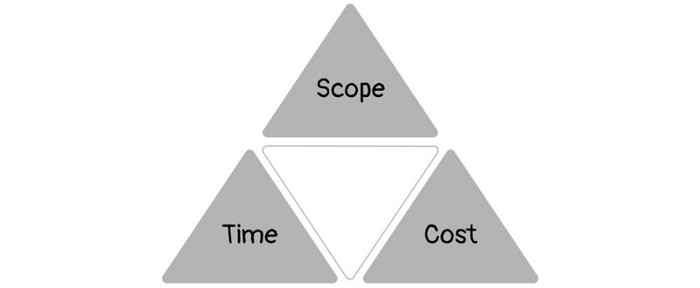
Quality was intended to be transformative, but none of these principles addressed why we conduct projects.
Value and benefits are key.
Product value is quantified by ROI, revenue, profit, savings, or other metrics. For me, every project or product delivery is about value.
Most project managers, especially those schooled 5-10 years or more ago (thousands working in huge corporations worldwide), understand the world in terms of the iron triangle. What does that imply? They worry about:
a) enough time to get the thing done.
b) have enough resources (budget) to get the thing done.
c) have enough scope to fit within (a) and (b) >> note, they never have too little scope, not that I have ever seen! although, theoretically, this could happen.
Boom—iron triangle.
To make the triangle function, project managers will utilize formal governance (Steering) to move those things. Increase money, scope, or both if time is short. Lacking funds? Increase time, scope, or both.
In current product development, shifting each item considerably may not yield value/benefit.
Even terrible. This approach will fail because it deprioritizes Value/Benefit by focusing the major stakeholders (Steering participants) and delivery team(s) on Time, Scope, and Budget restrictions.
Pre-agile, this problem was terrible. IT projects failed wildly. History is here.
Value, or benefit, is central to the product method. Product managers spend most of their time planning value-delivery paths.
Product people consider risk, schedules, scope, and budget, but value comes first. Let me illustrate.
Imagine managing internal products in an enterprise. Your core customer team needs a rapid text record of a chat to fix a problem. The consumer wants a feature/features added to a product you're producing because they think it's the greatest spot.
Project-minded, I may say;
Ok, I have budget as this is an existing project, due to run for a year. This is a new requirement to add to the features we’re already building. I think I can keep the deadline, and include this scope, as it sounds related to the feature set we’re building to give the desired result”.
This attitude repeats Scope, Time, and Budget.
Since it meets those standards, a project manager will likely approve it. If they have a backlog, they may add it and start specking it out assuming it will be built.
Instead, think like a product;
What problem does this feature idea solve? Is that problem relevant to the product I am building? Can that problem be solved quicker/better via another route ? Is it the most valuable problem to solve now? Is the problem space aligned to our current or future strategy? or do I need to alter/update the strategy?
A product mindset allows you to focus on timing, resource/cost, feasibility, feature detail, and so on after answering the aforementioned questions.
The above oversimplifies because
Leadership in discovery

Project managers are facilitators of ideas. This is as far as they normally go in the ‘idea’ space.
Business Requirements collection in classic project delivery requires extensive upfront documentation.
Agile project delivery analyzes requirements iteratively.
However, the project manager is a facilitator/planner first and foremost, therefore topic knowledge is not expected.
I mean business domain, not technical domain (to confuse matters, it is true that in some instances, it can be both technical and business domains that are important for a single individual to master).
Product managers are domain experts. They will become one if they are training/new.
They lead discovery.
Product Manager-led discovery is much more than requirements gathering.
Requirements gathering involves a Business Analyst interviewing people and documenting their requests.
The project manager calculates what fits and what doesn't using their Iron Triangle (presumably in their head) and reports back to Steering.
If this requirements-gathering exercise failed to identify requirements, what would a project manager do? or bewildered by project requirements and scope?
They would tell Steering they need a Business SME or Business Lead assigning or more of their time.
Product discovery requires the Product Manager's subject knowledge and a new mindset.
How should a Product Manager handle confusing requirements?
Product Managers handle these challenges with their talents and tools. They use their own knowledge to fill in ambiguity, but they have the discipline to validate those assumptions.
To define the problem, they may perform qualitative or quantitative primary research.
They might discuss with UX and Engineering on a whiteboard and test assumptions or hypotheses.
Do Product Managers escalate confusing requirements to Steering/Senior leaders? They would fix that themselves.
Product managers raise unclear strategy and outcomes to senior stakeholders. Open talks, soft skills, and data help them do this. They rarely raise requirements since they have their own means of handling them without top stakeholder participation.
Discovery is greenfield, exploratory, research-based, and needs higher-order stakeholder management, user research, and UX expertise.
Product Managers also aid discovery. They lead discovery. They will not leave customer/user engagement to a Business Analyst. Administratively, a business analyst could aid. In fact, many product organizations discourage business analysts (rely on PM, UX, and engineer involvement with end-users instead).
The Product Manager must drive user interaction, research, ideation, and problem analysis, therefore a Product professional must be skilled and confident.
Creating vs. receiving and having an entrepreneurial attitude

Product novices and project managers focus on details rather than the big picture. Project managers prefer spreadsheets to strategy whiteboards and vision statements.
These folks ask their manager or senior stakeholders, "What should we do?"
They then elaborate (in Jira, in XLS, in Confluence or whatever).
They want that plan populated fast because it reduces uncertainty about what's going on and who's supposed to do what.
Skilled Product Managers don't only ask folks Should we?
They're suggesting this, or worse, Senior stakeholders, here are some options. After asking and researching, they determine what value this product adds, what problems it solves, and what behavior it changes.
Therefore, to move into Product, you need to broaden your view and have courage in your ability to discover ideas, find insightful pieces of information, and collate them to form a valuable plan of action. You are constantly defining RoI and building Business Cases, so much so that you no longer create documents called Business Cases, it is simply ingrained in your work through metrics, intelligence, and insights.
Product Management is not a free lunch.
Plateless.
Plates and food must be prepared.
In conclusion, Product Managers must make at least three mentality shifts:
You put value first in all things. Time, money, and scope are not as important as knowing what is valuable.
You have faith in the field and have the ability to direct the search. YYou facilitate, but you don’t just facilitate. You wouldn't want to limit your domain expertise in that manner.
You develop concepts, strategies, and vision. You are not a waiter or an inbox where other people can post suggestions; you don't merely ask folks for opinion and record it. However, you excel at giving things that aren't clearly spoken or written down physical form.
Scott Duke Kominers
3 years ago
NFT Creators Go Creative Commons Zero (cc0)
On January 1, "Public Domain Day," thousands of creative works immediately join the public domain. The original creator or copyright holder loses exclusive rights to reproduce, adapt, or publish the work, and anybody can use it. It happens with movies, poems, music, artworks, books (where creative rights endure 70 years beyond the author's death), and sometimes source code.
Public domain creative works open the door to new uses. 400,000 sound recordings from before 1923, including Winnie-the-Pooh, were released this year. With most of A.A. Milne's 1926 Winnie-the-Pooh characters now available, we're seeing innovative interpretations Milne likely never planned. The ancient hyphenated version of the honey-loving bear is being adapted for a horror movie: "Winnie-the-Pooh: Blood and Honey"... with Pooh and Piglet as the baddies.
Counterintuitively, experimenting and recombination can occasionally increase IP value. Open source movements allow the public to build on (or fork and duplicate) existing technologies. Permissionless innovation helps Android, Linux, and other open source software projects compete. Crypto's success at attracting public development is also due to its support of open source and "remix culture," notably in NFT forums.
Production memes
NFT projects use several IP strategies to establish brands, communities, and content. Some preserve regular IP protections; others offer NFT owners the opportunity to innovate on connected IP; yet others have removed copyright and other IP safeguards.
By using the "Creative Commons Zero" (cc0) license, artists can intentionally select for "no rights reserved." This option permits anyone to benefit from derivative works without legal repercussions. There's still a lot of confusion between copyrights and NFTs, so nothing here should be considered legal, financial, tax, or investment advice. Check out this post for an overview of copyright vulnerabilities with NFTs and how authors can protect owners' rights. This article focuses on cc0.
Nouns, a 2021 project, popularized cc0 for NFTs. Others followed, including: A Common Place, Anonymice, Blitmap, Chain Runners, Cryptoadz, CryptoTeddies, Goblintown, Gradis, Loot, mfers, Mirakai, Shields, and Terrarium Club are cc0 projects.
Popular crypto artist XCOPY licensed their 1-of-1 NFT artwork "Right-click and Save As Guy" under cc0 in January, exactly one month after selling it. cc0 has spawned many derivatives.
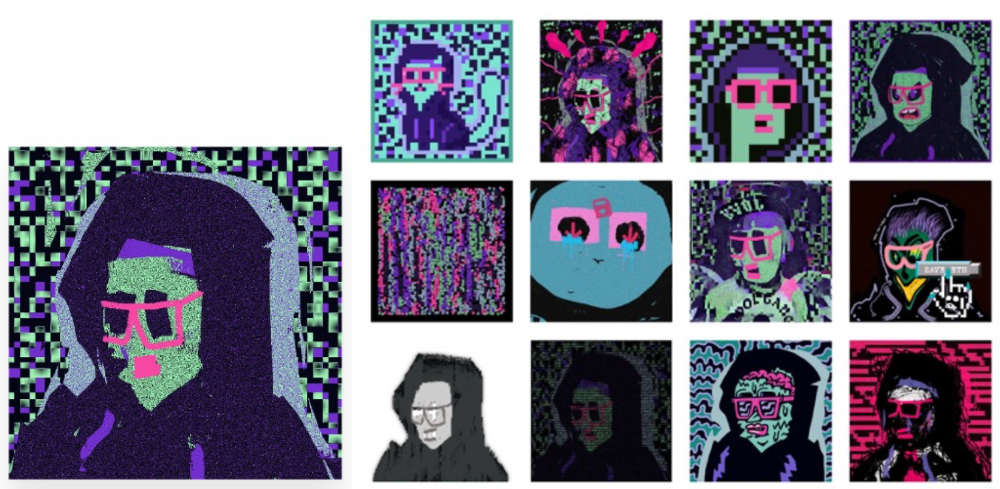
"Right-click Save As Guy" by XCOPY (1)/derivative works (2)
XCOPY said Monday he would apply cc0 to "all his existing art." "We haven't seen a cc0 summer yet, but I think it's approaching," said the artist. - predicting a "DeFi summer" in 2020, when decentralized finance gained popularity.
Why do so many NFT authors choose "no rights"?
Promoting expansions of the original project to create a more lively and active community is one rationale. This makes sense in crypto, where many value open sharing and establishing community.
Creativity depends on cultural significance. NFTs may allow verifiable ownership of any digital asset, regardless of license, but cc0 jumpstarts "meme-ability" by actively, not passively, inviting derivative works. As new derivatives are made and shared, attention might flow back to the original, boosting its reputation. This may inspire new interpretations, leading in a flywheel effect where each derivative adds to the original's worth - similar to platform network effects, where platforms become more valuable as more users join them.
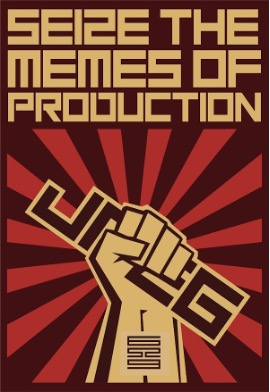
cc0 licence allows creators "seize production memes."
Physical items are also using cc0 NFT assets, thus it's not just a digital phenomenon. The Nouns Vision initiative turned the square-framed spectacles shown on each new NounsDAO NFT ("one per day, forever") into luxury sunglasses. Blitmap's pixel-art has been used on shoes, apparel, and caps. In traditional IP regimes, a single owner controls creation, licensing, and production.
The physical "blitcap" (3rd level) is a descendant of the trait in the cc0 Chain Runners collection (2nd), which uses the "logo" from cc0 Blitmap (1st)! The Logo is Blitmap token #84 and has been used as a trait in various collections. The "Dom Rose" is another popular token. These homages reference Blitmap's influence as a cc0 leader, as one of the earliest NFT projects to proclaim public domain intents. A new collection, Citizens of Tajigen, emerged last week with a Blitcap characteristic.
These derivatives can be a win-win for everyone, not just the original inventors, especially when using NFT assets to establish unique brands. As people learn about the derivative, they may become interested in the original. If you see someone wearing Nouns glasses on the street (or in a Super Bowl ad), you may desire a pair, but you may also be interested in buying an original NounsDAO NFT or related derivative.
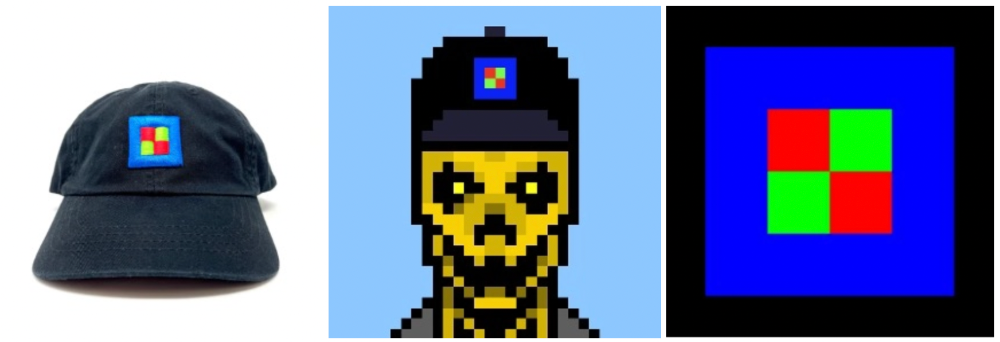
Blitmap Logo Hat (1), Chain Runners #780 ft. Hat (2), and Blitmap Original "Logo #87" (3)
Co-creating open source
NFTs' power comes from smart contract technology's intrinsic composability. Many smart contracts can be integrated or stacked to generate richer applications.
"Money Legos" describes how decentralized finance ("DeFi") smart contracts interconnect to generate new financial use cases. Yearn communicates with MakerDAO's stablecoin $DAI and exchange liquidity provider Curve by calling public smart contract methods. NFTs and their underlying smart contracts can operate as the base-layer framework for recombining and interconnecting culture and creativity.
cc0 gives an NFT's enthusiast community authority to develop new value layers whenever, wherever, and however they wish.
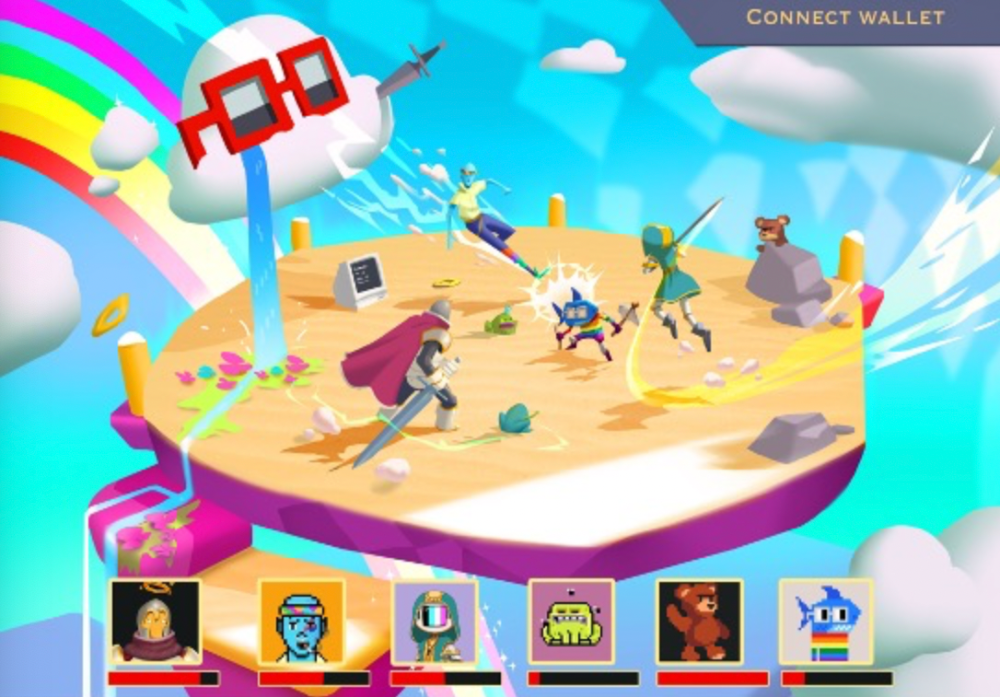
Multiple cc0 projects are playable characters in HyperLoot, a Loot Project knockoff.
Open source and Linux's rise are parallels. When the internet was young, Microsoft dominated the OS market with Windows. Linux (and its developer Linus Torvalds) championed a community-first mentality, freely available the source code without restrictions. This led to developers worldwide producing new software for Linux, from web servers to databases. As people (and organizations) created world-class open source software, Linux's value proposition grew, leading to explosive development and industry innovation. According to Truelist, Linux powers 96.3% of the top 1 million web servers and 85% of smartphones.
With cc0 licensing empowering NFT community builders, one might hope for long-term innovation. Combining cc0 with NFTs "turns an antagonistic game into a co-operative one," says NounsDAO cofounder punk4156. It's important on several levels. First, decentralized systems from open source to crypto are about trust and coordination, therefore facilitating cooperation is crucial. Second, the dynamics of this cooperation work well in the context of NFTs because giving people ownership over their digital assets allows them to internalize the results of co-creation through the value that accrues to their assets and contributions, which incentivizes them to participate in co-creation in the first place.
Licensed to create
If cc0 projects are open source "applications" or "platforms," then NFT artwork, metadata, and smart contracts provide the "user interface" and the underlying blockchain (e.g., Ethereum) is the "operating system." For these apps to attain Linux-like potential, more infrastructure services must be established and made available so people may take advantage of cc0's remixing capabilities.
These services are developing. Zora protocol and OpenSea's open source Seaport protocol enable open, permissionless NFT marketplaces. A pixel-art-rendering engine was just published on-chain to the Ethereum blockchain and integrated into OKPC and ICE64. Each application improves blockchain's "out-of-the-box" capabilities, leading to new apps created from the improved building blocks.
Web3 developer growth is at an all-time high, yet it's still a small fraction of active software developers globally. As additional developers enter the field, prospective NFT projects may find more creative and infrastructure Legos for cc0 and beyond.
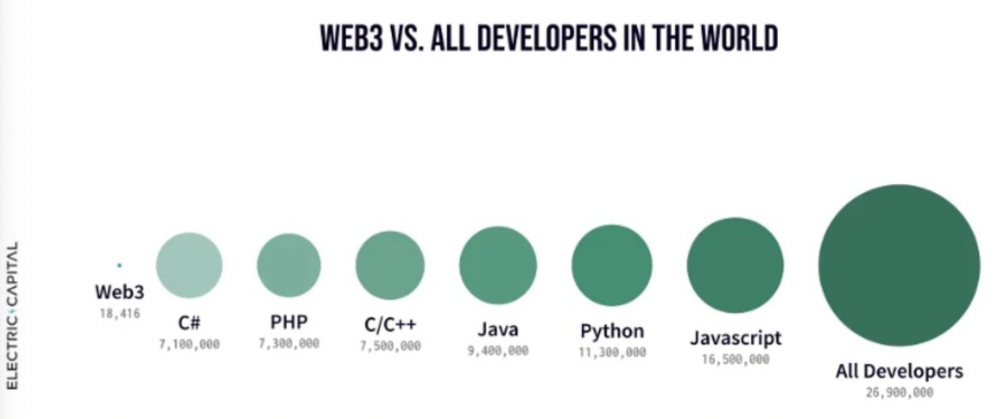
Electric Capital Developer Report (2021), p. 122
Growth requires composability. Users can easily integrate digital assets developed on public standards and compatible infrastructure into other platforms. The Loot Project is one of the first to illustrate decentralized co-creation, worldbuilding, and more in NFTs. This example was low-fi or "incomplete" aesthetically, providing room for imagination and community co-creation.
Loot began with a series of Loot bag NFTs, each listing eight "adventure things" in white writing on a black backdrop (such as Loot Bag #5726's "Katana, Divine Robe, Great Helm, Wool Sash, Divine Slippers, Chain Gloves, Amulet, Gold Ring"). Dom Hofmann's free Loot bags served as a foundation for the community.
Several projects have begun metaphorical (lore) and practical (game development) world-building in a short time, with artists contributing many variations to the collective "Lootverse." They've produced games (Realms & The Crypt), characters (Genesis Project, Hyperloot, Loot Explorers), storytelling initiatives (Banners, OpenQuill), and even infrastructure (The Rift).
Why cc0 and composability? Because consumers own and control Loot bags, they may use them wherever they choose by connecting their crypto wallets. This allows users to participate in multiple derivative projects, such as Genesis Adventurers, whose characters appear in many others — creating a decentralized franchise not owned by any one corporation.
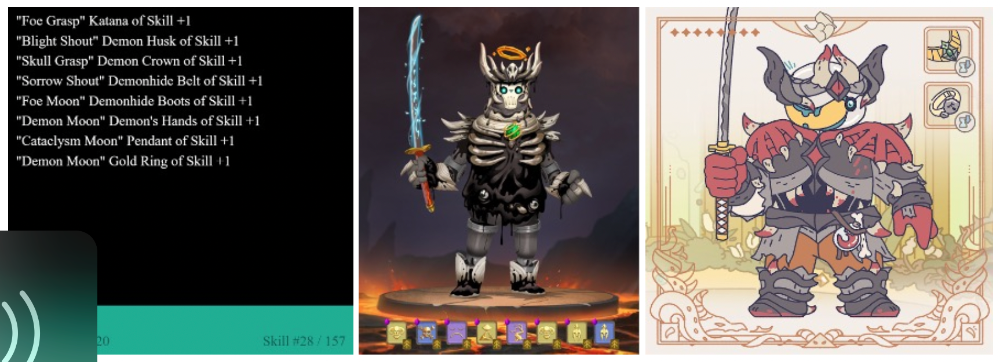
Genesis Project's Genesis Adventurer (1) with HyperLoot (2) and Loot Explorer (3) versions
When to go cc0
There are several IP development strategies NFT projects can use. When it comes to cc0, it’s important to be realistic. The public domain won't make a project a runaway success just by implementing the license. cc0 works well for NFT initiatives that can develop a rich, enlarged ecosystem.
Many of the most successful cc0 projects have introduced flexible intellectual property. The Nouns brand is as obvious for a beer ad as for real glasses; Loot bags are simple primitives that make sense in all adventure settings; and the Goblintown visual style looks good on dwarfs, zombies, and cranky owls as it does on Val Kilmer.
The ideal cc0 NFT project gives builders the opportunity to add value:
vertically, by stacking new content and features directly on top of the original cc0 assets (for instance, as with games built on the Loot ecosystem, among others), and
horizontally, by introducing distinct but related intellectual property that helps propagate the original cc0 project’s brand (as with various Goblintown derivatives, among others).
These actions can assist cc0 NFT business models. Because cc0 NFT projects receive royalties from secondary sales, third-party extensions and derivatives can boost demand for the original assets.
Using cc0 license lowers friction that could hinder brand-reinforcing extensions or lead to them bypassing the original. Robbie Broome recently argued (in the context of his cc0 project A Common Place) that giving away his IP to cc0 avoids bad rehashes down the line. If UrbanOutfitters wanted to put my design on a tee, they could use the actual work instead of hiring a designer. CC0 can turn competition into cooperation.
Community agreement about core assets' value and contribution can help cc0 projects. Cohesion and engagement are key. Using the above examples: Developers can design adventure games around whatever themes and item concepts they desire, but many choose Loot bags because of the Lootverse's community togetherness. Flipmap shared half of its money with the original Blitmap artists in acknowledgment of that project's core role in the community. This can build a healthy culture within a cc0 project ecosystem. Commentator NiftyPins said it was smart to acknowledge the people that constructed their universe. Many OG Blitmap artists have popped into the Flipmap discord to share information.
cc0 isn't a one-size-fits-all answer; NFTs formed around well-established brands may prefer more restrictive licenses to preserve their intellectual property and reinforce exclusivity. cc0 has some superficial similarities to permitting NFT owners to market the IP connected with their NFTs (à la Bored Ape Yacht Club), but there is a significant difference: cc0 holders can't exclude others from utilizing the same IP. This can make it tougher for holders to develop commercial brands on cc0 assets or offer specific rights to partners. Holders can still introduce enlarged intellectual property (such as backstories or derivatives) that they control.
Blockchain technologies and the crypto ethos are decentralized and open-source. This makes it logical for crypto initiatives to build around cc0 content models, which build on the work of the Creative Commons foundation and numerous open source pioneers.
NFT creators that choose cc0 must select how involved they want to be in building the ecosystem. Some cc0 project leaders, like Chain Runners' developers, have kept building on top of the initial cc0 assets, creating an environment derivative projects can plug into. Dom Hofmann stood back from Loot, letting the community lead. (Dom is also working on additional cc0 NFT projects for the company he formed to build Blitmap.) Other authors have chosen out totally, like sartoshi, who announced his exit from the cc0 project he founded, mfers, and from the NFT area by publishing a final edition suitably named "end of sartoshi" and then deactivating his Twitter account. A multi-signature wallet of seven mfers controls the project's smart contract.
cc0 licensing allows a robust community to co-create in ways that benefit all members, regardless of original creators' continuous commitment. We foresee more organized infrastructure and design patterns as NFT matures. Like open source software, value capture frameworks may see innovation. (We could imagine a variant of the "Sleepycat license," which requires commercial software to pay licensing fees when embedding open source components.) As creators progress the space, we expect them to build unique rights and licensing strategies. cc0 allows NFT producers to bootstrap ideas that may take off.