



More on Society & Culture

Tim Smedley
2 years ago
When Investment in New Energy Surpassed That in Fossil Fuels (Forever)
A worldwide energy crisis might have hampered renewable energy and clean tech investment. Nope.
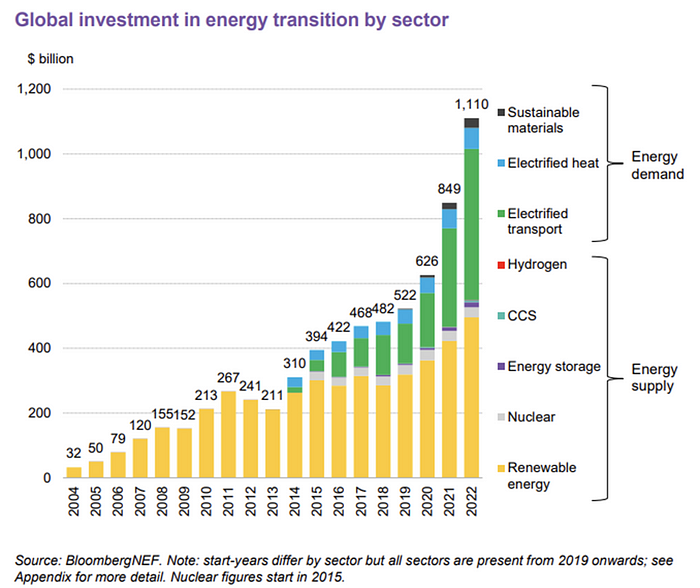
BNEF's 2023 Energy Transition Investment Trends study surprised and encouraged. Global energy transition investment reached $1 trillion for the first time ($1.11t), up 31% from 2021. From 2013, the clean energy transition has come and cannot be reversed.
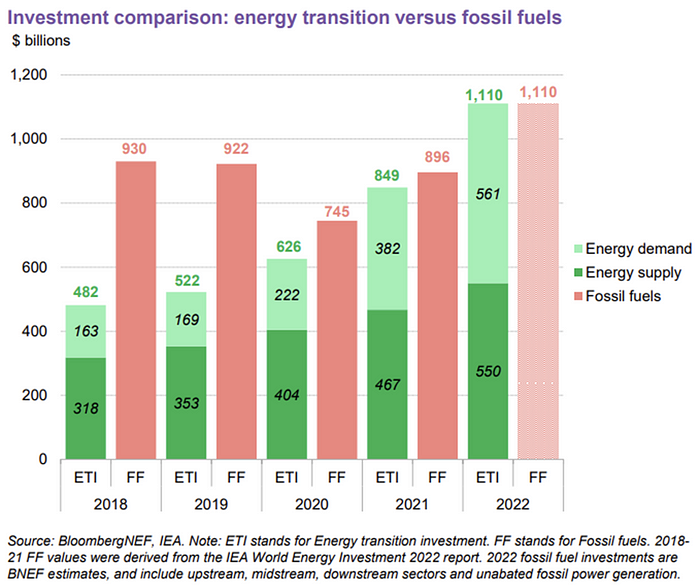
BNEF Head of Global Analysis Albert Cheung said our findings ended the energy crisis's influence on renewable energy deployment. Energy transition investment has reached a record as countries and corporations implement transition strategies. Clean energy investments will soon surpass fossil fuel investments.
The table below indicates the tripping point, which means the energy shift is occuring today.
BNEF calls money invested on clean technology including electric vehicles, heat pumps, hydrogen, and carbon capture energy transition investment. In 2022, electrified heat received $64b and energy storage $15.7b.
Nonetheless, $495b in renewables (up 17%) and $466b in electrified transport (up 54%) account for most of the investment. Hydrogen and carbon capture are tiny despite the fanfare. Hydrogen received the least funding in 2022 at $1.1 billion (0.1%).
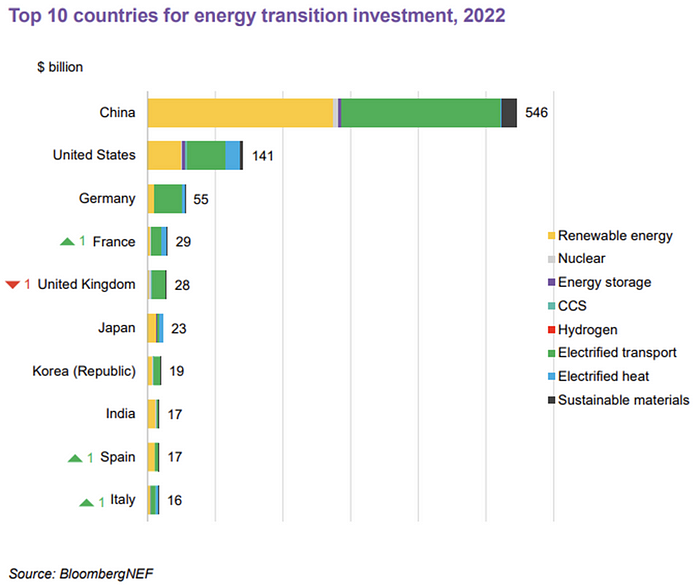
China dominates investment. China spends $546 billion on energy transition, half the global amount. Second, the US total of $141 billion in 2022 was up 11% from 2021. With $180 billion, the EU is unofficially second. China invested 91% in battery technologies.
The 2022 transition tipping point is encouraging, but the BNEF research shows how far we must go to get Net Zero. Energy transition investment must average $4.55 trillion between 2023 and 2030—three times the amount spent in 2022—to reach global Net Zero. Investment must be seven times today's record to reach Net Zero by 2050.
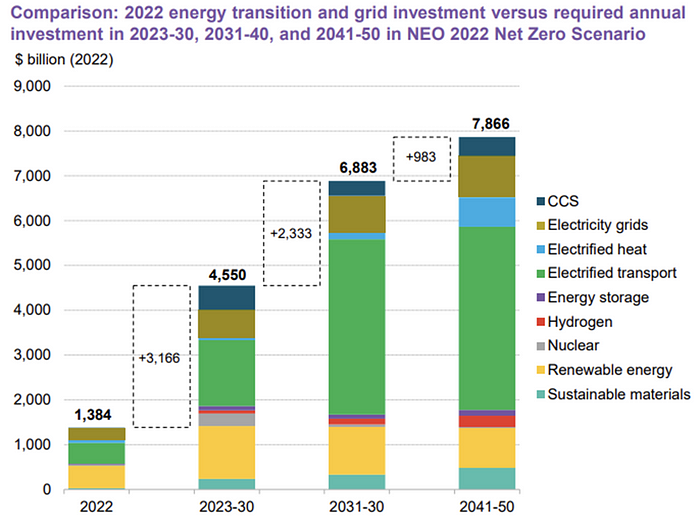
BNEF 2023 Energy Transition Investment Trends.
As shown in the graph above, BNEF experts have been using their crystal balls to determine where that investment should go. CCS and hydrogen are still modest components of the picture. Interestingly, they see nuclear almost fading. Active transport advocates like me may have something to say about the massive $4b in electrified transport. If we focus on walkable 15-minute cities, we may need fewer electric automobiles. Though we need more electric trains and buses.
Albert Cheung of BNEF emphasizes the challenge. This week's figures promise short-term job creation and medium-term energy security, but more investment is needed to reach net zero in the long run.
I expect the BNEF Energy Transition Investment Trends report to show clean tech investment outpacing fossil fuels investment every year. Finally saying that is amazing. It's insufficient. The planet must maintain its electric (not gas) pedal. In response to the research, Christina Karapataki, VC at Breakthrough Energy Ventures, a clean tech investment firm, tweeted: Clean energy investment needs to average more than 3x this level, for the remainder of this decade, to get on track for BNEFs Net Zero Scenario. Go!

The Velocipede
2 years ago
Stolen wallet
How a misplaced item may change your outlook

Losing your wallet means life stops. Money vanishes. No credit. Your identity is unverifiable. As you check your pockets for the missing object, you can't drive. You can't borrow a library book.
Last seen? intuitively. Every kid asks this, including yours. However, you know where you lost it: On the Providence River cycling trail. While pedaling vigorously, the wallet dropped out of your back pocket and onto the pavement.
A woman you know—your son's art teacher—says it will be returned. Faith.
You want that faith. Losing a wallet is all-consuming. You must presume it has been stolen and is being used to buy every diamond and non-fungible token on the market. Your identity may have been used to open bank accounts and fake passports. Because he used your license address, a ski mask-wearing man may be driving slowly past your house.
As you delete yourself by canceling cards, these images run through your head. You wait in limbo for replacements. Digital text on the DMV website promises your new license will come within 60 days and be approved by local and state law enforcement. In the following two months, your only defense is a screenshot.
Your wallet was ordinary. A worn, overstuffed leather rectangle. You understand how tenuous your existence has always been since you've never lost a wallet. You barely breathe without your documents.
Ironically, you wore a wallet-belt chain. You adored being a 1993 slacker for 15 years. Your wife just convinced you last year that your office job wasn't professional. You nodded and hid the chain.
Never lost your wallet. Until now.
Angry. Feeling stupid. How could you drop something vital? Why? Is the world cruel? No more dumb luck. You're always one pedal-stroke from death.
Then you get a call: We have your wallet.
Local post office, not cops.
The clerk said someone returned it. Due to trying to identify you, it's a chaos. It has your cards but no cash.
Your automobile screeches down the highway. You yell at the windshield, amazed. Submitted. Art teacher was right. Have some trust.
You thank the postmaster. You ramble through the story. The clerk doesn't know the customer, simply a neighborhood Good Samaritan. You wish you could thank that person for lifting your spirits.
You get home, beaming with gratitude. You thumb through your wallet, amazed that it’s all intact. Then you dig out your chain and reattach it.
Because even faith could use a little help.

Max Chafkin
3 years ago
Elon Musk Bets $44 Billion on Free Speech's Future
Musk’s purchase of Twitter has sealed his bond with the American right—whether the platform’s left-leaning employees and users like it or not.
Elon Musk's pursuit of Twitter Inc. began earlier this month as a joke. It started slowly, then spiraled out of control, culminating on April 25 with the world's richest man agreeing to spend $44 billion on one of the most politically significant technology companies ever. There have been bigger financial acquisitions, but Twitter's significance has always outpaced its balance sheet. This is a unique Silicon Valley deal.
To recap: Musk announced in early April that he had bought a stake in Twitter, citing the company's alleged suppression of free speech. His complaints were vague, relying heavily on the dog whistles of the ultra-right. A week later, he announced he'd buy the company for $54.20 per share, four days after initially pledging to join Twitter's board. Twitter's directors noticed the 420 reference as well, and responded with a “shareholder rights” plan (i.e., a poison pill) that included a 420 joke.
Musk - Patrick Pleul/Getty Images
No one knew if the bid was genuine. Musk's Twitter plans seemed implausible or insincere. In a tweet, he referred to automated accounts that use his name to promote cryptocurrency. He enraged his prospective employees by suggesting that Twitter's San Francisco headquarters be turned into a homeless shelter, renaming the company Titter, and expressing solidarity with his growing conservative fan base. “The woke mind virus is making Netflix unwatchable,” he tweeted on April 19.
But Musk got funding, and after a frantic weekend of negotiations, Twitter said yes. Unlike most buyouts, Musk will personally fund the deal, putting up up to $21 billion in cash and borrowing another $12.5 billion against his Tesla stock.
Free Speech and Partisanship
Percentage of respondents who agree with the following
The deal is expected to replatform accounts that were banned by Twitter for harassing others, spreading misinformation, or inciting violence, such as former President Donald Trump's account. As a result, Musk is at odds with his own left-leaning employees, users, and advertisers, who would prefer more content moderation rather than less.
Dorsey - Photographer: Joe Raedle/Getty Images
Previously, the company's leadership had similar issues. Founder Jack Dorsey stepped down last year amid concerns about slowing growth and product development, as well as his dual role as CEO of payments processor Block Inc. Compared to Musk, a father of seven who already runs four companies (besides Tesla and SpaceX), Dorsey is laser-focused.
Musk's motivation to buy Twitter may be political. Affirming the American far right with $44 billion spent on “free speech” Right-wing activists have promoted a series of competing upstart Twitter competitors—Parler, Gettr, and Trump's own effort, Truth Social—since Trump was banned from major social media platforms for encouraging rioters at the US Capitol on Jan. 6, 2021. But Musk can give them a social network with lax content moderation and a real user base. Trump said he wouldn't return to Twitter after the deal was announced, but he wouldn't be the first to do so.
Trump - Eli Hiller/Bloomberg
Conservative activists and lawmakers are already ecstatic. “A great day for free speech in America,” said Missouri Republican Josh Hawley. The day the deal was announced, Tucker Carlson opened his nightly Fox show with a 10-minute laudatory monologue. “The single biggest political development since Donald Trump's election in 2016,” he gushed over Musk.
But Musk's supporters and detractors misunderstand how much his business interests influence his political ideology. He marketed Tesla's cars as carbon-saving machines that were faster and cooler than gas-powered luxury cars during George W. Bush's presidency. Musk gained a huge following among wealthy environmentalists who reserved hundreds of thousands of Tesla sedans years before they were made during Barack Obama's presidency. Musk in the Trump era advocated for a carbon tax, but he also fought local officials (and his own workers) over Covid rules that slowed the reopening of his Bay Area factory.
Teslas at the Las Vegas Convention Center Loop Central Station in April 2021. The Las Vegas Convention Center Loop was Musk's first commercial project. Ethan Miller/Getty Images
Musk's rightward shift matched the rise of the nationalist-populist right and the desire to serve a growing EV market. In 2019, he unveiled the Cybertruck, a Tesla pickup, and in 2018, he announced plans to manufacture it at a new plant outside Austin. In 2021, he decided to move Tesla's headquarters there, citing California's "land of over-regulation." After Ford and General Motors beat him to the electric truck market, Musk reframed Tesla as a company for pickup-driving dudes.
Similarly, his purchase of Twitter will be entwined with his other business interests. Tesla has a factory in China and is friendly with Beijing. This could be seen as a conflict of interest when Musk's Twitter decides how to treat Chinese-backed disinformation, as Amazon.com Inc. founder Jeff Bezos noted.
Musk has focused on Twitter's product and social impact, but the company's biggest challenges are financial: Either increase cash flow or cut costs to comfortably service his new debt. Even if Musk can't do that, he can still benefit from the deal. He has recently used the increased attention to promote other business interests: Boring has hyperloops and Neuralink brain implants on the way, Musk tweeted. Remember Tesla's long-promised robotaxis!
Musk may be comfortable saying he has no expectation of profit because it benefits his other businesses. At the TED conference on April 14, Musk insisted that his interest in Twitter was solely charitable. “I don't care about money.”
The rockets and weed jokes make it easy to see Musk as unique—and his crazy buyout will undoubtedly add to that narrative. However, he is a megabillionaire who is risking a small amount of money (approximately 13% of his net worth) to gain potentially enormous influence. Musk makes everything seem new, but this is a rehash of an old media story.
You might also like

James White
3 years ago
Ray Dalio suggests reading these three books in 2022.
An inspiring reading list
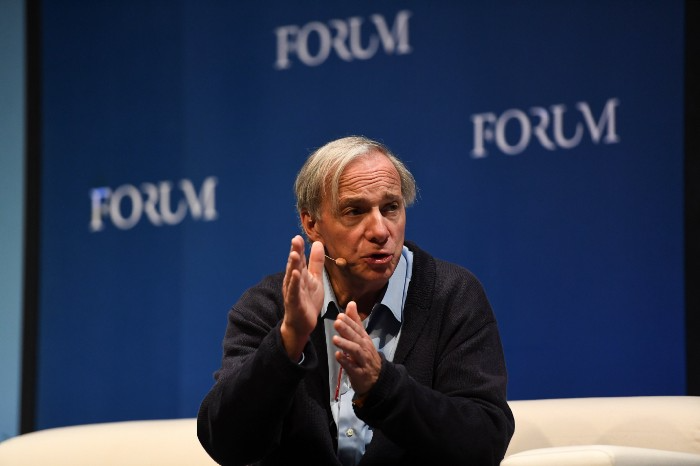
I'm no billionaire or hedge-fund manager. My bank account doesn't have millions. Ray Dalio's love of reading motivates me to think differently.
Here are some books recommended by Ray Dalio. Each influenced me. Hope they'll help you.
Sapiens by Yuval Noah Harari
Page Count: 512
Rating on Goodreads: 4.39
My favorite nonfiction book.
Sapiens explores human evolution. It explains how Homo Sapiens developed from hunter-gatherers to a dominant species. Amazing!
Sapiens will teach you about human history. Yuval Noah Harari has a follow-up book on human evolution.

My favorite book quotes are:
The tendency for luxuries to turn into necessities and give rise to new obligations is one of history's few unbreakable laws.
Happiness is not dependent on material wealth, physical health, or even community. Instead, it depends on how closely subjective expectations and objective circumstances align.
The romantic comparison between today's industry, which obliterates the environment, and our forefathers, who coexisted well with nature, is unfounded. Homo sapiens held the record among all organisms for eradicating the most plant and animal species even before the Industrial Revolution. The unfortunate distinction of being the most lethal species in the history of life belongs to us.
The Power Of Habit by Charles Duhigg
Page Count: 375
Rating on Goodreads: 4.13
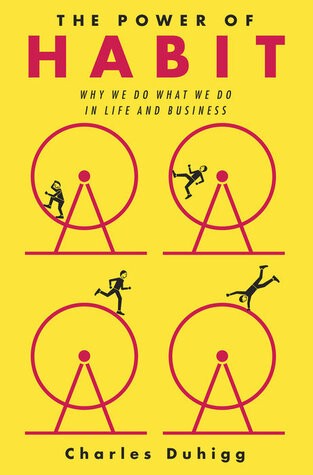
Great book: The Power Of Habit. It illustrates why habits are everything. The book explains how healthier habits can improve your life, career, and society.
The Power of Habit rocks. It's a great book on productivity. Its suggestions helped me build healthier behaviors (and drop bad ones).
Read ASAP!
My favorite book quotes are:
Change may not occur quickly or without difficulty. However, almost any behavior may be changed with enough time and effort.
People who exercise begin to eat better and produce more at work. They are less smokers and are more patient with friends and family. They claim to feel less anxious and use their credit cards less frequently. A fundamental habit that sparks broad change is exercise.
Habits are strong but also delicate. They may develop independently of our awareness or may be purposefully created. They frequently happen without our consent, but they can be altered by changing their constituent pieces. They have a much greater influence on how we live than we realize; in fact, they are so powerful that they cause our brains to adhere to them above all else, including common sense.
Tribe Of Mentors by Tim Ferriss
Page Count: 561
Rating on Goodreads: 4.06
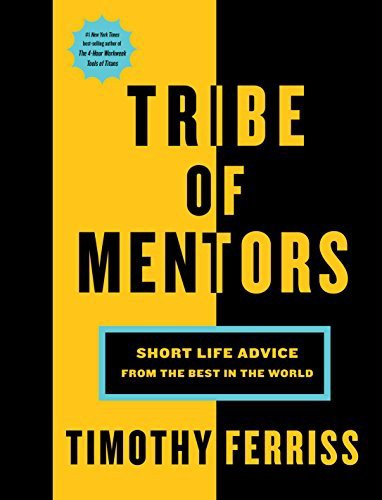
Unusual book structure. It's worth reading if you want to learn from successful people.
The book is Q&A-style. Tim questions everyone. Each chapter features a different person's life-changing advice. In the book, Pressfield, Willink, Grylls, and Ravikant are interviewed.
Amazing!
My favorite book quotes are:
According to one's courage, life can either get smaller or bigger.
Don't engage in actions that you are aware are immoral. The reputation you have with yourself is all that constitutes self-esteem. Always be aware.
People mistakenly believe that focusing means accepting the task at hand. However, that is in no way what it represents. It entails rejecting the numerous other worthwhile suggestions that exist. You must choose wisely. Actually, I'm just as proud of the things we haven't accomplished as I am of what I have. Saying no to 1,000 things is what innovation is.
Ray Dalio
3 years ago
The latest “bubble indicator” readings.
As you know, I like to turn my intuition into decision rules (principles) that can be back-tested and automated to create a portfolio of alpha bets. I use one for bubbles. Having seen many bubbles in my 50+ years of investing, I described what makes a bubble and how to identify them in markets—not just stocks.
A bubble market has a high degree of the following:
- High prices compared to traditional values (e.g., by taking the present value of their cash flows for the duration of the asset and comparing it with their interest rates).
- Conditons incompatible with long-term growth (e.g., extrapolating past revenue and earnings growth rates late in the cycle).
- Many new and inexperienced buyers were drawn in by the perceived hot market.
- Broad bullish sentiment.
- Debt financing a large portion of purchases.
- Lots of forward and speculative purchases to profit from price rises (e.g., inventories that are more than needed, contracted forward purchases, etc.).
I use these criteria to assess all markets for bubbles. I have periodically shown you these for stocks and the stock market.
What Was Shown in January Versus Now
I will first describe the picture in words, then show it in charts, and compare it to the last update in January.
As of January, the bubble indicator showed that a) the US equity market was in a moderate bubble, but not an extreme one (ie., 70 percent of way toward the highest bubble, which occurred in the late 1990s and late 1920s), and b) the emerging tech companies (ie. As well, the unprecedented flood of liquidity post-COVID financed other bubbly behavior (e.g. SPACs, IPO boom, big pickup in options activity), making things bubbly. I showed which stocks were in bubbles and created an index of those stocks, which I call “bubble stocks.”
Those bubble stocks have popped. They fell by a third last year, while the S&P 500 remained flat. In light of these and other market developments, it is not necessarily true that now is a good time to buy emerging tech stocks.
The fact that they aren't at a bubble extreme doesn't mean they are safe or that it's a good time to get long. Our metrics still show that US stocks are overvalued. Once popped, bubbles tend to overcorrect to the downside rather than settle at “normal” prices.
The following charts paint the picture. The first shows the US equity market bubble gauge/indicator going back to 1900, currently at the 40% percentile. The charts also zoom in on the gauge in recent years, as well as the late 1920s and late 1990s bubbles (during both of these cases the gauge reached 100 percent ).
The chart below depicts the average bubble gauge for the most bubbly companies in 2020. Those readings are down significantly.
The charts below compare the performance of a basket of emerging tech bubble stocks to the S&P 500. Prices have fallen noticeably, giving up most of their post-COVID gains.
The following charts show the price action of the bubble slice today and in the 1920s and 1990s. These charts show the same market dynamics and two key indicators. These are just two examples of how a lot of debt financing stock ownership coupled with a tightening typically leads to a bubble popping.
Everything driving the bubbles in this market segment is classic—the same drivers that drove the 1920s bubble and the 1990s bubble. For instance, in the last couple months, it was how tightening can act to prick the bubble. Review this case study of the 1920s stock bubble (starting on page 49) from my book Principles for Navigating Big Debt Crises to grasp these dynamics.
The following charts show the components of the US stock market bubble gauge. Since this is a proprietary indicator, I will only show you some of the sub-aggregate readings and some indicators.
Each of these six influences is measured using a number of stats. This is how I approach the stock market. These gauges are combined into aggregate indices by security and then for the market as a whole. The table below shows the current readings of these US equity market indicators. It compares current conditions for US equities to historical conditions. These readings suggest that we’re out of a bubble.
1. How High Are Prices Relatively?
This price gauge for US equities is currently around the 50th percentile.
2. Is price reduction unsustainable?
This measure calculates the earnings growth rate required to outperform bonds. This is calculated by adding up the readings of individual securities. This indicator is currently near the 60th percentile for the overall market, higher than some of our other readings. Profit growth discounted in stocks remains high.
Even more so in the US software sector. Analysts' earnings growth expectations for this sector have slowed, but remain high historically. P/Es have reversed COVID gains but remain high historical.
3. How many new buyers (i.e., non-existing buyers) entered the market?
Expansion of new entrants is often indicative of a bubble. According to historical accounts, this was true in the 1990s equity bubble and the 1929 bubble (though our data for this and other gauges doesn't go back that far). A flood of new retail investors into popular stocks, which by other measures appeared to be in a bubble, pushed this gauge above the 90% mark in 2020. The pace of retail activity in the markets has recently slowed to pre-COVID levels.
4. How Broadly Bullish Is Sentiment?
The more people who have invested, the less resources they have to keep investing, and the more likely they are to sell. Market sentiment is now significantly negative.
5. Are Purchases Being Financed by High Leverage?
Leveraged purchases weaken the buying foundation and expose it to forced selling in a downturn. The leverage gauge, which considers option positions as a form of leverage, is now around the 50% mark.
6. To What Extent Have Buyers Made Exceptionally Extended Forward Purchases?
Looking at future purchases can help assess whether expectations have become overly optimistic. This indicator is particularly useful in commodity and real estate markets, where forward purchases are most obvious. In the equity markets, I look at indicators like capital expenditure, or how much businesses (and governments) invest in infrastructure, factories, etc. It reflects whether businesses are projecting future demand growth. Like other gauges, this one is at the 40th percentile.
What one does with it is a tactical choice. While the reversal has been significant, future earnings discounting remains high historically. In either case, bubbles tend to overcorrect (sell off more than the fundamentals suggest) rather than simply deflate. But I wanted to share these updated readings with you in light of recent market activity.

John Rampton
3 years ago
Ideas for Samples of Retirement Letters

Ready to quit full-time? No worries.
Baby Boomer retirement has accelerated since COVID-19 began. In 2020, 29 million boomers retire. Over 3 million more than in 2019. 75 million Baby Boomers will retire by 2030.
First, quit your work to enjoy retirement. Leave a professional legacy. Your retirement will start well. It all starts with a retirement letter.
Retirement Letter
Retirement letters are formal resignation letters. Different from other resignation letters, these don't tell your employer you're leaving. Instead, you're quitting.
Since you're not departing over grievances or for a better position or higher income, you may usually terminate the relationship amicably. Consulting opportunities are possible.
Thank your employer for their support and give them transition information.
Resignation letters aren't merely a formality. This method handles wages, insurance, and retirement benefits.
Retirement letters often accompany verbal notices to managers. Schedule a meeting before submitting your retirement letter to discuss your plans. The letter will be stored alongside your start date, salary, and benefits in your employee file.
Retirement is typically well-planned. Employers want 6-12 months' notice.
Summary
Guidelines for Giving Retirement Notice
Components of a Successful Retirement Letter
Template for Retirement Letter
Ideas for Samples of Retirement Letters
First Example of Retirement Letter
Second Example of Retirement Letter
Third Example of Retirement Letter
Fourth Example of Retirement Letter
Fifth Example of Retirement Letter
Sixth Example of Retirement Letter
Seventh Example of Retirement Letter
Eighth Example of Retirement Letter
Ninth Example of Retirement Letter
Tenth Example of Retirement Letter
Frequently Asked Questions
1. What is a letter of retirement?
2. Why should you include a letter of retirement?
3. What information ought to be in your retirement letter?
4. Must I provide notice?
5. What is the ideal retirement age?
Guidelines for Giving Retirement Notice
While starting a new phase, you're also leaving a job you were qualified for. You have years of experience. So, it may not be easy to fill a retirement-related vacancy.
Talk to your boss in person before sending a letter. Notice is always appreciated. Properly announcing your retirement helps you and your organization transition.
How to announce retirement:
Learn about the retirement perks and policies offered by the company. The first step in figuring out whether you're eligible for retirement benefits is to research your company's retirement policy.
Don't depart without providing adequate notice. You should give the business plenty of time to replace you if you want to retire in a few months.
Help the transition by offering aid. You could be a useful resource if your replacement needs training.
Contact the appropriate parties. The original copy should go to your boss. Give a copy to HR because they will manage your 401(k), pension, and health insurance.
Investigate the option of working as a consultant or part-time. If you desire, you can continue doing some limited work for the business.
Be nice to others. Describe your achievements and appreciation. Additionally, express your gratitude for giving you the chance to work with such excellent coworkers.
Make a plan for your future move. Simply updating your employer on your goals will help you maintain a good working relationship.
Use a formal letter or email to formalize your plans. The initial step is to speak with your supervisor and HR in person, but you must also give written notice.
Components of a Successful Retirement Letter
To write a good retirement letter, keep in mind the following:
A formal salutation. Here, the voice should be deliberate, succinct, and authoritative.
Be specific about your intentions. The key idea of your retirement letter is resignation. Your decision to depart at this time should be reflected in your letter. Remember that your intention must be clear-cut.
Your deadline. This information must be in resignation letters. Laws and corporate policies may both stipulate a minimum amount of notice.
A kind voice. Your retirement letter shouldn't contain any resentments, insults, or other unpleasantness. Your letter should be a model of professionalism and grace. A straightforward thank you is a terrific approach to accomplish that.
Your ultimate goal. Chaos may start to happen as soon as you turn in your resignation letter. Your position will need to be filled. Additionally, you will have to perform your obligations up until a successor is found. Your availability during the interim period should be stated in your resignation letter.
Give us a way to reach you. Even if you aren't consulting, your company will probably get in touch with you at some point. They might send you tax documents and details on perks. By giving your contact information, you can make this process easier.
Template for Retirement Letter
Identify
Title you held
Address
Supervisor's name
Supervisor’s position
Company name
HQ address
Date
[SUPERVISOR],
1.
Inform that you're retiring. Include your last day worked.
2.
Employer thanks. Mention what you're thankful for. Describe your accomplishments and successes.
3.
Helping moves things ahead. Plan your retirement. Mention your consultancy interest.
Sincerely,
[Signature]
First and last name
Phone number
Personal Email
Ideas for Samples of Retirement Letters
First Example of Retirement Letter
Martin D. Carey
123 Fleming St
Bloomfield, New Jersey 07003
(555) 555-1234
June 6th, 2022
Willie E. Coyote
President
Acme Co
321 Anvil Ave
Fairfield, New Jersey 07004
Dear Mr. Coyote,
This letter notifies Acme Co. of my retirement on August 31, 2022.
There has been no other organization that has given me that sense of belonging and purpose.
My fifteen years at the helm of the Structural Design Division have given me a strong sense of purpose. I’ve been fortunate to have your support, and I’ll be always grateful for the opportunity you offered me.
I had a difficult time making this decision. As a result of finding a small property in Arizona where we will be able to spend our remaining days together, my wife and I have decided to officially retire.
In spite of my regret at being unable to contribute to the firm we’ve built, I believe it is wise to move on.
My heart will always belong to Acme Co. Thank you for the opportunity and best of luck in the years to come.
Sincerely,
Martin D. Carey
Second Example of Retirement Letter
Gustavo Fring
Los Pollas Hermanos
12000–12100 Coors Rd SW,
Albuquerque, New Mexico 87045
Dear Mr. Fring,
I write this letter to announce my formal retirement from Los Pollas Hermanos as manager, effective October 15.
As an employee at Los Pollas Hermanos, I appreciate all the great opportunities you have given me. It has been a pleasure to work with and learn from my colleagues for the past 10 years, and I am looking forward to my next challenge.
If there is anything I can do to assist during this time, please let me know.
Sincerely,
Linda T. Crespo
Third Example of Retirement Letter
William M. Arviso
4387 Parkview Drive
Tustin, CA 92680
May 2, 2023
Tony Stark
Owner
Stark Industries
200 Industrial Avenue
Long Beach, CA 90803
Dear Tony:
I’m writing to inform you that my final day of work at Stark Industries will be May14, 2023. When that time comes, I intend to retire.
As I embark on this new chapter in my life, I would like to thank you and the entire Stark Industries team for providing me with so many opportunities. You have all been a pleasure to work with and I will miss you all when I retire.
I am glad to assist you with the transition in any way I can to ensure your new hire has a seamless experience. All ongoing projects will be completed until my retirement date, and all key information will be handed over to the team.
Once again, thank you for the opportunity to be part of the Stark Industries team. All the best to you and the team in the days to come.
Please do not hesitate to contact me if you require any additional information. In order to finalize my retirement plans, I’ll meet with HR and can provide any details that may be necessary.
Sincerely,
(Signature)
William M. Arviso
Fourth Example of Retirement Letter
Garcia, Barbara
First Street, 5432
New York City, NY 10001
(1234) (555) 123–1234
1 October 2022
Gunther
Owner
Central Perk
199 Lafayette St.
New York City, NY 10001
Mr. Gunther,
The day has finally arrived. As I never imagined, I will be formally retiring from Central Perk on November 1st, 2022.
Considering how satisfied I am with my current position, this may surprise you. It would be best if I retired now since my health has deteriorated, so I think this is a good time to do so.
There is no doubt that the past two decades have been wonderful. Over the years, I have seen a small coffee shop grow into one of the city’s top destinations.
It will be hard for me to leave this firm without wondering what more success we could have achieved. But I’m confident that you and the rest of the Central Perk team will achieve great things.
My family and I will never forget what you’ve done for us, and I am grateful for the chance you’ve given me. My house is always open to you.
Sincerely Yours
Garcia, Barbara
Fifth Example of Retirement Letter
Pat Williams
618 Spooky Place
Monstropolis, 23221
123–555–0031
pwilliams@email.com
Feb. 16, 2022
Mike Wazowski
Co-CEO
Monters, Inc.
324 Scare Road
Monstropolis
Dear Mr. Wazowski,
As a formal notice of my upcoming retirement, I am submitting this letter. I will be leaving Monters, Inc. on April 13.
These past 10 years as a marketing associate have provided me with many opportunities. Since we started our company a decade ago, we have seen the face of harnessing screams change dramatically into harnessing laughter. During my time working with this dynamic marketing team, I learned a lot about customer behavior and marketing strategies. Working closely with some of our long-standing clients, such as Boo, was a particular pleasure.
I would be happy to assist with the transition following my retirement. It would be my pleasure to assist in the hiring or training of my replacement. In order to spend more time with my family, I will also be able to offer part-time consulting services.
After I retire, I plan to cash out the eight unused vacation days I’ve accumulated and take my pension as a lump sum.
Thank you for the opportunity to work with Monters, Inc. In the years to come, I wish you all the best!
Sincerely,
Paul Williams
Sixth Example of Retirement Letter
Dear Micheal,
As In my tenure at Dunder Mifflin Paper Company, I have given everything I had. It has been an honor to work here. But I have decided to move on to new challenges and retire from my position — mainly bears, beets, and Battlestar Galactia.
I appreciate the opportunity to work here and learn so much. During my time at this company, I will always remember the good times and memories we shared. Wishing you all the best in the future.
Sincerely,
Dwight K. Shrute
Your signature
May 16
Seventh Example of Retirement Letter
Greetings, Bill
I am announcing my retirement from Initech, effective March 15, 2023.
Over the course of my career here, I’ve had the privilege of working with so many talented and inspiring people.
In 1999, when I began working as a customer service representative, we were a small organization located in a remote office park.
The fact that we now occupy a floor of the Main Street office building with over 150 employees continues to amaze me.
I am looking forward to spending more time with family and traveling the country in our RV. Although I will be sad to leave.
Please let me know if there are any extra steps I can take to facilitate this transfer.
Sincerely,
Frankin, RenitaEighth Example of Retirement Letter
Height Example of Retirement Letter
Bruce,
Please accept my resignation from Wayne Enterprises as Marketing Communications Director. My last day will be August 1, 2022.
The decision to retire has been made after much deliberation. Now that I have worked in the field for forty years, I believe it is a good time to begin completing my bucket list.
It was not easy for me to decide to leave the company. Having worked at Wayne Enterprises has been rewarding both professionally and personally. There are still a lot of memories associated with my first day as a college intern.
My intention was not to remain with such an innovative company, as you know. I was able to see the big picture with your help, however. Today, we are a force that is recognized both nationally and internationally.
In addition to your guidance, the bold, visionary leadership of our company contributed to the growth of our company.
My departure from the company coincides with a particularly hectic time. Despite my best efforts, I am unable to postpone my exit.
My position would be well served by an internal solution. I have a more than qualified marketing manager in Caroline Crown. It would be a pleasure to speak with you about this.
In case I can be of assistance during the switchover, please let me know. Contact us at (555)555–5555. As part of my responsibilities, I am responsible for making sure all work is completed to Wayne Enterprise’s stringent requirements. Having the opportunity to work with you has been a pleasure. I wish you continued success with your thriving business.
Sincerely,
Cash, Cole
Marketing/Communications
Ninth Example of Retirement Letter
Norman, Jamie
2366 Hanover Street
Whitestone, NY 11357
555–555–5555
15 October 2022
Mr. Lippman
Head of Pendant Publishing
600 Madison Ave.
New York, New York
Respected Mr. Lippman,
Please accept my resignation effective November 1, 2022.
Over the course of my ten years at Pendant Publishing, I’ve had a great deal of fun and I’m quite grateful for all the assistance I’ve received.
It was a pleasure to wake up and go to work every day because of our outstanding corporate culture and the opportunities for promotion and professional advancement available to me.
While I am excited about retiring, I am going to miss being part of our team. It’s my hope that I’ll be able to maintain the friendships I’ve formed here for a long time to come.
In case I can be of assistance prior to or following my departure, please let me know. If I can assist in any way to ensure a smooth transfer to my successor, I would be delighted to do so.
Sincerely,
Signed (hard copy letter)
Norman, Jamie
Tenth Example of Retirement Letter
17 January 2023
Greg S. Jackson
Cyberdyne Systems
18144 El Camino Real,
Sunnyvale, CA
Respected Mrs. Duncan,
I am writing to inform you that I will be resigning from Cyberdyne Systems as of March 1, 2023. I’m grateful to have had this opportunity, and it was a difficult decision to make.
My development as a programmer and as a more seasoned member of the organization has been greatly assisted by your coaching.
I have been proud of Cyberdyne Systems’ ethics and success throughout my 25 years at the company. Starting as a mailroom clerk and currently serving as head programmer.
The portfolios of our clients have always been handled with the greatest care by my colleagues. It is our employees and services that have made Cyberdyne Systems the success it is today.
During my tenure as head of my division, I’ve increased our overall productivity by 800 percent, and I expect that trend to continue after I retire.
In light of the fact that the process of replacing me may take some time, I would like to offer my assistance in any way I can.
The greatest contender for this job is Troy Ledford, my current assistant.
Also, before I leave, I would be willing to teach any partners how to use the programmer I developed to track and manage the development of Skynet.
Over the next few months, I’ll be enjoying vacations with my wife as well as my granddaughter moving to college.
If Cyberdyne Systems has any openings for consultants, please let me know. It has been a pleasure working with you over the last 25 years. I appreciate your concern and care.
Sincerely,
Greg S, Jackson
Questions and Answers
1. What is a letter of retirement?
Retirement letters tell your supervisor you're retiring. This informs your employer that you're departing, like a letter. A resignation letter also requests retirement benefits.
Supervisors frequently receive retirement letters and verbal resignations. Before submitting your retirement letter, meet to discuss your plans. This letter will be filed with your start date, salary, and benefits.
2. Why should you include a letter of retirement?
Your retirement letter should explain why you're leaving. When you quit, your manager and HR department usually know. Regardless, a retirement letter might help you leave on a positive tone. It ensures they have the necessary papers.
In your retirement letter, you tell the firm your plans so they can find your replacement. You may need to stay in touch with your company after sending your retirement letter until a successor is identified.
3. What information ought to be in your retirement letter?
Format it like an official letter. Include your retirement plans and retirement-specific statistics. Date may be most essential.
In some circumstances, benefits depend on when you resign and retire. A date on the letter helps HR or senior management verify when you gave notice and how long.
In addition to your usual salutation, address your letter to your manager or supervisor.
The letter's body should include your retirement date and transition arrangements. Tell them whether you plan to help with the transition or train a new employee. You may have a three-month time limit.
Tell your employer your job title, how long you've worked there, and your biggest successes. Personalize your letter by expressing gratitude for your career and outlining your retirement intentions. Finally, include your contact info.
4. Must I provide notice?
Two-week notice isn't required. Your company may require it. Some state laws contain exceptions.
Check your contract, company handbook, or HR to determine your retirement notice. Resigning may change the policy.
Regardless of your company's policy, notification is standard. Entry-level or junior jobs can be let go so the corporation can replace them.
Middle managers, high-level personnel, and specialists may take months to replace. Two weeks' notice is a courtesy. Start planning months ahead.
You can finish all jobs at that period. Prepare transition documents for coworkers and your replacement.
5. What is the ideal retirement age?
Depends on finances, state, and retirement plan. The average American retires at 62. The average retirement age is 66, according to Gallup's 2021 Economy and Personal Finance Survey.
Remember:
Before the age of 59 1/2, withdrawals from pre-tax retirement accounts, such as 401(k)s and IRAs, are subject to a penalty.
Benefits from Social Security can be accessed as early as age 62.
Medicare isn't available to you till you're 65,
Depending on the year of your birth, your Full Retirement Age (FRA) will be between 66 and 67 years old.
If you haven't taken them already, your Social Security benefits increase by 8% annually between ages 6 and 77.