



More on Marketing

Jon Brosio
3 years ago
You can learn more about marketing from these 8 copywriting frameworks than from a college education.
Email, landing pages, and digital content

Today's most significant skill:
Copywriting.
Unfortunately, most people don't know how to write successful copy because they weren't taught in school.
I've been obsessed with copywriting for two years. I've read 15 books, completed 3 courses, and studied internet's best digital entrepreneurs.
Here are 8 copywriting frameworks that educate more than a four-year degree.
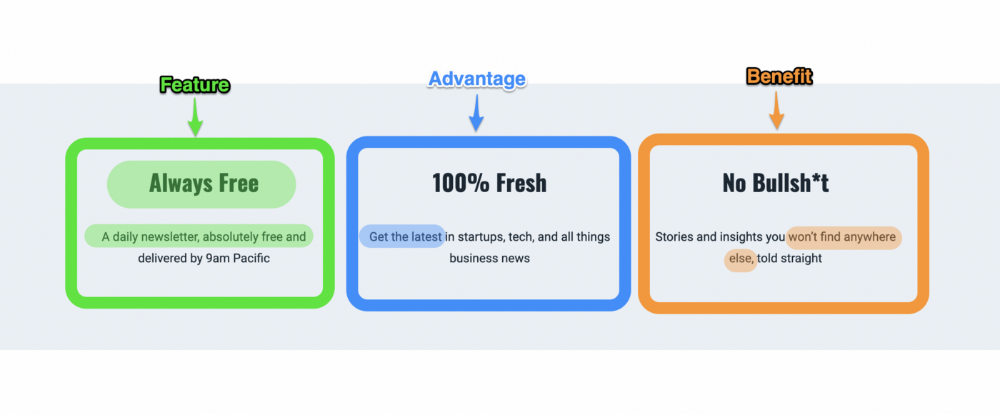
1. Feature — Advantage — Benefit (F.A.B)
This is the most basic copywriting foundation. Email marketing, landing page copy, and digital video ads can use it.
F.A.B says:
How it works (feature)
which is helpful (advantage)
What's at stake (benefit)
The Hustle uses this framework on their landing page to convince people to sign up:
2. P. A. S. T. O. R.
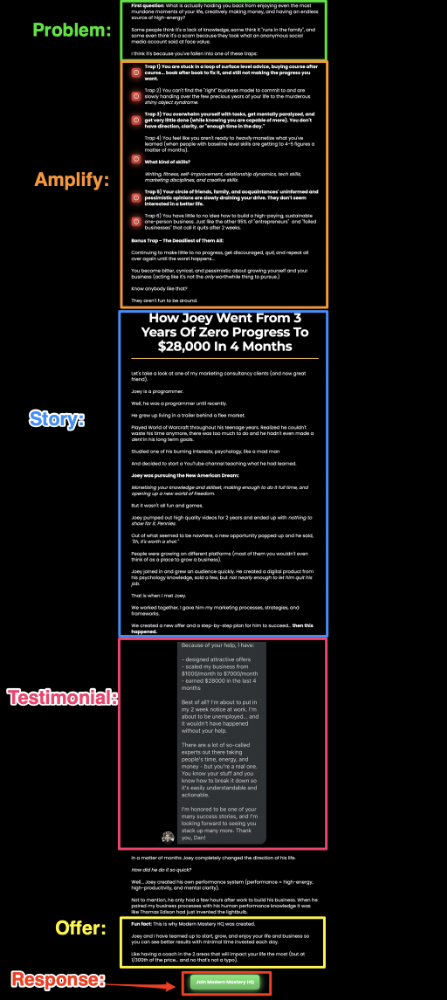
This framework is for longer-form copywriting. PASTOR uses stories to engage with prospects. It explains why people should buy this offer.
PASTOR means:
Problem
Amplify
Story
Testimonial
Offer
Response
Dan Koe's landing page is a great example. It shows PASTOR frame-by-frame.
3. Before — After — Bridge
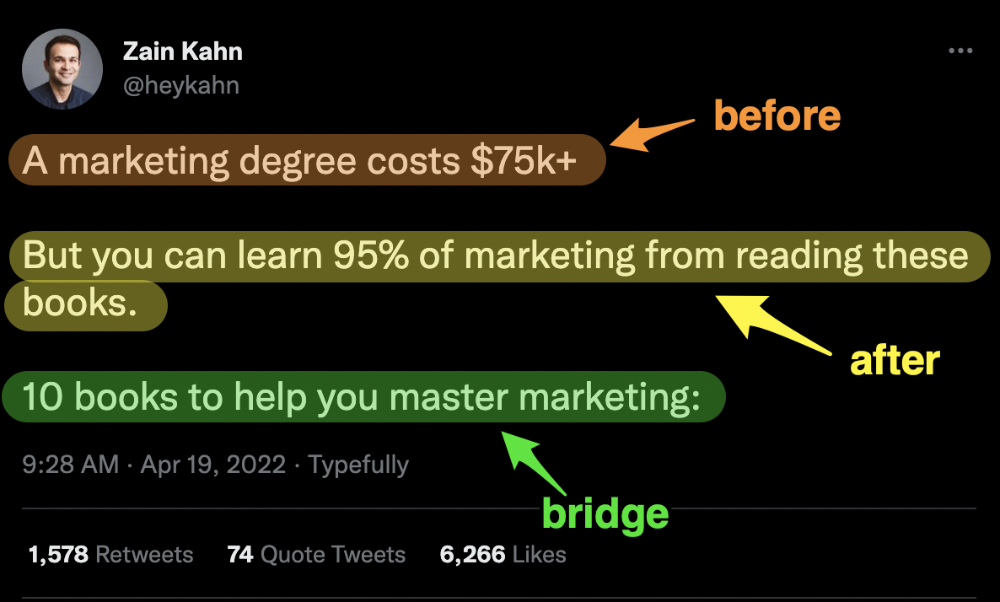
Before-after-bridge is a copywriting framework that draws attention and shows value quickly.
This framework highlights:
where you are
where you want to be
how to get there
Works great for: Email threads/landing pages
Zain Kahn utilizes this framework to write viral threads.
4. Q.U.E.S.T
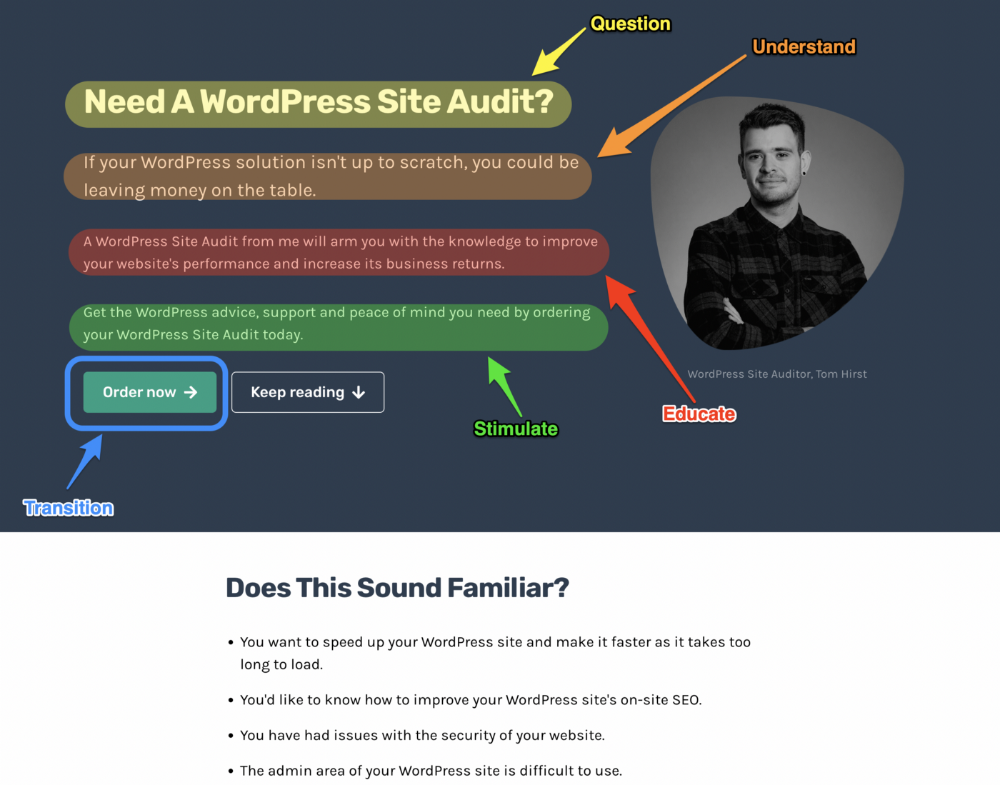
QUEST is about empathetic writing. You know their issues, obstacles, and headaches. This allows coverups.
QUEST:
Qualifies
Understands
Educates
Stimulates
Transitions
Tom Hirst's landing page uses the QUEST framework.
5. The 4P’s model
The 4P’s approach pushes your prospect to action. It educates and persuades quickly.
4Ps:
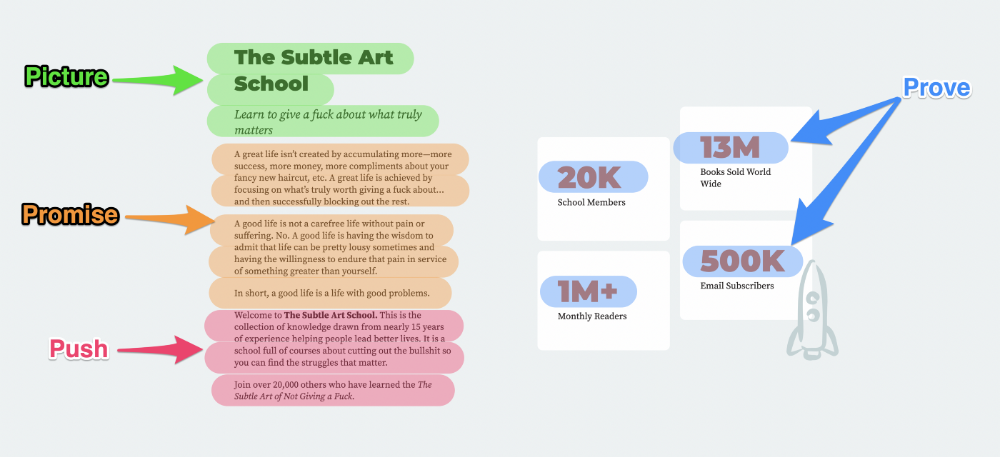
The problem the visitor is dealing with
The promise that will help them
The proof the promise works
A push towards action
Mark Manson is a bestselling author, digital creator, and pop-philosopher. He's also a great copywriter, and his membership offer uses the 4P’s framework.
6. Problem — Agitate — Solution (P.A.S)
Up-and-coming marketers should understand problem-agitate-solution copywriting. Once you understand one structure, others are easier. It drives passion and presents a clear solution.
PAS outlines:
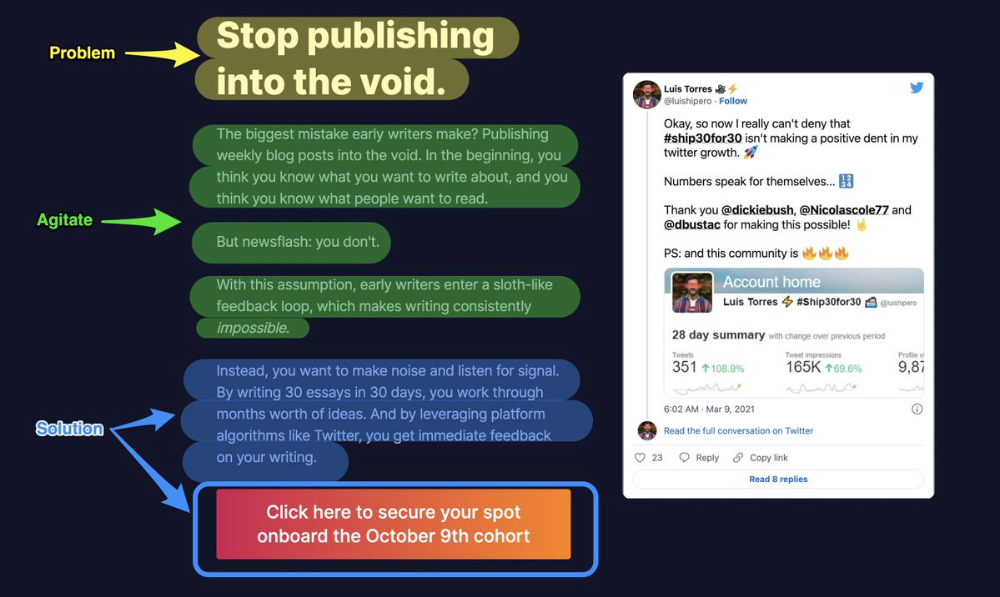
The issue the visitor is having
It then intensifies this issue through emotion.
finally offers an answer to that issue (the offer)
The customer's story loops. Nicolas Cole and Dickie Bush use PAS to promote Ship 30 for 30.
7. Star — Story — Solution (S.S.S)
PASTOR + PAS = star-solution-story. Like PAS, it employs stories to persuade.
S.S.S. is effective storytelling:
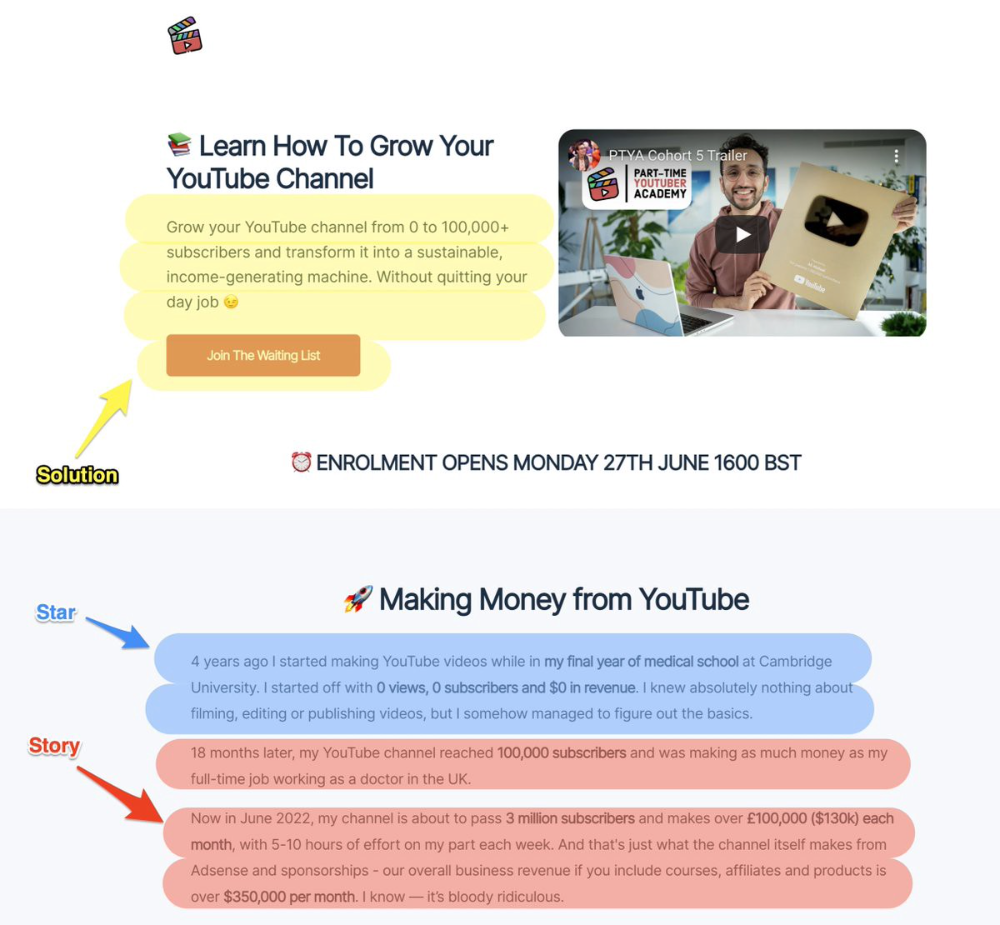
Star: (Person had a problem)
Story: (until they had a breakthrough)
Solution: (That created a transformation)
Ali Abdaal is a YouTuber with a great S.S.S copy.
8. Attention — Interest — Desire — Action
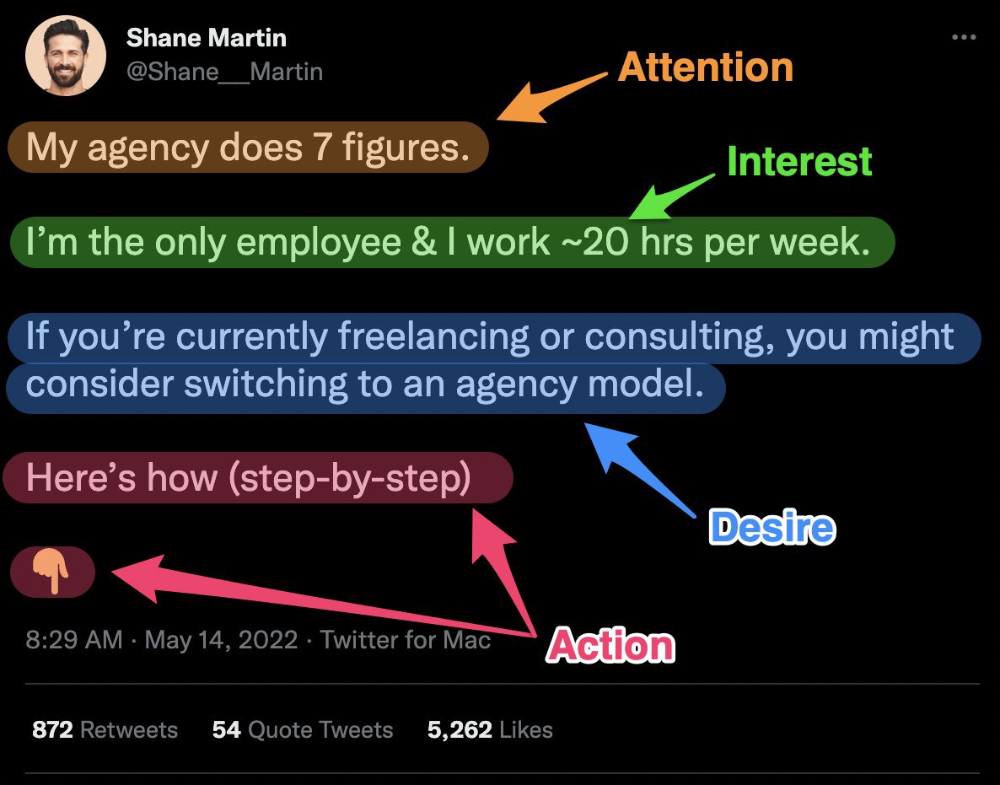
AIDA is another classic. This copywriting framework is great for fast-paced environments (think all digital content on Linkedin, Twitter, Medium, etc.).
It works with:
Page landings
writing on thread
Email
It's a good structure since it's concise, attention-grabbing, and action-oriented.
Shane Martin, Twitter's creator, uses this approach to create viral content.
TL;DR
8 copywriting frameworks that teach marketing better than a four-year degree
Feature-advantage-benefit
Before-after-bridge
Star-story-solution
P.A.S.T.O.R
Q.U.E.S.T
A.I.D.A
P.A.S
4P’s

Dung Claire Tran
3 years ago
Is the future of brand marketing with virtual influencers?
Digital influences that mimic humans are rising.
Lil Miquela has 3M Instagram followers, 3.6M TikTok followers, and 30K Twitter followers. She's been on the covers of Prada, Dior, and Calvin Klein magazines. Miquela released Not Mine in 2017 and launched Hard Feelings at Lollapazoolas this year. This isn't surprising, given the rise of influencer marketing.
This may be unexpected. Miquela's fake. Brud, a Los Angeles startup, produced her in 2016.
Lil Miquela is one of many rising virtual influencers in the new era of social media marketing. She acts like a real person and performs the same tasks as sports stars and models.
The emergence of online influencers
Before 2018, computer-generated characters were rare. Since the virtual human industry boomed, they've appeared in marketing efforts worldwide.
In 2020, the WHO partnered up with Atlanta-based virtual influencer Knox Frost (@knoxfrost) to gather contributions for the COVID-19 Solidarity Response Fund.
Lu do Magalu (@magazineluiza) has been the virtual spokeswoman for Magalu since 2009, using social media to promote reviews, product recommendations, unboxing videos, and brand updates. Magalu's 10-year profit was $552M.
In 2020, PUMA partnered with Southeast Asia's first virtual model, Maya (@mayaaa.gram). She joined Singaporean actor Tosh Zhang in the PUMA campaign. Local virtual influencer Ava Lee-Graham (@avagram.ai) partnered with retail firm BHG to promote their in-house labels.

In Japan, Imma (@imma.gram) is the face of Nike, PUMA, Dior, Salvatore Ferragamo SpA, and Valentino. Imma's bubblegum pink bob and ultra-fine fashion landed her on the cover of Grazia magazine.

Lotte Home Shopping created Lucy (@here.me.lucy) in September 2020. She made her TV debut as a Christmas show host in 2021. Since then, she has 100K Instagram followers and 13K TikTok followers.
Liu Yiexi gained 3 million fans in five days on Douyin, China's TikTok, in 2021. Her two-minute video went viral overnight. She's posted 6 videos and has 830 million Douyin followers.

China's virtual human industry was worth $487 million in 2020, up 70% year over year, and is expected to reach $875.9 million in 2021.
Investors worldwide are interested. Immas creator Aww Inc. raised $1 million from Coral Capital in September 2020, according to Bloomberg. Superplastic Inc., the Vermont-based startup behind influencers Janky and Guggimon, raised $16 million by 2020. Craft Ventures, SV Angels, and Scooter Braun invested. Crunchbase shows the company has raised $47 million.
The industries they represent, including Augmented and Virtual reality, were worth $14.84 billion in 2020 and are projected to reach $454.73 billion by 2030, a CAGR of 40.7%, according to PR Newswire.
Advantages for brands
Forbes suggests brands embrace computer-generated influencers. Examples:
Unlimited creative opportunities: Because brands can personalize everything—from a person's look and activities to the style of their content—virtual influencers may be suited to a brand's needs and personalities.
100% brand control: Brand managers now have more influence over virtual influencers, so they no longer have to give up and rely on content creators to include brands into their storytelling and style. Virtual influencers can constantly produce social media content to promote a brand's identity and ideals because they are completely scandal-free.
Long-term cost savings: Because virtual influencers are made of pixels, they may be reused endlessly and never lose their beauty. Additionally, they can move anywhere around the world and even into space to fit a brand notion. They are also always available. Additionally, the expense of creating their content will not rise in step with their expanding fan base.
Introduction to the metaverse: Statista reports that 75% of American consumers between the ages of 18 and 25 follow at least one virtual influencer. As a result, marketers that support virtual celebrities may now interact with younger audiences that are more tech-savvy and accustomed to the digital world. Virtual influencers can be included into any digital space, including the metaverse, as they are entirely computer-generated 3D personas. Virtual influencers can provide brands with a smooth transition into this new digital universe to increase brand trust and develop emotional ties, in addition to the young generations' rapid adoption of the metaverse.
Better engagement than in-person influencers: A Hype Auditor study found that online influencers have roughly three times the engagement of their conventional counterparts. Virtual influencers should be used to boost brand engagement even though the data might not accurately reflect the entire sector.
Concerns about influencers created by computers
Virtual influencers could encourage excessive beauty standards in South Korea, which has a $10.7 billion plastic surgery industry.
A classic Korean beauty has a small face, huge eyes, and pale, immaculate skin. Virtual influencers like Lucy have these traits. According to Lee Eun-hee, a professor at Inha University's Department of Consumer Science, this could make national beauty standards more unrealistic, increasing demand for plastic surgery or cosmetic items.

Other parts of the world raise issues regarding selling items to consumers who don't recognize the models aren't human and the potential of cultural appropriation when generating influencers of other ethnicities, called digital blackface by some.
Meta, Facebook and Instagram's parent corporation, acknowledges this risk.
“Like any disruptive technology, synthetic media has the potential for both good and harm. Issues of representation, cultural appropriation and expressive liberty are already a growing concern,” the company stated in a blog post. “To help brands navigate the ethical quandaries of this emerging medium and avoid potential hazards, (Meta) is working with partners to develop an ethical framework to guide the use of (virtual influencers).”
Despite theoretical controversies, the industry will likely survive. Companies think virtual influencers are the next frontier in the digital world, which includes the metaverse, virtual reality, and digital currency.
In conclusion
Virtual influencers may garner millions of followers online and help marketers reach youthful audiences. According to a YouGov survey, the real impact of computer-generated influencers is yet unknown because people prefer genuine connections. Virtual characters can supplement brand marketing methods. When brands are metaverse-ready, the author predicts virtual influencer endorsement will continue to expand.

Yucel F. Sahan
3 years ago
How I Created the Day's Top Product on Product Hunt
In this article, I'll describe a weekend project I started to make something. It was Product Hunt's #1 of the Day, #2 Weekly, and #4 Monthly product.

How did I make Landing Page Checklist so simple? Building and launching took 3 weeks. I worked 3 hours a day max. Weekends were busy.
It's sort of a long story, so scroll to the bottom of the page to see what tools I utilized to create Landing Page Checklist :x
As a matter of fact, it all started with the startups-investments blog; Startup Bulletin, that I started writing in 2018. No, don’t worry, I won’t be going that far behind. The twitter account where I shared the blog posts of this newsletter was inactive for a looong time. I was holding this Twitter account since 2009, I couldn’t bear to destroy it. At the same time, I was thinking how to evaluate this account.
So I looked for a weekend assignment.
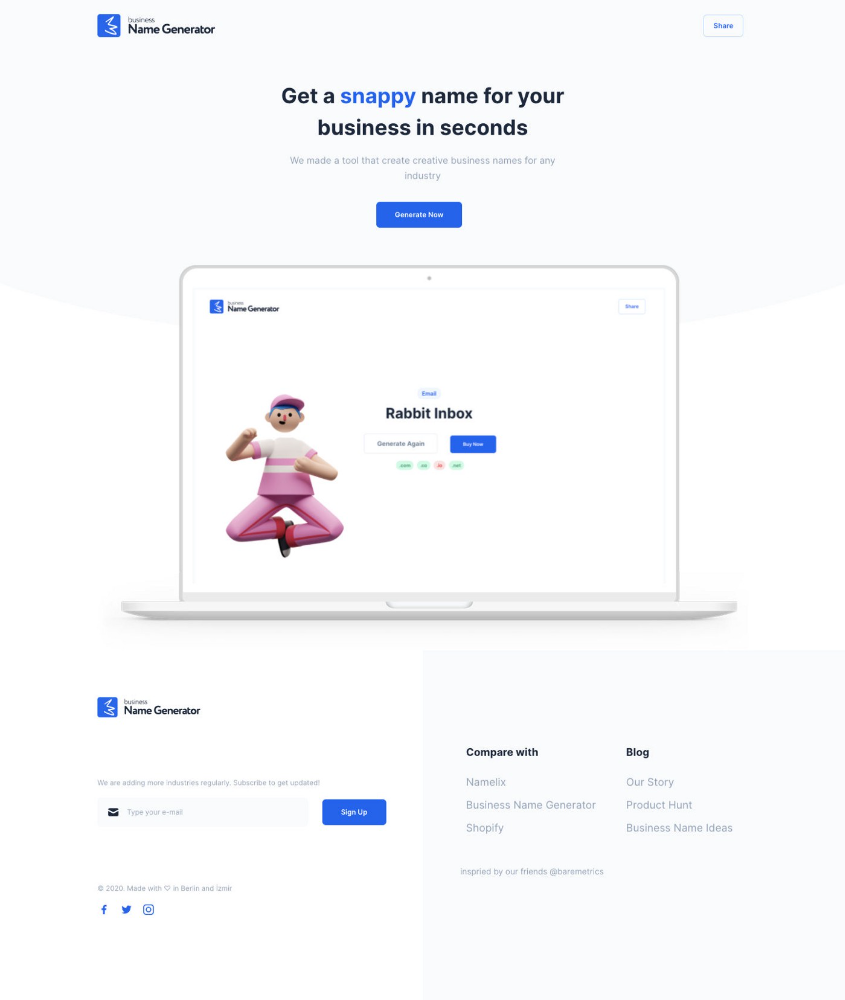
Weekend undertaking: Generate business names
Barash and I established a weekend effort to stay current. Building things helped us learn faster.
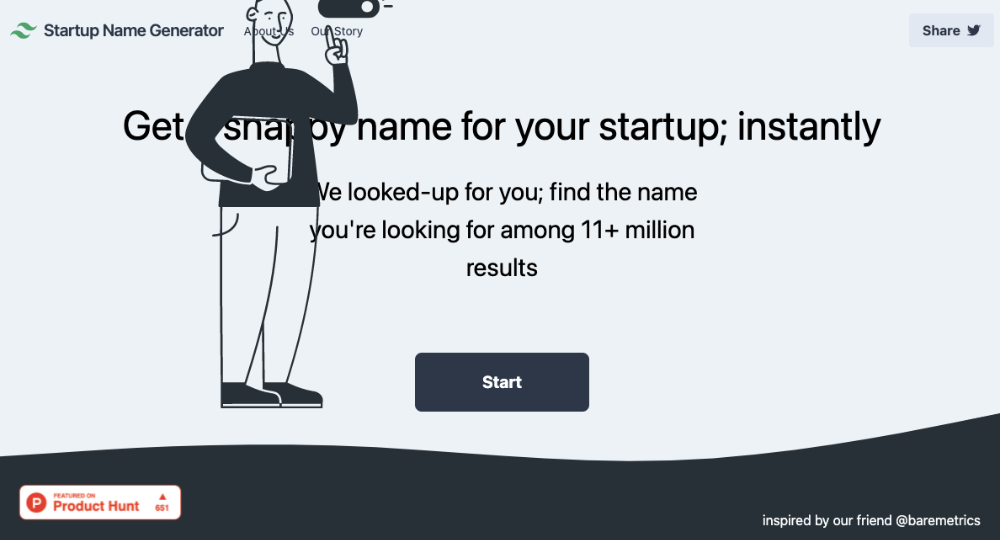
Simple. Startup Name Generator The utility generated random startup names. After market research for SEO purposes, we dubbed it Business Name Generator.
Backend developer Barash dislikes frontend work. He told me to write frontend code. Chakra UI and Tailwind CSS were recommended.
It was the first time I have heard about Tailwind CSS.
Before this project, I made mobile-web app designs in Sketch and shared them via Zeplin. I can read HTML-CSS or React code, but not write it. I didn't believe myself but followed Barash's advice.
My home page wasn't responsive when I started. Here it was:)
And then... Product Hunt had something I needed. Me-only! A website builder that gives you clean Tailwind CSS code and pre-made web components (like Elementor). Incredible.
I bought it right away because it was so easy to use. Best part: It's not just index.html. It includes all needed files. Like
postcss.config.js
README.md
package.json
among other things, tailwind.config.js
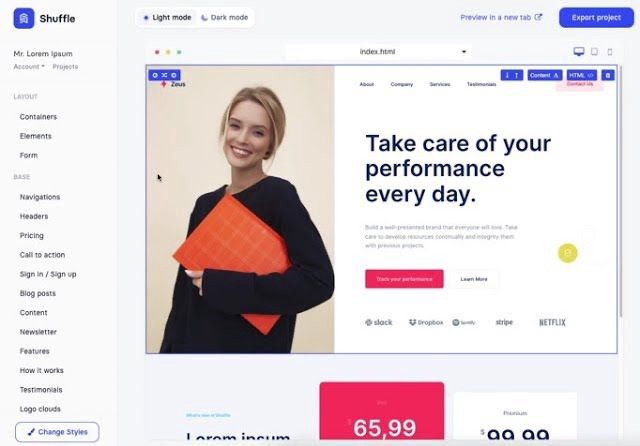
This is for non-techies.
Tailwind.build; which is Shuffle now, allows you to create and export projects for free (with limited features). You can try it by visiting their website.
After downloading the project, you can edit the text and graphics in Visual Studio (or another text editor). This HTML file can be hosted whenever.
Github is an easy way to host a landing page.
your project via Shuffle for export
your website's content, edit
Create a Gitlab, Github, or Bitbucket account.
to Github, upload your project folder.
Integrate Vercel with your Github account (or another platform below)
Allow them to guide you in steps.
Finally. If you push your code to Github using Github Desktop, you'll do it quickly and easily.
Speaking of; here are some hosting and serverless backend services for web applications and static websites for you host your landing pages for FREE!
I host landingpage.fyi on Vercel but all is fine. You can choose any platform below with peace in mind.
Vercel
Render
Netlify
After connecting your project/repo to Vercel, you don’t have to do anything on Vercel. Vercel updates your live website when you update Github Desktop. Wow!
Tails came out while I was using tailwind.build. Although it's prettier, tailwind.build is more mobile-friendly. I couldn't resist their lovely parts. Tails :)
Tails have several well-designed parts. Some components looked awful on mobile, but this bug helped me understand Tailwind CSS.
Unlike Shuffle, Tails does not include files when you export such as config.js, main.js, README.md. It just gives you the HTML code. Suffle.dev is a bit ahead in this regard and with mobile-friendly blocks if you ask me. Of course, I took advantage of both.
creativebusinessnames.co is inactive, but I'll leave a deployment link :)
Adam Wathan's YouTube videos and Tailwind's official literature helped me, but I couldn't have done it without Tails and Shuffle. These tools helped me make landing pages. I shouldn't have started over.
So began my Tailwind CSS adventure. I didn't build landingpage. I didn't plan it to be this long; sorry.
I learnt a lot while I was playing around with Shuffle and Tails Builders.
Long story short I built landingpage.fyi with the help of these tools;
Learning, building, and distribution
Shuffle (Started with a Shuffle Template)
Tails (Used components from here)
Sketch (to handle icons, logos, and .svg’s)
metatags.io (Auto Generator Meta Tags)
Vercel (Hosting)
Github Desktop (Pushing code to Github -super easy-)
Visual Studio Code (Edit my code)
Mailerlite (Capture Emails)
Jarvis / Conversion.ai (%90 of the text on website written by AI 😇 )
CookieHub (Consent Management)
That's all. A few things:
The Outcome
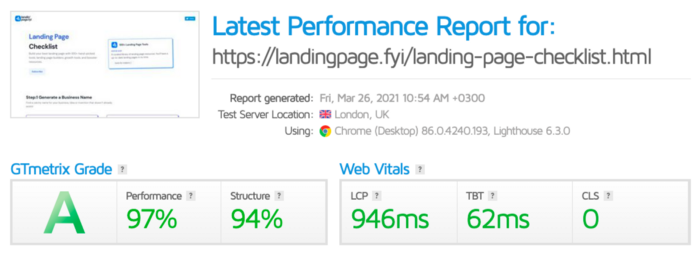
.fyi Domain: Why?

I'm often asked this.
I don't know, but I wanted to include the landing page term. Popular TLDs are gone. I saw my alternatives. brief and catchy.
CSS Tailwind Resources
I'll share project resources like Tails and Shuffle.
Beginner Tailwind (I lately enrolled in this course but haven’t completed it yet.)
Thanks for reading my blog's first post. Please share if you like it.
You might also like

Vitalik
4 years ago
An approximate introduction to how zk-SNARKs are possible (part 2)
If tasked with the problem of coming up with a zk-SNARK protocol, many people would make their way to this point and then get stuck and give up. How can a verifier possibly check every single piece of the computation, without looking at each piece of the computation individually? But it turns out that there is a clever solution.
Polynomials
Polynomials are a special class of algebraic expressions of the form:
- x+5
- x^4
- x^3+3x^2+3x+1
- 628x^{271}+318x^{270}+530x^{269}+…+69x+381
i.e. they are a sum of any (finite!) number of terms of the form cx^k
There are many things that are fascinating about polynomials. But here we are going to zoom in on a particular one: polynomials are a single mathematical object that can contain an unbounded amount of information (think of them as a list of integers and this is obvious). The fourth example above contained 816 digits of tau, and one can easily imagine a polynomial that contains far more.
Furthermore, a single equation between polynomials can represent an unbounded number of equations between numbers. For example, consider the equation A(x)+ B(x) = C(x). If this equation is true, then it's also true that:
- A(0)+B(0)=C(0)
- A(1)+B(1)=C(1)
- A(2)+B(2)=C(2)
- A(3)+B(3)=C(3)
And so on for every possible coordinate. You can even construct polynomials to deliberately represent sets of numbers so you can check many equations all at once. For example, suppose that you wanted to check:
- 12+1=13
- 10+8=18
- 15+8=23
- 15+13=28
You can use a procedure called Lagrange interpolation to construct polynomials A(x) that give (12,10,15,15) as outputs at some specific set of coordinates (eg. (0,1,2,3)), B(x) the outputs (1,8,8,13) on thos same coordinates, and so forth. In fact, here are the polynomials:
- A(x)=-2x^3+\frac{19}{2}x^2-\frac{19}{2}x+12
- B(x)=2x^3-\frac{19}{2}x^2+\frac{29}{2}x+1
- C(x)=5x+13
Checking the equation A(x)+B(x)=C(x) with these polynomials checks all four above equations at the same time.
Comparing a polynomial to itself
You can even check relationships between a large number of adjacent evaluations of the same polynomial using a simple polynomial equation. This is slightly more advanced. Suppose that you want to check that, for a given polynomial F, F(x+2)=F(x)+F(x+1) with the integer range {0,1…89} (so if you also check F(0)=F(1)=1, then F(100) would be the 100th Fibonacci number)
As polynomials, F(x+2)-F(x+1)-F(x) would not be exactly zero, as it could give arbitrary answers outside the range x={0,1…98}. But we can do something clever. In general, there is a rule that if a polynomial P is zero across some set S=\{x_1,x_2…x_n\} then it can be expressed as P(x)=Z(x)*H(x), where Z(x)=(x-x_1)*(x-x_2)*…*(x-x_n) and H(x) is also a polynomial. In other words, any polynomial that equals zero across some set is a (polynomial) multiple of the simplest (lowest-degree) polynomial that equals zero across that same set.
Why is this the case? It is a nice corollary of polynomial long division: the factor theorem. We know that, when dividing P(x) by Z(x), we will get a quotient Q(x) and a remainder R(x) is strictly less than that of Z(x). Since we know that P is zero on all of S, it means that R has to be zero on all of S as well. So we can simply compute R(x) via polynomial interpolation, since it's a polynomial of degree at most n-1 and we know n values (the zeros at S). Interpolating a polynomial with all zeroes gives the zero polynomial, thus R(x)=0 and H(x)=Q(x).
Going back to our example, if we have a polynomial F that encodes Fibonacci numbers (so F(x+2)=F(x)+F(x+1) across x=\{0,1…98\}), then I can convince you that F actually satisfies this condition by proving that the polynomial P(x)=F(x+2)-F(x+1)-F(x) is zero over that range, by giving you the quotient:
H(x)=\frac{F(x+2)-F(x+1)-F(x)}{Z(x)}
Where Z(x) = (x-0)*(x-1)*…*(x-98).
You can calculate Z(x) yourself (ideally you would have it precomputed), check the equation, and if the check passes then F(x) satisfies the condition!
Now, step back and notice what we did here. We converted a 100-step-long computation into a single equation with polynomials. Of course, proving the N'th Fibonacci number is not an especially useful task, especially since Fibonacci numbers have a closed form. But you can use exactly the same basic technique, just with some extra polynomials and some more complicated equations, to encode arbitrary computations with an arbitrarily large number of steps.
see part 3

Sara_Mednick
4 years ago
Since I'm a scientist, I oppose biohacking
Understanding your own energy depletion and restoration is how to truly optimize
Hack has meant many bad things for centuries. In the 1800s, a hack was a meager horse used to transport goods.
Modern usage describes a butcher or ax murderer's cleaver chop. The 1980s programming boom distinguished elegant code from "hacks". Both got you to your goal, but the latter made any programmer cringe and mutter about changing the code. From this emerged the hacker trope, the friendless anti-villain living in a murky hovel lit by the computer monitor, eating junk food and breaking into databases to highlight security system failures or steal hotdog money.
Now, start-a-billion-dollar-business-from-your-garage types have shifted their sights from app development to DIY biology, coining the term "bio-hack". This is a required keyword and meta tag for every fitness-related podcast, book, conference, app, or device.
Bio-hacking involves bypassing your body and mind's security systems to achieve a goal. Many biohackers' initial goals were reasonable, like lowering blood pressure and weight. Encouraged by their own progress, self-determination, and seemingly exquisite control of their biology, they aimed to outsmart aging and death to live 180 to 1000 years (summarized well in this vox.com article).
With this grandiose north star, the hunt for novel supplements and genetic engineering began.
Companies selling do-it-yourself biological manipulations cite lab studies in mice as proof of their safety and success in reversing age-related diseases or promoting longevity in humans (the goal changes depending on whether a company is talking to the federal government or private donors).
The FDA is slower than science, they say. Why not alter your biochemistry by buying pills online, editing your DNA with a CRISPR kit, or using a sauna delivered to your home? How about a microchip or electrical stimulator?
What could go wrong?
I'm not the neo-police, making citizen's arrests every time someone introduces a new plumbing gadget or extrapolates from animal research on resveratrol or catechins that we should drink more red wine or eat more chocolate. As a scientist who's spent her career asking, "Can we get better?" I've come to view bio-hacking as misguided, profit-driven, and counterproductive to its followers' goals.
We're creatures of nature. Despite all the new gadgets and bio-hacks, we still use Roman plumbing technology, and the best way to stay fit, sharp, and happy is to follow a recipe passed down since the beginning of time. Bacteria, plants, and all natural beings are rhythmic, with alternating periods of high activity and dormancy, whether measured in seconds, hours, days, or seasons. Nature repeats successful patterns.
During the Upstate, every cell in your body is naturally primed and pumped full of glycogen and ATP (your cells' energy currencies), as well as cortisol, which supports your muscles, heart, metabolism, cognitive prowess, emotional regulation, and general "get 'er done" attitude. This big energy release depletes your batteries and requires the Downstate, when your subsystems recharge at the cellular level.
Downstates are when you give your heart a break from pumping nutrient-rich blood through your body; when you give your metabolism a break from inflammation, oxidative stress, and sympathetic arousal caused by eating fast food — or just eating too fast; or when you give your mind a chance to wander, think bigger thoughts, and come up with new creative solutions. When you're responding to notifications, emails, and fires, you can't relax.
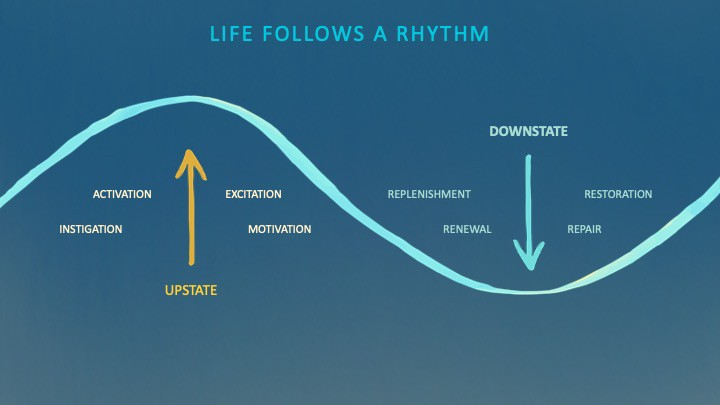
Downstates aren't just for consistently recharging your battery. By spending time in the Downstate, your body and brain get extra energy and nutrients, allowing you to grow smarter, faster, stronger, and more self-regulated. This state supports half-marathon training, exam prep, and mediation. As we age, spending more time in the Downstate is key to mental and physical health, well-being, and longevity.
When you prioritize energy-demanding activities during Upstate periods and energy-replenishing activities during Downstate periods, all your subsystems, including cardiovascular, metabolic, muscular, cognitive, and emotional, hum along at their optimal settings. When you synchronize the Upstates and Downstates of these individual rhythms, their functioning improves. A hard workout causes autonomic stress, which triggers Downstate recovery.
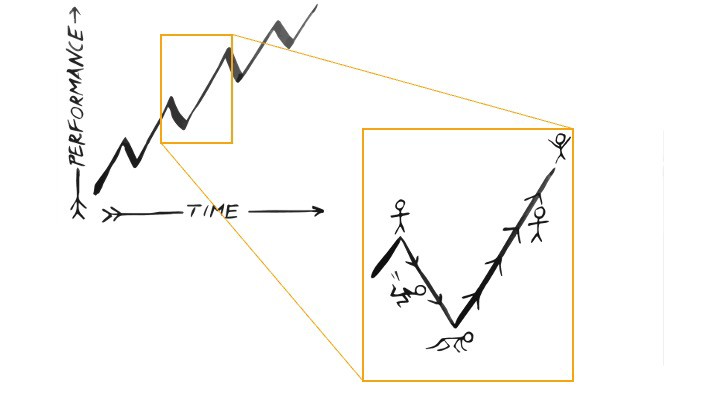
By choosing the right timing and type of exercise during the day, you can ensure a deeper recovery and greater readiness for the next workout by working with your natural rhythms and strengthening your autonomic and sleep Downstates.
Morning cardio workouts increase deep sleep compared to afternoon workouts. Timing and type of meals determine when your sleep hormone melatonin is released, ushering in sleep.
Rhythm isn't a hack. It's not a way to cheat the system or the boss. Nature has honed its optimization wisdom over trillions of days and nights. Stop looking for quick fixes. You're a whole system made of smaller subsystems that must work together to function well. No one pill or subsystem will make it all work. Understanding and coordinating your rhythms is free, easy, and only benefits you.
Dr. Sara C. Mednick is a cognitive neuroscientist at UC Irvine and author of The Power of the Downstate (HachetteGO)
Vitalik
4 years ago
Fairness alternatives to selling below market clearing prices (or community sentiment, or fun)
When a seller has a limited supply of an item in high (or uncertain and possibly high) demand, they frequently set a price far below what "the market will bear." As a result, the item sells out quickly, with lucky buyers being those who tried to buy first. This has happened in the Ethereum ecosystem, particularly with NFT sales and token sales/ICOs. But this phenomenon is much older; concerts and restaurants frequently make similar choices, resulting in fast sell-outs or long lines.
Why do sellers do this? Economists have long wondered. A seller should sell at the market-clearing price if the amount buyers are willing to buy exactly equals the amount the seller has to sell. If the seller is unsure of the market-clearing price, they should sell at auction and let the market decide. So, if you want to sell something below market value, don't do it. It will hurt your sales and it will hurt your customers. The competitions created by non-price-based allocation mechanisms can sometimes have negative externalities that harm third parties, as we will see.
However, the prevalence of below-market-clearing pricing suggests that sellers do it for good reason. And indeed, as decades of research into this topic has shown, there often are. So, is it possible to achieve the same goals with less unfairness, inefficiency, and harm?
Selling at below market-clearing prices has large inefficiencies and negative externalities
An item that is sold at market value or at an auction allows someone who really wants it to pay the high price or bid high in the auction. So, if a seller sells an item below market value, some people will get it and others won't. But the mechanism deciding who gets the item isn't random, and it's not always well correlated with participant desire. It's not always about being the fastest at clicking buttons. Sometimes it means waking up at 2 a.m. (but 11 p.m. or even 2 p.m. elsewhere). Sometimes it's just a "auction by other means" that's more chaotic, less efficient, and has far more negative externalities.
There are many examples of this in the Ethereum ecosystem. Let's start with the 2017 ICO craze. For example, an ICO project would set the price of the token and a hard maximum for how many tokens they are willing to sell, and the sale would start automatically at some point in time. The sale ends when the cap is reached.
So what? In practice, these sales often ended in 30 seconds or less. Everyone would start sending transactions in as soon as (or just before) the sale started, offering higher and higher fees to encourage miners to include their transaction first. Instead of the token seller receiving revenue, miners receive it, and the sale prices out all other applications on-chain.
The most expensive transaction in the BAT sale set a fee of 580,000 gwei, paying a fee of $6,600 to get included in the sale.
Many ICOs after that tried various strategies to avoid these gas price auctions; one ICO notably had a smart contract that checked the transaction's gasprice and rejected it if it exceeded 50 gwei. But that didn't solve the issue. Buyers hoping to game the system sent many transactions hoping one would get through. An auction by another name, clogging the chain even more.
ICOs have recently lost popularity, but NFTs and NFT sales have risen in popularity. But the NFT space didn't learn from 2017; they do fixed-quantity sales just like ICOs (eg. see the mint function on lines 97-108 of this contract here). So what?
That's not the worst; some NFT sales have caused gas price spikes of up to 2000 gwei.
High gas prices from users fighting to get in first by sending higher and higher transaction fees. An auction renamed, pricing out all other applications on-chain for 15 minutes.
So why do sellers sometimes sell below market price?
Selling below market value is nothing new, and many articles, papers, and podcasts have written (and sometimes bitterly complained) about the unwillingness to use auctions or set prices to market-clearing levels.
Many of the arguments are the same for both blockchain (NFTs and ICOs) and non-blockchain examples (popular restaurants and concerts). Fairness and the desire not to exclude the poor, lose fans or create tension by being perceived as greedy are major concerns. The 1986 paper by Kahneman, Knetsch, and Thaler explains how fairness and greed can influence these decisions. I recall that the desire to avoid perceptions of greed was also a major factor in discouraging the use of auction-like mechanisms in 2017.
Aside from fairness concerns, there is the argument that selling out and long lines create a sense of popularity and prestige, making the product more appealing to others. Long lines should have the same effect as high prices in a rational actor model, but this is not the case in reality. This applies to ICOs and NFTs as well as restaurants. Aside from increasing marketing value, some people find the game of grabbing a limited set of opportunities first before everyone else is quite entertaining.
But there are some blockchain-specific factors. One argument for selling ICO tokens below market value (and one that persuaded the OmiseGo team to adopt their capped sale strategy) is community dynamics. The first rule of community sentiment management is to encourage price increases. People are happy if they are "in the green." If the price drops below what the community members paid, they are unhappy and start calling you a scammer, possibly causing a social media cascade where everyone calls you a scammer.
This effect can only be avoided by pricing low enough that post-launch market prices will almost certainly be higher. But how do you do this without creating a rush for the gates that leads to an auction?
Interesting solutions
It's 2021. We have a blockchain. The blockchain is home to a powerful decentralized finance ecosystem, as well as a rapidly expanding set of non-financial tools. The blockchain also allows us to reset social norms. Where decades of economists yelling about "efficiency" failed, blockchains may be able to legitimize new uses of mechanism design. If we could use our more advanced tools to create an approach that more directly solves the problems, with fewer side effects, wouldn't that be better than fiddling with a coarse-grained one-dimensional strategy space of selling at market price versus below market price?
Begin with the goals. We'll try to cover ICOs, NFTs, and conference tickets (really a type of NFT) all at the same time.
1. Fairness: don't completely exclude low-income people from participation; give them a chance. The goal of token sales is to avoid high initial wealth concentration and have a larger and more diverse initial token holder community.
2. Don’t create races: Avoid situations where many people rush to do the same thing and only a few get in (this is the type of situation that leads to the horrible auctions-by-another-name that we saw above).
3. Don't require precise market knowledge: the mechanism should work even if the seller has no idea how much demand exists.
4. Fun: The process of participating in the sale should be fun and game-like, but not frustrating.
5. Give buyers positive expected returns: in the case of a token (or an NFT), buyers should expect price increases rather than decreases. This requires selling below market value.
Let's start with (1). From Ethereum's perspective, there is a simple solution. Use a tool designed for the job: proof of personhood protocols! Here's one quick idea:
Mechanism 1 Each participant (verified by ID) can buy up to ‘’X’’ tokens at price P, with the option to buy more at an auction.
With the per-person mechanism, buyers can get positive expected returns for the portion sold through the per-person mechanism, and the auction part does not require sellers to understand demand levels. Is it race-free? The number of participants buying through the per-person pool appears to be high. But what if the per-person pool isn't big enough to accommodate everyone?
Make the per-person allocation amount dynamic.
Mechanism 2 Each participant can deposit up to X tokens into a smart contract to declare interest. Last but not least, each buyer receives min(X, N / buyers) tokens, where N is the total sold through the per-person pool (some other amount can also be sold by auction). The buyer gets their deposit back if it exceeds the amount needed to buy their allocation.
No longer is there a race condition based on the number of buyers per person. No matter how high the demand, it's always better to join sooner rather than later.
Here's another idea if you like clever game mechanics with fancy quadratic formulas.
Mechanism 3 Each participant can buy X units at a price P X 2 up to a maximum of C tokens per buyer. C starts low and gradually increases until enough units are sold.
The quantity allocated to each buyer is theoretically optimal, though post-sale transfers will degrade this optimality over time. Mechanisms 2 and 3 appear to meet all of the above objectives. They're not perfect, but they're good starting points.
One more issue. For fixed and limited supply NFTs, the equilibrium purchased quantity per participant may be fractional (in mechanism 2, number of buyers > N, and in mechanism 3, setting C = 1 may already lead to over-subscription). With fractional sales, you can offer lottery tickets: if there are N items available, you have a chance of N/number of buyers of getting the item, otherwise you get a refund. For a conference, groups could bundle their lottery tickets to guarantee a win or a loss. The certainty of getting the item can be auctioned.
The bottom tier of "sponsorships" can be used to sell conference tickets at market rate. You may end up with a sponsor board full of people's faces, but is that okay? After all, John Lilic was on EthCC's sponsor board!
Simply put, if you want to be reliably fair to people, you need an input that explicitly measures people. Authentication protocols do this (and if desired can be combined with zero knowledge proofs to ensure privacy). So we should combine the efficiency of market and auction-based pricing with the equality of proof of personhood mechanics.
Answers to possible questions
Q: Won't people who don't care about your project buy the item and immediately resell it?
A: Not at first. Meta-games take time to appear in practice. If they do, making them untradeable for a while may help mitigate the damage. Using your face to claim that your previous account was hacked and that your identity, including everything in it, should be moved to another account works because proof-of-personhood identities are untradeable.
Q: What if I want to make my item available to a specific community?
A: Instead of ID, use proof of participation tokens linked to community events. Another option, also serving egalitarian and gamification purposes, is to encrypt items within publicly available puzzle solutions.
Q: How do we know they'll accept? Strange new mechanisms have previously been resisted.
A: Having economists write screeds about how they "should" accept a new mechanism that they find strange is difficult (or even "equity"). However, abrupt changes in context effectively reset people's expectations. So the blockchain space is the best place to try this. You could wait for the "metaverse", but it's possible that the best version will run on Ethereum anyway, so start now.