


More on Technology

Gajus Kuizinas
3 years ago
How a few lines of code were able to eliminate a few million queries from the database
I was entering tens of millions of records per hour when I first published Slonik PostgreSQL client for Node.js. The data being entered was usually flat, making it straightforward to use INSERT INTO ... SELECT * FROM unnset() pattern. I advocated the unnest approach for inserting rows in groups (that was part I).

However, today I’ve found a better way: jsonb_to_recordset.
jsonb_to_recordsetexpands the top-level JSON array of objects to a set of rows having the composite type defined by an AS clause.
jsonb_to_recordset allows us to query and insert records from arbitrary JSON, like unnest. Since we're giving JSON to PostgreSQL instead of unnest, the final format is more expressive and powerful.
SELECT *
FROM json_to_recordset('[{"name":"John","tags":["foo","bar"]},{"name":"Jane","tags":["baz"]}]')
AS t1(name text, tags text[]);
 name |   tags
------+-----------
 John | {foo,bar}
 Jane | {baz}
(2 rows)
Let’s demonstrate how you would use it to insert data.
Inserting data using json_to_recordset
Say you need to insert a list of people with attributes into the database.
const persons = [
  {
    name: 'John',
    tags: ['foo', 'bar']
  },
  {
    name: 'Jane',
    tags: ['baz']
  }
];
You may be tempted to traverse through the array and insert each record separately, e.g.
for (const person of persons) {
  await pool.query(sql`
    INSERT INTO person (name, tags)
    VALUES (
      ${person.name},
      ${sql.array(person.tags, 'text[]')}
    )
  `);
}
It's easier to read and grasp when working with a few records. If you're like me and troubleshoot a 2M+ insert query per day, batching inserts may be beneficial.

What prompted the search for better alternatives.
Inserting using unnest pattern might look like this:
await pool.query(sql`
  INSERT INTO public.person (name, tags)
  SELECT t1.name, t1.tags::text[]
  FROM unnest(
    ${sql.array(['John', 'Jane'], 'text')},
    ${sql.array(['{foo,bar}', '{baz}'], 'text')}
  ) AS t1.(name, tags);
`);
You must convert arrays into PostgreSQL array strings and provide them as text arguments, which is unsightly. Iterating the array to create slices for each column is likewise unattractive.
However, with jsonb_to_recordset, we can:
await pool.query(sql`
  INSERT INTO person (name, tags)
  SELECT *
  FROM jsonb_to_recordset(${sql.jsonb(persons)}) AS t(name text, tags text[])
`);
In contrast to the unnest approach, using jsonb_to_recordset we can easily insert complex nested data structures, and we can pass the original JSON document to the query without needing to manipulate it.
In terms of performance they are also exactly the same. As such, my current recommendation is to prefer jsonb_to_recordset whenever inserting lots of rows or nested data structures.

CyberPunkMetalHead
3 years ago
I made ChatGPT copy itself.

OpenAI's ChatGPT is an amazing AI-powered chatbot. It can write poetry, stories, and marketing campaigns, and it's also adept at coding. ChatGPT's coding is so amazing that it replicated itself. What happened:
Me: Hi
Hello! Can I help? I'll answer any inquiries you have.
Me: Build a python and flask AI chatbot that responds to user messages on the frontend.
CGPT:
from flask import Flask, request, jsonify

import openai
openai.api_key = "YOUR_API_KEY"

@app.route('/chatbot', methods=['POST'])
def chatbot():
    user_message = request.get_json()['message']
    response = chatbot_response(user_message)
    return jsonify({'response': response})


def chatbot_response(user_message):
    response = openai.Completion.create(
        engine="text-davinci-002",
        prompt=user_message,
        max_tokens=1024,
        n = 1,
        temperature=0.5
    )
    return response['choices'][0]['text']

if __name__ == '__main__':
    app.run()
To integrate a chatbot with a frontend, use Flask to serve an HTML page with a form for user messages and the chatbot's answer. AJAX can submit the form to the /chatbot route, and JavaScript can show the chatbot's response.
I imported code snippets at the top of the file.
Let's add a frontend interface, I said.
CGPT:
<!DOCTYPE html>
<html>
<head>
    <title>AI Chatbot</title>
</head>
<body>
    <h1>AI Chatbot</h1>
    <form id="chatbot-form">
        <label for="message">Message:</label><br>
        <input type="text" id="message" name="message"><br>
        <input type="submit" value="Submit">
    </form>
    <div id="chatbot-response"></div>

    <script src="https://ajax.googleapis.com/ajax/libs/jquery/3.5.1/jquery.min.js"></script>
    <script>
        $(document).ready(function() {
            $("#chatbot-form").submit(function(e) {
                e.preventDefault();
                var userMessage = $("#message").val();
                $.ajax({
                    type: "POST",
                    url: "/chatbot",
                    data: JSON.stringify({message: userMessage}),
                    contentType: "application/json; charset=utf-8",
                    dataType: "json",
                    success: function(response) {
                        $("#chatbot-response").text(response.response);
                    }
                });
            });
        });
    </script>
</body>
</html>
To serve this HTML page using Flask, build a new route that returns the page as a GET response.
So far, so good.

Looked quite basic so I got chatGPT to add some tailwind to the project.
Me: Tailwind the chatbot.html page, please. Give it a futuristic style with purple and neon
After a few more prompts, Talk GPT aligned the form to the center, changed some colors, and added padding.
CGPT:
<!DOCTYPE html>
<html>
<head>
    <title>AI Chatbot</title>
    <link href="https://unpkg.com/tailwindcss@^1.0/dist/tailwind.min.css" rel="stylesheet">
</head>
<body class="bg-black flex flex-col justify-center items-center">
    <h1 class="sm:text-center text-purple-500">AI Chatbot</h1>
    <form id="chatbot-form" class="border-purple-500 bg-purple-800 rounded">
        <label for="message">Message:</label><br>
        <input type="text" id="message" name="message" class="min-w-30 rounded"><br>
        <input type="submit" value="Submit" class="bg-purple-500 border-red-500 transform hover:scale-110 rounded">
    </form>
    <div class="flex justify-center">
        <div id="chatbot-response" class="text-white rounded"></div>
    </div>

    <script src="https://ajax.googleapis.com/ajax/libs/jquery/3.5.1/jquery.min.js"></script>
    <script>
        var colors = ['red', 'orange', 'yellow', 'green', 'blue', 'indigo', 'violet'];
        var colorIndex = 0;

        $(document).ready(function() {
            setInterval(function() {
                $("#chatbot-form").css('border-color', colors[colorIndex]);
                colorIndex = (colorIndex + 1) % colors.length;
            }, 1000);

            $("#chatbot-form").submit(function(e) {
                e.preventDefault();
                var userMessage = $("#message").val();
                $.ajax({
                    type: "POST",
                    url: "/chatbot",
                    data: JSON.stringify({message: userMessage}),
                    contentType: "application/json; charset=utf-8",
                    dataType: "json",
                    success: function(response) {
                        $("#chatbot-response").text(response.response);
                    }
                });
            });
        });
    </script>
</body>
</html>
Improved:

A few more prompts like “Add more vertical and horizontal padding to the submit button and vertical margin, and vertically align this file's body.”
The result:
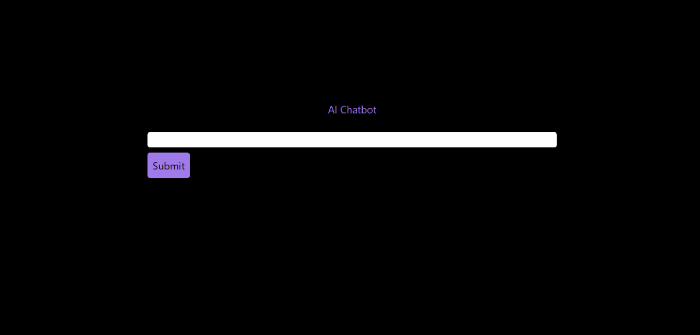
Is it effective? Now, I'll chat with ChatGPT's AI Chatbot. I intervened minimally throughout construction. Chat GPT created numerous files, connected and interacted with its own API, and presented the user request response on the front end by itself.
Me to AI Chatbot: Hey, can you give me 6 name suggestions for a black horse?
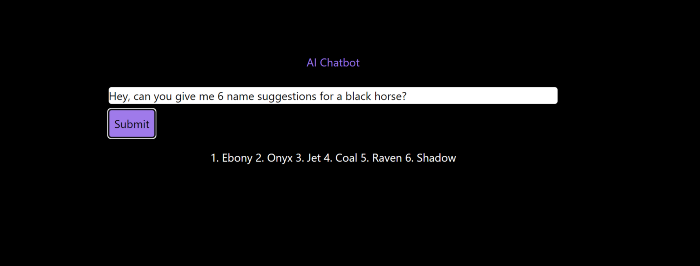
Me to AI Chatbot: Write a poem in the style of Jim Morrison. Make sure to mention cacti and black holes
ChatGPTs Chatbot:
In the desert night, I am confronted by cacti,
Their arms reaching out, As if to grab me and take me away.
The stars in the sky, Beckon me to come,
To a world of black holes, Where I can be free.
I am in a trance, My body and mind,
In a state of limbo, As I wander the night.
I hear a voice, Calling me to the unknown,
I cannot resist, The lure of the black hole.
The cacti watch, As I take my leave,
To a place of mystery, Where I can find peace.
Of course, the next question I gave it was to build a chatbot!
Me: Build a python and flask AI chatbot that responds to user messages on the frontend.
ChatbotGPTs:
import os from flask
import Flask, request, jsonify
from chatterbot
import ChatBot
from chatterbot.trainers
import ListTrainer

# Create a new chatbot
bot = ChatBot(
  "My Bot",
  storage_adapter="chatterbot.storage.SQLStorageAdapter",
  logic_adapters=[
    "chatterbot.logic.BestMatch",
    { "import_path": "chatterbot.logic.BestMatch",
      "statement_comparison_function": "chatterbot.comparisons.levenshtein_distance",
       "response_selection_method": "chatterbot.response_selection.get_first_response" }
    ],
    database_uri="sqlite:///database.sqlite3" )

# Train the chatbot with a few sample conversations
conversation = [ "Hello", "Hi there!", "How are you doing?", "I'm doing great.", "That is good to hear", "Thank you.", "You're welcome." ]
trainer = ListTrainer(bot) trainer.train(conversation)

# Create a Flask app
app = Flask(__name__)

# Define a route for the default URL
@app.route("/") def index(): return "<h1>Chatbot</h1>"

# Define a route for the /get_response URL
@app.route("/get_response", methods=["POST"])

def get_response():
# Get the user's message
user_message = request.form["user_message"]
# Get the bot's response
bot_response = bot.get_response(user_message)
# Return the bot's response
return str(bot_response)
# Run the Flask
app if __name__ == "__main__": app.run()
No matter how many times I tried, the second generation always used chatterbot instead of the ChatGPT API. Even when I told it to use the ChatGPT API, it didn't.
ChatGTP's ability to reproduce or construct other machine learning algorithms is interesting and possibly terrifying. Nothing prevents ChatGPT from replicating itself ad infinitum throughout the Internet other than a lack of desire. This may be the first time a machine repeats itself, so I've preserved the project as a reference. Adding a requirements.txt file and python env for easier deployment is the only change to the code.
I hope you enjoyed this.

Mark Schaefer
3 years ago
20 Fun Uses for ChatGPT
Our RISE community is stoked on ChatGPT. ChatGPT has countless uses.
Early on. Companies are figuring out the legal and ethical implications of AI's content revolution. Using AI for everyday tasks is cool.
So I challenged RISE friends... Let's have fun and share non-obvious uses.
Onward!
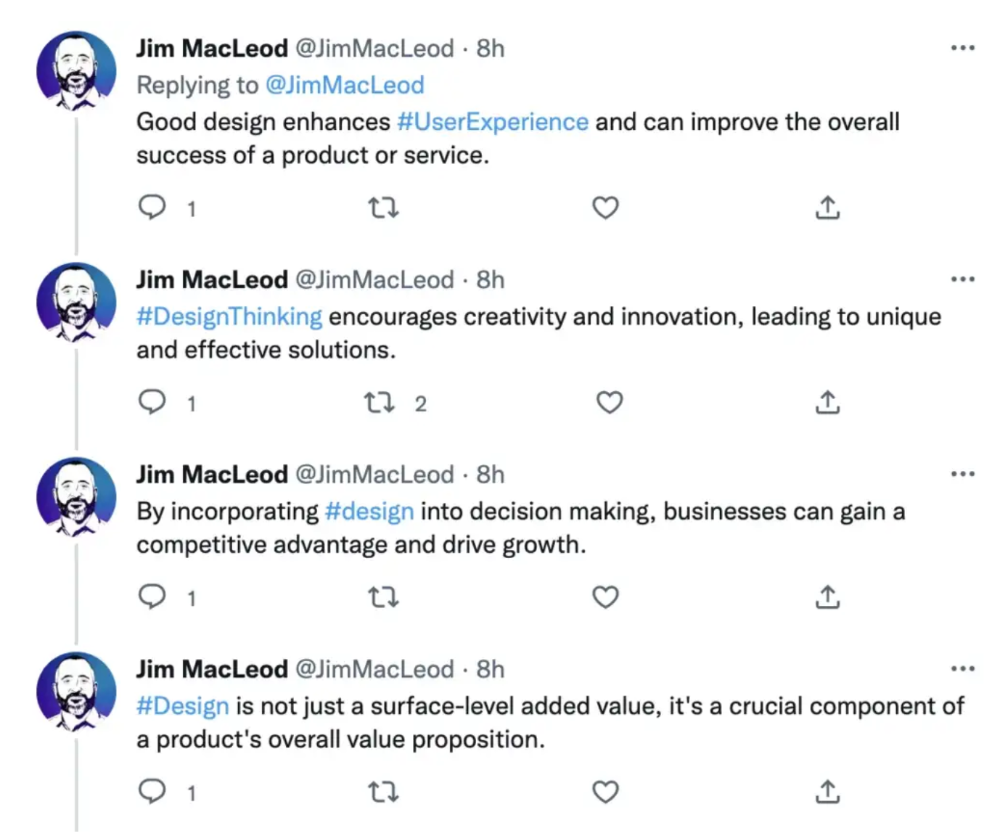
1. Tweet
Jim MacLeod requested a design-themed Twitter thread from ChatGPT.
2. Novelize
Giuseppe Fratoni writes novels.
"This is amazing!" Impotent. I asked about writing, mystery novels, and jazz.
"Develop a mystery novel plot in which a disillusioned homicide detective hunts a serial killer who targets jazz musicians who play Autumn Leaves."
"I have:
Detective James Thompson is a seasoned veteran of the Homicide department, but lately he’s been feeling burnt out and disillusioned. His latest case, the murder of a young jazz pianist who was found brutally killed in his home, only serves to deepen his sense of despair … (much more provided)
3. Question-and-answer sessions
Bliss recommends:
You have a guest speaker and want to ask audience questions.
Pre-generate questions with ChatGPT. "And here's a question from our AI?"
The conference is about Western water scarcity. Water management expert. My AI question was...
Which desalination-related questions should I ask an expert?
ChatGPT said...
How is desalination currently being used around the world, and in what types of locations is it most effective?
What are the potential advantages and disadvantages of using desalination to provide fresh water?
What are some of the key challenges and limitations of desalination technology, and how are they being addressed?
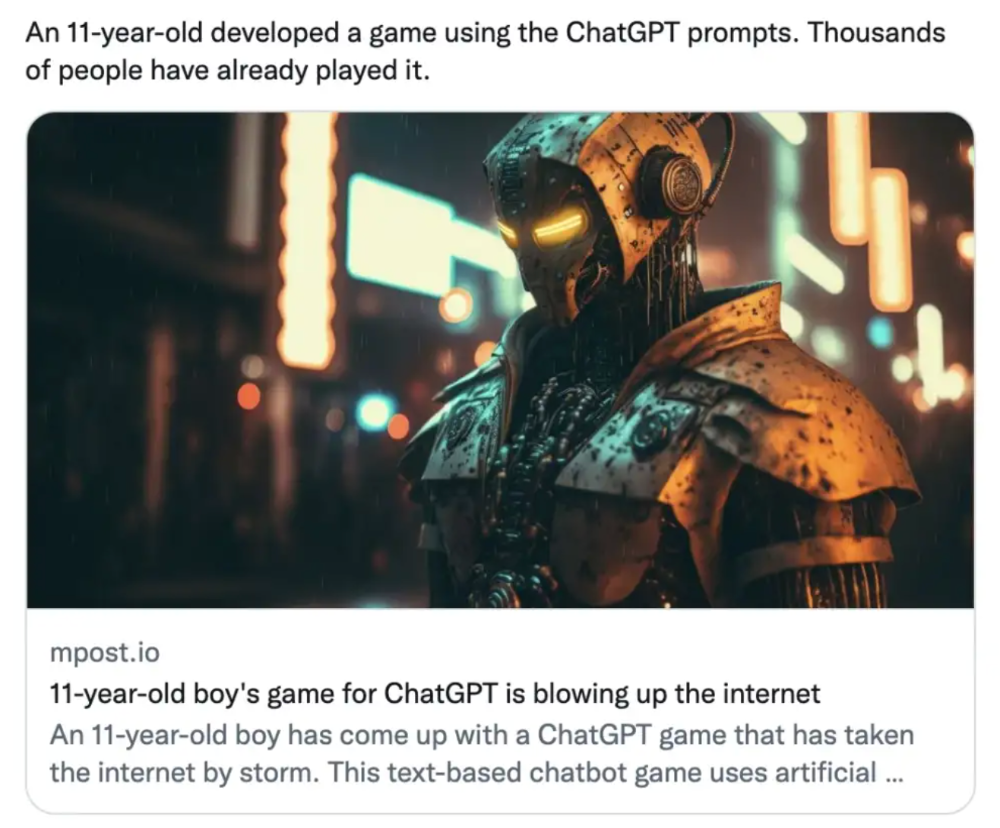
4. Game-making
Richard's a board game expert. He suggests using ChatGPT to plan games. Note: Some people have started getting help solving crossword puzzle clues.
5. Matchmaking
Tanya Thompson thinks it helps dating. ChatGPT:
Here are some flirty first-message ideas for dating apps:
I noticed you from afar. I had to say hi and see if we clicked.
Your profile picture is gorgeous. I'm obsessed with your [Feature] and want to know you better.
I don't usually message first, but I had to. You're [Attractive Quality] and I can't wait to talk.”
Hello. Your profile intimidates me. I'm starstruck by your [Attractiveness]. (Many instances)
5. Solitude/anxiety
ChatGPT excels at one-on-one conversations.
PepperBrooks: "I'm sad and lonely."
ChatGPT: I’m sorry to hear that you’re feeling sad and lonely. It’s natural to feel down sometimes, but it’s important to remember that you’re not alone. There are many people who care about you and want to help you. It can be helpful to talk to someone about your feelings, whether it’s a close friend, family member, or mental health professional.
Sometimes, just expressing your thoughts and emotions to someone else can help to alleviate your sadness and loneliness. It’s also important to take care of yourself and do things that make you happy, such as spending time with loved ones, pursuing a hobby, or exercising. These things can help to improve your mood and make you feel more connected to others. Remember that you are strong and capable, and that you can get through this difficult time.
Daniel Nestle asked ChatGPT to generate journal prompts to help him deal with anxiety.
Write down the things that are causing you anxiety at the moment.
Describe a situation in which you felt anxious and how you coped with it.
Reflect on how your thoughts and beliefs contribute to your anxiety.
Write a letter to your anxiety, expressing your feelings and concerns
Imagine yourself in a calm and peaceful place, and describe it in detail.
(many more items followed)
6. Names
Continued Daniel:
Also, naming ideas.
Me: Name this drink. Japanese gin, unsweetened tonic, lime, Szechuan pepper, grapefruit.
ChatGPT: How about “Sakura Sunrise?” The name incorporates the Japanese gin and the citrus flavors of grapefruit and lime, and the word “sunrise” suggests a fresh and invigorating start to the day. Alternatively, you could go with something like “Peppered Grapefruit Gin Fizz” to emphasize the unique flavor combination of Szechuan pepper and grapefruit.
7. Translation on the go
Monks recommends: ChatGPT is a perfect mobile translation tool. Say you need help in Italy.
ME: Translate to Italian
Where is the nearest gas station?
ChatGPT: “La mia auto sta per esaurire il carburante, mi puoi dire dove si trova la stazione di servizio più vicina?”
8. Fitness
Monks added:
ME: In 3 months, I want to run 5km. Plan out how I can do this.
ChatGPT: Here's a 3-month plan to run 5km.
Start by walking for 15–20 minutes each day to build up your endurance and get your body used to regular exercise.
After a week of walking, begin incorporating short jogs into your routine. Start by jogging for 1–2 minutes at a time, with walking breaks in between. Gradually increase the length of your jogs and reduce the amount of time you spend walking.
Once you can jog for 10 minutes without stopping, start increasing the distance of your runs. Aim to run 1km without stopping and then gradually increase the distance over time.
In addition to your regular runs, incorporate strength training and stretching into your routine to improve your overall fitness and reduce the risk of injury.
(more details continued on)
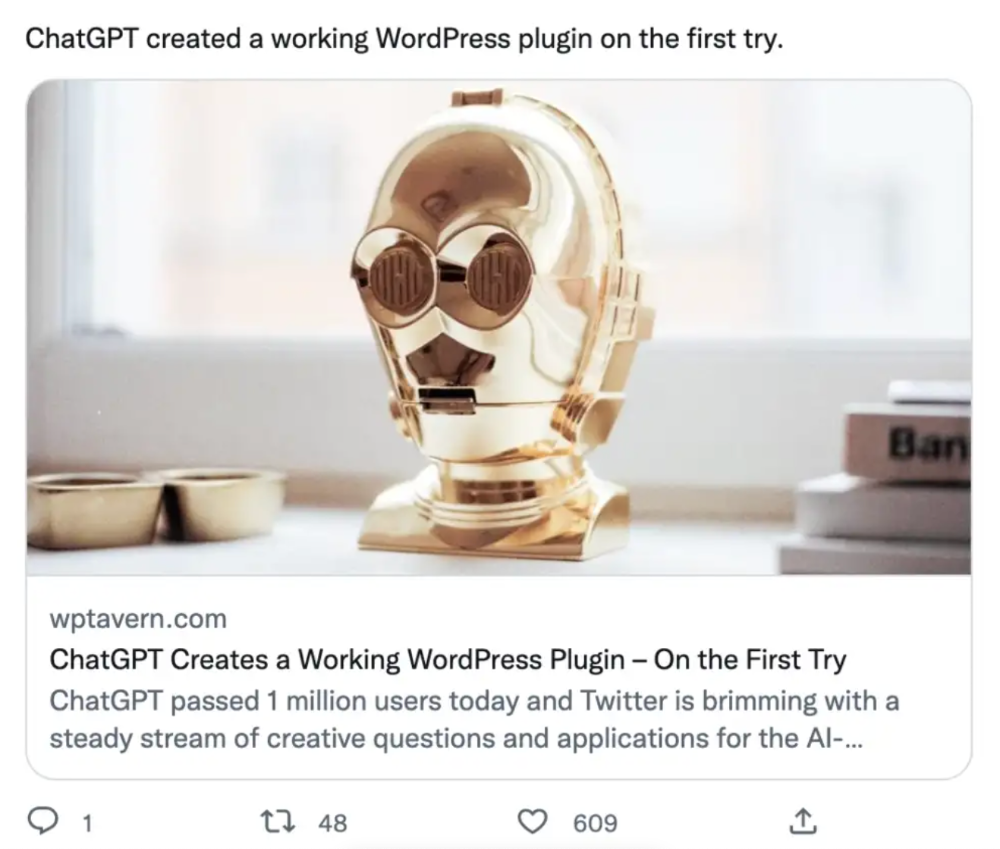
9. Integrations and coding
10. Teacher lesson plans
Spencer Crandall saved time.
This morning, I wondered who has the hardest job. Teachers.
Many students, little time. ChatGPT could handle lesson planning. I tried it and got this.
Lesson Title: The History and Impact of Artificial Intelligence
Students will understand the history and development of AI and the potential positive and negative impacts on society.
AI timeline AI technologies and applications
Overview:
Introduce the topic of artificial intelligence, and explain that it refers to the development of computer systems and algorithms that can simulate human intelligence and behavior.
Show the timeline of significant events in the history of AI, and discuss the key milestones and developments in the field.
Show examples of AI technologies and applications, and explain how they are used in various industries and fields.
Discuss the potential positive and negative impacts of AI on society, including its potential to improve productivity, efficiency, and safety, as well as its potential to create new challenges and concerns, such as job displacement and ethical issues.
(many more details followed)
11. Find podcast guests.
Joeri Billast suggested:
Who should be on my Web3 podcast?
ChatGPT: Web3 marketing experts, influencers, and thought leaders make great podcast guests. These include Web3 marketers, content creators, business owners, entrepreneurs, and technologists. You could invite Web3 startups and organizations to your podcast.
Please give examples.
ChatGPT: Ideal Web3 marketing podcast guests include:
Tim Berner-Lee, inventor of the World Wide Web
Chris Dixon, general partner at Andreessen Horowitz
Vitalik Buterin, founder of Ethereum
Joe Lubin, founder of ConsenSys
Susan Fowler, author of Whistleblower
(many other suggestions)
12. Comments and reviews on social media
Lisa Monk thinks ChatGPT can help retail staff with social media.
She asked ChatGPT to "review this restaurant"
POSITIVE CUSTOMER REVIEW: I absolutely love this place. We eat out a lot however this place has topped it all. Perfect meals, amazing staff and the timing for it all was great! Special thanks to Sophie B (you rock) From your guests all the way from the Gold Coast, THANK YOU
ChatGPT REPLY: Thank you so much for your kind words and for taking the time to write a review. We are delighted to hear that you had such a great experience at our restaurant. We are thrilled that you enjoyed your meal and the service provided by Sophie. It’s always a pleasure to serve guests visiting from the Gold Coast and we are grateful for your support. We look forward to welcoming you back again soon. Thank you again for your positive review.
CUSTOMER REVIEW: Most average food, there is a nice view, But that’s about it
ChatGPT: Thank you for your review. We apologize if your dining experience was not up to your expectations. We strive to provide top-quality food and service to all of our customers, and we will take your feedback into consideration as we continue to improve. Thank you for letting us know about your experience.
13. Crime-fighting
Zack Seipert said, "I researched some famous unsolved murders, and ChatGPT laid out the crime, suspects, clues, and more." I bet experienced detectives could solve some of these cold cases.
14. Reduce bias
Joanne Taylor struggles to remove biases from her writing. She asked ChatGPT for ideas.
I asked ChatGPT to check a text for racial bias, and it did well.
15. Furnishings
I designed a small, unique table using ChatGPT and MidJourney. I edited ChatGPT's idea for clarity and brevity before entering it in MidJourney.
Results:

16. Serialize a novel
Scott Scowcoft led ChatCPT through iterations of a story text to create serialized novel frames. You can view this here.
17. Interview preparation
I was on a sales podcast. Although this is marketing-related, it's not my forte. I asked ChatGPT for help with a sales interview. Response:
Here are some interview questions about the future of sales and how to answer them.
How will technology affect sales in the future?
Technology will impact sales in the coming years. Automation and AI could be used to handle routine tasks, and data analysis and CRM could become more important. E-commerce and online sales channels are also reshaping the sales landscape.
How will the salesperson's role change?
Future sales roles may change in response to changing customer needs and expectations. Salespeople must be knowledgeable and consultative to help customers navigate complex products and services. Increasing importance of data analysis and CRM tools will require salespeople to understand and use technology effectively.
Future sales professionals will need what skills?
Future salespeople will need many skills. Sales professionals must have strong communication and interpersonal skills, as well as product and service knowledge and the ability to use data analysis and CRM tools effectively. Adapting to changing customer needs and staying current on industry trends will also be important for sales success.
18. Gift ideas
I need Christmas gift ideas for my wife. I asked:
Suggest a gift idea under $200 for a middle-aged woman who loves The Eagles.
A middle-aged woman who loves The Eagles might like a vinyl record of "Hotel California" or "The Long Run." Many music fans enjoy the unique sound and experience of vinyl records.
Pair the record with a high-quality record player for a complete gift. The vinyl record and record player should fit within your $200 budget for an Eagles fan.
19. Explaining complex concepts
I entered: Explain quantum physics to me as if I were 10 years old.
Quantum physics is a branch of science that studies how tiny particles, like atoms and subatomic particles, behave. These particles are so small that they don’t always follow the same rules as the things we can see and touch every day.
For example, sometimes they can be in two places at the same time, or they can be friends with each other even if they are far apart. This might sound strange, but it’s what scientists have learned from studying these tiny particles. Quantum physics helps us understand how the world works at a very small scale, and it can also help us make new technologies, like computers that are much faster than the ones we have today.
20. AP-style editing
Blogs, journals, and books follow AP Style. I asked ChatGPT to "edit using AP Style" and it did a great job.
And then... "Write a catchy headline for a blog post about 16 ChatGPT uses"
Here are some possible blog post titles for 20 creative ChatGPT uses:
“20 Fun and Creative Ways to Use ChatGPT: From Games to Quizzes and More”
“The Ultimate Guide to Using ChatGPT for Entertainment and Creativity”
“20 Reasons to Use ChatGPT: How it Can Enhance Your Gaming, Storytelling, and More”
20 Entertaining Uses for ChatGPT You Never Knew Were Possible”
“Unleash Your Imagination with ChatGPT: 16 Creative and Fun Ways to Use it”
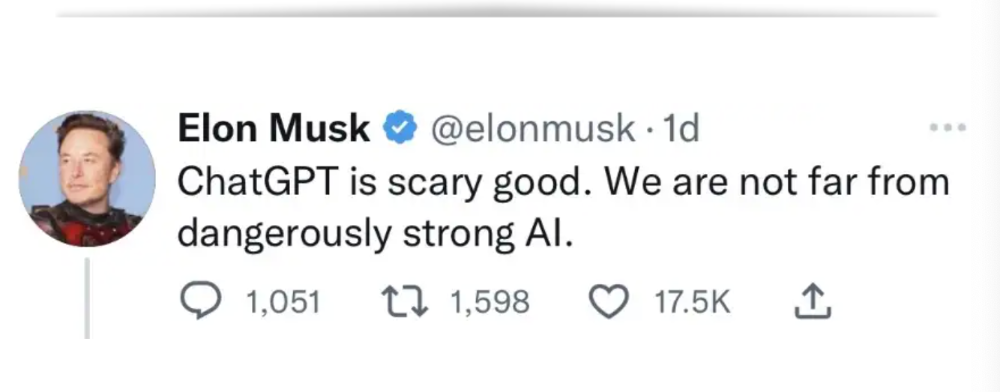
In a previous post, I said ChatGPT will change marketing careers forever. I have never made a statement like that in my life. Even in the early days of the internet, people were cautious.
This technology was just released two weeks ago, and over a million people are already using it. This is the fastest technology adoption in history.
Today's post offers inventive and entertaining ideas, but it's just the beginning. ChatGPT writes code, music, and papers.
You might also like

Ben Carlson
3 years ago
Bear market duration and how to invest during one

Bear markets don't last forever, but that's hard to remember. Jamie Cullen's illustration
A bear market is a 20% decline from peak to trough in stock prices.
The S&P 500 was down 24% from its January highs at its low point this year. Bear market.
The U.S. stock market has had 13 bear markets since WWII (including the current one). Previous 12 bear markets averaged –32.7% losses. From peak to trough, the stock market averaged 12 months. The average time from bottom to peak was 21 months.
In the past seven decades, a bear market roundtrip to breakeven has averaged less than three years.
Long-term averages can vary widely, as with all historical market data. Investors can learn from past market crashes.
Historical bear markets offer lessons.
Bear market duration
A bear market can cost investors money and time. Most of the pain comes from stock market declines, but bear markets can be long.
Here are the longest U.S. stock bear markets since World war 2:
Stock market crashes can make it difficult to break even. After the 2008 financial crisis, the stock market took 4.5 years to recover. After the dotcom bubble burst, it took seven years to break even.
The longer you're underwater in the market, the more suffering you'll experience, according to research. Suffering can lead to selling at the wrong time.
Bear markets require patience because stocks can take a long time to recover.
Stock crash recovery
Bear markets can end quickly. The Corona Crash in early 2020 is an example.
The S&P 500 fell 34% in 23 trading sessions, the fastest bear market from a high in 90 years. The entire crash lasted one month. Stocks broke even six months after bottoming. Stocks rose 100% from those lows in 15 months.
Seven bear markets have lasted two years or less since 1945.
The 2020 recovery was an outlier, but four other bear markets have made investors whole within 18 months.
During a bear market, you don't know if it will end quickly or feel like death by a thousand cuts.
Recessions vs. bear markets
Many people believe the U.S. economy is in or heading for a recession.
I agree. Four-decade high inflation. Since 1945, inflation has exceeded 5% nine times. Each inflationary spike caused a recession. Only slowing economic demand seems to stop price spikes.
This could happen again. Stocks seem to be pricing in a recession.
Recessions almost always cause a bear market, but a bear market doesn't always equal a recession. In 1946, the stock market fell 27% without a recession in sight. Without an economic slowdown, the stock market fell 22% in 1966. Black Monday in 1987 was the most famous stock market crash without a recession. Stocks fell 30% in less than a week. Many believed the stock market signaled a depression. The crash caused no slowdown.
Economic cycles are hard to predict. Even Wall Street makes mistakes.
Bears vs. bulls
Bear markets for U.S. stocks always end. Every stock market crash in U.S. history has been followed by new all-time highs.
How should investors view the recession? Investing risk is subjective.
You don't have as long to wait out a bear market if you're retired or nearing retirement. Diversification and liquidity help investors with limited time or income. Cash and short-term bonds drag down long-term returns but can ensure short-term spending.
Young people with years or decades ahead of them should view this bear market as an opportunity. Stock market crashes are good for net savers in the future. They let you buy cheap stocks with high dividend yields.
You need discipline, patience, and planning to buy stocks when it doesn't feel right.
Bear markets aren't fun because no one likes seeing their portfolio fall. But stock market downturns are a feature, not a bug. If stocks never crashed, they wouldn't offer such great long-term returns.

Ethan Siegel
2 years ago
How you view the year will change after using this one-page calendar.
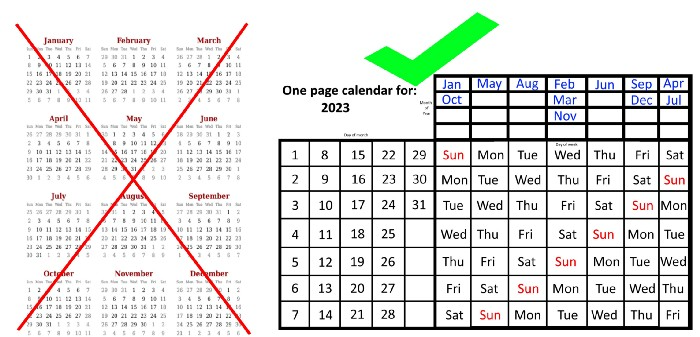
No other calendar is simpler, smaller, and reusable year after year. It works and is used here.
Most of us discard and replace our calendars annually. Each month, we move our calendar ahead another page, thus if we need to know which day of the week corresponds to a given day/month combination, we have to calculate it or flip forward/backward to the corresponding month. Questions like:
What day does this year's American Thanksgiving fall on?
Which months contain a Friday the thirteenth?
When is July 4th? What day of the week?
Alternatively, what day of the week is Christmas?
They're hard to figure out until you switch to the right month or look up all the months.
However, mathematically, the answers to these questions or any question that requires matching the day of the week with the day/month combination in a year are predictable, basic, and easy to work out. If you use this one-page calendar instead of a 12-month calendar, it lasts the whole year and is easy to alter for future years. Let me explain.
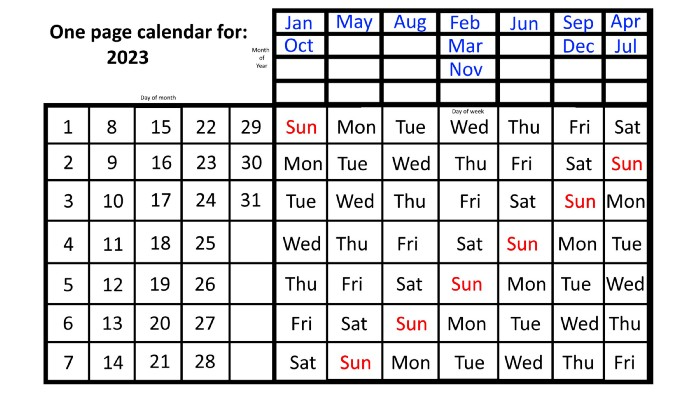
The 2023 one-page calendar is above. The days of the month are on the lower left, which works for all months if you know that:
There are 31 days in January, March, May, July, August, October, and December.
All of the months of April, June, September, and November have 30 days.
And depending on the year, February has either 28 days (in non-leap years) or 29 days (in leap years).
If you know this, this calendar makes it easy to match the day/month of the year to the weekday.
Here are some instances. American Thanksgiving is always on the fourth Thursday of November. You'll always know the month and day of the week, but the date—the day in November—changes each year.
On any other calendar, you'd have to flip to November to see when the fourth Thursday is. This one-page calendar only requires:
pick the month of November in the top-right corner to begin.
drag your finger down until Thursday appears,
then turn left and follow the monthly calendar until you reach the fourth Thursday.
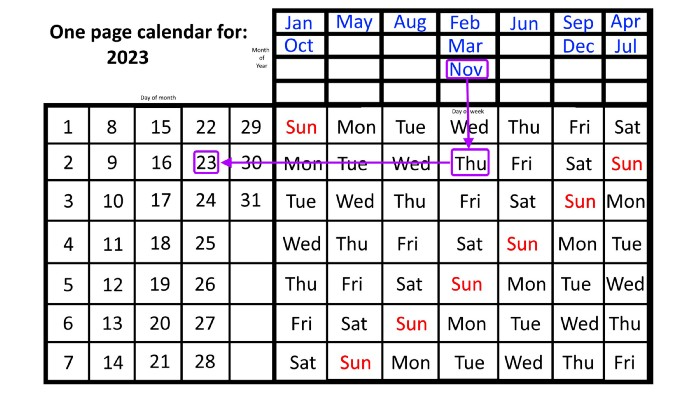
It's obvious: 2023 is the 23rd American Thanksgiving. For every month and day-of-the-week combination, start at the month, drag your finger down to the desired day, and then move to the left to see which dates match.
What if you knew the day of the week and the date of the month, but not the month(s)?
A different method using the same one-page calendar gives the answer. Which months have Friday the 13th this year? Just:
begin on the 13th of the month, the day you know you desire,
then swipe right with your finger till Friday appears.
and then work your way up until you can determine which months the specific Friday the 13th falls under.
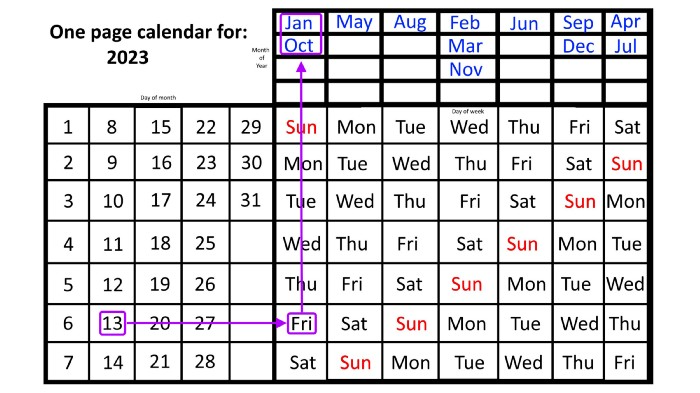
One Friday the 13th occurred in January 2023, and another will occur in October.
The most typical reason to consult a calendar is when you know the month/day combination but not the day of the week.
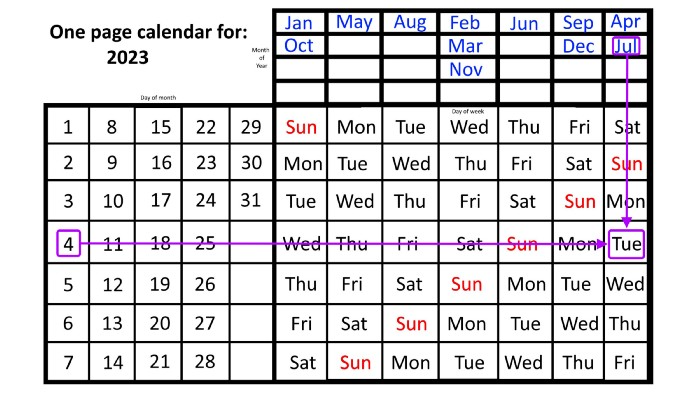
Compared to single-month calendars, the one-page calendar excels here. Take July 4th, for instance. Find the weekday here:
beginning on the left on the fourth of the month, as you are aware,
also begin with July, the month of the year you are most familiar with, at the upper right,
you should move your two fingers in the opposite directions till they meet: on a Tuesday in 2023.
That's how you find your selected day/month combination's weekday.
Another example: Christmas. Christmas Day is always December 25th, however unless your conventional calendar is open to December of your particular year, a question like "what day of the week is Christmas?" difficult to answer.
Unlike the one-page calendar!
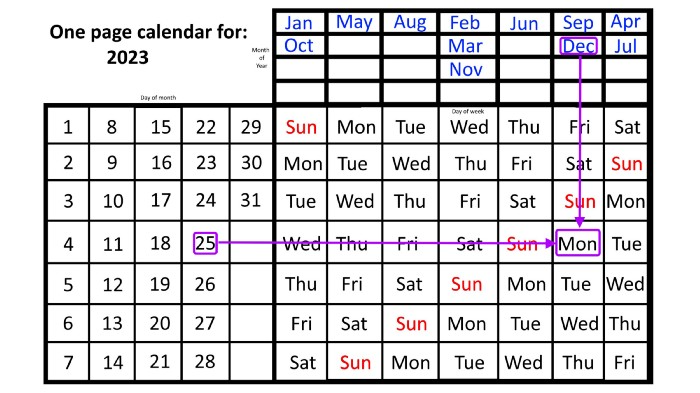
Remember the left-hand day of the month. Top-right, you see the month. Put two fingers, one from each hand, on the date (25th) and the month (December). Slide the day hand to the right and the month hand downwards until they touch.
They meet on Monday—December 25, 2023.
For 2023, that's fine, but what happens in 2024? Even worse, what if we want to know the day-of-the-week/day/month combo many years from now?
I think the one-page calendar shines here.
Except for the blue months in the upper-right corner of the one-page calendar, everything is the same year after year. The months also change in a consistent fashion.
Each non-leap year has 365 days—one more than a full 52 weeks (which is 364). Since January 1, 2023 began on a Sunday and 2023 has 365 days, we immediately know that December 31, 2023 will conclude on a Sunday (which you can confirm using the one-page calendar) and that January 1, 2024 will begin on a Monday. Then, reorder the months for 2024, taking in mind that February will have 29 days in a leap year.
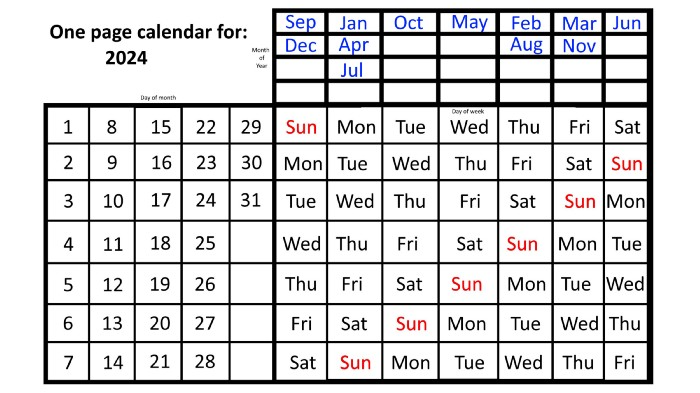
Please note the differences between 2023 and 2024 month placement. In 2023:
October and January began on the same day of the week.
On the following Monday of the week, May began.
August started on the next day,
then the next weekday marked the start of February, March, and November, respectively.
Unlike June, which starts the following weekday,
While September and December start on the following day of the week,
Lastly, April and July start one extra day later.
Since 2024 is a leap year, February has 29 days, disrupting the rhythm. Month placements change to:
The first day of the week in January, April, and July is the same.
October will begin the following day.
Possibly starting the next weekday,
February and August start on the next weekday,
beginning on the following day of the week between March and November,
beginning the following weekday in June,
and commencing one more day of the week after that, September and December.
Due to the 366-day leap year, 2025 will start two days later than 2024 on January 1st.
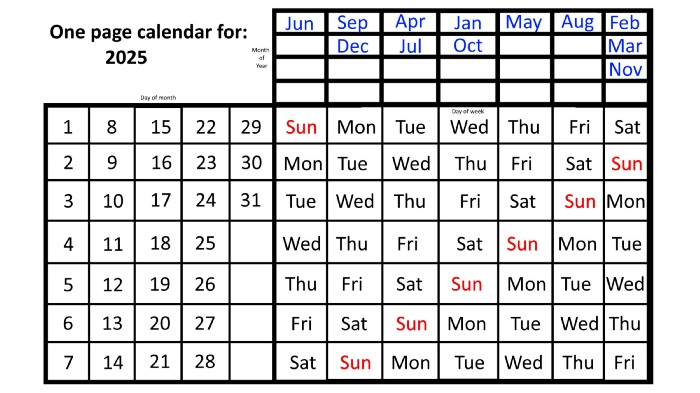
Now, looking at the 2025 calendar, you can see that the 2023 pattern of which months start on which days is repeated! The sole variation is a shift of three days-of-the-week ahead because 2023 had one more day (365) than 52 full weeks (364), and 2024 had two more days (366). Again,
On Wednesday this time, January and October begin on the same day of the week.
Although May begins on Thursday,
August begins this Friday.
March, November, and February all begin on a Saturday.
Beginning on a Sunday in June
Beginning on Monday are September and December,
and on Tuesday, April and July begin.
In 2026 and 2027, the year will commence on a Thursday and a Friday, respectively.
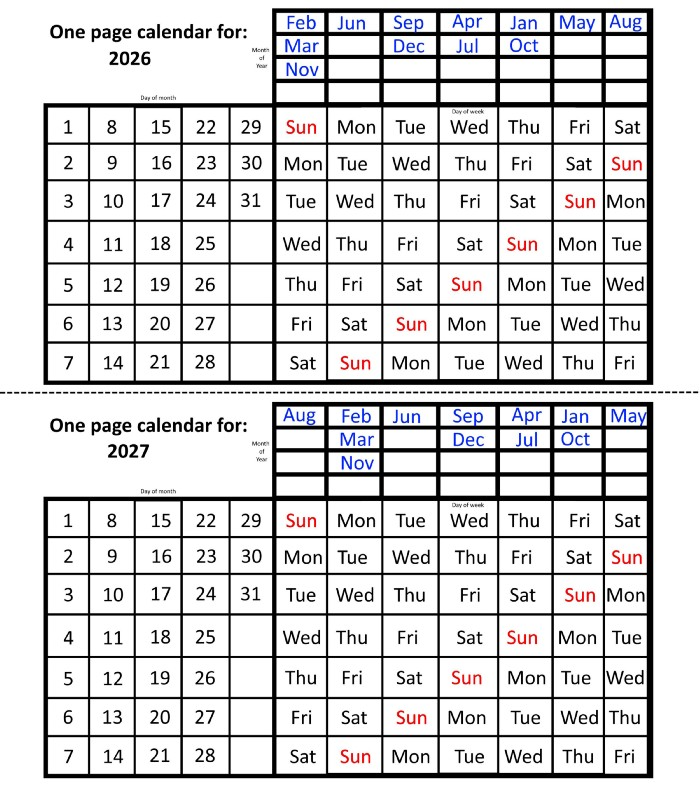
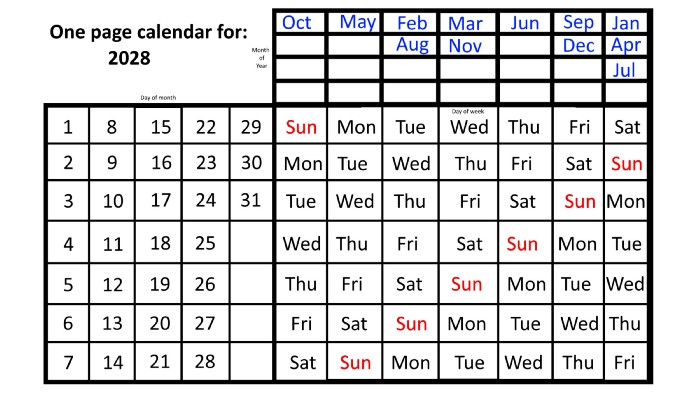
We must return to our leap year monthly arrangement in 2028. Yes, January 1, 2028 begins on a Saturday, but February, which begins on a Tuesday three days before January, will have 29 days. Thus:
Start dates for January, April, and July are all Saturdays.
Given that October began on Sunday,
Although May starts on a Monday,
beginning on a Tuesday in February and August,
Beginning on a Wednesday in March and November,
Beginning on Thursday, June
and Friday marks the start of September and December.
This is great because there are only 14 calendar configurations: one for each of the seven non-leap years where January 1st begins on each of the seven days of the week, and one for each of the seven leap years where it begins on each day of the week.
The 2023 calendar will function in 2034, 2045, 2051, 2062, 2073, 2079, 2090, 2102, 2113, and 2119. Except when passing over a non-leap year that ends in 00, like 2100, the repeat time always extends to 12 years or shortens to an extra 6 years.
The pattern is repeated in 2025's calendar in 2031, 2042, 2053, 2059, 2070, 2081, 2087, 2098, 2110, and 2121.
The extra 6-year repeat at the end of the century on the calendar for 2026 will occur in the years 2037, 2043, 2054, 2065, 2071, 2082, 2093, 2099, 2105, and 2122.
The 2027s calendar repeats in 2038, 2049, 2055, 2066, 2077, 2083, 2094, 2100, 2106, and 2117, almost exactly matching the 2026s pattern.
For leap years, the recurrence pattern is every 28 years when not passing a non-leap year ending in 00, or 12 or 40 years when we do. 2024's calendar repeats in 2052, 2080, 2120, 2148, 2176, and 2216; 2028's in 2056, 2084, 2124, 2152, 2180, and 2220.
Knowing January 1st and whether it's a leap year lets you construct a one-page calendar for any year. Try it—you might find it easier than any other alternative!

Bloomberg
3 years ago
Expulsion of ten million Ukrainians
According to recent data from two UN agencies, ten million Ukrainians have been displaced.
The International Organization for Migration (IOM) estimates nearly 6.5 million Ukrainians have relocated. Most have fled the war zones around Kyiv and eastern Ukraine, including Dnipro, Zhaporizhzhia, and Kharkiv. Most IDPs have fled to western and central Ukraine.
Since Russia invaded on Feb. 24, 3.6 million people have crossed the border to seek refuge in neighboring countries, according to the latest UN data. While most refugees have fled to Poland and Romania, many have entered Russia.
Internally displaced figures are IOM estimates as of March 19, based on 2,000 telephone interviews with Ukrainians aged 18 and older conducted between March 9-16. The UNHCR compiled the figures for refugees to neighboring countries on March 21 based on official border crossing data and its own estimates. The UNHCR's top-line total is lower than the country totals because Romania and Moldova totals include people crossing between the two countries.
Sources: IOM, UNHCR
According to IOM estimates based on telephone interviews with a representative sample of internally displaced Ukrainians, over 53% of those displaced are women, and over 60% of displaced households have children.