




More on Technology

CyberPunkMetalHead
3 years ago
I made ChatGPT copy itself.

OpenAI's ChatGPT is an amazing AI-powered chatbot. It can write poetry, stories, and marketing campaigns, and it's also adept at coding. ChatGPT's coding is so amazing that it replicated itself. What happened:
Me: Hi
Hello! Can I help? I'll answer any inquiries you have.
Me: Build a python and flask AI chatbot that responds to user messages on the frontend.
CGPT:
from flask import Flask, request, jsonify

import openai
openai.api_key = "YOUR_API_KEY"

@app.route('/chatbot', methods=['POST'])
def chatbot():
    user_message = request.get_json()['message']
    response = chatbot_response(user_message)
    return jsonify({'response': response})


def chatbot_response(user_message):
    response = openai.Completion.create(
        engine="text-davinci-002",
        prompt=user_message,
        max_tokens=1024,
        n = 1,
        temperature=0.5
    )
    return response['choices'][0]['text']

if __name__ == '__main__':
    app.run()
To integrate a chatbot with a frontend, use Flask to serve an HTML page with a form for user messages and the chatbot's answer. AJAX can submit the form to the /chatbot route, and JavaScript can show the chatbot's response.
I imported code snippets at the top of the file.
Let's add a frontend interface, I said.
CGPT:
<!DOCTYPE html>
<html>
<head>
    <title>AI Chatbot</title>
</head>
<body>
    <h1>AI Chatbot</h1>
    <form id="chatbot-form">
        <label for="message">Message:</label><br>
        <input type="text" id="message" name="message"><br>
        <input type="submit" value="Submit">
    </form>
    <div id="chatbot-response"></div>

    <script src="https://ajax.googleapis.com/ajax/libs/jquery/3.5.1/jquery.min.js"></script>
    <script>
        $(document).ready(function() {
            $("#chatbot-form").submit(function(e) {
                e.preventDefault();
                var userMessage = $("#message").val();
                $.ajax({
                    type: "POST",
                    url: "/chatbot",
                    data: JSON.stringify({message: userMessage}),
                    contentType: "application/json; charset=utf-8",
                    dataType: "json",
                    success: function(response) {
                        $("#chatbot-response").text(response.response);
                    }
                });
            });
        });
    </script>
</body>
</html>
To serve this HTML page using Flask, build a new route that returns the page as a GET response.
So far, so good.

Looked quite basic so I got chatGPT to add some tailwind to the project.
Me: Tailwind the chatbot.html page, please. Give it a futuristic style with purple and neon
After a few more prompts, Talk GPT aligned the form to the center, changed some colors, and added padding.
CGPT:
<!DOCTYPE html>
<html>
<head>
    <title>AI Chatbot</title>
    <link href="https://unpkg.com/tailwindcss@^1.0/dist/tailwind.min.css" rel="stylesheet">
</head>
<body class="bg-black flex flex-col justify-center items-center">
    <h1 class="sm:text-center text-purple-500">AI Chatbot</h1>
    <form id="chatbot-form" class="border-purple-500 bg-purple-800 rounded">
        <label for="message">Message:</label><br>
        <input type="text" id="message" name="message" class="min-w-30 rounded"><br>
        <input type="submit" value="Submit" class="bg-purple-500 border-red-500 transform hover:scale-110 rounded">
    </form>
    <div class="flex justify-center">
        <div id="chatbot-response" class="text-white rounded"></div>
    </div>

    <script src="https://ajax.googleapis.com/ajax/libs/jquery/3.5.1/jquery.min.js"></script>
    <script>
        var colors = ['red', 'orange', 'yellow', 'green', 'blue', 'indigo', 'violet'];
        var colorIndex = 0;

        $(document).ready(function() {
            setInterval(function() {
                $("#chatbot-form").css('border-color', colors[colorIndex]);
                colorIndex = (colorIndex + 1) % colors.length;
            }, 1000);

            $("#chatbot-form").submit(function(e) {
                e.preventDefault();
                var userMessage = $("#message").val();
                $.ajax({
                    type: "POST",
                    url: "/chatbot",
                    data: JSON.stringify({message: userMessage}),
                    contentType: "application/json; charset=utf-8",
                    dataType: "json",
                    success: function(response) {
                        $("#chatbot-response").text(response.response);
                    }
                });
            });
        });
    </script>
</body>
</html>
Improved:
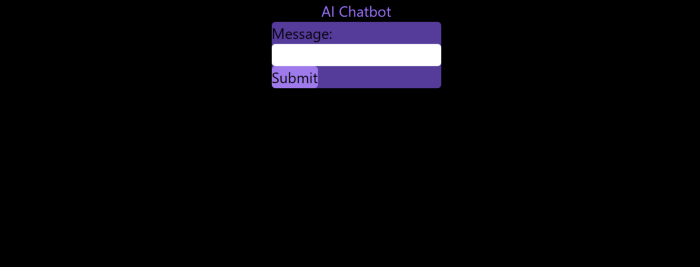
A few more prompts like “Add more vertical and horizontal padding to the submit button and vertical margin, and vertically align this file's body.”
The result:
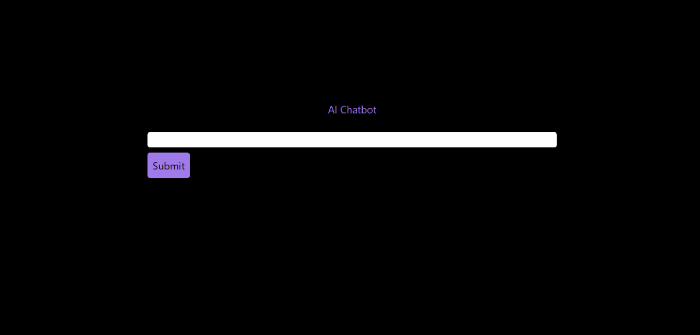
Is it effective? Now, I'll chat with ChatGPT's AI Chatbot. I intervened minimally throughout construction. Chat GPT created numerous files, connected and interacted with its own API, and presented the user request response on the front end by itself.
Me to AI Chatbot: Hey, can you give me 6 name suggestions for a black horse?
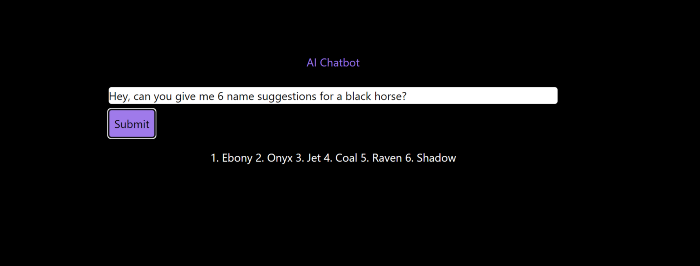
Me to AI Chatbot: Write a poem in the style of Jim Morrison. Make sure to mention cacti and black holes
ChatGPTs Chatbot:
In the desert night, I am confronted by cacti,
Their arms reaching out, As if to grab me and take me away.
The stars in the sky, Beckon me to come,
To a world of black holes, Where I can be free.
I am in a trance, My body and mind,
In a state of limbo, As I wander the night.
I hear a voice, Calling me to the unknown,
I cannot resist, The lure of the black hole.
The cacti watch, As I take my leave,
To a place of mystery, Where I can find peace.
Of course, the next question I gave it was to build a chatbot!
Me: Build a python and flask AI chatbot that responds to user messages on the frontend.
ChatbotGPTs:
import os from flask
import Flask, request, jsonify
from chatterbot
import ChatBot
from chatterbot.trainers
import ListTrainer

# Create a new chatbot
bot = ChatBot(
  "My Bot",
  storage_adapter="chatterbot.storage.SQLStorageAdapter",
  logic_adapters=[
    "chatterbot.logic.BestMatch",
    { "import_path": "chatterbot.logic.BestMatch",
      "statement_comparison_function": "chatterbot.comparisons.levenshtein_distance",
       "response_selection_method": "chatterbot.response_selection.get_first_response" }
    ],
    database_uri="sqlite:///database.sqlite3" )

# Train the chatbot with a few sample conversations
conversation = [ "Hello", "Hi there!", "How are you doing?", "I'm doing great.", "That is good to hear", "Thank you.", "You're welcome." ]
trainer = ListTrainer(bot) trainer.train(conversation)

# Create a Flask app
app = Flask(__name__)

# Define a route for the default URL
@app.route("/") def index(): return "<h1>Chatbot</h1>"

# Define a route for the /get_response URL
@app.route("/get_response", methods=["POST"])

def get_response():
# Get the user's message
user_message = request.form["user_message"]
# Get the bot's response
bot_response = bot.get_response(user_message)
# Return the bot's response
return str(bot_response)
# Run the Flask
app if __name__ == "__main__": app.run()
No matter how many times I tried, the second generation always used chatterbot instead of the ChatGPT API. Even when I told it to use the ChatGPT API, it didn't.
ChatGTP's ability to reproduce or construct other machine learning algorithms is interesting and possibly terrifying. Nothing prevents ChatGPT from replicating itself ad infinitum throughout the Internet other than a lack of desire. This may be the first time a machine repeats itself, so I've preserved the project as a reference. Adding a requirements.txt file and python env for easier deployment is the only change to the code.
I hope you enjoyed this.
Muhammad Rahmatullah
3 years ago
The Pyramid of Coding Principles
A completely operating application requires many processes and technical challenges. Implementing coding standards can make apps right, work, and faster.
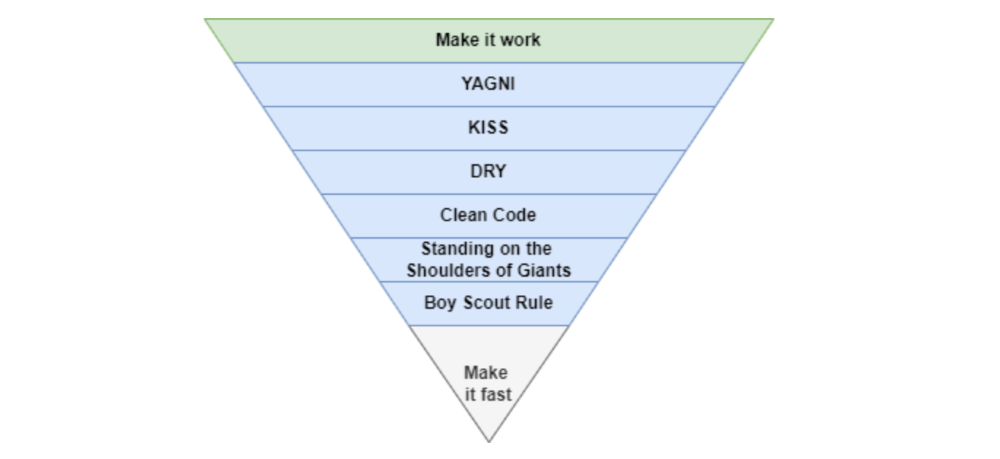
With years of experience working in software houses. Many client apps are scarcely maintained.
Why are these programs "barely maintainable"? If we're used to coding concepts, we can probably tell if an app is awful or good from its codebase.
This is how I coded much of my app.
Make It Work
Before adopting any concept, make sure the apps are completely functional. Why have a fully maintained codebase if the app can't be used?
The user doesn't care if the app is created on a super server or uses the greatest coding practices. The user just cares if the program helps them.
After the application is working, we may implement coding principles.
You Aren’t Gonna Need It
As a junior software engineer, I kept unneeded code, components, comments, etc., thinking I'd need them later.
In reality, I never use that code for weeks or months.
First, we must remove useless code from our primary codebase. If you insist on keeping it because "you'll need it later," employ version control.
If we remove code from our codebase, we can quickly roll back or copy-paste the previous code without preserving it permanently.
The larger the codebase, the more maintenance required.
Keep It Simple Stupid
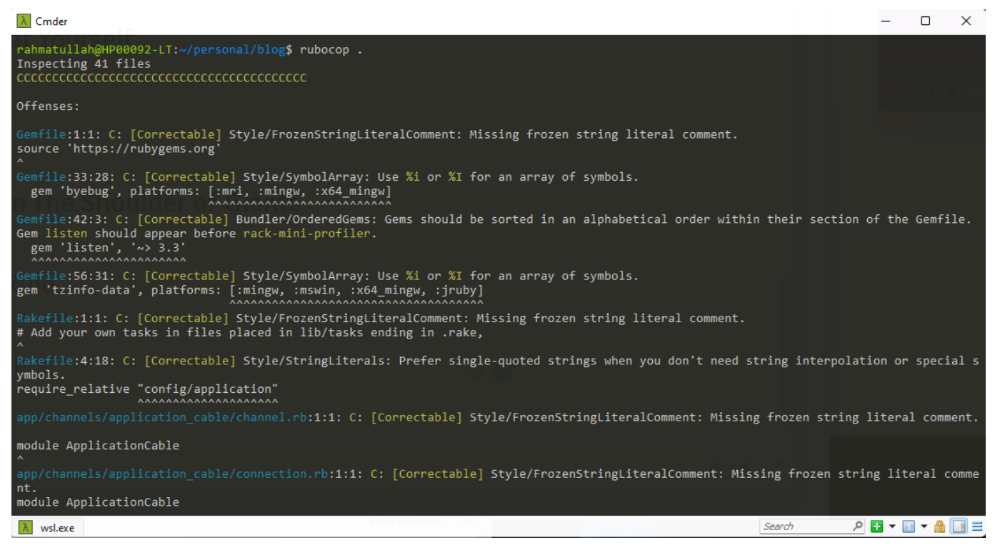
Indeed. Keep things simple.
Why complicate something if we can make it simpler?
Our code improvements should lessen the server load and be manageable by others.
If our code didn't pass those benchmarks, it's too convoluted and needs restructuring. Using an open-source code critic or code smell library, we can quickly rewrite the code.
Simpler codebases and processes utilize fewer server resources.
Don't Repeat Yourself
Have you ever needed an action or process before every action, such as ensuring the user is logged in before accessing user pages?
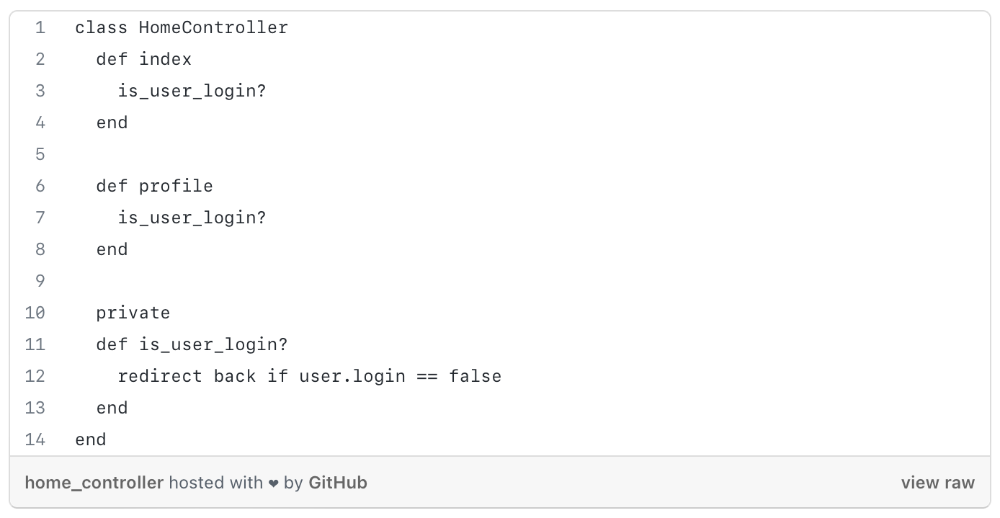
As you can see from the above code, I try to call is user login? in every controller action, and it should be optimized, because if we need to rename the method or change the logic, etc. We can improve this method's efficiency.
We can write a constructor/middleware/before action that calls is_user_login?
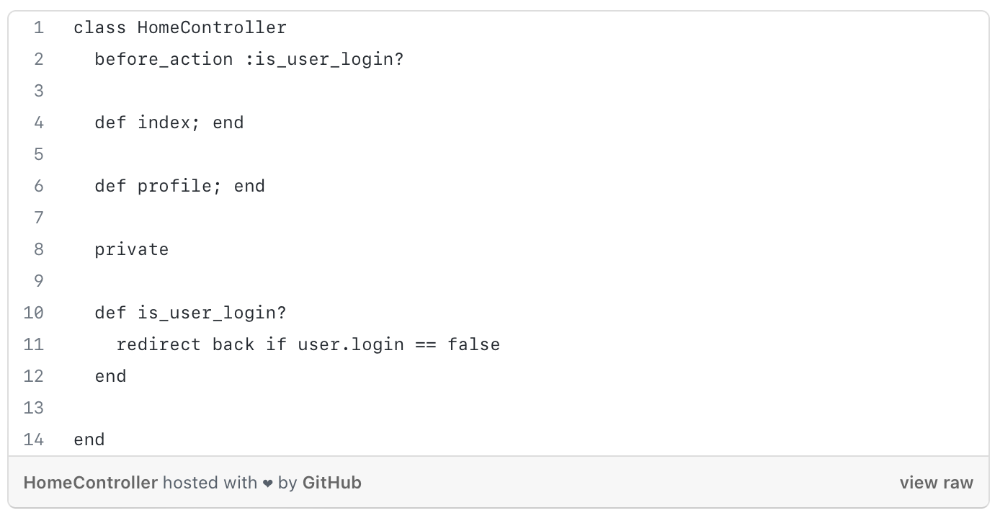
The code is more maintainable and readable after refactoring.
Each programming language or framework handles this issue differently, so be adaptable.
Clean Code
Clean code is a broad notion that you've probably heard of before.
When creating a function, method, module, or variable name, the first rule of clean code is to be precise and simple.
The name should express its value or logic as a whole, and follow code rules because every programming language is distinct.
If you want to learn more about this topic, I recommend reading https://www.amazon.com/Clean-Code-Handbook-Software-Craftsmanship/dp/0132350882.
Standing On The Shoulder of Giants
Use industry standards and mature technologies, not your own(s).
There are several resources that explain how to build boilerplate code with tools, how to code with best practices, etc.
I propose following current conventions, best practices, and standardization since we shouldn't innovate on top of them until it gives us a competitive edge.
Boy Scout Rule
What reduces programmers' productivity?
When we have to maintain or build a project with messy code, our productivity decreases.
Having to cope with sloppy code will slow us down (shame of us).
How to cope? Uncle Bob's book says, "Always leave the campground cleaner than you found it."
When developing new features or maintaining current ones, we must improve our codebase. We can fix minor issues too. Renaming variables, deleting whitespace, standardizing indentation, etc.
Make It Fast
After making our code more maintainable, efficient, and understandable, we can speed up our app.
Whether it's database indexing, architecture, caching, etc.
A smart craftsman understands that refactoring takes time and it's preferable to balance all the principles simultaneously. Don't YAGNI phase 1.
Using these ideas in each iteration/milestone, while giving the bottom items less time/care.
You can check one of my articles for further information. https://medium.com/life-at-mekari/why-does-my-website-run-very-slowly-and-how-do-i-optimize-it-for-free-b21f8a2f0162

Nicolas Tresegnie
3 years ago
Launching 10 SaaS applications in 100 days

Apocodes helps entrepreneurs create SaaS products without writing code. This post introduces micro-SaaS and outlines its basic strategy.
Strategy
Vision and strategy differ when starting a startup.
The company's long-term future state is outlined in the vision. It establishes the overarching objectives the organization aims to achieve while also justifying its existence. The company's future is outlined in the vision.
The strategy consists of a collection of short- to mid-term objectives, the accomplishment of which will move the business closer to its vision. The company gets there through its strategy.
The vision should be stable, but the strategy must be adjusted based on customer input, market conditions, or previous experiments.
Begin modestly and aim high.
Be truthful. It's impossible to automate SaaS product creation from scratch. It's like climbing Everest without running a 5K. Physical rules don't prohibit it, but it would be suicide.
Apocodes 5K equivalent? Two options:
(A) Create a feature that includes every setting option conceivable. then query potential clients “Would you choose us to build your SaaS solution if we offered 99 additional features of the same caliber?” After that, decide which major feature to implement next.
(B) Build a few straightforward features with just one or two configuration options. Then query potential clients “Will this suffice to make your product?” What's missing if not? Finally, tweak the final result a bit before starting over.
(A) is an all-or-nothing approach. It's like training your left arm to climb Mount Everest. My right foot is next.
(B) is a better method because it's iterative and provides value to customers throughout.
Focus on a small market sector, meet its needs, and expand gradually. Micro-SaaS is Apocode's first market.
What is micro-SaaS.
Micro-SaaS enterprises have these characteristics:
A limited range: They address a specific problem with a small number of features.
A small group of one to five individuals.
Low external funding: The majority of micro-SaaS companies have Total Addressable Markets (TAM) under $100 million. Investors find them unattractive as a result. As a result, the majority of micro-SaaS companies are self-funded or bootstrapped.
Low competition: Because they solve problems that larger firms would rather not spend time on, micro-SaaS enterprises have little rivalry.
Low upkeep: Because of their simplicity, they require little care.
Huge profitability: Because providing more clients incurs such a small incremental cost, high profit margins are possible.
Micro-SaaS enterprises created with no-code are Apocode's ideal first market niche.
We'll create our own micro-SaaS solutions to better understand their needs. Although not required, we believe this will improve community discussions.
The challenge
In 100 days (September 12–December 20, 2022), we plan to build 10 micro-SaaS enterprises using Apocode.
They will be:
Self-serve: Customers will be able to use the entire product experience without our manual assistance.
Real: They'll deal with actual issues. They won't be isolated proofs of concept because we'll keep up with them after the challenge.
Both free and paid options: including a free plan and a free trial period. Although financial success would be a good result, the challenge's stated objective is not financial success.
This will let us design Apocodes features, showcase them, and talk to customers.
(Edit: The first micro-SaaS was launched!)
Follow along
If you want to follow the story of Apocode or our progress in this challenge, you can subscribe here.
If you are interested in using Apocode, sign up here.
If you want to provide feedback, discuss the idea further or get involved, email me at nicolas.tresegnie@gmail.com
You might also like

Asher Umerie
4 years ago
What is Bionic Reading?
Senses help us navigate a complicated world. They shape our worldview - how we hear, smell, feel, and taste. People claim a sixth sense, an intuitive capacity that extends perception.
Our brain is a half-pool of grey and white matter that stores data from our senses. Brains provide us context, so zombies' obsession makes sense.
Bionic reading uses the brain's visual information and context to simplify text comprehension.
Stay with me.
What is Bionic Reading?
Bionic reading is a software application established by Swiss typographic designer Renato Casutt. The term honors the brain (bio) and technology's collaboration to better text comprehension.
The image above shows two similar paragraphs with bionic reading.
Notice anything yet?
This Twitter user did.
I did too...
Image text describes bionic reading-
New method to aid reading by using artificial fixation points. The reader focuses on the highlighted starting letters, and the brain completes the word.
How is Bionic Reading possible?
Do you remember seeing social media posts asking you to stare at a black dot for 30 seconds (or more)? You blink and see an after-image on your wall.
Our brains are skilled at identifying patterns and'seeing' familiar objects, therefore optical illusions are conceivable.
Brain and sight collaborate well. Text comprehension proves it.
Considering evolutionary patterns, humans' understanding skills may be cosmic luck.
Scientists don't know why people can read and write, but they do know what reading does to the brain.
One portion of your brain recognizes words, while another analyzes their meaning. Fixation, saccade, and linguistic transparency/opacity aid.
Let's explain some terms.
-
Fixation is how the eyes move when reading. It's where you look. If the eyes fixate less, a reader can read quicker. [Eye fixation is a physiological process](Eye fixation is a naturally occurring physiological process) impacted by the reader's vocabulary, vision span, and text familiarity.
-
Saccade - Pause and look around. That's a saccade. Rapid eye movements that alter the place of fixation, as reading text or looking around a room. They can happen willingly (when you choose) or instinctively, even when your eyes are fixed.
-
Linguistic transparency and opacity analyze how well a composite word or phrase may be deduced from its constituents.
The Bionic reading website compares these tools.
Text highlights lead the eye. Fixation, saccade, and opacity can transfer visual stimuli to text, changing typeface.
## Final Thoughts on Bionic Reading
I'm excited about how this could influence my long-term assimilation and productivity.
This technology is still in development, with prototypes working on only a few apps. Like any new tech, it will be criticized.
I'll be watching Bionic Reading closely. Comment on it!

Tim Denning
3 years ago
In this recession, according to Mark Cuban, you need to outwork everyone
Here’s why that’s baloney

Mark Cuban popularized entrepreneurship.
Shark Tank (which made Mark famous) made starting a business glamorous to attract more entrepreneurs. First off
This isn't an anti-billionaire rant.
Mark Cuban has done excellent. He's a smart, principled businessman. I enjoy his Web3 work. But Mark's work and productivity theories are absurd.
You don't need to outwork everyone in this recession to live well.
You won't be able to outwork me.
Yuck! Mark's words made me gag.
Why do boys think working is a football game where the winner wins a Super Bowl trophy? To outwork you.
Hard work doesn't equal intelligence.
Highly clever professionals spend 4 hours a day in a flow state, then go home to relax with family.
If you don't put forth the effort, someone else will.
- Mark.
He'll burn out. He's delusional and doesn't understand productivity. Boredom or disconnection spark our best thoughts.
TikTok outlaws boredom.
In a spare minute, we check our phones because we can't stand stillness.
All this work p*rn makes things worse. When is it okay to feel again? Because I can’t feel anything when I’m drowning in work and haven’t had a holiday in 2 years.
Your rivals are actively attempting to undermine you.
Ohhh please Mark…seriously.
This isn't a Tom Hanks war film. Relax. Not everyone is a rival. Only yourself is your competitor. To survive the recession, be better than a year ago.
If you get rich, great. If not, there's more to life than Lambos and angel investments.
Some want to relax and enjoy life. No competition. We witness people with lives trying to endure the recession and record-high prices.
This fictitious rival worsens life and work.

If you are truly talented, you will motivate others to work more diligently and effectively.
No Mark. Soz.
If you're a good leader, you won't brag about working hard and treating others like cogs. Treat them like humans. You'll have EQ.
Silly statements like this are caused by an out-of-control ego. No longer watch Shark Tank.
Ego over humanity.
Good leaders will urge people to keep together during the recession. Good leaders support those who are laid off and need a reference.
Not harder, quicker, better. That created my mental health problems 10 years ago.
Truth: we want to work less.
The promotion of entrepreneurship is ludicrous.
Marvel superheroes. Seriously, relax Max.
I used to write about entrepreneurship, then I quit. Many WeWork Adam Neumanns. Carelessness.
I now utilize the side hustle title when writing about online company or entrepreneurship. Humanizes.
Stop glorifying. Thinking we'll all be Elon Musks who send rockets to Mars is delusional. Most of us won't create companies employing hundreds.
OK.
The true epidemic is glorification. fewer selfies Little birdy needs less bank account screenshots. Less Uber talk.
We're exhausted.
Fun, ego-free business can transform the world. Take a relax pill.
Work as if someone were attempting to take everything from you.
I've seen people lose everything.
Myself included. My 20s startup failed. I was almost bankrupt. I thought I'd never recover. Nope.
Best thing ever.
Losing everything reveals your true self. Unintelligent entrepreneur egos perish instantly. Regaining humility revitalizes relationships.
Money's significance shifts. Stop chasing it like a puppy with a bone.
Fearing loss is unfounded.
Here is a more effective approach than outworking nobody.
(You'll thrive in the recession and become wealthy.)
Smarter work
Overworking is donkey work.
You don't want to be a career-long overworker. Instead than wasting time, write down what you do. List tasks and processes.
Keep doing/outsource the list. Step-by-step each task. Continuously systematize.
Then recruit a digital employee like Zapier or a virtual assistant in the same country.
Intelligent, not difficult.
If your big break could burn in hell, diversify like it will.
People err by focusing on one chance.
Chances can vanish. All-in risky. Instead of working like a Mark Cuban groupie, diversify your income.
If you're employed, your customer is your employer.
Sell the same abilities twice and add 2-3 contract clients. Reduce your hours at your main job and take on more clients.
Leave brand loyalty behind
Mark desires his employees' worship.
That's stupid. When times are bad, layoffs multiply. The problem is the false belief that companies care. No. A business maximizes profit and pays you the least.
To care or overpay is anti-capitalist (that run the world). Be honest.
I was a banker. Then the bat virus hit and jobs disappeared faster than I urinate after a night of drinking.
Start being disloyal now since your company will cheerfully replace you with a better applicant. Meet recruiters and hiring managers on LinkedIn. Whenever something goes wrong at work, act.
Loyalty to self and family. Nobody.
Outwork this instead
Mark doesn't suggest outworking inflation instead of people.
Inflation erodes your time on earth. If you ignore inflation, you'll work harder for less pay every minute.
Financial literacy beats inflation.
Get a side job and earn money online
So you can stop outworking everyone.
Internet leverages time. Same effort today yields exponential results later. There are still whole places not online.
Instead of working forever, generate money online.
Final Words
Overworking is stupid. Don't listen to wealthy football jocks.
Work isn't everything. Prioritize diversification, internet income streams, boredom, and financial knowledge throughout the recession.
That’s how to get wealthy rather than burnout-rich.

Deon Ashleigh
3 years ago
You can dominate your daily productivity with these 9 little-known Google Calendar tips.
Calendars are great unpaid employees.
After using Notion to organize my next three months' goals, my days were a mess.
I grew very chaotic afterward. I was overwhelmed, unsure of what to do, and wasting time attempting to plan the day after it had started.
Imagine if our skeletons were on the outside. Doesn’t work.
The goals were too big; I needed to break them into smaller chunks. But how?
Enters Google Calendar
RescueTime’s recommendations took me seven hours to make a daily planner. This epic narrative begins with a sheet of paper and concludes with a daily calendar that helps me focus and achieve more goals. Ain’t nobody got time for “what’s next?” all day.
Onward!
Return to the Paleolithic Era
Plan in writing.
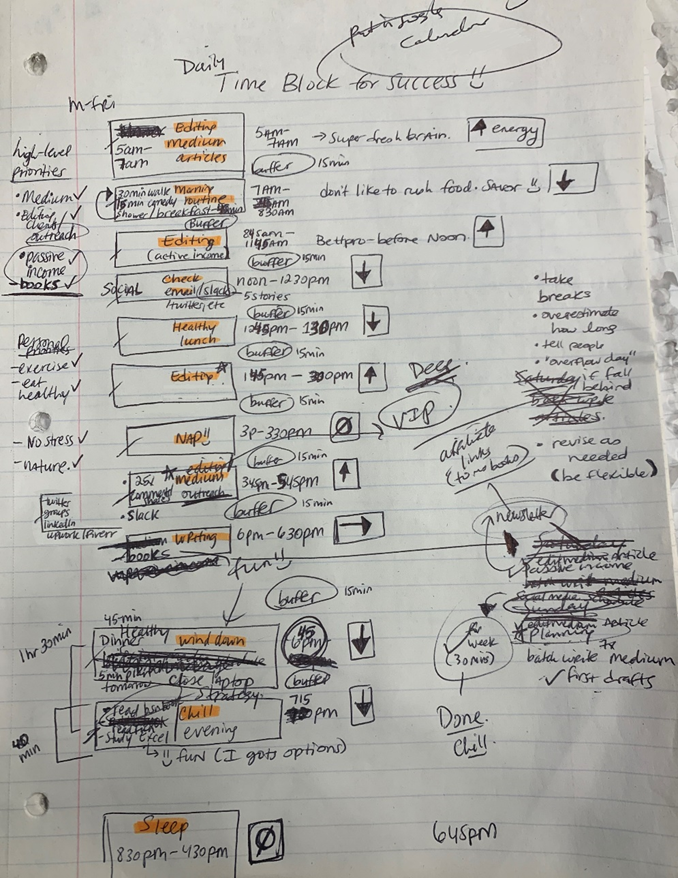
Not on the list, but it helped me plan my day. Physical writing boosts creativity and recall.
Find My Heart
i.e. prioritize
RescueTime suggested I prioritize before planning. Personal and business goals were proposed.
My top priorities are to exercise, eat healthily, spend time in nature, and avoid stress.
Priorities include writing and publishing Medium articles, conducting more freelance editing and Medium outreach, and writing/editing sci-fi books.
These eight things will help me feel accomplished every day.
Make a baby calendar.
Create daily calendar templates.
Make family, pleasure, etc. calendars.

Google Calendar instructions:
Other calendars
Press the “+” button
Create a new calendar
Create recurring events for each day
My calendar, without the template:
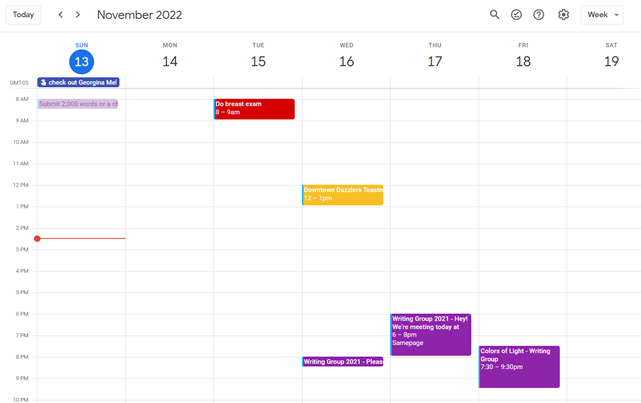
Empty, so I can fill it with vital tasks.
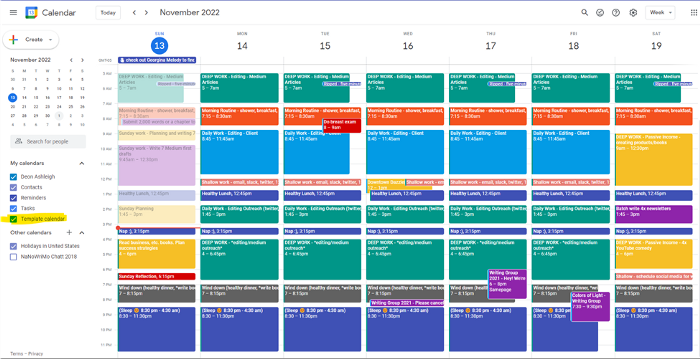
With the template:
My daily skeleton corresponds with my priorities. I've been overwhelmed for years because I lack daily, weekly, monthly, and yearly structure.
Google Calendars helps me reach my goals and focus my energy.
Get your colored pencils ready
Time-block color-coding.
Color labeling lets me quickly see what's happening. Maybe you are too.
Google Calendar instructions:
Determine which colors correspond to each time block.
When establishing new events, select a color.
Save
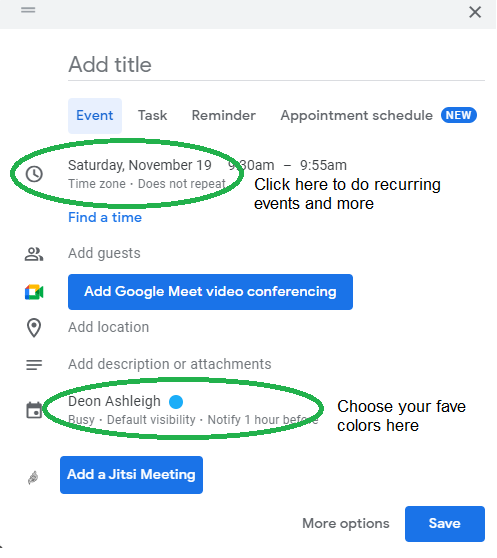
My calendar is color-coded as follows:
Yellow — passive income or other future-related activities
Red — important activities, like my monthly breast exam
Flamingo — shallow work, like emails, Twitter, etc.
Blue — all my favorite activities, like walking, watching comedy, napping, and sleeping. Oh, and eating.
Green — money-related events required for this adulting thing
Purple — writing-related stuff
Associating a time block with a color helps me stay focused. Less distractions mean faster work.
Open My Email
aka receive a daily email from Google Calendar.
Google Calendar sends a daily email feed of your calendars. I sent myself the template calendar in this email.
Google Calendar instructions:
Access settings
Select the calendar that you want to send (left side)
Go down the page to see more alerts
Under the daily agenda area, click Email.

Get in Touch With Your Red Bull Wings — Naturally
aka audit your energy levels.
My daily planner has arrows. These indicate how much energy each activity requires or how much I have.
Rightward arrow denotes medium energy.
I do my Medium and professional editing in the morning because it's energy-intensive.
Niharikaa Sodhi recommends morning Medium editing.
I’m a morning person. As long as I go to bed at a reasonable time, 5 a.m. is super wild GO-TIME. It’s like the world was just born, and I marvel at its wonderfulness.
Freelance editing lets me do what I want. An afternoon snooze will help me finish on time.
Ditch Schedule View
aka focus on the weekly view.
RescueTime advocated utilizing the weekly view of Google Calendar, so I switched.
When you launch the phone app or desktop calendar, a red line shows where you are in the day.
I'll follow the red line's instructions. My digital supervisor is easy to follow.
In the image above, it's almost 3 p.m., therefore the red line implies it's time to snooze.
I won't forget this block ;).
Reduce the Lighting
aka dim previous days.
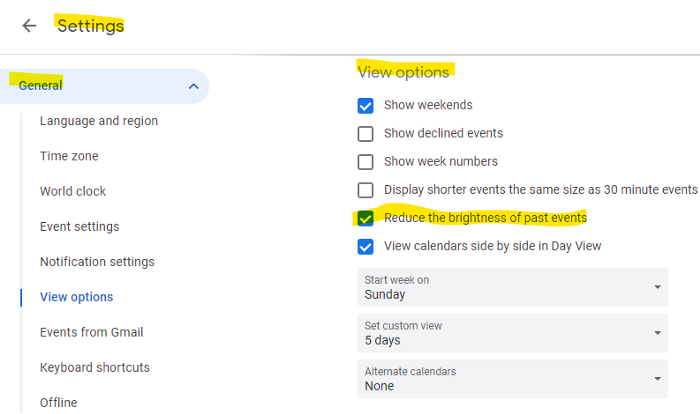
This is another Google Calendar feature I didn't know about. Once the allotted time passes, the time block dims. This keeps me present.
Google Calendar instructions:
Access settings
remaining general
To view choices, click.
Check Diminish the glare of the past.
Bonus
Two additional RescueTimes hacks:
Maintain a space between tasks
I left 15 minutes between each time block to transition smoothly. This relates to my goal of less stress. If I set strict start and end times, I'll be stressed.
With a buffer, I can breathe, stroll around, and start the following time block fresh.
Find a time is related to the buffer.
This option allows you conclude small meetings five minutes early and longer ones ten. Before the next meeting, relax or go wild.
Decide on a backup day.
This productivity technique is amazing.
Spend this excess day catching up on work. It helps reduce tension and clutter.
That's all I can say about Google Calendar's functionality.