


More on NFTs & Art

nft now
4 years ago
A Guide to VeeFriends and Series 2
VeeFriends is one of the most popular and unique NFT collections. VeeFriends launched around the same time as other PFP NFTs like Bored Ape Yacht Club.
Vaynerchuk (GaryVee) took a unique approach to his large-scale project, which has influenced the NFT ecosystem. GaryVee's VeeFriends is one of the most successful NFT membership use-cases, allowing him to build a community around his creative and business passions.
What is VeeFriends?
GaryVee's NFT collection, VeeFriends, was released on May 11, 2021. VeeFriends [Mini Drops], Book Games, and a forthcoming large-scale "Series 2" collection all stem from the initial drop of 10,255 tokens.
In "Series 1," there are G.O.O. tokens (Gary Originally Owned). GaryVee reserved 1,242 NFTs (over 12% of the supply) for his own collection, so only 9,013 were available at the Series 1 launch.
Each Series 1 token represents one of 268 human traits hand-drawn by Vaynerchuk. Gary Vee's NFTs offer owners incentives.
Who made VeeFriends?
Gary Vaynerchuk, AKA GaryVee, is influential in NFT. Vaynerchuk is the chairman of New York-based communications company VaynerX. Gary Vee, CEO of VaynerMedia, VaynerSports, and bestselling author, is worth $200 million.
GaryVee went from NFT collector to creator, launching VaynerNFT to help celebrities and brands.
Vaynerchuk's influence spans the NFT ecosystem as one of its most prolific voices. He's one of the most influential NFT figures, and his VeeFriends ecosystem keeps growing.
Vaynerchuk, a trend expert, thinks NFTs will be around for the rest of his life and VeeFriends will be a landmark project.
Why use VeeFriends NFTs?
The first VeeFriends collection has sold nearly $160 million via OpenSea. GaryVee insisted that the first 10,255 VeeFriends were just the beginning.
Book Games were announced to the VeeFriends community in August 2021. Mini Drops joined VeeFriends two months later.
Book Games
GaryVee's book "Twelve and a Half: Leveraging the Emotional Ingredients for Business Success" inspired Book Games. Even prior to the announcement Vaynerchuk had mapped out the utility of the book on an NFT scale. Book Games tied his book to the VeeFriends ecosystem and solidified its place in the collection.
GaryVee says Book Games is a layer 2 NFT project with 125,000 burnable tokens. Vaynerchuk's NFT fans were incentivized to buy as many copies of his new book as possible to receive NFT rewards later.
First, a bit about “layer 2.”
Layer 2 blockchain solutions help scale applications by routing transactions away from Ethereum Mainnet (layer 1). These solutions benefit from Mainnet's decentralized security model but increase transaction speed and reduce gas fees.
Polygon (integrated into OpenSea) and Immutable X are popular Ethereum layer 2 solutions. GaryVee chose Immutable X to reduce gas costs (transaction fees). Given the large supply of Book Games tokens, this decision will likely benefit the VeeFriends community, especially if the games run forever.
What's the strategy?
The VeeFriends patriarch announced on Aug. 27, 2021, that for every 12 books ordered during the Book Games promotion, customers would receive one NFT via airdrop. After nearly 100 days, GV sold over a million copies and announced that Book Games would go gamified on Jan. 10, 2022.
Immutable X's trading options make Book Games a "game." Book Games players can trade NFTs for other NFTs, sports cards, VeeCon tickets, and other prizes. Book Games can also whitelist other VeeFirends projects, which we'll cover in Series 2.
VeeFriends Mini Drops
GaryVee launched VeeFriends Mini Drops two months after Book Games, focusing on collaboration, scarcity, and the characters' "cultural longevity."
Spooky Vees, a collection of 31 1/1 Halloween-themed VeeFriends, was released on Halloween. First-come, first-served VeeFriend owners could claim these NFTs.
Mini Drops includes Gift Goat NFTs. By holding the Gift Goat VeeFriends character, collectors will receive 18 exclusive gifts curated by GaryVee and the team. Each gifting experience includes one physical gift and one NFT out of 555, to match the 555 Gift Goat tokens.
Gift Goat holders have gotten NFTs from Danny Cole (Creature World), Isaac "Drift" Wright (Where My Vans Go), Pop Wonder, and more.
GaryVee is poised to release the largest expansion of the VeeFriends and VaynerNFT ecosystem to date with VeeFriends Series 2.
VeeCon 101
By owning VeeFriends NFTs, collectors can join the VeeFriends community and attend VeeCon in 2022. The conference is only open to VeeCon NFT ticket holders (VeeFreinds + possibly more TBA) and will feature Beeple, Steve Aoki, and even Snoop Dogg.
The VeeFreinds floor in 2022 Q1 has remained at 16 ETH ($52,000), making VeeCon unattainable for most NFT enthusiasts. Why would someone spend that much crypto on a Minneapolis "superconference" ticket? Because of Gary Vaynerchuk.
Everything to know about VeeFriends Series 2
Vaynerchuk revealed in April 2022 that the VeeFriends ecosystem will grow by 55,555 NFTs after months of teasing.
With VeeFriends Series 2, each token will cost $995 USD in ETH, allowing NFT enthusiasts to join at a lower cost. The new series will be released on multiple dates in April.
Book Games NFT holders on the Friends List (whitelist) can mint Series 2 NFTs on April 12. Book Games holders have 32,000 NFTs.
VeeFriends Series 1 NFT holders can claim Series 2 NFTs on April 12. This allotment's supply is 10,255, like Series 1's.
On April 25, the public can buy 10,000 Series 2 NFTs. Unminted Friends List NFTs will be sold on this date, so this number may change.
The VeeFriends ecosystem will add 15 new characters (220 tokens each) on April 27. One character will be released per day for 15 days, and the only way to get one is to enter a daily raffle with Book Games tokens.
Series 2 NFTs won't give owners VeeCon access, but they will offer other benefits within the VaynerNFT ecosystem. Book Games and Series 2 will get new token burn mechanics in the upcoming drop.
Visit the VeeFriends blog for the latest collection info.
Where can you buy Gary Vee’s NFTs?
Need a VeeFriend NFT? Gary Vee recommends doing "50 hours of homework" before buying. OpenSea sells VeeFriends NFTs.

Web3Lunch
4 years ago
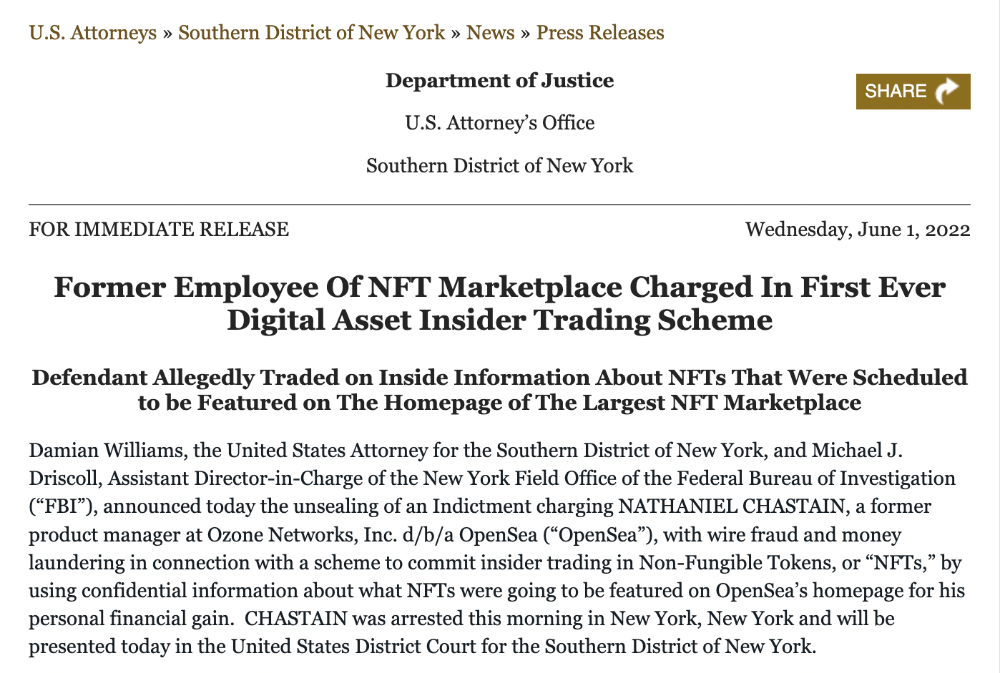
An employee of OpenSea might get a 40-year prison sentence for insider trading using NFTs.
The space had better days. Those greenish spikes...oh wow, haven't felt that in ages. Cryptocurrencies and NFTs have lost popularity. Google agrees. Both are declining.
As seen below, crypto interest spiked in May because of the Luna fall. NFT interest is similar to early October last year.
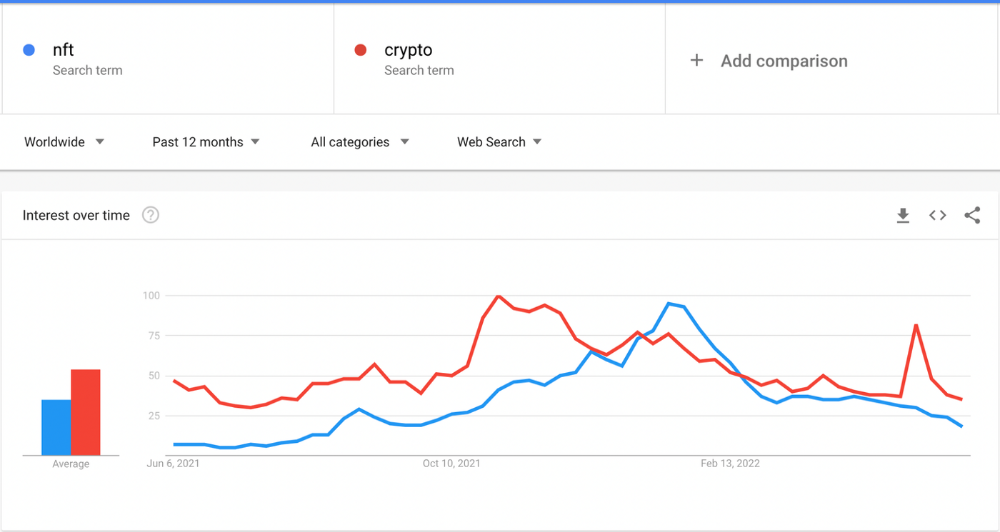
This makes me think NFTs are mostly hype and FOMO. No art or community. I've seen enough initiatives to know that communities stick around if they're profitable. Once it starts falling, they move on to the next project. The space has no long-term investments. Flip everything.
OpenSea trading volume has stayed steady for months. May's volume is 1.8 million ETH ($3.3 billion).
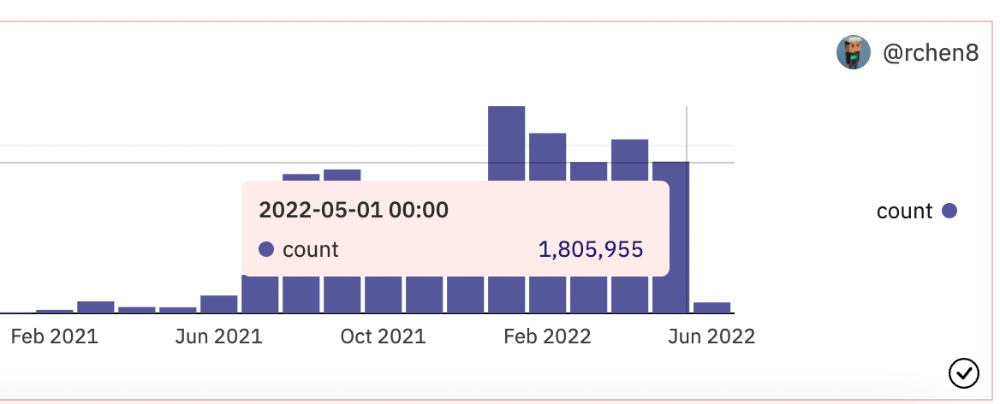
Despite this, I think NFTs and crypto will stick around. In bad markets, builders gain most.
Only 4k developers are active on Ethereum blockchain. It's low. A great chance for the space enthusiasts.
An employee of OpenSea might get a 40-year prison sentence for insider trading using NFTs.
Nathaniel Chastian, an OpenSea employee, traded on insider knowledge. He'll serve 40 years for that.
Here's what happened if you're unfamiliar.
OpenSea is a secondary NFT marketplace. Their homepage featured remarkable drops. Whatever gets featured there, NFT prices will rise 5x.
Chastian was at OpenSea. He chose forthcoming NFTs for OpenSeas' webpage.
Using anonymous digital currency wallets and OpenSea accounts, he would buy NFTs before promoting them on the homepage, showcase them, and then sell them for at least 25 times the price he paid.
From June through September 2021, this happened. Later caught, fired. He's charged with wire fraud and money laundering, each carrying a 20-year maximum penalty.
Although web3 space is all about decentralization, a step like this is welcomed since it restores faith in the area. We hope to see more similar examples soon.
Here's the press release.
Understanding smart contracts
@cantino.eth has a Twitter thread on smart contracts. Must-read. Also, he appears educated about the space, so follow him.

Scott Duke Kominers
4 years ago
NFT Creators Go Creative Commons Zero (cc0)
On January 1, "Public Domain Day," thousands of creative works immediately join the public domain. The original creator or copyright holder loses exclusive rights to reproduce, adapt, or publish the work, and anybody can use it. It happens with movies, poems, music, artworks, books (where creative rights endure 70 years beyond the author's death), and sometimes source code.
Public domain creative works open the door to new uses. 400,000 sound recordings from before 1923, including Winnie-the-Pooh, were released this year. With most of A.A. Milne's 1926 Winnie-the-Pooh characters now available, we're seeing innovative interpretations Milne likely never planned. The ancient hyphenated version of the honey-loving bear is being adapted for a horror movie: "Winnie-the-Pooh: Blood and Honey"... with Pooh and Piglet as the baddies.
Counterintuitively, experimenting and recombination can occasionally increase IP value. Open source movements allow the public to build on (or fork and duplicate) existing technologies. Permissionless innovation helps Android, Linux, and other open source software projects compete. Crypto's success at attracting public development is also due to its support of open source and "remix culture," notably in NFT forums.
Production memes
NFT projects use several IP strategies to establish brands, communities, and content. Some preserve regular IP protections; others offer NFT owners the opportunity to innovate on connected IP; yet others have removed copyright and other IP safeguards.
By using the "Creative Commons Zero" (cc0) license, artists can intentionally select for "no rights reserved." This option permits anyone to benefit from derivative works without legal repercussions. There's still a lot of confusion between copyrights and NFTs, so nothing here should be considered legal, financial, tax, or investment advice. Check out this post for an overview of copyright vulnerabilities with NFTs and how authors can protect owners' rights. This article focuses on cc0.
Nouns, a 2021 project, popularized cc0 for NFTs. Others followed, including: A Common Place, Anonymice, Blitmap, Chain Runners, Cryptoadz, CryptoTeddies, Goblintown, Gradis, Loot, mfers, Mirakai, Shields, and Terrarium Club are cc0 projects.
Popular crypto artist XCOPY licensed their 1-of-1 NFT artwork "Right-click and Save As Guy" under cc0 in January, exactly one month after selling it. cc0 has spawned many derivatives.
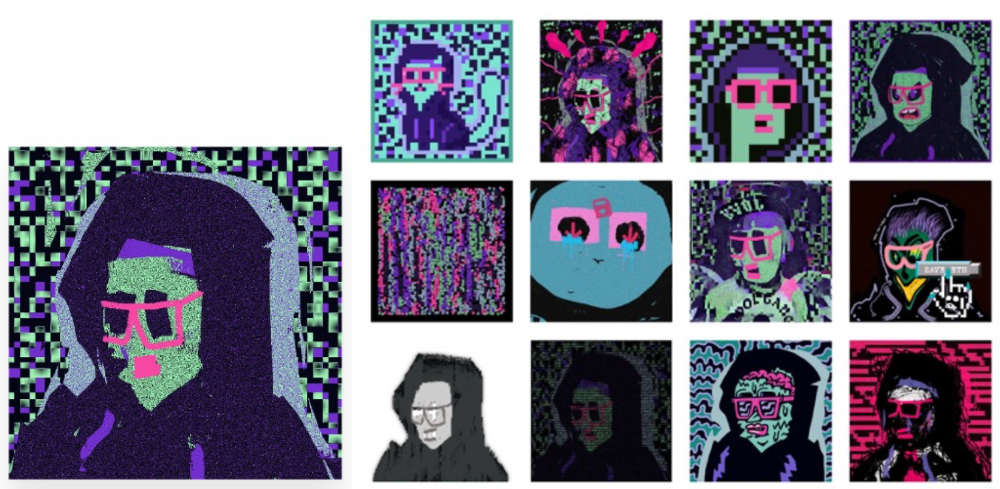
"Right-click Save As Guy" by XCOPY (1)/derivative works (2)
XCOPY said Monday he would apply cc0 to "all his existing art." "We haven't seen a cc0 summer yet, but I think it's approaching," said the artist. - predicting a "DeFi summer" in 2020, when decentralized finance gained popularity.
Why do so many NFT authors choose "no rights"?
Promoting expansions of the original project to create a more lively and active community is one rationale. This makes sense in crypto, where many value open sharing and establishing community.
Creativity depends on cultural significance. NFTs may allow verifiable ownership of any digital asset, regardless of license, but cc0 jumpstarts "meme-ability" by actively, not passively, inviting derivative works. As new derivatives are made and shared, attention might flow back to the original, boosting its reputation. This may inspire new interpretations, leading in a flywheel effect where each derivative adds to the original's worth - similar to platform network effects, where platforms become more valuable as more users join them.
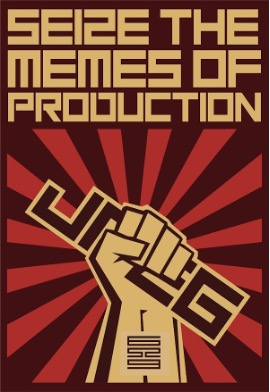
cc0 licence allows creators "seize production memes."
Physical items are also using cc0 NFT assets, thus it's not just a digital phenomenon. The Nouns Vision initiative turned the square-framed spectacles shown on each new NounsDAO NFT ("one per day, forever") into luxury sunglasses. Blitmap's pixel-art has been used on shoes, apparel, and caps. In traditional IP regimes, a single owner controls creation, licensing, and production.
The physical "blitcap" (3rd level) is a descendant of the trait in the cc0 Chain Runners collection (2nd), which uses the "logo" from cc0 Blitmap (1st)! The Logo is Blitmap token #84 and has been used as a trait in various collections. The "Dom Rose" is another popular token. These homages reference Blitmap's influence as a cc0 leader, as one of the earliest NFT projects to proclaim public domain intents. A new collection, Citizens of Tajigen, emerged last week with a Blitcap characteristic.
These derivatives can be a win-win for everyone, not just the original inventors, especially when using NFT assets to establish unique brands. As people learn about the derivative, they may become interested in the original. If you see someone wearing Nouns glasses on the street (or in a Super Bowl ad), you may desire a pair, but you may also be interested in buying an original NounsDAO NFT or related derivative.
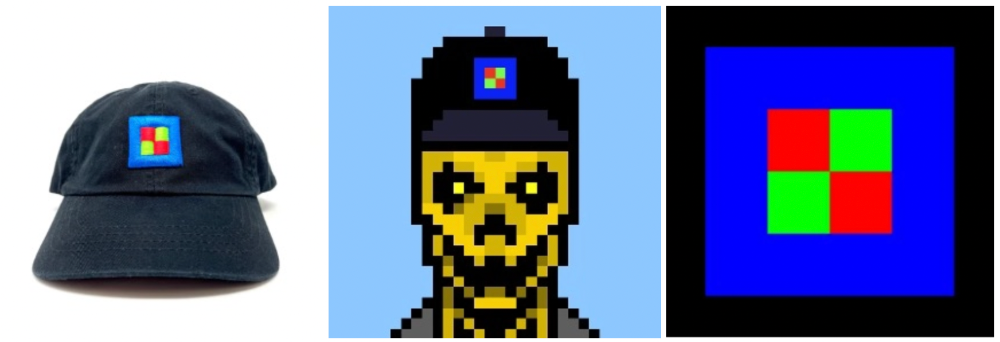
Blitmap Logo Hat (1), Chain Runners #780 ft. Hat (2), and Blitmap Original "Logo #87" (3)
Co-creating open source
NFTs' power comes from smart contract technology's intrinsic composability. Many smart contracts can be integrated or stacked to generate richer applications.
"Money Legos" describes how decentralized finance ("DeFi") smart contracts interconnect to generate new financial use cases. Yearn communicates with MakerDAO's stablecoin $DAI and exchange liquidity provider Curve by calling public smart contract methods. NFTs and their underlying smart contracts can operate as the base-layer framework for recombining and interconnecting culture and creativity.
cc0 gives an NFT's enthusiast community authority to develop new value layers whenever, wherever, and however they wish.
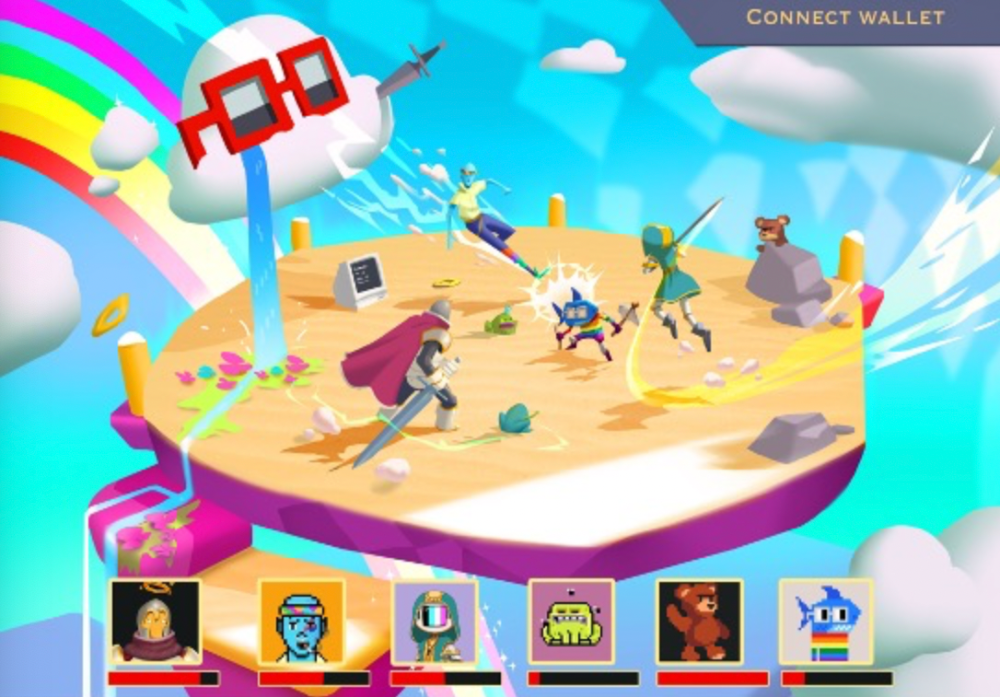
Multiple cc0 projects are playable characters in HyperLoot, a Loot Project knockoff.
Open source and Linux's rise are parallels. When the internet was young, Microsoft dominated the OS market with Windows. Linux (and its developer Linus Torvalds) championed a community-first mentality, freely available the source code without restrictions. This led to developers worldwide producing new software for Linux, from web servers to databases. As people (and organizations) created world-class open source software, Linux's value proposition grew, leading to explosive development and industry innovation. According to Truelist, Linux powers 96.3% of the top 1 million web servers and 85% of smartphones.
With cc0 licensing empowering NFT community builders, one might hope for long-term innovation. Combining cc0 with NFTs "turns an antagonistic game into a co-operative one," says NounsDAO cofounder punk4156. It's important on several levels. First, decentralized systems from open source to crypto are about trust and coordination, therefore facilitating cooperation is crucial. Second, the dynamics of this cooperation work well in the context of NFTs because giving people ownership over their digital assets allows them to internalize the results of co-creation through the value that accrues to their assets and contributions, which incentivizes them to participate in co-creation in the first place.
Licensed to create
If cc0 projects are open source "applications" or "platforms," then NFT artwork, metadata, and smart contracts provide the "user interface" and the underlying blockchain (e.g., Ethereum) is the "operating system." For these apps to attain Linux-like potential, more infrastructure services must be established and made available so people may take advantage of cc0's remixing capabilities.
These services are developing. Zora protocol and OpenSea's open source Seaport protocol enable open, permissionless NFT marketplaces. A pixel-art-rendering engine was just published on-chain to the Ethereum blockchain and integrated into OKPC and ICE64. Each application improves blockchain's "out-of-the-box" capabilities, leading to new apps created from the improved building blocks.
Web3 developer growth is at an all-time high, yet it's still a small fraction of active software developers globally. As additional developers enter the field, prospective NFT projects may find more creative and infrastructure Legos for cc0 and beyond.
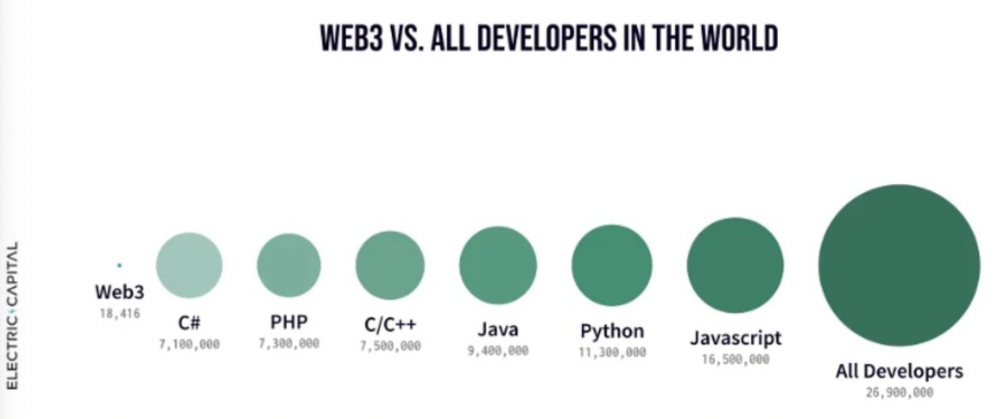
Electric Capital Developer Report (2021), p. 122
Growth requires composability. Users can easily integrate digital assets developed on public standards and compatible infrastructure into other platforms. The Loot Project is one of the first to illustrate decentralized co-creation, worldbuilding, and more in NFTs. This example was low-fi or "incomplete" aesthetically, providing room for imagination and community co-creation.
Loot began with a series of Loot bag NFTs, each listing eight "adventure things" in white writing on a black backdrop (such as Loot Bag #5726's "Katana, Divine Robe, Great Helm, Wool Sash, Divine Slippers, Chain Gloves, Amulet, Gold Ring"). Dom Hofmann's free Loot bags served as a foundation for the community.
Several projects have begun metaphorical (lore) and practical (game development) world-building in a short time, with artists contributing many variations to the collective "Lootverse." They've produced games (Realms & The Crypt), characters (Genesis Project, Hyperloot, Loot Explorers), storytelling initiatives (Banners, OpenQuill), and even infrastructure (The Rift).
Why cc0 and composability? Because consumers own and control Loot bags, they may use them wherever they choose by connecting their crypto wallets. This allows users to participate in multiple derivative projects, such as Genesis Adventurers, whose characters appear in many others — creating a decentralized franchise not owned by any one corporation.
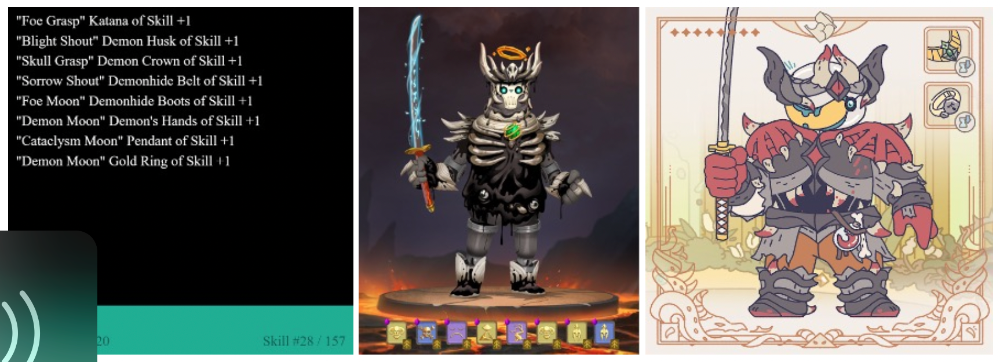
Genesis Project's Genesis Adventurer (1) with HyperLoot (2) and Loot Explorer (3) versions
When to go cc0
There are several IP development strategies NFT projects can use. When it comes to cc0, it’s important to be realistic. The public domain won't make a project a runaway success just by implementing the license. cc0 works well for NFT initiatives that can develop a rich, enlarged ecosystem.
Many of the most successful cc0 projects have introduced flexible intellectual property. The Nouns brand is as obvious for a beer ad as for real glasses; Loot bags are simple primitives that make sense in all adventure settings; and the Goblintown visual style looks good on dwarfs, zombies, and cranky owls as it does on Val Kilmer.
The ideal cc0 NFT project gives builders the opportunity to add value:
vertically, by stacking new content and features directly on top of the original cc0 assets (for instance, as with games built on the Loot ecosystem, among others), and
horizontally, by introducing distinct but related intellectual property that helps propagate the original cc0 project’s brand (as with various Goblintown derivatives, among others).
These actions can assist cc0 NFT business models. Because cc0 NFT projects receive royalties from secondary sales, third-party extensions and derivatives can boost demand for the original assets.
Using cc0 license lowers friction that could hinder brand-reinforcing extensions or lead to them bypassing the original. Robbie Broome recently argued (in the context of his cc0 project A Common Place) that giving away his IP to cc0 avoids bad rehashes down the line. If UrbanOutfitters wanted to put my design on a tee, they could use the actual work instead of hiring a designer. CC0 can turn competition into cooperation.
Community agreement about core assets' value and contribution can help cc0 projects. Cohesion and engagement are key. Using the above examples: Developers can design adventure games around whatever themes and item concepts they desire, but many choose Loot bags because of the Lootverse's community togetherness. Flipmap shared half of its money with the original Blitmap artists in acknowledgment of that project's core role in the community. This can build a healthy culture within a cc0 project ecosystem. Commentator NiftyPins said it was smart to acknowledge the people that constructed their universe. Many OG Blitmap artists have popped into the Flipmap discord to share information.
cc0 isn't a one-size-fits-all answer; NFTs formed around well-established brands may prefer more restrictive licenses to preserve their intellectual property and reinforce exclusivity. cc0 has some superficial similarities to permitting NFT owners to market the IP connected with their NFTs (à la Bored Ape Yacht Club), but there is a significant difference: cc0 holders can't exclude others from utilizing the same IP. This can make it tougher for holders to develop commercial brands on cc0 assets or offer specific rights to partners. Holders can still introduce enlarged intellectual property (such as backstories or derivatives) that they control.
Blockchain technologies and the crypto ethos are decentralized and open-source. This makes it logical for crypto initiatives to build around cc0 content models, which build on the work of the Creative Commons foundation and numerous open source pioneers.
NFT creators that choose cc0 must select how involved they want to be in building the ecosystem. Some cc0 project leaders, like Chain Runners' developers, have kept building on top of the initial cc0 assets, creating an environment derivative projects can plug into. Dom Hofmann stood back from Loot, letting the community lead. (Dom is also working on additional cc0 NFT projects for the company he formed to build Blitmap.) Other authors have chosen out totally, like sartoshi, who announced his exit from the cc0 project he founded, mfers, and from the NFT area by publishing a final edition suitably named "end of sartoshi" and then deactivating his Twitter account. A multi-signature wallet of seven mfers controls the project's smart contract.
cc0 licensing allows a robust community to co-create in ways that benefit all members, regardless of original creators' continuous commitment. We foresee more organized infrastructure and design patterns as NFT matures. Like open source software, value capture frameworks may see innovation. (We could imagine a variant of the "Sleepycat license," which requires commercial software to pay licensing fees when embedding open source components.) As creators progress the space, we expect them to build unique rights and licensing strategies. cc0 allows NFT producers to bootstrap ideas that may take off.
You might also like

Navdeep Yadav
3 years ago
31 startup company models (with examples)
Many people find the internet's various business models bewildering.
This article summarizes 31 startup e-books.
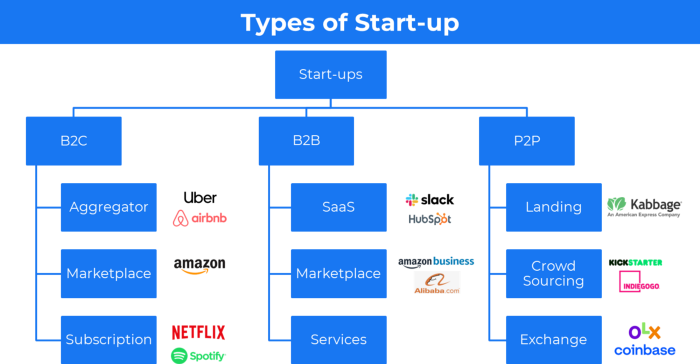
1. Using the freemium business model (free plus premium),
The freemium business model offers basic software, games, or services for free and charges for enhancements.
Examples include Slack, iCloud, and Google Drive
Provide a rudimentary, free version of your product or service to users.
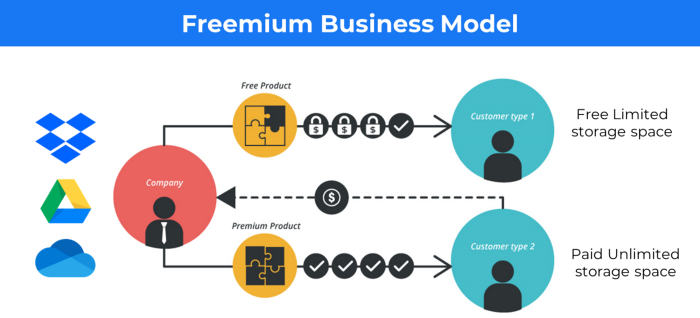
Google Drive and Dropbox offer 15GB and 2GB of free space but charge for more.
Freemium business model details (Click here)
2. The Business Model of Subscription
Subscription business models sell a product or service for recurring monthly or yearly revenue.
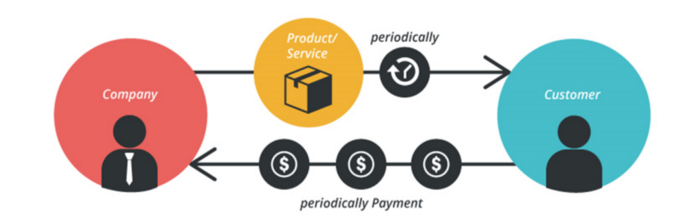
Examples: Tinder, Netflix, Shopify, etc
It's the next step to Freemium if a customer wants to pay monthly for premium features.
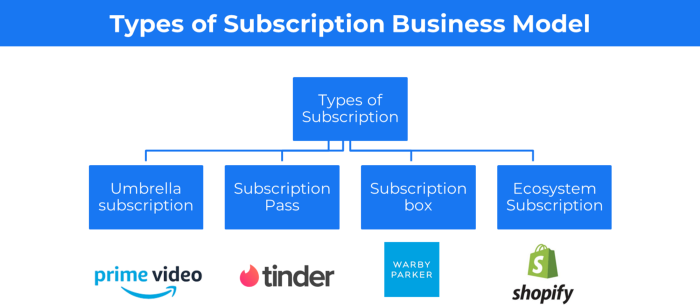
Subscription Business Model (Click here)
3. A market-based business strategy
It's an e-commerce site or app where third-party sellers sell products or services.
Examples are Amazon and Fiverr.
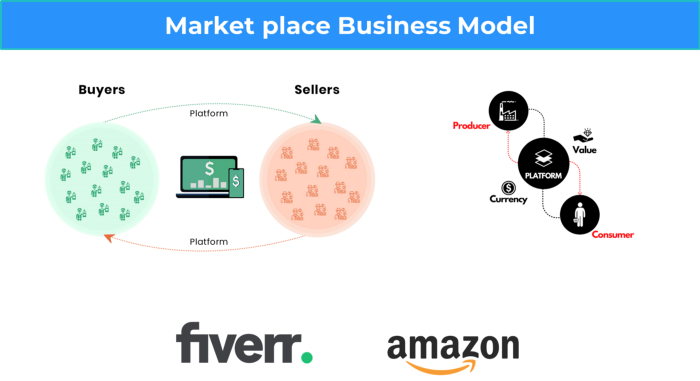
On Amazon's marketplace, a third-party vendor sells a product.
Freelancers on Fiverr offer specialized skills like graphic design.
Marketplace's business concept is explained.
4. Business plans using aggregates
In the aggregator business model, the service is branded.
Uber, Airbnb, and other examples
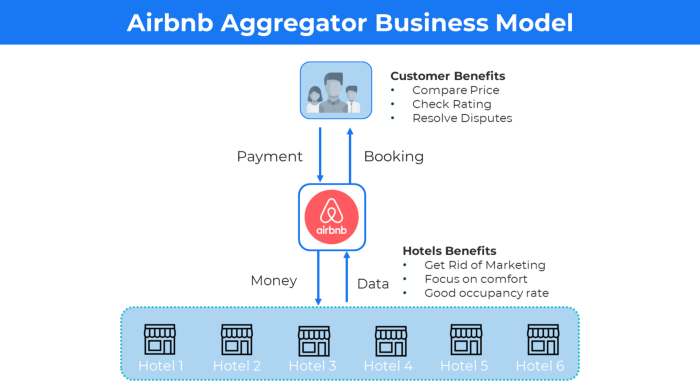
Marketplace and Aggregator business models differ.
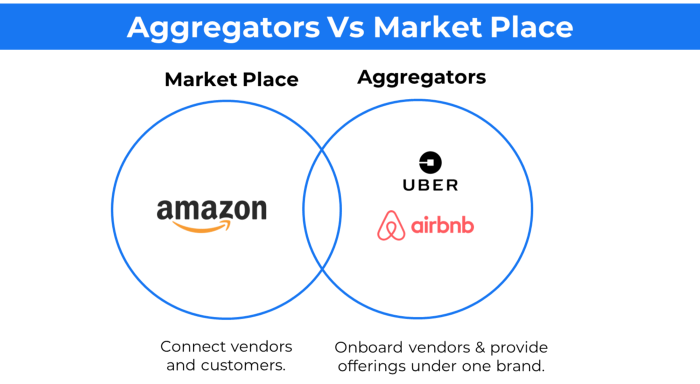
Amazon and Fiverr link merchants and customers and take a 10-20% revenue split.
Uber and Airbnb-style aggregator Join these businesses and provide their products.
5. The pay-as-you-go concept of business
This is a consumption-based pricing system. Cloud companies use it.
Example: Amazon Web Service and Google Cloud Platform (GCP) (AWS)
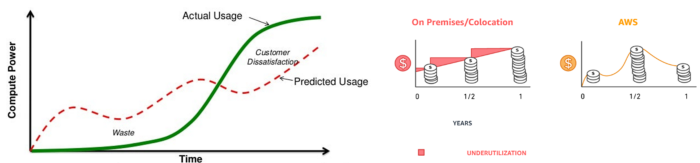
AWS, an Amazon subsidiary, offers over 200 pay-as-you-go cloud services.
“In short, the more you use the more you pay”
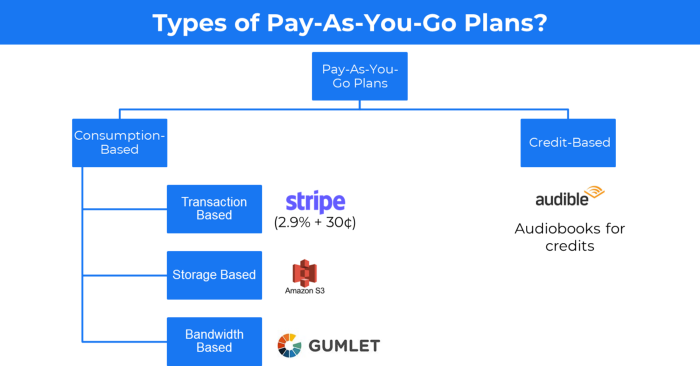
When it's difficult to divide clients into pricing levels, pay-as-you is employed.
6. The business model known as fee-for-service (FFS)
FFS charges fixed and variable fees for each successful payment.
For instance, PayU, Paypal, and Stripe
Stripe charges 2.9% + 30 per payment.
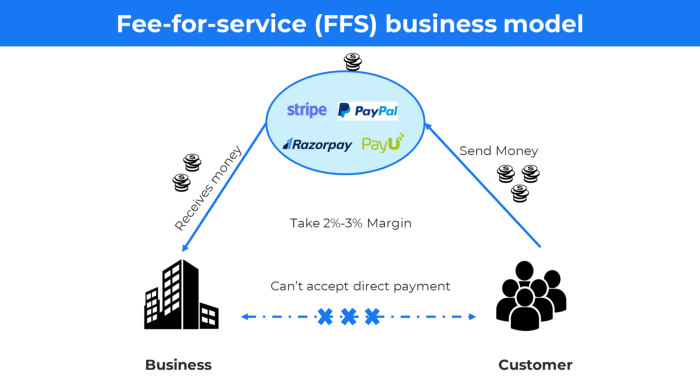
These firms offer a payment gateway to take consumer payments and deposit them to a business account.
Fintech business model
7. EdTech business strategy
In edtech, you generate money by selling material or teaching as a service.
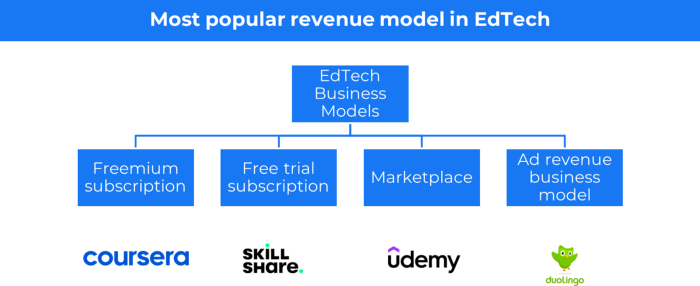
edtech business models
Freemium When course content is free but certification isn't, e.g. Coursera
FREE TRIAL SkillShare offers free trials followed by monthly or annual subscriptions.
Self-serving marketplace approach where you pick what to learn.
Ad-revenue model The company makes money by showing adverts to its huge user base.
Lock-in business strategy
Lock in prevents customers from switching to a competitor's brand or offering.
It uses switching costs or effort to transmit (soft lock-in), improved brand experience, or incentives.
Apple, SAP, and other examples
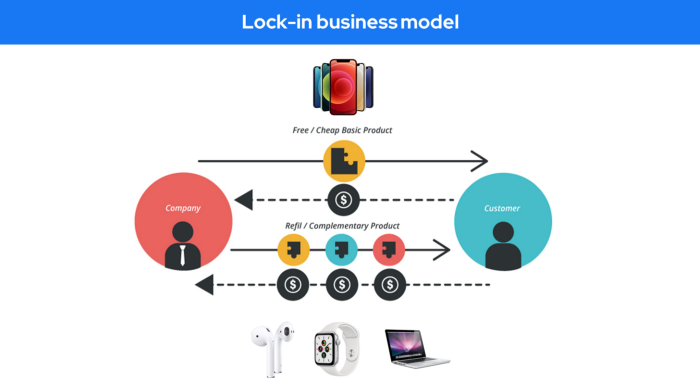
Apple offers an iPhone and then locks you in with extra hardware (Watch, Airpod) and platform services (Apple Store, Apple Music, cloud, etc.).
9. Business Model for API Licensing
APIs let third-party apps communicate with your service.
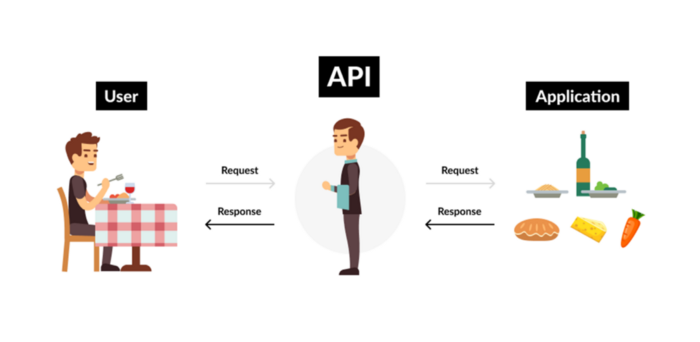
Uber and Airbnb use Google Maps APIs for app navigation.
Examples are Google Map APIs (Map), Sendgrid (Email), and Twilio (SMS).
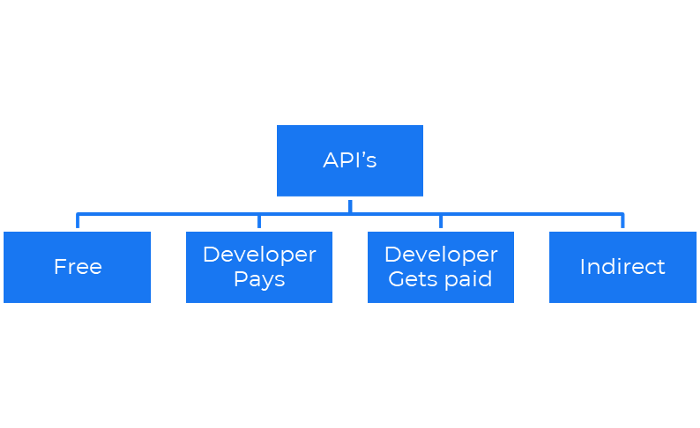
Business models for APIs
Free: The simplest API-driven business model that enables unrestricted API access for app developers. Google Translate and Facebook are two examples.
Developer Pays: Under this arrangement, service providers such as AWS, Twilio, Github, Stripe, and others must be paid by application developers.
The developer receives payment: These are the compensated content producers or developers who distribute the APIs utilizing their work. For example, Amazon affiliate programs
10. Open-source enterprise
Open-source software can be inspected, modified, and improved by anybody.
For instance, use Firefox, Java, or Android.

Google paid Mozilla $435,702 million to be their primary search engine in 2018.
Open-source software profits in six ways.
Paid assistance The Project Manager can charge for customization because he is quite knowledgeable about the codebase.
A full database solution is available as a Software as a Service (MongoDB Atlas), but there is a fee for the monitoring tool.
Open-core design R studio is a better GUI substitute for open-source applications.
sponsors of GitHub Sponsorships benefit the developers in full.
demands for paid features Earn Money By Developing Open Source Add-Ons for Current Products
Open-source business model
11. The business model for data
If the software or algorithm collects client data to improve or monetize the system.
Open AI GPT3 gets smarter with use.
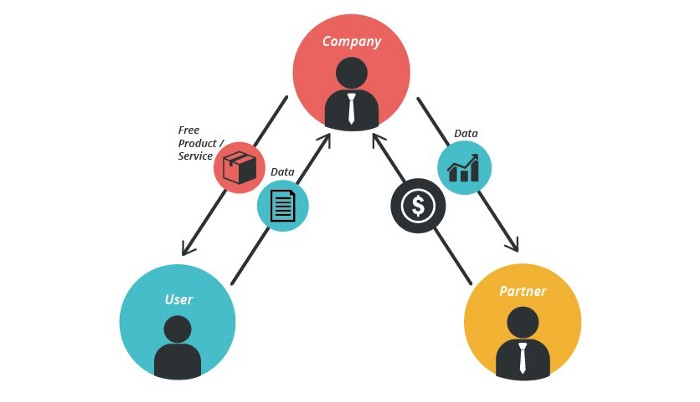
Foursquare allows users to exchange check-in locations.
Later, they compiled large datasets to enable retailers like Starbucks launch new outlets.
12. Business Model Using Blockchain
Blockchain is a distributed ledger technology that allows firms to deploy smart contracts without a central authority.
Examples include Alchemy, Solana, and Ethereum.
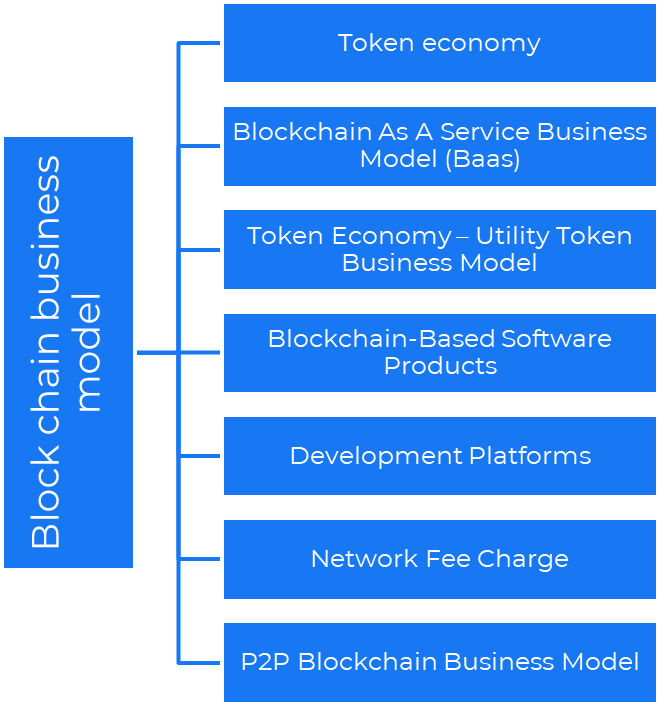
Business models using blockchain
Economy of tokens or utility When a business uses a token business model, it issues some kind of token as one of the ways to compensate token holders or miners. For instance, Solana and Ethereum
Bitcoin Cash P2P Business Model Peer-to-peer (P2P) blockchain technology permits direct communication between end users. as in IPFS
Enterprise Blockchain as a Service (Baas) BaaS focuses on offering ecosystem services similar to those offered by Amazon (AWS) and Microsoft (Azure) in the web 3 sector. Example: Ethereum Blockchain as a Service with Bitcoin (EBaaS).
Blockchain-Based Aggregators With AWS for blockchain, you can use that service by making an API call to your preferred blockchain. As an illustration, Alchemy offers nodes for many blockchains.
13. The free-enterprise model
In the freeterprise business model, free professional accounts are led into the funnel by the free product and later become B2B/enterprise accounts.
For instance, Slack and Zoom
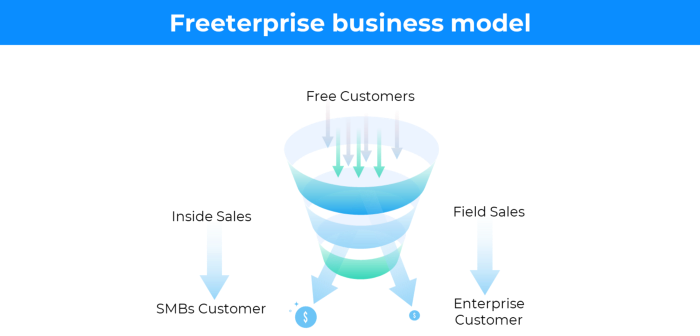
Freeterprise companies flourish through collaboration.
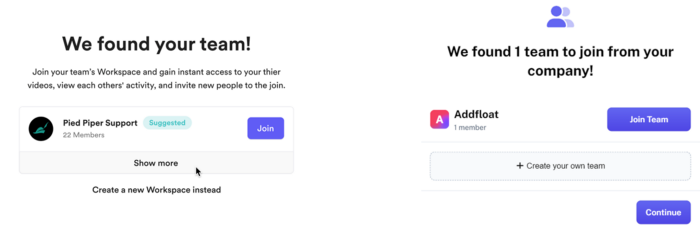
Start with a free professional account to build an enterprise.
14. Business plan for razor blades
It's employed in hardware where one piece is sold at a loss and profits are made through refills or add-ons.
Gillet razor & blades, coffee machine & beans, HP printer & cartridge, etc.
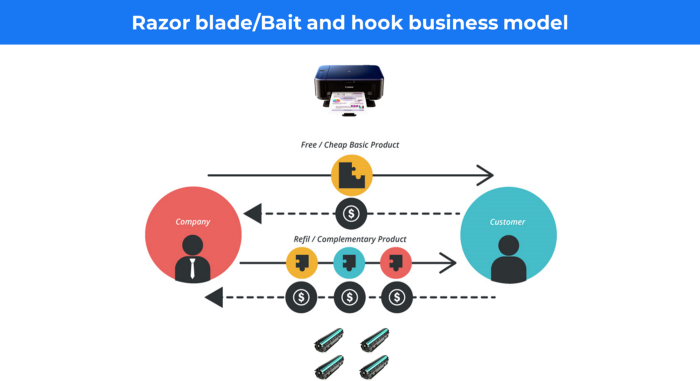
Sony sells the Playstation console at a loss but makes up for it by selling games and charging for online services.
Advantages of the Razor-Razorblade Method
lowers the risk a customer will try a product. enables buyers to test the goods and services without having to pay a high initial investment.
The product's ongoing revenue stream has the potential to generate sales that much outweigh the original investments.
Razor blade business model
15. The business model of direct-to-consumer (D2C)
In D2C, the company sells directly to the end consumer through its website using a third-party logistic partner.
Examples include GymShark and Kylie Cosmetics.
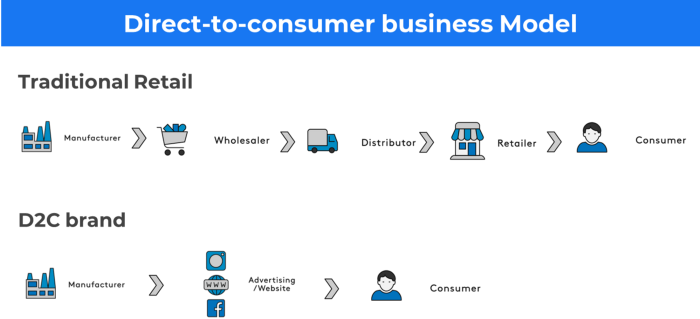
D2C brands can only expand via websites, marketplaces (Amazon, eBay), etc.
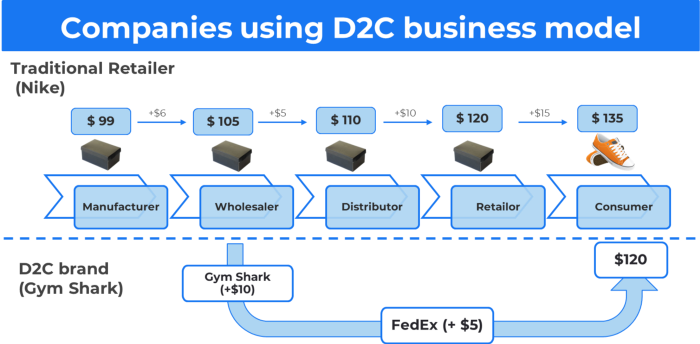
D2C benefits
Lower reliance on middlemen = greater profitability
You now have access to more precise demographic and geographic customer data.
Additional space for product testing
Increased customisation throughout your entire product line-Inventory Less
16. Business model: White Label vs. Private Label
Private label/White label products are made by a contract or third-party manufacturer.
Most amazon electronics are made in china and white-labeled.
Amazon supplements and electronics.
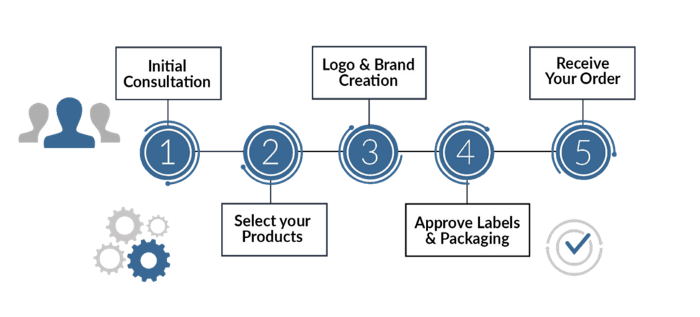
Contract manufacturers handle everything after brands select product quantities on design labels.
17. The franchise model
The franchisee uses the franchisor's trademark, branding, and business strategy (company).
For instance, KFC, Domino's, etc.
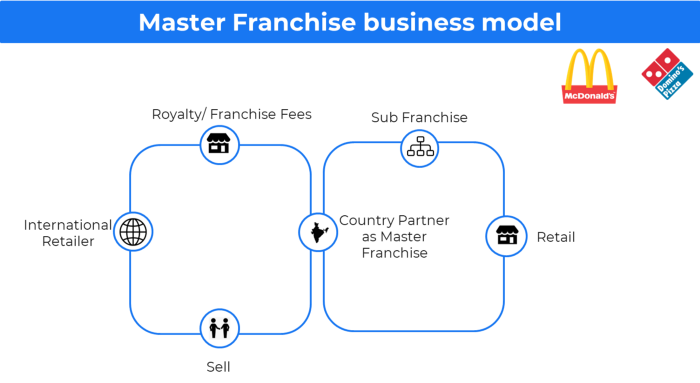
Subway, Domino, Burger King, etc. use this business strategy.
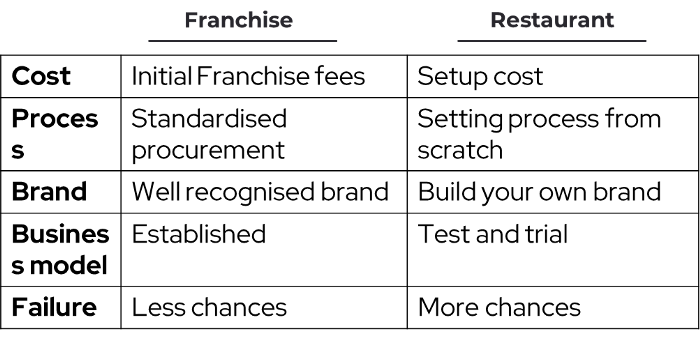
Many people pick a franchise because opening a restaurant is risky.
18. Ad-based business model
Social media and search engine giants exploit search and interest data to deliver adverts.
Google, Meta, TikTok, and Snapchat are some examples.
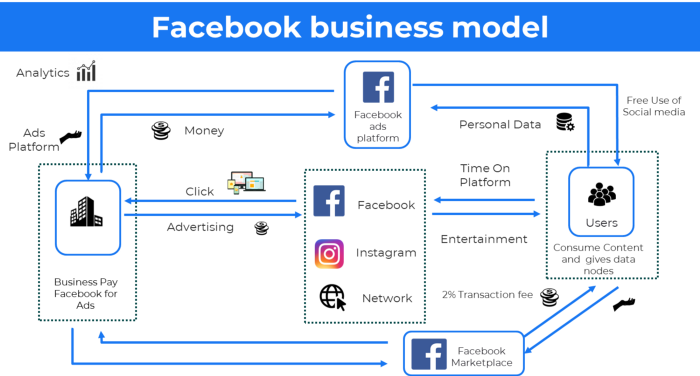
Users don't pay for the service or product given, e.g. Google users don't pay for searches.
In exchange, they collected data and hyper-personalized adverts to maximize revenue.
19. Business plan for octopuses
Each business unit functions separately but is connected to the main body.
Instance: Oyo
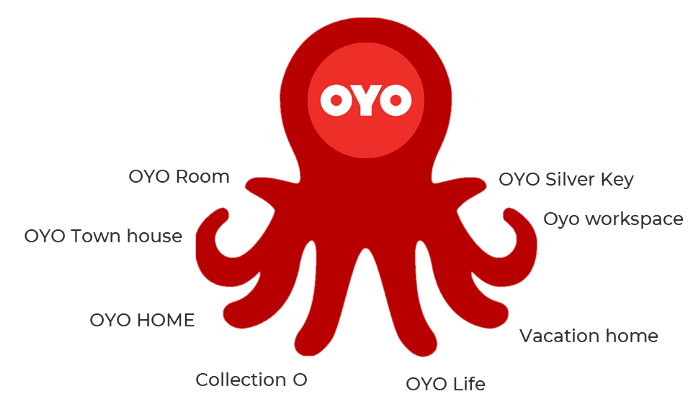
OYO is Asia's Airbnb, operating hotels, co-working, co-living, and vacation houses.
20, Transactional business model, number
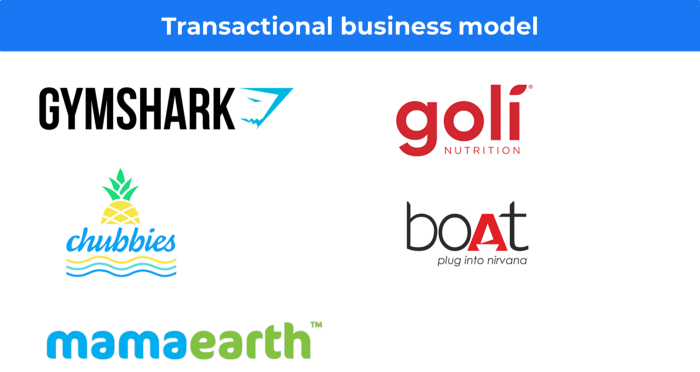
Sales to customers produce revenue.
E-commerce sites and online purchases employ SSL.
Goli is an ex-GymShark.
21. The peer-to-peer (P2P) business model
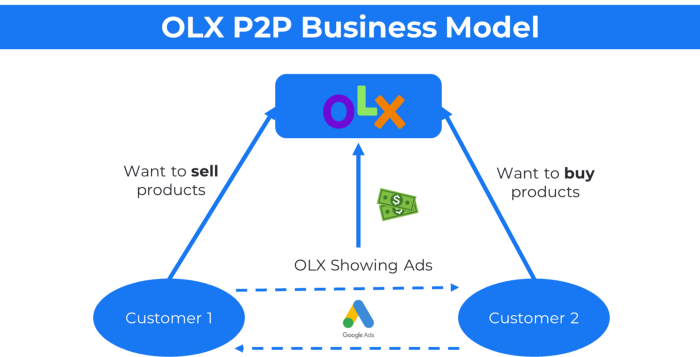
In P2P, two people buy and sell goods and services without a third party or platform.
Consider OLX.
22. P2P lending as a manner of operation
In P2P lending, one private individual (P2P Lender) lends/invests or borrows money from another (P2P Borrower).
Instance: Kabbage
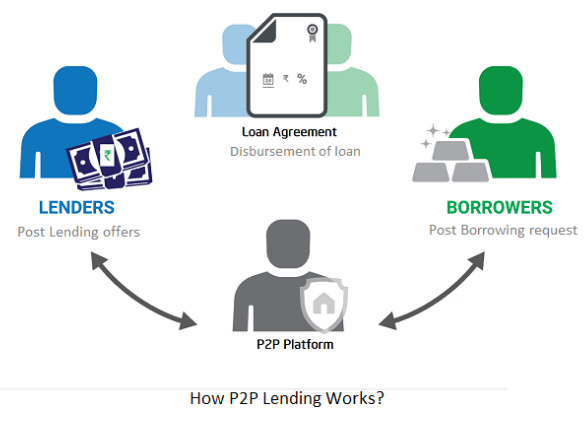
Social lending lets people lend and borrow money directly from each other without an intermediary financial institution.
23. A business model for brokers
Brokerages charge a commission or fee for their services.
Examples include eBay, Coinbase, and Robinhood.
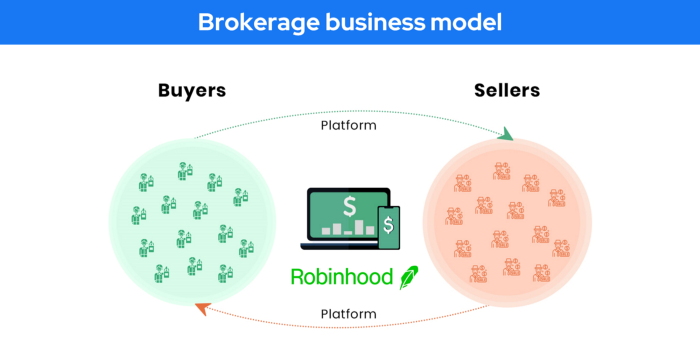
Brokerage businesses are common in Real estate, finance, and online and operate on this model.
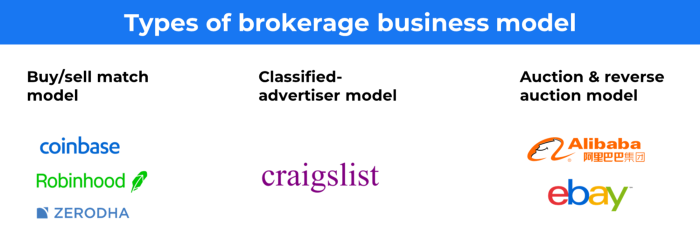
Buy/sell similar models Examples include financial brokers, insurance brokers, and others who match purchase and sell transactions and charge a commission.
These brokers charge an advertiser a fee based on the date, place, size, or type of an advertisement. This is known as the classified-advertiser model. For instance, Craiglist
24. Drop shipping as an industry
Dropshipping allows stores to sell things without holding physical inventories.
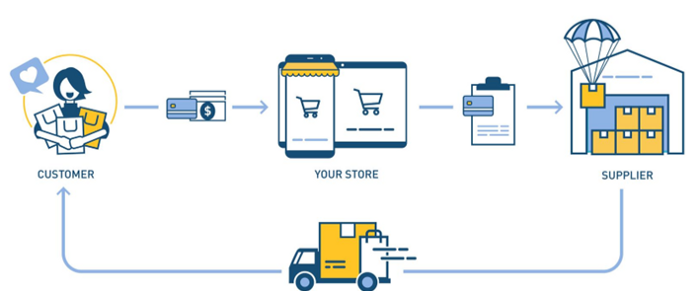
When a customer orders, use a third-party supplier and logistic partners.
Retailer product portfolio and customer experience Fulfiller The consumer places the order.
Dropshipping advantages
Less money is needed (Low overhead-No Inventory or warehousing)
Simple to start (costs under $100)
flexible work environment
New product testing is simpler
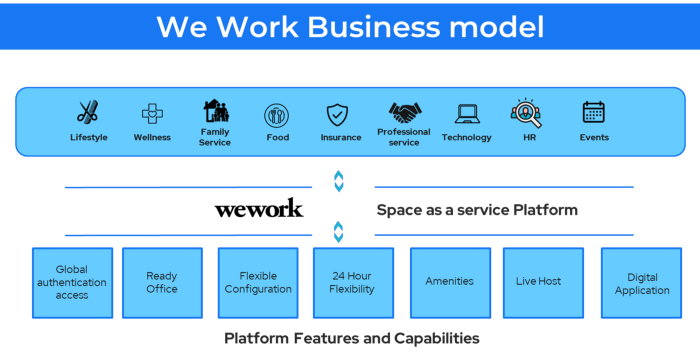
25. Business Model for Space as a Service
It's centered on a shared economy that lets millennials live or work in communal areas without ownership or lease.
Consider WeWork and Airbnb.
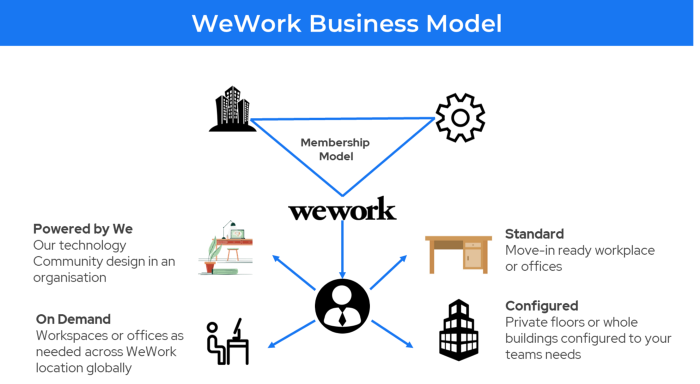
WeWork helps businesses with real estate, legal compliance, maintenance, and repair.
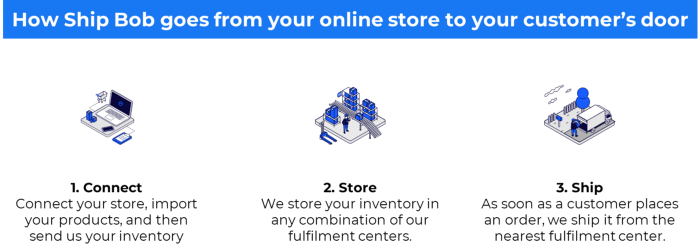
26. The business model for third-party logistics (3PL)
In 3PL, a business outsources product delivery, warehousing, and fulfillment to an external logistics company.
Examples include Ship Bob, Amazon Fulfillment, and more.

3PL partners warehouse, fulfill, and return inbound and outbound items for a charge.
Inbound logistics involves bringing products from suppliers to your warehouse.
Outbound logistics refers to a company's production line, warehouse, and customer.
27. The last-mile delivery paradigm as a commercial strategy
Last-mile delivery is the collection of supply chain actions that reach the end client.
Examples include Rappi, Gojek, and Postmates.
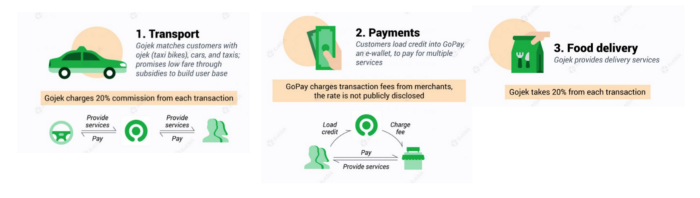
Last-mile is tied to on-demand and has a nighttime peak.
28. The use of affiliate marketing
Affiliate marketing involves promoting other companies' products and charging commissions.
Examples include Hubspot, Amazon, and Skillshare.
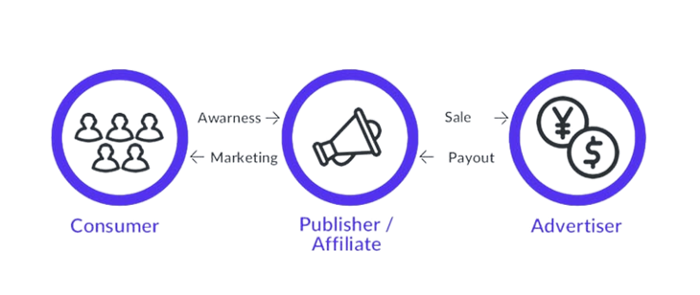
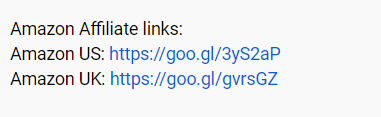
Your favorite youtube channel probably uses these short amazon links to get 5% of sales.
Affiliate marketing's benefits
In exchange for a success fee or commission, it enables numerous independent marketers to promote on its behalf.
Ensure system transparency by giving the influencers a specific tracking link and an online dashboard to view their profits.
Learn about the newest bargains and have access to promotional materials.
29. The business model for virtual goods
This is an in-app purchase for an intangible product.
Examples include PubG, Roblox, Candy Crush, etc.
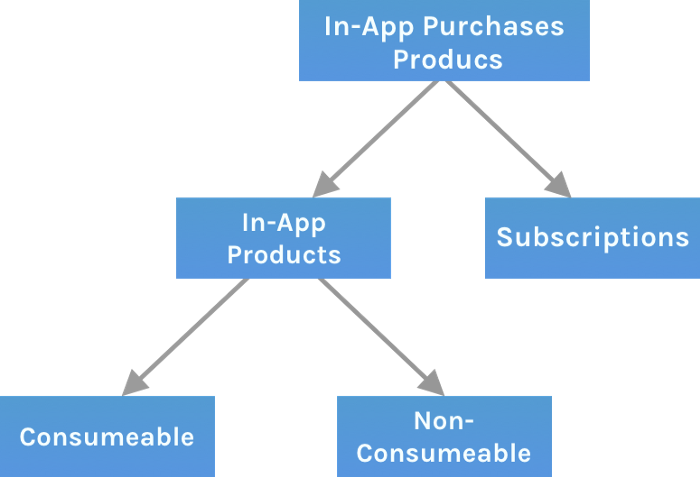
Consumables are like gaming cash that runs out. Non-consumable products provide a permanent advantage without repeated purchases.
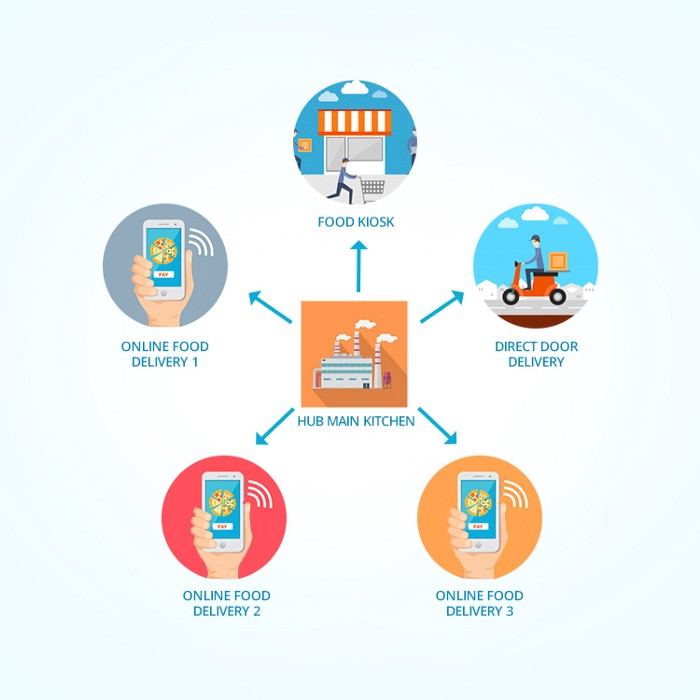
30. Business Models for Cloud Kitchens
Ghost, Dark, Black Box, etc.
Delivery-only restaurant.
These restaurants don't provide dine-in, only delivery.
For instance, NextBite and Faasos
31. Crowdsourcing as a Business Model
Crowdsourcing = Using the crowd as a platform's source.
In crowdsourcing, you get support from people around the world without hiring them.
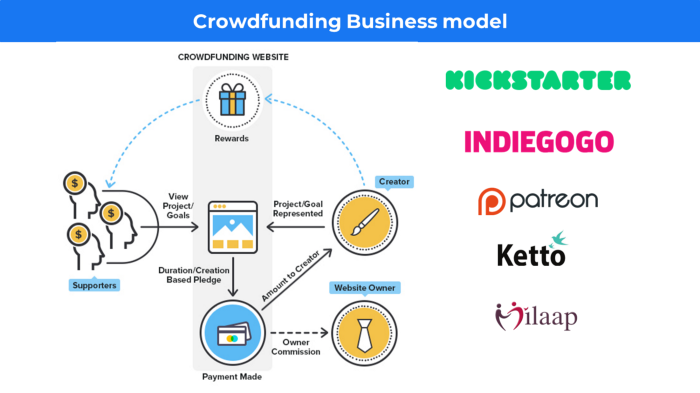
Crowdsourcing sites
Open-Source Software gives access to the software's source code so that developers can edit or enhance it. Examples include Firefox browsers and Linux operating systems.
Crowdfunding The oculus headgear would be an example of crowdfunding in essence, with no expectations.

Joseph Mavericks
4 years ago
5 books my CEO read to make $30M
Offices without books are like bodies without souls.
After 10 years, my CEO sold his company for $30 million. I've shared many of his lessons on medium. You could ask him anything at his always-open office. He also said we could use his office for meetings while he was away. When I used his office for work, I was always struck by how many books he had.
Books are useful in almost every aspect of learning. Building a business, improving family relationships, learning a new language, a new skill... Books teach, guide, and structure. Whether fiction or nonfiction, books inspire, give ideas, and develop critical thinking skills.
My CEO prefers non-fiction and attends a Friday book club. This article discusses 5 books I found in his office that impacted my life/business. My CEO sold his company for $30 million, but I've built a steady business through blogging and video making.
I recall events and lessons I learned from my CEO and how they relate to each book, and I explain how I applied the book's lessons to my business and life.
Note: This post has no affiliate links.
1. The One Thing — Gary Keller

Gary Keller, a real estate agent, wanted more customers. So he and his team brainstormed ways to get more customers. They decided to write a bestseller about work and productivity. The more people who saw the book, the more customers they'd get.
Gary Keller focused on writing the best book on productivity, work, and efficiency for months. His business experience. Keller's business grew after the book's release.
The author summarizes the book in one question.
"What's the one thing that will make everything else easier or unnecessary?"
When I started my blog and business alongside my 9–5, I quickly identified my one thing: writing. My business relied on it, so it had to be great. Without writing, there was no content, traffic, or business.
My CEO focused on funding when he started his business. Even in his final years, he spent a lot of time on the phone with investors, either to get more money or to explain what he was doing with it. My CEO's top concern was money, and the other super important factors were handled by separate teams.
Product tech and design
Incredible customer support team
Excellent promotion team
Profitable sales team
My CEO didn't always focus on one thing and ignore the rest. He was on all of those teams when I started my job. He'd start his day in tech, have lunch with marketing, and then work in sales. He was in his office on the phone at night.
He eventually realized his errors. Investors told him he couldn't do everything for the company. If needed, he had to change internally. He learned to let go, mind his own business, and focus for the next four years. Then he sold for $30 million.
The bigger your project/company/idea, the more you'll need to delegate to stay laser-focused. I started something new every few months for 10 years before realizing this. So much to do makes it easy to avoid progress. Once you identify the most important aspect of your project and enlist others' help, you'll be successful.
2. Eat That Frog — Brian Tracy
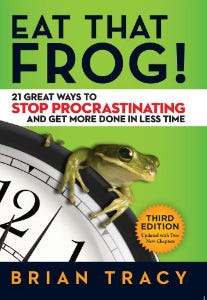
The author quote sums up book's essence:
Mark Twain said that if you eat a live frog in the morning, it's probably the worst thing that will happen to you all day. Your "frog" is the biggest, most important task you're most likely to procrastinate on.
"Frog" and "One Thing" are both about focusing on what's most important. Eat That Frog recommends doing the most important task first thing in the morning.
I shared my CEO's calendar in an article 10 months ago. Like this:

CEO's average week (some information crossed out for confidentiality)
Notice anything about 8am-8:45am? Almost every day is the same (except Friday). My CEO started his day with a management check-in for 2 reasons:
Checking in with all managers is cognitively demanding, and my CEO is a morning person.
In a young startup where everyone is busy, the morning management check-in was crucial. After 10 am, you couldn't gather all managers.
When I started my blog, writing was my passion. I'm a morning person, so I woke up at 6 am and started writing by 6:30 am every day for a year. This allowed me to publish 3 articles a week for 52 weeks to build my blog and audience. After 2 years, I'm not stopping.
3. Deep Work — Cal Newport
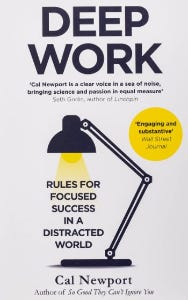
Deep work is focusing on a cognitively demanding task without distractions (like a morning management meeting). It helps you master complex information quickly and produce better results faster. In a competitive world 10 or 20 years ago, focus wasn't a huge advantage. Smartphones, emails, and social media made focus a rare, valuable skill.
Most people can't focus anymore. Screens light up, notifications buzz, emails arrive, Instagram feeds... Many people don't realize they're interrupted because it's become part of their normal workflow.
Cal Newport mentions Bill Gates' "Think Weeks" in Deep Work.
Microsoft CEO Bill Gates would isolate himself (often in a lakeside cottage) twice a year to read and think big thoughts.
Inside Bill's Brain on Netflix shows Newport's lakeside cottage. I've always wanted a lakeside cabin to work in. My CEO bought a lakehouse after selling his company, but now he's retired.
As a company grows, you can focus less on it. In a previous section, I said investors told my CEO to get back to basics and stop micromanaging. My CEO's commitment and ability to get work done helped save the company. His deep work and new frameworks helped us survive the corona crisis (more on this later).
The ability to deep work will be a huge competitive advantage in the next century. Those who learn to work deeply will likely be successful while everyone else is glued to their screens, Bluetooth-synced to their watches, and playing Candy Crush on their tablets.
4. The 7 Habits of Highly Effective People — Stephen R. Covey
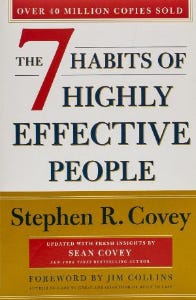
It took me a while to start reading this book because it seemed like another shallow self-help bible. I kept finding this book when researching self-improvement. I tried it because it was everywhere.
Stephen Covey taught me 2 years ago to have a personal mission statement.
A 7 Habits mission statement describes the life you want to lead, the character traits you want to embody, and the impact you want to have on others. shortform.com
I've had many lunches with my CEO and talked about Vipassana meditation and Sunday forest runs, but I've never seen his mission statement. I'm sure his family is important, though. In the above calendar screenshot, you can see he always included family events (in green) so we could all see those time slots. We couldn't book him then. Although he never spent as much time with his family as he wanted, he always made sure to be on time for his kid's birthday rather than a conference call.
My CEO emphasized his company's mission. Your mission statement should answer 3 questions.
What does your company do?
How does it do it?
Why does your company do it?
As a graphic designer, I had to create mission-statement posters. My CEO hung posters in each office.
5. Measure What Matters — John Doerr

This book is about Andrew Grove's OKR strategy, developed in 1968. When he joined Google's early investors board, he introduced it to Larry Page and Sergey Brin. Google still uses OKR.
Objective Key Results
Objective: It explains your goals and desired outcome. When one goal is reached, another replaces it. OKR objectives aren't technical, measured, or numerical. They must be clear.
Key Result should be precise, technical, and measurable, unlike the Objective. It shows if the Goal is being worked on. Time-bound results are quarterly or yearly.
Our company almost sank several times. Sales goals were missed, management failed, and bad decisions were made. On a Monday, our CEO announced we'd implement OKR to revamp our processes.
This was a year before the pandemic, and I'm certain we wouldn't have sold millions or survived without this change. This book impacted the company the most, not just management but all levels. Organization and transparency improved. We reached realistic goals. Happy investors. We used the online tool Gtmhub to implement OKR across the organization.
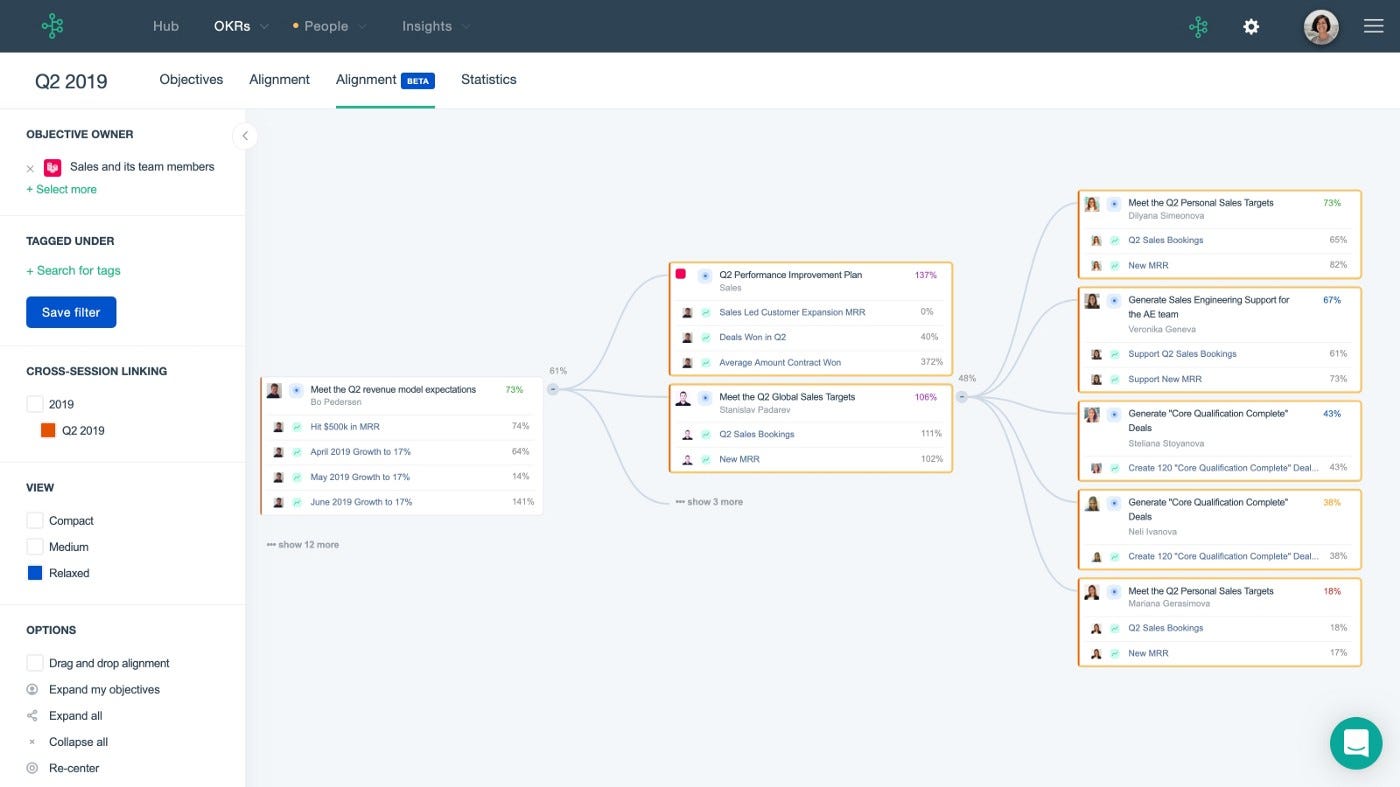
My CEO's company went from near bankruptcy to being acquired for $30 million in 2 years after implementing OKR.
I hope you enjoyed this booklist. Here's a recap of the 5 books and the lessons I learned from each.
The 7 Habits of Highly Effective People — Stephen R. Covey
Have a mission statement that outlines your goals, character traits, and impact on others.
Deep Work — Cal Newport
Focus is a rare skill; master it. Deep workers will succeed in our hyper-connected, distracted world.
The One Thing — Gary Keller
What can you do that will make everything else easier or unnecessary? Once you've identified it, focus on it.
Eat That Frog — Brian Tracy
Identify your most important task the night before and do it first thing in the morning. You'll have a lighter day.
Measure What Matters — John Doerr
On a timeline, divide each long-term goal into chunks. Divide those slices into daily tasks (your goals). Time-bound results are quarterly or yearly. Objectives aren't measured or numbered.
Thanks for reading. Enjoy the ride!

Tim Denning
3 years ago
I Posted Six Times a Day for 210 Days on Twitter. Here's What Happened.
I'd spend hours composing articles only to find out they were useless. Twitter solved the problem.

Twitter is wrinkled, say critics.
Nope. Writing is different. It won't make sense until you write there.
Twitter is resurgent. People are reading again. 15-second TikToks overloaded our senses.
After nuking my 20,000-follower Twitter account and starting again, I wrote every day for 210 days.
I'll explain.
I came across the strange world of microblogging.
Traditional web writing is filler-heavy.
On Twitter, you must be brief. I played Wordle.
Twitter Threads are the most popular writing format. Like a blog post. It reminds me of the famous broetry posts on LinkedIn a few years ago.
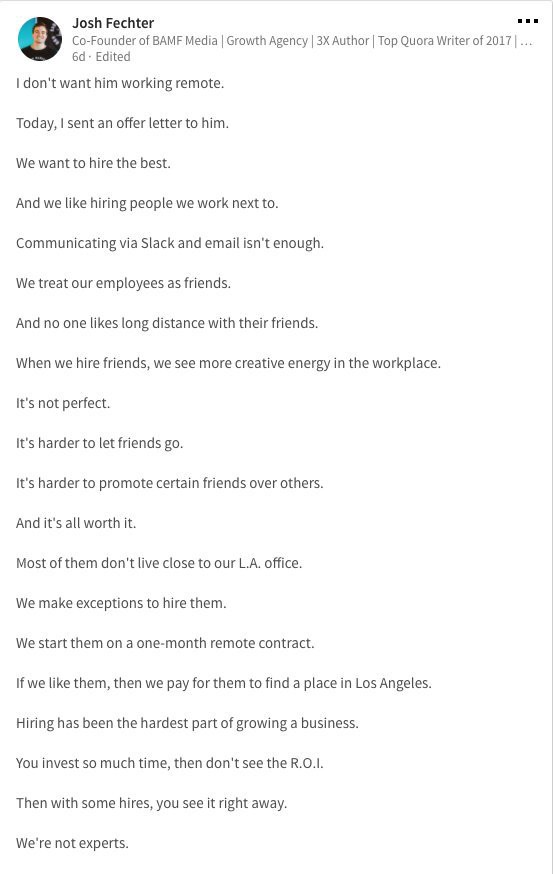
Threads combine tweets into an article.
Sharp, concise sentences
No regard for grammar
As important as the information is how the text looks.
Twitter Threads are like Michael Angelo's David monument. He chipped away at an enormous piece of marble until a man with a big willy appeared.
That's Twitter Threads.
I tried to remove unnecessary layers from several of my Wordpress blog posts. Then I realized something.
Tweeting from scratch is easier and more entertaining. It's quicker and makes you think more concisely.
Superpower: saying much with little words. My long-form writing has improved. My article sentences resemble tweets.
You never know what will happen.
Twitter's subcultures are odd. Best-performing tweets are strange.
Unusual trend: working alone and without telling anyone. It's a rebellion against Instagram influencers who share their every moment.
Early on, random thoughts worked:
My friend’s wife is Ukrainian. Her family are trapped in the warzone. He is devastated. And here I was complaining about my broken garage door. War puts everything in perspective. Today is a day to be grateful for peace.
Documenting what's happening triggers writing. It's not about viral tweets. Helping others matters.
There are numerous anonymous users.
Twitter uses pseudonyms.
You don't matter. On sites like LinkedIn, you must use your real name. Welcome to the Cyberpunk metaverse of Twitter :)
One daily piece of writing is a powerful habit.
Habits build creator careers. Read that again.
Twitter is an easy habit to pick up. If you can't tweet in one sentence, something's wrong. Easy-peasy-japanese.
Not what I tweeted, but my constancy, made the difference.
Daily writing is challenging, especially if your supervisor is on your back. Twitter encourages writing.
Tweets evolved as the foundation of all other material.
During my experiment, I enjoyed Twitter's speed.
Tweets get immediate responses, comments, and feedback. My popular tweets become newspaper headlines. I've also written essays from tweet discussions.
Sometimes the tweet and article were clear. Twitter sometimes helped me overcome writer's block.
I used to spend hours composing big things that had little real-world use.
Twitter helped me. No guessing. Data guides my coverage and validates concepts.
Test ideas on Twitter.
It took some time for my email list to grow.
Subscribers are a writer's lifeblood.
Without them, you're broke and homeless when Mark Zuckerberg tweaks the algorithms for ad dollars. Twitter has three ways to obtain email subscribers:
1. Add a link to your bio.
Twitter allows bio links (LinkedIn now does too). My eBook's landing page is linked. I collect emails there.
2. Start an online newsletter.
Twitter bought newsletter app Revue. They promote what they own.
I just established up a Revue email newsletter. I imported them weekly into my ConvertKit email list.
3. Create Twitter threads and include a link to your email list in the final tweet.
Write Twitter Threads and link the last tweet to your email list (example below).
Initial email subscribers were modest.
Numbers are growing. Twitter provides 25% of my new email subscribers. Some days, 50 people join.
Without them, my writing career is over. I'd be back at a 9-5 job begging for time off to spend with my newborn daughter. Nope.
Collect email addresses or die trying.
As insurance against unsubscribes and Zucks, use a second email list or Discord community.
What I still need to do
Twitter's fun. I'm wiser. I need to enable auto-replies and auto-DMs (direct messages).
This adds another way to attract subscribers. I schedule tweets with Tweet Hunter.
It’s best to go slow. People assume you're an internet marketer if you spam them with click requests.
A human internet marketer is preferable to a robot. My opinion.
210 days on Twitter taught me that. I plan to use the platform until I'm a grandfather unless Elon ruins it.