


More on Personal Growth

Jari Roomer
3 years ago
Successful people have this one skill.
Without self-control, you'll waste time chasing dopamine fixes.
I found a powerful quote in Tony Robbins' Awaken The Giant Within:
“Most of the challenges that we have in our personal lives come from a short-term focus” — Tony Robbins
Most people are short-term oriented, but highly successful people are long-term oriented.
Successful people act in line with their long-term goals and values, while the rest are distracted by short-term pleasures and dopamine fixes.
Instant gratification wrecks lives
Instant pleasure is fleeting. Quickly fading effects leave you craving more stimulation.
Before you know it, you're in a cycle of quick fixes. This explains binging on food, social media, and Netflix.
These things cause a dopamine spike, which is entertaining. This dopamine spike crashes quickly, leaving you craving more stimulation.
It's fine to watch TV or play video games occasionally. Problems arise when brain impulses aren't controlled. You waste hours chasing dopamine fixes.
Instant gratification becomes problematic when it interferes with long-term goals, happiness, and life fulfillment.
Most rewarding things require delay
Life's greatest rewards require patience and delayed gratification. They must be earned through patience, consistency, and effort.
Ex:
A fit, healthy body
A deep connection with your spouse
A thriving career/business
A healthy financial situation
These are some of life's most rewarding things, but they take work and patience. They all require the ability to delay gratification.
To have a healthy bank account, you must save (and invest) a large portion of your monthly income. This means no new tech or clothes.
If you want a fit, healthy body, you must eat better and exercise three times a week. So no fast food and Netflix.
It's a battle between what you want now and what you want most.
Successful people choose what they want most over what they want now. It's a major difference.
Instant vs. delayed gratification
Most people subconsciously prefer instant rewards over future rewards, even if the future rewards are more significant.
We humans aren't logical. Emotions and instincts drive us. So we act against our goals and values.
Fortunately, instant gratification bias can be overridden. This is a modern superpower. Effective methods include:
#1: Train your brain to handle overstimulation
Training your brain to function without constant stimulation is a powerful change. Boredom can lead to long-term rewards.
Unlike impulsive shopping, saving money is boring. Having lots of cash is amazing.
Compared to video games, deep work is boring. A successful online business is rewarding.
Reading books is boring compared to scrolling through funny videos on social media. Knowledge is invaluable.
You can't do these things if your brain is overstimulated. Your impulses will control you. To reduce overstimulation addiction, try:
Daily meditation (10 minutes is enough)
Daily study/work for 90 minutes (no distractions allowed)
First hour of the day without phone, social media, and Netflix
Nature walks, journaling, reading, sports, etc.
#2: Make Important Activities Less Intimidating
Instant gratification helps us cope with stress. Starting a book or business can be intimidating. Video games and social media offer a quick escape in such situations.
Make intimidating tasks less so. Break them down into small tasks. Start a new business/side-hustle by:
Get domain name
Design website
Write out a business plan
Research competition/peers
Approach first potential client
Instead of one big mountain, divide it into smaller sub-tasks. This makes a task easier and less intimidating.
#3: Plan ahead for important activities
Distractions will invade unplanned time. Your time is dictated by your impulses, which are usually Netflix, social media, fast food, and video games. It wants quick rewards and dopamine fixes.
Plan your days and be proactive with your time. Studies show that scheduling activities makes you 3x more likely to do them.
To achieve big goals, you must plan. Don't gamble.
Want to get fit? Schedule next week's workouts. Want a side-job? Schedule your work time.
Jari Roomer
3 years ago
After 240 articles and 2.5M views on Medium, 9 Raw Writing Tips
Late in 2018, I published my first Medium article, but I didn't start writing seriously until 2019. Since then, I've written more than 240 articles, earned over $50,000 through Medium's Partner Program, and had over 2.5 million page views.
Write A Lot
Most people don't have the patience and persistence for this simple writing secret:
Write + Write + Write = possible success
Writing more improves your skills.
The more articles you publish, the more likely one will go viral.
If you only publish once a month, you have no views. If you publish 10 or 20 articles a month, your success odds increase 10- or 20-fold.
Tim Denning, Ayodeji Awosika, Megan Holstein, and Zulie Rane. Medium is their jam. How are these authors alike? They're productive and consistent. They're prolific.
80% is publishable
Many writers battle perfectionism.
To succeed as a writer, you must publish often. You'll never publish if you aim for perfection.
Adopt the 80 percent-is-good-enough mindset to publish more. It sounds terrible, but it'll boost your writing success.
Your work won't be perfect. Always improve. Waiting for perfection before publishing will take a long time.
Second, readers are your true critics, not you. What you consider "not perfect" may be life-changing for the reader. Don't let perfectionism hinder the reader.
Don't let perfectionism hinder the reader. ou don't want to publish mediocre articles. When the article is 80% done, publish it. Don't spend hours editing. Realize it. Get feedback. Only this will work.
Make Your Headline Irresistible
We all judge books by their covers, despite the saying. And headlines. Readers, including yourself, judge articles by their titles. We use it to decide if an article is worth reading.
Make your headlines irresistible. Want more article views? Then, whether you like it or not, write an attractive article title.
Many high-quality articles are collecting dust because of dull, vague headlines. It didn't make the reader click.
As a writer, you must do more than produce quality content. You must also make people click on your article. This is a writer's job. How to create irresistible headlines:
Curiosity makes readers click. Here's a tempting example...
Example: What Women Actually Look For in a Guy, According to a Huge Study by Luba Sigaud
Use Numbers: Click-bait lists. I mean, which article would you click first? ‘Some ways to improve your productivity’ or ’17 ways to improve your productivity.’ Which would I click?
Example: 9 Uncomfortable Truths You Should Accept Early in Life by Sinem Günel
Most headlines are dull. If you want clicks, get 'sexy'. Buzzword-ify. Invoke emotion. Trendy words.
Example: 20 Realistic Micro-Habits To Live Better Every Day by Amardeep Parmar
Concise paragraphs
Our culture lacks focus. If your headline gets a click, keep paragraphs short to keep readers' attention.
Some writers use 6–8 lines per paragraph, but I prefer 3–4. Longer paragraphs lose readers' interest.
A writer should help the reader finish an article, in my opinion. I consider it a job requirement. You can't force readers to finish an article, but you can make it 'snackable'
Help readers finish an article with concise paragraphs, interesting subheadings, exciting images, clever formatting, or bold attention grabbers.
Work And Move On
I've learned over the years not to get too attached to my articles. Many writers report a strange phenomenon:
The articles you're most excited about usually bomb, while the ones you're not tend to do well.
This isn't always true, but I've noticed it in my own writing. My hopes for an article usually make it worse. The more objective I am, the better an article does.
Let go of a finished article. 40 or 40,000 views, whatever. Now let the article do its job. Onward. Next story. Start another project.
Disregard Haters
Online content creators will encounter haters, whether on YouTube, Instagram, or Medium. More views equal more haters. Fun, right?
As a web content creator, I learned:
Don't debate haters. Never.
It's a mistake I've made several times. It's tempting to prove haters wrong, but they'll always find a way to be 'right'. Your response is their fuel.
I smile and ignore hateful comments. I'm indifferent. I won't enter a negative environment. I have goals, money, and a life to build. "I'm not paid to argue," Drake once said.
Use Grammarly
Grammarly saves me as a non-native English speaker. You know Grammarly. It shows writing errors and makes article suggestions.
As a writer, you need Grammarly. I have a paid plan, but their free version works. It improved my writing greatly.
Put The Reader First, Not Yourself
Many writers write for themselves. They focus on themselves rather than the reader.
Ask yourself:
This article teaches what? How can they be entertained or educated?
Personal examples and experiences improve writing quality. Don't focus on yourself.
It's not about you, the content creator. Reader-focused. Putting the reader first will change things.
Extreme ownership: Stop blaming others
I remember writing a lot on Medium but not getting many views. I blamed Medium first. Poor algorithm. Poor publishing. All sucked.
Instead of looking at what I could do better, I blamed others.
When you blame others, you lose power. Owning your results gives you power.
As a content creator, you must take full responsibility. Extreme ownership means 100% responsibility for work and results.
You don’t blame others. You don't blame the economy, president, platform, founders, or audience. Instead, you look for ways to improve. Few people can do this.
Blaming is useless. Zero. Taking ownership of your work and results will help you progress. It makes you smarter, better, and stronger.
Instead of blaming others, you'll learn writing, marketing, copywriting, content creation, productivity, and other skills. Game-changer.

James White
3 years ago
Three Books That Can Change Your Life in a Day
I've summarized each.
Anne Lamott said books are important. Books help us understand ourselves and our behavior. They teach us about community, friendship, and death.
I read. One of my few life-changing habits. 100+ books a year improve my life. I'll list life-changing books you can read in a day. I hope you like them too.
Let's get started!
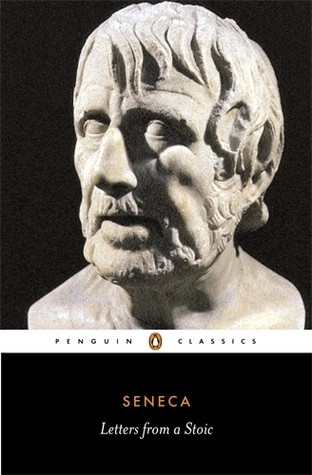
1) Seneca's Letters from a Stoic
One of my favorite philosophy books. Ryan Holiday, Naval Ravikant, and other prolific readers recommend it.
Seneca wrote 124 letters at the end of his life after working for Nero. Death, friendship, and virtue are discussed.
It's worth rereading. When I'm in trouble, I consult Seneca.
It's brief. The book could be read in one day. However, use it for guidance during difficult times.
My favorite book quotes:
Many men find that becoming wealthy only alters their problems rather than solving them.
You will never be poor if you live in harmony with nature; you will never be wealthy if you live according to what other people think.
We suffer more frequently in our imagination than in reality; there are more things that are likely to frighten us than to crush us.
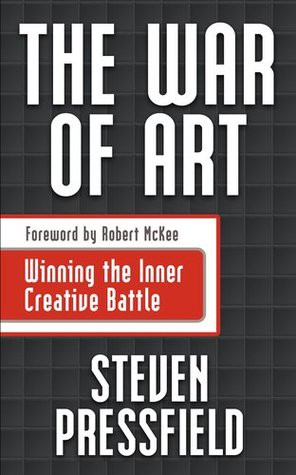
2) Steven Pressfield's book The War of Art
I’ve read this book twice. I'll likely reread it before 2022 is over.
The War Of Art is the best productivity book. Steven offers procrastination-fighting tips.
Writers, musicians, and creative types will love The War of Art. Workplace procrastinators should also read this book.
My favorite book quotes:
The act of creation is what matters most in art. Other than sitting down and making an effort every day, nothing else matters.
Working creatively is not a selfish endeavor or an attempt by the actor to gain attention. It serves as a gift for all living things in the world. Don't steal your contribution from us. Give us everything you have.
Fear is healthy. Fear is a signal, just like self-doubt. Fear instructs us on what to do. The more terrified we are of a task or calling, the more certain we can be that we must complete it.
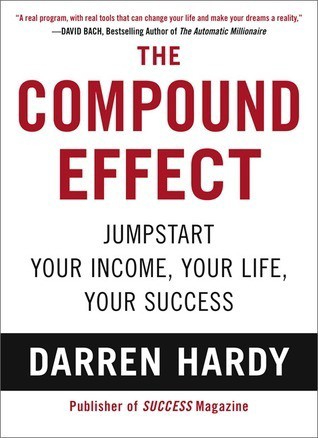
3) Darren Hardy's The Compound Effect
The Compound Effect offers practical tips to boost productivity by 10x.
The author believes each choice shapes your future. Pizza may seem harmless. However, daily use increases heart disease risk.
Positive outcomes too. Daily gym visits improve fitness. Reading an hour each night can help you learn. Writing 1,000 words per day would allow you to write a novel in under a year.
Your daily choices affect compound interest and your future. Thus, better habits can improve your life.
My favorite book quotes:
Until you alter a daily habit, you cannot change your life. The key to your success can be found in the actions you take each day.
The hundreds, thousands, or millions of little things are what distinguish the ordinary from the extraordinary; it is not the big things that add up in the end.
Don't worry about willpower. Time to use why-power. Only when you relate your decisions to your aspirations and dreams will they have any real meaning. The decisions that are in line with what you define as your purpose, your core self, and your highest values are the wisest and most inspiring ones. To avoid giving up too easily, you must want something and understand why you want it.
You might also like

Farhan Ali Khan
2 years ago
Introduction to Zero-Knowledge Proofs: The Art of Proving Without Revealing
Zero-Knowledge Proofs for Beginners
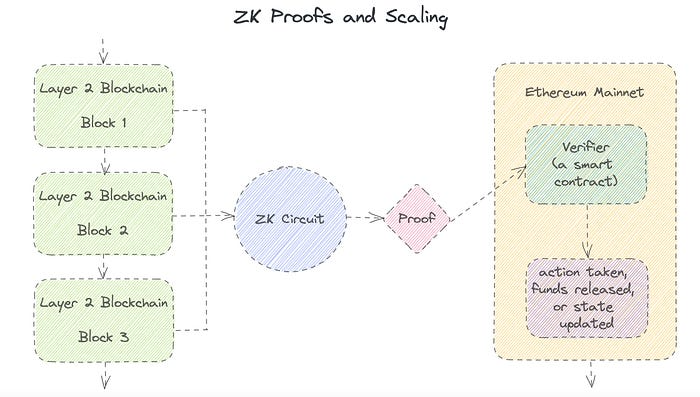
Published here originally.
Introduction
I Spy—did you play as a kid? One person chose a room object, and the other had to guess it by answering yes or no questions. I Spy was entertaining, but did you know it could teach you cryptography?
Zero Knowledge Proofs let you show your pal you know what they picked without exposing how. Math replaces electronics in this secret spy mission. Zero-knowledge proofs (ZKPs) are sophisticated cryptographic tools that allow one party to prove they have particular knowledge without revealing it. This proves identification and ownership, secures financial transactions, and more. This article explains zero-knowledge proofs and provides examples to help you comprehend this powerful technology.
What is a Proof of Zero Knowledge?
Zero-knowledge proofs prove a proposition is true without revealing any other information. This lets the prover show the verifier that they know a fact without revealing it. So, a zero-knowledge proof is like a magician's trick: the prover proves they know something without revealing how or what. Complex mathematical procedures create a proof the verifier can verify.
Want to find an easy way to test it out? Try out with tis awesome example! ZK Crush
Describe it as if I'm 5
Alex and Jack found a cave with a center entrance that only opens when someone knows the secret. Alex knows how to open the cave door and wants to show Jack without telling him.
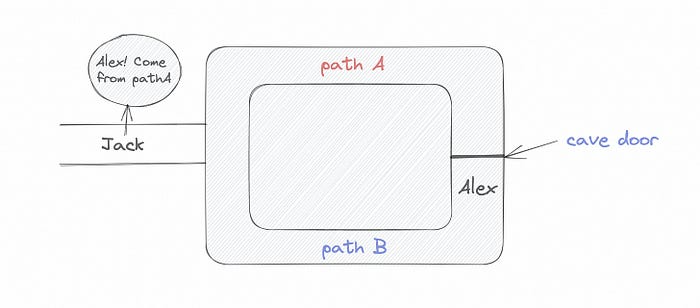
Alex and Jack name both pathways (let’s call them paths A and B).
In the first phase, Alex is already inside the cave and is free to select either path, in this case A or B.
As Alex made his decision, Jack entered the cave and asked him to exit from the B path.
Jack can confirm that Alex really does know the key to open the door because he came out for the B path and used it.
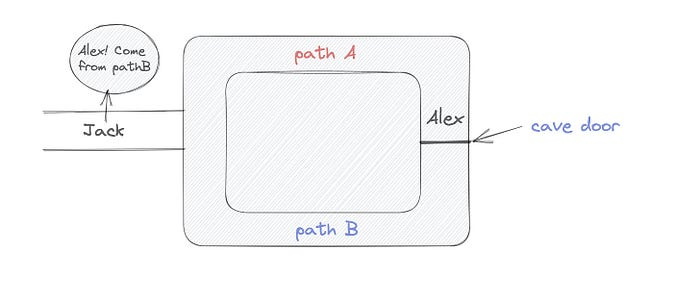
To conclude, Alex and Jack repeat:
Alex walks into the cave.
Alex follows a random route.
Jack walks into the cave.
Alex is asked to follow a random route by Jack.
Alex follows Jack's advice and heads back that way.
What is a Zero Knowledge Proof?
At a high level, the aim is to construct a secure and confidential conversation between the prover and the verifier, where the prover convinces the verifier that they have the requisite information without disclosing it. The prover and verifier exchange messages and calculate in each round of the dialogue.
The prover uses their knowledge to prove they have the information the verifier wants during these rounds. The verifier can verify the prover's truthfulness without learning more by checking the proof's mathematical statement or computation.
Zero knowledge proofs use advanced mathematical procedures and cryptography methods to secure communication. These methods ensure the evidence is authentic while preventing the prover from creating a phony proof or the verifier from extracting unnecessary information.
ZK proofs require examples to grasp. Before the examples, there are some preconditions.
Criteria for Proofs of Zero Knowledge
Completeness: If the proposition being proved is true, then an honest prover will persuade an honest verifier that it is true.
Soundness: If the proposition being proved is untrue, no dishonest prover can persuade a sincere verifier that it is true.
Zero-knowledge: The verifier only realizes that the proposition being proved is true. In other words, the proof only establishes the veracity of the proposition being supported and nothing more.
The zero-knowledge condition is crucial. Zero-knowledge proofs show only the secret's veracity. The verifier shouldn't know the secret's value or other details.
Example after example after example
To illustrate, take a zero-knowledge proof with several examples:
Initial Password Verification Example
You want to confirm you know a password or secret phrase without revealing it.
Use a zero-knowledge proof:
You and the verifier settle on a mathematical conundrum or issue, such as figuring out a big number's components.
The puzzle or problem is then solved using the hidden knowledge that you have learned. You may, for instance, utilize your understanding of the password to determine the components of a particular number.
You provide your answer to the verifier, who can assess its accuracy without knowing anything about your private data.
You go through this process several times with various riddles or issues to persuade the verifier that you actually are aware of the secret knowledge.
You solved the mathematical puzzles or problems, proving to the verifier that you know the hidden information. The proof is zero-knowledge since the verifier only sees puzzle solutions, not the secret information.
In this scenario, the mathematical challenge or problem represents the secret, and solving it proves you know it. The evidence does not expose the secret, and the verifier just learns that you know it.
My simple example meets the zero-knowledge proof conditions:
Completeness: If you actually know the hidden information, you will be able to solve the mathematical puzzles or problems, hence the proof is conclusive.
Soundness: The proof is sound because the verifier can use a publicly known algorithm to confirm that your answer to the mathematical conundrum or difficulty is accurate.
Zero-knowledge: The proof is zero-knowledge because all the verifier learns is that you are aware of the confidential information. Beyond the fact that you are aware of it, the verifier does not learn anything about the secret information itself, such as the password or the factors of the number. As a result, the proof does not provide any new insights into the secret.
Explanation #2: Toss a coin.
One coin is biased to come up heads more often than tails, while the other is fair (i.e., comes up heads and tails with equal probability). You know which coin is which, but you want to show a friend you can tell them apart without telling them.
Use a zero-knowledge proof:
One of the two coins is chosen at random, and you secretly flip it more than once.
You show your pal the following series of coin flips without revealing which coin you actually flipped.
Next, as one of the two coins is flipped in front of you, your friend asks you to tell which one it is.
Then, without revealing which coin is which, you can use your understanding of the secret order of coin flips to determine which coin your friend flipped.
To persuade your friend that you can actually differentiate between the coins, you repeat this process multiple times using various secret coin-flipping sequences.
In this example, the series of coin flips represents the knowledge of biased and fair coins. You can prove you know which coin is which without revealing which is biased or fair by employing a different secret sequence of coin flips for each round.
The evidence is zero-knowledge since your friend does not learn anything about which coin is biased and which is fair other than that you can tell them differently. The proof does not indicate which coin you flipped or how many times you flipped it.
The coin-flipping example meets zero-knowledge proof requirements:
Completeness: If you actually know which coin is biased and which is fair, you should be able to distinguish between them based on the order of coin flips, and your friend should be persuaded that you can.
Soundness: Your friend may confirm that you are correctly recognizing the coins by flipping one of them in front of you and validating your answer, thus the proof is sound in that regard. Because of this, your acquaintance can be sure that you are not just speculating or picking a coin at random.
Zero-knowledge: The argument is that your friend has no idea which coin is biased and which is fair beyond your ability to distinguish between them. Your friend is not made aware of the coin you used to make your decision or the order in which you flipped the coins. Consequently, except from letting you know which coin is biased and which is fair, the proof does not give any additional information about the coins themselves.
Figure out the prime number in Example #3.
You want to prove to a friend that you know their product n=pq without revealing p and q. Zero-knowledge proof?
Use a variant of the RSA algorithm. Method:
You determine a new number s = r2 mod n by computing a random number r.
You email your friend s and a declaration that you are aware of the values of p and q necessary for n to equal pq.
A random number (either 0 or 1) is selected by your friend and sent to you.
You send your friend r as evidence that you are aware of the values of p and q if e=0. You calculate and communicate your friend's s/r if e=1.
Without knowing the values of p and q, your friend can confirm that you know p and q (in the case where e=0) or that s/r is a legitimate square root of s mod n (in the situation where e=1).
This is a zero-knowledge proof since your friend learns nothing about p and q other than their product is n and your ability to verify it without exposing any other information. You can prove that you know p and q by sending r or by computing s/r and sending that instead (if e=1), and your friend can verify that you know p and q or that s/r is a valid square root of s mod n without learning anything else about their values. This meets the conditions of completeness, soundness, and zero-knowledge.
Zero-knowledge proofs satisfy the following:
Completeness: The prover can demonstrate this to the verifier by computing q = n/p and sending both p and q to the verifier. The prover also knows a prime number p and a factorization of n as p*q.
Soundness: Since it is impossible to identify any pair of numbers that correctly factorize n without being aware of its prime factors, the prover is unable to demonstrate knowledge of any p and q that do not do so.
Zero knowledge: The prover only admits that they are aware of a prime number p and its associated factor q, which is already known to the verifier. This is the extent of their knowledge of the prime factors of n. As a result, the prover does not provide any new details regarding n's prime factors.
Types of Proofs of Zero Knowledge
Each zero-knowledge proof has pros and cons. Most zero-knowledge proofs are:
Interactive Zero Knowledge Proofs: The prover and the verifier work together to establish the proof in this sort of zero-knowledge proof. The verifier disputes the prover's assertions after receiving a sequence of messages from the prover. When the evidence has been established, the prover will employ these new problems to generate additional responses.
Non-Interactive Zero Knowledge Proofs: For this kind of zero-knowledge proof, the prover and verifier just need to exchange a single message. Without further interaction between the two parties, the proof is established.
A statistical zero-knowledge proof is one in which the conclusion is reached with a high degree of probability but not with certainty. This indicates that there is a remote possibility that the proof is false, but that this possibility is so remote as to be unimportant.
Succinct Non-Interactive Argument of Knowledge (SNARKs): SNARKs are an extremely effective and scalable form of zero-knowledge proof. They are utilized in many different applications, such as machine learning, blockchain technology, and more. Similar to other zero-knowledge proof techniques, SNARKs enable one party—the prover—to demonstrate to another—the verifier—that they are aware of a specific piece of information without disclosing any more information about that information.
The main characteristic of SNARKs is their succinctness, which refers to the fact that the size of the proof is substantially smaller than the amount of the original data being proved. Because to its high efficiency and scalability, SNARKs can be used in a wide range of applications, such as machine learning, blockchain technology, and more.
Uses for Zero Knowledge Proofs
ZKP applications include:
Verifying Identity ZKPs can be used to verify your identity without disclosing any personal information. This has uses in access control, digital signatures, and online authentication.
Proof of Ownership ZKPs can be used to demonstrate ownership of a certain asset without divulging any details about the asset itself. This has uses for protecting intellectual property, managing supply chains, and owning digital assets.
Financial Exchanges Without disclosing any details about the transaction itself, ZKPs can be used to validate financial transactions. Cryptocurrency, internet payments, and other digital financial transactions can all use this.
By enabling parties to make calculations on the data without disclosing the data itself, Data Privacy ZKPs can be used to preserve the privacy of sensitive data. Applications for this can be found in the financial, healthcare, and other sectors that handle sensitive data.
By enabling voters to confirm that their vote was counted without disclosing how they voted, elections ZKPs can be used to ensure the integrity of elections. This is applicable to electronic voting, including internet voting.
Cryptography Modern cryptography's ZKPs are a potent instrument that enable secure communication and authentication. This can be used for encrypted messaging and other purposes in the business sector as well as for military and intelligence operations.
Proofs of Zero Knowledge and Compliance
Kubernetes and regulatory compliance use ZKPs in many ways. Examples:
Security for Kubernetes ZKPs offer a mechanism to authenticate nodes without disclosing any sensitive information, enhancing the security of Kubernetes clusters. ZKPs, for instance, can be used to verify, without disclosing the specifics of the program, that the nodes in a Kubernetes cluster are running permitted software.
Compliance Inspection Without disclosing any sensitive information, ZKPs can be used to demonstrate compliance with rules like the GDPR, HIPAA, and PCI DSS. ZKPs, for instance, can be used to demonstrate that data has been encrypted and stored securely without divulging the specifics of the mechanism employed for either encryption or storage.
Access Management Without disclosing any private data, ZKPs can be used to offer safe access control to Kubernetes resources. ZKPs can be used, for instance, to demonstrate that a user has the necessary permissions to access a particular Kubernetes resource without disclosing the details of those permissions.
Safe Data Exchange Without disclosing any sensitive information, ZKPs can be used to securely transmit data between Kubernetes clusters or between several businesses. ZKPs, for instance, can be used to demonstrate the sharing of a specific piece of data between two parties without disclosing the details of the data itself.
Kubernetes deployments audited Without disclosing the specifics of the deployment or the data being processed, ZKPs can be used to demonstrate that Kubernetes deployments are working as planned. This can be helpful for auditing purposes and for ensuring that Kubernetes deployments are operating as planned.
ZKPs preserve data and maintain regulatory compliance by letting parties prove things without revealing sensitive information. ZKPs will be used more in Kubernetes as it grows.

Victoria Kurichenko
3 years ago
What Happened After I Posted an AI-Generated Post on My Website
This could cost you.
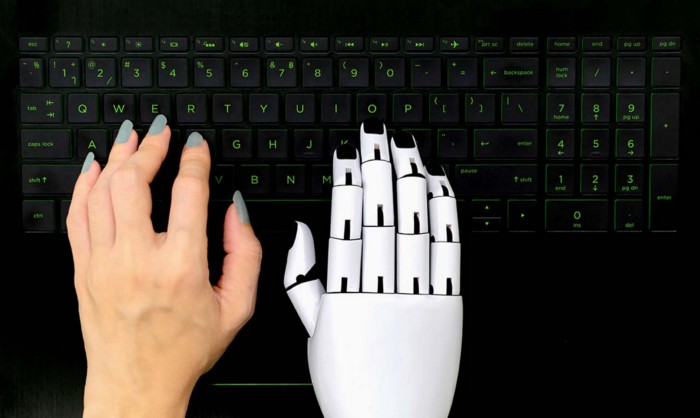
Content creators may have heard about Google's "Helpful content upgrade."
This change is another Google effort to remove low-quality, repetitive, and AI-generated content.
Why should content creators care?
Because too much content manipulates search results.
My experience includes the following.
Website admins seek high-quality guest posts from me. They send me AI-generated text after I say "yes." My readers are irrelevant. Backlinks are needed.
Companies copy high-ranking content to boost their Google rankings. Unfortunately, it's common.
What does this content offer?
Nothing.
Despite Google's updates and efforts to clean search results, webmasters create manipulative content.
As a marketer, I knew about AI-powered content generation tools. However, I've never tried them.
I use old-fashioned content creation methods to grow my website from 0 to 3,000 monthly views in one year.
Last year, I launched a niche website.
I do keyword research, analyze search intent and competitors' content, write an article, proofread it, and then optimize it.
This strategy is time-consuming.
But it yields results!
Here's proof from Google Analytics:
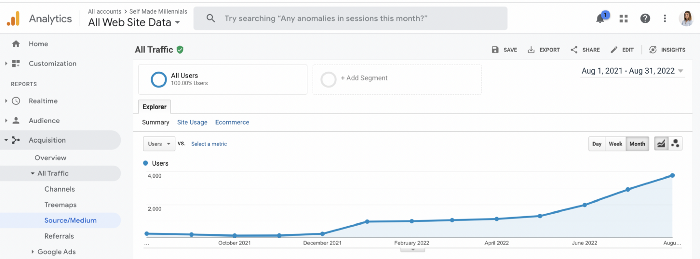
Proven strategies yield promising results.
To validate my assumptions and find new strategies, I run many experiments.
I tested an AI-powered content generator.
I used a tool to write this Google-optimized article about SEO for startups.
I wanted to analyze AI-generated content's Google performance.
Here are the outcomes of my test.
First, quality.
I dislike "meh" content. I expect articles to answer my questions. If not, I've wasted my time.
My essays usually include research, personal anecdotes, and what I accomplished and achieved.
AI-generated articles aren't as good because they lack individuality.
Read my AI-generated article about startup SEO to see what I mean.
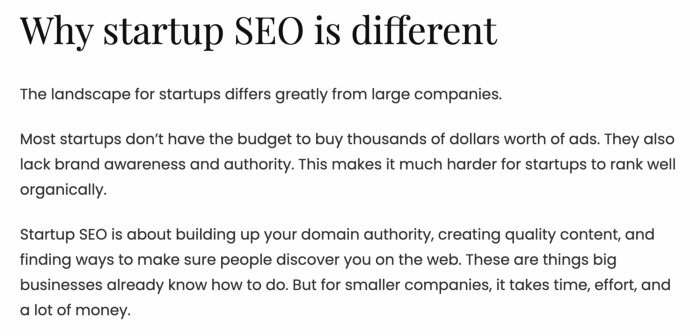
It's dry and shallow, IMO.
It seems robotic.
I'd use quotes and personal experience to show how SEO for startups is different.
My article paraphrases top-ranked articles on a certain topic.
It's readable but useless. Similar articles abound online. Why read it?
AI-generated content is low-quality.
Let me show you how this content ranks on Google.
The Google Search Console report shows impressions, clicks, and average position.
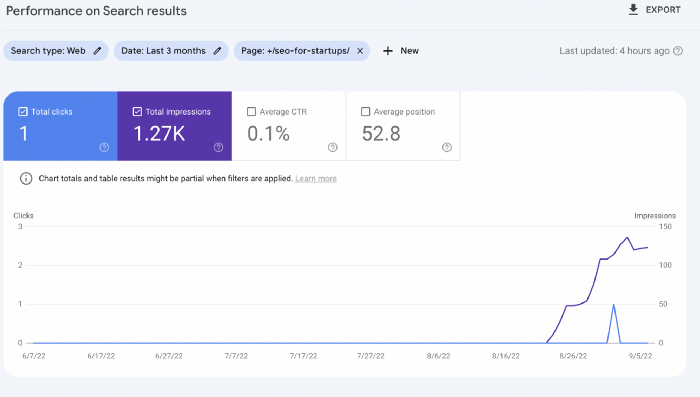
Low numbers.
No one opens the 5th Google search result page to read the article. Too far!
You may say the new article will improve.
Marketing-wise, I doubt it.
This article is shorter and less comprehensive than top-ranking pages. It's unlikely to win because of this.
AI-generated content's terrible reality.
I'll compare how this content I wrote for readers and SEO performs.
Both the AI and my article are fresh, but trends are emerging.
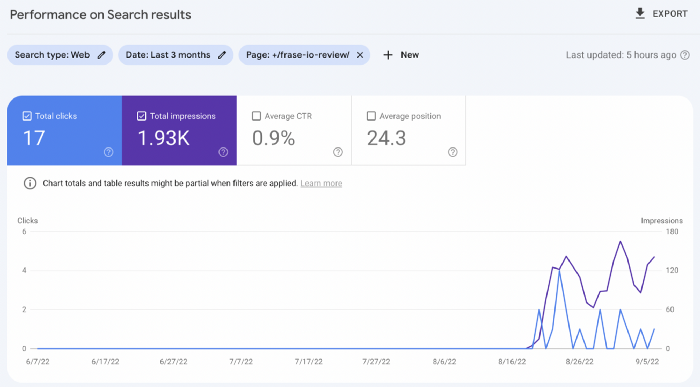
My article's CTR and average position are higher.
I spent a week researching and producing that piece, unlike AI-generated content. My expert perspective and unique consequences make it interesting to read.
Human-made.
In summary
No content generator can duplicate a human's tone, writing style, or creativity. Artificial content is always inferior.
Not "bad," but inferior.
Demand for content production tools will rise despite Google's efforts to eradicate thin content.
Most won't spend hours producing link-building articles. Costly.
As guest and sponsored posts, artificial content will thrive.
Before accepting a new arrangement, content creators and website owners should consider this.

Mickey Mellen
2 years ago
Shifting from Obsidian to Tana?
I relocated my notes database from Roam Research to Obsidian earlier this year expecting to stay there for a long. Obsidian is a terrific tool, and I explained my move in that post.
Moving everything to Tana faster than intended. Tana? Why?
Tana is just another note-taking app, but it does it differently. Three note-taking apps existed before Tana:
simple note-taking programs like Apple Notes and Google Keep.
Roam Research and Obsidian are two graph-style applications that assisted connect your notes.
You can create effective tables and charts with data-focused tools like Notion and Airtable.
Tana is the first great software I've encountered that combines graph and data notes. Google Keep will certainly remain my rapid notes app of preference. This Shu Omi video gives a good overview:
Tana handles everything I did in Obsidian with books, people, and blog entries, plus more. I can find book quotes, log my workouts, and connect my thoughts more easily. It should make writing blog entries notes easier, so we'll see.
Tana is now invite-only, but if you're interested, visit their site and sign up. As Shu noted in the video above, the product hasn't been published yet but seems quite polished.
Whether I stay with Tana or not, I'm excited to see where these apps are going and how they can benefit us all.