


More on Personal Growth

Entreprogrammer
3 years ago
The Steve Jobs Formula: A Guide to Everything
A must-read for everyone
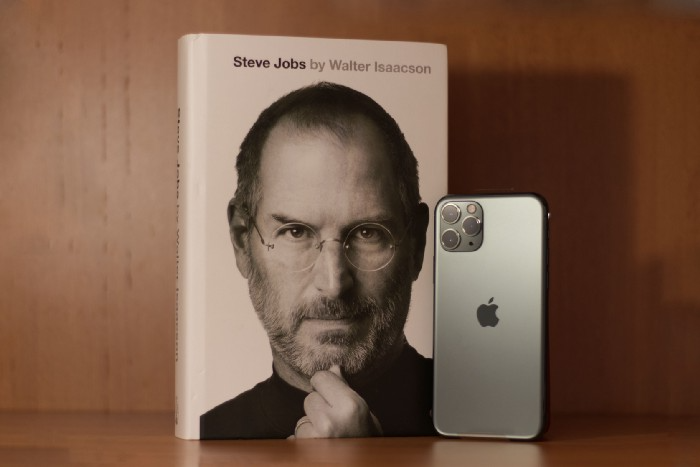
Jobs is well-known. You probably know the tall, thin guy who wore the same clothing every day. His influence is unavoidable. In fewer than 40 years, Jobs' innovations have impacted computers, movies, cellphones, music, and communication.
Steve Jobs may be more imaginative than the typical person, but if we can use some of his ingenuity, ambition, and good traits, we'll be successful. This essay explains how to follow his guidance and success secrets.
1. Repetition is necessary for success.
Be patient and diligent to master something. Practice makes perfect. This is why older workers are often more skilled.
When should you repeat a task? When you're confident and excited to share your product. It's when to stop tweaking and repeating.
Jobs stated he'd make the crowd sh** their pants with an iChat demo.
Use this in your daily life.
Start with the end in mind. You can put it in writing and be as detailed as you like with your plan's schedule and metrics. For instance, you have a goal of selling three coffee makers in a week.
Break it down, break the goal down into particular tasks you must complete, and then repeat those tasks. To sell your coffee maker, you might need to make 50 phone calls.
Be mindful of the amount of work necessary to produce the desired results. Continue doing this until you are happy with your product.
2. Acquire the ability to add and subtract.
How did Picasso invent cubism? Pablo Picasso was influenced by stylised, non-naturalistic African masks that depict a human figure.
Artists create. Constantly seeking inspiration. They think creatively about random objects. Jobs said creativity is linking things. Creative people feel terrible when asked how they achieved something unique because they didn't do it all. They saw innovation. They had mastered connecting and synthesizing experiences.
Use this in your daily life.
On your phone, there is a note-taking app. Ideas for what you desire to learn should be written down. It may be learning a new language, calligraphy, or anything else that inspires or intrigues you.
Note any ideas you have, quotations, or any information that strikes you as important.
Spend time with smart individuals, that is the most important thing. Jim Rohn, a well-known motivational speaker, has observed that we are the average of the five people with whom we spend the most time.
Learning alone won't get you very far. You need to put what you've learnt into practice. If you don't use your knowledge and skills, they are useless.
3. Develop the ability to refuse.
Steve Jobs deleted thousands of items when he created Apple's design ethic. Saying no to distractions meant upsetting customers and partners.
John Sculley, the former CEO of Apple, said something like this. According to Sculley, Steve’s methodology differs from others as he always believed that the most critical decisions are things you choose not to do.
Use this in your daily life.
Never be afraid to say "no," "I won't," or "I don't want to." Keep it simple. This method works well in some situations.
Give a different option. For instance, X might be interested even if I won't be able to achieve it.
Control your top priority. Before saying yes to anything, make sure your work schedule and priority list are up to date.
4. Follow your passion
“Follow your passion” is the worst advice people can give you. Steve Jobs didn't start Apple because he suddenly loved computers. He wanted to help others attain their maximum potential.
Great things take a lot of work, so quitting makes sense if you're not passionate. Jobs learned from history that successful people were passionate about their work and persisted through challenges.
Use this in your daily life.
Stay away from your passion. Allow it to develop daily. Keep working at your 9-5-hour job while carefully gauging your level of desire and endurance. Less risk exists.
The truth is that if you decide to work on a project by yourself rather than in a group, it will take you years to complete it instead of a week. Instead, network with others who have interests in common.
Prepare a fallback strategy in case things go wrong.
Success, this small two-syllable word eventually gives your life meaning, a perspective. What is success? For most, it's achieving their ambitions. However, there's a catch. Successful people aren't always happy.
Furthermore, where do people’s goals and achievements end? It’s a never-ending process. Success is a journey, not a destination. We wish you not to lose your way on this journey.
Matthew Royse
4 years ago
7 ways to improve public speaking
How to overcome public speaking fear and give a killer presentation

"Public speaking is people's biggest fear, according to studies. Death's second. The average person is better off in the casket than delivering the eulogy." — American comedian, actor, writer, and producer Jerry Seinfeld
People fear public speaking, according to research. Public speaking can be intimidating.
Most professions require public speaking, whether to 5, 50, 500, or 5,000 people. Your career will require many presentations. In a small meeting, company update, or industry conference.
You can improve your public speaking skills. You can reduce your anxiety, improve your performance, and feel more comfortable speaking in public.
“If I returned to college, I'd focus on writing and public speaking. Effective communication is everything.” — 38th president Gerald R. Ford
You can deliver a great presentation despite your fear of public speaking. There are ways to stay calm while speaking and become a more effective public speaker.
Seven tips to improve your public speaking today. Let's help you overcome your fear (no pun intended).
Know your audience.
"You're not being judged; the audience is." — Entrepreneur, author, and speaker Seth Godin
Understand your audience before speaking publicly. Before preparing a presentation, know your audience. Learn what they care about and find useful.
Your presentation may depend on where you're speaking. A classroom is different from a company meeting.
Determine your audience before developing your main messages. Learn everything about them. Knowing your audience helps you choose the right words, information (thought leadership vs. technical), and motivational message.
2. Be Observant
Observe others' speeches to improve your own. Watching free TED Talks on education, business, science, technology, and creativity can teach you a lot about public speaking.
What worked and what didn't?
What would you change?
Their strengths
How interesting or dull was the topic?
Note their techniques to learn more. Studying the best public speakers will amaze you.
Learn how their stage presence helped them communicate and captivated their audience. Please note their pauses, humor, and pacing.
3. Practice
"A speaker should prepare based on what he wants to learn, not say." — Author, speaker, and pastor Tod Stocker
Practice makes perfect when it comes to public speaking. By repeating your presentation, you can find your comfort zone.
When you've practiced your presentation many times, you'll feel natural and confident giving it. Preparation helps overcome fear and anxiety. Review notes and important messages.
When you know the material well, you can explain it better. Your presentation preparation starts before you go on stage.
Keep a notebook or journal of ideas, quotes, and examples. More content means better audience-targeting.
4. Self-record
Videotape your speeches. Check yourself. Body language, hands, pacing, and vocabulary should be reviewed.
Best public speakers evaluate their performance to improve.
Write down what you did best, what you could improve and what you should stop doing after watching a recording of yourself. Seeing yourself can be unsettling. This is how you improve.
5. Remove text from slides
"Humans can't read and comprehend screen text while listening to a speaker. Therefore, lots of text and long, complete sentences are bad, bad, bad.” —Communications expert Garr Reynolds
Presentation slides shouldn't have too much text. 100-slide presentations bore the audience. Your slides should preview what you'll say to the audience.
Use slides to emphasize your main point visually.
If you add text, use at least 40-point font. Your slides shouldn't require squinting to read. You want people to watch you, not your slides.
6. Body language
"Body language is powerful." We had body language before speech, and 80% of a conversation is read through the body, not the words." — Dancer, writer, and broadcaster Deborah Bull
Nonverbal communication dominates. Our bodies speak louder than words. Don't fidget, rock, lean, or pace.
Relax your body to communicate clearly and without distraction through nonverbal cues. Public speaking anxiety can cause tense body language.
Maintain posture and eye contact. Don’t put your hand in your pockets, cross your arms, or stare at your notes. Make purposeful hand gestures that match what you're saying.
7. Beginning/ending Strong
Beginning and end are memorable. Your presentation must start strong and end strongly. To engage your audience, don't sound robotic.
Begin with a story, stat, or quote. Conclude with a summary of key points. Focus on how you will start and end your speech.
You should memorize your presentation's opening and closing. Memorize something naturally. Excellent presentations start and end strong because people won't remember the middle.
Bringing It All Together
Seven simple yet powerful ways to improve public speaking. Know your audience, study others, prepare and rehearse, record yourself, remove as much text as possible from slides, and start and end strong.
Follow these tips to improve your speaking and audience communication. Prepare, practice, and learn from great speakers to reduce your fear of public speaking.
"Speaking to one person or a thousand is public speaking." — Vocal coach Roger Love

Jari Roomer
4 years ago
Successful people have this one skill.
Without self-control, you'll waste time chasing dopamine fixes.
I found a powerful quote in Tony Robbins' Awaken The Giant Within:
“Most of the challenges that we have in our personal lives come from a short-term focus” — Tony Robbins
Most people are short-term oriented, but highly successful people are long-term oriented.
Successful people act in line with their long-term goals and values, while the rest are distracted by short-term pleasures and dopamine fixes.
Instant gratification wrecks lives
Instant pleasure is fleeting. Quickly fading effects leave you craving more stimulation.
Before you know it, you're in a cycle of quick fixes. This explains binging on food, social media, and Netflix.
These things cause a dopamine spike, which is entertaining. This dopamine spike crashes quickly, leaving you craving more stimulation.
It's fine to watch TV or play video games occasionally. Problems arise when brain impulses aren't controlled. You waste hours chasing dopamine fixes.
Instant gratification becomes problematic when it interferes with long-term goals, happiness, and life fulfillment.
Most rewarding things require delay
Life's greatest rewards require patience and delayed gratification. They must be earned through patience, consistency, and effort.
Ex:
A fit, healthy body
A deep connection with your spouse
A thriving career/business
A healthy financial situation
These are some of life's most rewarding things, but they take work and patience. They all require the ability to delay gratification.
To have a healthy bank account, you must save (and invest) a large portion of your monthly income. This means no new tech or clothes.
If you want a fit, healthy body, you must eat better and exercise three times a week. So no fast food and Netflix.
It's a battle between what you want now and what you want most.
Successful people choose what they want most over what they want now. It's a major difference.
Instant vs. delayed gratification
Most people subconsciously prefer instant rewards over future rewards, even if the future rewards are more significant.
We humans aren't logical. Emotions and instincts drive us. So we act against our goals and values.
Fortunately, instant gratification bias can be overridden. This is a modern superpower. Effective methods include:
#1: Train your brain to handle overstimulation
Training your brain to function without constant stimulation is a powerful change. Boredom can lead to long-term rewards.
Unlike impulsive shopping, saving money is boring. Having lots of cash is amazing.
Compared to video games, deep work is boring. A successful online business is rewarding.
Reading books is boring compared to scrolling through funny videos on social media. Knowledge is invaluable.
You can't do these things if your brain is overstimulated. Your impulses will control you. To reduce overstimulation addiction, try:
Daily meditation (10 minutes is enough)
Daily study/work for 90 minutes (no distractions allowed)
First hour of the day without phone, social media, and Netflix
Nature walks, journaling, reading, sports, etc.
#2: Make Important Activities Less Intimidating
Instant gratification helps us cope with stress. Starting a book or business can be intimidating. Video games and social media offer a quick escape in such situations.
Make intimidating tasks less so. Break them down into small tasks. Start a new business/side-hustle by:
Get domain name
Design website
Write out a business plan
Research competition/peers
Approach first potential client
Instead of one big mountain, divide it into smaller sub-tasks. This makes a task easier and less intimidating.
#3: Plan ahead for important activities
Distractions will invade unplanned time. Your time is dictated by your impulses, which are usually Netflix, social media, fast food, and video games. It wants quick rewards and dopamine fixes.
Plan your days and be proactive with your time. Studies show that scheduling activities makes you 3x more likely to do them.
To achieve big goals, you must plan. Don't gamble.
Want to get fit? Schedule next week's workouts. Want a side-job? Schedule your work time.
You might also like

Scott Hickmann
4 years ago
YouTube
This is a YouTube video:

Clive Thompson
3 years ago
Small Pieces of Code That Revolutionized the World
Few sentences can have global significance.
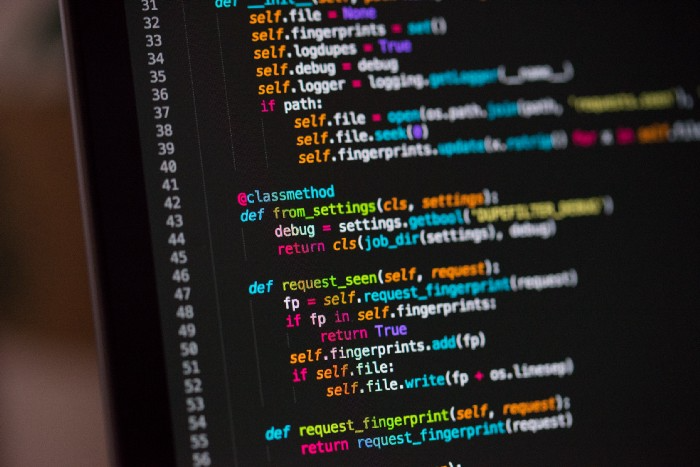
Ethan Zuckerman invented the pop-up commercial in 1997.
He was working for Tripod.com, an online service that let people make little web pages for free. Tripod offered advertising to make money. Advertisers didn't enjoy seeing their advertising next to filthy content, like a user's anal sex website.
Zuckerman's boss wanted a solution. Wasn't there a way to move the ads away from user-generated content?
When you visited a Tripod page, a pop-up ad page appeared. So, the ad isn't officially tied to any user page. It'd float onscreen.
Here’s the thing, though: Zuckerman’s bit of Javascript, that created the popup ad? It was incredibly short — a single line of code:
window.open('http://tripod.com/navbar.html'
"width=200, height=400, toolbar=no, scrollbars=no, resizable=no, target=_top");
Javascript tells the browser to open a 200-by-400-pixel window on top of any other open web pages, without a scrollbar or toolbar.
Simple yet harmful! Soon, commercial websites mimicked Zuckerman's concept, infesting the Internet with pop-up advertising. In the early 2000s, a coder for a download site told me that most of their revenue came from porn pop-up ads.
Pop-up advertising are everywhere. You despise them. Hopefully, your browser blocks them.
Zuckerman wrote a single line of code that made the world worse.
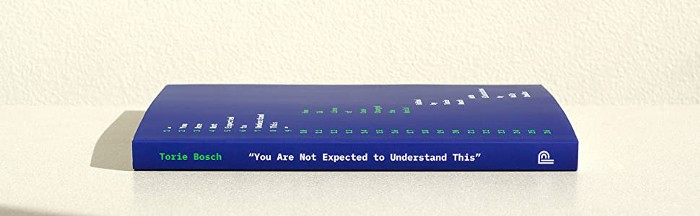
I read Zuckerman's story in How 26 Lines of Code Changed the World. Torie Bosch compiled a humorous anthology of short writings about code that tipped the world.
Most of these samples are quite short. Pop-cultural preconceptions about coding say that important code is vast and expansive. Hollywood depicts programmers as blurs spouting out Niagaras of code. Google's success was formerly attributed to its 2 billion lines of code.
It's usually not true. Google's original breakthrough, the piece of code that propelled Google above its search-engine counterparts, was its PageRank algorithm, which determined a web page's value based on how many other pages connected to it and the quality of those connecting pages. People have written their own Python versions; it's only a few dozen lines.
Google's operations, like any large tech company's, comprise thousands of procedures. So their code base grows. The most impactful code can be brief.
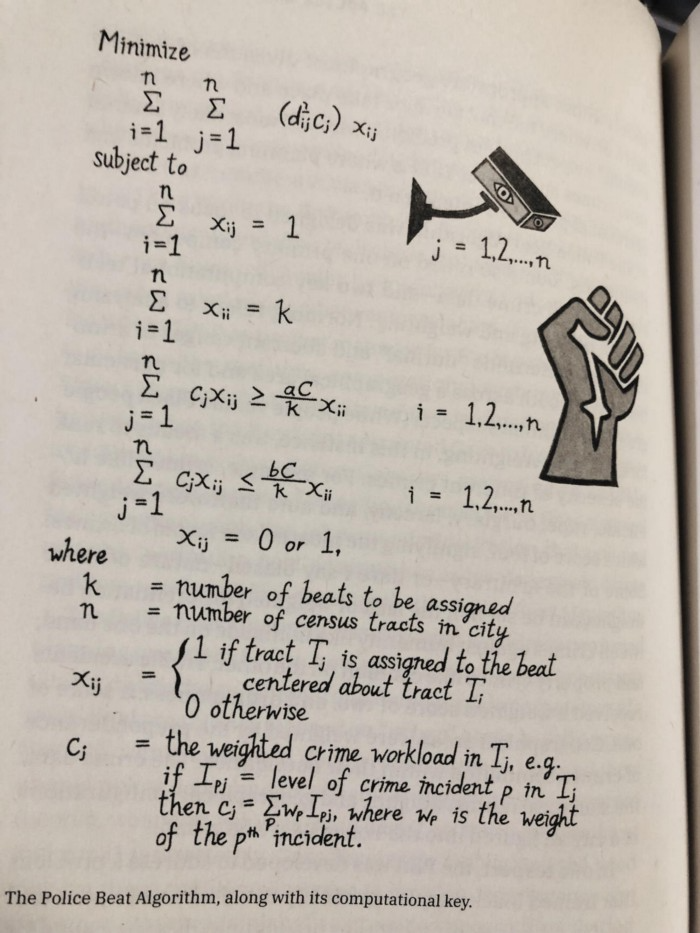
The examples are fascinating and wide-ranging, so read the whole book (or give it to nerds as a present). Charlton McIlwain wrote a chapter on the police beat algorithm developed in the late 1960s to anticipate crime hotspots so law enforcement could dispatch more officers there. It created a racial feedback loop. Since poor Black neighborhoods were already overpoliced compared to white ones, the algorithm directed more policing there, resulting in more arrests, which convinced it to send more police; rinse and repeat.
Kelly Chudler's You Are Not Expected To Understand This depicts the police-beat algorithm.
Even shorter code changed the world: the tracking pixel.
Lily Hay Newman's chapter on monitoring pixels says you probably interact with this code every day. It's a snippet of HTML that embeds a single tiny pixel in an email. Getting an email with a tracking code spies on me. As follows: My browser requests the single-pixel image as soon as I open the mail. My email sender checks to see if Clives browser has requested that pixel. My email sender can tell when I open it.
Adding a tracking pixel to an email is easy:
<img src="URL LINKING TO THE PIXEL ONLINE" width="0" height="0">An older example: Ellen R. Stofan and Nick Partridge wrote a chapter on Apollo 11's lunar module bailout code. This bailout code operated on the lunar module's tiny on-board computer and was designed to prioritize: If the computer grew overloaded, it would discard all but the most vital work.
When the lunar module approached the moon, the computer became overloaded. The bailout code shut down anything non-essential to landing the module. It shut down certain lunar module display systems, scaring the astronauts. Module landed safely.
22-line code
POODOO    INHINT
    CA  Q
    TS  ALMCADR

    TC  BANKCALL
    CADR  VAC5STOR  # STORE ERASABLES FOR DEBUGGING PURPOSES.

    INDEX  ALMCADR
    CAF  0
ABORT2    TC  BORTENT

OCT77770  OCT  77770    # DONT MOVE
    CA  V37FLBIT  # IS AVERAGE G ON
    MASK  FLAGWRD7
    CCS  A
    TC  WHIMPER -1  # YES.  DONT DO POODOO.  DO BAILOUT.

    TC  DOWNFLAG
    ADRES  STATEFLG

    TC  DOWNFLAG
    ADRES  REINTFLG

    TC  DOWNFLAG
    ADRES  NODOFLAG

    TC  BANKCALL
    CADR  MR.KLEAN
    TC  WHIMPER
This fun book is worth reading.
I'm a contributor to the New York Times Magazine, Wired, and Mother Jones. I've also written Coders: The Making of a New Tribe and the Remaking of the World and Smarter Than You Think: How Technology is Changing Our Minds. Twitter and Instagram: @pomeranian99; Mastodon: @clive@saturation.social.

Sam Hickmann
4 years ago
What is this Fed interest rate everybody is talking about that makes or breaks the stock market?
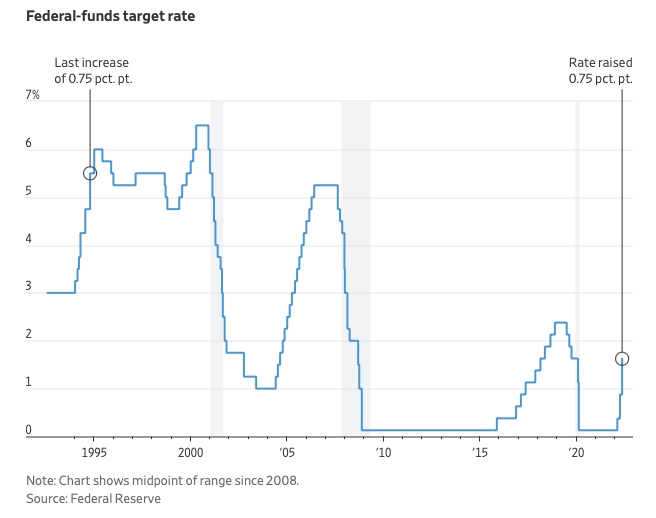
The Federal Funds Rate (FFR) is the target interest rate set by the Federal Reserve System (Fed)'s policy-making body (FOMC). This target is the rate at which the Fed suggests commercial banks borrow and lend their excess reserves overnight to each other.
The FOMC meets 8 times a year to set the target FFR. This is supposed to promote economic growth. The overnight lending market sets the actual rate based on commercial banks' short-term reserves. If the market strays too far, the Fed intervenes.
Banks must keep a certain percentage of their deposits in a Federal Reserve account. A bank's reserve requirement is a percentage of its total deposits. End-of-day bank account balances averaged over two-week reserve maintenance periods are used to determine reserve requirements.
If a bank expects to have end-of-day balances above what's needed, it can lend the excess to another institution.
The FOMC adjusts interest rates based on economic indicators that show inflation, recession, or other issues that affect economic growth. Core inflation and durable goods orders are indicators.
In response to economic conditions, the FFR target has changed over time. In the early 1980s, inflation pushed it to 20%. During the Great Recession of 2007-2009, the rate was slashed to 0.15 percent to encourage growth.
Inflation picked up in May 2022 despite earlier rate hikes, prompting today's 0.75 percent point increase. The largest increase since 1994. It might rise to around 3.375% this year and 3.1% by the end of 2024.