


More on Technology

CyberPunkMetalHead
3 years ago
I made ChatGPT copy itself.

OpenAI's ChatGPT is an amazing AI-powered chatbot. It can write poetry, stories, and marketing campaigns, and it's also adept at coding. ChatGPT's coding is so amazing that it replicated itself. What happened:
Me: Hi
Hello! Can I help? I'll answer any inquiries you have.
Me: Build a python and flask AI chatbot that responds to user messages on the frontend.
CGPT:
from flask import Flask, request, jsonify

import openai
openai.api_key = "YOUR_API_KEY"

@app.route('/chatbot', methods=['POST'])
def chatbot():
    user_message = request.get_json()['message']
    response = chatbot_response(user_message)
    return jsonify({'response': response})


def chatbot_response(user_message):
    response = openai.Completion.create(
        engine="text-davinci-002",
        prompt=user_message,
        max_tokens=1024,
        n = 1,
        temperature=0.5
    )
    return response['choices'][0]['text']

if __name__ == '__main__':
    app.run()
To integrate a chatbot with a frontend, use Flask to serve an HTML page with a form for user messages and the chatbot's answer. AJAX can submit the form to the /chatbot route, and JavaScript can show the chatbot's response.
I imported code snippets at the top of the file.
Let's add a frontend interface, I said.
CGPT:
<!DOCTYPE html>
<html>
<head>
    <title>AI Chatbot</title>
</head>
<body>
    <h1>AI Chatbot</h1>
    <form id="chatbot-form">
        <label for="message">Message:</label><br>
        <input type="text" id="message" name="message"><br>
        <input type="submit" value="Submit">
    </form>
    <div id="chatbot-response"></div>

    <script src="https://ajax.googleapis.com/ajax/libs/jquery/3.5.1/jquery.min.js"></script>
    <script>
        $(document).ready(function() {
            $("#chatbot-form").submit(function(e) {
                e.preventDefault();
                var userMessage = $("#message").val();
                $.ajax({
                    type: "POST",
                    url: "/chatbot",
                    data: JSON.stringify({message: userMessage}),
                    contentType: "application/json; charset=utf-8",
                    dataType: "json",
                    success: function(response) {
                        $("#chatbot-response").text(response.response);
                    }
                });
            });
        });
    </script>
</body>
</html>
To serve this HTML page using Flask, build a new route that returns the page as a GET response.
So far, so good.

Looked quite basic so I got chatGPT to add some tailwind to the project.
Me: Tailwind the chatbot.html page, please. Give it a futuristic style with purple and neon
After a few more prompts, Talk GPT aligned the form to the center, changed some colors, and added padding.
CGPT:
<!DOCTYPE html>
<html>
<head>
    <title>AI Chatbot</title>
    <link href="https://unpkg.com/tailwindcss@^1.0/dist/tailwind.min.css" rel="stylesheet">
</head>
<body class="bg-black flex flex-col justify-center items-center">
    <h1 class="sm:text-center text-purple-500">AI Chatbot</h1>
    <form id="chatbot-form" class="border-purple-500 bg-purple-800 rounded">
        <label for="message">Message:</label><br>
        <input type="text" id="message" name="message" class="min-w-30 rounded"><br>
        <input type="submit" value="Submit" class="bg-purple-500 border-red-500 transform hover:scale-110 rounded">
    </form>
    <div class="flex justify-center">
        <div id="chatbot-response" class="text-white rounded"></div>
    </div>

    <script src="https://ajax.googleapis.com/ajax/libs/jquery/3.5.1/jquery.min.js"></script>
    <script>
        var colors = ['red', 'orange', 'yellow', 'green', 'blue', 'indigo', 'violet'];
        var colorIndex = 0;

        $(document).ready(function() {
            setInterval(function() {
                $("#chatbot-form").css('border-color', colors[colorIndex]);
                colorIndex = (colorIndex + 1) % colors.length;
            }, 1000);

            $("#chatbot-form").submit(function(e) {
                e.preventDefault();
                var userMessage = $("#message").val();
                $.ajax({
                    type: "POST",
                    url: "/chatbot",
                    data: JSON.stringify({message: userMessage}),
                    contentType: "application/json; charset=utf-8",
                    dataType: "json",
                    success: function(response) {
                        $("#chatbot-response").text(response.response);
                    }
                });
            });
        });
    </script>
</body>
</html>
Improved:

A few more prompts like “Add more vertical and horizontal padding to the submit button and vertical margin, and vertically align this file's body.”
The result:
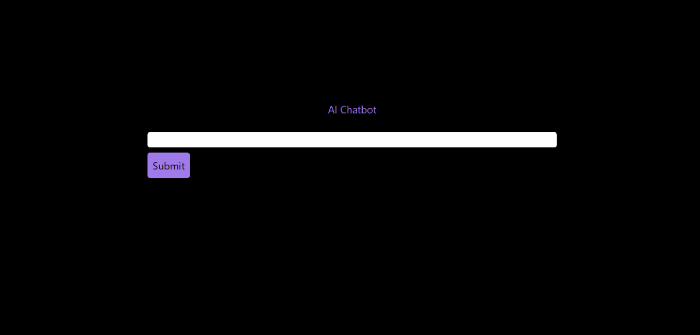
Is it effective? Now, I'll chat with ChatGPT's AI Chatbot. I intervened minimally throughout construction. Chat GPT created numerous files, connected and interacted with its own API, and presented the user request response on the front end by itself.
Me to AI Chatbot: Hey, can you give me 6 name suggestions for a black horse?
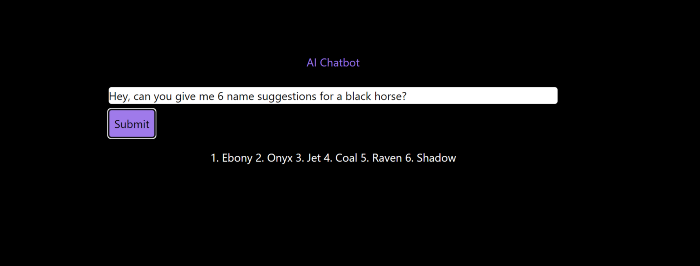
Me to AI Chatbot: Write a poem in the style of Jim Morrison. Make sure to mention cacti and black holes
ChatGPTs Chatbot:
In the desert night, I am confronted by cacti,
Their arms reaching out, As if to grab me and take me away.
The stars in the sky, Beckon me to come,
To a world of black holes, Where I can be free.
I am in a trance, My body and mind,
In a state of limbo, As I wander the night.
I hear a voice, Calling me to the unknown,
I cannot resist, The lure of the black hole.
The cacti watch, As I take my leave,
To a place of mystery, Where I can find peace.
Of course, the next question I gave it was to build a chatbot!
Me: Build a python and flask AI chatbot that responds to user messages on the frontend.
ChatbotGPTs:
import os from flask
import Flask, request, jsonify
from chatterbot
import ChatBot
from chatterbot.trainers
import ListTrainer

# Create a new chatbot
bot = ChatBot(
  "My Bot",
  storage_adapter="chatterbot.storage.SQLStorageAdapter",
  logic_adapters=[
    "chatterbot.logic.BestMatch",
    { "import_path": "chatterbot.logic.BestMatch",
      "statement_comparison_function": "chatterbot.comparisons.levenshtein_distance",
       "response_selection_method": "chatterbot.response_selection.get_first_response" }
    ],
    database_uri="sqlite:///database.sqlite3" )

# Train the chatbot with a few sample conversations
conversation = [ "Hello", "Hi there!", "How are you doing?", "I'm doing great.", "That is good to hear", "Thank you.", "You're welcome." ]
trainer = ListTrainer(bot) trainer.train(conversation)

# Create a Flask app
app = Flask(__name__)

# Define a route for the default URL
@app.route("/") def index(): return "<h1>Chatbot</h1>"

# Define a route for the /get_response URL
@app.route("/get_response", methods=["POST"])

def get_response():
# Get the user's message
user_message = request.form["user_message"]
# Get the bot's response
bot_response = bot.get_response(user_message)
# Return the bot's response
return str(bot_response)
# Run the Flask
app if __name__ == "__main__": app.run()
No matter how many times I tried, the second generation always used chatterbot instead of the ChatGPT API. Even when I told it to use the ChatGPT API, it didn't.
ChatGTP's ability to reproduce or construct other machine learning algorithms is interesting and possibly terrifying. Nothing prevents ChatGPT from replicating itself ad infinitum throughout the Internet other than a lack of desire. This may be the first time a machine repeats itself, so I've preserved the project as a reference. Adding a requirements.txt file and python env for easier deployment is the only change to the code.
I hope you enjoyed this.

Frank Andrade
3 years ago
I discovered a bug that allowed me to use ChatGPT to successfully web scrape. Here's how it operates.
This method scrapes websites with ChatGPT (demo with Amazon and Twitter)

In a recent article, I demonstrated how to scrape websites using ChatGPT prompts like scrape website X using Python.
But that doesn’t always work.
After scraping dozens of websites with ChatGPT, I realized that simple prompts rarely work for web scraping.
Using ChatGPT and basic HTML, we can scrape any website.
First things first, use ChatGPT's advanced version (Playground)
ChatGPT Playground's enhanced version is needed to scrape websites quickly. It generates code faster and has less constraints.
Here’s how it looks.
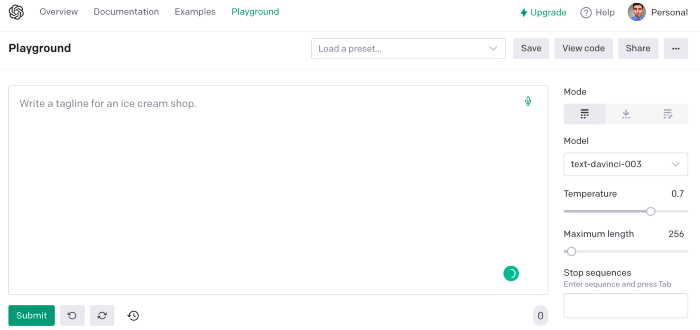
The classic ChatGPT display just allows you to type a prompt. Playground is more customizable and generates code faster than the basic version.
No more delays or restrictions.
In this tutorial, we'll write prompts underneath Playground.
How to Use ChatGPT to Scrape Any Website
To show you how to utilize ChatGPT to scrape any website, we'll use subslikescript, which lists movies.
Later in this post, I'll show you how to scrape Amazon and Twitter, but let's start easy.
If we try a basic prompt like “scrape the movie titles on this website: https://subslikescript.com/movies” it won’t scrape anything. Here’s when we need some HTML knowledge to build the right prompt for ChatGPT.Let's scrape the above movie titles. First, check the webpage. Right-click any element and choose Inspect.
Then see below.
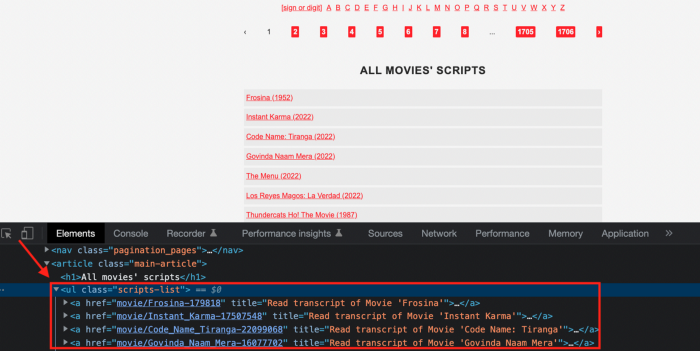
We identify the element to scrape (those in the red box). The data elements are ul, a, and scripts-list.
Here's the prompt for movie titles.
Scrape this website: https://subslikescript.com/movies with Python and Beautiful Soup. Locate the element with tag “ul” and class “scripts-list”. Scrape all the “a” elements inside. Get the text attribute and print it.
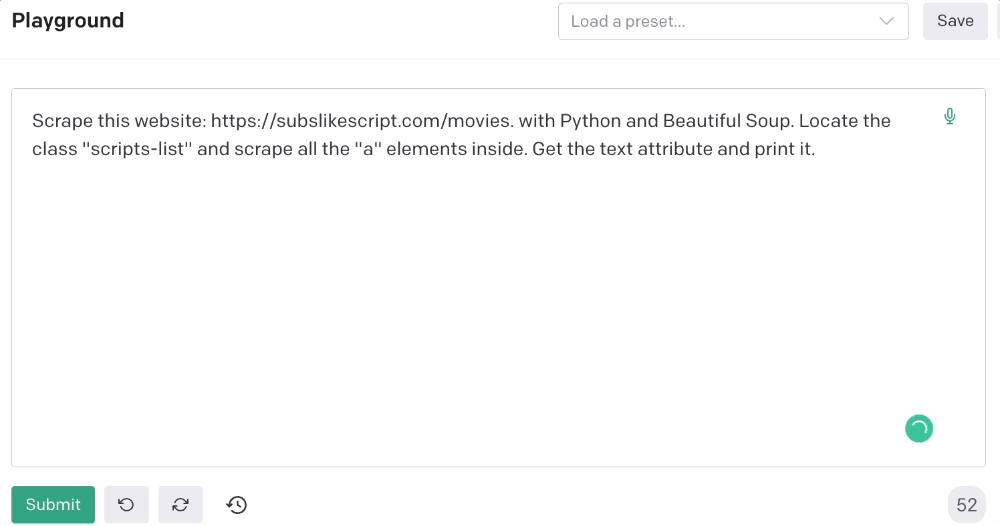
Code generated:
import requests
from bs4 import BeautifulSoup

page = requests.get('https://subslikescript.com/movies/')

soup = BeautifulSoup(page.content, 'html.parser')

scripts_list = soup.find(class_="scripts-list")

all_a_elements = scripts_list.find_all('a')

for element in all_a_elements:
    print(element.get_text())
It extracts movie titles successfully.
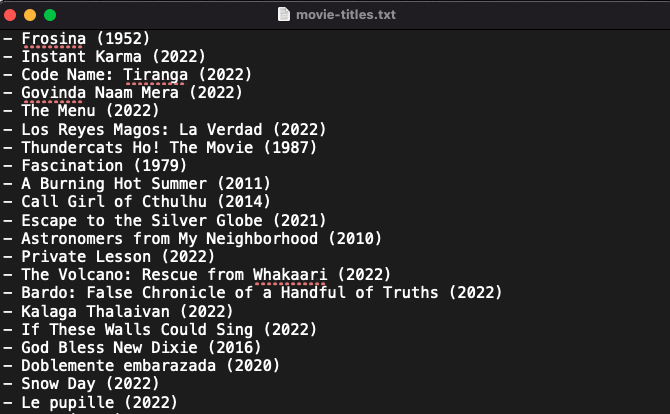
Let's scrape Amazon and Twitter.
ChatGPT's Amazon scraping
Consider scraping Amazon for self-help books. First, copy the Amazon link for self-help books.

Here’s the link I got. Location-dependent connection. Use my link to replicate my results.
Now we'll check book titles. Here's our element.
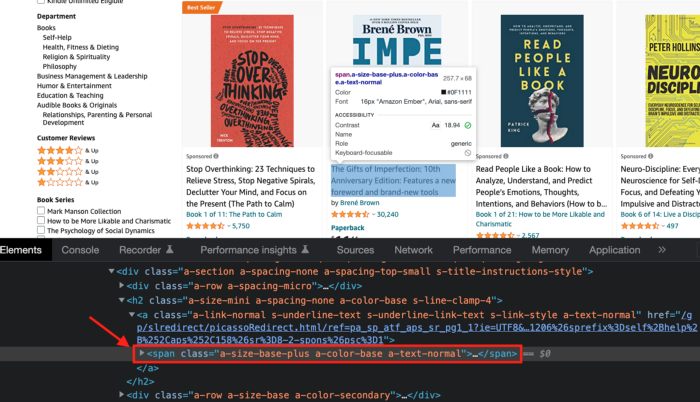
If we want to extract the book titles, we need to use the tag name span, class attribute name and a-size-base-plus a-color-base a-text-normalattribute value.
This time I'll use Selenium. I'll add Selenium-specific commands like wait 5 seconds and generate an XPath.
Scrape this website https://www.amazon.com/s?k=self+help+books&sprefix=self+help+%2Caps%2C158&ref=nb_sb_ss_ts-doa-p_2_10 with Python and Selenium.
Wait 5 seconds and locate all the elements with the following xpath: “span” tag, “class” attribute name, and “a-size-base-plus a-color-base a-text-normal” attribute value. Get the text attribute and print them.
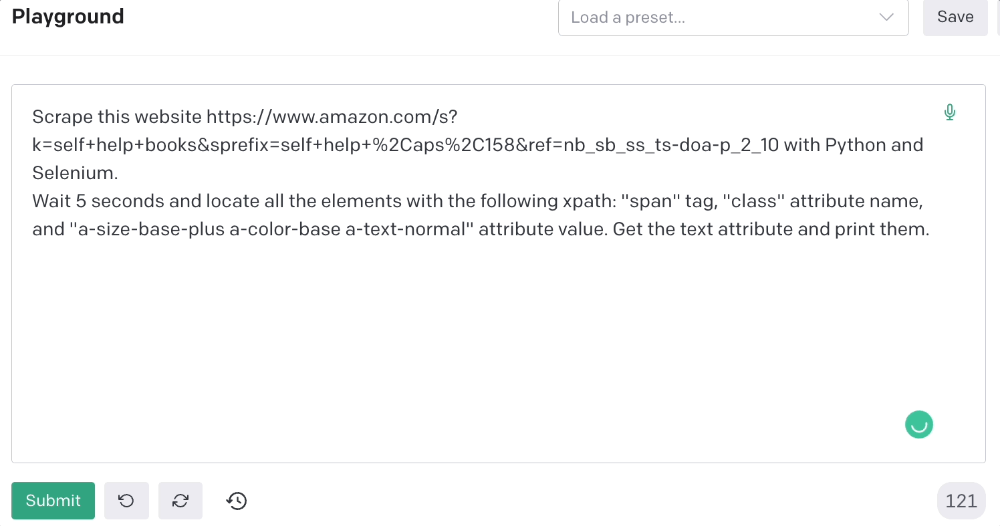
Code generated: (I only had to manually add the path where my chromedriver is located).
from selenium import webdriver
from selenium.webdriver.common.by import By
from time import sleep

#initialize webdriver
driver = webdriver.Chrome('<add path of your chromedriver>')

#navigate to the website
driver.get("https://www.amazon.com/s?k=self+help+books&sprefix=self+help+%2Caps%2C158&ref=nb_sb_ss_ts-doa-p_2_10")

#wait 5 seconds to let the page load
sleep(5)

#locate all the elements with the following xpath
elements = driver.find_elements(By.XPATH, '//span[@class="a-size-base-plus a-color-base a-text-normal"]')

#get the text attribute of each element and print it
for element in elements:
    print(element.text)

#close the webdriver
driver.close()
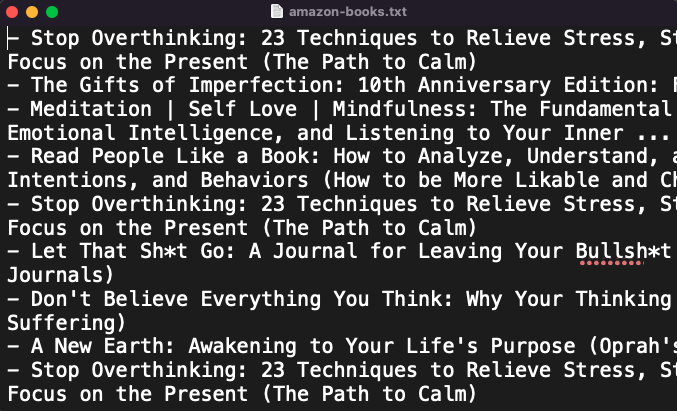
It pulls Amazon book titles.
Utilizing ChatGPT to scrape Twitter
Say you wish to scrape ChatGPT tweets. Search Twitter for ChatGPT and copy the URL.
Here’s the link I got. We must check every tweet. Here's our element.
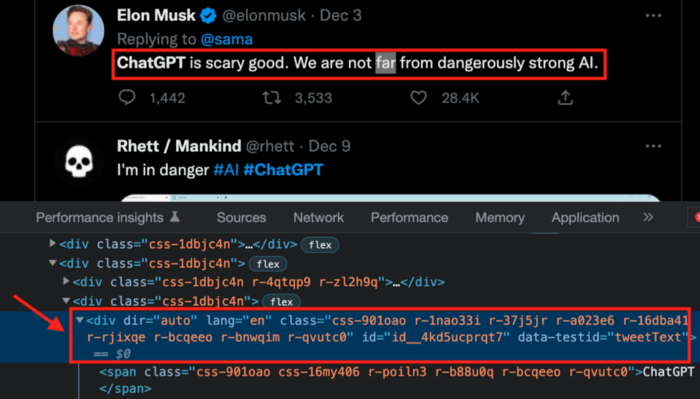
To extract a tweet, use the div tag and lang attribute.
Again, Selenium.
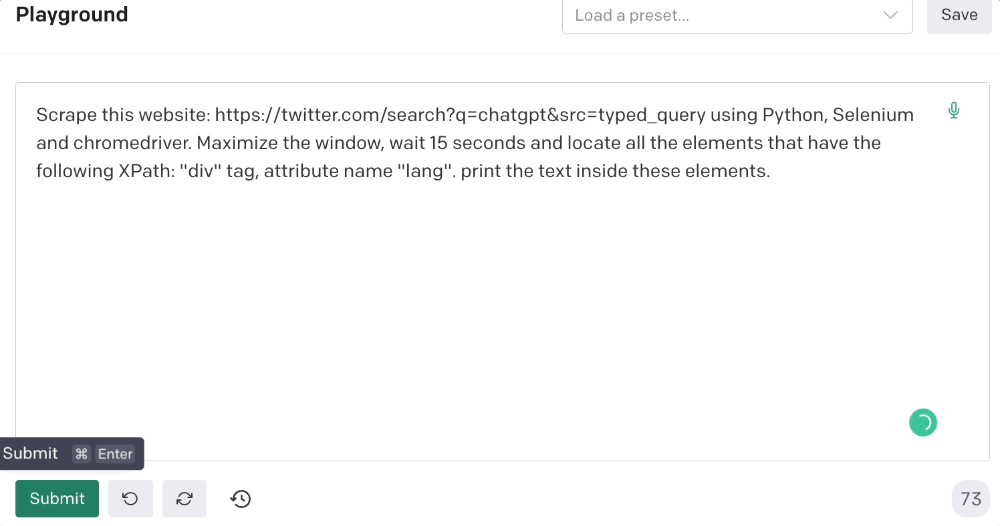
Scrape this website: https://twitter.com/search?q=chatgpt&src=typed_query using Python, Selenium and chromedriver.
Maximize the window, wait 15 seconds and locate all the elements that have the following XPath: “div” tag, attribute name “lang”. Print the text inside these elements.
Code generated: (again, I had to add the path where my chromedriver is located)
from selenium import webdriver
import time

driver = webdriver.Chrome("/Users/frankandrade/Downloads/chromedriver")
driver.maximize_window()
driver.get("https://twitter.com/search?q=chatgpt&src=typed_query")
time.sleep(15)

elements = driver.find_elements_by_xpath("//div[@lang]")
for element in elements:
    print(element.text)

driver.quit()
You'll get the first 2 or 3 tweets from a search. To scrape additional tweets, click X times.
Congratulations! You scraped websites without coding by using ChatGPT.

Enrique Dans
4 years ago
You may not know about The Merge, yet it could change society
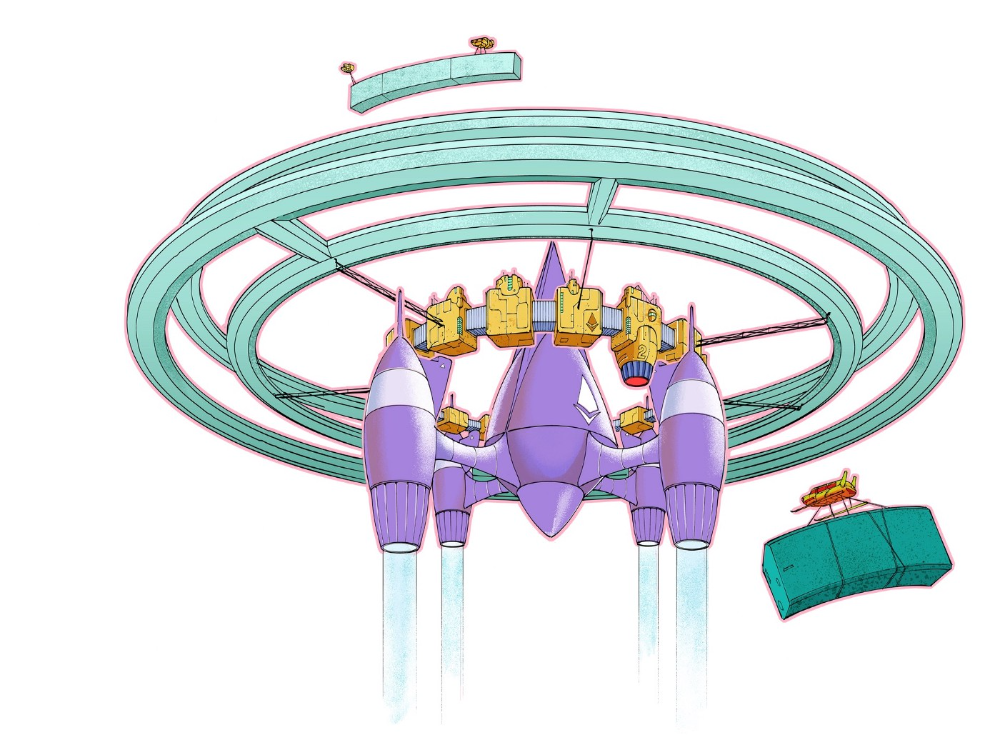
Ethereum is the second-largest cryptocurrency. The Merge, a mid-September event that will convert Ethereum's consensus process from proof-of-work to proof-of-stake if all goes according to plan, will be a game changer.
Why is Ethereum ditching proof-of-work? Because it can. We're talking about a fully functioning, open-source ecosystem with a capacity for evolution that other cryptocurrencies lack, a change that would allow it to scale up its performance from 15 transactions per second to 100,000 as its blockchain is used for more and more things. It would reduce its energy consumption by 99.95%. Vitalik Buterin, the system's founder, would play a less active role due to decentralization, and miners, who validated transactions through proof of work, would be far less important.
Why has this conversion taken so long and been so cautious? Because it involves modifying a core process while it's running to boost its performance. It requires running the new mechanism in test chains on an ever-increasing scale, assessing participant reactions, and checking for issues or restrictions. The last big test was in early June and was successful. All that's left is to converge the mechanism with the Ethereum blockchain to conclude the switch.
What's stopping Bitcoin, the leader in market capitalization and the cryptocurrency that began blockchain's appeal, from doing the same? Satoshi Nakamoto, whoever he or she is, departed from public life long ago, therefore there's no community leadership. Changing it takes a level of consensus that is impossible to achieve without strong leadership, which is why Bitcoin's evolution has been sluggish and conservative, with few modifications.
Secondly, The Merge will balance the consensus mechanism (proof-of-work or proof-of-stake) and the system decentralization or centralization. Proof-of-work prevents double-spending, thus validators must buy hardware. The system works, but it requires a lot of electricity and, as it scales up, tends to re-centralize as validators acquire more hardware and the entire network activity gets focused in a few nodes. Larger operations save more money, which increases profitability and market share. This evolution runs opposed to the concept of decentralization, and some anticipate that any system that uses proof of work as a consensus mechanism will evolve towards centralization, with fewer large firms able to invest in efficient network nodes.
Yet radical bitcoin enthusiasts share an opposite argument. In proof-of-stake, transaction validators put their funds at stake to attest that transactions are valid. The algorithm chooses who validates each transaction, giving more possibilities to nodes that put more coins at stake, which could open the door to centralization and government control.
In both cases, we're talking about long-term changes, but Bitcoin's proof-of-work has been evolving longer and seems to confirm those fears, while proof-of-stake is only employed in coins with a minuscule volume compared to Ethereum and has no predictive value.
As of mid-September, we will have two significant cryptocurrencies, each with a different consensus mechanisms and equally different characteristics: one is intrinsically conservative and used only for economic transactions, while the other has been evolving in open source mode, and can be used for other types of assets, smart contracts, or decentralized finance systems. Some even see it as the foundation of Web3.
Many things could change before September 15, but The Merge is likely to be a turning point. We'll have to follow this closely.
You might also like

Robert Kim
4 years ago
Crypto Legislation Might Progress Beyond Talk in 2022
Financial regulators have for years attempted to apply existing laws to the multitude of issues created by digital assets. In 2021, leading federal regulators and members of Congress have begun to call for legislation to address these issues. As a result, 2022 may be the year when federal legislation finally addresses digital asset issues that have been growing since the mining of the first Bitcoin block in 2009.
Digital Asset Regulation in the Absence of Legislation
So far, Congress has left the task of addressing issues created by digital assets to regulatory agencies. Although a Congressional Blockchain Caucus formed in 2016, House and Senate members introduced few bills addressing digital assets until 2018. As of October 2021, Congress has not amended federal laws on financial regulation, which were last significantly revised by the Dodd-Frank Act in 2010, to address digital asset issues.
In the absence of legislation, issues that do not fit well into existing statutes have created problems. An example is the legal status of digital assets, which can be considered to be either securities or commodities, and can even shift from one to the other over time. Years after the SEC’s 2017 report applying the definition of a security to digital tokens, the SEC and the CFTC have yet to clarify the distinction between securities and commodities for the thousands of digital assets in existence.
SEC Chair Gary Gensler has called for Congress to act, stating in August, “We need additional Congressional authorities to prevent transactions, products, and platforms from falling between regulatory cracks.” Gensler has reached out to Sen. Elizabeth Warren (D-Ma.), who has expressed her own concerns about the need for legislation.
Legislation on Digital Assets in 2021
While regulators and members of Congress talked about the need for legislation, and the debate over cryptocurrency tax reporting in the 2021 infrastructure bill generated headlines, House and Senate bills proposing specific solutions to various issues quietly started to emerge.
Digital Token Sales
Several House bills attempt to address securities law barriers to digital token sales—some of them by building on ideas proposed by regulators in past years.
Exclusion from the definition of a security. Congressional Blockchain Caucus members have been introducing bills to exclude digital tokens from the definition of a security since 2018, and they have revived those bills in 2021. They include the Token Taxonomy Act of 2021 (H.R. 1628), successor to identically named bills in 2018 and 2019, and the Securities Clarity Act (H.R. 4451), successor to a 2020 namesake.
Safe harbor. SEC Commissioner Hester Peirce proposed a regulatory safe harbor for token sales in 2020, and two 2021 bills have proposed statutory safe harbors. Rep. Patrick McHenry (R-N.C.), Republican leader of the House Financial Services Committee, introduced a Clarity for Digital Tokens Act of 2021 (H.R. 5496) that would amend the Securities Act to create a safe harbor providing a grace period of exemption from Securities Act registration requirements. The Digital Asset Market Structure and Investor Protection Act (H.R. 4741) from Rep. Don Beyer (D-Va.) would amend the Securities Exchange Act to define a new type of security—a “digital asset security”—and add issuers of digital asset securities to an existing provision for delayed registration of securities.
Stablecoins
Stablecoins—digital currencies linked to the value of the U.S. dollar or other fiat currencies—have not yet been the subject of regulatory action, although Treasury Secretary Janet Yellen and Federal Reserve Chair Jerome Powell have each underscored the need to create a regulatory framework for them. The Beyer bill proposes to create a regulatory regime for stablecoins by amending Title 31 of the U.S. Code. Treasury Department approval would be required for any “digital asset fiat-based stablecoin” to be issued or used, under an application process to be established by Treasury in consultation with the Federal Reserve, the SEC, and the CFTC.
Serious consideration for any of these proposals in the current session of Congress may be unlikely. A spate of autumn bills on crypto ransom payments (S. 2666, S. 2923, S. 2926, H.R. 5501) shows that Congress is more inclined to pay attention first to issues that are more spectacular and less arcane. Moreover, the arcaneness of digital asset regulatory issues is likely only to increase further, now that major industry players such as Coinbase and Andreessen Horowitz are starting to roll out their own regulatory proposals.
Digital Dollar vs. Digital Yuan
Impetus to pass legislation on another type of digital asset, a central bank digital currency (CBDC), may come from a different source: rivalry with China.
China established itself as a world leader in developing a CBDC with a pilot project launched in 2020, and in 2021, the People’s Bank of China announced that its CBDC will be used at the Beijing Winter Olympics in February 2022. Republican Senators responded by calling for the U.S. Olympic Committee to forbid use of China’s CBDC by U.S. athletes in Beijing and introducing a bill (S. 2543) to require a study of its national security implications.
The Beijing Olympics could motivate a legislative mandate to accelerate implementation of a U.S. digital dollar, which the Federal Reserve has been in the process of considering in 2021. Antecedents to such legislation already exist. A House bill sponsored by 46 Republicans (H.R. 4792) has a provision that would require the Treasury Department to assess China’s CBDC project and report on the status of Federal Reserve work on a CBDC, and the Beyer bill includes a provision amending the Federal Reserve Act to authorize issuing a digital dollar.
Both parties are likely to support creating a digital dollar. The Covid-19 pandemic made a digital dollar for delivery of relief payments a popular idea in 2020, and House Democrats introduced bills with provisions for creating one in 2020 and 2021. Bipartisan support for a bill on a digital dollar, based on concerns both foreign and domestic in nature, could result.
International rivalry and bipartisan support may make the digital dollar a gateway issue for digital asset legislation in 2022. Legislative work on a digital dollar may open the door for considering further digital asset issues—including the regulatory issues that have been emerging for years—in 2022 and beyond.

Tim Denning
3 years ago
I gave up climbing the corporate ladder once I realized how deeply unhappy everyone at the top was.
Restructuring and layoffs cause career reevaluation. Your career can benefit.

Once you become institutionalized, the corporate ladder is all you know.
You're bubbled. Extremists term it the corporate Matrix. I'm not so severe because the business world brainwashed me, too.
This boosted my corporate career.
Until I hit bottom.
15 months later, I view my corporate life differently. You may wish to advance professionally. Read this before you do.
Your happiness in the workplace may be deceptive.
I've been fortunate to spend time with corporate aces.
Working for 2.5 years in banking social media gave me some of these experiences. Earlier in my career, I recorded interviews with business leaders.
These people have titles like Chief General Manager and Head Of. New titles brought life-changing salaries.
They seemed happy.
I’d pass them in the hallway and they’d smile or shake my hand. I dreamt of having their life.
The ominous pattern
Unfiltered talks with some of them revealed a different world.
They acted well. They were skilled at smiling and saying the correct things. All had the same dark pattern, though.
Something felt off.
I found my conversations with them were generally for their benefit. They hoped my online antics as a writer/coach would shed light on their dilemma.
They'd tell me they wanted more. When you're one position away from CEO, it's hard not to wonder if this next move will matter.
What really displeased corporate ladder chasers
Before ascending further, consider these.
Zero autonomy
As you rise in a company, your days get busier.
Many people and initiatives need supervision. Everyone expects you to know business details. Weak when you don't. A poor leader is fired during the next restructuring and left to pursue their corporate ambition.
Full calendars leave no time for reflection. You can't have a coffee with a friend or waste a day.
You’re always on call. It’s a roll call kinda life.
Unable to express oneself freely
My 8 years of LinkedIn writing helped me meet these leaders.
I didn't think they'd care. Mistake.
Corporate leaders envied me because they wanted to talk freely again without corporate comms or a PR firm directing them what to say.
They couldn't share their flaws or inspiring experiences.
They wanted to.
Every day they were muzzled eroded by their business dream.
Limited family time
Top leaders had families.
They've climbed the corporate ladder. Nothing excellent happens overnight.
Corporate dreamers rarely saw their families.
Late meetings, customer functions, expos, training, leadership days, team days, town halls, and product demos regularly occurred after work.
Or they had to travel interstate or internationally for work events. They used bags and motel showers.
Initially, they said business class flights and hotels were nice. They'd get bored. 5-star hotels become monotonous.
No hotel beats home.
One leader said he hadn't seen his daughter much. They used to Facetime, but now that he's been gone so long, she rarely wants to talk to him.
So they iPad-parented.
You're miserable without your family.
Held captive by other job titles
Going up the business ladder seems like a battle.
Leaders compete for business gains and corporate advancement.
I saw shocking filthy tricks. Leaders would lie to seem nice.
Captives included top officials.
A different section every week. If they ran technology, the Head of Sales would argue their CRM cost millions. Or an Operations chief would battle a product team over support requests.
After one conflict, another began.
Corporate echelons are antagonistic. Huge pay and bonuses guarantee bad behavior.
Overly centered on revenue
As you rise, revenue becomes more prevalent. Most days, you'd believe revenue was everything. Here’s the problem…
Numbers drain us.
Unless you're a closet math nerd, contemplating and talking about numbers drains your creativity.
Revenue will never substitute impact.
Incapable of taking risks
Corporate success requires taking fewer risks.
Risks can cause dismissal. Risks can interrupt business. Keep things moving so you may keep getting paid your enormous salary and bonus.
Restructuring or layoffs are inevitable. All corporate climbers experience it.
On this fateful day, a small few realize the game they’ve been trapped in and escape. Most return to play for a new company, but it takes time.
Addiction keeps them trapped. You know nothing else. The rest is strange.
You start to think “I’m getting old” or “it’s nearly retirement.” So you settle yet again for the trappings of the corporate ladder game to nowhere.
Should you climb the corporate ladder?
Let me end on a surprising note.
Young people should ascend the corporate ladder. It teaches you business skills and helps support your side gig and (potential) online business.
Don't get trapped, shackled, or muzzled.
Your ideas and creativity become stifled after too much gaming play.
Corporate success won't bring happiness.
Find fulfilling employment that matters. That's it.

Julie Plavnik
4 years ago
How to Become a Crypto Broker [Complying and Making Money]
Three options exist. The third one is the quickest and most fruitful.
You've mastered crypto trading and want to become a broker.
So you may wonder: Where to begin?
If so, keep reading.
Today I'll compare three different approaches to becoming a cryptocurrency trader.
What are cryptocurrency brokers, and how do they vary from stockbrokers?
A stockbroker implements clients' market orders (retail or institutional ones).
Brokerage firms are regulated, insured, and subject to regulatory monitoring.
Stockbrokers are required between buyers and sellers. They can't trade without a broker. To trade, a trader must open a broker account and deposit money. When a trader shops, he tells his broker what orders to place.
Crypto brokerage is trade intermediation with cryptocurrency.
In crypto trading, however, brokers are optional.
Crypto exchanges offer direct transactions. Open an exchange account (no broker needed) and make a deposit.
Question:
Since crypto allows DIY trading, why use a broker?
Let's compare cryptocurrency exchanges vs. brokers.
Broker versus cryptocurrency exchange
Most existing crypto exchanges are basically brokers.
Examine their primary services:
connecting purchasers and suppliers
having custody of clients' money (with the exception of decentralized cryptocurrency exchanges),
clearance of transactions.
Brokerage is comparable, don't you think?
There are exceptions. I mean a few large crypto exchanges that follow the stock exchange paradigm. They outsource brokerage, custody, and clearing operations. Classic exchange setups are rare in today's bitcoin industry.
Back to our favorite “standard” crypto exchanges. All-in-one exchanges and brokers. And usually, they operate under a broker or a broker-dealer license, save for the exchanges registered somewhere in a free-trade offshore paradise. Those don’t bother with any licensing.
What’s the sense of having two brokers at a time?
Better liquidity and trading convenience.
The crypto business is compartmentalized.
We have CEXs, DEXs, hybrid exchanges, and semi-exchanges (those that aggregate liquidity but do not execute orders on their sides). All have unique regulations and act as sovereign states.
There are about 18k coins and hundreds of blockchain protocols, most of which are heterogeneous (i.e., different in design and not interoperable).
A trader must register many accounts on different exchanges, deposit funds, and manage them all concurrently to access global crypto liquidity.
It’s extremely inconvenient.
Crypto liquidity fragmentation is the largest obstacle and bottleneck blocking crypto from mass adoption.
Crypto brokers help clients solve this challenge by providing one-gate access to deep and diverse crypto liquidity from numerous exchanges and suppliers. Professionals and institutions need it.
Another killer feature of a brokerage may be allowing clients to trade crypto with fiat funds exclusively, without fiat/crypto conversion. It is essential for professional and institutional traders.
Who may work as a cryptocurrency broker?
Apparently, not anyone. Brokerage requires high-powered specialists because it involves other people's money.
Here's the essentials:
excellent knowledge, skills, and years of trading experience
high-quality, quick, and secure infrastructure
highly developed team
outstanding trading capital
High-ROI network: long-standing, trustworthy connections with customers, exchanges, liquidity providers, payment gates, and similar entities
outstanding marketing and commercial development skills.
What about a license for a cryptocurrency broker? Is it necessary?
Complex question.
If you plan to play in white-glove jurisdictions, you may need a license. For example, in the US, as a “money transmitter” or as a CASSP (crypto asset secondary services provider) in Australia.
Even in these jurisdictions, there are no clear, holistic crypto brokerage and licensing policies.
Your lawyer will help you decide if your crypto brokerage needs a license.
Getting a license isn't quick. Two years of patience are needed.
How can you turn into a cryptocurrency broker?
Finally, we got there! 🎉
Three actionable ways exist:
To kickstart a regulated stand-alone crypto broker
To get a crypto broker franchise, and
To become a liquidity network broker.
Let's examine each.
1. Opening a regulated cryptocurrency broker
It's difficult. Especially If you're targeting first-world users.
You must comply with many regulatory, technical, financial, HR, and reporting obligations to keep your organization running. Some are mentioned above.
The licensing process depends on the products you want to offer (spots or derivatives) and the geographic areas you plan to service. There are no general rules for that.
In an overgeneralized way, here are the boxes you will have to check:
capital availability (usually a large amount of capital c is required)
You will have to move some of your team members to the nation providing the license in order to establish an office presence there.
the core team with the necessary professional training (especially applies to CEO, Head of Trading, Assistant to Head of Trading, etc.)
insurance
infrastructure that is trustworthy and secure
adopted proper AML/KYC/financial monitoring policies, etc.
Assuming you passed, what's next?
I bet it won’t be mind-blowing for you that the license is just a part of the deal. It won't attract clients or revenue.
To bring in high-dollar clientele, you must be a killer marketer and seller. It's not easy to convince people to give you money.
You'll need to be a great business developer to form successful, long-term agreements with exchanges (ideally for no fees), liquidity providers, banks, payment gates, etc. Persuade clients.
It's a tough job, isn't it?

I expect a Quora-type question here:
Can I start an unlicensed crypto broker?
Well, there is always a workaround with crypto!
You can register your broker in a free-trade zone like Seychelles to avoid US and other markets with strong watchdogs.
This is neither wise nor sustainable.
First, such experiments are illegal.
Second, you'll have trouble attracting clients and strategic partners.
A license equals trust. That’s it.
Even a pseudo-license from Mauritius matters.
Here are this method's benefits and downsides.
Cons first.
As you navigate this difficult and expensive legal process, you run the risk of missing out on business prospects. It's quite simple to become excellent compliance yet unable to work. Because your competitors are already courting potential customers while you are focusing all of your effort on paperwork.
Only God knows how long it will take you to pass the break-even point when everything with the license has been completed.
It is a money-burning business, especially in the beginning when the majority of your expenses will go toward marketing, sales, and maintaining license requirements. Make sure you have the fortitude and resources necessary to face such a difficult challenge.
Pros
It may eventually develop into a tool for making money. Because big guys who are professionals at trading require a white-glove regulated brokerage. You have every possibility if you work hard in the areas of sales, marketing, business development, and wealth. Simply put, everything must align.
Launching a regulated crypto broker is analogous to launching a crypto exchange. It's ROUGH. Sure you can take it?
2. Franchise for Crypto Broker (Crypto Sub-Brokerage)
A broker franchise is easier and faster than becoming a regulated crypto broker. Not a traditional brokerage.
A broker franchisee, often termed a sub-broker, joins with a broker (a franchisor) to bring them new clients. Sub-brokers market a broker's products and services to clients.
Sub-brokers are the middlemen between a broker and an investor.
Why is sub-brokering easier?
less demanding qualifications and legal complexity. All you need to do is keep a few certificates on hand (each time depends on the jurisdiction).
No significant investment is required
there is no demand that you be a trading member of an exchange, etc.
As a sub-broker, you can do identical duties without as many rights and certifications.
What about the crypto broker franchise?
Sub-brokers aren't common in crypto.
In most existing examples (PayBito, PCEX, etc.), franchises are offered by crypto exchanges, not brokers. Though we remember that crypto exchanges are, in fact, brokers, do we?
Similarly:
For a commission, a franchiser crypto broker receives new leads from a crypto sub-broker.
See above for why enrolling is easy.
Finding clients is difficult. Most crypto traders prefer to buy-sell on their own or through brokers over sub-broker franchises.
3. Broker of the Crypto Trading Network (or a Network Broker)
It's the greatest approach to execute crypto brokerage, based on effort/return.
Network broker isn't an established word. I wrote it for clarity.
Remember how we called crypto liquidity fragmentation the current crypto finance paradigm's main bottleneck?
Where there's a challenge, there's progress.
Several well-funded projects are aiming to fix crypto liquidity fragmentation. Instead of launching another crypto exchange with siloed trading, the greatest minds create trading networks that aggregate crypto liquidity from desynchronized sources and enable quick, safe, and affordable cross-blockchain transactions. Each project offers a distinct option for users.
Crypto liquidity implies:
One-account access to cryptocurrency liquidity pooled from network participants' exchanges and other liquidity sources
compiled price feeds
Cross-chain transactions that are quick and inexpensive, even for HFTs
link between participants of all kinds, and
interoperability among diverse blockchains
Fast, diversified, and cheap global crypto trading from one account.
How does a trading network help cryptocurrency brokers?
I’ll explain it, taking Yellow Network as an example.
Yellow provides decentralized Layer-3 peer-to-peer trading.
trade across chains globally with real-time settlement and
Between cryptocurrency exchanges, brokers, trading companies, and other sorts of network members, there is communication and the exchange of financial information.
Have you ever heard about ECN (electronic communication network)? If not, it's an automated system that automatically matches buy and sell orders. Yellow is a decentralized digital asset ECN.
Brokers can:
Start trading right now without having to meet stringent requirements; all you need to do is integrate with Yellow Protocol and successfully complete some KYC verification.
Access global aggregated crypto liquidity through a single point.
B2B (Broker to Broker) liquidity channels that provide peer liquidity from other brokers. Orders from the other broker will appear in the order book of a broker who is peering with another broker on the market. It will enable a broker to broaden his offer and raise the total amount of liquidity that is available to his clients.
Select a custodian or use non-custodial practices.
Comparing network crypto brokerage to other types:
A licensed stand-alone brokerage business is much more difficult and time-consuming to launch than network brokerage, and
Network brokerage, in contrast to crypto sub-brokerage, is scalable, independent, and offers limitless possibilities for revenue generation.
Yellow Network Whitepaper. has more details on how to start a brokerage business and what rewards you'll obtain.
Final thoughts
There are three ways to become a cryptocurrency broker, including the non-conventional liquidity network brokerage. The last option appears time/cost-effective.
Crypto brokerage isn't crowded yet. Act quickly to find your right place in this market.
Choose the way that works for you best and see you in crypto trading.
Discover Web3 & DeFi with Yellow Network!
Yellow, powered by Openware, is developing a cross-chain P2P liquidity aggregator to unite the crypto sector and provide global remittance services that aid people.
Join the Yellow Community and plunge into this decade's biggest product-oriented crypto project.
Observe Yellow Twitter
Enroll in Yellow Telegram
Visit Yellow Discord.
On Hacker Noon, look us up.
Yellow Network will expose development, technology, developer tools, crypto brokerage nodes software, and community liquidity mining.