


DAO 101: Everything you need to know
Maybe you'll work for a DAO next! Over $1 Billion in NFTs in the Flamingo DAO Another DAO tried to buy the NFL team Denver Broncos. The UkraineDAO raised over $7 Million for Ukraine. The PleasrDAO paid $4m for a Wu-Tang Clan album that belonged to the “pharma bro.”
DAOs move billions and employ thousands. So learn what a DAO is, how it works, and how to create one!
DAO? So, what? Why is it better?
A Decentralized Autonomous Organization (DAO). Some people like to also refer to it as Digital Autonomous Organization, but I prefer the former.
They are virtual organizations. In the real world, you have organizations or companies right? These firms have shareholders and a board. Usually, anyone with authority makes decisions. It could be the CEO, the Board, or the HIPPO. If you own stock in that company, you may also be able to influence decisions. It's now possible to do something similar but much better and more equitable in the cryptocurrency world.
This article informs you:
DAOs- What are the most common DAOs, their advantages and disadvantages over traditional companies? What are they if any?
Is a DAO legally recognized?
How secure is a DAO?
I’m ready whenever you are!
A DAO is a type of company that is operated by smart contracts on the blockchain. Smart contracts are computer code that self-executes our commands. Those contracts can be any. Most second-generation blockchains support smart contracts. Examples are Ethereum, Solana, Polygon, Binance Smart Chain, EOS, etc. I think I've gone off topic. Back on track. Now let's go!
Unlike traditional corporations, DAOs are governed by smart contracts. Unlike traditional company governance, DAO governance is fully transparent and auditable. That's one of the things that sets it apart. The clarity!
A DAO, like a traditional company, has one major difference. In other words, it is decentralized. DAOs are more ‘democratic' than traditional companies because anyone can vote on decisions. Anyone! In a DAO, we (you and I) make the decisions, not the top-shots. We are the CEO and investors. A DAO gives its community members power. We get to decide.
As long as you are a stakeholder, i.e. own a portion of the DAO tokens, you can participate in the DAO. Tokens are open to all. It's just a matter of exchanging it. Ownership of DAO tokens entitles you to exclusive benefits such as governance, voting, and so on. You can vote for a move, a plan, or the DAO's next investment. You can even pitch for funding. Any ‘big' decision in a DAO requires a vote from all stakeholders. In this case, ‘token-holders'! In other words, they function like stock.
What are the 5 DAO types?
Different DAOs exist. We will categorize decentralized autonomous organizations based on their mode of operation, structure, and even technology. Here are a few. You've probably heard of them:
1. DeFi DAO
These DAOs offer DeFi (decentralized financial) services via smart contract protocols. They use tokens to vote protocol and financial changes. Uniswap, Aave, Maker DAO, and Olympus DAO are some examples. Most DAOs manage billions.
Maker DAO was one of the first protocols ever created. It is a decentralized organization on the Ethereum blockchain that allows cryptocurrency lending and borrowing without a middleman.
Maker DAO issues DAI, a stable coin. DAI is a top-rated USD-pegged stable coin.
Maker DAO has an MKR token. These token holders are in charge of adjusting the Dai stable coin policy. Simply put, MKR tokens represent DAO “shares”.
2. Investment DAO
Investors pool their funds and make investment decisions. Investing in new businesses or art is one example. Investment DAOs help DeFi operations pool capital. The Meta Cartel DAO is a community of people who want to invest in new projects built on the Ethereum blockchain. Instead of investing one by one, they want to pool their resources and share ideas on how to make better financial decisions.
Other investment DAOs include the LAO and Friends with Benefits.
3. DAO Grant/Launchpad
In a grant DAO, community members contribute funds to a grant pool and vote on how to allocate and distribute them. These DAOs fund new DeFi projects. Those in need only need to apply. The Moloch DAO is a great Grant DAO. The tokens are used to allocate capital. Also see Gitcoin and Seedify.
4. DAO Collector
I debated whether to put it under ‘Investment DAO' or leave it alone. It's a subset of investment DAOs. This group buys non-fungible tokens, artwork, and collectibles. The market for NFTs has recently exploded, and it's time to investigate. The Pleasr DAO is a collector DAO. One copy of Wu-Tang Clan's "Once Upon a Time in Shaolin" cost the Pleasr DAO $4 million. Pleasr DAO is known for buying Doge meme NFT. Collector DAOs include the Flamingo, Mutant Cats DAO, and Constitution DAOs. Don't underestimate their websites' "childish" style. They have millions.
5. Social DAO
These are social networking and interaction platforms. For example, Decentraland DAO and Friends With Benefits DAO.
What are the DAO Benefits?
Here are some of the benefits of a decentralized autonomous organization:
- They are trustless. You don’t need to trust a CEO or management team
- It can’t be shut down unless a majority of the token holders agree. The government can't shut - It down because it isn't centralized.
- It's fully democratic
- It is open-source and fully transparent.
What about DAO drawbacks?
We've been saying DAOs are the bomb? But are they really the shit? What could go wrong with DAO?
DAOs may contain bugs. If they are hacked, the results can be catastrophic.
No trade secrets exist. Because the smart contract is transparent and coded on the blockchain, it can be copied. It may be used by another organization without credit. Maybe DAOs should use Secret, Oasis, or Horizen blockchain networks.
Are DAOs legally recognized??
In most counties, DAO regulation is inexistent. It's unclear. Most DAOs don’t have a legal personality. The Howey Test and the Securities Act of 1933 determine whether DAO tokens are securities. Although most countries follow the US, this is only considered for the US. Wyoming became the first state to recognize DAOs as legal entities in July 2021 after passing a DAO bill. DAOs registered in Wyoming are thus legally recognized as business entities in the US and thus receive the same legal protections as a Limited Liability Company.
In terms of cyber-security, how secure is a DAO?
Blockchains are secure. However, smart contracts may have security flaws or bugs. This can be avoided by third-party smart contract reviews, testing, and auditing
Finally, Decentralized Autonomous Organizations are timeless. Let us examine the current situation: Ukraine's invasion. A DAO was formed to help Ukrainian troops fighting the Russians. It was named Ukraine DAO. Pleasr DAO, NFT studio Trippy Labs, and Russian art collective Pussy Riot organized this fundraiser. Coindesk reports that over $3 million has been raised in Ethereum-based tokens. AidForUkraine, a DAO aimed at supporting Ukraine's defense efforts, has launched. Accepting Solana token donations. They are fully transparent, uncensorable, and can’t be shut down or sanctioned.
DAOs are undeniably the future of blockchain. Everyone is paying attention. Personally, I believe traditional companies will soon have to choose between adapting or being left behind.
Long version of this post: https://medium.datadriveninvestor.com/dao-101-all-you-need-to-know-about-daos-275060016663
More on Web3 & Crypto

Percy Bolmér
3 years ago
Ethereum No Longer Consumes A Medium-Sized Country's Electricity To Run
The Merge cut Ethereum's energy use by 99.5%.
The Crypto community celebrated on September 15, 2022. This day, Ethereum Merged. The entire blockchain successfully merged with the Beacon chain, and it was so smooth you barely noticed.
Many have waited, dreaded, and longed for this day.
Some investors feared the network would break down, while others envisioned a seamless merging.
Speculators predict a successful Merge will lead investors to Ethereum. This could boost Ethereum's popularity.
What Has Changed Since The Merge
The merging transitions Ethereum mainnet from PoW to PoS.
PoW sends a mathematical riddle to computers worldwide (miners). First miner to solve puzzle updates blockchain and is rewarded.
The puzzles sent are power-intensive to solve, so mining requires a lot of electricity. It's sent to every miner competing to solve it, requiring duplicate computation.
PoS allows investors to stake their coins to validate a new transaction. Instead of validating a whole block, you validate a transaction and get the fees.
You can validate instead of mine. A validator stakes 32 Ethereum. After staking, the validator can validate future blocks.
Once a validator validates a block, it's sent to a randomly selected group of other validators. This group verifies that a validator is not malicious and doesn't validate fake blocks.
This way, only one computer needs to solve or validate the transaction, instead of all miners. The validated block must be approved by a small group of validators, causing duplicate computation.
PoS is more secure because validating fake blocks results in slashing. You lose your bet tokens. If a validator signs a bad block or double-signs conflicting blocks, their ETH is burned.
Theoretically, Ethereum has one block every 12 seconds, so a validator forging a block risks burning 1 Ethereum for 12 seconds of transactions. This makes mistakes expensive and risky.
What Impact Does This Have On Energy Use?
Cryptocurrency is a natural calamity, sucking electricity and eating away at the earth one transaction at a time.
Many don't know the environmental impact of cryptocurrencies, yet it's tremendous.
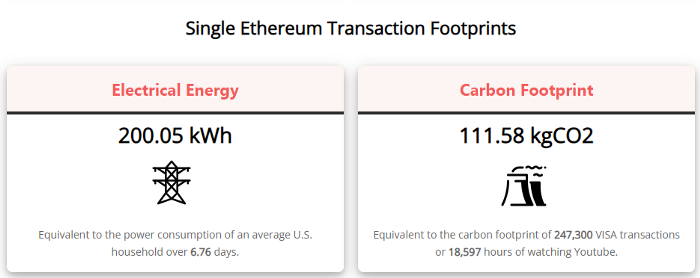
A single Ethereum transaction used to use 200 kWh and leave a large carbon imprint. This update reduces global energy use by 0.2%.
Ethereum will submit a challenge to one validator, and that validator will forward it to randomly selected other validators who accept it.
This reduces the needed computing power.
They expect a 99.5% reduction, therefore a single transaction should cost 1 kWh.
Carbon footprint is 0.58 kgCO2, or 1,235 VISA transactions.
This is a big Ethereum blockchain update.
I love cryptocurrency and Mother Earth.

Max Parasol
3 years ago
Are DAOs the future or just a passing fad?
How do you DAO? Can DAOs scale?
DAO: Decentralized Autonomous. Organization.
“The whole phrase is a misnomer. They're not decentralized, autonomous, or organizations,” says Monsterplay blockchain consultant David Freuden.
As part of the DAO initiative, Freuden coauthored a 51-page report in May 2020. “We need DAOs,” he says. “‘Shareholder first' is a 1980s/90s concept. Profits became the focus, not products.”
His predictions for DAOs have come true nearly two years later. DAOs had over 1.6 million participants by the end of 2021, up from 13,000 at the start of the year. Wyoming, in the US, will recognize DAOs and the Marshall Islands in 2021. Australia may follow that example in 2022.
But what is a DAO?
Members buy (or are rewarded with) governance tokens to vote on how the DAO operates and spends its money. “DeFi spawned DAOs as an investment vehicle. So a DAO is tokenomics,” says Freuden.
DAOs are usually built around a promise or a social cause, but they still want to make money. “If you can't explain why, the DAO will fail,” he says. “A co-op without tokenomics is not a DAO.”
Operating system DAOs, protocol DAOs, investment DAOs, grant DAOs, service DAOs, social DAOs, collector DAOs, and media DAOs are now available.
Freuden liked the idea of people rallying around a good cause. Speculators and builders make up the crypto world, so it needs a DAO for them.
,Speculators and builders, or both, have mismatched expectations, causing endless, but sometimes creative friction.
Organisms that boost output
Launching a DAO with an original product such as a cryptocurrency, an IT protocol or a VC-like investment fund like FlamingoDAO is common. DAOs enable distributed open-source contributions without borders. The goal is vital. Sometimes, after a product is launched, DAOs emerge, leaving the company to eventually transition to a DAO, as Uniswap did.
Doing things together is a DAO. So it's a way to reward a distributed workforce. DAOs are essentially productivity coordination organisms.
“Those who work for the DAO make permissionless contributions and benefit from fragmented employment,” argues Freuden. DAOs are, first and foremost, a new form of cooperation.
DAO? Distributed not decentralized
In decentralized autonomous organizations, words have multiple meanings. DAOs can emphasize one aspect over another. Autonomy is a trade-off for decentralization.
DAOstack CEO Matan Field says a DAO is a distributed governance system. Power is shared. However, there are two ways to understand a DAO's decentralized nature. This clarifies the various DAO definitions.
A decentralized infrastructure allows a DAO to be decentralized. It could be created on a public permissionless blockchain to prevent a takeover.
As opposed to a company run by executives or shareholders, a DAO is distributed. Its leadership does not wield power
Option two is clearly distributed.
But not all of this is “automated.”
Think quorum, not robot.
DAOs can be autonomous in the sense that smart contracts are self-enforcing and self-executing. So every blockchain transaction is a simplified smart contract.
Dao landscape
The DAO landscape is evolving.
Consider how Ethereum's smart contracts work. They are more like self-executing computer code, which Vitalik Buterin calls “persistent scripts”.
However, a DAO is self-enforcing once its members agree on its rules. As such, a DAO is “automated upon approval by the governance committee.” This distinguishes them from traditional organizations whose rules must be interpreted and applied.
Why a DAO? They move fast
A DAO can quickly adapt to local conditions as a governance mechanism. It's a collaborative decision-making tool.
Like UkraineDAO, created in response to Putin's invasion of Ukraine by Ukrainian expat Alona Shevchenko, Nadya Tolokonnikova, Trippy Labs, and PleasrDAO. The DAO sought to support Ukrainian charities by selling Ukrainian flag NFTs. With a single mission, a DAO can quickly raise funds for a country accepting crypto where banks are distrusted.
This could be a watershed moment for DAOs.
ConstitutionDAO was another clever use case for DAOs for Freuden. In a failed but “beautiful experiment in a single-purpose DAO,” ConstitutionDAO tried to buy a copy of the US Constitution from a Sotheby's auction. In November 2021, ConstitutionDAO raised $47 million from 19,000 people, but a hedge fund manager outbid them.
Contributions were returned or lost if transactional gas fees were too high. The ConstitutionDAO, as a “beautiful experiment,” proved exceptionally fast at organizing and crowdsourcing funds for a specific purpose.
We may soon be applauding UkraineDAO's geopolitical success in support of the DAO concept.
Some of the best use cases for DAOs today, according to Adam Miller, founder of DAOplatform.io and MIDAO Directory Services, involve DAO structures.
That is, a “flat community is vital.” Prototyping by the crowd is a good example. To succeed, members must be enthusiastic about DAOs as an alternative to starting a company. Because DAOs require some hierarchy, he agrees that "distributed is a better acronym."
Miller sees DAOs as a “new way of organizing people and resources.” He started DAOplatform.io, a DAO tooling advisery that is currently transitioning to a DAO due to the “woeful tech options for running a DAO,” which he says mainly comprises of just “multisig admin keys and a voting system.” So today he's advising on DAO tech stacks.
Miller identifies three key elements.
Tokenization is a common method and tool. Second, governance mechanisms connected to the DAO's treasury. Lastly, community.”
How a DAO works...
They can be more than glorified Discord groups if they have a clear mission. This mission is a mix of financial speculation and utopianism. The spectrum is vast.
The founder of Dash left the cryptocurrency project in 2017. It's the story of a prophet without an heir. So creating a global tokenized evangelical missionary community via a DAO made sense.
Evan Duffield, a “libertarian/anarchist” visionary, forked Bitcoin in January 2014 to make it instant and essentially free. He went away for a while, and DASH became a DAO.
200,000 US retailers, including Walmart and Barnes & Noble, now accept Dash as payment. This payment system works like a gift card.
Arden Goldstein, Dash's head of crypto, DAO, and blockchain marketing, claims Dash is the “first successful DAO.” It was founded in 2016 and disbanded after a hack, an Ethereum hard fork and much controversy. But what are the success metrics?
Crypto success is measured differently, says Goldstein. To achieve common goals, people must participate or be motivated in a healthy DAO. People are motivated to complete tasks in a successful DAO. And, crucially, when tasks get completed.
“Yes or no, 1 or 0, voting is not a new idea. The challenge is getting people to continue to participate and keep building a community.” A DAO motivates volunteers: Nothing keeps people from building. The DAO “philosophy is old news. You need skin in the game to play.”
MasterNodes must stake 1000 Dash. Those members are rewarded with DASH for marketing (and other tasks). It uses an outsourced team to onboard new users globally.
Joining a DAO is part of the fun of meeting crazy or “very active” people on Discord. No one gets fired (usually). If your work is noticed, you may be offered a full-time job.
DAO community members worldwide are rewarded for brand building. Dash is also a great product for developing countries with high inflation and undemocratic governments. The countries with the most Dash DAO members are Russia, Brazil, Venezuela, India, China, France, Italy, and the Philippines.
Grassroots activism makes this DAO work. A DAO is local. Venezuelans can't access Dash.org, so DAO members help them use a VPN. DAO members are investors, fervent evangelicals, and local product experts.
Every month, proposals and grant applications are voted on via the Dash platform. However, the DAO may decide not to fund you. For example, the DAO once hired a PR firm, but the community complained about the lack of press coverage. This raises a great question: How are real-world contractual obligations met by a DAO?
Does the DASH DAO work?
“I see the DAO defund projects I thought were valuable,” Goldstein says. Despite working full-time, I must submit a funding proposal. “Much faster than other companies I've worked on,” he says.
Dash DAO is a headless beast. Ryan Taylor is the CEO of the company overseeing the DASH Core Group project.
The issue is that “we don't know who has the most tokens [...] because we don't know who our customers are.” As a result, “the loudest voices usually don't have the most MasterNodes and aren't the most invested.”
Goldstein, the only female in the DAO, says she worked hard. “I was proud of the DAO when I made the logo pink for a day and got great support from the men.” This has yet to entice a major influx of female DAO members.
Many obstacles stand in the way of utopian dreams.
Governance problems remain
And what about major token holders behaving badly?
In early February, a heated crypto Twitter debate raged on about inclusion, diversity, and cancel culture in relation to decentralized projects. In this case, the question was how a DAO addresses alleged inappropriate behavior.
In a corporation, misconduct can result in termination. In a DAO, founders usually hold a large number of tokens and the keys to the blockchain (multisignature) or otherwise.
Brantly Millegan, the director of operations of Ethereum Name Service (ENS), made disparaging remarks about the LGBTQ community and other controversial topics. The screenshotted comments were made in 2016 and brought to the ENS board's attention in early 2022.
His contract with ENS has expired. But what of his large DAO governance token holdings?
Members of the DAO proposed a motion to remove Millegan from the DAO. His “delegated” votes net 370,000. He was and is the DAO's largest delegate.
What if he had refused to accept the DAO's decision?
Freuden says the answer is not so simple.
“Can a DAO kick someone out who built the project?”
The original mission “should be dissolved” if it no longer exists. “Does a DAO fail and return the money? They must r eturn the money with interest if the marriage fails.”
Before an IPO, VCs might try to remove a problematic CEO.
While DAOs use treasury as a governance mechanism, it is usually controlled (at least initially) by the original project creators. Or, in the case of Uniswap, the venture capital firm a16z has so much voting power that it has delegated it to student-run blockchain organizations.
So, can DAOs really work at scale? How to evolve voting paradigms beyond token holdings?
The whale token holder issue has some solutions. Multiple tokens, such as a utility token on top of a governance token, and quadratic voting for whales, are now common. Other safeguards include multisignature blockchain keys and decision time locks that allow for any automated decision to be made. The structure of each DAO will depend on the assets at stake.
In reality, voter turnout is often a bigger issue.
Is DAO governance scalable?
Many DAOs have low participation. Due to a lack of understanding of technology, apathy, or busy lives. “The bigger the DAO, the fewer voters who vote,” says Freuden.
Freuden's report cites British anthropologist Dunbar's Law, who argued that people can only maintain about 150 relationships.
"As the DAO grows in size, the individual loses influence because they perceive their voting power as being diminished or insignificant. The Ringelmann Effect and Dunbar's Rule show that as a group grows in size, members become lazier, disenfranchised, and detached.
Freuden says a DAO requires “understanding human relationships.” He believes DAOs work best as investment funds rooted in Cryptoland and small in scale. In just three weeks, SyndicateDAO enabled the creation of 450 new investment group DAOs.
Due to SEC regulations, FlamingoDAO, a famous NFT curation investment DAO, could only have 100 investors. The “LAO” is a member-directed venture capital fund and a US LLC. To comply with US securities law, they only allow 100 members with a 120ETH minimum staking contribution.
But how did FlamingoDAO make investment decisions? How often did all 70 members vote? Art and NFTs are highly speculative.
So, investment DAOs are thought to work well in a small petri dish environment. This is due to a crypto-native club's pooled capital (maximum 7% per member) and crowdsourced knowledge.
While scalability is a concern, each DAO will operate differently depending on the goal, technology stage, and personalities. Meetups and hackathons are common ways for techies to collaborate on a cause or test an idea. But somebody still organizes the hack.
Holographic consensus voting
But clever people are working on creative solutions to every problem.
Miller of DAOplatform.io cites DXdao as a successful DAO. Decentralized product and service creator DXdao runs the DAO entirely on-chain. “You earn voting rights by contributing to the community.”
DXdao, a DAOstack fork, uses holographic consensus, a voting algorithm invented by DAOstack founder Matan Field. The system lets a random or semi-random subset make group-wide decisions.
By acting as a gatekeeper for voters, DXdao's Luke Keenan explains that “a small predictions market economy emerges around the likely outcome of a proposal as tokens are staked on it.” Also, proposals that have been financially boosted have fewer requirements to be successful, increasing system efficiency.” DXdao “makes decisions by removing voting power as an economic incentive.”
Field explains that holographic consensus “does not require a quorum to render a vote valid.”
“Rather, it provides a parallel process. It is a game played (for profit) by ‘predictors' who make predictions about whether or not a vote will be approved by the voters. The voting process is valid even when the voting quorum is low if enough stake is placed on the outcome of the vote.
“In other words, a quorum is not a scalable DAO governance strategy,” Field says.
You don't need big votes on everything. If only 5% vote, fine. To move significant value or make significant changes, you need a longer voting period (say 30 days) and a higher quorum,” says Miller.
Clearly, DAOs are maturing. The emphasis is on tools like Orca and processes that delegate power to smaller sub-DAOs, committees, and working groups.
Miller also claims that “studies in psychology show that rewarding people too much for volunteering disincentivizes them.” So, rather than giving out tokens for every activity, you may want to offer symbolic rewards like POAPs or contributor levels.
“Free lunches are less rewarding. Random rewards can boost motivation.”
Culture and motivation
DAOs (and Web3 in general) can give early adopters a sense of ownership. In theory, they encourage early participation and bootstrapping before network effects.
"A double-edged sword," says Goldstein. In the developing world, they may not be fully scalable.
“There must always be a leader,” she says. “People won't volunteer if they don't want to.”
DAO members sometimes feel entitled. “They are not the boss, but they think they should be able to see my calendar or get a daily report,” Goldstein gripes. Say, “I own three MasterNodes and need to know X, Y, and Z.”
In most decentralized projects, strong community leaders are crucial to influencing culture.
Freuden says “the DAO's community builder is the cryptoland influencer.” They must “disseminate the DAO's culture, cause, and rally the troops” in English, not tech.
They must keep members happy.
So the community builder is vital. Building a community around a coin that promises riches is simple, but keeping DAO members motivated is difficult.
It's a human job. But tools like SourceCred or coordinate that measure contributions and allocate tokens are heavily marketed. Large growth funds/community funds/grant programs are common among DAOs.
The Future?
Onboarding, committed volunteers, and an iconic community builder may be all DAOs need.
It takes a DAO just one day to bring together a passionate (and sometimes obsessive) community. For organizations with a common goal, managing stakeholder expectations is critical.
A DAO's core values are community and cause, not scalable governance. “DAOs will work at scale like gaming communities, but we will have sub-DAOs everywhere like committees,” says Freuden.
So-called holographic consensuses “can handle, in principle, increasing rates of proposals by turning this tension between scale and resilience into an economical cost,” Field writes. Scalability is not guaranteed.
The DAO's key innovation is the fragmented workplace. “Voting is a subset of engagement,” says Freuden. DAO should allow for permissionless participation and engagement. DAOs allow for remote work.”
In 20 years, DAOs may be the AI-powered self-organizing concept. That seems far away now. But a new breed of productivity coordination organisms is maturing.

Crypto Zen Monk
2 years ago
How to DYOR in the world of cryptocurrency
RESEARCH
We must create separate ideas and handle our own risks to be better investors. DYOR is crucial.
The only thing unsustainable is your cluelessness.
DYOR: Why
On social media, there is a lot of false information and divergent viewpoints. All of these facts might be accurate, but they might not be appropriate for your portfolio and investment preferences.
You become a more knowledgeable investor thanks to DYOR.
DYOR improves your portfolio's risk management.
My DYOR resources are below.
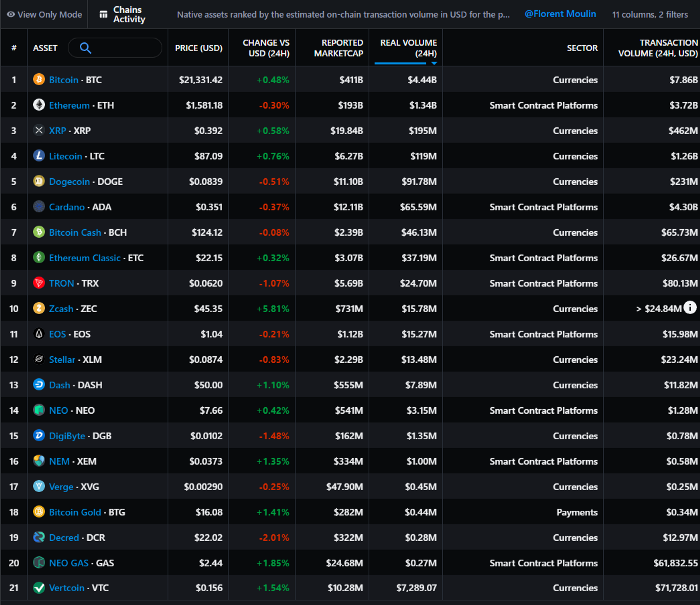
Messari: Major Blockchains' Activities
New York-based Messari provides cryptocurrency open data libraries.
Major blockchains offer 24-hour on-chain volume. https://messari.io/screener/most-active-chains-DB01F96B
What to do
Invest in stable cryptocurrencies. Sort Messari by Real Volume (24H) or Reported Market Cap.
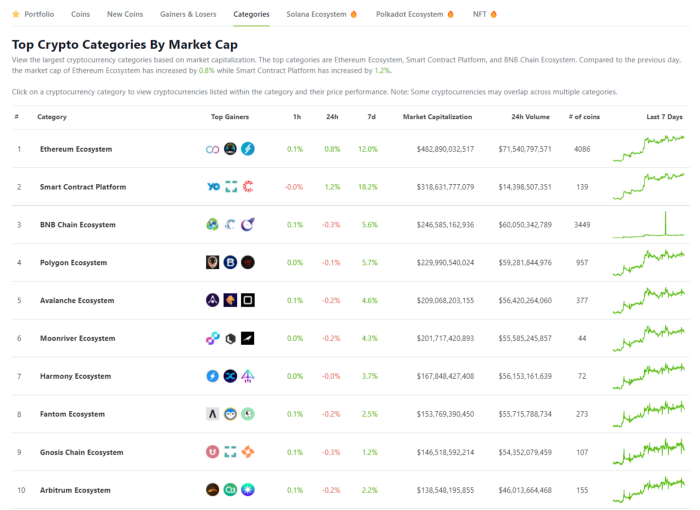
Coingecko: Research on Ecosystems
Top 10 Ecosystems by Coingecko are good.
What to do
Invest in quality.
Leading ten Ecosystems by Market Cap
There are a lot of coins in the ecosystem (second last column of above chart)
CoinGecko's Market Cap Crypto Categories Market capitalization-based cryptocurrency categories. Ethereum Ecosystem www.coingecko.com
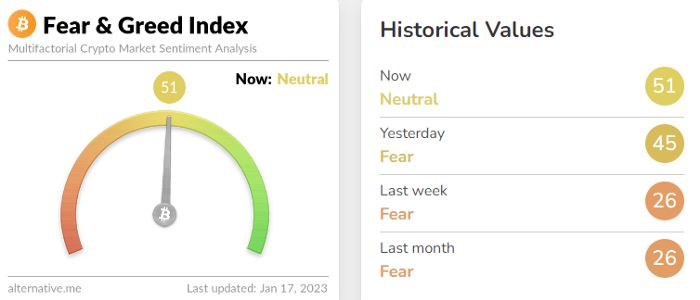
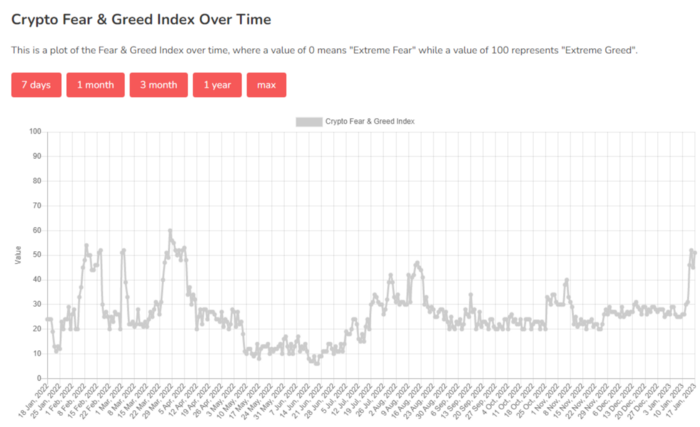
Fear & Greed Index for Bitcoin (FGI)
The Bitcoin market sentiment index ranges from 0 (extreme dread) to 100. (extreme greed).
How to Apply
See market sentiment:
Extreme fright = opportunity to buy
Extreme greed creates sales opportunity (market due for correction).
Glassnode
Glassnode gives facts, information, and confidence to make better Bitcoin, Ethereum, and cryptocurrency investments and trades.
Explore free and paid metrics.
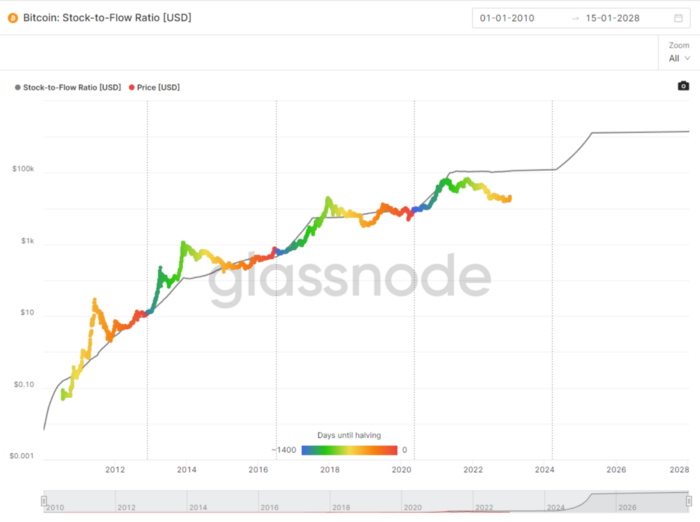
Stock to Flow Ratio: Application
The popular Stock to Flow Ratio concept believes scarcity drives value. Stock to flow is the ratio of circulating Bitcoin supply to fresh production (i.e. newly mined bitcoins). The S/F Ratio has historically predicted Bitcoin prices. PlanB invented this metric.
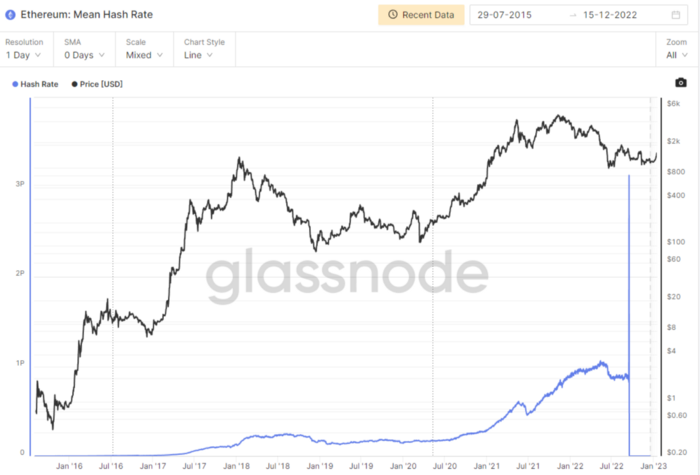
Utilization: Ethereum Hash Rate
Ethereum miners produce an estimated number of hashes per second.
ycharts: Hash rate of the Bitcoin network
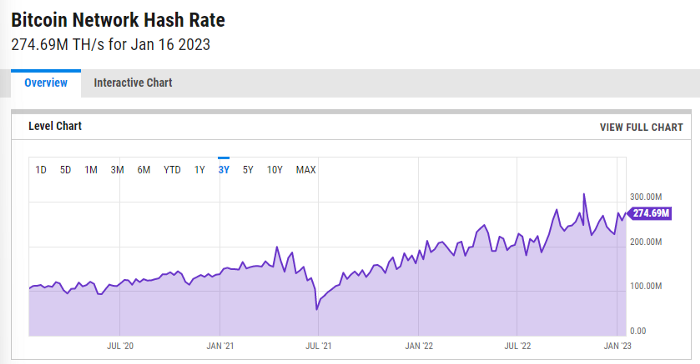
TradingView
TradingView is your go-to tool for investment analysis, watch lists, technical analysis, and recommendations from other traders/investors.
Research for a cryptocurrency project
Two key questions every successful project must ask: Q1: What is this project trying to solve? Is it a big problem or minor? Q2: How does this project make money?
Each cryptocurrency:
Check out the white paper.
check out the project's internet presence on github, twitter, and medium.
the transparency of it
Verify the team structure and founders. Verify their LinkedIn profile, academic history, and other qualifications. Search for their names with scam.
Where to purchase and use cryptocurrencies Is it traded on trustworthy exchanges?
From CoinGecko and CoinMarketCap, we may learn about market cap, circulations, and other important data.
The project must solve a problem. Solving a problem is the goal of the founders.
Avoid projects that resemble multi-level marketing or ponzi schemes.
Your use of social media
Use social media carefully or ignore it: Twitter, TradingView, and YouTube
Someone said this before and there are some truth to it. Social media bullish => short.
Your Behavior
Investigate. Spend time. You decide. Worth it!
Only you have the best interest in your financial future.
You might also like

Sad NoCoiner
3 years ago
Two Key Money Principles You Should Understand But Were Never Taught
Prudence is advised. Be debt-free. Be frugal. Spend less.
This advice sounds nice, but it rarely works.
Most people never learn these two money rules. Both approaches will impact how you see personal finance.
It may safeguard you from inflation or the inability to preserve money.
Let’s dive in.
#1: Making long-term debt your ally
High-interest debt hurts consumers. Many credit cards carry 25% yearly interest (or more), so always pay on time. Otherwise, you’re losing money.
Some low-interest debt is good. Especially when buying an appreciating asset with borrowed money.
Inflation helps you.
If you borrow $800,000 at 3% interest and invest it at 7%, you'll make $32,000 (4%).
As money loses value, fixed payments get cheaper. Your assets' value and cash flow rise.
The never-in-debt crowd doesn't know this. They lose money paying off mortgages and low-interest loans early when they could have bought assets instead.
#2: How To Buy Or Build Assets To Make Inflation Irrelevant
Dozens of studies demonstrate actual wage growth is static; $2.50 in 1964 was equivalent to $22.65 now.
These reports never give solutions unless they're selling gold.
But there is one.
Assets beat inflation.
$100 invested into the S&P 500 would have an inflation-adjusted return of 17,739.30%.
Likewise, you can build assets from nothing. Doing is easy and quick. The returns can boost your income by 10% or more.
The people who obsess over inflation inadvertently make the problem worse for themselves. They wait for The Big Crash to buy assets. Or they moan about debt clocks and spending bills instead of seeking a solution.
Conclusion
Being ultra-prudent is like playing golf with a putter to avoid hitting the ball into the water. Sure, you might not slice a drive into the pond. But, you aren’t going to play well either. Or have very much fun.
Money has rules.
Avoiding debt or investment risks will limit your rewards. Long-term, being too cautious hurts your finances.
Disclaimer: This article is for entertainment purposes only. It is not financial advice, always do your own research.

Alex Mathers
3 years ago
400 articles later, nobody bothered to read them.

Writing for readers:
14 years of daily writing.
I post practically everything on social media. I authored hundreds of articles, thousands of tweets, and numerous volumes to almost no one.
Tens of thousands of readers regularly praise me.
I despised writing. I'm stuck now.
I've learned what readers like and what doesn't.
Here are some essential guidelines for writing with impact:
Readers won't understand your work if you can't.
Though obvious, this slipped me up. Share your truths.
Stories engage human brains.
Showing the journey of a person from worm to butterfly inspires the human spirit.
Overthinking hinders powerful writing.
The best ideas come from inner understanding in between thoughts.
Avoid writing to find it. Write.
Writing a masterpiece isn't motivating.
Write for five minutes to simplify. Step-by-step, entertaining, easy steps.
Good writing requires a willingness to make mistakes.
So write loads of garbage that you can edit into a good piece.
Courageous writing.
A courageous story will move readers. Personal experience is best.
Go where few dare.
Templates, outlines, and boundaries help.
Limitations enhance writing.
Excellent writing is straightforward and readable, removing all the unnecessary fat.
Use five words instead of nine.
Use ordinary words instead of uncommon ones.
Readers desire relatability.
Too much perfection will turn it off.
Write to solve an issue if you can't think of anything to write.
Instead, read to inspire. Best authors read.
Every tweet, thread, and novel must have a central idea.
What's its point?
This can make writing confusing.
️ Don't direct your reader.
Readers quit reading. Demonstrate, describe, and relate.
Even if no one responds, have fun. If you hate writing it, the reader will too.

Joseph Mavericks
3 years ago
Apples Top 100 Meeting: Steve Jobs's Secret Agenda's Lessons
Jobs' secret emails became public due to a litigation with Samsung.
Steve Jobs sent Phil Schiller an email at the end of 2010. Top 100 A was the codename for Apple's annual Top 100 executive meetings. The 2011 one was scheduled.
Everything about this gathering is secret, even attendance. The location is hidden, and attendees can't even drive themselves. Instead, buses transport them to a 2-3 day retreat.
Due to a litigation with Samsung, this Top 100 meeting's agenda was made public in 2014. This was a critical milestone in Apple's history, not a Top 100 meeting. Apple had many obstacles in the 2010s to remain a technological leader. Apple made more money with non-PC goods than with its best-selling Macintosh series. This was the last Top 100 gathering Steve Jobs would attend before passing, and he wanted to make sure his messages carried on before handing over his firm to Tim Cook.
In this post, we'll discuss lessons from Jobs' meeting agenda. Two sorts of entrepreneurs can use these tips:
Those who manage a team in a business and must ensure that everyone is working toward the same goals, upholding the same principles, and being inspired by the same future.
Those who are sole proprietors or independent contractors and who must maintain strict self-discipline in order to stay innovative in their industry and adhere to their own growth strategy.
Here's Steve Jobs's email outlining the annual meeting agenda. It's an 11-part summary of the company's shape and strategy.
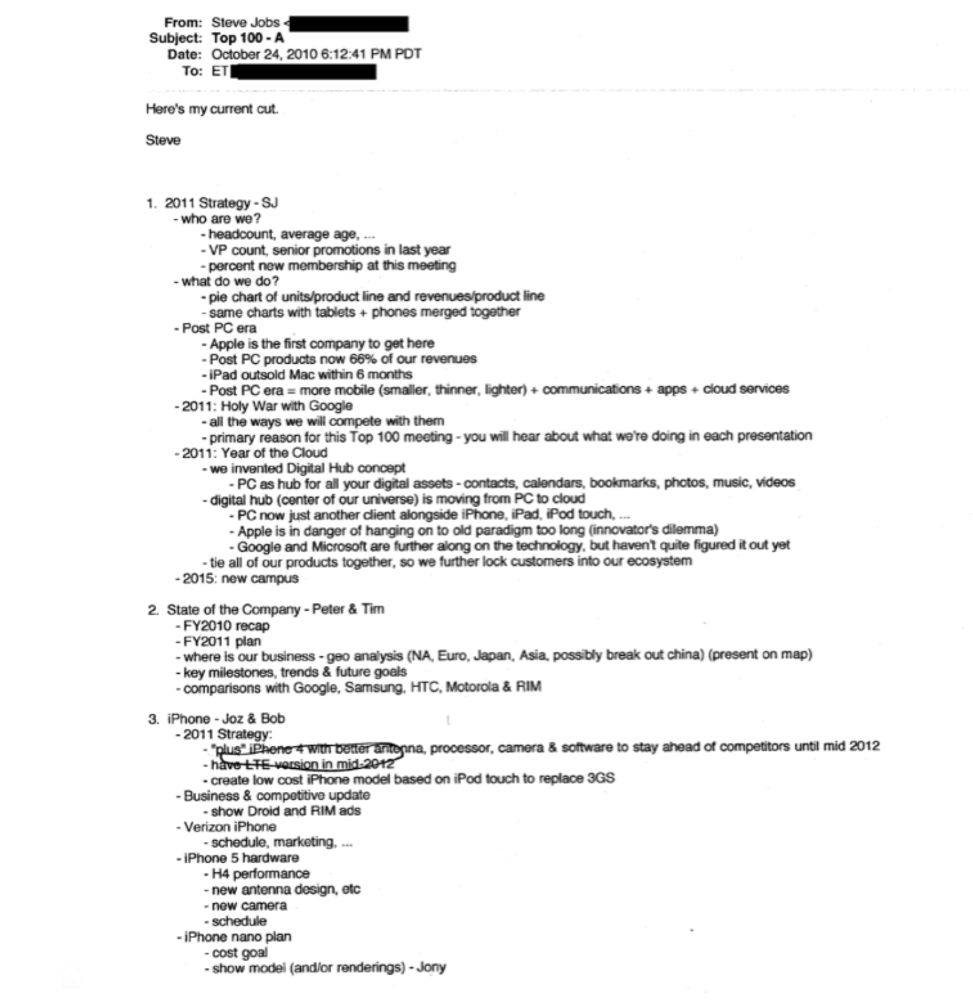
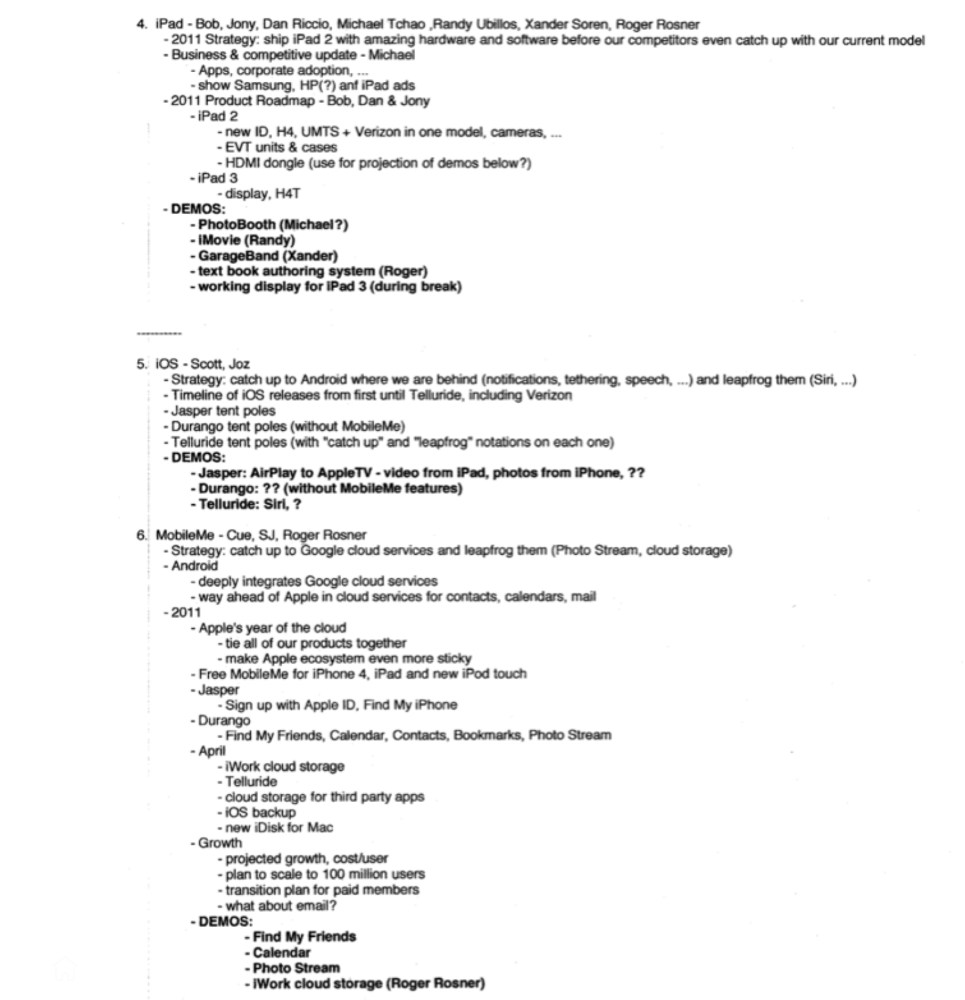
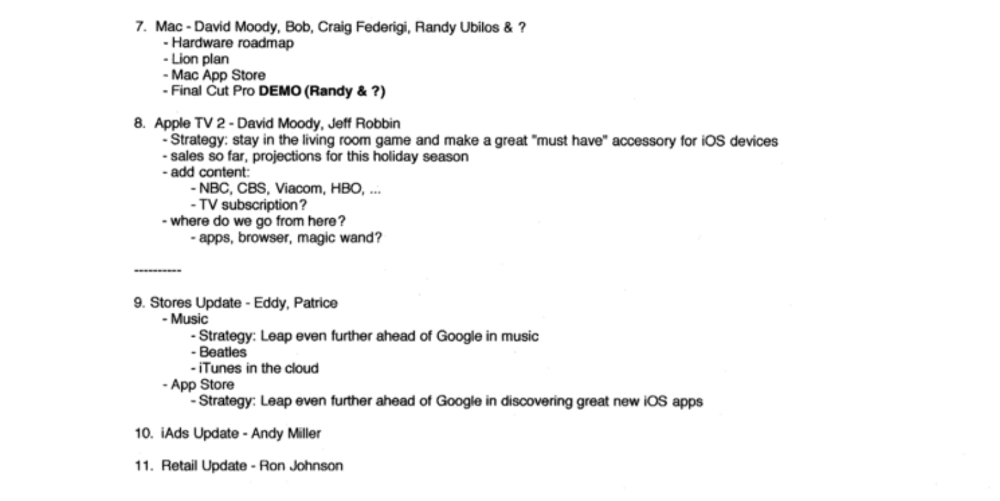
Steve Jobs outlines Apple's 2011 strategy, 10/24/10
1. Correct your data
Business leaders must comprehend their company's metrics. Jobs either mentions critical information he already knows or demands slides showing the numbers he wants. These numbers fall under 2 categories:
Metrics for growth and strategy
As we will see, this was a crucial statistic for Apple since it signaled the beginning of the Post PC era and required them to make significant strategic changes in order to stay ahead of the curve. Post PC products now account for 66% of our revenues.
Within six months, iPad outsold Mac, another sign of the Post-PC age. As we will see, Jobs thought the iPad would be the next big thing, and item number four on the agenda is one of the most thorough references to the iPad.
Geographical analysis: Here, Jobs emphasizes China, where the corporation has a slower start than anticipated. China was dominating Apple's sales growth with 16% of revenue one year after this meeting.
Metrics for people & culture
The individuals that make up a firm are more significant to its success than its headcount or average age. That holds true regardless of size, from a 5-person startup to a Fortune 500 firm. Jobs was aware of this, which is why his suggested agenda begins by emphasizing demographic data.
Along with the senior advancements in the previous year's requested statistic, it's crucial to demonstrate that if the business is growing, the employees who make it successful must also grow.
2. Recognize the vulnerabilities and strengths of your rivals
Steve Jobs was known for attacking his competition in interviews and in his strategies and roadmaps. This agenda mentions 18 competitors, including:
Google 7 times
Android 3 times
Samsung 2 times
Jobs' agenda email was issued 6 days after Apple's Q4 results call (2010). On the call, Jobs trashed Google and Android. His 5-minute intervention included:
Google has acknowledged that the present iteration of Android is not tablet-optimized.
Future Android tablets will not work (Dead On Arrival)
While Google Play only has 90,000 apps, the Apple App Store has 300,000.
Android is extremely fragmented and is continuing to do so.
The App Store for iPad contains over 35,000 applications. The market share of the latest generation of tablets (which debuted in 2011) will be close to nil.
Jobs' aim in blasting the competition on that call was to reassure investors about the upcoming flood of new tablets. Jobs often criticized Google, Samsung, and Microsoft, but he also acknowledged when they did a better job. He was great at detecting his competitors' advantages and devising ways to catch up.
Jobs doesn't hold back when he says in bullet 1 of his agenda: "We further lock customers into our ecosystem while Google and Microsoft are further along on the technology, but haven't quite figured it out yet tie all of our goods together."
The plan outlined in bullet point 5 is immediately clear: catch up to Android where we are falling behind (notifications, tethering, and speech), and surpass them (Siri,). It's important to note that Siri frequently let users down and never quite lived up to expectations.
Regarding MobileMe, see Bullet 6 Jobs admits that when it comes to cloud services like contacts, calendars, and mail, Google is far ahead of Apple.
3. Adapt or perish
Steve Jobs was a visionary businessman. He knew personal computers were the future when he worked on the first Macintosh in the 1980s.
Jobs acknowledged the Post-PC age in his 2010 D8 interview.
Will the tablet replace the laptop, Walt Mossberg questioned Jobs? Jobs' response:
“You know, when we were an agrarian nation, all cars were trucks, because that’s what you needed on the farm. As vehicles started to be used in the urban centers and America started to move into those urban and suburban centers, cars got more popular and innovations like automatic transmission and things that you didn’t care about in a truck as much started to become paramount in cars. And now, maybe 1 out of every 25 vehicles is a truck, where it used to be 100%. PCs are going to be like trucks. They’re still going to be around, still going to have a lot of value, but they’re going to be used by one out of X people.”
Imagine how forward-thinking that was in 2010, especially for the Macintosh creator. You have to be willing to recognize that things were changing and that it was time to start over and focus on the next big thing.
Post-PC is priority number 8 in his 2010 agenda's 2011 Strategy section. Jobs says Apple is the first firm to get here and that Post PC items account about 66% of our income. The iPad outsold the Mac in 6 months, and the Post-PC age means increased mobility (smaller, thinner, lighter). Samsung had just introduced its first tablet, while Apple was working on the iPad 3. (as mentioned in bullet 4).
4. Plan ahead (and different)
Jobs' agenda warns that Apple risks clinging to outmoded paradigms. Clayton Christensen explains in The Innovators Dilemma that huge firms neglect disruptive technologies until they become profitable. Samsung's Galaxy tab, released too late, never caught up to Apple.
Apple faces a similar dilemma with the iPhone, its cash cow for over a decade. It doesn't sell as much because consumers aren't as excited about new iPhone launches and because technology is developing and cell phones may need to be upgraded.
Large companies' established consumer base typically hinders innovation. Clayton Christensen emphasizes that loyal customers from established brands anticipate better versions of current products rather than something altogether fresh and new technologies.
Apple's marketing is smart. Apple's ecosystem is trusted by customers, and its products integrate smoothly. So much so that Apple can afford to be a disruptor by doing something no one has ever done before, something the world's largest corporation shouldn't be the first to try. Apple can test the waters and produce a tremendous innovation tsunami, something few corporations can do.
In March 2011, Jobs appeared at an Apple event. During his address, Steve reminded us about Apple's brand:
“It’s in Apple’s DNA, that technology alone is not enough. That it’s technology married with liberal arts, married with the humanities that yields us the results that make our hearts sink. And nowhere is that more true that in these Post-PC devices.“
More than a decade later, Apple remains one of the most innovative and trailblazing companies in the Post-PC world (industry-disrupting products like Airpods or the Apple Watch came out after that 2011 strategy meeting), and it has reinvented how we use laptops with its M1-powered line of laptops offering unprecedented performance.
A decade after Jobs' death, Apple remains the world's largest firm, and its former CEO had a crucial part in its expansion. If you can do 1% of what Jobs did, you may be 1% as successful.
Not bad.