



More on Entrepreneurship/Creators

Sammy Abdullah
3 years ago
R&D, S&M, and G&A expense ratios for SaaS
SaaS spending is 40/40/20. 40% of operating expenses should be R&D, 40% sales and marketing, and 20% G&A. We wanted to see the statistics behind the rules of thumb. Since October 2017, 73 SaaS startups have gone public. Perhaps the rule of thumb should be 30/50/20. The data is below.
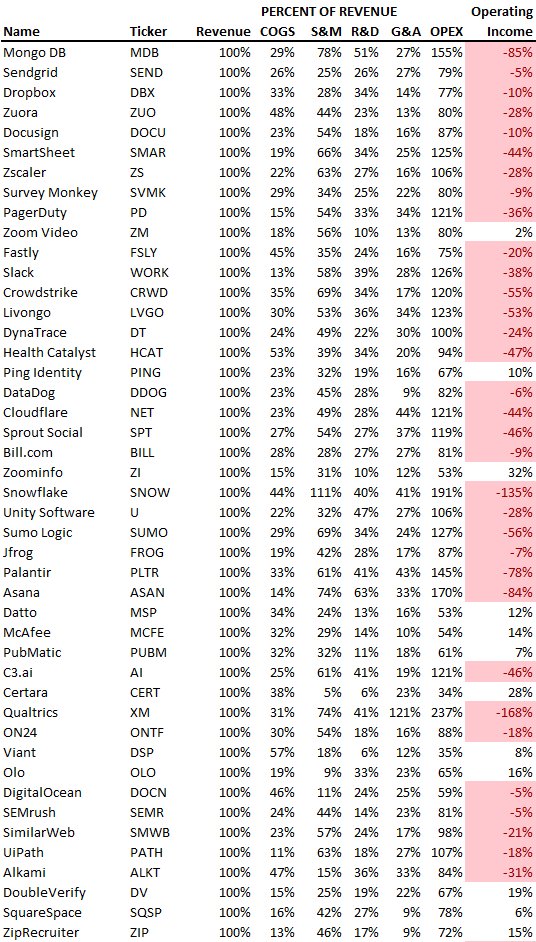
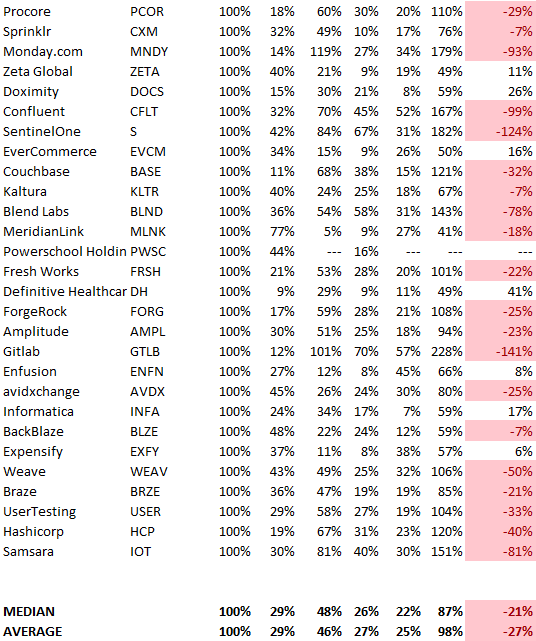
30/50/20. R&D accounts for 26% of opex, sales and marketing 48%, and G&A 22%. We think R&D/S&M/G&A should be 30/50/20.
There are outliers. There are exceptions to rules of thumb. Dropbox spent 45% on R&D whereas Zoom spent 13%. Zoom spent 73% on S&M, Dropbox 37%, and Bill.com 28%. Snowflake spent 130% of revenue on S&M, while their EBITDA margin is -192%.
G&A shouldn't stand out. Minimize G&A spending. Priorities should be product development and sales. Cloudflare, Sendgrid, Snowflake, and Palantir spend 36%, 34%, 37%, and 43% on G&A.
Another myth is that COGS is 20% of revenue. Median and averages are 29%.
Where is the profitability? Data-driven operating income calculations were simplified (Revenue COGS R&D S&M G&A). 20 of 73 IPO businesses reported operational income. Median and average operating income margins are -21% and -27%.
As long as you're growing fast, have outstanding retention, and marquee clients, you can burn cash since recurring income that doesn't churn is a valuable annuity.
The data was compelling overall. 30/50/20 is the new 40/40/20 for more established SaaS enterprises, unprofitability is alright as long as your business is expanding, and COGS can be somewhat more than 20% of revenue.

Nick Nolan
3 years ago
How to Make $1,037,100 in 4 Months with This Weird Website
One great idea might make you rich.
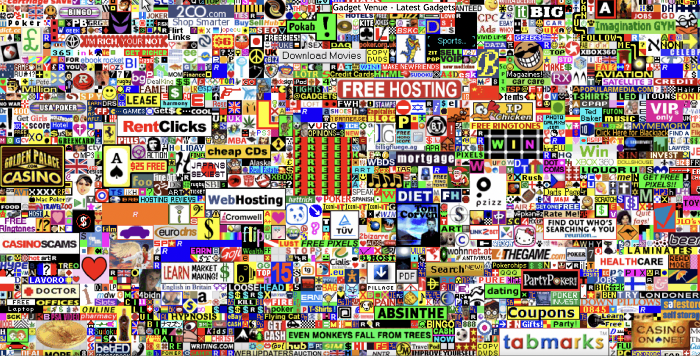
Imagine having a million-dollar concept in college that made a million.
2005 precisely.
Alex Tew, 21, from Wiltshire, England, created The Million Dollar Homepage in August 2005. The idea is basic but beyond the ordinary, which is why it worked.
Alex built a 1,000,000-pixel webpage.
Each website pixel would cost $1. Since pixels are hard to discern, he sold 10x10 squares for $100.
He'd make a million if all the spots sold.
He may have thought about NFTs and the Metaverse decades ago.
MillionDollarHomepage.com launched in 2005.
Businesses and individuals could buy a website spot and add their logo, website link, and tagline. You bought an ad, but nobody visited the website.
If a few thousand people visited the website, it could drive traffic to your business's site.
Alex promised buyers the website would be up for 5 years, so it was a safe bet.
Alex's friend with a music website was the first to buy real estate on the site. Within two weeks, 4,700 pixels sold, and a tracker showed how many were sold and available.

Word-of-mouth marketing got the press's attention quickly. Everyone loves reading about new ways to make money, so it was a good news story.
By September, over 250,000 pixels had been sold, according to a BBC press release.
Alex and the website gained more media and public attention, so traffic skyrocketed. Two months after the site launched, 1,400 customers bought more than 500,000 pixels.
Businesses bought online real estate. They heard thousands visited the site, so they could get attention cheaply.
Unless you bought a few squares, I'm not sure how many people would notice your ad or click your link.
A sponge website owner emailed Alex:
“We tried Million Dollar Homepage because we were impressed at the level of ingenuity and the sheer simplicity of it. If we’re honest, we didn’t expect too much from it. Now, as a direct result, we are pitching for £18,000 GBP worth of new clients and have seen our site traffic increase over a hundred-fold. We’re even going to have to upgrade our hosting facility! It’s been exceptional.”
Web.archive.org screenshots show how the website changed.
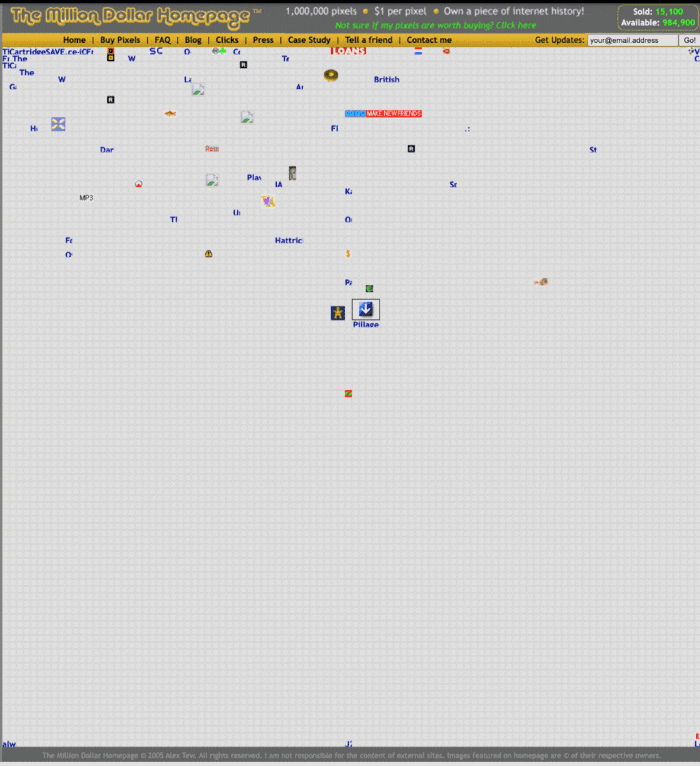
“The idea is to create something of an internet time capsule: a homepage that is unique and permanent. Everything on the internet keeps changing so fast, it will be nice to have something that stays solid and permanent for many years. You can be a part of that!” Alex Tew, 2005
The last 1,000 pixels were sold on January 1, 2006.
By then, the homepage had hundreds of thousands of monthly visitors. Alex put the last space on eBay due to high demand.
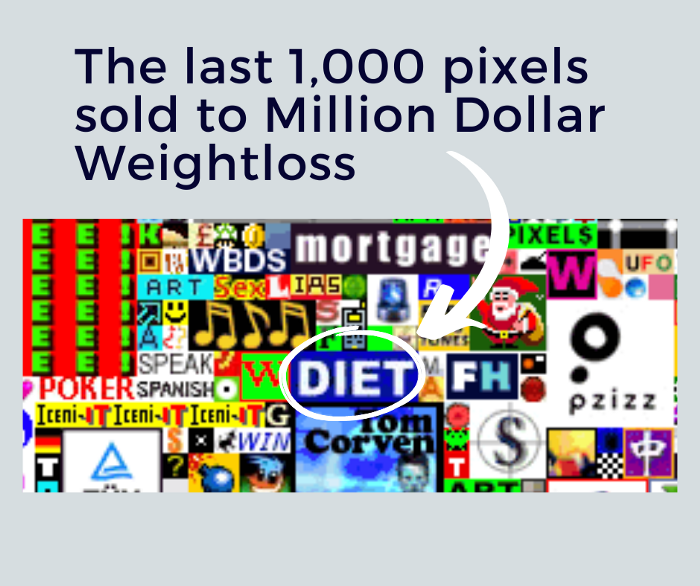
MillionDollarWeightLoss.com won the last pixels for $38,100, bringing revenue to $1,037,100 in 4 months.
Many have tried to replicate this website's success. They've all failed.
This idea only worked because no one had seen this website before.
This winner won't be repeated, but it should inspire you to try something new and creative.
Still popular, you could buy one of the linked domains. You can't buy pixels, but you can buy an expired domain.
One link I clicked costs $59,888.

You'd own a piece of internet history if you spent that much on a domain.
Someone bought stablesgallery.co.uk after the domain expired and restored it.
Many of the linked websites have expired or been redirected, but some still link to the original. I couldn't find sponge's website. Can you?
This is a great example of how a simple creative idea can go viral.
Comment on this amazing success story.

Micah Daigle
3 years ago
Facebook is going away. Here are two explanations for why it hasn't been replaced yet.
And tips for anyone trying.

We see the same story every few years.
BREAKING NEWS: [Platform X] launched a social network. With Facebook's reputation down, the new startup bets millions will switch.
Despite the excitement surrounding each new platform (Diaspora, Ello, Path, MeWe, Minds, Vero, etc.), no major exodus occurred.
Snapchat and TikTok attracted teens with fresh experiences (ephemeral messaging and rapid-fire videos). These features aren't Facebook, even if Facebook replicated them.
Facebook's core is simple: you publish items (typically text/images) and your friends (generally people you know IRL) can discuss them.
It's cool. Sometimes I don't want to, but sh*t. I like it.
Because, well, I like many folks I've met. I enjoy keeping in touch with them and their banter.
I dislike Facebook's corporation. I've been cautiously optimistic whenever a Facebook-killer surfaced.
None succeeded.
Why? Two causes, I think:
People couldn't switch quickly enough, which is reason #1
Your buddies make a social network social.
Facebook started in self-contained communities (college campuses) then grew outward. But a new platform can't.
If we're expected to leave Facebook, we want to know that most of our friends will too.
Most Facebook-killers had bottlenecks. You have to waitlist or jump through hoops (e.g. setting up a server).
Same outcome. Upload. Chirp.
After a week or two of silence, individuals returned to Facebook.
Reason #2: The fundamental experience was different.
Even when many of our friends joined in the first few weeks, it wasn't the same.
There were missing features or a different UX.
Want to reply with a meme? No photos in comments yet. (Trying!)
Want to tag a friend? Nope, sorry. 2019!
Want your friends to see your post? You must post to all your friends' servers. Good luck!
It's difficult to introduce a platform with 100% of the same features as one that's been there for 20 years, yet customers want a core experience.
If you can't, they'll depart.
The causes that led to the causes
Having worked on software teams for 14+ years, I'm not surprised by these challenges. They are a natural development of a few tech sector meta-problems:
Lean startup methodology
Silicon Valley worships lean startup. It's a way of developing software that involves testing a stripped-down version with a limited number of people before selecting what to build.
Billion people use Facebook's functions. They aren't tested. It must work right away*
*This may seem weird to software people, but it's how non-software works! You can't sell a car without wheels.
2. Creativity
Startup entrepreneurs build new things, not copies. I understand. Reinventing the wheel is boring.
We know what works. Different experiences raise adoption friction. Once millions have transferred, more features (and a friendlier UX) can be implemented.
3. Cost scaling
True. Building a product that can sustain hundreds of millions of users in weeks is expensive and complex.
Your lifeboats must have the same capacity as the ship you're evacuating. It's required.
4. Pure ideologies
People who work on Facebook-alternatives are (understandably) critical of Facebook.
They build an open-source, fully-distributed, data-portable, interface-customizable, offline-capable, censorship-proof platform.
Prioritizing these aims can prevent replicating the straightforward experience users expect. Github, not Facebook, is for techies only.
What about the business plan, though?
Facebook-killer attempts have followed three models.
Utilize VC funding to increase your user base, then monetize them later. (If you do this, you won't kill Facebook; instead, Facebook will become you.)
Users must pay to utilize it. (This causes a huge bottleneck and slows the required quick expansion, preventing it from seeming like a true social network.)
Make it a volunteer-run, open-source endeavor that is free. (This typically denotes that something is cumbersome, difficult to operate, and is only for techies.)
Wikipedia is a fourth way.
Wikipedia is one of the most popular websites and a charity. No ads. Donations support them.
A Facebook-killer managed by a good team may gather millions (from affluent contributors and the crowd) for their initial phase of development. Then it might sustain on regular donations, ethical transactions (e.g. fees on commerce, business sites, etc.), and government grants/subsidies (since it would essentially be a public utility).
When you're not aiming to make investors rich, it's remarkable how little money you need.
If you want to build a Facebook competitor, follow these tips:
Drop the lean startup philosophy. Wait until you have a finished product before launching. Build it, thoroughly test it for bugs, and then release it.
Delay innovating. Wait till millions of people have switched before introducing your great new features. Make it nearly identical for now.
Spend money climbing. Make sure that guests can arrive as soon as they are invited. Never keep them waiting. Make things easy for them.
Make it accessible to all. Even if doing so renders it less philosophically pure, it shouldn't require technical expertise to utilize.
Constitute a nonprofit. Additionally, develop community ownership structures. Profit maximization is not the only strategy for preserving valued assets.
Last thoughts
Nobody has killed Facebook, but Facebook is killing itself.
The startup is burying the newsfeed to become a TikTok clone. Meta itself seems to be ditching the platform for the metaverse.
I wish I was happy, but I'm not. I miss (understandably) removed friends' postings and remarks. It could be a ghost town in a few years. My dance moves aren't TikTok-worthy.
Who will lead? It's time to develop a social network for the people.
Greetings if you're working on it. I'm not a company founder, but I like to help hard-working folks.
You might also like

Bart Krawczyk
2 years ago
Understanding several Value Proposition kinds will help you create better goods.
Fixing problems isn't enough.
Numerous articles and how-to guides on value propositions focus on fixing consumer concerns.
Contrary to popular opinion, addressing customer pain rarely suffices. Win your market category too.
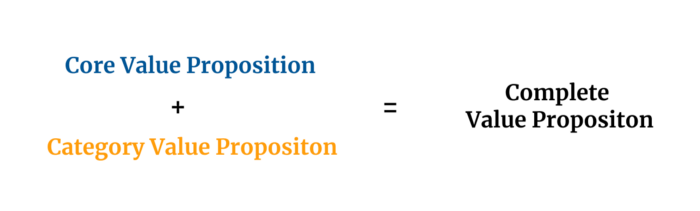
Core Value Statement
Value proposition usually means a product's main value.
Its how your product solves client problems. The product's core.
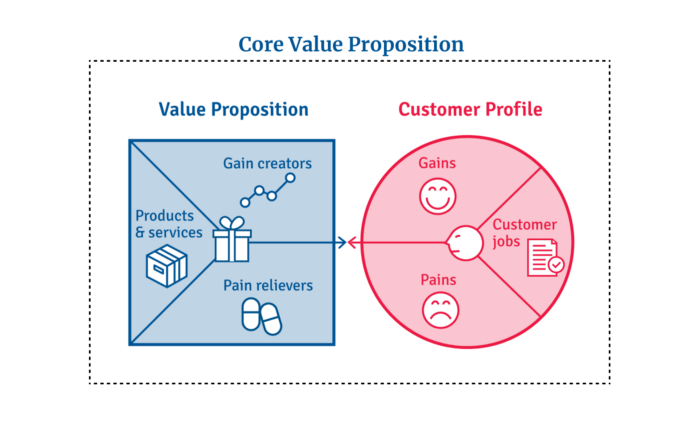
Answering these questions creates a relevant core value proposition:
What tasks is your customer trying to complete? (Jobs for clients)
How much discomfort do they feel while they perform this? (pains)
What would they like to see improved or changed? (gains)
After that, you create products and services that alleviate those pains and give value to clients.
Value Proposition by Category
Your product belongs to a market category and must follow its regulations, regardless of its value proposition.
Creating a new market category is challenging. Fitting into customers' product perceptions is usually better than trying to change them.
New product users simplify market categories. Products are labeled.
Your product will likely be associated with a collection of products people already use.
Example: IT experts will use your communication and management app.
If your target clients think it's an advanced mail software, they'll compare it to others and expect things like:
comprehensive calendar
spam detectors
adequate storage space
list of contacts
etc.
If your target users view your product as a task management app, things change. You can survive without a contact list, but not status management.
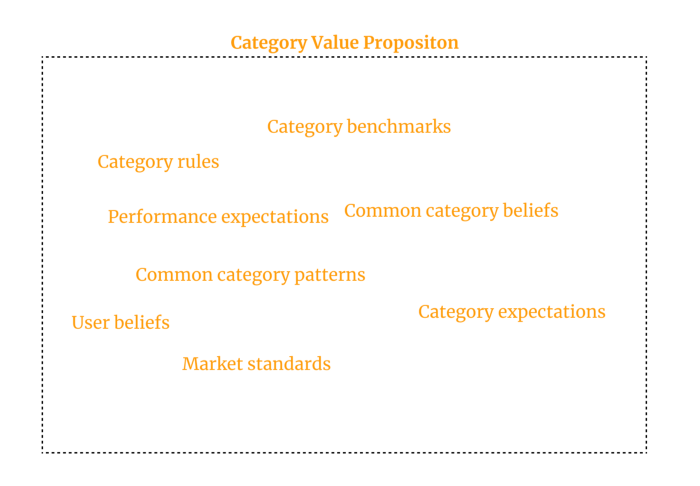
Find out what your customers compare your product to and if it fits your value offer. If so, adapt your product plan to dominate this market. If not, try different value propositions and messaging to put the product in the right context.
Finished Value Proposition
A comprehensive value proposition is when your solution addresses user problems and wins its market category.
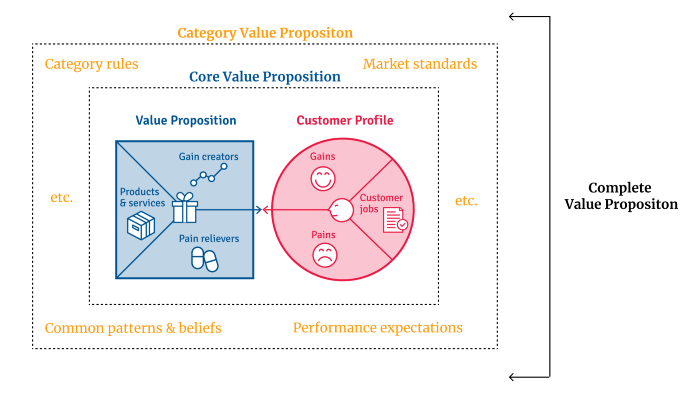
Addressing simply the primary value proposition may produce a valuable and original product, but it may struggle to cross the chasm into the mainstream market. Meeting expectations is easier than changing views.
Without a unique value proposition, you will drown in the red sea of competition.
To conclude:
Find out who your target consumer is and what their demands and problems are.
To meet these needs, develop and test a primary value proposition.
Speak with your most devoted customers. Recognize the alternatives they use to compare you against and the market segment they place you in.
Recognize the requirements and expectations of the market category.
To meet or surpass category standards, modify your goods.
Great products solve client problems and win their category.

Christianlauer
3 years ago
Looker Studio Pro is now generally available, according to Google.
Great News about the new Google Business Intelligence Solution

Google has renamed Data Studio to Looker Studio and Looker Studio Pro.
Now, Google releases Looker Studio Pro. Similar to the move from Data Studio to Looker Studio, Looker Studio Pro is basically what Looker was previously, but both solutions will merge. Google says the Pro edition will acquire new enterprise management features, team collaboration capabilities, and SLAs.
![Dashboard Example in Looker Studio Pro — Image Source: Google[2]](https://storage.googleapis.com/int3grity/posts/m9yb4IqJCm7D/images/ZuJudlWT6GUeTKKNVduA5)
In addition to Google's announcements and sales methods, additional features include:
Looker Studio assets can now have organizational ownership. Customers can link Looker Studio to a Google Cloud project and migrate existing assets once. This provides:
Your users' created Looker Studio assets are all kept in a Google Cloud project.
When the users who own assets leave your organization, the assets won't be removed.
Using IAM, you may provide each Looker Studio asset in your company project-level permissions.
Other Cloud services can access Looker Studio assets that are owned by a Google Cloud project.
Looker Studio Pro clients may now manage report and data source access at scale using team workspaces.
Google announcing these features for the pro version is fascinating. Both products will likely converge, but Google may only release many features in the premium version in the future. Microsoft with Power BI and its free and premium variants already achieves this.
Sources and Further Readings
Google, Release Notes (2022)
Google, Looker (2022)

Vitalik
3 years ago
Fairness alternatives to selling below market clearing prices (or community sentiment, or fun)
When a seller has a limited supply of an item in high (or uncertain and possibly high) demand, they frequently set a price far below what "the market will bear." As a result, the item sells out quickly, with lucky buyers being those who tried to buy first. This has happened in the Ethereum ecosystem, particularly with NFT sales and token sales/ICOs. But this phenomenon is much older; concerts and restaurants frequently make similar choices, resulting in fast sell-outs or long lines.
Why do sellers do this? Economists have long wondered. A seller should sell at the market-clearing price if the amount buyers are willing to buy exactly equals the amount the seller has to sell. If the seller is unsure of the market-clearing price, they should sell at auction and let the market decide. So, if you want to sell something below market value, don't do it. It will hurt your sales and it will hurt your customers. The competitions created by non-price-based allocation mechanisms can sometimes have negative externalities that harm third parties, as we will see.
However, the prevalence of below-market-clearing pricing suggests that sellers do it for good reason. And indeed, as decades of research into this topic has shown, there often are. So, is it possible to achieve the same goals with less unfairness, inefficiency, and harm?
Selling at below market-clearing prices has large inefficiencies and negative externalities
An item that is sold at market value or at an auction allows someone who really wants it to pay the high price or bid high in the auction. So, if a seller sells an item below market value, some people will get it and others won't. But the mechanism deciding who gets the item isn't random, and it's not always well correlated with participant desire. It's not always about being the fastest at clicking buttons. Sometimes it means waking up at 2 a.m. (but 11 p.m. or even 2 p.m. elsewhere). Sometimes it's just a "auction by other means" that's more chaotic, less efficient, and has far more negative externalities.
There are many examples of this in the Ethereum ecosystem. Let's start with the 2017 ICO craze. For example, an ICO project would set the price of the token and a hard maximum for how many tokens they are willing to sell, and the sale would start automatically at some point in time. The sale ends when the cap is reached.
So what? In practice, these sales often ended in 30 seconds or less. Everyone would start sending transactions in as soon as (or just before) the sale started, offering higher and higher fees to encourage miners to include their transaction first. Instead of the token seller receiving revenue, miners receive it, and the sale prices out all other applications on-chain.
The most expensive transaction in the BAT sale set a fee of 580,000 gwei, paying a fee of $6,600 to get included in the sale.
Many ICOs after that tried various strategies to avoid these gas price auctions; one ICO notably had a smart contract that checked the transaction's gasprice and rejected it if it exceeded 50 gwei. But that didn't solve the issue. Buyers hoping to game the system sent many transactions hoping one would get through. An auction by another name, clogging the chain even more.
ICOs have recently lost popularity, but NFTs and NFT sales have risen in popularity. But the NFT space didn't learn from 2017; they do fixed-quantity sales just like ICOs (eg. see the mint function on lines 97-108 of this contract here). So what?
That's not the worst; some NFT sales have caused gas price spikes of up to 2000 gwei.
High gas prices from users fighting to get in first by sending higher and higher transaction fees. An auction renamed, pricing out all other applications on-chain for 15 minutes.
So why do sellers sometimes sell below market price?
Selling below market value is nothing new, and many articles, papers, and podcasts have written (and sometimes bitterly complained) about the unwillingness to use auctions or set prices to market-clearing levels.
Many of the arguments are the same for both blockchain (NFTs and ICOs) and non-blockchain examples (popular restaurants and concerts). Fairness and the desire not to exclude the poor, lose fans or create tension by being perceived as greedy are major concerns. The 1986 paper by Kahneman, Knetsch, and Thaler explains how fairness and greed can influence these decisions. I recall that the desire to avoid perceptions of greed was also a major factor in discouraging the use of auction-like mechanisms in 2017.
Aside from fairness concerns, there is the argument that selling out and long lines create a sense of popularity and prestige, making the product more appealing to others. Long lines should have the same effect as high prices in a rational actor model, but this is not the case in reality. This applies to ICOs and NFTs as well as restaurants. Aside from increasing marketing value, some people find the game of grabbing a limited set of opportunities first before everyone else is quite entertaining.
But there are some blockchain-specific factors. One argument for selling ICO tokens below market value (and one that persuaded the OmiseGo team to adopt their capped sale strategy) is community dynamics. The first rule of community sentiment management is to encourage price increases. People are happy if they are "in the green." If the price drops below what the community members paid, they are unhappy and start calling you a scammer, possibly causing a social media cascade where everyone calls you a scammer.
This effect can only be avoided by pricing low enough that post-launch market prices will almost certainly be higher. But how do you do this without creating a rush for the gates that leads to an auction?
Interesting solutions
It's 2021. We have a blockchain. The blockchain is home to a powerful decentralized finance ecosystem, as well as a rapidly expanding set of non-financial tools. The blockchain also allows us to reset social norms. Where decades of economists yelling about "efficiency" failed, blockchains may be able to legitimize new uses of mechanism design. If we could use our more advanced tools to create an approach that more directly solves the problems, with fewer side effects, wouldn't that be better than fiddling with a coarse-grained one-dimensional strategy space of selling at market price versus below market price?
Begin with the goals. We'll try to cover ICOs, NFTs, and conference tickets (really a type of NFT) all at the same time.
1. Fairness: don't completely exclude low-income people from participation; give them a chance. The goal of token sales is to avoid high initial wealth concentration and have a larger and more diverse initial token holder community.
2. Don’t create races: Avoid situations where many people rush to do the same thing and only a few get in (this is the type of situation that leads to the horrible auctions-by-another-name that we saw above).
3. Don't require precise market knowledge: the mechanism should work even if the seller has no idea how much demand exists.
4. Fun: The process of participating in the sale should be fun and game-like, but not frustrating.
5. Give buyers positive expected returns: in the case of a token (or an NFT), buyers should expect price increases rather than decreases. This requires selling below market value.
Let's start with (1). From Ethereum's perspective, there is a simple solution. Use a tool designed for the job: proof of personhood protocols! Here's one quick idea:
Mechanism 1 Each participant (verified by ID) can buy up to ‘’X’’ tokens at price P, with the option to buy more at an auction.
With the per-person mechanism, buyers can get positive expected returns for the portion sold through the per-person mechanism, and the auction part does not require sellers to understand demand levels. Is it race-free? The number of participants buying through the per-person pool appears to be high. But what if the per-person pool isn't big enough to accommodate everyone?
Make the per-person allocation amount dynamic.
Mechanism 2 Each participant can deposit up to X tokens into a smart contract to declare interest. Last but not least, each buyer receives min(X, N / buyers) tokens, where N is the total sold through the per-person pool (some other amount can also be sold by auction). The buyer gets their deposit back if it exceeds the amount needed to buy their allocation.
No longer is there a race condition based on the number of buyers per person. No matter how high the demand, it's always better to join sooner rather than later.
Here's another idea if you like clever game mechanics with fancy quadratic formulas.
Mechanism 3 Each participant can buy X units at a price P X 2 up to a maximum of C tokens per buyer. C starts low and gradually increases until enough units are sold.
The quantity allocated to each buyer is theoretically optimal, though post-sale transfers will degrade this optimality over time. Mechanisms 2 and 3 appear to meet all of the above objectives. They're not perfect, but they're good starting points.
One more issue. For fixed and limited supply NFTs, the equilibrium purchased quantity per participant may be fractional (in mechanism 2, number of buyers > N, and in mechanism 3, setting C = 1 may already lead to over-subscription). With fractional sales, you can offer lottery tickets: if there are N items available, you have a chance of N/number of buyers of getting the item, otherwise you get a refund. For a conference, groups could bundle their lottery tickets to guarantee a win or a loss. The certainty of getting the item can be auctioned.
The bottom tier of "sponsorships" can be used to sell conference tickets at market rate. You may end up with a sponsor board full of people's faces, but is that okay? After all, John Lilic was on EthCC's sponsor board!
Simply put, if you want to be reliably fair to people, you need an input that explicitly measures people. Authentication protocols do this (and if desired can be combined with zero knowledge proofs to ensure privacy). So we should combine the efficiency of market and auction-based pricing with the equality of proof of personhood mechanics.
Answers to possible questions
Q: Won't people who don't care about your project buy the item and immediately resell it?
A: Not at first. Meta-games take time to appear in practice. If they do, making them untradeable for a while may help mitigate the damage. Using your face to claim that your previous account was hacked and that your identity, including everything in it, should be moved to another account works because proof-of-personhood identities are untradeable.
Q: What if I want to make my item available to a specific community?
A: Instead of ID, use proof of participation tokens linked to community events. Another option, also serving egalitarian and gamification purposes, is to encrypt items within publicly available puzzle solutions.
Q: How do we know they'll accept? Strange new mechanisms have previously been resisted.
A: Having economists write screeds about how they "should" accept a new mechanism that they find strange is difficult (or even "equity"). However, abrupt changes in context effectively reset people's expectations. So the blockchain space is the best place to try this. You could wait for the "metaverse", but it's possible that the best version will run on Ethereum anyway, so start now.