



More on Technology

Ossiana Tepfenhart
3 years ago
Has anyone noticed what an absolute shitshow LinkedIn is?
After viewing its insanity, I had to leave this platform.
I joined LinkedIn recently. That's how I aim to increase my readership and gain recognition. LinkedIn's premise appealed to me: a Facebook-like platform for professional networking.
I don't use Facebook since it's full of propaganda. It seems like a professional, apolitical space, right?
I expected people to:
be more formal and respectful than on Facebook.
Talk about the inclusiveness of the workplace. Studies consistently demonstrate that inclusive, progressive workplaces outperform those that adhere to established practices.
Talk about business in their industry. Yep. I wanted to read articles with advice on how to write better and reach a wider audience.
Oh, sh*t. I hadn't anticipated that.
After posting and reading about inclusivity and pro-choice, I was startled by how many professionals acted unprofessionally. I've seen:
Men have approached me in the DMs in a really aggressive manner. Yikes. huge yikes Not at all professional.
I've heard pro-choice women referred to as infant killers by many people. If I were the CEO of a company and I witnessed one of my employees acting that poorly, I would immediately fire them.
Many posts are anti-LGBTQIA+, as I've noticed. a lot, like, a lot. Some are subtly stating that the world doesn't need to know, while others are openly making fun of transgender persons like myself.
Several medical professionals were posting explicitly racist comments. Even if you are as white as a sheet like me, you should be alarmed by this. Who's to guarantee a patient who is black won't unintentionally die?
I won't even get into how many men in STEM I observed pushing for the exclusion of women from their fields. I shouldn't be surprised considering the majority of those men I've encountered have a passionate dislike for women, but goddamn, dude.
Many people appear entirely too at ease displaying their bigotry on their professional profiles.
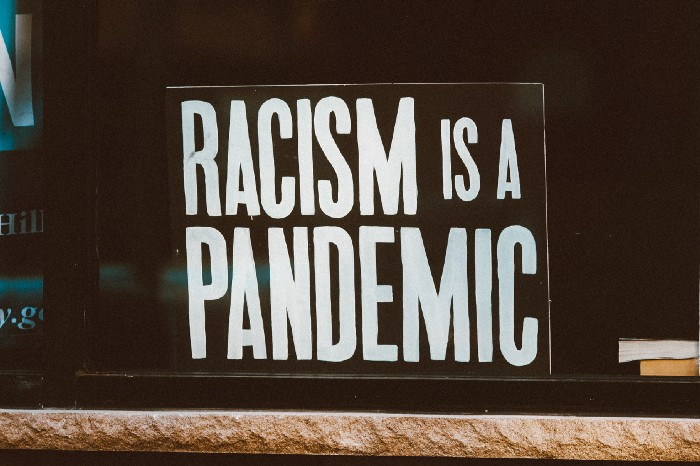
As a white female, I'm always shocked by people's open hostility. Professional environments are very important.
I don't know if this is still true (people seem too politicized to care), but if I heard many of these statements in person, I'd suppose they feel ashamed. Really.
Are you not ashamed of being so mean? Are you so weak that competing with others terrifies you? Isn't this embarrassing?
LinkedIn isn't great at censoring offensive comments. These people aren't getting warnings. So they were safe while others were unsafe.
The CEO in me would want to know if I had placed a bigot on my staff.

I always wondered if people's employers knew about their online behavior. If they know how horrible they appear, they don't care.
As a manager, I was picky about hiring. Obviously. In most industries, it costs $1,000 or more to hire a full-time employee, so be sure it pays off.
Companies that embrace diversity and tolerance (and are intolerant of intolerance) are more profitable, likely to recruit top personnel, and successful.
People avoid businesses that alienate them. That's why I don't eat at Chic-Fil-A and why folks avoid MyPillow. Being inclusive is good business.
CEOs are harmed by online bigots. Image is an issue. If you're a business owner, you can fire staff who don't help you.
On the one hand, I'm delighted it makes it simpler to identify those with whom not to do business.
Don’t get me wrong. I'm glad I know who to avoid when hiring, getting references, or searching for a job. When people are bad, it saves me time.
What's up with professionalism?
Really. I need to know. I've crossed the boundary between acceptable and unacceptable behavior, but never on a professional platform. I got in trouble for not wearing bras even though it's not part of my gender expression.
If I behaved like that at my last two office jobs, my supervisors would have fired me immediately. Some of the behavior I've seen is so outrageous, I can't believe these people have employment. Some are even leaders.
Like…how? Is hatred now normalized?
Please pay attention whether you're seeking for a job or even simply a side gig.
Do not add to the tragedy that LinkedIn comments can be, or at least don't make uninformed comments. Even if you weren't banned, the site may still bite you.
Recruiters can and do look at your activity. Your writing goes on your résumé. The wrong comment might lose you a job.
Recruiters and CEOs might reject candidates whose principles contradict with their corporate culture. Bigotry will get you banned from many companies, especially if others report you.
If you want a high-paying job, avoid being a LinkedIn asshole. People care even if you think no one does. Before speaking, ponder. Is this how you want to be perceived?
Better advice:
If your politics might turn off an employer, stop posting about them online and ask yourself why you hold such objectionable ideas.

Duane Michael
3 years ago
Don't Fall Behind: 7 Subjects You Must Understand to Keep Up with Technology
As technology develops, you should stay up to date
You don't want to fall behind, do you? This post covers 7 tech-related things you should know.
You'll learn how to operate your computer (and other electronic devices) like an expert and how to leverage the Internet and social media to create your brand and business. Read on to stay relevant in today's tech-driven environment.
You must learn how to code.
Future-language is coding. It's how we and computers talk. Learn coding to keep ahead.
Try Codecademy or Code School. There are also numerous free courses like Coursera or Udacity, but they take a long time and aren't necessarily self-paced, so it can be challenging to find the time.
Artificial intelligence (AI) will transform all jobs.
Our skillsets must adapt with technology. AI is a must-know topic. AI will revolutionize every employment due to advances in machine learning.
Here are seven AI subjects you must know.
What is artificial intelligence?
How does artificial intelligence work?
What are some examples of AI applications?
How can I use artificial intelligence in my day-to-day life?
What jobs have a high chance of being replaced by artificial intelligence and how can I prepare for this?
Can machines replace humans? What would happen if they did?
How can we manage the social impact of artificial intelligence and automation on human society and individual people?
Blockchain Is Changing the Future
Few of us know how Bitcoin and blockchain technology function or what impact they will have on our lives. Blockchain offers safe, transparent, tamper-proof transactions.
It may alter everything from business to voting. Seven must-know blockchain topics:
Describe blockchain.
How does the blockchain function?
What advantages does blockchain offer?
What possible uses for blockchain are there?
What are the dangers of blockchain technology?
What are my options for using blockchain technology?
What does blockchain technology's future hold?
Cryptocurrencies are here to stay
Cryptocurrencies employ cryptography to safeguard transactions and manage unit creation. Decentralized cryptocurrencies aren't controlled by governments or financial institutions.

Bitcoin, the first cryptocurrency, was launched in 2009. Cryptocurrencies can be bought and sold on decentralized exchanges.
Bitcoin is here to stay.
Bitcoin isn't a fad, despite what some say. Since 2009, Bitcoin's popularity has grown. Bitcoin is worth learning about now. Since 2009, Bitcoin has developed steadily.
With other cryptocurrencies emerging, many people are wondering if Bitcoin still has a bright future. Curiosity is natural. Millions of individuals hope their Bitcoin investments will pay off since they're popular now.
Thankfully, they will. Bitcoin is still running strong a decade after its birth. Here's why.
The Internet of Things (IoT) is no longer just a trendy term.
IoT consists of internet-connected physical items. These items can share data. IoT is young but developing fast.
20 billion IoT-connected devices are expected by 2023. So much data! All IT teams must keep up with quickly expanding technologies. Four must-know IoT topics:
Recognize the fundamentals: Priorities first! Before diving into more technical lingo, you should have a fundamental understanding of what an IoT system is. Before exploring how something works, it's crucial to understand what you're working with.
Recognize Security: Security does not stand still, even as technology advances at a dizzying pace. As IT professionals, it is our duty to be aware of the ways in which our systems are susceptible to intrusion and to ensure that the necessary precautions are taken to protect them.
Be able to discuss cloud computing: The cloud has seen various modifications over the past several years once again. The use of cloud computing is also continually changing. Knowing what kind of cloud computing your firm or clients utilize will enable you to make the appropriate recommendations.
Bring Your Own Device (BYOD)/Mobile Device Management (MDM) is a topic worth discussing (MDM). The ability of BYOD and MDM rules to lower expenses while boosting productivity among employees who use these services responsibly is a major factor in their continued growth in popularity.
IoT Security is key
As more gadgets connect, they must be secure. IoT security includes securing devices and encrypting data. Seven IoT security must-knows:
fundamental security ideas
Authorization and identification
Cryptography
electronic certificates
electronic signatures
Private key encryption
Public key encryption
Final Thoughts
With so much going on in the globe, it can be hard to stay up with technology. We've produced a list of seven tech must-knows.

Jussi Luukkonen, MBA
3 years ago
Is Apple Secretly Building A Disruptive Tsunami?
A TECHNICAL THOUGHT
The IT giant is seeding the digital Great Renaissance.
Recently, technology has been dull.
We're still fascinated by processing speeds. Wearables are no longer an engineer's dream.
Apple has been quiet and avoided huge announcements. Slowness speaks something. Everything in the spaceship HQ seems to be turning slowly, unlike competitors around buzzwords.
Is this a sign of the impending storm?
Metas stock has fallen while Google milks dumb people. Microsoft steals money from corporations and annexes platforms like Linkedin.
Just surface bubbles?
Is Apple, one of the technology continents, pushing against all others to create a paradigm shift?
The fundamental human right to privacy
Apple's unusual remarks emphasize privacy. They incorporate it into their business models and judgments.
Apple believes privacy is a human right. There are no compromises.
This makes it hard for other participants to gain Apple's ecosystem's efficiencies.
Other players without hardware platforms lose.
Apple delivers new kidneys without rejection, unlike other software vendors. Nothing compromises your privacy.
Corporate citizenship will become more popular.
Apples have full coffers. They've started using that flow to better communities, which is great.
Apple's $2.5B home investment is one example. Google and Facebook are building or proposing to build workforce housing.
Apple's funding helps marginalized populations in more than 25 California counties, not just Apple employees.
Is this a trend, and does Apple keep giving back? Hope so.
I'm not cynical enough to suspect these investments have malicious motives.
The last frontier is the environment.
Climate change is a battle-to-win.
Long-term winners will be companies that protect the environment, turning climate change dystopia into sustainable growth.
Apple has been quietly changing its supply chain to be carbon-neutral by 2030.
“Apple is dedicated to protecting the planet we all share with solutions that are supporting the communities where we work.” Lisa Jackson, Apple’s vice president of environment.
Apple's $4.7 billion Green Bond investment will produce 1.2 gigawatts of green energy for the corporation and US communities. Apple invests $2.2 billion in Europe's green energy. In the Philippines, Thailand, Nigeria, Vietnam, Colombia, Israel, and South Africa, solar installations are helping communities obtain sustainable energy.
Apple is already carbon neutral today for its global corporate operations, and this new commitment means that by 2030, every Apple device sold will have net zero climate impact. -Apple.
Apple invests in green energy and forests to reduce its paper footprint in China and the US. Apple and the Conservation Fund are safeguarding 36,000 acres of US working forest, according to GreenBiz.
Apple's packaging paper is recycled or from sustainably managed forests.
What matters is the scale.
$1 billion is a rounding error for Apple.
These small investments originate from a tree with deep, spreading roots.
Apple's genes are anchored in building the finest products possible to improve consumers' lives.
I felt it when I switched to my iPhone while waiting for a train and had to pack my Macbook. iOS 16 dictation makes writing more enjoyable. Small change boosts productivity. Smooth transition from laptop to small screen and dictation.
Apples' tiny, well-planned steps have great growth potential for all consumers in everything they do.
There is clearly disruption, but it doesn't have to be violent
Digital channels, methods, and technologies have globalized human consciousness. One person's responsibility affects many.
Apple gives us tools to be privately connected. These technologies foster creativity, innovation, fulfillment, and safety.
Apple has invented a mountain of technologies, services, and channels to assist us adapt to the good future or combat evil forces who cynically aim to control us and ruin the environment and communities. Apple has quietly disrupted sectors for decades.
Google, Microsoft, and Meta, among others, should ride this wave. It's a tsunami, but it doesn't have to be devastating if we care, share, and cooperate with political decision-makers and community leaders worldwide.
A fresh Renaissance
Renaissance geniuses Michelangelo and Da Vinci. Different but seeing something no one else could yet see. Both were talented in many areas and could discover art in science and science in art.
These geniuses exemplified a period that changed humanity for the better. They created, used, and applied new, valuable things. It lives on.
Apple is a digital genius orchard. Wozniak and Jobs offered us fertile ground for the digital renaissance. We'll build on their legacy.
We may put our seeds there and see them bloom despite corporate greed and political ignorance.
I think the coming tsunami will illuminate our planet like the Renaissance.
You might also like

Tim Denning
3 years ago
Bills are paid by your 9 to 5. 6 through 12 help you build money.
40 years pass. After 14 years of retirement, you die. Am I the only one who sees the problem?

I’m the Jedi master of escaping the rat race.
Not to impress. I know this works since I've tried it. Quitting a job to make money online is worse than Kim Kardashian's internet-burning advice.
Let me help you rethink the move from a career to online income to f*ck you money.
To understand why a job is a joke, do some life math.
Without a solid why, nothing makes sense.
The retirement age is 65. Our processed food consumption could shorten our 79-year average lifespan.
You spend 40 years working.
After 14 years of retirement, you die.
Am I alone in seeing the problem?
Life is too short to work a job forever, especially since most people hate theirs. After-hours skills are vital.
Money equals unrestricted power, f*ck you.
F*ck you money is the answer.
Jack Raines said it first. He says we can do anything with the money. Jack, a young rebel straight out of college, can travel and try new foods.
F*ck you money signifies not checking your bank account before buying.
F*ck you” money is pure, unadulterated freedom with no strings attached.
Jack claims you're rich when you rarely think about money.
Avoid confusion.
This doesn't imply you can buy a Lamborghini. It indicates your costs, income, lifestyle, and bank account are balanced.
Jack established an online portfolio while working for UPS in Atlanta, Georgia. So he gained boundless power.
The portion that many erroneously believe
Yes, you need internet abilities to make money, but they're not different from 9-5 talents.
Sahil Lavingia, Gumroad's creator, explains.
A job is a way to get paid to learn.
Mistreat your boss 9-5. Drain his skills. Defuse him. Love and leave him (eventually).
Find another employment if yours is hazardous. Pick an easy job. Make sure nothing sneaks into your 6-12 time slot.
The dumb game that makes you a sheep
A 9-5 job requires many job interviews throughout life.
You email your résumé to employers and apply for jobs through advertisements. This game makes you a sheep.
You're competing globally. Work-from-home makes the competition tougher. If you're not the cheapest, employers won't hire you.
After-hours online talents (say, 6 pm-12 pm) change the game. This graphic explains it better:
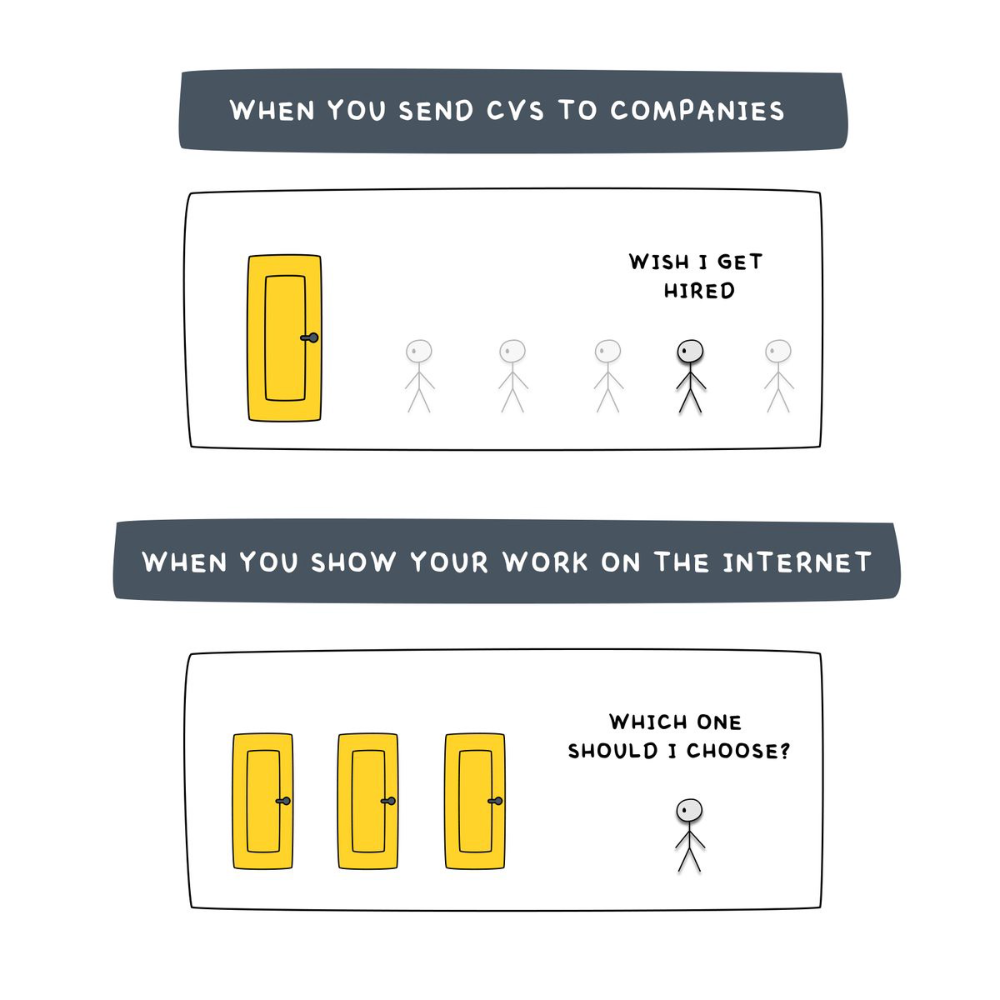
Online talents boost after-hours opportunities.
You go from wanting to be picked to picking yourself. More chances equal more money. Your f*ck you fund gets the extra cash.
A novel method of learning is essential.
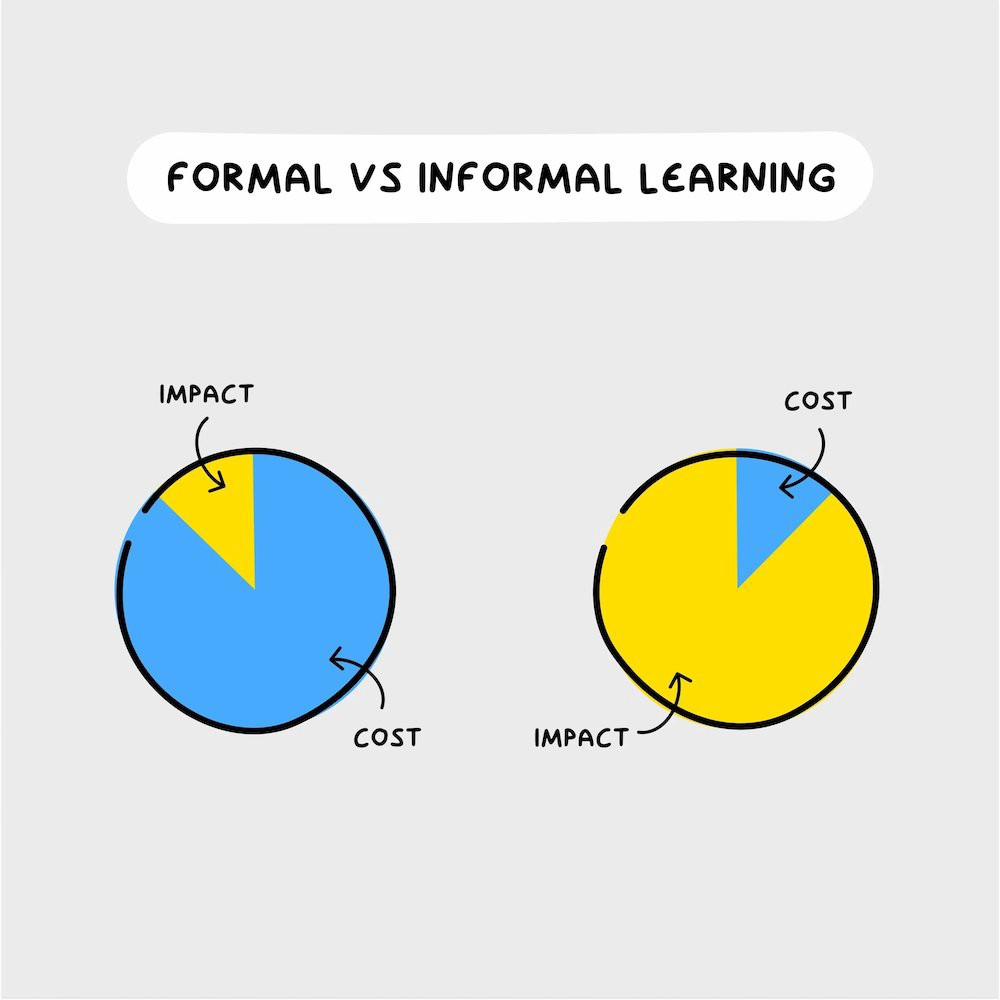
College costs six figures and takes a lifetime to repay.
Informal learning is distinct. 6-12pm:
Observe the carefully controlled Twitter newsfeed.
Make use of Teachable and Gumroad's online courses.
Watch instructional YouTube videos
Look through the top Substack newsletters.
Informal learning is more effective because it's not obvious. It's fun to follow your curiosity and hobbies.
The majority of people lack one attitude. It's simple to learn.
One big impediment stands in the way of f*ck you money and time independence. So often.
Too many people plan after 6-12 hours. Dreaming. Big-thinkers. Strategically. They fill their calendar with meetings.
This is after-hours masturb*tion.
Sahil Bloom reminded me that a bias towards action will determine if this approach works for you.
The key isn't knowing what to do from 6-12 a.m. Trust yourself and develop abilities as you go. It's for building the parachute after you jump.
Sounds risky. We've eliminated the risk by finishing this process after hours while you work 9-5.
With no risk, you can have an I-don't-care attitude and still be successful.
When you choose to move forward, this occurs.
Once you try 9-5/6-12, you'll tell someone.
It's bad.
Few of us hang out with problem-solvers.
It's how much of society operates. So they make reasons so they can feel better about not giving you money.
Matthew Kobach told me chasing f*ck you money is easier with like-minded folks.
Without f*ck you money friends, loneliness will take over and you'll think you've messed up when you just need to keep going.
Steal this easy guideline
Let's act. No more fluffing and caressing.
1. Learn
If you detest your 9-5 talents or don't think they'll work online, get new ones. If you're skilled enough, continue.
Easlo recommends these skills:
Designer for Figma
Designer Canva
bubble creators
editor in Photoshop
Automation consultant for Zapier
Designer of Webflow
video editor Adobe
Ghostwriter for Twitter
Idea consultant
Artist in Blender Studio
2. Develop the ability
Every night from 6-12, apply the skill.
Practicing ghostwriting? Write someone's tweets for free. Do someone's website copy to learn copywriting. Get a website to the top of Google for a keyword to understand SEO.
Free practice is crucial. Your 9-5 pays the money, so work for free.
3. Take off stealthily like a badass
Another mistake. Sell to few. Don't be the best. Don't claim expertise.
Sell your new expertise to others behind you.
Two ways:
Using a digital good
By providing a service,
Point 1 also includes digital service examples. Digital products include eBooks, communities, courses, ad-supported podcasts, and templates. It's easy. Your 9-5 job involves one of these.
Take ideas from work.
Why? They'll steal your time for profit.
4. Iterate while feeling awful
First-time launches always fail. You'll feel terrible. Okay. Remember your 9-5?
Find improvements. Ask free and paying consumers what worked.
Multiple relaunches, each 1% better.
5. Discover more
Never stop learning. Improve your skill. Add a relevant skill. Learn copywriting if you write online.
After-hours students earn the most.
6. Continue
Repetition is key.
7. Make this one small change.
Consistently. The 6-12 momentum won't make you rich in 30 days; that's success p*rn.
Consistency helps wage slaves become f*ck you money. Most people can't switch between the two.
Putting everything together
It's easy. You're probably already doing some.
This formula explains why, how, and what to do. It's a 5th-grade-friendly blueprint. Good.
Reduce financial risk with your 9-to-5. Replace Netflix with 6-12 money-making talents.
Life is short; do whatever you want. Today.

Simon Egersand
3 years ago
Working from home for more than two years has taught me a lot.
Since the pandemic, I've worked from home. It’s been +2 years (wow, time flies!) now, and during this time I’ve learned a lot. My 4 remote work lessons.
I work in a remote distributed team. This team setting shaped my experience and teachings.
Isolation ("I miss my coworkers")
The most obvious point. I miss going out with my coworkers for coffee, weekend chats, or just company while I work. I miss being able to go to someone's desk and ask for help. On a remote world, I must organize a meeting, share my screen, and avoid talking over each other in Zoom - sigh!
Social interaction is more vital for my health than I believed.
Online socializing stinks
My company used to come together every Friday to play Exploding Kittens, have food and beer, and bond over non-work things.
Different today. Every Friday afternoon is for fun, but it's not the same. People with screen weariness miss meetings, which makes sense. Sometimes you're too busy on Slack to enjoy yourself.
We laugh in meetings, but it's not the same as face-to-face.
Digital social activities can't replace real-world ones
Improved Work-Life Balance, if You Let It
At the outset of the pandemic, I recognized I needed to take better care of myself to survive. After not leaving my apartment for a few days and feeling miserable, I decided to walk before work every day. This turned into a passion for exercise, and today I run or go to the gym before work. I use my commute time for healthful activities.
Working from home makes it easier to keep working after hours. I sometimes forget the time and find myself writing coding at dinnertime. I said, "One more test." This is a disadvantage, therefore I keep my office schedule.
Spend your commute time properly and keep to your office schedule.
Remote Pair Programming Is Hard
As a software developer, I regularly write code. My team sometimes uses pair programming to write code collaboratively. One person writes code while another watches, comments, and asks questions. I won't list them all here.
Internet pairing is difficult. My team struggles with this. Even with Tuple, it's challenging. I lose attention when I get a notification or check my computer.
I miss a pen and paper to rapidly sketch down my thoughts for a colleague or a whiteboard for spirited talks with others. Best answers are found through experience.
Real-life pair programming beats the best remote pair programming tools.
Lessons Learned
Here are 4 lessons I've learned working remotely for 2 years.
-
Socializing is more vital to my health than I anticipated.
-
Digital social activities can't replace in-person ones.
-
Spend your commute time properly and keep your office schedule.
-
Real-life pair programming beats the best remote tools.
Conclusion
Our era is fascinating. Remote labor has existed for years, but software companies have just recently had to adapt. Companies who don't offer remote work will lose talent, in my opinion.
We're still figuring out the finest software development approaches, programming language features, and communication methods since the 1960s. I can't wait to see what advancements assist us go into remote work.
I'll certainly work remotely in the next years, so I'm interested to see what I've learnt from this post then.
This post is a summary of this one.

Patryk Nawrocki
3 years ago
7 things a new UX/UI designer should know

If I could tell my younger self a few rules, they would boost my career.
1. Treat design like medicine; don't get attached.

If it doesn't help, you won't be angry, but you'll try to improve it. Designers blame others if they don't like the design, but the rule is the same: we solve users' problems. You're not your design, and neither are they. Be humble with your work because your assumptions will often be wrong and users will behave differently.
2. Consider your design flawed.

Disagree with yourself, then defend your ideas. Most designers forget to dig deeper into a pattern, screen, button, or copywriting. If someone asked, "Have you considered alternatives? How does this design stack up? Here's a functional UX checklist to help you make design decisions.
3. Codeable solutions.
If your design requires more developer time, consider whether it's worth spending more money to code something with a small UX impact. Overthinking problems and designing abstract patterns is easy. Sometimes you see something on dribbble or bechance and try to recreate it, but it's not worth it. Here's my article on it.
4. Communication changes careers

Designers often talk with users, clients, companies, developers, and other designers. How you talk and present yourself can land you a job. Like driving or swimming, practice it. Success requires being outgoing and friendly. If I hadn't said "hello" to a few people, I wouldn't be where I am now.
5. Ignorance of the law is not an excuse.

Copyright, taxation How often have you used an icon without checking its license? If you use someone else's work in your project, the owner can cause you a lot of problems — paying a lot of money isn't worth it. Spend a few hours reading about copyrights, client agreements, and taxes.
6. Always test your design

If nobody has seen or used my design, it's not finished. Ask friends about prototypes. Testing reveals how wrong your assumptions were. Steve Krug, one of the authorities on this topic will tell you more about how to do testing.
7. Run workshops
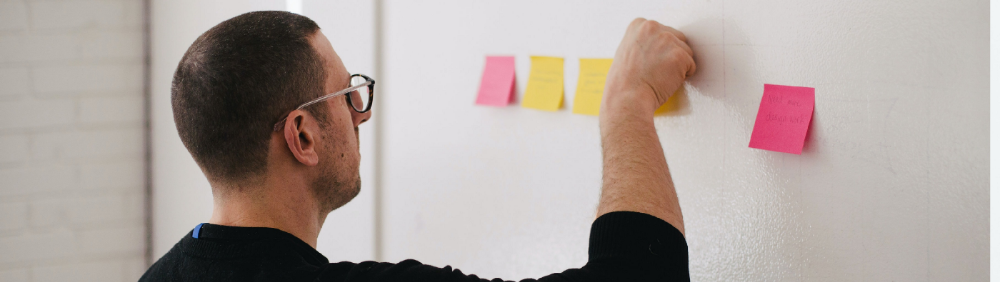
A UX designer's job involves talking to people and figuring out what they need, which is difficult because they usually don't know. Organizing teamwork sessions is a powerful skill, but you must also be a good listener. Your job is to help a quiet, introverted developer express his solution and control the group. AJ Smart has more on workshops here.