


LCX is the latest CEX to have suffered a private key exploit.
The attack began around 10:30 PM +UTC on January 8th.
Peckshield spotted it first, then an official announcement came shortly after.
We’ve said it before; if established companies holding millions of dollars of users’ funds can’t manage their own hot wallet security, what purpose do they serve?
The Unique Selling Proposition (USP) of centralised finance grows smaller by the day.
The official incident report states that 7.94M USD were stolen in total, and that deposits and withdrawals to the platform have been paused.
LCX hot wallet: 0x4631018f63d5e31680fb53c11c9e1b11f1503e6f
Hacker’s wallet: 0x165402279f2c081c54b00f0e08812f3fd4560a05
Stolen funds:
- 162.68 ETH (502,671 USD)
- 3,437,783.23 USDC (3,437,783 USD)
- 761,236.94 EURe (864,840 USD)
- 101,249.71 SAND Token (485,995 USD)
- 1,847.65 LINK (48,557 USD)
- 17,251,192.30 LCX Token (2,466,558 USD)
- 669.00 QNT (115,609 USD)
- 4,819.74 ENJ (10,890 USD)
- 4.76 MKR (9,885 USD)
**~$1M worth of $LCX remains in the address, along with 611k EURe which has been frozen by Monerium.
The rest, a total of 1891 ETH (~$6M) was sent to Tornado Cash.**
Why can’t they keep private keys private?
Is it really that difficult for a traditional corporate structure to maintain good practice?
CeFi hacks leave us with little to say - we can only go on what the team chooses to tell us.
Next time, they can write this article themselves.
See below for a template.
More on Web3 & Crypto

Coinbase
4 years ago
10 Predictions for Web3 and the Cryptoeconomy for 2022
By Surojit Chatterjee, Chief Product Officer
2021 proved to be a breakout year for crypto with BTC price gaining almost 70% yoy, Defi hitting $150B in value locked, and NFTs emerging as a new category. Here’s my view through the crystal ball into 2022 and what it holds for our industry:
1. Eth scalability will improve, but newer L1 chains will see substantial growth — As we welcome the next hundred million users to crypto and Web3, scalability challenges for Eth are likely to grow. I am optimistic about improvements in Eth scalability with the emergence of Eth2 and many L2 rollups. Traction of Solana, Avalanche and other L1 chains shows that we’ll live in a multi-chain world in the future. We’re also going to see newer L1 chains emerge that focus on specific use cases such as gaming or social media.
2. There will be significant usability improvements in L1-L2 bridges — As more L1 networks gain traction and L2s become bigger, our industry will desperately seek improvements in speed and usability of cross-L1 and L1-L2 bridges. We’re likely to see interesting developments in usability of bridges in the coming year.
3. Zero knowledge proof technology will get increased traction — 2021 saw protocols like ZkSync and Starknet beginning to get traction. As L1 chains get clogged with increased usage, ZK-rollup technology will attract both investor and user attention. We’ll see new privacy-centric use cases emerge, including privacy-safe applications, and gaming models that have privacy built into the core. This may also bring in more regulator attention to crypto as KYC/AML could be a real challenge in privacy centric networks.
4. Regulated Defi and emergence of on-chain KYC attestation — Many Defi protocols will embrace regulation and will create separate KYC user pools. Decentralized identity and on-chain KYC attestation services will play key roles in connecting users’ real identity with Defi wallet endpoints. We’ll see more acceptance of ENS type addresses, and new systems from cross chain name resolution will emerge.
5. Institutions will play a much bigger role in Defi participation — Institutions are increasingly interested in participating in Defi. For starters, institutions are attracted to higher than average interest-based returns compared to traditional financial products. Also, cost reduction in providing financial services using Defi opens up interesting opportunities for institutions. However, they are still hesitant to participate in Defi. Institutions want to confirm that they are only transacting with known counterparties that have completed a KYC process. Growth of regulated Defi and on-chain KYC attestation will help institutions gain confidence in Defi.
6. Defi insurance will emerge — As Defi proliferates, it also becomes the target of security hacks. According to London-based firm Elliptic, total value lost by Defi exploits in 2021 totaled over $10B. To protect users from hacks, viable insurance protocols guaranteeing users’ funds against security breaches will emerge in 2022.
7. NFT Based Communities will give material competition to Web 2.0 social networks — NFTs will continue to expand in how they are perceived. We’ll see creator tokens or fan tokens take more of a first class seat. NFTs will become the next evolution of users’ digital identity and passport to the metaverse. Users will come together in small and diverse communities based on types of NFTs they own. User created metaverses will be the future of social networks and will start threatening the advertising driven centralized versions of social networks of today.
8. Brands will start actively participating in the metaverse and NFTs — Many brands are realizing that NFTs are great vehicles for brand marketing and establishing brand loyalty. Coca-Cola, Campbell’s, Dolce & Gabbana and Charmin released NFT collectibles in 2021. Adidas recently launched a new metaverse project with Bored Ape Yacht Club. We’re likely to see more interesting brand marketing initiatives using NFTs. NFTs and the metaverse will become the new Instagram for brands. And just like on Instagram, many brands may start as NFT native. We’ll also see many more celebrities jumping in the bandwagon and using NFTs to enhance their personal brand.
9. Web2 companies will wake up and will try to get into Web3 — We’re already seeing this with Facebook trying to recast itself as a Web3 company. We’re likely to see other big Web2 companies dipping their toes into Web3 and metaverse in 2022. However, many of them are likely to create centralized and closed network versions of the metaverse.
10. Time for DAO 2.0 — We’ll see DAOs become more mature and mainstream. More people will join DAOs, prompting a change in definition of employment — never receiving a formal offer letter, accepting tokens instead of or along with fixed salaries, and working in multiple DAO projects at the same time. DAOs will also confront new challenges in terms of figuring out how to do M&A, run payroll and benefits, and coordinate activities in larger and larger organizations. We’ll see a plethora of tools emerge to help DAOs execute with efficiency. Many DAOs will also figure out how to interact with traditional Web2 companies. We’re likely to see regulators taking more interest in DAOs and make an attempt to educate themselves on how DAOs work.
Thanks to our customers and the ecosystem for an incredible 2021. Looking forward to another year of building the foundations for Web3. Wagmi.

Marco Manoppo
3 years ago
Failures of DCG and Genesis
Don't sleep with your own sister.
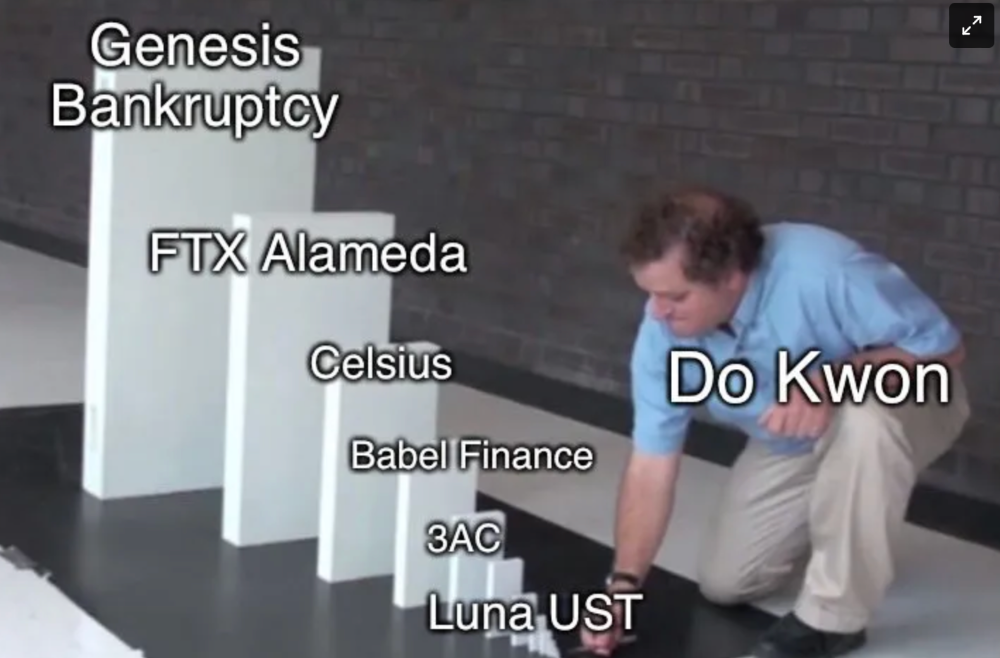
70% of lottery winners go broke within five years. You've heard the last one. People who got rich quickly without setbacks and hard work often lose it all. My father said, "Easy money is easily lost," and a wealthy friend who owns a family office said, "The first generation makes it, the second generation spends it, and the third generation blows it."
This is evident. Corrupt politicians in developing countries live lavishly, buying their third wives' fifth Hermès bag and celebrating New Year's at The Brando Resort. A successful businessperson from humble beginnings is more conservative with money. More so if they're atom-based, not bit-based. They value money.
Crypto can "feel" easy. I have nothing against capital market investing. The global financial system is shady, but that's another topic. The problem started when those who took advantage of easy money started affecting other businesses. VCs did minimal due diligence on FTX because they needed deal flow and returns for their LPs. Lenders did minimum diligence and underwrote ludicrous loans to 3AC because they needed revenue.
Alameda (hence FTX) and 3AC made "easy money" Genesis and DCG aren't. Their businesses are more conventional, but they underestimated how "easy money" can hurt them.
Genesis has been the victim of easy money hubris and insolvency, losing $1 billion+ to 3AC and $200M to FTX. We discuss the implications for the broader crypto market.
Here are the quick takeaways:
Genesis is one of the largest and most notable crypto lenders and prime brokerage firms.
DCG and Genesis have done related party transactions, which can be done right but is a bad practice.
Genesis owes DCG $1.5 billion+.
If DCG unwinds Grayscale's GBTC, $9-10 billion in BTC will hit the market.
DCG will survive Genesis.
What happened?
Let's recap the FTX shenanigan from two weeks ago. Shenanigans! Delphi's tweet sums up the craziness. Genesis has $175M in FTX.
Cred's timeline: I hate bad crisis management. Yes, admitting their balance sheet hole right away might've sparked more panic, and there's no easy way to convey your trouble, but no one ever learns.
By November 23, rumors circulated online that the problem could affect Genesis' parent company, DCG. To address this, Barry Silbert, Founder, and CEO of DCG released a statement to shareholders.
A few things are confirmed thanks to this statement.
DCG owes $1.5 billion+ to Genesis.
$500M is due in 6 months, and the rest is due in 2032 (yes, that’s not a typo).
Unless Barry raises new cash, his last-ditch efforts to repay the money will likely push the crypto market lower.
Half a year of GBTC fees is approximately $100M.
They can pay $500M with GBTC.
With profits, sell another port.
Genesis has hired a restructuring adviser, indicating it is in trouble.
Rehypothecation
Every crypto problem in the past year seems to be rehypothecation between related parties, excessive leverage, hubris, and the removal of the money printer. The Bankless guys provided a chart showing 2021 crypto yield.
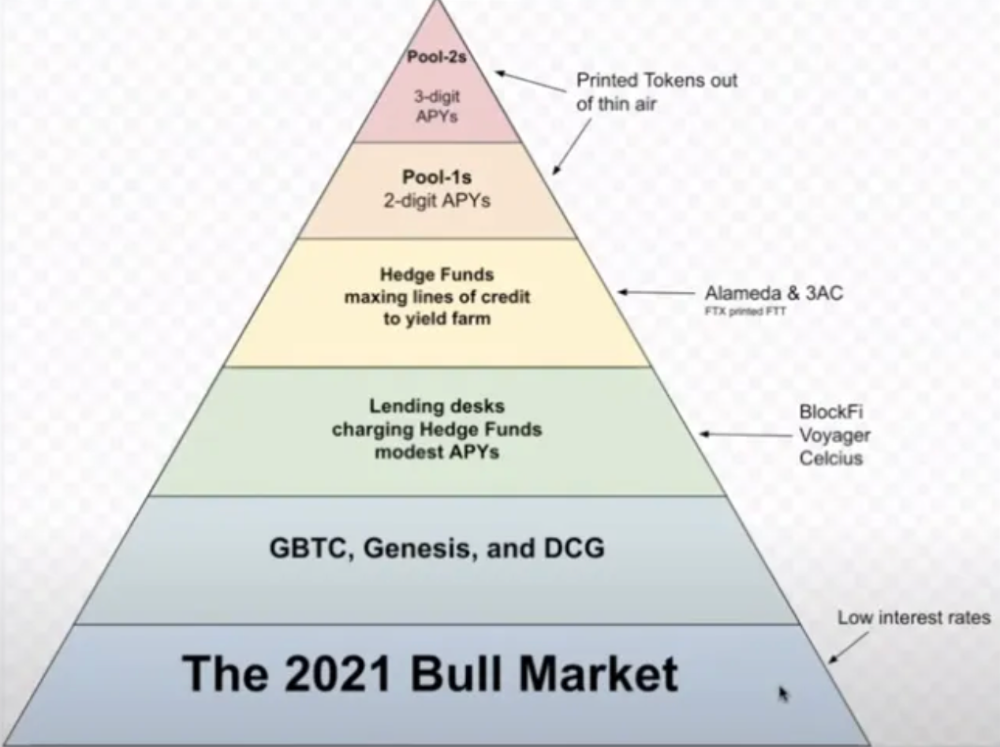
In June 2022, @DataFinnovation published a great investigation about 3AC and DCG. Here's a summary.
3AC borrowed BTC from Genesis and pledged it to create Grayscale's GBTC shares.
3AC uses GBTC to borrow more money from Genesis.
This lets 3AC leverage their capital.
3AC's strategy made sense because GBTC had a premium, creating "free money."
GBTC's discount and LUNA's implosion caused problems.
3AC lost its loan money in LUNA.
Margin called on 3ACs' GBTC collateral.
DCG bought GBTC to avoid a systemic collapse and a larger discount.
Genesis lost too much money because 3AC can't pay back its loan. DCG "saved" Genesis, but the FTX collapse hurt Genesis further, forcing DCG and Genesis to seek external funding.
bruh…
Learning Experience
Co-borrowing. Unnecessary rehypothecation. Extra space. Governance disaster. Greed, hubris. Crypto has repeatedly shown it can recreate traditional financial system disasters quickly. Working in crypto is one of the best ways to learn crazy financial tricks people will do for a quick buck much faster than if you dabble in traditional finance.
Moving Forward
I think the crypto industry needs to consider its future. This is especially true for professionals. I'm not trying to scare you. In 2018 and 2020, I had doubts. No doubts now. Detailing the crypto industry's potential outcomes helped me gain certainty and confidence in its future. This includes VCs' benefits and talking points during the bull market, as well as what would happen if government regulations became hostile, etc. Even if that happens, I'm certain. This is permanent. I may write a post about that soon.
Sincerely,
M.

Modern Eremite
4 years ago
The complete, easy-to-understand guide to bitcoin

Introduction
Markets rely on knowledge.
The internet provided practically endless knowledge and wisdom. Humanity has never seen such leverage. Technology's progress drives us to adapt to a changing world, changing our routines and behaviors.
In a digital age, people may struggle to live in the analogue world of their upbringing. Can those who can't adapt change their lives? I won't answer. We should teach those who are willing to learn, nevertheless. Unravel the modern world's riddles and give them wisdom.
Adapt or die . Accept the future or remain behind.
This essay will help you comprehend Bitcoin better than most market participants and the general public. Let's dig into Bitcoin.
Join me.

Ascension
Bitcoin.org was registered in August 2008. Bitcoin whitepaper was published on 31 October 2008. The document intrigued and motivated people around the world, including technical engineers and sovereignty seekers. Since then, Bitcoin's whitepaper has been read and researched to comprehend its essential concept.
I recommend reading the whitepaper yourself. You'll be able to say you read the Bitcoin whitepaper instead of simply Googling "what is Bitcoin" and reading the fundamental definition without knowing the revolution's scope. The article links to Bitcoin's whitepaper. To avoid being overwhelmed by the whitepaper, read the following article first.
Bitcoin isn't the first peer-to-peer digital currency. Hashcash or Bit Gold were once popular cryptocurrencies. These two Bitcoin precursors failed to gain traction and produce the network effect needed for general adoption. After many struggles, Bitcoin emerged as the most successful cryptocurrency, leading the way for others.
Satoshi Nakamoto, an active bitcointalk.org user, created Bitcoin. Satoshi's identity remains unknown. Satoshi's last bitcointalk.org login was 12 December 2010. Since then, he's officially disappeared. Thus, conspiracies and riddles surround Bitcoin's creators. I've heard many various theories, some insane and others well-thought-out.
It's not about who created it; it's about knowing its potential. Since its start, Satoshi's legacy has changed the world and will continue to.
Block-by-block blockchain
Bitcoin is a distributed ledger. What's the meaning?
Everyone can view all blockchain transactions, but no one can undo or delete them.
Imagine you and your friends routinely eat out, but only one pays. You're careful with money and what others owe you. How can everyone access the info without it being changed?

You'll keep a notebook of your evening's transactions. Everyone will take a page home. If one of you changed the page's data, the group would notice and reject it. The majority will establish consensus and offer official facts.
Miners add a new Bitcoin block to the main blockchain every 10 minutes. The appended block contains miner-verified transactions. Now that the next block has been added, the network will receive the next set of user transactions.
Bitcoin Proof of Work—prove you earned it
Any firm needs hardworking personnel to expand and serve clients. Bitcoin isn't that different.
Bitcoin's Proof of Work consensus system needs individuals to validate and create new blocks and check for malicious actors. I'll discuss Bitcoin's blockchain consensus method.
Proof of Work helps Bitcoin reach network consensus. The network is checked and safeguarded by CPU, GPU, or ASIC Bitcoin-mining machines (Application-Specific Integrated Circuit).
Every 10 minutes, miners are rewarded in Bitcoin for securing and verifying the network. It's unlikely you'll finish the block. Miners build pools to increase their chances of winning by combining their processing power.
In the early days of Bitcoin, individual mining systems were more popular due to high maintenance costs and larger earnings prospects. Over time, people created larger and larger Bitcoin mining facilities that required a lot of space and sophisticated cooling systems to keep machines from overheating.
Proof of Work is a vital part of the Bitcoin network, as network security requires the processing power of devices purchased with fiat currency. Miners must invest in mining facilities, which creates a new business branch, mining facilities ownership. Bitcoin mining is a topic for a future article.
More mining, less reward
Bitcoin is usually scarce.
Why is it rare? It all comes down to 21,000,000 Bitcoins.
Were all Bitcoins mined? Nope. Bitcoin's supply grows until it hits 21 million coins. Initially, 50BTC each block was mined, and each block took 10 minutes. Around 2140, the last Bitcoin will be mined.
But 50BTC every 10 minutes does not give me the year 2140. Indeed careful reader. So important is Bitcoin's halving process.
What is halving?
The block reward is halved every 210,000 blocks, which takes around 4 years. The initial payout was 50BTC per block and has been decreased to 25BTC after 210,000 blocks. First halving occurred on November 28, 2012, when 10,500,000 BTC (50%) had been mined. As of April 2022, the block reward is 6.25BTC and will be lowered to 3.125BTC by 19 March 2024.
The halving method is tied to Bitcoin's hashrate. Here's what "hashrate" means.
What if we increased the number of miners and hashrate they provide to produce a block every 10 minutes? Wouldn't we manufacture blocks faster?

Every 10 minutes, blocks are generated with little asymmetry. Due to the built-in adaptive difficulty algorithm, the overall hashrate does not affect block production time. With increased hashrate, it's harder to construct a block. We can estimate when the next halving will occur because 10 minutes per block is fixed.
Building with nodes and blocks
For someone new to crypto, the unusual terms and words may be overwhelming. You'll also find everyday words that are easy to guess or have a vague idea of what they mean, how they work, and what they do. Consider blockchain technology.
Nodes and blocks: Think about that for a moment. What is your first idea?
The blockchain is a chain of validated blocks added to the main chain. What's a "block"? What's inside?
The block is another page in the blockchain book that has been filled with transaction information and accepted by the majority.
We won't go into detail about what each block includes and how it's built, as long as you understand its purpose.
What about nodes?
Nodes, along with miners, verify the blockchain's state independently. But why?
To create a full blockchain node, you must download the whole Bitcoin blockchain and check every transaction against Bitcoin's consensus criteria.
What's Bitcoin's size?
In April 2022, the Bitcoin blockchain was 389.72GB.
Bitcoin's blockchain has miners and node runners.
Let's revisit the US gold rush. Miners mine gold with their own power (physical and monetary resources) and are rewarded with gold (Bitcoin). All become richer with more gold, and so does the country.
Nodes are like sheriffs, ensuring everything is done according to consensus rules and that there are no rogue miners or network users.
Lost and held bitcoin
Does the Bitcoin exchange price match each coin's price? How many coins remain after 21,000,000? 21 million or less?
Common reason suggests a 21 million-coin supply.
What if I lost 1BTC from a cold wallet?
What if I saved 1000BTC on paper in 2010 and it was damaged?
What if I mined Bitcoin in 2010 and lost the keys?
Satoshi Nakamoto's coins? Since then, those coins haven't moved.
How many BTC are truly in circulation?
Many people are trying to answer this question, and you may discover a variety of studies and individual research on the topic. Be cautious of the findings because they can't be evaluated and the statistics are hazy guesses.
On the other hand, we have long-term investors who won't sell their Bitcoin or will sell little amounts to cover mining or living needs.
The price of Bitcoin is determined by supply and demand on exchanges using liquid BTC. How many BTC are left after subtracting lost and non-custodial BTC?
We have significantly less Bitcoin in circulation than you think, thus the price may not reflect demand if we knew the exact quantity of coins available.
True HODLers and diamond-hand investors won't sell you their coins, no matter the market.
What's UTXO?
Unspent (U) Transaction (TX) Output (O)

Imagine taking a $100 bill to a store. After choosing a drink and munchies, you walk to the checkout to pay. The cashier takes your $100 bill and gives you $25.50 in change. It's in your wallet.
Is it simply 100$? No way.
The $25.50 in your wallet is unrelated to the $100 bill you used. Your wallet's $25.50 is just bills and coins. Your wallet may contain these coins and bills:
2x 10$ 1x 10$
1x 5$ or 3x 5$
1x 0.50$ 2x 0.25$
Any combination of coins and bills can equal $25.50. You don't care, and I'd wager you've never ever considered it.
That is UTXO. Now, I'll detail the Bitcoin blockchain and how UTXO works, as it's crucial to know what coins you have in your (hopefully) cold wallet.
You purchased 1BTC. Is it all? No. UTXOs equal 1BTC. Then send BTC to a cold wallet. Say you pay 0.001BTC and send 0.999BTC to your cold wallet. Is it the 1BTC you got before? Well, yes and no. The UTXOs are the same or comparable as before, but the blockchain address has changed. It's like if you handed someone a wallet, they removed the coins needed for a network charge, then returned the rest of the coins and notes.
UTXO is a simple concept, but it's crucial to grasp how it works to comprehend dangers like dust attacks and how coins may be tracked.
Lightning Network: fast cash
You've probably heard of "Layer 2 blockchain" projects.
What does it mean?
Layer 2 on a blockchain is an additional layer that increases the speed and quantity of transactions per minute and reduces transaction fees.
Imagine going to an obsolete bank to transfer money to another account and having to pay a charge and wait. You can transfer funds via your bank account or a mobile app without paying a fee, or the fee is low, and the cash appear nearly quickly. Layer 1 and 2 payment systems are different.
Layer 1 is not obsolete; it merely has more essential things to focus on, including providing the blockchain with new, validated blocks, whereas Layer 2 solutions strive to offer Layer 1 with previously processed and verified transactions. The primary blockchain, Bitcoin, will only receive the wallets' final state. All channel transactions until shutting and balancing are irrelevant to the main chain.
Layer 2 and the Lightning Network's goal are now clear. Most Layer 2 solutions on multiple blockchains are created as blockchains, however Lightning Network is not. Remember the following remark, as it best describes Lightning.

Lightning Network connects public and private Bitcoin wallets.
Opening a private channel with another wallet notifies just two parties. The creation and opening of a public channel tells the network that anyone can use it.
Why create a public Lightning Network channel?
Every transaction through your channel generates fees.
Money, if you don't know.
See who benefits when in doubt.
Anonymity, huh?
Bitcoin anonymity? Bitcoin's anonymity was utilized to launder money.
Well… You've heard similar stories. When you ask why or how it permits people to remain anonymous, the conversation ends as if it were just a story someone heard.
Bitcoin isn't private. Pseudonymous.
What if someone tracks your transactions and discovers your wallet address? Where is your anonymity then?

Bitcoin is like bulletproof glass storage; you can't take or change the money. If you dig and analyze the data, you can see what's inside.
Every online action leaves a trace, and traces may be tracked. People often forget this guideline.
A tool like that can help you observe what the major players, or whales, are doing with their coins when the market is uncertain. Many people spend time analyzing on-chain data. Worth it?
Ask yourself a question. What are the big players' options? Do you think they're letting you see their wallets for a small on-chain data fee?
Instead of short-term behaviors, focus on long-term trends.
More wallet transactions leave traces. Having nothing to conceal isn't a defect. Can it lead to regulating Bitcoin so every transaction is tracked like in banks today?
But wait. How can criminals pay out Bitcoin? They're doing it, aren't they?
Mixers can anonymize your coins, letting you to utilize them freely. This is not a guide on how to make your coins anonymous; it could do more harm than good if you don't know what you're doing.
Remember, being anonymous attracts greater attention.
Bitcoin isn't the only cryptocurrency we can use to buy things. Using cryptocurrency appropriately can provide usability and anonymity. Monero (XMR), Zcash (ZEC), and Litecoin (LTC) following the Mimblewimble upgrade are examples.
Summary
Congratulations! You've reached the conclusion of the article and learned about Bitcoin and cryptocurrency. You've entered the future.
You know what Bitcoin is, how its blockchain works, and why it's not anonymous. I bet you can explain Lightning Network and UTXO to your buddies.
Markets rely on knowledge. Prepare yourself for success before taking the first step. Let your expertise be your edge.
This article is a summary of this one.
You might also like
Atown Research
3 years ago
Meet the One-Person Businesses Earning Millions in Sales from Solo Founders
I've spent over 50 hours researching one-person firms, which interest me. I've found countless one-person enterprises that made millions on the founder's determination and perseverance.
Throughout my investigation, I found three of the most outstanding one-person enterprises. These enterprises show that people who work hard and dedicate themselves to their ideas may succeed.
Eric Barone (@ConcernedApe) created Stardew Valley in 2011 to better his job prospects. Eric loved making the game, in which players inherit a farm, grow crops, raise livestock, make friends with the villagers, and form a family.
Eric handled complete game production, including 3D graphics, animations, and music, to maintain creative control. He stopped job hunting and worked 8-15 hours a day on the game.
Eric developed a Stardew Valley website and subreddit to engage with gamers and get feedback. Eric's devoted community helped him meet Steam's minimum vote requirement for single creators.
Stardew Valley sold 1 million copies in two months after Eric launched it for $15 in 2016. The game has sold 20 million copies and made $300 million.

The game's inexpensive price, outsourcing of PR, marketing, and publication, and loyal player base helped it succeed. Eric has turned down million-dollar proposals from Sony and Nintendo to sell the game and instead updates and improves it. Haunted Chocolatier is Eric's new game.
Is farming not profitable? Ask Stardew Valley creator Eric Barone.
Gary Brewer established BuiltWith to assist users find website technologies and services. BuiltWith boasts 3000 paying customers and $14 million in yearly revenue, making it a significant resource for businesses wishing to generate leads, do customer analytics, obtain business insight, compare websites, or search websites by keyword.
BuiltWith has one full-time employee, Gary, and one or two part-time contractors that help with the blog. Gary handles sales, customer service, and other company functions alone.
BuiltWith acquired popularity through blog promotions and a top Digg ranking. About Us, a domain directory, connected to BuiltWith on every domain page, boosting it. Gary introduced $295–$995 monthly subscriptions to search technology, keywords, and potential consumers in response to customer demand.
Gary uses numerous methods to manage a firm without staff. He spends one to two hours every day answering user queries, most of which are handled quickly by linking to BuiltWiths knowledge store. Gary creates step-by-step essays or videos for complex problems. Gary can focus on providing new features based on customer comments and requests since he makes it easy to unsubscribe.
BuiltWith is entirely automated and successful due to its unique approach and useful offerings. It works for Google, Meta, Amazon, and Twitter.
Digital Inspiration develops Google Documents, Sheets, and Slides plugins. Digital Inspiration, founded by Amit Agarwal, receives 5 million monthly visits and earns $10 million. 40 million individuals have downloaded Digital Inspirations plugins.
Amit started Digital Inspiration by advertising his blog at tech events and getting Indian filter blogs and other newspapers to promote his articles. Amit built plugins and promoted them on the blog once the blog acquired popularity, using ideas from comments, friends, and Reddit. Digital Inspiration has over 20 free and premium plugins.
Mail Merge, Notifications for Google Forms, YouTube Uploader, and Document Studio are some of Digital Inspiration's most popular plugins. Mail Merge allows users to send personalized emails in bulk and track email opens and clicks.
Since Amits manages Digital Inspiration alone, his success is astounding. Amit developed a successful company via hard work and creativity, despite platform dependence. His tale inspires entrepreneurs.

DC Palter
3 years ago
How Will You Generate $100 Million in Revenue? The Startup Business Plan
A top-down company plan facilitates decision-making and impresses investors.

A startup business plan starts with the product, the target customers, how to reach them, and how to grow the business.
Bottom-up is terrific unless venture investors fund it.
If it can prove how it can exceed $100M in sales, investors will invest. If not, the business may be wonderful, but it's not venture capital-investable.
As a rule, venture investors only fund firms that expect to reach $100M within 5 years.
Investors get nothing until an acquisition or IPO. To make up for 90% of failed investments and still generate 20% annual returns, portfolio successes must exit with a 25x return. A $20M-valued company must be acquired for $500M or more.
This requires $100M in sales (or being on a nearly vertical trajectory to get there). The company has 5 years to attain that milestone and create the requisite ROI.
This motivates venture investors (venture funds and angel investors) to hunt for $100M firms within 5 years. When you pitch investors, you outline how you'll achieve that aim.
I'm wary of pitches after seeing a million hockey sticks predicting $5M to $100M in year 5 that never materialized. Doubtful.
Startups fail because they don't have enough clients, not because they don't produce a great product. That jump from $5M to $100M never happens. The company reaches $5M or $10M, growing at 10% or 20% per year. That's great, but not enough for a $500 million deal.
Once it becomes clear the company won’t reach orbit, investors write it off as a loss. When a corporation runs out of money, it's shut down or sold in a fire sale. The company can survive if expenses are trimmed to match revenues, but investors lose everything.
When I hear a pitch, I'm not looking for bright income projections but a viable plan to achieve them. Answer these questions in your pitch.
Is the market size sufficient to generate $100 million in revenue?
Will the initial beachhead market serve as a springboard to the larger market or as quicksand that hinders progress?
What marketing plan will bring in $100 million in revenue? Is the market diffuse and will cost millions of dollars in advertising, or is it one, focused market that can be tackled with a team of salespeople?
Will the business be able to bridge the gap from a small but fervent set of early adopters to a larger user base and avoid lock-in with their current solution?
Will the team be able to manage a $100 million company with hundreds of people, or will hypergrowth force the organization to collapse into chaos?
Once the company starts stealing market share from the industry giants, how will it deter copycats?
The requirement to reach $100M may be onerous, but it provides a context for difficult decisions: What should the product be? Where should we concentrate? who should we hire? Every strategic choice must consider how to reach $100M in 5 years.
Focusing on $100M streamlines investor pitches. Instead of explaining everything, focus on how you'll attain $100M.
As an investor, I know I'll lose my money if the startup doesn't reach this milestone, so the revenue prediction is the first thing I look at in a pitch deck.
Reaching the $100M goal needs to be the first thing the entrepreneur thinks about when putting together the business plan, the central story of the pitch, and the criteria for every important decision the company makes.

Nitin Sharma
3 years ago
The result of my side-hustle blog post with ChatGPT is remarkable.
It's free now.

Most content writers—including me—write about side hustles because they do well.
I wrote several articles on a profitable programming side hustle.
Later, I learnt about AI content-generating platforms like Jasper.ai and Copy.ai, which I thought were terrible because they required subscriptions and had bad content. Even I dislike automatic online posting.
Since ChatGPT is becoming more popular, I tried it. It's free now.
Note: I wasn’t compensated to write this piece by this tool. In other words, I don’t receive any payment from their founders. There is no affiliate link, and right now it is free to use. Also, ChatGPT can do a lot more than what I ever did.
Begin.
OpenAI account registration requires visiting the website (if you don’t have one). Just write anything into the chatbot and get a response.
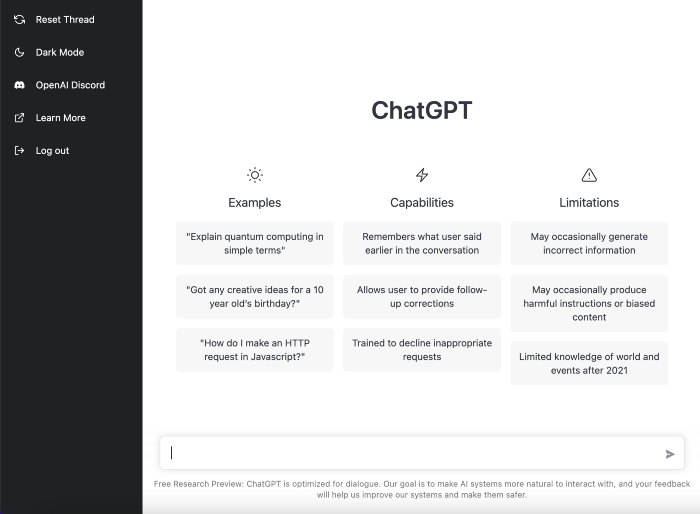
First, I wrote about the top 10 2023 side businesses.
This came in seconds.
2023 is shaping up to be a year of growth and opportunity for entrepreneurs and side hustlers. With the rise of remote work and the growing gig economy, there are many income streams to consider launching in the coming year. Here are the top 10 income streams to launch in 2023:
Virtual Assistant — The demand for virtual assistants is on the rise as more businesses move online. As a virtual assistant, you can offer administrative, technical, or creative services to clients remotely.
Online Tutoring — If you have expertise in a particular subject, consider becoming an online tutor. There are many platforms that connect tutors with students looking for help with their studies.
Freelance Writing — If you have a knack for writing, consider becoming a freelance writer. You can offer your services to businesses, bloggers, and individuals looking for content for their websites or social media platforms.
Graphic Design — If you have a talent for design, consider starting a graphic design side hustle. You can create logos, banners, and other visual content for businesses and individuals.
Social Media Management — Many businesses are looking for help with managing their social media accounts. As a social media manager, you can help businesses create and execute social media strategies to reach their target audience.
Dropshipping — Dropshipping is a business model where you sell products without actually holding any inventory. You can partner with suppliers and ship the products directly to the customer on behalf of the business.
Pet Sitting — If you love animals, consider starting a pet-sitting side hustle. You can offer your services to pet owners who need someone to take care of their pets while they are away.
Home Cleaning — With busy schedules, many people are looking for help with cleaning their homes. As a home cleaning service provider, you can offer your services to help keep homes tidy and organized.
Event Planning — If you have a talent for organization and planning, consider starting an event planning side hustle. You can offer your services to help plan and execute events for businesses and individuals.
Online Teaching — With the rise of online education, there is a growing demand for online teachers. If you have expertise in a particular subject, consider becoming an online teacher and offer your services to students looking for personalized instruction.
In conclusion, 2023 is shaping up to be a great year for launching new income streams. Whether you are looking to start a virtual assistant business, become an online tutor, or offer home cleaning services, there are many opportunities to turn your skills and expertise into a profitable side hustle.
Better than most online side hustle posts, right?
Write about the top 10 programming side hustles to start in 2023.
I got this.
If you are a programmer looking to start a side hustle, 2023 is the perfect time to launch your own business. With the growing demand for software and app development, there are many opportunities for programmers to turn their skills into a profitable side hustle. Here are the top 10 programming side hustles to start in 2023:
App Development — With the rise of smartphones and tablets, there is a growing demand for app development. You can offer your services to businesses and individuals looking to create custom apps for their needs.
Website Development — Many businesses and individuals are looking for help with creating and maintaining their websites. As a website developer, you can offer your services to help design, build, and manage websites for your clients.
Software Development — If you have expertise in a particular programming language, consider starting a software development side hustle. You can offer your services to businesses and individuals looking to create custom software solutions for their needs.
Game Development — The gaming industry is thriving, and there is a growing demand for game development. If you have experience in game development, you can offer your services to businesses and individuals looking to create custom games.
Data Analysis — With the rise of big data, there is a growing demand for data analysts. As a data analyst, you can offer your services to businesses and individuals looking to make sense of their data and gain insights from it.
Machine Learning — Machine learning is a rapidly growing field, and there is a growing demand for machine learning experts. If you have experience in machine learning, you can offer your services to businesses and individuals looking to develop custom machine learning solutions.
Cloud Computing — With the rise of cloud computing, there is a growing demand for cloud experts. If you have experience in cloud computing, you can offer your services to businesses and individuals looking to migrate their applications and data to the cloud.
Blockchain Development — Blockchain technology is gaining popularity, and there is a growing demand for blockchain developers. If you have experience in blockchain development, you can offer your services to businesses and individuals looking to develop custom blockchain solutions.
Artificial Intelligence — Artificial intelligence is a rapidly growing field, and there is a growing demand for AI experts. If you have experience in artificial intelligence, you can offer your services to businesses and individuals looking to develop custom AI solutions.
Virtual Reality — Virtual reality is an exciting and emerging technology, and there is a growing demand for VR developers. If you have experience in VR development, you can offer your services to businesses and individuals looking to create custom VR experiences.
In conclusion, 2023 is a great time to start a programming side hustle. Whether you are interested in app development, website development, or machine learning, there are many opportunities for programmers to turn their skills into a profitable business.
These two blogs show that AI can simplify blog authoring.
I asked some tough programming questions, and most were suitable.
The content may occasionally not be what we want, but it will almost always be very helpful to you.
Enjoy.