

More on Current Events

Jess Rifkin
3 years ago
As the world watches the Russia-Ukraine border situation, This bill would bar aid to Ukraine until the Mexican border is secured.
Although Mexico and Ukraine are thousands of miles apart, this legislation would link their responses.
Context
Ukraine was a Soviet republic until 1991. A significant proportion of the population, particularly in the east, is ethnically Russian. In February, the Russian military invaded Ukraine, intent on overthrowing its democratically elected government.
This could be the biggest European land invasion since WWII. In response, President Joe Biden sent 3,000 troops to NATO countries bordering Ukraine to help with Ukrainian refugees, with more troops possible if the situation worsened.
In July 2021, the US Border Patrol reported its highest monthly encounter total since March 2000. Some Republicans compare Biden's response to the Mexican border situation to his response to the Ukrainian border situation, though the correlation is unclear.
What the bills do
Two new Republican bills seek to link the US response to Ukraine to the situation in Mexico.
The Secure America's Borders First Act would prohibit federal funding for Ukraine until the US-Mexico border is “operationally controlled,” including a wall as promised by former President Donald Trump. (The bill even mandates a 30-foot-high wall.)
The USB (Ukraine and Southern Border) Act, introduced on February 8 by Rep. Matt Rosendale (R-MT0), would allow the US to support Ukraine, but only if the number of Armed Forces deployed there is less than the number deployed to the Mexican border. Madison Cawthorne introduced H.R. 6665 on February 9th (R-NC11).
What backers say
Supporters argue that even if the US should militarily assist Ukraine, our own domestic border situation should take precedence.
After failing to secure our own border and protect our own territorial integrity, ‘America Last' politicians on both sides of the aisle now tell us that we must do so for Ukraine. “Before rushing America into another foreign conflict over an Eastern European nation's border thousands of miles from our shores, they should first secure our southern border.”
“If Joe Biden truly cared about Americans, he would prioritize national security over international affairs,” Rep. Cawthorn said in a separate press release. The least we can do to secure our own country is send the same number of troops to the US-Mexico border to assist our border patrol agents working diligently to secure America.
What opponents say
The president has defended his Ukraine and Mexico policies, stating that both seek peace and diplomacy.
Our nations [the US and Mexico] have a long and complicated history, and we haven't always been perfect neighbors, but we have seen the power and purpose of cooperation,” Biden said in 2021. “We're safer when we work together, whether it's to manage our shared border or stop the pandemic. [In both the Obama and Biden administration], we made a commitment that we look at Mexico as an equal, not as somebody who is south of our border.”
No mistake: If Russia goes ahead with its plans, it will be responsible for a catastrophic and unnecessary war of choice. To protect our collective security, the United States and our allies are ready to defend every inch of NATO territory. We won't send troops into Ukraine, but we will continue to support the Ukrainian people... But, I repeat, Russia can choose diplomacy. It is not too late to de-escalate and return to the negotiating table.”
Odds of passage
The Secure America's Borders First Act has nine Republican sponsors. Either the House Armed Services or Foreign Affairs Committees may vote on it.
Rep. Paul Gosar, a Republican, co-sponsored the USB Act (R-AZ4). The House Armed Services Committee may vote on it.
With Republicans in control, passage is unlikely.

Erik Engheim
3 years ago
You Misunderstand the Russian Nuclear Threat
Many believe Putin is simply sabre rattling and intimidating us. They see no threat of nuclear war. We can send NATO troops into Ukraine without risking a nuclear war.
I keep reading that Putin is just using nuclear blackmail and that a strong leader will call the bluff. That, in my opinion, misunderstands the danger of sending NATO into Ukraine.
It assumes that once NATO moves in, Putin can either push the red nuclear button or not.
Sure, Putin won't go nuclear if NATO invades Ukraine. So we're safe? Can't we just move NATO?
No, because history has taught us that wars often escalate far beyond our initial expectations. One domino falls, knocking down another. That's why having clear boundaries is vital. Crossing a seemingly harmless line can set off a chain of events that are unstoppable once started.
One example is WWI. The assassin of Archduke Franz Ferdinand could not have known that his actions would kill millions. They couldn't have known that invading Serbia to punish them for not handing over the accomplices would start a world war. Every action triggered a counter-action, plunging Europe into a brutal and bloody war. Each leader saw their actions as limited, not realizing how they kept the dominos falling.
Nobody can predict the future, but it's easy to imagine how NATO intervention could trigger a chain of events leading to a total war. Let me suggest some outcomes.
NATO creates a no-fly-zone. In retaliation, Russia bombs NATO airfields. Russia may see this as a limited counter-move that shouldn't cause further NATO escalation. They think it's a reasonable response to force NATO out of Ukraine. Nobody has yet thought to use the nuke.
Will NATO act? Polish airfields bombed, will they be stuck? Is this an article 5 event? If so, what should be done?
It could happen. Maybe NATO sends troops into Ukraine to punish Russia. Maybe NATO will bomb Russian airfields.
Putin's response Is bombing Russian airfields an invasion or an attack? Remember that Russia has always used nuclear weapons for defense, not offense. But let's not panic, let's assume Russia doesn't go nuclear.
Maybe Russia retaliates by attacking NATO military bases with planes. Maybe they use ships to attack military targets. How does NATO respond? Will they fight Russia in Ukraine or escalate? Will they invade Russia or attack more military installations there?
Seen the pattern? As each nation responds, smaller limited military operations can grow in scope.
So far, the Russian military has shown that they begin with less brutal methods. As losses and failures increase, brutal means are used. Syria had the same. Assad used chemical weapons and attacked hospitals, schools, residential areas, etc.
A NATO invasion of Ukraine would cost Russia dearly. “Oh, this isn't looking so good, better pull out and finish this war,” do you think? No way. Desperate, they will resort to more brutal tactics. If desperate, Russia has a huge arsenal of ugly weapons. They have nerve agents, chemical weapons, and other nasty stuff.
What happens if Russia uses chemical weapons? What if Russian nerve agents kill NATO soldiers horribly? West calls for retaliation will grow. Will we invade Russia? Will we bomb them?
We are angry and determined to punish war criminal Putin, so NATO tanks may be heading to Moscow. We want vengeance for his chemical attacks and bombing of our cities.
Do you think the distance between that red nuclear button and Putin's finger will be that far once NATO tanks are on their way to Moscow?
We might avoid a nuclear apocalypse. A NATO invasion force or even Western cities may be used by Putin. Not as destructive as ICBMs. Putin may think we won't respond to tactical nukes with a full nuclear counterattack. Why would we risk a nuclear Holocaust by launching ICBMs on Russia?
Maybe. My point is that at every stage of the escalation, one party may underestimate the other's response. This war is spiraling out of control and the chances of a nuclear exchange are increasing. Nobody really wants it.
Fear, anger, and resentment cause it. If Putin and his inner circle decide their time is up, they may no longer care about the rest of the world. We saw it with Hitler. Hitler, seeing the end of his empire, ordered the destruction of Germany. Nobody should win if he couldn't. He wanted to destroy everything, including Paris.
In other words, the danger isn't what happens after NATO intervenes The danger is the potential chain reaction. Gambling has a psychological equivalent. It's best to exit when you've lost less. We humans are willing to take small risks for big rewards. To avoid losses, we are willing to take high risks. Daniel Kahneman describes this behavior in his book Thinking, Fast and Slow.
And so bettors who have lost a lot begin taking bigger risks to make up for it. We get a snowball effect. NATO involvement in the Ukraine conflict is akin to entering a casino and placing a bet. We'll start taking bigger risks as we start losing to Russian retaliation. That's the game's psychology.
It's impossible to stop. So will politicians and citizens from both Russia and the West, until we risk the end of human civilization.
You can avoid spiraling into ever larger bets in the Casino by drawing a hard line and declaring “I will not enter that Casino.” We're doing it now. We supply Ukraine. We send money and intelligence but don't cross that crucial line.
It's difficult to watch what happened in Bucha without demanding NATO involvement. What should we do? Of course, I'm not in charge. I'm a writer. My hope is that people will think about the consequences of the actions we demand. My hope is that you think ahead not just one step but multiple dominos.
More and more, we are driven by our emotions. We cannot act solely on emotion in matters of life and death. If we make the wrong choice, more people will die.
Read the original post here.

Gill Pratt
3 years ago
War's Human Cost
War's Human Cost
I didn't start crying until I was outside a McDonald's in an Olempin, Poland rest area on highway S17.
Children pick toys at a refugee center, Olempin, Poland, March 4, 2022.
Refugee children, mostly alone with their mothers, but occasionally with a gray-haired grandfather or non-Ukrainian father, were coaxed into picking a toy from boxes provided by a kind-hearted company and volunteers.
I went to Warsaw to continue my research on my family's history during the Holocaust. In light of the ongoing Ukrainian conflict, I asked former colleagues in the US Department of Defense and Intelligence Community if it was safe to travel there. They said yes, as Poland was a NATO member.
I stayed in a hotel in the Warsaw Ghetto, where 90% of my mother's family was murdered in the Holocaust. Across the street was the first Warsaw Judenrat. It was two blocks away from the apartment building my mother's family had owned and lived in, now dilapidated and empty.
Building of my great-grandfather, December 2021.
A mass grave of thousands of rocks for those killed in the Warsaw Ghetto, I didn't cry when I touched its cold walls.
Warsaw Jewish Cemetery, 200,000–300,000 graves.
Mass grave, Warsaw Jewish Cemetery.
My mother's family had two homes, one in Warszawa and the rural one was a forest and sawmill complex in Western Ukraine. For the past half-year, a local Ukrainian historian had been helping me discover faint traces of her family’s life there — in fact, he had found some people still alive who remembered the sawmill and that it belonged to my mother’s grandfather. The historian was good at his job, and we had become close.
My historian friend, December 2021, talking to a Ukrainian.
With war raging, my second trip to Warsaw took on a different mission. To see his daughter and one-year-old grandson, I drove east instead of to Ukraine. They had crossed the border shortly after the war began, leaving men behind, and were now staying with a friend on Poland's eastern border.
I entered after walking up to the house and settling with the dog. The grandson greeted me with a huge smile and the Ukrainian word for “daddy,” “Tato!” But it was clear he was awaiting his real father's arrival, and any man he met would be so tentatively named.
After a few moments, the boy realized I was only a stranger. He had musical talent, like his mother and grandfather, both piano teachers, as he danced to YouTube videos of American children's songs dubbed in Ukrainian, picking the ones he liked and crying when he didn't.
Songs chosen by my historian friend's grandson, March 4, 2022
He had enough music and began crying regardless of the song. His mother picked him up and started nursing him, saying she was worried about him. She had no idea where she would live or how she would survive outside Ukraine. She showed me her father's family history of losses in the Holocaust, which matched my own research.
After an hour of drinking tea and trying to speak of hope, I left for the 3.5-hour drive west to Warsaw.
It was unlike my drive east. It was reminiscent of the household goods-filled carts pulled by horses and people fleeing war 80 years ago.
Jewish refugees relocating, USHMM Holocaust Encyclopaedia, 1939.
The carefully chosen trinkets by children to distract them from awareness of what is really happening and the anxiety of what lies ahead, made me cry despite all my research on the Holocaust. There is no way for them to communicate with their mothers, who are worried, absent, and without their fathers.
It's easy to see war as a contest of nations' armies, weapons, and land. The most costly aspect of war is its psychological toll. My father screamed in his sleep from nightmares of his own adolescent trauma in Warsaw 80 years ago.
Survivor father studying engineering, 1961.
In the airport, I waited to return home while Ukrainian public address systems announced refugee assistance. Like at McDonald's, many mothers were alone with their children, waiting for a flight to distant relatives.
That's when I had my worst trip experience.
A woman near me, clearly a refugee, answered her phone, cried out, and began wailing.
The human cost of war descended like a hammer, and I realized that while I was going home, she never would
You might also like

Scrum Ventures
3 years ago
Trends from the Winter 2022 Demo Day at Y Combinators

Y Combinators Winter 2022 Demo Day continues the trend of more startups engaging in accelerator Demo Days. Our team evaluated almost 400 projects in Y Combinator's ninth year.
After Winter 2021 Demo Day, we noticed a hurry pushing shorter rounds, inflated valuations, and larger batches.
Despite the batch size, this event's behavior showed a return to normalcy. Our observations show that investors evaluate and fund businesses more carefully. Unlike previous years, more YC businesses gave investors with data rooms and thorough pitch decks in addition to valuation data before Demo Day.
Demo Day pitches were virtual and fast-paced, limiting unplanned meetings. Investors had more time and information to do their due research before meeting founders. Our staff has more time to study diverse areas and engage with interesting entrepreneurs and founders.
This was one of the most regionally diversified YC cohorts to date. This year's Winter Demo Day startups showed some interesting tendencies.
Trends and Industries to Watch Before Demo Day
Demo day events at any accelerator show how investment competition is influencing startups. As startups swiftly become scale-ups and big success stories in fintech, e-commerce, healthcare, and other competitive industries, entrepreneurs and early-stage investors feel pressure to scale quickly and turn a notion into actual innovation.
Too much eagerness can lead founders to focus on market growth and team experience instead of solid concepts, technical expertise, and market validation. Last year, YC Winter Demo Day funding cycles ended too quickly and valuations were unrealistically high.
Scrum Ventures observed a longer funding cycle this year compared to last year's Demo Day. While that seems promising, many factors could be contributing to change, including:
Market patterns are changing and the economy is becoming worse.
the industries that investors are thinking about.
Individual differences between each event batch and the particular businesses and entrepreneurs taking part
The Winter 2022 Batch's Trends
Each year, we also wish to examine trends among early-stage firms and YC event participants. More international startups than ever were anticipated to present at Demo Day.
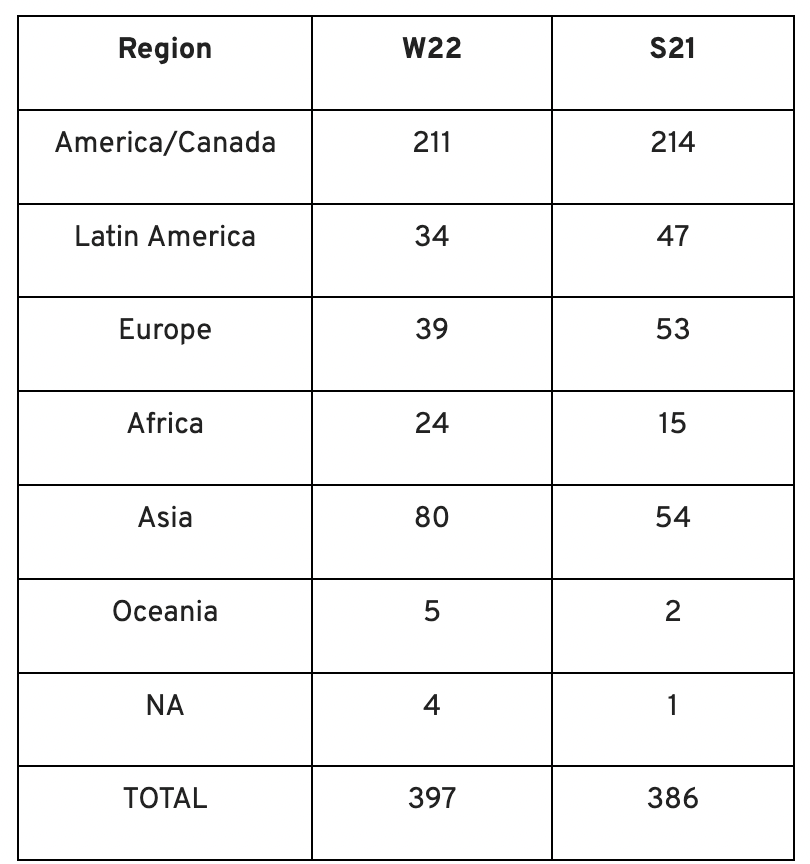
Less than 50% of demo day startups were from the U.S. For the S21 batch, firms from outside the US were most likely in Latin America or Europe, however this year's batch saw a large surge in startups situated in Asia and Africa.
YC Startup Directory
163 out of 399 startups were B2B software and services companies. Financial, healthcare, and consumer startups were common.
Our team doesn't plan to attend every pitch or speak with every startup's founders or team members. Let's look at cleantech, Web3, and health and wellness startup trends.
Our Opinions Following Conversations with 87 Startups at Demo Day
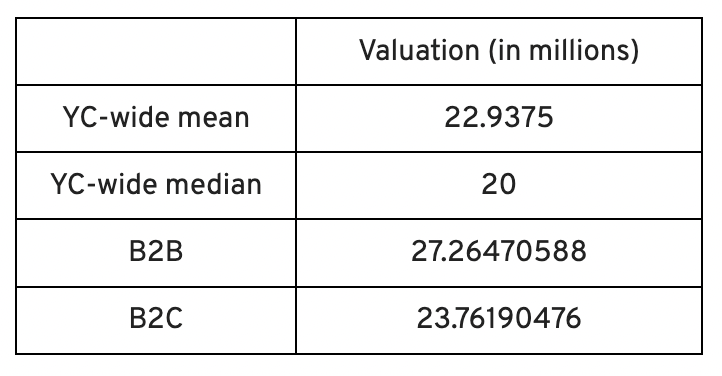
In the lead-up to Demo Day, we spoke with 87 of the 125 startups going. Compared to B2C enterprises, B2B startups had higher average valuations. A few outliers with high valuations pushed B2B and B2C means above the YC-wide mean and median.
Many of these startups develop business and technology solutions we've previously covered. We've seen API, EdTech, creative platforms, and cybersecurity remain strong and increase each year.
While these persistent tendencies influenced the startups Scrum Ventures looked at and the founders we interacted with on Demo Day, new trends required more research and preparation. Let's examine cleantech, Web3, and health and wellness startups.
Hardware and software that is green
Cleantech enterprises demand varying amounts of funding for hardware and software. Although the same overarching trend is fueling the growth of firms in this category, each subgroup has its own strategy and technique for investigation and identifying successful investments.
Many cleantech startups we spoke to during the YC event are focused on helping industrial operations decrease or recycle carbon emissions.
Carbon Crusher: Creating carbon negative roads
Phase Biolabs: Turning carbon emissions into carbon negative products and carbon neutral e-fuels
Seabound: Capturing carbon dioxide emissions from ships
Fleetzero: Creating electric cargo ships
Impossible Mining: Sustainable seabed mining
Beyond Aero: Creating zero-emission private aircraft
Verdn: Helping businesses automatically embed environmental pledges for product and service offerings, boost customer engagement
AeonCharge: Allowing electric vehicle (EV) drivers to more easily locate and pay for EV charging stations
Phoenix Hydrogen: Offering a hydrogen marketplace and a connected hydrogen hub platform to connect supply and demand for hydrogen fuel and simplify hub planning and partner program expansion
Aklimate: Allowing businesses to measure and reduce their supply chain’s environmental impact
Pina Earth: Certifying and tracking the progress of businesses’ forestry projects
AirMyne: Developing machines that can reverse emissions by removing carbon dioxide from the air
Unravel Carbon: Software for enterprises to track and reduce their carbon emissions
Web3: NFTs, the metaverse, and cryptocurrency
Web3 technologies handle a wide range of business issues. This category includes companies employing blockchain technology to disrupt entertainment, finance, cybersecurity, and software development.
Many of these startups overlap with YC's FinTech trend. Despite this, B2C and B2B enterprises were evenly represented in Web3. We examined:
Stablegains: Offering consistent interest on cash balance from the decentralized finance (DeFi) market
LiquiFi: Simplifying token management with automated vesting contracts, tax reporting, and scheduling. For companies, investors, and finance & accounting
NFTScoring: An NFT trading platform
CypherD Wallet: A multichain wallet for crypto and NFTs with a non-custodial crypto debit card that instantly converts coins to USD
Remi Labs: Allowing businesses to more easily create NFT collections that serve as access to products, memberships, events, and more
Cashmere: A crypto wallet for Web3 startups to collaboratively manage funds
Chaingrep: An API that makes blockchain data human-readable and tokens searchable
Courtyard: A platform for securely storing physical assets and creating 3D representations as NFTs
Arda: “Banking as a Service for DeFi,” an API that FinTech companies can use to embed DeFi products into their platforms
earnJARVIS: A premium cryptocurrency management platform, allowing users to create long-term portfolios
Mysterious: Creating community-specific experiences for Web3 Discords
Winter: An embeddable widget that allows businesses to sell NFTs to users purchasing with a credit card or bank transaction
SimpleHash: An API for NFT data that provides compatibility across blockchains, standardized metadata, accurate transaction info, and simple integration
Lifecast: Tools that address motion sickness issues for 3D VR video
Gym Class: Virtual reality (VR) multiplayer basketball video game
WorldQL: An asset API that allows NFT creators to specify multiple in-game interpretations of their assets, increasing their value
Bonsai Desk: A software development kit (SDK) for 3D analytics
Campfire: Supporting virtual social experiences for remote teams
Unai: A virtual headset and Visual World experience
Vimmerse: Allowing creators to more easily create immersive 3D experiences
Fitness and health
Scrum Ventures encountered fewer health and wellness startup founders than Web3 and Cleantech. The types of challenges these organizations solve are still diverse. Several of these companies are part of a push toward customization in healthcare, an area of biotech set for growth for companies with strong portfolios and experienced leadership.
Here are several startups we considered:
Syrona Health: Personalized healthcare for women in the workplace
Anja Health: Personalized umbilical cord blood banking and stem cell preservation
Alfie: A weight loss program focused on men’s health that coordinates medical care, coaching, and “community-based competition” to help users lose an average of 15% body weight
Ankr Health: An artificial intelligence (AI)-enabled telehealth platform that provides personalized side effect education for cancer patients and data collection for their care teams
Koko — A personalized sleep program to improve at-home sleep analysis and training
Condition-specific telehealth platforms and programs:
Reviving Mind: Chronic care management covered by insurance and supporting holistic, community-oriented health care
Equipt Health: At-home delivery of prescription medical equipment to help manage chronic conditions like obstructive sleep apnea
LunaJoy: Holistic women’s healthcare management for mental health therapy, counseling, and medication
12 Startups from YC's Winter 2022 Demo Day to Watch
Bobidi: 10x faster AI model improvement
Artificial intelligence (AI) models have become a significant tool for firms to improve how well and rapidly they process data. Bobidi helps AI-reliant firms evaluate their models, boosting data insights in less time and reducing data analysis expenditures. The business has created a gamified community that offers a bug bounty for AI, incentivizing community members to test and find weaknesses in clients' AI models.
Magna: DeFi investment management and token vesting
Magna delivers rapid, secure token vesting so consumers may turn DeFi investments into primitives. Carta for Web3 allows enterprises to effortlessly distribute tokens to staff or investors. The Magna team hopes to allow corporations use locked tokens as collateral for loans, facilitate secondary liquidity so investors can sell shares on a public exchange, and power additional DeFi applications.
Perl Street: Funding for infrastructure
This Fintech firm intends to help hardware entrepreneurs get financing by [democratizing] structured finance, unleashing billions for sustainable infrastructure and next-generation hardware solutions. This network has helped hardware entrepreneurs achieve more than $140 million in finance, helping companies working on energy storage devices, EVs, and creating power infrastructure.
CypherD: Multichain cryptocurrency wallet
CypherD seeks to provide a multichain crypto wallet so general customers can explore Web3 products without knowledge hurdles. The startup's beta app lets consumers access crypto from EVM blockchains. The founders have crypto, financial, and startup experience.
Unravel Carbon: Enterprise carbon tracking and offsetting
Unravel Carbon's AI-powered decarbonization technology tracks companies' carbon emissions. Singapore-based startup focuses on Asia. The software can use any company's financial data to trace the supply chain and calculate carbon tracking, which is used to make regulatory disclosures and suggest carbon offsets.
LunaJoy: Precision mental health for women
LunaJoy helped women obtain mental health support throughout life. The platform combines data science to create a tailored experience, allowing women to access psychotherapy, medication management, genetic testing, and health coaching.
Posh: Automated EV battery recycling
Posh attempts to solve one of the EV industry's largest logistical difficulties. Millions of EV batteries will need to be decommissioned in the next decade, and their precious metals and residual capacity will go unused for some time. Posh offers automated, scalable lithium battery disassembly, making EV battery recycling more viable.
Unai: VR headset with 5x higher resolution
Unai stands apart from metaverse companies. Its VR headgear has five times the resolution of existing options and emphasizes human expression and interaction in a remote world. Maxim Perumal's method of latency reduction powers current VR headsets.
Palitronica: Physical infrastructure cybersecurity
Palitronica blends cutting-edge hardware and software to produce networked electronic systems that support crucial physical and supply chain infrastructure. The startup's objective is to build solutions that defend national security and key infrastructure from cybersecurity threats.
Reality Defender: Deepfake detection
Reality Defender alerts firms to bogus users and changed audio, video, and image files. Reality Deference's API and web app score material in real time to prevent fraud, improve content moderation, and detect deception.
Micro Meat: Infrastructure for the manufacture of cell-cultured meat
MicroMeat promotes sustainable meat production. The company has created technologies to scale up bioreactor-grown meat muscle tissue from animal cells. Their goal is to scale up cultured meat manufacturing so cultivated meat products can be brought to market feasibly and swiftly, boosting worldwide meat consumption.
Fleetzero: Electric cargo ships
This startup's battery technology will make cargo ships more sustainable and profitable. Fleetzero's electric cargo ships have five times larger profit margins than fossil fuel ships. Fleetzeros' founder has marine engineering, ship operations, and enterprise sales and business experience.

Nick
3 years ago
This Is How Much Quora Paid Me For 23 Million Content Views
You’ll be surprised; I sure was

Blogging and writing online as a side income has now been around for a significant amount of time. Nowadays, it is a continuously rising moneymaker for prospective writers, with several writing platforms existing online. At the top of the list are Medium, Vocal Media, Newsbreak, and the biggest one of them, Quora, with 300 million active users.
Quora, unlike Medium, is a question-and-answer format platform. On Medium you are permitted to write what you want, while on Quora, you answer questions on topics that you have expertise about. Quora, like Medium, now compensates its authors for the answers they provide in comparison to the previous, in which you had to be admitted to the partner program and were paid to ask questions.
Quora just recently went live with this new partner program, Quora Plus, and the way it works is that it is a subscription for $5 a month which provides you access to metered/monetized stories, in turn compensating the writers for part of that subscription for their answers.
I too on Quora have found a lot of success on the platform, gaining 23 Million Content Views, and 300,000 followers for my space, which is kind of the Quora equivalent of a Medium article. The way in which I was able to do this was entirely thanks to a hack that I uncovered to the Quora algorithm.
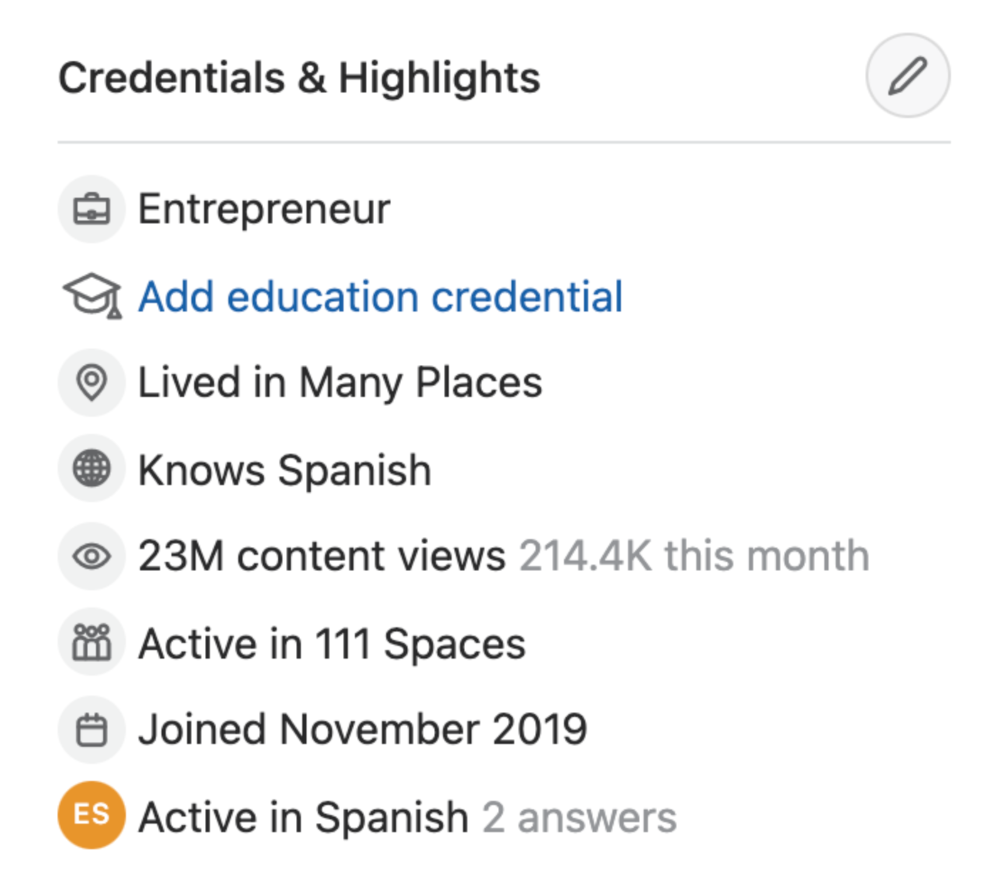
In this article, I plan on discussing how much money I received from 23 million content views on Quora, and I bet you’ll be shocked; I know I was.
A Brief Explanation of How I Got 23 Million Views and How You Can Do It Too
On Quora, everything in terms of obtaining views is about finding the proper question, which I only understood quite late into the game. I published my first response in 2019 but never actually wrote on Quora until the summer of 2020, and about a month into posting consistently I found out how to find the perfect question. Here’s how:
The Process
Go to your Home Page and start scrolling… While browsing, check for the following things…
Answers from people you follow or your followers.
Advertisements
These two things are the two things you want to ignore, you don’t want to answer those questions or look at the ads. You should now be left with a couple of recommended answers. To discover which recommended answer is the best to answer as well, look at these three important aspects.
Date of the answer: Was it in the past few days, preferably 2–3 days, even better, past 24 hours?
Views: Are they in the ten thousands or hundred thousands?
Upvotes: Are they in the hundreds or thousands?
Now, choose an answer to a question which you think you could answer as well that satisfies the requirements above. Once you click on it, as all answers on Quora works, it will redirect you to the page for that question, in which you will have to select once again if you should answer the question.
Amount of answers: How many responses are there to the given question? This tells you how much competition you have. My rule is beyond 25 answers, you shouldn’t answer, but you can change it anyway you’d like.
Answerers: Who did the answering for the question? If the question includes a bunch of renowned, extremely well-known people on Quora, there’s a good possibility your essay is going to get drowned out.
Views: Check for a constant quantity of high views on each answer for the question; this is what will guarantee that your answer gets a lot of views!
The Income Reveal! How Much I Made From 23 Million Content Views
DRUM ROLL, PLEASE!
8.97 USD. Yes, not even ten dollars, not even nine. Just eight dollars and ninety-seven cents.
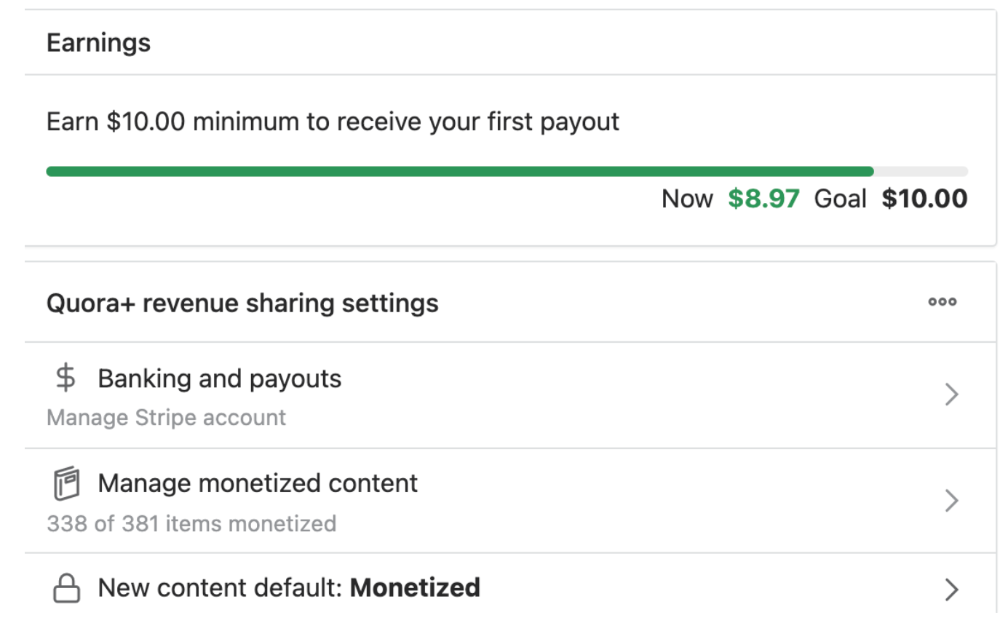
Possible Reasons for My Low Earnings
Quora Plus and the answering partner program are newer than my Quora views.
Few people use Quora+, therefore revenues are low.
I haven't been writing much on Quora, so I'm only making money from old answers and a handful since Quora Plus launched.
Quora + pays poorly...
Should You Try Quora and Quora For Money?
My answer depends on your needs. I never got invited to Quora's question partner program due to my late start, but other writers have made hundreds. Due to Quora's new and competitive answering partner program, you may not make much money.
If you want a fun writing community, try Quora. Quora was fun when I only made money from my space. Quora +'s paywalls and new contributors eager to make money have made the platform less fun for me.
This article is a summary to save you time. You can read my full, more detailed article, here.

Liam Vaughan
3 years ago
Investors can bet big on almost anything on a new prediction market.
Kalshi allows five-figure bets on the Grammys, the next Covid wave, and future SEC commissioners. Worst-case scenario
On Election Day 2020, two young entrepreneurs received a call from the CFTC chairman. Luana Lopes Lara and Tarek Mansour spent 18 months trying to start a new type of financial exchange. Instead of betting on stock prices or commodity futures, people could trade instruments tied to real-world events, such as legislation, the weather, or the Oscar winner.
Heath Tarbert, a Trump appointee, shouted "Congratulations." "You're competing with 1840s-era markets. I'm sure you'll become a powerhouse too."
Companies had tried to introduce similar event markets in the US for years, but Tarbert's agency, the CFTC, said no, arguing they were gambling and prone to cheating. Now the agency has reversed course, approving two 24-year-olds who will have first-mover advantage in what could become a huge new asset class. Kalshi Inc. raised $30 million from venture capitalists within weeks of Tarbert's call, his representative says. Mansour, 26, believes this will be bigger than crypto.
Anyone who's read The Wisdom of Crowds knows prediction markets' potential. Well-designed markets can help draw out knowledge from disparate groups, and research shows that when money is at stake, people make better predictions. Lopes Lara calls it a "bullshit tax." That's why Google, Microsoft, and even the US Department of Defense use prediction markets internally to guide decisions, and why university-linked political betting sites like PredictIt sometimes outperform polls.
Regulators feared Wall Street-scale trading would encourage investors to manipulate reality. If the stakes are high enough, traders could pressure congressional staffers to stall a bill or bet on whether Kanye West's new album will drop this week. When Lopes Lara and Mansour pitched the CFTC, senior regulators raised these issues. Politically appointed commissioners overruled their concerns, and one later joined Kalshi's board.
Will Kanye’s new album come out next week? Yes or no?
Kalshi's victory was due more to lobbying and legal wrangling than to Silicon Valley-style innovation. Lopes Lara and Mansour didn't invent anything; they changed a well-established concept's governance. The result could usher in a new era of market-based enlightenment or push Wall Street's destructive tendencies into the real world.
If Kalshi's founders lacked experience to bolster their CFTC application, they had comical youth success. Lopes Lara studied ballet at the Brazilian Bolshoi before coming to the US. Mansour won France's math Olympiad. They bonded over their work ethic in an MIT computer science class.
Lopes Lara had the idea for Kalshi while interning at a New York hedge fund. When the traders around her weren't working, she noticed they were betting on the news: Would Apple hit a trillion dollars? Kylie Jenner? "It was anything," she says.
Are mortgage rates going up? Yes or no?
Mansour saw the business potential when Lopes Lara suggested it. He interned at Goldman Sachs Group Inc., helping investors prepare for the UK leaving the EU. Goldman sold clients complex stock-and-derivative combinations. As he discussed it with Lopes Lara, they agreed that investors should hedge their risk by betting on Brexit itself rather than an imperfect proxy.
Lopes Lara and Mansour hypothesized how a marketplace might work. They settled on a "event contract," a binary-outcome instrument like "Will inflation hit 5% by the end of the month?" The contract would settle at $1 (if the event happened) or zero (if it didn't), but its price would fluctuate based on market sentiment. After a good debate, a politician's election odds may rise from 50 to 55. Kalshi would charge a commission on every trade and sell data to traders, political campaigns, businesses, and others.
In October 2018, five months after graduation, the pair flew to California to compete in a hackathon for wannabe tech founders organized by the Silicon Valley incubator Y Combinator. They built a website in a day and a night and presented it to entrepreneurs the next day. Their prototype barely worked, but they won a three-month mentorship program and $150,000. Michael Seibel, managing director of Y Combinator, said of their idea, "I had to take a chance!"
Will there be another moon landing by 2025?
Seibel's skepticism was rooted in America's historical wariness of gambling. Roulette, poker, and other online casino games are largely illegal, and sports betting was only legal in a few states until May 2018. Kalshi as a risk-hedging platform rather than a bookmaker seemed like a good idea, but convincing the CFTC wouldn't be easy. In 2012, the CFTC said trading on politics had no "economic purpose" and was "contrary to the public interest."
Lopes Lara and Mansour cold-called 60 Googled lawyers during their time at Y Combinator. Everyone advised quitting. Mansour recalls the pain. Jeff Bandman, a former CFTC official, helped them navigate the agency and its characters.
When they weren’t busy trying to recruit lawyers, Lopes Lara and Mansour were meeting early-stage investors. Alfred Lin of Sequoia Capital Operations LLC backed Airbnb, DoorDash, and Uber Technologies. Lin told the founders their idea could capitalize on retail trading and challenge how the financial world manages risk. "Come back with regulatory approval," he said.
In the US, even small bets on most events were once illegal. Under the Commodity Exchange Act, the CFTC can stop exchanges from listing contracts relating to "terrorism, assassination, war" and "gaming" if they are "contrary to the public interest," which was often the case.
Will subway ridership return to normal? Yes or no?
In 1988, as academic interest in the field grew, the agency allowed the University of Iowa to set up a prediction market for research purposes, as long as it didn't make a profit or advertise and limited bets to $500. PredictIt, the biggest and best-known political betting platform in the US, also got an exemption thanks to an association with Victoria University of Wellington in New Zealand. Today, it's a sprawling marketplace with its own subculture and lingo. PredictIt users call it "Rules Cuck Panther" when they lose on a technicality. Major news outlets cite PredictIt's odds on Discord and the Star Spangled Gamblers podcast.
CFTC limits PredictIt bets to $850. To keep traders happy, PredictIt will often run multiple variations of the same question, listing separate contracts for two dozen Democratic primary candidates, for example. A trader could have more than $10,000 riding on a single outcome. Some of the site's traders are current or former campaign staffers who can answer questions like "How many tweets will Donald Trump post from Nov. 20 to 27?" and "When will Anthony Scaramucci's role as White House communications director end?"
According to PredictIt co-founder John Phillips, politicians help explain the site's accuracy. "Prediction markets work well and are accurate because they attract people with superior information," he said in a 2016 podcast. “In the financial stock market, it’s called inside information.”
Will Build Back Better pass? Yes or no?
Trading on nonpublic information is illegal outside of academia, which presented a dilemma for Lopes Lara and Mansour. Kalshi's forecasts needed to be accurate. Kalshi must eliminate insider trading as a regulated entity. Lopes Lara and Mansour wanted to build a high-stakes PredictIt without the anarchy or blurred legal lines—a "New York Stock Exchange for Events." First, they had to convince regulators event trading was safe.
When Lopes Lara and Mansour approached the CFTC in the spring of 2019, some officials in the Division of Market Oversight were skeptical, according to interviews with people involved in the process. For all Kalshi's talk of revolutionizing finance, this was just a turbocharged version of something that had been rejected before.
The DMO couldn't see the big picture. The staff review was supposed to ensure Kalshi could complete a checklist, "23 Core Principles of a Designated Contract Market," which included keeping good records and having enough money. The five commissioners decide. With Trump as president, three of them were ideologically pro-market.
Lopes Lara, Mansour, and their lawyer Bandman, an ex-CFTC official, answered the DMO's questions while lobbying the commissioners on Zoom about the potential of event markets to mitigate risks and make better decisions. Before each meeting, they would write a script and memorize it word for word.
Will student debt be forgiven? Yes or no?
Several prediction markets that hadn't sought regulatory approval bolstered Kalshi's case. Polymarket let customers bet hundreds of thousands of dollars anonymously using cryptocurrencies, making it hard to track. Augur, which facilitates private wagers between parties using blockchain, couldn't regulate bets and hadn't stopped users from betting on assassinations. Kalshi, by comparison, argued it was doing everything right. (The CFTC fined Polymarket $1.4 million for operating an unlicensed exchange in January 2022. Polymarket says it's now compliant and excited to pioneer smart contract-based financial solutions with regulators.
Kalshi was approved unanimously despite some DMO members' concerns about event contracts' riskiness. "Once they check all the boxes, they're in," says a CFTC insider.
Three months after CFTC approval, Kalshi announced funding from Sequoia, Charles Schwab, and Henry Kravis. Sequoia's Lin, who joined the board, said Tarek, Luana, and team created a new way to invest and engage with the world.
The CFTC hadn't asked what markets the exchange planned to run since. After approval, Lopes Lara and Mansour had the momentum. Kalshi's March list of 30 proposed contracts caused chaos at the DMO. The division handles exchanges that create two or three new markets a year. Kalshi’s business model called for new ones practically every day.
Uncontroversial proposals included weather and GDP questions. Others, on the initial list and later, were concerning. DMO officials feared Covid-19 contracts amounted to gambling on human suffering, which is why war and terrorism markets are banned. (Similar logic doomed ex-admiral John Poindexter's Policy Analysis Market, a Bush-era plan to uncover intelligence by having security analysts bet on Middle East events.) Regulators didn't see how predicting the Grammy winners was different from betting on the Patriots to win the Super Bowl. Who, other than John Legend, would need to hedge the best R&B album winner?
Event contracts raised new questions for the DMO's product review team. Regulators could block gaming contracts that weren't in the public interest under the Commodity Exchange Act, but no one had defined gaming. It was unclear whether the CFTC had a right or an obligation to consider whether a contract was in the public interest. How was it to determine public interest? Another person familiar with the CFTC review says, "It was a mess." The agency didn't comment.
CFTC staff feared some event contracts could be cheated. Kalshi wanted to run a bee-endangerment market. The DMO pushed back, saying it saw two problems symptomatic of the asset class: traders could press government officials for information, and officials could delay adding the insects to the list to cash in.
The idea that traders might manipulate prediction markets wasn't paranoid. In 2013, academics David Rothschild and Rajiv Sethi found that an unidentified party lost $7 million buying Mitt Romney contracts on Intrade, a now-defunct, unlicensed Irish platform, in the runup to the 2012 election. The authors speculated that the trader, whom they dubbed the “Romney Whale,” may have been looking to boost morale and keep donations coming in.
Kalshi said manipulation and insider trading are risks for any market. It built a surveillance system and said it would hire a team to monitor it. "People trade on events all the time—they just use options and other instruments. This brings everything into the open, Mansour says. Kalshi didn't include election contracts, a red line for CFTC Democrats.
Lopes Lara and Mansour were ready to launch kalshi.com that summer, but the DMO blocked them. Product reviewers were frustrated by spending half their time on an exchange that represented a tiny portion of the derivatives market. Lopes Lara and Mansour pressed politically appointed commissioners during the impasse.
Tarbert, the chairman, had moved on, but Kalshi found a new supporter in Republican Brian Quintenz, a crypto-loving former hedge fund manager. He was unmoved by the DMO's concerns, arguing that speculation on Kalshi's proposed events was desirable and the agency had no legal standing to prevent it. He supported a failed bid to allow NFL futures earlier this year. Others on the commission were cautious but supportive. Given the law's ambiguity, they worried they'd be on shaky ground if Kalshi sued if they blocked a contract. Without a permanent chairman, the agency lacked leadership.
To block a contract, DMO staff needed a majority of commissioners' support, which they didn't have in all but a few cases. "We didn't have the votes," a reviewer says, paraphrasing Hamilton. By the second half of 2021, new contract requests were arriving almost daily at the DMO, and the demoralized and overrun division eventually accepted defeat and stopped fighting back. By the end of the year, three senior DMO officials had left the agency, making it easier for Kalshi to list its contracts unimpeded.
Today, Kalshi is growing. 32 employees work in a SoHo office with big windows and exposed brick. Quintenz, who left the CFTC 10 months after Kalshi was approved, is on its board. He joined because he was interested in the market's hedging and risk management opportunities.
Mid-May, the company's website had 75 markets, such as "Will Q4 GDP be negative?" Will NASA land on the moon by 2025? The exchange recently reached 2 million weekly contracts, a jump from where it started but still a small number compared to other futures exchanges. Early adopters are PredictIt and Polymarket fans. Bets on the site are currently capped at $25,000, but Kalshi hopes to increase that to $100,000 and beyond.
With the regulatory drawbridge down, Lopes Lara and Mansour must move quickly. Chicago's CME Group Inc. plans to offer index-linked event contracts. Kalshi will release a smartphone app to attract customers. After that, it hopes to partner with a big brokerage. Sequoia is a major investor in Robinhood Markets Inc. Robinhood users could have access to Kalshi so that after buying GameStop Corp. shares, they'd be prompted to bet on the Oscars or the next Fed commissioner.
Some, like Illinois Democrat Sean Casten, accuse Robinhood and its competitors of gamifying trading to encourage addiction, but Kalshi doesn't seem worried. Mansour says Kalshi's customers can't bet more than they've deposited, making debt difficult. Eventually, he may introduce leveraged bets.
Tension over event contracts recalls another CFTC episode. Brooksley Born proposed regulating the financial derivatives market in 1994. Alan Greenspan and others in the government opposed her, saying it would stifle innovation and push capital overseas. Unrestrained, derivatives grew into a trillion-dollar industry until 2008, when they sparked the financial crisis.
Today, with a midterm election looming, it seems reasonable to ask whether Kalshi plans to get involved. Elections have historically been the biggest draw in prediction markets, with 125 million shares traded on PredictIt for 2020. “We can’t discuss specifics,” Mansour says. “All I can say is, you know, we’re always working on expanding the universe of things that people can trade on.”
Any election contracts would need CFTC approval, which may be difficult with three Democratic commissioners. A Republican president would change the equation.