


Terra fiasco raises TRON's stablecoin backstop
After Terra's algorithmic stablecoin collapsed in May, TRON announced a plan to increase the capital backing its own stablecoin.
USDD, a near-carbon copy of Terra's UST, arrived on the TRON blockchain on May 5. TRON founder Justin Sun says USDD will be overcollateralized after initially being pegged algorithmically to the US dollar.
A reserve of cryptocurrencies and stablecoins will be kept at 130 percent of total USDD issuance, he said. TRON described the collateral ratio as "guaranteed" and said it would begin publishing real-time updates on June 5.
Currently, the reserve contains 14,040 bitcoin (around $418 million), 140 million USDT, 1.9 billion TRX, and 8.29 billion TRX in a burning contract.
Sun: "We want to hybridize USDD." We have an algorithmic stablecoin and TRON DAO Reserve.
algorithmic failure
USDD was designed to incentivize arbitrageurs to keep its price pegged to the US dollar by trading TRX, TRON's token, and USDD. Like Terra, TRON signaled its intent to establish a bitcoin and cryptocurrency reserve to support USDD in extreme market conditions.
Still, Terra's UST failed despite these safeguards. The stablecoin veered sharply away from its dollar peg in mid-May, bringing down Terra's LUNA and wiping out $40 billion in value in days. In a frantic attempt to restore the peg, billions of dollars in bitcoin were sold and unprecedented volumes of LUNA were issued.
Sun believes USDD, which has a total circulating supply of $667 million, can be backed up.
"Our reserve backing is diversified." Bitcoin and stablecoins are included. USDC will be a small part of Circle's reserve, he said.
TRON's news release lists the reserve's assets as bitcoin, TRX, USDC, USDT, TUSD, and USDJ.
All Bitcoin addresses will be signed so everyone knows they belong to us, Sun said.
Not giving in
Sun told that the crypto industry needs "decentralized" stablecoins that regulators can't touch.
Sun said the Luna Foundation Guard, a Singapore-based non-profit that raised billions in cryptocurrency to buttress UST, mismanaged the situation by trying to sell to panicked investors.
He said, "We must be ahead of the market." We want to stabilize the market and reduce volatility.
Currently, TRON finances most of its reserve directly, but Sun says the company hopes to add external capital soon.
Before its demise, UST holders could park the stablecoin in Terra's lending platform Anchor Protocol to earn 20% interest, which many deemed unsustainable. TRON's JustLend is similar. Sun hopes to raise annual interest rates from 17.67% to "around 30%."
This post is a summary. Read full article here
More on Web3 & Crypto

OnChain Wizard
4 years ago
How to make a >800 million dollars in crypto attacking the once 3rd largest stablecoin, Soros style
Everyone is talking about the $UST attack right now, including Janet Yellen. But no one is talking about how much money the attacker made (or how brilliant it was). Lets dig in.
Our story starts in late March, when the Luna Foundation Guard (or LFG) starts buying BTC to help back $UST. LFG started accumulating BTC on 3/22, and by March 26th had a $1bn+ BTC position. This is leg #1 that made this trade (or attack) brilliant.
The second leg comes in the form of the 4pool Frax announcement for $UST on April 1st. This added the second leg needed to help execute the strategy in a capital efficient way (liquidity will be lower and then the attack is on).
We don't know when the attacker borrowed 100k BTC to start the position, other than that it was sold into Kwon's buying (still speculation). LFG bought 15k BTC between March 27th and April 11th, so lets just take the average price between these dates ($42k).
So you have a ~$4.2bn short position built. Over the same time, the attacker builds a $1bn OTC position in $UST. The stage is now set to create a run on the bank and get paid on your BTC short. In anticipation of the 4pool, LFG initially removes $150mm from 3pool liquidity.
The liquidity was pulled on 5/8 and then the attacker uses $350mm of UST to drain curve liquidity (and LFG pulls another $100mm of liquidity).
But this only starts the de-pegging (down to 0.972 at the lows). LFG begins selling $BTC to defend the peg, causing downward pressure on BTC while the run on $UST was just getting started.
With the Curve liquidity drained, the attacker used the remainder of their $1b OTC $UST position ($650mm or so) to start offloading on Binance. As withdrawals from Anchor turned from concern into panic, this caused a real de-peg as people fled for the exits
So LFG is selling $BTC to restore the peg while the attacker is selling $UST on Binance. Eventually the chain gets congested and the CEXs suspend withdrawals of $UST, fueling the bank run panic. $UST de-pegs to 60c at the bottom, while $BTC bleeds out.
The crypto community panics as they wonder how much $BTC will be sold to keep the peg. There are liquidations across the board and LUNA pukes because of its redemption mechanism (the attacker very well could have shorted LUNA as well). BTC fell 25% from $42k on 4/11 to $31.3k
So how much did our attacker make? There aren't details on where they covered obviously, but if they are able to cover (or buy back) the entire position at ~$32k, that means they made $952mm on the short.
On the $350mm of $UST curve dumps I don't think they took much of a loss, lets assume 3% or just $11m. And lets assume that all the Binance dumps were done at 80c, thats another $125mm cost of doing business. For a grand total profit of $815mm (bf borrow cost).
BTC was the perfect playground for the trade, as the liquidity was there to pull it off. While having LFG involved in BTC, and foreseeing they would sell to keep the peg (and prevent LUNA from dying) was the kicker.
Lastly, the liquidity being low on 3pool in advance of 4pool allowed the attacker to drain it with only $350mm, causing the broader panic in both BTC and $UST. Any shorts on LUNA would've added a lot of P&L here as well, with it falling -65% since 5/7.
And for the reply guys, yes I know a lot of this involves some speculation & assumptions. But a lot of money was made here either way, and I thought it would be cool to dive into how they did it.

Vitalik
4 years ago
An approximate introduction to how zk-SNARKs are possible (part 1)
You can make a proof for the statement "I know a secret number such that if you take the word ‘cow', add the number to the end, and SHA256 hash it 100 million times, the output starts with 0x57d00485aa". The verifier can verify the proof far more quickly than it would take for them to run 100 million hashes themselves, and the proof would also not reveal what the secret number is.
In the context of blockchains, this has 2 very powerful applications: Perhaps the most powerful cryptographic technology to come out of the last decade is general-purpose succinct zero knowledge proofs, usually called zk-SNARKs ("zero knowledge succinct arguments of knowledge"). A zk-SNARK allows you to generate a proof that some computation has some particular output, in such a way that the proof can be verified extremely quickly even if the underlying computation takes a very long time to run. The "ZK" part adds an additional feature: the proof can keep some of the inputs to the computation hidden.
You can make a proof for the statement "I know a secret number such that if you take the word ‘cow', add the number to the end, and SHA256 hash it 100 million times, the output starts with 0x57d00485aa". The verifier can verify the proof far more quickly than it would take for them to run 100 million hashes themselves, and the proof would also not reveal what the secret number is.
In the context of blockchains, this has two very powerful applications:
- Scalability: if a block takes a long time to verify, one person can verify it and generate a proof, and everyone else can just quickly verify the proof instead
- Privacy: you can prove that you have the right to transfer some asset (you received it, and you didn't already transfer it) without revealing the link to which asset you received. This ensures security without unduly leaking information about who is transacting with whom to the public.
But zk-SNARKs are quite complex; indeed, as recently as in 2014-17 they were still frequently called "moon math". The good news is that since then, the protocols have become simpler and our understanding of them has become much better. This post will try to explain how ZK-SNARKs work, in a way that should be understandable to someone with a medium level of understanding of mathematics.
Why ZK-SNARKs "should" be hard
Let us take the example that we started with: we have a number (we can encode "cow" followed by the secret input as an integer), we take the SHA256 hash of that number, then we do that again another 99,999,999 times, we get the output, and we check what its starting digits are. This is a huge computation.
A "succinct" proof is one where both the size of the proof and the time required to verify it grow much more slowly than the computation to be verified. If we want a "succinct" proof, we cannot require the verifier to do some work per round of hashing (because then the verification time would be proportional to the computation). Instead, the verifier must somehow check the whole computation without peeking into each individual piece of the computation.
One natural technique is random sampling: how about we just have the verifier peek into the computation in 500 different places, check that those parts are correct, and if all 500 checks pass then assume that the rest of the computation must with high probability be fine, too?
Such a procedure could even be turned into a non-interactive proof using the Fiat-Shamir heuristic: the prover computes a Merkle root of the computation, uses the Merkle root to pseudorandomly choose 500 indices, and provides the 500 corresponding Merkle branches of the data. The key idea is that the prover does not know which branches they will need to reveal until they have already "committed to" the data. If a malicious prover tries to fudge the data after learning which indices are going to be checked, that would change the Merkle root, which would result in a new set of random indices, which would require fudging the data again... trapping the malicious prover in an endless cycle.
But unfortunately there is a fatal flaw in naively applying random sampling to spot-check a computation in this way: computation is inherently fragile. If a malicious prover flips one bit somewhere in the middle of a computation, they can make it give a completely different result, and a random sampling verifier would almost never find out.
It only takes one deliberately inserted error, that a random check would almost never catch, to make a computation give a completely incorrect result.
If tasked with the problem of coming up with a zk-SNARK protocol, many people would make their way to this point and then get stuck and give up. How can a verifier possibly check every single piece of the computation, without looking at each piece of the computation individually? There is a clever solution.
see part 2

Stephen Moore
4 years ago
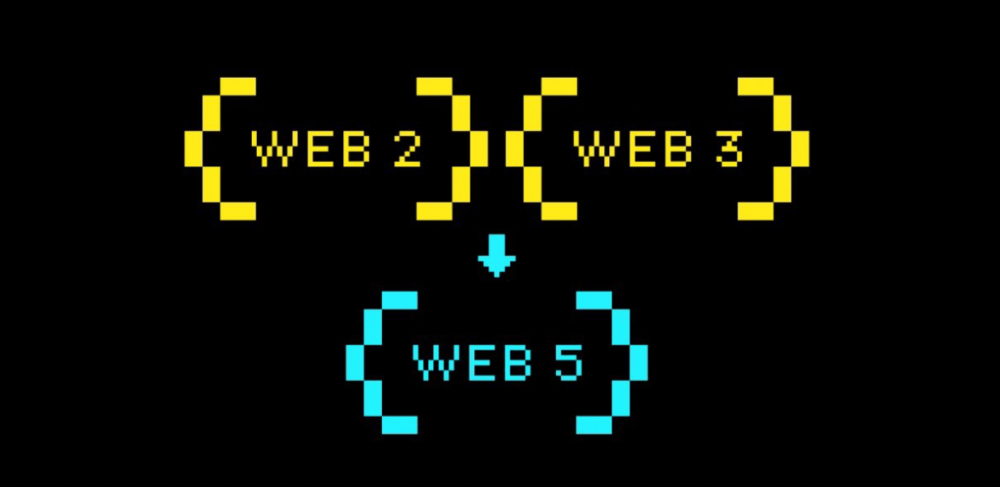
Web 2 + Web 3 = Web 5.
Monkey jpegs and shitcoins have tarnished Web3's reputation. Let’s move on.
Web3 was called "the internet's future."
Well, 'crypto bros' shouted about it loudly.
As quickly as it arrived to be the next internet, it appears to be dead. It's had scandals, turbulence, and crashes galore:
Web 3.0's cryptocurrencies have crashed. Bitcoin's all-time high was $66,935. This month, Ethereum fell from $2130 to $1117. Six months ago, the cryptocurrency market peaked at $3 trillion. Worst is likely ahead.
Gas fees make even the simplest Web3 blockchain transactions unsustainable.
Terra, Luna, and other dollar pegs collapsed, hurting crypto markets. Celsius, a crypto lender backed by VCs and Canada's second-largest pension fund, and Binance, a crypto marketplace, have withheld money and coins. They're near collapse.
NFT sales are falling rapidly and losing public interest.
Web3 has few real-world uses, like most crypto/blockchain technologies. Web3's image has been tarnished by monkey profile pictures and shitcoins while failing to become decentralized (the whole concept is controlled by VCs).
The damage seems irreparable, leaving Web3 in the gutter.
Step forward our new saviour — Web5
Fear not though, as hero awaits to drag us out of the Web3 hellscape. Jack Dorsey revealed his plan to save the internet quickly.
Dorsey has long criticized Web3, believing that VC capital and silicon valley insiders have created a centralized platform. In a tweet that upset believers and VCs (he was promptly blocked by Marc Andreessen), Dorsey argued, "You don't own "Web3." VCs and LPs do. Their incentives prevent it. It's a centralized organization with a new name.
Dorsey announced Web5 on June 10 in a very Elon-like manner. Block's TBD unit will work on the project (formerly Square).
Web5's pitch is that users will control their own data and identity. Bitcoin-based. Sound familiar? The presentation pack's official definition emphasizes decentralization. Web5 is a decentralized web platform that enables developers to write decentralized web apps using decentralized identifiers, verifiable credentials, and decentralized web nodes, returning ownership and control over identity and data to individuals.
Web5 would be permission-less, open, and token-less. What that means for Earth is anyone's guess. Identity. Ownership. Blockchains. Bitcoin. Different.
Web4 appears to have been skipped, forever destined to wish it could have shown the world what it could have been. (It was probably crap.) As this iteration combines Web2 and Web3, simple math and common sense add up to 5. Or something.
Dorsey and his team have had this idea simmering for a while. Daniel Buchner, a member of Block's Decentralized Identity team, said, "We're finishing up Web5's technical components."
Web5 could be the project that decentralizes the internet. It must be useful to users and convince everyone to drop the countless Web3 projects, products, services, coins, blockchains, and websites being developed as I write this.
Web5 may be too late for Dorsey and the incoming flood of creators.
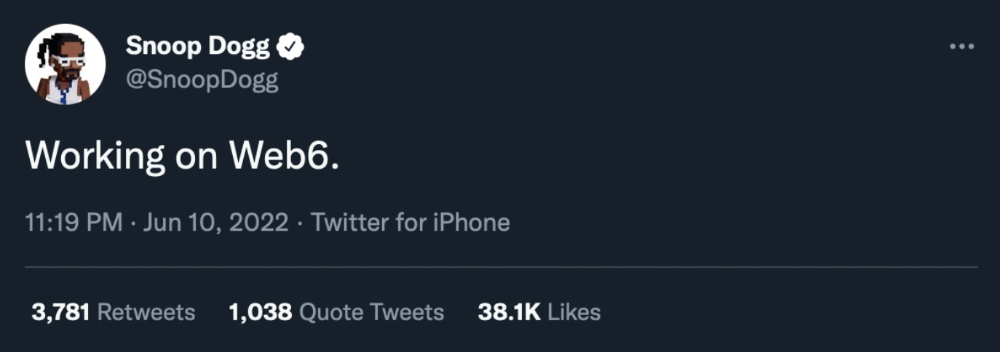
Web6 is planned!
The next months and years will be hectic and less stable than the transition from Web 1.0 to Web 2.0.
Web1 was around 1991-2004.
Web2 ran from 2004 to 2021. (though the Web3 term was first used in 2014, it only really gained traction years later.)
Web3 lasted a year.
Web4 is dead.
Silicon Valley billionaires are turning it into a startup-style race, each disrupting the next iteration until they crack it. Or destroy it completely.
Web5 won't last either.
You might also like

The woman
3 years ago
The best lesson from Sundar Pichai is that success and stress don't mix.
His regular regimen teaches stress management.
In 1995, an Indian graduate visited the US. He obtained a scholarship to Stanford after graduating from IIT with a silver medal. First flight. His ticket cost a year's income. His head was full.
Pichai Sundararajan is his full name. He became Google's CEO and a world leader. Mr. Pichai transformed technology and inspired millions to dream big.
This article reveals his daily schedule.
Mornings
While many of us dread Mondays, Mr. Pichai uses the day to contemplate.
A typical Indian morning. He awakens between 6:30 and 7 a.m. He avoids working out in the mornings.
Mr. Pichai oversees the internet, but he reads a real newspaper every morning.
Pichai mentioned that he usually enjoys a quiet breakfast during which he reads the news to get a good sense of what’s happening in the world. Pichai often has an omelet for breakfast and reads while doing so. The native of Chennai, India, continues to enjoy his daily cup of tea, which he describes as being “very English.”
Pichai starts his day. BuzzFeed's Mat Honan called the CEO Banana Republic dad.
Overthinking in the morning is a bad idea. It's crucial to clear our brains and give ourselves time in the morning before we hit traffic.
Mr. Pichai's morning ritual shows how to stay calm. Wharton Business School found that those who start the day calmly tend to stay that way. It's worth doing regularly.
And he didn't forget his roots.
Afternoons
He has a busy work schedule, as you can imagine. Running one of the world's largest firm takes time, energy, and effort. He prioritizes his work. Monitoring corporate performance and guaranteeing worker efficiency.
Sundar Pichai spends 7-8 hours a day to improve Google. He's noted for changing the company's culture. He wants to boost employee job satisfaction and performance.
His work won him recognition within the company.
Pichai received a 96% approval rating from Glassdoor users in 2017.
Mr. Pichai stresses work satisfaction. Each day is a new canvas for him to find ways to enrich people's job and personal lives.
His work offers countless lessons. According to several profiles and press sources, the Google CEO is a savvy negotiator. Mr. Pichai's success came from his strong personality, work ethic, discipline, simplicity, and hard labor.
Evenings
His evenings are spent with family after a busy day. Sundar Pichai's professional and personal lives are balanced. Sundar Pichai is a night owl who re-energizes about 9 p.m.
However, he claims to be most productive after 10 p.m., and he thinks doing a lot of work at that time is really useful. But he ensures he sleeps for around 7–8 hours every day. He enjoys long walks with his dog and enjoys watching NSDR on YouTube. It helps him in relaxing and sleep better.
His regular routine teaches us what? Work wisely, not hard, discipline, vision, etc. His stress management is key. Leading one of the world's largest firm with 85,000 employees is scary.
The pressure to achieve may ruin a day. Overworked employees are more likely to make mistakes or be angry with coworkers, according to the Family Work Institute. They can't handle daily problems, making the house more stressful than the office.
Walking your dog, having fun with friends, and having hobbies are as vital as your office.

Rita McGrath
4 years ago
Flywheels and Funnels
Traditional sales organizations used the concept of a sales “funnel” to describe the process through which potential customers move, ending up with sales at the end. Winners today have abandoned that way of thinking in favor of building flywheels — business models in which every element reinforces every other.
Ah, the marketing funnel…
Prospective clients go through a predictable set of experiences, students learn in business school marketing classes. It looks like this:
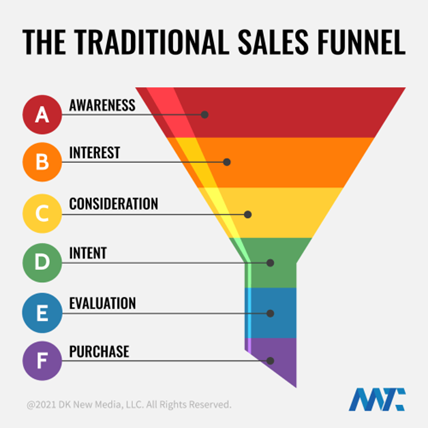
Understanding the funnel helps evaluate sales success indicators. Gail Goodwin, former CEO of small business direct mail provider Constant Contact, said managing the pipeline was key to escaping the sluggish SaaS ramp of death.
Like the funnel concept. To predict how well your business will do, measure how many potential clients are aware of it (awareness) and how many take the next step. If 1,000 people heard about your offering and 10% showed interest, you'd have 100 at that point. If 50% of these people made buyer-like noises, you'd know how many were, etc. It helped model buying trends.
TV, magazine, and radio advertising are pricey for B2C enterprises. Traditional B2B marketing involved armies of sales reps, which was expensive and a barrier to entry.
Cracks in the funnel model
Digital has exposed the funnel's limitations. Hubspot was born at a time when buyers and sellers had huge knowledge asymmetries, according to co-founder Brian Halligan. Those selling a product could use the buyer's lack of information to become a trusted partner.
As the world went digital, getting information and comparing offerings became faster, easier, and cheaper. Buyers didn't need a seller to move through a funnel. Interactions replaced transactions, and the relationship didn't end with a sale.
Instead, buyers and sellers interacted in a constant flow. In many modern models, the sale is midway through the process (particularly true with subscription and software-as-a-service models). Example:
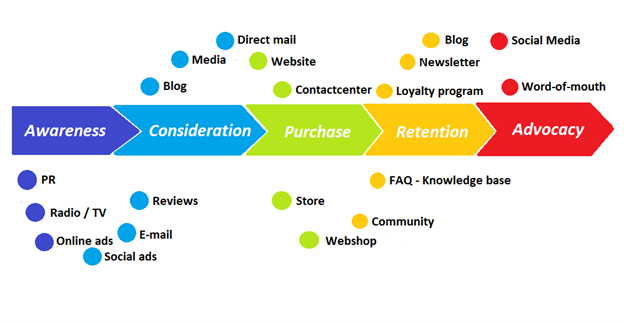
You're creating a winding journey with many touch points, not a funnel (and lots of opportunities for customers to get lost).
From winding journey to flywheel
Beyond this revised view of an interactive customer journey, a company can create what Jim Collins famously called a flywheel. Imagine rolling a heavy disc on its axis. The first few times you roll it, you put in a lot of effort for a small response. The same effort yields faster turns as it gains speed. Over time, the flywheel gains momentum and turns without your help.
Modern digital organizations have created flywheel business models, in which any additional force multiplies throughout the business. The flywheel becomes a force multiplier, according to Collins.
Amazon is a famous flywheel example. Collins explained the concept to Amazon CEO Jeff Bezos at a corporate retreat in 2001. In The Everything Store, Brad Stone describes in his book The Everything Store how he immediately understood Amazon's levers.
The result (drawn on a napkin):
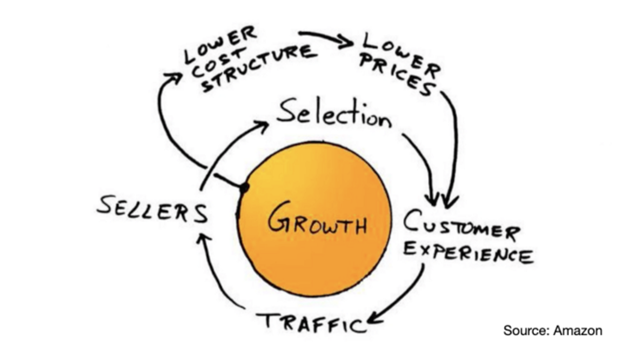
Low prices and a large selection of products attracted customers, while a focus on customer service kept them coming back, increasing traffic. Third-party sellers then increased selection. Low-cost structure supports low-price commitment. It's brilliant! Every wheel turn creates acceleration.
Where from here?
Flywheel over sales funnel! Consider these business terms.

VIP Graphics
4 years ago
Leaked pitch deck for Metas' new influencer-focused live-streaming service
As part of Meta's endeavor to establish an interactive live-streaming platform, the company is testing with influencers.
The NPE (new product experimentation team) has been testing Super since late 2020.
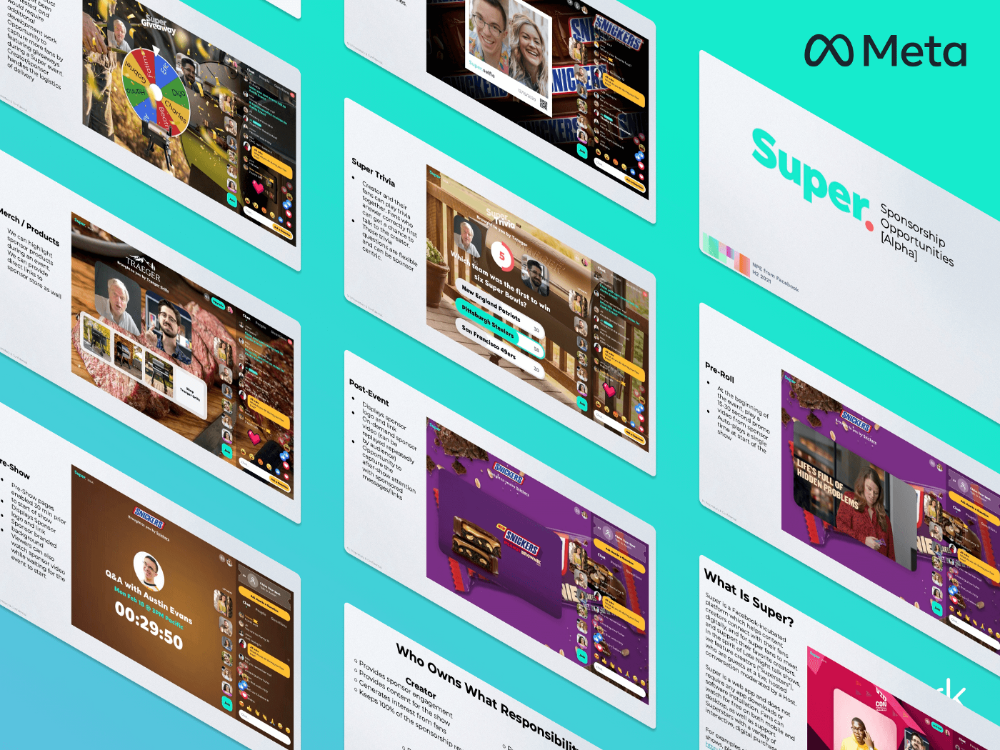
Bloomberg defined Super as a Cameo-inspired FaceTime-like gadget in 2020. The tool has evolved into a Twitch-like live streaming application.
Less than 100 creators have utilized Super: Creators can request access on Meta's website. Super isn't an Instagram, Facebook, or Meta extension.
“It’s a standalone project,” the spokesperson said about Super. “Right now, it’s web only. They have been testing it very quietly for about two years. The end goal [of NPE projects] is ultimately creating the next standalone project that could be part of the Meta family of products.” The spokesperson said the outreach this week was part of a drive to get more creators to test Super.
A 2021 pitch deck from Super reveals the inner workings of Meta.
The deck gathered feedback on possible sponsorship models, with mockups of brand deals & features. Meta reportedly paid creators $200 to $3,000 to test Super for 30 minutes.
Meta's pitch deck for Super live streaming was leaked.
What were the slides in the pitch deck for Metas Super?
Embed not supported: see full deck & article here →
View examples of Meta's pitch deck for Super:
Product Slides, first
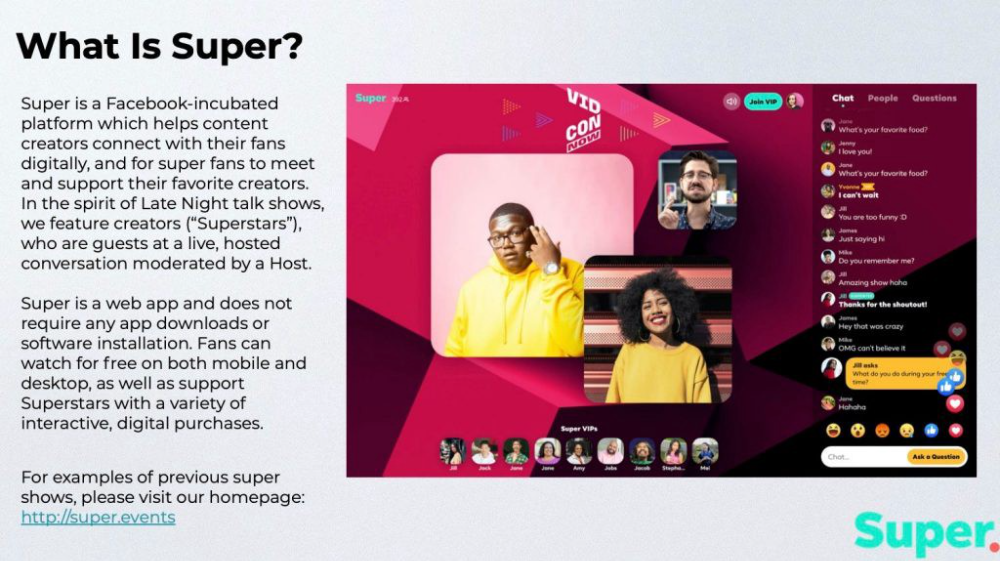
The pitch deck begins with Super's mission:
Super is a Facebook-incubated platform which helps content creators connect with their fans digitally, and for super fans to meet and support their favorite creators. In the spirit of Late Night talk shows, we feature creators (“Superstars”), who are guests at a live, hosted conversation moderated by a Host.
This slide (and most of the deck) is text-heavy, with few icons, bullets, and illustrations to break up the content. Super's online app status (which requires no download or installation) might be used as a callout (rather than paragraph-form).
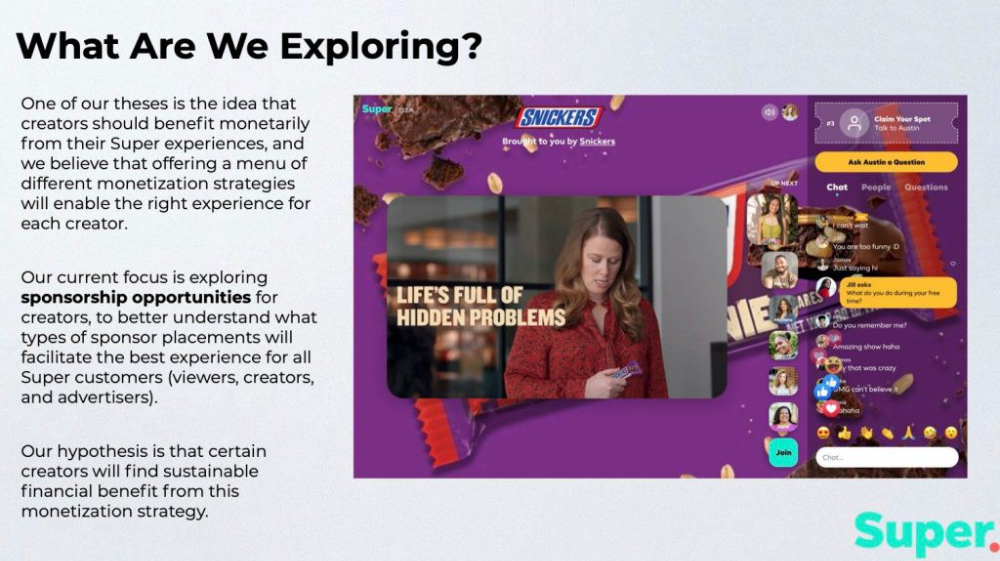
Meta's Super platform focuses on brand sponsorships and native placements, as shown in the slide above.
One of our theses is the idea that creators should benefit monetarily from their Super experiences, and we believe that offering a menu of different monetization strategies will enable the right experience for each creator. Our current focus is exploring sponsorship opportunities for creators, to better understand what types of sponsor placements will facilitate the best experience for all Super customers (viewers, creators, and advertisers).
Colorful mockups help bring Metas vision for Super to life.
2. Slide Features
Super's pitch deck focuses on the platform's features. The deck covers pre-show, pre-roll, and post-event for a Sponsored Experience.
Pre-show: active 30 minutes before the show's start
Pre-roll: Play a 15-minute commercial for the sponsor before the event (auto-plays once)
Meet and Greet: This event can have a branding, such as Meet & Greet presented by [Snickers]
Super Selfies: Makers and followers get a digital souvenir to post on social media.
Post-Event: Possibility to draw viewers' attention to sponsored content/links during the after-show
Almost every screen displays the Sponsor logo, link, and/or branded background. Viewers can watch sponsor video while waiting for the event to start.
Slide 3: Business Model
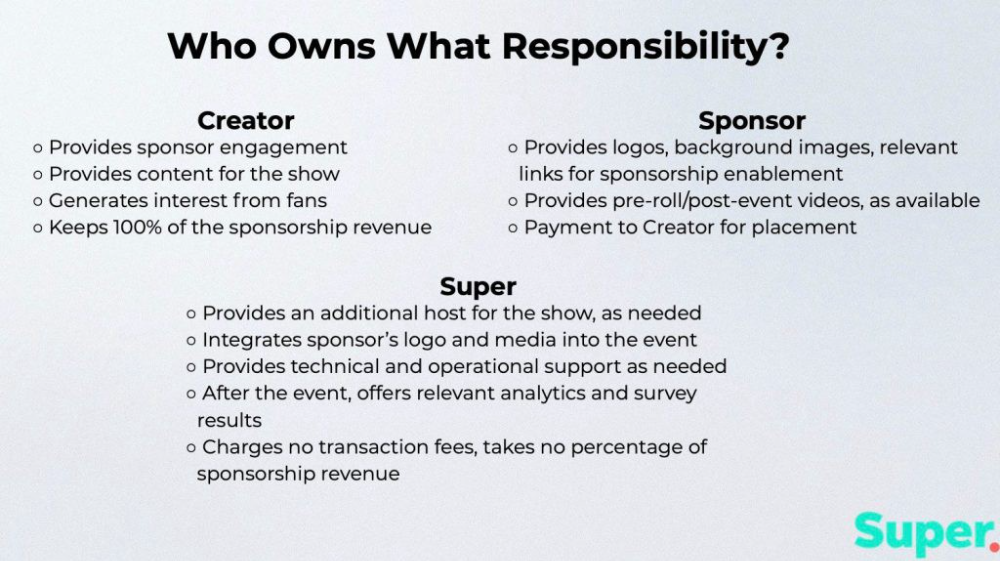
Meta's presentation for Super is incomplete without numbers. Super's first slide outlines the creator, sponsor, and Super's obligations. Super does not charge creators any fees or commissions on sponsorship earnings.
How to make a great pitch deck
We hope you can use the Super pitch deck to improve your business. Bestpitchdeck.com/super-meta is a bookmarkable link.
You can also use one of our expert-designed templates to generate a pitch deck.
Our team has helped close $100M+ in agreements and funding for premier companies and VC firms. Use our presentation templates, one-pagers, or financial models to launch your pitch.
Every pitch must be audience-specific. Our team has prepared pitch decks for various sectors and fundraising phases.
Pitch Deck Software VIP.graphics produced a popular SaaS & Software Pitch Deck based on decks that closed millions in transactions & investments for orgs of all sizes, from high-growth startups to Fortune 100 enterprises. This easy-to-customize PowerPoint template includes ready-made features and key slides for your software firm.

Accelerator Pitch Deck The Accelerator Pitch Deck template is for early-stage founders seeking funding from pitch contests, accelerators, incubators, angels, or VC companies. Winning a pitch contest or getting into a top accelerator demands a strategic investor pitch.
Pitch Deck Template Series Startup and founder pitch deck template: Workable, smart slides. This pitch deck template is for companies, entrepreneurs, and founders raising seed or Series A finance.
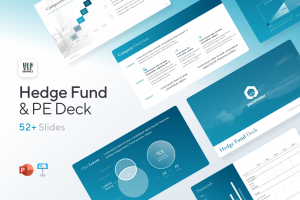
M&A Pitch Deck Perfect Pitch Deck is a template for later-stage enterprises engaging more sophisticated conversations like M&A, late-stage investment (Series C+), or partnerships & funding. Our team prepared this presentation to help creators confidently pitch to investment banks, PE firms, and hedge funds (and vice versa).
Browse our growing variety of industry-specific pitch decks.