



More on Society & Culture

Michelle Teheux
3 years ago
Get Real, All You Grateful Laid-Off LinkedIn Users
WTF is wrong with you people?

When I was laid off as editor of my town's daily newspaper, I went silent on social media. I knew it was coming and had been quietly removing personal items each day, but the pain was intense.
I posted a day later. I didn't bad-mouth GateHouse Media but expressed my sadness at leaving the newspaper industry, pride in my accomplishments, and hope for success in another industry.
Normal job-loss response.
What do you recognize as abnormal?
The bullshit I’ve been reading from laid-off folks on LinkedIn.
If you're there, you know. Many Twitter or Facebook/Meta employees recently lost their jobs.
Well, many of them did not “lose their job,” actually. They were “impacted by the layoffs” at their former employer. I keep seeing that phrase.
Why don’t they want to actually say it? Why the euphemism?
Many are excited about the opportunities ahead. The jobless deny being sad.
They're ecstatic! They have big plans.
Hope so. Sincerely! Being laid off stinks, especially if, like me, your skills are obsolete. It's worse if, like me, you're too old to start a new career. Ageism exists despite denials.
Nowadays, professionalism seems to demand psychotic levels of fake optimism.
Why? Life is unpredictable. That's indisputable. You shouldn't constantly complain or cry in public, but you also shouldn't pretend everything's great.
It makes you look psychotic, not positive. It's like saying at work:
“I was impacted by the death of my spouse of 20 years this week, and many of you have reached out to me, expressing your sympathy. However, I’m choosing to remember the amazing things we shared. I feel confident that there is another marriage out there for me, and after taking a quiet weekend trip to reset myself, I’ll be out there looking for the next great marital adventure! #staypositive #available #opentolove
Also:
“Now looking for our next #dreamhome after our entire neighborhood was demolished by a wildfire last night. We feel so lucky to have lived near so many amazing and inspirational neighbors, all of whom we will miss as we go on our next housing adventure. The best house for us is yet to come! If you have a great neighborhood you’d recommend, please feel free to reach out and touch base with us! #newhouse #newneighborhood #newlife
Admit it. That’s creepy.
The constant optimism makes me feel sick to my stomach.
Viscerally.
I hate fakes.
Imagine a fake wood grain desk. Wouldn't it be better if the designer accepted that it's plastic and went with that?
Real is better but not always nice. When something isn't nice, you don't have to go into detail, but you also shouldn't pretend it's great.
How to announce your job loss to the world.
Do not pretend to be happy, but don't cry and drink vodka all afternoon.
Say you loved your job, and that you're looking for new opportunities.
Yes, if you'll miss your coworkers. Otherwise, don't badmouth. No bridge-burning!
Please specify the job you want. You may want to pivot.
Alternatively, try this.
You could always flame out.
If you've pushed yourself too far into toxic positivity, you may be ready to burn it all down. If so, make it worthwhile by writing something like this:
Well, I was shitcanned by the losers at #Acme today. That bitch Linda in HR threw me under the bus just because she saw that one of my “friends” tagged me in some beach pics on social media after I called in sick with Covid. The good thing is I will no longer have to watch my ass around that #asspincher Ron in accounting, but I’m sad that I will no longer have a cushy job with high pay or access to the primo office supplies I’ve been sneaking home for the last five years. (Those gel pens were the best!) I am going to be taking some time off to enjoy my unemployment and hammer down shots of Jägermeister but in about five months I’ll be looking for anything easy with high pay and great benefits. Reach out if you can help! #officesupplies #unemploymentrocks #drinkinglikeagirlboss #acmesucks
It beats the fake positivity.

Liz Martin
3 years ago
What Motivated Amazon to Spend $1 Billion for The Rings of Power?

Amazon's Rings of Power is the most costly TV series ever made. This is merely a down payment towards Amazon's grand goal.
Here's a video:
Amazon bought J.R.R. Tolkien's fantasy novels for $250 million in 2017. This agreement allows Amazon to create a Tolkien series for Prime Video.
The business spent years developing and constructing a Lord of the Rings prequel. Rings of Power premiered on September 2, 2022.
It drew 25 million global viewers in 24 hours. Prime Video's biggest debut.
An Exorbitant Budget
The most expensive. First season cost $750 million to $1 billion, making it the most costly TV show ever.
Jeff Bezos has spent years looking for the next Game of Thrones, a critically and commercially successful original series. Rings of Power could help.
Why would Amazon bet $1 billion on one series?
It's Not Just About the Streaming War
It's simple to assume Amazon just wants to win. Since 2018, the corporation has been fighting Hulu, Netflix, HBO, Apple, Disney, and NBC. Each wants your money, talent, and attention. Amazon's investment goes beyond rivalry.

Subscriptions Are the Bait
Audible, Amazon Music, and Prime Video are subscription services, although the company's fundamental business is retail. Amazon's online stores contribute over 50% of company revenue. Subscription services contribute 6.8%. The company's master plan depends on these subscriptions.
Streaming videos on Prime increases membership renewals. Free trial participants are more likely to join. Members buy twice as much as non-members.
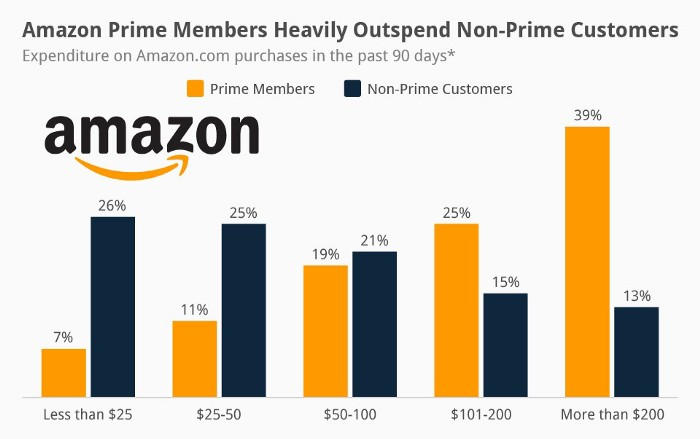
Amazon Studios doesn't generate original programming to earn from Prime Video subscriptions. It aims to retain and attract clients.
Amazon can track what you watch and buy. Its algorithm recommends items and services. Mckinsey says you'll use more Amazon products, shop at Amazon stores, and watch Amazon entertainment.
In 2015, the firm launched the first season of The Man in the High Castle, a dystopian alternate history TV series depicting a world ruled by Nazi Germany and Japan after World War II.

This $72 million production earned two Emmys. It garnered 1.15 million new Prime users globally.
When asked about his Hollywood investment, Bezos said, "A Golden Globe helps us sell more shoes."
Selling more footwear
Amazon secured a deal with DirecTV to air Thursday Night Football in restaurants and bars. First streaming service to have exclusive NFL games.

This isn't just about Thursday night football, says media analyst Ritchie Greenfield. This sells t-shirts. This may be a ticket. Amazon does more than stream games.
The Rings of Power isn't merely a production showcase, either. This sells Tolkien's fantasy novels such Lord of the Rings, The Hobbit, and The Silmarillion.
This tiny commitment keeps you in Amazon's ecosystem.

Charlie Brown
3 years ago
What Happens When You Sell Your House, Never Buying It Again, Reverse the American Dream
Homeownership isn't the only life pattern.

Want to irritate people?
My party trick is to say I used to own a house but no longer do.
I no longer wish to own a home, not because I lost it or because I'm moving.
It was a long-term plan. It was more deliberate than buying a home. Many people are committed for this reason.
Poppycock.
Anyone who told me that owning a house (or striving to do so) is a must is wrong.
Because, URGH.
One pattern for life is to own a home, but there are millions of others.
You can afford to buy a home? Go, buddy.
You think you need 1,000 square feet (or more)? You think it's non-negotiable in life?
Nope.
It's insane that society forces everyone to own real estate, regardless of income, wants, requirements, or situation. As if this trade brings happiness, stability, and contentment.
Take it from someone who thought this for years: drywall isn't happy. Living your way brings contentment.
That's in real estate. It may also be renting a small apartment in a city that makes your soul sing, but you can't afford the downpayment or mortgage payments.
Living or traveling abroad is difficult when your life savings are connected to something that eats your money the moment you sign.
#vanlife, which seems like torment to me, makes some people feel alive.
I've seen co-living, vacation rental after holiday rental, living with family, and more work.
Insisting that home ownership is the only path in life is foolish and reduces alternative options.
How little we question homeownership is a disgrace.
No one challenges a homebuyer's motives. We congratulate them, then that's it.
When you offload one, you must answer every question, even if you have a loose screw.
Why do you want to sell?
Do you have any concerns about leaving the market?
Why would you want to renounce what everyone strives for?
Why would you want to abandon a beautiful place like that?
Why would you mismanage your cash in such a way?
But surely it's only temporary? RIGHT??
Incorrect questions. Buying a property requires several inquiries.
The typical American has $4500 saved up. When something goes wrong with the house (not if, it’s never if), can you actually afford the repairs?
Are you certain that you can examine a home in less than 15 minutes before committing to buying it outright and promising to pay more than twice the asking price on a 30-year 7% mortgage?
Are you certain you're ready to leave behind friends, family, and the services you depend on in order to acquire something?
Have you thought about the connotation that moving to a suburb, which more than half of Americans do, means you will be dependent on a car for the rest of your life?
Plus:
Are you sure you want to prioritize home ownership over debt, employment, travel, raising kids, and daily routines?
Homeownership entails that. This ex-homeowner says it will rule your life from the time you put the key in the door.
This isn't questioned. We don't question enough. The holy home-ownership grail was set long ago, and we don't challenge it.
Many people question after signing the deeds. 70% of homeowners had at least one regret about buying a property, including the expense.
Exactly. Tragic.
Homes are different from houses
We've been fooled into thinking home ownership will make us happy.
Some may agree. No one.
Bricks and brick hindered me from living the version of my life that made me most comfortable, happy, and steady.
I'm spending the next month in a modest apartment in southern Spain. Even though it's late November, today will be 68 degrees. My spouse and I will soon meet his visiting parents. We'll visit a Sherry store. We'll eat, nap, walk, and drink Sherry. Writing. Jerez means flamenco.
That's my home. This is such a privilege. Living a fulfilling life brings me the contentment that buying a home never did.
I'm happy and comfortable knowing I can make almost all of my days good. Rejecting home ownership is partly to blame.
I'm broke like most folks. I had to choose between home ownership and comfort. I said, I didn't find them together.
Feeling at home trumps owning brick-and-mortar every day.
The following is the reality of what it's like to turn the American Dream around.
Leaving the housing market.
Sometimes I wish I owned a home.
I miss having my own yard and bed. My kitchen, cookbooks, and pizza oven are missed.
But I rarely do.
Someone else's life plan pushed home ownership on me. I'm grateful I figured it out at 35. Many take much longer, and some never understand homeownership stinks (for them).
It's confusing. People will think you're dumb or suicidal.
If you read what I write, you'll know. You'll realize that all you've done is choose to live intentionally. Find a home beyond four walls and a picket fence.
Miss? As I said, they're not home. If it were, a pizza oven, a good mattress, and a well-stocked kitchen would bring happiness.
No.
If you can afford a house and desire one, more power to you.
There are other ways to discover home. Find calm and happiness. For fun.
For it, look deeper than your home's foundation.
You might also like

Tomas Pueyo
2 years ago
Soon, a Starship Will Transform Humanity
SpaceX's Starship.
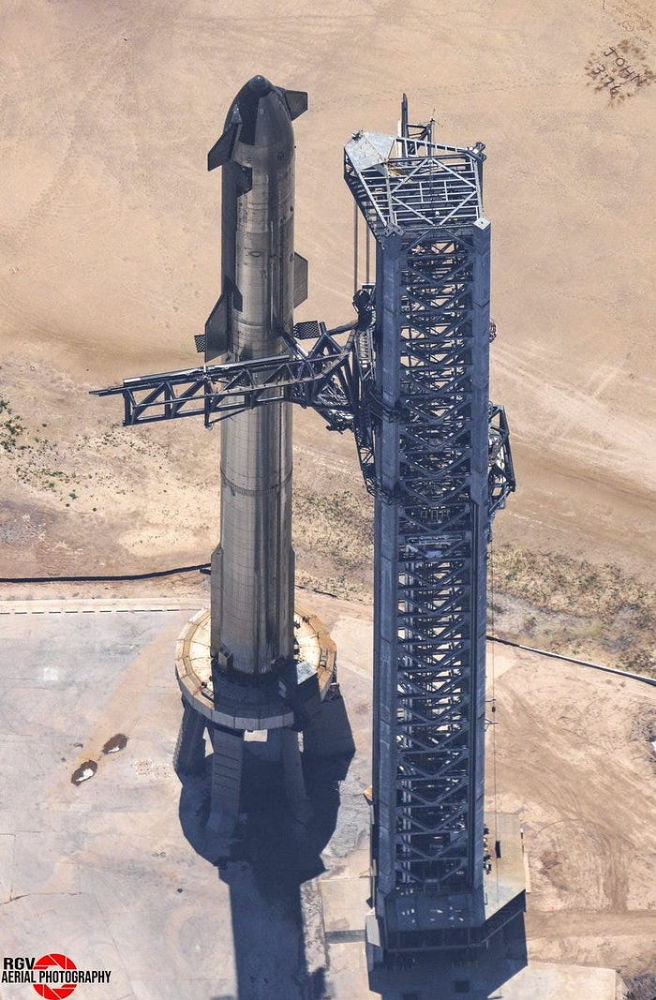
Launched last week.
Four minutes in:
SpaceX will succeed. When it does, its massiveness will matter.
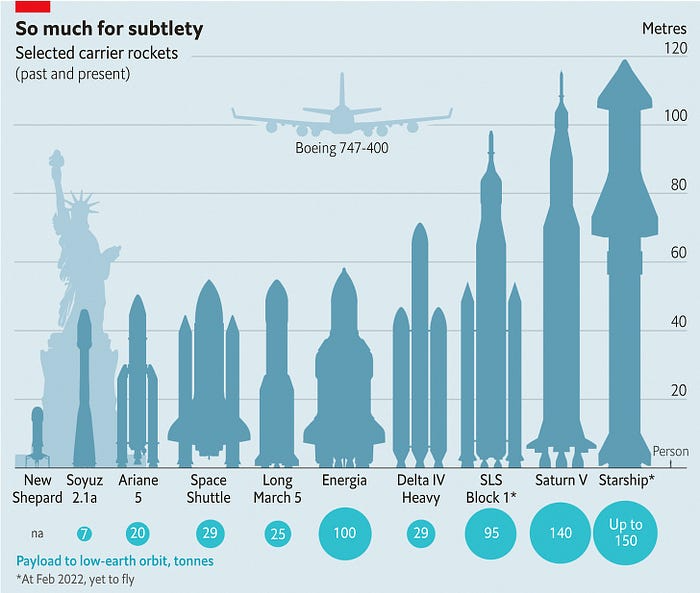
Its payload will revolutionize space economics.
Civilization will shift.
We don't yet understand how this will affect space and Earth culture. Grab it.
The Cost of Space Transportation Has Decreased Exponentially
Space launches have increased dramatically in recent years.
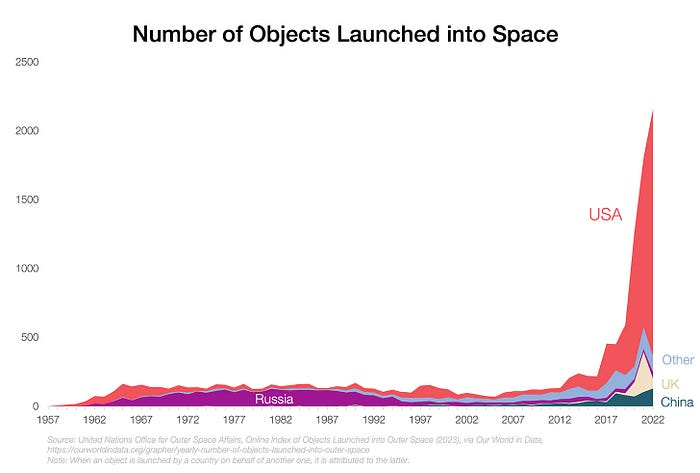
We mostly send items to LEO, the green area below:
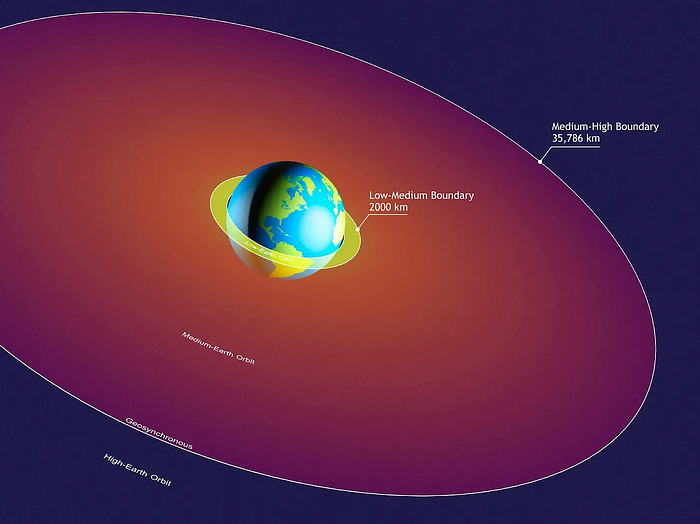
SpaceX's reusable rockets can send these things to LEO. Each may launch dozens of payloads into space.
With all these launches, we're sending more than simply things to space. Volume and mass. Since the 1980s, launching a kilogram of payload to LEO has become cheaper:
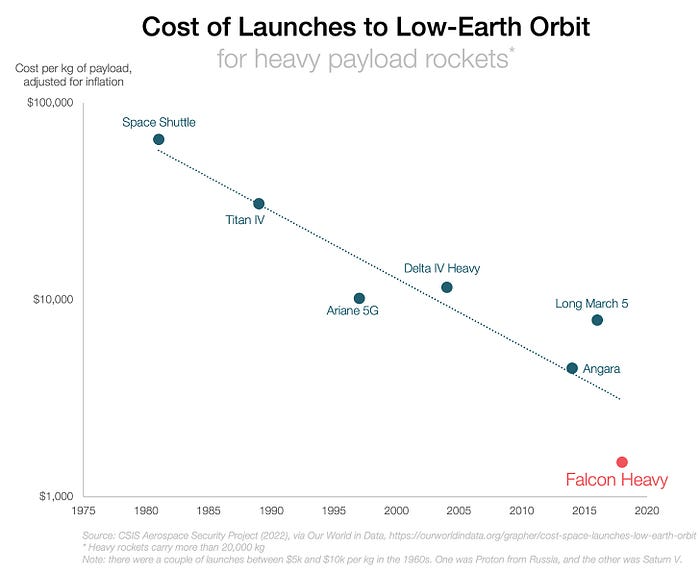
One kilogram in a large rocket cost over $75,000 in the 1980s. Carrying one astronaut cost nearly $5M! Falcon Heavy's $1,500/kg price is 50 times lower. SpaceX's larger, reusable rockets are amazing.
SpaceX's Starship rocket will continue. It can carry over 100 tons to LEO, 50% more than the current Falcon heavy. Thousands of launches per year. Elon Musk predicts Falcon Heavy's $1,500/kg cost will plummet to $100 in 23 years.
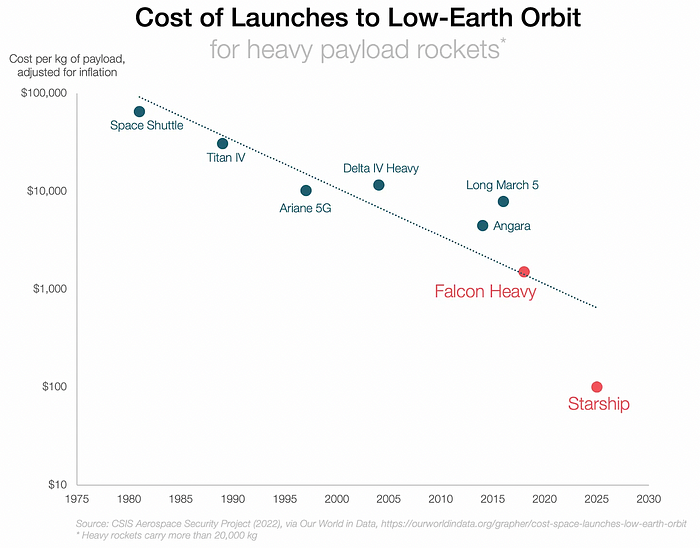
In context:
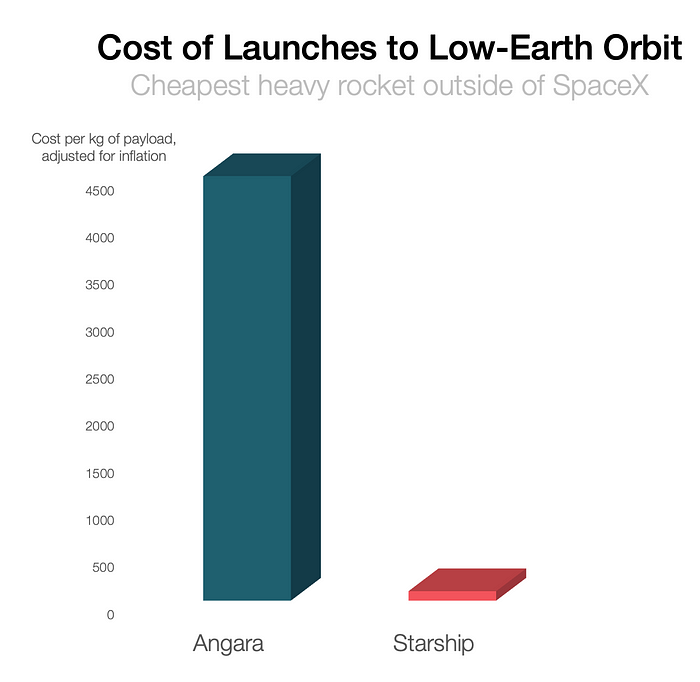
People underestimate this.
2. The Benefits of Affordable Transportation
Compare Earth's transportation costs:
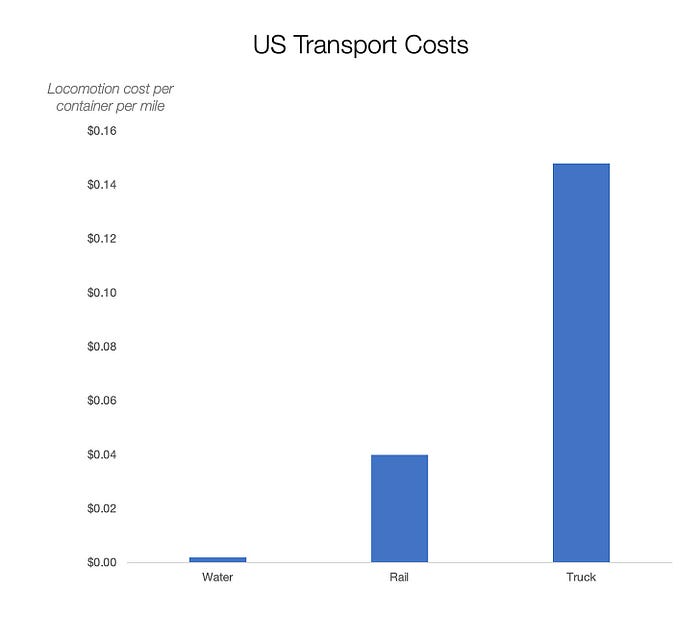
It's no surprise that the US and Northern Europe are the wealthiest and have the most navigable interior waterways.

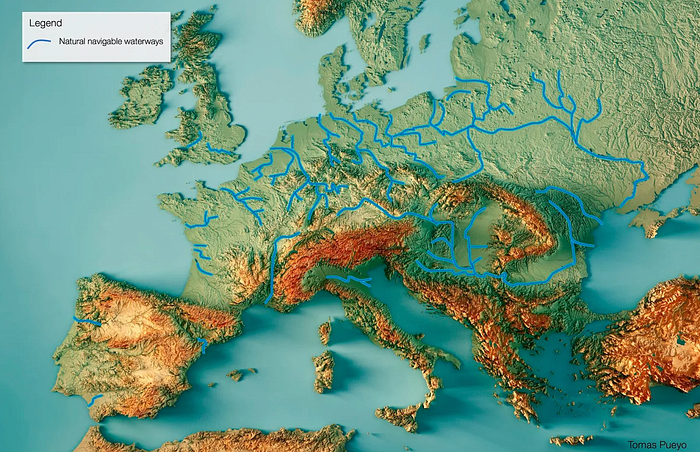
So what? since sea transportation is cheaper than land. Inland waterways are even better than sea transportation since weather is less of an issue, currents can be controlled, and rivers serve two banks instead of one for coastal transportation.
In France, because population density follows river systems, rivers are valuable. Cheap transportation brought people and money to rivers, especially their confluences.

How come? Why were humans surrounding rivers?
Imagine selling meat for $10 per kilogram. Transporting one kg one kilometer costs $1. Your margin decreases $1 each kilometer. You can only ship 10 kilometers. For example, you can only trade with four cities:
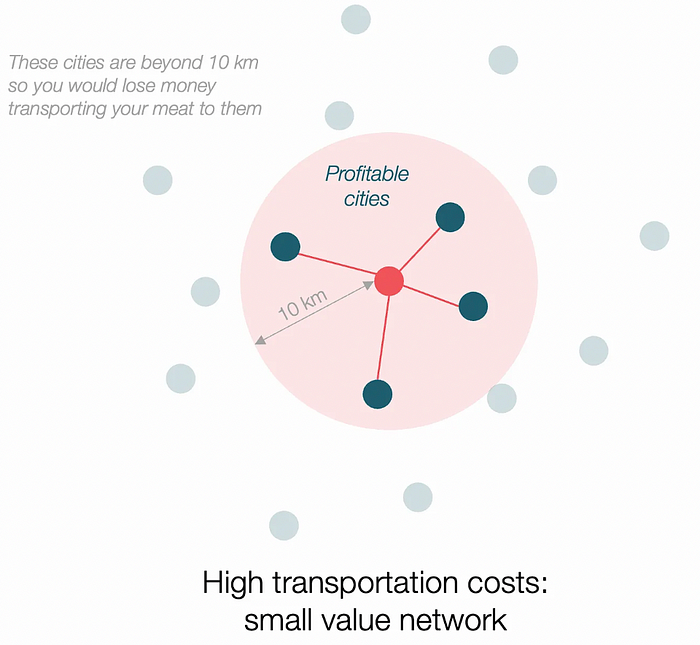
If instead, your cost of transportation is half, what happens? It costs you $0.5 per km. You now have higher margins with each city you traded with. More importantly, you can reach 20-km markets.
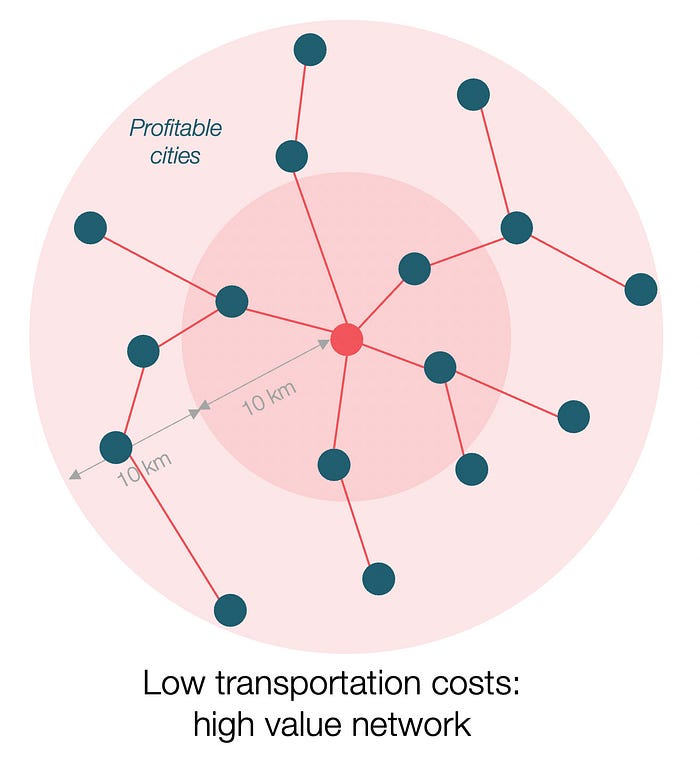
However, 2x distance 4x surface! You can now trade with sixteen cities instead of four! Metcalfe's law states that a network's value increases with its nodes squared. Since now sixteen cities can connect to yours. Each city now has sixteen connections! They get affluent and can afford more meat.
Rivers lower travel costs, connecting many cities, which can trade more, get wealthy, and buy more.
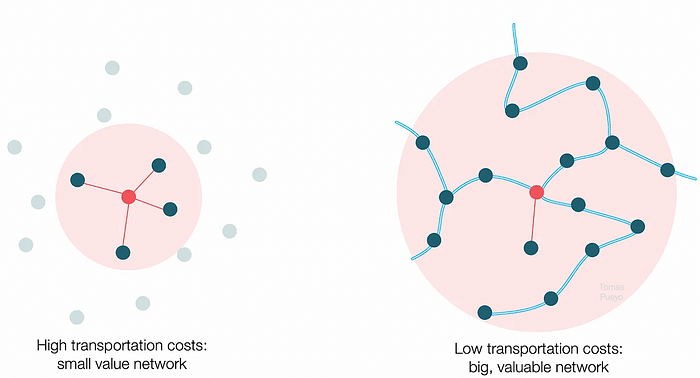
The right network is worth at least an order of magnitude more than the left! The cheaper the transport, the more trade at a lower cost, the more income generated, the more that wealth can be reinvested in better canals, bridges, and roads, and the wealth grows even more.
Throughout history. Rome was established around cheap Mediterranean transit and preoccupied with cutting overland transportation costs with their famous roadways. Communications restricted their empire.

The Egyptians lived around the Nile, the Vikings around the North Sea, early Japan around the Seto Inland Sea, and China started canals in the 5th century BC.
Transportation costs shaped empires.Starship is lowering new-world transit expenses. What's possible?
3. Change Organizations, Change Companies, Change the World
Starship is a conveyor belt to LEO. A new world of opportunity opens up as transportation prices drop 100x in a decade.
Satellite engineers have spent decades shedding milligrams. Weight influenced every decision: pricing structure, volumes to be sent, material selections, power sources, thermal protection, guiding, navigation, and control software. Weight was everything in the mission. To pack as much science into every millimeter, NASA missions had to be miniaturized. Engineers were indoctrinated against mass.
No way.
Starship is not constrained by any space mission, robotic or crewed.
Starship obliterates the mass constraint and every last vestige of cultural baggage it has gouged into the minds of spacecraft designers. A dollar spent on mass optimization no longer buys a dollar saved on launch cost. It buys nothing. It is time to raise the scope of our ambition and think much bigger. — Casey Handmer, Starship is still not understood
A Tesla Roadster in space makes more sense.
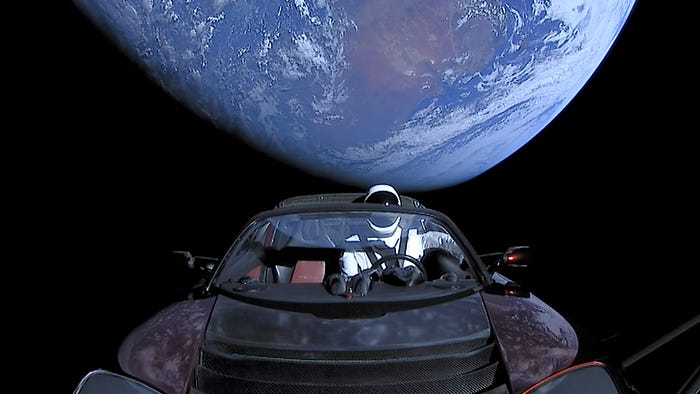
It went beyond bad PR. It told the industry: Did you care about every microgram? No more. My rockets are big enough to send a Tesla without noticing. Industry watchers should have noticed.
Most didn’t. Artemis is a global mission to send astronauts to the Moon and build a base. Artemis uses disposable Space Launch System rockets. Instead of sending two or three dinky 10-ton crew habitats over the next decade, Starship might deliver 100x as much cargo and create a base for 1,000 astronauts in a year or two. Why not? Because Artemis remains in a pre-Starship paradigm where each kilogram costs a million dollars and we must aggressively descope our objective.
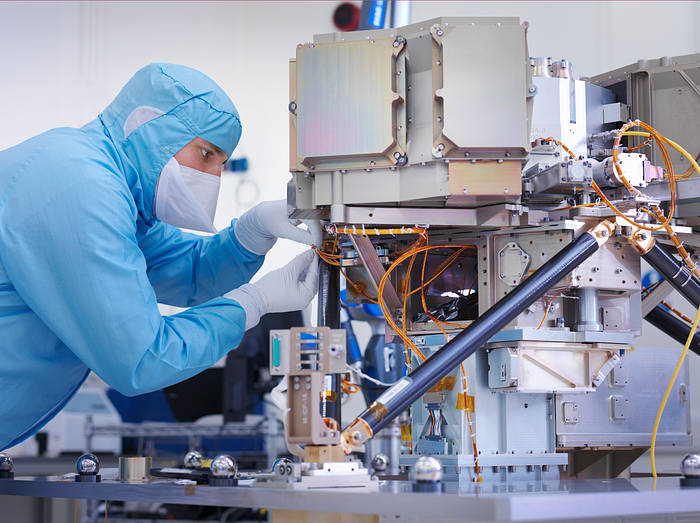
Space agencies can deliver 100x more payload to space for the same budget with 100x lower costs and 100x higher transportation volumes. How can space economy saturate this new supply?
Before Starship, NASA supplied heavy equipment for Moon base construction. After Starship, Caterpillar and Deere may space-qualify their products with little alterations. Instead than waiting decades for NASA engineers to catch up, we could send people to build a space outpost with John Deere equipment in a few years.
History is littered with the wreckage of former industrial titans that underestimated the impact of new technology and overestimated their ability to adapt: Blockbuster, Motorola, Kodak, Nokia, RIM, Xerox, Yahoo, IBM, Atari, Sears, Hitachi, Polaroid, Toshiba, HP, Palm, Sony, PanAm, Sega, Netscape, Compaq, GM… — Casey Handmer, Starship is still not understood
Everyone saw it coming, but senior management failed to realize that adaption would involve moving beyond their established business practice. Others will if they don't.
4. The Starship Possibilities
It's Starlink.

SpaceX invented affordable cargo space and grasped its implications first. How can we use all this inexpensive cargo nobody knows how to use?
Satellite communications seemed like the best way to capitalize on it. They tried. Starlink, designed by SpaceX, provides fast, dependable Internet worldwide. Beaming information down is often cheaper than cable. Already profitable.
Starlink is one use for all this cheap cargo space. Many more. The longer firms ignore the opportunity, the more SpaceX will acquire.
What are these chances?
Satellite imagery is outdated and lacks detail. We can improve greatly. Synthetic aperture radar can take beautiful shots like this:

Have you ever used Google Maps and thought, "I want to see this in more detail"? What if I could view Earth live? What if we could livestream an infrared image of Earth?

We could launch hundreds of satellites with such mind-blowing visual precision of the Earth that we would dramatically improve the accuracy of our meteorological models; our agriculture; where crime is happening; where poachers are operating in the savannah; climate change; and who is moving military personnel where. Is that useful?
What if we could see Earth in real time? That affects businesses? That changes society?

CyberPunkMetalHead
3 years ago
Developed an automated cryptocurrency trading tool for nearly a year before unveiling it this month.


Overview
I'm happy to provide this important update. We've worked on this for a year and a half, so I'm glad to finally write it. We named the application AESIR because we’ve love Norse Mythology. AESIR automates and runs trading strategies.
Volatility, technical analysis, oscillators, and other signals are currently supported by AESIR.
Additionally, we enhanced AESIR's ability to create distinctive bespoke signals by allowing it to analyze many indicators and produce a single signal.
AESIR has a significant social component that allows you to copy the best-performing public setups and use them right away.
Enter your email here to be notified when AEISR launches.
Views on algorithmic trading
First, let me clarify. Anyone who claims algorithmic trading platforms are money-printing plug-and-play devices is a liar. Algorithmic trading platforms are a collection of tools.
A trading algorithm won't make you a competent trader if you lack a trading strategy and yolo your funds without testing. It may hurt your trade. Test and alter your plans to account for market swings, but comprehend market signals and trends.
Status Report
Throughout closed beta testing, we've communicated closely with users to design a platform they want to use.
To celebrate, we're giving you free Aesir Viking NFTs and we cover gas fees.
Why use a trading Algorithm?
Automating a successful manual approach
experimenting with and developing solutions that are impossible to execute manually
One AESIR strategy lets you buy any cryptocurrency that rose by more than x% in y seconds.
AESIR can scan an exchange for coins that have gained more than 3% in 5 minutes. It's impossible to manually analyze over 1000 trading pairings every 5 minutes. Auto buy dips or DCA around a Dip
Sneak Preview
Here's the Leaderboard, where you can clone the best public settings.

As a tiny, self-funded team, we're excited to unveil our product. It's a beta release, so there's still more to accomplish, but we know where we stand.
If this sounds like a project that you might want to learn more about, you can sign up to our newsletter and be notified when AESIR launches.
Useful Links:
Join the Discord | Join our subreddit | Newsletter | Mint Free NFT

Will Lockett
3 years ago
Thanks to a recent development, solar energy may prove to be the best energy source.
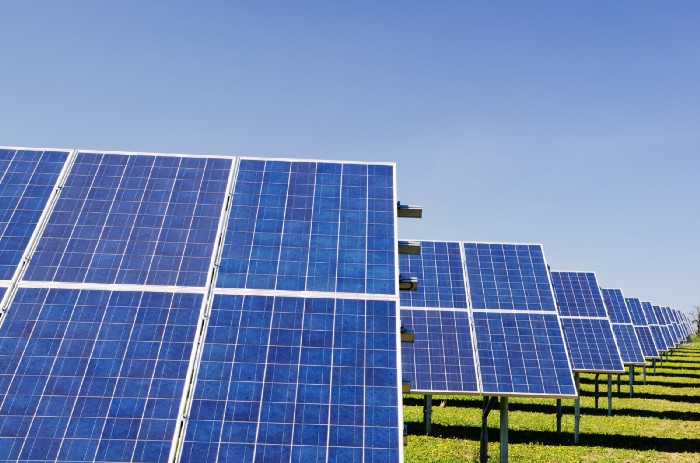
Perovskite solar cells will revolutionize everything.
Humanity is in a climatic Armageddon. Our widespread ecological crimes of the previous century are catching up with us, and planet-scale karma threatens everyone. We must adjust to new technologies and lifestyles to avoid this fate. Even solar power, a renewable energy source, has climate problems. A recent discovery could boost solar power's eco-friendliness and affordability. Perovskite solar cells are amazing.
Perovskite is a silicon-like semiconductor. Semiconductors are used to make computer chips, LEDs, camera sensors, and solar cells. Silicon makes sturdy and long-lasting solar cells, thus it's used in most modern solar panels.
Perovskite solar cells are far better. First, they're easy to make at room temperature, unlike silicon cells, which require long, intricate baking processes. This makes perovskite cells cheaper to make and reduces their carbon footprint. Perovskite cells are efficient. Most silicon panel solar farms are 18% efficient, meaning 18% of solar radiation energy is transformed into electricity. Perovskite cells are 25% efficient, making them 38% more efficient than silicon.
However, perovskite cells are nowhere near as durable. A normal silicon panel will lose efficiency after 20 years. The first perovskite cells were ineffective since they lasted barely minutes.
Recent research from Princeton shows that perovskite cells can endure 30 years. The cells kept their efficiency, therefore no sacrifices were made.
No electrical or chemical engineer here, thus I can't explain how they did it. But strangely, the team said longevity isn't the big deal. In the next years, perovskite panels will become longer-lasting. How do you test a panel if you only have a month or two? This breakthrough technique needs a uniform method to estimate perovskite life expectancy fast. The study's key milestone was establishing a standard procedure.
Lab-based advanced aging tests are their solution. Perovskite cells decay faster at higher temperatures, so scientists can extrapolate from that. The test heated the panel to 110 degrees and waited for its output to reduce by 20%. Their panel lasted 2,100 hours (87.5 days) before a 20% decline.
They did some math to extrapolate this data and figure out how long the panel would have lasted in different climates, and were shocked to find it would last 30 years in Princeton. This made perovskite panels as durable as silicon panels. This panel could theoretically be sold today.
This technology will soon allow these brilliant panels to be released into the wild. This technology could be commercially viable in ten, maybe five years.
Solar power will be the best once it does. Solar power is cheap and low-carbon. Perovskite is the cheapest renewable energy source if we switch to it. Solar panel manufacturing's carbon footprint will also drop.
Perovskites' impact goes beyond cost and carbon. Silicon panels require harmful mining and contain toxic elements (cadmium). Perovskite panels don't require intense mining or horrible materials, making their production and expiration more eco-friendly.
Solar power destroys habitat. Massive solar farms could reduce biodiversity and disrupt local ecology by destroying vital habitats. Perovskite cells are more efficient, so they can shrink a solar farm while maintaining energy output. This reduces land requirements, making perovskite solar power cheaper, and could reduce solar's environmental impact.
Perovskite solar power is scalable and environmentally friendly. Princeton scientists will speed up the development and rollout of this energy.
Why bother with fusion, fast reactors, SMRs, or traditional nuclear power? We're close to developing a nearly perfect environmentally friendly power source, and we have the tools and systems to do so quickly. It's also affordable, so we can adopt it quickly and let the developing world use it to grow. Even I struggle to justify spending billions on fusion when a great, cheap technology outperforms it. Perovskite's eco-credentials and cost advantages could save the world and power humanity's future.